Charitable Documentation

Learn how to make the most of Charitable with clear, step-by-step instructions.

Account Shortcodes

Table of Contents

Login Form

To set it up, add the following shortcode to a new page:

[charitable_login]

You can optionally set the message that will be displayed to users when they are already logged in with the logged_in_message parameter:

[charitable_login logged_in_message="You are already logged in!"]

You can also customize the text used for the link to the registration page with the registration_link_text parameter:

[charitable_login registration_link_text="Register"]

To remove the link to the registration page altogether, set registration_link_text to 0:

[charitable_login registration_link_text=0]

It is also possible to change the default page that people are redirected to after logging in:

[charitable_login redirect=http://yoursite.com]

After creating this page, go to Charitable Settings and scroll down to find the “Login Page” setting. From the dropdown list, select the page you just created.

Logout Link

You can add a logout link with a shortcode:

[charitable_logout]

The shortcode accepts two optional parameters: redirect sets the URL that users will be redirected to after logging out. text sets the logout text.

[charitable_logout redirect=https://mysite.com text="My special logout text"]

Registration Form

To set it up, add the following shortcode to a new page:

[charitable_registration]

You can optionally set the message that will be displayed to users when they are already logged in with the logged_in_message parameter:

[charitable_registration logged_in_message="You are already logged in!"]

You can also customize the text used for the link to the login page with the login_link_text parameter:

[charitable_registration login_link_text="Signed up already? Login instead."]

To remove the link to the login page altogether, set login_link_text to 0:

[charitable_registration login_link_text=0]

By default, the user is redirected to the Profile page after registration or, if the Profile page has not been set up (see below), to the homepage. You can provide a default page for users to be redirected to with the redirect parameter:

[charitable_registration redirect="http://www.yoursite.com/custom-redirect-page"]

After creating this page, go to Charitable Settings and scroll down to find the “Registration Page” setting. From the dropdown list, select the page you just created.

Profile Form

This is a simple way to include a profile form for your donors to manage their details.

To set it up, add the following shortcode to a new page:

[charitable_profile]

There are no extra parameters.

After creating this page, go to Charitable Settings and scroll down to find the “Profile Page” setting. From the dropdown list, select the page you just created.

Donations Table

You can let donors see a history of their donations with this shortcode:

[charitable_my_donations]

Note that this currently only works for logged in users, so your donors will have to register and/or login before accessing this.

Still have questions? We’re here to help!

Last Modified:

What's New In Charitable

View The Latest Updates
🔔 Subscribe to get our latest updates
📧 Subscribe to Emails

Email Subscription

Join our Newsletter

We won’t spam you. We only send an email when we think it will genuinely help you. Unsubscribe at any time!

ambassadors New

👤 Creator Profiles: Put a Face to Every Peer-to-Peer Campaign

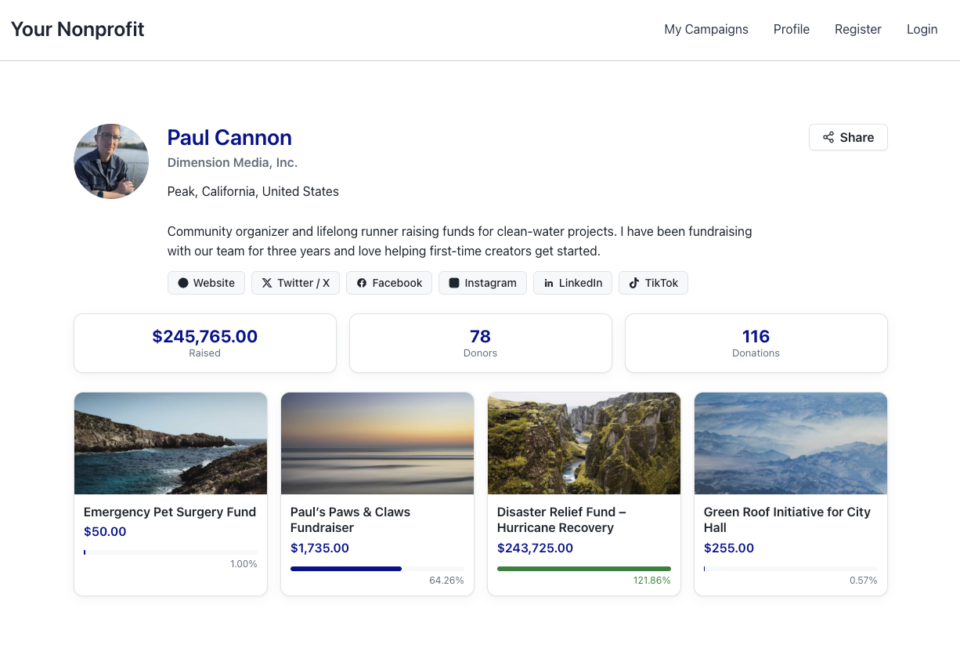
Ambassadors 3.3.0 now provies Creator Profiles — giving your supporters a permanent, shareable public home that turns one-time fundraisers into ongoing relationships.

👤 Public Creator Pages: Give every fundraiser an instant, clean landing page at /creator/their-name/ to showcase their custom avatar, bio, and a browsable grid of their campaigns.

📊 Proof of Impact: Boost donor trust by displaying site-wide milestones on the profile—like total funds raised and total donor counts.

💳 Interactive Hover Cards: When donors hover over a creator’s name on a campaign page, a compact card expands with their bio and social handles right at the moment of decision.

📍 Responsible Location Sharing: Allow creators to safely show local supporters where they are based using only city, state, and country details.

🛠️ Self-Serve Customization: Fundraisers can update their own profiles and link up to six social networks directly from the My Campaigns hub, saving you admin time.

Ready to empower your advocates? Update to Ambassadors 3.3.0 and turn on “Enable Public Creator Page” today!

Improvement Payments

📱 Turn Mobile Scrollers Into Donors: Meet Charitable’s Mollie Upgrade

Losing mobile supporters because they hate typing out long card numbers on their phones? Charitable’s updated Mollie integration features:

⚡ One-Tap Wallet Checkout: Enable donors to complete their gifts instantly using Apple Pay or Google Pay with a simple face scan, fingerprint, or tap.

💰 No Extra PCI Burden: Skip complex domain verification and security compliance since all wallet transactions run safely through Mollie’s hosted checkout.

🛠️ Custom Cancel Routing: Keep the experience predictable by automatically sending donors who back out to your cancellation page, or use developer filters to route them to a custom page.

Visit this page to learn more.

ambassadors improved New

Moderation and Directory Screens In Ambassadors 3.0

Ambassadors 3.0 has new features: moderation and directory screens… now easily see those who are earning donations on your peer to peer network – including campaign creators that might need to be verified – all in one place. Generate reports, email ambassadors and campaign creators directly and more.

🚀 See when campaign creators and ambassadors have updated their campaigns, what donors/donation they have brought in and more.

🎉 Manually add ambassadors and campaign creators, and approve them in one-click!

Visit this page to learn more.

New Payments

⚡ Unlock India-Based Donations: Meet Charitable’s Native Razorpay Integration

Trying to collect donations in India? Charitable’s native Razorpay integration features:

⚡ Instant UPI Integration: Accept fast, local donations directly inside your form via apps like PhonePe, Google Pay, Paytm, and BHIM without sending donors away from your site.

📲 Auto-Generated Campaign QRs: Instantly render scannable QR codes encoding a UPI deep link directly on your public campaign pages and sidebars for an effortless “scan-to-give” experience.

💰 Dual Local & Global Reach: Headline your campaigns in INR while seamlessly accepting major international currencies like USD, EUR, GBP, and CAD to maximize global support.

🔁 Seamless Recurring Giving: Fully integrates with the Charitable Recurring addon to manage automatic monthly subscriptions directly through Razorpay without extra code.

↩️ Automatic Two-Way Sync: Keep your books perfectly clean with two-way refund syncing—issue a refund inside WordPress or your Razorpay dashboard and both sides update automatically.

🔒 Webhook-Verified Security: Automatically protect your donation records using HMAC-signed webhook verification to ensure every status update represents real money cleared on the rails.

Visit this page to learn more.

Integration New

🎉 New Built-in PushEngage Integration

Struggling with falling email open rates and rising ad costs just to keep your supporters engaged? Charitable’s built-in PushEngage integration features:

🔔 Zero-Fee Direct Messaging: Deliver crisp, instant pop-up notifications straight to your donors’ desktops and mobile devices.

⏱️ Four Smart Automated Triggers: Automatically send updates for immediate donation thank yous, full-list campaign launches, urgent “ending soon” alerts, and goal milestone celebrations.

📈 Group Momentum Broadcasts: Turn private milestones into public wins by automatically broadcasting alerts to your entire subscriber list the moment a campaign hits 50%, 75%, or 100% of its goal.

📊 Automatic Analytics Tracking: Monitor exactly where your incoming notification traffic is coming from with built-in attribution that requires zero complex configuration.

Visit this page to learn more.