


Key takeaways
- Best for small businesses and online stores: Tidio. It combines live chat, an AI agent and Shopify order tools, and its iPhone app holds a 4.8 rating in the App Store.
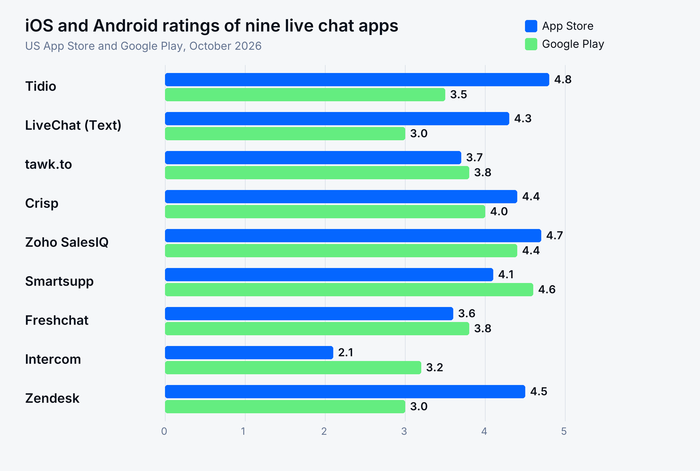
- The same app can rate very differently by platform. Zendesk Support is 4.5 on iOS and 3.0 on Android; Intercom is 2.1 on iOS and 3.2 on Android. Check the store you use.
- Four apps confirm the mobile app is included on their free plan: Tidio, tawk.to, Crisp and Zoho SalesIQ.
- Cheapest paid seat: Zoho SalesIQ at $7 an operator a month, billed annually. tawk.to is free with optional paid extras.
- List price is never total cost. AI answers are billed per resolution at Intercom ($0.99) and Zendesk ($1.50 to $2.00 past the included five), on top of seat prices.
A customer messages you at 7pm, and your laptop is closed. Whether that chat gets answered depends on the app on your phone, which most roundups skip. We compared nine live chat apps for customer support (not video-chat apps) on what each one lets an agent do from an iPhone or an Android phone, how the store ratings differ, and what the plans cost. Prices and store ratings were checked in October 2026. Tidio is listed first because this list is ordered for small and mid-size businesses and online stores; every app, Tidio included, gets the same template and its real drawbacks.
The best live chat apps at a glance
For most small teams, the best live chat app is the one your agents will actually open on the go: Tidio for stores that want AI and live chat together, tawk.to for a zero budget, and LiveChat for a team that only answers chats. Zendesk and Intercom fit larger or software-led teams.
| App | Best for | Starting price (paid) | Free plan / trial | G2 rating |
|---|---|---|---|---|
| Tidio | Small businesses and online stores, especially Shopify | $24.17/mo, billed annually | Free plan · 7-day trial | 4.6 (1,962) |
| LiveChat | Teams whose main job is answering chats | $19/seat/mo, billed annually | No free plan · 14-day trial | 4.5 (813) |
| tawk.to | A free plan with unlimited agents | Free; branding removal $29/mo | Free plan | 4.5 (203) |
| Crisp | Small teams that want flat workspace pricing | $45/mo per workspace | Free plan (2 seats) · 14-day trial | 4.5 (204) |
| Zoho SalesIQ | Visitor tracking on a tight budget | $7/operator/mo, billed annually | Free plan (3 operators) · 15-day trial | 4.4 (256) |
| Smartsupp | Solo store owners who want a free plan with WhatsApp | $17/mo, billed annually | Free plan (1 operator) | 4.7 (1,077) |
| Freshchat | Teams that plan to join the Freshworks suite | $19/agent/mo, billed annually | Free plan (up to 10 agents) | 4.4 (502) |
| Intercom | Software teams that put an AI agent first | $29/seat/mo, billed annually, plus $0.99 per Fin outcome | No free plan · 14-day trial | 4.5 (3,921) |
| Zendesk | Large teams that work in tickets across many channels | $55/agent/mo (first plan with chat), billed annually | No free plan · 14-day trial | 4.3 (7,097) |
How we chose and tested these apps
We started from the 15 live chat apps in our guides to web chat apps and free live chat software, kept the nine that have a dedicated agent app on both iOS and Android, and ordered them for the buyer in this article: a small or mid-size team, often selling online. HubSpot was left out because its store listing describes a sales app and never mentions a chat inbox.
We scored each app on six criteria:
- Agent app: what the App Store and Google Play listings say an agent can do, and how current the app is.
- Store ratings: the US App Store and Google Play ratings and rating counts, side by side.
- Price: public plan prices and what the AI costs on top.
- Free plan: whether one exists, and whether the mobile app comes with it.
- Channels and AI: chat, email and social in one inbox, and an AI agent.
- G2 rating: the current rating and review count.
Everything comes from vendor pricing pages, the app store listings and G2, checked in October 2026. We did not install and test every rival app on both platforms, so feature lines repeat what each vendor says its app does. Order follows fit for the stated buyer, not rating.
The 9 best live chat apps in 2026
1. Tidio
Best for: small businesses and online stores that answer chats from a phone
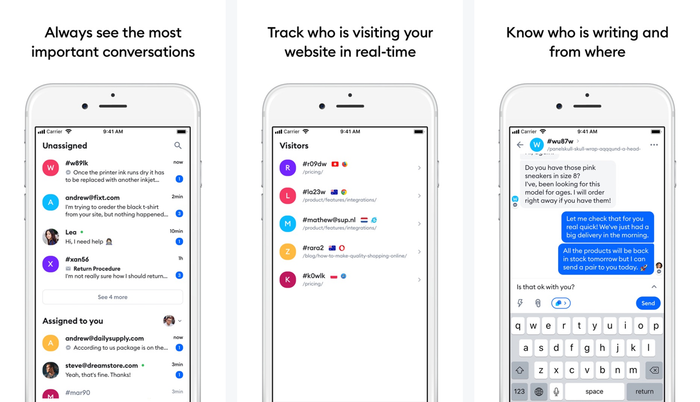
Tidio puts live chat, an AI agent and a shared inbox for email, Messenger, Instagram and WhatsApp in one account, and the iOS and Android apps give agents the same inbox on a phone. Stores get the most from it: the Tidio inbox shows a shopper’s cart and order history next to the chat, and Lyro, Tidio’s AI agent, takes the repetitive questions first. Tidio says Lyro can resolve up to 75% of support requests.
Key features:
- Mobile inbox: reply to chats, use quick responses in one tap and get push notifications even when the app is closed.
- Live visitor list: see who is browsing the site and the visitor’s city, device and browser from the app.
- Lyro AI agent and Flows: automate order-status and other repeat questions, and capture leads while you are offline.
- Shopify tools: cart preview and order history in the Tidio inbox, next to the conversation.
Mobile app: iPhone, iPad and Android, plus a desktop app. App Store 4.8 (4,769 ratings) · Google Play 3.5 (2.86K ratings, 500K+ downloads). Tidio’s pricing page lists the mobile app on every plan, the free one included. If you also run your own app, the Tidio mobile SDK can embed chat and Lyro in it; it is available on request on the Premium plan.
Tidio fits these teams best:
- Online stores, especially on Shopify, that want order context inside the chat.
- Small teams that answer customers across live chat, email and social from one inbox.
- Shops with a steady stream of repeat questions that want an AI agent to take the first pass.
Pros
- Most rated iPhone app on this list with a 4.8 rating, at 4,769 ratings.
- Free plan with 10 seats and the mobile app included.
- Chat, email, social and AI in one inbox, so agents don’t switch apps.
- Lyro and Flows are priced separately, so you only pay for the AI you use.
Cons
- The Android rating (3.5) trails the iPhone one, so Android-heavy teams should try it first on their own phones.
- Free and Starter plans include 50 and 100 billable conversations a month, so busy teams watch the quota.
- Larger deployments (Plus and Premium) are quoted with Tidio’s sales team.
Skip Tidio if your team only needs a bare chat widget with unlimited conversations, which tawk.to covers.
Pricing: Tidio’s pricing page lists billing annually, with monthly in brackets:
- Free: $0, 50 billable conversations a month, up to 10 seats.
- Starter: $24.17 a month ($29), 100 conversations.
- Growth: from $49.17 a month ($59) for 250 conversations, up to 2,000.
- Plus: from $300 a month plus usage. Premium: custom pricing.
- Add-ons: Lyro AI agent from $32.50 a month ($39) for 50 Lyro conversations; Flows from $24.17 a month ($29).
- 7-day free trial of the premium features.
Rating: G2 4.6/5 (1,962 reviews)
See Tidio plans and add Lyro to your chat
2. LiveChat
Best for: teams whose main job is answering website chats

LiveChat, now sold under the Text brand, is chat-first: its agent app shows what a customer is typing before they send it, and it carries file sharing, tickets and reassignment between groups. The limits are cost and scope: there is no free plan, seats are billed individually, and AI resolutions are capped per plan.
Key features:
- Typing preview and ready-made responses for faster replies from a phone.
- Customer details, including the cart and order history a customer has right now.
- Built-in ticketing with reassignment between groups.
Pros
- Polished agent app with the broadest chat-specific feature list of the apps here.
- Updated in October 2026 on both platforms.
Cons
- No free plan, and every extra seat adds to the monthly bill.
- The Android rating is 3.0 across 1.16K ratings.
Mobile app: iPhone, iPad, Android and a desktop app. App Store 4.3 (112 ratings) · Google Play 3.0 (1.16K ratings, 100K+ downloads). Whether the mobile app is on every plan isn’t stated on the vendor’s pages.
Pricing (per seat, billed annually; monthly in brackets): Essential $19 ($25) · Growth $79 ($99) · Enterprise custom. AI resolutions are capped per plan (10 on Essential, 200 on Growth), and packs of 50 cost $49.50. 14-day free trial, no card.
Rating: G2 4.5/5 (813 reviews)
Read more: LiveChat alternatives
3. tawk.to
Best for: unlimited free chat for a team on a zero budget
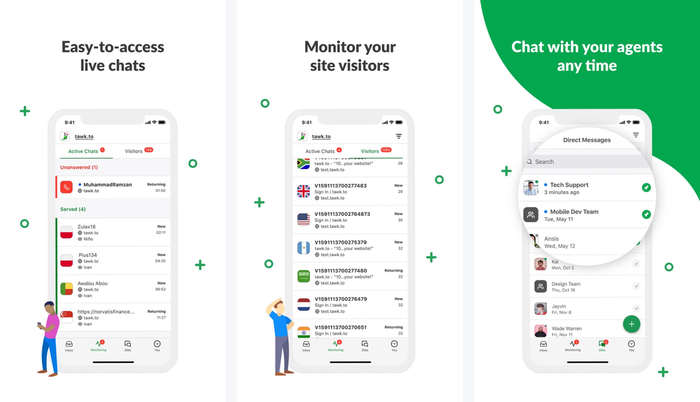
tawk.to is free for unlimited agents, and its mobile apps are free too. The Android app is the most-rated on this list, with 15.2K ratings and over a million downloads. You pay only for extras such as removing the “Powered by tawk.to” badge, an AI assistant and hired chat agents. The trade-off is polish: the widget and design options are basic next to newer tools.
Key features:
- Visitor monitor: see visitors move across the site and start a chat first.
- Tickets in the app: work tickets from email or create new ones.
- Shortcuts and transcripts: canned responses, plus chat history you can convert into a ticket or email.
Pros
- Free forever with no limit on team members.
- Direct messages and group chats between agents inside the app.
Cons
- Branding removal ($29 a month) and AI cost extra.
- The iPhone rating is 3.7, below most apps here.
Mobile app: iPhone, iPad, Android and desktop apps. App Store 3.7 (215 ratings) · Google Play 3.8 (15.2K ratings, 1M+ downloads). tawk.to calls the iOS and Android apps free.
Pricing: free. Branding removal $29 a month, AI Assist from $29 a month, hired chat agents from $1 an hour.
Rating: G2 4.5/5 (203 reviews)
Read more: tawk.to alternatives
4. Crisp
Best for: small teams that want flat pricing per workspace
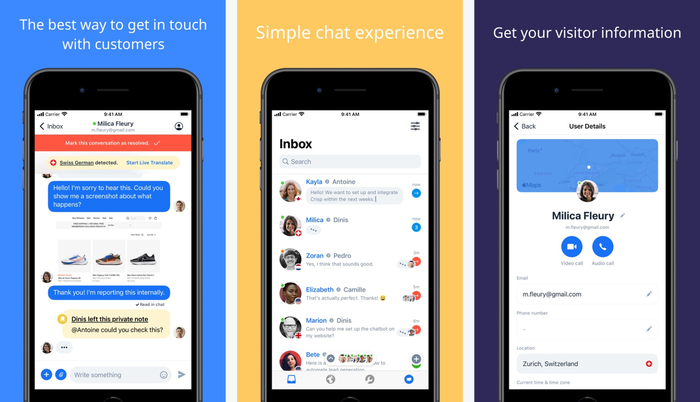
Crisp prices per workspace rather than per agent, so a team of four on Mini pays the same as a team of one. Its mobile app is a full helpdesk in your pocket, with private notes, shortcuts and help articles, and the Android app can show what a customer is typing as they write. The catch is that bundles are fixed: moving from 4 to 10 seats means a jump from $45 to $95 a month.
Key features:
- MagicType: see what the customer is writing in real time.
- Private notes and shortcuts for team handovers and fast replies.
- Working hours: teammates aren’t notified outside their hours.
Pros
- Flat workspace pricing is easy to budget for small teams.
- Mobile apps are listed on the free plan too.
Cons
- No AI on the free plan.
- Seats come in fixed bundles, and $10 extra agents exist only on Plus, so a fifth agent on Mini means the $95 plan.
Mobile app: iPhone, iPad, Android and desktop apps. App Store 4.4 (522 ratings) · Google Play 4.0 (3.17K ratings, 100K+ downloads).
Pricing (per workspace, per month): Free, 2 seats · Mini $45 (4 seats) · Essentials $95 (10 seats) · Plus $295 (20 seats). Extra agents $10 a month on Plus only. 14-day free trial, no card.
Rating: G2 4.5/5 (204 reviews)
Read more: Crisp review
5. Zoho SalesIQ
Best for: tracking visitors and chatting first, on a tight budget

Zoho SalesIQ is the app for operators who want to start the conversation. The store listing leads with who is on your site, proactive chat, lead scoring and real-time chat translation in over 25 languages. Paid plans start at $7 an operator, the lowest seat price here.
Key features:
- Visitor tracking that keeps the list even after visitors leave.
- Proactive chat invitations to engage visitors.
- Translation in over 25 languages.
Pros
- Lowest per-operator price among paid plans here.
- Free plan for three operators, with the mobile app included.
Cons
- Branding removal and extra chatbots are paid add-ons.
- The store text says little about agent actions such as notes or canned replies.
Mobile app: iPhone, iPad, Android and desktop apps. App Store 4.7 (1,331 ratings) · Google Play 4.4 (944 ratings, 100K+ downloads). Zoho lists the mobile app in its free plan.
Pricing (per operator, billed annually; monthly in brackets): Free, 3 operators and 100 chat sessions a month · Basic $7 ($10) · Professional $12.75 ($17) · Enterprise $20 ($25). 15-day free trial, no card.
Rating: G2 4.4/5 (256 reviews)
6. Smartsupp
Best for: solo store owners who want a free plan with WhatsApp
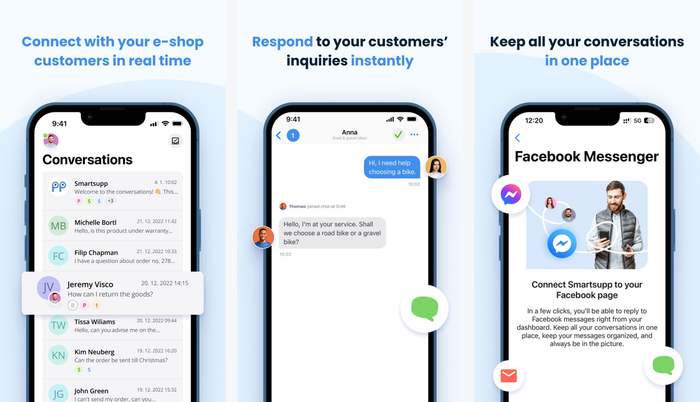
Smartsupp keeps website chat, WhatsApp and Messenger in one inbox for a small shop. Its Android app is rated 4.6 across 8.96K ratings, while the iPhone app sits at 4.1. The free plan covers one operator, so a second person means a paid plan.
Key features:
- One inbox for website chat, email and Facebook Messenger.
- AI assistants and automated messages on the listing.
- Chat reports inside the app.
Pros
- Free plan with live chat and WhatsApp.
- Strong Android rating and a G2 score of 4.7.
Cons
- The free plan stops at one operator and 25 conversations a month.
- The store text doesn’t say which agent actions the app supports.
Mobile app: iPhone, iPad and Android. App Store 4.1 (142 ratings) · Google Play 4.6 (8.96K ratings, 100K+ downloads). The pricing page calls it a free app; which plans include it is not spelled out.
Pricing (billed annually): Free, 1 operator · Solo $17 a month · Plus $25 (3 operators) · Expert $83.
Rating: G2 4.7/5 (1,077 reviews)
7. Freshchat
Best for: teams that plan to grow into the Freshworks suite
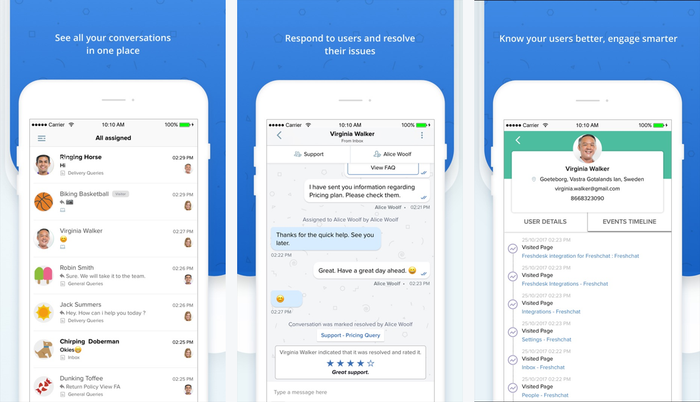
Freshchat, the messaging product from Freshworks (formerly Freshdesk Messaging), lets agents view, reply to and assign conversations from the phone and open the visitor’s profile with an event timeline and usage history. The free plan supports up to 10 agents. Social channels and the Freddy AI agent start on paid plans.
Key features:
- Assign and reply from anywhere, with push notifications for replies.
- Visitor profile: contact details, event timeline and usage history.
- FAQ sharing: send help articles to visitors from the app.
Pros
- Up to 10 agents on the free plan.
- A direct upgrade path into the Freshworks help desk.
Cons
- Facebook, Instagram, WhatsApp and SMS need a paid plan.
- The iPhone rating is 3.6 across only 51 ratings.
Mobile app: iPhone, iPad and Android. App Store 3.6 (51 ratings) · Google Play 3.8 (1.51K ratings, 100K+ downloads).
Pricing: free for up to 10 agents · Growth $19 per agent a month billed annually · Pro $49 · Enterprise $79. Freddy AI Agent: 500 sessions free once, then $49 per 100 sessions.
Rating: G2 4.4/5 (502 reviews)
Read more: Freshchat review
8. Intercom
Best for: software teams that want an AI agent first and people second

Intercom is built around Fin, its AI agent, with a help desk and Messenger around it. The mobile app, called Intercom Conversations, lets teammates view and assign conversations, see where they are mentioned, leave internal notes, insert saved replies and open a user’s live profile. The weak spot is the app itself: 2.1 on iOS across 172 ratings, and 3.2 on Android.
Key features:
- Assign and mention teammates in a conversation.
- Internal notes and saved replies from the phone.
- User and lead profiles next to the thread.
Pros
- Mature AI agent and help desk in one product.
- Strong in-app messaging for software products.
Cons
- A seat price plus $0.99 per Fin outcome makes the bill hard to forecast.
- The iPhone app has the lowest rating in this list.
Mobile app: iPhone, iPad and Android. App Store 2.1 (172 ratings) · Google Play 3.2 (1.1K ratings, 100K+ downloads).
Pricing (per seat, billed annually): Essential $29 · Advanced $85 · Expert $132. Fin AI agent $0.99 per outcome. 14-day free trial.
Rating: G2 4.5/5 (3,921 reviews)
9. Zendesk
Best for: large teams that work in tickets across many channels

Zendesk’s agent app, Zendesk Support, is a ticketing app for agents, team leads and managers on the move. It sends push notifications on critical updates, lets you set which alerts arrive by group and time of day, and supports @mentions, new tickets and attachments. The store text doesn’t mention live chat, so check how your chat conversations appear in it.
Key features:
- Notification rules by group, day and time.
- @mentions, tags and followers on tickets.
- Customer profiles with notes, organizations and requests.
Pros
- Scales to large, multi-team support operations.
- Fine control over which notifications reach which agents.
Cons
- Expensive per agent for small teams, and setup takes admin time.
- The Android rating is 3.0 across a large base of ratings.
Mobile app: iPhone, iPad and Android. App Store 4.5 (4,217 ratings) · Google Play 3.0 (7.78K ratings, 500K+ downloads).
Pricing (per agent, billed annually; monthly in brackets): Suite Team $55 ($69) · Suite Professional $115 ($149) · Enterprise through sales. Suite Team includes five automated resolutions per agent a month, then $1.50 each committed or $2.00 pay as you go. 14-day free trial.
Rating: G2 4.3/5 (7,097 reviews)
How the apps compare on iOS and Android
The same app often earns a different score on each platform, and the gap says more about day-to-day reliability than a G2 score does. Tidio, Zendesk, Zoho SalesIQ, LiveChat and Crisp rate higher on iPhone; Smartsupp, tawk.to, Freshchat and Intercom rate higher on Android.
| App | App Store rating | Google Play rating | Android downloads | Desktop app |
|---|---|---|---|---|
| Tidio | 4.8 (4,769) | 3.5 (2.86K) | 500K+ | Yes |
| LiveChat (Text) | 4.3 (112) | 3.0 (1.16K) | 100K+ | Yes |
| tawk.to | 3.7 (215) | 3.8 (15.2K) | 1M+ | Yes |
| Crisp | 4.4 (522) | 4.0 (3.17K) | 100K+ | Yes |
| Zoho SalesIQ | 4.7 (1,331) | 4.4 (944) | 100K+ | Yes |
| Smartsupp | 4.1 (142) | 4.6 (8.96K) | 100K+ | Yes (Windows) |
| Freshchat | 3.6 (51) | 3.8 (1.51K) | 100K+ | Not stated |
| Intercom | 2.1 (172) | 3.2 (1.1K) | 100K+ | Not stated |
| Zendesk | 4.5 (4,217) | 3.0 (7.78K) | 500K+ | Not stated |
What a live chat app should let you do from your phone
An agent app is good enough when you can answer a chat, see who the customer is and hand the conversation to a teammate without opening a laptop. Test these five things on a real phone before you commit to a plan.
- Push alerts that arrive. Close the app, send yourself a test chat from another device and time the notification. Most apps list push; Zoho SalesIQ, Smartsupp and Intercom don’t mention it in their store text. Delivery also varies by phone and settings.
- Quick replies and canned responses. An agent on a phone types slowly. Check that saved replies insert in one tap.
- Visitor and order context. Tidio, LiveChat and Freshchat show visitor or customer details next to the thread; Zoho SalesIQ and Tidio add a live visitor list.
- Assign, notes and mentions. Intercom, Crisp and Zendesk list private notes or mentions, so a teammate can pick up a chat.
- AI hand-off. If an AI agent answers first, the human should see what it said. Confirm that the full thread arrives in the app.
For day-to-day habits, see our guide to live chat best practices.
Live chat inside your own mobile app
If you have an iOS or Android app of your own, you may want chat inside it rather than an agent app. That needs a mobile SDK, not a website widget. Tidio’s mobile SDK for iOS and Android can embed chat and Lyro, on request on the Premium plan, and Freshchat’s free plan lists a chat widget for web and mobile apps. Intercom and Zendesk have in-app messaging for products as well; check each vendor’s SDK docs for the platforms and frameworks you use before you commit.
How to choose a live chat app
Start with the phone your agents carry
Count your iPhone and Android agents, then check that platform’s rating above. A 4.8 on iOS does not help an Android team.
Check what the free plan really includes
Free plans cap seats, conversations or history. tawk.to is unlimited, Smartsupp stops at one operator, and Tidio’s free plan covers 10 seats and 50 billable conversations a month. Our guide to free live chat software covers every limit in detail.
Work out the real price
Seat prices are the start. Add the AI: Intercom charges $0.99 per Fin outcome, Zendesk charges $1.50 to $2.00 per automated resolution past the included five, and Tidio sells Lyro separately from $32.50 a month. Multiply your busiest month’s chats by the AI rate before you choose.
Put every channel in one inbox
Customers also write on email, Messenger, Instagram and WhatsApp. Pick an app where those arrive in the same mobile inbox, or agents end up switching between apps. For website widgets, see our comparison of live chat apps for websites.
Which live chat app should you pick?
- You run a Shopify store: Tidio, on a paid plan with Lyro, so the inbox shows the cart and order history next to the chat. A store that only needs ticketing can look at Gorgias.
- You are a small team answering mostly chats: Tidio Growth with Lyro, or LiveChat if you only need a chat-first agent app and want a per-seat price.
- You have no budget: tawk.to, or Tidio’s free plan if you want an AI agent to try.
- You want flat pricing for a small team: Crisp.
- You want to start conversations with visitors: Zoho SalesIQ.
- You are a software company with an AI-first support model: Intercom, with the iPhone app’s 2.1 rating in mind.
- You run a large, ticket-based team: Zendesk.
Try Tidio's chat inbox on iOS and Android
Frequently asked questions
Tidio is the best fit for most small businesses and online stores, because live chat, an AI agent and a shared inbox sit in one app that also runs on iPhone and Android. tawk.to suits a zero budget and Crisp suits a small team that wants flat pricing.
Yes. tawk.to is free for unlimited agents, Tidio’s free plan covers 10 seats and 50 billable conversations a month, and Crisp, Zoho SalesIQ, Smartsupp and Freshchat have free plans with limits. Tidio, tawk.to, Crisp and Zoho SalesIQ also confirm that the mobile app comes with the free plan.
Smartsupp (4.6) and Zoho SalesIQ (4.4) have the highest Google Play ratings in this comparison, and tawk.to has the biggest audience with 15.2K ratings and over a million downloads. Tidio’s Android rating is 3.5, so test it on your own phone.
Tidio (4.8), Zoho SalesIQ (4.7) and Zendesk Support (4.5) have the highest App Store ratings here. Intercom’s is the lowest, at 2.1.
Yes. Every app in this article has an iOS and Android agent app. Most list push alerts and chat replies; Zendesk Support is a ticketing app and Zoho SalesIQ leads with visitor tracking, so test those two first. Check the features you need, such as notes or assignment, before you commit.
Tidio is AI customer service software that combines live chat, a shared inbox, the Lyro AI agent and automation flows for small and mid-size businesses, with free and paid plans and mobile apps for iOS and Android.
Use live chat to support your customers in real-time
