The char data type is a primitive data type in Java and can hold only one 16-bit Unicode character, like ‘A’, ‘5’, or ‘$’. Its range lies between ‘\u0000’ and ‘\uffff’.
In this Java char tutorial, we will learn the properties of Java char data type, how to declare and print characters, do increment-decrement operations on char variable, and conversion of char data type to other types including int and String.
=> Check ALL Java Tutorials Here
What Is the char Data Type in Java?

In Java, the char data type is an unsigned 16-bit Unicode character. The minimum value that can be held by the char data type is ‘\u0000’ (0), while its maximum value is ‘\uffff’ (65,535 inclusive).
Characteristics of char data type are as follows:
- Size: 2 bytes (16 bits).
- Encoding: In Java, it is encoded in UTF-16 format as compared to C/C++, in which char is usually of 8-bit ASCII encoding. This enables Java to store letters, digits, symbols, as well as international characters of nearly every written language.
- Literal Form: Character values must be enclosed within single quotes, e.g., ‘a’, ‘7’, ‘$’. Also, characters can be represented by their integer Unicode codes (like 65 for ‘A’), or Unicode escapes like ‘\u0041’.
- Arithmetic Operation: As char is internally stored in integer form, we can perform arithmetic operations using char (e.g., ‘a’+1 is ‘b’).
The data type char comes under the characters group that represents symbols i.e. alphabets and numbers in a character set.
The Size of a Java char is 16-bit and the range is between 0 to 65,535. Also, the standard ASCII characters range from 0 to 127.
Given below is the syntax of char Java.
Syntax:
char variable_name = ‘variable_value’;
Declaring and Initializing a char in Java
Before proceeding to perform character manipulations, it is important to know how you can declare, initialize, and assign a character literal in Java.
1. Declaration and Simple Initialization
To declare a char variable, you have to use char keyword followed by the variable name. You can assign its value as follows:
Java
// Declaration only
char letter;

// Declaration with initialization
char grade = 'A';
char symbol = '#';
char digit = '5';
Note for beginners: Always use single quotes (‘A’) when assigning a character. The double quotes (“A”) create a string object, which is another data type in Java.
2. Correct Methods for Specifying Character Literals
In Java, there are several correct methods for specifying character literals:
- Single Character Literal: Single printable character in single quotes.
Java
char ch1 = 'x';
Unicode Escape Sequences: Prefixing the 4-digit hexadecimal Unicode value with \u.
Java
char ch2 = '\u0041'; // Represents 'A'
char ch3 = '\u03A9'; // Represents Greek capital letter Omega (Ω)
Integer Values: Assigning an integer value from 0 to 65535 corresponding to the character’s ASCII or Unicode code point.
Java
char ch4 = 65; // Assigns 'A' because 65 is the ASCII/Unicode code for 'A'
Escape Sequences: Special control characters pre-fixed with a backslash (\).
Java
char newLine = '\n';   // Newline character
char tab = '\t';       // Tab character
char singleQuote = '\''; // Single quote character
char backslash = '\\'; // Backslash character
Characteristics Of char
Given below are the major characteristics of a char.
- As mentioned above, the range is between 0 to 65,535.
- The default value is ‘\u0000’ and that is the lowest range of Unicode.
- The default size (as mentioned above) is 2 bytes because Java uses the Unicode system and not the ASCII code system.
Displaying Characters
Given below is the simplest program of displaying the characters that have been initialized by using the char keyword.
public class example {

	public static void main(String[] args) {

		char c1 = 'x';
		char c2 = 'X';

		System.out.println("c1 is: " +c1);
		System.out.println("c2 is: " +c2);

	}

}
Output:

Printing Characters Using ASCII Value
In the below example, we have initialized three char Java variables with the integers. Upon printing them, those integers will be converted into their ASCII equivalent. The compiler typecast integer to a character and then the corresponding ASCII value will be displayed.
public class example {

	public static void main(String[] args) {

		char c1, c2, c3;

		/*
		 *  Since 65 and 67 are the ASCII value for A and C,
		 *  we have assigned c1 as 65 and c3 as 67.
		 */

		c1 = 65;
		c2 = 'B';
		c3 = 67;

		System.out.println("The characters are: " + c1 + c2 + c3);

	}

}
Output:

Incrementing And Decrementing The chars
In the below program, we have initialized a Java character variable and then we have tried incrementing and decrementing it using the operator.
A print statement is included before and after each operation to see how the value changes.
public class example {

	public static void main(String[] args) {

		char c1 = 'A';
		System.out.println("The value of c1 is: " + c1);

		c1++;
		System.out.println("After incrementing: " + c1);

		c1--;
		System.out.println("After decrementing: " + c1);

	}

}
Output:

Breaking String Into Character Java
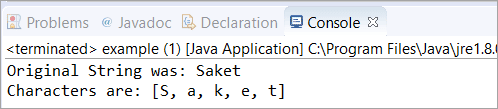
In this section, we will break a String in the form of Character Java. To start with, we have taken an input String and converted it into a Java character array. Then, we printed the value of the original String and the characters inside that array using the toString() method.
import java.util.Arrays;

public class example {

	public static void main(String[] args) {

		String str1 = "Saket";

		// conversion into character array
		char[] chars = str1.toCharArray();

		System.out.println("Original String was: " + str1);
		System.out.println("Characters are: " + Arrays.toString(chars));

	}

}
Output:
Represent char Into Unicode System
In this section, we have initialized three Java characters with the Unicode value (escape sequence). Thereafter, we have simply printed those variables. The compiler will take care of the rest as it will explicitly convert the Unicode value into Java character.
Click here for Unicode Character Table.
import java.util.Arrays;

public class example {

	public static void main(String[] args) {

		char chars1 = '\u0058';
		char chars2 = '\u0059';
		char chars3 = '\u005A';

		System.out.println("chars1, chars2 and chars2 are: " + chars1 + chars2 + chars3);

	}

}
Output:

Typecast Integer To char Java
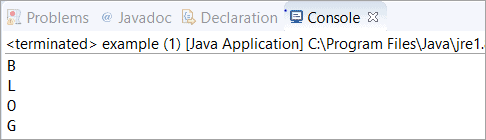
In this section, we have initialized a variable with the integer value and then we typecast the integer value to Java char explicitly. All these integer variables that are initialized with the numeric value belong to some character.
For example, 66 belongs to B, 76 belongs to L, etc. You cannot specify any random integer and try to typecast it. In such cases, the compiler will fail to typecast and as a result, it will throw ‘?’ in the output.
import java.util.Arrays;

public class example {

	public static void main(String[] args) {

		int number1 = 66;
		char chars1 = (char)number1;

		int number2 = 76;
		char chars2 = (char)number2;

		int number3 = 79;
		char chars3 = (char)number3;

		int number4 = 71;
		char chars4 = (char)number4;

		System.out.println(chars1);
		System.out.println(chars2);
		System.out.println(chars3);
		System.out.println(chars4);

	}

}
Output:
How to Read a Character Input in Java
Reading one character at a time from the keyboard is one of the most frequent actions for novice programmers. Nevertheless, there is no nextChar() method in the Scanner class of Java programming language. It is usually done by reading an input String and retrieving the first character by the .charAt(0) method.
1. Standard Approach: Scanner + charAt(0) In order to retrieve one character from user input, you need to perform scanner.next(), which returns the next word or scanner.nextLine(), which returns the entire line, and then use .charAt(0).
Java
import java.util.Scanner;

public class CharacterInputExample {
    public static void main(String[] args) {
        Scanner scanner = new Scanner(System.in);

        System.out.print("Enter a single character: ");
        // Read the next string token and get its first character
        char letter = scanner.next().charAt(0);

        System.out.println("You entered: " + letter);

        scanner.close();
    }
}
2. How It Works
- scanner.next() reads the input provided by the user as a String (e.g., “A”).
- .charAt(0) accesses the character at index 0 (the first position) of that string.
3. Limitations & Special Cases
This method may be easy to understand and commonly used, but beginning programmers should note these limitations:
• StringIndexOutOfBoundsException: If the user presses the Enter key without inputting anything (or if the string passed to scanner.nextLine().charAt(0) is an empty line), .charAt(0) tries to read an index which does not exist, resulting in an exception and causing the program to crash.
o Fix: Make sure that the length of the string is >0 before using .charAt(0).
• Ignores Unnecessary Characters: If the user enters the word “Java”, then scanner.next().charAt(0) extracts the first letter (‘J’) while disregarding “ava”.
• Surrogate Pairs (Emojis & Unicode): As the char variable in Java uses 16 bits, some special characters outside the Basic Multilingual Plane (BMP), including emojis and very old languages, require two 16-bit values (surrogate pairs).
- Calling charAt(0) on such input will only return the high surrogate half, not the full character.
Frequently Asked Questions
1. What is the size and range of char in Java?
Char takes 2 bytes (16 bits) of space in memory. It ranges from 0 to 65535 (both inclusive), which denotes Unicode characters from ‘\u0000’ to ‘\uffff’.
2. What is the difference between char and String?
Char is a primitive data type which holds a single character in single quotes (for example ‘a’). Whereas String is an object holding multiple characters in double quotes (for example “a”)
3. How do you convert an int to a char in Java?
An integer can be converted to its respective character by explicit casting:
Java
int asciiVal = 65;
char letter = (char) asciiVal; // Results in ‘A’
4. How do you get a character from a String?
You use the charAt() method by passing the index of the desired character:
Java
String text = “Java”;
char firstChar = text.charAt(0); // Results in ‘J’
5. How do you read character input in Java?
Since Scanner lacks a dedicated nextChar() method, you read input as a String and extract the first character using charAt(0):
Java
Scanner scanner = new Scanner(System.in);
char inputChar = scanner.next().charAt(0);
6. What is the scanner for char in Java?
There is no such method called nextChar() in the Scanner Class. You need to use the next() method with charAt() method to get the char Java or the character Java.
7. Why is char used in Java?
Java char is a primitive data type that is used to declare the Java character variables.
8. What is the use of \t in Java?
The \t is an escape sequence in Java that moves the control to the next tab. It is similar to pressing the “TAB” key from the keyboard.
Also read =>> Convert Java String to Integer
Conclusion
In this tutorial, we explained Java char along with its description, range, size, syntax, and examples.
Char data type in Java is employed for storing individual code units in UTF-16 encoding format. The possible values of char type lie between ‘\u0000’ and ‘\uffff’. Knowing the features of this data type, declaration, numeric values, operations of increment/decrement and Unicode notation will help you handle character data in an efficient way. You may also employ methods like toCharArray() and charAt(). Using these examples in practice will help you grasp how Java works with character data.
=> Visit Here To Learn Java From Scratch
Was this helpful?
Recommended Reading
-

In this tutorial we will learn the different ways to convert values of primitive data type char to int in Java along with FAQs and examples: We will be covering the use of the following methods provided by different Java classes for converting character to int : Implicit type casting…
-
This video tutorial will explain all about Java String data type, how to create it, immutability, string buffer, and builder with examples: Since String is a non-primitive data type, we will also lay down the difference between primitive and non-primitive data types. Apart from this, the Java String format() method…
-
This Tutorial Explains all about the Java String length() Method along with Multiple Programming Examples & FAQs to help you Understand the Concept: Moreover, we will be covering the different scenarios related to the String Java length() method. Frequently asked questions related to the Java String length() method will also…
-
Learn how to Convert Char to String in Java using four different methods with programming examples for each method: In this tutorial, we will cover the various ways of converting Java primitive data type char values to data type String. We will be learning the following methods in Java for…