Webhooks
In case you want to perform your own actions when events happen in Moonbase, you can configure webhooks to forward events to your own APIs. Webhooks can be set up to trigger on a number of different events:
- Payment events
OrderCheckoutInitiatedOrderPaymentFailedOrderPaidOrderCompletedOrderPayoutScheduledOrderRefundedOrderDisputedOrderDisputeResolved
- Licensing events
LicenseActivatedLicenseProvisionedTrialActivated
- Product release events
ProductReleasePublished
- Subscription events
SubscriptionStartedSubscriptionRenewedSubscriptionExpiredSubscriptionCancelledSubscriptionCompleted
- Voucher events
VoucherCodeRedeemed
- Review events
ReviewPublishedReviewNeedsDecision
- Customer events
CustomerSignedUpCustomerSubscribedCustomerUnsubscribedCustomerLoginLinkedCustomerLoginUnlinked
To get started with webhooks, head over to Account settings > Developer in Moonbase, and set up your first webhook:
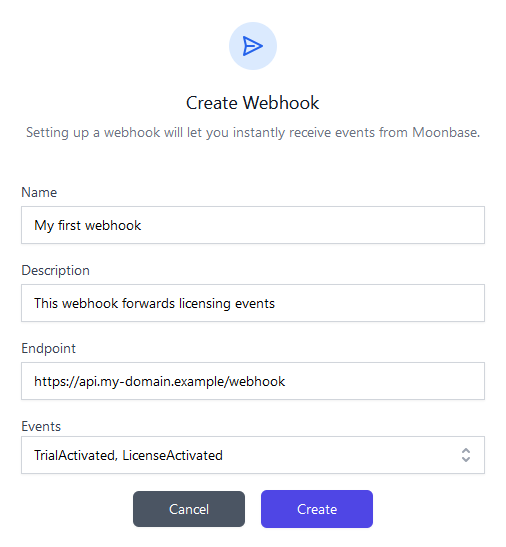
Once created, it's immediately active and you will have access to the secret key used to compute the signature as described in Security. A webhook only receives the events it was set up for, so to start receiving an event that was added after you created it, edit the webhook and select it.
Importing data into Moonbase never triggers a webhook. Customers, licenses, subscriptions and trials brought in through the import endpoints or a CSV upload, and trials recorded from another store with a createdAt, are not announced to your endpoints, whichever events you have selected.
Do you have a specific scenario you need webhooks for that is not covered by the current events and content?
Reach out to us through the support channel, or at developers@moonbase.sh.
Security
To ensure that the webhook requests are in fact originating from Moonbase and not some malicious actor, we apply a HMAC-SHA256 algorithm on the body of the request and include this signature in a X-Signature header on the request.
Example signature verification code
    using var algorithm = new HMACSHA256(Encoding.UTF8.GetBytes(secretKey));
    var json = await request.Content.ReadAsStringAsync();
    var hash = algorithm.ComputeHash(Encoding.UTF8.GetBytes(json));
    var signature = Convert.ToBase64String(hash).ToUpperInvariant();
    var sentSignature = request.Headers.GetValues("X-Signature").Single();
    Assert.Equal(sentSignature, signature);
Should you ever need to change the secret key, you can do so by editing the webhook.
JSON structure
All webhook requests being sent by Moonbase will have a fixed structure with some basic details about the event that occurred. Additionally, relevant resources are also attached, so that you don't have to query the Moonbase API to fetch more details. The shape of these resources differ between events, and are described on this page.
- Name
id- Type
- string
- Description
Identifier of this unique webhook request.
- Name
endpoint- Type
- string
- Description
The endpoint the request is being sent to.
- Name
eventType- Type
- enum
- Description
The event being communicated, will one of the events listed in this article.
- Name
timestamp- Type
- datetime
- Description
ISO-8601 date and time of the time at which the event occurred.
- Name
eventId- Type
- string
- Description
Identifier of the event this request is about, the same on every delivery of that event, where
idis new on each one. Use it to recognize an event you have already handled.
- Name
accountId- Type
- string
- Description
The ID of the Moonbase account the event happened in, such as
demo.
- Name
resource- Type
- object
- Description
The resource that the event relates to:
- Name
type- Type
- enum
- Description
One of:
Order,License,Trial,ProductRelease,Subscription,VoucherCode,Customer,CustomerLogin,Review,AutomationRun
- Name
data- Type
- object
- Description
The actual contents of the entity. See below for more details about how this is structured.
- Name
customer- Type
- object
- Nullability
- nullable
- Description
Details about the customer associated with the event. In case the customer is unknown, it will be null.
- Name
id- Type
- string
- Description
Unique identifier of the customer.
- Name
name- Type
- string
- Description
Name of the customer.
- Name
email- Type
- string
- Description
Email address of the customer.
- Name
hasAccount- Type
- boolean
- Description
Flag showing if the customer has an account they can sign in with.
falsefor a newsletter contact.
- Name
isDeleted- Type
- boolean
- Description
Flag showing if the customer account was deleted
- Name
adConsent- Type
- object
- Optionality
- optional
- Description
The recorded advertising choice:
adUserData,adPersonalization,basisanddecidedAt. Omitted when unknown. See Ad consent.
- Name
logins- Type
- array
- Description
The Google, Apple, Facebook and Discord accounts the customer signs in with. Empty when they only sign in with their email address. See Customer events for the shape of each.
- Name
properties- Type
- object
- Optionality
- optional
- Description
Any custom properties configured on the customer, keyed by name. Omitted when the customer has none. See Customer events for the shape of each value.
Webhook request
{
    "id": "a885619a-cb5e-41a6-a07b-1be4e520cccb",
    "endpoint": "https://api.my-domain.example/webhook",
    "eventType": "OrderCompleted",
    "timestamp": "2024-11-11T11:11:11.0000000Z",
    "resource": {
        "type": "Order",
        "data": {...}
    },
    "customer": {
        "id": "92c0f540-9044-4b00-af4c-fe29f5da355e",
        "name": "Example customer name",
        "email": "user@example.com",
        "hasAccount": true,
        "isDeleted": false,
        "logins": []
    },
    "accountId": "demo",
    "eventId": "3d7e5b0c-2f4a-4c1e-9b6d-8a1f0e2c4b7d"
}
Retries
Answer with any 2xx status to accept a delivery. If your endpoint answers with anything else, or can't be reached, Moonbase tries again three times within about 15 seconds. If those fail too, it sends the event again later, further apart each time: after 5 minutes, 30 minutes, 2 hours, 6 hours, 12 hours, 24 hours and 24 hours. That makes up to 8 deliveries over about 3 days.
Retries stop once a delivery gets through, after the 8th, or when you deactivate or remove the webhook or unsubscribe it from that event. Every delivery shows in the webhook's Logs, where Retry sends a failed one straight away. Once that gets through, the automatic retries still to come for that event are called off.
A retried event arrives late, so events can arrive out of order and more than once. Recognize repeats by eventId, and compare timestamp or read the current state from the Core API instead of relying on the order they arrive in. An automation's Webhook step retries on a shorter schedule, described under Automation step events.
Payment Events
When customers make purchases through Moonbase, they make them on what we call an "Order". This is why the events related to payments are all prefixed with Order, and the typical lifecycle of an order goes like this:
- The customer reaches the checkout and gives us an email address to reach them at, a
OrderCheckoutInitiatedevent is sent - The customer pays for an order, a
OrderPaidevent is sent (not applicable for free purchases) - Moonbase fulfills the order, issuing licenses and sending receipts, completing the order, a
OrderCompletedevent is sent - Moonbase then calculates all affiliate revenue splits and schedules payout for the order, a
OrderPayoutScheduledevent is sent
OrderCheckoutInitiated is the event to build abandoned-checkout recovery on: unlike the other order events, the order it describes may never be paid for. It is sent at most once per order, and only once the checkout has both an email address for the buyer and a priced total, so someone who opens the checkout and leaves before filling anything in produces no event. Subscription renewals are charged against a stored payment method without anyone visiting a checkout, and never send it. An order you build through the Storefront API sends the event when one of its checkout URLs is opened, not while you are still adding items to it.
Buyers do not need a Moonbase account to check out, and most people who abandon a checkout do not have one, so the top-level customer on this event is often null. The order's own billingDetails always carries the email address that triggered the event.
OrderPaymentFailed is sent each time an attempt to pay for an order fails, such as a declined card or a failed 3-D Secure check. The order stays Open and the buyer can try again, so one order can send it several times. paymentFailure on the order says why, and the event is never sent for subscription renewals. As with OrderCheckoutInitiated, the top-level customer is null for a buyer without an account, and billingDetails carries their email address.
Lastly, if you refund the order, from the Moonbase app or through the Core API, Moonbase will emit a OrderRefunded event to any webhook listening. The same event is sent for both full and partial refunds: check isFullyRefunded and isPartiallyRefunded to tell them apart, and read the refundHistory array for the amounts and line items covered by each refund. OrderRefunded is also sent when you apply business details to a completed purchase and Moonbase returns the over-collected tax. That refund returns no units, so both flags stay false and its refundHistory entry has a kind of TaxAdjustment.
A sale another store made and you recorded through the Core API sends OrderPaid and OrderCompleted like a checkout, and OrderRefunded when you record its refund. It never sends OrderPayoutScheduled, and its channel says where it was sold.
OrderDisputed is sent when a buyer's bank opens a chargeback on an order, and OrderDisputeResolved when the bank decides it. The order carries the dispute the event is about. A decision can change, such as a lost dispute won on appeal, which sends OrderDisputeResolved again with the new outcome.
On accounts with gift purchases turned on, a buyer can send an order to someone else. Its OrderCompleted arrives at payment with the buyer as customer, a gift object and no licenses on its line items. The licenses are issued when the recipient claims the gift, and belong to whoever claimed it (gift.claim.customerId), with a LicenseProvisioned event for each. If you issue your own licenses from OrderCompleted, check for gift first, or they go to the buyer.
All events concering orders will have the same shape of the order. On OrderCheckoutInitiated and OrderPaymentFailed the order is still open and unpaid, so the fields that only exist once money has moved are absent, among them completedAt, payout and the fulfillment on each line item.
- Name
adConsent- Type
- object
- Optionality
- optional
- Description
The recorded advertising choice:
adUserData,adPersonalization,basisanddecidedAt. Omitted when unknown. See Ad consent.
- Name
id- Type
- string
- Description
Unique identifier of the order.
- Name
number- Type
- number
- Optionality
- optional
- Description
The order number on the customer's receipt (the invoice number, when the receipt is an invoice). Omitted until the order is paid, and on free orders and recorded orders.
- Name
status- Type
- enum(Open|Paid|Completed)
- Description
The current status of the order.
Openwhile the buyer is at the checkout and has not paid,Paidif not yet completed,Completedif paid and fulfilled.
- Name
currency- Type
- string
- Description
The currency used for this purchase.
- Name
channel- Type
- string
- Description
Where the sale was made:
moonbasefor your Moonbase checkout, or the channel a sale was recorded under, such asmy-shopify-store.
- Name
externalId- Type
- string
- Optionality
- optional
- Description
The order's reference in the store where it was made, for a recorded order, stored trimmed and in lowercase. Omitted on orders from your Moonbase checkout.
- Name
completedAt- Type
- DateTime
- Optionality
- optional
- Description
The timestamp for when the order was completed.
- Name
refundedAt- Type
- DateTime
- Optionality
- optional
- Description
The timestamp for when the order was fully refunded. Omitted while the order is not fully refunded.
- Name
isFullyRefunded- Type
- boolean
- Description
Whether the entire order has been refunded. Remains
falsefor a partial refund, even thoughrefundHistorylists the refunded amounts.
- Name
isPartiallyRefunded- Type
- boolean
- Description
Whether the order has been partially but not fully refunded.
trueonce at least one refund has settled while the order still has unrefunded units.
- Name
refundHistory- Type
- array
- Optionality
- optional
- Description
The settled refunds applied to this order, present once at least one refund has settled. Each entry describes a single refund:
- Name
id- Type
- string
- Description
Unique identifier of the refund.
- Name
at- Type
- DateTime
- Description
The timestamp for when this refund was made.
- Name
amount- Type
- object
- Description
The amount refunded to the customer in this refund, containing:
currency: The currency of the refunded amount.amount: The refunded amount.
- Name
kind- Type
- enum(Sale|TaxAdjustment)
- Description
What the refund returned.
Salefor a refund of the purchase itself,TaxAdjustmentfor over-collected tax returned after business details were applied to a completed purchase. ATaxAdjustmentrefunds no units, so each of itslineItemscarries aquantityof0.
- Name
lineItems- Type
- array
- Description
The order line items covered by this refund, each containing:
- Name
lineItemId- Type
- string
- Description
Identifier of the refunded order line item. Matches the
lineItemIdof an entry in the order'sitemsarray.
- Name
quantity- Type
- number
- Description
The number of units refunded for this line item in this refund.
- Name
amount- Type
- object
- Description
The amount refunded to the customer for this line item, with the same
currencyandamountproperties as above.
- Name
isDisputed- Type
- boolean
- Description
Whether the order stands disputed: a dispute is open, or one was decided against you.
- Name
dispute- Type
- object
- Optionality
- optional
- Description
The chargeback the event is about. Only on
OrderDisputedandOrderDisputeResolved.- Name
at- Type
- DateTime
- Description
When the buyer's bank opened the dispute.
- Name
reason- Type
- string
- Optionality
- optional
- Description
The reason the payment provider gave, such as
fraudulentorproduct_not_received.
- Name
amount- Type
- object
- Optionality
- optional
- Description
The disputed amount, with
currencyandamount.
- Name
resolved- Type
- boolean
- Description
Whether the bank has decided the dispute. Always
falseonOrderDisputed.
- Name
won- Type
- boolean
- Optionality
- optional
- Description
Whether you won, so the money stays with you. Omitted while the dispute is open.
- Name
resolvedAt- Type
- DateTime
- Optionality
- optional
- Description
When the dispute was decided. Omitted while it is open.
- Name
paymentFailure- Type
- object
- Optionality
- optional
- Description
Why the attempt to pay failed. Only on
OrderPaymentFailed.- Name
reason- Type
- enum(Declined|AuthenticationFailed|CardDetails|ProcessingError|Other)
- Description
- Declined: The card issuer or payment provider declined the payment. The buyer can try another card.
- AuthenticationFailed: The buyer didn't pass 3-D Secure or their bank's own check.
- CardDetails: The card number, security code or postcode was wrong, or the card has expired.
- ProcessingError: The payment couldn't be processed this time, and trying again may work.
- Other: Anything else, or no reason was given.
- Name
paymentMethod- Type
- string
- Optionality
- optional
- Description
The kind of payment method that failed, such as
cardorpaypal. Omitted when not known.
- Name
total- Type
- object
- Description
Calculated total for all items part of the order, contains:
original: The original amount before discountsdiscount: The total amount of discounts addedsubtotal: The total amount after discounts have been removedtaxes: Total taxes to pay, may be inclusive or exclusive of thesubtotaldepending on configuration, currency and region.due: How much is being paid in total by the customer
- Name
payout- Type
- object
- Optionality
- optional
- Description
Payout details for this order, only present if an amount is to be paid. Note that this may get updated as affiliate revenue splits are calculated later in the pipeline.
subtotal: The original amount paid by the customertaxes: The total amount of taxes collected and remittedplatformFees: The total amount of fees going to Moonbasedue: How much is being paid out to you
- Name
billingDetails- Type
- object
- Description
Billing details about the customer who made the purchase:
- Name
name- Type
- string
- Description
Full name of the customer.
- Name
businessName- Type
- string
- Nullability
- nullable
- Description
In case the purchase was a business purchase, this field will have the name.
- Name
taxId- Type
- string
- Nullability
- nullable
- Description
In case the purchase was a business purchase, this field will have the tax id if given.
- Name
email- Type
- string
- Description
Email address of the customer.
- Name
phone- Type
- string
- Nullability
- nullable
- Description
Phone number of the customer. Note that collecting phone numbers is an optional feature in Moonbase and not activated by default.
- Name
address- Type
- object
- Nullability
- nullable
- Description
Billing address for the customer, not present if the purchase was a lead generator purchase. Contains the following properties:
- Name
countryCode- Type
- string
- Description
ISO 3166-1 alpha-2 two-letter country code.
- Name
streetAddress1- Type
- string
- Description
First line of the regular street address.
- Name
streetAddress2- Type
- string
- Optionality
- optional
- Description
Second line of the regular street address.
- Name
postCode- Type
- string
- Description
Postal code of the address.
- Name
locality- Type
- string
- Description
Locality of the address, only required if no region is given.
Also known asCity.
- Name
region- Type
- string
- Description
Region of the address, only required if no locality is given.
Also known asState.
- Name
gift- Type
- object
- Optionality
- optional
- Description
Present when the buyer sent the order as a gift. Its line items carry no
fulfillmentuntil someone claims it.- Name
recipient- Type
- object
- Description
The
nameandemailthe buyer entered for the recipient.
- Name
senderName- Type
- string
- Description
Who the gift is from, as the buyer wants the recipient to read it.
- Name
message- Type
- string
- Nullability
- nullable
- Description
The buyer's personal message, or null.
- Name
delivery- Type
- object
- Description
When the recipient is emailed.
typeisImmediate(right after payment) orScheduled, which adds the buyer'sdate,timeandtimeZone, anddeliverAtin UTC.
- Name
status- Type
- enum(Pending|Scheduled|Sent|Claimed|Voided)
- Description
- Pending: The order is not completed yet.
- Scheduled: Completed, and the email waits for its date.
- Sent: The recipient was emailed and has not claimed it.
- Claimed: Someone claimed it.
- Voided: Refunded or disputed before anyone claimed it, so its code no longer works.
- Name
emailedAt- Type
- DateTime
- Nullability
- nullable
- Description
When the recipient was last emailed the gift.
- Name
emailedTo- Type
- string
- Nullability
- nullable
- Description
Where that email went.
- Name
claim- Type
- object
- Nullability
- nullable
- Description
Who claimed it and when:
customerId,at, andfailureReasonwhen delivering it to them failed.
- Name
voidedAt- Type
- DateTime
- Nullability
- nullable
- Description
When the gift stopped working, for a voided gift.
- Name
items- Type
- array
- Description
Collection of items part of the order. Note that this can be either products or bundles, and they are discriminated using the
typeproperty. Some properties are present on both types, others are shared:- Name
type- Type
- 'Product'
- Description
Item type discriminator.
- Name
productId- Type
- string
- Description
The unique ID of the product.
- Name
targetLicenseId- Type
- string
- Optionality
- optional
- Description
The customer's license this line upgrades or renews, for a license that covers only some releases.
Product line item
- Name
type- Type
- 'Bundle'
- Description
Item type discriminator.
- Name
bundleId- Type
- string
- Description
The unique ID of the bundle.
Bundle line item
- Name
lineItemId- Type
- string
- Description
Stable identifier of this order line item. Use it to correlate entries in
refundHistoryback to the line they refunded.
- Name
quantity- Type
- number
- Description
The quantity of this item.
- Name
price- Type
- object
- Description
The original price of the product or bundle.
- Name
total- Type
- object
- Description
The calculated total for this line item, with
original,discount,subtotalanddueamounts. It also splits the discount per source, each amount being what one unit of the line was discounted by:productDiscount,offerDiscountfor an offer picked for this item,couponDiscount, andcartOfferDiscountfor this line's share of a cart offer applied to the order as a whole. All four are omitted on older orders that were priced before the split existed.
- Name
received- Type
- object
- Optionality
- optional
- Description
For a sale made elsewhere, what the store or reseller paid you for this line after keeping its cut, excluding tax, with
currencyandamountproperties. Omitted unless it was sent when the order was recorded.
- Name
variation- Type
- object
- Description
Details about the selected pricing variation for this item.
- Name
fulfillment- Type
- object
- Optionality
- optional
- Description
Details about the license fulfillment for this purchase. A
Licensefulfillment lists the issuedlicenseIds, andextendedLicenseIdsfor the licenses an upgrade or renewal extended instead.
Shared
- Name
receiptUrl- Type
- string
- Optionality
- optional
- Description
A link to the order's receipt as a PDF, for you to send to your customer. It opens without signing in and does not expire, so send it to the buyer only. Present from
OrderCompletedonwards. On some older orders it is left out: get the order from the Core API for a working link to those.
Order data example
{
    "id": "dc0b53f9-4e43-4179-8554-00f2a8228a25",
    "number": 184213,
    "status": "Completed",
    "currency": "EUR",
    "channel": "moonbase",
    "completedAt": "2024-11-11T11:11:11.0000000Z",
    "isFullyRefunded": false,
    "isPartiallyRefunded": false,
    "isDisputed": false,
    "total": {
        "original": {
            "currency": "EUR",
            "amount": 10
        },
        "discount": {
            "currency": "EUR",
            "amount": 5
        },
        "subtotal": {
            "currency": "EUR",
            "amount": 5
        },
        "taxes": {
            "currency": "EUR",
            "amount": 5
        },
        "due": {
            "currency": "EUR",
            "amount": 5
        }
    },
    "billingDetails": {
        "name": "Example User",
        "businessName": null,
        "taxId": null,
        "email": "user@example.com",
        "phone": null,
        "address": {
            "countryCode": "NO",
            "streetAddress1": "Utsikten 6",
            "streetAddress2": null,
            "locality": "Skien",
            "region": null,
            "postCode": "3718"
        }
    },
    "couponsApplied": [
        {
            "id": "43396b94-53b4-4901-8e9e-ab1d6ee7d3b5",
            "code": "MY-UNIQUE-CODE",
            "name": "Half off coupons",
            "description": "Thanks for being our customer!",
            "discount": {
                "type": "PercentageOffDiscount",
                "percentage": 0.5
            },
            "applicableProductVariations": {},
            "applicableBundleVariations": {}
        }
    ],
    "items": [
        {
            "type": "Product",
            "lineItemId": "7c1f0b2a-9d3e-4a5b-8c6d-0e1f2a3b4c5d",
            "productId": "example-product",
            "quantity": 1,
            "price": {
                "EUR": 10
            },
            "total": {
                "original": {
                    "currency": "EUR",
                    "amount": 10
                },
                "discount": {
                    "currency": "EUR",
                    "amount": 5
                },
                "subtotal": {
                    "currency": "EUR",
                    "amount": 5
                },
                "due": {
                    "currency": "EUR",
                    "amount": 5
                }
            },
            "variation": {
                "id": "v802c5",
                "name": "Default",
                "entitlement": {
                    "type": "PerpetualLicense"
                },
                "recurrence": {
                    "type": "OneOff"
                },
                "price": {
                    "EUR": 10
                }
            },
            "fulfillment": {
                "type": "License",
                "licenseIds": [
                    "d564a47a-d7f3-48ea-8698-57ad7512b11d"
                ]
            }
        }
    ],
    "receiptUrl": "https://demo.moonbase.sh/api/customer/orders/dc0b53f9-4e43-4179-8554-00f2a8228a25/receipt?t=CfDJ8Nw3..."
}
When an order is only partially refunded, isPartiallyRefunded is true while isFullyRefunded stays false, no order-level refundedAt is set, and the refundHistory array carries the details of each settled refund:
Order data example (partially refunded)
{
    "id": "dc0b53f9-4e43-4179-8554-00f2a8228a25",
    "status": "Completed",
    "currency": "EUR",
    "completedAt": "2024-11-11T11:11:11.0000000Z",
    "isFullyRefunded": false,
    "isPartiallyRefunded": true,
    "isDisputed": false,
    "total": {
        "original": { "currency": "EUR", "amount": 20 },
        "discount": { "currency": "EUR", "amount": 0 },
        "subtotal": { "currency": "EUR", "amount": 20 },
        "taxes": { "currency": "EUR", "amount": 5 },
        "due": { "currency": "EUR", "amount": 20 }
    },
    "refundHistory": [
        {
            "id": "b3f1c2a4-6d8e-4f51-9c7a-1d2e3f4a5b6c",
            "at": "2024-11-12T09:30:00.0000000Z",
            "amount": { "currency": "EUR", "amount": 10 },
            "kind": "Sale",
            "lineItems": [
                {
                    "lineItemId": "8f2c1b4e-3a6d-4f51-9c7a-1d2e3f4a5b6c",
                    "quantity": 1,
                    "amount": { "currency": "EUR", "amount": 10 }
                }
            ]
        }
    ],
    "items": [
        {
            "type": "Product",
            "lineItemId": "8f2c1b4e-3a6d-4f51-9c7a-1d2e3f4a5b6c",
            "productId": "example-product",
            "quantity": 2,
            "price": { "EUR": 10 },
            "total": {
                "original": { "currency": "EUR", "amount": 20 },
                "discount": { "currency": "EUR", "amount": 0 },
                "subtotal": { "currency": "EUR", "amount": 20 },
                "due": { "currency": "EUR", "amount": 20 }
            }
        }
    ]
}
An OrderCheckoutInitiated order carries the same shape, priced and with the buyer's billing details filled in, but with nothing paid or fulfilled yet:
Order data example (checkout initiated)
{
    "id": "dc0b53f9-4e43-4179-8554-00f2a8228a25",
    "status": "Open",
    "currency": "EUR",
    "isFullyRefunded": false,
    "isPartiallyRefunded": false,
    "isDisputed": false,
    "total": {
        "original": { "currency": "EUR", "amount": 10 },
        "discount": { "currency": "EUR", "amount": 0 },
        "subtotal": { "currency": "EUR", "amount": 10 },
        "taxes": { "currency": "EUR", "amount": 2.5 },
        "due": { "currency": "EUR", "amount": 12.5 }
    },
    "billingDetails": {
        "name": "Example User",
        "businessName": null,
        "taxId": null,
        "email": "user@example.com",
        "phone": null,
        "address": {
            "countryCode": "NO",
            "streetAddress1": "Utsikten 6",
            "streetAddress2": null,
            "locality": "Skien",
            "region": null,
            "postCode": "3718"
        }
    },
    "items": [
        {
            "type": "Product",
            "lineItemId": "7c1f0b2a-9d3e-4a5b-8c6d-0e1f2a3b4c5d",
            "productId": "example-product",
            "quantity": 1,
            "price": { "EUR": 10 },
            "total": {
                "original": { "currency": "EUR", "amount": 10 },
                "discount": { "currency": "EUR", "amount": 0 },
                "subtotal": { "currency": "EUR", "amount": 10 },
                "due": { "currency": "EUR", "amount": 10 }
            },
            "variation": {
                "id": "v802c5",
                "name": "Default",
                "entitlement": { "type": "PerpetualLicense" },
                "recurrence": { "type": "OneOff" },
                "price": { "EUR": 10 }
            }
        }
    ]
}
An OrderPaymentFailed order looks the same, with paymentFailure saying why the attempt failed:
Order data example (payment failed)
{
    "id": "dc0b53f9-4e43-4179-8554-00f2a8228a25",
    "status": "Open",
    "currency": "EUR",
    "channel": "moonbase",
    "isFullyRefunded": false,
    "isPartiallyRefunded": false,
    "isDisputed": false,
    "paymentFailure": {
        "reason": "Declined",
        "paymentMethod": "card"
    },
    "total": {
        "original": { "currency": "EUR", "amount": 10 },
        "discount": { "currency": "EUR", "amount": 0 },
        "subtotal": { "currency": "EUR", "amount": 10 },
        "taxes": { "currency": "EUR", "amount": 2.5 },
        "due": { "currency": "EUR", "amount": 12.5 }
    },
    "billingDetails": {
        "name": "Example User",
        "email": "user@example.com",
        ...
    },
    "items": [ ... ]
}
An OrderDisputeResolved order carries the dispute with its outcome. On OrderDisputed, resolved is false and won and resolvedAt are left out:
Order data example (dispute resolved)
{
    "id": "dc0b53f9-4e43-4179-8554-00f2a8228a25",
    "number": 184213,
    "status": "Completed",
    "currency": "USD",
    "channel": "moonbase",
    "completedAt": "2026-11-02T14:20:00.0000000Z",
    "isFullyRefunded": false,
    "isPartiallyRefunded": false,
    "isDisputed": false,
    "dispute": {
        "at": "2026-11-18T09:30:00.0000000Z",
        "reason": "fraudulent",
        "amount": { "currency": "USD", "amount": 39.99 },
        "resolved": true,
        "won": true,
        "resolvedAt": "2026-12-04T10:15:00.0000000Z"
    },
    "billingDetails": { ... },
    "items": [ ... ]
}
A gift order's gift, once the recipient has claimed it:
Gift example
{
    "recipient": {
        "name": "Alex Example",
        "email": "alex@example.com"
    },
    "senderName": "Sam",
    "message": "Happy birthday!",
    "delivery": {
        "type": "Scheduled",
        "date": "2026-12-24",
        "time": "09:00",
        "timeZone": "Europe/Oslo",
        "deliverAt": "2026-12-24T08:00:00Z"
    },
    "status": "Claimed",
    "emailedAt": "2026-12-24T08:01:12Z",
    "emailedTo": "alex@example.com",
    "claim": {
        "customerId": "5b8e2f71-0c3d-4a9e-b6f4-2d1c7e9a3b58",
        "at": "2026-12-24T10:42:05Z",
        "failureReason": null
    },
    "voidedAt": null
}
Licensing events
We currently expose the following licensing related events:
LicenseActivated: Happens the first time a license is activated on any deviceLicenseProvisioned: Happens when a license is provisioned for a customer, for example after an order completes, a voucher is redeemed, or a subscription is migrated. Not sent for imported licenses.TrialActivated: Happens the first time a trial is started on any device, including trials you start or record from another store through the Core API
These events have different resource shapes:
License events
Both LicenseActivated and LicenseProvisioned carry the same license resource shape:
- Name
variationId- Type
- string
- Optionality
- optional
- Description
The issuing product pricing variation, when recorded. Omitted on older licenses without one.
- Name
id- Type
- string
- Description
Unique identifier of the license.
- Name
externalId- Type
- string
- Optionality
- optional
- Description
Your own external identifier for the license, if one was set. Omitted when not set.
- Name
status- Type
- enum(Active|Revoked|Expired|Pending)
- Description
The current status of the license.
- Name
productId- Type
- string
- Description
The product ID that the license is for.
- Name
maxNumberOfActivations- Type
- number
- Description
The maximum number of devices the license can be activated on.
- Name
offlineActivationsAllowed- Type
- boolean
- Description
Whether the license is allowed to be activated offline.
- Name
releaseAccess- Type
- object
- Optionality
- optional
- Description
What a license that covers only some releases covers, as an
updatesUntildate, anupToMajorversion, or both. Omitted when the license covers every release.
- Name
properties- Type
- object
- Optionality
- optional
- Description
Custom properties configured on the license, keyed by name. Omitted when the license has no custom properties. Each value contains:
- Name
type- Type
- enum(text|number|date|boolean|object|array)
- Description
The type of the property value.
- Name
value- Description
The property value, shaped according to
type.
- Name
public- Type
- boolean
- Description
Whether the property is exposed publicly.
- Name
includeInToken- Type
- boolean
- Description
Whether the property is included in issued license tokens.
License data example
{
    "id": "5ec722c7-f7d9-441d-83af-69ea634e429b",
    "externalId": "EXT-12345",
    "status": "Active",
    "productId": "example-product",
    "maxNumberOfActivations": 5,
    "offlineActivationsAllowed": false,
    "properties": {
        "deployment": {
            "type": "text",
            "value": "production",
            "public": false,
            "includeInToken": true
        }
    }
}
Trial events
- Name
id- Type
- string
- Description
Unique identifier of trial.
- Name
externalId- Type
- string
- Optionality
- optional
- Description
The store's reference for a trial recorded from another store. Omitted when not set.
- Name
status- Type
- enum(Active|Expired)
- Description
The current status of the trial.
- Name
productId- Type
- string
- Description
The product ID being trialled.
- Name
lastValidatedAt- Type
- DateTime
- Description
The time of last validation.
- Name
expiresAt- Type
- DateTime
- Optionality
- optional
- Description
The time at which this trial expires. Absent for an endless trial, one started while its product's trials never expire.
Trial data example
{
    "id": "7cda66c7d03bd35bac892b97436c33b8",
    "status": "Active",
    "productId": "example-product",
    "lastValidatedAt": "2024-11-11T11:11:11.0000000Z",
    "expiresAt": "2025-11-11T11:11:11.0000000Z"
}
Product release events
We currently expose the following product release related events:
ProductReleasePublished: Happens every time a new version of a product is being released
Event
- Name
productId- Type
- string
- Description
The product ID of the released product
- Name
version- Type
- string
- Description
The version of the release
- Name
description- Type
- string
- Nullability
- nullable
- Description
The description of the release, in Markdown
- Name
publishedAt- Type
- DateTime
- Description
The time at which the product release was published
Product release data example
{
    "productId": "example-product",
    "version": "1.2.3",
    "description": "Enhanced performance and critical bug fixes",
    "publishedAt": "2024-11-11T11:11:11.0000000Z"
}
Subscription events
We currently expose the following subscription related events:
SubscriptionStarted: Happens every time a new subscription is startedSubscriptionRenewed: Happens every time a subscription is renewedSubscriptionExpired: Happens every time a subscription expiresSubscriptionCancelled: Happens every time a subscription is cancelledSubscriptionCompleted: Happens when a subscription reaches its natural completion, for example when a fixed-term subscription runs its course
Event
- Name
id- Type
- string
- Description
The unique ID of the subscription
- Name
status- Type
- enum(Active|Cancelled|Expired|Completed)
- Description
The current status of the subscription.
Completedis used once the subscription has reached its natural completion.
- Name
expiresAt- Type
- DateTime
- Description
The time at which the subscription expires unless sucessfully renewed.
- Name
renewedAt- Type
- DateTime
- Nullability
- nullable
- Description
The last time at which the subscription was renewed, null if never renewed.
- Name
startedAt- Type
- DateTime
- Description
The time at which the subscription started originally.
- Name
total- Type
- object
- Description
Calculated total to be paid for each subscription cycle, contains:
original: The original amount before discountsdiscount: The total amount of discounts addedsubtotal: The total amount after discounts have been removedtaxes: Total taxes to pay, may be inclusive or exclusive of thesubtotaldepending on configuration, currency and region.due: How much is being paid in total by the customer
- Name
cycleLength- Type
- enum(Monthly|Yearly)
- Description
The length of each subscription cycle on this subscription.
- Name
content- Type
- object
- Description
The content of the subscription, can either be a product or a bundle:
Product content
- Name
type- Type
- 'Product'
- Description
Content type discriminator.
- Name
productId- Type
- string
- Description
ID of the product.
- Name
quantity- Type
- number
- Description
The number of licenses being subscribed to.
- Name
fulfillment- Type
- object
- Description
The fulfillment details for this product, will contain the following properties:
- Name
licenseIds- Type
- string[]
- Description
A list of license IDs that has been fulfilled for this fulfillment.
Bundle content
- Name
type- Type
- 'Bundle'
- Description
Content type discriminator.
- Name
bundleId- Type
- string
- Description
ID of the bundle.
- Name
quantity- Type
- number
- Description
The number of licenses being subscribed to for each product in the bundle.
- Name
fulfillment- Type
- object
- Description
The fulfillment details for this bundle, will contain the following properties:
- Name
licenseIds- Type
- string[]
- Description
A list of license IDs that has been fulfilled for this fulfillment.
Subscription data example
{
    "id": "4e794c6a-56c3-4a2b-a568-a99eaa0d3b7f",
    "status": "Active",
    "expiresAt": "2025-02-14T21:26:45.3769978Z",
    "renewedAt": "2025-02-13T21:26:45.3769978Z",
    "startedAt": "2025-02-08T21:08:43.6530272Z",
    "total": {
        "original": {
            "currency": "EUR",
            "amount": 15
        },
        "discount": {
            "currency": "EUR",
            "amount": 0
        },
        "subtotal": {
            "currency": "EUR",
            "amount": 12.4
        },
        "taxes": {
            "currency": "EUR",
            "amount": 2.6
        },
        "due": {
            "currency": "EUR",
            "amount": 15
        }
    },
    "cycleLength": "Monthly",
    "content": {
        "type": "Product",
        "quantity": 1,
        "fulfillment": {
            "type": "License",
            "licenseIds": [
                "922c8100-e57e-48e6-9ea8-a0e00db52c13"
            ]
        },
        "productId": "example-product"
    }
}
Voucher events
We currently expose the following voucher related events:
VoucherCodeRedeemed: Happens every time a code of a voucher is redeemed by a customer
Event
- Name
code- Type
- string
- Description
The code being redeemed
- Name
redeemedBy- Type
- string
- Description
Unique ID of the customer that redeemed this code
- Name
redeemedAt- Type
- datetime
- Description
ISO-8601 date and time for when the redemption took place.
- Name
voucher- Type
- object
- Description
Details about the parent voucher object, including:
- Name
id- Type
- string
- Description
Unique ID of this voucher
- Name
name- Type
- string
- Description
Name as configured in your Moonbase account
- Name
description- Type
- string
- Description
Description as configured in your Moonbase account
- Name
redeemsProducts- Type
- array
- Description
List of products that this voucher redeems, each object in the list contains:
- Name
value- Type
- string
- Description
The ID of the product
- Name
quantity- Type
- number
- Description
Number of licenses provisioned per redemption
- Name
redeemsBundles- Type
- array
- Description
List of bundles that this voucher redeems, each object in the list contains:
- Name
value- Type
- string
- Description
The ID of the bundle
- Name
quantity- Type
- number
- Description
Number of licenses provisioned per redemption
Voucher data example
{
    "code": "EXAMPLE-VOUCHER-CODE",
    "redeemedBy": "922c8100-e57e-48e6-9ea8-a0e00db52c13",
    "redeemedAt": "2025-02-14T21:26:45.3769978Z",
    "voucher": {
        "id": "4e794c6a-56c3-4a2b-a568-a99eaa0d3b7f",
        "name": "Example voucher",
        "description": "This voucher is used for demo purposes",
        "redeemsProducts": [
            { "value": "example-product-id", "quantity": 1 },
        ],
        "redeemsBundles": [
            { "value": "example-bundle-id", "quantity": 1 },
        ],
    },
}
Customer events
We currently expose the following customer related events:
CustomerSignedUp: Happens when a customer creates a Moonbase account, either by signing up themselves or when an account is created for them during checkout or license provisioning. Not sent for imported customers or customers registered without an account.CustomerSubscribed: Happens when a customer opts in to your newsletter and marketing communications. Many subscribers are newsletter contacts without an account, whichhasAccounttells apart from customers who can sign in.CustomerUnsubscribed: Happens when a customer opts out of your newsletter and marketing communications.CustomerLoginLinked: Happens when a customer can sign in with an account at Google, Apple, Facebook or Discord: they signed up or signed in with it, connected it from their account, or a customer who had it was merged into them.CustomerLoginUnlinked: Happens when an account at Google, Apple, Facebook or Discord no longer signs in to the customer: they or you removed it, or the customer was deleted. Merging customers doesn't send it, as the customer kept getsCustomerLoginLinkedinstead.
CustomerSignedUp, CustomerSubscribed and CustomerUnsubscribed share the same customer resource shape:
- Name
adConsent- Type
- object
- Optionality
- optional
- Description
The recorded advertising choice:
adUserData,adPersonalization,basisanddecidedAt. Omitted when unknown. See Ad consent.
- Name
id- Type
- string
- Description
Unique identifier of the customer.
- Name
name- Type
- string
- Description
Name of the customer.
- Name
email- Type
- string
- Description
Email address of the customer.
- Name
hasAccount- Type
- boolean
- Description
Flag showing if the customer has an account they can sign in with.
falsefor a newsletter contact, until they sign up or buy with the same email address.
- Name
isDeleted- Type
- boolean
- Description
Flag showing if the customer account was deleted.
- Name
logins- Type
- array
- Description
The Google, Apple, Facebook and Discord accounts the customer signs in with, in the order they were linked, each shaped as the
CustomerLoginresource below. Empty when they only sign in with their email address.
- Name
properties- Type
- object
- Optionality
- optional
- Description
Custom properties configured on the customer, keyed by name. Omitted when the customer has no custom properties. Each value contains:
- Name
type- Type
- enum(text|number|date|boolean|object|array)
- Description
The type of the property value.
- Name
value- Description
The property value, shaped according to
type.
- Name
public- Type
- boolean
- Description
Whether the property is exposed publicly.
- Name
includeInToken- Type
- boolean
- Description
Whether the property is included in issued tokens.
Customer data example
{
    "id": "92c0f540-9044-4b00-af4c-fe29f5da355e",
    "name": "Example customer name",
    "email": "user@example.com",
    "hasAccount": true,
    "isDeleted": false,
    "logins": [],
    "properties": {
        "industry": {
            "type": "text",
            "value": "Technology",
            "public": true,
            "includeInToken": false
        }
    }
}
CustomerLoginLinked and CustomerLoginUnlinked send the account as a CustomerLogin resource, with the customer it signs in to in customer. Use them to keep your own records in step, such as a role you give a customer's Discord account. To look a customer up by an account at any time, use Get customer by sign-in account.
- Name
provider- Type
- enum(Google|Apple|Facebook|Discord)
- Description
The sign-in provider.
- Name
id- Type
- string
- Description
The provider's own ID for the account: the Discord user ID, Google's and Apple's
sub, or Facebook's app-scoped user ID.
- Name
email- Type
- string
- Optionality
- optional
- Description
The email address the provider gave when the account was linked. Omitted once the customer is deleted.
- Name
linkedAt- Type
- datetime
- Description
When the account was linked to the customer.
CustomerLoginLinked
{
    "id": "5f0b7c2e-91d4-4a8f-b3e6-2c7a9d1e4f60",
    "endpoint": "https://api.my-domain.example/webhook",
    "eventType": "CustomerLoginLinked",
    "timestamp": "2026-11-20T14:02:11Z",
    "eventId": "b8e2d4f1-6a3c-4e9b-8d7f-1c5a2e9b3d40",
    "accountId": "demo",
    "resource": {
        "type": "CustomerLogin",
        "data": {
            "provider": "Discord",
            "id": "80351110224678912",
            "email": "user@example.com",
            "linkedAt": "2026-11-20T14:02:11Z"
        }
    },
    "customer": {
        "id": "92c0f540-9044-4b00-af4c-fe29f5da355e",
        "name": "Example customer name",
        "email": "user@example.com",
        "hasAccount": true,
        "isDeleted": false,
        "logins": [
            {
                "provider": "Discord",
                "id": "80351110224678912",
                "email": "user@example.com",
                "linkedAt": "2026-11-20T14:02:11Z"
            }
        ]
    }
}
Review events
Choose either or both events on your webhook under Account settings > Developer:
ReviewPublished: a review becomes public, through its automatic check or a merchant's decision.ReviewNeedsDecision: the automatic check holds a review or cannot decide, leaving it for you to publish or decline.
The resource type is Review. Its data contains the public id, product (id, nullable name), status, revision, rating, title, body, language, optional English translation (title, body), displayName, anonymous, submittedAt, nullable publishedAt, nullable check and nullable usePermittedAt.
check contains decision (Approve, Hold, Undecided), reasons and nullable note. Reasons can be Spam, Offensive, OffTopic, PersonalData, Promotional, Impersonation, Gibberish, Other or SupportRequest. usePermittedAt records agreement to use the current text in your store and marketing.
These are merchant-facing notifications. customer identifies the author for your integration even if the public review is anonymous; the public displayName is still null for an anonymous review. Do not forward the webhook's customer or check details into a public review card.
The webhook status is one of PendingModeration, Published, Held, NeedsDecision, Declined, Withdrawn or Suspended. The Storefront API deliberately uses coarser lowercase author statuses, such as underReview, needsSupport and ownershipLost; do not parse these payloads with its review model.
An edited review has a new revision and is checked again. Notifications for erased reviews, superseded revisions or states that no longer hold are not delivered. Use the envelope's eventId to recognize a redelivery.
ReviewPublished
{
    "id": "c607a80c-6af6-408b-b9ab-ef160c005b61",
    "endpoint": "https://example.com/moonbase-webhook",
    "eventType": "ReviewPublished",
    "timestamp": "2026-11-13T12:01:00Z",
    "eventId": "f7bb30b0-ce6e-4145-8417-fd356a2e77ec",
    "accountId": "demo",
    "resource": {
        "type": "Review",
        "data": {
            "id": "3aa42f89-ef66-4a36-a7db-e406e6207f92",
            "product": {
                "id": "helios",
                "name": "Helios Synth"
            },
            "status": "Published",
            "revision": 1,
            "rating": 5,
            "title": "Fits my workflow",
            "body": "The controls make it easy to get the sound I want.",
            "language": "en",
            "translation": null,
            "displayName": "Alex",
            "anonymous": false,
            "submittedAt": "2026-11-13T12:00:00Z",
            "publishedAt": "2026-11-13T12:01:00Z",
            "check": {
                "decision": "Approve",
                "reasons": [],
                "note": null
            },
            "usePermittedAt": "2026-11-13T12:00:00Z"
        }
    },
    "customer": {
        "id": "641c6c86-e11a-48f1-b537-14aa5436ec78",
        "name": "Alex Rivera",
        "email": "alex@example.com",
        "hasAccount": true,
        "isDeleted": false
    }
}
ReviewNeedsDecision resource
{
    "type": "Review",
    "data": {
        "id": "3aa42f89-ef66-4a36-a7db-e406e6207f92",
        "product": {
            "id": "helios",
            "name": "Helios Synth"
        },
        "status": "Held",
        "revision": 1,
        "rating": 2,
        "title": "Need help getting started",
        "body": "I cannot get the plugin running. Can someone help me install it?",
        "language": "en",
        "translation": null,
        "displayName": "Alex",
        "anonymous": false,
        "submittedAt": "2026-11-13T12:00:00Z",
        "publishedAt": null,
        "check": {
            "decision": "Hold",
            "reasons": [
                "SupportRequest"
            ],
            "note": "The author is asking for installation help."
        },
        "usePermittedAt": "2026-11-13T12:00:00Z"
    }
}
Automation step events
The Automations API supports a Webhook step. Select one of your account's existing webhooks as its webhookId. Each customer reaching that step sends AutomationStepReached to that endpoint, with resource type AutomationRun.
This event is sent only by that step, rather than selected as a subscription to ordinary account events. The step cannot name a connected app's webhook. Your configured webhook's security still applies; a Discord destination receives an embed instead of the JSON envelope.
Resource data contains:
| Field | Meaning |
|---|---|
id, enteredAt | Run ID and enrollment time. |
test | True for a test from the builder, rather than a customer's actual journey. |
automation | The automation's id and name. |
step | The step's id, stable key and nullable label. |
trigger | kind, nullable sourceId, occurredAt and values, as recorded on enrollment. Null only in a test without a chosen trigger. |
steps | Outputs from earlier steps, grouped by their stable key, with string values. |
Trigger values use the same names as copy variables, such as order.total or product.name. Step output is nested, for example steps.coupon_1.code. These are snapshots from the journey, not a fresh read of the order.
If your endpoint fails, the step tries again after 1 minute, 10 minutes and 1 hour, then the customer carries on without it. eventId is {runId}:{stepId} and stays the same on retries; delivery id changes each time. Test events use a test: prefix and sample data where needed. Distinguish them before changing your own customer records.
AutomationStepReached
{
    "id": "c607a80c-6af6-408b-b9ab-ef160c005b61",
    "endpoint": "https://example.com/moonbase-webhook",
    "eventType": "AutomationStepReached",
    "timestamp": "2026-11-13T12:01:00Z",
    "eventId": "681dfbee-0486-4baa-a2de-e225cd2c13a7:77ca3e9c-b99f-4e6e-b700-8c52bc86c96b",
    "accountId": "demo",
    "resource": {
        "type": "AutomationRun",
        "data": {
            "id": "681dfbee-0486-4baa-a2de-e225cd2c13a7",
            "test": false,
            "automation": {
                "id": "b05ac6e5-1ed8-4dd4-a977-bff839cf6e27",
                "name": "Welcome new customers"
            },
            "step": {
                "id": "77ca3e9c-b99f-4e6e-b700-8c52bc86c96b",
                "key": "webhook_1",
                "label": "Sync welcome coupon"
            },
            "enteredAt": "2026-11-12T12:00:00Z",
            "trigger": {
                "kind": "SignedUp",
                "sourceId": null,
                "occurredAt": "2026-11-12T12:00:00Z",
                "values": {}
            },
            "steps": {
                "coupon_1": {
                    "code": "WELCOME-ALEX",
                    "discount": "15% off",
                    "expires_at": "20 November 2026"
                }
            }
        }
    },
    "customer": {
        "id": "641c6c86-e11a-48f1-b537-14aa5436ec78",
        "name": "Alex Rivera",
        "email": "alex@example.com",
        "hasAccount": true,
        "isDeleted": false
    }
}