

I'm very grateful, and don't worry, I'll do my best to make it compatible with plugins already established in the market. I don't see it as consent, just an opportunity for improvement, and I really appreciate it. Now, the part I didn't understand is why it's not compatible with the button mapping plugin. This plugin only adds the shortcut for the letter "M" without altering any class or configuration base; I didn't quite understand that part. Thank you for your response; I'm already developing the integration with the movement plugin.
A member registered Aug 18, 2025 · View creator page →
Creator of

Replace generic map screens with a dynamic, evolving floorplan. Turn getting lost into a thrilling game of exploration.

Abandon boring menus. Let your players navigate a living, breathing world.

Your sprites looking around without having to draw them one by one, or program the matrix.

Lock events to specific Region IDs and bring NPCs to life with natural 8-directional movement in RPG Maker MZ!

Add a smart skip button! Let players fast-forward grouped dialogue blocks safely without breaking your cutscenes.

Breathe life into your maps! Automatically refresh event Self Switches upon map entry using simple notetags.

Reward players with gorgeous animated pixel achievements, stat boosts, and native Steam integration!

Sea of Stars inspired dynamic fishing! Steer your cast mid-air, manage line tension, and complete the Fish Bestiary.

Abandon flat maps! Turn your RPG Maker MZ overworld into a stunning 3D planet with clouds and fog.

Turn stiff sprites into lively paper cutouts! Adds classic hop, wobble, and flip animations to RPG Maker MZ.

Abandon flat environments. Sculpt terrain, place dynamic lights, and build stunning isometric 3D maps.

The ultimate Metroidvania engine for RPG Maker MZ. Real-time combat, physics, and a powerful visual level editor

Stop guessing coordinates! Visually connect your RPG Maker MZ maps and manage teleports with simple drag-and-drop.

Stop opening external software for simple adjustments. Build your variations instantly.

Replace standard menus with an RE4-style grid inventory, item combining, and a custom Merchant system for RPG Maker MZ.

Change Region IDs on the fly in RPG Maker MZ! Features zero-lag updates, save persistence, and smart map reloads.

Build animated RPG Maker MZ title screens with custom UI, particles, videos, and live maps using a visual editor.

Instantly swap your party leader on the map using custom keyboard or gamepad hotkeys. No menus required!

Replace static text boxes with dynamic, auto-sizing speech, thought, and shout bubbles in your RPG Maker MZ games!

Apply dynamic hue, grayscale, and CSS-style visual filters to events and maps in RPG Maker MZ with smooth fade effects.

Never see the same attack twice! Enhance MZ combat with dynamic animations, hit reactions, and custom particles.

Ditch boring text! Let players physically flip the pages of realistic 3D journals and grimoires in RPG Maker MZ.

Replace basic map transfers with classic survival horror 3D door animations. Build true suspense in RPG Maker MZ!

Transform your game with a modern Drag & Drop Skill Bar. Features real-time cooldowns, custom commands, and a sleek HUD!

Roll for damage! Bring real 3D physics-based dice to your RPG Maker MZ battles and events.

The stealth system for RPG Maker MZ! Add dynamic vision cones, smart AI, global alarms, fog, and hiding boxes.

Stop placing chests manually! Auto-spawn dynamic loot with weighted RNG drops and visual popups in RPG Maker MZ.

Real-time minimap with auto-mapping, enemy tracking, radar waves, and glitch effects. No image setup required!

Edit RPG Maker MZ text faster! Manage dialogue, faces, codes & preview in real-time. Powerful search, wrap & save.

A Live Server for RPG Maker MZ. Update maps instantly upon saving without reloading.

The most advanced transition plugin for RPG Maker MZ.

Load custom fonts and dynamically change styles in messages & menus using tags.

Turn RPG Maker MZ into a retro 3D shooter. Optimized raycasting, weapons, and AI included.

A fully customizable Drag & Drop MP3 Radio Player with Audio Visualizers and a Visual Editor for RPG Maker MZ.

Swap gear instantly! Create multiple equipment sets and switch with a visual HUD.

The ultimate grid-safe editor for 32x32 IconSets. Paint, filter, and organize.

The Portal game system for RPG Maker MZ.

True Drag & Drop Equipment system for MZ. Fully customizable UI with included Visual Editor.

Rewind time on Map & Battle. Undo turns, fix mistakes, and defy death itself.

Tactical Body Part Targeting. Aim for the head, break limbs, and fight with surgical precision.

Visual Stat Distribution for MZ. Forge unique builds with real-time graphs and unlockable titles.

Fight on the map! Seamless Chrono Trigger style combat with tactical physics and visual loot.

Transform Front View battles with visible actors, dynamic poses, breathing animations, and custom HUDs for MZ.

Abandon linear leveling. Build massive visual Skill Trees & License Boards in MZ. Visual Editor included!

Break the 4th wall (and window)! Open real frameless HTML windows, puzzles & OS tools in RPG Maker MZ.

A complete suite: 8-Dir Move, Global Saves, Anti-Crash, HUDs, proximity active and powerful Dev Tools.

60+ WebGL Shaders & CSS Effects for RPG Maker MZ. Glitch, Retro, Cinematic, and Total Visual Control.

Break the 4th wall. Haunt the OS. The ultimate Meta-Horror suite for RPG Maker MZ.

A robust procedural dungeon generator for RPG Maker MZ.

Create transparent desktop games and virtual pets. Your characters walk directly on the user's wallpaper.

Realistic water, interactive waves, wet floors, and dynamic rain for RPG Maker MZ.

Turn battles into beats. A full Rhythm Combat System + MIDI Chart Editor.

Visual Battle Stats. Display HP, MP, Weaknesses, and custom icons directly over enemy sprites.

Cinematic camera control: Smooth zoom, target tracking, and map rendering fixes for MZ.

Add satisfying physical loot to MZ! Items bounce, glow by rarity, and magnetize to you.

Move to see. Stop to survive. Visual echolocation and auditory stealth for RPG Maker MZ.

Two Players. Two Maps. One Screen. True local split-screen co-op for RPG Maker MZ.

Turn your cursor into a God Hand. Real physics combat, drag & drop, and gesture magic for MZ.

Pro MZ Familiar Engine: Allies orbit, hunt foes & scavenge for items in real-time.
An automatic, animated Bestiary with detailed stats and drop tracking for MZ.

Transform turn-based battles with interactive QTEs. Master the timing, boost damage, and unleash combos.

Switch dimensions instantly! A dual-reality system with native filters, screen flipping, and FX for MZ.

Bring static sprites to life! Breathing, Floating, Particles & Dynamic Swapping for MZ.

Rotate your world! Dynamic camera, auto-zoom, and tile-based gravity physics for MZ. Redefine movement & puzzles!

The 'Bullet Time' mechanic for RPG Maker MZ, real-time audio distortion, visual shaders, and tactical cooldowns

Footprints, Step Sounds & Particles for RPG Maker MZ

Master mobility with Jump, Dash, Teleport, Wall Run, and 8-Directional movement.

Summon, Substitute, Dominate. The ultimate FFX & Pokémon style summoning system for RPG Maker MZ.

Transform events into Party Members, Mirrors & Shadows instantly in RPG Maker MZ.

Create living worlds in MZ. Features dynamic time cycles, ambient color blending, and professional 2D lighting.

Transform .txt scripts into living scenes. Control dialogue, busts, movement & logic without the Event Editor.

Transform simple kill quests into a professional Monster Hunter experience.

Stunning HP/MP Bars & Weakness Icons for RPG Maker MZ. Includes 25 unique presets to style your battles.

Create games with computer systems and debug in real-time without leaving the screen.

Effortlessly display database items, icons, and colors in your messages using simple shortcodes.

Transform boring text logs into sleek, animated, rarity-coded popups for items and gold.

Give your players the tactical edge: reveal enemy weaknesses, stats, and loot drops in real-time.

Give your combat impact with the Damage Popup plugin. Animations, physics, icons, and pro-level visual effects.

A dramatic "YOU DIED" screen for RPG Maker MZ, fully customizable and designed for quick, immersive retries.

Craft, Enhance & Dismantle for MZ. Includes a Visual Editor to build recipe trees instantly.

A complete ABS for RPG Maker MZ. Real-time map combat with custom weapon effects, advanced bosses & deep RPG mechanics.
Recent community posts
Kadajah's 3D Curve World Map + Planet Illusion for RPG Maker MZ comments · Replied to jedite1000 in Kadajah's 3D Curve World Map + Planet Illusion for RPG Maker MZ comments
Hey, how are you?
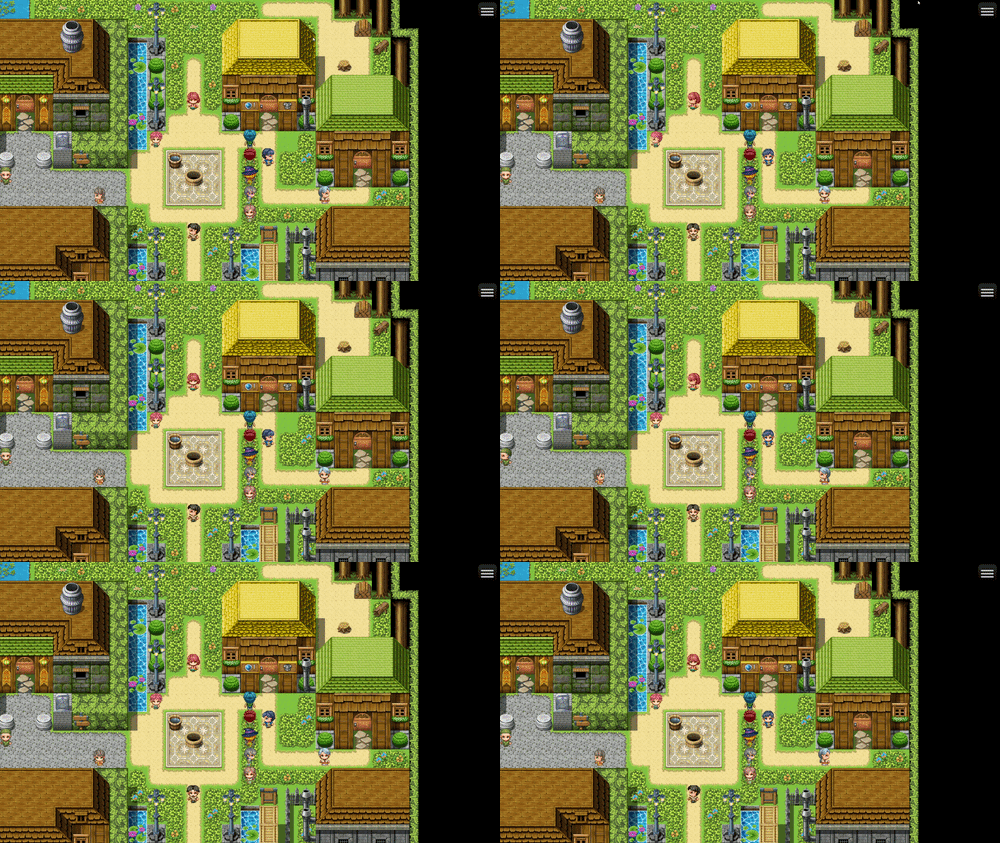
You'll need to make some fine adjustments to the zoom and curvature parameters of the plugin until you reach an aspect ratio that you feel is satisfactory.
The example I'm going to show now is at a resolution of 1280 x 720.
To achieve this aspect ratio:
I used this configuration: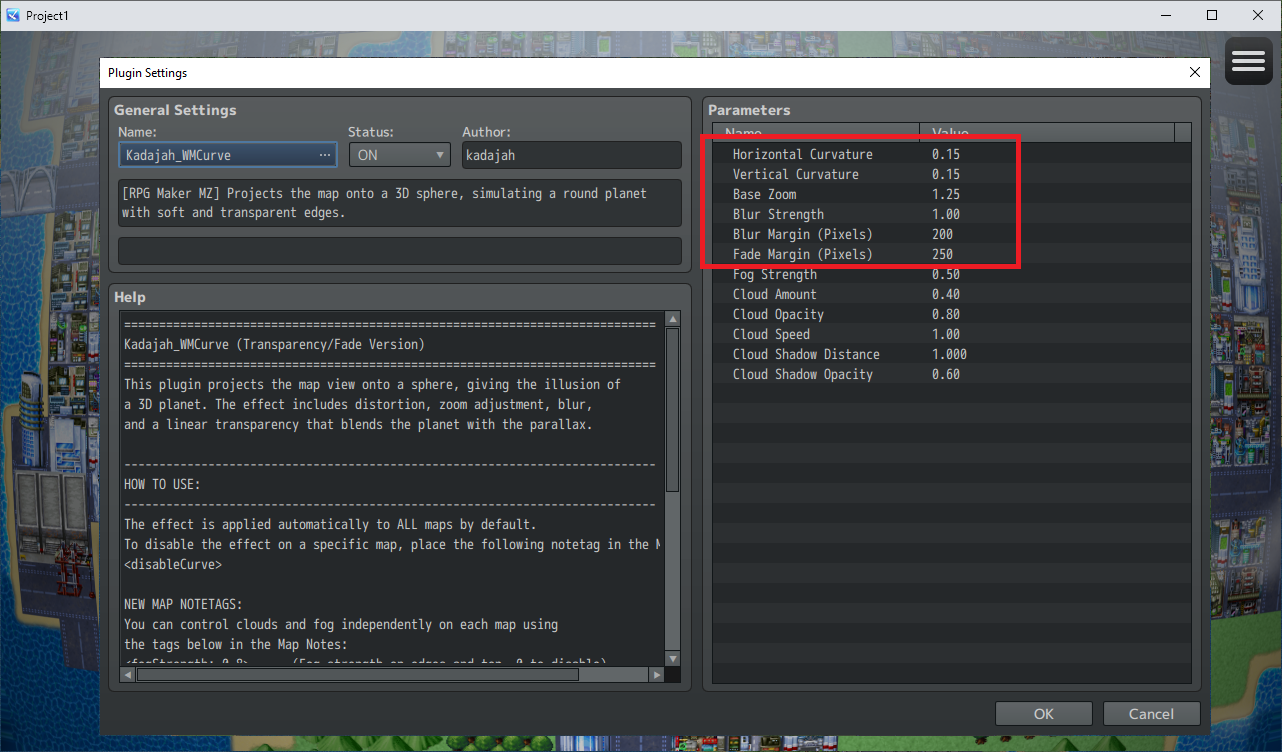
Let me know if you have any questions.
Kadajah's LookAround System for RPG Maker MZ comments · Replied to EchoWake in Kadajah's LookAround System for RPG Maker MZ comments

Kadajah's Skill Tree - License Board + Sphere Grid for RPG Maker MZ comments · Replied to jedite1000 in Kadajah's Skill Tree - License Board + Sphere Grid for RPG Maker MZ comments
 It was my mistake not to explain this correctly in a devlog or documentation; the Weapon Unlock option was a later addition, and I failed to explain its functionality.
It doesn't unlock the weapon itself; my plugin doesn't make any inventory changes. This function unlocks the weapon type, and this ID is the weapon type ID in the RPG Maker database.
With this node, you can allow a mage to use a broadsword or a martial artist to use a bow. It basically enables a weapon type that wasn't natively available to your character's class, making it available.