
🤖 Start ngrok*
In order for Slack to contact your local server, you'll need to run a tunnel. We recommend ngrok or localtunnel. We're going to use ngrok for this example.
If you don't have ngrok, download it here.
Here's a rudimentary diagream of how ngrok allows Slack to connect to your server
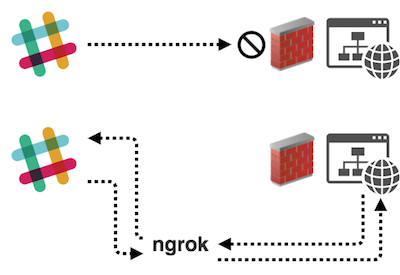
- 💡 Slack requires event requests be delivered over SSL, so you'll want to
- use the HTTPS URL provided by ngrok.
Run ngrok and copy the HTTPS URL
ngrok http 3000
ngrok by @inconshreveable (Ctrl+C to quit)

Session status                      online
Version                             2.1.18
Region                  United States (us)
Web Interface        http://127.0.0.1:4040

Forwarding http://h7465j.ngrok.io -> localhost:9292
Forwarding https://h7465j.ngrok.io -> localhost:9292
🤖 Run the app:
You'll need to have your server and ngrok running to complete your app's Event Subscription setup
python app.py
🤖 Subscribe your app to events
Add your Request URL (your ngrok URL + /slack/events) and subscribe your app to message.channels under bot events. Save and toggle Enable Events to on


🎉 Once your app has been installed and subscribed to Bot Events, you will begin receiving event data from Slack
👋 Interact with your bot:
Invite your bot to a public channel, then paste ticket url and your bot will respond.
