About DataHub Lineage
Data lineage is a map that shows how data flows through your organization. It details where your data originates, how it travels, and where it ultimately ends up. This can happen within a single system (like data moving between Snowflake tables) or across various platforms.
With data lineage, you can
- Maintaining Data Integrity
- Simplify and Refine Complex Relationships
- Perform Lineage Impact Analysis
- Propagate Metadata Across Lineage
Viewing Lineage
You can view lineage under Lineage tab or Lineage Visualization screen.
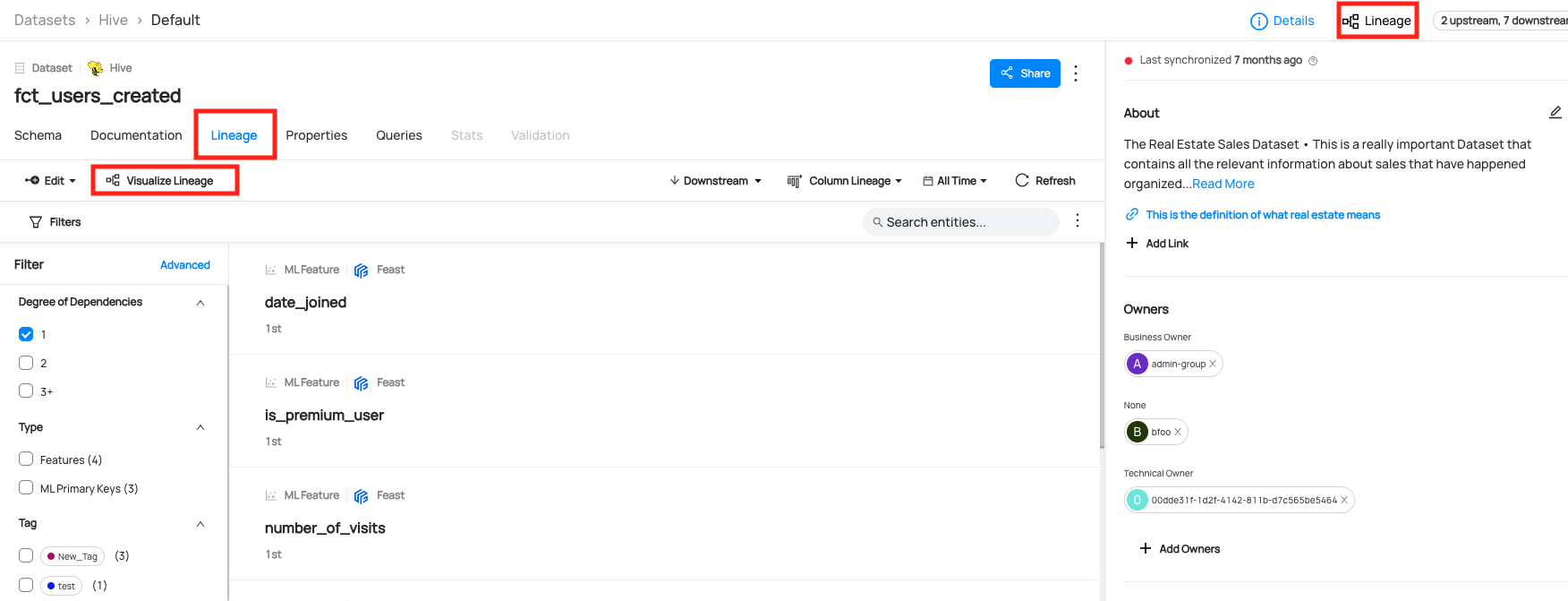
By default, The UI shows the latest version of the lineage. The time picker can be used to filter out edges within the latest version to exclude those that were last updated outside of the time window. Selecting time windows in the patch will not show you historical lineages. It will only filter the view of the latest version of the lineage.
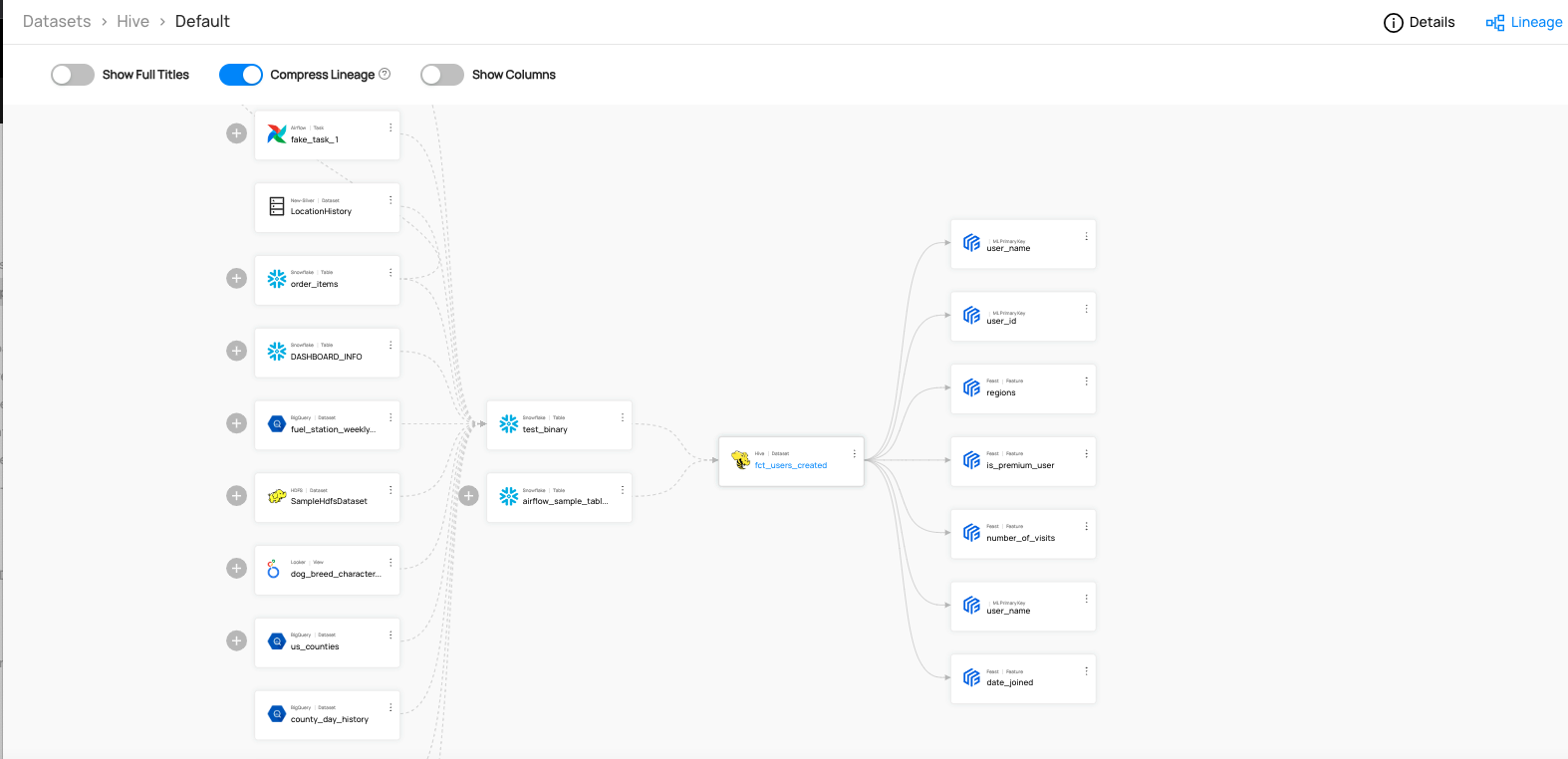
In this example, data flows from Airflow/BigQuery to Snowflake tables, then to the Hive dataset, and ultimately to the features of Machine Learning Models.
This means you have not yet ingested lineage metadata for that entity. Please ingest lineage to proceed.
Column Level Lineage Support
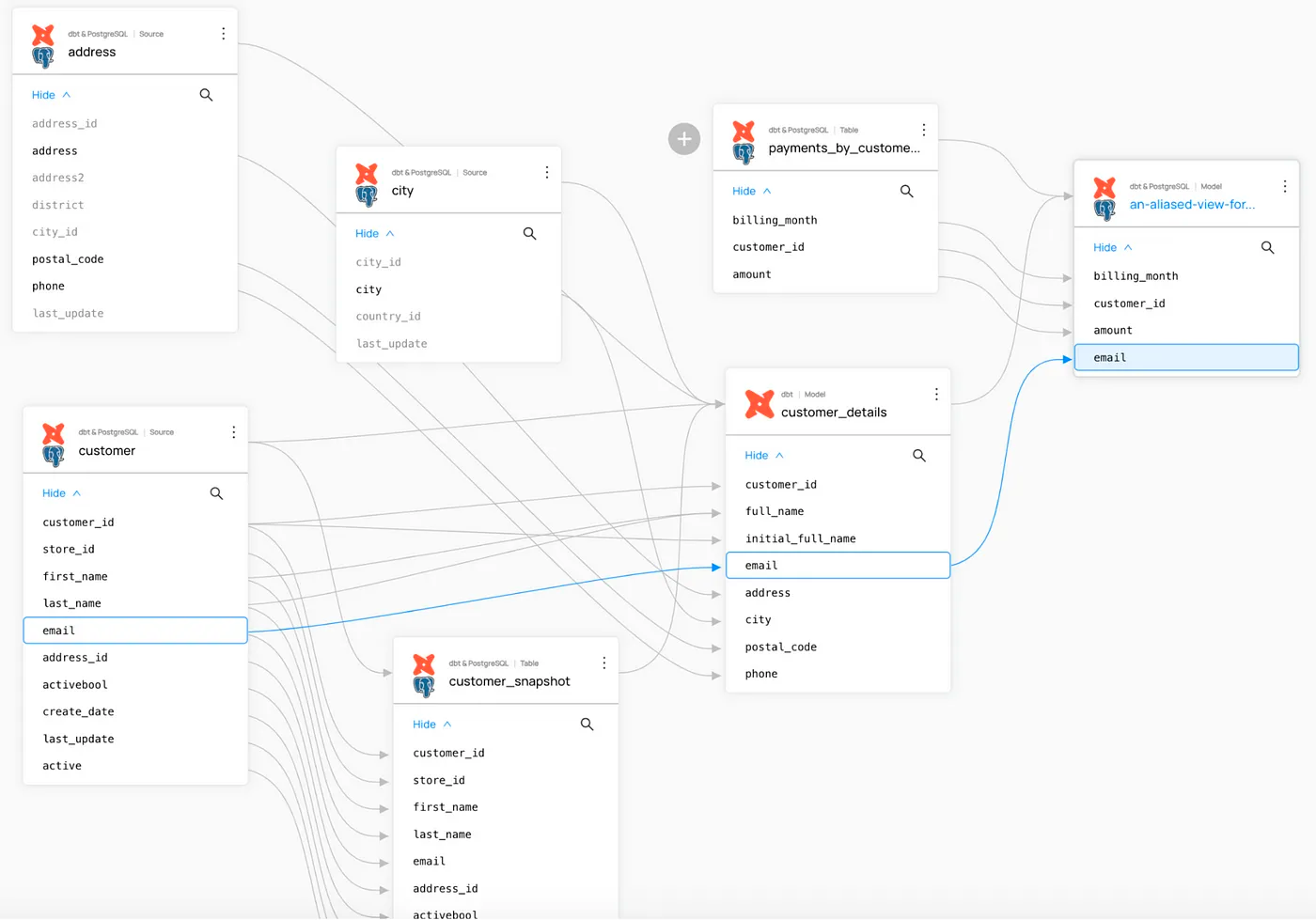
Column-level lineage tracks changes and movements for each specific data column. This approach is often contrasted with table-level lineage, which specifies lineage at the table level. Below is how column-level lineage can be set with dbt and Postgres tables.
Adding Lineage
Ingestion Source
If you're using an ingestion source that supports extraction of Lineage (e.g. Table Lineage Capability), then lineage information can be extracted automatically. For detailed instructions, refer to the source documentation for the source you are using.
UI
As of v0.9.5, DataHub supports the manual editing of lineage between entities. Data experts are free to add or remove upstream and downstream lineage edges in both the Lineage Visualization screen as well as the Lineage tab on entity pages. Use this feature to supplement automatic lineage extraction or establish important entity relationships in sources that do not support automatic extraction. Editing lineage by hand is supported for Datasets, Charts, Dashboards, and Data Jobs.
Please refer to our UI Guides on Lineage for more information.
Lineage added by hand and programmatically may conflict with one another to cause unwanted overwrites. It is strongly recommend that lineage is edited manually in cases where lineage information is not also extracted in automated fashion, e.g. by running an ingestion source.
API
If you are not using a Lineage-support ingestion source, you can programmatically emit lineage edges between entities via API. Please refer to API Guides on Lineage for more information.
Lineage Support
DataHub supports automatic table- and column-level lineage detection from BigQuery, Snowflake, dbt, Looker, PowerBI, and 20+ modern data tools. For data tools with limited native lineage tracking, DataHub's SQL Parser detects lineage with 97–99% accuracy, ensuring teams will have high quality lineage graphs across all corners of their data stack.
Types of Lineage Connections
Types of lineage connections supported in DataHub and the example codes are as follows.
- Dataset to Dataset
- DataJob to DataFlow
- DataJob to Dataset
- Chart to Dashboard
- Chart to Dataset
Automatic Lineage Extraction Support
This is a summary of automatic lineage extraciton support in our data source. Please refer to the Important Capabilities table in the source documentation. Note that even if the source does not support automatic extraction, you can still add lineage manually using our API & SDKs.
| Source | Table-Level Lineage | Column-Level Lineage | Related Configs |
|---|---|---|---|
| ABS Data Lake | ❌ | ❌ | |
| Athena | ✅ | ❌ | - incremental_lineage - include_table_location_lineage - include_view_lineage - include_view_column_lineage |
| BigQuery | ✅ | ✅ | - enable_stateful_lineage_ingestion - incremental_lineage - include_table_location_lineage - lineage_use_sql_parser - lineage_parse_view_ddl - lineage_sql_parser_use_raw_names - extract_column_lineage - extract_lineage_from_catalog - include_table_lineage - upstream_lineage_in_report |
| Business Glossary | ❌ | ❌ | |
ClickHouse clickhouse | ❌ | ❌ | |
ClickHouse clickhouse-usage | ❌ | ❌ | |
| CockroachDB | ✅ | ❌ | - incremental_lineage - include_table_location_lineage - include_view_lineage - include_view_column_lineage |
| CSV Enricher | ❌ | ❌ | |
| Databricks | ✅ | ✅ | - incremental_lineage - include_table_location_lineage - include_view_lineage - include_view_column_lineage - include_table_lineage - include_external_lineage - include_column_lineage - column_lineage_column_limit |
| DataHub | ❌ | ❌ | |
| DataHubGc | ❌ | ❌ | |
dbt dbt | ✅ | ✅ | - incremental_lineage - prefer_sql_parser_lineage - skip_sources_in_lineage - include_column_lineage |
dbt dbt-cloud | ✅ | ✅ | - incremental_lineage - prefer_sql_parser_lineage - skip_sources_in_lineage - include_column_lineage |
| Delta Lake | ❌ | ❌ | |
| Druid | ❌ | ❌ | |
| Elasticsearch | ❌ | ❌ | |
| Feast | ✅ | ❌ | |
| File Based Lineage | ✅ | ✅ | |
| Fivetran | ❌ | ✅ | - include_column_lineage |
| Glue | ✅ | ❌ | - emit_s3_lineage - glue_s3_lineage_direction - include_column_lineage |
| Google Cloud Storage | ❌ | ❌ | |
| Grafana | ❌ | ❌ | |
| Hive | ❌ | ❌ | |
Hive Metastore hive-metastore | ❌ | ❌ | |
Hive Metastore presto-on-hive | ❌ | ❌ | |
| Kafka | ❌ | ❌ | |
| Kafka Connect | ✅ | ❌ | - convert_lineage_urns_to_lowercase |
Looker looker | ✅ | ✅ | - extract_column_level_lineage |
Looker lookml | ✅ | ✅ | - extract_column_level_lineage |
| MariaDB | ❌ | ❌ | |
| Metabase | ✅ | ❌ | |
Metadata File file | ❌ | ❌ | |
Metadata File metadata-file | ❌ | ❌ | |
| Microsoft SQL Server | ❌ | ❌ | |
| MLflow | ❌ | ❌ | |
| Mode | ✅ | ✅ | |
| MongoDB | ❌ | ❌ | |
| MySQL | ❌ | ❌ | |
| NiFi | ✅ | ❌ | - incremental_lineage |
| Okta | ❌ | ❌ | |
| Oracle | ❌ | ❌ | |
| Postgres | ✅ | ❌ | - incremental_lineage - include_table_location_lineage - include_view_lineage - include_view_column_lineage |
PowerBI powerbi | ✅ | ✅ | - extract_lineage - convert_lineage_urns_to_lowercase - enable_advance_lineage_sql_construct - extract_column_level_lineage |
PowerBI powerbi-report-server | ❌ | ❌ | |
| Presto | ❌ | ❌ | |
| Qlik Sense | ✅ | ✅ | |
| Redash | ✅ | ❌ | |
| Redshift | ✅ | ✅ | - enable_stateful_lineage_ingestion - incremental_lineage - s3_lineage_config - include_table_location_lineage - include_view_lineage - include_view_column_lineage - use_lineage_v2 - lineage_v2_generate_queries - include_table_lineage - include_copy_lineage - include_unload_lineage - include_table_rename_lineage - table_lineage_mode - extract_column_level_lineage - resolve_temp_table_in_lineage |
| S3 / Local Files | ❌ | ❌ | |
| SageMaker | ✅ | ❌ | |
| Salesforce | ❌ | ❌ | |
| SAP Analytics Cloud | ✅ | ❌ | - incremental_lineage |
| SAP HANA | ❌ | ❌ | |
| Sigma | ✅ | ❌ | - extract_lineage - workbook_lineage_pattern |
| Slack | ❌ | ❌ | |
| Snowflake | ✅ | ✅ | - enable_stateful_lineage_ingestion - incremental_lineage - include_table_location_lineage - include_view_lineage - include_view_column_lineage - include_table_lineage - ignore_start_time_lineage - upstream_lineage_in_report - include_column_lineage |
| SQL Queries | ✅ | ✅ | |
| Superset | ✅ | ❌ | |
| Tableau | ✅ | ✅ | - extract_column_level_lineage - lineage_overrides - extract_lineage_from_unsupported_custom_sql_queries - force_extraction_of_lineage_from_custom_sql_queries |
| Teradata | ✅ | ✅ | - incremental_lineage - include_table_location_lineage - include_view_lineage - include_view_column_lineage - include_table_lineage |
Trino trino | ❌ | ❌ | |
Trino starburst-trino-usage | ❌ | ❌ | |
| Vertica | ✅ | ❌ | - incremental_lineage - include_table_location_lineage - include_view_lineage - include_view_column_lineage - include_projection_lineage |
SQL Parser Lineage Extraction
If you’re using a different database system for which we don’t support column-level lineage out of the box, but you do have a database query log available, we have a SQL queries connector that generates column-level lineage and detailed table usage statistics from the query log.
If these does not suit your needs, you can use the new DataHubGraph.parse_sql_lineage() method in our SDK. (See the source code here)
For more information, refer to the Extracting Column-Level Lineage from SQL
We're actively working on expanding lineage support for new data sources. Visit our Official Roadmap for upcoming updates!