
The SQL WITH clause (Common Table Expression or CTE) defines a temporary result set that can be used within a query. It simplifies complex SQL statements, making them easier to read, manage, and reuse.
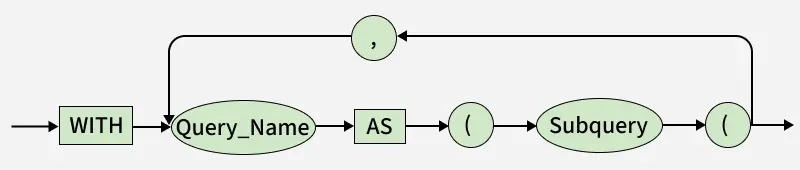
- WITH: Starts the CTE definition, creating a temporary result set.
- QueryName: User-defined name to reference the CTE later.
- AS: Connects the CTE name with its subquery.
- ( ) : Encloses the subquery (e.g., a SELECT statement).
- Subquery: Provides data for the CTE, improving readability and reuse.
- Flow: Syntax , WITH QueryName AS (Subquery) followed by the main query.
Syntax:
WITH cte_name (column1, column2, ...)
AS (
    SELECT column1, column2, ...
    FROM table_name
    WHERE condition
)
SELECT *
FROM cte_name;- cte_name is the name of the Common Table Expression.
- The query inside parentheses defines the temporary result set.
- The main query uses this CTE as if it were a table.
Examples of SQL WITH Clause
First, we will create a demo SQL database and table, on which we will use the WITH Clause command.

Example 1: Finding Employees with Above-Average Salary
This example demonstrates how to find all employees whose salary is higher than the average salary of all employees in the database. The query calculates the average salary using the WITH clause and compares each employee's salary against this average to return those with above-average salaries.
Query:
WITH AvgSalaryCTE (averageValue) AS (
    SELECT AVG(Salary)
    FROM Employees
)
SELECT
    EmployeeID,
    Name,
    Salary
FROM
    Employees
WHERE
    Salary > (SELECT averageValue FROM AvgSalaryCTE);
Output:

- This query returns employees whose salary is higher than the average salary.
- The CTE (temporaryTable) first calculates the average salary, and the main query then selects employees earning more than that value.
Example 2: Finding Employees with the Lowest Salary
In this example, we find the employee or employees who earn the lowest salary in the company. The WITH clause is used to first calculate the minimum salary from the Employees table, and then the main query retrieves the details of employees whose salary matches this minimum value.
Query:
WITH MinSalaryCTE (min_salary) AS (
    -- 1. Calculate the single lowest salary value
    SELECT MIN(Salary)
    FROM Employees
)
SELECT
    e.EmployeeID,
    e.Name,
    e.Salary
FROM
    Employees e
WHERE
    e.Salary = (SELECT min_salary FROM MinSalaryCTE);
Output

- CTE (WITH MinSalaryCTE): A temporary step that calculates and stores the single lowest salary value from the entire Employees table using the MIN(Salary) function.
- Main SELECT: Retrieves the details (EmployeeID, Name, Salary) from the Employees table.
- WHERE Filter: Compares every employee's salary to the lowest value calculated in the CTE, returning only the rows where the employee's salary is equal to the company minimum.
Nested (Chained) WITH Clauses
A Nested or Chained WITH Clause defines multiple Common Table Expressions (CTEs) within a single query, where a later CTE references the result of a previous CTE. This allows you to break down a complex, multi-step calculation into logical, readable parts.
WITH DeptAvg AS (
    SELECT Department, AVG(Salary) AS AvgSalary
    FROM Employees
    GROUP BY Department
),
RankedEmployees AS (
    SELECT e.EmployeeID, e.Name, e.Department, e.Salary,
           RANK() OVER (PARTITION BY e.Department ORDER BY e.Salary DESC) AS SalaryRank
    FROM Employees e
    JOIN DeptAvg d ON e.Department = d.Department
)
SELECT *
FROM RankedEmployees
WHERE SalaryRank = 1;
Output:

- DeptAvg (first CTE): Calculates the average salary for each department, preparing department-level salary data for further processing.
- RankedEmployees (second CTE): Uses RANK() to rank employees within each department by salary in descending order, assigning SalaryRank = 1 to the highest-paid employee(s).
- Final SELECT: Filters the result to return only employees with SalaryRank = 1, displaying the top earner(s) in each department (including ties).
Note: When a query with a WITH clause runs, the subquery inside it is executed first to create a temporary result set, which is then used by the main query.