
Sampling from a population is a technique in statistics and data analysis. It allows we to draw conclusions about a large group (the population) by examining a smaller, representative subset (the sample). In R programming language, we can perform random sampling to obtain a sample from a population, which is useful for various applications such as hypothesis testing, data visualization, and model building.
Sampling with Replacement
When we sample with replacement, each selected item is returned to the population before the next item is drawn. In R, we can specify this behavior using the replace argument in the sample() function.
1. Creating a Vector and Sampling with Replacement
We create a numeric vector and randomly sample values with replacement.
- sample: Used to draw random samples from the given vector.
- replace: Decides whether to allow repeated values in the sample.
population_vector <- c(10, 20, 30, 40, 50)
sampled_vector <- sample(population_vector, size = 3, replace = TRUE)
print(sampled_vector)
Output:
[1] 20 30 40
2. Creating a Data Frame and Sampling Rows with Replacement
We create a data frame and draw a sample of rows from it with replacement.
- data.frame: Used to create tabular data.
- nrow: Returns the number of rows in the data frame.
- sample: Selects random row numbers.
- replace: Allows repeated rows in the sample.
population_df <- data.frame(
  Name = c("Alice", "Bob", "Charlie", "David", "Eve"),
  Age = c(25, 30, 35, 40, 45)
)

sampled_df <- population_df[sample(nrow(population_df), size = 2, replace = TRUE), ]
print(sampled_df)
Output:

3. Creating a List and Sampling Elements with Replacement
We define a list and extract a sample of elements from one of its components.
- list: Stores heterogeneous data in R.
- sample: Randomly selects values from a vector.
- replace: Allows values to repeat in the result.
population_list <- list(
  fruits = c("Apple", "Banana", "Cherry", "Date"),
  colors = c("Red", "Yellow", "Red", "Brown")
)

sampled_list <- sample(population_list$fruits, size = 4, replace = TRUE)
print(sampled_list)
Output
[1] "Apple" "Banana" "Banana" "Date"
4. Replicating a Sampling Process
We replicate the sampling operation multiple times without replacement.
- replicate: Repeats an expression a specific number of times.
- sample: Selects values randomly from the vector.
- replace: Ensures no repeated values in each sample.
population_vector <- c(10, 20, 30, 40, 50, 60, 70, 80, 90, 100)
replicated_samples <- replicate(5, sample(population_vector, size = 3, replace = FALSE))
print(replicated_samples)
Output:

Sampling without replacement
We demonstrate how to perform random sampling without replacement using basic R functions.
1. Sampling from a Vector without Replacement
We randomly select unique elements from a vector without repetition.
- sample: Used to draw values randomly.
- replace: Set to FALSE to avoid repetition.
items <- c(1, 2, 3, 4, 5, 6, 7, 8, 9, 10)
sample_size <- 5
sample <- sample(items, size = sample_size, replace = FALSE)
print(sample)
Output
[1] 7 8 4 2 1
2. Shuffling a Deck and Drawing Cards without Replacement
We simulate shuffling a deck of cards and draw a hand without repetition.
- sample: Randomizes the order of card indices.
- length: Provides the number of elements to shuffle.
deck <- 1:52
shuffled_deck <- sample(deck, size = length(deck), replace = FALSE)
hand_size <- 5
hand <- shuffled_deck[1:hand_size]
print(hand)
Output:
[1] 21 29 1 34 2
Random sampling using the dplyr package
The dplyr package in R is used for data manipulation and transformation. It has many functions that make it simpler to work with data casings and data tables. Using dplyr , random sampling can be performed using the sample_n() and sample_frac() functions.
1. Sampling Rows from a Data Frame using dplyr
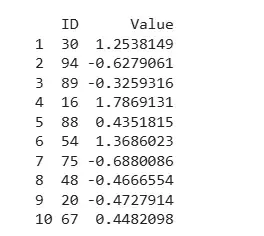
We use the dplyr package to randomly sample a fixed number of rows.
- library: Loads external packages.
- data.frame: Creates structured tabular data.
- sample_n: Randomly selects a fixed number of rows.
- set.seed: Ensures reproducible results.
- rnorm: Generates random normal values.
library(dplyr)
set.seed(123)
data <- data.frame(
  ID = 1:100,
  Value = rnorm(100)
)

sampled_data <- data %>%
  sample_n(10)

print(sampled_data)
Output:
2. Sampling a Fraction of Rows using dplyr
We randomly sample a specific fraction of rows from a data frame.
- sample_frac: Selects a random percentage of rows.
- set.seed: Ensures the sampling process is reproducible.
- rnorm: Generates random values from a normal distribution.
library(dplyr)
set.seed(456)
data <- data.frame(
  ID = 1:200,
  Value = rnorm(200)
)

sampled_data <- data %>%
  sample_frac(0.20)

head(sampled_data)
Output:
