
Predictive analytics in healthcare can significantly enhance patient outcomes and streamline healthcare operations. Visualization plays a critical role in understanding the data and the predictions made by analytical models. In this article, we will explore predictive healthcare analysis using R Programming Language, focusing on creating insightful visualizations with a synthetic dataset.
Introduction to Predictive Healthcare Analysis
Predictive healthcare analysis involves using historical data and statistical methods to predict future outcomes, such as patient readmission rates, disease progression, and resource utilization. Visualizations help in understanding patterns and deriving actionable insights from these predictions.
Creating a Synthetic Healthcare Dataset
We'll create a synthetic dataset to explain healthcare data.
# Load necessary libraries
library(tidyverse)

# Set seed for reproducibility
set.seed(123)

# Create a synthetic dataset
healthcare_data <- tibble(
  PatientID = 1:1000,
  Age = sample(18:90, 1000, replace = TRUE),
  Gender = sample(c("Male", "Female"), 1000, replace = TRUE),
  BMI = round(runif(1000, 15, 40), 1),
  BloodPressure = round(runif(1000, 90, 180), 0),
  Cholesterol = round(runif(1000, 100, 300), 0),
  Diabetes = sample(c("Yes", "No"), 1000, replace = TRUE),
  HeartDisease = sample(c("Yes", "No"), 1000, replace = TRUE),
  Readmission = sample(c("Yes", "No"), 1000, replace = TRUE)
)

# Display the first few rows of the dataset
head(healthcare_data)
Output:
# A tibble: 6 × 9
  PatientID   Age Gender   BMI BloodPressure Cholesterol Diabetes HeartDisease Readmission
      <int> <int> <chr>  <dbl>         <dbl>       <dbl> <chr>    <chr>        <chr>
1         1    48 Female  15.4           104         238 Yes      No           Yes
2         2    68 Female  37.6           142         183 Yes      Yes          Yes
3         3    31 Female  34.9           154         238 Yes      No           Yes
4         4    84 Male    16.9           115         290 Yes      Yes          Yes
5         5    59 Female  17.5            92         110 Yes      No           No
6         6    67 Male    19.3           154         224 No       No           No
Distribution of Age
Understanding the age distribution of patients can help identify the age group most affected by certain conditions.
# Distribution of Age
ggplot(healthcare_data, aes(x = Age)) +
  geom_histogram(binwidth = 5, fill = "blue", color = "black") +
  labs(title = "Age Distribution", x = "Age", y = "Count")
Output:

This histogram shows the frequency distribution of patients' ages, helping us to identify the most common age ranges in the dataset.
BMI vs. Heart Disease
Analyzing the distribution of BMI with respect to heart disease status.
# BMI vs. Heart Disease
ggplot(healthcare_data, aes(x = BMI, fill = HeartDisease)) +
  geom_histogram(binwidth = 1, position = "dodge") +
  labs(title = "BMI Distribution by Heart Disease", x = "BMI", y = "Count")
Output:

This histogram can reveal if there's a relationship between BMI and heart disease, indicating whether higher or lower BMIs are associated with heart disease.
Advanced Donut Chart of Readmission Status
Donut charts are a variation of pie charts with a hole in the center, often used to display a part-to-whole relationship.
# Donut Chart of Readmission Status
readmission_dist <- healthcare_data %>%
  count(Readmission) %>%
  mutate(percentage = n / sum(n) * 100)

ggplot(readmission_dist, aes(x = 2, y = percentage, fill = Readmission)) +
  geom_bar(stat = "identity", width = 1) +
  coord_polar("y", start = 0) +
  labs(title = "Readmission Status", x = NULL, y = NULL) +
  theme_void() +
  xlim(0.5, 2.5)
Output:

The resulting chart is a donut chart that visualizes the distribution of readmission statuses in the healthcare dataset. Here's a breakdown of what you will see in the output:
- Circular Segments: The chart will have two circular segments, each representing one of the categories in the Readmission column (e.g., "Yes" and "No").
- Proportions: The size of each segment corresponds to the percentage of patients who fall into each readmission category. For example, if 60% of patients were readmitted, the "Yes" segment will cover 60% of the donut chart's circumference.
- Colors: Each segment will be filled with a different color based on the Readmission status. By default, ggplot2 will assign different colors to "Yes" and "No".
Faceted Histogram of Age by Gender
Faceting allows for the creation of multiple subplots based on a categorical variable.
# Faceted Histogram of Age by Gender
ggplot(healthcare_data, aes(x = Age)) +
  geom_histogram(binwidth = 5, fill = "purple", color = "black") +
  facet_wrap(~ Gender) +
  labs(title = "Age Distribution by Gender", x = "Age", y = "Count") +
  theme_minimal() +
  scale_fill_manual()
Output:
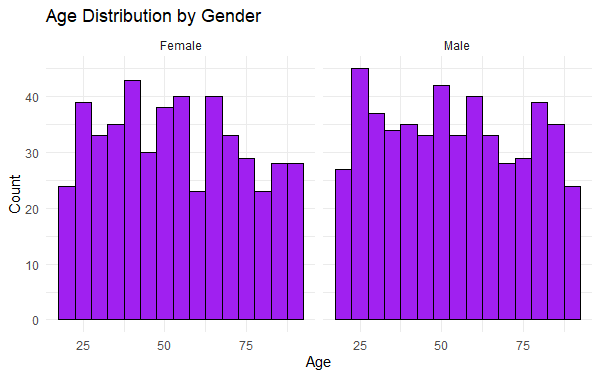
This faceted histogram to visualize the age distribution of patients, separated by gender. The geom_histogram() function creates histograms with a bin width of 5 years, and each gender (Male and Female) has its own subplot due to facet_wrap(~ Gender). The fill color of the bars is set to purple with black outlines. The labs() function adds a title and axis labels to the plot. theme_minimal() applies a clean, minimalistic theme to the chart. This visualization allows for an easy comparison of age distributions between males and females in the dataset.
Building Predictive Models
We will build a logistic regression model to predict the likelihood of readmission.
# Load necessary libraries
library(caret)
library(e1071)

# Convert categorical variables to factors
healthcare_data <- healthcare_data %>%
  mutate(
    Gender = as.factor(Gender),
    Diabetes = as.factor(Diabetes),
    HeartDisease = as.factor(HeartDisease),
    Readmission = as.factor(Readmission)
  )

# Split the data into training and testing sets
set.seed(123)
train_index <- createDataPartition(healthcare_data$Readmission, p = 0.7, list = FALSE)
train_data <- healthcare_data[train_index, ]
test_data <- healthcare_data[-train_index, ]

# Train a logistic regression model
model <- train(Readmission ~ Age + Gender + BMI + BloodPressure + Cholesterol + Diabetes + HeartDisease,
               data = train_data, method = "glm", family = "binomial")

# Make predictions
predictions <- predict(model, test_data)
confusionMatrix(predictions, test_data$Readmission)
Output:
Confusion Matrix and Statistics

          Reference
Prediction  No Yes
       No   40  79
       Yes 104  76

               Accuracy : 0.388
                 95% CI : (0.3324, 0.4458)
    No Information Rate : 0.5184
    P-Value [Acc > NIR] : 1.00000

                  Kappa : -0.2333

 Mcnemar's Test P-Value : 0.07604

            Sensitivity : 0.2778
            Specificity : 0.4903
         Pos Pred Value : 0.3361
         Neg Pred Value : 0.4222
             Prevalence : 0.4816
         Detection Rate : 0.1338
   Detection Prevalence : 0.3980
      Balanced Accuracy : 0.3841

       'Positive' Class : No
Conclusion
Predictive healthcare analysis in R provides valuable insights that can help healthcare providers improve patient outcomes and operational efficiency. By creating a synthetic dataset, performing exploratory data analysis, building predictive models, and visualizing the results, we can uncover patterns and make informed decisions. Advanced visualizations, such as pie charts, donut charts, stacked bar charts, and faceted histograms, play a crucial role in interpreting the data and the model's performance.