
The DevOps Lifecycle is a continuous, looping process that bridges the gap between software development (Dev) and IT operations (Ops). Unlike traditional models where development and operations were siloed steps, DevOps integrates them into a single, infinite loop of collaboration, automation, and feedback.
Phases of DevOps Lifecycle

Phase 1: Plan (Dev)
Before a single line of code is written, the team must define the value they are creating.
- Goal: Define requirements, create roadmaps, and organize tasks.
- Key Activities: Backlog management, sprint planning, user story creation.
- Tools: Jira, Trello, Azure Boards.
Phase 2: Code (Dev)
Developers write the code and commit it to a shared repository.
- Goal: Write high-quality, version-controlled code.
- Key Activities: Coding, code reviews, merging branches.
- Tools: Git, GitHub, GitLab, Bitbucket.
Phase 3: Build (Dev)
Once code is committed, it is pulled and compiled into an executable format.
- Goal: Detect compilation errors early and package the application.
- Key Activities: Compiling code, dependency management, creating container images (Docker).
- Tools: Maven, Gradle, Docker, Packer.
Phase 4: Test (Dev)
The build is tested for bugs, security vulnerabilities, and performance issues.
- Goal: Ensure software quality and prevent bugs from reaching production.
- Key Activities: Unit testing, integration testing, static code analysis.
- Tools: Selenium, JUnit, SonarQube, TestNG.
Phase 5: Release (Ops)
The code has passed testing and is ready to be deployed. This phase manages the versioning and approval.
- Goal: Schedule and manage the release to specific environments (Staging/Prod).
- Key Activities: Artifact versioning, change management approvals.
- Tools: Jenkins, GitLab CI, CircleCI.
Phase 6: Deploy (Ops)
The application is pushed to the production servers.
- Goal: Deliver the software to end-users with zero downtime.
- Key Activities: Infrastructure provisioning (IaC), configuration management, blue/green deployments.
- Tools: Terraform, Ansible, Kubernetes (ArgoCD), AWS CodeDeploy.
Phase 7: Operate (Ops)
The software is live. This phase involves the day-to-day management of the infrastructure running the app.
- Goal: Ensure system uptime and reliability.
- Key Activities: Server patching, auto-scaling, database management.
- Tools: Chef, Puppet, PowerShell, Ansible.
Phase 8: Monitor (Ops)
Data is collected from the live application to understand user behavior and system performance. This feedback loops back into the Plan phase.
- Goal: Detect issues immediately and gather insights for future improvements.
- Key Activities: Log analysis, performance tracking, alerting.
- Tools: Prometheus, Grafana, Nagios, ELK Stack (Elasticsearch, Logstash, Kibana).
7 Cs of DevOps
The 7 Cs of DevOps are core principles that help make DevOps successful. They guide how teams work together, build, test, and deliver software faster and more reliably. Each of these Cs contributes to a workflow that enhances the quality, speed, and reliability of delivering software products:
- Continuous Development
- Continuous Integration
- Continuous Testing
- Continuous Deployment/Continuous Delivery
- Continuous Monitoring
- Continuous Feedback
- Continuous Operations

1. Continuous Development
This stage focuses on the iterative planning and coding of software in small, manageable units. It allows for rapid updates and early bug detection.
- Focus: Version control and incremental coding.
- Example: A developer builds a "Login" feature on Monday and "Search" on Tuesday, rather than waiting weeks to finish the entire app.
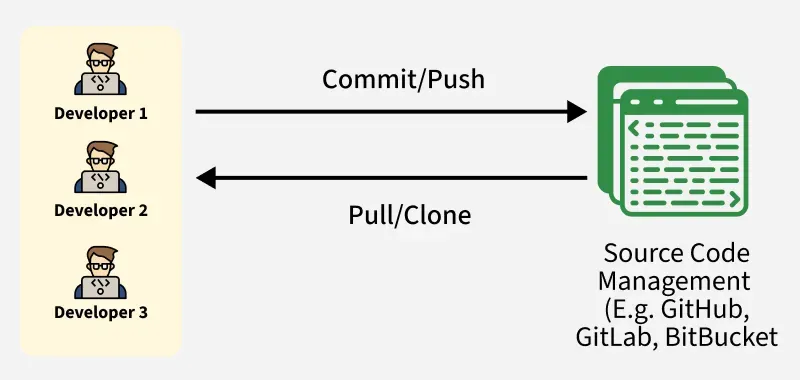
2. Continuous Integration (CI)
CI automates the process of merging code changes into a central repository. It includes automated building, quality checks, and storage.
- Tools: Jenkins, GitHub, Maven, SonarQube.
- Example: When Meena pushes code to GitHub, Jenkins automatically builds it and checks for bugs. If it passes, a "ready-to-use" file is saved.

3. Continuous Testing
Automated tests are executed every time the code changes. This ensures that new features don't break existing functionality.
- Tools: Selenium, Testsigma, JUnit.
- Example: After adding a "Coupon" feature, automated scripts immediately test if the discount applies correctly and if the checkout still works.

4. Continuous Deployment & Delivery
These processes bridge the gap between development and the live environment.
- Delivery: Code is always in a "ready-to-deploy" state but requires a manual click to go live.

- Deployment: Every change that passes testing is automatically pushed to users without human intervention.

- Example: A "Refer & Earn" feature sits in a staging area until the marketing team chooses to launch it (Delivery).
5. Continuous Monitoring
Teams track the health and performance of the application in real-time to catch issues before they cause a crash.

- Tools: Prometheus, Grafana.
- Example: If the app slows down during dinner rush, Prometheus alerts the team, and Grafana shows exactly which server is struggling.
6. Continuous Feedback
This involves collecting and analyzing data from end-users to improve the product. It creates a loop between the user and the developer.
- Focus: App reviews, error reports, and user surveys.
- Example: Users report that map tracking is laggy; the team analyzes this feedback and prioritizes a fix for the next update.
7. Continuous Operations
The goal is to eliminate downtime. Maintenance and updates are performed in a way that the application remains available to users at all times.
- Focus: High availability and uptime.
- Example: Updating the payment gateway in the background while users continue to order food without noticing any service interruption.
Best Practices of the DevOps Lifecycle
The DevOps lifecycle is a continuous loop of development and operations designed to bridge the gap between building and deploying software through automation and collaboration.
1. Culture & Collaboration
- Foster Shared Responsibility: Break down silos between Dev and Ops to align on common goals and faster issue resolution.
- Continuous Learning: Conduct retrospectives and prioritize iterative improvements based on team feedback.
2. Automation & Infrastructure
- CI/CD Pipelines: Automate code integration and delivery to catch bugs early and accelerate release cycles.
- Infrastructure as Code (IaC): Use tools like Terraform or Ansible to manage environments via code, ensuring consistency and repeatability.
- Automated Testing: Implement robust test suites to validate changes instantly and reduce manual overhead.
3. Architecture & Security
- DevSecOps: Shift security "left" by integrating vulnerability scanning and compliance checks early in the pipeline.
- Microservices: Use independent, modular services to improve scalability and allow for isolated updates.
4. Visibility & Versioning
- Version Control: Utilize Git to track every change, enabling seamless collaboration and easy rollbacks.
- Continuous Monitoring: Use tools like Prometheus or ELK Stack for real-time visibility into system health and performance.
5. Feedback Loops
- Continuous Feedback: Use data from stakeholders and monitoring tools to drive informed, user-centric development.
The Future: DevSecOps (Shifting Left)
In traditional models, security was a final checkpoint before release. In DevOps, security is integrated into every phase. This is known as DevSecOps or "Shifting Left."
- Plan: Threat modeling.
- Code: Secure coding standards.
- Build: SAST (Static Application Security Testing) to find vulnerabilities in code.
- Test: DAST (Dynamic Application Security Testing) to hack the running app.
- Deploy: Scanning Infrastructure as Code (IaC) for misconfigurations.
The DevOps Toolchain
| Category | Purpose | Popular Tools |
|---|---|---|
| Plan | Project Management | Jira, Trello, Monday.com |
| SCM | Source Code Management | Git, GitHub, GitLab |
| CI/CD | Automation Server | Jenkins, CircleCI, GitHub Actions |
| Build | Packaging & Containers | Maven, Docker, Gradle |
| Testing | Automated QA | Selenium, SonarQube, JUnit |
| Configuration | Managing Server State | Ansible, Chef, Puppet |
| IaC | Provisioning Infrastructure | Terraform, AWS CloudFormation |
| Orchestration | Managing Containers | Kubernetes (K8s), Docker Swarm |
| Monitoring | Observability | Prometheus, Grafana, Datadog, Nagios |