
Wi-Fi(Wireless Fidelity) launched in September 1997, is affiliated with WLAN (Wireless Local Area Network). It is a wireless communication technology that uses radio waves to provide a high-speed network and Internet connection. Sometimes there is a need to know the previously connected WiFi networks to get details on some network. There is a wide range of software available for the same. But, this can be done easily with the use of the command prompt of the windows. To show the History of previously connected WiFi networks using the command prompt of Windows, follow the steps given below:
Steps to Show all the previously connected WiFi Networks
Step 1:
Open Command Prompt by typing 'cmd' in Start Menu and right-click to run as administrator.
Alternatively,
- Press
Windows + Rto open the Run dialog. - Type
cmdand press Enter.
Step 2:
Now type the following command and press Enter:
netsh wlan show profiles

All the previously connected WiFi networks are now visible.
Step 3:
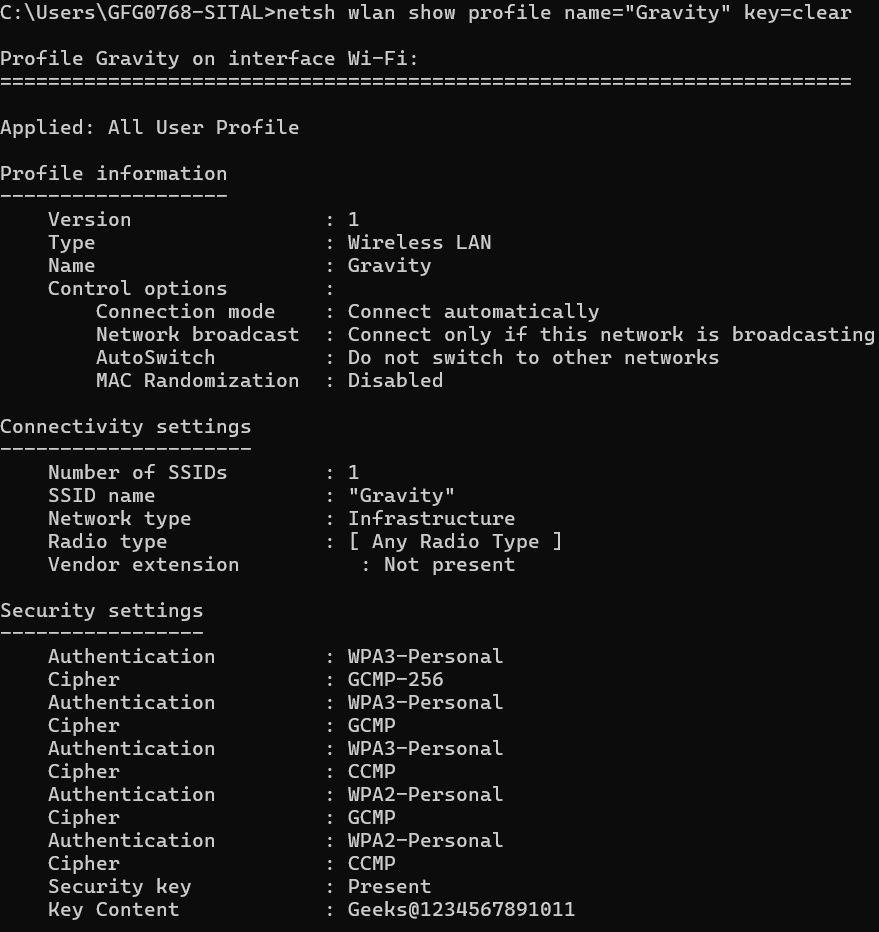
View Details of a Specific WiFi Profile
netsh wlan show profile name="Network_Name" key=clear
Example: netsh wlan show profile name="Gravity" key=clear
based on the name of available networks we can view details of a specific Wifi Profile
Step 4:
Export All WiFi Profiles (Optional)
we can export the full list of saved WiFi profiles with configurations using:
netsh wlan show profile name="Network_Name" key=clear
- This will save
.xmlfiles for each profile inC:\WiFiBackup. - The
key=clearoption that includes passwords in readable format.
Step 5:
To remove a profile we no longer use:
netsh wlan delete profile name="Network_Name"
Conclusion
CMD allows you view, view and undertake all the saved WiFi profiles in Windows — particularly for IT admins and those who like to tweak settings for others or care about their privacy. It is a completely software solutions, without any third-party hardware, that works on all modern Windows. Whether you are looking for lost passwords or deleting outdated connections, these are the commands that give you full control.