
LangChain is a framework for building applications with Large Language Models (LLMs). Its core components are Tools and Agents. Tools extend the capabilities of LLMs, while agents orchestrate tools to solve complex tasks intelligently.
- Tools: External functions, APIs or logic that an agent can call.
- Agents: LLM-powered entities that reason, plan and decide which tools to use to solve a query.
Agents in LangChain

An Agent is an LLM-powered system that plans, reasons and decides which tools to use to solve user queries. Agents are more intelligent than a standalone LLM because they can:
- Select tools based on task requirements.
- Chain multiple steps.
- Observe outputs and adjust decisions dynamically.
Types of Agents
1. OpenAI Function Agent: Uses OpenAI's function-calling API. This agent can structure outputs, call predefined functions and receive structured responses.
Use Case: Form-filling, structured API queries or validated output generation.
Implementation
- @tool decorator: Registers greet function as a tool that the agent can call.
- ChatOpenAI: Initializes the LLM with the GPT-4 function-calling model.
- ChatPromptTemplate: Sets up the conversation prompt for the agent.
- create_openai_functions_agent: Creates an agent that uses OpenAI function-calling to invoke tools.
- AgentExecutor: Wraps the agent to execute and manage tool calls.
- invoke({"input": "Greet Alice"}): The agent receives a user query and decides to call the greet tool.
from langchain.agents import create_openai_functions_agent, AgentExecutor
from langchain_openai import ChatOpenAI
from langchain_core.tools import tool
from langchain_core.prompts import ChatPromptTemplate, MessagesPlaceholder

@tool
def greet(name: str) -> str:
    """Return a greeting message for the given name."""
    return f"Hello, {name}!"

llm = ChatOpenAI(model="gpt-4-0613")

prompt = ChatPromptTemplate.from_messages([
    ("system", "You are a helpful assistant with access to tools."),
    ("human", "{input}"),
    MessagesPlaceholder(variable_name="agent_scratchpad"),
])

agent = create_openai_functions_agent(llm, [greet], prompt=prompt)
agent_executor = AgentExecutor(agent=agent, tools=[greet], verbose=True)

response = agent_executor.invoke({"input": "Greet Alice"})
print(response["output"])
Output:

2. OpenAI Tools Agent: Uses the LLM’s reasoning to choose which tool to invoke.
Use Case: Dynamic tasks where the agent decides which API or function is needed for the query.
Implementation
- @tool add(a,b): Registers a simple addition function as a tool.
- ChatOpenAI(model="gpt-3.5-turbo"): Uses a GPT-3.5 LLM for reasoning.
- create_openai_tools_agent: Creates an agent that can choose tools dynamically based on the query.
- AgentExecutor: Manages the agent’s execution and tool invocation.
from langchain.agents import create_openai_tools_agent, AgentExecutor
from langchain_openai import ChatOpenAI
from langchain_core.tools import tool
from langchain_core.prompts import ChatPromptTemplate, MessagesPlaceholder

@tool
def add(a: int, b: int) -> int:
    """Add two numbers and return the result."""
    return a + b

llm = ChatOpenAI(model="gpt-3.5-turbo")

prompt = ChatPromptTemplate.from_messages([
    ("system", "You are an assistant that answers using tools."),
    ("human", "{input}"),
    MessagesPlaceholder(variable_name="agent_scratchpad"),
])

agent = create_openai_tools_agent(llm, [add], prompt=prompt)
agent_executor = AgentExecutor(agent=agent, tools=[add], verbose=True)

result = agent_executor.invoke({"input": "What is 5 plus 7?"})
print(result["output"])
Output:

3. ReAct Agent: Combines Reasoning + Acting. The agent uses observations from tools to update its reasoning iteratively.
Use Case: Complex problem solving, multi-step planning or tasks that require trial-and-error reasoning.
Implementation
- REACT_PROMPT_TEMPLATE: Defines the ReAct reasoning format with Thought → Action → Observation.
- @tool echo: Registers a tool to simply return input as output.
- create_react_agent: Initializes an agent that iteratively reasons and acts.
- AgentExecutor(handle_parsing_errors=True): Ensures the agent handles output parsing robustly.
from langchain.prompts.chat import ChatPromptTemplate, MessagesPlaceholder
from langchain.agents import create_react_agent, AgentExecutor
from langchain_openai import ChatOpenAI
from langchain_core.tools import tool

REACT_PROMPT_TEMPLATE = """\ You are a thoughtful agent that reasons and acts in this format:

Thought: you should always think before acting
Action: the action to take, should be one of [{tool_names}]
Action Input: the input to the action
Observation: the result of the action

(Repeat Thought/Action/Action Input/Observation as needed)
Thought: I now know the final answer
Final Answer: the final answer to provide to the user

Tools:
{tools}

Begin!

Question: {input}
{agent_scratchpad}"""

@tool
def echo(text: str) -> str:
    """Return the input text as the output."""
    return text

llm = ChatOpenAI(model="gpt-4")

prompt = ChatPromptTemplate.from_template(REACT_PROMPT_TEMPLATE)
prompt.input_variables.extend(["tools", "tool_names"])

agent = create_react_agent(llm, [echo], prompt=prompt)
agent_executor = AgentExecutor(
    agent=agent, tools=[echo], verbose=True, handle_parsing_errors=True)

response = agent_executor.invoke({"input": "Echo Hello Geek"})
print(response["output"])
Output:

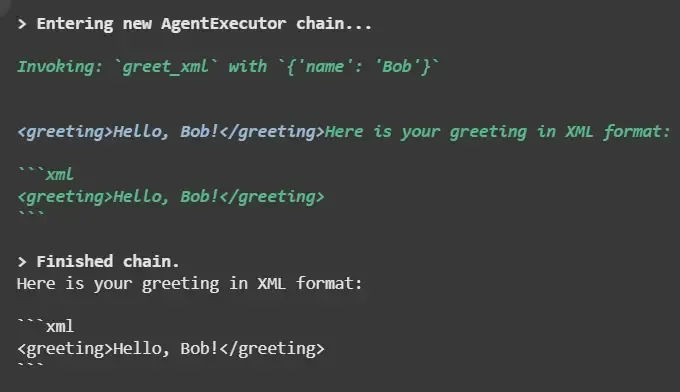
4. XML Agent: Handles structured XML inputs/outputs. Useful in domains requiring strict schema compliance like enterprise applications.
Implementation
- @tool greet_xml: Returns output formatted as XML.
- create_openai_tools_agent: Agent can select tools and handle XML output.
from langchain.agents import create_openai_tools_agent, AgentExecutor
from langchain_openai import ChatOpenAI
from langchain_core.tools import tool
from langchain_core.prompts import ChatPromptTemplate, MessagesPlaceholder

@tool
def greet_xml(name: str) -> str:
    """Return a greeting message wrapped in XML tags."""
    return f"<greeting>Hello, {name}!</greeting>"

llm = ChatOpenAI(model="gpt-4")

prompt = ChatPromptTemplate.from_messages([
    ("system", "You are an assistant that uses tools to answer."),
    ("human", "{input}"),
    MessagesPlaceholder(variable_name="agent_scratchpad"),
])

agent = create_openai_tools_agent(llm, [greet_xml], prompt=prompt)

agent_executor = AgentExecutor(agent=agent, tools=[greet_xml], verbose=True)

response = agent_executor.invoke({"input": "Greet Bob in XML format."})
print(response["output"])
Output:
5. JSON Chat Agent: Handles structured conversations in JSON format. Useful for chatbots with schema-based outputs or API interactions.
Implementation,
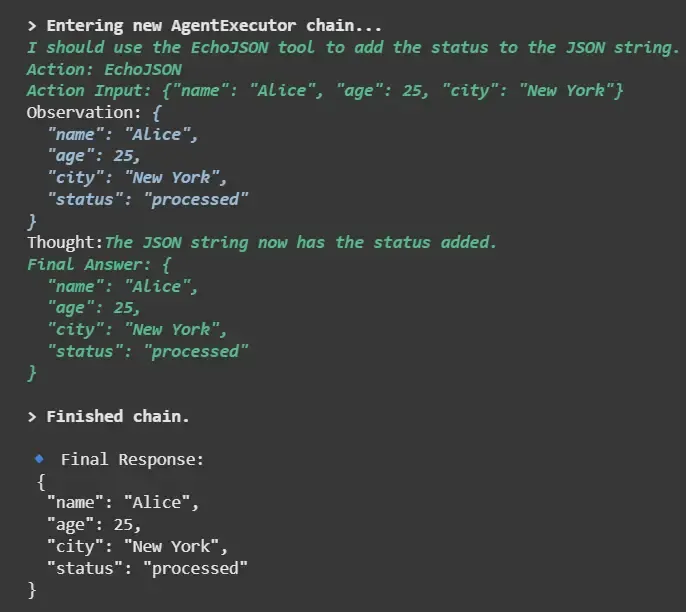
- echo_tool: Accepts a JSON string, modifies it, returns JSON.
- Tool(...): Registers echo_tool as a LangChain tool.
- initialize_agent: Creates a JSON-aware agent capable of processing JSON input/output.
def echo_tool(input_text: str) -> str:
    """Echo tool that expects JSON and returns it back with 'status=processed'."""
    try:
        data = json.loads(input_text)
        data["status"] = "processed"
        return json.dumps(data, indent=2)
    except Exception as e:
        return json.dumps({"error": str(e)})


tools = [
    Tool(
        name="EchoJSON",
        func=echo_tool,
        description="Takes a JSON string and returns it back with 'status=processed'."
    )
]

llm = ChatOpenAI(model="gpt-3.5-turbo", temperature=0)
agent = initialize_agent(
    tools=tools,
    llm=llm,
    agent=AgentType.ZERO_SHOT_REACT_DESCRIPTION,
    verbose=True
)

query = """Take the following info and return JSON with status:
{"name": "Alice", "age": 25, "city": "New York"}"""

response = agent.run(query)
print("\n Final Response:\n", response)
Output:
6. Structured Chat Agent: Uses predefined schemas to interact with multiple tools. Ensures structured inputs/outputs and predictable agent behavior.
Implementation,
- @tool book_flight: Registers a flight-booking simulation tool.
- hub.pull(...): Loads a predefined function-calling prompt.
- create_openai_functions_agent: Agent uses the schema to call functions predictably.
- AgentExecutor: Executes the agent and tool workflow.
from langchain import hub


@tool
def book_flight(origin: str, destination: str) -> str:
    """Simulate flight booking from origin to destination."""
    return f" Booked flight from {origin} to {destination}"


tools = [book_flight]

prompt = hub.pull("hwchase17/openai-functions-agent")
llm = ChatOpenAI(model="gpt-4", temperature=0)
agent = create_openai_functions_agent(llm=llm, tools=tools, prompt=prompt)
executor = AgentExecutor(agent=agent, tools=tools, verbose=True)

response = executor.invoke({"input": "Book a flight from NYC to LA"})
print("\nFinal Output:", response["output"])
Output:

Tools in LangChain

A Tool is any function, API or computational module that an agent can call. Tools extend the capabilities of LLMs beyond simple text generation, enabling dynamic computation, data retrieval and document processing.
- Tools are modular and reusable.
- Each tool has a name, function and description.
- Tools can be simple (calculator) or complex (flight booking, real-time web search).
- Agents rely on tool descriptions to decide which tool to invoke.
Types of Tools
1. Calculator Tool: Handles numerical calculations and simple logic. Useful for financial, scientific or mathematical tasks.
Code:
- calculator(expression: str): Function evaluates a math expression.
- Tool(...): Registers the function as a LangChain tool with name and description.
- calc_tool.run("125 * 12"): Invokes the tool with input "125 * 12".
from langchain.agents import Tool

def calculator(expression: str) -> str:
    try:
        return str(eval(expression))
    except Exception as e:
        return f"Error: {e}"


calc_tool = Tool(
    name="Calculator",
    func=calculator,
    description="Evaluate a math expression like 2+2"
)

result = calc_tool.run("125 * 12")
print("Calculator Tool Output:", result)
Output:
Calculator Tool Output: 1500
2. Web Search Tool: Provides real-time access to knowledge or news. Important for questions requiring up-to-date information.
Code:
- DuckDuckGoSearchRun(): Provides a lightweight web search tool.
- Tool(...): Wraps the search function as a LangChain tool.
- search_tool.run("LangChain Python tutorials"): Executes the search query.
from langchain_community.tools import DuckDuckGoSearchRun
from langchain.agents import Tool

search = DuckDuckGoSearchRun()

search_tool = Tool(
    name="Web Search",
    func=search.run,
    description="Search the web and return relevant results"
)

result = search_tool.run("LangChain Python tutorials")
print("Web Search Tool Output:", result[:100], "...")
Output:
Web Search Tool Output: In this tutorial, we'll walk through a basic RAG flow using Python, LangChain, ChromaDB and OpenAI ...
3. PDF Reader Tool: Extracts content from documents, enabling agents to reason over structured or unstructured text. Useful for summarization, document Q&A or knowledge extraction.
Code:
- PyPDFLoader(file_path): Loads PDF and splits it into pages.
- read_pdf(...): Combines all page content into a single string.
- Tool(...): Registers PDF reader as a LangChain tool.
- pdf_tool.run("sample.pdf"): Extracts content from the PDF file.
from langchain.document_loaders import PyPDFLoader
from langchain.agents import Tool

def read_pdf(file_path: str) -> str:
    loader = PyPDFLoader(file_path)
    docs = loader.load()
    return "\n".join([page.page_content for page in docs])

pdf_tool = Tool(
    name="PDF Reader",
    func=read_pdf,
    description="Read a PDF file and return its text content"
)

result = pdf_tool.run("sample.pdf")
print("PDF Reader Tool Output:", result[:1000], "...")
Output:

4. Python REPL Tool: Allows agents to execute Python code dynamically. Useful for logic execution, simulations or calculations beyond simple math.
Code:
- python_eval(code: str): Executes arbitrary Python expressions.
- Tool(...): Registers Python executor as a tool.
- python_tool.run("10 + 25"): Evaluates 10 + 25 → returns 35.
from langchain.agents import Tool

def python_eval(code: str) -> str:
    try:
        return str(eval(code))
    except Exception as e:
        return f"Error: {e}"

python_tool = Tool(
    name="Python REPL",
    func=python_eval,
    description="Run Python code and return the result"
)

result = python_tool.run("10 + 25")
print("Python REPL Tool Output:", result)
Output:
Python REPL Tool Output: 35
Multi-Tool Agent
A multitool agent in LangChain is an agent that has access to and can intelligently use multiple tools to solve a given task or answer a user’s query, rather than being limited to just one external function or data source.
- It uses a large language model (LLM) to reason about which tools to use at each step, deciding the best tools' to call from a set of registered functions or APIs.
- Tools can include search engines, calculators, code execution, document retrieval, API calls, and much more.
- The agent can use several tools in sequence (or in parallel, depending on the workflow), chaining their outputs to answer complex, multi-step questions.
Example:

1. tools=[...]: Combines all tools into a single list.
2. ChatOpenAI(model="gpt-4"): LLM that powers the agent’s reasoning.
3. initialize_agent(...):
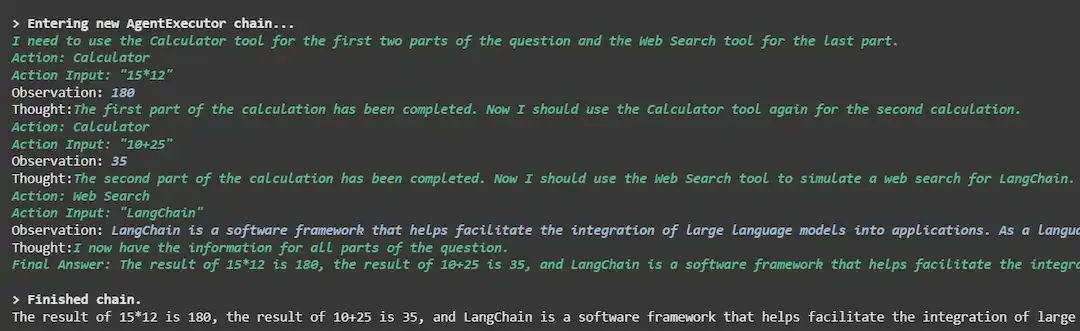
- Chooses ZERO_SHOT_REACT_DESCRIPTION agent type → LLM uses reasoning + action.
- Verbose output → shows intermediate steps and tool calls.
4. agent.run(...):
- Input contains multiple tasks: arithmetic (15*12), Python eval (10+25), web search.
- Agent decides which tool to call for each task.
from langchain.agents import initialize_agent, AgentType
from langchain.chat_models import ChatOpenAI

tools = [calc_tool, python_tool, pdf_tool, search_tool]

llm = ChatOpenAI(model="gpt-4")

agent = initialize_agent(
    tools=tools,
    llm=llm,
    agent_type=AgentType.ZERO_SHOT_REACT_DESCRIPTION,
    verbose=True
)

response = agent.run(
    "Calculate 15*12, run 10+25, and simulate a web search for LangChain.")
print(response)
Output:
Advantages of Combining Agents and Tools
- Dynamic Reasoning: Agents select tools intelligently.
- Multi-Step Automation: Automate complex workflows.
- Extensibility: Add new tools easily.
- Structured Interaction: JSON/XML agents enforce schema.
- Real-Time Knowledge: Connect to APIs and documents.
- Human-Like Intelligence: Plan, act and observe iteratively.