

Variables in TypeScript are used to store data. They can be declared using let, const, or var, with optional type annotations for better type safety.
- Store and manage data in your program.
- Declare variables using let, const, or var.
- Support explicit types or automatic type inference.
- Improve code readability and type safety.
Types of Variable Declarations
In TypeScript, we can declare variables in several ways.
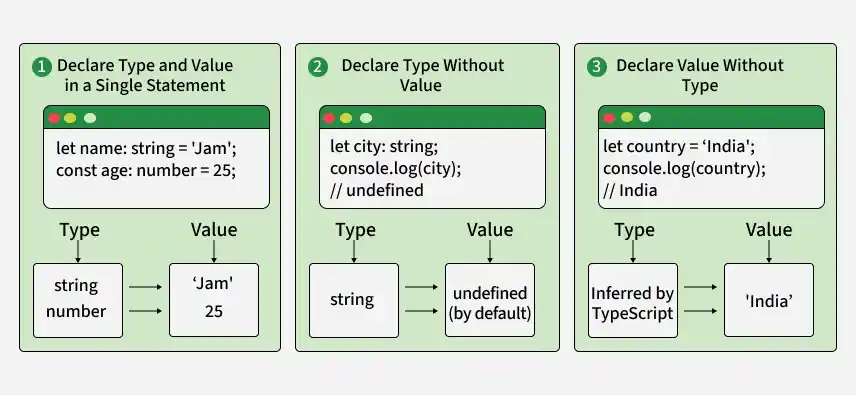
1. Declare Type and Value in a Single Statement
let name: string = 'Jam';
const age: number = 25;
- Type and value are defined together.
- name is a variable of type string.
- age is a constant of type number.
2. Declare Type Without Value
let city: string;
console.log(city);
Only the type is defined; the value is undefined by default.
3. Declare Value Without Type
let country = 'India';
console.log(country);
The type is inferred as string, and the value is initialized to 'India'.
Variable Declaration Keywords in TypeScript
TypeScript allows you to declare variables using three keywords:
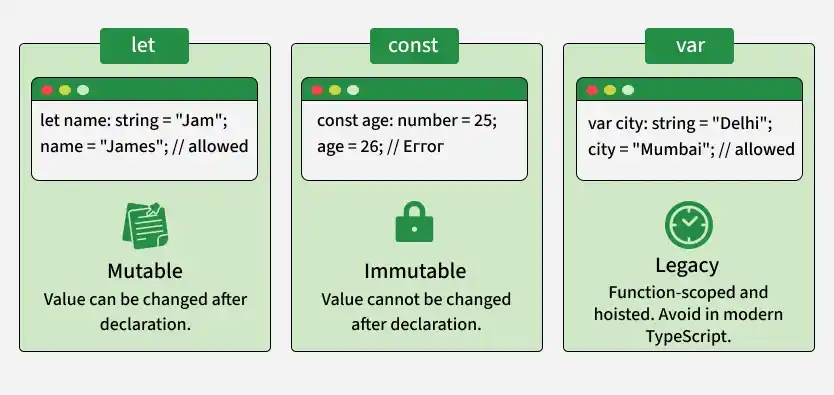
1. var
var is function-scoped and supports hoisting. It is generally avoided in modern TypeScript because let and const provide safer block-level scoping.
function testVar() {
  var globalVar = "I am a function-scoped variable";
  console.log(globalVar);
}
testVar();
Output
I am a function-scoped variableNote: Avoid using var in modern TypeScript due to its unpredictable behavior.
2. let
let provides block-level scoping, meaning it is confined to the block (i.e., loop or condition) in which it is declared. It helps prevent redeclaration within the same scope and reduces issues related to hoisting.
let count = 5;
if (count > 0) {
  let message = "Count is positive";
  console.log(message);
}
// console.log(message);  // Error: message is not accessible here
Output
Count is positive3. const
Similar to let in terms of scoping, const is used for variables that should not be reassigned after their initial value. Attempting to reassign a const variable results in a compile-time error.
const country = "India";
// country = "USA";  // Error: Cannot assign to 'country' because it is a constant
console.log(country);
Output
IndiaNote: Rules for Variable Names
- Can contain letters, digits, `_`, and `$`.
- Cannot begin with a digit.
- Are case-sensitive.
- Cannot use reserved keywords.
Type Annotations
Type annotations explicitly specify the type of a variable, parameter, or return value, improving readability and type safety. Using explicit types helps TypeScript catch errors during development and ensures better maintainability.
let userName: string = "Jane";
let age: number = 25;
let isActive: boolean = true;

function greetUser(name: string, age: number): string {
  return `Hello, ${name}! You are ${age} years old.`;
}

let greeting = greetUser(userName, age);
console.log(greeting);
Output
Hello, Jane! You are 25 years old.- userName: string specifies that the userName variable must hold a string value.
- age: number specifies that the age variable must hold a number value.
- isActive: boolean specifies that isActive must be a boolean.
- The function greetUser (name: string, age: number) uses type annotations for both parameters and the return type to ensure type safety.
Variable Scopes
Understanding variable scope is crucial for managing the accessibility and lifespan of variables in TypeScript.
There are three main types of scopes:
1. Local Scope
Variables declared within a function or block are accessible only within that function or block.
function testLocalScope() {
  let localVar = "I am local";
  console.log(localVar);
}
// console.log(localVar);  // Error: localVar is not defined outside the function
Output
I am local- localVar is declared inside the function.
- It is accessible only within the function.
- Accessing it outside results in an error.
2. Global Scope
Variables declared outside any function or block are accessible throughout the entire program.
let globalVar = 10;
function displayGlobalVar() {
  console.log(globalVar);
}
displayGlobalVar();
Output
10- globalVar is declared outside the function, making it globally accessible.
- displayGlobalVar() accesses and prints the value of globalVar.
- The output is 10.
3. Class Scope
Variables declared within a class are accessible to all members (methods) of that class.
class Employee {
    salary: number = 50000;
    printSalary(): void {
        console.log(`Salary: ${this.salary}`);
    }
}

const emp = new Employee();
emp.printSalary();
Output
50000- The class Employee has: A property salary set to 50000. A method printSalary() that prints the salary.
- An object emp is created from the Employee class.
- Calling emp.printSalary() prints the salary.