

API testing ensures that an API functions correctly by validating its endpoints, responses, and status codes. Postman simplifies this process by enabling testers to create, execute, and automate API tests, helping maintain API reliability throughout development.
- Verifies API functionality by validating endpoints, status codes, and response data.
- Uses JavaScript test scripts and built-in snippets to automate response validation.
- Helps maintain API quality by detecting issues whenever the API changes.
Snippets Panel
The Snippets panel contains ready-made JavaScript templates that you can insert into your test script with a single click. These snippets save time and help you validate API responses without writing code from scratch.

Common Snippets Shown in the Image
- Clear an environment variable – Removes an environment variable.
- Clear a global variable – Removes a global variable.
- Clear a collection variable – Removes a collection variable.
- Send a request – Sends another API request from within a script.
- Status code: Code is 200 – Verifies that the response status code is 200 OK.
- Response body: Contains string – Checks whether the response contains a specific text.
- Response body: JSON value check – Validates the value of a JSON field.
- Response body: Is equal to a string – Confirms that the response exactly matches a given string.
- Response headers: Content-Type header – Verifies the Content-Type response header.
Diverse Approaches to API Testing
Different API testing approaches help verify an API's functionality, reliability, compatibility, and performance. Each approach focuses on a specific aspect of the API to ensure it works correctly in different scenarios.
- Contract Testing: Contract testing verifies that the request and response contracts between API providers and consumers remain consistent. It ensures services can communicate correctly without breaking integrations.
- Unit Testing: Unit testing validates individual API components or functions in isolation. It helps identify defects early before integrating with other parts of the application.
- End-to-End (E2E) Testing: End-to-end testing verifies complete business workflows involving multiple APIs and services. It ensures all system components work together as expected.
- Load Testing: Load testing measures an API's performance under expected user traffic. It evaluates response time, throughput, and scalability to ensure the API performs efficiently under normal load.
Writing Test Scripts in Postman
Postman allows you to write JavaScript test scripts to automatically validate API responses after a request is executed. These scripts help verify status codes, response data, headers, response time, and other conditions, making API testing faster and more reliable.
Steps to Write a Test Script
- Open the API request in Postman.
- Click the Tests tab.
- Write or insert a JavaScript test script.
- Click Send to execute the request.
- View the test results in the Test Results panel.

Using Variables in Scripts
Postman allows you to use variables in pre-request and test scripts to create dynamic and reusable API requests. Variables can store values such as URLs, authentication tokens, request parameters, and response data, reducing the need for hardcoded values in scripts.
Types of Variables
- Global Variables: Accessible across all collections, requests, and environments within the current Postman workspace.
- Collection Variables: Shared among all requests within a specific collection.
- Environment Variables: Store values specific to a selected environment, such as Development, Testing, or Production.
- Local Variables: Available only during the execution of the current request or script.
Common Variable Methods
1. pm.globals: Creates, updates, or retrieves a global variable.
Example: pm.globals.set("variable_key", "variable_value");
2. pm.collectionVariables: Creates, updates, or retrieves a collection variable.
Example: pm.collectionVariables.set("variable_key", "variable_value");
3. pm.environment: Creates, updates, or retrieves an environment variable in the currently selected environment.
Example: pm.environment.set("variable_key", "variable_value");
4. pm.variables: Creates or updates a local variable that exists only during the current request execution.
Example: pm.variables.set("variable_key", "variable_value");
5. unset: Removes a variable from its respective scope (global, collection, environment, or local).
Example: pm.environment.unset("variable_key");


Dynamic Variables in Postman
Dynamic variables are built-in Postman variables that automatically generate random or dynamic values during request execution. They are useful for creating unique test data, eliminating the need to manually enter values for every request.

Common Dynamic Variables
- {{$guid}}: Generates a unique UUID.
- {{$timestamp}}: Returns the current Unix timestamp.
- {{$randomInt}}: Generates a random integer.
- {{$randomFirstName}}: Generates a random first name.
- {{$randomLastName}}: Generates a random last name.
- {{$randomEmail}}: Generates a random email address.
- {{$randomPhoneNumber}}: Generates a random phone number.
- {{$randomCompanyName}}: Generates a random company name.
Leveraging Postman Sandbox
The Postman Sandbox is a JavaScript runtime environment based on Node.js that executes scripts before and after an API request. It enables users to add dynamic behavior, automate workflows, manipulate data, and validate API responses.
Pre-request Script
The Pre-request Script runs before an API request is sent. It is commonly used to:
- Set or update variables.
- Generate authentication tokens or signatures.
- Create dynamic request data.
- Modify request headers or parameters.
Automation with Postbot
Postbot is an AI-powered assistant in Postman that automates various API testing tasks using natural language prompts. It helps developers and testers generate test scripts, validate responses, debug issues, and create documentation, reducing manual effort and improving productivity.

Key Capabilities
- Automatically generates API test scripts.
- Validates response status codes, headers, and response body.
- Identifies and fixes errors in existing test scripts.
- Saves response values as variables for reuse.
- Generates API documentation.
- Explains API responses and suggests improvements.
Postbot for Intelligent Test Generation
Postbot uses artificial intelligence (AI) to automatically generate API test scripts based on requests and responses. It analyzes the API behavior and suggests relevant validation tests, reducing the need to manually write JavaScript code.
- Automatically generates test scripts for API responses.
- Creates validations for status codes, headers, and response body.
- Suggests tests for required fields and JSON structure.
Template-driven Testing
Template-driven testing in Postman provides ready-to-use testing templates for common API testing scenarios. Instead of manually creating test collections and scripts, you can choose a template that automatically sets up the required tests and configurations..
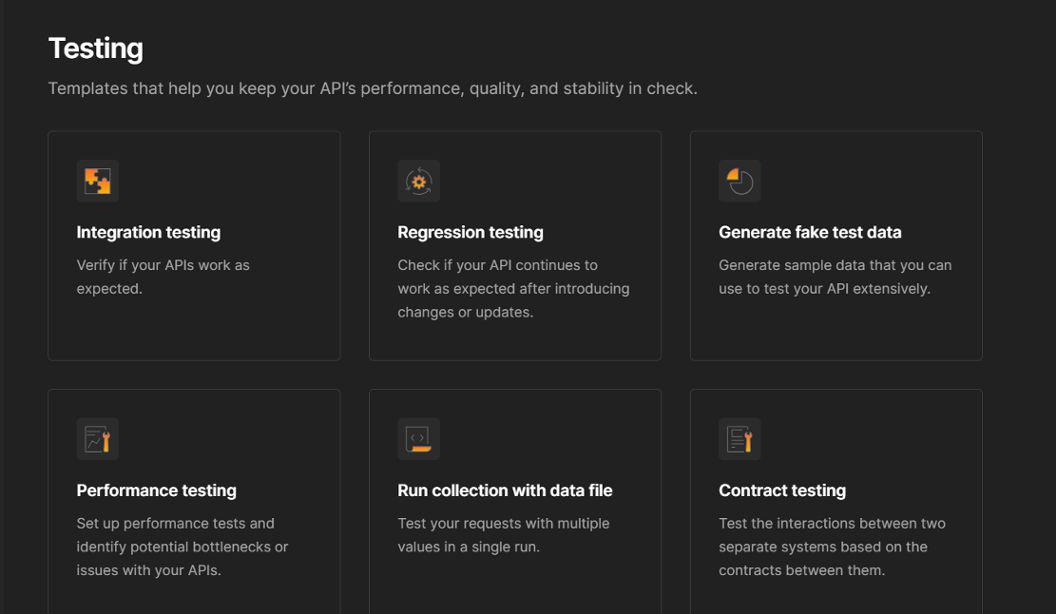
- Integration Testing: Verifies that APIs work correctly with other services and components.
- Regression Testing: Ensures existing API functionality continues to work after changes or updates.
- Generate Fake Test Data: Creates sample data for testing different API scenarios.
- Performance Testing: Tests API response time, throughput, and identifies performance bottlenecks.
- Run Collection with Data File: Executes API requests using data from CSV or JSON files for data-driven testing.
- Contract Testing: Verifies that API providers and consumers follow the agreed request and response contracts.
Validating Responses
Response validation in Postman ensures that an API returns the expected results after a request is executed. It helps verify the correctness of status codes, response data, headers, and response time, ensuring the API behaves as expected.

Common Response Validations
- Status Code Validation: Verifies that the API returns the expected HTTP status code (e.g., 200 OK, 201 Created, 404 Not Found).
- Response Body Validation: Checks whether the response contains the expected data or values.
- Header Validation: Confirms that response headers, such as Content-Type, have the correct values.
- Response Time Validation: Ensures the API responds within an acceptable time limit.
- JSON Schema Validation: Verifies that the response follows the expected JSON structure.
Collection Runner
The Collection Runner is a Postman feature that executes all the requests in a collection or folder automatically. After execution, it displays a detailed summary of the test results, including passed and failed tests, response times, and execution statistics.

Use of Collection Runner
- Executes multiple API requests automatically.
- Runs all test scripts in a collection or folder.
- Displays passed, failed, and skipped test results.
- Measures response time and execution duration.
- Supports data-driven testing using CSV or JSON files.
- Generates reports for API testing and automation.
Debugging Tests
Debugging tests in Postman involves identifying and resolving issues in API requests, test scripts, or responses. Postman provides tools such as the Postman Console, Test Results, and Postbot to help diagnose errors and improve test reliability.
ommon Debugging Techniques
- Check Test Results: Review passed and failed assertions to identify validation errors.
- Use the Postman Console: Inspect requests, responses, variables, and console logs for troubleshooting.
- Verify Response Data: Ensure the API returns the expected status code, headers, and response body.
- Inspect Variables: Confirm that environment, collection, and global variables contain the correct values.
- Use Postbot: Automatically identify issues, suggest fixes, and generate improved test scripts.