

Compatibility Testing is a type of non-functional testing that verifies whether a software application works correctly across different operating systems, browsers, devices, hardware, networks, and software environments. It ensures that users receive a consistent experience regardless of the platform they use.
- Verifies software compatibility across multiple platforms and environments.
- Identifies environment-specific issues before software release.
- Ensures consistent functionality, performance, and user experience.
Example: An e-commerce website is tested on Chrome, Firefox, Edge, Windows, Android, and iOS devices to ensure that all features work correctly and provide a consistent user experience across different environments.
Types of Compatibility Testing
The different types of Compatibility Testing, which verifies that a software application functions correctly across various environments, platforms, devices, and configurations.
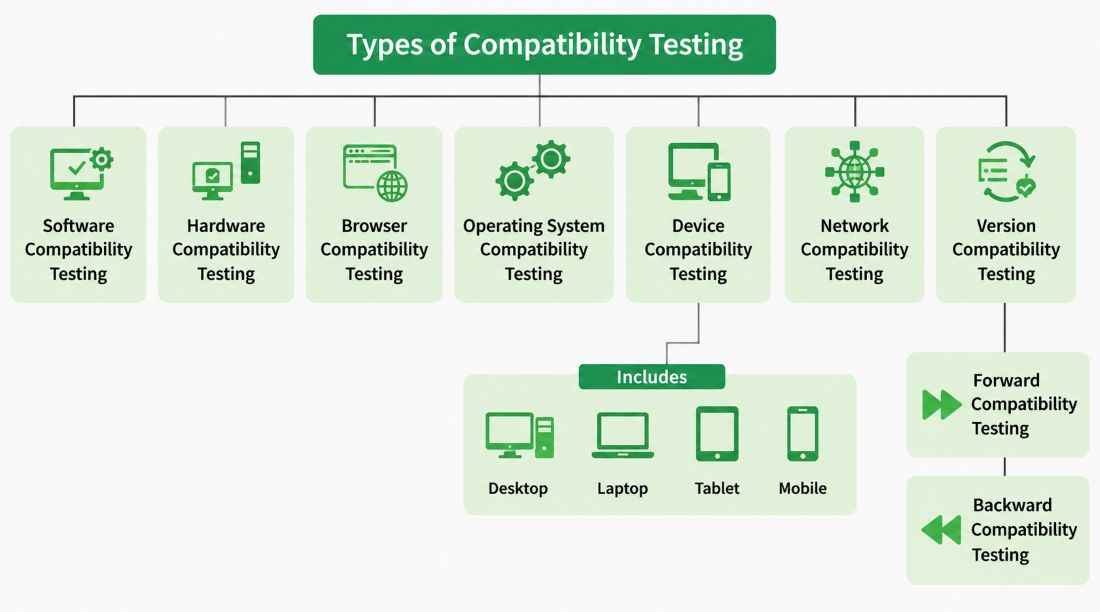
Software Compatibility Testing
- Ensures the application works correctly with different software environments.
- Verifies compatibility with databases, middleware, third-party applications, and libraries.
- Confirms seamless integration with external software components.
Hardware Compatibility Testing
- Verifies that the software performs correctly on different hardware configurations.
- Tests compatibility with processors, RAM, storage devices, graphics cards, and peripheral devices.
- Ensures stable performance across various hardware specifications.
Browser Compatibility Testing
- Ensures the application displays and functions consistently across different web browsers.
- Tests compatibility with browsers such as Chrome, Firefox, Edge, and Safari.
- Verifies support for different browser versions.
Operating System Compatibility Testing
- Validates that the application runs smoothly on different operating systems.
- Tests compatibility with Windows, macOS, Linux, Android, and iOS.
- Ensures consistent functionality and performance across supported platforms.
Device Compatibility Testing
- Ensures the application functions correctly on different devices.
- Verifies compatibility with desktops, laptops, tablets, and mobile devices.
- Confirms consistent functionality, layout, and performance across various screen sizes and hardware configurations.
Network Compatibility Testing
- Ensures the application performs reliably under different network conditions.
- Tests functionality over Wi-Fi, Ethernet, 4G/5G, and slow internet connections.
- Verifies application behavior in high-latency and unstable network environments.
Version Compatibility Testing
- Verifies that the application remains compatible with different versions of supported software.
- Tests compatibility with various versions of browsers, operating systems, databases, frameworks, and libraries.
- Ensures smooth operation after software updates or version changes.
Forward Compatibility Testing: Ensures the software continues to function correctly with future versions of operating systems, browsers, hardware, or software.
Backward Compatibility Testing: Ensures newer versions of the software continue to support older operating systems, browsers, devices, and configurations.
Compatibility Testing Process
The Compatibility Testing Process is a systematic approach used to verify that an application works correctly across different platforms, devices, browsers, operating systems, and environments.
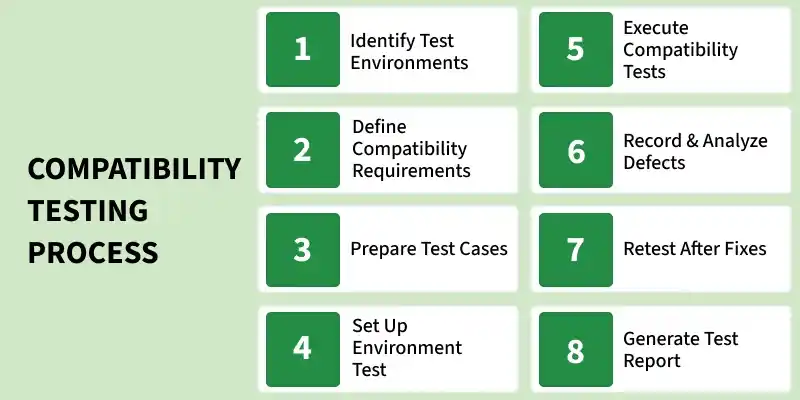
- Identify Test Environments: Determine the browsers, operating systems, devices, hardware, and network configurations that need to be tested.
- Define Compatibility Requirements: Identify the supported platforms and compatibility expectations based on user and business requirements.
- Prepare Test Cases: Create test scenarios to verify application functionality across different environments and configurations.
- Set Up Test Environment: Configure the required devices, browsers, operating systems, and hardware for testing.
- Execute Compatibility Tests: Run the test cases on different platforms to check application behavior and performance.
- Record and Analyze Defects: Document compatibility issues, analyze their causes, and report them to the development team.
- Retest After Fixes: Verify that reported defects have been fixed and ensure the application works correctly after changes.
- Generate Test Report: Prepare a report summarizing test results, identified issues, and overall compatibility status of the application.
Compatibility Testing Tools
- Selenium: An open-source automation tool used for testing web applications across different browsers and platforms.
- BrowserStack: A cloud-based platform that enables testing on real devices, browsers, and operating systems.
- LambdaTest: An online testing platform used for cross-browser and cross-device compatibility testing.
- CrossBrowserTesting: A testing tool that helps verify application compatibility across multiple browsers and devices.
- Sauce Labs: Provides automated and manual testing capabilities across various browsers, devices, and operating systems.
- TestComplete: Supports automated compatibility testing for desktop, web, and mobile applications.
- Ranorex Studio: A comprehensive testing tool used for cross-browser, desktop, and mobile compatibility testing.
- Katalon Studio: An all-in-one automation solution that supports compatibility testing across different environments.
Advantages of Compatibility Testing
- Ensures the software works correctly across different browsers, operating systems, devices, and hardware.
- Provides a consistent user experience on all supported platforms.
- Identifies compatibility issues before the software is released.
- Improves software quality and reliability.
- Increases customer satisfaction by supporting diverse user environments.
- Reduces post-release defects and maintenance costs.
Limitations of Compatibility Testing
- Requires testing across many browsers, operating systems, devices, and hardware configurations.
- Can be time-consuming due to the large number of platform combinations.
- Increases testing costs because multiple devices and environments are needed.
- It is difficult to test every possible hardware and software configuration.
- Frequent browser, operating system, and device updates require continuous testing.
- Maintaining multiple test environments can be complex.
Compatibility Testing vs Cross-Browser Testing
| Feature | Compatibility Testing | Cross-Browser Testing |
|---|---|---|
| Definition | Verifies software functionality across different environments, devices, operating systems, browsers, and hardware. | Verifies that a web application works correctly across different web browsers and browser versions. |
| Scope | Broad testing that covers multiple platforms and configurations. | Focuses only on browser-related compatibility. |
| Purpose | Ensures a consistent user experience across all supported environments. | Ensures consistent appearance and functionality across browsers. |
| Testing Area | Browsers, operating systems, devices, hardware, networks, and software versions. | Web browsers such as Chrome, Firefox, Edge, Safari, and Opera. |
| Application Type | Applicable to web, desktop, and mobile applications. | Mainly applicable to web applications. |
| Complexity | More complex due to multiple testing environments. | Less complex as it focuses only on browsers. |
| Example | Testing an application on Windows, macOS, Android, iOS, Chrome, and Firefox. | Testing a website on Chrome, Firefox, Edge, and Safari browsers. |