

The useContext hook in React allows components to consume values from the React context. React’s context API is primarily designed to pass data down the component tree without manually passing props at every level. useContext is a part of React's hooks system, that enables functional components to access context values.
- Simplifies accessing shared state across components.
- Avoids prop drilling by eliminating the need to pass props down multiple levels.
- Works seamlessly with React's Context API to provide global state.
- Ideal for managing themes, authentication, or user preferences across the app.
Syntax:
const contextValue = useContext(MyContext);- MyContext: The context object is created using React.createContext().
- contextValue: The current context value that we can use in our component.
Working of useContext
The useContext hook allows to consume values from a React Context, enabling easy access to shared state across multiple components without prop drilling. Here’s how it works:
- useContext hook consumes values from a React Context, making them accessible to functional components.
- First, create a Context object using React.createContext(), which holds the shared state.
- Use useContext to access the context value in any component that needs it, avoiding prop drilling.
- When the value of the Context updates, all components consuming that context automatically re-render with the new value.
Creating a Context
Before using useContext, we need to create a context using React.createContext(). This context will provide a value that can be accessed by any child component wrapped in a Context.Provider.
import React, { createContext, useContext, useState } from 'react';

const MyContext = createContext();

function App() {
    const [value, setValue] = useState('Hello, World!');

    return (
        <MyContext.Provider value={value}>
            <ChildComponent />
        </MyContext.Provider>
    );
}

function ChildComponent() {
    const contextValue = useContext(MyContext);
    return <h1>{contextValue}</h1>;
}
- createContext() creates a context object (MyContext) that holds a default value.
- MyContext.Provider passes down the context value to its child components.
- useContext(MyContext) allows components like ChildComponent to access the context value.
Implementing the useContext Hook
Implementing the useContext Hook involves creating a context, providing its value through a provider component, and consuming that shared value directly within functional components.
1. Managing Authentication with useContext
useContext can be used for managing the user authentication state globally.
import React, { createContext, useContext, useState } from 'react';
const AuthContext = createContext();
function AuthProvider({ children }) {
    const [isLoggedIn, setIsLoggedIn] = useState(false);
    return (
        <AuthContext.Provider value={{ isLoggedIn, setIsLoggedIn }}>
            {children}
        </AuthContext.Provider>
    );
}
function LoginButton() {
    const { isLoggedIn, setIsLoggedIn } = useContext(AuthContext);
    return (
        <button onClick={() => setIsLoggedIn(!isLoggedIn)}>
            {isLoggedIn ? 'Logout' : 'Login'}
        </button>
    );
}
function App() {
    return (
        <AuthProvider>
            <LoginButton />
        </AuthProvider>
    );
}
export default App;
In this code,
- AuthContext is created using createContext() and AuthProvider manages the isLoggedIn state, passing it down through the context.
- LoginButton uses useContext to access isLoggedIn and setIsLoggedIn from the context and toggles the login state.
- App renders LoginButton wrapped in AuthProvider, allowing dynamic login/logout functionality.
Output

2. Sharing a Theme Across Components
Create a theme context and use useContext to access its values in child components.
import React, { createContext, useContext, useState } from 'react';

const ThemeContext = createContext();
function ThemeProvider({ children }) {
    const [theme, setTheme] = useState('light');

    const toggleTheme = () => {
        setTheme(prevTheme => (prevTheme === 'light' ? 'dark' : 'light'));
    };

    return (
        <ThemeContext.Provider value={{ theme, toggleTheme }}>
            {children}
        </ThemeContext.Provider>
    );
}
function ThemedComponent() {
    const { theme, toggleTheme } = useContext(ThemeContext);
    return (
        <div style={{ background: theme === 'light' ? '#fff' : '#333',
            color: theme === 'light' ? '#000' : '#fff', padding: '20px', textAlign: 'center' }}>
            <p>Current Theme: {theme}</p>
            <button onClick={toggleTheme}>Toggle Theme</button>
        </div>
    );
}
function App() {
    return (
        <ThemeProvider>
            <ThemedComponent />
        </ThemeProvider>
    );
}

export default App;
In this code,
ThemeContextis created usingcreateContext(), andThemeProvidershares the current theme andtoggleThemefunction with its children.useContext(ThemeContext)allowsThemedComponentto access the current theme and toggle it.- Clicking the button switches the theme between light and dark modes.
Output

3. Passing Data Between Sibling Components Using Context
Sometimes, two sibling components need to share data. useContext helps avoid lifting state up unnecessarily.
import React, { useContext, useState } from "react";
import MessageContext from "./MessageContext";
import "./App.css";

function Parent() {
  const [message, setMessage] = useState("Hello from Child A");

  return (
    <MessageContext.Provider value={{ message, setMessage }}>
      <div className="container">
        <Header />

        <div className="children-container">
          <ChildA />
          <ChildB />
        </div>
      </div>
    </MessageContext.Provider>
  );
}

function Header() {
  return (
    <div className="header">
      <h2>GeeksforGeeks</h2>
      <p>Passing Data Between Siblings using React Context API</p>
    </div>
  );
}

function ChildA() {
  const { setMessage } = useContext(MessageContext);

  return (
    <div className="card">
      <h3>Child A</h3>

      <input
        type="text"
        placeholder="Update message"
        onChange={(e) => setMessage(e.target.value)}
        className="input"
      />
    </div>
  );
}

function ChildB() {
  const { message } = useContext(MessageContext);

  return (
    <div className="card">
      <h3>Child B</h3>

      <p className="message">
        <strong>Message from A:</strong> {message}
      </p>
    </div>
  );
}

export default function App() {
  return <Parent />;
}
import { createContext } from "react";

const MessageContext = createContext();

export default MessageContext;
In this code,
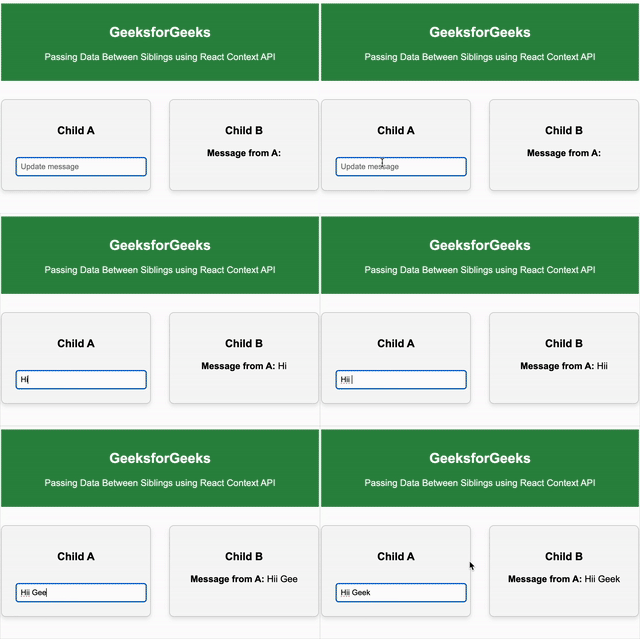
MessageContext.Providershares themessagestate andsetMessagefunction with both sibling components.ChildAupdates the sharedmessageusingsetMessage, andChildBreads and displays the updated value from the context.- The CSS is used only for styling and layout; it does not affect the Context API or the data flow.
Output
useContext vs Prop Drilling
useContext | Prop Drilling |
|---|---|
Shares data directly across components | Passes data step-by-step through each level |
Global state (like theme, auth, user) | Simple data between nearby components |
Simple after setup | Gets harder as app grows |
May re-render more if not optimized | More controlled, but harder to manage |
Performance Considerations
- Minimize Re-renders: Avoid unnecessary re-renders by memoizing values and functions using useMemo and useCallback.
- Efficient State Initialization: Use lazy initialization in useState for expensive computations.
- Cleanup Effects: Always clean up side effects in useEffect to prevent memory leaks.
- Limit Dependencies: Keep dependencies in useEffect minimal to reduce unnecessary executions.