

Django is a high-level, open-source Python web framework used to build secure, scalable and maintainable web applications. Its built-in features such as ORM, authentication, admin interface, URL routing and security tools make it widely used for developing modern web applications. Understanding Django's architecture, models, views, URLs, middleware and database handling is important for technical interviews.
Q1. How does Django work?
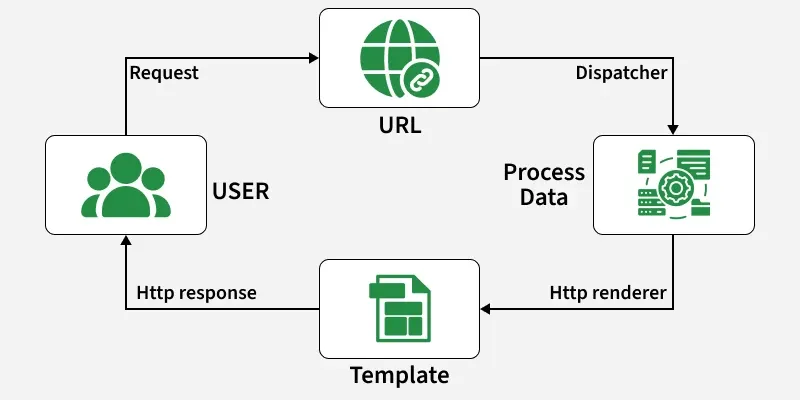
Django follows the Model-View-Template (MVT) architecture to process client requests and generate responses. The basic request flow is:
Client -> URL Router -> View -> Model/Database -> Template -> Response
- Client Request: A user sends a request to the Django server (via browser or API call).
- URL Routing: Django’s urls.py maps the request to the appropriate view.
- View Processing: The view receives the request, interacts with models or external APIs, and processes data.
- Model Interaction: Models (via Django ORM) retrieve, update, or delete data from the database.
- Template Rendering: The view passes data to a template, which generates HTML dynamically.
- Response: Django sends the rendered HTML or JSON response back to the client.

Q2. What are Features of Django?
Django provides several built-in features that simplify web development and help developers build secure, maintainable applications.
- Django ORM: Allows developers to interact with databases using Python objects instead of writing SQL queries directly.
- URL Routing: Provides a clean and flexible system for mapping URLs to views using path-based routing.
- Template System: Uses templates to generate dynamic HTML pages by combining presentation with application data.
- Built-in Admin Panel: Automatically provides an administration interface for managing application data and models.
- Security Features: Includes built-in protection against common threats such as CSRF, XSS and SQL injection.
Q3. What is the difference between Flask and Django?
Both Flask and Django are popular Python web frameworks, but they differ in their approach, built-in features and typical use cases.
Flask
- Lightweight: A microframework that provides the essential components and allows developers to choose additional libraries.
- Easy to learn: Has a simple structure and minimal setup.
- Flexible: Developers can choose their preferred ORM, authentication system, and other tools.
- Commonly used for: APIs, microservices, and small to medium-sized applications.
- Database support: Usually relies on external libraries such as SQLAlchemy or PyMongo.
- Admin and authentication: Generally require third-party extensions or custom implementation.
- Scalability: Can be scaled effectively, but larger applications may require more manual architectural decisions.
Django
- Full-stack framework: Provides many built-in features required for web application development.
- More structured: Follows a defined architecture and project structure, which can have a steeper learning curve.
- Batteries-included: Provides built-in ORM, authentication, admin panel, URL routing, and templating.
- Commonly used for: Large and complex applications, enterprise systems, and content-heavy websites.
- Database support: Built-in ORM supports databases such as PostgreSQL, MySQL, SQLite, and Oracle.
- Admin and authentication: Provides a built-in admin interface and authentication system.
- Scalability: Designed to support large applications with proper architecture and deployment.
In general, choose Flask when flexibility, simplicity, and minimal framework overhead are the priority and choose Django when a structured framework with comprehensive built-in features is preferred.
Q4. Explain Django project directory structure.
When you create a new Django project, it generates a set of files and folders to organize your application. Each file has a specific role:

- manage.py: A command-line utility to run the server, create migrations, and manage the project.
- __init__.py: Marks the directory as a Python package.
- settings.py: Stores configuration like installed apps, middleware, database settings, and API keys.
- urls.py: Defines URL patterns and maps them to views.
- wsgi.py: Entry point for deploying the project; helps web servers communicate with Django.
- apps.py: Configuration file for an individual app.
- admin.py: Registers models to be managed through the Django admin panel.
- models.py: Defines the database structure using Python classes.
- views.py: Contains the logic to handle requests and return responses (part of each app, not the main project).
Q5. What is the purpose of Django apps?
Django apps exist to make projects organized, reusable, and scalable. Instead of writing everything in one place, Django encourages breaking functionality into independent apps.
- Each app focuses on a specific feature or functionality (e.g., blog, authentication, payments).
- Apps are reusable across different projects without rewriting code.
- They improve maintainability, as developers can work on separate apps independently.
- They support scalability, ensuring projects don’t become monolithic and unmanageable.
Q6. Importance of virtual environment setup for Django.
A virtual environment creates an isolated workspace for a Django project, keeping its dependencies separate from other projects. This prevents version conflicts and makes project management easier.
- Not strictly required, but highly recommended.
- Ensures each project has its own dependencies.
- Eliminates conflicts between different package versions.
- Makes deployment and collaboration smoother.
Q7. Give a brief about the Django admin interface.
Django provides a built-in admin interface that allows users to manage application data easily. It supports creating, reading, updating, and deleting (CRUD) model objects without writing additional code.
- Automatically generated from registered models.
- Useful for performing administrative tasks.
- Fully customizable through configuration.
- Saves development time with a ready-to-use backend.
Q8. What are Django URLs?
In Django, URLs define the routing of a web application. They are managed in a urls.py file, which maps URL patterns to specific view functions or classes.

- When a user enters a URL in the browser, Django matches it against the patterns in urls.py.
- If a match is found, the corresponding view is executed and returns a response.
- This makes navigation and request handling organized and modular.
Q9. What are the views of Django?
In Django’s MVT architecture, a view is a function or class that takes a web request and returns a web response.
- The response can be an HTML page, JSON data, XML, a PDF, or even an image.
- Views act as the connection between models and templates, processing data and rendering it to the user.
- They handle business logic and decide what content should be displayed to the client.
Q10. What are the models in Django?
In Django, a model is a built-in feature that defines the structure and behavior of the data in the application.

- Each model is represented as a Python class and typically maps to a single database table.
- It defines fields, relationships, and constraints for storing and managing data.
- Django’s Object-Relational Mapper (ORM) automatically translates model classes into SQL queries, so developers can interact with the database using Python instead of raw SQL.
Q11. What do the commands python manage.py makemigrations and python manage.py migrate do?
- makemigrations: Scans the models in your app and creates migration files based on any changes. These files contain SQL instructions but do not apply them yet.
- migrate: Applies the SQL instructions from the migration files to the database, creating or updating tables as required.
Q12. What are Sessions in Django?
Sessions allow Django to store user-specific data across multiple requests. Session data is stored on the server side, while the browser usually stores only a session ID used to identify the user's session.
- Maintains user-specific data across requests, commonly used for login status, shopping carts, and user preferences.
- Django provides built-in session management through django.contrib.sessions.
- Session can be configured to expire when the browser closes or after a specified period. By default, Django stores sessions in the database.
request.session["username"] = "Emma"
The stored value can later be retrieved using:
username = request.session.get("username")
Sessions are useful when temporary user-specific state needs to be maintained between requests.
Q13. Define static files and explain their uses.
Static files in Django are files that do not change dynamically and are used to support the frontend of a web application.
- Include CSS files, JavaScript files, images, fonts, and other UI assets.
- Usually stored in a static directory at the app or project level.
- Managed using Django’s django.contrib.staticfiles app.
- Help organize, collect, and serve static content efficiently.
Q14. What are templates in the Django language?
A Django template is a text document that is used to give a front and a layout for our website. It is the third and most significant aspect of Django's MVT Structure. In Django, a template is an HTML file that contains HTML, CSS, and Javascript.

Django framework efficiently manages and generates dynamically generated HTML web pages for end-user viewing. Django is mostly a backend framework, thus we use templates to give a layout for our website. There are two ways to incorporate the template into our website.
- We can utilize a single template directory that will be distributed throughout the project.
- We can make a separate template directory for each app in our project.
Q15. What are Django Forms and ModelForms?
Django Forms provide a structured way to handle user input, validation, and form rendering. ModelForm is a specialized form that is generated from a Django model and can be used to create or update model records.
- Form is used when the form fields are defined manually.
- ModelForm automatically generates fields from a model.
- Both provide built-in validation. ModelForms reduce the amount of code required for database-backed forms.
from django import forms
from .models import Student

class StudentForm(forms.ModelForm):
    class Meta:
        model = Student
        fields = ["name", "age"]
Here, StudentForm automatically creates form fields based on the Student model.
Q16. What are QuerySets in Django?
A QuerySet in Django represents a collection of database queries used to retrieve, filter, and manipulate model objects. It provides a high-level, Pythonic API to interact with the database.
- Lazy evaluation: A QuerySet is not executed until the data is actually needed (e.g., iteration, slicing, or conversion).
- Filtering and chaining: Methods like .filter(), .exclude(), .order_by() can be combined to build complex queries.
- Model instances: Results are returned as objects of the corresponding model.
- Reusable and flexible: The same QuerySet can be refined further without hitting the database multiple times.
# Retrieve all active users
users = User.objects.filter(is_active=True)
Q17. What is the difference between get() and filter() in Django ORM?
Both get() and filter() are used to retrieve records from the database, but they differ in the number of results they expect.
get()
- Returns exactly one object matching the given condition and raises DoesNotExist if no matching object is found.
- Raises MultipleObjectsReturned if more than one object matches.
- Best used when the queried field is expected to identify a single record.
student = Student.objects.get(id=1)
print(student.name)
filter()
- Returns a QuerySet containing all matching objects and returns an empty QuerySet if no records match.
- Can return one, multiple, or no records. Useful when multiple results are possible.
students = Student.objects.filter(course="CSE")
for student in students:
    print(student.name)
In general, use get() when exactly one record is expected and use filter() when you may need zero, one, or multiple records.
Q18. What is the difference between select_related() and prefetch_related()?
Both methods are used to reduce the number of database queries when working with related objects, but they work differently.
select_related()
- Uses SQL joins to fetch related objects in the same query.
- Best suited for ForeignKey and OneToOneField relationships.
- Reduces additional queries when accessing a single related object.
books = Book.objects.select_related("author")
prefetch_related()
- Performs separate queries and combines the results in Python.
- Suitable for ManyToManyField and reverse relationships.
- Also works with relationships that select_related() cannot efficiently handle.
authors = Author.objects.prefetch_related("books")
In general, use select_related() for single-valued relationships such as foreign keys and use prefetch_related() for many-to-many and reverse relationships.
Q19. What is the N+1 query problem in Django?
The N+1 query problem occurs when an application performs one query to retrieve a collection of objects and then performs an additional query for each object's related data.
books = Book.objects.all()
for book in books:
    print(book.author.name)
If authors are not loaded efficiently, this can result in one query for the books plus additional queries for their authors. This can be improved using:
books = Book.objects.select_related("author")
Benefits:
- Reduces unnecessary database queries.
- Improves response time.
- Is especially important when working with large datasets.
Q20. What is the difference between null=True and blank=True in Django models?
Both options allow a field to be optional, but they control different aspects of the field.
null=True
- Applies at the database level and allows the database column to store NULL.
- Mainly relevant for database storage and commonly used with non-string fields such as IntegerField, DateField, or ForeignKey.
age = models.IntegerField(null=True)
blank=True
- Applies at the validation level and allows the field to be left empty in Django forms and model validation.
- Does not by itself change how the value is stored in the database.
name = models.CharField(max_length=100, blank=True)
Q21. What is the difference between ForeignKey, OneToOneField and ManyToManyField in Django models?
These relationship fields are used to define how Django models are related to each other.
ForeignKey
- Creates a many-to-one relationship and multiple records in one model can refer to the same record in another model.
- Commonly used for relationships such as multiple books belonging to one author.
author = models.ForeignKey(
    Author,
    on_delete=models.CASCADE
)
OneToOneField
- Creates a one-to-one relationship and each record can be associated with only one record on the other side.
- Commonly used for extending a user with a profile.
profile = models.OneToOneField(
    User,
    on_delete=models.CASCADE
)
ManyToManyField
- Creates a many-to-many relationship and multiple records can be related to multiple records.
- Commonly used for relationships such as students and courses.
courses = models.ManyToManyField(Course)
Q22. What does the settings.py file do?
settings.py is the core configuration file of a Django project. It defines essential settings such as:
- Database configuration
- Static and media file paths
- Installed apps and middleware
- Security keys and API keys
- Logging and other environment-specific options
- It ensures Django knows how the project should run across different environments.
Q23. Difference between MVC and MVT design patterns?
Both MVC (Model-View-Controller) and MVT (Model-View-Template) separate an application's data, business logic, and presentation, but they organize these responsibilities differently.
MVC
- Model: Manages application data and business logic.
- View: Handles how the data is presented to the user.
- Controller: Receives requests, processes application logic, and coordinates the Model and View.
- The developer explicitly implements the Controller to manage the request flow.
MVT
- Model: Manages application data and database operations.
- View: Handles request processing and application logic.
- Template: Defines how the data is presented to the user.
- Django's URL dispatcher and framework handle much of the controller-like request routing implicitly.
In general, MVC explicitly separates the Controller from the other components and MVT places request-handling logic in Django Views while Templates handle presentation.
Q24. What is Django ORM?
Django ORM (Object Relational Mapper) lets you interact with the database using Python instead of SQL. It maps Python classes to database tables and makes CRUD operations (Create, Read, Update, Delete) simple.
from django.db import models

class Student(models.Model):
    name = models.CharField(max_length=100)
    age = models.IntegerField()
In the above Model:
- Student: represents a table in the database.
- name and age: represent columns in that table.
Using ORM in the Django shell :
from myapp.models import Student

Student.objects.create(name="Rahul", age=22)
Student.objects.all()

student = Student.objects.get(name="Rahul")
student.age = 23
student.save()

student.delete()
Q25. What is transaction.atomic() in Django?
transaction.atomic() is used to execute multiple database operations as a single transaction. If all operations succeed, the changes are committed; if an error occurs, the transaction can be rolled back.
from django.db import transaction

with transaction.atomic():
    student = Student.objects.create(name="Emma")
    Result.objects.create(student=student, marks=90)
Here, both database operations are treated as one transaction.
Benefits:
- Maintains database consistency.
- Prevents partially completed operations.
- Useful when multiple related database changes must succeed together.
Q26. What is Superuser?
A Superuser in Django is the most powerful user account that has full permissions in the Django Admin interface. Superusers can:
- Create, read, update, and delete any model records.
- Manage other users, including adding staff or assigning permissions.
- Access all sections of the Django Admin panel without restriction.
Q27. What is Jinja templating?
Jinja (specifically Jinja2) is a popular templating engine for Python, used to generate dynamic HTML, XML, or other markup. Although Django has its own default templating engine, developers can configure Django to use Jinja2 as an alternative.
Key Features of Jinja2:
- HTML Escaping: Prevents XSS by automatically escaping special characters like <, >, &.
- Sandbox Execution: Allows secure template testing in a protected environment.
- Template Inheritance: Enables reusability and cleaner template structures.
- Performance: Faster than Django’s default engine.
- Debugging: Easier error tracking compared to the default engine.
Q28. What do you mean by the csrf_token?
CSRF (Cross-Site Request Forgery) is a security attack in which a malicious website can attempt to make unauthorized requests using a user's authenticated session. Django provides the {% csrf_token %} template tag to help protect forms from such attacks.
- Django generates a CSRF token for the user session.
- The token is included in forms that submit unsafe requests, such as POST.
- When the form is submitted, Django checks whether the token is valid.
- If the token is missing or invalid, Django rejects the request.
<form method="POST">
    {% csrf_token %}

    <input type="text" name="username">
    <button type="submit">Submit</button>
</form>
Here, {% csrf_token %} adds the CSRF token to the form, allowing Django's CSRF protection middleware to verify the request.
Q29. Explain the use of Middlewares in Django.
Middleware is a lightweight framework that processes requests and responses globally before they reach the view or after the response leaves the view. Middleware is used to perform tasks such as security, session management, authentication, and CSRF protection.
- AuthenticationMiddleware: Associates users with requests using sessions.
- CsrfViewMiddleware: Protects against Cross-Site Request Forgery.
- SessionMiddleware: Manages sessions across requests.
- SecurityMiddleware: Provides headers and security improvements.
Q30. What are signals?
Signals allow certain senders to notify a set of receivers when specific actions occur. They are used to trigger custom behavior in response to events such as creating, updating, or deleting a database entry. For example, when a new user is created, a signal can be used to automatically create a corresponding profile. Common Types of Signals:
- pre_delete / post_delete: Triggered before or after deleting a model instance.
- pre_init / post_init: Triggered before or after instantiating a model (__init__() method).
- pre_save / post_save: Triggered before or after saving a model instance.
Q31. What is Media Root?
Media Root is the directory where user-uploaded files (media files) are stored. These include images, videos, documents, or any content uploaded by users.
- MEDIA_ROOT: Defines the absolute file system path on the server where uploaded files are saved.
- MEDIA_URL: Defines the public URL through which these files can be accessed in the browser.
Example configuration in settings.py:
MEDIA_ROOT = os.path.join(BASE_DIR, 'media')
MEDIA_URL = '/media/'
This setup ensures:
- Uploaded files are stored in the media/ directory inside the project.
- Files are accessible via a URL (e.g., /media/profile.jpg).
Q32. What are context processors in Django and how are they used?
A context processor in Django is a function that injects extra variables into the template context, making them available in all templates without needing to pass them explicitly in every view.
- Defined as Python functions that take a request object and return a dictionary of data.
- Commonly used for site-wide data, like the logged-in user, site settings, or notifications.
- Configured in the TEMPLATES setting under OPTIONS > context_processors.
- Example: Django’s built-in django.contrib.auth.context_processors.auth automatically adds the user object to every template.
Q33. What is the difference between function-based views and class-based views in Django?
Both Function-Based Views (FBVs) and Class-Based Views (CBVs) are used to handle requests and return responses, but they organize the view logic differently.
Function-Based Views (FBVs)
- Implemented as regular Python functions.
- Simple and straightforward to understand.
- Provide direct control over request handling.
- Well suited for small or simple views.
- Can become repetitive when similar functionality is needed across multiple views.
def my_view(request):
    return HttpResponse("Hello Django")
Class-Based Views (CBVs)
- Implemented as Python classes.
- Organize request handling into methods such as get() and post().
- Support inheritance and mixins, making code easier to reuse.
- Well suited for complex views and common CRUD operations.
- Provide a more structured, object-oriented approach.
from django.views import View

class MyView(View):
    def get(self, request):
        return HttpResponse("Hello Django")
In general, use FBVs when the view logic is simple and direct and use CBVs when you need reusable behavior, inheritance, or a more structured view design.
Q34. What are Generic Class-Based Views in Django?
Generic Class-Based Views (Generic CBVs) are built-in Django views that provide reusable implementations for common tasks such as displaying, creating, updating, and deleting objects. Common Generic Views include:
- ListView: Displays a list of objects.
- DetailView: Displays details of a single object.
- CreateView: Creates a new object.
- UpdateView: Updates an existing object.
- DeleteView: Deletes an object.
from django.views.generic import ListView
from .models import Student

class StudentListView(ListView):
    model = Student
    template_name = "students.html"
Generic views reduce repetitive code and are useful when implementing common CRUD functionality.
Q35. How does Django encourage clean and reusable templates?
Django promotes clean and reusable templates through its template inheritance system and modular structure.
- Template inheritance with
{% extends %}: Allows defining a common base template (e.g., base.html) that holds site-wide elements like navigation, header, and footer. Other templates extend it and only override specific blocks. - Block tags (
{% block %}): Enable customization of specific sections without duplicating the entire template. - Including smaller templates with
{% include %}: Helps reuse components such as navbars, forms, or sidebars across multiple pages. - App-specific template organization: Storing templates inside each app’s directory (e.g., app_name/templates/app_name/) prevents conflicts and keeps templates maintainable.
- Separation of concerns: Business logic stays in views, while templates handle presentation, ensuring clarity and maintainability.
Q36. How do you connect your Django Project to the database?
Django connects to databases through the configuration defined in the settings.py file. By default, Django uses SQLite, but you can configure it for other databases like PostgreSQL, MySQL, or Oracle.
DATABASES = {
    'default': {
        'ENGINE': 'django.db.backends.postgresql',
        'NAME': 'mydatabase',
        'USER': 'myuser',
        'PASSWORD': 'mypassword',
        'HOST': 'localhost',
        'PORT': '5432',
    }
}
In the configuration:
- ENGINE: specifies the database backend (e.g., sqlite3, postgresql, mysql, oracle).
- NAME, USER, PASSWORD: credentials for the database.
- HOST, PORT: connection details.
Q37. Explain Caching Strategies of Django ?
Django has its own inbuilt caching system that allows us to store our dynamic pages. So that we don't have to request them again when we need them. The advantage of the Django Cache framework is that it allows us to cache data such as templates or the entire site. Django provides four different types of caching options, they are:
- per-site cache: It is the most straightforward to set up and caches your entire website.
- per-view cache: Individual views can be cached using the per-view cache.
- Template fragment caching: allows you to cache only a portion of a template.
- low-level cache API: It can manually set, retrieve, and maintain particular objects in the cache using the low-level cache API.
Q38. Give exception classes present in Django.
An exception is a rare occurrence that causes a program to fail. Django has its own exception classes to cope with this circumstance, and it also supports all fundamental Python exceptions. some of the exception classes are listed below:
- MultipleObjectsReturned: If just one item is anticipated but many objects are returned, this error is thrown by the query.
- ViewDoesNotExist: When a requested view does not exist, Django.URLs raise this exception.
- PermissionDenied: It's triggered when a user doesn't have the necessary permissions to perform the requested activity.
- SuspiciousOperation: Raised when a user's request contains suspicious data that could indicate a security threat, such as header tampering or an invalid session ID.
- ValidationError: It's triggered when data validation fails on a form or a model field.
- FieldDoesNotExist: It raises when the requested field does not exist.
- ObjectDoesNotExist: The base class for DoesNotExist exceptions.
- AppRegistryNotReady: It is raised when attempting to use models before the app loading process.
- EmptyResultSet: If a query does not return any result, this exception is raised.
Q39. What is No SQL and Does Django support NoSQL?
NoSQL (Not Only SQL) databases are non-relational databases that store data using models such as documents, key-value pairs, wide columns, or graphs rather than traditional relational tables.
- NoSQL databases are designed for flexible data structures and different scalability requirements.
- Common NoSQL databases include MongoDB, Redis, Cassandra, and Neo4j.
- Django itself does not officially support NoSQL databases as database backends.
- Django officially supports relational databases such as PostgreSQL, MariaDB, MySQL, Oracle, and SQLite.
- Third-party packages and external libraries can be used to integrate some NoSQL databases with Django, but these are not part of Django's official database support.
Q40. What are the different model inheritance styles in Django?
Django provides three model inheritance styles that allow models to reuse fields and behavior in different ways.
Abstract Base Classes
- Used to share common fields and methods between multiple models.
- The abstract model itself does not create a database table. Child models inherit its fields.
class CommonInfo(models.Model):
    name = models.CharField(max_length=100)

    class Meta:
        abstract = True

class Student(CommonInfo):
    age = models.IntegerField()
Here, Student inherits the name field, while CommonInfo does not have its own database table.
Multi-Table Inheritance
- Each model in the inheritance hierarchy gets its own database table and the child model automatically has a relationship with the parent model.
- Useful when both parent and child models need to exist as separate database entities.
class Person(models.Model):
    name = models.CharField(max_length=100)

class Student(Person):
    roll_no = models.IntegerField()
Here, both Person and Student have separate database tables.
Proxy Models
- Used to change or extend the behavior of an existing model without creating a new database table.
- Useful when only Python-level behavior, such as methods, ordering, or admin behavior, needs to be changed.
class StudentProxy(Student):
    class Meta:
        proxy = True
        ordering = ["name"]
Here, StudentProxy uses the same database table as Student.
Q41. What is the purpose of the Meta class inside a Django model?
The Meta class in a Django model is used to configure model-level options that change the behavior of the model without altering the fields themselves.
- Define database table name using db_table.
- Set ordering of query results with ordering.
- Control verbose names for the model and its fields (verbose_name, verbose_name_plural).
- Apply unique constraints or permissions.
- Mark a model as abstract so it can be inherited but not created as a table.
class Book(models.Model):
    title = models.CharField(max_length=100)
    author = models.CharField(max_length=100)

    class Meta:
        db_table = "library_books"
        ordering = ["title"]
        verbose_name = "Book"
        verbose_name_plural = "Books"
In this example:
- The model will be saved in a table named library_books instead of the default appname_book.
- Query results will be ordered by title automatically.
- In the admin, the model will appear as “Book” (singular) and “Books” (plural).
Q42. How do you exclude records that match a condition in Django ORM?
In Django ORM, the .exclude() method is used to filter out records that match a given condition. It works opposite to .filter().
- .filter(): returns records matching the condition.
- .exclude(): returns records not matching the condition.
- Both can be chained with other query methods.
# Get all users except inactive ones
users = User.objects.exclude(is_active=False)

# Get all books except those published in 2025
books = Book.objects.exclude(published_year=2025)
Q43. How do you query all items or a single item from a database table in Django ORM?
To query all items: Use .all() to fetch every record from a model table.
items = ModelName.objects.all()
To query a single item: Use .get() to fetch one specific object that matches a condition.
item = ModelName.objects.get(id=1)
Q44. What is Django Rest Framework?
REST Framework is an architectural standard for listing, generating, modifying, and deleting data on your server. The Django REST framework which is also known as DRF is a powerful and flexible toolkit built on top of the Django web framework that simplifies the creation of REST interfaces by reducing the amount of code required. there are different advantages of using REST Framework like:
- Web browsable API that provides huge usability for developer
- Authentication policy which includes packages for 0auth1 and auth2.
- It supports both ORM and non-ORM data sources.
- It has extensive documentation and great community support.
Q45. Explain the Django Response lifecycle.
The Django Response lifecycle defines how a client request is processed by Django and how a response is returned. It ensures smooth communication between the client and the server.
Step-by-step flow:
- Client Request: A client (browser or API client) sends an HTTP request to the Django server.
- URL Routing: Django uses the urls.py file to match the incoming request to the appropriate view function or class-based view.
- View Processing: The matched view receives the HttpRequest object as its first argument. The view handles business logic such as querying the database, applying rules, or rendering templates.
- Response Generation: The view must return an HttpResponse object. The response can include HTML, JSON, files, or any content type.
- Middleware Involvement: Before reaching the view and after leaving it, middleware components can modify the request and response such as for authentication, caching, or session handling.
- Client Receives Response: The final HttpResponse is sent back to the client, which then renders the content in the browser or consumes it in case of API data.
Q46. What is the difference between WSGI and ASGI in Django?
WSGI and ASGI are interfaces that allow Python web applications to communicate with web servers, but ASGI adds support for asynchronous applications.
WSGI
- Designed primarily for synchronous applications.
- Commonly used for traditional Django deployments.
- Suitable for applications that do not require asynchronous request handling.
ASGI
- Supports both synchronous and asynchronous applications.
- Enables Django's asynchronous views and request handling.
- Supports long-lived connections and asynchronous workflows.
In general, use WSGI for traditional synchronous Django applications and use ASGI when the application requires asynchronous functionality. Django supports asynchronous views and an async-enabled request stack when running under ASGI.
Q47. How do filter items in the Model?
Django ORM provides the filter() method to retrieve records that match one or more specified conditions. It returns a QuerySet containing all matching objects.
students = Student.objects.filter(course="CSE")
for student in students:
    print(student.name)
This retrieves all students whose course is "CSE".
Common filtering examples:
Student.objects.filter(marks__gte=80)
Student.objects.filter(name__icontains="emma")
Student.objects.filter(course="CSE", marks__gte=80)
- filter() can return zero, one, or multiple records and multiple conditions can be combined in the same query.
- It returns a QuerySet, which can be further filtered or ordered and Django automatically generates the required SQL query.
Q48. How do you optimize database queries in Django?
Django database performance can be improved by reducing unnecessary queries and retrieving only the data required by the application. Common techniques include:
- Use select_related() for ForeignKey and OneToOneField.
- Use prefetch_related() for many-to-many and reverse relationships.
- Use only() or defer() when large fields do not need to be loaded.
- Use exists() when only checking whether a record exists.
- Avoid executing queries repeatedly inside loops.
- Add appropriate database indexes for frequently queried fields.
- Profile the application before applying optimizations.
students = Student.objects.select_related(
    "course"
).only(
    "name",
    "course__name"
)
Query optimization should be based on actual application behavior and profiling rather than applying every optimization everywhere.
Q49. What are F() and Q() objects in Django ORM?
F() and Q() objects provide advanced ways to construct database queries.
F() Object: allows to reference another field's value directly in a database operation without first loading the object into Python.
from django.db.models import F

Product.objects.update(
    price=F("price") + 100
)
This increases the price directly in the database.
Q() Object: are used to create complex queries using conditions such as OR and NOT.
from django.db.models import Q

students = Student.objects.filter(
    Q(course="CSE") | Q(course="IT")
)
This retrieves students from either CSE or IT.
Q50. What is the difference between CharField and TextField in Django?
Both CharField and TextField are used to store text in Django models, but they are intended for different types of text data.
CharField
- Used for short or medium-length text, such as names, email addresses, and titles and requires the max_length parameter.
- Typically maps to a VARCHAR column in the database.
- In Django forms, it is generally rendered as a single-line input field. Django validates the value against the specified max_length.
name = models.CharField(max_length=100)
TextField
- Used for large amounts of text, such as descriptions, comments, and article content. Does not require max_length.
- Typically maps to a TEXT column in the database.
- In Django forms, it is generally rendered as a multi-line textarea. Does not enforce a length limit at the model-field level by default.
description = models.TextField()
In general, use CharField for short, bounded text and use TextField for long-form text.
Q51. What are Django cookies?
Cookies in Django are small pieces of information stored in the client’s browser. They are commonly used to manage sessions, remember user preferences, or track user behavior.
- Use the set_cookie() method to set a cookie in a response.
- Retrieve cookie values using request.COOKIES['key'] or the get() method.
- Cookies can store data such as session IDs, user preferences, or authentication tokens.
- Proper handling of cookies ensures secure and consistent user experiences.
Q52. How can you implement database sharding in Django for handling large-scale applications?
Database sharding is the practice of splitting a large database into smaller, faster, more manageable parts called shards. Each shard contains a subset of the total data. Django does not provide built-in sharding support, but it can be implemented with custom configurations.
Ways to implement sharding:
Multiple Database Configuration: Define multiple databases in settings.py and assign models or queries to specific shards.
DATABASES = {
    'default': {...},      # Main database
    'shard1': {...},       # Shard 1
    'shard2': {...},       # Shard 2
}
Database Routers: Write a custom database router to direct queries for specific models or data ranges to the right shard.
class ShardRouter:
    def db_for_read(self, model, **hints):
        # Logic to select the correct shard
        return 'shard1' if condition else 'shard2'
Third-party Tools: Use libraries such as django-sharding, django-multidb-router, or integrate with external sharding solutions like Vitess or Citus for PostgreSQL.
Q53. Why is Django called a loosely coupled framework?
Django is called a loosely coupled framework because of its Model-Template-View architecture.
- The Model handles data and database interactions.
- The Template manages the presentation layer, controlling what is sent to the client.
- The View contains the business logic and connects models to templates.
- Each component is independent, allowing changes in one part without affecting others.
- This separation makes Django applications modular, maintainable, and easier to extend.
Q54. Explain Django Security.
Security is a critical aspect of web development, and Django provides built-in protection against common threats to safeguard user data.
- Cross-site scripting (XSS) protection: Prevents malicious scripts from being executed in browsers.
- SQL injection protection: Safeguards the database from harmful queries.
- Cross-site request forgery (CSRF) protection: Ensures that form submissions are from trusted sources.
- Enforcing SSL/HTTPS: Secures data transmission over the network.
- Session security: Protects user sessions from hijacking or tampering.
- Clickjacking protection: Prevents malicious UI overlays from tricking users into unintended actions.
- Host header validation: Ensures that requests come from allowed hosts only.
Q55. Explain user authentication in Django
Django provides a built-in authentication system to manage users, groups, permissions, and more. Its core is the User object, which handles both authentication and authorization.
- Users: Represent individuals who can log in to the system.
- Permissions: Control what actions users can perform.
- Groups: Allow grouping of users with shared permissions.
- Password Hashing System: Secures user passwords.
- Forms Validation: Ensures secure and valid user input.
- Pluggable Backend System: Supports custom authentication methods or integration with third-party systems.
Q56. What is a Custom User Model in Django?
A custom user model allows a Django project to replace or extend the default User model when additional authentication requirements are needed, such as using an email address instead of a username. Django provides two common approaches:
- AbstractUser: Extends Django's existing user implementation.
- AbstractBaseUser: Provides a lower-level foundation for building a completely customized user model.
from django.contrib.auth.models import AbstractUser
from django.db import models

class User(AbstractUser):
    phone_number = models.CharField(max_length=15)
The custom model must be configured using:
AUTH_USER_MODEL = "accounts.User"
It is generally recommended to decide on a custom user model at the beginning of a project because changing the user model after migrations and relationships have been established can be complex.
Q57. What is the "Django.shortcuts.render" function?
The render() function is a Django shortcut used when a view needs to return an HTML response instead of plain text. It combines a template with a context dictionary and automatically returns an HttpResponse object.
def home(request):
    context = {'title': 'Home Page', 'message': 'Welcome to Django'}
    return render(request, 'home.html', context)
In this example:
- The request object.
- The template file (home.html).
- A context dictionary containing data (title and message).
Q58. What is serialization in Django?
Serialization in Django, especially using the Django REST Framework, converts complex Python objects like models or querysets into simple data formats, usually JSON or XML, that front-end applications can understand.
- Serializers handle data transformation from Python objects to client-friendly formats.
- They also enable deserialization, turning incoming data back into Python objects.
- Built-in validation ensures incoming data is correct before saving to the database.
- Serialization is essential for building APIs that communicate seamlessly with front-end frameworks.
Q59. How do you test a Django application?
Django provides a built-in testing framework based on Python's testing tools. Tests can be used to verify models, views, forms, URLs, authentication, and other application behavior.
For tests that require database access, Django provides the TestCase class.
from django.test import TestCase
from .models import Student

class StudentTest(TestCase):

    def test_student_creation(self):
        student = Student.objects.create(
            name="Emma",
            age=22
        )
        self.assertEqual(student.name, "Emma")
Django also provides tools such as the test client for simulating requests to views.