

CSV (Comma-Separated Values) files store tabular data where values are separated by commas. They are widely used for data analysis because they can be easily created, shared, and opened in spreadsheet applications such as Excel.
Using read_csv()
The read_csv() function is the most common way to import a CSV file in Pandas. It reads the CSV file and stores its contents in a DataFrame, allowing you to easily view and analyze the data.
To download the file used in this article, click here.
import pandas as pd
df = pd.read_csv("nba.csv")
print(df.head(5))
Output

Explanation: read_csv() function downloads the CSV file from the given URL and loads it into a DataFrame. The head(10) method displays the first 5 rows of the dataset.
Using csv Module
csv module can be used to read the contents of a CSV file. After reading the data, it can be converted into a Pandas DataFrame for further analysis.
import csv
import pandas as pd

with open(r"C:\Users\gfg0753\nba.csv", newline='') as f:
    data = list(csv.reader(f))

df = pd.DataFrame(data)
print(df.head())
Output

Explanation: csv.reader() function reads all rows from the CSV file as a list of lists. This data is then passed to pd.DataFrame() to create a Pandas DataFrame, and head() displays the first five rows.
Using NumPy
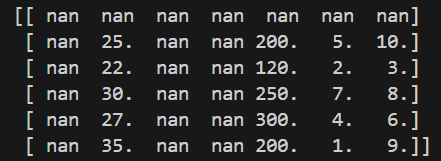
genfromtxt() function from the NumPy library reads data from a CSV file and stores it as a NumPy array. This method is useful when the CSV file primarily contains numerical data.
import numpy as np

path = r"C:\Users\gfg0753\data.csv"
arr = np.genfromtxt(path, delimiter=",")
print(arr)
Output
Explanation:
- genfromtxt() function reads the CSV file and stores its contents in a NumPy array.
- delimiter="," argument specifies that the values in the file are separated by commas.