

PostgreSQL NULLIF() function is a conditional expression that compares two expressions and returns NULL if they are equal. Otherwise, it returns the value of the first expression.
- Replace specific values with NULL in query results.
- Prevent division-by-zero errors in calculations.
- Simplify conditional expressions and improve query readability.
Syntax
NULLIF(expression1, expression2)Where:
- expression1: The value to be returned if the two expressions are not equal.
- expression2: The value compared with the first expression.
Examples
Example 1: Using NULLIF() with Equal Values
The following example compares two equal values.
SELECT NULLIF(10, 10) AS result;Output:

- Since both values are equal, the function returns NULL.
Example 2: Using NULLIF() with Different Values
The following example compares two different values.
SELECT NULLIF(10, 20) AS result;Output:
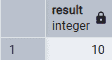
- Since the values are different, the function returns the first value.
Example 3: Using NULLIF() with Strings
The following example compares two string values.
SELECT
    NULLIF('Apple', 'Apple') AS same_value,
    NULLIF('Apple', 'Orange') AS different_value;
Output:
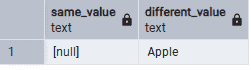
- The first comparison returns NULL because both strings are identical. The second comparison returns 'Apple' because the strings are different.
Example 4: Using NULLIF() to Avoid Division by Zero
Firstly, create the Sales table and insert some records.
CREATE TABLE Sales (ProductName VARCHAR(50),TotalSales NUMERIC,QuantitySold INT);INSERT INTO Sales VALUES('Laptop', 50000, 10),('Mouse', 5000, 0),('Keyboard', 12000, 6);
Now, calculate the average price per unit.
SELECTProductName,TotalSales,QuantitySold,TotalSales / NULLIF(QuantitySold, 0) AS AveragePriceFROM Sales;
Output:

- When QuantitySold is 0, NULLIF(QuantitySold, 0) returns NULL. Dividing by NULL produces NULL instead of raising a division-by-zero error.
Example 5: Using NULLIF() with Table Data
Firstly, create the Employees table and insert some records.
CREATE TABLE Employees (EmployeeID INT,EmployeeName VARCHAR(50),Bonus INT);INSERT INTO Employees VALUES(101, 'John', 5000),(102, 'Alice', 0),(103, 'David', 3000);
Retrieve the bonus values by converting 0 into NULL.
SELECTEmployeeName,NULLIF(Bonus, 0) AS BonusFROM Employees;
Output:

- The NULLIF() function replaces bonus values equal to 0 with NULL, while all other values remain unchanged.