

jQuery is a fast, lightweight JavaScript library that simplifies front-end web development by making DOM manipulation, event handling, animations, and AJAX easier.
- Simplifies DOM manipulation and event handling.
- Provides cross-browser compatibility.
- Supports AJAX and animations with minimal code.
Basic Interview Questions
1. What is jQuery?
jQuery is a lightweight "write less, do more" JavaScript library.
- The purpose of jQuery is to make it much easier to use JavaScript on your website.
- jQuery takes a lot of common tasks that require many lines of JavaScript code to accomplish and wraps them into methods that you can call with a single line of code.
- jQuery also simplifies a lot of the complicated things from JavaScript, like AJAX calls and DOM manipulation.
2. Does jQuery work for both HTML and XML Documents?
Yes, jQuery works for both HTML and XML documents. It provides a unified API to traverse and manipulate both HTML and XML structures.
- jQuery uses its selectors and methods like .find(), .text(), and .attr() to access elements in both types of documents.
- However, for XML documents, jQuery treats them as a generic tree structure, and you can traverse through XML tags and attributes in a similar way as HTML elements.
3. What are jQuery Selectors?
jQuery selectors allow you to select and manipulate HTML element(s).
- jQuery selectors are used to "find" (or select) HTML elements based on their name, id, classes, types, attributes, values of attributes and much more.
- It's based on the existing CSS Selectors, and in addition, it has some own custom selectors.
- All selectors in jQuery start with the dollar sign and parentheses: $().
4. What are the advantages of using jQuery?
- Simplifies JavaScript: Reduces the amount of code needed for common tasks like DOM manipulation, event handling, and animations.
- Cross-browser compatibility: Handles browser inconsistencies, allowing code to work consistently across different browsers.
- Easy AJAX support: Provides simple methods such as $.ajax(), $.get(), and $.post() for making asynchronous HTTP requests.
- Method chaining: Allows multiple operations to be performed in a single statement, making code cleaner and more readable.
- Rich plugin ecosystem: Offers many plugins to add functionality quickly, although this is less significant with modern JavaScript frameworks.
5. What are the jQuery methods to provide effects?
jQuery offers several methods to provide effects for HTML elements. Some of the most commonly used ones include:
- toggle():toggle() toggles between showing and hiding an element.
- fadeIn():fadeIn() gradually fades in an element.
- fadeOut(): fadeOut() gradually fades out an element.
- slideDown():slideDown() slides an element down to make it visible.
- fadeToggle():fadeToggle() toggles the visibility of an element with a fade effect.
- .animate():.animate() performs a custom animation on a set of CSS properties over a specified duration.
- .slideUp():.slideUp() slides an element up to hide it.
- .show():.show() displays an element that was hidden using .hide().
- .hide():.hide() hides the selected elements.
6. Difference between empty(), remove(), and detach() methods in jQuery?
In jQuery, the empty(), remove(), and detach() methods are used to manipulate DOM elements, but they have different behaviors:
- empty(): Removes all child elements and text from the selected element but keeps the element itself in the DOM. Useful when you want to clear the content of an element but keep the element in place for future manipulation.
$('#container').empty(); - remove(): Completely removes the selected element from the DOM, including all its children and data attached to it. Useful when you want to completely remove an element and all its content from the DOM, including event handlers and data.
$('#item').remove(); - detach(): Similar to remove(), but it keeps all event handlers and data associated with the removed elements. Useful when you want to remove an element temporarily but may wish to reattach it later with its event handlers and data intact.
var detachedElement = $('#item').detach();
$('#container').append(detachedElement);
7. Is jQuery a JavaScript or JSON library file?
jQuery is a JavaScript library, not a JSON (JavaScript Object Notation) library file.
- JavaScript: jQuery is written in JavaScript and can be used to manipulate HTML and interact with the DOM (Document Object Model) using JavaScript syntax.
- JSON: JSON is a data format used for structuring data in a readable format for humans and machines, but jQuery is not related to JSON itself; however, jQuery can be used to work with JSON data (like parsing and making Ajax requests).
8. What are the different Ajax functions available in jQuery?
jQuery provides several methods to work with AJAX (Asynchronous JavaScript and XML) for making asynchronous requests to the server. Below are the most commonly used AJAX functions
Method | Description |
|---|---|
Performs a fully customizable AJAX request. | |
Sends a GET request to retrieve data. | |
Sends a POST request to submit data. | |
Sends a GET request and expects a JSON response. | |
Loads and executes a JavaScript file dynamically. | |
Sets default options for all AJAX requests. | |
Coordinates one or more asynchronous operations (such as multiple AJAX requests) and executes code when they complete. | |
Serializes an object or array into a URL-encoded query string for use in AJAX requests. |
9. Mention the compatible operating systems with jQuery.
jQuery is a JavaScript library that works across all operating systems as long as the browser supports JavaScript. jQuery’s compatibility depends on the browser, not the operating system. It's compatible with modern browsers on:
- Windows: Chrome, Firefox, Edge, Safari, Opera
- macOS: Safari, Chrome, Firefox, Edge, Opera
- Linux: Chrome, Firefox, Opera, Chromium
- iOS: Safari, Chrome, Firefox, Opera
- Android: Chrome, Firefox, Opera, Samsung Internet
10. How to include the jQuery library in an ASP.NET project?
To include jQuery in an ASP.NET project, you can use one of these methods:
- CDN (Content Delivery Network): Add this script tag in your HTML or Razor page.
<script src="https://code.jquery.com/jquery-3.6.0.min.js"></script>- Local File: Download jQuery and save it in the Scripts folder.
<script src="~/Scripts/jquery-3.6.0.min.js"></script>- NuGet Package: Install jQuery via NuGet in Visual Studio.
<script src="~/Scripts/jquery-3.6.0.min.js"></script>11. What is the use of the param() method in jQuery?
The param() method in jQuery is used to is used to convert a set of key/value pairs into a query string format, which is typically used in URL encoding or when sending data in an HTTP request, especially with AJAX. It converts an object or array into a query string.
Syntax
$.param( object, trad )Parameters: This method accepts two parameters as mentioned above and described below:
- object: It is a mandatory parameter that is used to specify an array or object to serialize.
- trad: It is an optional parameter and is used to specify whether or not to use the traditional style of param serialization.
12. How to check the version of jQuery?
To check the version of jQuery in your project, we can use one of the following methods:
Method 1: Using $.fn.jquery
console.log($.fn.jquery);Method 2: Using jQuery.fn.jquery
console.log(jQuery.fn.jquery);Method 3: Using Browser Developer Tools
- Open the Developer Tools in your browser (press F12 or Ctrl+Shift+I).
- Go to the Console tab.
- Type $.fn.jquery and press Enter to view the version.
13. What is jQuery Connect?
jQuery Connect is not an official feature, method, or API of the jQuery library. There is no built-in concept called "jQuery Connect." If the term appears in documentation or a project, it usually refers to a third-party plugin, a custom implementation, or an application-specific name rather than a standard jQuery feature.
14. Difference between find() and children() methods?
find() | children() |
|---|---|
Searches for all descendants of the selected element(s) matching the specified selector. | Returns only the direct child elements of the selected element(s). |
Can search deeply within nested elements (all descendants). | Searches only the direct children of the selected element(s). |
Used when you need to find elements at any level inside the selected element. | Used when you need to access immediate child elements only. |
$("#parent").find(".child") will find .child elements inside #parent at any depth. | $("#parent").children(".child") will find only immediate .child elements of #parent. |
15. How does jQuery handle errors?
Query primarily handles errors during AJAX requests using callback functions and Promise methods.
- error callback: Handles failures in an AJAX request.
- .fail(): Executes when an AJAX request fails.
- $(document).ajaxError(): Handles AJAX errors globally for all AJAX requests.
- try...catch: Used to handle general JavaScript runtime errors when needed.
16. What are the different ways to store data in jQuery?
jQuery itself provides the .data() method to associate data with DOM elements without modifying the HTML.
In web applications, client-side data can also be stored using browser storage mechanisms:
- .data(): Stores data associated with DOM elements (jQuery-specific).
- localStorage: Stores data persistently in the browser until it is explicitly removed.
- sessionStorage: Stores data only for the duration of the browser session.
- Cookies: Store small amounts of data that can be sent with HTTP requests.
17. How does jQuery handle case-insensitive attribute selectors?
jQuery supports case-insensitive attribute matching using the CSS4 i flag in attribute selectors (in modern browsers and recent jQuery versions).
$("[name='MyInput' i]").css("background-color", "yellow");This selector matches elements regardless of the case of the attribute value. For example, it matches:
- name="MyInput"
- name="myinput"
- name="MYINPUT"
Note: The i flag is a CSS4 selector feature, not a jQuery-specific feature, and its support depends on the browser and jQuery version.
18. What is the difference between $(this) and $(event.target)?
Both $(this) and $(event.target) refer to DOM elements inside an event handler, but they are not always the same.
$(this) | $(event.target) |
|---|---|
Refers to the element on which the event handler is attached. | Refers to the actual element that triggered the event. |
Remains the same regardless of which child element was clicked. | Changes depending on the element the user actually interacted with. |
Commonly used to modify the element handling the event. | Commonly used to modify the element handling the event. |
19. What is chaining in jQuery?
Chaining in jQuery allows you to perform multiple actions on the same set of elements, one after another, in a single line of code. This is made possible because most jQuery methods return the jQuery object itself, enabling you to chain multiple methods together.
$("#myDiv")
    .css("color", "red")        // Change text color to red
    .slideUp(1000)             // Slide up over 1 second
    .slideDown(1000)       // Slide down over 1 second
    .fadeOut(500);           // Fade out over 0.5 second
20. Explain $.when() and $.then() in jQuery.
The $.when() method waits for one or more asynchronous operations (Deferred objects or Promises) to complete before executing a callback. The $.then() method is used to chain actions after a Promise is resolved or rejected.
$.when() Syntax:
$.when(promise1, promise2).done(function(result1, result2) {
    console.log("All promises completed");
});
Example:
const request1 = $.get("/users");
const request2 = $.get("/posts");

$.when(request1, request2).done(function(users, posts) {
    console.log(users, posts);
});
$.then() Example:
$.ajax("/users")
    .then(function(response) {
        console.log(response);
    })
    .catch(function(error) {
        console.log(error);
    });
- $.when() waits for one or more asynchronous operations to complete.
- $.then() executes callbacks after a Promise or Deferred object is resolved or rejected.
- Both methods simplify handling asynchronous operations in jQuery
21. What are the categories in jQuery Events ?
jQuery events are grouped into the following categories:
- Mouse Events: click, dblclick, mouseenter, mouseleave, mouseover, mouseout
- Keyboard Events: keydown, keypress, keyup
- Form Events: submit, change, focus, blur, select
- Document/Window Events: ready, load, resize, scroll, unload
These event categories help respond to different user interactions and browser events.
22. What is the difference between JavaScript and jQuery ?
JavaScript | jQuery |
|---|---|
A programming language. | A JavaScript library. |
Used to build web application logic. | Simplifies JavaScript tasks. |
Requires more code for DOM manipulation and AJAX. | Provides concise methods for DOM manipulation, events, animations, and AJAX. |
Runs natively in browsers. | Built on top of JavaScript. |
No external library required. | Requires the jQuery library to be included. |
23. What are Events in jQuery ?
Events are actions or occurrences detected by the browser, such as user interactions or browser activities. jQuery provides methods to attach event handlers so that code executes when an event occurs.
Common events include:
- click
- dblclick
- keydown
- keyup
- submit
- change
- focus
- blur
24. Whether we need to add a jQuery file in both the Master and Content page ?
In an ASP.NET Web Forms application, the jQuery library should typically be included only once in the Master Page. Since all Content Pages inherit from the Master Page, they can use jQuery without including the library again.
Including the jQuery file in both the Master Page and Content Pages can result in duplicate loading, which may cause performance issues or unexpected behavior.
25. Is jQuery required for bootstrap ?
It depends on the Bootstrap version:
- Bootstrap 3 and Bootstrap 4 require jQuery for JavaScript components such as modals, tooltips, and dropdowns.
- Bootstrap 5 removed the jQuery dependency and uses vanilla JavaScript instead.
26. What is the purpose of $.extend() method in jQuery?
The $.extend() method in jQuery is used to merge the properties of one or more source objects into a target object. It is commonly used to combine default configuration options with user-provided options.
By default, it performs a shallow copy, but passing true as the first argument enables a deep copy of nested objects.
const defaults = { theme: "light", fontSize: 14 };
const options = { fontSize: 16 };

const settings = $.extend({}, defaults, options);
// Result: { theme: "light", fontSize: 16 }
27. How to check the data type of any variable in jQuery ?
Use $.type(Object) method to get the data-type of object.
Intermediate Interview Questions
28. What is the difference between .not() and .filter() in jQuery?
Both not(selector) and filter(selector) are used to select elements based on specific conditions, but they are used in different contexts and behave differently.
.not() | .filter() |
|---|---|
Excludes elements that match the given selector. | Selects elements that match the given selector. |
It is used to remove elements from the set of selected elements. | It is used to narrow down the selected elements. |
Excludes the matched elements from the original set. | Returns a subset of elements that match the criteria. |
$("p").not(".exclude") – Selects all <p> elements except those with class .exclude. | $("p").filter(".include") – Selects only <p> elements with class .include. |
29. How do you handle form validation using jQuery?
Form validation ensures that the data entered into a form is correct before it is submitted. jQuery provides various ways to handle form validation easily by using built-in methods and custom checks.
HTML Form
<form id="myForm">
    <input type="text" id="username" placeholder="Username">
    <input type="email" id="email" placeholder="Email">
    <input type="password" id="password" placeholder="Password">
    <button type="submit">Submit</button>
</form>
<div id="error-message"></div>
jQuery Validation
$(document).ready(function () {
    $("#myForm").submit(function (event) {
        event.preventDefault();
        var isValid = true;
        var errorMessages = [];

        if ($("#username").val() === "") {
            isValid = false;
            errorMessages.push("Username is required.");
        }

        var email = $("#email").val();
        var emailPattern = /^[a-zA-Z0-9._-]+@[a-zA-Z0-9.-]+\.[a-zA-Z]{2,6}$/;
        if (!email || !emailPattern.test(email)) {
            isValid = false;
            errorMessages.push("Valid email is required.");
        }

        if ($("#password").val().length < 6) {
            isValid = false;
            errorMessages.push("Password must be at least 6 characters.");
        }

        if (!isValid) {
            $("#error-message").html("<ul><li>" + errorMessages.join("</li><li>") + "</li></ul>");
        } else {
            alert("Form submitted successfully!");
        }
    });
});
30. Can you explain about ajaxStart() functions?
The ajaxStart() function in jQuery is triggered when any Ajax request starts. It is used to execute actions before an Ajax request, like showing a loading indicator. It is useful for showing loading indicators or disabling UI elements during Ajax requests.
Syntax
$(document).ajaxStart(function() {
});
31. How do you fade in an element only if it’s hidden?
To fade in an element only if it's hidden, we can first check the element's display property using the css() method. If the value is set to none, which indicates that the element is hidden, you can then apply the fadeIn() method to smoothly make it visible.
if (!$("#box").is(":visible")) {
    $("#box").fadeIn();
}
31. What is the purpose of the bind(), live(), and delegate() methods in jQuery?
In jQuery, the bind(), live(), and delegate() methods are used for event handling.
- bind(): Binds event handlers to elements.It directly binds the event handler to the specified element at the time of binding.It only works for elements that exist when the script runs, so it won't work for elements added dynamically after the page loads.
- live(): Binds events to dynamically added elements (deprecated).The live() method attaches an event handler to all matching elements, including those that are added to the DOM dynamically after the initial page load.
- delegate(): Binds events to parent elements and uses event delegation.It is typically used when you want to handle events for dynamically added elements.You specify the parent element and the child elements you want to listen for events on. When the event occurs on a matching child element, it is handled by the event handler.
32. How do you create and read cookies using jQuery?
jQuery does not provide built-in methods for creating or reading cookies. Traditionally, developers used the jQuery Cookie Plugin, which provides the $.cookie() method.
// Create a cookie
$.cookie("name", "value");

// Read a cookie
var value = $.cookie("name");
33. What are the different ways to select elements in jQuery?
Selector Type | Syntax | Example |
|---|---|---|
By Element Type | $("tagname") | $("p") |
By ID | $("#id") | $("#elementId") |
By Class | $(".className") | $(".active") |
By Attribute | $("[attribute='value']") | $("[type='text']") |
By Pseudo-Class | $("selector:pseudo-class") | $("li:first") |
By Descendant/Child | $("parent child") | $("div p") |
By Index | $("selector:eq(index)") | $("ul li:eq(2)") |
34. Can you explain the ajaxComplete() function?
The ajaxComplete() function in jQuery is an event handler that is triggered when an AJAX request completes (either successfully or with an error). It is called for every AJAX request that completes, no matter what.
- The ajaxComplete() function allows you to run some code after an AJAX request finishes, regardless of whether it succeeded or failed.
- This makes it a useful tool for performing actions like resetting UI elements, showing a loading spinner, or logging statistics after an AJAX request is done.
$(document).ajaxComplete(function(event, xhr, settings) {
});
35. How to append, prepend, and insert content in jQuery?
In jQuery, we can easily append, prepend, and insert content into HTML elements using specific methods.
- append(): append() adds content to the end of selected elements.
- prepend():prepend() adds content to the beginning of selected elements.
- insertBefore(), insertAfter() for inserting content at specific positions.
36. Why jQuery is better than JavaScript ?
jQuery is not a replacement for JavaScript; it is a JavaScript library that simplifies common client-side tasks.
Compared to plain JavaScript, jQuery offers several advantages:
- Simplifies DOM manipulation with concise syntax.
- Provides cross-browser compatibility, handling browser inconsistencies.
- Makes event handling easier using simple APIs.
- Simplifies AJAX requests with methods like $.ajax(), $.get(), and $.post().
- Supports method chaining, resulting in cleaner and more readable code.
- Offers a rich plugin ecosystem for adding functionality quickly.
37. What is the method used to define the specific character in place of $ sign ?
The jQuery.noConflict() method is used to release the $ alias so that other JavaScript libraries using $ can coexist with jQuery without conflicts. After calling noConflict(), you can assign jQuery to another variable and use that variable instead of $.
38. What exactly is a jQuery Data Table plugin?
The jQuery DataTable plugin is a powerful and flexible tool for enhancing HTML tables.
- It provides interactive features like sorting, searching, pagination, and filtering out of the box.
- By transforming standard HTML tables into dynamic, user-friendly data grids.
- It helps improve the user experience for displaying large sets of tabular data.
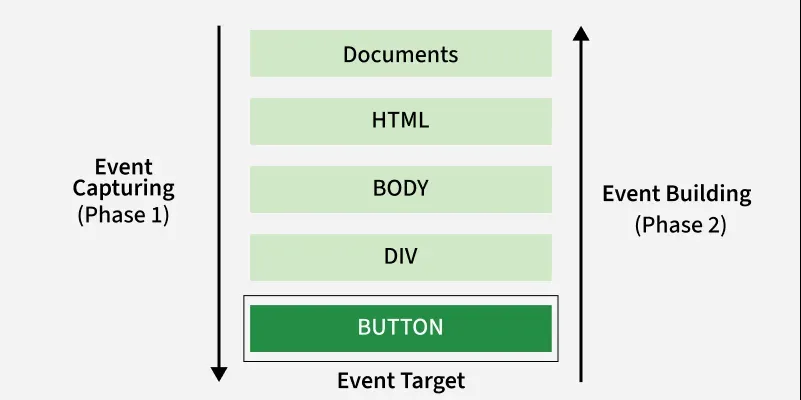
39. What is event delegation in jQuery?
Event delegation is the practice of binding an event to a parent element rather than directly to individual child elements, making it more efficient and handling dynamically added elements.
- It reduces the number of event handlers by using one for a parent element instead of multiple for each child.
- It works even with elements that are added to the DOM after the page has loaded (e.g., via AJAX or user interaction).
40. How to perform an AJAX request in jQuery?
To perform an AJAX request in jQuery, you can use the $.ajax() method, which allows you to send asynchronous HTTP requests to the server and handle the response without refreshing the page. jQuery provides the $.ajax() method for making these requests, offering a wide range of customization options for HTTP requests.
- url: The URL where the request is sent.
- type: Specifies the HTTP request method (GET, POST, etc.).
- data: Data to be sent with the request (used for POST or PUT).
- success: Function to execute if the request succeeds.
- error: Function to execute if the request fails.
41. What is the difference between $.get() and $.post() methods?
$.get() | $.post() |
|---|---|
$.get() uses GET method. | $.post() uses POST method. |
Primarily used to retrieve (fetch) data from the server. | Primarily used to send or submit data to the server. |
Sends data as URL query parameters. | Sends data in the HTTP request body. |
Data is visible in the URL. | Data is not visible in the URL. |
Data size is limited by the maximum URL length. | Data size is limited by the server's request body size. |
Requests can be cached by browsers. | Requests are typically not cached by default. |
URLs can be bookmarked or shared with the same parameters. | Requests cannot be bookmarked since the data is not in the URL. |
42. How to work with parent(), children() and siblings() methods in jQuery ?
The parent() method returns the parent of the chosen element by calling the jQuery parent() method. The siblings() method returns all the siblings of given HTML elements.
Advanced Interview Questions
43. What is $.proxy() and how is it used?
$.proxy() is used to preserve the this context inside event handlers. This is useful when working with event handlers or callbacks, where the value of this can change, and you need to bind it to a specific context (such as a DOM element or an object).
var obj = {
    message: "Hello",
    showMessage: function () {
        console.log(this.message);
    }
};

$("#btn").on("click", $.proxy(obj.showMessage, obj));
44. How do you debounce a function in jQuery?
Debouncing is a technique used to limit the number of times a function is called in response to events that trigger frequently (like scrolling, resizing, keypresses, etc.).
- It ensures that the function is only called after a certain amount of time has passed since the last event was triggered, preventing it from being called too many times in quick succession.
- It reduces unnecessary function calls, improving performance, especially for expensive operations (like API calls or heavy DOM manipulation).
- It prevents overwhelming the user interface with too many changes at once.
function debounce(func, delay) {
    let timer;
    return function () {
        clearTimeout(timer);
        timer = setTimeout(() => func.apply(this, arguments), delay);
    };
}

$(window).on("resize", debounce(function () {
    console.log("Resized!");
}, 500));
45. How do you create a jQuery plugin?
A jQuery plugin is a way to extend the functionality of jQuery by creating reusable functions that can be applied to jQuery objects.
- These plugins allow developers to add custom methods that can be called on jQuery objects, making it easier to encapsulate complex logic and keep the code modular and clean.
- A plugin allows you to separate concerns by encapsulating specific functionality into a self-contained module. This keeps your codebase clean and manageable.
- By using plugins, you can hide the complexity of a specific task or feature inside a simple interface, making it easier for other developers to use.
(function ($) {
    $.fn.changeColor = function (color) {
        this.css("color", color);
        return this;
    };
})(jQuery);

$("p").changeColor("blue");
46. How does jQuery internally work?
Internally, jQuery is built on top of JavaScript and provides a simpler, cross-browser API for common tasks such as DOM manipulation, event handling, animations, and AJAX.
- Wrapping native JavaScript APIs to simplify common operations.
- Using CSS selectors (through the Sizzle selector engine in older versions and native selector APIs where possible) to efficiently locate DOM elements.
- Returning a jQuery object, which enables method chaining.
- Handling cross-browser compatibility, so the same code works consistently across different browsers.

47. Why is jQuery still relevant despite modern frameworks like React and Vue?
Although modern frameworks like React and Vue are preferred for building large, component-based applications, jQuery is still relevant in several scenarios:
- Legacy applications: Many existing websites and enterprise applications are built with jQuery and continue to be maintained.
- Simple DOM manipulation: It provides an easy and concise API for tasks such as DOM manipulation, event handling, animations, and AJAX.
- No build setup: jQuery can be added directly with a script tag, making it suitable for small projects and quick prototypes.
- Large plugin ecosystem: Numerous plugins are available for features like form validation, sliders, and data tables.
- Cross-browser compatibility: It abstracts browser differences, especially in older browsers.
- Easy integration: It can be added to existing projects without requiring a complete application rewrite.
48. How to optimize jQuery for performance?
Best Practices for Enhancing jQuery Performance
- Cache selectors to avoid repeated DOM lookups.
- Use efficient selectors, such as ID selectors, whenever possible.
- Minimize DOM manipulation by batching updates instead of making frequent changes.
- Use method chaining to reduce repeated element selection.
- Use event delegation with .on() instead of attaching handlers to many individual elements.
- Avoid unnecessary DOM traversals and repeated searches.
- Minimize reflows and repaints by reducing frequent layout changes.
- Minify JavaScript for production to reduce file size.
- Load jQuery efficiently, such as using the defer attribute or placing the script before the closing </body> tag.
- Use native JavaScript for simple operations when appropriate in modern applications.
49. What is the difference between $(document).ready() and $(window).on("load")?
$(document).ready() | $(window).on("load") |
|---|---|
When DOM is fully loaded | After the entire page (including images, CSS, etc.) is loaded |
DOM manipulation, attaching event listeners | Actions that depend on images or external resources |
Faster, as it doesn't wait for external resources like images or CSS to load. | Slower, as it waits for everything (including images, videos, etc.) to load. |
$(document).ready(function() { ... }); | $(window).on("load", function() { ... }); |
Fires when the DOM is fully loaded (HTML is parsed, but images, stylesheets, and other external resources may not be loaded yet). | Fires when the entire page, including all images, stylesheets, and other resources, has finished loading. |
50. Explain how event bubbling and event capturing work in jQuery.
Event propagation is the process by which an event travels through the DOM. It consists of two phases:
Event Bubbling
- The event starts from the target element and propagates upward through its parent elements to the document (child → parent).
- jQuery event handlers (.on(), .click(), etc.) work during the bubbling phase.
- Event bubbling is commonly used for event delegation.
Event Capturing
- The event starts from the root document and travels downward to the target element (parent → child).
- Event capturing is supported by native JavaScript using addEventListener() with the capture option.
- jQuery does not provide built-in support for event capturing.
$("#parent").on("click", function () {
    alert("Parent clicked!");
});

$("#child").on("click", function (event) {
    alert("Child clicked!");
    event.stopPropagation(); // Prevents the event from bubbling to the parent
});
51. Is it possible to pause or postpone the execution of the document.ready for a period of time?
No. The execution of $(document).ready() itself cannot be paused or postponed. It is automatically triggered by jQuery as soon as the DOM has been fully loaded and parsed.
However, you can delay the execution of code inside the ready() callback using JavaScript functions such as setTimeout().
$(document).ready(function () {
    setTimeout(function () {
        console.log("Executed after a 3-second delay.");
    }, 3000);
});
The ready() event fires immediately when the DOM is ready, but the code inside setTimeout() runs after a 3-second delay.
52. Explain $.fn and its role in jQuery plugin development.
When developing jQuery plugins, $.fn is used to add new functions to jQuery’s object prototype. This allows you to call these functions on any jQuery object, just like built-in methods like .click() or .hide(). By extending $.fn, you ensure that your custom methods are chainable and behave like native jQuery methods.
- $.fn is a shortcut for jQuery.prototype.
- It is used to extend jQuery and create custom plugins.
Example of a simple jQuery plugin:=
(function ($) {
    $.fn.highlight = function (color) {
        this.css("background-color", color);
        return this;
    };
})(jQuery);

$("p").highlight("yellow");
53. Explain the .promise() method in jQuery.
The .promise() method in jQuery returns a jQuery Promise (Deferred Promise) that is resolved when all queued actions, such as animations, on the selected elements have completed.
It is commonly used to execute code after multiple animations or queued operations finish, without having to track each one individually.
$("#box")
    .fadeOut()
    .fadeIn()
    .promise()
    .done(function () {
        console.log("All animations completed.");
    });
In this example, the callback passed to .done() executes only after both animations have finished.
54. What are the key differences between jQuery $.each() and JavaScript’s forEach()
$.each() | forEach() |
|---|---|
Works with arrays and objects. | Works only with arrays. |
Can break the loop using return false. | Cannot break or stop the loop early. |
return true skips the current iteration (similar to continue). | Does not support break or continue. |
Returns the original collection. | Returns undefined. |
Inside the callback, this refers to the current element/object. | this is not the current element by default (unless a thisArg is provided). |
Slightly slower due to jQuery overhead. | Generally faster because it is a native JavaScript method. |
55. How does jQuery handle asynchronous operations?
jQuery handles asynchronous operations using the following features:
- AJAX methods: $.ajax(), $.get(), and $.post() send asynchronous HTTP requests without reloading the page.
- Deferred objects and Promises: $.Deferred() provides a way to manage asynchronous tasks using methods such as .done(), .fail(), .then(), and .always().
- Animation callbacks: Animation methods like .fadeIn() and .slideUp() execute asynchronously and support callback functions or .promise() to run code after completion.
- Timers: JavaScript functions such as setTimeout() and setInterval() can be used alongside jQuery for delayed or repeated execution.
$.ajax({
    url: "example.com",
    success: function(response) {
        console.log(response);
    },
    error: function(xhr, status, error) {
        console.error(error);
    }
});
56. How do you ensure memory efficiency while using jQuery?
To maintain memory efficiency in your jQuery code, it's crucial to follow best practices that minimize memory leaks and optimize performance. Below are key strategies to ensure efficient memory usage when working with jQuery
- Avoid Global Variables : Use local variables inside functions whenever possible. If global variables are necessary, consider using closures to encapsulate them.
- Unbind Event Handlers : Always use .off() to unbind event handlers when they are no longer needed, especially in dynamically created content.
- Use .remove() to Clean Up DOM Elements : When removing elements from the DOM, use .remove() to ensure the element and its associated events and data are properly cleaned up.
- Limit jQuery Selectors : Be specific with your selectors and try to avoid searching the entire DOM. Cache frequently accessed elements in variables.
- Use $.data() and $.removeData() Properly : If you no longer need the stored data, call $.removeData() to ensure memory is freed.
- Be Careful with setInterval() and setTimeout() : Always use clearInterval() or clearTimeout() to stop periodic actions when they are no longer required.
- Optimize DOM Manipulations : Batch DOM manipulations by using .append(), .prepend(), or .html() in bulk, rather than manipulating individual elements repeatedly.
57. What is the difference between event.preventDefault() and event.stopPropagation()?
Both event.preventDefault() and event.stopPropagation() are used to control event behavior, but they serve different purposes:
event.preventDefault() | event.stopPropagation() |
|---|---|
Prevents the browser's default action for an event. | Prevents the event from propagating to parent elements (event bubbling). |
Does not stop the event from bubbling. | Does not prevent the default browser action. |
Commonly used to stop form submission or link navigation. | Commonly used to prevent parent event handlers from being triggered. |
Example: Prevent a form from submitting or a link from opening. | Example: Prevent a click event on a child element from reaching its parent. |
58. How do you optimize jQuery performance in large-scale applications?
To improve jQuery performance, consider the following optimization techniques:
Cache Selectors: Store frequently used elements in variables instead of querying the DOM multiple times.
var $btn = $("#myButton");
$btn.click(function() {
    $btn.text("Clicked!");
});
Use Event Delegation: Attach event handlers to parent elements instead of individual child elements.
$(document).on("click", ".dynamic-button", function() {
    alert("Button Clicked!");
});
Minimize DOM Manipulation: Batch changes to the DOM instead of modifying it repeatedly.
var items = "";
for (var i = 0; i < 100; i++) {
    items += "<li>Item " + i + "</li>";
}
$("#list").html(items);
- Use .on() Instead of .bind() or .live(): .on() improves event handling performance.
- Remove Unused Elements & Data: Use .remove() and .empty() when elements are no longer needed.
59. What is QUnit ?
QUnit is a JavaScript unit testing framework developed by the jQuery team. It is used to test JavaScript code, including jQuery plugins and applications.
Features include:
- Unit testing
- Assertions
- Asynchronous testing
- Test reporting
It is lightweight and can be used for testing any JavaScript code, not just jQuery.
60. What is the proper way in jQuery to remove an element from the DOM before its Promise is resolved ?
When an element has a pending jQuery Promise (typically from queued animations), avoid removing it immediately with .remove(), because .remove() also removes the element's associated jQuery data and event handlers, which can interfere with unresolved queued operations.
Instead, use .detach(), which removes the element from the DOM while preserving its data and events. After the promise resolves, you can clean up the element using .removeData() (if needed) and .remove().
var $box = $("#box").detach();

$box.promise().done(function () {
    $box.removeData();
    $box.remove();
});
61. What is the slowest selector in jQuery ?
The slowest selectors in jQuery are generally complex selectors and jQuery-specific pseudo-selectors, such as :contains(), :has(), :visible, and :hidden, because they require additional filtering after the initial element selection.
For better performance, prefer simple selectors such as ID (#id), class (.class), or element (div) selectors whenever possible.
62. Which is the fastest selector in jQuery?
The ID selector (#id) is generally the fastest selector in jQuery because it uses the browser's native document.getElementById() method, which is highly optimized for locating a single element.
Example:
$("#header"); // Fastest selectorFor better performance, use simple selectors (such as ID, class, or element selectors) instead of complex or pseudo-selectors whenever possible.