

In Git, merging combines changes from one branch into another. If conflicts occur, Git requires them to be resolved before the merge is completed.
- Merge keeps all changes and shows a merge commit in the history.
- It can merge more than two branches at once.
- Works even if the branches have different changes.
- Adds a special commit to show when the branches were combined.
Common Merge Strategies
Git provides several merge strategies, each suited for different scenarios. The choice of strategy depends on the complexity of changes and the desired outcome. Here are the most commonly used merge strategies:
1. Fast Forward Merge
A fast-forward merge occurs when the target branch has not diverged from the source branch. In this case, Git simply moves the target branch pointer to the latest commit in the source branch. This strategy is simple and keeps the commit history linear.
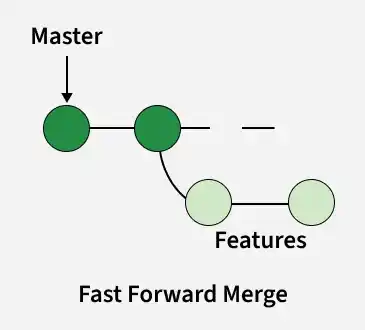
- Creates a linear commit history with no merge commit.
- Used when the main branch has no new commits.
- Simply moves the branch pointer forward.
- Keeps the project history clean and straight.
Command:
git checkout main
git merge feature-branch


2. Recursive Merge (Default)
Recursive merge is Git’s default strategy for merging diverged branches. It creates a merge commit that combines changes while preserving the history of both branches.

- Used when both branches have new commits since they diverged.
- Git creates a new merge commit with two parent commits.
Command:
git merge --no-ff <branch-name>
Note: There is nothing right or wrong of either one of the strategies but with fast forward merge you have a straight line of history and with the recursive merge, it is of multiple lines.
Fast-Forward merge vs Recursive merge
Here are some key differences between Fast-Forward and Recursive merges:
| Fast Forward | Recursive |
|---|---|
| No new commits on the master | New commits on the master |
| Linear History | Commit 2 parents |
| No merge commits | Merge commit is created |
| git rebase | git merge --no-ff <branch-name> |
3. Octopus Merge
Octopus merge is used for merging more than two branches simultaneously. It’s less common and typically used for automated merges involving multiple feature branches.

- Used to merge more than two branches at once.
- Avoids complex merges that require manual conflict resolution.
- Commonly used to combine multiple topic branches.
- Default strategy when merging or pulling multiple branches.
Command:
$ git merge -s octopus
4. Subtree Merge
The subtree merge strategy is useful when you want to merge a project into a subdirectory of another project. This is typically used for merging external projects or submodules into your project.
Use Case: Use the subtree strategy when merging an entire project into a subdirectory of the current repository.
Command:
git merge -s subtree branch-name5. Squash and Merge
Squash and merge combines all commits from a feature branch into a single commit on the target branch without creating a merge commit. This strategy simplifies the commit history, making it easier to follow.
Use Case: Ideal for merging feature branches with numerous small commits, resulting in a cleaner main branch history.
Command:
git checkout main
git merge --squash feature-branch
git commit -m "Merged feature-branch with squash"
6. Ours Merge
The ours strategy is used when you want to keep the changes from the current branch (the branch you are merging into) and discard the changes from the branch being merged.
Use Case: Use the ours strategy when you want to discard changes from the branch being merged and keep your own.
Command:
git merge -s ours branch-nameUse Cases for Different Merge Strategies
Different merge strategies are used based on branch history, conflict complexity, and the need to preserve or simplify commit history.
Merge Strategy | Use Case |
|---|---|
Fast Forward Merge | When there are no new commits in the target branch. |
Recursive Merge | When two branches have independent changes and need to be merged. |
Octopus Merge | When you need to merge multiple branches at once. |
Subtree Merge | When you want to merge a project or submodule into a subdirectory. |
Squash and Merge | When you want to combine multiple small commits into a single commit. |
Ours Merge | When you want to keep the current branch’s changes and discard the other branch’s. |