

Google Dorking (Google Hacking) is a technique that uses advanced search operators to uncover sensitive information unintentionally exposed on the internet, helping in the reconnaissance phase of security assessments by identifying misconfigurations and potential vulnerabilities.
- Uses operators like (site:), (filetype:) and (intitle:) to refine searches.
- Finds exposed files, directories and login pages indexed by search engines.
- Supports information gathering in penetration testing and ethical hacking.
- Helps identify misconfigured or vulnerable systems before exploitation.
Information Discoverable Using Google Dorks
- Specific file types such as PDF, DOC, XLS or SQL files.
- Login pages or admin panels of websites.
- Sensitive documents and configuration files accidentally exposed online.
- Directory listings, error messages and database backups are indexed by search engines.
Example: This query searches for PDF files available only within the domain geeksforgeeks.org
site: geeksforgeeks.com filetype:pdf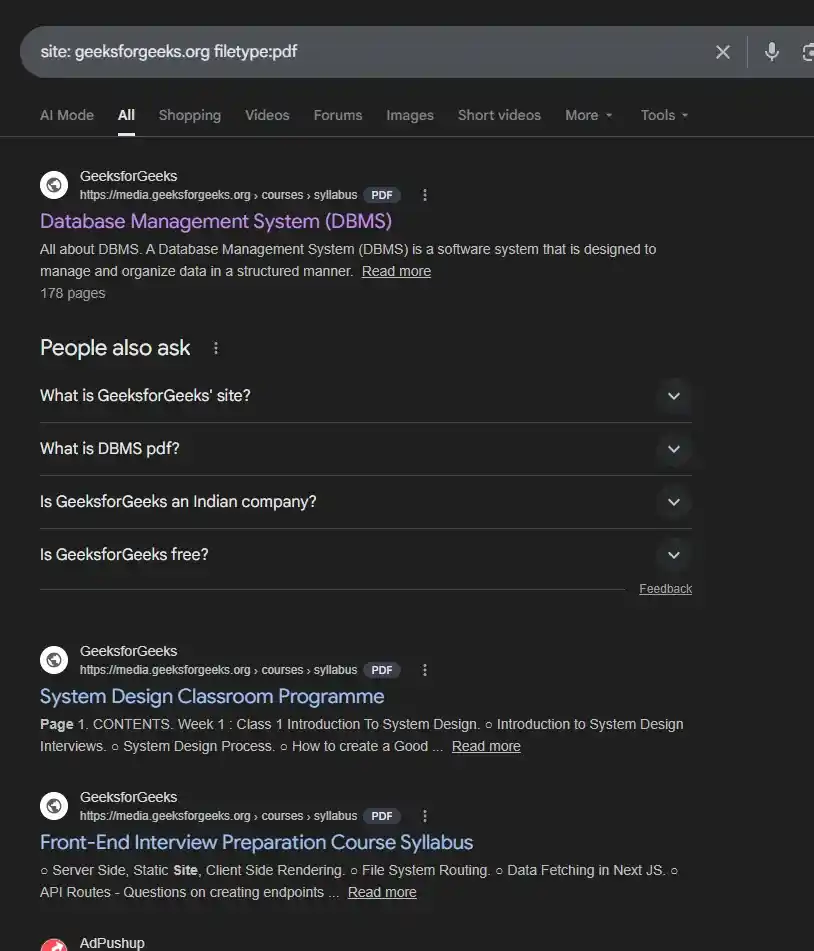
Common Google Dork Operators
1. Site
The (site:) operator restricts search results to a specific website or domain. It is useful for finding indexed pages within a particular site.
Example: Below query returns only pages indexed from the domain geeksforgeeks.org.
site: geeksforgeeks.orgYou can also combine it with other operators: Below searches for login-related pages within the geeksforgeeks.org domain.
site: geeksforgeeks.org login2. Filetype
The (filetype:) operator searches for specific types of files available on the internet. It is commonly used to locate documents, reports, backups or data files.
Example: This query finds PDF documents that contain the word "confidential".
filetype:pdf "confidential"Common file types used in Google Dorking:
- pdf: documents
- doc / docx: Word files
- xls / xlsx: Excel spreadsheets
- txt: text files
- log: system logs
- sql: database backup files
3. Intitle
The (intitle:) operator searches for keywords within the title of a webpage. It helps identify pages with specific titles.
Example 1: This may reveal open directory listings.
intitle:"index of"Example 2: This may reveal directories containing backup files.
intitle:"index of" "backup"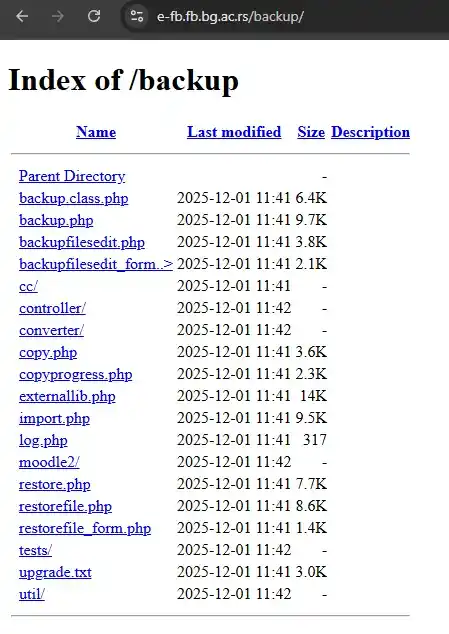
4. Inurl
The (inurl:) operator searches for specific keywords within the URL of a webpage. It is useful for locating certain pages such as admin panels or login portals.
Example 1: This may reveal admin control panels.
inurl:adminExample 2: This finds pages that contain login.php in their URL.
inurl:login.php5. Intext
The (intext:) operator searches for specific words or phrases inside the content of webpages.
Example: This searches for pages containing both the words username and password in the page content.
intext:"username" "password"6. cache
The cache: operator displays the cached version of a webpage stored by Google. This can help view pages even if they are temporarily unavailable.
Example: This shows Google’s stored snapshot of the website example.com.
cache:example.com7. Link
The (link:) operator shows pages that link to a specific website or webpage.
Example: This query lists webpages that contain links pointing to example.com.
cache:example.comOperators in Google Dorking
Apart from the above-mentioned operator, there are also some logical operators which can be used to filter the search engine results according to the need.
| Operator | Description | Example |
|---|---|---|
| OR ( | ) | This self-explanatory operator searches for a given search term OR an equivalent term. | site:geeksforgeeks.org | site:www.geeksforgeeks.org |
| AND | Similarly, this operator searches for a given search term AND an equivalent term. | site:geeksforgeeks.com & site:www.geeksforgeeks.org |
| Exact Match (" ") | This operator only looks for the precise phrase within speech marks. | "GeeksForGeeks POTD" |
| Wildcard (*) | This works best when you don't know what goes on in the place of the asterisk (*). | site: *.geeksforgeeks.org |
| Include (+) | Will include the results. | site:linkedin.com +site:linkedin.* |
| Exclude (-) | Will exclude the results. | site:linkedin.* -site:linkedin.com |
- Google search operators help refine search results and find specific information more efficiently.
- They can be combined with Google Dorks to discover publicly available data indexed by search engines.
- Attackers may misuse this technique to find sensitive information like login pages, files or credentials.
- Therefore, organizations should secure sensitive data and prevent it from being publicly accessible online.
Use of Google Dorking in Cybersecurity
Google Dorking is an important technique during the reconnaissance phase of penetration testing. Security professionals use it to:
- Used during the reconnaissance phase of penetration testing.
- Helps discover exposed sensitive files and misconfigured servers.
- Assists in identifying vulnerable web applications, login portals and exposed databases.
- Enables gathering intelligence about a target organization.
Prevention From Google Dorking
As an owner/developer, you will wish your website to be secure from google dorking. You can do so by following the below-mentioned stuff:
- Use Robots.txt: You may tell search engines not to index particular web pages or directories on your website using a robots.txt file.
<META NAME="ROBOTS" CONTENT="NOINDEX, NOFOLLOW">
// This meta tag will prevent all
 robots from scanning your website
- Disable Directory Indexing: Web servers frequently permit directory crawling by default, allowing anybody to see a directory's contents.
- Use a Firewall: You can use a WAF (Web Application Firewall) to enhance the security of your website. It will provide you with an extra layer of security.
- Use Access Control: You can use authentication or MFA (Multi-Factor Authentication) on the pages if you don't want let anyone to have access. It will prevent unauthorized access to the website.
Google Dorking Tools & Automation
Performing Google Dorking manually is possible, but cybersecurity experts and ethical hackers use powerful tools to automate it for quicker vulnerability scanning.
- Google Hacking Database (GHDB): A set of premade Google Dork queries that are utilized by security experts during OSINT and vulnerability scanning.
- DorkScanner: An automated tool that scans Google search results for exposed information, such as login pages, admin panels and security flaws
- SQLmap: It is a powerful tool that helps to exploit SQL injection vulnerabilities using Google Dorks to find vulnerable databases.
- GoogD0rker: A script that makes it easier to search for indexed sensitive files such as password documents, API keys and other exposed configurations.
- Google Dork Automation (GDA): A framework for scraping Google search results, identifying vulnerabilities and automating OSINT tasks.
Google Hacking Database (GHDB)
The Google Hacking Database (GHDB) is a collection of advanced Google search queries, known as Google Dorks, used to identify sensitive information and potential vulnerabilities exposed on the internet.
- Files containing passwords: Documents or files that may expose login credentials.
- Sensitive directories: Open folders containing backups, logs or configuration files.
- Login portals: Administrative or authentication pages of websites and applications.
- Vulnerable servers: Servers that may reveal outdated software or security misconfigurations.
- Network devices: Web interfaces of routers, cameras and other connected devices.
- Database files: Exposed database backups such as SQL dumps or configuration files.
Examples
Below are some example Google Dorks from GHDB that demonstrate how sensitive information or specific resources can be discovered using advanced search operators.
1. Finding exposed password files
This query searches for text files that contain the word "password", which may reveal exposed credentials.
Filetype:txt "password"2. Finding open directory listings
This may reveal public directories containing backup files.
intitle:"index of" "backup"3. Finding login pages
This searches for admin login portals of websites.
inurl:admin login4. Finding database backup files
This query looks for SQL database dump files that may be publicly accessible.
filetype:sql "dump"5. Finding network device interfaces
This may reveal webcam or network camera interfaces available online.
intitle:"webcamXP 5"