

Google Compute Engine is a cloud service that provides scalable virtual machines hosted on Google’s global infrastructure. It allows businesses to run applications and workloads without purchasing or maintaining physical servers.
By offering on-demand computing power, it helps organizations stay flexible, efficient, and cost-effective.
- Scales computing resources up or down based on workload demands
- Eliminates the cost and complexity of managing physical hardware
- Provides high performance, security, and global availability
- Enables faster deployment so teams can focus on building applications.
Google Compute Engine
Google Compute Engine is an IaaS component of Google Cloud Platform (GCP). It is built on the global infrastructure that runs Google's Search Engine, Gmail, YouTube, and other Big Services.
- Google Compute Engine (GCE) is a core component of the compute platform within Google Cloud, providing virtual machines (VMs) hosted in Google’s global data centers and connected through high-speed fiber networks.
- GCE supports flexible deployment models, enabling workloads to scale seamlessly from a single VM to globally distributed systems using the same tooling and workflows.
- Access to GCE requires authentication using OAuth 2.0, an open standard for secure access delegation widely adopted by organizations such as Amazon, Meta, Microsoft, Twitter, and Google, allowing users to grant access without sharing passwords.
- Users can manage and interact with Google Compute Engine through multiple interfaces, including the Google Cloud Console, RESTful APIs, and command-line tools (CLI).
Working of Google Compute Engine
Google Compute Engine allows users to create and manage virtual machines with full control over operating systems, storage, networking, and security configurations.
Users can interact with GCE through:
- Google Cloud Console: A web-based graphical interface for managing resources
- RESTful APIs: Programmatic access for automation and integration
- Command-line tools (CLI): Efficient management through terminal based commands
Access to Google Compute Engine is secured using OAuth 2.0, a widely adopted authorization framework that enables secure access delegation without exposing user credentials, ensuring strong authentication and access control.
Why Businesses Choose Google Compute Engine?
The below are some key reasons for businesses choose to use Google Compute Engine:
- Cost-effectiveness: In contrast to managing its own infrastructure, Google Compute Engine offers a pay-as-you-go model where the organization only needs to pay for the resources that are actually used.
- Reliability: We can place a lot of trust in the Google computing engine infrastructures because they offer a 99% uptime SLA, making apps accessible to consumers around the clock.
- Data Migration: Migrating the data from the physical servers to the cloud is very easy and efficient.
- Easily Integrate with other services: Google compute engine integrate easily with other Google Cloud Services, that makes easy for businesses to build complete cloud solutions.
Applications of Google Compute Engine
Google Compute Engine will allow you to run your application and services on virtual machines. Below are some common applications of Google Compute Engine.
- Web applications hosting: Google compute engine will provide the storage, and networking resources to host your web application.
- Can run large-scale data: Google compute engine is suitable for data analysis, and scientific simulations which need to handle large-scale data.
- Gaming servers: Google's compute engine has low latency so it is very suitable to host multiple gaming infrastructures.
- Support Docker and Kubernetes: Google compute engine will support containerization applications. Either you can run containers as a single or you can maintain the clusters which are provided by Kubernetes and docker-compose.
Features of Google Compute Engine
The below are key features of Google Compute Engine:
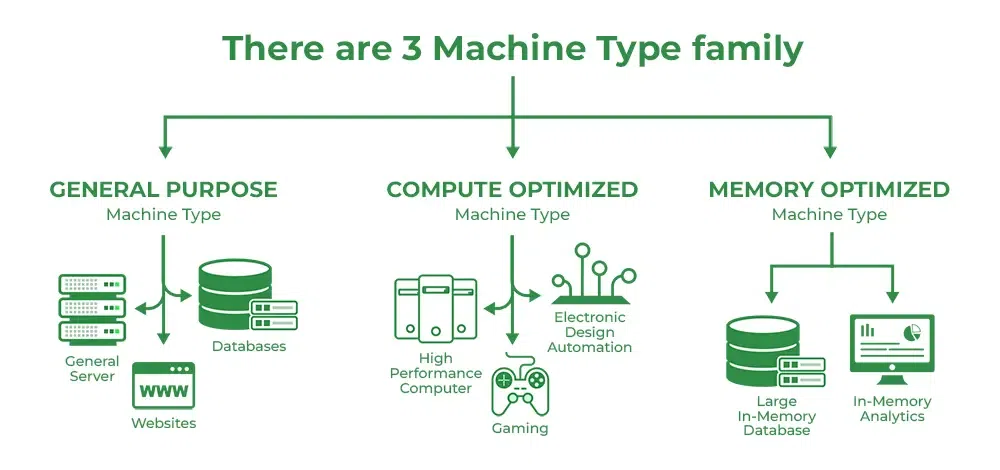
- Machine Type: It describes Virtual hardware attached to an instance, it also includes RAM and CPU. It can further have two types:
- Local SSD: GCE always offers encrypted local solid-state drive block storage which is physically attached to the Virtual Machine running it. It improves performance and also reduces latency.
- Persistent Disk: Durable high-performance block storage for VM instances that can be created in Hard Disk and SSD formats, so users can take snapshots and create a new persistent disk from the snapshots.
- GPU Accelerators: GPUs are added to accelerate workloads like Machine Learning or virtual workstation applications etc.
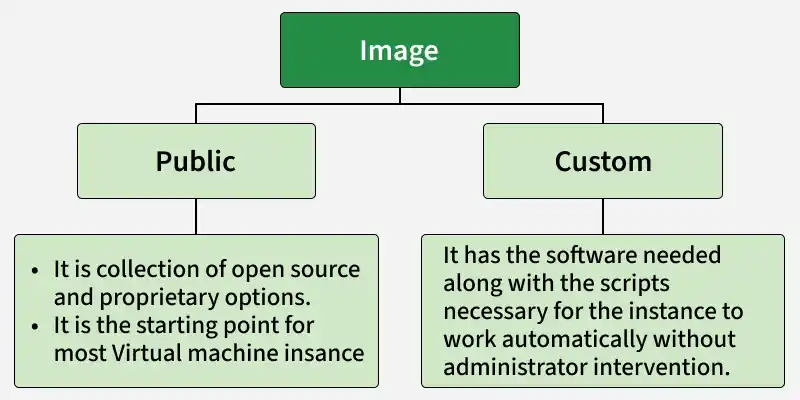
- Image: An image contains the Operating system of the root file that uses leverage to run a virtual machine instance. So GCP provides two main types of images:
- Global Load Balancing: helps in distributing requests across pools of instances across multiple regions.
- Other features include Linux and Windows Support containers, Reservation, OS patch management live migration for Virtual machines, and many more.
Usage of Virtual Machines
Virtual machines (VMs) are frequently utilized in a variety of contexts and businesses. Here are a few frequent scenarios for using virtual machines:
- Virtual machines are frequently employed in software development and testing. Without using physical hardware, developers can create several virtual machines (VMs) to imitate various settings and test their apps there.
- Disaster Recovery A VM-based disaster recovery plan is an option. Businesses can build virtual machines (VMs) containing important data and applications and duplicate them to different locations. The replicated VMs can be turned on to maintain business operations in the event that the primary location suffers a calamity.
- VMs are frequently utilized when moving workloads and applications to the cloud. Businesses can establish virtual machines (VMs) in the cloud, move their programs and data there, then turn down their on-premise servers.
- Web applications, databases, and other services can be hosted on VMs. Hosting companies are able to generate virtual machines (VMs) for their clients, allowing them total control over their virtual environment.
Difference between Google Compute Engine and Google App Engine
The following are the table that will help you to understand the difference between Google Compute Engine and Google App Engine:
| Google Compute Engine | Google App Engine |
|---|---|
Google Compute Engine (GCE) comes under infrastructure as a service (IaaS) | Google app engine (GAE) Platform as a Service (PaaS) |
Virtual machines(VMs) are available in different sizes we can select the Virtual machine based on our needs. | The underlying infrastructure will be fully taken care of by Google App Engine (GAE). |
If an organization that wants control there want control over its infrastructure can use Google Compute Engine(GCE). | Google App Engine (GAE) is suitable for organizations that want to focus on application development without worrying about infrastructure. |
Google Compute Engine(GCE) can manage workloads that are more complex to handle | Google App Engine (GAE) can support different programming languages like Java, Python, Node.js, and Go. |
Google Compute Engine Pricing
Flexible pricing is offered by Google Compute Engine (GCE). As mentioned below:
- Pay-as-you-go: We can pay only for the resources that we use on an hourly basis.
- Committed Use Discounts (CUD): Committed Use Discounts (CUD) are like the organization giving commitment to the Google Cloud by saying we will use certain resources for certain years. Then Google Cloud will provide a discount on that particular resource.
- Sustained Use Discounts (SUD): With SUD, as your usage increases over time, you automatically enjoy reductions on your usage. SUDs are the best choice for workloads that operate constantly for a long time.
Google Compute Engine Charges On Resources
Google compute engine pricing depends on the services we are using and the time we are using like virtual machines, types of storage, network usage and etc Below are some factors on which pricing depends.
- Type of virtual machine: The pricing will depend on the type of virtual machine you are choosing. This means touch memory, how many CPUs are, and usage time.
- Network Usage: The charges will be based on the amount of data transferred from your virtual network to another network.
- Committed discounts: Google compute engine will offer some discounts by you giving the commitment to a Google Cloud Platform by using certain instances for a certain amount of time.
- Integrating with external services: Google compute engine will change for the services separately like load balancers, managed database, and managed kubernetes. Will be charged based on how much time we used the service.