

File handling in C++ refers to reading data from and writing data to files such as .txt, .csv, and binary files. It allows programs to store and retrieve data from secondary storage even after the program terminates.
- Data stored only in a program's memory is lost when the program ends, while data written to a file can persist on secondary storage such as an HDD or SSD.
- C++ provides file stream classes such as ifstream, ofstream, and fstream for performing file operations.
- These classes are provided by the <fstream> header.
Opening a File
Before reading from or writing to a file, we need to open it. Opening a file creates a connection between the program and the file; it does not load the entire file into memory. Data is transferred when read or write operations are performed.
In C++, a file can be opened by creating a file stream object using ifstream, ofstream, or fstream.
fstream file("filename.ext", mode);
where,
- file is the name of the file stream object.
- filename.ext specifies the file to be opened.
- mode specifies how the file will be accessed.
File Opening Modes
File opening modes specify how a file is opened and how the program can interact with it.
| Mode | Description |
|---|---|
| ios::in | File open for reading. If file does not exists, the open operation fails. |
| ios::out | File open for writing: the internal stream buffer supports output operations. |
| ios::binary | Operations are performed in binary mode rather than text. |
| ios::ate | The output position starts at the end of the file. |
| ios::app | All output operations happen at the end of the file, appending to its existing contents. |
| ios::trunc | Any contents that existed in the file before it is open are discarded. |
For Example, if we want to open the file for reading, we use the following opening mode:
fstream filein("file.txt", ios::in);
Similarly, if we want to open the file for writing, we use the following:
fstream fileout("file.txt", ios::out);
These modes can also be combined using OR operator (|). For example, you can open the file stream in both read and write mode as shown:
fstream str("file.txt", ios::in | ios::out);
If the file opened in write mode does not exists, a new file is created. But if the file opened in read mode doesn't exists, then no new file is created, and an exception is thrown
Other File Streams
C++ provides three commonly used file stream classes:
- ifstream: Used for input operations, such as reading data from a file.
- ofstream: Used for output operations, such as writing data to a file.
- fstream: Used for both input and output operations.
For example, an input file can be opened using ifstream:
ifstream filein("file.txt");
Similarly, for output:
ofstream fileout("file.txt");
Write Data to File
Once the file is opened in the write mode using either fstream or ofstream, we can perform the write operation in similar way as with cout using << operator.
#include <bits/stdc++.h>
using namespace std;

int main() {

    // Open a file
    ofstream file("GFG.txt");

    // Write the string to the file
    file << "Welcome to GeeksforGeeks.";

    return 0;
}

Read Data from File
Once the file is opened in read mode using either fstream or ifstream, we can perform the read operation in a similar way as with cin using the >> operator.
#include <bits/stdc++.h>
using namespace std;

int main()
{

    // Open a file in read mode
    ifstream file("GFG.txt");
    string s;

    // Read string from the file
    file >> s;

    cout << "Read String: " << s;

    return 0;
}
Output
Read String: WelcomeThis has same problem as cin. The input is only taken until the first whitespace character. To avoid this, we can use the getline() function as shown:
#include <bits/stdc++.h>
using namespace std;

int main()
{

    // Open a file in read mode
    ifstream file("GFG.txt");
    string s;

    // Read string from the file
    getline(file, s);

    cout << "Read String: " << s;

    return 0;
}
Output
Read String: Welcome to GeeksforGeeks.Closing the File
Closing the file means closing the associated stream and free the resources that we being used. It is important to close the file after you are done with it, especially in the long running programs to avoid memory leaks, data loss, etc.
In C++, the files are closed using the close() member function that is present in all file streams.
#include <bits/stdc++.h>
using namespace std;

int main()
{

    // Open a file in read mode
    ifstream file("GFG.txt");
    string s;

    // Read string from the file
    getline(file, s);

    cout << "Read String: " << s;

    // Close the file
    file.close();

    return 0;
}
Output
Read String: Welcome to GeeksforGeeks.Errors in File Handling
Many different types of errors can occur in file handling such as file not found, disk full, etc. Our programs should expect common errors and should be able to handle them properly. Following are some common errors that can occur during file handling:
File Open Failure
There can be cases in which the file is not opened due to various reasons such as it doesn't exists, or the program does not have permission to open it, etc. In this case, we can use the is_open() member function of the file stream classes to check whether the file is opened sucessfullly or not.
#include <bits/stdc++.h>
using namespace std;

int main() {
    fstream file("nonexistent_file.txt", ios::in);

    // Check if the file is opened
    if (!file.is_open()) {
        cerr << "Error: Unable to open file!" << endl;
        return 1;
    }

    file.close();
    return 0;
}
Output
Error: Unable to open file!Failure to Read/Write Data
Another common error is failure to read or write data for reasons such as incorrect mode, etc. In this case, we can validate operations after each read/write attempt. For example, reading using getline() can be validated as shows:
#include <bits/stdc++.h>
using namespace std;

int main() {
    fstream file("GFG.txt", ios::out);

    if (!file.is_open()) {
        cerr << "Error: Unable to open file!" << endl;
        return 1;
    }
    string line;

    // Checking if getline() read successfully or not
    if (!getline(file, line))
        cerr << "Error: Failed to read data" << endl;

    file.close();
    return 0;
}
Output
Error: Failed to read dataEnd-of-File (EOF) Error
Trying to read beyond the end of the file can cause an EOF error. This can happen when you don't check for the end of the file before reading. We can check for EOF using eof() member function.
#include <bits/stdc++.h>
using namespace std;

int main()
{
    ifstream file("GFG.txt");

    if (!file.is_open())
    {
        cerr << "Error: Unable to open file!" << endl;
        return 1;
    }
    string line;
    while (getline(file, line))
        cout << line << endl;

    // Check for eof
    if (file.eof())
        cout << "Reached end of file." << endl;
    else
        cerr << "Error: File reading failed!" << endl;

    file.close();
    return 0;
}
Output
Reached end of file.Notice that we have also validated the read operation before checking EOF as getline() will only return nullptr even if the read fails due to any reason.
Handling Binary Files
In C++, we can also handle binary files, which store data in raw format. To read and write binary data, must use the ios::binary flag when creating/opening a binary file.
Write into Binary File
To write data to a binary file, we first need to open or create the file in ios::binary mode.
#include <cstring>
#include <fstream>
#include <iostream>
using namespace std;

int main()
{
    string str = "Welcome to GeeksForGeeks";

    // Open a binary file for writing
    ofstream file("fileBin.bin", ios::binary);

    // Check if the file is open
    if (!file)
    {
        cerr << "Error opening the file for writing.";
        return 1;
    }

    // Write the length of the string (size) to file first
    size_t strLength = str.length();
    file.write(reinterpret_cast<const char *>(&strLength), sizeof(strLength));

    // Write the string to the binary file
    file.write(str.c_str(), strLength);

    // Close the file
    file.close();

    return 0;
}
Output
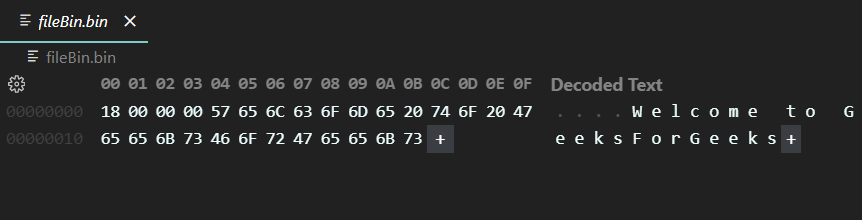
Reading from Binary File
Just as we open a file in binary mode to write data, to read data from a binary file, we must open the file in read mode using ios::in.
Syntax:
fstream fileInstance("fileName.bin", ios::in| ios::binary);
#include <cstring>
#include <fstream>
#include <iostream>
using namespace std;

int main()
{
    string str;

    // Open the binary file for reading
    fstream file("fileBin.bin", ios::in | ios::binary);

    // Check if the file is open
    if (!file)
    {
        cerr << "Error opening the file for reading.";
        return 1;
    }

    // Read the length of the string (size) from the file
    size_t strLength;
    file.read(reinterpret_cast<char *>(&strLength), sizeof(strLength));

    // Allocate memory for the string and read the data
    char *buffer = new char[strLength + 1]; // +1 for the null-terminator
    file.read(buffer, strLength);

    // Null-terminate the string
    buffer[strLength] = '\0';

    // Convert the buffer to a string
    str = buffer;

    // Print file data
    cout << "File Data: " << str;
    delete[] buffer;
    file.close();

    return 0;
}
Output
File Data: Welcome to GeeksForGeeksHandling Large Files and Measuring Performance
When working with large files, loading the entire file into memory can consume significant memory. C++ allows files to be processed in smaller chunks using a buffer. Functions can organize the file-processing operations, while arrays and pointers can be used to access and process the buffered data. The <chrono> library can be used to measure the elapsed time required to read and process the file.
- Functions can separate file opening, reading, processing, and closing operations.
- Arrays can be used as fixed-size buffers to read large files in chunks.
- Pointers can be used to access data stored in the buffer.
- Counters can track the number of bytes and lines processed.
- std::chrono can measure the elapsed time for file reading and processing.
#include <iostream>
#include <fstream>
#include <chrono>

using namespace std;

void processFile(const string& filename)
{
    ifstream file(filename, ios::binary);

    if (!file) {
        cerr << "Error: Unable to open file." << endl;
        return;
    }

    const size_t BUFFER_SIZE = 8192;
    char buffer[BUFFER_SIZE];

    size_t totalBytes = 0;
    size_t totalLines = 0;

    auto start = chrono::steady_clock::now();

    while (file.read(buffer, BUFFER_SIZE) || file.gcount() > 0) {
        size_t bytesRead = static_cast<size_t>(file.gcount());

        totalBytes += bytesRead;

        // Pointer points to the beginning of the buffer
        char* ptr = buffer;

        // Process the buffer using the pointer
        for (size_t i = 0; i < bytesRead; i++) {
            if (*(ptr + i) == '\n') {
                totalLines++;
            }
        }
    }

    auto end = chrono::steady_clock::now();

    chrono::duration<double> elapsed = end - start;

    file.close();

    cout << "Total Bytes: " << totalBytes << endl;
    cout << "Total Lines: " << totalLines << endl;
    cout << "Time Taken: " << elapsed.count() << " seconds" << endl;
}

int main()
{
    processFile("large_file.txt");

    return 0;
}
Explanation
- The processFile() function handles the file-reading and processing operation. The file is read in 8 KB chunks using the buffer array, so the entire file does not need to be loaded into memory at once.
- The ptr pointer points to the beginning of the buffer. The expression *(ptr + i) accesses each byte through pointer arithmetic and is used to check for newline characters.
- The program maintains totalBytes and totalLines to count the amount of data processed. chrono::steady_clock records the start and end times, and their difference gives the elapsed time for reading and processing the file.