

The Standard Template Library (STL) is a library in C++ that provides ready-to-use template classes and functions for implementing common data structures and algorithms. It helps developers write efficient, reusable, and optimized code, making it an essential part of modern C++ programming.
- Includes containers, algorithms, iterators, and function objects (functors).
- Reduces development time by providing pre-built, optimized components.
- Frequently asked in C++ interviews for both freshers and experienced developers.
1. What is STL?
The Standard Template Library (STL) is a part of the C++ Standard Library that provides a collection of generic template classes and functions for commonly used data structures and algorithms. It helps developers write efficient, reusable, and optimized code while reducing development time.
- Provides containers like vector, list, map, set, stack, and queue.
- Includes built-in algorithms such as sort(), find(), and binary_search().
- Uses iterators to efficiently access and traverse container elements.
2. What is a Template?
A template is a C++ feature that allows you to write generic functions and classes that work with different data types without rewriting the same code. It improves code reusability, flexibility, and maintainability.
- Supports generic programming by using type parameters.
- Eliminates code duplication for different data types.
- Used to create both function templates and class templates.
Example:
template <typename T>
T add(T a, T b) {
return a + b;
}
3. Why do we use <bits/stdc++.h>?
<bits/stdc++.h> is a GCC-specific header file that includes almost all standard C++ library headers in a single file. It is commonly used in competitive programming to save time and avoid including multiple headers.
- Includes most standard C++ libraries with a single #include.
- Simplifies coding and speeds up development in competitive programming.
- Not part of the C++ standard, so it is not recommended for portable or production code.
Example:
#include <bits/stdc++.h>
using namespace std;
4. Why do we need STL when we can perform all the operations using a user-defined data structure and functions?
Although we can implement our own data structures and algorithms, STL provides standardized, optimized, and well-tested implementations that make development faster and more efficient. It helps write clean, reusable, and reliable code while reducing implementation effort.
- Saves development time by providing ready-to-use data structures and algorithms.
- Offers optimized and well-tested implementations with better reliability.
- Improves code readability, reusability, and maintainability.
5. What are Containers in STL?
Containers are template classes in the C++ Standard Template Library (STL) that are used to store and organize collections of data. They provide efficient ways to insert, access, delete, and manage elements.
- Store and manage collections of elements efficiently.
- Provide different types of containers for different use cases (e.g., vector, list, map, set).
- Work seamlessly with STL algorithms and iterators.
6. What are Algorithms in STL?
Algorithms in the C++ Standard Template Library (STL) are pre-defined functions that perform common operations on container elements, such as sorting, searching, counting, and modifying data. They help write efficient and concise code.
- Provide ready-to-use functions for common operations.
- Work with containers through iterators.
- Examples include sort(), find(), binary_search(), count(), and reverse().
7. What are Functors in STL?
Functors (Function Objects) are objects of a class that behave like functions by overloading the operator(). They are commonly used with STL algorithms to define custom operations or comparison logic.
- Objects that can be called like functions using operator().
- Used to customize the behavior of STL algorithms.
- Often provide better flexibility and performance than regular functions.
8. What is a vector?
A vector is a sequence container in the C++ Standard Template Library (STL) that stores elements in a dynamic array. It automatically resizes as elements are added or removed, providing fast random access and efficient memory management.
- Stores elements in contiguous memory like an array.
- Automatically grows or shrinks in size as needed.
- Supports fast random access and efficient insertion at the end (push_back()).
Example: vector<data_type> vector_name;
9. What is an iterator?
An iterator is an object in the C++ Standard Template Library (STL) that is used to access and traverse elements of a container. It acts like a pointer and allows algorithms to work with different containers in a uniform way.
- Used to traverse and access container elements.
- Acts like a pointer to container elements.
- Connects STL containers with STL algorithms.
10. What is the Range in Terms of Vectors?
In a vector, a range refers to a sequence of elements specified by two iterators: begin() and end(). The range is inclusive of begin() and exclusive of end(), represented as [begin(), end()).
- Defined using two iterators: begin() and end().
- Includes the first element but excludes the element pointed to by end().
- Used by STL algorithms such as sort(), find(), and reverse().
Example: vector<int> v = {1, 2, 3, 4, 5};
sort(v.begin(), v.end()); // Operates on the entire vector
11. What is the difference between an array and a vector?
An array is a fixed-size data structure whose size cannot be changed after creation, whereas a vector is a dynamic array that can automatically grow or shrink as elements are added or removed.
| Array | Vector |
|---|---|
| Fixed size | Dynamic size |
| Size cannot be changed | Automatically resizes |
| No built-in functions | Provides many STL member functions |
| Faster for fixed-size data | More flexible and easier to use |
| Part of the core language | Part of the C++ STL |
12. How can we insert elements in a vector?
Elements can be inserted into a vector using the following methods:
A. Using push_back()
The push_back() function inserts an element at the end of the vector and automatically increases its size.
Example: vector<int> v;
v.push_back(12);
B. Using insert()
The insert() function inserts an element at a specified position in the vector.
Example: vector<int> v = {10, 30};
v.insert(v.begin() + 1, 20);
C. Using emplace() / emplace_back()
The emplace() function constructs and inserts an element at a specified position, while emplace_back() constructs the element at the end of the vector. They are generally more efficient than insert() and push_back() for complex objects.
Example: vector<int> v = {10, 30};
v.emplace(v.begin() + 1, 20);
v.emplace_back(40);
13. How can we remove elements in a vector?
Elements can be removed from a vector using the following member functions:
- Using pop_back() function
- Using erase() function
A. Using pop_back()
The pop_back() function removes the last element from the vector.
Example: vector<int> v = {10, 20, 30};
v.pop_back(); // Removes 30
B. Using erase() function
erase() is also a member function of the vector class. It is used to remove the elements at a particular position in the vector.
Example: vector<int> v = {10, 20, 30, 40}
v.erase(v.begin() + 1); // Removes 20
C. Using clear()
The clear() function removes all elements from the vector, making it empty.
Example:
vector<int> v = {10, 20, 30};
v.clear();
Note: To remove all occurrences of a specific value, use the erase-remove idiom.
14. What is the time complexity of insertion and deletion in vector?
The time complexity of insertion and deletion in a vector depends on the position where the operation is performed. Operations at the end are efficient, while operations at the beginning or middle require shifting elements.
| Operation | Time Complexity |
|---|---|
| push_back() | O(1) (Amortized) |
| pop_back() | O(1) |
| insert() at the end | O(1) (Amortized) |
| insert() at the beginning or middle | O(n) |
| erase() at the end (pop_back()) | O(1) |
| erase() at the beginning or middle | O(n) |
15. What is the use of auto keyword in C++?
The auto keyword allows the compiler to automatically deduce the data type of a variable from its initializer. It makes code simpler, improves readability, and is especially useful when working with complex types such as iterators and lambda expressions.
- Automatically determines the variable's data type at compile time.
- Reduces code verbosity and improves readability.
- Commonly used with STL iterators, range-based loops, and lambda expressions.
Example
vector<int> v = {1, 2, 3};

auto it = v.begin();   // Deduced as vector<int>::iterator
auto x = 10;           // int
auto y = 3.14;         // double
16. How can we traverse a vector?
A vector can be traversed using different methods, such as index-based loops, iterators, range-based for loops, and the for_each() algorithm.
- Index-based loops are simple and provide direct access using indices.
- Iterators are commonly used with STL algorithms.
- Range-based for loops offer a clean and readable way to traverse a vector.
A. Using Index-Based for Loop
vector<int> v = {10, 20, 30};

for (int i = 0; i < v.size(); i++)
    cout << v[i] << " ";
B. Using Iterators
vector<int> v = {10, 20, 30};

for (auto it = v.begin(); it != v.end(); ++it)
    cout << *it << " ";
C. Using Range-Based for Loop
vector<int> v = {10, 20, 30};

for (auto x : v)
    cout << x << " ";
D. Using for_each()
vector<int> v = {10, 20, 30};

for_each(v.begin(), v.end(), [](int x) {
    cout << x << " ";
});
17. How to print vectors in C++?
A vector can be printed using an index-based loop, iterator, or range-based for loop. The range-based loop is the most commonly used and readable approach in modern C++.
A. Using Range-Based for Loop
vector<int> v = {10, 20, 30};
for (int x : v)cout << x << " ";
B. Using Index-Based Loop
for (int i = 0; i < v.size(); i++)
cout << v[i] << " ";
C. Using Iterators
for (auto it = v.begin(); it != v.end(); ++it)
cout << *it << " ";
18. How can we convert the array into a vector?
An array can be converted into a vector by using the vector constructor that accepts the beginning and ending addresses (iterators/pointers) of the array. This copies all array elements into the vector.
- Use the vector constructor with the array's start and end addresses.
- The vector stores a copy of the array elements.
- The resulting vector can be resized and modified dynamically.
Syntax: vector<data_type> vector_name(array, array + size);
Example:
#include <iostream>
#include <vector>
using namespace std;

int main() {
    int arr[] = {10, 20, 30, 40, 50};
    int n = sizeof(arr) / sizeof(arr[0]);

    vector<int> v(arr, arr + n);

    return 0;
}
19. How can we convert vectors into arrays?
A vector can be converted into an array by copying its elements using the data() member function or the copy() algorithm. The data() function returns a pointer to the vector's underlying array.
A. Using data()
#include <iostream>
#include <vector>
using namespace std;

int main() {
    vector<int> v = {10, 20, 30, 40, 50};

    int* arr = v.data();

    for (int i = 0; i < v.size(); i++)
        cout << arr[i] << " ";

    return 0;
}
B. Using copy()
#include <iostream>
#include <vector>
#include <algorithm>
using namespace std;

int main() {
    vector<int> v = {10, 20, 30, 40, 50};

    int arr[5];
    copy(v.begin(), v.end(), arr);

    return 0;
}
20. How to initialize a 2-D vector in C++?
A 2-D vector is a vector of vectors that represents a two-dimensional dynamic array. It can be initialized by specifying the number of rows, columns, and an optional default value for all elements.
- A 2-D vector is declared as vector<vector<data_type>>.
- Rows and columns can be specified during initialization.
- All elements can be initialized with a default value.
Syntax: vector<vector<data_type>> vector_name(rows, vector<data_type>(columns, value));
21. What is the time complexity of the sorting done in vector using the sort( ) function?
The sort() function in the C++ STL sorts the elements of a vector in ascending order by default. It uses Introsort (a combination of Quick Sort, Heap Sort, and Insertion Sort), which provides efficient performance in most cases.
- Average Time Complexity: O(n log n)
- Worst-Case Time Complexity: O(n log n)
- Auxiliary Space Complexity: O(log n) (due to recursion)
22. What is the use of lower_bound() and upper_bound()?
The lower_bound() and upper_bound() functions are STL binary search algorithms used to find positions in a sorted range. They run in O(log n) time.
- lower_bound() returns an iterator to the first element that is greater than or equal to the given value.
- upper_bound() returns an iterator to the first element that is greater than the given value.
- Both functions require the range to be sorted.
Example:
#include <iostream>
#include <vector>
#include <algorithm>
using namespace std;

int main() {
    vector<int> v = {1, 2, 2, 3, 5, 5, 7};

    auto lb = lower_bound(v.begin(), v.end(), 5);
    auto ub = upper_bound(v.begin(), v.end(), 5);

    cout << "lower_bound index: " << lb - v.begin() << endl;
    cout << "upper_bound index: " << ub - v.begin() << endl;

    return 0;
}
23. What is a pair in STL?
A pair is an STL utility class that stores two values together as a single object. The two values can be of the same or different data types and are accessed using the first and second members.
- Stores two related values in a single object.
- Values are accessed using first and second.
- Commonly used in containers like map, unordered_map, and algorithms.
Syntax: pair<data_type1, data_type2> pair_name;
24. Explain different methods to insert elements in a pair.
Elements can be inserted into a pair using different methods, such as constructor initialization, make_pair(), brace initialization, and assignment.
- make_pair() automatically deduces the data types.
- Brace {} and constructor initialization are simple and commonly used.
- Values can also be assigned using first and second.
A. Using make_pair()
pair<int, string> p = make_pair(101, "Alice");
B. Using Constructor Initialization
pair<int, string> p(101, "Alice");
C. Using Brace Initialization
pair<int, string> p = {101, "Alice"};
D. Using first and second
pair<int, string> p;
p.first = 101;
p.second = "Alice";
25. In which header file is the std::pair defined?
The std::pair class is defined in the <utility> header file. It provides a simple way to store two related values as a single object.
- std::pair is declared in the <utility> header.
- Access the stored values using first and second.
- Commonly used with STL containers such as map and unordered_map.
26. What is a List?
A list is an STL sequence container that stores elements in a doubly linked list. It allows efficient insertion and deletion of elements at any position without shifting other elements.
- Implemented as a doubly linked list.
- Supports fast insertion and deletion (O(1)) using iterators.
- Does not provide direct random access like a vector.
Syntax: list<data_type> list_name;
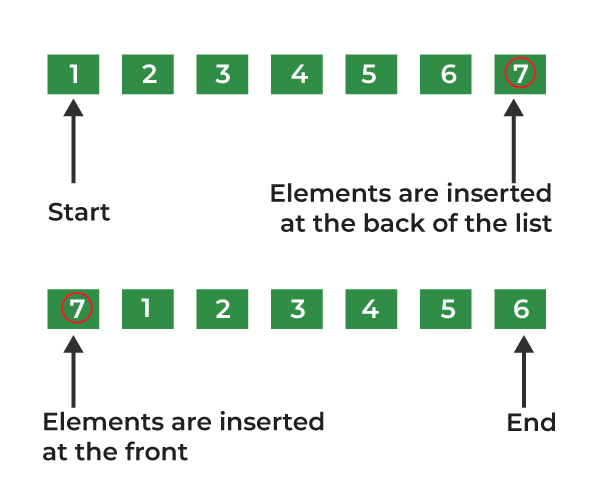
27. What is the time complexity of insertion and deletion in the list?
A list is implemented as a doubly linked list, so insertion and deletion are efficient at the beginning and end. However, inserting or deleting at a specific position requires traversing the list first.
Insertion
- At the beginning (push_front()): O(1)
- At the end (push_back()): O(1)
- At the Mth position: O(M) (O(n) in the worst case)
Deletion
- At the beginning (
pop_front()): O(1) - At the end (
pop_back()): O(1) - At the Mth position: O(M)(O(n) in the worst case)
28. Difference between a vector and a list?
A vector is a dynamic array that stores elements in contiguous memory, while a list is a doubly linked list that stores elements in non-contiguous memory. Vectors provide fast random access, whereas lists are optimized for frequent insertions and deletions.
| Vector | List |
|---|---|
| Implemented as a dynamic array | Implemented as a doubly linked list |
| Stores elements in contiguous memory | Stores elements in non-contiguous memory |
| Supports random access (O(1)) | Does not support random access |
| Insertion/deletion in the middle is O(n) | Insertion/deletion using an iterator is O(1) |
| Lower memory overhead | Higher memory overhead due to node pointers |
| Better cache performance | Poorer cache performance |
29. How can we remove elements from the list?
Elements can be removed from a list using member functions such as pop_front(), pop_back(), erase(), remove(), and clear().
- pop_front() and pop_back() remove elements from the beginning and end.
- erase() removes an element or a range of elements using an iterator.
- remove() deletes all occurrences of a specified value.
30. What is a stack?
A stack is an STL container adaptor that stores elements in Last In, First Out (LIFO) order. This means the last element inserted is the first one to be removed.
- Follows the LIFO (Last In, First Out) principle.
- Supports insertion and deletion only at the top of the stack.
- Common operations include push(), pop(), top(), empty(), and size().
Syntax: stack<data_type> stack_name;

31. What are the basic functions associated with the STL stack?
The STL stack provides several member functions to insert, remove, and access elements. Since a stack follows the LIFO (Last In, First Out) principle, all operations are performed at the top of the stack.
- push(): This function is used for inserting elements at the top of the stack.
- pop(): The pop() function is used for removing elements from the top.
- size(): It returns the size of the stack.
- top(): The top() function returns the top element of the stack.
- empty(): It checks if the stack is empty or not.
32. What is the time complexity of insertion and deletion in the stack?
A stack follows the LIFO (Last In First Out) principle. The insertion and deletion operations are performed only at the top of the stack.
- Insertion (Push): The time complexity of inserting an element into a stack is O(1) because the element is added directly at the top without shifting any other elements.
- Deletion (Pop): The time complexity of deleting an element from a stack is O(1) because the top element is removed directly without affecting other elements.
33. What is a queue in STL?
A queue in STL (Standard Template Library) is a container adapter that follows the FIFO (First In First Out) principle. The element that is inserted first is removed first.
- Elements are inserted from the rear (back) using the push() function.
- Elements are removed from the front using the pop() function.
- The STL queue is implemented using containers like deque by default.

34. What are the commonly used member functions of the STL Queue?
The commonly used member functions of the STL queue are used to insert, remove, access, and manage elements in the queue.
- push(): Inserts an element at the rear of the queue.
- pop(): Removes the element from the front of the queue.
- front(): Returns the first element of the queue.
- back(): Returns the last element of the queue.
- empty(): Checks whether the queue is empty. Returns true if the queue has no elements.
- size(): Returns the number of elements present in the queue.
- swap(): Exchanges the contents of two queues.
35. What is a deque?
A deque (Double Ended Queue) is a container in STL that allows insertion and deletion of elements from both ends (front and rear).
- It combines the features of both a stack and a queue.
- Elements can be added using push_front() and push_back().
- Elements can be removed using pop_front() and pop_back().
- It provides dynamic size and allows random access to elements.

36. What is the time complexity of insertion and deletion in the deque?
In an STL deque (Double Ended Queue), insertion and deletion can be performed from both the front and back ends.
- Insertion at the front (push_front()): Time complexity is O(1) because the element is directly added at the beginning.
- Insertion at the back (push_back()): Time complexity is O(1) because the element is added at the end.
- Deletion from the front (pop_front()): Time complexity is O(1) because the first element is removed directly.
- Deletion from the back (pop_back()): Time complexity is O(1) because the last element is removed directly.
Therefore, the time complexity of both insertion and deletion operations in a deque is O(1).
37. What is Set & How can we change the sorting order of a set?
A set in STL is a container that stores unique elements in a sorted order. It does not allow duplicate values, and elements are automatically sorted in ascending order by default.
- Elements in a set are stored using a balanced binary search tree (usually Red-Black Tree).
- Duplicate elements are not allowed.
- Insertion, deletion, and searching operations have a time complexity of O(log n).
38. How to access elements in a set by index?
In STL, a set does not support direct indexing like an array or vector because elements are stored in a sorted tree structure. Therefore, we cannot access elements using the index operator ([]).
To access elements at a specific position, we can use an iterator and move it using advance().
Example:
#include <iostream>
#include <set>
#include <iterator>
using namespace std;

int main() {
    set<int> s = {10, 20, 30, 40, 50};

    auto it = s.begin();
    advance(it, 2);

    cout << *it;  // Output: 30

    return 0;
}
39. How to iterate over the set?
We can iterate over an STL set using the following methods:
- Using an iterator: The normal iterator (begin() and end()) is used to traverse elements in ascending order.
- Using a reverse iterator: The reverse iterator (rbegin() and rend()) is used to traverse elements in the backward direction.
- Using a range-based for loop: A simple for loop can be used to access each element of the set.
- Using the for_each() function: The STL for_each() algorithm can be used to apply a function to each element of the set.
40. What is a multiset in STL?
A multiset in STL is a container that stores elements in a sorted order and allows duplicate elements. Unlike a normal set, a multiset can contain multiple occurrences of the same value.
- Elements are stored in ascending order by default.
- Duplicate elements are allowed.
- Elements are stored using a balanced binary search tree (usually Red-Black Tree).
- Insertion, deletion, and searching operations have a time complexity of O(log n).
41. What is a unordered_set?
An unordered_set in STL is a container that stores unique elements without any particular order. It uses hashing to store elements, which allows faster insertion, deletion, and searching operations compared to a normal set.
- Duplicate elements are not allowed.
- Elements are stored in an unordered manner.
- It is implemented using a hash table.
- The average time complexity of insertion, deletion, and searching is O(1).
- In the worst case, the time complexity can be O(n) due to hash collisions.
42. What is a unordered_multiset in STL?
An unordered_multiset in STL is a container that stores elements in an unordered manner and allows duplicate elements. It uses hashing for storing elements, which provides faster insertion, deletion, and searching operations.
- Duplicate elements are allowed.
- Elements are not stored in any sorted order.
- It is implemented using a hash table.
- The average time complexity of insertion, deletion, and searching is O(1).
- In the worst case, the time complexity can be O(n) due to hash collisions.
43. What is a map?
A map in STL is a container that stores elements in the form of key-value pairs. Each key is unique and is used to access its corresponding value.
- Keys are stored in sorted order by default.
- Each key can have only one associated value.
- It is implemented using a balanced binary search tree (usually Red-Black Tree).
- The time complexity of insertion, deletion, and searching operations is O(log n).
44. What is a multimap?
A multimap in STL is a container that stores elements in the form of key-value pairs and allows multiple values with the same key. Unlike a normal map, a multimap can contain duplicate keys.
- Keys are stored in sorted order by default.
- Duplicate keys are allowed.
- Each key can be associated with multiple values.
- It is implemented using a balanced binary search tree (usually Red-Black Tree).
- The time complexity of insertion, deletion, and searching operations is O(log n).
45. What is a unordered_map?
An unordered_map in STL is a container that stores elements in the form of key-value pairs using hashing. Unlike a normal map, it does not store elements in sorted order.
- Each key must be unique.
- Elements are stored in an unordered manner.
- It is implemented using a hash table.
- The average time complexity of insertion, deletion, and searching operations is O(1).
- In the worst case, the time complexity can be O(n) due to hash collisions.
46. What is a unordered_multimap?
An unordered_multimap in STL is a container that stores elements in the form of key-value pairs using hashing and allows duplicate keys. Unlike multimap, it does not store elements in sorted order.
- Multiple values can be associated with the same key.
- Elements are stored in an unordered manner.
- It is implemented using a hash table.
- The average time complexity of insertion, deletion, and searching operations is O(1).
- In the worst case, the time complexity can be O(n) due to hash collisions.
47. What is priority_queue?
A priority_queue in STL is a container adapter that stores elements according to their priority rather than the order of insertion. The element with the highest priority is always accessed first.
- By default, it is implemented as a max-heap, where the largest element is at the top.
- It does not allow direct access to elements except the top element.
- Elements are stored internally using a heap data structure.
- Insertion and deletion operations have a time complexity of O(log n).
- Accessing the top element has a time complexity of O(1).
48. How to create a min-heap using STL priority_queue?
By default, STL priority_queue creates a max-heap, where the largest element is always at the top. To create a min-heap, we can use the greater<> comparator.
Syntax: priority_queue<data_type, vector<data_type>, greater<data_type>> pq;
Example:
#include <iostream>
#include <queue>
using namespace std;

int main() {
    priority_queue<int, vector<int>, greater<int>> pq;

    pq.push(30);
    pq.push(10);
    pq.push(20);

    cout << pq.top();  // Output: 10

    return 0;
}
49. What are the basic operations on priority_queue in C++?
The basic operations performed on an STL priority_queue are used to insert, remove, and access elements based on their priority.
- push(): Inserts an element into the priority queue.
- pop(): Removes the highest priority element (top element).
- top(): Returns the element with the highest priority without removing it.
- empty(): Checks whether the priority queue is empty.
- size(): Returns the number of elements present in the priority queue.
50. How is priority_queue implemented in C++ STL ? What is the time complexity of basic operations in it?
In C++ STL, a priority_queue is implemented using a heap data structure. By default, it uses a max-heap, where the largest element is always stored at the top.
- The underlying container used by priority_queue is vector by default.
- It maintains the heap property using heap operations.
- It can also be converted into a min-heap by using the greater<> comparator.