

Cross-Site Request Forgery (CSRF) is a web security vulnerability that tricks an authenticated user into performing unintended actions on a web application without their knowledge. In a CSRF attack, the victim is already logged into a trusted website. The attacker exploits this active session by forcing the victim’s browser to send unauthorized requests, allowing actions such as:
- Changing account passwords or email addresses.
- Transferring funds and Updating account settings.
- Deleting accounts or sensitive data.
Working of CSRF
Web applications commonly use cookies to maintain user sessions because HTTP is a stateless protocol. Once a user logs in, the browser stores a session cookie and automatically sends it with future requests. CSRF abuses this behavior.
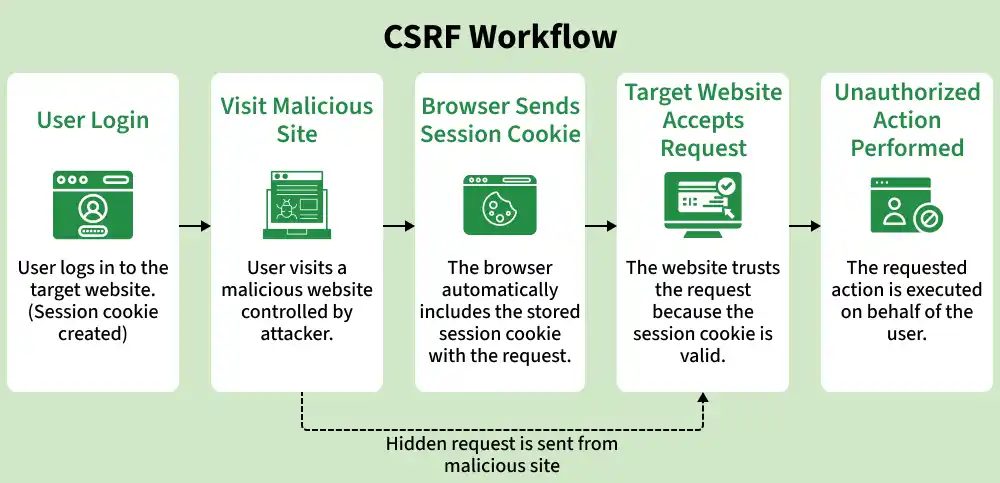
- A user logs into a trusted website (bank.com).
- The website stores a valid session cookie in the user's browser.
- The attacker creates a malicious webpage or email containing a forged request.
- The victim visits the attacker-controlled page while still logged in.
- The browser automatically sends the request along with the victim’s session cookie.
- The target application processes the request as if it came from the legitimate user.
- Example: while checking an online banking account, a user may unknowingly visit a malicious page that silently submits a money transfer request using their authenticated session.
Conditions Required for a CSRF Attack
A CSRF attack typically succeeds when the following conditions are met:
1. Sensitive Action Exists
The application exposes an action that changes user data or application state, such as:
- Changing passwords or email addresses.
- Making payments or money transfers.
- Modifying account permissions.
- Deleting resources or accounts.
2. Cookie-Based Authentication
The application relies on authentication credentials automatically included by the browser, such as:
- Session cookies.
- Remember-me cookies.
- If no extra verification is required, cross-site requests may be accepted.
3. Predictable Request Parameters
The attacker can determine the parameters needed for the request. If the application requires an unknown value such as:
- Current password.
- One-time verification code.
- CSRF token.
- Random nonce.
- The attack becomes significantly harder or fails completely.
Hands-On CSRF Demonstration Using DVWA
The Damn Vulnerable Web Application (DVWA) lab can be used to understand CSRF practically.
Step 1: Set Security Level to Low
Log into DVWA and set the security level to Low. You can choose your own security level like Low, Medium, High and perform the Lab.
Step 2: Identify the Vulnerable Request
Open the CSRF module and perform the action normally. Inspect the request using browser developer tools and note the URL.
http://127.0.0.1:42001/vulnerabilities/csrf/?password_new=abc1234&password_conf=abc1234&Change=Change#Step 3: Create a Malicious Page
Create a file named csrf.html that reproduces the observed request.
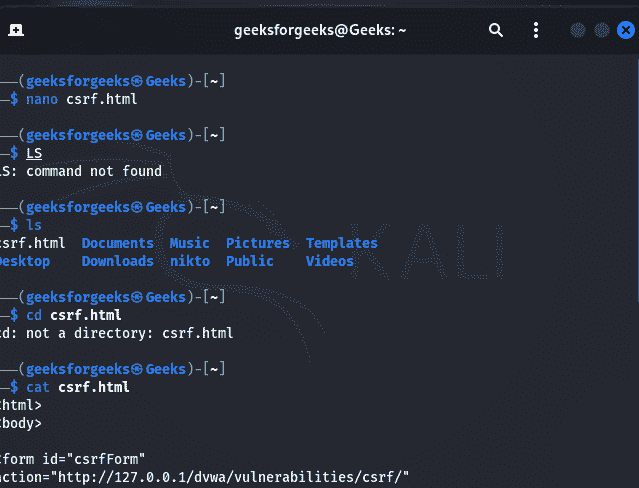
Step 4: Host the Malicious Page
You need the browser to open the page. In the same terminal, run:
python3 -m http.server 42002You should see: This starts a small web server.
Serving HTTP on 0.0.0.0 port 42002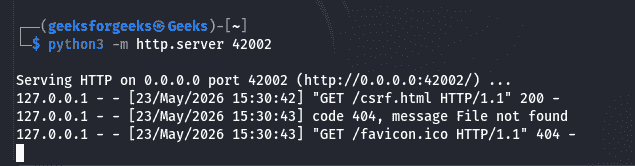
Step 5: Keep DVWA Logged In
- Open Firefox.
- Login to DVWA.
- Set security level to Low
- Stay logged in.
Step 6: Trigger the CSRF
Open a new tab in the same browser. The page may appear blank or show briefly. Behind the scenes:
- Hidden form auto-submits.
- Browser sends your DVWA session cookie.
- DVWA processes the password change.
Visit:
http://127.0.0.1:42002/csrf.html
Step 7: Verify
- Go back to DVWA.
- Logout.
- Try logging in with: Username: admin, Password: hacked123
- If login works, the lab succeeded.
Preventing CSRF Attacks
1. Use CSRF Tokens (Recommended)
CSRF tokens are the most widely used defense. Since attackers cannot read or predict the token, forged requests fail. A CSRF token is:
- Unique per session or request.
- Generated by the server.
- Included in forms or API requests.
- Validated before processing sensitive actions.
2. Use SameSite Cookies
Modern browsers support the SameSite cookie attribute. This restricts browsers from sending cookies with many cross-site requests. Common values:
- Strict: Strongest protection.
- Lax: Balanced security and usability.
- None: Cross-site allowed (requires Secure).
3. Require Re-Authentication for Sensitive Actions
Applications can ask users to re-enter credentials before performing critical operations such as:
- Password changes.
- Fund transfers.
- Account deletion.
4. Validate Origin and Referer Headers
Servers can inspect to verify whether requests originate from trusted domains:
- Origin header.
- Referer header.