

Network protocol is a collection of rules that governs how data is transmitted, received, and interpreted between devices on a network, regardless of their internal structure or design.
- Defines what, how, and when data is communicated.
- Enables communication between heterogeneous devices.
- Ensures reliable and standardized data exchange.
- Prevents data loss, duplication, and misinterpretation.
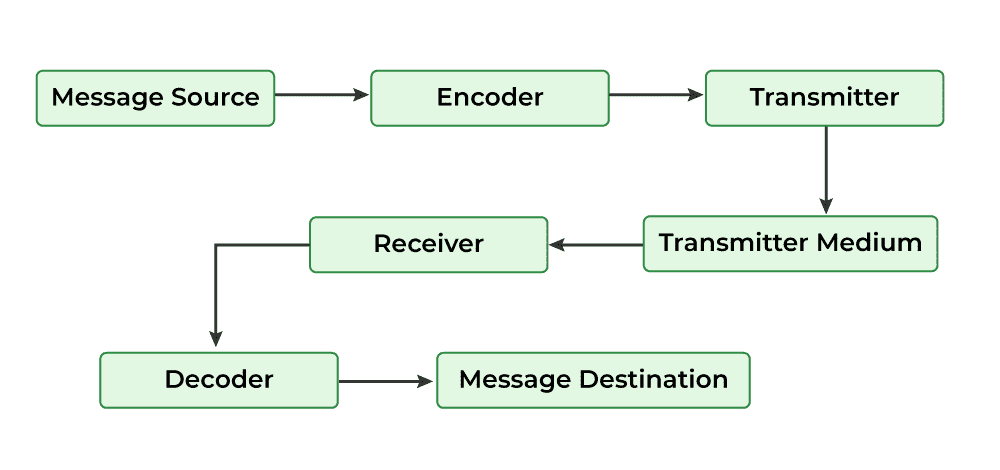
Working of Network Protocols
Network protocols work by dividing communication tasks into layers, where each layer performs a specific function to ensure successful data transmission.
- Communication is based on the OSI model, which consists of 7 layers.
- Each OSI layer uses specific protocols to perform its task.
- Data moves layer by layer from sender to receiver.
- Example: Internet Protocol (IP) operates at the Network Layer and handles routing using source and destination addresses.
- Layered communication improves reliability, scalability, and troubleshooting.
Types of Network Protocols
In most cases, communication across a network like the Internet uses the OSI model. The OSI model has a total of seven layers. Secured connections, network management, and network communication are the three main tasks that the network protocol performs. The purpose of protocols is to link different devices.
The protocols can be broadly classified into three major categories:
1. Network Communication
Communication protocols are really important for the functioning of a network. They are so crucial that it is not possible to have computer networks without them. These protocols formally set out the rules and formats through which data is transferred. These protocols handle syntax, semantics, error detection, synchronization, and authentication.
Hypertext Transfer Protocol(HTTP)
Used for transferring hypertext data between systems on the World Wide Web, Hypertext Transfer Protocol (HTTP) operates at the application layer.
- Model: Functions on a client-server architecture (e.g., browser to web server).
- Primary Use: Standard protocol for loading web pages and transferring hypertext.
- State: Stateless, meaning it does not retain session information between requests.
- Security: Inherently insecure; requires HTTPS (SSL/TLS) for data encryption and security.
Transmission Control Protocol(TCP)
A connection-oriented protocol that ensures reliable, ordered, and error-checked delivery of data between applications.
- Connection Establishment: Uses a three-way handshake (SYN, SYN-ACK, ACK) to create a session before data is sent.
- Reliability: Employs sequenced acknowledgments to track received packets and re-transmit lost ones.
- Data Integrity: Includes built-in error detection and flow control to prevent the sender from overwhelming the receiver.
- Sequencing: Guarantees that data packets arrive and are reassembled in the exact order they were sent.
User Datagram Protocol(UDP)
UDP is a connectionless protocol designed for high-speed transmission where low latency is prioritized over data integrity.
- Connectionless: Sends data immediately without a formal "handshake," reducing initial latency.
- Minimal Overhead: Lacks reliability mechanisms like error recovery, flow control, or retransmission, making it much faster than TCP.
- Unreliable Delivery: Does not guarantee that packets will arrive in order or arrive at all (best-effort delivery).
- Efficiency: Ideal for applications that can tolerate occasional data loss without failing.
Border Gateway Protocol(BGP)
BGP is the standardized exterior gateway protocol designed to exchange routing and reachability information between Autonomous Systems (AS).
- Inter-AS Routing: Operates between large networks (Autonomous Systems) managed by different organizations (e.g., ISPs, tech giants).
- Path Vector Protocol: Instead of looking at hop counts, it makes routing decisions based on paths, network policies, and rule-sets.
- Scalability: Engineered to manage the massive, ever-growing table of IP prefixes that make up the global internet.
- Stability: Designed to find the most efficient paths while preventing routing loops across the global infrastructure.
Address Resolution Protocol(ARP)
ARP is the critical bridge that maps a logical IP address (Network Layer) to a physical MAC address (Data Link Layer) to facilitate communication within a local network.
- Mapping: Resolves 32-bit IP addresses into 48-bit hardware MAC addresses.
- ARP Cache: Maintains a temporary table of mappings to reduce redundant broadcast traffic.
- LAN Essential: Necessary for packet delivery; while IP handles routing to the correct network, ARP finds the specific hardware on that network.
- Dynamic Discovery: If a mapping isn't in the cache, the device sends an ARP Request (broadcast) and receives an ARP Reply (unicast).
Internet Protocol(IP)
Handles addressing and routing of data packets across interconnected networks using the Internet Protocol (IP).
- Addressing: Assigns unique numerical identifiers (IP addresses) to every device on a network.
- Routing: Determines the path data takes from the source host to the destination host across interconnected networks.
- Encapsulation: Wraps data into "packets" containing header information (like source and destination addresses).
- Connectionless: Does not establish a session before sending data; each packet is treated independently
Dynamic Host Configuration Protocol(DHCP)
Automates the assignment of IP addresses and network configuration details with the help of the Dynamic Host Configuration Protocol (DHCP).
- Automated IP Management: Dynamically assigns IP addresses to devices as they join the network and reclaims them when they leave.
- Subnet Mask: Defines the network boundaries.
- Default Gateway: The path to exit the local network.
- DNS Servers: Resolves domain names to IP addresses.
- Operational Efficiency: Minimizes manual entry errors (like IP conflicts) and drastically simplifies administration for large networks.
2. Network Management
These protocols assist in describing the procedures and policies that are used in monitoring, maintaining, and managing the computer network. These protocols also help in communicating these requirements across the network to ensure stable communication. Network management protocols can also be used for troubleshooting connections between a host and a client.
Internet Control Message Protocol(ICMP)
Used for reporting errors and sending operational messages between network devices through the Internet Control Message Protocol (ICMP).
- Error Reporting: Notifies the sender when a destination is unreachable, a packet is dropped due to congestion, or a TTL (Time to Live) expires.
- Diagnostics: Powers fundamental troubleshooting tools like Ping (Echo Request/Reply) and Traceroute.
- Connectivity Checks: Helps identify network bottlenecks, timeouts, and hardware failures.
- Flow Control: Can inform source hosts to slow down transmission if the network is overwhelmed.(deprecated)
Simple Network Management Protocol(SNMP)
Facilitates monitoring and managing network devices in an IP network using the Simple Network Management Protocol (SNMP).
- Purpose: Provides a standardized way to monitor and manage devices like routers, switches, servers, and printers.
- Architecture: Operates using a three-part model consisting of an SNMP Manager, SNMP Agents, and Managed Devices.
- Data Collection: Agents residing on devices gather performance data and status updates to report back to the central manager.
- Functionality: Enables administrators to track bandwidth usage, detect hardware faults, and troubleshoot connectivity remotely.
- Scalability: Serves as the industry standard for maintaining visibility across complex enterprise network infrastructures.
Gopher
Designed for searching and retrieving files from remote systems in a structured manner, functionality provided by Gopher.
- Organization: Arranges files in a strict hierarchical structure resembling a system of folders and menus.
- Retrieval: Provides descriptive metadata for each item, making it easy for users to navigate remote file systems without knowing specific paths.
- Historical Status: Developed at the University of Minnesota, it was one of the first major protocols for distributed document search and retrieval.
- Current Usage: Almost entirely obsolete, having been superseded by the flexibility of HTTP and the World Wide Web in the early 1990s.
File Transfer Protocol(FTP)
Enables file transfer between a local system and a remote host using the File Transfer Protocol (FTP).
- Functionality: Primary method for uploading and downloading files between local and remote systems.
- Reliability: Built on the TCP/IP stack, ensuring that file data is delivered accurately and in the correct order.
- Usage: Extensively utilized for bulk file sharing and managing web server content.
- Authentication: Requires a username and password for access, though it also supports "anonymous" sessions.
- Security: Transmits data in plaintext; requires FTPS (FTP over SSL) or SFTP (SSH File Transfer Protocol) for encryption.
Post Office Protocol(POP3)
Retrieves emails from a mail server to a local device using the Post Office Protocol version 3 (POP3).
- Retrieval Model: Downloads emails directly to a local device for offline viewing.
- Storage Policy: Traditionally deletes the message from the server once the download is complete.
- Device Mapping: Best suited for users accessing email from a single device, as the server does not sync status across multiple platforms.
- Simplicity: Offers a straightforward, low-overhead method for managing mail compared to more complex protocols.
- Flexibility: Lacks the multi-device synchronization and server-side folder management found in IMAP.
Telnet
Allows remote access and command execution on another system through the Telnet protocol.
- Remote Interaction: Enables users to log in to a remote host and execute commands as if they were physically present at the terminal.
- Architecture: Operates on a standard client-server model over a TCP connection.
- Security Risk: Transmits all data—including usernames and passwords in unencrypted plain text, making it vulnerable to interception.
- Modern Status: Almost entirely replaced by SSH (Secure Shell), which provides identical functionality with strong encryption.
- Current Use: Primarily relegated to legacy hardware maintenance and basic network service testing (e.g., checking if a specific port is open).
3. Network Security
These protocols secure the data in passage over a network. These protocols also determine how the network secures data from any unauthorized attempts to extract or review data. These protocols make sure that no unauthorized devices, users, or services can access the network data. Primarily, these protocols depend on encryption to secure data.
Secure Socket Layer(SSL)
Ensures encrypted communication and data protection over networks using the Secure Socket Layer (SSL).
- Encrypts data transferred between communicating systems.
- Supports both client-to-server and server-to-server communication.
- Prevents unauthorized access and data interception.
- Ensures confidentiality of sensitive information.
- Forms the foundation for secure web communication.
Hypertext Transfer Protocol(HTTPS)
Provides secure communication between web browsers and servers by using encryption in the Hypertext Transfer Protocol Secure (HTTPS).
- Uses SSL/TLS to secure data transmission.
- Protects user data from interception and tampering.
- Commonly used for secure web browsing.
- Ensures data confidentiality and integrity.
- Indicated by a padlock icon in web browsers.
Transport Layer Security(TLS)
Delivers privacy, integrity, and authentication in data transmission using the Transport Layer Security (TLS) protocol.
- Encrypts data during transmission.
- Verifies data integrity to detect tampering.
- Authenticates communicating parties.
- Widely used in web applications, email services, and VoIP.
- Successor and more secure version of SSL.
Some Other Protocols
Internet Message Access Protocol (IMAP)
Allows accessing and managing emails directly from the server through the Internet Message Access Protocol (IMAP).
- Allows users to view and manage emails without downloading them permanently.
- Emails remain stored on the mail server.
- Enables access to the same mailbox from multiple devices.
- Supports folder organization and synchronization.
- More flexible than POP3.
Session Initiation Protocol (SIP)
Handles the initiation and management of real-time communication sessions using the Session Initiation Protocol (SIP).
- Used in voice, video, and messaging applications.
- Establishes communication sessions between users.
- Manages session setup, modification, and termination.
- Commonly used in VoIP and video conferencing.
- Works with RTP to transmit media data.
Real-Time Transport Protocol (RTP)
Supports real-time transmission of audio and video data over networks through the Real-Time Transport Protocol (RTP).
- Supports real-time multimedia communication.
- Used along with SIP for audio and video transmission.
- Provides sequence numbering and timestamping.
- Ensures timely delivery of streaming media.
- Widely used in video calls and live streaming.
Point To Point Tunnelling Protocol (PPTP)
Used to establish virtual private network connections using the Point-to-Point Tunneling Protocol (PPTP).
- Encapsulates PPP frames inside IP datagrams.
- Enables secure data transmission over public networks.
- Used for remote access VPN connections.
- Simple to configure but less secure than modern VPN protocols.
Trivial File Transfer Protocol (TFTP)
Provides a lightweight method for file transfer with minimal features using the Trivial File Transfer Protocol (TFTP).
- Uses UDP instead of TCP.
- Provides minimal functionality and no authentication.
- Commonly used for boot files and firmware updates.
- Faster but less secure than FTP.
Resource Location Protocol (RLP)
Helps locate and assign network resources efficiently through the Resource Location Protocol (RLP).
- Helps locate resources such as printers, servers, and devices.
- Uses broadcast queries to find available resources.
- Supports efficient resource discovery on a network.
- Useful in distributed network environments.