Reading a file in C involves opening the file, retrieving its contents, and closing it after use. The C Standard Library provides several functions for reading files depending on the type and format of the data.
- Supports reading text as well as binary files.
- Different functions are available for different reading requirements.
Example: The following program reads and displays the contents of a text file.
#include <stdio.h>

int main()
{
    FILE *fp = fopen("file.txt", "r");
    char ch;

    if (fp == NULL) {
        printf("Unable to open file.");
        return 1;
    }

    while ((ch = fgetc(fp)) != EOF)
        putchar(ch);

    fclose(fp);

    return 0;
}
Output
GeeksforGeeksExplanation: The program opens the file in read mode, reads one character at a time using fgetc(), displays it, and finally closes the file.
Steps to Read a File in C
Reading a file generally involves the following steps:
1. Open the File
Use the fopen() function in read mode ("r") to open the file.
FILE *fp = fopen("file.txt", "r");
2. Read the Data
Read the file using one of the available input functions.
- fgetc() - Reads one character.
- fgets() - Reads one line.
- fscanf() - Reads formatted data.
- fread() - Reads binary data.
3. Close the File
After reading is complete, close the file using fclose().
fclose(fp);
Methods to Read a File in C
C provides several functions for reading data from a file.
| Function | Reads | Suitable For |
|---|---|---|
| fgetc() | Character | Character-by-character processing |
| fgets() | Line/String | Reading text files line by line |
| fscanf() | Formatted input | Structured text files |
| fread() | Binary blocks | Binary files |
Assume that the file.txt (file to read) contains the following data:

1. Reading a File Using fgetc()
The fgetc() function reads one character at a time from a file. It returns the next character on success and EOF when the end of the file is reached.
Use it when:
- Reading files character by character.
- Processing text one character at a time.
- Counting or filtering specific characters.
Syntax
int fgetc(FILE *stream);
#include <stdio.h>

int main()
{
    FILE *fp = fopen("file.txt", "r");
    char ch;

    if (fp == NULL) {
        printf("Unable to open file.");
        return 1;
    }

    while ((ch = fgetc(fp)) != EOF)
        putchar(ch);

    fclose(fp);

    return 0;
}
Output
GeeksforGeeksExplanation: The program reads one character at a time until fgetc() returns EOF, indicating the end of the file.
2. Reading a File Using fgets()
The fgets() function reads one line (or a specified number of characters) from a file and stores it in a character array.
Use it when:
- Reading a text file line by line.
- Processing strings that may contain spaces.
- Working with configuration files or log files.
Syntax
char *fgets(char *str, int size, FILE *stream);
#include <stdio.h>

int main()
{
    FILE *fp = fopen("file.txt", "r");
    char buffer[100];

    if (fp == NULL) {
        printf("Unable to open file.");
        return 1;
    }

    while (fgets(buffer, sizeof(buffer), fp))
        printf("%s", buffer);

    fclose(fp);

    return 0;
}
Output
GeeksforGeeksExplanation: The program reads one line at a time into the buffer and prints it until fgets() returns NULL.
3. Reading a File Using fscanf()
The fscanf() function reads formatted input from a file. It is useful for reading structured data such as numbers, strings, or records stored in a specific format.
Use it when:
- Reading formatted text data.
- Extracting values into variables.
- Processing files containing structured records.
Syntax
int fscanf(FILE *stream, const char *format, ...);
Example
Suppose file.txt contains:

#include <stdio.h>

int main()
{
    FILE *fp = fopen("file.txt", "r");

    char name[50];
    int age;

    if (fp == NULL) {
        printf("Unable to open file.");
        return 1;
    }

    while (fscanf(fp, "%s %d", name, &age) == 2)
        printf("Name: %s  Age: %d\n", name, age);

    fclose(fp);

    return 0;
}
Output
Name: Raman  Age: 12
Name: Kunal  Age: 25
Name: Vikas  Age: 6
Explanation: The program reads a string and an integer from each line according to the specified format and stores them in variables.
4. Reading a File Using fread()
The fread() function reads blocks of binary data from a file into memory. It is commonly used for reading structures, arrays, and other binary data.
Use it when:
- Reading binary files.
- Loading structures or arrays from a file.
- Processing large blocks of data efficiently.
Syntax
size_t fread(void *ptr, size_t size, size_t count, FILE *stream);
#include <stdio.h>

struct Student {
    int roll;
    char name[30];
};

int main()
{
    FILE *fp = fopen("student.dat", "rb");
    struct Stude#include <stdio.h>
#include <stdlib.h>
#include <string.h>

struct Course {
     int price;
    char cname[100];
};

int main() {

    // Open binary file in read  mode
  	FILE *ptr = fopen("file.bin", "rb");

  	// Structure variable to
  	// store the  file data
    struct Course fileData;

 	// Start reading the data using fread
    while (fread(&fileData, sizeof(struct
                 Course), 1, ptr)) {
        printf("Course Name = %s Price = %d\n",
            fileData.cname, fileData.price);
    }

  	fclose(ptr);
  	return 0;
}nt s;

    if (fp == NULL) {
        printf("Unable to open file.");
        return 1;
    }

    while (fread(&s, sizeof(struct Student), 1, fp))
        printf("%d %s\n", s.roll, s.name);

    fclose(fp);

    return 0;
}
Output
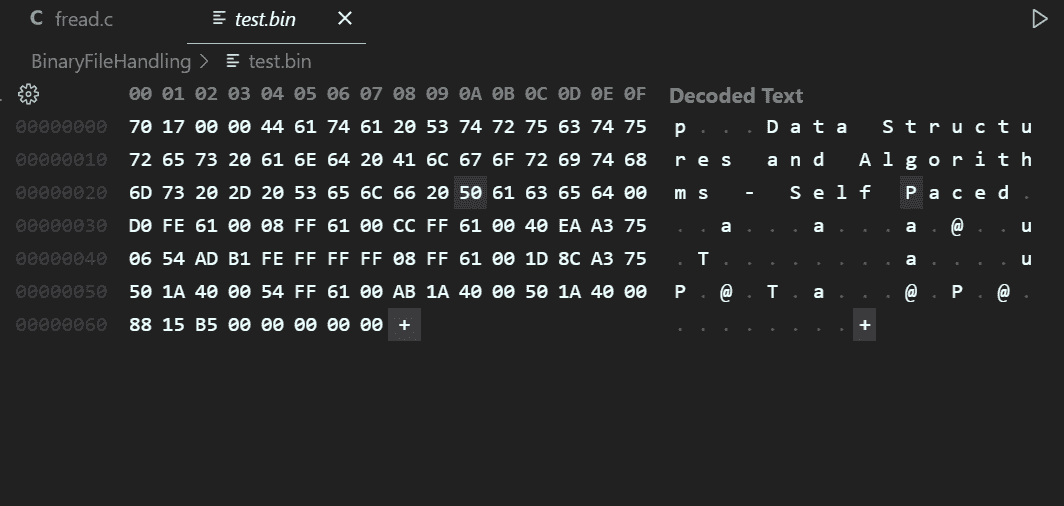
Course Name = Data Structures and Algorithms - Self Paced Price = 6000The binary file could look like this: