

AngularJS is an open-source JavaScript-based front-end framework used to build dynamic Single Page Applications (SPAs) by extending HTML with custom attributes and enabling automatic synchronization between the model and the view.
- Updates page content dynamically without full page reloads, ensuring a smooth user experience.
- Converts static HTML into interactive, data-driven views.
- Simplifies front-end development through two-way data binding.
Ways to Use AngularJS
AngularJS can be included in a project in two different ways:
1. Using CDN Link
This is the most common and simplest way to use AngularJS.
- Ideal for learning and small to medium projects.
- No installation or build tools required.
<script src="https://cdnjs.cloudflare.com/ajax/libs/angular.js/1.8.3/angular.min.js"> </script>2. Using Local AngularJS File
AngularJS can also be used by downloading the AngularJS library and including it locally in the project.
- Suitable for offline development.
- Provides full control over AngularJS version.
- No dependency on external CDN.
<script src="js/angular.min.js"></script>Creating First AngularJS Application
<!DOCTYPE html>
<html ng-app>
<head>
  <title>AngularJS Hello World</title>
  <script src="angular.min.js"></script>
</head>
<body>

  <h1>{{ 'Hello World!' }}</h1>

</body>
</html>
- ng-app starts the AngularJS application and activates AngularJS processing on the page.
- The AngularJS library (angular.min.js) enables expressions and data binding features.
- {{ 'Hello World!' }} is an AngularJS expression that displays dynamic content in the HTML view.
Working of AngularJS
AngularJS works by binding application data to the HTML view and automatically updating the UI whenever the data changes, without reloading the page.
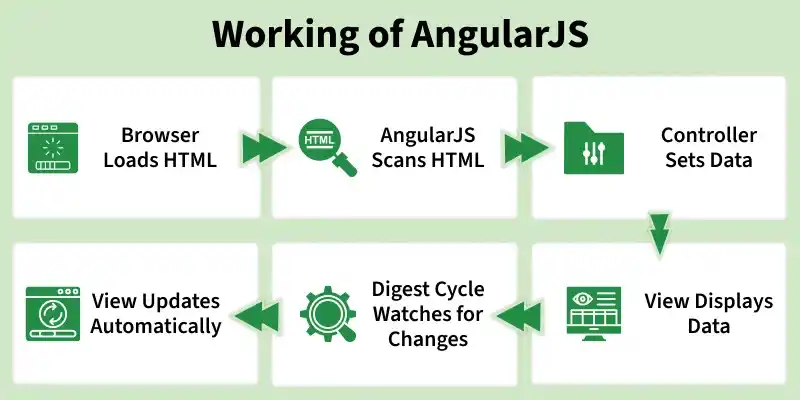
1. Browser Loads HTML
The browser loads the initial HTML page along with the AngularJS library.
- Loads index.html in the browser.
- Includes AngularJS using the <script> tag.
2. AngularJS Scans HTML
AngularJS analyzes the HTML to identify Angular-specific elements.
- Detects directives like ng-app, ng-model.
- Processes expressions such as {{ }} during HTML compilation.
3. Controller Sets Data
The controller initializes and manages the application’s data.
- Controller logic executes.
- Data is stored in the model using $scope.
4. View Displays Data
The view renders model data dynamically using AngularJS features.
- Displays data through AngularJS expressions.
- Two-way data binding links $scope (model) and HTML (view).
5. Digest Cycle Watches for Changes
AngularJS continuously monitors the model for data changes.
- Watches track changes in $scope.
- Digest cycle runs whenever data is modified.
6. View Updates Automatically
AngularJS automatically updates the UI when data changes.
- Updated data reflects instantly in the view.
- No page reload or manual DOM manipulation required.
Features of AngularJS
AngularJS provides a comprehensive set of features that make it easier to build dynamic, scalable, and maintainable web applications.
1. Model–View–Controller (MVC) Architecture
AngularJS follows the MVC pattern, which separates application logic, data, and presentation for better organization.
- Model: It manages application data and business logic and updates when changes occur.
- View: It represents the UI and displays data to users in a structured format.
- Controller: It acts as an intermediary that processes user input and updates the model accordingly.
2. Filters and Data Transformation
AngularJS includes built-in filters that allow developers to format and transform data directly in the view layer.
- Common filters such as filter, orderBy, and currency help in sorting, searching, and formatting data.
- Custom filters can be created to meet specific application requirements.
3. Routing and Single Page Applications (SPAs)
AngularJS supports client-side routing, enabling the creation of Single Page Applications without full page reloads.
- Navigation between views happens smoothly within the same page.
- Route parameters make it easier to handle dynamic content and URLs.
4. Services and Dependency Injection
Services in AngularJS are reusable objects designed to perform specific tasks such as data fetching or business logic.
- Dependency injection helps manage service dependencies automatically.
- This approach improves code reusability, maintainability, and testability.
5. Custom Directives and Components
AngularJS allows developers to extend HTML by creating custom directives and reusable components.
- Directives help encapsulate UI behavior and logic.
- Isolated scopes ensure better communication and separation between components.
6. Testing AngularJS Applications
AngularJS is built with testing in mind, making it easier to write reliable and maintainable test cases.
- Unit testing is commonly done using Jasmine and Karma.
- End-to-end testing can be performed using modern testing tools such as Cypress or Playwright.
Applications of AngularJS
AngularJS is widely used to build interactive and dynamic web applications across various domains.
- Dynamic Forms: AngularJS excels at creating dynamic forms with real-time validation and feedback.
- Real-Time Dashboards: Build interactive dashboards that update in real time based on user interactions.
- Collaborative Apps: AngularJS is perfect for chat applications and collaborative document editing.
- E-Commerce Platforms: Create seamless shopping experiences with AngularJS-powered product catalogs and checkout processes.