
The smarter way to manage HR
Your entire HR team
in your pocket
The WP ERP Business App puts attendance, leave management, employee profiles,
and company announcements in the hands of every employee — under
your brand, on your app stores.

5,000+
Active WP ERP installs
around the world
160+
Countries running WP
ERP today
4.4/5
Rating on
WordPress.org
93%
Customer satisfaction
rate
Your entire HR team
in your pocket
The WP ERP Business App is not a stripped-down version of the plugin. It is the full
HRM module, rebuilt for mobile. Your employees use it, your data stays on your
own WordPress installation.

One-click check-in
Employees slide to check in and check out from anywhere. Attendance syncs instantly to WP ERP — no manual entry, no spreadsheets.
Announcements
Company news and holiday notices reach every employee the moment they are published.
Instant Notifications
Push notifications for leave approvals, announcements, and team updates. Stay connected with your team in real-time.
Leave management
Request leave, check balances, and track approval status right from the app. HR managers get notified instantly and can act on the spot.
Real-time sync
Every action in the app reflects instantly in your WP ERP dashboard. One source of truth across desktop and mobile — always in sync.
Secure Access
Enterprise-grade security with biometric login support. Your HR data remains safe and accessible only to authorized personnel.
Employee profiles
Full profiles — personal info, designation, department, contact details. Employees update their own data without needing WP admin access.
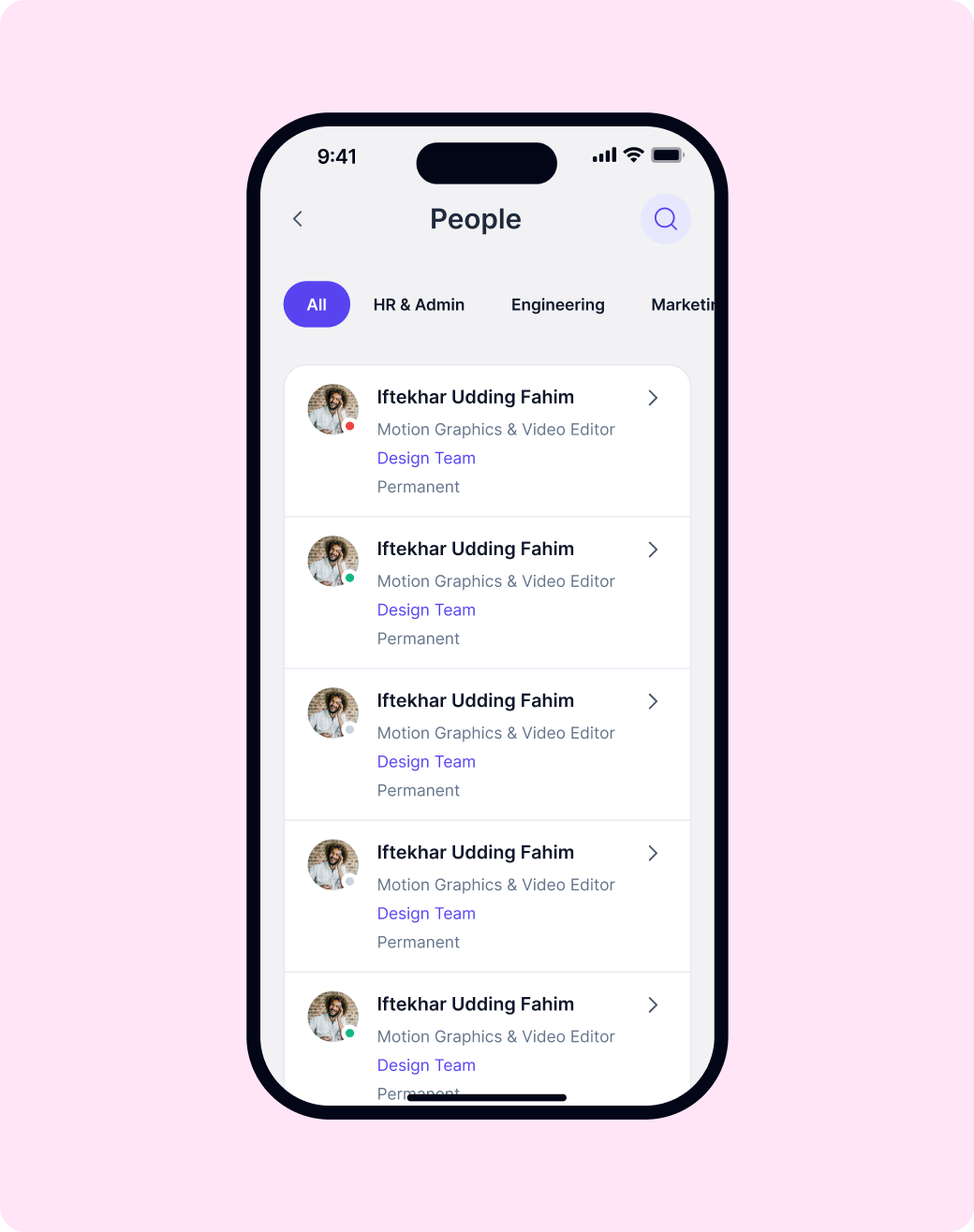
People directory
Browse your whole team by department, filter by designation, and pull up any employee profile. Your company, always one tap away.
Custom Settings
Tailor the app to your needs. Manage notification preferences, dark mode, and language settings with ease.

Smart Attendance One-tap check-in from anywhere.
Track employee attendance with precision using geolocation. No more manual logs or hardware scanners—everything happens right on their phone.

Geofencing Support
Set virtual boundaries for office or remote work sites.
Real-time Sync
Attendance logs reflect instantly in your WP ERP dashboard.
Offline Tracking
Check in even without internet; data syncs when back online.

Employee Directory Your whole team, one tap away
Find any teammate instantly. Browse by department, filter by designation, and access contact details on the go.
Searchable Directory
Quickly find team members by name or department.
One-tap Connection
Call or email teammates directly from their profile.
Team Structure
Visualize reporting lines and department hierarchies.
Secure Profiles Personal data, managed by employees.
Empower your workforce to manage their own information. Employees can update their profiles and track their own growth.
Self-service Updates
Employees update contact and personal info without HR help.
Bank-grade Security
Data is encrypted and siloed on your own WP installation.
Privacy First
Control exactly who can see which parts of an employee profile.


Your brand. Your app
stores. Your employees.
The app goes live under your company name, with your logo and brand colors — on both the Play Store and App Store. Your team downloads your app, not ours.

Custom branding
throughout
Your logo, brand colors, and app name across every screen. Your employees never see any WP ERP branding.

Published under your
accounts
The app lists under your Play Store and App Store developer accounts. You own the listing, the reviews, and the presence.

We build and launch it for
you
Share your credentials and brand details — our team handles everything from the build to the app store submission. No developer needed on your end.
Unified HR universe
All your people tools in one place. Focus on growth, we’ll handle the rest.




How It Works
Setting up FlyHR is a breeze. Follow these three steps
to bring your HR management to mobile.

Download App
Get the FlyHR mobile app from the Play Store or App Store. It’s free for all your employees.

Connect WP ERP
Link the app to your existing WP ERP Business installation with a few simple taps. Data syncs automatically.

Start Managing
Employees can now check-in, request leaves, and browse the directory—all from their mobile devices.
Trusted by teams everywhere
See why thousands of companies rely on FlyHR every day.
“
I have been looking for an ERP/CRM to manage invoices and customers for sometime now. Having used a variety I have settled on this plugin and I am very happy with it.
Richard Brown
Community Organiser, FlyHR
“
Support for this plugin is the best support experience I have experienced till date. Team solves your problems as if they are their own problems, and that’s what makes you love this plugin.
Shubham Rajdhar
Owner, Taste OfAndroid
“
I use WPERP and WP Project Manager for myself and my clients. The plugins and add-ons are very well thought out and very impressive, especially for a relatively young product.
Jason Barbour
Owner, USACarshopper & Advertise It
Have questions? We have
answers
Want to know more? You can email us anytime at [email protected]
Which plans include the FlyHR app?
The standard FlyHR app comes with the ERP Pro Scale and Enterprise plans at no extra cost. On any other ERP Pro plan, you can order a custom branded app as a separate purchase.
What is the difference between the standard app and a custom branded app?
The standard app is called FlyHR and uses WP ERP branding. Your team downloads it from Google Play or the Apple App Store. A custom branded app carries your own app name, logo, and colors. Our team builds it and publishes it under your own Play Store and App Store accounts.
How much does a custom branded app cost?
Choose Android, iOS, or both. Monthly plans are $29 for Android, $39 for iOS, and $49 for both. Lifetime deals are $725 for Android, $897 for iOS, and $1,053 for both. Every order also has a one-time $99 setup fee for the build, branding, and launch.
What do I need on my WordPress site?
ERP Free and ERP Pro, both active, plus the App Bridge plugin. You download App Bridge from your wperp.com account, select ERP as the connected plugin, and activate your ERP App license key in it. Use the ERP App key, not your Scale plan key.
Who can sign in to the app?
Anyone with the employee role in WP ERP signs in with their WordPress username and password. Admins and HR managers need the employee role too. Once they sign in, they also get team leave requests and recruitment tools.
Where is my HR data stored?
On your own WordPress site. The app reads and saves data through App Bridge, so no separate copy sits with a third party.
Can I get a refund?
Yes. You can ask for a full refund within 14 days of purchase. The $99 setup fee for a custom branded app is non-refundable.
Are you ready to empower your team?
Join thousands of companies managing their workforce with FlyHR. One tap and you’re on your way to better HR.


