Updating Gutenberg 22.6.0
-
Hi everybody,
Question to @bernhard-reiter
As a new version of Gut was released yesterday, I uploaded (I got WP 6.9.1 and PHP 8.3).
It didn’t work well, displaying a somewhat chaotic pages layout in draft mode and making it impossible to work with, even though everything else was working fine. I had to downgrade.
What’s the problem with it? thanks

-
Here the same problem.
How can I rollback to the previous version?Hi @scribelle and @fvbussel,
Sorry that you’re experiencing issues with the latest release of the plugin.
Did either of you happen to take a screenshot of the issue? Few other questions that will help investigate:
- @scribelle you mentioned draft mode. Did you also see the issue when editing published content?
- Were you creating a new draft or editing a pre-existing one?
- Were there any patterns in the draft?
- Were you editing an individual page or post? Or were you in the Site Editor editing the layout of a template or global styles?
Hi @fvbussel,
You can upload a plugin for that. For instance “Rollback” is easy and works well.
Once installed and activated, this option will appear alongside Enable and Remove in your Plugin list.
Then you will be able to downgrade to the version of your choice.Thanks, Scribelle.
@desrosj:
With version 22.6.0 I got an empty editor screen, everything else seems normal, also in the preview.
I got no error message, just an empty editor screen.
I tried modifying an existing message and an existing page both are showing an empty editor space.
With version 22.5.3 everything is normal.
WordPress 6.9.1, twentytwentyone
PHP-version: 8.1-
This reply was modified 4 months, 3 weeks ago by
fvbussel.
I got no error message, just an empty editor screen.
It’s likely a client-side, i.e. JavaScript, error. Could you please show us the contents of your browser’s console tab?
- Right-click on a page and select Inspect.
- Click the Console tab.
- There should be some kind of red message.
@fvbussel @scribelle — In addition to the information that @wildworks requested, can you share which theme you’re using?
Hi @desrosj
To help, I uploaded the last version again. And made captured.
But it is simple: for all pages already published or for a new one I create, it is the same look in the draft: totally white content, and no block can be added. I can only click on the + and the sidebar with the options appears, but when I choose one (either in the basic Gut, or those of another added plugin), no block comes in the content; only the menu appears sometimes (not with “paragraph”).
Q1&2- Yes, both.
Q3 – No pattern (layout all hand-made) not template or model. (Neve theme, but started from zero) PHP 8.3
Q4 – Page.
When I try to edit published pages, the draft view shows a blank page of content, except when I hover over it. Then, black lines appear for adding content (+). That’s all.
For the page with a banner I added and a background red color, and with the new version of Gut, when I opened the draft, I could just make out a vertical line on the far right where the banner should be.
Exactly the same problem than the other, empty screen, but no error message.
Under WP 6.9.1.
Important: I’ve just uploaded Gut on another website of mine, that is still under WP 6.8.3 and it works!
I do not think it is a question of themes.Hi @wildworks
Here it is (Neve theme)CSP-messages are red. With both version. I will look at that later.
With the newest version (2 screendumps):

With the previous version:
(one screendump)
@scribelle Thank you! Looks like I’m able to reproduce the issue when using the Neve theme. Can you try with a different theme (e.g. Twenty Twenty Five) and see if the issue persists?
I’m using TwenyTwentyOne.
This is the problem I’m seeing when using the Neve theme: https://cldup.com/ZiWbvxmgay.gif
@scribelle Is that what you’re seeing as well?
@fvbussel Looking at your screenshots, I believe you’re facing a different issue. Do you have any plugins installed?
@bernhard-reiter
With TwenyTwenty-Two and TwenyTwenty-Four, it is better, yes. As I the draft shows at least all the content.@bernhard-reiter
Yes, with NEVE, it does exactly like your exemple.@scribelle That’s good to hear, thank you for confirming! In that case, it’s a bug in the Neve theme. Please report it in the corresponding support forum.
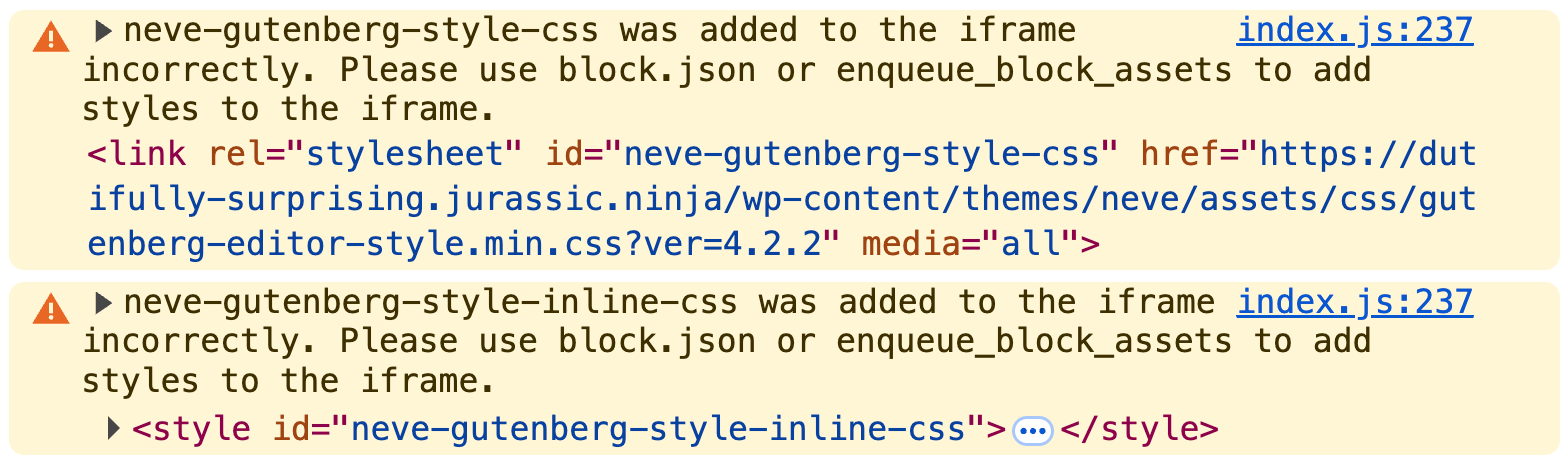
FWIW, I see these warnings in my browser console. Maybe it will help theme authors debug the issue (although there’s a chance that the warnings aren’t directly related to the editor bug):
-
This reply was modified 4 months, 3 weeks ago by
Bernie Reiter.


You must be logged in to reply to this topic.

