

Description
QR Code Composer automatically generates QR codes for your WordPress pages, posts, and WooCommerce products — without any manual setup.
No need to create QR codes one by one. Just install and everything works instantly.
Perfect for store owners, marketers, and businesses who want to save time and automate QR code usage.
🔥 What You Can Do with This Plugin
🟢 Automatic QR Code Generation
- Generate QR codes for pages, posts, products & custom post types
-
Updates automatically when URLs change
-
Meta field supported
- Automatically generate QR codes from each author’s user bio and display it on their dashboard.
- QR code Image can be downloaded from the backend and frontend
🟡 Custom QR Code Creation
- Create QR codes for text, links, phone, email & WhatsApp
- Display anywhere using shortcodes
🔵 WooCommerce Integration
- Show QR codes on product pages
- Generate customer QR codes in My Account page
🚀 Upgrade to Pro – Unlock Advanced QR Features
Take your QR codes to the next level with QR Code Composer Pro:
Branded QR Code: Create QR codes that match your brand with flexible design options — including circular, square, dotted, and rounded styles. Customize colors and shapes to generate clean, professional-looking QR codes that fit perfectly with your website design. Admin Demo for premium version
Eye Frame Shape QR code: Premium QR code eye frame shape can be changed and gradient color can be added supported color. Shape types are: Square, Circle, Classy, and Classy rounded.
Eye Ball Shape QR code: Premium QR code eyeball shape can be changed and gradient color can be added supported color. Shape types are Square, Circle, and Classy.
Gradient Color QR code: Gradient Design QR Code. It has the shape of an eye frame. and design in the form of eyeballs. And the advantage of using gradient colors in each element. Attractive gradient color QR code generator in the premium version
Logo Image Upload: The premium version supported the Logo in the center of the QR code.
Woocommerce Order QR Code: It will automatically generate a QR code for every new order and old order. You can control the content of the QR code from the plugin settings page. You can view the order QR code in the WooCommerce order dashboard. Admin Demo for Order QR
Order QR Code on Email: After an order is completed the order QR code will be printed in the WooCommerce order email. WC order email QR codes can be created from different elements. It is completely in your hands to control what elements you want to add. Order email Demo
Bulk vCard Generator: The Plugin generates bulk vCrad QR codes based on post type. Suppose you have a custom post type called ‘Developer’. Now looking to create a separate vCrad QR for each developer. Then go to the developer’s edit page and you will see a meta field called vCard QR. Fill in the required information and save. According to the information, a vCard QR code will be generated for a developer. Thus every developer can create vCrad QR for it. This vCard QR code has auto-display features, which will be on the frontend and back end. Besides, there is a shortcode facility
Event management QR Code: Event QR Code is a solution that simplifies event marketing and planning. Currently, event QR code is a very popular medium. The Premium plugin Creates an Event QR code with event details, time, and event location.
WP Author QR Code: This QR code is for all WordPress authors and users. The plugin has built-in shortcodes. Shortcodes are used to display on the front end.
WiFi QR Code: Scan the QR Code to Connect To Any WiFi Network Instantly. A WiFi QR Code is a solution that lets you create QR Codes to connect to the internet.
QR Code for Google Maps: Users can create a QR code location for the address. This way, the company location can be found simply by scanning the code.
Elementor QR code generator: If you have the Elementor Page Builder plugin active on your WordPress website. you can easily generate a QR code with our plugin’s built-in addon. We have introduced the “QR Code Composer” addon to generate QR codes with Elementor. Elementor demo
Integration
BBPress User QR Code: Premium plugin generates QR codes for bbPress users. you can generate QR codes for users’ profile links. Similarly, you can generate vCard QR code based on user profile information
BuddyPress User QR Code This plugin generates QR codes for BuddyPress users. If your site has the BuddyPress plugin active. you can generate QR codes for users’ profile links. Similarly, you can generate vCard QR code based on user profile information,
Dokan vendor QR code The QR Code Composer Pro plugin generates QR codes for Dokan vendors. If your site has the Dokan plugin active. you can generate QR codes for the vendor’s profile links. Similarly, you can generate vCard QR code based on vendor profile information
Other Features
Bulk print QR images as a PDF: Bulk QR codes can be printed from the plugin’s dashboard or the front end via built-in shortcodes. You can use the filter by category. This will print out as a PDF.. Admin Demo
Download all Post types of QR codes from one page This plugin allows the download of all QR codes based on Post type . and it is from one page. Admin Demo
Download All vCard QR codes from one page The plugin allows the download of all Post types of vCard QR Code Images from One Page. Admin Demo
WordPress Widget: The QR code plugin supports widget API. This means you can generate a QR code through a WordPress widget. Widget Demo
Shortcode Generator: On the plugin’s settings page, you’ll find the shortcode generator. From here let’s create shortcodes for all elements. Shortcodes for Custom Link QR, Whatsapp QR, WIFI QR, Google Map QR, vCard QR, and Event QR, can be generated through this generator. Also, you can customize many things including changing the design, color, logo, and animation of the QR code. Check out the live backend demo below View Shortcode Geneator
Credits
This plugin includes a modified version of the QRCode for JavaScript by Kazuhiko Arase, which is licensed under the MIT license.
Privacy
This plugin:
-
Does NOT connect to any third-party services
-
Does NOT store user data
-
ONLY generates QR code images locally
⭐ We Value Your Feedback
Your feedback helps us grow!
If you enjoy QR Code Composer, please share your experience and leave a rating. It means a lot.
How to add QR codes to a WordPress website
Screenshots

QR code on frontend with POpup Features 
Dynamic QR code on Page 
Circular QR code on Page 
Dynamic QR code on the Product Page 
Popup QR code on a single product page 
Dynamic QR code in Metabox Section 
Auto Generate vCard QR code on WordPress User’s Profile dashboard 
QR Code addon for Elementor Page Builder 
Gradient color QR code (Premium Version) 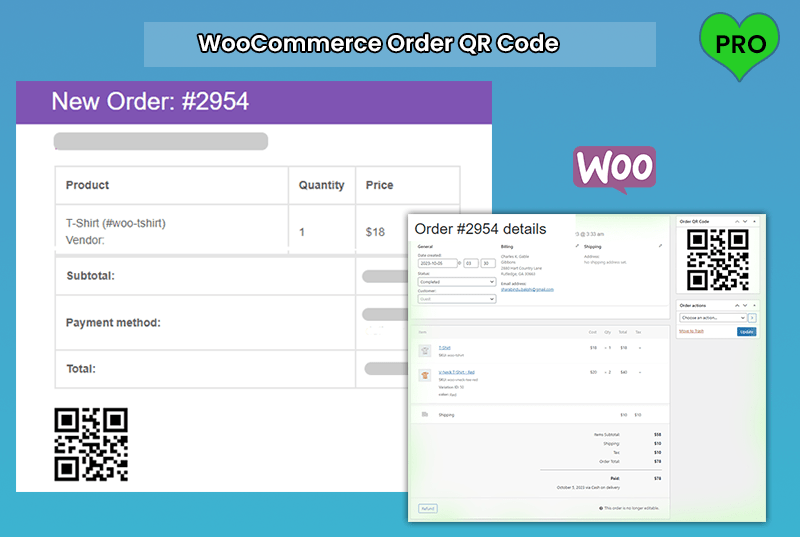
WooCommerce Order QR Code (Premium Version) 
Order QR Code on PDF Invoice (Premium Version) 
QR code print and Download (BULK Qty) (Premium Version)
Installation
- Go to your WordPress dashboard and navigate to Plugins > Add New.
- Search for “QR Code Composer”.
- Click “Install Now” and then “Activate” the plugin.
FAQ
-
What is QR Code Composer?
-
QR Code Composer is a powerful WordPress QR code generator plugin that automatically creates fully customizable QR codes for posts, pages, WooCommerce products, custom URLs, contact details, and more. It supports WooCommerce, Elementor, and multiple QR formats including vCard, email, phone, and WhatsApp.
-
How do I generate a QR code in WordPress?
-
After installing and activating the plugin, QR codes are automatically generated for your WordPress content. You can also create custom QR codes through the plugin settings or by using shortcodes anywhere on your site.
-
Can I generate QR codes for WooCommerce products?
-
Yes. The plugin has full WooCommerce QR code integration, allowing QR codes to appear on product pages, order details, customer dashboards, and (Pro) order emails and invoices. This helps customers quickly scan, share, or access product information.
-
Does the plugin support vCard QR codes?
-
Yes. QR Code Composer can generate vCard QR codes for WordPress users and WooCommerce customers, enabling instant sharing of contact information with a single scan.
-
Is the plugin compatible with Elementor?
-
Yes, it works seamlessly with Elementor Page Builder. You can insert QR codes using built-in shortcodes or by using the dedicated Elementor widget (Pro), allowing live design and customization inside Elementor.
-
Can I create custom QR codes for links, emails, or phone numbers?
-
Absolutely. The plugin generates QR codes for:
- URLs and custom links
- Email addresses
- Phone numbers
- WhatsApp contacts
- Plain text or numeric data
This makes it ideal for marketing, digital business cards, product sharing, and contact-based QR solutions.
-
Yes. The Pro version adds powerful features like bulk QR code generation, WiFi QR codes, event QR codes, Google Maps location QR codes, vCards for custom post types, and integrations with plugins like Dokan, BBPress, BuddyPress, and WooCommerce PDF invoice plugins.
-
Can users download the QR codes?
-
Yes. QR codes can be shown in popup view or via a download-only button, allowing visitors to instantly download the QR image with one click.
-
Is bulk QR code generation supported?
-
Yes. Bulk generation is available in the premium version, allowing you to create and download QR codes for hundreds of posts, pages, products, or user profiles at once.
-
Does QR Code Composer support shortcodes?
-
Yes. The plugin includes multiple flexible QR code shortcodes so you can display QR codes anywhere — in posts, pages, widgets, templates, Elementor, or custom layouts.
-
How long are the QR codes valid?
-
QR codes generated by QR Code Composer are valid for the lifetime of your website. They never expire unless you change the underlying content (URL, text, contact info). Once generated, the QR code remains permanently usable.
-
How are QR codes created? Depend on Google API?
-
QR codes are generated using pure JavaScript, directly inside your website.
They do not rely on Google APIs or any third-party services.
This ensures fast, private, and lifetime-valid QR images with no external dependency. -
How do I stop automatically displaying QR codes?
-
You can disable automatic display from:
Dashboard QR Plugin Settings Auto Generate QR CodeThere you can:
-
Hide QR codes by post type
-
Hide QR codes for specific pages
Even when disabled on the frontend, QR codes remain available in the backend meta box, so you can still download or use them manually.
-
-
Is the QR code image stored somewhere inside WordPress?
-
No. QR codes are created instantly in the browser and not stored in the database. They are generated dynamically on each page load to ensure accuracy and speed.
Reviews


Contributors & Developers
“QR Code Composer – Automatic QR code generation” is open source software. The following people have contributed to this plugin.
Contributors
“QR Code Composer – Automatic QR code generation” has been translated into 1 locale. Thank you to the translators for their contributions.
Translate “QR Code Composer – Automatic QR code generation” into your language.
Interested in development?
Browse the code, check out the SVN repository, or subscribe to the development log by RSS.
Changelog
3.0.5
- Update: Compatibility Update
3.0.4
- Update: Improved compatibility with LiteSpeed Cache and Autoptimize.
- Update: Fixed QR rendering issues caused by aggressive JS minification.
- Update: Enhanced script loading for deferred and delayed JS
- Update: Optimized QR preset initialization for cached pages
3.0.3
- Update: Improved the plugin settings page UI for better usability.
3.0.2
- Fix: Product QR code location on a single page
- Update: Compatibility Update
3.0.1
- Update: Compatibility Update
3.0.0
- New: Added Circular Shape QR Code design
- New: Can Add Error Correction Level
- New: Can Margin around the QR code
- New: Added option to disable auto-display of QR Code on the frontend via a button.
- New: Added option to disable auto-display of QR Code in the meta box via a button.
- Update: updated the Auto Generate QR Code data settings.
2.0.17
- Update: Elementor QR Code JS functionality update
2.0.16
- Fix: VCard QR code scannable problem
2.0.15
- Fix: QR Code Show/Hide on Product Page Issues Fixed
2.0.14
- Fix: QR Code Download File on Proudct page
2.0.13
- Update: Compatibility Update
2.0.12
- Fix: QR code on product page as tab
- Update: Compatibility Update
2.0.11
- Update: Compatibility Update
2.0.10
- Update: Compatibility Update
2.0.9
- Update: Added a prefix to the modal popup
2.0.8
- New: For generating QR codes for Elementor Page Builder, QR addon is included
2.0.7
- Fix: QR code removed form BudyBoss Search template
2.0.6
- New: Displaying QR code via pop-up.
- New: Added multiple options for WooCommerce’s single product page QR code display location.
- New: QR code converted from image to canvas
- New: QR code visibilityFeatires added
2.0.5
- Fix: Removed string code from QR code in meta box
- Update: The URL of the download button of the QR code is configured
2.0.4
- Update: Made Compatible with WordPress
2.0.3
- Update: Removed QR codes for shipping and billing addresses
- Update: Removed username from User vCard QR code
2.0.2
- Fix: Fixing Alignment issues for shortcode
2.0.1
- Update: Made Compatible with WordPress
1.7.3
- Fix: Fixing the issues of Download QR code image from the backend
1.7.2
- Update: Change The QR Design
1.6.1
- Fix: Troubleshooting QR code WordPress user pages
1.5.4
- Update: Hide QR code according to Page
1.5.0
- Update: Made Compatible with WordPress
1.4.0
- New: Added vCard QR code functionality
1.3.3
- New: Settings page update
1.3.2
- New: POT File Add
1.3.1
- Fix: admin page fix
1.3.0
- New: QR will run automatically by default size
1.2.9
- New: QR will run automatically by default size
1.2.8
- New: QR Download Button Added
1.2.7
- Update: Made Compatible with WordPress
1.2.6
- Update: Made Compatible with WordPress
1.2.5
- Update: Made Compatible with WordPress
1.2.4
- Update: Made Compatible with WordPress
1.2.3
- Update: Made Compatible with WordPress
1.2.2
- Update: Made Compatible with WordPress
1.2.0
- Fix: Fix CSS Issues
1.1.0
- Initial release