

Mô tả
Tạo khoá học trực tuyến, bài học, bài kiểm tra và câu hỏi tương tác tuyệt vời.
Sensei LMS là một plugin quản lý học tập mạnh mẽ của Automattic, công ty sở hữu WordPress.com, WooC Commerce và Jetpack. Tại Automattic, chúng tôi sử dụng Sensei LMS để hỗ trợ tất cả các khóa đào tạo nhân viên của mình.
Chia sẻ kiến thức của bạn và giảng dạy miễn phí với Sensei LMS!
Tính năng LMS mạnh mẽ
- Tích hợp hoàn hảo Sensei LMS vào trang web WordPress của bạn. Sensei LMS tương thích tuyệt vời với bất kỳ giao diện nào và có thể được tùy chỉnh để phù hợp với thương hiệu và phong cách của bạn.
- Tạo các khóa học hấp dẫn với WordPress Block Editor, hỗ trợ đầy đủ, tối đa bởi Giao diện Course miễn phí cho Sensei.
- Bật Chế độ học tập trung để có trải nghiệm học tập sâu sắc mà không bị phân tâm.
- Theo dõi sự tiến bộ và hiệu suất của học viên bằng các báo cáo chi tiết.
- Nhúng các video từ YouTube, Vimeo, và VideoPress cho các khoá học với bài học là các Video.
- Thêm khối Danh sách khoá học vào bất kỳ trang hoặc bài viết nào để hiển thị khoá học có sẵn.
Tạo bài kiểm tra hiệu quả
Câu hỏi là một cách hiệu quả để nâng cao sự hiểu biết của học viên về các khái niệm chính và theo dõi sự tiến bộ của họ. Chọn từ nhiều loại câu hỏi và cài đặt câu hỏi khác nhau, chẳng hạn như trắc nghiệm, điền vào chỗ trống, đúng/sai, sắp xếp câu trả lời đúng, tải tệp lên, v.v.
Giới thiệu khoá học của bạn
Gửi khóa học của bạn tới buổi giới thiệu khóa học công khai của Sensei LMS tại https://senseilms.com/showcase/. Chương trình giới thiệu khóa học của Sensei LMS cho phép bạn tiếp cận đối tượng mới để mở rộng khả năng hiển thị khóa học của mình.
Khám phá sức mạnh của Sensei Pro
Nhận ra toàn bộ tiềm năng của các khóa học của bạn với Sensei Pro.
Tương thích WooCommerce: Dễ dàng thiết lập giá và bán các khóa học chỉ trong vài cú nhấp chuột. Sensei Pro tương thích hoàn toàn với các tiện ích mở rộng WooCommerce Subscriptions, Payments, Memberships, và Affiliates.
Chia sẻ nội dung theo lịch trình: Kiểm soát tiến độ của các bài học trong khóa học của bạn bằng cách chỉ định thời điểm học viên có thể truy cập nội dung bài học theo các khoảng thời gian cố định sau khi bắt đầu khóa học hoặc vào một ngày cụ thể.
Khối tương tác phong phú: Làm phong phú thêm các bài học, trang hoặc bài đăng của bạn bằng video, thẻ ghi chú, điểm phát hình ảnh và danh sách nhiệm vụ hấp dẫn.
Tính năng kiểm tra nâng cao: Đặt bộ hẹn giờ cho bài kiểm tra và kết hợp loại câu hỏi kiểm tra theo thứ tự. Với Sensei LMS Pro, bạn có thể đưa các câu hỏi trắc nghiệm riêng lẻ vào bất kỳ nội dung WordPress nào, không chỉ trong bài kiểm tra.
Groups & Cohorts dễ dàng: Tổ chức học viên thành các nhóm và nhóm để quản lý quyền truy cập và tùy chỉnh trải nghiệm học tập.
Thời gian truy cập khóa học: Xác định ngày bắt đầu, ngày kết thúc hoặc khoảng thời gian nhất định mà học viên vẫn có thể truy cập các khóa học.
Nội dung độc quyền: Cá nhân hóa hành trình học tập bằng cách ẩn hoặc hiển thị các bài học và nội dung dựa trên nhóm, trạng thái đăng ký và ngày.
Hỗ trợ ưu tiên tận tâm: Đội ngũ kỹ sư chuyên nghiệp và thân thiện của chúng tôi luôn sẵn sàng hỗ trợ và đảm bảo thành công của bạn!
Flashcards: Thêm văn bản, video, hình ảnh, nội dung nhúng và nhiều thứ khác vào cả hai mặt của khối flashcard.
Đồng giảng viên: Chia sẻ quyền sở hữu khóa học với Đồng giảng viên có thể chỉnh sửa cài đặt khóa học, bài học và câu hỏi.
Tiện ích miễn phí
Chứng chỉ: Tự động tạo các chứng chỉ PDF đẹp mắt có thể tải xuống cho học viên khi họ hoàn thành khóa học.
Tìm hiểu thêm về Sensei LMS Certificates.
Post To Course Creator: Tạo các khóa học một cách nhanh chóng bằng cách chuyển đổi các bài đăng trên blog hiện có thành các bài học khóa học chỉ bằng vài cú nhấp chuột.
Ảnh màn hình

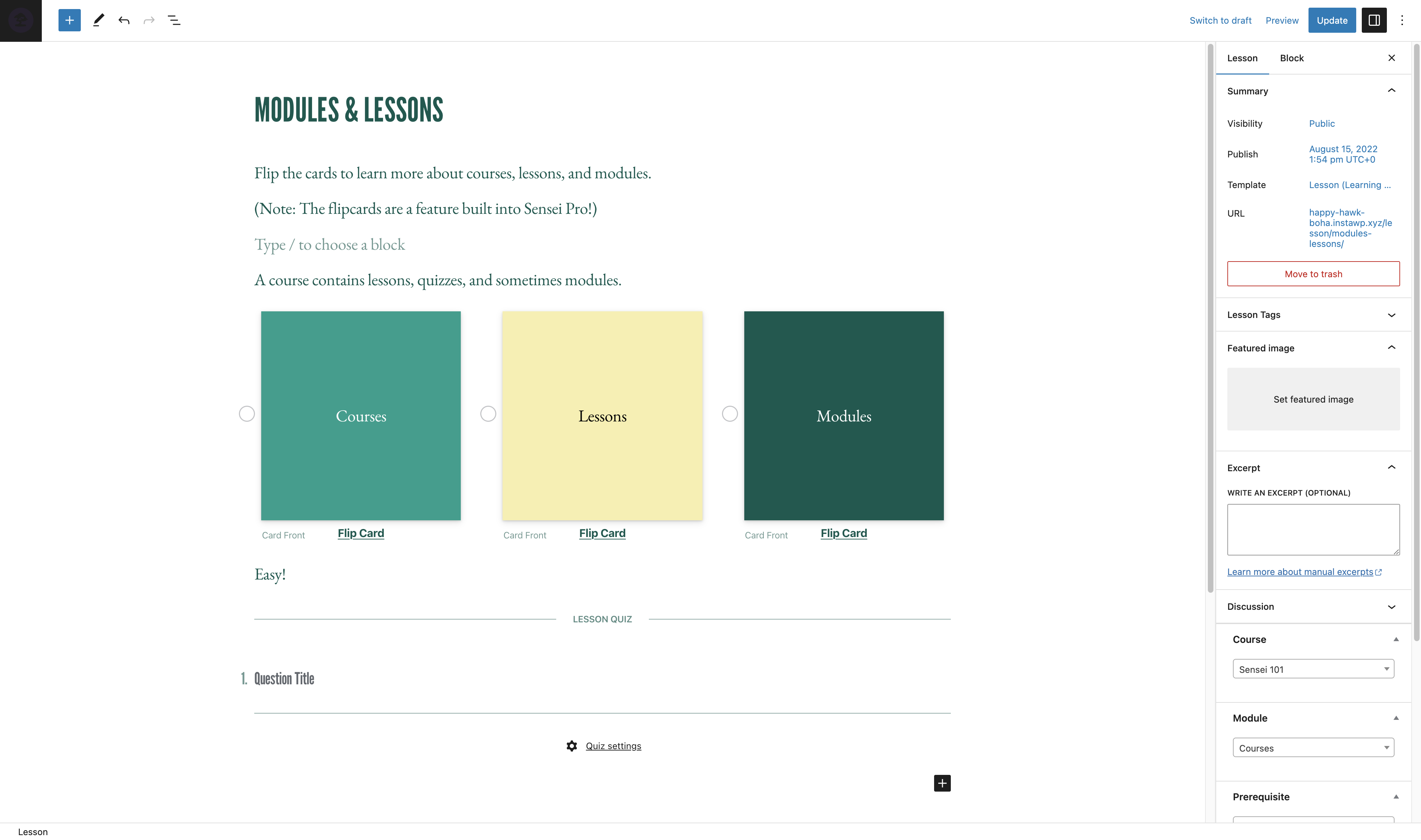
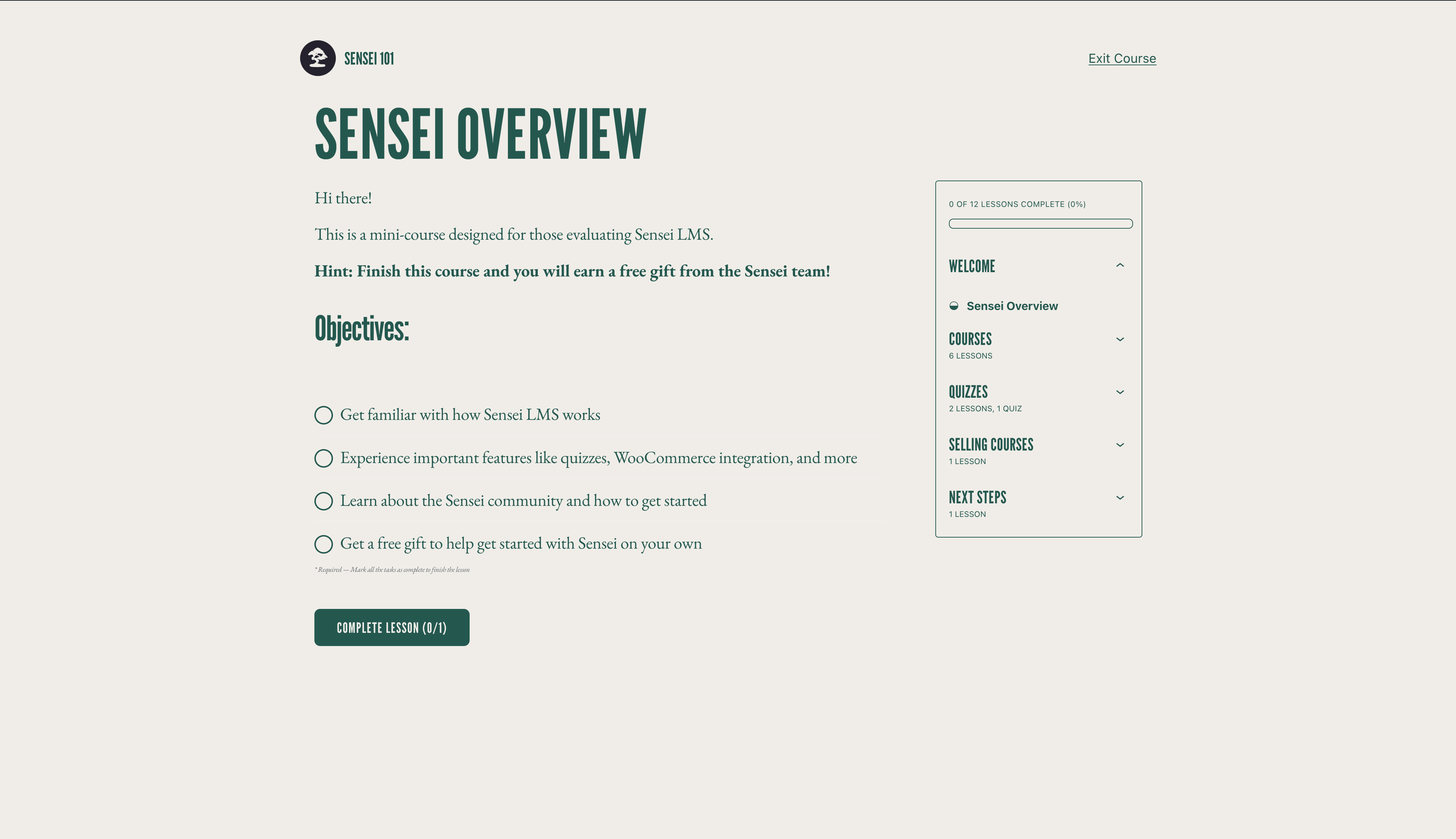

Khối
Plugin này cung cấp 3 khối.
- Course Title
- Exit Course
- Course Theme Lesson Module
Cài đặt
Cài đặt tự động
- Đăng nhập vào WordPress và đi tới Plugin > Cài mới.
- Gõ “Sensei LMS” vào ô tìm kiếm.
- Khi đã tìm thấy plugin, bấm Cài đặt.
- Bấm Kích hoạt.
- Cấu hình cài đặt bằng cách tới Sensei LMS > Cài đặt.
Cài đặt thủ công
- Tải file plugin về máy tính và giải nén.
- Sử dụng phần mềm FTP, hoặc bảng quản lý hosting, tải thư mục plugin đã giải nén vào bên trong thư mục
wp-content/plugins/trên hosting hoặc server. - Đăng nhập vào WordPress và kích hoạt plugin từ menu Plugin.
- Cấu hình cài đặt bằng cách tới Sensei LMS > Cài đặt.
Hỏi đáp
-
Tôi có thể nhận sự hỗ trợ cho Sensei LMS ở đâu?
-
Với phiên bản miễn phí, vui lòng sử dụng Diễn đàn hỗ trợ nếu bạn có bất kỳ câu hỏi nào. Chúng tôi theo dõi diễn đàn thường xuyên và sẽ trả lời ngay khi có thể.
Bạn cũng có thể xem Tài liệu trên trang web của chúng tôi để biết hướng dẫn, hướng dẫn và thông tin hữu ích khác.
-
Tôi có thể báo cáo lỗi hoặc đóng góp cải tiến cho plugin ở đâu?
-
Sensei được phát triển công khai trên Github. Chúng tôi hoan nghênh bất kỳ ai báo cáo lỗi, gửi yêu cầu kéo và theo dõi tiến trình của chúng tôi.
-
Sensei có hoạt động với plugin membership không?
-
Sensei LMS có thể được sử dụng cùng với Sensei Pro và WooCommerce Memberships để cho phép bạn bán các khóa học như một phần của gói thành viên. Xem Bán khóa học dưới dạng gói thành viên để biết thêm chi tiết.
-
Làm cách nào tôi có thể cập nhật các bản phát hành và thông báo mới cho Sensei LMS?
-
Vui lòng truy cập Blog Sensei hoặc đăng ký danh sách email.
-
Làm cách nào Tôi có thể hiển thị khoá học trong khu vực Giới thiệu của Sensei LMS?
-
Để tìm hiểu cách gửi khóa học tới Khu vực giới thiệu các Website sử dụng Sensei LMS và các yêu cầu, vui lòng xem tài liệu của chúng tôi về Giới thiệu khóa học.
-
Sensei có hỗ trợ khoá học trực tuyến, tích hợp Zoom, hoặc webinars?
-
Có! Bạn có thể thêm liên kết tới Zoom, Google Meet, hoặc bất kỳ nền tảng nào bạn chọn trong bài học của khoá học. Thêm vào đó, Sensei còn bao gồm bố cục bài học cuộc họp mà bạn có thể chọn khi tạo bài học mới để giúp việc này trở nên dễ dàng hơn.
-
Sensei có hoạt động trên WordPress Multisite?
-
Sensel LMS hoạt động tốt với WordPress Multisite. Mặc dù giấy phép Sensei Pro chỉ bao gồm một trang web nhưng gói Sensei Agency cho phép kích hoạt Sensei Pro trên tối đa 20 trang web. Nếu bạn sử dụng hoặc dự định sử dụng Sensei Pro trên Multisite với hơn 20 trang web, vui lòng liên hệ để biết giá tùy chỉnh.
-
Làm thế nào Tôi bán các khoá học theo dạng Hội viên?
-
Sensei LMS tương thích với Sensei Pro và WooCommerce Memberships, cho phép bạn bán các khoá học như một phần của gói membership.
Xem cách Bán Khoá học dạng Membership chi tiết hơn.
-
Sensei có bản tiếng Việt không?
-
Các thành viên cộng đồng đã dịch plugin Sensei LMS miễn phí sang 18 ngôn ngữ khác nhau, trong khi đó Sensei Pro đã được các chuyên gia dịch sang sang 16 ngôn ngữ. Chúng tôi hoan nghênh những đóng góp để cải thiện hơn nữa.
Đánh giá


Người đóng góp & Lập trình viên
“Sensei LMS – Online Courses, Quizzes, & Learning” là mã nguồn mở. Những người sau đã đóng góp vào plugin này.
Những người đóng góp


“Sensei LMS – Online Courses, Quizzes, & Learning” đã được dịch qua 27 ngôn ngữ. Cảm ơn những người tham gia dịch vì đóng góp của họ.
Dịch “Sensei LMS – Online Courses, Quizzes, & Learning” sang ngôn ngữ của bạn.
Muốn tham gia phát triển?
Duyệt code, check out SVN repository, hoặc theo dõi nhật ký phát triển qua RSS.
Nhật ký thay đổi
4.26.4 – 2026-09-29
Security
- Check the destination course permissions when changing the lesson course from the bulk editor.
- Enforce course edit permissions when creating a module from the course editor.
- Enforce lesson edit permissions when saving the course structure.
- Ensure Learning Mode applies colour values without changing block markup.
- Escape the label attribute in the Exit Course block.
- Escape the teacher name and archive link rendered by the sensei_teachers shortcode.
- Improved how locked lesson content is excluded from frontend listings.
- Improved how private messages are excluded from frontend queries.
- Improved how the admin lesson and course fields are initialised so that post content cannot influence them.
- Improved the authorization of lesson completion.
- Improved the authorization of private messages sent to teachers.
- Improved the authorization of usage tracking events.
- Improved the handling of files uploaded as quiz answers.
- Improved the privacy of private messages.
- Improved the scoping of teacher comment moderation.
- Made request-input handling consistent across the admin and frontend.
- Prevent students from changing their quiz answers after the quiz has been submitted.
- Require the Order Courses capability to save the course order.
- Restrict the legacy lesson quiz save handler to the lesson being saved.
Changed
- Reports Overview Students and Courses header counts now read HPPS progress tables when High-Performance Progress Storage is enabled. #8231
- Reports Overview students per-row average grade now reads HPPS progress tables. #8205
- Reports Overview students per-row course counts now read HPPS progress tables when High-Performance Progress Storage is enabled. #8231
- Resolve HPPS storage configuration consistently across progress query services and repositories. #8248
- Update Sensei blocks to Block API version 3 so they render in the WordPress iframe block editor. #8190
- Update the Action Scheduler package to version 4.1.0. #8166
- Update the pelago/emogrifier package to version 7.3.0. #8231
Deprecated
- Deprecate the
sensei_analysis_user_lesson_gradesfilter. #8205
Fixed
- Fix a fatal error when a teacher triggers a module hierarchy rebuild.
- Fix a PHP 8 TypeError when
post_updatedfires with a null post object during autosave. #8222 - Fix a PHP 8.4 deprecation notice when exporting CSV files. #8213
- Fix a thick border showing on Course Outline modules in the editor when the module border setting is off. #8191
- Fixed a PHP deprecation notice when reviewing a grade for an unanswered True/False question. #8214
- Fixed a PHP warning when changing a course’s teacher on a course with no modules. #8225
- Fixed edits to a WPML-duplicated lesson’s quiz landing on the original language’s quiz and questions. #8220
- Fixed quiz answers, grades, resets, and lesson and course quiz surfaces breaking when the admin uses a secondary language or the lesson is translated on multilingual sites. #8130
- Fixed saving a translated course overwriting and stealing the original course’s lessons on WPML sites. #8219
- Fixed the quiz saved message not showing in Learning Mode. #8272
- Fixed the student management and grading screens showing no students when the WPML admin language is not the original one. #8224
- Fixed the text domain on the “Generate quiz questions with AI” upsell label so it can be translated. #8230
- Fix garbled text in button blocks whose text uses non-Latin characters when the button URL is set at render time. #8226
- Fix lesson/module hamburger menu being hidden on mobile when the course title is too long. #8094
- Fix lesson order not reaching WPML translations when the translated lessons are not duplicates. #8246
- Fix lessons removed from a course staying in its WPML translations after the translation is updated. #8245
- Fix PHP 8.4 deprecation warnings from implicitly nullable function parameters. #8199
- Fix Sensei templates in the Site Editor when Gutenberg’s Template activation experiment is enabled. #8250
Development
- Refactored course report lesson metrics into dedicated progress aggregation and grading statistics services. #8249
- Remove the unused sensei_question_slug filter registration from the WPML compatibility class. #8215
4.26.3 – 2026-08-20
Security
- Scope the Students management user search to student accounts. #8174
- Require the grading capability on the lessons dropdown AJAX endpoint and scope it to the caller’s own lessons.
- Restrict adding a student to a lesson so it is only allowed through the lesson’s own course.
- Prevent a teacher from deleting another teacher’s unused module.
- Remove the admin notice that exposed the administration email address to non-administrators.
Removed
- Remove the course and lesson editor tours. #8150
Fixed
- Fix a false “already owned by another teacher” error that blocked saving a course containing a module without a resolvable owner. #8180
- Fix course layouts and Sensei blocks not loading when Show template is enabled. #8139
- Fix quiz results and grading showing a previous attempt’s grades after a retake from another language on multilingual sites. #8125
- Fix spacing and styling of quiz question options when using the iframed block editor. #8172
- Fix the Grading screen Grade button and row titles when the admin uses a secondary language on multilingual sites. #8121
- Fix the quiz results page showing questions in the language the quiz was taken in instead of the viewer’s language on multilingual sites. #8124
- Fix lesson prerequisites pointing to the original-language lesson on WPML-translated lessons. #8132
- Fix lessons appearing out of order in translated courses when a new lesson is translated with WPML, and attach WPML lesson duplicates to the translated course. #8149
- Fix PHP 8.1 deprecation notices rendered into the quiz page for unanswered Multi Line questions. #8146
- Fix quiz question titles and answers not being translated on WPML-translated lessons. #8100
- Fix the Add Student form layout on the Students page. #8147
- Fix the misaligned Reset filter button on the Grading screen. #8122
- Fix typo in My Courses Page setting description. #8106 👏 @Hashim1999164
- WordPress 7.1 Compatibility: Course and lesson block colors match the theme in the iframed post editor. #8179
- WordPress 7.1 Compatibility: Fix a PHP notice logged by Learning Mode templates. #8179
- WordPress 7.1 Compatibility: Learning Mode and email templates appear in their own group in the Site Editor. #8179
4.26.2 – 2026-07-29
Security
- Align the sensei-messages REST endpoint results with documented message visibility. #8032
- Ensure manual quiz grading submissions respect lesson ownership. #8035
- Apply private message permissions to replies returned by the core comments REST API. #8037
- Scope the Students “load more courses” action to courses the current teacher can manage. #8043
- Check quiz ownership in the legacy quiz-editor actions before applying changes. #8044
- Limit the modules course search to courses the current user is allowed to edit. #8049
- Only allow enrolled students to mark a course as complete. #8050
- Scope the Reports CSV export to the current teacher’s own courses, lessons and learners. #8053
- Ensure quiz resets are only allowed when retakes are enabled for the quiz. #8054
- Limit editing, deleting, and course assignment of a module to the module’s owner. #8089
Changed
- Disable the onboarding tour. #8014
- Migrate student start date editing to use progress repositories instead of direct comment meta access. #7933
- Open course outline AI upsell in a new tab. #8023
Fixed
- Fix alignment of option descriptions in the setup wizard’s purpose step. #8013
- Fix an infinite save loop when editing a lesson with a quiz block while a plugin (e.g. Polylang) injects extra fields into the REST response. #8036
- Fix duplicate frontend notices when the same keyed notice is added multiple times on classic themes. #8051
- Fix content import stalling permanently when CSVs reference many or large remote media files. #8064
- Fix PHP Fatal TypeError on PHP 8.x caused by malformed
classNameattribute definition in the Module Title block. #8093 - Fix the position of the Course(s) field description on the module add and edit screens. #8090
- Fix export and import dropping private lessons and questions. #8068
- Fix export content search missing matching lessons/courses/questions. #8048
- Fix PHP 8.4 deprecation warnings for implicitly-nullable parameters by declaring explicit nullable types. #8021
- Fix React ref warning in the quiz block toolbar by forwarding refs through the number controls. #8033
- Fix React render-phase update warning when opening Course Settings in the course editor. #8041
- Fix remote featured images with query-string URLs failing to import. #8063
- Fix translated quiz titles keeping the original-language title when using WPML. #8096
- Prevent the Welcome to Course email from being sent more than once to the same student for the same course. #8046