

外掛說明
SEOPress – 快速、以隱私為先、準備好迎接 AI 搜尋的 WordPress SEO 外掛
在 Google 以及 AI 答案引擎中取得更高排名(ChatGPT、Claude、Perplexity、Gemini)。SEOPress 是自 2017 年起受 350,000+ 個網站信賴的一站式 WordPress SEO 外掛:完整支援自訂品牌、以隱私為設計核心,現在也已準備好迎接 AI。
- ✔ 一個 SEO 外掛,支援所有網頁編輯器:Gutenberg、Elementor、Divi 4 & 5、Bricks、Oxygen、Breakdance、WPBakery、Avada、Kadence 等皆可使用通用 SEO 中繼框。查看所有整合。
- ✔ AI 驅動的中繼資料:使用 OpenAI、Google Gemini、Anthropic Claude、MistralAI 或 DeepSeek,大量產生 SEO 標題、中繼說明、Open Graph、X (Twitter) Cards 與圖片替代文字。進一步了解。
- ✔ 專為 AI 搜尋打造(AEO / GEO):原生支援 llms.txt,並提供一鍵式 Agent Readiness 切換開關,讓 ChatGPT、Claude、Perplexity & Gemini 了解您的內容。
- ✔ 隱私優先 & 完全自訂品牌:不追蹤、不留下資料足跡,也不會在管理區推銷升級方案。您的資料仍歸您所有。自訂品牌功能的重要性。
- ✔ 內容分析支援不限數量的目標關鍵字:每篇文章都沒有刻意設定的數量上限。
- ✔ 一鍵移轉:支援從 Yoast SEO、Rank Math、AIOSEO、The SEO Framework、Slim SEO、SmartCrawl、Squirrly、SEO Ultimate、WP Meta SEO、Premium SEO Pack、SiteSEO 移轉。開始移轉。
- ✔ 已翻譯成 30 種以上語言,提供專業譯文。 協助翻譯。
SEOPress PRO 每年 $49 起:1 個網站 • 不限網站數,每年 $149
功能 | 移轉 | PRO | 整合 | 支援 | 自訂品牌 | AI
SEOPress 10.3 更新亮點
Cookie 橫幅可與快取外掛搭配使用,結構化資料彼此連結,Search Console 資料則在您需要的地方呈現。
- 🤖 Manage your SEO from your AI assistant: The new MCP server connects your site to Claude, ChatGPT, Cursor or any MCP client. 14 tools in SEOPress Free, 13 more for redirections, schemas, target keywords, AI generation and the technical audit (PRO). Read-only connections, tool by tool control and one-click revocation.
- 🍪 與快取外掛相容的 Cookie 橫幅:使用 WP Rocket、LiteSpeed Cache 或 W3 Total Cache 時,每位訪客的瀏覽器現在都會套用該訪客自己的同意選擇。Google Analytics、Matomo 和 Microsoft Clarity 只會在訪客同意後啟動。
- 🧩 讓 Google 了解您身分的結構化資料:Organization、WebSite 與其他結構化資料現在都有穩定的 ID,並已相互連結。新增 Book 結構化資料,Service 結構化資料可一鍵連結服務提供者,並提供更多 Local Business 和 Video 結構化資料選項 (PRO)。
- 📈 在您需要的地方查看 Search Console 資料 (PRO):儀表板提供 12 個月的成效圖表,SEO 中繼資料區塊顯示文章指標,文章清單則顯示 Google 索引狀態。
- ↪️ 為您把關的重新導向功能 (PRO):準備發佈的網址已有重新導向設定時,編輯器會顯示警告;410 與 451 規則會使用佈景主題的錯誤頁面,並支援分批匯入及更可靠的正規表示式比對。
- 📊 更多 Google Analytics 4 選項:跨網域追蹤、404 頁面追蹤,以及 WooCommerce 的開始結帳與商品清單追蹤 (PRO)。
- ⭐ Google 偏好來源,一鍵加入:「偏好來源」按鈕會在彈出式視窗中開啟 Google 的設定流程,讓讀者留在您的頁面。
- ⚡ 更快、更可靠的 SEO 中繼資料區塊:以 WordPress 原生元件重新打造。版面配置不變,載入更快,儲存也更可靠。
- 🛠️ 其他改進與修正:行動裝置上的全寬 Cookie 橫幅、Google Analytics 連線 (PRO),以及更多改進。
為什麼 SEOPress 是最佳的 WordPress SEO 外掛?
- 一站式:結構化資料、重新導向、XML 網站地圖、GSC、圖片 SEO、導覽標記、失效連結等功能集中在一個外掛中。外掛更少、衝突更少、維護負擔更低。
- 模組化:不需要某項功能嗎?只要按一下即可停用,而且不會遺失設定。
- 價格實惠:PRO 每年 $49 起,適用 1 個網站。無限網站每年 $149。不收取「代理商」加價費。
- 預設提供自訂品牌功能:取代外掛名稱、標誌、連結與畫面。非常適合代理商與自由工作者。
- GDPR 友善:以隱私權為設計核心。內建與同意管理平台的相容性。
- 從新手到專家:為新手提供安裝精靈,為開發人員提供數百個 hooks、REST API 與 WP-CLI。免費的 指南 與 SEO 電子書。
- 經實戰驗證:350,000+ 個有效安裝、定期發佈,自 2017 年起由專責團隊維護。
SEOPress 免費功能
- 安裝精靈:幾分鐘內完成設定。
- 通用 SEO 中繼框:在任何編輯器(Gutenberg、Elementor、Divi、Bricks、Oxygen、Breakdance、WPBakery、Avada、Kadence…)中編輯標題、中繼說明、Open Graph、X Cards、結構化資料、robots 與 canonical。
- 命令面板(Cmd/Ctrl+K):立即跳至任何設定。
- 內容分析,搭配 **不限數量的目標關鍵字**,協助您撰寫能取得排名的內容。
- 行動版 & 桌面版 Google 預覽:在發佈前查看 SERP 摘要。
- Facebook & X (Twitter) 社群預覽,以提升社群平台上的 CTR。
- 標題與中繼說明 搭配動態變數(自訂欄位、分類法詞彙、分類法)。
- Open Graph & X (Twitter) 卡片,適用於 Facebook、LinkedIn、Instagram、Pinterest、WhatsApp、Threads…
- Google 知識圖譜:組織資料包含地址 & 法定欄位(9.8 新增)。
- llms.txt & Agent Readiness:協助 AI 搜尋引擎瞭解您的網站(9.8 新增)。
- Google Analytics 4 & Matomo:下載追蹤、自訂維度、IP 匿名化、再行銷、人口統計資料、跨網域追蹤,並採 GDPR 友善設計。
- Microsoft Clarity 整合:免費熱圖與工作階段錄製。
- 自訂標準網址與meta robots(noindex、nofollow、noimageindex、nosnippet)。
- XML 網站地圖(文章、頁面、CPT、分類法、圖片、作者):9.8 版速度比以往更快。
- HTML 網站地圖,方便無障礙使用 & 導覽。
- 圖片 XML 網站地圖,適用於 Google 圖片。
- 重新導向(文章/頁面/CPT 層級)。
- 網址清理:移除 /category/、/product-category/、?replytocom;將附件頁面重新導向至上層頁面或檔案網址。
- 圖片 SEO:自動設定圖片標題、替代文字、圖說與描述。
- Google Indexing API & IndexNow(Bing/Yandex),立即建立索引。
- 匯入/匯出設定,在網站之間移轉。
- 一鍵移轉,支援從 Yoast、Rank Math、AIOSEO、SEO Framework、SureRank、Slim SEO、SmartCrawl、Squirrly、SEO Ultimate、WP Meta SEO、Premium SEO Pack、SiteSEO 移轉。
SEOPress PRO:讓 SEO 更上一層樓
- AI SEO:使用 OpenAI、Google Gemini(包括 **Gemini 3 Flash & 3.1 Pro**)、Anthropic Claude、MistralAI、DeepSeek,大量自動產生 SEO 標題、中繼說明、OG/X 標籤與圖片替代文字。
- 網站稽核:完整的 React + DataViews 體驗,提供 **GSC 支援的建議**、掃描記錄、即時進度、一鍵修正 AI 替代文字,並可匯出 CSV。
- SEO 警示:在 SEO 回歸問題影響正式環境前收到警告。
- Google Search Console:直接在文章清單中查看點擊次數、曝光次數、CTR 與平均排名。
- Google Suggestions 內容分析功能,可用於探索長尾關鍵字。
- 重新導向管理工具:不限數量的 301/302/307/410/451 重新導向、正規表示式、網址測試器視窗、分類,以及 CSV/htaccess 匯入與匯出。
- 404 監控 & 自動重新導向,並提供電子郵件通知。
- 失效連結檢查器:可靠的 CRON 批次掃描,即使是最大的網站也適用。
- Schema.org / JSON-LD 編輯器,支援 **即時預覽**:Article、LocalBusiness、Service、How-to、FAQ、Course、Recipe、SoftwareApplication、Video、Event、Product、JobPosting、Review、ProfilePage、自訂結構化資料。
- 自動結構化資料,搭配進階條件(AND/OR、文章類型、分類法)。
- 無障礙導覽標記:Schema.org、符合 A11Y、即時預覽、可依 CPT/分類法詞彙自訂。
- 在地 SEO:在地商家結構化資料,支援營業時間與多間商店。
- WooCommerce SEO:商品結構化資料含全域識別碼(GTIN、MPN、品牌)、Enhanced Ecommerce、OG 價格/貨幣,以及購物車/結帳/帳戶頁面的 noindex。
- Easy Digital Downloads 整合。
- 內部連結建議。
- 影片 XML 網站地圖,搭配自動探索 YouTube 影片 + **Google News 網站地圖**。
- Google Analytics 控制台:直接在 WordPress 中查看指標,不必切換操作環境。
- PageSpeed Insights & Core Web Vitals 報告。
- robots.txt & .htaccess 編輯器:適用於多網站/多網域。
- 自訂 RSS Feed 選項。
- 多語言 llms.txt 搭配 TranslatePress。
SEOPress Insights:在 WordPress 中追蹤排名 & 反向連結
- 關鍵字排名追蹤器:52 個 Google 搜尋地區。
- 每天追蹤每個網站的 50 個關鍵字。
- 競爭對手追蹤:查看哪些對手的排名高於您。
- 每週監控反向連結。
- Google Trends:尋找新的內容切入角度。
- 永久資料存取權:匯出為 CSV/PDF/Excel。
- 電子郵件 & Slack 警示。
WooCommerce & EDD SEO(SEOPress PRO)
- 商品結構化資料含全域識別碼(GTIN、MPN、品牌)。
- OG 價格 & 貨幣,讓社群分享內容更豐富。
- 商品 XML 網站地圖,包括圖片藝廊。
- 集中管理購物車/結帳/帳戶/感謝頁面的 noindex。
- 移除 WooCommerce/EDD 的 generator 中繼標籤。
- 手動或自動建立 JSON-LD 商品結構化資料。
- 支援 WooCommerce 的導覽標記。
- 標題 & 中繼說明的全域動態標籤。
- Google Enhanced Ecommerce:購買、商品瀏覽與購物車事件。
通用 SEO 中繼框:適用於所有編輯器
直接在 Gutenberg、Elementor、Divi、Bricks、Oxygen、Breakdance、WPBakery、Avada、Kadence、WP Fusion 中編輯 SEO。不必再來回切換網頁編輯器與 WordPress 管理區。
為開發人員打造
- 數百個 hooks:瀏覽 hooks 參考資料。
- REST API:支援無頭網站與靜態網站。開始使用。
- WP-CLI 指令:將所有工作自動化。CLI 參考資料。
- 9.8 新增 13+ 個開發者 hooks。
來自同一團隊
螢幕擷圖
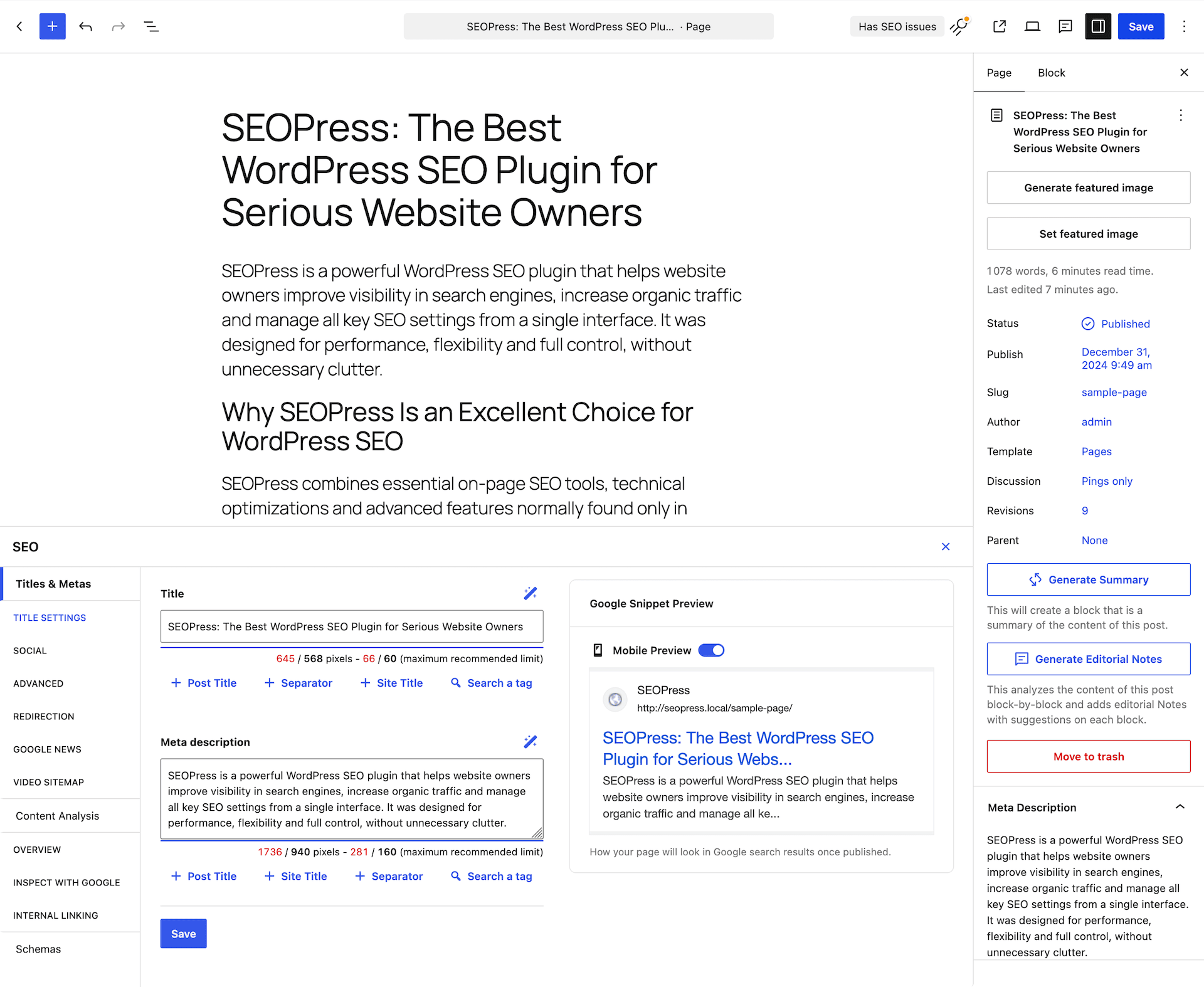


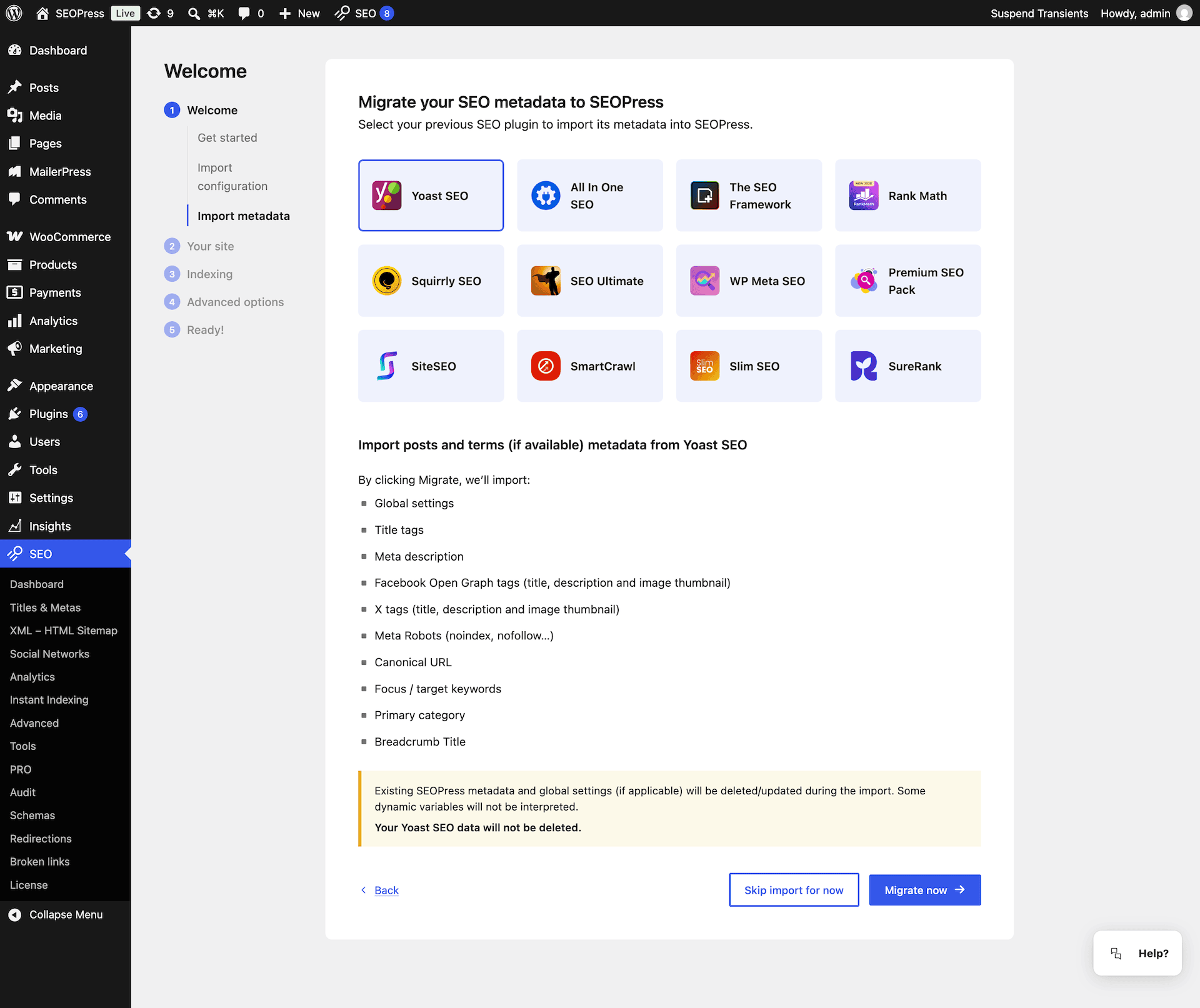

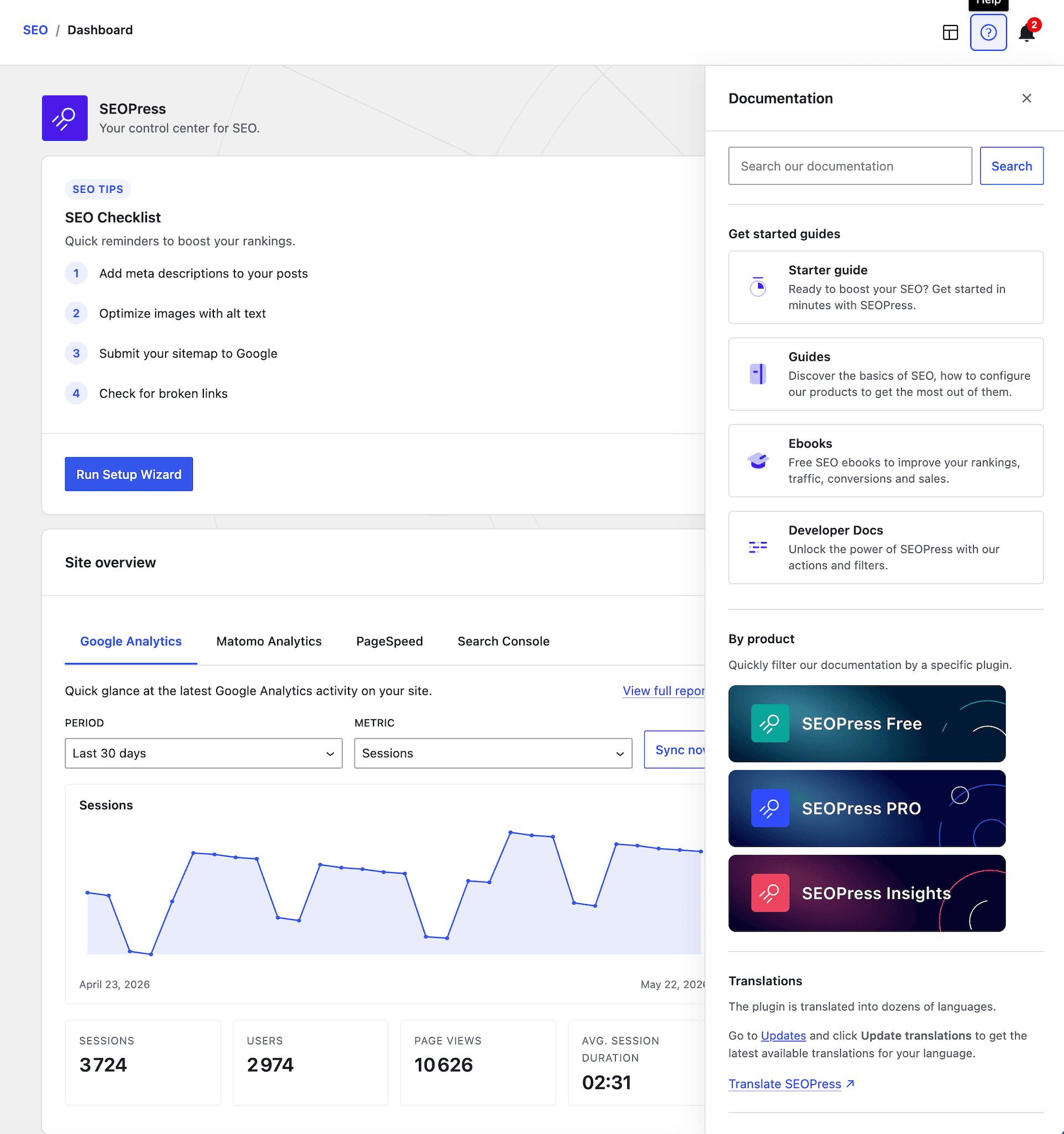


適用於區塊編輯器
這個外掛提供 4 個可供區塊編輯器使用的區塊。
- FAQ (legacy) Allows to easily build FAQs
- Google Preferred Sources Display a button inviting visitors to add your site as a preferred source on Google.
- FAQ Allows to easily build FAQs
- Sitemap Display an HTML sitemap
安裝方式
- 將
wp-seopress上傳至/wp-content/plugins/,或在 WordPress 管理區透過 Plugins Add New 安裝。 - 透過 Plugins 選單啟用 SEOPress。
- 從管理區側邊欄的 SEO 啟動安裝精靈。
常見問題集
-
我可以從其他 SEO 外掛移轉嗎?
-
可以,請使用我們的匯入工具:
我們支援以下 SEO 外掛:
– Yoast
– AIOSEO
– RankMath
– The SEO Framework
– Squirrly SEO
– SEO Ultimate
– WP Meta SEO
– Premium SEO Pack
– SiteSEO
– Slim SEO
– SmartCrawl -
什麼是「Agent Readiness」與 llms.txt?
-
LLM 與 AI 答案引擎(ChatGPT、Claude、Perplexity、Gemini)探索及引用網站的方式與傳統搜尋引擎不同。SEOPress 9.8 新增 Agent Readiness 切換開關,會發佈內容的純文字版本與標準化的
/llms.txt檔案,讓 AI 代理程式了解網站的結構、服務與政策:藉此提升網站在 AEO(Answer Engine Optimization) 與 GEO(Generative Engine Optimization) 中的能見度。 -
新的指令面板如何運作?
-
在 SEOPress 啟用期間,您可以在 WordPress 管理區的任何位置按下 Cmd+K(Mac)或 Ctrl+K(Windows/Linux)。搜尋範圍涵蓋 240+ 個已編入索引的項目,包括設定、工具、結構化資料與重新導向,並立即跳轉或執行動作。系統會記錄最近使用的指令。
-
支援哪些佈景主題與網頁編輯器?
-
全部都支援。Gutenberg(區塊編輯器)、Elementor、Divi、Bricks、Oxygen、Breakdance、WPBakery、Avada Builder、Kadence、Beaver Builder。我們的通用 SEO 中繼框適用於所有編輯器。
-
SEOPress 是否相容於 WooCommerce 與 Easy Digital Downloads?
-
可以。SEOPress PRO 提供進階的 WooCommerce SEO(包含 GTIN/MPN/品牌的商品結構化資料、Enhanced Ecommerce、OG 價格/貨幣,以及在購物車/結帳頁面上設定 noindex),並支援 EDD。
-
SEOPress 支援多語系網站嗎?
-
是的:Polylang、WPML 與 TranslatePress。SEOPress 9.8 新增搭配 TranslatePress 使用的多語系 llms.txt。
-
我們的使用者介面提供多少種語言?
-
+30 languages and counting!
🇺🇸 English (UK) (English (UK)) – professional translation
🇫🇷 Français (French (France)) – professional translation
🇪🇸 Español (Spanish (Spain)) – professional translation
🇩🇪 Deutsch (German) – professional translation
🇳🇱 Nederlands (Dutch) – professional translation
🇷🇺 Русский (Russian) – professional translation
🇯🇵 日本語 (Japanese) – professional translation
🇮🇳 हिन्दी (Hindi) – professional translation
🇨🇳 中文 (Chinese (China)) – professional translation
🇧🇷 Português do Brasil (Portuguese (Brazil)) – professional translation
🇵🇱 Polskie (Polish) – professional translation
🇸🇪 Svenska (Swedish) – professional translation
🇮🇹 Italiano (Italian) – professional translation
🇨🇿 Čeština (Czech) – professional translation
🇬🇷 Ελληνικά (Greek)
🇧🇬 Български (Bulgarian)
🇮🇩 Bahasa Indonesia (Indonesian)
🇻🇳 Loki Web (Vietnamese)
🇷🇴 Română (Romanian)
🇰🇷한국인 (Korean)
🇸🇦 العربية (Arabic)
فارسی (Persian)
Türkçe (Turkish)
… -
Google Tag Manager/其他指令碼如何搭配 SEOPress 使用?
-
前往 SEO > Analytics > Custom Tracking 分頁。將 GTM/自訂追蹤程式碼貼到 [HEAD] Add an additional tracking code/[BODY] Add an additional tracking code 文字區域欄位。儲存變更並清除快取。
-
SEOPress 支援哪些類型的網站地圖?
-
免費版:文章、頁面、CPT、分類法、圖片與作者的 XML 網站地圖,以及 HTML 網站地圖。
PRO:Google News 與 Video XML 網站地圖,並自動探索 YouTube。 -
如何取得支援?
-
免費版使用者:使用指南、w.org 上的支援論壇、常見問題、提供給開發者的 hooks,以及我們 YouTube 頻道上的影片。
PRO 使用者:透過客戶帳號以電子郵件取得支援。 -
SEOPress 是否符合 GDPR 規範?
-
是的。SEOPress 以隱私權為設計核心,並完全支援自訂品牌。深入瞭解。
-
SEOPress 是否相容於 WordPress 多網站?
-
可以:包括全網路設定,以及多網站/多網域的 robots.txt 與 .htaccess 編輯。
-
自訂品牌功能是否免費?
-
是的!請在這裡深入瞭解 SEOPress 與自訂品牌功能的詳細資訊
-
我的 XML 網站地圖傳回 404 錯誤
-
請閱讀這篇文章以解決此問題
-
我的 XML 網站地圖顯示空白頁面
-
閱讀這篇文章即可解決這個問題
-
我看不到正確的標題!
-
您的佈景主題可能使用了已淘汰的函式來處理標題。在這裡深入瞭解
-
Google 顯示錯誤的標題/中繼說明
-
Google 想怎樣就怎樣!
詳情請參閱我們的指南。 -
哪裡可以找到未最小化的原始碼?
-
外掛
public/目錄中的 JavaScript,是使用 webpack 從app/中的 React 原始碼建置而成。每個版本的原始碼、建置工具(package.json、webpack.config-beacon.js、.babelrc、.browserslistrc、postcss.config.js)與建置說明,都會發布於我們的公開儲存庫:github.com/wp-seopress/wp-seopress-public。 -
如何回報安全性漏洞?
-
請使用我們的聯絡表單(主旨請選取 Misc),或直接透過 Patchstack 回報。
-
這裡沒有列出我的問題!
-
在我們的網站閱讀完整常見問題,或在我們的支援論壇提問。
使用者評論


參與者及開發者
以下人員參與了開源軟體〈SEOPress – AI SEO 外掛 & 全站 SEO〉的開發相關工作。
參與者


變更記錄
10.3 Read the blog post update
NEW MCP server: manage your SEO from Claude, ChatGPT, Cursor or any MCP client, with up to 27 tools
NEW MCP server: read-only connections, tool by tool control and one-click revocation
NEW MCP server: 14 tools in SEOPress Free, plus 13 for redirections, schemas, target keywords, AI generation and the technical audit (PRO)
NEW Cookie banner now works with page cache plugins (WP Rocket, LiteSpeed Cache, W3 Total Cache…): each visitor’s consent choice is respected, even on cached pages
NEW Google preferred sources: readers can add your site as a preferred source in a popup, without leaving your page
NEW Google Analytics 4: optional cross-domain tracking, to follow visitors across several of your websites
NEW Google Analytics 4: optional tracking of 404 pages, without counting extra page views
NEW Google Analytics 4: optional WooCommerce tracking of checkout starts, and of product views and clicks in product lists (PRO)
NEW Schemas: your Organization (or Person) and WebSite schemas are now linked together, to help Google understand who publishes your site
NEW Schemas: a list of the available dynamic variables to help you write custom JSON-LD
NEW Book schema, with a ready-to-use template for book catalogs (PRO)
NEW Service schema: link the service provider to your site’s Organization instead of typing its details again (PRO)
NEW Local Business schema: add an optional email, logo and social profiles (PRO)
NEW Video schema: add your own YouTube API key to fill in video details automatically (PRO)
NEW Search Console: a 12-month chart of your clicks, impressions, CTR and average position in the dashboard (PRO)
NEW Search Console: see the clicks, impressions, CTR and position of each post directly in the SEO metabox (PRO)
NEW Search Console: a new column in your post lists shows the last saved Google indexing status (PRO)
NEW Redirections: a warning appears in the editor when the URL you are about to publish is already redirected (PRO)
NEW Redirections: 410 and 451 rules now display your theme’s error page instead of a blank page (PRO)
NEW AI: Claude Sonnet 5 is now available (PRO)
NEW WP-CLI: run a content analysis on all your posts in one command, handy after switching from another SEO plugin (PRO)
INFO SEO metabox: faster and more reliable, now built on the native WordPress components
INFO Pages are now shared on social networks as “website” instead of “article”
INFO Schemas and Search Console now use your site address, not the WordPress install folder
INFO Tools: new check for your IndexNow key file, and fewer false alerts on the XML sitemap check
INFO Clearer settings for the Knowledge Graph, WebSite schema and role restrictions
INFO WooCommerce: HPOS and Cart/Checkout blocks compatibility declared
INFO Developers: new filters to disable bulk actions, keep the canonical on noindexed pages and change the priority of your custom tracking code
INFO Security hardening for tracking codes, imports and settings exports
FIX Cookie banner no longer overflows the screen width on mobile
FIX Content analysis: decorative images (empty alt) are accepted, and schemas are counted correctly
FIX Content analysis: works with translated homepages and Bricks templates, and ignores login pages
FIX Primary category: removed categories are no longer used in breadcrumbs and permalinks
FIX Custom field variables holding a list of values are now displayed
FIX Zero values (“0”) are no longer removed from schemas and dynamic variables
FIX Meta descriptions keep the text wrapped in shortcodes
FIX Canonical URL of a static homepage
FIX FAQ block: question links and schema anchors
FIX XML sitemaps: deleted post types, deleted product images and inactive WPML languages are no longer listed
FIX Instant Indexing: URLs with special characters are kept intact
FIX Divi 5: the SEO button now loads in the visual builder
FIX Polylang: schemas use the right domain for each language
FIX WPML 5.0 compatibility
FIX White label: the SEOPress name and logo no longer appear in the new admin screens
FIX Advanced settings now save correctly in the Classic Editor
FIX Redirection search now works with plain permalinks
FIX Removed the useless “Save changes” button from the Tools page
FIX Google Analytics: connections made since 10.2 work again, and sync errors are explained (PRO)
FIX Search Console: your data is kept when a sync fails, and service account keys are checked (PRO)
FIX Redirections: large imports no longer fail, and duplicate imports are prevented (PRO)
FIX Redirections: regex rules with a trailing slash, query parameters, WPML or Weglot URLs now match (PRO)
FIX Redirections: disabled regex rules no longer block active ones (PRO)
FIX Redirections: homepage redirects and the URL tester are more accurate (PRO)
FIX Breadcrumbs: the “Home” item is kept, and item names are plain text in the schema (PRO)
FIX Product schema: store pickup is excluded, free shipping stays free, and no made-up price expiry dates (PRO)
FIX Local Business schema: partial opening hours are kept, and empty address fields are no longer output (PRO)
FIX Video schema: no empty publisher logo (PRO)
FIX Site Audit: scores are calculated from the current page content (PRO)
FIX Broken Links: bulk actions and pagination are back (PRO)
FIX AI: an exhausted quota is no longer reported as an invalid API key (PRO)
FIX License activation is retried after a domain change (PRO)
FIX PHP 8.5 deprecation notice in the setup wizard (PRO)