

QuickTextTools
QuickTextTools provides over 76 free online utilities that streamline text processing for writers, SEO experts, and creators, enhancing productivity.
About QuickTextTools
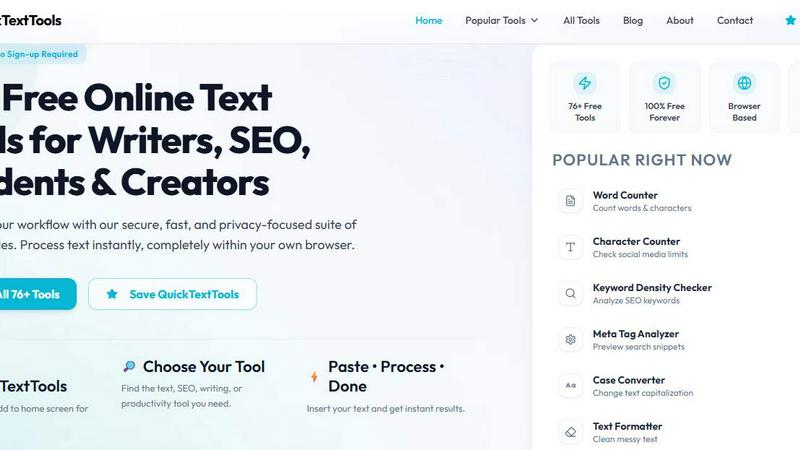
QuickTextTools is a versatile and completely free online platform featuring over 76 browser-based utilities tailored for writers, marketers, developers, students, SEO professionals, and content creators. This user-friendly toolkit is designed to enhance productivity by providing instant access to a wide range of tools that simplify various writing and content management tasks. With utilities such as text formatting options, SEO analysis tools, writing assistants, and keyword management features, QuickTextTools empowers users to streamline their workflows and save valuable time. The platform stands out due to its fast, secure, and privacy-focused approach, allowing users to perform tasks directly in their browser without the need for complicated installations or software downloads. QuickTextTools is ideal for anyone seeking efficient solutions to improve their writing process, analyze SEO elements, clean up text formatting, or manage keyword lists effectively, all while ensuring a hassle-free and secure user experience.
Features of QuickTextTools
Word Counter
The Word Counter tool allows users to quickly count the number of words, characters, and sentences in their text. This feature is essential for writers and content creators who need to adhere to specific length requirements for articles, essays, or social media posts.
Keyword Density Checker
This utility helps users analyze the frequency and density of keywords within their content. Understanding keyword density is crucial for SEO optimization, as it enables users to refine their text for better search engine ranking and visibility.
Text Formatter
The Text Formatter tool is designed to clean up messy text by removing unwanted formatting, extra spaces, and special characters. This feature ensures that the content is polished and ready for presentation or publication, saving users time and effort.
Meta Tag Analyzer
The Meta Tag Analyzer provides a preview of how search snippets will appear in search results. This feature is invaluable for SEO professionals and web developers looking to optimize their website's visibility by analyzing and refining meta tags effectively.
Use Cases of QuickTextTools
Content Creation for Writers
Writers can utilize QuickTextTools to streamline their content creation process. With tools like the Word Counter and Text Formatter, they can ensure their work meets specific requirements while maintaining clarity and readability.
SEO Optimization for Marketers
Marketers can leverage the Keyword Density Checker and Meta Tag Analyzer to optimize their content for search engines. By analyzing keywords and meta tags, they can improve their website's ranking and attract more traffic.
Academic Support for Students
Students can benefit from QuickTextTools when writing essays or research papers. The Word Counter and Character Counter tools help them adhere to assignment guidelines, while the Text Cleaner ensures their submissions are polished and professional.
Development Support for Developers
Developers can take advantage of utilities like the JSON Formatter and URL Encoder to enhance their coding workflow. These tools simplify tasks related to data formatting and encoding, allowing for more efficient project management.
Frequently Asked Questions
What types of tools does QuickTextTools offer?
QuickTextTools offers a comprehensive suite of over 76 online utilities, including text formatting tools, SEO analysis, writing assistants, and developer utilities, all designed to enhance productivity.
Is QuickTextTools free to use?
Yes, QuickTextTools is completely free to use, with no sign-up required. Users can access all tools immediately without any associated costs.
Do I need to download any software to use QuickTextTools?
No, QuickTextTools is a browser-based platform, which means all tools operate directly in your web browser without the need for downloads or complicated setups.
How does QuickTextTools ensure user privacy?
QuickTextTools is committed to user privacy and security. The tools function within the browser, ensuring that your data remains secure and private, with no information stored on external servers.
Explore more in this category:
Similar to QuickTextTools

Novastart
Apps and files on an infinite canvas where people and AI agents work together.

ButterShare
Transfer files between iPhone, Android, Windows, and Mac directly from your browser. Free, secure, and private. No apps, cloud storage, or signup.

AI Email Filter
AI Email Filter sorts incoming mail into folders using plain-language prompts you write. Works with any IMAP mailbox; bring your own LLM if you want.

Product Launch Checklist
A free launch checklist for SaaS, apps, AI tools and more. Every step says why it matters and when you can skip it.

Kody Tools
Free collection of online developer utilities, code formatters, and digital converters designed to streamline your daily workflow.

tally counter
Online tally counter for tracking attendance, workouts, inventory, visitors, sports scores, habits, and everyday counting tasks.


iHatePosting
Create once, tailor for each platform, and schedule posts across 14 social networks from one simple dashboard.