Discover next-gen
AI tools & startups.
Curated directory of the best AI tools. Submit your project to get high-quality backlinks and traffic.
Why Choose thistools?
thistools is your go-to platform for discovering cutting-edge AI tools and innovative tech products. We curate the best tools from around the world, helping you find the perfect solutions for your productivity, automation, and creative needs.
Daily Curated Picks
Every day, we feature fresh AI tools and startups selected for quality and launch momentum.
Quality-First Curation
We prioritize tools that solve genuine problems and offer exceptional user experiences.
Community-Driven Rankings
Trending lists are driven by real user feedback so the most valuable tools rise.
>> LAUNCHING_TODAY

nestd.ai is a property intelligence platform that turns listing photos into structured property features and then into professional, room-by-room listing descriptions. You can paste an Airbnb or Booking.com URL or upload interior, exterior, and amenity photos, and the platform analyzes each room, extracts visible materials, finishes, and appliances, and generates description copy that matches what is actually there. The pitch is simple: photos in, structured features out, then professional descriptions. It is built for landlords, Airbnb and Booking.com hosts, real estate agents, and agencies or catalog operators who need listing copy without starting from a blank page. Writing listing descriptions is slow and repetitive. As nestd.ai describes it, hosts and agents can spend 45 minutes staring at a blank page for every listing, or end up with descriptions that all sound the same because they run out of ways to say "spacious." Generic one-shot AI prompts often produce generic fluff that does not match the photos, missing room-level detail. Meanwhile, on the guest and buyer side, catalog filters cannot answer a request like "a quiet place with a real kitchen." nestd.ai addresses both problems by turning photos into a structured feature graph that descriptions — and natural-language search — can be written from. The first feature group is import and upload. You can paste your Airbnb or Booking.com listing URL and nestd.ai pulls the title, room details, location when available, and photos, which skips the blank form and gets you to analysis faster; you must own or manage the listing. Alternatively, you can upload your own photos — interior, exterior, and amenity shots — and smartphone photos work perfectly, so professional photography is not required. The system then groups the uploads into rooms, so a set of twelve listing photos becomes an organized set of spaces rather than an unstructured dump. Once photos are in, nestd.ai builds a structured feature analysis. It identifies each space (kitchen, bedroom, living room, and so on) and extracts materials, finishes, appliances, and style, along with condition signals. When you add a location, it also researches nearby amenities, transit and accessibility signals, schools, neighborhood vibe, and local characteristics. The platform then suggests a listing name, property type, and room counts from the photos, plus a location when EXIF GPS is available, and you can review and edit anything before continuing. This review step means the structured analysis reflects your property accurately before any copy is generated. From that analysis, nestd.ai generates descriptions. You choose the style (marketing or social), length, language, and target audience such as families, couples, digital nomads, professionals, or a custom audience, and the AI adapts the wording so it speaks to the right guests or buyers. Every property gets deep analysis: room-by-room identification of kitchens, bedrooms, and bathrooms; feature extraction of materials, appliances, and finishes; style classification such as modern, traditional, or luxury; quality assessment of condition and renovation level; location intelligence covering nearby amenities, accessibility, and local character; and target audience selection. The same structured features also power natural-language search on Enterprise, so guests and buyers can find properties by how they actually think rather than by checkbox filters. nestd.ai's approach differs from generic one-shot prompts because it looks at each room, not just the first photo. The workflow runs in four steps: upload your photos or import a listing; the AI builds your feature analysis; you confirm suggested details; then you generate descriptions from the analysis. You can review the complete property breakdown in your dashboard — rooms identified, features extracted, style classification, and location insights — before generating copy. The outcome is descriptions that mention the marble countertops in the kitchen and the barn doors in the bedroom because those details were actually extracted from the images. No prompt writing is required to get good results: you upload photos and a location, and the platform analyzes rooms, features, style, and neighborhood context automatically, with the option to adjust style, tone, and length and add an additional prompt if needed. The benefits are speed, specificity, and consistency. Landlords can generate descriptions for multiple units in minutes instead of hours, and can see the complete analysis before committing. Hosts get compelling descriptions that can help get more bookings without hiring a copywriter. Agents get consistent, high-quality descriptions for every property they represent, speeding up the listing process. Users can regenerate descriptions as many times as they want and adjust style, tone, or length until it is right, and can tailor the copy to different guests or buyers. Because the analysis highlights what makes each property unique, descriptions avoid sounding like every other AI description. As the site puts it, every description written by hand is an hour that could be spent on showings, client calls, or closing deals. Concrete use cases appear throughout the product. A luxury villa example uses vaulted ceilings, a fireplace, a kitchen island, and a barn-door primary suite as extracted features turned into a social-style description, with neighborhood context such as wildlife refuges and local restaurants. A coastal Cabarete apartment for digital nomads turns an open plan, private balcony, and resort pool into marketing copy. A compact Warsaw apartment uses a galley kitchen, accent wall, and built-in wardrobe. Beyond these examples, hosts and agents import listings and generate copy, and agencies and catalog operators use the same photo analysis to power natural-language search across a catalog. Demo mode lets users search example properties with natural language even without uploading photos. nestd.ai is designed for landlords, Airbnb and Booking.com hosts, real estate agents, and agencies or catalog operators. The main integrations are Airbnb and Booking.com listing import, and an Enterprise path for embeddable natural-language search for catalogs and platforms. The product runs on the web at app.nestd.ai. There is no credit card required to start: new users get free credits with no expiration, and instant demo access is available. In short, nestd.ai turns photos into property intelligence. By replacing manual feature forms and blank prompts with a structured, room-by-room analysis of what is actually in the photos — plus location context and audience targeting — it helps anyone listing a property produce accurate, specific descriptions faster.

EmbeddingGemma 2 is an open, lightweight multimodal embedding model from Google DeepMind. It natively maps combinations of text, code, images, audio, and video into a unified embedding space, so a single query can search across all of them. The model is intended for developers building on-device applications: apps that organize, search, and connect information directly on consumer hardware. Released under the commercially permissive Apache 2.0 license, EmbeddingGemma 2 has 740 million parameters, making it optimal for on-device inference, and its model weights are available on Hugging Face and Kaggle. The original EmbeddingGemma was introduced to give developers a lightweight option for high-quality text embeddings. That release was used to power smarter on-device search tools and privacy-first retrieval augmented generation (RAG) pipelines, and it surpassed 20 million downloads as the developer community's response blew past expectations. EmbeddingGemma 2 addresses the next step: content is no longer only text. Users have voice memos, image libraries, video archives, and code repositories, and cloud embedding services can add latency and raise privacy concerns because data has to leave the device. EmbeddingGemma 2 unifies those modalities in a shared space so developers can build cross-modal search and retrieval that works entirely offline. EmbeddingGemma 2 is described as the most capable model for on-device multimodal embeddings. It is built from the same technology as Gemini Embedding models and is positioned as best-in-class for its size, achieving leading scores among sub-1B multimodal embedders on benchmarks such as MTEB (Massive Text Embedding Benchmark) Code and MAEB (Massive Audio Embedding Benchmark). According to Google, it matches or outperforms many larger models across text, vision, and audio tasks, and across image, video, documents, and audio it sets a new standard in quality-per-parameter for sub-1B models, even outperforming some specialist models more than twice its size. It also matches the strong multilingual text performance of the original EmbeddingGemma while improving code performance significantly: the MTEB Code score rises from 68.76 to 78.68, a 9.92-point improvement. That makes the model well suited to local codebase indexing, semantic code search, and coding agent retrieval. Modular by design, EmbeddingGemma 2 requires as little as 270M parameters for text-only workloads, with optional vision (170M) and audio (300M) encoders available for full multimodal support. Developers can therefore scale the deployed footprint to the workload instead of always shipping the largest configuration. Storage efficiency is handled through Matryoshka Representation Learning (MRL): output vectors can be dynamically truncated from 768 dimensions down to 512, 256, or 128 dimensions, which provides up to 6x storage reduction for local vector databases and reduces memory usage. For apps that keep embeddings on the device, this directly affects how much media and content can be indexed and searched locally. The model is optimized for on-device performance and runs efficiently within tight resource constraints. With quantization, on a Google Pixel 11 Pro, EmbeddingGemma 2 requires as little as approximately 191MB of active RAM for text-only weights and roughly 567MB for the full multimodal model. It also features an 8K token context window, four times larger than EmbeddingGemma 1, which allows it to process up to 5.5 minutes of audio, 29 images, 58 video frames, or interleaved combinations of those inputs directly on local hardware. That extended context lets a single embedding cover a substantial piece of real content, such as a recorded clip, a set of images, or a sequence of video frames, rather than only a short text snippet. Overall, EmbeddingGemma 2 brings robust embedding capabilities directly to edge hardware. Generating embeddings locally helps ensure data privacy, reduces pipeline latency, and empowers developers to build cross-modal search and retrieval that works entirely offline. Because the model is built on the Gemma 4 architecture and shares its text tokenizer and audio encoder, developers can run EmbeddingGemma 2 together with generative models such as Gemma 4 in a unified pipeline with a lower combined total memory footprint. That pairing enables on-device RAG pipelines that understand complex multimodal data, for example using EmbeddingGemma 2 for local file retrieval and Gemma 4 for contextual reasoning. The benefits described by Google follow directly from running embeddings on the device: data privacy, since content does not need to be sent to a cloud service; reduced pipeline latency; and offline operation, so search and retrieval keep working without a network connection. The modular parameter counts and MRL truncation reduce memory and storage requirements, letting developers index more content within a device's constraints. The quality gains in code, vision, and audio mean cross-modal search is practical at this size, and the extended context window means embeddings can represent longer stretches of audio, images, or video rather than only short text. Google demonstrates several concrete use cases. In Google AI Edge Gallery's Instant Media Search, users find the top matches in a media library using text or an image, ranked by semantic similarity. Video Moments Finder locates specific moments in video using text or audio queries. The Google AI Edge Foresight app pairs EmbeddingGemma 2 for local file retrieval with Gemma 4 for contextual reasoning. Developers can also create real-time decision engines that leverage multimodal context for classification, routing, and predictive capabilities via the MediaPipe Decision Task API. Because of the code improvement, the model is well suited for local codebase indexing, semantic code search, and coding agent retrieval. The launch example also describes finding a specific video clip from a voice memo, or searching through hours of audio recordings based on a text query, all handled by a single natively multimodal model. EmbeddingGemma 2 is aimed at developers building on-device and edge applications, including those working on search, retrieval, and RAG experiences. Getting started is supported by model weights on Hugging Face and Kaggle, with Gemini Enterprise Agent Platform Model Garden availability coming soon, and LiteRT Community on Hugging Face for models optimized for on-device use. For on-device deployment, developers can use Google AI Edge MediaPipe for turnkey embedding, retrieval, and decision tasks, or LiteRT for custom model integration; browser builds are possible with transformers.js or WebGPU. The model can be served with transformers, sentence-transformers, MLX, vLLM, llama.cpp, SGLang, Ollama, and LMStudio, embedding vectors can be stored with Qdrant, and Unsloth provides guidance on fine-tuning. Google also points to a developer guide, documentation, and specific inference and fine-tuning guides. The model is released under the commercially permissive Apache 2.0 license. EmbeddingGemma 2 continues the EmbeddingGemma line by moving lightweight embeddings beyond text. It unifies text, code, images, video, and audio in one shared embedding space, stays small enough to run on-device, and stays flexible through modular encoders and truncatable vectors. For developers who need privacy-first, low-latency search and retrieval that works offline, it provides a single multimodal model for cross-modal search, on-device RAG, and real-time decision tasks.

Ancher is an AI knowledge workspace that turns everything you read, watch, and save into work you can actually use. It is built for people who read, watch, and save for a living — knowledge workers, founders and indie hackers, investors, researchers and academics, creators, product, growth and marketing teams, and consultants. Instead of starting from a blank page, Ancher starts with everything you consume: you capture articles, videos, PDFs, social posts, podcasts, screenshots, and ideas, and the product connects that knowledge, answers questions across it, and helps you produce research briefs, reports, presentations, and content in your own voice. The promise is simple and repeated throughout the site: remember everything, create anything. The problem Ancher addresses is one that anyone who consumes a lot of content knows well. The products people use today start in the wrong place. As Ancher's own comparison puts it, Notion is built for documents and collaboration — it starts with a blank page, and you write it down. Obsidian is built for markdown and local knowledge — it starts after you collect, and you build it yourself. Both are excellent at what they do, but neither begins with the raw material of your thinking. Meanwhile, the material itself is slipping away: articles, videos, social posts, and podcasts disappear or become impossible to find again, and the exact part you remember from a rough description is often unrecoverable. Ancher's answer is to begin from consumption rather than from a blank document, so that everything you encounter is already connected by the time you need to create something from it. Capture is the first stage of the loop. Ancher lets you drop in URLs, PDFs, podcasts, videos, and screenshots — anything you encounter — and it accepts them from the browser, Slack, Telegram, or email, so you can save from wherever you already are. There is no tagging, no folders, and no organizing; the design intent is explicitly to let you capture and move on. The platform also saves directly from every feed, grabbing posts, threads, and videos straight from X, LinkedIn, YouTube, Reddit, Instagram, and more, plus any link, PDF, or screenshot you come across. Because saving is frictionless, the habit sticks, and the archive grows without the maintenance overhead that usually kills knowledge systems. Connect is where the stored material becomes more than a pile of links. Ancher automatically links every new piece of content to what you have saved before, surfacing patterns, contradictions, and evolving themes on their own. The company describes the effect as compounding: the more you feed it, the sharper it gets, and your knowledge compounds silently in the background. Alongside that automatic linking, every source is worked into a clean, skimmable note with key points, takeaways, and keyframes pulled straight from videos — no formatting required from you. A contribution heatmap visualizes your saving activity, turning the growth of your second brain into a habit you can actually see. Retrieval is handled by an agent rather than a search box alone. You can ask your knowledge anything across everything you have saved, and the answers are grounded in your own sources rather than the open web — which matters when accuracy and provenance are the point. Ancher also lets you find the exact part of a source from a rough description, so a half-remembered clip or paragraph is still reachable. Collections turn this into working context: you group related notes into a collection and hand that collection to the agent, so creation draws from exactly the sources you chose. That combination of grounded answers and scoped context is what separates the workspace from a generic chatbot. Create is the payoff. Ancher produces real deliverables rather than chat replies: memos, newsletters, board decks, and research briefs. Everything it generates is grounded in what you have actually consumed rather than generic AI guesswork, and it is written the way you write — the site's framing is that your editor will not know Ancher helped. Output can include charts, diagrams, and illustrations generated to match the deliverable, and the same knowledge base supports posts alongside longer documents. The company's own activity numbers describe over 1.1 million creations shipped, covering notes, briefs, posts, decks, and documents, which gives a sense of the range of formats the workspace is expected to produce. The overall method follows one loop: save, recall, create. Consumption enters the system without friction, the system connects and structures it automatically, and the agent retrieves from it with your sources as the ground truth before generating output in your voice. Ancher positions this as the new way to think, learn, and create, and it works with ChatGPT and Claude, so it sits alongside the AI tools people already use rather than replacing them. The critical difference from note-taking apps is the starting point: Ancher starts with everything you consume, rather than starting from an empty page you must fill in yourself. The stated benefit is that your saved knowledge becomes more useful every time you add to it. Because new material is linked to old material automatically, the archive does not decay into an unfindable backlog; it sharpens. Users gain recall of the exact fragment they remember from a rough description, answers that trace back to their own sources, and deliverables that reflect genuine reading and watching rather than generic model output. Framed in the site's own terms, this is described as an unfair advantage: you consume hours of content every day, and Ancher turns that consumption into work you can ship. Ancher publishes dedicated workflows for six audiences. Founders and indie hackers turn everything they track into their next move. Investors build conviction from everything they have read. Researchers and academics turn scattered sources into a brief they can trust. Creators create from everything they have already consumed. Product, growth and marketing teams keep every insight where they can use it. Consultants show up with the work already assembled. The same save-recall-create loop is reshaped to each of these jobs, which is why the platform frames itself around workflows rather than a single generic feature set. Ancher is available as a web app for saving, searching, and creating from any browser with nothing to install, as a mobile app for saving links, screenshots, and ideas from a phone with syncing everywhere, and as a browser extension for one-click capture of any page, video, or post. Pricing starts free: the Free plan is always free and includes 100 credits per month, all core features, and community support. Digest costs $5 per month, or $59.99 billed yearly, and adds 5,000 credits per month plus email support. Pro costs $15 per month, or $179.99 billed yearly, and adds 20,000 credits per month, priority support, and early access to new features. Yearly billing saves up to 20 percent. On security, Ancher states that data is protected with the same encryption banks use, that notes, files, and conversations are never used to train AI, that you can sign out of any device in a single tap and erase everything you have stored, and that Google sign-in uses only your name, email, and profile to create, secure, and open your account. Ancher's core proposition is that the content you already consume should be the raw material for the work you produce. By removing the organizing burden from capture, connecting new material to old automatically, grounding answers in your own sources, and generating deliverables in your own voice, it aims to make a knowledge base that compounds rather than a bookmark list that rots. The tagline the company uses captures it: turn everything you read and save into work you can ship.
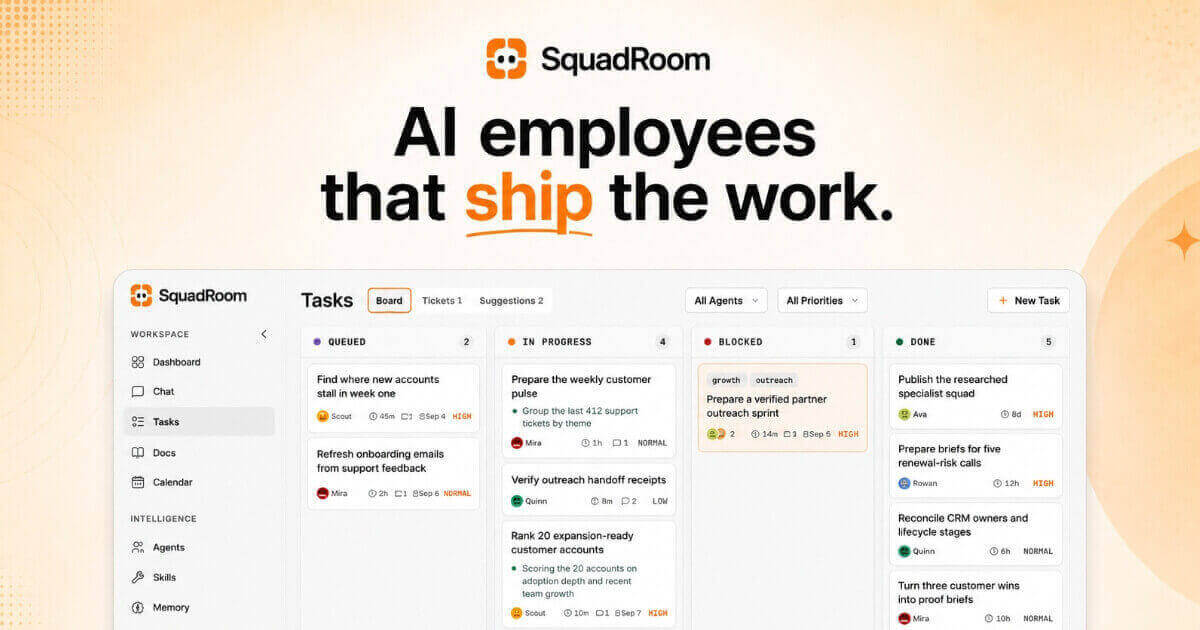
SquadRoom is a workspace where a squad of specialist AI agents works for you. According to the site, they are "AI employees that finish the work": you write the Task, you read the Report, and everything in between is the squad's job. You build the roster, put Tasks on a board, and the agents do the work, hand off to each other, and report back with proof. When you come back, the work is finished and a report shows every step and every source. The product is aimed at people who want work completed rather than a conversation, and the site advises writing a Task "the way you'd brief a new hire." A live demo with a sample company loaded lets you explore the real product, and there is no signup required for the demo. The problem SquadRoom addresses is the turn-by-turn nature of ordinary AI chat. As the FAQ puts it, you don't prompt it turn by turn: you put a Task on the board and one agent owns it, then it wakes up, reads its brief, does the work, and every step lands in Activity, Docs and a final Report. Work is therefore not something you have to supervise continuously. The site stresses visibility with the phrase "Nothing happens in the dark," and the product is designed so that agents only stop to ask you when a decision really needs you. Product Hunt notes that nothing goes out without your OK. Instead of chat logs that fade away, each Task produces a receipt showing what got done, how it got done, and the exact versions delivered. The first core capability is the Task board and routing. One line on the board gets one owner straight away, and nothing runs without an owner. Ava, the Chief of Staff, reads every new Task and hands it to the specialist whose job it is. A Task can be an Epic, with child Tasks appearing as specialists pick up stages, and the board tracks states such as Todo, In Progress, Blocked and Done, along with priority levels including high, medium and low. Every move is visible in an Activity feed as it happens, so a Task such as "Research and rank 15 integration partners" or "Turn three customer wins into proof briefs" can be followed step by step from assignment to completion. The second capability is the way agents ask for help. When an agent gets stuck it raises a Ticket: one to three plain questions, with what they found and a recommended answer, and only that one Task waits. A demo Ticket, for example, asks which verified partner batch should be contacted manually first and offers two options, one of them marked as recommended. You can reply in the Ticket inbox or in Chat, and the Task picks back up on its own. This keeps decisions with the human while letting the rest of the squad continue working, so a single question does not stall the whole board. The third capability is Reports and Docs. Every Task ends in a Report describing what got done, how it got done, and the exact versions delivered, which the site describes as "a receipt, not a chat log." Outputs live in Docs, a shared knowledge base where every save is a new version: nothing gets overwritten, any Doc can be rolled back without losing history, and any Doc can be shared with a link. Reference material can be uploaded for the squad to use, and everything they deliver lands there too. A partner outreach shortlist Doc, for instance, shows multiple versions with contact names, statuses such as verified or parked, and a note explaining why ten partners were parked rather than deleted. The squad itself follows a clear structure: one lead routes, specialists own the work. In the demo workspace the roster includes Ava as Chief of Staff, Scout in Market Research, Rowan in Partnerships, Quinn in Operations and QA, and Mira in Content Strategy. Specialists pitch in on each other's Tasks, review each other's work, and the lead groups related Tasks into Epics. Because Tasks can be blocked on dependencies, the board shows clearly when one agent is waiting on another's output, for example drafts blocked until a research shortlist is ready. The overall methodology is captured in four steps the site lays out: you assign, they work, they ask only when stuck, and you get a Report. In detail, one line on the board gets one owner immediately; the right specialists pitch in and every step shows up in Activity as it happens; a short question with findings and a recommended answer pauses only that one Task; and finally you receive a Report covering what got done, how, and the exact versions delivered. Scheduled Jobs and Playbooks let recurring work run on its own, and the Calendar view shows what the squad will run today, such as a partner signal scan at 09:00 or a pipeline receipt check at 16:30. A distinctive part of the approach is the bring-your-own-key model. You connect a ChatGPT account or a key from OpenAI, Anthropic, Google, Azure OpenAI or OpenRouter, give each agent the model that fits, and pay the provider directly with no markup from SquadRoom. The demo shows Ava on GPT-5.5, Scout on Gemini Pro, Rowan on Claude Sonnet, Quinn on GPT-5.5 and Mira on Claude Opus. The site frames this as "Your key. Your bill. No markup," and a sample month shows the SquadRoom platform fee billed by SquadRoom while model usage stays on your own provider bills. There is also a usage view showing what each API key has spent and credits consumed by day. Integration coverage is broad: 24 integrations and any MCP server. Named integrations include Gmail, Google Calendar, Notion, Slack, GitHub, Linear, HubSpot, Stripe, Google Analytics, Google Search Console, Google Drive, Google Sheets, Google Docs, Google Slides, Outlook, YouTube, Reddit, LinkedIn, Trello, GitLab, Semrush, Microsoft Clarity, Segment and PostHog. Any MCP server can be added by pasting its URL, and agents pick up every tool it exposes. Chat also works over Telegram so briefs, replies and Tickets reach your phone. Each connection has a scope such as Read, Write or Full, destructive actions need a confirmation in Chat, and tool permissions can be set per agent. Research is built in rather than bolted on. Agents have web search, full page reads and seven social platforms available with nothing to set up, covering Web, LinkedIn, X, Reddit, YouTube, Instagram, Facebook and TikTok. Findings land in a Doc and the Report cites each source, so a weekly signal sweep or market research Task produces a traceable document rather than a loose summary. For users, the benefit is finished work with evidence attached. Because every Task has an owner, every step appears in Activity, and every Task ends in a Report, you can see how an outcome was reached and which versions were delivered. Decisions stay with you: agents only stop when a decision really needs you, and nothing goes out without your OK. Work continues across the squad even while one Task waits on your answer, and customers are not contacted unless you approve it, as the proof brief example makes explicit. Concrete use cases shown in the demo include preparing a verified partner outreach sprint, where Scout scores 15 companies and recommends five, Quinn verifies contacts against two sources, and Rowan drafts five personalized partner emails; turning three customer wins into proof briefs with every claim tied to an approved source; reconciling CRM owners and lifecycle stages across reviewed records; running scheduled checks such as partner signal scans and pipeline receipt checks; and ongoing market research that ranks expansion-ready customer accounts and lands findings in versioned Docs. SquadRoom is delivered as a web workspace. Pricing is one flat plan for all the agents: the current early-access price is $49 per month, down from $99, with a 7-day money-back guarantee and the ability to cancel any time, and you keep the early-access price for as long as you stay subscribed. The plan lists unlimited AI agents, Tasks, Tickets and Reports, versioned Docs with share links, scheduled Jobs and Playbooks, Chat including Telegram, bring your own AI key, per-agent tool permissions, and 1,000 research credits a month. Model usage is paid directly to your chosen provider. A live demo with a sample company is available to try without signing up. In short, SquadRoom turns a prompt-by-prompt AI assistant into a squad of specialist AI employees that take a Task from assignment to a finished, documented result. You write the Task, the lead agent routes it, specialists do the work and hand off as needed, and you read a Report that shows every step, every source and the exact versions delivered, with your own AI key and a single flat platform fee.

Understory is a Mac notes app for people who take notes in order to write something. It is built for students, researchers and bloggers, and for anyone carrying a research paper, an essay, a blog post, a video script or even a book from the first note to the finished draft. The app is described as part outliner and part notes app: you collect your research, shape it into an outline, write the draft, and then publish the finished piece, all inside one application and without copying anything from one app to another. The problem Understory addresses is the gap between taking notes and writing. Notes tend to be taken in one place while the writing happens in another, so material has to be moved across before it can be used. Understory closes that gap by treating notes as the raw material of a draft rather than as a separate archive. It also distinguishes itself from a conventional outliner: an outliner is good for shaping ideas into a hierarchy, but every item in it is a bullet, whereas in Understory every item is a whole note written as regular text, and the same note can appear in several outlines, or in none at all. The first step in the workflow is collecting. Understory is designed for taking notes as you read, chapter by chapter: a note is just text, and you do not have to come up with a title or a filename before you start writing. You keep each quote or idea as a short note filed under the book and the chapter it came from, so the source of every thought is preserved in the structure of the notebook rather than in a separate record. Notes can also be linked to one another; the app's own material shows reading notes filed chapter by chapter, with one note linking to a related note taken from another book, so ideas that cross between sources stay connected without being merged into a single block of text. The second step is outlining, where the argument is built out of the notes already taken. You add a note for each main point and then put the notes you have already collected underneath the points they support, moving things around until the structure works. Because every item in the outline is a full note rather than a bullet, the same note can sit in more than one place, so an idea can belong to every subject it touches. That means a single piece of research can support several arguments at once without being duplicated or rewritten, and it can also sit in no outline at all until it is needed. The third step is writing the draft. Each point is drafted in its own note, with the research you gathered listed right beneath it in the sidebar, so the supporting notes stay visible while the section is being written rather than sitting in a separate window or document. Selecting the main points lets you read the whole piece from beginning to end as one continuous draft, which gives you a way to check how the sections read together before anything is published. The app shows sections being drafted in Markdown, with their supporting notes listed alongside. Publishing turns the outline into a document that can be shared. The finished piece is published as a PDF, Rich Text, Markdown or a website, in the order you arranged it, so the structure built during outlining carries straight through to the output. The same project can therefore become a printable PDF, an editable Rich Text or Markdown file, or a web page without being rebuilt. The published result follows the arrangement of the outline rather than the order in which the notes were originally taken. The app's approach to storage is part of how it works. Notes are kept in a plain folder of Markdown files on your Mac, which Understory calls a Project Notebook, or in your own iCloud account as a Personal Notebook synced between your Macs. In both cases there is no Understory account to create, and nothing of yours passes through the developer's hands. Because the notes live as Markdown files in an ordinary folder, they remain in a form that is not tied to an account on someone else's service. For the writer, the benefit is that research and drafting live in the same place. Nothing has to be copied from one app to another between the first note and the finished draft, so quotes and ideas stay attached to the books and chapters they came from while they are being shaped into an argument. Because the same note can serve several outlines, an idea does not have to be rewritten to fit each piece it appears in. And because the published document follows the arrangement of the outline, the structure worked out during outlining becomes the structure of the final output. Use cases follow the writing the app was designed for. A student writing an essay or a research paper can take notes from each book and chapter, add a note for each main point, and move existing notes underneath the points they support until the structure works. A researcher working through a long book can file quotes and ideas chapter by chapter and link related notes from other books. A blogger can turn reading notes into a post by arranging them into an outline and drafting each section with the research beside it. The same workflow is described for a video script or a whole book, and the finished piece can be published as a PDF, Rich Text, Markdown or a website. Because one note can sit in more than one outline, a writer working on several subjects at once can reuse the same idea in every piece it touches. Understory is aimed at students, researchers and bloggers, and more broadly at anyone who takes notes in order to write something. It is a Mac app, downloaded from the Mac App Store: there is no iPhone or iPad version yet, and the app is Mac only for now. Pricing is not a subscription, as one purchase makes it yours. It is free to try first, with every feature working from the first launch, publishing included; the only limit is on how many notes a notebook holds, and there is enough room to find out whether it works for you. A one-time payment removes that limit, and the pricing page has the details. Support is available by email, and there is a Discord community for talking about the app. Understory's value proposition is straightforward: it is a notes app for writing, not just a notes app for storing. It carries a research paper, an essay, a blog post, a video script or a book from the first note to the finished draft in one place, letting you collect notes as you read, arrange them into an outline, draft each section with your research beside it, and publish in the order you arranged. Its tagline, notes that tell the tale, captures the intent: the notes are not an archive, they are the path to a finished piece of writing.

Kudos is a free financial companion and browser extension that turns everyday spending into bigger earnings. According to its website, Kudos automatically maximizes your card offers and benefits, lowers your bills, and keeps finding new ways to save. It is built for people who hold one or more credit cards and want more value from the purchases they are already making. Instead of simply presenting charts, Kudos surfaces useful actions: it auto-activates card-linked offers, recommends the best card to use at checkout and in stores, tracks card benefits before they expire, and uses AI to negotiate bills and cancel subscriptions. Members keep 100% of the savings. The product is described as working at more than two million stores and supporting more than 3,000 credit cards, with a membership base of over 500,000 people. The problem Kudos addresses is money that quietly slips away. As the product's own material explains, most people do not know that their credit cards come with personalized offers they have to turn on by hand, and many card benefits go unused before they expire. Forgotten subscriptions keep charging month after month, and recurring bills such as internet or cellphone plans are often higher than they need to be. Kudos frames its mission around recovering that value, telling users to "take back +$3,000 in missed benefits every year" and stating that the average member earns over $3,000 per year with Kudos Premium. Most money apps, the company argues, show you charts; Kudos instead does the work of finding and recovering that value on your behalf, so saving does not depend on constant manual checking. One of the core feature groups is card-linked offer activation and rewards stacking. Kudos auto-activates card offers across issuers including Amex, Chase, BofA, Wells Fargo, and Citi, describing these as worth $750+ a year, and reminds you when to use them. Product Hunt metadata puts the figure at about $800/yr in offers in early testing. The free browser extension then works at the point of purchase: it picks the best card, autofills card details, applies offers, and stacks cash back automatically at checkout. According to the FAQ, when you visit an issuer portal such as Amex, Chase, or Citi with Kudos installed, it automatically activates hundreds of offers across all your cards with no manual clicking. At checkout, Kudos shows you active offers and recommends the card that maximizes your savings, factoring in your card's rewards rate, activated offers, and Boost Cash Back. Kudos Boost Cash Back is available at 15,000 partner stores, and Premium members earn 1.25x more Boost at those stores. A second major feature group is AI-powered bill negotiation and subscription cancellation. Kudos AI cancels unused subscriptions, negotiates your bills, and handles the calls to save you money. Kudos states that its AI calls providers to lower your bills, quoting $216/yr per negotiation, and cancels subscriptions you forgot, quoting $247/yr each. Premium members can tap "Cancel for Me," and Kudos handles the entire cancellation process — phone calls, live chat, and emails — while you get real-time status updates until it is done. Kudos also identifies and helps you negotiate bills that you might be overpaying for. The website's comparison table notes that unlike Rocket Money, which it says takes up to 10 days and up to 50% of savings, Kudos lowers your bills and cancels subscriptions with no cut taken. A member testimonial describes the AI calling a cellphone company within 12 hours of subscribing and reducing a bill from $420 to $315 a month with no plan changes. A third group of features centers on benefits tracking, spending insight, and card guidance. Kudos tracks every benefit across all your cards and makes sure you use them before they expire, backed by a promise to help members take back more than $3,000 in missed benefits every year. Kudos analyzes your transaction history and proactively finds personalized ways to earn more rewards and save money, and Premium unlocks more advanced AI insights tailored to your spending plus two years of transaction history to spot patterns and trends. A location-based Cheatsheet shows the best card to use wherever you are shopping, so you never miss a reward in-store. The free plan also includes personalized card discovery tools — Dream Wallet, Card Explore, Test Drive, and Approval Odds — and a member review notes that the Test Drive feature helped them select the right card. Finally, "Ask your wallet anything" lets Kudos AI connect the dots across your cards, bills, and spending to answer questions, uncover hidden opportunities, and take action to save you money. The overall workflow is described in four steps. First, Activate: download Kudos and connect your cards securely. Second, Connect: Kudos learns how you spend to find ways for you to earn and save. Third, Automate: activate offers, negotiate bills, and use the best card. Fourth, Earn & Save: watch your savings pile up and keep more of what you earn. Card connections are powered by Plaid, and the company emphasizes that with Plaid you choose what is shared, with whom, and for how long. Security is positioned as a priority: Kudos says it uses Zero-Knowledge Architecture so sensitive data is encrypted on your device and invisible to anyone, including Kudos; it has passed rigorous independent audits to achieve SOC 2 (Type 1) compliance; and data is protected with 256-bit encryption, the same standard trusted by banks worldwide. For users, the stated outcomes are earnings and savings with minimal effort. Kudos says the average member earns over $3,000 per year with Kudos Premium, and that Premium members on average earn an additional $754/year and save $324/year. The product currently advertises 500,000+ members, a 4.8-star rating, and 10,000+ reviews. Testimonials on the site describe auto-activated offers that actually get used, a personal finance experience "without the busywork" that surfaces useful actions instead of just charts, and negotiated savings that more than pay for a lifetime membership. One reviewer reports that the AI got their bill reduced by $50 more than the entire subscription cost within 12 hours, while another notes that Kudos brings everything into one place and saves time by removing the need for constant checking. Concrete use cases follow directly from these features. When shopping online at any of the two million-plus supported stores, the free browser extension chooses the best card for that merchant, autofills card details, applies activated offers, and stacks cash back at checkout. When shopping in person, the Cheatsheet tells you which card to use based on your location so you do not miss an in-store reward. Before a benefit expires, the Automated Benefits Tracker flags partially redeemed credits and prompts you to use them. For recurring expenses, Kudos detects subscriptions across your connected cards, helps you decide what is worth keeping, and handles cancellations end to end, while also negotiating bills you may be overpaying on. If you are considering a new card, the free discovery tools including Dream Wallet, Card Explore, Test Drive, and Approval Odds help you choose one that fits your setup. And when you want a straight answer, you can ask Kudos AI about your cards, bills, and spending. The target audience is people who use credit cards — especially those holding multiple cards or unsure which card fits their setup — and who want to capture rewards, offers, and benefits without tracking them manually. Kudos is delivered as a browser extension and a mobile app, with Product Hunt topics listing Android and Chrome Extensions alongside Fintech, Artificial Intelligence, and Personal Finance. It connects cards through Plaid and supports more than 3,000 credit cards, with offers automated for issuers including Amex, Chase, BofA, Wells Fargo, and Citi. Pricing follows a freemium model: the free plan includes seamless checkout with best card recommendations and autofill at 2M+ stores, Boost Cash Back at 15,000 stores, all rewards, credits, and benefits in one place, card discovery tools, and the Cheatsheet. Kudos Premium is sold as a $190 lifetime deal (listed as $240 total, with $50 off for a limited time) or a $141.99 yearly subscription, and includes automated benefits tracking, AI negotiations to lower bills, auto-activate card-linked offers, 1.25x more Boost at 15,000 partner stores, a 500 Boost welcome bonus for lifetime buyers, two years of transaction history and dashboards, welcome bonus tracking with smart reminders, and early access to new autopilot features. The company positions Kudos against Rocket Money, CardPointers, Rakuten, and Credit Karma, and its coverage includes Yahoo Finance, Bloomberg, Nasdaq, and The Motley Fool. In short, Kudos takes the manual work out of credit card rewards. It auto-activates offers you would otherwise have to turn on by hand, tells you the best card to use online and in stores, tracks benefits before they expire, and uses AI to negotiate bills and cancel subscriptions — all while letting you keep 100% of the savings. For cardholders who want the money they are already leaving on the table, Kudos is positioned as a set-up-once, earn-forever financial companion.
Codemind is a build service that a coding agent calls directly. Instead of writing code itself, your agent hands Codemind a task — a title, the acceptance criteria and the stack — and Codemind writes the code, tests it against those criteria and returns the files. A build that passes is counted as one verified build; a build that fails returns an error code and no charge. It is built for developers who already work inside coding agents such as Claude Code, Cursor, Codex and OpenCode, and who want the writing, testing and fixing to happen somewhere other than their own session and plan. Everything is designed so the agent's plan goes on planning and review, while Codemind handles the build. Coding agents typically operate in a write, run and fix loop. Every attempt, including the ones that fail, consumes tokens or plan quota, and the trial and error fills up the agent's context. While the agent is busy running that loop, it cannot move on to the next task. Codemind addresses this by moving the writing, testing and fixing to its own servers, off your plan. Rather than paying for every attempt whether the code works or not, you pay for verified builds only: a build that passes tests written from your acceptance criteria. Codemind states that it has not measured how total cost compares with an agent writing the same code itself, and that it will publish the method when available. The workflow has three steps. First, your agent sends a task containing a title, the acceptance criteria and the stack; if the criteria are too vague to test, Codemind says so before it starts. Second, Codemind writes the code and tests it against your criteria before anything comes back. Third, the files return to your agent, which writes them into your project. A build that passes counts as one verified build. The design intent is that you stay in your coding session while the writing, testing and fixing happen on Codemind's side, off your plan. Every build comes back with its result. You see whether it passed and what you were charged. A passing build produces a build receipt — for example, a task such as checking the webhook signature on POST /events in a TypeScript stack, sent from Claude Code over MCP — showing that the code was written, that it was tested against your criteria, how many files were returned and what you paid. A build that fails returns an error code and no charge; code that fails its tests does not reach your agent, so your agent can retry or do the task itself. Builds inside your free allowance cost nothing either way. Pricing is a flat rate charged only for code that works, with no seats and no tokens to count. The Free plan costs $0 and requires no card: it includes 100 verified builds in your first month, then 50 every month, with up to 2 builds at once and 20 an hour. Pay as you go costs $0.10 per verified build for builds beyond the free allowance, drawn from a prepaid balance you top up — although paid top-ups are coming soon and are not available yet. A Custom plan, by contact, offers a negotiated volume rate, reserved capacity and support. A Pro plan is coming soon at a price to be announced, adding Swarm and higher limits of up to 10 builds at once; Ship is also coming soon. If you use up the free allowance, new builds are refused with a clear message until your next month starts, and nothing is charged unless you have added a paid balance. Your free allowance counts verified builds only. Setup is designed to be run by the agent itself. A button copies a one-line prompt — read and follow the setup steps at codemindhq.dev/agent-onboarding/SKILL.md — that you paste into your coding agent. The agent adds the Codemind server to your host and asks you to reload it, and a free account is created when it connects. You then restart your agent and delegate your first task. No script runs and no key is stored, though if you restart your host, Codemind starts a new free account. You can also sign up yourself in the dashboard. If you already have a key, you can add the server by hand with a claude mcp add command that keeps your key out of the config file. Codemind's MCP endpoint is https://api.codemindhq.dev/mcp and it needs no API key; agents are instructed to call get_usage_guide before their first build_feature. The stated benefits fall into productivity and performance. On productivity, a coding model normally works through one task at a time, whereas Codemind builds run side by side on its servers — 2 at once on Free, more with Pro — so your agent can send a task and move on to the next one instead of sitting in a write, run and fix loop. Because the writing and testing happen off your plan, your tokens go on planning and review, letting your agent get more done on the same plan. On performance, a build is marked verified, and charged, only after it passes tests written from your acceptance criteria; code that fails its tests does not reach your agent; and the trial and error happens on Codemind's side, so it does not fill up your agent's context. The result is code that has already been tested coming back to your agent. Codemind works over MCP or REST, and the same builds are available from your agent or from your own code. It currently builds JavaScript and TypeScript, including Cloudflare Workers, Node and React. You can send a task to create new code, or change files you already have by sending the current file with the task and getting the complete modified file back. Your agent can also ask for a code review or a test run on its own. Beyond a single build, two larger modes are planned: Swarm, where your agent defines a set of tasks and a swarm builds them in parallel, verifies each one and tells you once when the whole set is done; and Ship, where you hand over a spec and the target repositories and Codemind splits it into tasks, builds them and delivers the result. Both are coming soon, Swarm with Pro. You can also estimate your savings through the analyze page linked from the site. Codemind is aimed at developers who use coding agents and want to delegate implementation work without leaving their session. It supports Claude Code, Cursor (tested through its agent CLI), Codex (CLI 0.160.1 or later; 0.27.0 has no remote MCP) and OpenCode, with Cline coming soon. It does not replace your coding agent: your agent still plans the work and edits your project, while Codemind takes the tasks it delegates and returns code that has already been tested. Languages other than JavaScript and TypeScript are not supported yet. Codemind keeps what it needs to run your builds and show you their results, with details on what it stores, for how long, and how to ask for export or deletion on the Privacy page. Taken together, Codemind's value proposition is straightforward: your agent's plan goes on planning and review, while a separate build service writes, tests and fixes the code and returns only what has passed. You are billed per verified build — $0.10 after a free allowance, with failed builds costing nothing — and you start with 100 verified builds in your first month without a card. Delegate your first task and see what comes back.
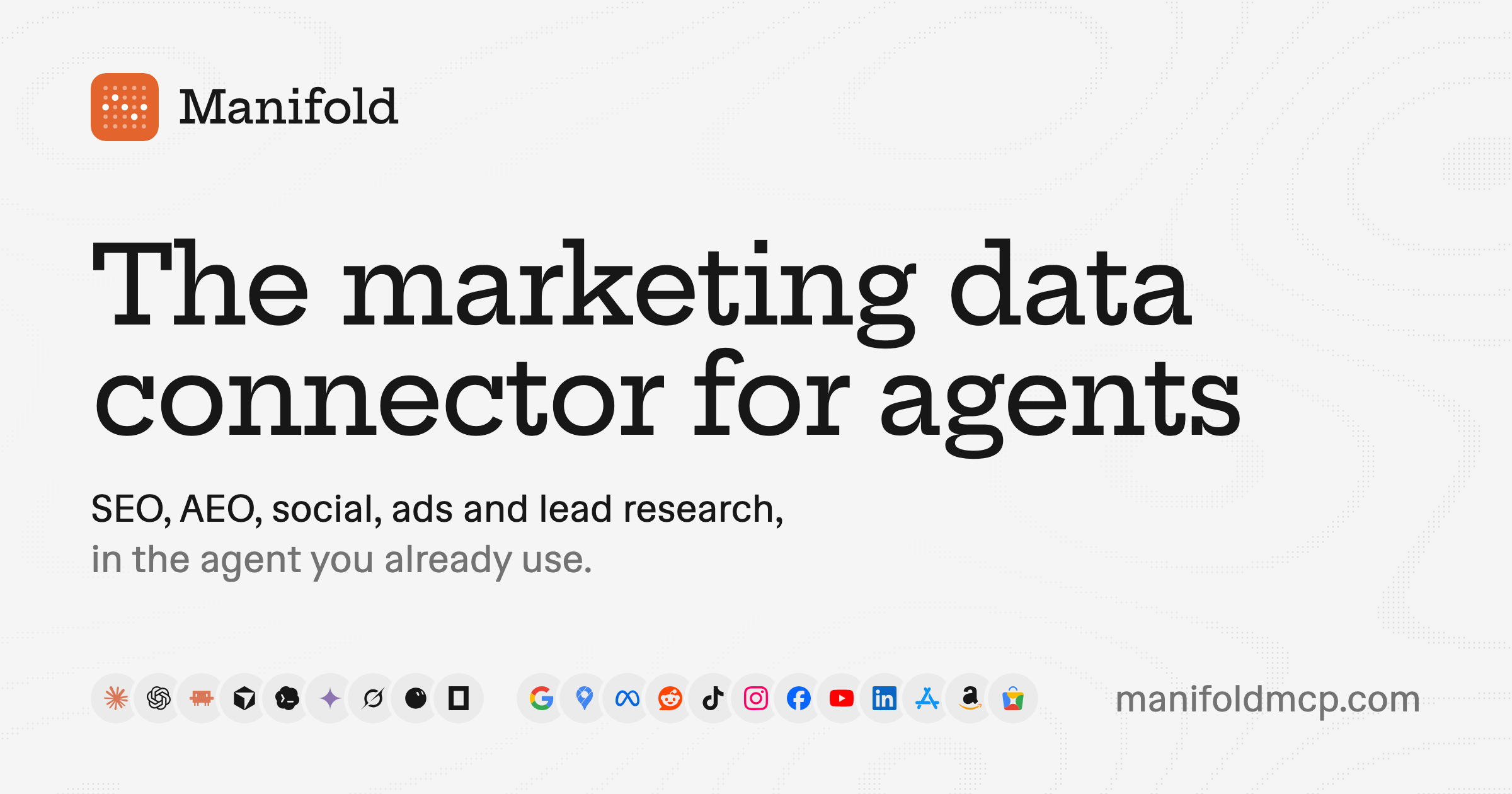
Manifold is a hosted MCP server that gives your AI agent live marketing data across every channel you grow on. Rather than opening another dashboard, you connect Manifold to the AI app you already use — Claude, ChatGPT, Cursor, Claude Code, Codex, Gemini CLI, Grok, OpenCode or any other client that supports remote MCP servers — and ask questions in plain words. Your agent picks the right tools and brings back answers built on real data: Google rankings and backlinks, what AI assistants say about a brand, social posts and videos, Reddit threads, competitors' live ads, and companies and people with verified work emails. It is aimed at marketers, founders and growth teams, and it is free to start for every new workspace. Marketing data is usually spread thin. Rankings live in one tool, AI answer visibility in another, creator research somewhere else, competitor ads in an ad library, and buyer intent across LinkedIn, X and Reddit. Pulling that together means a pile of tabs, several logins and API keys for services like Reddit, LinkedIn or a search data provider. Manifold collapses it into one hosted connection: your agent signs in once and uses Manifold's own provider accounts, so there is no Reddit API app, no LinkedIn login and no DataForSEO deposit to manage. The result is a single place where an agent can look up live marketing data whenever it needs to, and answer with real numbers rather than guesses. SEO is the first data group. Your agent can see every keyword you rank for, who outranks you and why, and what to fix on your site. A typical question — which keywords do we rank 5 to 15 for that could reach page one? — returns terms sitting just below the first page. A sample answer might tell you to put a phrase in a page title because you already rank seventh for it, to answer a question directly on the page because an AI assistant gets it wrong, or to link to that page from your best-ranking posts. Because the data is fetched live from search providers, the recommendations reflect current rankings rather than a stale export. AI answers, sometimes called AEO, covers how assistants describe your brand. Your agent can ask ChatGPT, Claude, Gemini, Perplexity and Google's AI Overviews any prompt, on demand, and report which brands each answer names, in what position, and which pages it cites. You can check whether AI assistants recommend you for the questions your buyers ask, see who they name instead, and review which pages they cite. You pay per prompt and engine rather than a monthly fee for tracked prompts, and a free check shows whether your site lets AI crawlers read it — a prerequisite for appearing in AI answers at all. Social research finds the creators and videos already winning your niche. Your agent can locate the TikTok, YouTube and Instagram creators your buyers watch, along with their audience and their top videos with transcripts — for example, which sales creators on TikTok and YouTube get the most views and what their top videos are. Instagram, Facebook, LinkedIn and X are covered too. Ad libraries sit alongside this: you can pull competitors' live ads on Meta and Google, see what each one says, and check how long it has run, so you can write better ads by seeing what already works. Reddit and lead research connect that data to action. Your agent can find every thread that asks for what you make, read the replies and draft your answer — for instance, threads this month asking for a CRM, or Reddit threads asking for recommendations. On the people side, Manifold spots posts on LinkedIn and X about the problem you solve and returns each author's verified work email, so you can reach buyers who are looking right now. The agent writes from this data too: blog posts, Reddit replies, ad copy and outreach emails are drafted in the chat with real numbers behind them, and you check the drafts and use them where you want. Manifold is the data your agent works from — not a scheduler or an autoposter. Under the hood, Manifold is a remote MCP server. You connect your agent once — in Claude, add the URL as a custom connector and sign in; in Claude Code, run claude mcp add --transport http manifold followed by the URL — and every client uses one URL, https://mcp.manifoldmcp.com/mcp, and one credit balance. Tools carry names such as seo_get_ranked_keywords, aeo_run_ai_answers, reddit_search_posts and linkedin_search_posts, and your agent picks the ones it needs for your question. Manifold fetches data live from specialist providers when your agent asks: search, keyword, backlink and AI answer data come from DataForSEO, while Reddit, TikTok, Instagram, YouTube, Facebook, LinkedIn, X and the ad libraries come from the platforms' public data. Results are cached briefly — most for a day to a week — so a repeat question comes back fast and costs less. Answers you can act on are the point. Instead of raw exports, the agent returns specifics: what to fix on a page, who to reach out to, which threads to join. From there it can take the next steps for you, drafting the content or the outreach in the same conversation. You get real numbers rather than estimates, one balance and one URL across every client instead of a collection of keys and logins, and cost control built in — every call is paid from a single credit balance, each tool states its price before it runs, and your agent can cap what a call spends. Concrete workflows run across the product. In SEO, teams ask which keywords they rank 5 to 15 for that could reach page one. In AI visibility, they ask whether they are recommended for a query like "best CRM for startups". In social, they ask which sales creators on TikTok and YouTube get the most views and what their top videos are. In prospecting, they ask who posted about leaving their CRM this week. In competitive research, they ask what a competitor is running on Meta this week. And in community marketing, they ask for threads posted this month asking for a CRM. Manifold is for marketers, founders and growth teams doing SEO, AEO, social, ads or lead research, and it works with Claude, ChatGPT, Cursor, Claude Code, Codex, Gemini CLI, Grok, OpenCode and any other client that supports remote MCP servers. Clients without OAuth use a Manifold API key instead. Pricing is easy to start: every new workspace gets 250 free credits, then a Pro plan from $20 a month for 2,500 credits, or Max at a lower rate per credit, with top-ups from $10 between renewals. Manifold is a marketing data MCP server founded in London in September 2026 by Jesse Sibley, and it is not related to Manifold Markets. Manifold MCP turns the AI assistant you already use into a marketing research and growth partner. One connection, one credit balance, and live data from Google, AI answers, Reddit, social platforms, ad libraries and lead sources — so your agent can answer in plain language, then help act on what it finds.
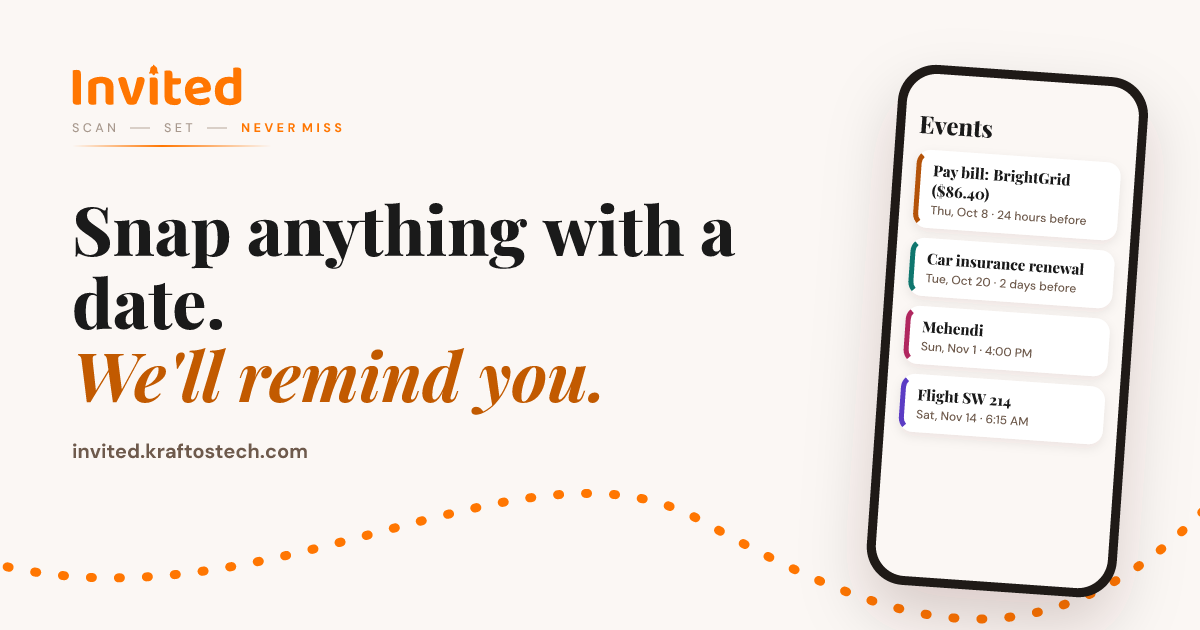
Invited is an AI reminder scanner that turns any document containing a date into a smart reminder. Bills, cheques, renewals, invitations and appointments are all fair game: you snap a photo, pick a screenshot or PDF, or share a document from another app, and Invited's AI finds every date on it so you can be reminded before it matters. It runs on iPhone and Android, requires no signup, and is made for anyone who wants a simple, reliable way to stay ahead of due dates, renewals and events. The trouble with dates is that they arrive on paper, in PDFs, in screenshots and inside apps, not in a single tidy calendar. A bill carries a due date and a late-fee date; an insurance policy has a renewal date; a wedding invitation lists five separate functions across several days; a boarding pass has a departure time and a gate. Most reminder apps can only capture one date, so people end up typing entries by hand, copying amounts and times, and still missing the moment that mattered. Invited exists to close that gap: instead of asking you to remember, it scans the document and does the work of finding the dates for you. Invited accepts almost any input that contains a date. You can take a photo with your camera, pick an image or screenshot from your library, choose a PDF or document from your files, or share something straight into Invited from any other app. That means the same workflow handles an electricity bill photographed on your kitchen table, a screenshot of a subscription confirmation, a PDF insurance schedule, or a boarding pass shared from your email. Because sharing is supported from any app, you do not need to export or retype anything — the document goes in as it is and the AI takes it from there. The standout capability is that one document can produce many reminders. Where most tools find a single date, Invited finds all of them. A Gujarati wedding invitation with five functions — Mehendi, Haldi, Sangeet, the wedding ceremony and the reception — becomes five separate reminders, each with its own time and place. A BrightGrid electricity bill can produce both a pay-bill reminder for the due date and a separate late-fee reminder for the later penalty date. This matters because the same paperwork often contains several deadlines that sit days or weeks apart, and catching all of them is the difference between a small task and an avoidable fee. Invited reads 80+ languages, so a document does not need to be in English to be understood. The site highlights English, Gujarati, Hindi, Arabic, Chinese, Spanish, Portuguese, Japanese and French among the supported languages. It also understands nine calendar systems: Gregorian, Vikram Samvat, Hijri, Hebrew, Chinese Lunar, Persian, Thai Buddhist, Ethiopian and Japanese era. That means a date written as Kartik Sud 5, 1 Shawwal, 1 Tishrei, the first day of the first month, 1 Farvardin, year 2569, 1 Meskerem or Reiwa 8 is converted into a real date in your own calendar, rather than being lost because it does not look like the format you are used to. You control when you hear about each reminder. Invited lets you choose a lead time of 1 hour, 6 hours, 12 hours, 24 hours or 2 days before the date. You can set a default once and then change it for any individual reminder, so a flight can warn you a day ahead while a bill nudges you 24 hours before it is due. The product notes that reminders can be set from 1 hour to 2 days before, giving you a simple range that covers both errands and events. Invited is deliberately minimal and honest about how it handles your information. There is no signup and no account — you open the app and scan. To find the dates, the document you scan is sent securely to an AI service that reads it, while your reminder list itself is stored on your device rather than in the cloud. You stay in control by reviewing every date before saving, and the app warns that AI can make mistakes with dates, times and payment locations, so you check the extracted details first. You can edit or delete reminders at any time, and unlimited reminders can also be created by hand if you prefer. The overall flow is described as three taps with zero typing. First, snap or share: take a photo, pick a screenshot or PDF, or share from any app. Second, the AI reads it, extracting dates, times, places and amounts in 80+ languages — and you check them before saving. Third, you get reminded anywhere from 1 hour to 2 days before, at the lead time you chose. Behind the scenes the app moves through a small pipeline (load, read, AI, done) and then presents the events it found for your review, with each event showing its title, date, time, place, amount and reminder offset. The benefit is straightforward. Instead of acting as a second memory, Invited removes the need to remember at all: you scan once and the reminders appear before the deadline. Bills are paid before late fees, cheques are deposited before they run out of time, insurance renewals are handled before cover ends, free trials are cancelled before you are charged, and invitations and appointments are not missed. Because everything stays on your phone and needs no account, using it is fast and low-friction — a single scan can create several reminders at once, and the reminders carry context such as the amount owed, the place, or the gate number. Invited is used across a wide range of everyday documents. Bills and utilities are scanned for due dates and late-fee dates. Cheques are scanned so you deposit them before they expire. Insurance and renewals are scanned so you act well before cover ends. Subscriptions are scanned for free-trial and renewal dates, before you are charged. Invitations — weddings, birthdays, parties and conferences — are scanned so every function on the card gets its own reminder. Appointments such as doctor and dentist visits are captured with their time and place. Travel tickets and boarding passes are scanned for departure and gate times. Warranty cards are scanned so you claim before the warranty quietly runs out. The site also lists rent, streaming subscriptions, credit card statements, passport renewals, gas bills, license renewals and school events among the things people scan. Invited is aimed at anyone who deals with dated paperwork — households paying bills, families juggling multiple invitations and appointments, travellers tracking flights and tickets, and anyone who wants a no-account reminder tool that works with documents they already have. It is available on iPhone and Android, in 80+ languages. Pricing is freemium: the app is free to download and includes 3 free AI scans, plus unlimited reminders created by hand; Invited Pro unlocks unlimited AI scans and more, with the current price shown in the App Store and Google Play. At its core, Invited is a reminder app that reads for you. It takes the documents that already carry your deadlines — bills, cheques, policies, invitations, tickets, warranties and more — and converts every date it finds into a reminder you will actually see, in your language and your calendar, with no signup and no typing.
ngram is an AI video generator that creates perfect AI videos for every team, covering onboarding, training, demos and explainers from a prompt or a screen recording. Its Product Hunt listing describes ngram 2.0 as a tool for creating explainers, screencasts, and AI avatar videos by turning ideas, documents, and recordings into narrated videos. The site presents it for sales teams, marketing teams, support teams, HR teams, product teams, founders, explainers and every team in between. The core promise is that you describe the video you want in plain words, ngram plans and builds it, and the finished video stays editable so you can then make it perfect. The problem ngram addresses is the gap between having something worth explaining and having a video that actually explains it. The site draws the contrast directly: Loom is useful for quick screen recordings but does not help with structure or polish, while Descript requires editing skills. ngram instead starts from your intent — who the video is for and what it should achieve — and builds a complete video with structure, visuals, and polish. The customer stories suggest why that matters. The Owelet team says, “I can finally show people what Owelet does instead of just describing it.” The Wolvio Solutions team reports that “what used to take weeks can now be done in a day” and cites 80% less production time, while the Quillr team went from producing 3 to 7 reels a week. A G2 reviewer notes ngram makes it easier to create and refine instructional content. ngram can begin from whatever material a team already has. The most direct starting point is a prompt: you describe your video idea, audience, and tone, and that description is treated as the whole brief. The site's own example brief asks for a 30-second launch film for Inkpolish, specifying the opening moment, the ranking drop, the fix, and a request to use the brand kit. Projects can also start from a screen recording or an uploaded video, which ngram analyzes to identify key moments and build clear product walkthroughs. Other inputs named on the site include documents and PDFs, screenshots, photos and references, your README, and even your website — for example, one prompt asks ngram to turn a website into a 30-second explainer for facility managers. The homepage is explicit that assets are optional: you can start with just a description, and ngram will write the script, plan the storyboard, and generate visuals to match. Before anything renders, ngram plans the story. After you describe the video, ngram outlines every scene and waits for your approval — the site's example plan lists five scenes with individual durations covering the publish moment, the ranking drop, the score and fix, the prompt, and the publish decision. Once approved, you watch it build: narration, soundtrack, visuals and animation come together while you watch, and the site describes ngram recording the narration, composing the soundtrack, generating visuals, building the animation and checking the result. The site also states that ngram plans the story structure before generating anything and uses your brand kit for consistency, a deliberate approach designed so videos look intentionally produced rather than obviously automated. Every video stays editable, which is where the “then make it perfect” half of the promise lives. You can edit any scene by chatting: you point at the frame you want changed and say what you want, and ngram makes a new version. In the site's example, a change pinned to scene two — “Get to this drop sooner. The intro runs long.” — caused ngram to shorten scene one from 4s to 2s so the drop lands sooner, producing version two. Iteration works in plain language after the video is done too, with requests like “make the intro shorter” or “swap the second scene for a screen recording.” You can also take the controls yourself: captions, music and scene edits are a click away, and captions can be set to styles such as Pop Light from the Edit video menu. Deeper control is available through the timeline editor, which offers frame-level precision, plus the ability to swap scenes, edit text, change styles and regenerate sections. ngram supports narrated, animated and avatar-led videos. You can create animated explainers or add an AI avatar presenter, and the site lists AI presenters and custom voices, cinematic AI footage, and the ability to swap the voice or the language. Captions are added automatically and can be matched to your brand colors. A brand kit is set up once, and every video then uses your identity — colors, fonts, logo, intro/outro sequences — for consistent branding across your entire team. Output is flexible: finished videos export as MP4, and short ones can also be downloaded as a GIF. You can create in 16:9 (landscape), 9:16 (vertical), or 1:1 (square) when the selected models support it, and you can download the finished video or share a link to it, or embed it. The overall method is a seven-step flow the site lays out in order: describe it, approve the plan, watch it build, preview the video, point at a change, take the controls, and download. The preview stage plays the finished video beside its storyboard, scene by scene, so you can see how each beat maps to the plan. This structure is what the site presents as the core difference from other tools — ngram starts from your intent and builds a complete video with structure, visuals, and polish, rather than handing you a raw recording or expecting editing expertise. It also means the video is planned before it is generated, so story decisions come before rendering, and revisions afterward are targeted rather than wholesale. The stated outcomes for users are speed, clarity and iteration without starting over. Teams report moving from weeks to a day, 80% less production time, and higher output like 3 to 7 reels a week. The site frames the benefit as being able to show rather than describe — “I can finally show people what Owelet does instead of just describing it.” Because you review the script and storyboard before anything renders and can iterate anytime afterwards, changes do not require rebuilding the video. ngram also reports a G2 rating of 4.6 out of 5 from 62 reviews, and offers a free start with no credit card. Use cases map onto teams. For sales and revenue, ngram pitches sending the demo and skipping the call, with pitch explainers built from screenshots. For marketing, it generates industry explainers from screenshots, promo videos with an AI presenter from a PDF or doc, and product launch films from photos and references. For customer success and support, it makes customer onboarding videos from screenshots and customer education from a PDF or doc. For HR, People and L&D, it produces compliance training and messages with an AI presenter from photos and references — including non-English training, such as a safety video in Vietnamese about hand hygiene compliance in hospitals. For product and engineering, it creates stakeholder demos from screen recordings and developer launch teasers from your README. For founders and leadership, it builds board update videos from reports and all-hands announcements from a prompt. For explainers and education, it turns a website into an explainer or builds technical explainers from photos and references. ngram is aimed at teams rather than individual editors. The homepage explicitly names sales, marketing, support, HR, product, founder, and explainer/education audiences, and the example library spans brands such as Slack, Headspace, Revolut, Robinhood and Cernel, alongside companies listed as customers including HubSpot, Deel, Zapier, ITV, Veeva, DP World, Genpact and SafetyCulture. Pricing is described as “Free to start · No credit card.” The marketing site is built on Next.js. The site is also clear that the product is not limited to marketing videos: teams use ngram for product demos, customer onboarding, internal updates, training videos, sales enablement, changelogs and investor pitches — any message that lands better as video. In short, ngram's value proposition is that anyone on a team can describe the video they need — or bring a prompt, a screen recording, a document, or a website — approve a plan, and end up with a narrated, branded, polished video they can refine by chatting or by hand. It removes the structure and production burden while keeping the finished video fully editable.

SalesRep is an all-in-one omnichannel customer communication platform built around a single, AI-powered team inbox. It unifies every customer channel, CRM and AI provider in one place so teams can capture leads, automate conversations, broadcast campaigns and close deals faster from a single platform. The product also acts as a virtual sales rep that sells for you 24/7: it pulls live prices and stock from Shopify, WooCommerce, PrestaShop, Meta Catalog or your own database and API, answers customers on WhatsApp, Instagram, Messenger, email, SMS and other channels, and sends product cards and quotes on the fly in any channel. SalesRep follows up automatically until the deal closes, allows human takeover at any time, and works in more than 30 languages that are auto-detected. It is used by more than 1,000 businesses worldwide. As chats and calls multiply, old inboxes and workflows break. Teams that sell and support customers across WhatsApp, Instagram, Messenger, email, SMS, voice and social media end up juggling multiple platforms, losing context and leaving conversations unanswered. SalesRep addresses this fragmentation by giving every customer one reliable record and every conversation one thread, no matter which channel it came from. Instead of silos, the platform offers a unified conversation history, automatic contact merging and deduplication, real-time sync with your CRM, and smart routing based on channel and context. The stated goal is to help businesses manage the entire customer journey in one place, even at high volume — a framework SalesRep calls Conversation-Led Growth. At the centre of SalesRep is the Omnichannel Team Inbox. It unifies contacts from voice calls, email, WhatsApp, TikTok, Facebook Messenger, Instagram, Telegram, SMS, WeChat, MS Teams, Slack, iMessage, Google Business and more, including Asterisk. Every conversation appears in a single thread and every customer in one place, so agents no longer switch between apps or maintain separate inboxes. The inbox includes unified conversation history across all channels, automatic contact merging and deduplication, real-time sync with your CRM (or SalesRep's own CRM), and smart routing based on channel and context. SalesRep states that chat channels deliver 92%+ open rates, and that messaging channels support product catalogs and in-chat payments. The inbox also supports team and custom inboxes, live chat and popup widgets, a knowledge base and canned responses, mobile app access with 2FA, and AI call and chat summaries. SalesRep's AI Agents are AI that sells, supports and scales. Ready-made or custom agents qualify leads, answer FAQs, recommend products, book appointments, route enquiries and handle support requests around the clock, across every messaging channel. The site reports that 75% of chats are handled entirely by AI and 80% of conversations are resolved by AI. Agents perform multimodal processing — text, images, audio and files — so they can send documents and images and process screenshots, audio and files for full context understanding. AI sales automation sends product offers with photos, prices and live stock in real time, answers voice messages with its own voice replies, auto-detects each customer's language and replies in it, generates and sends quotes instantly without human intervention, follows up automatically on every quote until it closes, and hands the conversation to your team whenever needed. Additional AI Agent capabilities round out the offering. Guardrails define what AI Agents say and do so they stay on-brand and compliant, and humans can take over active conversations instantly. A RAG-powered knowledge base lets agents pull verified answers from knowledge sources such as PDFs, doc files, catalogs, images and websites, continuously updated for accuracy. Voice AI provides natural, human-like speech. Agent specialization lets you orchestrate teams of micro-agents focused on tasks like retrieval, routing and escalation for precision results at scale. Teams can start quickly with ready-made AI Agent templates or build a fully customized agent tailored to their business needs and workflows. Agents also collect data, update lifecycle stages, resolve support issues, recommend products, share images and trigger workflows automatically. Beyond the inbox and agents, SalesRep provides AI Workflows and Broadcast campaigns. Workflows let teams build powerful automations with a visual drag-and-drop builder to automate repetitive tasks, sync data across platforms and keep the team focused on closing deals rather than manual busywork, with automatic lead routing and assignment, real-time CRM sync and custom field mapping. Broadcast lets you send targeted messages across WhatsApp, SMS, Facebook, Instagram, Telegram and Email in one click, sharing promotions, product updates and newsletters directly to the channels your customers use most. Broadcast features include multi-channel campaigns, audience segmentation and targeting, delivery and engagement analytics, and automated opt-in/opt-out management. SalesRep connects to HubSpot, Salesforce, Jira, Zapier and 40+ tools, plus Shopify, WooCommerce and PrestaShop. SalesRep's overall approach is organised around its Conversation-Led Growth framework, which is designed to help businesses manage the entire customer journey across every channel in one place, even at high volume. The platform describes three pillars. The first is the Omnichannel Team Inbox, which unifies contacts from voice, email, WhatsApp, TikTok, Facebook Messenger, Instagram and more into one thread per customer. The second is AI Agents, which answer FAQs, qualify leads, route enquiries, book appointments and handle support requests around the clock. The third is Automate & Integrate, which connects SalesRep to HubSpot, Salesforce, Jira, Zapier and 40+ tools to automate workflows, sync data and eliminate manual busywork. A published sample conversation shows an AI agent greeting a customer, quoting an IP phone with a reference, price and live stock, preparing a quote for four units, sending a PDF quote by WhatsApp and email, and scheduling an automatic follow-up. The site publishes a range of outcome metrics. SalesRep reports 42.5x average ROI, 500K+ conversations per month, 99.9% uptime and 1,000+ businesses across 30+ countries. It also cites a 60% faster sales cycle, an 81% conversion rate with AI Agents and 3x more leads from ads. Customer stories describe AirCharter.com cutting its sales cycle by 60% with the omnichannel inbox for private jet charter bookings, Maroc Ventes eCommerce handling support and sales across WhatsApp, email and live chat from one inbox with 3x faster quotes, Sport Center reaching an 81% conversion rate with AI Agents on SalesRep, and Sip.ma tripling leads and streamlining customer communication. The stated promise is to transform customer conversations into revenue. SalesRep is marketed as built for a range of business types, each with a concrete workflow. Clinics and healthcare use it for bookings, confirmations, reminders and patient follow-ups right inside WhatsApp. Sales teams use it to capture, qualify and close leads from ads and chats in one visual pipeline. E-commerce and retail teams use it for order updates, abandoned-cart recovery and product campaigns that convert. Salons and local services use it for appointment scheduling, deposits and no-show reduction on autopilot. Customer support teams use one shared omnichannel inbox, with AI resolving the routine majority. Real estate and agencies route property and project inquiries to the right agent in seconds. A separate workflow example shows quote requests for hardware being received via WhatsApp, assigned to an agent, tracked through lifecycle stages such as Proposal, Warm Lead and Purchased, and answered with a quote attached. SalesRep targets businesses that sell and support customers through messaging apps — sales teams, support teams, e-commerce and retail operations, clinics, salons and local services, and real estate agencies — and reports being used by 1,000+ businesses worldwide. Integrations named in the content include HubSpot, Salesforce, Jira and Zapier, plus Shopify, WooCommerce and PrestaShop, and the product states it connects to 40+ tools; it also supports Zapier, Make and n8n, API access and webhooks, and Meta & TikTok Ads and Catalog. Pricing starts at $39/mo for the Starter plan with 3 users included and +$12/seat, then $20 per extra 1,000 conversations that never expire, with conversation-per-month tiers of 1000, 2500, 5000 and 10000+. The Growth plan is $79/mo with 5 users, the Advanced plan $139/mo with 10 users, and Enterprise $249/mo with 20 users. A 21-day free trial requires no credit card. SalesRep emphasises safety and onboarding. It uses the official WhatsApp Business API and enforces Meta's messaging policies — opt-ins, approved templates and sending limits — so your number stays safe, and the team helps resolve any issues with Meta. The WhatsApp Business API requires its own dedicated number, which can be new or migrated, and SalesRep guides users through every step. Teams can migrate contacts, templates and automations from other tools or from the WhatsApp Business app without interrupting ongoing conversations. The free trial lasts 21 days with no credit card required, including help connecting channels and launching first automations, with evaluation extensions available on request. Most teams launch within a few days, and guided onboarding is free on every plan. The platform is available in 30 languages and AI agents converse naturally in Arabic (including Darija), French, English, Spanish and more, with a tone you control. AI agents do not replace teams; they take over repetitive work such as answering common questions, qualifying leads and routing conversations, handing anything complex to the right human agent with full conversation context. As a summary, SalesRep combines an omnichannel team inbox, AI sales agents, workflow automation and broadcast marketing into one platform for businesses that sell and support customers across messaging channels. Its central value proposition is that a virtual sales rep can pull live prices and stock, answer in the customer's own language, generate and send quotes, follow up until the deal closes, and hand off to a human whenever needed — turning everyday customer conversations into revenue while reducing response times and manual workload.
>> ALL_LOGS
OpenScreen is a free, open-source screen recorder and video editor for Windows, macOS and Linux that takes a raw screen capture and turns it into a finished demo. Its stated purpose is that a raw capture goes in and a finished demo comes out, in the category Screen Studio defined. It is aimed at anyone who records their screen — a founder demonstrating a product, a developer walking through a tool, a support person showing a workflow — and wants the recording to look finished without learning a separate editing suite. Both halves of the job live in one application: the recorder captures the screen, and the editor places zooms, restyles the cursor, dresses the frame, and cuts the video, including cuts described in writing and handled by an AI agent over MCP. Screen recordings usually look unfinished on the first take. The cursor is small, the frame is a bare rectangle of desktop, and the moment that matters — a button being clicked — scrolls past at normal speed. The usual fix is to re-shoot, or to move the file into an editing program and rebuild the framing by hand. OpenScreen's approach is to make the recording look good before you touch anything: a finished frame with wallpaper, padding, shadow, rounded corners and a little motion blur is applied by default, and zooms are planned from where you clicked. It is MIT licensed, with no watermark and no account, and it continues the original OpenScreen project, which its creator archived after v1.5.0. Recording is done with the operating system, not around it. You pick a window or a display, and OpenScreen uses the capture path the system itself provides: macOS goes through ScreenCaptureKit, Windows through Windows Graphics Capture, and Linux through PipeWire and the ScreenCast portal. System audio is captured without an extra driver, and Windows uses Media Foundation for webcam capture. The important technical detail is that the pointer is recorded as data rather than burned into the pixels, which is the only reason the cursor can be restyled later instead of being committed at record time. On macOS, cursor shape and clicks become available once Accessibility is granted. The editor is built around a small number of things you will actually do. For style, you can swap the background to an image, a colour or a gradient behind your recording with no re-shoot, set the background animation to none, Drift, Aurora or Waves, and apply background blur. For effects, padding, motion blur, shadow and roundness each composite live, so you frame it your way. For the cursor, size, smoothing, motion blur and click bounce are all adjustable, because every move should read on screen. Five cursor packs ship with the app — Studio Ink, Prism Glow, Pop Coral, Pixel Candy and Star Sprout — and each can be drawn as a 3D object with a shadow. Zoom placement is the headline editing behaviour. Zooms from your clicks means each take is zoomed where you clicked, by a fixed rule, with no AI and no network call, and it can be turned off in Record mode. On top of that sits a 3D camera: each zoom can stay flat, turn the screen left or right, or orbit it while following the zoom's focus, and depth of field softens the far side to add depth. Around the screen you can place a frame — a window, laptop, phone or screen, in light or dark — over an animated background. On the timeline, zooms, speed ramps, trims and comments each land as a pill, so one click places every zoom and the edit stays visible rather than hidden in menus. The transcript is a second editing surface. You edit video like text: delete a word or a silence and the cut lands on the timeline, and nothing is destructive, so the original material stays intact. Captions lean on the same idea. Transcription runs on your machine because whisper.cpp ships with the app; the model downloads once on first use, and after that it works with the network off across 100 languages. The audio never leaves the laptop, and what comes back is editable text — set the typeface, the size, the colour and the position, then burn it into the render. Webcam work is handled with layouts and segmentation. There are four layouts: picture in picture, dual frame, vertical stack, or no webcam at all. Full Camera gives a stretch of the timeline to the camera, so it grows to full screen and then eases back. Blur, cut out or replace is driven by a segmentation model that separates you from the room on your own computer, and nothing is uploaded. The same take can be framed for any aspect ratio — 16:9, 9:16, 1:1, 4:3, 4:5, 16:10 or 10:16. Blur regions, smooth or mosaic, as a rectangle, an oval or a freehand shape, can be drawn over an email, a key or a password before the clip is shared. Then there is the agent. You describe the edit and the agent makes it. The wizard places zooms by watching where your cursor went; the agent goes further by reading the actual transcript and the actual timeline, so it answers with timecodes you can go and check, telling you which spans it will cut and how much that saves. Every edit it makes is an ordinary undoable one, it needs a provider key you supply, and it is off by default — nothing runs until you connect one. Export writes the file on your machine, which is where the local-first promise is easiest to see. Output is MP4 from 720p up to source resolution, at 24, 30 or 60 frames per second, in H.264, or a GIF. The encode runs on your machine and counts frames while it does, so you can see progress rather than wait behind a queue. There is no account, no watermark, and the file is on disk when the bar fills. The outcome for users is a demo that looks deliberate without a second tool. Nothing is uploaded: recording, transcription and rendering all happen on your machine, and your video never leaves it. Text leaves only when you ask — the chat panel and caption translation each use a key you supply, and transcription downloads its 264 MB Whisper model once, on first run. Every feature ships free for personal and commercial use, with no paywalls, no premium tier and no usage caps. Because transcript cuts and agent edits are non-destructive, you can experiment without risking the take. The concrete workflows are the ones the product was built around. You record a product demo and let the zooms fall where you clicked, as in the walkthrough showing a soil sensor being paired in the Fern garden app: no app store, no account, the probe talks to the laptop, and the whole thing took forty seconds — with the dead air still to be trimmed. You trim that dead air by deleting words and silences in the transcript instead of scrubbing a timeline. You cut a vertical or square version of the same take for a social post without recording again. You mask a key, an email or a password with a blur region before sharing a support clip. You let the agent read the transcript and propose which spans to cut, with timecodes you can verify. And you burn subtitles in whatever language the audience needs. OpenScreen runs on Windows, macOS and Linux from one source tree with native capture on each. Distribution is broad for a free tool: a Microsoft Store listing, a .dmg, a .exe, a .deb, a .rpm, a .pacman, an AppImage and a Nix flake, with a signed and notarized macOS build — the Windows .exe is not code-signed, so SmartScreen warns before it runs. The interface is available in 15 languages: English, Arabic, Czech, German, Spanish, French, Italian, Japanese, Korean, Russian, Turkish, Vietnamese, Brazilian Portuguese, Simplified Chinese and Traditional Chinese. The tech stack leans on the platform: ScreenCaptureKit, Windows Graphics Capture, PipeWire, Media Foundation and whisper.cpp for local transcription, with H.264 encoding on the way out. The takeaway is straightforward. OpenScreen is a free, open-source screen recorder and video editor that makes the first take look finished, keeps the whole pipeline on your machine, and leaves the tedious part of editing — placing zooms, trimming dead air, cutting spans — to rules, transcripts and, if you want it, an AI agent you connect with your own key. No watermark, no account, MIT licensed, and every edit reversible.

FloorGen is a free floor plan maker that runs in the browser and combines 2D drafting, 3D walkthroughs, video export and code checking in one place. You can describe the space you have in mind and let FloorGen AI draw an editable plan, or draw the plan yourself wall by wall. It is built for homeowners and renters, interior designers and architects, real estate professionals and builders, and people who want an AI assistant to edit their drawings. Every wall, door and sofa in a plan is editable, and every plan is already a 3D model, so you can orbit it, open it as a dollhouse, or walk through it at eye level before anything is built. The problem it addresses is the gap between wanting to change a space and being able to show anyone what that change looks like. Measuring a room, testing where the sofa fits, planning a kitchen or a backyard ADU usually means sketching on paper, guessing at scale, or learning heavyweight drafting software with a licence and an install. FloorGen lets you measure a room, draw it to the inch or the millimetre, and try the sofa in three places before you lift it. There is nothing to install and no account required to draw: plans save in your browser until you choose to sign in. Plans can start from scratch or from existing work. Walls snap and rooms close as you draw, or you can import a photo or PDF of a plan, set the scale by clicking two points a known distance apart, and accept or skip the walls FloorGen suggests. That tracing workflow is semi-automatic, so you check each wall and draw over the image where it misses one. Ready-made plans include houses, ADUs and rooms, such as a 3-bed ranch of about 2,000 ft², a 4-bed two-story of about 2,240 ft², an 800 ft² backyard ADU, a garage-to-studio ADU, an L-shaped kitchen, a 5 × 8 full bath and a 12 × 12 bedroom, each drawn to scale, furnished, and openable in the editor without an account. Furnishing and finishes are handled on the same drawing. About 3,000 models in 14 categories cover kitchens and bathroom fixtures through to cars, workbenches and garage shelving, and each face of a wall can take its own paint while floors take marble, ceramic or wood. Because every plan is already a 3D model, you can orbit it, view it as a dollhouse or walk through at eye level, then record an MP4 walkthrough in 16:9, 9:16 or 1:1 up to 1440p with captions. A view-only HTML file lets anyone open the result without installing anything. Drawings and exports are produced at scale. Plans, elevations and sections sit on sheets from Letter and A4 up to ARCH D and A1, with your client, address and revision in the title block. PDF plan sets include a title block, schedules and a 3D view; PNG images go up to 4,500 px; SVG gives layered vector output; DXF (R12) carries a layer per object type for AutoCAD and other CAD tools and also imports walls, doors and windows as editable objects; glTF exports a 3D model; and MP4 or WebM delivers the walkthrough video. FloorGen states clearly that there is no DWG or IFC export and no photoreal rendering. Code checking runs as you edit. You pick a profile, including IRC (US), NBC (Canada), OBC (Ontario), the UK Approved Documents, DIN (Germany), CDMX (Mexico City) or a generic set, and each issue names the room, the rule and what it needs, with a numbered marker on the plan that you can mark as handled. The checks cover habitable room size and width (IRC: at least 70 ft² and 7′ across), stairs including risers, treads, width, headroom, handrails and guards with IRC limits of 7¾″ risers, 10″ treads and 6′-8″ headroom, net and gross area per room and floor in ft² or m², and schedules for doors, windows, finishes and furniture with unit rates for a budget. FloorGen describes itself as a design aid, not a permit approval, and advises confirming with your building department. AI is available in two forms with the same tools and the same undo. Sign in and press Ctrl+I on any plan to use the built-in FloorGen AI, typing what you want or dropping in a photo of a sketch; every change appears as a step with its own Undo. Alternatively, connect the assistant you already use, including Claude, ChatGPT, Cursor, Claude Code, Claude Desktop, claude.ai, VS Code with Copilot, Windsurf, Codex CLI, Gemini CLI or Cline, over MCP. The MCP server exposes 150 tools, 15 resources and 12 prompts that read and change the real drawing rather than a picture of it, so areas and checks stay correct. Keys are scoped to read, edit or full access per project with an expiry, while dry runs, a restorable trash and a checkpoint before big changes add safety, and deleted projects can be restored for 30 days. Everything works on one drawing, which is the core of the approach: change a wall and the areas, the 3D model, the code checks and the printed sheets follow. The workflow runs from drawing or tracing, to furnishing and checking, to walking the plan in 3D, to exporting or printing a plan set. Metric and imperial units are both supported, with feet and inches to 1/16″ or metric to 1 mm, and areas shown in ft², m² or sq yd. For homeowners and renters that means trying a layout before moving anything, planning a kitchen, bathroom or backyard ADU, and handing a contractor a drawing to scale instead of a sketch. For interior designers and architects it means furnishing from the model library, giving walls individual finishes, presenting in 3D or on video, and producing elevations, sections and print sets. For real estate and builders it means tracing plans from a photo or PDF, getting room areas and a budget for paint, flooring, tile, doors and windows, and sending a view-only HTML file or a walkthrough video. Concrete workflows described on the site include tracing a plan from a photo or PDF and setting the scale with two points, furnishing a bedroom or kitchen and reviewing numbered issues room by room, walking a four-bed two-story template in 3D, and printing an 800 ft² ADU plan. The AI workflow is equally concrete: ask an assistant to widen the kitchen by 2 ft, add a window over the sink, then check the rooms against the IRC, and watch each change land as an undoable step. There is also a direction for education, for teaching how plans work. Target users are listed explicitly: homeowners and renters, interior designers and architects, real estate and builders, AI users, and education. It runs in the browser on phones, tablets and desktops with nothing to install, though a bigger screen is easier for detailed drafting. Pricing is $0: the editor in metric or imperial, furnished 3D with walk-through and video, code checks and schedules, PDF, PNG, DXF and glTF exports, and the AI assistant connection are all free, with no trial, no card and no watermark. Signing in, also free, is what unlocks exports and adds cloud sync and the AI chat in the editor. FloorGen's value proposition is straightforward: a free, browser-based way to draw or describe a floor plan, see it furnished in 3D, check it against building code guidance and export a scaled drawing set, all without installing software, paying for a licence, or creating an account just to start.

FocusWrite is a calm, local-first writing app built around the act of writing itself. According to the product's own description, it combines deep focus modes, ambient sounds, optional cloud sync, and PDF export in a single editor. The application presents a minimal writing surface centered on a single draft, shown in the interface as "Untitled 1," with a live word count and reading-time estimate displayed beneath it. A saved indicator confirms that work is stored, and a sidebar can be opened or closed depending on how much space the writer wants to give the page. FocusWrite is positioned as "your words, your space, no distractions," making it clear that the product is intended for anyone who wants to write without the clutter and interference of a heavier productivity suite. Most writing tools have grown into complex workspaces. They bundle collaboration, project management, formatting panels, comment threads, and notification streams into the same window where a person is supposed to concentrate. The result is a surface that constantly competes for attention. FocusWrite addresses that problem directly by naming itself around focus. Its stated purpose is a calm writing environment, and its feature set is deliberately limited to the things that support sustained attention rather than breaking it: a distraction-free editor, adjustable focus depth, ambient sound, and quiet local storage. The phrase "local-first" in its description signals a stance on where writing lives - on the writer's own device by default, with cloud sync offered as an option rather than a requirement. For people who write for a living or write to think, that framing matters, because it treats the draft as private, immediate, and always available rather than something that depends on a server round trip before it feels real. Focus modes are the centerpiece of the product. The interface exposes three settings - Off, Standard, and Deep - which let the writer choose how much of the environment remains visible while working. At one end, the Off setting leaves the app in its normal state, with the surrounding interface available. The Standard and Deep settings progressively narrow the experience toward the text alone, which is useful when the goal is a long stretch of uninterrupted drafting rather than quick editing or review. Because the modes are presented as a simple three-position control inside the editor, switching depth does not require navigating preferences or reloading the document; the writer can move from a more open workspace into a quieter one and back again within the same session. That matters for real writing rhythms, where attention demands change from minute to minute: a person might want the full picture while planning a section and then drop into Deep focus once the words start to flow. Ambient sounds are included as part of the same calm environment. Rather than requiring a separate app or browser tab, background audio sits alongside the writing surface, so a writer can settle into a steady soundscape without leaving the document. The local-first design complements this: drafts are kept on the device, and the app indicates the state of cloud connectivity directly in the interface with a "Cloud offline" status, making it explicit when work is being held locally rather than synced. Cloud sync itself is described as optional, meaning writers can use FocusWrite entirely offline and enable syncing only if they want their work available elsewhere. In practice, that combination - sound for atmosphere, local storage for reliability, and an optional cloud layer - means the editor keeps working the same way whether or not a network is present, which is the core promise of a local-first application. The writing surface itself stays deliberately plain. FocusWrite displays a document title, a live word count, and a reading-time estimate that appears beneath the text, shown in the interface in formats like "0 words | 1 min read." Those two numbers give a writer an immediate sense of scope - useful when drafting to a target length or judging whether a piece is long enough to be worth trimming. A saved indicator reassures the writer that changes have been committed. A find function, bound to the familiar Command-F shortcut, allows quick searching within the document without leaving the editor. An open sidebar can be toggled on or off. Export is available from the toolbar, and PDF export is named specifically in the product description, giving writers a way to turn a draft into a fixed, shareable document. A brief "Finishing setup" state appears when the app is preparing to run for the first time. FocusWrite's approach is cumulative rather than clever. It does not try to reinvent the text editor; it removes things. The product's identity is built from three decisions that reinforce one another: keep everything local so writing is instant and private, make concentration adjustable through Off, Standard, and Deep focus modes rather than a single all-or-nothing fullscreen toggle, and add only the light atmospheric touches - ambient sound - that help a writer stay in place. Optional cloud sync means the app never forces a trade-off between the reliability of local storage and the convenience of access from another machine; the writer decides. The result is a tool whose methodology is essentially restraint: a calm surface, a few well-chosen controls, and no mechanism by which the software can demand attention away from the sentence being written. The benefits described for users follow directly from those design choices. Writing in FocusWrite is calm by default: the interface is quiet, the focus setting can be deepened when concentration wavers, and ambient sound supplies background texture without a separate player. Because the app is local-first, drafts remain available and responsive without depending on a connection, and the explicit cloud status removes the ambiguity that usually surrounds offline editing - a writer can see whether work is synced or held locally. Word count and reading time give immediate feedback on progress and length. PDF export provides a finished artifact for sharing or archiving. Taken together, these outcomes point to the same goal the product states outright: your words, your space, no distractions. A few workflows follow naturally from what the app provides. A writer drafting a long piece can open a document, switch to Deep focus, and work through a session with ambient sound running and nothing else on screen, checking the live word count as a progress gauge. Someone who needs to work without a connection - on a train, in a place with poor signal, or simply offline by preference - can keep writing locally, with "Cloud offline" shown in the interface, and sync later if cloud sync is enabled. A writer finishing a draft can use Command-F to search the document for a term or a passage that needs revision, and then use Export to produce a PDF for sending to an editor or reader. A shorter session works the same way at the Standard focus level, with the sidebar open while writing. FocusWrite is listed on Product Hunt as a Web App, and its topics there are Web App, Productivity, and Writing. Product Hunt metadata shows it has received 115 votes and 14 comments at the time of listing. The application runs in the browser at focuswrite.app and does not require installation, which fits its local-first model: a writer opens a page and starts typing. Pricing and plan details are not stated in the available content, and no specific integrations or technology stack are named beyond the optional cloud sync layer that supports storing work across devices. FocusWrite's primary value proposition is straightforward: a calm, local-first writing environment where focus can be dialled up or down, where the draft lives on your own device unless you choose to sync it, and where the only outputs that matter are your words and, when you are ready, a PDF. It is a writing app that treats attention as the scarce resource and builds everything else around protecting it.

HireKey is a recruiter-informed AI job-search co-pilot designed to help people apply strategically and interview with confidence. It brings the entire job search into a single workspace: assessing how well a candidate fits a role, tailoring a resume to a specific job description, preparing answers out loud with an interactive AI voice coach, drafting cover letters, researching companies, and tracking every application and next step. HireKey is built for professionals applying to competitive roles, including engineers, product managers, designers, data professionals, marketers, sales professionals, and operators. Its stated purpose is to help job seekers see their next move more clearly — to understand their fit, apply with purpose, practice the conversation, and keep moving forward instead of sending applications and hearing nothing back. Much of the frustration HireKey addresses is captured in its own framing: sending applications, hearing nothing, and not knowing where to focus. The platform is informed by the other side of the hiring process, drawing on ten years of tech recruiting experience at Microsoft, Amazon, and Stripe. HireKey explicitly warns that a high ATS score may not lead to interviews and that a score or recommendation cannot predict an employer's decision, so the product takes a different angle. Instead of promising a prediction, it aims to explain which gaps need clearer communication and which need actual experience. That distinction shapes every feature — from role-fit analysis to resume tailoring — and gives candidates a clearer reason to apply, improve, or move on. Role-fit analysis compares a resume with a specific job description. It separates the experience a candidate can genuinely support from the wording of the resume itself, showing where the evidence is strong, what needs a clearer explanation, and where there may be a genuine gap. HireKey assesses role fit and resume impact separately and explains the evidence behind each assessment, so users can understand their strengths and gaps and decide where to focus their effort. A companion free tool, the recruiter resume review, checks a resume on its own for positioning, evidence, scan visibility, and seniority signals; it requires no account, and the free checker processes the resume on the user's device. The distinction matters: the free checker looks at the resume alone, while role-fit analysis in HireKey compares documented experience with a specific job description. Resume tailoring turns vague bullets into a clearer account of what a candidate actually did, bringing the experience that matters for the role to the front. Users review original and tailored wording side by side, so they can see what changed and why each revision clarifies their contribution and impact. HireKey keeps the candidate in control: the final say over every change stays with the user, and tailoring is intended to make real experience clearer and more relevant rather than to invent qualifications, results, or responsibilities. It should not turn a contributing role into ownership the candidate did not have, and every revision is meant to be reviewed before use. Cover letters follow the same principle — a draft grounded in the user's background and the specific job, connected to the opportunity and given the user's own voice before it is sent. Interview preparation centers on an interactive AI voice coach. Candidates work through their answers in a live audio conversation on their own schedule, choosing questions for a recruiter screen or a hiring-manager conversation, or adding their own. The coach asks follow-up questions based on the answers given, so practice feels like a real conversation rather than a script; it also provides feedback during practice and a debrief on what to improve. For those who prefer preparing on paper, HireKey can save role-specific questions and answer guidance as a PDF. Company research briefs build context before an interview, turning what the candidate learns into more specific questions and a clearer reason for their interest. Together these features aim to give job seekers a clearer story for their application and better context for the next conversation. The job application tracker keeps every opportunity in one place, from the first application to the final interview. Users can see their whole pipeline in either a table or a Kanban view, with stages covering Not Applied, Applied, Phone Screen, Interview, Offer, Rejected, and Withdrawn, and keep stages, deadlines, notes, and follow-ups together rather than scattered across spreadsheets. Each opportunity stays connected to the preparation that supports it. Overall, HireKey describes a simple loop: find your fit, apply, practice, and keep moving. Role-fit analysis informs the decision to apply, resume tailoring and cover letters shape the application, the AI voice coach and company research briefs prepare the conversation, and the tracker keeps the whole search moving forward with a visible next step. The benefits HireKey claims are visibility and confidence at each stage of the search. Candidates know their fit before they apply rather than guessing; they can tailor a resume to the role so their contribution and impact are easier to see; they can practice out loud and receive real-time interview feedback before the interview counts; and they can track every application and next step without another spreadsheet. Because assessments are explained with evidence, users can separate a genuine experience gap from a communication gap and decide where to spend their effort — apply, improve, or move on. The result the site describes is a search with a clearer plan: understanding fit, applying with purpose, practicing the conversation, and keeping momentum instead of sending applications into silence. Concrete scenarios map closely to that four-step workflow. A candidate finds a job posting they are excited about and runs role-fit analysis to compare their resume against the job description, seeing where the evidence is thin. If the role is worth pursuing, they use resume tailoring to review original and tailored bullets side by side and confirm what each rewrite clarifies, then draft a cover letter connected to that opportunity. Before a recruiter screen, they practice out loud with the AI voice coach in recruiter-screen mode, receive feedback and a debrief, and save role-specific questions and answer guidance as a PDF. Company research briefs prepare them to ask more specific questions. Throughout, the tracker shows which applications sit at the Not Applied, Applied, Phone Screen, Interview, Offer, Rejected, or Withdrawn stage, and what follow-up comes next. HireKey is built for professionals applying to competitive roles, including engineers, product managers, designers, data professionals, marketers, sales professionals, and operators. It is available on the web, and users can start with a free plan. Free costs $0 per month and includes 5 resume tailoring sessions, 5 interview practice sessions, 2 live voice coaching sessions, 5 cover letters, 5 company research briefs, and unlimited job application tracking in the dashboard. Premium costs $39 per month for candidates actively applying, interviewing, and preparing for competitive opportunities, and includes 50 resume tailoring sessions, 50 interview practice sessions, 10 live voice coaching sessions, unlimited cover letters, unlimited company research briefs, unlimited job application tracking, plus Pipeline Intelligence and Application Insights. Premium can be selected after sign-in and onboarding under Settings > Billing, and additional credits are available: 5 voice sessions for $9.99 and 15 resume tailors for $9.99. The free checker and the full app have different data workflows; the free checker processes the resume on the device, while the app uses the information provided to deliver its features. For job seekers tired of sending applications and hearing nothing, HireKey's value proposition is a clearer plan informed by a recruiter's perspective: understand your fit, apply with purpose, practice the conversation out loud, and keep moving forward. It does not promise to predict an employer's decision; it aims to make the experience a candidate already has easier to see, explain, and prove — and to keep every opportunity connected to the preparation behind it.

kōdlo is an AI-native sales workspace for high-ticket B2B teams. It finds prospects that fit your ICP, tells you how to warm each one up, and writes the message, the offer, and the deck from your own documents. Instead of stopping at a list, the workspace carries a deal through the full cycle: ICP interview, lead sourcing, list enrichment, deep research, cited brief, personalized outreach, pipeline update, campaign content, and closed deal. Your team tracks clients, contacts, and tasks in the same place, so nothing gets lost between steps. An agent sits on every page, and a shared memory layer means the research, outreach, and CRM capabilities never start from zero context. The product positions itself as the AI workspace for sales, built around one source of truth. Most sales tooling solves one slice of the cycle. As the site itself puts it, other sales tools hand you a list and stop. The gap is everything that comes after: understanding whether a prospect genuinely fits, finding the public signals that show how to approach them, writing outreach that sounds like you, and keeping the pipeline current while you do it. When each of those steps lives in a different tool, context fragments — the reasoning behind a lead, the sources behind a claim, and the history of a relationship all get scattered. kōdlo addresses this by holding your ICP, your contacts, your campaigns, and every brief the agent has written in one place, so prospects arrive with their signals and sources attached and stay that way. kōdlo's outbound loop starts with the ICP Builder, an interview-style setup where the agent builds your ideal customer profile with you. From there the Lead Discovery agent hunts for leads that match it, and each lead is backed by real signals rather than a guess. Those signals are drawn from public record sources the site lists explicitly: press releases, patent filings, job postings, trademark registries, conference programs, public funding rounds, open repositories, public LinkedIn pages, podcast transcripts, tender notices, Companies House, and SEC EDGAR. Every signal is cited to its source, so you can check for yourself that the fit is real. A list enrichment step sits between sourcing and research, filling out the records that discovery produces before the agent goes deeper on them. Deep research turns every account into a cited brief. The agent plans the question, runs the searches, cross-checks what it finds, and cites every source — on screen, step by step, while it happens. That visible trace (ask, plan, search, cross-check, cite) is what lets you see exactly where the agent went wrong when it is wrong. Research draws only on public sources, and every record carries the links it came from. The site notes that the record is live and re-indexed hourly, and that the lawful basis for processing is legitimate interest, documented. The result is a brief you can verify rather than a summary you have to trust, which matters a great deal when the account in question is a high-ticket deal where a wrong assumption is expensive. Outreach goes out personalized over LinkedIn or email and is drafted in your tone of voice. What makes it specific is the Knowledge Hub: you upload product catalogues and other documents, the hub parses them with OCR, and the agent turns them into personalized messages, offers, deep searches, and decks. The Knowledge Hub holds up to 1,000 pages on the Starter edition and up to 10,000 pages on Pro. On the closing side, pitch decks and proposals generate from your own template, so a deal that advances or closes turns into campaign content that keeps the account warm. Documents and attachments that arrive through the inbound lane are parsed and made queryable in the same workspace. The workspace pairs tools and agents on one shared context. On the tool side sit the capabilities your team works with every day: outreach, web intelligence, the Knowledge Hub, and CRM operations. On the agent side sit deep research, lead discovery, content and slide-deck generation, and scheduled automation jobs. Everything sits on a single memory layer made up of short-term memory, long-term session-wise memory, and user profiling memory, so no capability and no agent ever starts from zero context. The CRM and contact management keep the pipeline current, holding companies as an entity layer, people in each role, and the industry they move in. A ticket system handles inquiries, replies are grounded in Knowledge Hub citations and the memory of past threads, and Telegram and Google Chat connections deliver follow-ups and digests. Pro adds long-term session memory and agent learning. The stated outcome is continuity: each step feeds the next because they all run on the same data. Open a contact six weeks later, ask "what's next?", and the agent answers from the record it built — grounded in their public profile, their company news, and your own history with them. On the data side, the promise is that you pay for signal rather than seats: no per-contact charges and no data add-ons. Your data stays in your workspace, under GDPR, CCPA, and global privacy standards, with sourcing the site describes as GDPR-clean. Two workflows are described in detail on the site. In the outbound loop, you define the play with an ICP block, the Lead Discovery agent discovers leads, deep research qualifies prospects with cited briefs, and personalized LinkedIn and email outreach goes out in your tone of voice; the flow ends in a close-and-retain stage with pitch decks, proposals, and scheduled check-ins, and wins and losses feed back to refine the ICP. In the inbound lane, incoming inquiries become contacts and tickets with attachments parsed and queryable, every reply is grounded in Knowledge Hub citations and past threads, follow-ups and digests reach you in Telegram and Google Chat, and pitch decks and proposals generate from your own template. Closing and retaining run in the same workspace as the hunt. kōdlo is aimed at high-ticket B2B sales work: solo reps ready to work a real pipeline, small teams sharing one workspace, and organizations whose needs do not fit a standard plan. Pricing runs across three editions. A free tier offers a seven-day trial with one seat, the agent-native workspace, ICP Builder and Prospect Finder, integrated web and deep research, CRM and contact management, Knowledge Hub with OCR, cited deep research briefs, Telegram and Google Chat connection, and the ticket system. Starter is $49 per month plus VAT (about $43 per month on quarterly billing, a 15% saving) for one seat and Knowledge Hub OCR up to 1,000 pages. Pro is $199 per month plus VAT (about $169 per month quarterly) for up to three seats, workspace collaboration features, 4x month limits, long-term session memory, agent learning, and OCR up to 10,000 pages. An Enterprise edition adds custom AI agents built around your workflow, custom integrations, SSO and advanced security, SLA, DPA and procurement support, dedicated onboarding, and an optional bring-your-own-API-key option. Claude Desktop, ChatGPT Work, or your code agent can connect with kōdlo MCP to scale and orchestrate contexts. kōdlo's core proposition is an end-to-end sales workspace with unified context: one record that finds the prospect and answers the inquiry that arrives without one, one memory that every tool and agent shares, and one place where the ICP, the briefs, the outreach, and the pipeline live together. For high-ticket B2B teams, that means the research behind a lead is cited and checkable, the outreach is written from your own documents and in your voice, and nothing gets lost between the steps of the cycle.

Kooler is a free cocktail recipe app for people who like making drinks at home. You tell it what is in your bar — the bottles and ingredients you already have — and it shows you the drinks you can make right now, drawn from a library of more than 100 curated recipes covering classics, modern cocktails and Brazilian drinks. Every recipe is presented with clear measurements, a step-by-step method and a consistent photo. Kooler runs on the web and on iOS, and it is free to use: no ads and no paywall. The problem Kooler addresses is the gap between a shelf of bottles and a drink in your hand. People who mix drinks at home typically own a set of spirits, liqueurs and mixers, but it is not obvious which combinations of them actually add up to a good cocktail. The product states the premise directly: classic and Brazilian cocktail recipes with measurements and step-by-step method — tell us what's in your bar and see what you can make. Inverting the usual way of browsing recipes, from what do I feel like drinking to what can I make with what I already have, is what turns a recipe collection into something you can use on the spot instead of a list of drinks that require a shopping trip. My Bar is the heart of the app. You add the bottles and ingredients you have, and Kooler then shows you every drink you can make right now. This removes guesswork from the moment you decide to mix something: instead of reading through recipes and discovering halfway down the ingredient list that you are missing a component, you start from what is physically available to you. Because the bar inventory is the starting point, the drinks surfaced are ones you can actually pour without leaving the house, which is exactly the promise in the app's tagline: find cocktails you can make with what's in your bar. Behind My Bar sits a curated recipe library of more than 100 drinks, organised so that there is something for every level of effort and taste. The Classics selection includes well-known standards such as the Old Fashioned, Dry Martini, Negroni, Espresso Martini, Cosmopolitan, Margarita, Manhattan, Mojito, Aperol Spritz and Daiquiri. A dedicated Brazilian section covers drinks such as Caipirinha, Rabo de Galo, Macunaíma, Caju Amigo, Caipiroska, Batida de Coco, Passion Fruit Batida, Quentão, Clericot, Bombeirinho, Leite de Onça and Rabo de Galo Paulista, alongside Brazilian Frozen Limeade and Sakerinha. Further collections include Just in for recently added drinks, To impress for more involved serves such as the Penicillin, Mai Tai, French 75, Sidecar, Boulevardier, Pisco Sour, Clover Club, Alexander, Aviation and Brandy Crusta, Sours such as the Whiskey Sour, Tom Collins, Virgin Mojito, Amaretto Sour, Gimlet, Tommy's Margarita, Fitzgerald and Gin Fizz, and Built in the glass for simple drinks mixed directly in the serving glass, such as Gin and Tonic, Mimosa, Dark 'n' Stormy, Shirley Temple, Fernet and Coke, Passion Fruit Tonic, Rusty Nail, Black Russian, Garibaldi and Campari Soda. An A–Z index lists the full catalogue alphabetically, from Adonis and Algonquin through to White Russian and Zombie, so a specific drink can be found quickly by name. Each recipe is built around clarity. Kooler gives clear measurements for every ingredient and a step-by-step method that walks through how the drink is made, rather than leaving the reader to interpret a loose ingredient list. Recipes are accompanied by consistent photos, so the drink you are aiming for looks the same across the catalogue and you can see what the finished serve should resemble. These three elements — measurements, method and photography — are the reason the app describes itself as a source of classic and Brazilian cocktail recipes with measurements and step-by-step method. The library is also organised as browsable collections rather than one flat list. Collections such as Classics, Brazilian, Just in, To impress, Sours and Built in the glass group drinks by theme and by how they are made, which makes it easier to move from a general intention — something simple, something sour, something to serve to guests — to a specific recipe. The Just in collection highlights recent additions, and a From the community section surfaces drinks submitted by users, including entries such as Honey Deuce, Carajillo and Espresso Tonic with Orange and Spices. On the home page these collections sit alongside a For you feed, and each collection links through to a see all page for the complete list. Beyond recipes, Kooler adds a social layer through check-ins. You can rate a drink you had at a bar and share it, which extends the app beyond your own kitchen and lets you record what you thought of a cocktail you tried out. Signing in — with Apple or Google — creates an account that lets you save your favourite drinks, interact with the community and submit your own best recipes. That account layer is what turns a recipe reference into something personal, where the drinks you like and the drinks you have created accumulate over time. Kooler's overall approach is bar-first and curated. Instead of an open-ended database of every cocktail imaginable, it presents a defined set of over 100 curated recipes and pairs it with an inventory you control. The two halves work together: the inventory answers the question of what is possible tonight, and the curated library answers the question of what is worth making. Collections then give a second route into the same catalogue, by style, by occasion or by method, so the app can be used either by typing in what you own or by browsing by mood. The practical result is a recipe app that does not get in the way. There are no ads and there is no paywall, so the entire recipe library and the My Bar matching are available without interruption or subscription. It is available on the web at kooler.me and as an app on the App Store for iOS, meaning the same account and collection can be reached from a laptop in the kitchen or a phone at the bar. The site is also offered with a Portuguese (Brazil) locale alongside English, reflecting the Brazilian cocktails that are a distinct part of the catalogue. Use cases follow directly from how the app is built. Someone with a partly stocked home bar opens My Bar, enters their bottles and ingredients, and sees a list of drinks they can make immediately. Someone curious about Brazilian drinking culture browses the Brazilian collection and works through Caipirinha, Rabo de Galo or Macunaíma. Someone hosting looks at To impress for a more involved serve such as a Mai Tai or Clover Club, or at Built in the glass when they want something quick like a Gin and Tonic or Mimosa. Someone at a bar uses check-ins to rate a drink and share it. Someone with their own variation submits it to the community, and someone who simply wants to remember what they liked saves favourites to their account. Kooler is aimed at people who like making drinks at home — from those who keep a basic set of bottles and want to know what those bottles can produce, to drinkers interested in classic cocktails and in Brazilian recipes in particular. Access is through the web at kooler.me or the iOS app, with an optional free account created via Apple or Google sign-in that unlocks favourites, community interaction and recipe submission. There is no paid tier described: the product is free, with no ads and no paywall. The takeaway is that Kooler solves a narrow, everyday question well: what can I make with what I have? By connecting a My Bar inventory to more than 100 curated classic, modern and Brazilian recipes, each with clear measurements, a step-by-step method and consistent photos, it removes the shopping-list problem from home bartending and lets you pour something good tonight.
Ayven describes itself as the AI super coordinator that carries and drives your team's agenda. It works on Slack and Microsoft Teams: she reads what is due, asks the one person who can move it, hands off what she cannot do herself, and follows every piece through to Done, with a ticket changing only on its owner's yes. In practice that means Ayven observes the work, cuts it into pieces the team can take one at a time, puts an owner and a date on each, and files them in Jira or YouTrack. From there she runs, tracks and talks about the work for weeks — asking whoever knows, waiting, chasing silence and moving work when someone is away. Your team answers in Slack and the board moves. Ayven is aimed at the people who own outcomes for a team: the leads, executives and founders whose initiatives stall because no single person is explicitly holding the next step. Every open question in new territory has no obvious owner, and the ones nobody owns are the ones that stall. That is the problem Ayven is built around. A ticket that gates a launch passes its due date and quietly sits there. A question asked at six dies in the thread until tomorrow, and nobody counts the day it cost. Three days with no next step is a stall. When you are finding out, what was true on Monday is wrong by Wednesday, and someone has to ask around. Worse, the few people who can push into the unknown are the ceiling, and every new initiative waits on them. Teams that staff this kind of work hire a chief of staff at a $160,000 median base, which is the coordination burden Ayven is designed to carry instead. Ayven's first job is driving and delegating the work itself. She observes what is happening, cuts it into pieces your team can take one at a time, puts an owner and a due date on each, and files them into the board your team already uses, such as Jira, YouTrack or Asana. What she cannot do herself becomes a ticket with an owner and a due date, filed after you approve it, and she follows it until the board says Done. When work runs late, she keeps it moving: past its due date she asks the assignee on the ticket, then hands the work to a teammate who can carry it once you say yes. She also moves work when someone is away. Throughout, she tells whoever raised the work as it moves, so the person who reported a problem hears about it the moment the ticket changes. Ayven also asks the person who actually holds each answer. She sends the question to whoever can answer it — one person by direct message, or the channel when anyone can. Before she asks, she reads the relevant ticket or document, so she is checking rather than guessing. She takes 'no reply yet' as an answer, asks another person when one goes quiet, and tells the asker who answered. One example on the site shows her checking billing and finding that the annual discount is applied at invoice time rather than at checkout, so the demo bug is in checkout, not pricing — she found the answer in the code and asked no one. Another shows her checking competitor prices before putting a pricing decision to a person, because the call gates the pricing page. A third capability is that Ayven reads the tools you already run rather than asking you to move into a new one. She reads Slack threads before writing, reads the live Google Drive doc, and re-reads Notion pages before she acts. She reads a ticket's state and due date in Asana, watches a Jira ticket through to Done, reads the due date off a YouTrack ticket, and reads a GitHub issue's state and owner. She reads the live SharePoint file and can browse any Microsoft Teams channel on demand. She asks through Slack and Microsoft Teams, checks the ticket or the doc before she asks, and files or reassigns on the board only after you approve the exact change. Ayven is built to work over time and in the background, over months. A promised Thursday is a deadline she keeps, no ask is left waiting forever, and she follows up in step with the deadline. On the site she works to a morning clock at 08:00, tracks expiry windows, and comments on a ticket the day it passes its date. For a goal such as a launch by a given date, she reads the due date off the ticket, notes a blocker, and acts — commenting on the ticket the morning after it passes, emailing you if the launch projects past its date, and recomputing after every step. The stated outcome is that she warns you about a slip while you can still do something about it, rather than after the fact. The centre of Ayven's approach is that her messages and comments go out on their own, but a change to a ticket waits for your yes. She files work she cannot do as a ticket once you approve it, reassigns only on your yes, and is watched to Done without ever marking a ticket Done herself. Missions hold multi-week work: you give the outcome, she messages the people each step waits on, comments on tickets past their date, and files or changes a ticket after you approve the exact change. A reply on the ticket or a move on the board updates the mission automatically, so the record stays true without anyone re-explaining it. The benefits follow directly from that model. Because Ayven carries the asking, the following-up and the coordination between people, those things happen on their own instead of waiting on a human to remember them. Planning stops being the barrier, and the team ships its agenda faster. More gets done with the same team, because the few people who can push into the unknown are no longer the bottleneck for every unrelated step. Responsibility stays clear — every piece has an owner and a date — and you are told when a ticket you care about moves, and when something you own slips, with enough time left to act. Concrete scenarios appear throughout the site. An account executive reports that two prospects hit the checkout bug in demos; Ayven files it as a ticket to an engineer, due Thursday, watches it until the board shows Done, and tells the account executive as it moves. A senior executive asks for a summer team trip to be organised; Ayven asks four people one question each — dates, venue, headcount and budget — in direct messages. A finance, product and sales update becomes one assembled draft on Google Drive, filed on the requester's yes, with each team asked for its own numbers by a Thursday noon deadline. Late work is chased on the ticket, then handed to a teammate once approved, and a launch-gating ticket past its due date triggers a comment on the ticket the same day. Ayven runs on Slack and Microsoft Teams and integrates with Google Drive, Notion, SharePoint, Asana, Jira, YouTrack and GitHub, so it reads the tools a team already runs rather than replacing them. Its stated audience is teams that would otherwise staff this coordination work by hiring a chief of staff, whose median base is $160,000. Pricing starts with a free plan at $0 that includes 500 credits a month, every integration included, and no card required; a 15-minute demo can also be booked. There is no mention of a separate paid tier on the site, though the credit-based free plan implies usage is metered. Taken together, Ayven is a coordinator rather than a dashboard: it takes the outcome you give it, asks the one person who can move each step, files and tracks tickets to Done, and keeps every change behind your approval. Its value proposition is that the asking, the chasing and the coordination stop depending on a human remembering them — the board moves, the record stays true, and you hear about a slip while you can still do something about it.

Foley is a voice-first to-do list that turns spoken thoughts into structured tasks. Instead of typing a task, choosing a project, setting a date and adding a reminder, you say a sentence — or several things at once — and Foley works out the tasks, the dates and the project before anything lands. It is built for people who keep their work and their life in one place and want the admin of task management to disappear. The app is available on Mac, Windows, the web, iPhone, Android, Apple Watch and Wear OS watches, and the same list follows you across those surfaces. Its promise is simple: out of your head, into your day. Most task apps ask you to do the filing yourself. You have to think of the task, open the app, type it, decide where it belongs, pick a date, and set a reminder — often at the exact moment your hands are full or your attention is elsewhere. That friction is why lists go stale and why thoughts get lost between one meeting and the next. Foley approaches the problem from the other direction. The thought is the input, not the chore. You say what needs doing the way you would say it to a colleague, and the app handles the structure. When two tasks could fit what you said, or when it needs to know where before it goes looking, Foley asks a question rather than making a guess, so you stay in charge of the result. Capture is where everything begins. A desktop shortcut brings Foley to you without pulling you out of what you are doing, and on iPhone, Android and the watches the capture sheet or capture mark listens while you talk. You can say one thing or several — “Add two tasks: buy milk, and call the electrician” — and Foley works out the separate tasks, the dates and the project before anything lands. You review what it understood before the tasks are saved. On the wrist, Foley shows what it is doing: while the microphone is open the wordmark pulses and the clock counts up, so waiting never looks like something is broken, and you stop when you are done. Nothing asks you to confirm. Once tasks exist, Foley gives them a place. Folders keep related projects together and projects hold the work and its context, so work, life and everything in between can live in one system with clear boundaries — “Create a folder called Clients and move work into it.” For the parts of life that are not projects, Lists provide a simple checklist: shopping, packing, the little things to remember. You can add an item to the shopping list and tick things off. Task context goes further than a title. You can connect related work, keep notes and attachments with the task, and see the dependencies that explain what comes next, such as an invoice that is blocked by a board deck. Seeing what is holding things up is part of knowing what to do next. Foley is also a planner. The Daily desk brings tasks from across your projects together in one clear place, where you can open a task, change a detail, or check it off when it is done. Your day shows the shape of the day in a calendar, so when plans change you can move a task or change its time and keep the rest of the day in view — “Change Sam's pull request review to 4 PM.” You can ask Foley to help plan your day around the tasks already there, follow the plan back to the work, and adjust it as you go. On mobile, the Plan tab answers questions like “What should I work on first?” from what is actually on your list. Clarification is a deliberate feature: when two tasks could fit what you said, Foley asks which one you mean. The approach that ties all of this together is voice plus verification. Capture is conversational, and the result is confirmed rather than assumed: after a capture the app shows what it saved, with the project and the time already set, and then it says so out loud — one sentence, by the same rules on every device — while the words stay on the screen whether or not the voice plays. When the voice does not play, the watch says why, in one dim line. History keeps your original words beside what Foley changed, so you can review the result and undo a capture when you need to. And because the phone, the desk and the browser share one list once you are signed in, a change made in one place is a change made everywhere. On the wrist, a short answer is read back before it goes anywhere, because that is where recognition is least reliable. The outcome Foley aims for is a lighter head and a clearer day. Tasks do not need to be remembered, because capture is only a sentence away on whatever device is nearest. Tasks do not need to be re-typed, because the project and the date arrive with them. Plans do not need to be rebuilt from scratch, because Foley plans around the tasks already on the list and you can adjust from there. And because the app asks rather than guesses, the list stays trustworthy — you are not silently filing tasks into the wrong project or accepting a wrong date. The Timeline groups what is late, what is due today and what the week holds across every project, so the day is one glance instead of a search. Concrete scenarios run through the whole product. In the middle of work, you press a shortcut and say “Add two tasks: buy milk, and call the electrician,” review the two tasks Foley produced, and carry on. Walking out of a meeting, you capture on your phone and Foley files it with the project and time already set. When something changes, you say “Change Sam's pull request review to 4 PM” and the day rearranges. When you are not sure where to start, you ask “What should I work on first?” and Foley answers from your list — for example, renewing an overdue parking permit before posting a parcel due at 12:30. On the wrist, a question like “Which area, and how many people?” can be answered with a tap on one of the suggested chips or by voice. And for a household errand, “Add bread to the shopping list” is enough. Foley is aimed at anyone who keeps a personal and professional task list and wants to keep it without doing the filing — knowledge workers at a desk, people who capture thoughts on the move, and anyone who wants their tasks on a watch as well as a screen. It runs on Mac and Windows desktop apps, in the browser at my.foleyapp.com, on iPhone and Android, and on Apple Watch (watchOS 10 or later) and Wear OS watches (Wear OS 3 or later). Setup lets you connect your tools, choose your capture shortcut, and decide which projects AI may use as context — and you can pick Foley-managed AI or bring your own key. Desktop task management is free, with no sign-in needed to get started and a personal AI key for AI features; your AI provider charges for personal-key usage. Foley Pro is $8 per month (currently $4 for the first month), with hosted AI without a personal key and your account across devices on monthly or annual billing. Website pricing may differ from store prices; signing in is required for hosted AI, sync and sharing. Foley's value proposition is that the thought is the work. By starting with voice — on a desktop shortcut, a phone, a browser tab or a watch — and finishing with a task that already has its project, date and reminder attached, it removes the administrative step that makes most task lists fail. It asks when it is unsure instead of guessing, it keeps your original words so changes can be undone, and it keeps one list in sync across Mac, Windows, web, iPhone, Android and the watches. The result is exactly what the product promises: out of your head, into your day.

Skreno is an AI-powered screen recorder that runs entirely in your browser. It records your screen, captures screenshots and records meetings such as Zoom calls, then turns each recording into a shareable link that arrives with a transcript, an AI summary and comments placed on the exact second. Alongside recording, Skreno includes Studio, a recorder and editor that runs in the browser and is included with every plan, with exports up to 4K. It is built for individuals and teams who need to show something on screen rather than describe it in words. The problems Skreno addresses are the small frictions that pile up around explaining things visually. Installing an app just to hit record. Uploading a file, waiting, then pasting a link. Opening an editor just to draw an arrow. Cropping and labelling screenshots by hand. Chasing feedback across five threads. On engineering and support teams the friction is sharper still: a ticket says 'it works on my machine', a developer says 'I can't reproduce it without the error', and a hand-off arrives with no stack trace and no idea where to look. Support teams report that each ticket can take three replies before anyone can reproduce it, and video conversations tend to turn into long meetings when a short recording would do. Skreno's answer is to put recording, editing and sharing in one place in the browser, so the explanation travels with the evidence. Recording is the first layer. Skreno records right in the browser, so there is no app to install before hitting record. Screenshots are captured and labelled automatically, so each step in a sequence is grabbed and annotated rather than cropped and labelled by hand. Annotations can be drawn and marked up while you record, so an arrow or a highlight lands exactly where the point is being made instead of being added afterwards in a separate editor. Screen and camera can be recorded as separate tracks, which gives the editor freedom to choose the layout later. Sharing is immediate. The link is live the second you stop recording, so there is no upload-and-wait step between finishing and sending. Every recording arrives with a transcript, an AI summary and comments, and comments are placed on the exact second they refer to, which keeps discussion anchored to the moment in the video rather than scattered across threads. When typing three paragraphs would be slower than showing it, you can reply with a quick video instead. And when input is needed from other people, the feedback is collected right on the video. Studio is the editing layer, and it runs in the browser. It trims, captions, blurs and polishes, with exports up to 4K and no download required to do the work. A ten-second trim no longer means downloading the raw file first. Captions, blur and backgrounds live in one editor instead of being spread across one app for captions and another for backgrounds. Editors can pick a layout, cut silences, and add animated captions and titles. Because editing happens from the cloud, every edit updates the same link, so nobody has to re-upload the whole recording after a small change. For engineering work, Skreno attaches the technical evidence to the recording. A bug report can come with the console log attached, and a network panel shows three failed requests highlighted with the 500 error response body open, so the person fixing it can see what actually broke. That directly addresses the three familiar lines in a bug thread: 'it works on my machine', 'I can't reproduce it without the error' and 'no stack trace, no idea where to look'. Teams can also install Skreno on their own site with a Web SDK that needs one script tag, and an AI assistant can be connected so it searches your recordings over MCP and acts. Beyond screens, Skreno covers meetings and other people's recordings. The Meeting Notetaker records the call and writes the notes, so a meeting produces a transcript and a recap automatically, and transcripts and AI recaps are generated for recordings. For customer stories, you can send a link, the customer records, and you receive the testimonial. Request links work the same way for bug reports: anyone can record for you, no account needed. The way it all fits together is deliberately simple. Everything happens in the browser from a single starting point, with an optional Chrome extension and an SDK for your own site. Recording produces separate tracks, the cloud editor assembles them into a layout, and every edit updates one link. That link carries the video plus the transcript, AI summary, timestamped comments and, where relevant, the console and network logs. Nothing needs to be downloaded to trim, caption or export, and recordings stay attached to the work they belong to rather than living in a separate folder. The payoff is speed in the places where speed is scarce. Showing something takes minutes instead of meetings. A support ticket can be recorded by the customer directly, so the first reply is closer to a fix. A developer receives the error and the log together, which removes a round of guessing. Feedback lands on the second it concerns, so reviewers do not have to reconstruct context. Edits update the link that has already been shared, so nobody has to redistribute a new file after every change. Use cases span the teams that explain things on screen. Support teams send Request links so customers record the bug themselves, build a library of their ten most repeated tickets, and keep recordings attached to the ticket rather than in a separate folder. Engineering teams use dev logs and the Web SDK to capture what broke. Product and design teams mark up screens and collect feedback on the video. Meetings and calls get a notetaker that records the call and writes the notes. Marketing and adjacent teams collect customer stories by sending a link. Guides and tutorials are produced in the same editor used for everything else. Skreno is aimed at individuals and teams who work in a browser and need to explain, review or report something visual — support, engineering, product and design, meeting-heavy roles and anyone gathering testimonials. Pricing matches that reach: free is a real plan rather than a trial, with no card and no countdown, no watermark on any plan, and no account needed to try it. The full editor is free, Studio is included with every plan, and exports run up to 4K. Skreno's value proposition is the promise in its own line: record once, explain nothing. Record, edit and share in the browser, and let the transcript, AI summary, timestamped comments and technical logs do the explaining that usually costs another round of replies.

Hypervibe is a native macOS application that brings AI coding agents together on one infinite visual board. Instead of juggling terminal tabs and separate windows, you can run Claude Code, Codex, Gemini CLI and a catalog of other command-line agents side by side as nodes on a single canvas. It is built for developers who already work with agentic CLIs and want to see, organize and orchestrate many of them at once, on their own Mac, using the agent subscriptions they already pay for. macOS 14 or later on Apple Silicon is required. The starting point for Hypervibe is a simple observation: don't let a screen decide how many agents you run. Developers adopting AI coding agents quickly hit the limits of the terminal. tmux gives you panes, but as the Hypervibe comparison puts it, it does not tell you which agent is waiting for you, hand a task from one agent to another, or bring every conversation back when you reopen. Terminal tabs multiply, context is lost between sessions, and there is nowhere to plan next to the work itself. Hypervibe keeps the real terminal and adds the board around it: status per console, teams, loops, voice, and a place to plan. Each console on the board is a real terminal. Every one is a full PTY with a controlling terminal, so Ctrl-C, job control and full-screen TUIs behave exactly like iTerm. The agents run as the interactive CLIs you are already logged into, which means you use your own subscription rather than API keys, and nothing falls outside the plan you already pay for. Hypervibe runs the binaries already on your PATH, supports Claude Code, Codex, Gemini, Grok, opencode and a catalog of 34 CLIs, and also accepts any custom executable you add yourself: if it runs in a terminal, it can live in a node. Around those terminals, Hypervibe provides a set of studios and board tools. Live web tiles show a localhost preview with a real Web Inspector docked to the board. A code studio lets you browse the file tree, preview code with highlighting, and pin files as nodes on the board. A markdown studio offers an Obsidian-style vault with a file tree, autosaving editor and a force-directed link graph. A diagram studio turns diagrams of your repo into loose ink figures you can spill onto the board and export as PNG or .excalidraw. A document studio generates documents from the repo with a live preview and exports a real paginated PDF. Kanban, sticky notes, text and checklists sit beside your consoles so you can plan next to the work, and ink and markup let you draw directly on the board or mark up dropped images in place. A live git card shows your branches alongside a GitHub panel for commit, push and pull. Orchestration is where the board goes beyond a pretty desktop. You can line up a whole team in the composer and launch twelve consoles in one action. Consoles can be grouped into teams, with a mission map to keep track, and work can be handed from one agent to another. Loops know when to stop: you can trigger a console on a schedule, on idle or on output, give the loop a goal, and it retires itself once the goal is met. Voice control lets you direct the board by speaking; the voice planner turns spoken instructions into plans and the app speaks short replies back. State and continuity are handled with care. Every workspace is saved on each change, and sessions come back so consoles return exactly where they were, conversation included. A usage pill per CLI and token analytics by day and agent are built from your local session logs. Profiles with isolated homes let you run two accounts of the same CLI side by side. Project memory works at the per-repo and global level, and nothing reaches a console unless you push it. Under the hood, Hypervibe is local-first. State lives on your disk as versioned JSON and speech is transcribed on-device. Only three things talk to the servers: your sign-in, handled by Firebase Authentication; your planner commands with their board context, which the planner service sends to Groq to turn into a plan; and the text of the short replies the app speaks, which the gateway sends to Inworld to generate audio. Your microphone audio and your repositories never leave your Mac. You also have the last word: agents type, but you send. Nothing prepared for you is ever sent for you, a live console only dies by an explicit confirmed action, and each CLI's auto-approval flag is a global opt-in that is off by default. Getting started follows three steps. First, install your CLIs: log in to Claude Code, Codex, Gemini or whichever agents you use, the same way you do today, and Hypervibe runs the binaries already on your PATH. Second, open a repo by pointing Hypervibe at a folder, which becomes a board with workspaces you switch like tabs and presets that lay one out in a single tap. Third, spawn consoles by adding agent consoles as nodes and putting them to work, directing them by voice or keyboard, grouping them into teams, or leaving them on a loop. The outcomes follow from that structure. Because every console is a real terminal, developer workflows, keyboard shortcuts and full-screen tools keep working. Because each agent runs on your own subscription, there is no resold model access and no separate API key bill. Because the workspace is saved on every change, reopening Hypervibe brings back the exact arrangement and conversations you left. Because loops can watch for output, idle time or a schedule, agents can keep working without a human watching each step, and because their goals retire the loops, automated work stops on its own. Concrete scenarios fall directly out of the features described. A developer can run Claude Code, Codex and Gemini CLI side by side on the same repo to compare their output, using profiles with isolated homes to run two accounts of the same CLI at once. A larger effort can be laid out as a team of consoles on a mission map, with handoffs between agents and twelve consoles launched at once from the composer. While agents work, you can keep a live localhost preview open in a web tile with the Web Inspector docked beside it, check the git card and push from the GitHub panel, or generate a PDF document and a repo diagram from the same board. Loops handle recurring or conditional work: a console triggered on a schedule, on idle or on output, given a goal like a specific task to finish, retires itself when the goal is met. Usage analytics track token consumption by day and by agent from local session logs. Hypervibe is for one person working on their own Macs. It requires macOS 14 or later on Apple Silicon, and ships as a direct download rather than through the Mac App Store because real terminals need to spawn real processes that the App Store sandbox does not allow. The Pro plan costs USD 19 per month, billed monthly with taxes calculated at checkout, and can be cancelled anytime with a 14-day refund window on first purchases and annual renewals. Pro includes 10,000 credits every month for the voice planner and spoken replies, unlimited on-device voice dictation, 34 agent CLIs on one visual board, teams, handoffs and automated loops, the documents, diagrams and code studios, and all updates. Credits renew monthly, and if they run out, new voice planner requests and spoken replies pause until renewal while the board, consoles, voice dictation and local commands keep working. Agent subscriptions such as Claude, Codex or Gemini are paid separately to their providers, and Paddle acts as merchant of record. A Discord community run by the makers of Hypervibe is open for showing boards, reporting bugs and shaping what comes next. The takeaway is that Hypervibe turns a pile of terminal tabs into one workspace for AI coding agents. It keeps the real PTY terminals and your existing subscriptions, then adds the board, the teams, the loops, the studios and the voice control that make running many agents at once manageable, all on your Mac and with your repos never leaving it.

Maildun for Mac is an agentic email builder for macOS, released as a free beta. It is part of the Maildun family of email tools: the open source Maildun platform, described on the website as the full email marketing stack for campaigns, sequences and transactional email; Maildun for Mac, a native Mac application for designing emails; and Maildun Platform, a managed version listed as coming soon with the promise "We run it, you send." The home page summarises the whole offering as "Campaigns, sequences, and transactional email. Run it yourself, design on your Mac, or let us host it for you." The Mac app is built for people who want to produce on-brand emails either by hand, with an AI assistant, or over MCP, and it is free to download. Maildun is positioned as email marketing tooling "built in the open." The open source edition is described as the full email marketing stack that you can self-host, read the code of, and help shape, and the site notes it is free to self-host. Rather than pushing teams toward a single closed hosted product, Maildun offers three ways to run the same idea: hosting it yourself, designing on your Mac, or letting the vendor host it for you through the forthcoming Maildun Platform. This matters because email remains a core channel for campaigns, automated sequences and transactional messages, and teams often want control over where their sending stack and their design workflow live. The Mac app gives designers a native place to build those emails, while the open source project and the upcoming managed platform offer a path to actually sending them. Designing by hand is the foundation of Maildun for Mac. The app provides a drag-and-drop editor in which you build an email by adding elements such as a heading and body text, as shown in the product's editor screenshot with the prompt "Write something people want to read." The editor exposes three views — Design, Preview and Code — so you can lay out the email visually, check how it will render, and inspect or edit the underlying code. An "Apply brand" action sits alongside the assistant and an export control in the toolbar. The result is a hands-on workflow in which the person designing the email keeps direct control over layout and copy rather than relying purely on generated output. The AI assistant takes that hand-built design and edits it live. Maildun for Mac lets you connect Claude, ChatGPT, Gemini or Grok using your own API key, so the model you already use can work directly on the email you are building. Critically, the assistant's changes are presented as a proposal that you accept or reject, rather than being applied silently to your design. That review step keeps a human in the loop: you can see what the assistant wants to change, approve it if it improves the email, or discard it and keep your original version. Bringing your own API key also means the choice of model provider stays with you, and the app supports several of the major assistants by name. Beyond the in-app assistant, Maildun for Mac ships with a built-in MCP server. Turning it on allows developer-facing AI coding tools — Claude Code, Codex and Cursor are the ones named — to create and edit emails as well. MCP, the Model Context Protocol, is the mechanism through which those tools talk to the app, and having the server built in means there is nothing extra to install beyond enabling it. This opens a second, more technical route into email production: instead of pointing and clicking in the editor, a developer or power user can ask an agent inside their coding environment to generate or adjust an email, with the resulting changes landing in the Mac app's design. Maildun for Mac also adds organisational features around the design itself. Workspaces per client let an agency or freelancer keep each client's emails separate, so one client's work does not bleed into another's. Brand kits carry shadcn-style component styles, and the "Apply brand" action brings those styles to a design, which helps keep every email visually consistent with the brand it represents. For repeatable layouts, saved sections let you store blocks you use often and drop them into new emails rather than rebuilding them each time. Media can be stored on your own Cloudflare R2 or Amazon S3 bucket, giving you control over where images and other assets live. And when an email is finished, it can be published to maildun.com. The overall approach is summed up in the Product Hunt tagline: "Design on-brand emails by hand, with AI, or over MCP." Maildun for Mac deliberately supports three ways of working on the same design rather than forcing a single path. You can build everything yourself in the drag-and-drop editor; you can hand an existing design to Claude, ChatGPT, Gemini or Grok and let the assistant propose edits; or you can enable the built-in MCP server and let Claude Code, Codex or Cursor create and edit emails through an agent. Whichever route you take, the app remains the place where the email lives, and the assistant's edits always arrive as proposals you accept or reject. Underneath, the wider Maildun project is open source and positioned as something you can self-host, read the code of, and help shape. The stated benefits follow from that mix of control and assistance. Because the Mac app is free and the open source platform is free to self-host, teams can adopt Maildun without a licence fee, and because the project is built in the open they can read the code and help shape it. Designing by hand keeps full control over the output, while the AI assistant speeds up changes without removing the designer from the loop — every suggestion is accepted or rejected rather than applied automatically. Support for MCP means the same email work can be driven from the AI coding tools many developers already use. Brand kits and saved sections reduce repeated work and help maintain consistency across emails, and media storage on your own R2 or S3 bucket keeps assets under your control. Concrete uses described in the material include building a marketing email by hand in the editor — adding a heading, writing body copy, and checking the result in Preview or Code view. Teams running campaigns, automated sequences and transactional email can use the wider Maildun stack for sending, with the open source edition self-hosted or the managed Maildun Platform used once it is available. Agencies and freelancers can organise work by client using workspaces and apply each client's brand kit so their emails look on-brand. Designers who want a faster first draft can ask the AI assistant to edit the design and then accept or reject its proposals. Developers can enable the MCP server and create or edit emails from Claude Code, Codex or Cursor, and finished emails can be published to maildun.com. Maildun for Mac is aimed at people who design emails — in-house marketers and designers, and agencies or freelancers working across multiple clients — as well as developers who want to generate emails from their coding tools. It runs on macOS as a native application and is free. The wider Maildun project is open source and free to self-host, with source code available on GitHub and a managed Maildun Platform listed as coming soon. Named integrations and connections include Claude, ChatGPT, Gemini and Grok for the AI assistant; Claude Code, Codex and Cursor through the built-in MCP server; Cloudflare R2 and Amazon S3 for media storage; and publishing to maildun.com. The Mac app is labelled beta, and Maildun itself is labelled open source beta. Maildun for Mac packages an on-brand email builder, a bring-your-own-key AI assistant and a built-in MCP server into a single free Mac app, and connects it to an open source email marketing stack you can self-host. Its core promise is choice: design by hand, with AI, or over MCP, while keeping the final say over every change.

Cue is a free macOS app that turns your headphones into a focus switch. Put your AirPods in and your Mac turns on your Focus mode, blocks distracting sites and starts a timer in the notch; take them out and it is break time, with your sites coming back. It runs on macOS 14 (Sonoma) or later and the download is built for Apple Silicon, and it is made for anyone who wants to start and stop focusing without opening yet another app. Most focus tools wait for you to open them, pick a mode and start a session manually. Cue takes the opposite approach: it starts when you put your headphones in and ends when you take them out, so there is nothing to remember. The problem it addresses is the friction between deciding to focus and actually being in a focused state: the small habits of opening an app, choosing a timer length and remembering to stop are exactly the moments where distraction creeps back in. Because triggering focus is tied to a physical action you already perform, putting earbuds in, the switch happens automatically and consistently. Cue also notes that macOS has no public way to set a Focus mode, so it sets up its own shortcuts once and switches Focus for you with no more prompts. The core of Cue is the link between your ears and your Mac. When AirPods are detected in your ears, your Focus mode turns on, distracting sites are blocked and the timer starts. The blocker covers social, video and news lists plus any sites you add yourself; you can paste a comma-separated list and Cue splits it. Apps you list are asked to quit while you focus. Both the blocked sites and the quit apps come back when you take a break. Take your AirPods out and, after a 10-second grace period in case you are only adjusting a bud, Focus turns off and your sites return. The break ends after 15 minutes by default, and you can set it anywhere from 5 to 60 minutes in Settings. AirPods Pro, Max, 3 and 4 are the most precise because they report when they are in your ears, but any Bluetooth headphones work, with other headphones starting the session when they connect. Cue lives in the notch: a small dot and a timer sit next to the camera cutout, and you point at it to open it, tap to pin it, and hover to see your day. There is no Dock icon and no window in the way. On Macs without a cutout, such as the MacBook Air M1, iMac, Mac mini and Mac Studio, Cue draws a floating 190 x 32 pill instead, and the same pill floats at the top of the screen when you are plugged into an external monitor. The notch serves as a compact surface for your session: now playing appears with artwork and play, next and previous controls for whatever is playing, from Spotify to a YouTube tab. Notifications from any app land in the notch instead of the corner and tuck away by themselves. Volume and brightness show in the notch rather than as a big box mid-screen. You can give the notch your own colors by picking from presets such as Peach, Lilac, Mint, Sunset and Aurora, or using Mix, which blends three to five colors you choose into three gradient options so you keep the one you like. Battery information appears when you open your AirPods case, showing each bud's battery with one-tap connect. Small islands cover extras such as keep awake, a caps lock indicator and a nudge to unplug at full charge, and a single switch hides the notch from recordings. Two tiny mascot buddies hang under the notch and react to what you do. They run while you focus, nap on your break, dance when music plays and blush when you point at them. New in version 2.6, outside a focus session the buddies leave the notch and roam your whole screen, walking on windows, climbing their sides, hanging from the menu bar and jumping between them. You can pick one up and throw it or click it to cheer. A loop button sprays 20 to 30 buddies out of the notch, and the power button adds ten more per tap up to 60; tap loop again and they all go home. The skin you pick is worn on screen too, with seventeen outfits free from day one and eleven dance moves that change with each phrase and stay smooth on the beat. The buddies also react to your music, volume, notifications, AirPods and face. When they are on the notch they bob to the volume level, cover their ears when it is loud and squint when it is bright. Cue says two roaming buddies cost no more than the notch alone. Cue's approach is built on three steps and one workaround. First, you put your headphones in and focus starts: your Focus mode turns on, sites get blocked and the timer starts. Second, you take them out and a break starts: after the 10-second grace period Focus turns off and your sites come back, with the break ending after a configurable 5 to 60 minutes. Third, you see your day: today against your goal, your streak and the last seven days all appear in one place. Because macOS provides no public way to set a Focus mode, Cue sets up its own shortcuts once and then switches Focus for you with no more prompts. The app is also deliberately private: there are no accounts and no analytics, and your data stays on your Mac. It sends only feedback you write yourself, an optional update check that is off by default, and two anonymous one-time setup signals (opened, ready). It is written in Swift only and is described as light as a feather. The result is a focus routine that starts with a physical habit rather than a decision. You do not have to remember to open an app or start a timer, and you do not have to remember to stop either, because taking your earbuds out ends the session and returns your blocked sites and quit apps. The notch keeps session information, media controls, notifications and system levels out of the middle of your screen, so nothing is in the way while you work. The optional Face Unlock, for Macs without Touch ID, lets the buddies look at the camera while Cue scans your face and wave a welcome back once you are unlocked; Cue itself notes this is for convenience, not security, since a photo of you could open it. Cue also greets you by name and reminds you to drink water and rest, and you can wear any of the seventeen free skins on the notch. Use cases follow the rhythm of a working day. When you sit down with earbuds in, Cue quietly starts a focus session, blocks the social, video and news sites you listed, quits the apps you asked to quit and begins the timer in the notch. While you work, the notch carries what is playing, incoming notifications and your session timer, so the middle of the screen stays clear. If you need to check something, you can take one bud out; the 10-second grace period covers the case where you are only adjusting, so a quick adjustment does not end the session, and then you settle back in. At break time, sites and apps return for the length you configured. At the end of the day you can open the Today tab to see minutes against your daily goal, your streak, your longest session, sessions today and the last seven days. Cue also supports other headphones: any Bluetooth headphones work and Cue tells them apart, with AirPods starting when in your ears and other headphones when connected. Cue is aimed at Mac users who want to reduce friction around focusing, particularly people who already wear AirPods or other Bluetooth headphones while they work. It requires macOS 14 (Sonoma) or later and the download is built for Apple Silicon. It is free: there are no ads, no accounts and no paid tiers, and all seventeen buddy outfits are free from day one. Installation involves downloading the DMG, dragging Cue to Applications and completing a one-screen setup; because Cue is a free hobby app and is not notarized by Apple (which requires a paid developer account), macOS asks you to confirm once through Privacy & Security before it opens. During setup you click Start, enter your password once for the site blocking helper, allow Motion, and turn Cue on in Privacy & Security to Accessibility; Full Disk Access is optional and lets you pick your own Focus modes. The app is written in Swift, and the maker describes it as vibe-coded by one person and Claude. A feedback form accepts feature requests, feedback, bug reports and notes, and an optional email list announces new versions. The site is available in English and Vietnamese. In short, Cue turns a pair of headphones into the simplest possible focus switch for the Mac: in means focus, out means break, with site blocking, a notch timer, media and system controls, playful mascots and a private, account-free design. For anyone who wants focus to start on its own rather than from an app they have to remember to open, Cue makes the transition automatic and keeps everything it needs to show you in the notch.
History Monk is a replacement for your browser's built-in history page. Instead of scrolling through days of browsing history, you type a few letters and the page you want shows up. It is aimed at anyone who has remembered visiting a page but cannot find it again, and it handles the full life of that record: searching it, filtering it, exporting it and clearing out the clutter. According to the website, History Monk is searchable 80 milliseconds after it opens, it replaces the browser's history page in Chrome, Edge and Opera, and in Firefox you open it from the toolbar button or with Alt+Shift+H. Everything runs on your own computer. Browsers record everything you look at but give you very little control over that record. The default history view is a long chronological list that is painful to scan, and it accumulates search result pages, sign-in screens, shortened links and pages you clicked exactly once. Most people never clean it because cleaning it would take hours. The website frames the problem plainly: no more scrolling through days of browsing history. It also points out that browsers cannot restore deleted history, for any extension, which is why History Monk pairs bulk deletion with confirmation steps and a protected-sites list. Privacy is the second problem: browsing history is sensitive, so Search, Analytics and Cleanup are run locally. Search is the core of the product. You type part of a title or the name of a site and matching pages appear while you type, with results updating for every letter, no Enter key and no waiting for a page to load. Spelling mistakes are corrected from the words in your own browsing history, so typing "plannig" still finds the planning doc. Power filters narrow the list further: site:github.com restricts results to one site, -site:youtube.com excludes one, title:invoice matches the page title only, url:/pull/ matches the address only, after:yesterday and before:17:30 restrict by date and time of day, and visits:>10 finds pages opened more than ten times. A regular expression can be combined with any of these filters, sort:new orders by best match, newest or most visited, and selected: shows only the rows you ticked. The site counts more than eleven power filters. Terms can be mixed in any order, quotes match an exact phrase, and the site states that 100,000 pages can be searched with no lag. Recently closed keeps every tab and window you close, newest first, next to your browsing history. The last tab you closed sits on top, you can type a word to filter the closed tabs, and clicking one opens it again. In Chrome, the Devices view lists the tabs open on your other signed-in devices — phone, tablet and laptop — grouped by device and newest first, with the time each tab was last used, searchable by title or address and openable right there. The website notes this uses the Chrome sync you already have, needs no extra account, and that Firefox does not share other devices' tabs with extensions. Sites is where bulk deletion happens: tick one site or fifty, using shift-click for a range or Ctrl+A for every site, and press Delete to remove every page from those sites, including older visits you cannot see on screen. You can also right-click any page or link and choose "Delete all history of this site". Deleting a site always asks first, and sites on your protected list can never be removed. Export turns what you have found into a file. Search or filter first, then export just those results, or a whole Cleanup group. CSV opens in Excel and Google Sheets, JSON is ready for your own scripts, and the HTML file is a searchable, sortable page you can keep offline. Every export keeps the same five columns — title, URL, site, last visited and visit count — and the file is created in your browser and saved to Downloads, with nothing uploaded. By group is another way to organise history: each search and the pages you opened from it stay together in one card, covering Google, Bing, DuckDuckGo, YouTube and dozens more with no setup. A group card can reopen the whole search with "Open N pages", which brings every page back in a new tab group, or delete a search and its pages in two clicks, leaving pages you also visited at other times untouched. Cleanup sorts history into 24 groups of removable pages, such as search result pages, duplicate pages, sign-in and callback pages, links with tracking parameters, shortened links, pages visited once and never again, untitled or failed pages, AI chat conversations, cart and checkout pages and webmail and calendar pages. You can look inside a group before anything is deleted, every delete waits for a second click to confirm, protected sites are never touched, and there are one-click deletes for the last hour, day or week. Timeline shows your history one day at a time, newest first, starting a new session after 30 minutes of quiet and displaying the gap for how long you were away. Analytics adds a weekday-by-hour heatmap, a focus score, streaks, rising and fading sites and the terms you search for most, and clicking any cell opens those pages. A weekly digest card summarises the last seven days — pages, top sites, your busiest hour and late-night share — and can be copied as an image or text. Keyboard shortcuts such as Alt+Shift+H to open History Monk from any tab, / to jump to search, arrow keys to move, Enter to open and Ctrl+Enter to open in the background keep your hands on the keys. History Monk's approach is local-first. It reads your browsing history through the browser's history API and searches it inside the extension page, so Search, Analytics and Cleanup all run on your computer and your browsing history never leaves your device. There are no content scripts, so it never runs inside the pages you visit; it only does work while its history page is open, which is why the site says it will not slow down your browser. In Chrome and Edge, site icons come from the browser's icon cache, so showing results makes no web requests. There is no account to sign up for and no third-party trackers or analytics. The only network requests it makes are to verify a licence key and to look up the current price. Hidden sites can be kept out of search, Sites, Analytics and Cleanup without touching the underlying history, and protected sites can never be deleted from any view. The payoff is speed and control over a dataset you already own. Search is ready 80 ms after the page opens and refreshes on every keystroke, so finding a page takes seconds instead of minutes. Typo correction removes the need to remember exact titles, and the filter language turns a flat list into something you can interrogate by site, date, title, URL, visit count or pattern. Bulk delete clears a whole site's history in one action, and Cleanup removes large blocks of junk in a chosen time range while still showing you exactly what will go. Export gives you a portable, reusable record of any slice of your history. Timeline and Analytics show where your time actually goes, and because everything is local with no account, using the product does not create a new privacy problem of its own. Concrete workflows come straight from the product's own examples. You remember the Lisbon flight you looked at yesterday, type a couple of letters, and the page is back. You close a tab by mistake and reopen it from the top of Recently closed. You are shopping for a surprise, so you tick that site under Sites or right-click the page and delete all of its history in one go. You want a record of your pull request pages, so you search site:github.com pull and download CSV, JSON or HTML. Your history has filled up with search result pages, duplicate pages and sign-in screens, so Cleanup shows you the 24 groups, you review a group such as the 1,204 search result pages, and delete them after a confirming click. You start reading something on your phone, open the Devices view on your laptop, and pick it up there. Or you simply open the weekly digest to see pages, top sites, your busiest hour and your late-night share. History Monk is distributed as a browser extension for Chrome, Edge, Opera and Firefox 140 and later. In Chrome, Edge and Opera it replaces the built-in history page, so the History menu and its shortcut open History Monk; in Firefox you reach it from the toolbar button or with Alt+Shift+H. It searches as far back as your browser keeps history — Chrome keeps about 90 days — loading the most recent 100,000 pages in the range you pick, with the first 2,000 searchable before the rest finish loading. It is free for 7 days with no account, and after the trial it keeps working for 3 opens a day; a licence removes the limit and enables deleting from Cleanup. It ships with 28 themes drawn from official palettes, including Nord, Dracula, Catppuccin, Solarized and Rosé Pine, and eight languages: English, Español, Français, Deutsch, Português, 日本語, 简体中文 and हिन्दी. You can also set a 12- or 24-hour clock, date order, row density and text size. In short, History Monk takes the browser's least useful built-in page and turns it into a fast, private tool for finding, filtering, exporting and clearing your browsing history. It searches as you type and forgives typos, it recovers closed tabs and shows tabs from your other devices, it deletes a whole site's history in one action, and it groups the junk into reviewable cleanup categories. Nothing is uploaded, there is no account, and the only network requests are for licence verification and price lookup — which is exactly what a tool built on this much personal data should look like.
GitGlow is a local-first visual Git workbench for independent developers who want to know what their code and their agents will ship. It brings precise staging, clear commit history, conflict resolution, a checkout-aware terminal, coding-agent review, and release preparation into a single desktop workspace. Instead of switching between separate tools, a developer opens a clone, reviews the current diff file by file, stages precisely, and ships with confidence. GitGlow is available as desktop builds for macOS, Windows, and Linux, and the free tier works with a private local clone without requiring an account. The problem GitGlow addresses is that producing changes is easy, but verifying them is not — particularly when some changes come from AI coding agents. Developers need to inspect what actually changed, decide which parts belong in a commit, and remember what they have already reviewed. GitGlow's review confidence approach is explicit about this: mark files reviewed and run checks, and later edits bring files back to your attention while making earlier results stale. Agent context is also connected to the checkout, so observed and managed runs can carry repository, checkout, event, and attributed-file context into the same Changes workflow. Local private work remains useful on the free tier, covering precise staging, commits, branches, conflicts, history, blame, and reflog without a GitGlow account. Staging in GitGlow is deliberately granular: review files, hunks, or selected lines before composing a clean commit, so only what belongs is staged. This is available on the free tier for a local repository. Building on that, the Pro review confidence feature lets developers mark files reviewed and run an explicit check with timeout and cancellation, keeping results tied to the checkout that was tested. When a file is edited again later, it returns to attention and the previous verification becomes stale. Nearby, checkout-aware terminal tabs let developers run Git, tests, and installed agent CLIs beside the diff; one checkout is free, while concurrent checkouts are part of Pro. History in GitGlow is presented as topology rather than a flat list: explore real topology, compare revisions, and trace file or line history, with core history free and editing features in Pro. Developers work with branches, remotes, stashes, tags, and trusted worktrees — daily actions are free, while managed worktrees are Pro. Conflict resolution focuses on understanding the real operation: GitGlow explains the roles in merge, rebase, cherry-pick, and revert conflicts, and continuation and recovery are free. For people working across several clones, GitGlow keeps registrations, context, and workspaces without flattening local data, with one active repository free and concurrency in Pro; Pro also adds a selected-repository fetch that brings repositories up to date together with clear per-repository results. Agent work is treated as something to be reviewed rather than merely watched. GitGlow follows authentic provider and Git signals across live, observed, and managed runs, with basic observation free and managed controls in Pro. Observed sessions remain owned by their originating Desktop or CLI client: GitGlow monitors supported hook events and independent Git changes, but hides message, approval, and interrupt controls unless the provider exposes a supported channel, while runs launched by GitGlow are Managed and can expose those controls. An Activity Tape lets developers search and replay sanitized operational detail in context, with the latest Replay free and advanced retention in Pro. Through a packaged MCP sidecar, GitGlow gives agents bounded Git context by exposing read tools and reviewed native actions; reads are free and approved writes are Pro. Free MCP access is read-only, and every MCP-originated write waits for native approval in Agent Observatory while the desktop app is open. GitGlow's overall approach is local-first, with an explicit privacy boundary: local status, diffs, history, repository paths, previews, and audit records stay on the device. Optional GitHub, agent-provider, billing, and consented analytics connections have separate, explicit data boundaries. If GitHub is connected, GitGlow sends only the GitHub requests needed for installed repositories through the GitGlow API, and tokens never enter the desktop webview or MCP responses. For agent observability, an encrypted local flight recorder can retain sanitized provider-visible plans and commentary, commands, bounded output and tests, approvals, collaboration, relative paths, statistics, and safe text diff hunks. It excludes raw prompts, full transcripts or final replies, credentials, absolute paths, binary or oversized bodies, and contents or hunks from secret-prone files, and redaction and truncation are always disclosed. GitGlow states that it never exposes or stores hidden reasoning. Pro also extends the workspace beyond the local clone. A GitHub connection lets developers review authorized GitHub repositories, pull requests, issues, workflows, and checks. Release Workspace helps prepare a release you can review by bringing checks, merged work, notes, and tags into one guarded sequence; release publication is available only there, after a fresh guarded preview and explicit final confirmation. Insights explore the shape of the work — activity, commits, graphs, trends, complexity, work types, rhythm, sessions, and exports — with commits and activity free and advanced insights varying by plan. Indie Log turns evidence into a useful work log, written manually or produced as an analysis-only report pack built from selected sources, with manual logging free and managed reports in Pro. The stated benefits follow from these capabilities. Review confidence means knowing what you reviewed and what changed, so verification does not silently drift out of date. Fetching selected repositories together gives clear per-repository results when catching up across a workspace. Precise staging produces clean commits that contain only intended changes. Checkout-aware terminals keep tests and agent CLIs beside the diff they relate to. Agent observability makes agent work reviewable and ties it to the checkout, while bounded MCP context keeps agent access controlled through native approval. Moving between repositories safely preserves context and local data instead of flattening it. Concrete workflows start with onboarding: install GitGlow, open a clone, and create a first reviewed commit. From there, the daily Git loop covers reviewing changes, working with refs, resolving conflicts, and inspecting history. Developers who use coding agents connect supported clients, review events, and open the exact changed files, with repository, checkout, event, and attributed-file context carried into Changes. Developers preparing a ship can run the guarded release sequence in Release Workspace. They can also search the Activity Tape or replay sanitized operational detail when they need to return to the moment that matters, and produce a work log with Indie Log. The documentation additionally covers finding every control — exact button labels, shortcuts, availability, and recovery behavior. GitGlow describes itself as local Git for independent developers. It ships desktop builds for macOS, Windows, and Linux; GitGlow 2.0.5 has been manually checked on macOS, while Windows x64 and Linux x86_64/aarch64 packages are build-validated for version, architecture, payloads, sidecars, and checksums. Pricing is free for private local clones with no account needed, including one active repository or checkout, precise staging, commits, branches, sync, merge, conflict resolution, stashes, tags, topology history, compare, blame, reflog, basic observation, latest Replay, manual Indie Log, analytics, export, read-only MCP, and terminal tabs in the active checkout. Pro costs €2.99/month or €29/year and adds concurrent terminal sessions, review freshness, verification tied to checkout state, multi-repository fetch, guarded history editing, concurrent workspaces, managed agents, advanced Observatory review and Replays, GitHub integration, Release Workspace, managed Indie Log, and MCP writes. AI provider subscriptions and API usage are separate. Taken together, GitGlow is a local-first Git workbench that treats review as the central act of shipping software. It keeps everyday Git free and local, adds confidence and control through review marks, checkout-tied checks, concurrent workspaces, managed agents, GitHub integration, and release tooling in Pro, and gives coding agents bounded, approved access rather than open-ended control. For independent developers who want to know exactly what they reviewed and what will ship, the product's value proposition is simple: review every change and ship with confidence.

Baby Desk is a macOS app that turns your Mac into a full-screen playground for a baby or toddler while your work stays exactly where you left it. The product's own summary is blunt about its priorities: the point isn't the fun, it's the wall. With one Accessibility permission, Baby Desk intercepts input at the system level — before macOS or any other app can see it — so every keypress, click and scroll lands on the play screen instead of on your documents, windows or applications. It is built for parents and caregivers who work on a Mac at home and need a few safe minutes, not a separate device to hand over. A small child's hand on an open keyboard is unpredictable in the most expensive way. The website lists the shortcuts that routinely threaten an afternoon of work: ⌘Q quits the front app, ⌘W closes a window, ⌘Tab switches applications, ⌘Space opens Spotlight, ⇧⌘3 takes a screenshot, and ⌥⌘⎋ can trigger force quit. Media and volume keys, plus every click and scroll, are just as easy to trip. Baby Desk exists to make those inputs harmless: dangerous shortcuts are swallowed whole rather than merely covered up, which is why the product leads with safety rather than entertainment. Input interception happens at the system level. Baby Desk asks for a single Accessibility permission, and that permission is what lets it swallow keystrokes before macOS acts on them. Because interception happens ahead of the operating system and any other app, protection is not limited to one window or one application — it applies across the whole machine while the play screen is on. Multi-display setups are fully covered as well, so an external monitor becomes part of the playground instead of a gap in the wall. The permission is used only while the play screen is active, and a friendly onboarding walks users through granting it. On screen, Baby Desk offers three ways to be completely mesmerized. The first is Starlight Keyboard: every key pops a giant letter or emoji accompanied by its own xylophone note. Those notes are tuned to a pentatonic scale, so even chaotic mashing sounds lovely rather than jarring, and fast mashing earns fireworks as a reward. The second is Sparkle Drawing, where the mouse paints a glowing rainbow trail that lingers on screen. These are real drawings that stay long enough to be admired and then gently fade away, turning random pointer movement into something that looks intentional. The third mode is Balloon Pop. Balloons drift up the screen and any key or click pops them in a burst of confetti. The supply is endless, so the game never runs out and the giggles keep going for as long as the session lasts. Together, the three modes share one underlying idea: the keyboard and mouse still feel responsive and rewarding, but everything they produce stays inside the playground. Nothing typed here can reach a document, a draft or a chat window, and nothing drawn here can alter a file. Getting out of the playground is deliberately harder than getting in. A parent gate requires the secret exit shortcut ⌘⌥⇧L, or alternatively holding any screen corner for three seconds. From there, an optional second factor — Touch ID or a PIN — makes sure a lucky mash can never unlock the Mac by accident. A play timer can be set to 1, 3 or 5 minutes, after which a calm "that's all for today" screen ends the session. A volume cap and dim mode keep the stimulation gentle, and system volume itself is never touched. Baby Desk is honest by design about what it cannot do. No software can intercept the hardware power button, a forced shutdown, or some system trackpad gestures, and rather than pretending otherwise the app shows the exact protection level in force: Full protection when Accessibility has been granted, or a clearly-labeled partial mode without it. There are no surprises in either state, and the app still works in partial mode if the permission is refused. This transparency is presented as a feature in its own right — the product would rather show you what it covers than overstate its guarantees. The overall approach explains why Baby Desk is not on the Mac App Store. The App Store requires sandboxing, and a sandboxed app cannot intercept system-level input, which is the entire point of the product. It therefore ships directly, signed with a verified Apple Developer ID and notarized by Apple, the same way pro tools like keyboard remappers are distributed. The result is a single-purpose utility with a narrow, well-defined job: hold a system-wide wall for a bounded amount of time, then hand the Mac back untouched. Requirements are macOS 13 Ventura or later on Apple Silicon or Intel, with the interface available in English, Korean and Japanese, following your system language. The benefit is measured in ordinary parental currency: minutes. When playtime ends, your desktop comes back exactly as you left it — same windows, same focus, same volume. Input never reached other apps in the first place, so there is no cleanup, no lost draft, no relaunched application and no reopened tabs. The site frames the trade plainly: trade five minutes of chaos for five minutes of wonder. For a working parent, that means the Mac can be shared with a curious toddler without becoming a liability, and a 1, 3 or 5 minute timer gives the session a natural, calm ending. Typical scenarios follow directly from that design. A parent working from home can set the play timer and let a baby mash the keyboard while an important document stays open and untouched. Someone with a multi-display desk can extend the playground across an external monitor, so a child reaching toward the second screen finds the same protected surface. A one-minute session suits a quick distraction, while five minutes covers finishing an email or a call. In every case the wall is the product: the Mac remains a Mac underneath. Baby Desk is aimed at parents and caregivers who work on a Mac and need their machine to survive tiny hands, including users running multi-display setups and those who choose to run in clearly-labeled partial mode instead of granting Accessibility. The interface follows your system language and is available in English, Korean and Japanese. Pricing is a one-time purchase described as yours forever: $1.99 during the launch offer and $4.99 regularly, bought directly from the developer rather than through the App Store. A demo is available on the website to try before buying. Baby Desk's primary value proposition is narrow and clear: it is a wall, not a toy. By intercepting input at the system level with a single Accessibility permission, it swallows ⌘Q, ⌘W, ⌘Tab, Spotlight, screenshots, force quit, media keys and every click and scroll before macOS or any other app can react. Stars, xylophone notes, rainbow trails and confetti balloons keep little hands busy on every display, while a parent gate, optional Touch ID or PIN, a play timer, volume cap and dim mode keep the session controlled. When playtime ends, your work is exactly where you left it.

Onepin is an AI voice production agent that turns any script into voice that is ready to ship — model-matched, validated, and auto-fixed. It sits on top of the text-to-speech models teams already use, handling the models, the cleanup, the pronunciations, and the checks so that every line comes out production-ready. The site describes its role simply: text-to-speech creates voice, and Onepin decides what ships. It is built for teams shipping AI voiceover in several languages, including product videos, dubbing, and courses, and it is free to start with no credit card required. Onepin exists because of a specific gap in modern voice AI. AI voices sound human now, but they still guess names from the spelling, and nobody has time to listen to every line. Addresses, prices, dates, and abbreviations make every TTS model stumble, and mispronouncing a brand, a drug, or a name can make an entire line unusable — it is the first thing generic TTS gets wrong. One wrong name ruins the take. Onepin attacks these failures on both sides of synthesis so that teams producing multilingual voice work do not have to catch every error by ear or listen to each take twice. The first pillar of Onepin is access to every top text-to-speech model in one place. A script flows into 30+ models behind one account, routed line by line. Named providers shown on the site include ElevenLabs, OpenAI, Google, Microsoft, AWS, Cartesia, Murf AI, Deepgram, MiniMax, Inworld, Rime, Fish Audio, and Naver Clova, with more than twenty additional models listed. Because no model wins every language, Onepin benchmarks continuously and picks per run, so the model choice is made for each job instead of being fixed up front. That has a practical operational value: if a provider hikes prices, deprecates a capability, or shuts down, the pipeline does not move. Teams shipping at scale never have to marry one model again, which matters most when the output is going out to customers and legal teams alike. The pipeline then starts by cleaning the text before a single line is generated. Addresses, prices, dates, and abbreviations — described as the most common cause of misreads — are normalized in every language before synthesis, so the model pronounces the script the way it was meant. The site illustrates this with strings such as 3042 becoming thirty forty-two, St. resolved as either Saint or Street depending on context, and NW expanded to NorthWest. Because these cases are fixed before synthesis rather than after, roughly half of voice errors are removed up front, which means fewer regenerations, fewer review cycles, and far less manual correction for anyone producing voice at volume. Pronunciation is the next stage, and it is treated as the highest-stakes one. Onepin uses a 4M word dictionary that teaches how to say the hard words right, in any language. It covers brand and product names, complex medical and drug terms, and hard names in any language. The examples on the site span consumer brands and artists — AbbVie, Versace, Sade, Siobhán, Måneskin, Hermès, Givenchy, Björk, Saoirse, Stromae, Balenciaga, Rammstein, Röyksopp, Moët, Ng, Xóchitl, and Hoegaarden — alongside medical and scientific terms such as semaglutide, esomeprazole, hydroxychloroquine, esophagogastroduodenoscopy, and electroencephalography, each paired with a phonetic transcription. The point is that a single mispronounced name or drug term forces a redo of the whole line, so getting pronunciation right is the difference between a usable take and a wasted one. After generation comes validation. Every line comes back scored on four dimensions: naturalness, word accuracy, clarity, and pronunciation. The same bar is applied in every language, and lines are scored against your bar rather than the provider's, so one standard holds across an entire multilingual project. The site shows this working across locales — a US line, a Spanish line, a Japanese line, a Korean line, and a German line — each returning with its own score. That means a team can review a project by looking at scores instead of listening line by line, and can spot which specific lines need attention before anything ships. The final stage is automatic repair. Misses fix themselves: when a line is flagged, Onepin either regenerates the line or fixes just the word that missed. The example given is a line where Siobhan was misread — the system holds the gate on that line and corrects it, using the same model with new settings, without re-rendering the entire take. The stated outcome is that you always get the best take. Because only the failing word or line is touched, the rest of the approved audio is preserved, which keeps a review workflow from cascading into a full re-record. Overall the method is a single drop-in workflow: you drop in your script, and Onepin handles the models, the cleanup, the pronunciations, and the checks. The site frames it as a three-part flow on screen — select, generate, validate — backed by four pipeline steps: clean, pronounce, validate, and fix. The promise is a script that goes in and production-ready lines that come out, on the voices you already use, without a person having to listen to every line twice. The benefits extend beyond audio quality into how a team operates. Because output quality is scored rather than guessed at, review becomes a matter of checking scores and fixing flagged lines. Because model routing is abstracted, procurement risk is reduced. The site also addresses ownership directly: every output is assigned to you and cleared for commercial use, and Enterprise adds a negotiated IP indemnity, so the audio can legally ship. On the cost side, you buy one credit volume and allocate it across workspaces, reallocating anytime, with seats provided free — a structure designed for multiple teams drawing from a single pool. Use cases named on the site include product videos, dubbing, and courses for teams shipping AI voiceover in several languages, and the demo script panel offers verticals such as Product, L&D, Healthcare, Support, Travel, and Sports. The site also illustrates the kinds of lines where pronunciation decides the outcome: a gaming line — Slough off the poison before it spreads; an audiobook line about the minute inscription above Hawthorne's tomb; an advertising line about booking a stay in Yosemite before the summer rush; an e-learning line about the reign of Louis XIV; and a film line about subtlety never being his forte. Each depends on a name, a number, or a word that generic text-to-speech tends to get wrong. The product also states it is trusted by teams shipping voice at scale, listing HeyGen, Hyundai Motor Group, Sierra, Bland, and Johns Hopkins University. On integrations and commercial terms, Onepin connects to the voice providers it routes across, including ElevenLabs, OpenAI, Google, Microsoft, AWS, Cartesia, Murf AI, Deepgram, MiniMax, Inworld, Rime, Fish Audio, and Naver Clova, with more than twenty additional models reachable through the same account. Access starts free with no credit card required, and the pricing section positions Pro for when you are shipping, with a contact option for larger needs. Enterprise adds the negotiated IP indemnity mentioned above. In short, Onepin is the production layer between your script and shippable voice: it cleans the text, gets the names right, scores every line, and fixes the misses automatically across 30+ TTS models in any language. Its core value proposition is confidence — shipping AI voice you do not have to listen to twice.

ReSO is a generative engine optimization platform that helps brands show up and get recommended in AI search results. It is built for founders, CMOs, and growth teams who want to turn buyer intent expressed in ChatGPT, Perplexity, and Google AIO into visibility, citations, and traffic. The product is pitched as an agentic employee you onboard so that your brand is recommended in the answer when buyers ask AI. Instead of only tracking rankings, ReSO analyzes intent, competitors, content gaps, and technical issues, then turns them into priority actions to improve AI recommendations. The site also invites visitors to check their AI visibility and to run a detailed AI visibility analysis across brand, content, technical setup, and competitive gaps worth $500 at no cost. The problem ReSO addresses is a shift in how buyers discover products. As the site puts it, your buyers are searching on ChatGPT, and in 2026 AI will dictate discovery. B2B buyers increasingly use ChatGPT, Perplexity, or Google AIO to research solutions, compare vendors, and shortlist providers. If a brand is absent from those answers, competitors can influence the buying journey before a prospect ever reaches the website. The FAQ frames the discipline as AI Search Optimization (AISO) and notes that AISO, GEO, AEO, and LLMO are overlapping terms for optimizing visibility in AI-generated answers: AISO focuses broadly on AI search, GEO on generative engines, AEO on direct-answer visibility, and LLMO on large language models. The same FAQ observes that most organizations still cannot clearly say how ready they are for AI search, which makes it difficult to identify gaps, prioritize investment, or measure progress. The core of the platform is a proprietary intent model mapped to real buyer queries on AI. ReSO says LLMs interpret intent, not keywords, and its proprietary model analyzes 30+ intent-driven search variables to decode exactly what customers are looking for. Users can curate a list of 75 high search intent-based prompts, view brand share of voice across the entire awareness-to-conversion funnel, and map visibility against competitors. The features section illustrates the Discovery stage of the buyer journey, described as exploration where people look for the best options, trends, and possibilities before narrowing down what fits their needs, with example prompts such as “Best budgeting apps for managing personal finances?”, “Best fitness trackers for everyday use?”, and “Best tools for automating B2B lead qualification?” Citation Intelligence helps create content that gets a brand mentioned by LLMs. Each piece is built around the signals that influence AI visibility: prompt trends, citation behavior, and content gaps across the category. The approach promises a consistent weekly publishing cadence, a 100% customised content strategy to become a category leader on LLMs, and content created in formats that improve mention potential. The site pairs this with an AI citation chat interface. The underlying logic described in the FAQ is that to be cited by AI search engines, a site needs clear, authoritative answers, strong entity signals, useful source material, and structured content that AI systems can interpret easily. ReSO analyzes which sources AI platforms cite within a category and identifies gaps in content and authority signals. The Technical Engine audits the technical issues that affect how AI systems and search engines access, interpret, and trust a website. It delivers technical edits intended to increase LLM visibility, entity mapping and code-level changes to make the website AI-readable, and improvements to discoverability across search platforms. Alongside these engines, ReSO presents a visibility dashboard: the imagery on the site shows a laptop user dashboard, a competitor gap view, a brand visibility score, and a “new opportunity found” alert. The platform is described as multi-platform search optimization, focused on how a brand shows up across AI search rather than a single engine. The workflow ReSO describes starts with onboarding the agentic employee and checking your AI visibility. From there, you identify the questions your buyers are asking LLMs and where your brand currently appears in those answers. ReSO maps high-intent prompts across the buyer journey, measures your share of voice against competitors, and identifies the content and technical gaps that may be limiting visibility. Those findings are converted into prioritized actions: the pages, topics, and site improvements most likely to increase brand mentions and recommendations. On the content side, pieces ship on a weekly cadence and are shaped by prompt trends and citation behavior; on the technical side, entity mapping and code-level changes are applied so the site is easier for AI systems to read and trust; and throughout, visibility against competitor mentions is tracked. ReSO reports multi-platform search optimization outcomes of 3X traffic increase from LLM-driven search, +38% citation growth month-on-month, +25% signup conversion directly from ChatGPT referrals, and +30% visibility score quarter-over-quarter growth. Three case studies are listed on the site. SMC Global, a publicly listed fintech in India, saw a 132% increase in clicks from ChatGPT, a 162% increase in website clicks (up from 37,200), and a 516% increase in impressions (up from 923,000). An EoR platform in HRTech achieved a 12X increase in citations from LLMs in three months, a 364% increase in blog traffic (from 824 to 3,825 monthly clicks), a 5x increase in AI mentions (up from 10 to 50), and a 41% lift in AI visibility (up from 8%). A US-based LegalTech company recorded a 92% increase in brand mentions (up from 288), 60% total traffic growth (up from 23,400), and 55% impressions growth (up from 2,080,000). The use cases described on the site center on buyer research and comparison. Buyers ask AI for the best budgeting apps for personal finances, the best fitness trackers for everyday use, or the best tools for automating B2B lead qualification, and ReSO aims to make a brand part of those answers. B2B teams use it to appear when prospects research solutions, compare vendors, and shortlist providers. Marketing teams use the weekly content engine to publish material shaped by prompt trends and citation behavior, and the technical engine to remove barriers to being accessed, interpreted, and trusted. Growth teams track whether their brand is mentioned or recommended versus competitors at each buyer-intent stage, and prioritize the biggest visibility gaps. ReSO is aimed at founders, CMOs, and growth teams, and says it is trusted by founders and CMOs across high-growth startups and enterprise; logos shown include SMC Global, Mountmiller, Dhisana, Boundless, Early, 5 Day, Gaia Dynamics, Sprouts, and Strong. The platform positions itself as a replacement for agencies, consultants, and fragmented internal workflows — “replace your SEO agency with an agentic employee” — while working alongside traditional SEO rather than replacing it. Getting started requires no credit card and no commitment, and the site offers a detailed AI visibility analysis across brand, content, technical setup, and competitive gaps worth $500 at no cost for now. Beyond the free visibility check, ReSO directs interested teams to book a call to hire an AI employee that grows their business. In short, ReSO's value proposition is turning AI search from guesswork into a measurable, actionable channel. It combines intent analysis across intent-driven search variables, a curated set of high-intent prompts, a weekly content engine, and a technical audit into one agentic employee, so brands can move from being overlooked in AI answers to being mentioned, cited, and recommended. For founders, CMOs, and growth teams who want to know how LLMs see their brand and what to do about it, ReSO offers both the diagnostic — a free AI visibility check — and the ongoing execution to improve it.
Fluence is a reading app for your phone that turns your PDFs, ebooks, reports and saved articles into something you can listen to, follow along with, and ask questions about. It is built for readers who want to get through long documents without keeping their eyes on a screen — people with reading piles, reports, books and saved articles, and anyone who prefers to listen. The promise is stated plainly on the product's own site: your books and documents, read aloud by a voice you choose. Its main purpose is to make listening to written material a first-class way of reading, with everything happening on the phone in your hand rather than on a remote server, so the app keeps working and your material stays with you. Documents are long, and the moments when you could actually get through them are usually the moments when reading is impossible. That is the gap Fluence addresses. Walking, driving, doing chores or commuting, you can listen even when you cannot look at a page, so a report or a book stops being something that only progresses when you are sitting still. The alternative tools tend to add friction of their own: accounts to create, servers to upload documents to, and subscriptions that keep charging month after month. Fluence is deliberately built the other way around. It does all of the work on the device in your hand — reading the file, making the speech, answering your questions — with no account, no server and no subscription. The result is a reader that still works on a plane, in a car, or anywhere the signal drops. The first thing Fluence changes about reading is that you never lose your place. The sentence being spoken lights up as you listen, so the text and the audio stay in step and your eye can follow every word as it is spoken. A highlighted line is also a foothold: after a distraction you can re-enter the document where the voice is, rather than hunting back through the page. Alongside following along, you can bookmark a line or write a note beside it. Those marks let you treat a listen as active reading — flagging the passage you want to return to and capturing the thought you had while it was being read out. The voice that reads to you comes with the app, so there is no voice pack to pick and nothing to download before you can start listening to your first document. That removes the setup step that usually sits between installing a reader and hearing a page. The voice that ships inside the app reads 31 languages, which means documents written in any of those languages are covered without extra configuration. If none of the available voices suit you, Fluence lets you use your own, made from a short recording you speak yourself. Choosing the voice is not a cosmetic detail — it is the difference between listening to a document with attention and merely tolerating it, and a voice you recorded yourself is one you already recognize. Fluence also lets you ask about what you read. You put a question to the document and get an answer drawn from the document itself, with the app showing you the passages the answer came from. Showing the source passages is what makes this usable for reports, research and non-fiction: instead of taking a summary on trust, you can see exactly where in the text the answer is grounded and read around it. Because the answer is drawn from the document's own passages, the feature works as a way of interrogating a file you have already loaded rather than as a general-purpose chatbot. Any book or document can become one audio file. Fluence prepares the audio for the whole document ahead of time while you do something else, and tells you when it is ready. What you get is a single file to keep, to play in the car, or to send to another app. Turning a document into one finished audio object is a different proposition from pressing play in a reader: the result is yours to carry with you and to hand to whatever player you already use. Preparing the audio is free; saving it out is part of the full version. Everything stays on your phone. Fluence does all of the work on the device in your hand — reading the file, making the speech, answering your questions — so your library, your notes and your recorded voice stay with you, and the app works offline rather than depending on a connection. On the input side, Fluence opens what you already read. It accepts PDF, EPUB, Word, OpenDocument, Rich Text, Slides, Text, Markdown and web articles, so you can bring the files you have instead of converting them into a format the app prefers. Between the on-device processing and the wide format support, the practical effect is that your existing reading pile is usable as it stands. Fluence is made for Android and is distributed through Google Play. Ten documents are free, so you can see how it feels first before deciding. The full version is a one-time payment of €14.99: buy once and it stays yours, on every phone you sign into with the same Google account. There is no subscription attached, which means the cost of listening to your documents does not recur month after month. The free allowance covers ten documents and includes preparing audio, while saving the finished audio file is part of the full version. The outcomes Fluence is built around are practical ones. You keep your place automatically because the spoken sentence is highlighted as it plays. You can listen while your hands and eyes are busy, which is when written material otherwise stalls. You can mark and annotate as you go, so listening still produces something you can return to. You can convert material into a single audio file that travels with you. And you can do all of this privately — offline, with no account and nothing leaving your phone. Together these make the app a way of finishing documents rather than a way of starting them. In daily use, Fluence fits the moments when reading is not possible. A commute is the obvious one: load a report or a book and follow the highlighted text on the screen, or just listen with the phone pocketed. Because any document can be turned into one audio file, the car is another: prepare the audio ahead of time, save the finished file, and play it through whatever you already use. For study and research, following the spoken line while reading, bookmarking the passages that matter and writing notes beside them supports close reading of dense material, and asking the document a question returns an answer with the passages it came from so you can check it against the text. Fluence is for anyone who has more to read than time to sit and read it. That includes people with long reports and work documents, students and researchers working through dense material, readers with a backlog of ebooks and saved articles, and anyone who would rather listen than look at a screen. Because it is an Android app that opens the formats people already have and works offline, it also suits listeners who want their documents and recordings to stay on their own device. Fluence's value proposition is narrow and clear: your books, documents and saved articles, read aloud on your phone by a voice you choose, with follow-along highlighting, answers drawn from the text itself, and finished audio files you can keep. It runs offline, keeps everything on your device, and costs one payment of €14.99 after ten free documents.
Claude Dashboards and Claude Motion are two new beta artifacts inside Claude that let people ask for the finished output instead of building it by hand. Claude Dashboards connects to a company's data platform or CRM and turns a plain language question into a live dashboard that keeps itself current as the underlying data changes. Claude Motion turns reports, charts and walkthroughs into short animations that are written as code, so any word, number or timing can be edited, and the result can be downloaded as an MP4 file. Both features are aimed at work where people need answers and explanations: those asking questions of company data, and anyone preparing an all-hands, a board deck or a product walkthrough who wants their ideas to land better in motion rather than as another static slide. The article frames the problem in two familiar workplace bottlenecks. Asking questions about company data usually means filing a ticket or writing SQL, so people wait, or they skip the question entirely. Ideas that would land better in motion usually end up as another static slide. Claude could already help with parts of this, but the output was something a person still had to assemble. With Dashboards and Motion, you can ask for the dashboard or the animation itself, and see how Claude made it: each chart shows the query behind it, and each animation is built as code you can edit. Claude makes the first version, and you decide what gets shared. Claude Dashboards begins with a connection. You connect your company's data platform, such as Amazon Redshift, BigQuery, ClickHouse, Databricks or Snowflake, and then ask a question in plain language. Claude pulls the answers from your data, builds the dashboard, and keeps it current as the data changes. Dashboards also work with your other connectors, so you can ask for a dashboard of your Salesforce opportunities without setting up anything separate. Each chart shows when its data was last refreshed, which tells you how current a number is before you rely on it. Transparency is built in: click any number to see the query behind it, or ask Claude to explain it in words. The article positions Dashboards as a tool for quick, exploratory questions rather than deep analysis, and gives the example of asking how this week's signups compare with last month's. The illustrated example is a bike share dashboard built from a year of ride data, with trip totals and charts of rides per day and by hour. When a question needs deeper analysis, Dashboards work alongside your existing BI and analytics tools: you can send the dashboard from Claude straight to Amplitude, Grafana, Hex, Mixpanel, Omni, Perplexity, PostHog or Sigma and pick up the analysis from there. Looker, monday.com and Tableau are coming soon as additional destinations. Claude Motion is built for explaining your own work. You can ask Claude to turn a quarterly report into a 30-second explainer for an all-hands, add motion to a chart in a board deck, or make a product walkthrough for customer onboarding. Typing "/motion" in the Claude message box brings up the Motion option. Claude builds an animation from your prompt and it plays like a short video. Because Claude writes code that animates your text, charts, shapes and images, you can change any word, number or timing, either in the editor or by asking Claude to change it. When you are happy with it, you download it as an MP4 file. Motion deliberately does not use a video generation model, so there is no generated footage and no AI-generated people. When you want to take an animation further, you can open it in Adobe, Descript, HeyGen, Higgsfield, invideo, Luma AI or Runway, with Canva and Captions coming soon. Alongside the two new beta artifacts, the article also confirms that Claude Docs, Slides and Design are out of beta and available on every plan, including Free, and that people have made more than 45 million docs, decks and designs in Claude. Artifacts now support CMEK, and admins choose which artifact templates their organization uses. Teams and Claude can work on the same doc, deck, design or dashboard. Slides, designs, dashboards and animations can be shared with people outside your organization, or with anyone who has the link, if your admin allows it. PowerPoint and PDF downloads keep your formatting, and decks go straight to Google Slides as editable files. Docs, decks and designs can also be edited on your phone in the Claude mobile app. The shared idea behind both artifacts is that you ask for the finished thing and then inspect how it was made. Dashboards expose the query behind every number and the time of the last data refresh, so a plain language question still resolves to something you can verify. Motion writes the animation as code rather than generating footage, so every word, number and timing stays editable and the result contains no AI-generated people or generated video. In both cases Claude produces a first version and the person decides what gets shared, which keeps a human in the loop on the output that leaves the organization. The article also notes that Claude Design, which started at its own URL, now works inside every Claude conversation, where it can use your context, files and connectors. The practical benefit is speed on the questions people normally wait for. Instead of filing a ticket or writing SQL, you ask in plain language and get a dashboard that refreshes as the data changes, so the numbers do not go stale after the first screenshot. Instead of another static slide, you get a short animation that can be edited down to the individual word or number. Because the query is visible behind each number, the dashboard can be checked rather than taken on trust, and because Motion output is code, it can be handed to design and video tools without locking you into a single editor. Shared artifacts move beyond the team through links and exports that preserve formatting. The article suggests concrete scenarios. For data: a dashboard comparing this week's signups with last month's, a Salesforce opportunity dashboard, or the illustrated bike share dashboard built from a year of ride data with trip totals and charts of rides per day and by hour. For explanations: a quarterly report turned into a 30-second explainer for an all-hands, a chart in a board deck given motion, or a product walkthrough made for customer onboarding. The getting started section offers example prompts such as "Build a dashboard of this quarter's revenue by region," "Animate how our pricing plans compare for the sales kickoff," and "Turn these notes into a deck for Monday." Suggested starting points are the dashboard you would otherwise wait for, or the report that needs more than a slide. Availability is tiered. Claude Dashboards is in beta on paid plans. Claude Motion is in beta on Team and Enterprise. Docs, Slides and Design are out of beta and available on every plan, including Free. For Enterprise admins, Dashboards and Motion are off by default and can be turned on in Organization settings > Artifacts. Docs, Slides and Design turn on by default on October 15, or can be turned on today. Claude Design's standalone site at claude.ai/design remains available until December 14, with a migration guide for moving team design systems over; one migration on the Artifacts page brings over every design system in your organization, while the originals stay unchanged in the standalone version until it closes. Chats with Claude and comments on standalone projects stay in the standalone version and will not be available after it closes. Claude Dashboards and Claude Motion extend Claude from a helper on parts of a task to the place where the dashboard or the animation is produced. Dashboards answer plain language questions with live, refresh-aware views of company data and show the query behind every number; Motion turns reports, charts and walkthroughs into editable, code-built animations ready to export as MP4. Together they shorten the wait for a data answer and remove the need to settle for another static slide.

Skymir is a native Google Drive sync client built specifically for Linux. It mirrors Google Drive folders to local disk so that your cloud files become real files on your machine rather than a virtual filesystem, and it keeps both sides in sync in both directions. It is aimed at Linux desktop users who need a working Google Drive client on distributions such as Ubuntu, Linux Mint, Debian, and Pop!_OS, where Google's own Drive for desktop application is not available. Alongside syncing, Skymir generates shortcuts for Google Docs, Sheets, and Slides, shows sync status in a GTK system tray icon, and runs a background daemon that keeps everything up to date without user intervention. Google Drive for desktop runs on Windows and macOS only, so Linux users have long been left without a first-party client. Skymir's developers built the product after an accident: a sync run using rclone's bisync feature deleted 1,437 of their Google Docs while they were mirroring twenty years of files. rclone removed the native Docs, Sheets, and Slides as if they were missing files. The team emphasises that rclone is a great tool for bulk transfers, but keeping a working folder in sync with Drive's native documents turned out to be a different job. That experience shaped Skymir's safety-first design, which treats Google's native document formats as shortcuts rather than files that might appear to be missing. Skymir's core is true mirror mode. You can mirror your entire Google Drive, or only the folders you choose, and keep them in perfect sync with local disk. You can edit on either side and changes flow both ways, with full offline access to your mirrored files. Deletions propagate safely to the trash rather than being permanent, giving 30-day recovery on both sides. The app also includes a hard safety rule: a sync that would delete more than half of your files is refused. This max-delete safety is exposed in the General settings tab, alongside options such as sync interval, start-on-login, and exclude patterns. Google's native documents are handled differently. Skymir generates .gdoc, .gsheet, and .gslides shortcut files for every native Google Docs file in your Drive, so they are never treated as missing files. Double-clicking one of these shortcuts in Nemo, Nautilus, or Dolphin opens the live document in your browser, which means you can find and open a Doc the same way you open any other file on your desktop. Sync itself is quick and incremental: saving a file puts it on Drive within seconds, while changes made in Drive on the web, on your phone, or on another computer come down within about a minute. Skymir asks Drive only for what changed since the last check using the changes.list endpoint, so it never rescans your entire Drive. Skymir integrates with the Linux desktop through a native GTK tray icon built as a real AppIndicator3 applet that matches the theme of Mint, GNOME, Cinnamon, KDE, or XFCE. It shows sync status at a glance and provides quick actions: sync now, pause, open folder, and open settings. A Recent Activity window lists downloads, uploads, deletions, and shortcut creations with timestamps. At first-run setup a guided wizard walks you through Google sign-in and then offers two sync modes. Full Drive Sync mirrors your entire My Drive and automatically picks up new top-level folders you create later, the same model as Google Drive Desktop on Windows and Mac. Selective mode lets you choose exactly which folders to mirror, so you can leave large or noisy folders behind. You can switch between the two any time in Settings, and either way only My Drive is mirrored, since shared drives are not supported yet. Skymir was built from scratch on the Google Drive API, and it ships as a .deb package built against glibc 2.35. It installs from the skymir.app apt repository or as a direct .deb download, and runs on Ubuntu 22.04+, Linux Mint 21+, Debian 12+, Pop!_OS, elementary OS, Zorin OS and other Debian-based distributions. It has been end-to-end tested on Linux Mint 22.3, Ubuntu 24.04.4 LTS, Ubuntu 22.04.5 LTS, and Debian 13 "Trixie" across Cinnamon, GNOME, and KDE Plasma. Support for .rpm (Fedora) and Flatpak is planned after launch. A background daemon keeps everything in sync while the tray icon shows status, so the workflow is simply install, connect, and go. For users, the main benefit is that Google Drive behaves like a normal folder on Linux. Your files are real files on disk, not a virtual filesystem, so they are available offline and readable by any application. Local saves reach Drive in seconds and Drive-side changes arrive within about a minute, so working across a laptop, phone, and the web stays consistent. The safety measures, including shortcuts instead of missing files, trash-based deletion with 30-day recovery, and the refusal to run a sync that would delete more than half your files, are designed to prevent the kind of catastrophic data loss that inspired the product. Skymir also avoids vendor lock-in: if you uninstall it, your local files stay on your disk and your Drive content stays in Google Drive, with no proprietary format involved. Typical scenarios include mirroring an entire My Drive to a Linux workstation so that every folder is available locally and offline, and using Selective mode to mirror only the folders that matter while leaving large or noisy folders in the cloud. Because Skymir generates .gdoc, .gsheet, and .gslides shortcuts, users can browse a mirrored folder in their file manager and double-click a Google Doc to open the live document in a browser, which is useful for people who prefer working from the file manager rather than the Drive web interface. Since changes made in Drive on the web, on a phone, or on another computer arrive within about a minute, Skymir suits workflows where the same documents are edited from several devices. The Recent Activity window supports reviewing what was downloaded, uploaded, deleted, or turned into a shortcut. Skymir is aimed at Linux desktop users on Debian-based distributions who need Google Drive access, including people who previously relied on rclone's bisync, Insync, or overGrive. Pricing is a one-time $19 launch price with lifetime updates and no subscription. A 14-day free trial offers full functionality with no credit card and no account registration, just an email address for trial reminders and support replies, with the trial starting on first launch. All features are unlocked during the trial: mirror mode, tray, settings GUI, activity viewer, and the background daemon. One license activates one machine at a time, and you can move between computers at any time by deactivating on the old machine in Settings, License, Deactivate. A 30-day refund policy applies, and email support is available at support@skymir.app. Skymir is an independent third-party application built on Google's public Drive API and is not affiliated with, sponsored by, or endorsed by Google. Skymir fills a gap Google has left open: a native Google Drive client for Linux. It combines true two-way mirroring, double-click shortcuts for Google Docs, quick incremental sync, and a themed GTK tray in a .deb package that costs $19 once. Its safety-first design, with shortcuts rather than missing files, trash-based deletes, and a max-delete guard, targets the data-loss risk that makes sync tools dangerous, while the 14-day trial lets Linux users verify it on their own distribution before paying.
Pawse is a free, open-source macOS menu bar app that reminds you to drink water, keep your habits and take breaks. Instead of firing off a notification, Pawse sends a small 3D pet walking onto your screen to ask you a simple question: "Did you drink water?" or "Did you stretch?" You answer yes or not yet, and the pet reacts — bouncing with joy when you say yes, and drooping, sniffling and floating back a little later when you say not yet. Everything lives quietly in your menu bar until it's time to care, and the app covers water tracking, habit reminders on any interval and screen-time breaks in one place. Most reminder apps rely on notifications, and notifications get swiped away. Banners get muted. Reminders get ignored. Pawse's answer to that problem is character: as the site puts it, it is really hard to say no to someone small and hopeful who walked all the way across your screen just to ask if you're okay. That framing shapes everything about the app — a reminder that has a face, a mood and a voice is harder to dismiss than a grey banner. Instead of adding another alert to silence, Pawse turns hydration, stretching, eye rest and screen-time breaks into small moments you answer directly from your screen. The water tracker is built around a daily goal and a glass size you set yourself. Your pet visits you on your schedule and only during your active hours, and it stops once you hit your goal. A one-click log makes answering trivial: the "Yes!" button records the glass, the counter advances (for example 2/8, then 6/8 glasses today), and the pet reacts. Pawse tracks streaks and shows a month calendar so you can see consistency at a glance. The progress view shows a partially filled glass alongside your streak — the site's example shows a 75% full glass and an 11 day streak, and the sample day-in-the-life ends with 8/8 glasses and a streak that grows to 12 days. Habits can be anything on any interval. Stretch every 30 minutes. Walk every 45. Rest your eyes every 20. You create a habit with an emoji and a goal, and your pet asks about it — and the habit list shown on the site includes drinking water, stretching, resting your eyes, taking a break, fixing posture, going for a walk, breathing and taking a pawse. Each habit has its own interval and its own pet reminder, so a 30-minute stretch habit and a 45-minute walk habit can run side by side. Habit tracking includes streaks and a monthly calendar, and the habit detail view shows the streak and the calendar together, so you can see which habits you are keeping and which ones are slipping. Screen time is measured from active use and it pauses automatically when you step away. After 30 minutes of continuous screen time — adjustable, since the default break rhythm is 30 minutes but can be changed to anything — Pawse shows a calm full-screen break with tips such as the 20-20-20 rule for resting your eyes. Stepping away for 3 minutes counts as a break automatically, so a genuine pause is recognised without you having to log it. The screen-time section includes an hourly chart, auto-pause, a daily limit and 20-20-20 tips. Summaries show figures such as 4h 28m of screen time today and 4 breaks taken, and the screen time area also offers hourly and weekly charts, so you can see when your heaviest screen use happens and whether your breaks are keeping pace with it. Hard block is the optional serious mode. For the habits you're serious about, the pet covers the whole screen and it only unlocks when you say yes — for water, for any habit, or for breaks. Breaks in hard block cannot be snoozed or ended early, which is the point: no snooze, no excuses. It can be enabled per habit, and locked breaks are part of the same mechanism. Because that could be frustrating if something urgent comes up, Pawse builds in an emergency exit: hold Esc for 5 seconds and the screen unlocks, described in the app as the only way out, with a "Done!" confirmation for the habit you completed. Pawse ships with five hand-built 3D pets, each with its own walk, voice and personality, and each with moods you can tap. Momo is the chatty chibi, who has a real voice, offers you a water bottle and takes a big sip when you do. Mochi the Cat has a tail that swishes, ears that twitch and a meow you won't want to ignore. Pip the Penguin waddles in and flaps both flippers when you drink. Yuzu the Capybara is calm, chill, and carries an orange on its head, squeaking softly. Boo is a gentle ghost bunny that floats in with ears streaming. If you want something else entirely, you can drop any .usdz 3D model into Pawse and use it as your pet. Pawse is a menu bar app with one window for your whole day: a Today dashboard, a Habits view and a Screen time view. The Today view gathers water, screen time and habits together so you can see the day at a glance, and the app is designed to live quietly in the menu bar until it is time to care. Privacy matters here: Pawse makes no network requests and has no analytics or accounts, so your history stays on your Mac. The site puts it bluntly: 0 network requests, your data never leaves your Mac. For screen time, Pawse reads only how many seconds ago you last pressed a key or moved the mouse — never what you type or which apps you use. A day with Pawse, as described on the site, starts at 9:00 when Momo walks in with a bottle before your first meeting and asks "Good morning, water?" At 10:30 your 30-minute stretch habit fires and Mochi waits for an answer: "Did you stretch?" At 12:00, after 30 minutes of screen time, break time arrives as a calm countdown with your eyes off the screen. At 15:00, if you answer "Not yet?", Boo droops, sniffles, and floats back a little later rather than nagging. At 18:00 the goal is reached — 8/8 glasses, 4 stretches — and your streak grows to 12 days. That rhythm makes Pawse useful for anyone who spends long stretches at a Mac and forgets to drink water, sits too long without stretching, or needs a nudge to rest their eyes, and it can be turned up with hard block for the habits you're serious about. Pawse runs on macOS 13 Ventura, macOS 14 Sonoma, macOS 15 Sequoia and newer, on both Apple silicon (M1, M2, M3, M4) and Intel Macs, as a universal download of about 5MB. On first launch, if macOS can't verify the developer, you right-click Pawse in Applications, choose Open, and confirm Open. Pawse is completely free, with no ads, subscriptions, in-app purchases or accounts, and it is open source under the MIT licence. The site states the price as $0 forever, and there are no paid tiers or plans to compare — the only cost mentioned anywhere is nothing. The takeaway is simple: Pawse takes the three things people most often neglect at a desk — drinking water, keeping small healthy habits and taking breaks from the screen — and hands them to a small, hopeful 3D pet that walks across your screen and asks. Because it is a Mac menu bar app with no network requests, no accounts and no price, it adds care without adding another subscription or another notification to swipe away. Free forever, open source, and living quietly in your menu bar until it's time to care.

TapNoise is a macOS app that gives your Mac the sound of a dream keyboard. It ships with 20 keyboard sounds, from a deep thock to tiny paws, and adds Tappy, a little keycap character that lives on your desktop and reacts to everything you do. The app is built for Mac users who want typing to feel and sound better, and it also tells you when your AI coding agent is done. It runs on macOS 14 or later and is sold as a one-time purchase for one Mac (Solo) or two Macs (Duo), with no subscription. Most keyboard sound apps play the same clip for every key and every keystroke. TapNoise starts from a different premise: most keyboard sound apps play every key the same, so fast typing ends up sounding like a machine gun. Instead, TapNoise feels how hard you press through the MacBook's motion sensor, and every key plays as loud as you hit it. Every key also gets a take of its own, so fast typing never sounds like a machine gun. Space, Return and Delete sound like the bigger keys they are, and the stereo follows the key, left to right. TapNoise includes 20 keyboard sounds, which the site groups into Keyboards and Fun. The Keyboards set covers Thock, Creamy, Clicky, Silky, Hushed, Bumpy, Pillowy, Clunky, Chunky and Retro, including a deep and heavy thock that sounds like a custom board. The Fun set adds Typewriter, 8-bit, Bubble, Piano, Rain, Paws, Kalimba, Woody, Marbles and Laser. On the website you can pick a sound, click a box and type to hear the real sounds from the app. On a Mac they play under every key, in every app, and you switch sounds with one click from the menu bar, where you also turn TapNoise on or off and set the volume; Tappy, Clean Mode and Guard Mode are there too. Tappy is a little keycap with a face that sits in a corner of your screen, and you can drag it anywhere. It presses along with every key and shows your words per minute underneath. Tappy has moods drawn from what you are doing: Happy when typing along with you, Sweating when you type fast, On fire when you are really fast, Dizzy when someone slaps the Mac, Snacking when the charger goes in, Ears covered when Caps Lock is on, Sleepy when it is late, Asleep when you have been away, Party when you level up, and Bye! when the lid is closing. Every tap is XP: you type, level up, and Tappy unlocks hats to wear, including a party hat at level 2, sunglasses at level 4, headphones at level 6, a beanie at level 8, a chef's hat at level 10 and a crown at level 15. You can keep a daily streak going, watch your typing speed, and get a card of your week to share. Because it reads the MacBook's motion sensor, TapNoise can do more than play key sounds. Type softly and it whispers, hit hard and it clacks: every key plays as loud as you hit it. The MacBook itself has sounds too. Slap it and it says ouch, harder hits are louder. Opening the lid makes the hinge creak like an old door, faster the faster you move it. The charger and USB plugs get their own little sounds: Tappy has a snack when you plug in the charger, and USB gets a happy little chime. Slaps, knocks and pressure need a MacBook with a motion sensor, which means a MacBook Pro with M1 Pro or later, or a MacBook Air with M2 or later, and the lid creak needs a lid angle sensor, found on the same models plus the 2019 16-inch MacBook Pro. The same sensors that make the sounds do real work. Knock twice on your MacBook to pause the music, mute your mic in a call, or answer a waiting AI agent, and three knocks lock the screen. Guard Mode is for leaving your MacBook at a café table: if someone lifts it or pulls the charger, it sounds a loud alarm, and turning it off takes your Touch ID or password, though Force Quit ends Guard and closing the lid may put the Mac to sleep. Lift detection needs a MacBook with a motion sensor; other Macs get the charger alarm only. Clean Mode holds the keyboard and trackpad still so you can wipe them without typing nonsense or clicking anything, with a countdown so you know when it is done, and holding Esc stops it early. A shortcut cheat sheet appears when you hold Command for a second, showing every shortcut in the app you are using, and disappears when you let go. Tappy also acts as a break buddy, reminding you to stretch after a long stretch of work and nudging you when you start hammering the keys. Song Mode lets Piano, Kalimba or 8-bit play the next note of a song with every key, so you can type an email and hear Für Elise. Typing speed shows your words per minute live under Tappy, with your best today and your best ever. Quiet in calls means TapNoise goes silent while any app is using your microphone, so nobody in the meeting hears your thock. For developers, TapNoise puts your AI agent on speaker. If you code with Claude Code, Codex or Cursor, you can look away while it works, because TapNoise chimes when your agent is done or needs you, so you stop checking the terminal. A rising little chime and a Tappy party mean done; two quick taps and a sweating Tappy mean the agent needs you; a falling note and covered ears mean an error. When an agent is waiting, knock twice on your MacBook and its window jumps to the front, or just click Tappy. Connecting takes one click in Settings › Agents › Connect: TapNoise backs up your settings first, adds one small hook, and Remove takes it out again. The cues are made from the keyboard sound you picked, so they sound like part of your Mac rather than another alert, and they stay quiet in calls and follow your volume. It works with Claude Code (done, needs you and errors), Cursor (done and errors) and the Codex CLI (done). Knocking needs a MacBook with a motion sensor, while clicking Tappy works on any Mac. TapNoise is private by design: it hears keys, never words. It learns which key position went down, so it can play the right sound, and it never sees what you type, keeping only counts. From AI agents it hears only done, needs you or error, never your code. There is no account to sign up for and no analytics in the app; your stats, levels and hats stay on your Mac. TapNoise goes online to activate and check your license key with Dodo Payments, and once a day to look for an update, and nothing about your typing is sent. It is also built to be light: on a MacBook Air, typing at full speed uses about 4% of one CPU core and around 30 MB of memory, the motion sensor slows down when you are not typing, and it turns off with the features that use it. TapNoise is free for 3 days with no card, then sold as a one-time purchase. Solo covers 1 Mac and Duo covers 2, and every sound and every tool, plus every update, is included, with 14 days to change your mind. At launch the site lists a discounted price while launch licenses last: US$4.99 instead of US$9.99 for Solo and US$7.99 instead of US$14.99 for Duo, which works out at US$4 per Mac at launch, with the launch discount applied at checkout and no code to type. Standard pricing is listed as US$9.99 for one Mac (Solo) or US$14.99 for two (Duo), plus tax, with no subscription; checkout is handled by Dodo Payments and there is a 14-day refund policy. The license key arrives by email the moment you buy and is pasted into TapNoise Settings, License, Enter Key; a Solo key works on 1 Mac at a time and a Duo key on 2 Macs, and to move it you click Remove from this Mac on the old Mac and then activate it on the new one. Any Mac with macOS 14 or later plays the key, click, charger and USB sounds, with the built-in keyboard or any keyboard you plug in, and Guard Mode sounds its charger alarm. TapNoise is made independently by Rudra Satani, who also makes NotchMind. In short, TapNoise is more than a keyboard sound app. It pairs 20 carefully built sounds with a pressure-aware sound engine, a desktop companion that reacts to your typing and your moods, a set of genuinely useful tools such as Knock commands, Guard Mode and Clean Mode, and agent notifications that call you back when your AI finishes. It is a one-time purchase with no subscription, so every key really does get a little joy.
OpenPilot is an open-source, MIT-licensed desktop AI agent that runs locally on your machine and connects to the language model you choose. Rather than bundling its own hosted model marketplace, it acts as an AI harness: you point it at any OpenAI-compatible endpoint—OpenAI, OpenRouter, a local server such as Ollama or LM Studio, or a custom base URL—and it gains practical access to your workspace. Once connected, the agent can create and edit files, run real terminal commands, search the live web, and work through full projects from start to finish. It is built for developers and builders who want an agent that does the work inside their own environment, using their own keys and their own models, without a vendor login or platform tax. The native Windows app is available now, with macOS builds releasing soon. The problem OpenPilot addresses is the trade-off many developers face when adopting AI coding agents: powerful hosted agents often require a vendor account, lock you into a single model provider, and add what the site calls a "platform tax." OpenPilot takes the opposite approach. It describes itself as "a harness, not a hosted model marketplace," which means it supplies the tooling and the agent loop while you supply the intelligence. Because you bring an OpenAI-compatible endpoint and your own API key, you can swap providers without rewriting your workflow, keep usage tied to the keys you already pay for, and avoid being locked to models that may change, deprecate, or become more expensive. The site frames the product simply: "Own the harness. Bring the model." The agent's core capability is working directly with files. Across a workspace folder that you designate, OpenPilot can read, write, edit, grep, and glob. When you ask for a full project, it scaffolds the structure by writing files such as package.json, src/index.ts, and src/routes/users.ts, then refines the result through follow-up instructions with actions like edit_file. The site's own example shows a short sequence of write_file and edit_file calls ending with "4 files · project ready." Because the agent operates in place, you can keep iterating on the same project—adding routes, adjusting configuration, or extending existing code—rather than regenerating everything from scratch each time. File and shell access are scoped to the workspace folder you open, and the Product Hunt listing notes that you approve sensitive actions as the agent works. The terminal is a first-class tool in OpenPilot rather than a simulated code snippet. The agent can run real shell commands in your workspace, which means it can install dependencies, start servers, and run test suites. Output from those commands—including stdout—streams back into the chat, so you can watch results appear as the agent works instead of waiting for a summary. The site illustrates this with an npm test run that reports passing auth and user specs and a total of twelve tests passed. This matters because many real development tasks are not about writing code alone; they depend on feedback loops—installing a package, seeing a build fail, reading the error, and fixing it. By streaming command output back into the conversation, OpenPilot keeps that loop inside one place. OpenPilot also reaches beyond the local repository. With live web research powered by TinyFish, the agent searches and fetches pages in real time when documentation, APIs, or error messages live outside your codebase, then grounds its answer in what it actually read—the site shows an example of searching for a Node fetch timeout, fetching a docs page, and returning a cited answer plus a fix. Alongside research, the agent supports skills and long-term memory. Skills are reusable playbooks you can drop in, and preferences can be persisted in an AGENTS.md file. The agent loads these into context, and it can update memory when you ask it to. The example AGENTS.md content captures the idea: prefer TypeScript strict mode, use pnpm in this repository, and never commit .env. This gives the agent durable, project-specific guidance instead of forcing you to repeat the same instructions in every conversation. When the built-in toolset is not enough, OpenPilot supports the Model Context Protocol (MCP). You can connect MCP servers and flip them on per chat, extending the agent with the systems you already run—databases, browsers, or internal APIs. The site illustrates the configuration with an mcp.json file that defines a server named docs with a command. Because MCP servers are toggled on a per-chat basis, you can keep the agent's available tools scoped to what a given task actually needs rather than loading every integration at once. Underneath everything, OpenPilot is a bring-your-own-model harness. Setup follows three steps described on the site: add a model, open a workspace, and describe the outcome. To add a model you paste a base URL, an API key, and a model id—no account with OpenPilot is required. The settings example shows a model definition with a name, a baseUrl such as https://api.openai.com/v1, an apiKey, and a modelId. You can use cloud APIs or local OpenAI-compatible servers, with named examples including OpenAI (api.openai.com), OpenRouter (openrouter.ai), local options like Ollama and LM Studio running on localhost:11434, or your own custom gateway base URL. Then you open a workspace folder, which is where the agent receives filesystem and shell access, and finally you describe the outcome you want—build, fix, research, or automate—and review the tool trail as the agent works. OpenPilot also tracks token usage, showing session and lifetime views in the app, which helps you keep an eye on consumption against your own keys. The practical benefits follow from that design. Because there is no OpenPilot account or vendor login, there is one less credential and one less dependency in your toolchain. Because you supply a custom base URL and API key per model, you can move between providers without rewriting how you work, and you can stay portable across the models you already pay for. The token usage views give visibility into what your sessions cost. The agent is a local Electron app, so it runs on your machine, and its MIT license means the source is open—the project is on GitHub for anyone who wants to inspect it. Together these choices add up to ownership: you keep your keys, your models, and your machine. In practice, OpenPilot fits workflows where an agent needs to touch a real codebase. Scaffolding a project is the clearest case: ask for a full project and watch the file tree fill in, then refine with follow-ups. Running the development loop is another: the agent installs dependencies, starts servers, and runs tests, streaming output back into the chat so you can react to failures. Researching outside the repository is a third: when docs, APIs, or errors live elsewhere, the agent searches and fetches pages and returns a grounded, cited answer. Automating repetitive workspace tasks is a fourth, since the agent has both filesystem and shell access in the folder you opened. And when you need more, MCP servers let you extend the agent with the systems you already run, such as databases, browsers, and internal APIs. Each of these plays out inside the folder you chose, with you reviewing the tool trail and approving sensitive actions. OpenPilot is aimed at people who want the agent without the platform tax—developers and builders who refuse vendor lock-in, and who are comfortable supplying their own model endpoint and API key. The download section notes that the native Windows app is available now: a 64-bit installer and a portable executable, requiring Windows 10 or later (x64). macOS builds for Apple silicon and Intel are listed as coming soon. The Product Hunt listing describes the product as a free, MIT-licensed desktop AI agent, with Windows available now and macOS in early beta. Downloads link to the project's GitHub releases, and the site offers a getting started guide, FAQ, and changelog for further detail. OpenPilot's core proposition is straightforward: an open-source desktop AI agent that does real work in your workspace—creating and editing files, running terminal commands, searching the live web, and extending through MCP—while running on a model you choose and control. Own the harness, bring the model, and keep your keys, your models, and your machine.

Together Link is a free, open-source tool from Together AI that connects the coding agent you already use to open models running on Together AI. Instead of switching editors, terminals, or chat apps, you keep the harness you already know — Claude Code, Claude Desktop, Codex in the ChatGPT app, ChatGPT Desktop, OpenCode, or Pi — and point it at open models such as Kimi K3, GLM 5.3, MiniMax M3, and DeepSeek V4.1 Flash. It is aimed at developers and teams who want to run their everyday coding work on affordable open models while keeping their existing login, settings, history, and habits exactly where they are. Together Link is currently in beta. Coding agents have become the place where a lot of development work actually happens, and most of that work runs on closed frontier APIs priced per token. Together Link starts from a simple observation on its own site: open models cost a fraction of closed frontier APIs per token, so moving a team's everyday coding work onto them cuts the bill by more than half. At the same time, open models such as GLM 5.3, Kimi K3, DeepSeek V4.1 Flash, and MiniMax M3 are described as handling real coding work at frontier level, and because they ship with open weights they are fully in your control. Together Link exists to make that swap practical without asking anyone to leave the tool they already use. Auto Router is the default in Together Link, and it is the setting that decides which model handles a task. When you set the model to Auto, the router reads the first task in each session and weighs it on the way through: quick work goes to a low-cost model such as GLM 5.3, while harder problems are sent to a more capable one. If you use an Anthropic API key in Claude Code or Claude Desktop, the router routes between Opus 5.5 and GLM 5.3. The site frames the trade-off in three phrases: per-session routing, lower cost, and frontier when needed. You are never locked into the router, either — you can also pick a model yourself, right from your agent's model menu. Getting started is deliberately minimal and is described as one paste, six agents, and no config edits. You install it in one quick command, then run Together Link in your terminal to launch your agent. The site lists six supported harnesses: Claude Code, Claude Desktop, ChatGPT Desktop, Codex, OpenCode, and Pi. OpenCode support requires version 2 or later, and Pi support requires version 0.80.8 or later. Each harness launches with its own command, such as togetherlink claude. Existing configuration files are left alone rather than rewritten. Together Link prints a receipt for every session. Every proxied session prints its token totals and dollar totals when you leave, so the cost of a piece of work is visible the moment it finishes. A usage report shows the last seven days of spend, and the togetherlink usage command shows your running total. You can also switch back anytime: profiles are reversible, your config is untouched, and a single command takes you back to your own setup. The site states that Together Link cuts coding agent spend by 50-80% compared with running every session on Opus 5.5. Under the hood, the approach differs slightly by harness, but the destination is the same open model lineup. For Claude Code, the gateway translates Claude Code's traffic to Together, you stay signed in, and the session prints its cost on exit. For Claude Desktop, one command installs a reversible profile and reopens the app with the Together lineup in its model menu for Chat, Cowork, and Code alike. ChatGPT Desktop opens on a separate Together Link profile and is turned off with togetherlink chatgpt off. For Codex, one command adds Together as a provider in the Codex CLI on its own profile, switched off with togetherlink codex off. OpenCode already supports Together, so one command adds your key and the router so every open model lands in its model list. For Pi, one command registers Together in Pi's model list so you can cycle between open models mid-session without leaving the terminal. Terminal agents get settings that last only for that session, while Claude Desktop and ChatGPT Desktop use their own profiles that switch back with one command. Longer answers live in the docs, which your agent can read on its own. The benefits come down to three stated reasons to use it. First, you keep the harness you already know: Claude Code, Claude Desktop, Codex in the ChatGPT app, OpenCode, and Pi, with your login, settings, history, and habits staying exactly where they are. Second, you cut agent spend — open models cost a fraction of closed frontier APIs per token, and moving your team's everyday coding work onto them cuts the bill by more than half. Third, you get frontier quality on models you control, because open weights keep those models fully in your hands. Alongside those, automatic routing means the cheap model handles the easy work and the capable model is reserved for hard problems, while the per-session receipt and seven-day usage report make the spending visible rather than surprising. Concrete workflows follow the harnesses listed on the site. A developer writing everyday code in Claude Code can point the gateway at Together, stay signed in, and see the session cost printed on exit. A Claude Desktop user can install a reversible profile and use the Together lineup in the model menu for Chat, Cowork, and Code. A Codex CLI user can add Together as a provider on its own profile while keeping sandbox and approval settings. An OpenCode user can add a key and the router so open models land in the model list beside other providers. A Pi user can register Together in the model list and cycle between open models mid-session without leaving the terminal. A team can watch the usage report to see the last seven days of spend as it moves everyday coding work onto open models and cuts its coding agent bill by 50-80% compared with running every session on Opus 5.5. Getting started requires a Together AI API key, macOS or Linux, and a supported coding agent. Installation runs with curl -fsSL https://link.together.ai/install | bash, and togetherlink configure adds your key. Together Link itself is a free, open-source tool; you pay only for model usage at Together AI's per-token rates. Published model pricing includes Kimi K3 at $3.00 in and $15.00 out, GLM 5.3 at $1.40 in and $4.40 out, MiniMax M3 at $0.30 in and $1.20 out, and DeepSeek V4.1 Flash at $0.30 in and $1.20 out. Switching between models or back to your original setup is a command away, so nothing about the arrangement is permanent. Together Link's core promise is simple: pair your favorite coding agent with affordable open models, keep the harness, login, settings, and history you already rely on, and let automatic routing, per-session receipts, and usage reporting keep costs transparent and down.
Opposable is computer use for phones. It gives AI agents thumbs: Claude Code, Codex, Cursor, any MCP client, or the free agent built into the app can see, tap and type across every app you are already signed into on a real Android phone, the one in your pocket or a private phone rented in the cloud. The agent reads a screenshot and the screen as a list of labelled elements, opens apps, taps, swipes and types, and every call reports what it actually did. Everyday tasks like alarms, calendar, calls and texts run on the phone with no model at all, payments always stop and wait for your Approve tap, and iPhones work in beta through Opposable for Mac. Most of your life runs through phone apps, and none of them have an API. Banking, rides, delivery, messaging and the two-factor prompt in the middle of every workflow are exactly where agents cannot currently go, which is why handing work to an AI usually ends with you copying a code between two screens. Reval Labs is building the layer that lets agents use those apps, on the phone you own and on phones the company runs for you, so an agent can open the banking app, check the amount, read the verification text and stop only for the one tap a person has to make. Getting an agent onto a phone is deliberately small. The Android app shows its address and a token, and the phone becomes a tool in your next session with one command, for example claude mcp add --transport http phone https://.p1.getopposable.com/mcp with a bearer token header. Codex takes a few lines in ~/.codex/config.toml, and Cursor or any other MCP client works the same way. Opposable also ships as a connector for the Claude and ChatGPT apps: install the Android app, turn it on in Settings Accessibility, paste https://getopposable.com/mcp into a custom connector, then sign in, pick your phone and allow access. It is free for 14 days per phone, then part of Pro. No model API key is needed, because Claude Code or Codex think on the subscription you already pay for. Most phone agents send your screen to a model in a data centre. Opposable's own agent runs on the phone it operates, so it keeps working with the laptop closed or with no signal, and the screen never leaves the device. About 40 tasks, including alarms, reminders, calendar, calls and texts, camera, settings, volume, maps and conversions, run with no model at all in 0 to 15 seconds each, and each one checks its own result on the screen. Everything else uses a 1.4 GB screen model that looks at the screen and taps like you do, plus a 0.7 GB answer model that answers questions from web results. On recent Snapdragon phones the vision step runs on the NPU; on a Galaxy S25 it was measured at about a quarter of a second, roughly 16 times faster than on a laptop CPU. Whatever Claude does once on your phone can be saved as a routine and replayed by the phone on its own in seconds. The screen is exposed as both a screenshot and a structured list of labelled elements with their positions, cheap enough to read on every step. The agent acts with simple tool calls such as tap_element, swipe, type_text in any language, launch_app and press_key, and every call reports what it actually did. Alongside MCP there is a plain REST endpoint and webhooks: posting a task to /api/do returns a status, a result and a duration in seconds, which makes Opposable callable from cron jobs, n8n and Zapier. Tasks can be scheduled daily or every few minutes, so the phone wakes, does the work and messages you the outcome. Connections run over USB, over the same Wi-Fi, or from anywhere through the hosted relay, where the phone keeps one outbound connection and there is no port to forward. Money never moves on its own: payments and purchases stop and wait for your Approve tap on every plan, and Pro lets you approve or deny from the phone's notification. The approach is model-neutral and phone-local. The same surface, one Android app with its own MCP server, a REST API, and a relay that reaches any phone, can be driven by Claude, Codex, OpenAI-compatible endpoints or the on-device agent, so you choose the brain without changing the hands. Because the phone's model runs locally, inference keeps working with no network and no screen data leaving the device, and because the phone only dials out, it can be operated on mobile data without exposing it to the internet. Pricing follows the same split: everything that runs on your phone is free, and you pay for what is annoying to host yourself, namely the relay, approvals and sync. The practical benefit is that you can close the laptop instead of carrying it around half-open. A task handed to the phone is done locally and only the result comes back, so agents keep working on routines, scheduled checks and app-only workflows that were previously out of reach. You keep control of the consequential moments: the agent does the twenty taps, you make the one that matters. Pro adds an audit log of everything your agents did, and recipes backed up and shared across up to three phones, with automatic recipe repair when apps update listed as coming. Power covers up to ten phones with an audit log across phones, a shared recipe library for a small team and priority recipe repair, both coming. Recorded, unedited runs show what this looks like in practice. In one demo, Claude Code over MCP turns on dark theme and sets a five-minute timer in 50 seconds across 17 tool calls. In another, the agent opens Chrome, goes to Wikipedia, reads the Apollo 11 launch date and crew, and returns 16 July 1969 with Armstrong, Collins and Aldrin for $0.44 and 118 seconds. A third run uses the on-device model to open Clock and the Stopwatch tab with no network calls for inference. Day-to-day examples from the site include reading the two-factor text the moment it lands and typing it where it is needed, opening the banking app to check the amount and stopping before paying, replying in chat apps in your voice with the whole thread in mind, booking a ride and sending the driver's ETA, reordering last week's grocery basket, and clearing the morning inbox by archiving, replying and moving invites into your calendar. Opposable is built for people who already run agents: Claude Code, Codex and Cursor users, anyone with an MCP client, and teams running agents on several phones. The Android app is a 43 MB APK and needs Android 11 or later; iPhones work in beta when paired with a Mac, and on Windows or Linux a small Opposable Stick, about $8 to $13 with firmware installable from the browser, does the Bluetooth part. The Free plan covers the phone app, its MCP server and REST API, common no-model tasks, USB or same-Wi-Fi use, unlimited tasks and recipe replays, and the free on-device agent. Pro is $8/mo, $79 a year with founding members at $5/mo for life, and adds the hosted relay, scheduled tasks and webhooks while your laptop is closed, payment approvals from notifications, an audit log, and recipes backed up and shared across up to three phones. Power is $29/mo for up to ten phones. If you have no spare phone, cloud phones start at $19/mo with Cloud Starter, $49/mo for an always-on phone and $149/mo for three; some banking apps refuse to run on virtual phones, while your own phone has no such limits. The takeaway: Opposable gives AI agents thumbs on a real phone, so the apps that never had an API become part of the workflow, free where it runs on your device and paid where you want remote access, approvals and control.

OpenVids is an open-source, agent-first AI video editor for macOS and Windows. Instead of assembling a film by dragging clips onto a timeline from the first frame, you describe the film you want and AI agents do the assembly work: they build the chapters, cut the timeline, add motion and sound, and review the render. The product is described on its own site as free and open source, and it is distributed as a downloadable desktop application with a build for Apple Silicon Macs and a build for Windows, alongside a public source repository on GitHub. Its stated premise is simple: you direct, and the agents edit. The problem OpenVids sets out to solve is stated directly on the site: "Every project starts with a story. Then the timeline grows faster than the story does." As the page puts it, you lose the thread somewhere around clip two hundred — the story that was clear at the start becomes buried under the growing volume of clips, cuts and edits required to finish it. The team behind OpenVids says they wanted the story to stay visible the whole way through, and that goal shapes the structure of the editor rather than being an afterthought. Instead of treating the timeline as the only source of truth, the product keeps the story itself visible as a first-class part of the project. The central capability is agent-driven editing by description. The site's own summary of the product is that you describe the film, and agents build the chapters, cut the timeline, add motion and sound, and review the render. This means the first pass at an edit is generated from a description of the film rather than from manual clip placement. The agents act on the project in more than one dimension: they organise content into chapters, perform the cuts that make up the timeline, generate motion elements, add sound, and then review the rendered output. The writing on the page frames this as "You direct. Agents edit." — direction is the human contribution, and the mechanical editing work is delegated. Chapters and story structure are kept explicit in the product. The landing experience itself is built as a chaptered film, listing segments such as Cold open, The problem, Meet OpenVids, Feature tour, In the field and Outro, each with its own timecode. The same idea appears in the navigation as a Story Graph area, which sits alongside Media and Edit rather than being hidden inside them. Because the story is represented as named chapters with timecodes, it stays legible even as the number of clips grows — which is precisely the thing the site says a conventional timeline makes difficult. Crucially, agent output is not a black box you are locked out of. OpenVids states that "every change lands on a timeline you can take over." So the agents' edits are recorded as real timeline changes that a human editor can subsequently pick up and modify directly. This is what separates an agent-first editor from a one-shot generative tool: the result of the agents' work is an editable project, and the site's feature tour describes showing the workspaces as one continuous workflow, implying that moving between agent-generated structure and hands-on editing is not a separate mode but part of the same flow. Motion and sound are handled as distinct concerns with their own place in the interface. The navigation lists Motion and Sound as separate areas, and the agent summary explicitly includes adding motion and sound to the timeline. The landing page illustrates this with media entries such as Title_Reveal.motion, a motion asset shown with its own duration, indicating that motion elements are tracked as items in the project just as footage is. Treating motion and sound as first-class, agent-addressable parts of the project is what allows a description of the film to result in something that is not merely cut but finished — with titles, movement and an audio layer rather than picture alone. Review and rendering close the loop. The site says the agents review the render, and Render is listed as its own area in the interface alongside Edit and Sound. The page also lists Licenses as a top-level area, and the demo project is annotated with a version marker (V1), a frame rate (24 FPS), a resolution (3840 × 2160) and the descriptors RESEARCH, OPEN MOVIES and CC BY. The landing page's imagery is drawn from open movies including Sintel, Big Buck Bunny and Tears of Steel from the Blender Foundation, shown under CC BY. Media management is visible too: a Media panel in the demo reports a count of 23 assets, with 1 missing. Overall, OpenVids works by inverting the usual relationship between description and timeline. Rather than beginning with an empty timeline and building a story clip by clip, you start with a description of the film; agents translate that description into chapters, cuts, motion and sound; the result is reviewed and rendered; and every one of those changes is written onto a timeline that remains yours to take over. The unique approach, as the site frames it, is being agent-first: agents are the primary operators of the edit, and the human's role is direction — deciding what the film is, with the option to step in and edit the timeline directly at any point. The stated benefit follows from that approach. If the story stays visible the whole way through, you are less likely to lose the thread as the project grows — the failure mode the site describes around clip two hundred. Because agent edits land on a takeable-over timeline, you get the speed of delegating assembly without giving up control of the final cut: you can direct, let the agents build and revise, and then take over the parts you care about. And because the product is free and open source, the editor itself, not just its output, is something users can download, inspect and build on. In practical terms, the workflow the site describes plays out as follows. You begin a project with a description of the film you want to make. Agents build the chapter structure — something like a cold open, the problem, an introduction, a feature tour, a field section and an outro — and cut the timeline accordingly. Motion elements such as a title reveal are added, and sound is layered in. The render is produced and reviewed, and the whole thing arrives on a timeline you can take over, with the project's media assets tracked in one place. From there you can keep directing further revisions, or edit the timeline directly. OpenVids is built for macOS and Windows. The site offers a direct download for macOS on Apple Silicon (the .dmg build labelled v0.5.4) and a Windows build (the x64 setup executable, also labelled v0.5.4), plus a link to view the source on GitHub. The product is described as free and open source, and no paid tier is described on the page — the emphasis is on the download and the repository rather than on plans or subscriptions. The interface organises the work into named areas including Agents, Media, Story Graph, Edit, Motion, Sound, Render and Licenses. You direct; the agents edit. That single line captures what OpenVids is: an agent-first, open-source video editor that turns a description of a film into chapters, cuts, motion, sound and a reviewed render — all landing on a timeline that stays under your control, so the story remains visible from the first clip to the last.
AgentSDR is an open-source, self-hosted AI SDR workspace that runs outbound across email, LinkedIn and WhatsApp from a single place, and pairs that outreach with an AI CRM. Teams use it to build sequences, import and enrich lead lists, contact prospects on the channel that fits, and let AI read and classify every reply before an answer is drafted from their own knowledge base. Rather than renting several separate outbound subscriptions, they keep leads, campaigns and conversations in one workspace that they run on their own server with their own model key. The Product Hunt listing positions AgentSDR as the open-source AI SDR workspace that replaces Clay, Smartlead, HubSpot "and many more." The landing page makes the same point visually with a wall of familiar tools — Smartlead, Clay, Instantly, HubSpot, HeyReach, Attio, lemlist, Salesforce, Apollo.io, Pipedrive, Expandi, Close, Outreach, Lusha, Salesloft, Hunter, Waalaxy and folk. Outbound work is normally scattered across sending tools, enrichment tools and a CRM, and each one needs its own subscription, its own data import and its own login. AgentSDR's answer is to put reach, triage and measurement in one workspace: sequences on email, LinkedIn and WhatsApp inside each channel's limits, every reply classified by AI with the answer already drafted, and replies, meetings and customers measured by channel in a single view. Email is the first channel. Sequences run from your own Google Workspace mailboxes, connected through a service account with domain-wide delegation, and they can be multi-step. Any CSV or XLSX column can be used as a {{merge field}}, and {A|B} spin text lets one step read differently per lead. Each mailbox carries its own daily cap (30 by default), sending window and signature, and several campaigns can share the same pool of mailboxes, which are assigned round-robin. List hygiene is handled at send time with one-click unsubscribe and automatic bounce suppression. AgentSDR deliberately does not record opens or clicks, so reply rate is the engagement metric to watch rather than open or click rates. LinkedIn runs through Unipile and can spread sending across several accounts. A typical sequence is an invite, an accept message and three follow-ups. Pacing stays inside LinkedIn's limits: 30 invites a day on premium accounts and 5 on free, with a randomised 30–60 second gap between invites and sending only inside each account's working hours; an account that hits LinkedIn's own limit pauses for the day. Search batches can pull up to 400 leads a day per account into campaigns. Every LinkedIn reply lands in one thread view with an AI draft already prepared, so nothing depends on remembering to check a separate LinkedIn inbox. WhatsApp is the third channel, and it is built around calling. Linking your number through Unipile and installing the AgentSDR Call Recorder Chrome extension lets you dial a lead from AgentSDR; the extension places the call inside WhatsApp Web and records both sides. The recording goes to your own storage bucket and your chosen model transcribes it. Unanswered leads can be called again after 1, 2 and 4 days, and messages sync as well, with a 24-hour warm-up for new numbers and a limit of 25 new chats a day per number. WhatsApp calling relies on WhatsApp Web's English interface. The AI CRM and inbox is where the three channels converge. Every reply is classified as Interested, Customer, Not interested or Other — or into stages you define yourself — and the answer is drafted from your knowledge base and held for approval. Every follow-up step in a reply sequence is drafted for review too. The inbox is keyboard-first: J and K move, Enter opens, and ⌘K jumps anywhere. Autonomy is deliberately narrow. The AI can move a lead forward in the pipeline on its own when it is confident, but a backward move, a low-confidence classification and every new Customer are held for a person. Drafts wait in "Action required" until someone sends them, as written or edited, and analytics track how many drafts went out as-is, edited or discarded, along with the override rate for labels a person changed. Underneath the channels sits one database of people and companies, shared by every channel. You import CSV or XLSX, add your own columns (text, number, date, select) and match duplicates on email or LinkedIn. Enrichment tables go further: a column can call an API, run a formula, ask your model or pull from Apollo, and the finished table can be turned into a campaign directly. Every AI call — classification, reply drafts, transcription and AI table columns — runs on your own OpenRouter key, pinned to the provider you chose, with fallbacks turned off so data only goes where you decided. Leads, conversations and call recordings live in your Postgres and your own storage bucket; recordings are reached only through short-lived signed links, and provider keys are encrypted at rest with AES-256-GCM. There is no hosted AgentSDR service in the middle. Deployment is the other half of the design. AgentSDR is free and open source, and you run it yourself. The quick start is a clone, a copy of the example environment file (database URL, auth secret, encryption key), and docker compose up — after which the app answers on localhost:3000 with Postgres, schema, app and scheduler in place. It needs a machine that runs Docker and PostgreSQL 16 or newer, though the Compose file brings its own database. Because it is a TypeScript Next.js app on Postgres, adding a column type, an enrichment provider or your own channel is ordinary application work, and issues and pull requests are welcome on GitHub. One deployment can also hold several organizations, each with its own leads, inboxes and connected accounts, fully separate from the others; teammates sign in with their own accounts and are invited as owners, admins or members. The benefits follow from that combination. Replies, meetings and customers are measured by channel in one analytics view, so you can see which channel actually brings conversations in, alongside counts of interested, customer, not interested, other and unclassified replies, funnel stages, drafts sent and the override rate. Guardrails run on every channel — daily caps, sending windows, warm-up for new numbers and Do Not Contact honoured everywhere — which keeps sending behaviour inside the limits the channels themselves enforce. Because the AI proposes rather than sends, the human stays in the loop: low-confidence classifications wait for review, and drafts sit in a queue until someone approves them. And because leads, conversations, recordings and model keys stay on your infrastructure, your data is not handed to a third-party SaaS vendor. Concrete workflows follow the channels. A sales team imports a CSV of leads, enriches company data in a table with an AI column, and creates an email campaign from that table, letting the mailbox pool pace itself under daily caps. A founder runs LinkedIn outreach across two accounts with an invite, accept message and three follow-ups, and answers replies from the unified thread view. A rep places WhatsApp calls from AgentSDR, gets a transcript written by their own model, and queues retries for the leads who did not pick up. An agency runs several organizations in one deployment, each with separate leads, inboxes and connected accounts. Throughout, the AI CRM keeps a priority queue of conversations waiting on a person, follow-ups that are due, and drafts to review. AgentSDR targets sales and go-to-market teams, founders doing their own outbound, and agencies running campaigns for multiple clients — anyone who wants multi-channel outreach and an AI-assisted CRM without per-seat or per-contact fees. The integrations it connects are your own accounts: Google Workspace for email mailboxes, Unipile for LinkedIn and WhatsApp accounts, OpenRouter for every AI step, and Cloudflare R2 for call recordings, plus optional lead enrichment integrations for emails, phones and company data in Tables (Hunter, Lusha, RocketReach, Snov, FullEnrich, LeadMagic, Findymail, ZeroBounce, Apollo and others). The stack is Next.js 16, React 19, TypeScript, Postgres, Drizzle, Tailwind 4, Bun and Docker. Pricing is simply free and open source: no seats, tiers or per-contact fees — you pay for your server, the accounts you connect, and your own AI usage. The takeaway is that AgentSDR turns outbound into one owned system: reach on email, LinkedIn and WhatsApp inside each channel's limits, triage where every reply is classified and every answer drafted, and measurement that shows replies, meetings and customers by channel. Because it is open source and self-hosted, your leads, conversations, recordings and model key never leave your infrastructure, and you can change how it works.
Refs is a video reference library built for AI agents and the people who direct them. It gathers 3,032 films — launch films, motion pieces and explainers that moved people — and turns each one into measured analysis an agent can actually use. Instead of a mood board of links, Refs publishes cut-by-cut measurements, a 15-plate blueprint and a runnable prompt recipe for every film, so tools like Claude Code, Codex and Cursor can study what already worked and plan a new film from real references. Browsing is free, and the library is designed for marketers, motion designers, founders and developers who want their agent to plan a launch film from the real thing rather than from a vague description. Every creative brief runs into the same wall: language is a poor way to describe motion. Telling an agent to make a punchy 15-second launch film leaves out the timing, the shot lengths, the cuts per minute, the type treatment and the sound, so the model fills the gaps with guesses. Refs starts from the premise stated on its own homepage — Claude is only as good as the references you give it. By measuring successful films frame by frame and writing the findings down as structured plates and prompts, Refs gives an agent something concrete to reason from. The result is that Claude copies the method of a film that worked, never the footage, which keeps the output original while grounding it in evidence rather than vibes. The core of Refs is a measured archive. Each film in the library is broken down shot by shot, with shot boundaries found frame by frame so you can click any shot and jump straight to it. Every entry carries its own numbers: a shot index such as 01 / 10, cuts per minute (for example 36), and average shot length (for example 1.5 seconds). A cut map runs beneath the player, and you can hover a film to play it or move across it to scrub through its cuts; on a phone you simply tap. Scrub-anywhere playback makes it possible to compare pacing across many films quickly, and search runs across the whole archive, so you can pull up every film studied from a given company or explore by keyword. Beyond measurement, each film is written up as a 15-plate blueprint — a structured document of what the film does and how it does it. The plates cover hook, beats, shots, type, colour, sound and script. Specific plates named on the site include Format, which describes what the film is in one breath; Card, which gives length, pace, shots and sound at a glance; Hook, which breaks the first two seconds down frame by frame; and a final plate titled Make it yours, which shows how to swap the story but keep the method. The blueprint is a flip-through deck rather than a static report, with 15 plates per film, so an agent or a designer can walk from the hook to the edit in a defined sequence and see the decisions in the order they were made. Refs also groups films by format and publishes formulas: the patterns that the strong films of one format share. Named formulas in the library include The Price of Regret, The Music-Led Motion Showreel, The Dark Staged Product Reveal, The Live-Drawn Paradox, The Fifteen-Second Service Rescue, The Sonified Chart Relay and The Capability Proof Montage. Each formula is backed by a set of films — the site lists, for example, eight films under the dark staged product reveal, ten under the music-led motion showreel and seven under the live-drawn paradox. In total Refs reports 28 formulas across the archive, which gives an agent a way to reason about a whole format rather than a single example. Every film also comes with a prompt recipe that Claude can run. The recipes are written as concrete, executable instructions rather than descriptions. One example published on the site opens: Use Remotion to create an original 15-second, 60 fps motion-design showreel for {{PRODUCT}}, then lists timed beats — 0–1.9 s a point grows into the mark inside faint circular guides; 1.9–3.4 a full-screen shape wipe reveals a huge product title; 3.4–5.6 a warm-ivory process chart — and continues through the piece. Because the recipe is parameterised with placeholders such as {{PRODUCT}}, the structure travels to your own product while the timing and craft stay intact. You paste the recipe into Claude Code and make it yours. Refs connects to an agent through an MCP server. One command adds it: claude mcp add --transport http refs https://refs.video/mcp --header "Authorization: Bearer $REFS_KEY". The site notes that the same integration works with Claude Code, Codex and Cursor. Once connected, the agent has a search tool — the transcript on the homepage shows refs.search_videos being called with queries such as founder launch, kinetic type, silent demo, three.js and terminal — and can pull blueprints and formulas back into its context. As the FAQ puts it, Claude can then search the archive, pull blueprints and formulas, and plan your film from real references. That is the whole workflow: ask for a film, let the agent study what already worked, then build. The distinctive move is that Refs does not host the videos. Every film plays from its original post and stays its maker's; Refs publishes only its own measurements and analysis, and credits and links every source. That keeps the library respectful of the original work while still letting an agent study it, and it also means the blueprint teaches method rather than footage — as the site says, Claude copies the method, never the footage. In practice that produces original work grounded in evidence: instead of a generic AI video, you get a plan shaped by timed beats, measured pacing and structural plates drawn from films that demonstrably reached an audience. The most obvious use case is a launch film. A team asks Claude for a launch video, the agent searches Refs for founder-led launches or dark staged product reveals, reads the matching blueprints and formulas, and returns a plan with timed beats and a prompt recipe that can be built in a tool like Remotion. Other workflows follow the same shape: planning a motion design showreel, structuring an explainer, building a 15-second service rescue spot, or reverse-engineering why a competitor's teaser feels fast. Because browsing is free, designers also use the archive directly — scrubbing films, reading cut maps and comparing cuts per minute — to learn pacing by eye before they ever open an editor. Refs is aimed at people who plan and produce films with AI: founders and marketing teams making launch videos, motion designers and editors studying pacing, and developers who already work inside Claude Code, Codex or Cursor. The archive is free to browse forever and includes every film playable from its source, cut maps, hover-scrub, the numbers behind each film, the first plates of every blueprint and full archive search. Pro is $10 a month billed yearly, or $16 monthly, and opens all 15 plates of every blueprint, a runnable recipe for every film, formulas across films of one format, and the Refs MCP for Claude Code, Codex and Cursor with 1,500 credits a month. A Product Hunt launch code, PRODUCTHUNT, takes 50% off a year of Pro. The takeaway is simple: agents write better films when they are given better references, and Refs is the reference library built for exactly that. It packages 3,032 films, 67,695 measured shots and 28 formulas into blueprints and prompt recipes an agent can search and run, so make me a launch film becomes a plan drawn from work that already moved people. Same Claude — better references.

Odyssey-3 is a foundation world model that generates embodied environments from a prompt and predicts in real time how those environments change as a person or an agent takes actions or introduces events, using previous observations and the latest inputs. It is described as a learned dynamical system, implemented as an autoregressive diffusion transformer, that predicts how objects move and interact through space and how situations evolve over time. The model learns representations of physics, dynamics, and cause-and-effect from a broad dataset of visual observations, and developers use that knowledge both to simulate environments and to train policies for different physical systems. The research preview is available now, and physical AI developers who want to build with Odyssey-3 are invited to get in touch for access. The team behind Odyssey-3 comes from a decade spent building driverless cars, where predicting the world was essential to determining what a car should do next. The founders started Odyssey to pursue that idea far beyond the roads and to build a general-purpose technology that could bring learned world knowledge to all machines and tasks. Physical accuracy has been made a central focus of the research, on the reasoning that a foundation model for physical intelligence must learn to predict how the world actually behaves. In the team's own framing, with Odyssey-3 that idea is now being realized. Odyssey-3 generates embodied environments in real time and predicts how they change as a person or agent takes actions or introduces events. You can move through the environment or introduce an event during generation and observe how the model responds. The current preview provides first-person and third-person navigation alongside independent camera movement, giving different ways to interact with and inspect the model's predictions. The stated design goal was to enable dynamic, open-ended interactions with an environment that responds as the user acts. Odyssey-3 Pro sets a new state of the art on Physics-IQ Verified's video-to-video benchmark, achieving 66.1, the highest reported score. Physics-IQ, a benchmark from Anates Labs and DeepMind, tests physical behavior across fluid dynamics, optics, solid mechanics, magnetism, and thermodynamics by asking models to continue videos of real physical experiments and comparing their predictions with what actually happened. Odyssey-3 Pro also scores 54.7 in image-to-video. Reported video-to-video scores are 51.8 with base prompts, 61.6 with prompt enhancement, and 64.4 best-of-8 for the Odyssey-3 480p series, and 63.4 with prompt enhancement and 66.1 best-of-8 for Odyssey-3 Pro 720p. On image-to-video, Odyssey-3 records 41.0 with base prompts, 48.8 with prompt enhancement, and 52.8 best-of-8, while Odyssey-3 Pro records 50.0 with prompt enhancement and 54.7 best-of-8. Odyssey-3 also improves the measured tradeoff between physical accuracy and generation cost, making it possible to generate more simulations within the same compute budget. Resolutions are 832x480 for Odyssey-3 and 1280x720 for Pro. WorldMark measures control-following, visual quality, and world memory. In Odyssey's evaluation, using the benchmark's own captions and the mean of its 13 reported metric scores, Odyssey-3 ranks first in first-person stylized environments with 77.2, third-person real environments with 79.0, and third-person stylized environments with 76.3, and places third in first-person real environments with 80.6. The company notes that these results measure specific properties of generated worlds, and that applying the model to a physical system also requires evaluating the behaviors that matter for that machine and its tasks. Odyssey-3's learned world knowledge can be applied to different systems by training an action decoder or policy on paired observations and actions. These learned components translate that knowledge into the controls required by a particular machine, letting developers adapt the foundation model to a new body or task. With only tens of hours of robot demonstrations, Odyssey-3 completed manipulation tasks such as "Pour the cereal into the bowl" and "Close the screwbox" and showed recovery behaviors absent from those demonstrations, including reorienting a gripper after a missed grasp and retrieving a dropped object in an unusual position. Flexion has built humanoid control policies on Odyssey-3; the resulting policies exceeded the performance of the tested VLA baselines under environmental changes and continued to perform tasks under lighting changes that caused those baselines to fail. Odyssey-3 was also adapted to drive a car on real roads in India, training a driving policy on just 20 hours of driving data while keeping the Odyssey-3 backbone frozen. The policy uses the model's visual representations to predict waypoints ahead of the car, allowing it to drive in closed loop, and was demonstrated with instructions such as "Take the first roundabout exit" and "Drive along the road". Separately, Odyssey-3 was adapted to generate observations for particular sensor arrangements: in an early experiment using the front three cameras of an autonomous-driving dataset, an Odyssey-3 training checkpoint produced driving sequences with three camera views generated together after just 100 training steps. Odyssey-3 can also help train agents. An agent is an AI system that pursues a goal by observing its surroundings, choosing actions, and using what happens to decide what to do next. A world model can provide the environment in which those decisions are made, giving a way to study how an agent responds to changing conditions and whether it can complete a task inside a world whose behavior is learned. In Odyssey's task-completion demonstration, an agent receives a natural-language goal and pursues it inside Odyssey-3, observing the generated world as it works toward the task. Odyssey-3's training data combines internet video with time-localized, schema-verified event annotations, gameplay recordings with time-aligned keyboard and mouse inputs, and simulated rigid-body interactions with captions and metadata. Together these sources connect diverse observations with descriptions of what happens and, where available, the actions that produced it. The model is built as a multi-step video diffusion transformer, using temporally resolved prompts and controls to guide how the world unfolds. It is then extended autoregressively through teacher forcing and causal masking, training it to continue from preceding observations and predict future states conditioned on action inputs. Finally, a post-training pipeline combines distribution-matching and adversarial distillation to produce a distilled variant of Odyssey-3, a few-step model capable of real-time interaction. Odyssey believes world models will power increasingly capable physical AI, generate environments in which other intelligences can train, and enable new kinds of human experiences. Developers building robots, humanoids, self-driving cars, drones, or any other autonomous system are invited to explore how foundation world models can accelerate their work. The research preview lets people prompt an environment, act within it, and see how the world model responds, while API access is available by getting in touch with the team. In summary, Odyssey-3 is presented as the company's most powerful foundation world model, combining real-time, prompt-driven environment generation with strong physical accuracy results on Physics-IQ Verified and WorldMark, and with demonstrated adaptation to robot arms, humanoids, vehicles, multi-sensor data generation, and agent training.

Phonable is smarter voicemail for iPhone. When you cannot pick up, callers hear your greeting and get a text back; if they leave a message, you get a transcript and an AI summary within seconds. It is built for iPhone owners who are not always able to answer the phone, whether they are in a meeting, on the road, mid-workout or away for the weekend, and it works alongside your existing number rather than replacing it. You keep your own number, no new SIM is needed, and the service is free to start, so the product's main purpose is to handle the calls you miss on both ends of the conversation. Phonable exists because a missed call leaves both sides hanging. As the product describes it, carrier voicemail has not changed in decades: a beep, a message you never get round to, and a caller left wondering. Phonable takes care of both ends of the call. Instead of a caller being greeted by a generic carrier beep and never knowing whether their message was received, Phonable speaks to them with a greeting you chose and follows up with a text, while you receive the message already transcribed and summarised. The result is that nobody is left guessing what happened after a call went unanswered. Text back, so callers are never left guessing. The moment you miss a call, Phonable sends a short text on your behalf, even when the caller hangs up without leaving a voicemail. Templates include "In a meeting", "Driving" and "Back on Monday", or you can write your own. The system is considerate by default: each caller receives at most one text per hour, so someone who tries twice is not flooded with messages. Because each mode has its own text, what callers read always fits where you are, whether that is driving, at the gym or away for the weekend. Texts use the SMS credits in your plan and are not sent to landlines or to countries that Phonable does not support yet. Visual voicemail, summarised. There is no more dialling in and pressing 1. Every voicemail appears in the app with the recording, a full transcript and a one-line AI summary, so you know what the message is about in seconds. The AI summary arrives as a notification before you have even opened the app. You can skim the transcript or listen to the recording at the speed you like, and reply in one tap by calling back or sending a message straight from the voicemail. Greetings that sound just right. If you are not a fan of recording yourself, you can type what you would like to say, pick a voice and a tone, and Phonable speaks it naturally; if you prefer your own voice, you can record it in seconds. The listed AI voices are Sarah (soft and reassuring, American), George (warm and trustworthy, British), Laura (bright and upbeat, American), Lily (clear and polished, British), Brian (deep and composed, American) and Charlie (casual and friendly, Australian). Any of those voices can be used in any tone: Professional, Friendly, Calm or Energetic. Modes are new in 2.0 and give you one tap for every situation. A mode pairs what callers hear with the text they get back. You can switch from Workday to Driving in one tap, keep a mode on for a while (an hour, three hours or until tomorrow morning), or let it switch on by itself with a schedule that picks the days and hours. The modes shown include Workday ("Sorry I missed your call. I'm in a meeting and will call you back within the hour."), Driving ("I'm driving right now and can't pick up. I'll get back to you as soon as I've parked."), Gym ("Mid-workout, can't pick up! I'll call you back within the hour.") and Weekend ("Thanks for calling! I'm away until Monday. For anything urgent, send me an email."). Modes and scheduled switching are available on the Basic and Pro plans. How it works: Phonable uses conditional call forwarding, a standard feature of mobile networks. You keep your number, your SIM and your phone, and Phonable only steps in when you do not answer. The flow has four steps. First, you miss a call, in a meeting, on the road or out of signal, and the calls you do not take are forwarded to your Phonable line. Second, the caller hears your greeting, either your own recording or a natural AI voice reading the words you typed. Third, the caller gets a text back telling them why you could not pick up and when you will get back to them. Fourth, you get the gist, with any voicemail transcribed and summarised and the summary landing in your notifications. Forwarding covers three situations: when you do not answer (it rang out while you were busy), when you are busy (you are already on a call, or you tap decline) and when you are unreachable (flight mode, a flat battery or no signal). Setup shows you exactly what to dial and walks you through three quick steps that take about a minute, and you can switch back anytime. When you do answer, nothing changes: the call connects as usual and Phonable is not involved. The little things are done well too. Every call appears at a glance in one timeline, by name, and if someone hung up without leaving a message you can still see that they got your text. Callers show up with the name from your contacts rather than a bare number. Phonable is private by design: your contacts stay on your iPhone and are never uploaded, and the company states that it never sells your data. You can upgrade to a dedicated Phonable line that only handles your calls, and the app has a calm design that follows your iPhone's light and dark mode. The benefits and outcomes are straightforward. The core promise is that you stop leaving callers hanging and you stop dialling into voicemail to find out what was said. Callers know you got the call and what happens next, and you know what a message is about in seconds, with the gist delivered to your notifications before you open the app. Replying takes one tap, so returning a call or sending a message happens straight from the voicemail. Because texts are limited to one per caller per hour, the automatic follow-up stays considerate rather than spammy. Typical use cases map directly onto the modes. In a meeting, Workday mode tells callers you are in a meeting and will call them back within the hour. On the road, Driving mode explains that you are driving and cannot pick up and that you will reply once you have parked. Mid-workout, Gym mode says you cannot pick up and will call back within the hour. Away for the weekend, Weekend mode tells callers you are away until Monday and suggests email for anything urgent. When you are unreachable, whether through flight mode, a flat battery or no signal, conditional call forwarding still sends the call to Phonable, and when you are already on a call or tap decline, the caller still receives a greeting and a text. Plans and availability. Phonable offers Test Drive, a free plan that includes greetings, voicemail and text backs, a monthly allowance of voicemails and texts, up to two modes and a shared community line. Basic, billed monthly or yearly, is for everyday use with more voicemails and texts every month, up to five modes and modes that switch on a schedule. Pro, also monthly or yearly and marked most popular, includes the most voicemails and texts, unlimited modes on a schedule, AI voice greetings and a dedicated line that is only yours. Prices are shown in the App Store in your local currency, yearly billing saves 20% and you can cancel anytime in your App Store settings. Phonable is available as an iPhone app through the App Store. Phonable takes the awkwardness out of the missed call: callers get an answer and a text immediately, while you get transcribed, AI-summarised voicemails in your notifications, all without changing your number. Missed calls, handled.
Busabase is an open-source (MIT) database and workspace built for AI agents and the people who work alongside them. It keeps business records, documents, skills, and apps in one shared place so that what an agent produces stays as data your team can reuse, instead of disappearing into a chat window. The product calls itself the general system of record for AI agents, and it is aimed at teams and individuals who already run agents such as Claude Code, Codex, Cursor, or their own custom agent and want the output of that work to land somewhere durable. Busabase can run on your own machine as Busabase Desktop, on your own server through Docker, or in Busabase Cloud. The problem Busabase addresses is that agent work keeps evaporating. Teams already use AI, and the work gets done, but it scatters across personal chat windows and leaves when people do. The site contrasts a scenario without Busabase — Amy drafting a quote in ChatGPT, Ben cleaning a customer list in Claude, Chris finishing a data cleanup script in Cursor before leaving the company, Dana recording a meeting decision in Gemini — with a scenario where the same output lands in one team workspace as customers, quotes, meeting notes, an app, and a skill. The stated consequences of the scattered approach are that results stay in a chat log nobody finds again, every session starts from zero, and when someone leaves, their work goes too. Busabase's answer is to keep AI work in the company rather than in chat histories, so the next task can build on the previous one. Busabase organises work into Bases. The Data Base holds customers, projects, and inventory in tables with fixed columns, so every agent reads and writes the same fields rather than free-form text. The Knowledge Base is described as the team's shared memory: answers you can find, with a source, that someone checked. A record in Busabase carries its body, its sources, and its review history, which is what separates it from a pile of unstructured notes accumulating in different tools. Because the structure is fixed, an agent writing into a Data Base produces something a person can open tomorrow, and a person editing a record produces something the next agent can read. The Apps Base collects your internal tools, called AirApps, in one place and builds them on the same data, so every screen shows the latest version — the Busa CRM template, for example, presents pipeline, deals, and follow-ups from the same underlying records. The Skills Base lets you save a workflow once as a skill, and any agent can run it next time, which turns a single successful run into a repeatable capability. Playbooks are written-down descriptions of how your team does things; agents check them before every task and follow them instead of improvising. Layered together, these Bases turn isolated agent output into assets the whole workspace shares. Busabase does not ask teams to switch tools. You connect the agents you already use — Claude Code, Codex, Cursor, n8n, or your own agent — through Agent Skills, MCP, OpenAPI, or the CLI, and any agent that can call a REST API can work with it; the documentation suggests pasting the SKILL.md file and going. You can also talk to a connected agent right inside Busabase, or connect 40+ external agents over Agent Skills, MCP, and more, with Claude Code, Codex, and OpenClaw named as examples. Either way, they read and write the same workspace. Every write is on the record: each change carries who made it, what changed, and a full history, and for the writes that matter you can hold the change for a person to review. Rejected work never enters your canonical data, and every decision — approve, request changes, or reject — stays attached so the record remains explainable later. The mechanics are described in three steps. First, connect your agents: an agent like Claude Code, Codex, Cursor, n8n, or your own connects through Agent Skills, MCP, OpenAPI, or the CLI, then runs a task such as logging today's customer calls and updating the CRM. Second, every write is on the record, with the change carrying who made it, what changed, and a full history, and important writes held for human review. Third, reuse it next time: the Data Base, Knowledge Base, Apps Base, and Skills Base are read by the next agent, a teammate, or an AirApp, so nobody starts from zero. This loop — connect, record, reuse — is the product's core methodology, and it applies whether Busabase runs on a laptop, a company server, or in the cloud. The benefits follow from that loop. Agent output stops being ephemeral and becomes typed data, documents, skills, and apps that survive sessions and staff changes. Because every change keeps its source and its full history, teams can explain later what happened and why, and because review is built in, the writes that matter can wait for a person. Individuals get a private, local place where data stays in a folder on their computer, with no usage tracking and continued offline operation. Teams get one workspace where the rules agents follow, the data they touch, and the agents themselves all live together. And because every screen reads the same data, internal tools built as AirApps always show the latest version rather than a stale export. Use cases are grouped into eight kinds of work you can start keeping today. Customer support keeps Q&A and product facts, where agents draft the reply and a person approves it. Marketing holds CRM contacts, campaign records, social posts, and creative assets in one place. Content manages briefs, drafts, and published pieces moving through one pipeline. Team memory stores decisions, meeting notes, and context the next agent can read. Operations tracks projects, to-dos, and supplier details in one place. Research gathers market signals and monitored sources, verified and adding up over time. Product catalog keeps SKUs, specs, pricing, and relations searchable and managed in one place. Compliance covers access reviews, vendor checks, and a complete audit log. A worked example on the site shows a content calendar of scheduled social posts with visuals, platform, copy, and status, read from a Products base and written to a Content base. Deployment is a deliberate choice rather than a default. Busabase Desktop runs on your machine with data staying in a folder on your computer, no usage tracking, and offline operation. Self-hosting via a Docker image deploys the same engine inside your company network so data never has to leave it, and the project offers a security page for teams heading into a security review. Busabase Cloud is for teams that want to work together right away with nothing to install. Pricing follows: the open-source engine is free forever, and Cloud starts free with one space you own, three seats per space, 5,000 records per space, 1 GB of attachment storage, and one self-hosted connection online. Plus costs $10 per seat per month billed $120 per seat annually and adds three spaces you own, ten seats per space, 20 GB of attachment storage, and OpenAPI, webhooks, and MCP. Pro costs $20 per seat per month billed $240 per seat annually and adds unlimited spaces, unlimited seats, 100 GB of attachment storage, and priority support over WhatsApp, WeChat, or email. In summary, Busabase is an open-source, local-first database and workspace that gives AI agents somewhere to put their work. Data, docs, skills, playbooks, and apps share one structure with a full history behind every change, agents connect through the tools they already speak, and important writes can wait for a human. Start local for free, and add Cloud when the team is ready.
AI Room Makeover helps you preview changes in a photo of your real room before buying furniture, painting or remodeling. Upload a room photo, describe the change, and optionally add product or material reference images. Generate a visual preview of new furniture, wall colors, flooring or a room style while keeping the original space as close to the source photo as possible. A free tier is available, with optional one-time credit packs.

offstage is a tool for macOS that gives your coding agent its own Mac desktop. It provides Claude Code, Codex and opencode with a second, logged-in macOS account to work in, so that GUI work runs behind your session instead of on top of it. Simulators, Xcode UI tests and the app your agent just built open on that account's desktop, while your windows, keyboard and mouse stay yours. It is free and MIT licensed, built for Macs on Apple Silicon with Node 20 or newer, and the helper account takes a single setup command. The problem it addresses is focus theft by computer-use agents. Coding agents do more than edit files: they run test suites, boot simulators, drive headed browsers and open the applications they have just built. Every one of those actions normally needs a real display, a real window server and real input, which on a single-user Mac means your screen. Faced with that, you either watch the agent take over your desktop — windows flashing, the pointer moving on its own, focus pulled away from what you were doing — or you avoid running that work as often as you would like. offstage's answer is to stop sharing one desktop: it gives the agent a second macOS account that is logged in at the same time as yours, so both desktops exist simultaneously and the agent's work happens somewhere that is not your screen. At the centre of offstage is command routing. Before anything runs, offstage reads the command and sends it to the cheapest place that keeps it off your display. Commands that need a real Mac desktop — xcodebuild test, xcrun simctl, XCUITests, open -a, osascript, or a built .app — go to the second macOS account, which has its own desktop, window server and input; this is the reason offstage exists. Headed browser work, signalled by flags such as --headed or headless: false, or by cypress open and WebGL and GPU flags, goes to a Linux container with a virtual display if Docker is installed — a real display, just not yours. Commands that never open a window, such as npm test, vitest, headless Playwright and Puppeteer, run right where they are, because wrapping them would only cost time. And a fourth class — installers, a .pkg, a .dmg or hdiutil — runs nowhere at all: both accounts share one machine, so offstage refuses these and no flag overrides that refusal. Agents drive offstage through MCP tools. offstage_route tells the agent which lane a command would get, and offstage_run executes it there. For testing an app with a GUI, the agent uses offstage_session_launch, which waits until the app registers and returns its pid; then offstage_session_screenshot, decide, offstage_session_input, and another screenshot to confirm. Coordinates are points, not pixels, so a pixel coordinate is divided by the screenshot's scale. offstage_session_quit closes the app when the agent is done. A status of "skipped" means nothing ran anywhere, and the agent is instructed to surface the fix line from diagnostics and stop rather than re-running the command outside offstage. A "refused" status means offstage will not run an installer on any lane, and the decision to run it belongs to the user. Isolation is enforced rather than assumed. The daemon posts input to its own session only and never to the global input stream that feeds your screen; if its session is ever the one on the console, it refuses to send input at all. In testing, the window server's own log showed every synthetic event landing in the helper session and none reaching the console. The helper account is an ordinary second user, so it cannot write to your files and can read only what macOS lets any other local account read. Where an agent needs access to a project the helper account cannot otherwise reach, offstage session share grants read-only access to that folder — one folder at a time, reversible with unshare — and each run writes its output to its own artifacts folder. offstage's approach is deliberately not virtualisation. It is a second user account on the Mac you already have, with no guest OS and nothing to boot. It takes about 3 GB of disk, where the macOS VM image the project measured was a 68.8 GB download. The trade-off is that both accounts share the Mac's CPU, memory and disk. Setting the helper account up happens once, and it needs sudo and one click, so the agent cannot do it: install the CLI with npm i -g @viraatdas/offstage and run offstage doctor to learn which lanes work on this Mac and how to fix the rest; run sudo offstage session setup --create, which creates an ordinary account called computeruse and builds a small Swift daemon for it, granting Screen Recording and Accessibility if your terminal has Full Disk Access and otherwise naming the two toggles to flip, printing the whole root script before running it; switch to the account once using the user menu in the menu bar and then switch back, which starts the daemon and leaves the account logged in behind yours until the Mac restarts; and optionally share a project folder. offstage session status exits 0 when the account is ready. The agent can then connect itself: an MCP install line for Claude Code, a config block for Codex in ~/.codex/config.toml, or an entry in opencode.json. Anything that can run a shell command can use the offstage CLI instead — offstage route -- and offstage run -- are the same code path as the MCP tools. The benefit is that the agent gets a genuine macOS desktop while you keep yours. GUI test runs no longer steal focus, move your pointer or cover your screen, and you can carry on watching a video or working while an Xcode UI test grinds through a simulator on the other account. Because the second account is a real account rather than an emulation layer, the agent sees the same window server and input model as a normal user. Because input cannot reach the console session, the agent cannot click on your screen even by accident. Because folder sharing is read-only, handing the helper account access to a repository does not give it write access to your work. And because headless commands run in place, the tool does not slow down the parts of the agent's work that never needed a display. Typical scenarios follow the lanes. A developer asks Claude Code to run an Xcode UI test or boot a simulator: the work lands in the computeruse account, and the app under test opens on that account's desktop. An agent finishes building an app and needs to try it: it launches the app in the helper session, takes a screenshot, issues input, screenshots again to confirm, and quits the app. A Playwright or Cypress run needs a headed browser or WebGL: if Docker is present, it runs in a Linux container with a virtual display. A macOS automation step uses open -a or osascript, again off the developer's screen. Ordinary test suites such as npm test or vitest run in place. Developers who want the behaviour to stick paste the provided instruction into their project's AGENTS.md or CLAUDE.md, so the agent connects offstage itself and keeps GUI work off the screen from then on. offstage is aimed at developers on Apple Silicon Macs who run coding agents such as Claude Code, Codex and opencode and who want those agents to be able to do GUI work without hijacking a desktop. It works with those three agents through MCP, and Claude Code also as a plugin. Anything else that can run a shell command can use the offstage CLI, which runs the same code path. It requires Node 20 or newer, adds a small Swift daemon for the helper account, and uses a Linux container with a virtual display only for headed browser work and only if Docker is installed. offstage is free, MIT licensed, and open source, with the source published on GitHub. In short, offstage separates the question of whether an agent may use a desktop from the question of which desktop it may use. It hands the agent a real, logged-in macOS account of its own — one that boots no VM, costs about 3 GB of disk, and cannot post input to your session — so computer-use work keeps happening, and your screen, keyboard and mouse stay exactly where they belong.
Liquid Inference is an LLM router built around a single promise: the lowest price for every prompt. You send an ordinary chat request and providers compete to answer it, so your request is completed at the lowest price that still satisfies the requirements you set. It is aimed at developers, engineers and teams who reach large language models through an API, from someone wiring up a single coding agent to organisations pushing large volumes of inference, and its purpose is to turn model access into a competitive market rather than a fixed rate card. Signing up is free with an email address, and you receive an API key to use with one base URL. The problem it addresses is that inference is normally bought at list price. Conventional access means choosing a vendor and accepting whatever rate card that vendor publishes, even though the underlying capacity is supplied by many providers whose costs and spare capacity change constantly. Providers drop their prices when they have spare capacity, but under a published rate card that movement never reaches the buyer. Liquid Inference moves that dynamic into the request path. Instead of negotiating contracts, you let providers bid for each individual prompt and you pay only for the tokens the model produces. Because routing rules constrain model, region, speed and minimum quality, the competition happens strictly inside boundaries you define. The mechanism is an instant auction for every request, described on the site in three steps. First, providers set their prices: each provider sets a price per token for each model and can change it at any time. Second, the cheapest match answers: you set the rules, covering model, region, speed and minimum quality, and the cheapest provider that meets them answers your request. Third, you pay for what you use: before the model starts you know the most a request can cost, and you are billed only for the tokens it produces, with the cap fixed before the first token. The practical effect is that cost exposure is known in advance instead of being discovered on an invoice later. Routing is yours to control. You choose the model, region, speed and minimum quality, and only providers that meet those requirements compete, which means the auction can never push a request outside your constraints. The site also supports routing rule presets and Auto routing algorithms for teams that would rather not define every rule by hand. Alongside routing sits a price limit on every request: the maximum a request can cost is fixed before the model starts. Together, the two controls make cheapness one dimension of the decision rather than the only one, since quality, geography and latency stay in your hands. The catalogue is broad. Liquid Inference covers hundreds of open- and closed-weight models with full multi-modal support. The site lists model families with their counts and lowest current offers, including GPT with 55 models, Qwen with 53, Gemini with 46, GLM with 31, Deepseek with 28, Gemma with 25, Kimi with 18, Grok with 16, Claude with 16, Mistral with 14, O with 9 and Nemotron with 8, alongside Ernie, Mimo, Llama, Muse, Seed, Doubao, Minimax, Aion, Phi, Nova, Command, Mercury, Hermes, Longcat, Ling, Ministral, Step, Hunyuan, Claw, Fugu, Nex, Reka, Granite, Synth, Laguna, Agnes, Schematron, Solar, Unslopnemo, Remm, Weaver, Sonar, Morph, Inkling and Relace. A live offer board shows the cheapest offers on the book, headed in the example shown by Nemotron: Nano 9B V2 at 0.01 and DeepSeek V3.1 at 0.02 USD per million output tokens. Compatibility is deliberately conservative: one key covers OpenAI and Anthropic APIs. OpenAI Chat Completions and Anthropic Messages are served on one base URL, so your existing code works unchanged. In practice you change the base URL in any client that speaks either API and keep everything else the same; the documented edit is a single line pointing base_url at the router with your Liquid API key. That means the router can be adopted without a rewrite, and the same key serves both API dialects. Because the interface is standard, the product plugs into the AI coding tools teams already use. The site lists Claude Code, Codex, Pi, Oh My Pi, Cursor, OpenCode, Cline, Roo Code, Kilo Code, Goose, Open WebUI, Cherry Studio and n8n as supported clients, together with the OpenAI SDK, Anthropic SDK, Claude Agent SDK, OpenAI Agents SDK, Vercel AI SDK, LiteLLM, LangChain and curl. Fully compatible with agentic coding tools and full multi-modal support are both stated up front, so an agent that already speaks the OpenAI or Anthropic API can be pointed at the router without changes to its internal logic. Transparency sits alongside the pricing model. Billing is itemized, so you can see what every request cost, line by line, and reconcile spend per request rather than per invoice. Under market data, Liquid Inference publishes a public price history: you can download live and past prices for every model and send work when prices are low. On the provider-trust side, an architect tests every provider regularly with standard benchmarks and publishes the results. Customers see a provider's price, speed and measured quality, and the same rules apply to every provider. The platform is two-sided. If you already run models, you can sell inference on them: your software posts a price and changes it whenever your costs do, and when you win a request you are paid for the tokens you serve. Providers set their own price with no fixed rate card, can change it as often as they like, control load by stopping quotes when full, and lower price when they have spare capacity. Winning is on price and quality, since customers see price, speed and measured quality under the same rules. Records are clear, with every job and payment checkable against the provider's own logs. Registration takes four steps: create an account, register the deployment you want to serve, an operator reviews it and lists it, and your agent connects and starts quoting. Registration is free, and Liquid Inference charges its fee to the customer rather than to the provider. For the buyer, the outcome is straightforward: competitive lowest marginal cost on each prompt, a hard price ceiling known before the first token, and the freedom to set constraints on model, region, speed and quality. You get one key and one base URL across OpenAI and Anthropic APIs, itemized records of what each request cost, and public price history that lets you schedule flexible work for the moments when providers are cheapest. Free signup with an email address lowers the barrier to testing, and the first 500 users receive $20 of free inference. The use cases follow directly from those mechanics. Agentic coding tools such as Claude Code, Codex, Cursor, Cline and OpenCode can be repointed at the router so each prompt is served by the cheapest provider that meets your rules, with multi-modal requests handled by the same key. Teams planning a budget can pick a model and a monthly output volume of 1M, 10M, 100M or 1B tokens and read the estimated cost per month from the lowest offer on the book, remembering that input tokens are priced separately. Cost-sensitive batch work can be timed against the public price history. Workloads with regional, latency or quality requirements can specify them and let the market satisfy them. Pricing is usage-based: you are billed per token produced, with input tokens priced separately, and there is no rate card to accept. Signing up is free with email, and the first 500 users get $20 of free inference; referrals earn 20 percent of referred fees as free inference and 10 percent for second-level referrals. On the supply side, registration is free for providers and the platform's fee is charged to the customer. The product is delivered as a web sign-up and API service reached through a single base URL, https://router.inference.ai.exchange/v1, with integrations spanning coding agents, chat UIs, automation tools, SDKs and frameworks. In summary, Liquid Inference turns AI inference into an auction. Providers post and revise prices per token, your routing rules decide who is eligible, the cheapest eligible provider answers each prompt, and a fixed cap tells you the most a request can cost before the model starts. You pay only for the tokens produced, see the cost of every request line by line, and can join the market from the other side to sell capacity on the models you already run. The value proposition is the one in the title: the lowest price for every prompt.

Udon is a control deck for a Mac home server. It turns an Apple Silicon Mac into a home for your files, photos, media, and apps, letting you keep your digital life on hardware you own and manage it all from your browser. It is built for people who want to self-host without leaving the Mac ecosystem: instead of a dedicated NAS, a Raspberry Pi, or x86 server hardware, Udon runs on the Mac you already have. From a single dashboard you can install and run self-hosted applications, manage containers and packages, browse and share storage, open a terminal or the Mac's own desktop remotely, and watch live system activity. An optional AI sysadmin can install apps, check the server, or investigate a problem, and a mobile companion app for iPhone and Android is coming soon. macOS has no dashboard for running self-hosted apps, so anyone who wants to host their own media, photos, or files on a Mac usually falls back to manual SSH work and a container tool such as Portainer, or buys dedicated hardware. Udon adds the missing control layer. A Mac mini idles at a few watts, runs near silent, and still has power to spare for media, photos, and a dozen containers, which makes it a practical always-on home server. Udon exists so that the Mac keeps working as a normal Mac while also serving your files and apps, giving you a single browser-based place to run and monitor everything rather than juggling command lines and separate tools. The AI sysadmin is the feature that sets Udon apart. You can ask it to install apps, check your server, or investigate a problem, and it responds through the dashboard. It is optional and stays off until you turn it on. You choose which AI provider to connect, or run a local model on the same Mac: Udon supports an Anthropic or OpenAI API key, a coding CLI such as Claude Code or Codex, or a local model. By default the assistant asks before every change, and it records its actions in an audit log, so you stay in control of what happens on your machine. This turns routine server administration, which normally requires knowing command-line tools, into a conversation. Containers and Packages let you choose the software your Mac runs. Udon manages Docker images and Homebrew packages in one place, so system utilities installed through Homebrew and containerized applications live under the same roof. It runs standard images from Docker Hub, GitHub Container Registry, or any other registry, on Apple Container (Apple's native runtime) or OrbStack (Docker-compatible). On OrbStack you can also build compose stacks in the visual Composer, which means multi-container setups can be assembled and adjusted graphically instead of by hand-editing configuration. Terminal and Remote Desktop bring your Mac within reach from any browser. You can work on the machine from anywhere, with its terminal and its desktop both available, and your terminal sessions stay open between visits so you can pick up where you left off. Storage and Sharing is the other half of the everyday workflow: keep your files on your own drives, browse and preview them, check drive health, and share folders across your home network as SMB shares. Together these features mean the Mac's files, screen, and shell are accessible without sitting in front of it. The App Store lets you build a photo library, stream your media, or organize documents at home by installing self-hosted apps with their settings pre-filled, or by finding more on Docker Hub and Homebrew. Tailscale lets you take your apps and files with you while your Mac stays home: you connect over your own Tailscale network, and the dashboard gets trusted HTTPS. Activity gives you an at-a-glance picture of how your Mac is doing, following CPU, memory, network, and power use live and showing which processes are running, so you can spot heavy workloads or problems as they happen. Udon installs with a single terminal command, curl -fsSL https://udon.sh/install | bash, and then serves its dashboard in the browser, for example at mac-mini.local:4443. Under the hood it runs containers on Apple Container or OrbStack, and it manages Homebrew packages alongside them. The Mac keeps working as a normal Mac. Udon runs on any Apple Silicon Mac (M1 or newer) with macOS 26 or later, including Mac mini, Mac Studio, MacBook, and iMac; Intel Macs are not supported. Licensing is tied to your Mac's serial number, so there are no accounts to create. The benefit is ownership without administration overhead. Your files, photos, and media stay on your Mac rather than in someone else's cloud, and the dashboard is served over HTTPS while remote access runs over Tailscale, your own private network. If you connect a cloud AI model, it sees what you ask the assistant to work on, which Udon states plainly. Because it is a one-time purchase, there is no subscription to renew, and updates are included. Terminals that persist between visits, live system stats, drive health checks, and the audit log all reduce the friction of running a server at home. Concrete uses follow the apps people host: stream media with Jellyfin or Plex, back up photos with Immich, sync files with Nextcloud, keep passwords in Vaultwarden, block ads for the whole network, archive documents with Paperless, and automate it all with n8n. Udon can also host your development environments and coding agents, which you reach from a laptop or iPad anywhere. The App Store's pre-filled settings make these installs quicker, and compose stacks on OrbStack let the more involved setups be assembled visually. Udon is aimed at people who want to own their digital life and are comfortable starting from a Mac, particularly owners of a Mac mini, which is described as the usual pick for an always-on home server because it is small, quiet, and draws a few watts at idle. It integrates with Docker Hub, GitHub Container Registry, OrbStack, Apple Container, Homebrew, Tailscale, and AI providers including Anthropic, OpenAI, coding CLIs such as Claude Code or Codex, and local models. Udon is free for 5 days with no card required; every feature is included and the trial starts when you install. After that, a lifetime license is $29 one-time (listed at $49, saving $20, 41% off for early supporters), includes every feature and updates, is tied to your Mac's serial number, and comes with a 14-day money-back guarantee. When the trial ends the dashboard locks until you buy a license, while containers keep running and your files and settings stay as they are. Udon's core promise is simple: own your digital life, starting with your Mac. It brings self-hosted apps, containers, storage, monitoring, remote access, and an optional AI sysadmin into one browser-based control deck, so an Apple Silicon Mac can serve your files and media at home while remaining a normal Mac. For anyone comparing it with Unraid, TrueNAS, Proxmox VE, a Synology NAS, Umbrel, CasaOS, or OpenMediaVault, or simply managing things manually with SSH and Portainer, Udon offers a Mac-native, pay-once alternative.

Hark is a personal AI assistant built around a simple promise: whatever you need, let Hark handle it. Instead of adding yet another chatbot to your day, it is designed to take tasks off your plate entirely. You chat with Hark in a single thread for whatever you need — booking a table for a birthday dinner, submitting expenses from email receipts, or doing quick research — and Hark works from the Hark Pro app on browser, iOS, and Android. The company describes Hark as "a new kind of system for getting things done" and states that at Hark it is building the most personal, human-like intelligence in the world. Its purpose is to handle life before you have to. Most productivity tools and AI assistants add work rather than remove it: another app to open, another prompt to write, another set of tabs you still have to manage yourself. Hark explicitly positions itself against that pattern, describing Hark Pro as a personal AI "designed to take things off your plate, not add another chatbot to your day." The everyday problem it targets is life admin — the accumulation of small and large obligations such as planning a trip, collecting home insurance quotes, finding a dentist who takes your insurance, sorting a crowded inbox, auditing spending, or booking a Friday dinner for two. These are exactly the tasks people postpone, and Hark's premise is that a personal AI should remember what matters, think ahead about what you might need, and then get things done across the web rather than just offering advice. Hark's everyday interface is a single conversation thread. You can ask for anything in that thread: book a table, submit expenses from email receipts, or do quick research. What distinguishes it from a stateless assistant is persistent memory — Hark remembers what matters, so its responses are tailored to actually be useful to you rather than generic. For larger, multi-step efforts, Hark provides Projects, which keep bigger undertakings such as job searches or trip planning organized instead of scattered across separate chats. Together, the single thread, persistent memory, and Projects create a structure where small requests and long-running goals live in one place. For anything that requires touching the web, Hark uses Handoff, described as its computer use agent. Handoff can use the internet just like you would, operating from its own secure computer with a full browser that is individual to you. Because it works through a real browser rather than narrow integrations, the range of tasks is broad: it can build websites, do research, place orders, make slides, and, in Hark's words, "you name it." This is what turns Hark from a conversational assistant into one that completes work end to end — placing the order, filling in the form, or running the search rather than telling you how to do it. Because Hark asks you to connect accounts, save logins, and make payments on its behalf, trust is central to the product. Secured by hark applies end-to-end encryption so your data stays safe. Hark describes the arrangement as a vault that absolutely no person has access to, and states that your sensitive credentials stay encrypted, that Hark never sells your data, and that it does not share your data with advertisers. Crucially, Hark also checks in with you before doing something that requires your approval, so you retain a decision point on consequential actions. You can also watch it work, which keeps the automation observable rather than opaque. Hark's Action Buttons reframe the to-do list. Hark suggests and prioritizes actions based on what it knows you have on your plate, and all you have to do is click on one — Hark will then perform that action from start to finish. Examples reflected in the product include managing and sorting your email, auditing what you spend the most on and helping you save money, and finding the cheapest flight from SFO to JFK for the weekend and booking it for you. The value here is the inversion of the usual workflow: instead of you describing a task in detail and supervising it step by step, Hark proposes the task and then executes it. Panels let you build your own custom views. You describe what you want and Hark will build mini-apps completely tailored to you, so you can stay on top of whatever you like. You can also ask your Panels questions to dig deeper into their data, which Hark says unlocks even more from services you already use, such as Strava, Spotify, and Venmo. That combination — describe, build, then interrogate — means Panels are not just static dashboards but interactive, purpose-built tools created on request, extending the value of accounts you already have without you having to assemble anything yourself. Hark's overall approach combines a conversational front end with an autonomous execution layer and a security layer. On top, you speak naturally in one thread, supported by persistent memory and Projects. Beneath that, Handoff supplies an individual secure computer and full browser so actions can be carried out across the web. Around it, Secured by hark provides end-to-end encryption and approval check-ins so you stay in control of sensitive steps. Action Buttons push suggested next steps to you, and Panels let you shape the surface you interact with. All of it is delivered through the Hark Pro app on browser, iOS, and Android. The stated outcome is relief from the weight of unfinished tasks. Hark lets you tap things off your list instead of carrying them, handles life before you have to, and keeps bigger goals — a job search, a trip — organized rather than fragmented. Because Hark remembers what matters and thinks ahead about what you might need, you spend less time re-explaining context. Because it acts through its own browser, the work actually completes rather than returning a list of links to follow. And because credentials are encrypted, nobody has access to your vault, and you are consulted before actions that require approval, using Hark does not mean surrendering control. The examples shown on Hark's website sketch a wide set of concrete scenarios. Travel planning: "Book me a trip to Mexico City next weekend. Find the cheapest flights and a nice hotel in Polanco," or "Find the cheapest flight from SFO to JFK this weekend, and book it for me." Food: "I'm really craving some pizza. Can you order me a Margherita from my usual place?" Household admin: "I've been putting off home insurance quotes. Find me competitive quotes with equivalent coverage, show me a comparison, and make the switch." Health: finding a dentist who takes your insurance and booking a checkup, or finding a spot for an annual physical. Money and inbox: auditing what you spend the most on to help you save, and helping manage and sort your email. Social: "I'm interested in a nice dinner for 2 in my neighborhood this Friday." Hark is aimed at people who want everyday tasks handled rather than merely assisted — individuals managing busy personal and household logistics, travel and appointment booking, inboxes, bills, and spending. It is delivered through the Hark Pro app across browser, iOS, and Android, so the same assistant follows you between desktop and mobile. Sign-up is available with Google or Apple, or by continuing through the standard flow, and doing so constitutes agreement to Hark's Terms of Service and acknowledgement that data will be processed in accordance with its Privacy Policy. Product Hunt lists Hark under Android, Productivity, Artificial Intelligence, and Lifestyle topics, and the site also links to a security page and a manifesto. Hark's value proposition is straightforward: a personal AI that does the work instead of describing it. With one threaded conversation, persistent memory, Projects for long undertakings, the Handoff computer use agent running on its own secure browser, Action Buttons that execute suggestions in a click, customizable Panels, and end-to-end encrypted credentials with approval check-ins, Hark covers the full arc from remembering what matters to getting it done — whatever you need, let Hark handle it.

Paw-Paw is a free desktop pet for macOS that places a small illustrated animal in the corner of your screen, where it reacts as you type and click and naps when you pause. The product is positioned as a cute little companion that stays out of your way and makes coding, writing and working a bit cozier, and according to the official site it runs on any MacBook, iMac or Mac mini with macOS 13 or later. Paw-Paw is free with no ads, no subscription and no account required. Both seasons, with all of their Paw-Paws and items, are included at no extra charge and unlock as you play, with one optional paid artist collection available inside the app. The site describes a desktop pet as a small animated character that lives on your screen alongside your other windows, like a tiny companion that keeps you company while you work or study. Paw-Paw is built around exactly that idea rather than around tasks or documents: it does not manage your work, it sits beside it. By reacting to typing and clicking, the pet turns ordinary keyboard activity into progress, so long stretches of coding, writing or studying gain a small, visible reward loop. The makers describe their goal as making work a bit cozier and emphasize that the pet stays out of your way, with no ads, no nonsense and no account needed. Paw-Paw's core interaction is reactive: the pet notices when you type and click and responds on screen. Type fast enough and your Paw-Paw catches On Fire, a state that doubles XP while you keep up the rhythm. Progress is tracked as levels per season track, and the site shows examples such as Season 1 at level 12 with a 0/50 XP bar and a Season 2 track at level 15 with 2× XP. When you pause, the pet naps, illustrated on the site with a zzZ state. Clicking your Paw-Paw makes it talk, offering little cheers for the next small step; one example line shown on the site reads, "Ewe can do it, and I'm not being sheepish about it." Typing, clicking and working are also how you earn random item drops. Paw-Paw is organized into seasons. You start with a choice between Shiba or Sheep, and each season grows on its own track as you type and click, so progress in one season is separate from the other. Clicking any Paw-Paw brings it to your corner. Season 1 holds the original Paw-Paws, while Season 2 introduces many new ones, beginning with Sheep. The site stresses that every Paw-Paw in both seasons is free to discover, and that new Season 2 Paw-Paws and items can arrive without needing an update. Items are the collectible layer on top of the pets. The site states that typing, clicking and working earn random item drops, with more than 100 free items to find, ranging from common sprouts to legendary frog princes, and every item fits every Paw-Paw. To try one on, you click an item or drag it onto your Paw-Paw in the corner, and clicking it again takes it off. In Season 2, gifts arrive as one of three gift balls — pink, purple or orange — and you can wear what is inside straight from the reveal or choose to pick again. The Library's Items page lets you filter by category, search by name and see which season each item came from, using category and origin badges on each item card. Season 2 introduced a brand-new Library window that gathers every Paw-Paw, item and achievement in one place, with a page for each season. The Library now opens on Home, and a short tour shows you around after setup. From a season or collection page you can choose which track earns XP, so you decide where your typing effort goes. The Library also added Open All, which opens a pile of gifts at once, plus a Feedback & bugs entry for sending notes straight from the app. Updates download in the background, and signing in on a new Mac brings your progress along in one step. Paw-Paw can be adjusted to fit your screen setup. In Settings you pick a size — Small, Medium or Large — and you can turn on Mirror Mode. Right-clicking your Paw-Paw, or its Dock icon, opens a menu where you can switch Paw-Paws and items or set its opacity. The pet sits next to the Dock in the bottom-right corner of the screen and moves to the bottom-left in Mirror Mode; you can drag it anywhere, and Reset Position puts it back. Paw-Paw also has its own Dock icon whose right-click menu mirrors the pet menu, offering Open Library, Change Paw-Paw, Click-Through and more. Achievements give the collection another goal: the app pops up notifications such as "Achievement discovered, First Spark" and "Achievement discovered, New Look" as you reach milestones. Alongside these, the site mentions secret Paw-Paw and item pairings to find in the app Paw-Paw is a native macOS app that is downloaded directly, with no App Store and no sign-up required; the download is signed with Apple Developer ID and notarized by Apple. To notice typing and clicking, the app needs macOS Accessibility access, and the site is explicit about what that access does: it counts key presses and clicks, never what you type, and never logs or transmits typed text. The setup guide explains how to grant the permission. Paw-Paw checks its CDN for updates, syncs your progress only if you sign in, and sends usage analytics or crash diagnostics only if you opt in. Accounts are optional and are used only if you want to buy a collection or keep your progress in sync. Pricing is simple: Paw-Paw is free, with no ads or subscription, and both seasons with all of their Paw-Paws and items are included and unlocked as you play. The one optional extra is the Illustrain Collection, Paw-Paw's first artist collection, illustrated by Illustrain: 5 Paw-Paws and 57 items on a level track of their own, bought inside the app for USD 2.99 one time. After purchase you select Earn XP Here on its page to level up the track and unlock its Paw-Paws and items one by one. The app is macOS only for now — a native app for macOS 13 Ventura or later, including macOS 14 Sonoma, macOS 15 Sequoia, macOS 26 Tahoe and macOS 27 — with a universal binary that runs on Apple silicon and Intel Macs, from a MacBook Air to an iMac or Mac Studio. A Windows version is planned for later in 2026, alongside Season 3, multiplayer and a winter holiday special. The benefits are deliberately small and light. Paw-Paw gives a long work or study session a companion to keep you company, and it converts ordinary typing and clicking into visible progress such as XP, levels, On Fire streaks and item drops. Because the pet is always on screen but never in the way, it adds a layer of playfulness to work without demanding attention. Cheering speech bubbles and achievements reinforce small steps rather than big milestones, which suits the product's stated aim of making coding, writing and working a bit cozier. Concrete uses follow directly from how the app behaves. A developer writing code can keep Paw-Paw in the corner and watch it react with each keystroke, building speed to trigger On Fire and double XP. A writer drafting a document gets the same response loop, with the pet napping during thinking pauses. A student studying through a long session can click the pet for encouragement and collect item drops as a light break. Collectors can focus a session on one season or on the Illustrain Collection by choosing which track earns XP, or use Open All to reveal a batch of gifts. And someone with more than one Mac can sign in to carry progress across machines. At its core, Paw-Paw is a free, native, privacy-respecting macOS desktop pet that makes typing feel a little less lonely. Dozens of free Paw-Paws across two seasons, more than 100 free items, achievements, secret pairings and a single optional USD 2.99 artist collection add up to a small, cheerful companion that lives beside your Dock and grows as you work.

Off the Record is a macOS app built by Weird Machines that blocks AI from transcribing your meetings. It reshapes your voice in real time, so the people on the call hear and understand you exactly as usual, while AI notetakers, meeting bots and hidden interview copilots get nothing usable to work with. The product is for anyone who spends their day on Zoom, Google Meet, Microsoft Teams or any other application that uses a microphone, and who wants to decide for themselves when AI is allowed to hear them. Rather than asking other people's notetakers to behave, Off the Record changes the audio itself before it ever leaves your machine, and it does that work entirely on your own device. You stay on the record when you want to be, and off it when you don't. AI notetakers have become a normal part of online meetings, and, as the site acknowledges, they are often useful. The problem is that not every notetaker announces itself. Some run quietly on the other person's computer, with no bot ever joining the call and no notice to anyone on the invite. They do not simply transcribe either; they pick out what was said between the two of you and send it to everyone on the invite. Interviewing has its own version of the same problem: AI copilots hide on candidates' screens, listen to your questions and write polished answers in seconds, which makes it hard to know whether an answer is really the candidate's. As the site puts it, you cannot say no to what you cannot see. Off the Record gives that choice back, letting you keep the lock off when you are happy to be transcribed and turn it on when you are not. The core capability is real-time voice reshaping. A small model running on your Mac alters your voice as you speak, adding small amounts of noise at strategic points that are aimed at speech-to-text systems rather than human ears. The result is that colleagues and friends hear you normally, though they may sometimes notice a slight change, and the site recommends headphones for the best results. Off the Record is honest that the effect is subtle rather than invisible: people still understand every word, live or in a recording. What changes is what a machine can do with the audio afterwards. A demo on the site plays a clip twice, first as original audio and then off the record, so visitors can hear the difference for themselves. Compatibility is deliberately broad. Off the Record works with Zoom, Google Meet and Microsoft Teams, and with any app that uses your microphone, with no per-app setup required. The site backs the claim with unedited output from four widely used speech-to-text engines, including one running live, with names withheld. Across the engines, the protected audio produces nonsense, garbled phrases and, in one live case, no text returned at all, while the intended sentence is simply that the people on this call can understand everything the speaker says, and the robots cannot. Visitors can download a protected sample audio file and run it through any transcriber of their choosing. Voice processing stays on your Mac. Everything happens on your device, and your voice is never sent to Weird Machines or to any cloud service, which the company frames as both a privacy and an ownership point: it stays private, and it stays yours. A menu bar app shows a lock and a processing-on-this-device indicator; clicking the lock takes you off the record. For hiring, Off the Record protects the interviewer's side of a conversation, so a candidate's hidden copilot hears nonsense while the candidate hears the questions as usual. The same protection is being extended beyond meetings with the Off the Record Stick, a device available for pre-order at $59.99 that brings protection to phone calls, since regular calls are not end-to-end encrypted. The Stick works with any phone you can pair a Bluetooth headset with, iPhone or Android, protects calls 100% on your device as you speak, and turns on or off with one click. The approach is different from asking platforms or notetakers to respect a setting. Off the Record does not fight AI notetakers directly; it changes the signal they receive. Your voice is reshaped before it leaves your Mac, which means the protection travels with the audio: because the reshaping happens at the source, a recording carries the same protection, and transcribing it later still gets nothing usable. That answers the obvious question of whether someone could simply listen to the recording. Yes, they can, and that is the point. Humans hear you as usual, live or recorded. What Off the Record stops is AI. Getting started reflects the same simplicity: download it for macOS, open it from the menu bar and click the lock. The benefits follow from that design. You keep speaking normally and being understood, without changing how you present yourself on calls. You gain a way to say no to transcription that you cannot see, including notetakers running silently on someone else's computer and copilots listening in to feed answers. Your voice never leaves your device, so the tool does not create a new copy of your speech in the cloud. Because processing is local, the protection applies both to what is said live and to any recording of it. And because it sits at the microphone level, it covers every app you already use rather than requiring you to switch tools or configure each meeting platform separately. Concrete scenarios are described throughout the site. In an ordinary online meeting, you speak as usual while AI notetakers and meeting bots that transcribe calls get nothing worth sharing with everyone on the invite. In a hiring interview, the interviewer turns protection on so that a hidden interview copilot on the candidate's screen hears nonsense instead of the questions, and every answer is genuinely the candidate's own. On a personal or business phone call, the Off the Record Stick is designed to bring the same protection to calls that are not end-to-end encrypted. Should you want the notetaker to work normally, you simply leave the lock off and stay on the record. The site also positions the tool for company-wide rollouts through its Organization plan. Off the Record is priced in tiers. The Free plan costs $0, needs no account, and gives you 60 protected minutes a week that reset every Monday, with your voice staying on your Mac; the site describes it as a way to try the product on real calls. Pro is $8 per month, or $72 a year, saving 25%, and removes the limits: unlimited protected minutes, up to five Macs, and email sign-in with no password. Hiring is $30 per seat per month, billed yearly at $360 per seat, and gives Pro to every interviewer, lets a team invite members by email and add or remove seats at any time. Organization is custom priced for a team's size, includes everything in Pro for everyone, sets up seats for you, and offers custom terms and invoicing. Prices are in USD, tax may apply at checkout, and you can upgrade anytime from the app. The target users are people in meetings on Zoom, Google Meet, Teams or any mic-based app, interviewers and hiring teams, and organizations rolling the tool out company-wide. Off the Record is, in Weird Machines' words, the company's first machine, not its last, and it targets a narrow, specific job: choosing when AI hears you. It does not pretend to make you invisible to humans, and it does not ask other people's tools to cooperate. It reshapes your voice in real time on your own Mac so that the people you are talking to understand you as usual while speech-to-text gets nothing usable, whether live or from a recording later. With a free tier to test it on real calls, paid plans that lift the limits, an interview-focused plan and a phone-call Stick on the way, it gives control back to the person speaking.

TractionWave is an attention analytics product for advertising and marketing creative. It predicts where attention lands on your ads, thumbnails, and campaign visuals, returning an AI attention heatmap together with ranked hotspots described in plain language. The product is built for the people who make and approve creative — designers, marketers, and agencies — and its stated purpose is simple: test the creative before you spend the budget. TractionWave runs on the web, where you can upload an image and see a result with no account needed, and it also runs inside Figma through a plugin, with a Canva app described as coming soon to the Canva Apps Marketplace. A video workflow and an MCP server extend the same attention prediction to video ads and to AI agents. The problem it addresses is stated plainly on the site: media budgets buy impressions, and attention is not included. Most creative goes live untested, and the usual feedback is an A/B test or falling click-through — both of which arrive afterward, with your money already spent. The alternatives TractionWave sets itself against are a two-week eye-tracking study or a burned A/B budget. TractionWave tells you before instead of after. It is positioned to catch buried calls to action, weak hierarchy and competing focal points while the design is still being edited, so those issues can be fixed before a single impression is bought. The core of the product is the creative evaluation. You upload a static visual as a PNG or JPG — dropping it in or pasting from the clipboard — and TractionWave returns a predicted attention heatmap shown against the original so the two can be compared side by side. Alongside the heatmap you get ranked hotspots, presented in plain language rather than raw data. The tool is described as working on any static visual, including display and social ads, thumbnails, posts, banners, posters, and slides. Once the result is in, the heatmap can be dropped onto the canvas as a layer, which lets you compare versions of a design or show the predicted attention result to your team or a client without leaving the file you are working in. TractionWave is delivered as integrations inside Canva and Figma, so the attention check happens in the editor where the creative is made. In Figma, you connect the TractionWave account from a plugin found under Plugins in Actions, then select frames — or select none to use every frame on the page — and run them. In Canva, you open Apps in the side panel, search for TractionWave, connect your account, pick a page and run it. Each Figma frame or Canva page costs 1 credit, and failed runs are refunded. The workflow is deliberately free of exports, uploads and tab switching: pick the Canva page or Figma frame and send it. One account carries one balance, so Canva and Figma runs spend the same credits as the web app, and every result lands in your workspace history. For video ads, TractionWave returns a heatmap video rather than a slideshow. Attention is blended smoothly from second to second over the full-frame-rate original, and the result is ready to download and share. Ranked hotspots are provided for every second on a timeline, so you can see when the logo, the offer and the CTA actually get looked at across the duration of the ad. This turns video creative review into a second-by-second check rather than a single overall impression of whether the ad is working. The MCP server gives AI agents what the site calls eyes for attention. You connect TractionWave to Claude, Cursor, VS Code or any MCP client by pasting the server URL at https://compute.tractionwave.com/mcp and signing in. A single tool, predict_attention, lets your agent send a screenshot or design and get ranked hotspots plus a heatmap back, so it can check a layout before it ships. Sign-in uses OAuth — no API keys — with your client opening a TractionWave consent page the first time and refreshing its own tokens afterward. Every connected agent is listed in your workspace with when it was last used, and disconnecting one stops its access immediately. Overall the product follows a three-step method. First, open the panel in Canva or Figma while you are editing the ad, post or campaign visual. Second, run the analysis with one click, which sends the current page or frame for evaluation. Third, read the heat: a predicted attention heatmap plus ranked hotspots in plain language, which you can drop onto the canvas as a layer. Under the hood, a diffusion model trained on interaction data predicts where attention lands on your creative, delivering eye-tracking-style insight in seconds instead of recruiting a panel or waiting weeks for a study. The benefits follow directly from that speed and placement. You can protect the spend by finding out whether the CTA, offer and logo actually get seen before a single impression is bought. You get evidence in seconds rather than a two-week eye-tracking study or a burned A/B budget. And you avoid adding new tools, because it runs inside Canva and Figma where the creative is made — analyze, adjust, re-run, publish. TractionWave also states that your image is used only to generate your analysis, that designs are never used to train or improve any model, that your work stays yours, and that deleting your account removes it permanently. Use cases follow the creative formats the product supports. Marketers can pretest display and social ads, thumbnails, posts, banners, posters and slides before committing budget. Designers can compare versions by dropping the heatmap onto the canvas as a layer and presenting that comparison to a team or client. Video teams can review per-second hotspots to confirm the moments a logo, offer or CTA is actually looked at. Teams using AI agents can have an MCP client call predict_attention on a screenshot or design so a layout is checked before it ships. Agencies running volume can work across many client visuals using the same credit balance and workspace history. TractionWave is aimed at designers working in Figma and Canva, marketers responsible for media budgets, teams shipping creative every week, agencies running volume, and AI agent users. Integrations include the Figma plugin on Figma Community, the Canva app listed as coming soon to the Canva Apps Marketplace, and MCP clients such as Claude Code, Claude app, Cursor and VS Code. Pricing is pay-per-evaluation with no subscription: 1 credit equals 1 evaluated visual. The free tier offers 2 evaluations — 1 watermarked with no account needed and 1 more, watermark-free, when you sign up. Starter is $18 for 10 credits ($2 per credit), Growth is $95 for 100 credits ($1 per credit) with priority processing and 5 images on us, and Scale is $185 for 400 credits ($0.50 per credit) with priority processing and 30 images on us. Paid packs include full-resolution, watermark-free output, and credits never expire. TractionWave's value proposition is narrow and clear: media budgets buy impressions but not attention, so the attention check belongs before the spend, not after. By predicting where people will look with a heatmap and ranked hotspots, and by delivering that prediction inside Figma, Canva and AI agent workflows, it lets you catch buried CTAs, weak hierarchy and competing focal points while the creative is still editable — and pay only for the evaluations you use.

Clippo is a developer tool for Windows that turns software development into a visual command room. Instead of juggling separate terminal windows, you work on an infinite visual canvas where you assemble a team of AI agents, delegate tasks to them, and watch code progress in real time. The product describes itself as a visual orchestration canvas in which you are positioned as the tech lead and your AI agents work together in parallel. Clippo is built for developers who already use AI coding agents and command-line AI tools and who want a single place to organise, monitor, and review their work. Everything is arranged on the canvas with full freedom to lay out your workspace however you like, so the structure of the screen can reflect the structure of your project. Software development with AI agents often turns into a struggle with dozens of lost terminal tabs. Developers move between windows, copy and paste the same briefings over and over, and lose track of which agent is working on what. Context disappears between sessions, which means re-prompting and burning tokens. Clippo exists to address that specific problem: it brings visibility and organisation to an increasingly parallel, agent-driven workflow. Rather than forcing you to remember what each terminal was doing, the canvas shows everyone working side by side on a single screen, so you know instantly who is coding and who is done without window switching. The product frames itself as replacing the wrestling with terminals with a visual command room that you arrange and control. The core capability of Clippo is running your AI dev team in parallel. You can assign agents to different fronts of a project: one building the backend API, another writing test suites, and another refactoring the frontend. Because the agents are placed on a single canvas, you can see them all working side by side and immediately tell who is coding and who has finished. Clippo works alongside the AI tools you already use every day. The listed compatible tools include Claude Code, OpenAI Codex, Gemini CLI, OpenCode, Aider, and Copilot CLI, as well as local engines such as Ollama and LM Studio. WSL and Docker are supported out of the box. That means Clippo is not a replacement for your chosen agent or model; it is an orchestration layer that organises the tools you already trust while keeping them under one visual roof. Clippo keeps agents aligned with a structured project binder that lives right on the canvas. The binder has three parts. Project holds the overall architecture, stack guidelines, and team conventions. Plan provides a step-by-step implementation roadmap that you can review before execution begins. Walkthrough is an executive delivery report containing diff summaries and verification checklists. The binder is not merely documentation sitting off to the side: you connect a cable from any note to a terminal, and the agent absorbs that context immediately, with no re-prompting needed. This turns your project conventions and plans into live context that every connected agent can read, reducing the risk of agents drifting away from the agreed approach and removing the repetitive briefing loop that usually accompanies multi-agent work. Clippo includes two tools that sit directly on the canvas. ClipSurf is an embedded browser that provides web browsing and eyes for any agent. It is available to both you and your agents, and it lets terminal agents and CLI models that have no built-in web access browse documentation, research solutions online, and test the local web app they just built, live in front of you. Clippo IDE is a visual code editor built into the canvas. With it you can browse project files, review agent-generated code with syntax highlighting, inspect Git diffs, and make quick edits before committing with a single keystroke. Together these tools keep browsing, inspection, and review inside the same visual workspace instead of scattering them across separate applications, and they let you stay in full control of your repository. Persistent memory with local AI is one of Clippo's most distinctive capabilities. Agents no longer lose context between sessions, because Clippo keeps a local memory that learns your project over time. It stores architectural decisions, solved pitfalls, and coding standards. A lightweight local model retrieves relevant memories on demand. Because retrieval is local and selective, this cuts token usage and keeps context across sessions. In practice this means that decisions you made once, such as a convention, a workaround, or a lesson learned, remain available to future agent sessions rather than being re-explained each time. The memory layer is the mechanism behind the stated token savings, and it is also part of why Clippo can describe itself as private: your files, notes, and prompts never leave your PC. The product's overall approach is visual and local. Everything happens on an infinite canvas where you arrange notes, terminals, IDEs, and browsers as nodes, then connect them with cables so that connected agents absorb the relevant context immediately. Because Clippo works alongside existing CLIs and local engines, you choose which agents and models run and how they are arranged. Privacy is central to the design: the content states zero account creation, zero login, and zero tracking, and that your files, notes, and prompts never leave your PC. Clippo also positions itself as lightweight and fast, explicitly contrasting itself with bloated web wrappers that eat up RAM. It opens fast, stays light, and leaves CPU and memory free for compiling and development, a meaningful detail when the same machine is running multiple coding agents at once. Taken together, these capabilities produce a set of stated outcomes. You gain visibility, because instead of lost terminal tabs you see parallel agents on one screen and know who is coding and who is done. You gain alignment, because the project binder and cable-connected notes feed context to agents without repeated briefing. You gain efficiency, because persistent local memory keeps context across sessions and cuts token usage. You gain control, because Clippo IDE lets you inspect agent-generated code, review Git diffs, and edit before committing. And you gain privacy and performance, with no accounts, no logins, and no tracking, in a lightweight application that leaves resources free for compiling. The overall promise is that you step up as tech lead of your own AI engineering team. Several concrete scenarios follow directly from the description. In a multi-front build, you assign one agent to build the backend API, another to write test suites, and a third to refactor the frontend, watching all three side by side on the canvas. In a planning workflow, you write architecture and conventions as Project notes, connect them to the relevant terminals so each agent absorbs the context, and let the Plan roadmap be reviewed before execution. When an agent needs information it cannot reach on its own, ClipSurf lets it browse docs or research solutions online, and it can test the local web app it just built in front of you. Before committing, you open Clippo IDE to review agent-generated code with syntax highlighting and inspect Git diffs. Across sessions, memory retrieval restores architectural decisions and solved pitfalls so returning to a project does not mean starting from zero. Clippo is aimed at developers who work with AI coding agents and command-line AI tools and who want to orchestrate them rather than manage a pile of terminals. It runs on Windows 11, version 22H2 or higher, x64, and is distributed through the Microsoft Store, where it is developed by Thiago Grião. Compatible tools listed in the description include Claude Code, OpenAI Codex, Gemini CLI, OpenCode, Aider, Copilot CLI, and local engines such as Ollama and LM Studio; WSL and Docker are supported out of the box. Pricing follows a free start: the free plan includes a complete workspace with unlimited terminals, notes, Clippo IDEs, ClipSurfs, and Spaces inside it. To work across multiple projects at once, the Clippo Pro add-on unlocks unlimited workspaces through a one-time purchase from the Microsoft Store. The store listing notes that Clippo offers in-app purchases. Clippo's primary value proposition is organisational and visual: it turns an increasingly parallel, agent-driven development workflow into something you can see, arrange, and steer. By placing parallel agents, project context, an embedded browser, a code viewer, and persistent local memory on a single infinite canvas, it removes the tab-chasing and repeated briefing that slow agent-assisted development down. It does so without taking over your choice of AI tools, since it works alongside the CLIs and local engines you already use, and without sending your work to the cloud, with no account, no login, and no tracking. For developers on Windows who want to act as tech lead of their own AI engineering team, Clippo's promise is a command room where the whole team, human and artificial, is on one screen.
Markdoc is a shared editor for Markdown that places a code editor and a rich preview side by side inside a single document. You can type in either surface and the other follows instantly, cursors included, live for everyone in the document. Its purpose is to make Markdown a genuinely collaborative format, where writing, reviewing and publishing all happen in the same place. It is built for people who already work in Markdown and want the presence, comments and version history they expect from modern document tools — writers, developers and teams whose files live in GitHub. Markdown is one of the most durable writing formats there is: plain text, easy to diff, easy to store in Git. Its tooling, however, has traditionally been solitary. Collaborative work in Markdown usually means copying text out into another tool for review, leaving feedback in a separate chat thread or issue, and losing any clean record of who changed what and when. Markdoc addresses that gap by treating a Markdown file as a live, shared document rather than a static blob of text. Collaboration happens on the document itself, comments stay attached to the words they were written about, and versions are captured automatically, so the file remains the single source of truth from first draft through to publication. The core of the product is its two-surface editing model. A code editor and a rich preview sit side by side, and typing in either one updates the other instantly, cursors included. That means a writer can work in the rendered view while a developer works in the source, and both see the same document change in front of them in real time. Real-time collaboration runs across both surfaces, with presence indicators, live carets and selections, and conflict-free merging, so simultaneous edits do not overwrite one another. The editor also works offline and catches up when you reconnect, which keeps writing uninterrupted on an unreliable connection, a plane, or anywhere the network drops out mid-sentence. Review is handled by two complementary features. Comments anchor to specific text and follow those words as the document changes, so a thread stays where it was written even after paragraphs move or text is rewritten; threads can be replied to, resolved and reopened. Suggesting mode turns edits into tracked changes rather than direct modifications: a contributor proposes an edit, and the document owner accepts or rejects each suggestion individually or all at once. Together these give a Markdown file the same review mechanics as a collaborative word processor, without giving up the plain-text format underneath — the source is still the source, it simply now carries a conversation and a decision trail with it. Version history and GitHub-native storage close the loop. Markdoc takes automatic snapshots while you work and lets you name versions when it matters, with word-level diffs and one-click restore, so a bad edit is always recoverable and a good state can be pinned deliberately. Storage is GitHub-native: you can open any Markdown file from a gist or a repository, and publishing creates a real commit on the branch you choose. Markdoc also supports bringing your own agent over MCP, so an AI agent can take part in the same document as a collaborator, and you can publish straight to a gist or a repository file once the work is ready. How the product works overall is defined by keeping everyone on the same document. Both surfaces are backed by the same content, and edits from either side are merged conflict-free, including edits made while offline. Because the underlying file lives in GitHub, publishing is not an export step but a commit: the document you have been editing becomes a change on a branch. That single-threaded approach — one document, two views, one storage backend — removes the copy-paste-and-reconcile cycle that normally sits between writing Markdown and getting it into a repository. The benefits follow directly from that design. Teams stop losing review context because comments travel with the text they annotate, and they stop overwriting each other because merging is conflict-free across both surfaces. Suggestion mode lets an owner keep control of a document without rejecting help outright, since every proposed change can be judged one at a time. Word-level diffs and named versions make it safe to edit freely, knowing any state can be restored in one click. And because publishing is a real commit to a branch, the path from draft to repository is short — no manual formatting pass, no export-and-paste step, and no divergence between what was reviewed and what was shipped. Concrete use cases follow the way Markdown is already used. A team maintaining a README or project documentation can open the file from the repository, discuss changes in anchored comment threads, and accept suggested edits before publishing a commit to the chosen branch. A technical writer and an engineer can co-edit a specification, one working in the source and the other in the preview, seeing each other's cursors as the document evolves. A blogger or newsletter author can draft in Markdown, review with a colleague using comments and tracked suggestions, keep a named version at each milestone, and publish to a gist. Anyone working with an AI agent over MCP can have the agent draft or revise content inside the same document that humans are reviewing, keeping the agent and the people on one shared copy rather than trading files. Markdoc runs on the web and requires a GitHub account. Its integrations are GitHub-centric: gists and repository files for opening and publishing, and MCP for bringing your own agent into the document. The product is priced as free while in preview, with a GitHub account required to get started. Beyond Markdown, GitHub and the two editing surfaces, no further stack details are stated in the available content. For anyone who writes in Markdown and needs other people — or agents — in the document, Markdoc combines live two-surface editing, threaded comments, tracked suggestions, automatic version history and GitHub-native publishing in a single shared editor. The takeaway is simple: Markdown stops being a file you pass around and becomes a document you work on together.
KloudMate is an AI-powered, full-stack observability and SRE-ops platform that brings logs, metrics, and traces together in a single place so engineers can find and fix production issues without jumping between tools. Its headline promise is unified observability with an SRE Copilot built in: rather than treating telemetry as separate silos, KloudMate connects alerts, signals, incidents, and infrastructure context into one investigation flow. The platform pairs a complete observability stack — log management, infrastructure monitoring, APM and distributed tracing, alerting, incident and on-call management, synthetic monitoring, and Kubernetes and infrastructure monitoring — with KloudMate Assistant, an AI module that summarizes, correlates, and guides response workflows. KloudMate is described as built for modern, distributed systems and is aimed at SRE and platform teams who need production visibility from telemetry collection through to incident response. The investigation problem KloudMate targets is simple to state and painful to live with: every signal lives in a different tool, so every incident becomes a manual hunt. Alerts tell you something is wrong, while logs, metrics, traces, incidents, and infrastructure events tell you why — but only when a team can connect them quickly. KloudMate describes three concrete symptoms of this fragmentation. First, signals are scattered: teams jump between dashboards, alert channels, logs, traces, and infrastructure views just to understand what changed. Second, triage takes too long: every incident begins with manual correlation, noisy alerts, and repeated context gathering across tools. Third, costs keep growing: as telemetry volume increases, fragmented observability stacks become harder to manage and more expensive to operate. KloudMate's answer is to bring these signals together and use KloudMate Assistant to surface context, correlations, and next steps during investigation. KloudMate Assistant is the platform's SRE Copilot, designed to move teams from alert to evidence faster. It correlates telemetry, summarizes incident context, highlights likely causes, and guides engineers toward the next useful investigation step. The Assistant's documented capabilities include automatic correlation — connecting alerts with related logs, traces, metrics, infrastructure signals, deployments, and incident activity — and AI-assisted triage, which summarizes what happened, what changed, and which signals are most relevant before engineers start digging. Guided investigation then helps teams identify where to look next using telemetry-backed context instead of guesswork, and the module also works to reduce alert noise by grouping related signals and incidents so teams can focus on the underlying issue rather than every symptom. A representative Assistant output shows an incident summary for a Payment API latency increase after a deployment, listing correlated signals such as an error-rate spike, slow database queries, trace timeouts propagating from the database query layer, and Kubernetes restart events, followed by a suggested next step to review the deployment change and inspect database saturation. The telemetry layer underneath the Copilot covers the three pillars of observability. Logs can be searched, filtered, and investigated with context from services, traces, infrastructure, and incidents, so a log line is never examined in isolation. Metrics monitor service health, infrastructure performance, SLOs, and custom metrics at scale. Traces, delivered through KloudMate's APM offering, follow requests across distributed systems to identify latency, errors, and dependency issues, and let engineers move between related telemetry signals during an investigation without losing service, request, or incident context. The product illustrates this with a checkout trace showing a total duration of 1.84 seconds across 27 spans with one error, breaking down time across a frontend proxy, a checkout API handler, a Redis cart lookup, an inventory API call, a PostgreSQL SELECT for items, a payments API charge, and a Kafka publish — exactly the kind of end-to-end view needed to see where latency actually lives. Beyond raw telemetry, KloudMate covers the operational workflows around it. Alerting lets teams build workflows that connect symptoms to context and route them to the right responder. Incident management and on-call handles routing alerts to whoever is on call, paging them by phone until someone acknowledges, escalating through further steps when there is no response, and keeping customers posted with a status page. The site illustrates this with an incident timeline: an alert page goes to the primary on-call engineer, goes unanswered, is re-escalated to the second step with additional engineers rung by phone, and is finally acknowledged when one of them presses a key on the call. Synthetic monitoring tracks user-facing availability and performance before customers report issues, adding an outside-in check on top of internal telemetry. Kubernetes and infrastructure monitoring gives teams a view of cluster, node, pod, and workload health alongside application telemetry, so infrastructure events — such as pod restarts and OOM-kill spikes — can be read in the same context as service errors. The overall investigation workflow ties the pieces together in five steps: an alert is triggered when KloudMate detects abnormal latency, error rate, resource saturation, or availability impact; signals are correlated as KloudMate links the alert with related logs, traces, metrics, infrastructure events, and incident activity; the Assistant summarizes context by highlighting what changed, what is affected, and which evidence matters most; the team investigates faster starting from a focused investigation path instead of manually searching across disconnected tools; and the response stays connected, with findings, ownership, timelines, and follow-up actions remaining tied to the incident context. The stated benefits centre on consolidation and predictability. KloudMate helps teams consolidate telemetry, alerting, incidents, and investigation workflows into one platform, reducing tool sprawl and lowering operational overhead while keeping observability costs predictable as telemetry volume grows. Being OpenTelemetry native means teams collect telemetry using open standards and avoid lock-in to proprietary agents. Cost efficiency is described as a platform design principle rather than an afterthought, and the platform's production-readiness is framed around real-time signal collection, on-call paging and re-escalation, and a workflow tuned for live incident response. Together these translate into less manual investigation time, one place to look during an incident, and a stack that scales economically with telemetry growth. Concrete scenarios described in the content include investigating a latency regression: an engineer asks why p99 latency on checkout jumped after a specific time, and the Assistant points to the inventory API deployment that landed minutes earlier, notes that the added latency sits on PostgreSQL SELECT spans inside a stock-lookup call, and suggests opening the relevant trace cluster and comparing database statements across versions. Another scenario is a payment API incident where an alert fires on p95 latency breaching its SLO and error rates climbing, and the Assistant assembles an incident timeline covering the deployment, the alert, and the opened incident along with correlated signals and a suggested next step. Other workflows include paging and re-escalating to on-call engineers until an incident is acknowledged, monitoring Kubernetes workloads for restarts and OOM kills, and tracking user-facing availability with synthetic checks. Teams also use KloudMate to consolidate fragmented logging, metrics, tracing, and incident tooling. KloudMate is built for modern SRE and platform teams operating distributed systems in production; the site shows engineers from companies including SprintMoney, Rocketium, Codeifai, Ostrum, Soffit, Microsoft, WeCheer, HealthifyMe, and Smartbox. On the technology side, the platform is OpenTelemetry native for telemetry collection and designed for Kubernetes, covering services, pods, nodes, clusters, workloads, and application telemetry together. The Product Hunt listing notes that KloudMate originally launched three years earlier as an AWS serverless monitoring tool and returns as a full-stack, AI-powered observability and agentic SRE-ops platform, with AI modules comprising Assistant (Answers), Builder (Dashboards, Alarms), Investigator (RCA), and Docs (Documentation). Access to the product is offered through a demo booking and an exploratory demo environment rather than a published self-serve pricing page. KloudMate's value proposition is straightforward: unify the signals that describe production, put an AI SRE Copilot inside the investigation workflow, and let teams move from alert to root cause without switching tools. By connecting logs, metrics, traces, alerts, incidents, synthetics, and Kubernetes and infrastructure context in one platform — and by using KloudMate Assistant to correlate evidence, summarize context, and suggest next steps — it aims to shorten incident triage, cut manual correlation work, and keep observability costs predictable as telemetry grows.

Claude for Google Workspace is an add-on that puts Claude to work directly inside Google Docs, Google Sheets and Google Slides. Rather than leaving a file to ask an assistant for help, users open Claude from the Extensions menu and work with it in a sidebar beside the document, spreadsheet or slide deck they have open. In Docs, Claude drafts from scratch, tightens wording and structure, and delivers changes as suggestions the author applies or dismisses. In Sheets, it builds financial models, analyzes data and pulls in live numbers from data sources. In Slides, it builds slides from a deck's layout, edits whatever is selected and flags overlapping elements. The product is in beta and is aimed at individuals and teams who already run their writing, modelling and presenting inside Google Workspace. Most AI assistance today lives in a separate window. A user copies text or numbers out of a document, pastes them into a chat interface, prompts for a result, and then copies the answer back into the file. That round trip breaks concentration, risks losing formatting, and makes it hard to see exactly what the assistant changed once the text is back in place. Claude for Google Workspace is designed to remove that loop, so that there is no more copying and pasting between apps. By working inside the file, the assistant can operate on the real content, respect the document's existing styles, and present its output as something the user reviews and approves rather than something that simply appears in the middle of shared work. Claude for Google Docs covers three kinds of work. It can draft a document from scratch when there is nothing on the page yet; it can tighten wording and structure in something that already exists; and it can present its changes as a suggestion that the author either applies or dismisses. That last behaviour matters because it keeps editorial judgement with the writer instead of silently rewriting a shared file. In Google Sheets, the same sidebar can build financial models, analyze the data already in the spreadsheet, and pull in live numbers from your data sources. Suggested edits are visible in Docs and changed cells are highlighted in Sheets, so every modification is legible before it becomes permanent. Claude for Google Slides builds slides from your slides layout rather than inventing a look of its own. It edits whatever you have selected, which keeps changes scoped to the element under discussion, and it flags overlapping elements so layout problems are surfaced rather than left for a reader to notice later. New slides are visible before you accept them. Formatting is preserved throughout: Claude builds from your deck's theme, follows your heading styles, and leaves surrounding formatting intact. The result is that generated content looks like it belongs in the file, instead of needing a second pass to repair fonts, colours and heading levels. Beyond the three apps, a set of core capabilities carries across them. Connectors bring in your tools, letting Claude pull context from other systems into the sidebar so answers can account for information that is not in the open file. When a process works, it can be saved as a skill, and a team then runs that same process the same way in Docs, Sheets and Slides. Preferences let you tell Claude how you like a model built or a memo drafted, and it works that way next time. Reference files extend the same idea: you can drop a PDF, a CSV or an Office file into the sidebar and Claude reads it alongside your open file, which is useful when the source material lives outside Google Workspace. The mechanics are deliberately narrow. Installation happens from the Google Workspace Marketplace, or a workspace admin can deploy the add-on to a domain or to selected groups; after that, Claude is opened from the Extensions menu and runs as a sidebar. Inside the add-on, Claude can access only its sidebar and the file you opened it in, plus any connectors you turn on, and Google lists both permissions before you allow access. Workspace admins control who installs it. Editing also runs in the other direction: you can ask Claude to grab a Google file, or paste a Google Docs, Sheets or Slides link into Claude on web or desktop, and on supported setups the file opens beside the chat so you and Claude edit together. That path uses the Google Docs, Sheets and Slides connectors, currently in beta, and access follows your Google Drive permissions. The practical benefit is that assistance arrives where the work already is. Writers keep their heading styles and review changes before they land. Analysts can build and adjust models without exporting data. Presenters get slides that match an existing theme and are warned about overlapping elements. Teams get consistency, because a saved skill runs the same process across three apps. And administrators get visibility, because permission scopes are shown up front and installation is centrally controlled. Underneath it all, the user remains in control of what changes, since suggested edits, highlighted cells and new slides are all presented before acceptance. Concrete scenarios follow the three apps. A marketing team drafts a brief in Docs, asks Claude to tighten the wording, and applies only the suggestions it likes. A finance analyst builds a financial model in Sheets, has Claude analyze the underlying data and pull in live numbers from a connected data source, then checks the highlighted cells. A consultant assembles a client deck in Slides, letting Claude build slides from the existing layout while flagging overlapping elements. Elsewhere, someone drops a PDF or CSV into the sidebar to have Claude read it next to an open sheet, and a team turns a repeated reporting process into a skill so everyone produces the same output. Claude for Google Workspace is in beta on all paid Claude plans and runs in Chrome, Edge and Safari. Installation can be self-service from the Google Workspace Marketplace or managed by an admin who deploys it to a domain or selected groups. Because the add-on surfaces permission details before access is granted, it suits organisations that need to know what an assistant can see. Data handling depends on the plan: for consumer plans, data is handled according to Anthropic's Privacy Policy, while for teams and enterprise plans it is handled according to the Commercial Terms and the Data Processing Addendum. Support is available through the Help Center article on using Claude in Google Docs, Sheets and Slides, or from an Anthropic account team. The takeaway is that Claude for Google Workspace keeps the assistant inside the file instead of beside it. Drafting, spreadsheet analysis and slide building all happen in a sidebar in Docs, Sheets and Slides; connectors, skills, preferences and reference files extend what Claude can draw on; and suggested edits, highlighted cells and previewed slides keep the user in control of what actually changes. It is a beta add-on for paid Claude plans, delivered through the Google Workspace Marketplace, and built for people whose working day already happens in Google Docs, Google Sheets and Google Slides.

Claude Haiku 5.5 is Anthropic's fastest, cheapest, and most capable small model, announced on October 7, 2026. It is designed for high-volume, cost-sensitive tasks and reliably handles quick, repetitive workloads such as summaries, compactions, database queries, and classification requests. The model also pairs well with Anthropic's larger models, Opus 5.5 and Sonnet 5.5, acting as a subagent on coding work. Because it is Anthropic's fastest model to date, it is positioned for speed-sensitive workloads including live customer support and browser use, giving developers a small model they can run often rather than sparingly. The launch addresses a practical problem in production AI: many of the requests that dominate real traffic are short, repetitive, and narrow, yet teams have historically paid frontier-model prices to serve them. Anthropic notes that prompts up to 100,000 tokens make up around 90% of requests to the previous Haiku model, which means the bulk of day-to-day workloads are the kind that do not need a large model. Claude Haiku 5.5 is priced far lower than Haiku 4.5: on average, it now costs around 75% less to run. By footnote, it is priced 90% lower than Haiku 4.5 for requests up to 100,000 tokens and 50% lower for requests over 100,000 tokens. That calculation also accounts for the model's updated tokenizer, similar to those of Sonnet 5.5 and Opus 5.5, which uses slightly more tokens per task. Claude Haiku 5.5 brings substantial benchmark gains over Haiku 4.5 across knowledge work, computer use, reasoning, agentic coding, and visual reasoning. On GDPval-AA v2.1, a knowledge-work evaluation, it scores 1,620 versus 735 for Haiku 4.5, 1,437 for GPT-6 Luna, and 1,840 for Sonnet 5.5. On AA-Briefcase v1.1 it scores 1,578 against 614 for Haiku 4.5, 1,336 for GPT-6 Luna, and 1,824 for Sonnet 5.5. On the OSWorld 2.1 computer-use benchmark (offline subset) it reaches 72.4% versus 15.7% for Haiku 4.5, 48.9% for GPT-6 Luna, and 83.9% for Sonnet 5.5. On Humanity's Last Exam, a multidisciplinary reasoning test, it scores 45.9% without tools and 57.4% with tools, compared with 10.2% and 18.7% for Haiku 4.5 and 56.9% and 64.5% for Sonnet 5.5. On Terminal-Bench 4.0 agentic coding it scores 39.2% versus 0.0% for Haiku 4.5 and 70.6% for Sonnet 5.5, and on FrontierCode 1.1 (Main) it reaches 46.4%, while Chartography visual reasoning lands at 46.4% without tools versus 6.4% for Haiku 4.5. Full evaluation details are documented in the Haiku 5.5 System Card. Haiku 5.5 is the first Haiku-class model to come with an adjustable effort setting. As with Anthropic's other models, users can decide whether to optimize for cost or intelligence by choosing an effort level, with options charted across Low, Med, High, Xhigh, and Max. Anthropic publishes accuracy-versus-cost charts for three benchmarks at each setting: OSWorld 2.1 for computer use, GDPval-AA for knowledge work, and Humanity's Last Exam for multidisciplinary reasoning. OSWorld 2.1 measures how well agents can operate a real computer to finish long, multi-step tasks; GDPval-AA v2.1 evaluates agents on real-world professional work across 44 occupations; and Humanity's Last Exam tests expert-level academic knowledge and reasoning. This effort setting lets teams tune the trade-off between per-attempt cost and task accuracy without switching models or rewriting their workloads. Anthropic reports that Claude Haiku 5.5 shows major improvements across almost all of its alignment evaluations relative to Haiku 4.5, with far fewer instances of misaligned behavior and a lower willingness to cooperate with misuse; a dedicated system card describes the evaluation process and results in more detail. The model's cybersecurity safeguards are more restrictive than Haiku 4.5's but somewhat less restrictive than those applied to other recent models. In cybersecurity, they permit a wider range of defensive tasks than the safeguards for Sonnet 5.5 but still block penetration testing and other techniques more likely to be used by attackers. Its biology safeguards are the same as those for Sonnet 5, Sonnet 5.5, and Opus 5: they allow research biology questions but restrict access to requests judged likely to cause harm. Organizations working on wider-ranging biology and cyber activities can apply to the Life Sciences Verification Program and the Cyber Verification Program. The model's distinct approach is to combine a small footprint with a configurable effort dial and a clear role as a cost-efficient companion to larger Claude models. Anthropic explicitly frames Haiku 5.5 as best suited to more narrowly scoped tasks that might otherwise have been cost-prohibitive with previous versions of Claude, such as compaction, summarization, or subagent work, while Sonnet 5.5 and Opus 5.5 remain better choices for complex agentic coding tasks like those measured by Terminal-Bench 4.0. In practice this means a larger model can lead a task while Haiku 5.5 subagents handle the high-volume supporting steps. Anthropic also improved the value of its wider model range at the same time: Sonnet 5.5's cache reads were halved to $0.10 per million tokens, reducing the cost of Sonnet 5.5 on most agentic tasks by around 20%, and new monthly API credits were introduced for Max and Team subscribers. For users, the headline benefits are lower cost and lower latency at scale. The pricing table shows Haiku 5.5 at $0.01 per million tokens for cache reads on prompts up to 100,000 tokens and $0.05 over that, $0.125/$0.625 for cache writes, $0.10/$0.50 for input tokens, and $0.50/$2.50 for output tokens, against Haiku 4.5's $0.10, $1.25, $1.00, and $5.00. Early customer testing reported results consistent with the performance and cost improvements shown in the benchmarks. Asana measured over a 30% reduction in latency for task completions and up to 2.5x faster inference per agent turn. Box saw Haiku 5.5 score 11 points higher than Haiku 4.5 at about half the latency. The combination makes high-volume work affordable enough to run often rather than selectively. Anthropic and its early customers describe concrete workflows. AlphaSense's Ask in Document feature runs about 8 million calls a week in production answering very specific questions on top of one or a few documents; across 400 queries, Haiku 5.5 scored 0.84 versus 0.76 for Haiku 4.5. Box plans to use it on analytical work that runs at scale, from cost reports to financial summaries and weekly recurring reviews, across large volumes of enterprise content. HubSpot tests models on CRM tasks such as reporting on deals using simulated portals; Haiku 5.5 scored 92.8% averaged over three runs, the best result on that suite, and on a CRM audit task identifying stale but ambiguous records it was fastest to complete the task with the highest hit rate and the lowest false positive rate. Rogo uses it for quick lookups, subagents, and summaries, for example a Haiku 5.5 subagent pulling a segment revenue line from a 10-K while a bigger model builds the deck. Cognition offers Haiku 5.5 as a sidekick in Devin Fusion, holding a top-tier FrontierCode score of 66.2 while cutting cost and latency, available today in the Devin CLI with Opus 5.5 as the lead. Asana deployed it for AI Teammates use cases such as triaging bugs, setting up projects, and searching large portfolios to surface high-risk or overdue work. Claude Haiku 5.5 is available now on all platforms, including Amazon Web Services, Google Cloud, and Microsoft Azure, and developers on the Claude Platform can get started with the identifier claude-haiku-5-5; Anthropic provides a migration guide for details. For developers, Anthropic updated its Claude Python and TypeScript SDKs to add support for computer use and browser use in beta, noting that Haiku 5.5 is especially well-suited to these tasks given its combination of speed, capability, and price. Alongside the launch, Anthropic rolled out a new monthly API credit to Max and Team subscribers for use on the Claude Platform: Max 5x users receive $100 in credits per month, Max 20x users receive $200, and Team subscribers receive up to $500 pooled across their users. Credits can be used on any Claude model and are designed to let users experiment with building tools, apps, and agents that call the API. Claude Haiku 5.5's value proposition is straightforward: it is the cheapest, fastest, and most capable small model Anthropic has released, aimed squarely at high-volume, cost-sensitive work. With large benchmark gains over Haiku 4.5, an adjustable effort setting for tuning cost against intelligence, substantially lower token pricing, and availability across major cloud platforms, it gives teams a model they can run frequently for summarization, classification, lookups, subagents, customer support, and browser and computer use, while reserving larger Claude models for the most complex tasks.

OpenSwarm is a free AI desktop for Mac where many agents work at once. Rather than giving you a single assistant in a single chat window, OpenSwarm gives each agent its own browser, apps and tools, and places the entire swarm on one canvas. You can watch every agent work in parallel, step in whenever you want, and pick up the finished work when it is done. Its stated promise is simple: anything you do on your computer, a swarm can do for you, because the agents use your browser, your apps and your connected tools, so they finish the whole task instead of telling you how to do it. Most AI tools still give you one agent in one chat. That agent works on a single task while you wait, and as OpenSwarm puts it, anything bigger than that ends up back on your plate. The framing is that AI has been bolted onto the computer rather than built into it, so the tool always sits beside the work instead of doing the work. OpenSwarm's answer is an AI-first operating system where agents run the whole machine: apps create themselves, browsers control themselves, and swarms of agents work together. The shift the product describes is from you doing one task at a time to orchestrating dozens in parallel, with you at the helm. The site reports 10,672 people on the waitlist and carries a 'Backed by' link to joinef.com. The first capability OpenSwarm highlights is browsing in parallel. When you ask a question such as 'Find the best food in Berkeley', OpenSwarm opens six browsers at once, and each agent reads its own set of pages. Instead of one agent paging through results sequentially while you wait, several agents divide the reading between them and work at the same time. Because each agent runs its own browser rather than sharing the one you are using, research that would normally be a long serial process becomes a broad, simultaneous sweep. The same behaviour underpins the bigger jobs: the site describes swarms for work that would otherwise require you to open many tabs, read many sources and stitch the answers together by hand. A second capability is apps on request. If you type 'Make me an app for my daily brief', an agent builds the tool for you, and it then sits in your launcher next to the rest. This means the software you need does not have to already exist: you describe the tool you want in plain language, and OpenSwarm produces it as an app inside your desktop. For everyday work this removes the gap between realising you need a small utility and actually having one. The apps land in the same launcher as everything else in OpenSwarm, so they become part of your environment rather than one-off scripts you have to remember, run and maintain yourself. OpenSwarm also ships an agent marketplace: apps that your agents use inside OpenSwarm to find leads, validate problems and more. Lead Finder is an app for finding your next customers with five agents. Problem Validator takes a problem you describe and has agents search Reddit, X, Hacker News and review sites for real people who have it, using six agents. Post Harvester lets you paste a profile, after which agents harvest the posts and turn them into a knowledge base you can talk to, using three agents. Social Footprint Finder takes a name or a handle and has agents find public profiles across the web, again with six agents. Each marketplace app is a packaged, multi-agent workflow: you supply the input, the swarm does the searching, and you get back something structured, whether that is leads, evidence of demand, a browsable knowledge base, or a set of profiles. Beyond individual jobs, OpenSwarm is positioned as one desktop for every team, where you hand the repetitive, multi-step work to a swarm whether you sell, run operations, hire or research. Its sales and outreach example is illustrative: an agent team can find the right people, learn what they care about, and have a first email ready for each one. The prompt shown on the site is 'Find 50 Series A fintech startups in New York and draft a first email to each founder', and the workflow reports progress toward 50 leads. The website groups the same pattern under Operations, Recruiting and Research, treating each as a domain where a swarm can take over the repetitive, multi-step portion of the job while the person stays in charge of direction. The way all of this fits together is consistent across every example. You describe what you want in natural language; OpenSwarm spins up multiple agents; each agent receives its own browser, apps and tools; and the whole swarm is visible on a single canvas. You can watch the work happen, intervene at any point, and collect the finished output at the end. Because the agents operate your browser, your apps and your connected tools, they act inside the environment where the work actually lives rather than in a separate chat box. OpenSwarm describes this as a swarm of agents in the same place you work, with the desktop itself acting as an infinite canvas for parallel work. The stated benefits follow from that structure. Work that used to be sequential becomes parallel, so a task that needed one agent and a long wait is instead split across many agents running at once. Anything bigger than a single question no longer ends up back on your plate; the swarm carries it through to finished output, and you stay at the helm, deciding what to run and stepping in where judgement is needed. Because agents use your actual browser, apps and connected tools, they finish the whole task rather than telling you how to do it. And because capability is packaged as marketplace apps with a fixed number of agents, the work is repeatable, since the same app can be pointed at a new problem the next day. Concrete scenarios appear throughout the site. For research, ask for the best food in Berkeley and six browsers open in parallel, each reading its own set of pages. For tooling, ask for an app for your daily brief and an agent builds it into your launcher. For idea validation, describe a problem and Problem Validator sends six agents across Reddit, X, Hacker News and review sites to find real people who have it. For prospecting, run 'Find 50 Series A fintech startups in New York and draft a first email to each founder', with Lead Finder supplying five agents. For audience research, paste a profile into Post Harvester and three agents turn the posts into a knowledge base you can talk to. For identity checks, give Social Footprint Finder a name or handle and six agents locate public profiles across the web. Text Agents, Call Agents and Verbal Hotkeys are listed as coming soon. OpenSwarm is built for people whose work involves repetitive, multi-step computer tasks. Sales and outreach, operations, recruiting and research are the four team contexts the site names explicitly. The sales workflow shown on the site works with LinkedIn, Crunchbase, HubSpot and Gmail, and the page displays icons for Apple Messages, FaceTime, ChatGPT, Claude, Safari and Calendar alongside the OpenSwarm logo. Pricing is stated plainly: OpenSwarm is described as a 100% free AI desktop for Mac, and joining the free waitlist is the current route to early access. Early-access updates arrive by email and can be unsubscribed at any time, and the site reports 10,672 people already on the waitlist. OpenSwarm's core proposition is that you should not have to bolt AI onto your computer one chat at a time. It is a free AI desktop for Mac where a swarm of agents, each with its own browser, apps and tools, works in parallel on one canvas while you direct and intervene. From parallel browsing and apps built on request to a marketplace of multi-agent apps for lead finding, problem validation, post harvesting and social footprint discovery, OpenSwarm turns the desktop into an infinite canvas for orchestrated work.
ButterShare offers a direct, peer-to-peer file transfer solution that bypasses cloud storage and eliminates file size limitations. This browser-based tool enables users to send anything, from photos and 4K videos to entire folders, directly between devices. Unlike traditional services, ButterShare does not require any signup or account creation, making the process quick and accessible for everyone.The core functionality of ButterShare relies on WebRTC technology to establish an encrypted connection between the sender and receiver. Files are streamed in real-time and written directly to the recipient's disk using the browser's Origin Private File System (OPFS). This direct streaming method ensures high transfer speeds and maintains the privacy of your data, as files do not pass through any third-party servers or cloud storage during a direct connection.ButterShare supports a wide range of devices and modern browsers, including Windows, macOS, Linux, iOS, Android, and ChromeOS. While Chromium-based browsers and Firefox offer the most robust experience with OPFS disk streaming for large transfers, Safari also supports transfers with browser memory constraints. The service is designed for simplicity, featuring a streamlined three-step process: choose files, share a link, and stream directly. This eliminates the need for manual zipping or waiting for upload queues.Security is a key aspect of ButterShare. All data transferred is end-to-end encrypted, with cryptographic keys held exclusively by the two connected devices. Even if a direct connection fails and the transfer falls back to a TURN relay, the traffic remains encrypted. Furthermore, ButterShare supports resumable transfers, allowing sessions to be continued if the connection drops mid-transfer, with checkpoint data stored locally in the browser. This makes it a reliable option for sending large files without interruptions.
ParakeetAI is a real-time AI interview assistant that gives you the right answer while you are still talking. According to the website, it is built for interviews, sales calls, client meetings, or any conversation where freezing up isn't an option. Rather than being only a preparation tool, ParakeetAI works both before and during the conversation: you rehearse ahead of time and then, on the day, it listens to the real interview and drafts your answers live. The product is presented as the "#1 Real-Time AI Interview Assistant" and the "#1 AI Interview Assistant on SimilarWeb," and the site says it is trusted by 1.5M+ people with a 4.86 rating from 340K+ reviews. Its stated purpose is to take you from "what will they ask?" to "I nailed it." The problem ParakeetAI addresses is the familiar moment when your mind goes blank during an important conversation—what the website calls freezing up. That moment is costly in interviews, sales calls, and client meetings, where the answer matters in real time and there is no chance to redo it. Traditional interview preparation is difficult because candidates do not know exactly what will be asked, and even solid preparation can fall apart under pressure. ParakeetAI positions itself as both a rehearsal partner and a live safety net, combining practice tools with in-conversation assistance so that a shaky moment does not become a lost opportunity. Two of the preparation features are the Question Bank and Mock Interviews. The Question Bank lets you browse the questions real candidates were asked, organized company by company and ranked by how often they come up, so you can spend your time on the questions most likely to surface rather than guessing. Mock Interviews take that further by letting you practice out loud against an AI interviewer that asks questions, listens, and follows up on your answers. Afterwards, you can read the transcript back to see how you actually responded. The first mock interview is free, which lowers the barrier to trying the rehearsal workflow. ParakeetAI also bundles a Resume Maker and a Headshots tool. The Resume Maker builds a resume tailored to the role you are chasing, so that when you reach the call the story you tell starts from the right foundation. Headshots turn one photo into studio-quality headshots for LinkedIn and your resume, keeping the same face while giving you a pick of look. Together these two features round out the preparation side of the product: not just what you say, but the materials that represent you before and around the conversation. For technical calls, the site describes Full Coding Support: ParakeetAI listens for coding questions and reads code shared on your screen, then talks the approach through with you while the call is still going. Under the hood, the platform uses a state-of-the-art transcription model for blazing-fast speech recognition, described as a highly accurate model at recent breaking speed. Its AI answers are generated by choosing between the best LLMs available—OpenAI, Claude, and Gemini are named on the page—in order to provide the most accurate responses. The live interface shows a listening timer, an "Auto Answer" toggle, and Clear and Answer controls. A defining part of ParakeetAI's approach is privacy and undetectability. The website promises "real-time answers without distraction or judgment—completely undetectable, completely yours," and then lists five specific invisibility features. It is invisible on screen share, so you can share your screen while ParakeetAI stays hidden from others. It is invisible in the Dock, with no icon or activity indicator. It is invisible in Activity Monitor, with no visible process name or icon. It is invisible to tab switching, so platforms cannot detect that you moved away. And it offers cursor undetectability, so your cursor stays unchanged when hovering, clicking, or adjusting settings. The site states that these are checked on supported platforms. ParakeetAI lists eight platforms where its invisibility has been verified: Zoom, Microsoft Teams, Google Meet, Webex, Lark (Feishu), Amazon Chime, CoderPad, and HackerRank. Each is marked "Verified," and the page notes that the checks were done recently—"Checked 49 days ago"—with an invitation to open a platform and watch the test yourself. These are the environments where interviews, sales calls, and meetings commonly happen, so the verification is meant to reassure users that the assistant remains hidden in the tools they already use rather than only in lab conditions. Overall, ParakeetAI's approach is to run alongside your conversation, not instead of it. It listens, transcribes quickly, and drafts answers while the call is still happening, and it is designed to stay out of sight so it does not intrude on the moment or reveal itself to other participants. The workflow spans the whole arc of an opportunity: build your materials with the Resume Maker and Headshots, study the Question Bank, rehearse in Mock Interviews and review transcripts, then enter the real conversation with live assistance and coding support. Sessions are managed from a dashboard where you can create sessions, see mode, duration, credits used, and state, and save or view transcripts afterward. The stated benefits center on confidence and accuracy. The core promise is getting the right answer while you are still talking, which is aimed at eliminating the freeze-up that derails high-stakes conversations. Testimonials quoted on the page describe it as a "confidence boost," a "game changer," and "like having the ultimate backup when your brain decides to lag." Reviewers also highlight super-fast transcriptions, spot-on AI answers, and a pay-as-you-go model rather than a subscription. Read together, these point to outcomes such as calmer delivery, better-prepared answers, and more polished application materials. Use cases described in the content include job interviews—including technical interviews with coding questions and screen-shared code—plus sales calls and client meetings. The dashboard illustrates sessions set up for roles such as Software Developer, Systems Architect, Machine Learning Engineer, Backend Engineer, Full Stack Developer, DevOps Engineer, Payments Engineer, GPU Systems Engineer, Product Designer, and Site Reliability Engineer, across companies including Anthropic, Microsoft, Apple, OpenAI, Google, Meta, Sumo Logic, Stripe, NVIDIA, Airbnb, and Datadog. Sessions can run in "Interview" or "Regular" mode, with recorded durations, credits used, save-transcript options, and states such as Live, Ready to Start, and Ended. The site says ParakeetAI is used by 1.5M+ people, carries a 4.86 rating from 340K+ reviews, and was named the #1 AI Interview Assistant on SimilarWeb. Its tech stack includes leading LLMs—OpenAI, Claude, and Gemini—alongside a state-of-the-art transcription model. It appears to be available on the web, on mobile (shown "running on mobile"), and as a desktop app, since the interface includes an "Open Desktop App" option. Pricing described in the content includes a Free Plan that lets you "start a 10 min free session or buy credits for full-length calls," and the first mock interview is free; a reviewer notes it is "not a subscription; just pay as you go." A limited-time offer advertises code PH50 for 50% off. In short, ParakeetAI pairs real-time, undetectable AI assistance with a full set of interview preparation tools—a company-ranked Question Bank, AI Mock Interviews, a Resume Maker, and Headshots—so job seekers and professionals can walk into interviews, sales calls, and client meetings with answers ready and confidence intact.

Rool is a private AI machine: a full machine in the cloud, hosted in the EU, that brings your files, ideas, and AI together in one workspace. According to the product, chat is only the surface — behind every conversation sits a complete machine that holds your files, runs software, and keeps your work and memory between tasks. You start with a chat and then build from there, using AI models that Rool self-hosts on infrastructure it manages in the EU to work on the documents, files, and tasks inside your machine. Rool is built for privacy-conscious individuals, teams, and creators who want an AI workspace that stays private to them and to the people they invite, free to get started and available on the web and through mobile apps. The privacy problem behind most AI tools is that your files and conversations live on someone else's terms. Rool positions itself as the opposite: a workspace where your data is not the product. The company states plainly that it sells Rool, not your data — there are no ads, no data sales, and your files and conversations are never used to train AI models. Your machine is private to you and the people you invite, so you keep your files, conversations, and memory in your own workspace and choose who gets access. Rool also emphasises a European home for your work: the Rool Machine is hosted in the EU, and the AI models are self-hosted in the EU as well, bringing the workspace and the AI infrastructure closer together. Product Hunt metadata adds that the data is stored in Finland, under EU law. Inside a Rool Machine you get three things that work together: files, software, and memory. You can write a document, work with your files, or run software directly on your machine. The machine keeps both the results and the context, so they are ready for the next task — you do not start from zero each time. This persistent, full Object Memory is what turns a chat into something that lasts; chat is how you get started, and the machine is what carries the work forward. The free Standard plan includes 1 GB of storage per Machine with Full Object Memory, while Plus offers 2 GB per Machine and Pro offers 10 GB per Machine for heavier workloads. The AI models in Rool are models the company self-hosts in the EU, running on infrastructure it manages. Self-hosting means the models run on Rool-operated infrastructure rather than a third-party AI provider, and the company uses this setup to bring your workspace and its AI infrastructure closer together. You use these models to work on the documents, files, and tasks in your Rool Machine. The free Standard plan includes frontier AI models, and so do the paid plans. Access is metered in AI credits: 240 credits per day on Standard, 1,200 per day on Plus, and 4,800 per day on Pro, with balances that refill hourly up to 1,000, 2,000, and 5,000 respectively. Rool connects to the tools you already use. Built-in connectors and custom MCP servers let you connect external services to your machine and bring those tools into your Rool workspace. Connectors and MCP are listed as features of the Plus and Pro plans. Pro adds priority support from the Rool team, and both Plus and Pro include a custom subdomain for your machine. Pro also raises the number of Rool Machines to five versus two on Standard and Plus, so heavier users can give separate spaces to separate projects or teams. Overall, Rool's approach is to treat a chat as an entry point rather than the whole product. You start a conversation, and underneath it sits a full machine that holds your files, runs software, and keeps your work and memory between tasks. Everything you do happens in a workspace that is private to you and the people you invite, with access controlled by you. AI models, storage, and software all live inside that same machine environment rather than being stitched together from separate third-party services. You can get started free — no card, no trial clock, no pressure — and upgrade only when you need more room. The stated benefits are control, privacy, and continuity. Control comes from owning your workspace on your own machine in the cloud, deciding who gets access, and running AI on your terms. Privacy comes from the absence of ads, data sales, and AI training on your content, combined with EU hosting and EU self-hosted models. Continuity comes from persistent memory: your machine keeps the results and the context of each task, so the next task starts with everything you have already built instead of a blank conversation. Together these make Rool a workspace where your files, ideas, and AI live in one place and stay yours. Concrete scenarios follow directly from how the machine is described. You can write a document and use the AI models to work on it inside the same machine that stores your files. You can run software on your machine, keeping the outputs alongside the documents they relate to. You can connect the tools you already use through connectors and custom MCP servers, so external services feed into your Rool workspace rather than living in separate silos. You can keep long-running work going, because the machine retains memory between tasks. And if you work with others, you can invite specific people into a machine so a small team shares files, conversations, and memory in a workspace that stays private to the group. Plans and access are straightforward. Every machine starts free, and Standard is free forever with 240 AI credits per day, two Rool Machines, 1 GB of storage per Machine, hourly balance refills up to 1,000, Full Object Memory, and frontier AI models included. Plus costs €9 per month and is described as the easy upgrade for everyday work with five times the daily credits: 1,200 AI credits per day, two Rool Machines, 2 GB of storage per Machine, hourly refills up to 2,000, faster hourly refills, a custom subdomain, and connectors / MCP. Pro costs €25 per month for power users who live inside their AI, with twenty times the Standard credits: 4,800 AI credits per day, five Rool Machines, 10 GB of storage per Machine, hourly refills up to 5,000, priority support from the Rool team, a custom subdomain, and connectors / MCP. Rool is reachable through a web signup and through apps listed on the Apple App Store and Google Play, and a pricing page lets you compare plans and AI credits. Rool's takeaway is simple: a private AI machine that keeps your files, software, and memory in one EU-hosted workspace, runs AI models self-hosted in the EU, connects to the tools you already use, and does so without ads, data sales, or your content training AI models. It is AI on your terms, with full control and privacy — free to start, and yours to grow.
Ownfeed is a daily social feed built for indie makers who have shipped a product and want to find the people who need it. You paste your product's URL, and Ownfeed reads that page to learn what the product does and who it is for, writes roughly thirty search terms, and searches public posts across Reddit, X, Bluesky and Hacker News. What comes back is your own timeline of posts from people who need what you built, refreshed every day with posts from the last 24 hours. Ownfeed is explicit that it does not post or reply for you: it finds the posts, and you write the replies yourself. The whole routine is designed to take about five minutes a day. The product begins from a situation most indie makers recognize: you built it, you shipped it, nobody came. Ownfeed illustrates this with a launch post that was removed by a moderator, sitting next to a counter showing ten visitors over the last thirty days. Searching for people to talk to, the site says, eats your whole day. One quoted maker describes spending three hours on Reddit looking for people who might need their app and concluding there has to be a better way. Another asks for a tool that tells them when someone asks for something like their product, because they keep finding these threads a week too late. The framing Ownfeed uses is simple: the people who need your product are writing about their problem today, you just cannot see them. Setup is deliberately reduced to a single step. You paste your product's URL, and that is described as the whole setup. Ownfeed reads the page to learn what the product does and who it is for, then writes about thirty search terms to find your people. There are no keywords for you to configure and no alert inbox to manage. The site shows a working screen that narrates the process: reading the product page and generating thirty search terms, searching four sources, and then picking the ones that matter. Ownfeed states that your first feed is ready in a few minutes, and the interface suggests it usually takes about fifteen minutes. That first feed contains posts from the last 24 hours. Ownfeed searches four sources: Reddit, X, Bluesky and Hacker News. A sample run displayed on the site returned 42 posts from Reddit, 18 from X, 11 from Bluesky and 9 from Hacker News. Every plan includes all four of these sources, starting from the $1 one-day trial. The three-month plan additionally unlocks beta sources, namely LinkedIn, Threads, TikTok, Instagram, YouTube and Product Hunt, which the site says arrive in small daily amounts with no guarantees while they are in beta. Because the sources are public social platforms, discovery happens in the places where people already describe their problems in their own words, rather than in a destination you have to convince them to visit. The filtering step is where Ownfeed's AI does its heaviest work: it reads posts across those platforms and keeps only the ones where your product helps. The output is a daily timeline with views such as Today and All relevant, and individual posts are labelled by type, including Pain point, Looking for a tool, and Mention. Your part is intentionally small. Ownfeed asks you to spend five minutes in your feed each morning and reply to the people you want to talk to. The site states plainly that you write the replies, not an AI, and that this is why they land. There is no alert inbox to work through and no keyword list to maintain. Ownfeed positions itself against a specific set of alternatives with three explicit negatives: no keywords, no alert inbox, no auto-replies. Instead of building query lists and then triaging a stream of alerts, you get one curated timeline per day. And because replies are written by hand from your own accounts, Ownfeed never touches your social accounts, so you reply in your own words, as usual. The site presents this as both a safety choice and a quality choice. It also keeps the scope narrow by design: the feed is not a general-purpose listening suite, it is a list of posts where your product is relevant. The stated payoff is time saved and timing improved. Five minutes in the feed each morning replaces the all-day search that the site describes as eating your whole day, and it removes the need to set up and tune monitoring before you see anything useful. Because the feed is built from the last 24 hours of posts, you can reach people while their problem is still live instead of a week after the thread went quiet. And because the reply comes from you rather than a bot, the outreach stays personal, which is Ownfeed's own argument for why those replies land. Cancelling is also frictionless: every option renews automatically, but you can cancel any of them from Billing in Settings and keep access until the end of the period you have already paid for. Ownfeed's demo feed uses an invoicing product, Tidybill, to show what a day of the feed looks like. The posts it surfaces include a freelance copywriter asking how to chase unpaid invoices without sounding desperate, labelled a pain point; a solo designer looking for a dead-simple invoicing app for around six invoices a month, labelled looking for a tool; a Bluesky post from a freelancer saying the worst part of freelancing is asking to be paid; an Ask HN thread asking freelancers how they deal with late payments; a Bluesky post from someone who switched to Tidybill for the automatic reminders and described their unpaid list dropping from nine to two, labelled as a mention; and a Reddit post from an Etsy seller asking for an invoicing app that sends polite reminders automatically. That mix of pain points, direct requests for a tool, and unprompted mentions of the product is the shape of the feed Ownfeed aims to produce for any product URL you give it. Ownfeed is aimed at indie makers who built something and want to find the people looking for it without spending the whole day searching. Pricing is in USD and tax may be added at checkout. The trial costs $1 for one day and shows you a day of your feed before you decide; $1 is charged today and then $39 per month starts the next day unless you cancel first. The monthly plan is $39 per month and keeps your feed running month to month. The three-month plan is $89 every three months, which the site describes as a lower price, and it adds the beta sources on top of everything in Monthly. All plans cover one product and a daily timeline, and every option renews automatically until you cancel. In short, Ownfeed turns a product URL into a daily reading habit. It reads your page, generates roughly thirty search terms, sweeps Reddit, X, Bluesky and Hacker News, and filters the results down to posts where your product actually helps. You spend five minutes, you pick your conversations, and you reply in your own words. For indie makers whose launch disappeared into the void, that is the difference between searching all day and knowing where your people are already talking.
Knuff is a family check-in app built to make it easy to see how the people around you are doing, even when life gets busy. It is available for iPhone and iPad with iOS 16 or later as well as Android smartphones, and the website says it is for families and friend groups of all ages. Inside the app you create a bubble with your most important people — family, close friends, or neighbors — and share quick check-ins so everyone stays connected wherever life takes you. Knuff was developed to bring people closer together and give them a good feeling in everyday life, whether between grandparents, children, parents, partners, or friends. The problem Knuff addresses is the everyday uncertainty of not knowing whether the people you care about are okay. Traditionally, that means sending messages, making calls, or starting conversations just to confirm that everything is fine — small interactions that add up and sometimes feel like an obligation. Knuff frames its check-in as an answer to exactly that: no more messages, no more calls, just choose a Knuffling, check in, and you are done. The app turns reassurance into a single tap, so everyone in the group stays up to date and can react if someone does not check in as usual. Knuff is not positioned as a replacement for messengers; its FAQ states that it complements existing messengers such as WhatsApp or iMessage. The focus is on knowing how people in your bubble are doing and being informed when someone has been inactive for a long time. Bubbles are the organising principle of Knuff. You can create separate bubbles for family, close friends, or neighbors, and within each bubble every member can see each other's check-in status. The website describes this as private, simple, and reassuring. Privacy is scoped by bubble: your check-ins are always limited to the bubble where they were created, and only members of that bubble can see them, while other bubbles have no access. You do not choose individual recipients for each check-in — instead, a check-in is shared with all members of the bubble it was posted in. To control who receives which check-ins, you create additional bubbles, so each one acts as its own separate group. A bubble is automatically deleted when the last member leaves it. Checking in is deliberately minimal. You tap the hand button in the Knuff bubble or in the Knuff chat, select a Knuffling — one of the little figures that make the process more personal — indicate how you feel, and check in. From there you can optionally expand the check-in with whether you feel good or bad, a personal message, an uploaded photo or video, a picture taken directly through the camera, a voice message, a poll for your group, or your current location. How much you share is up to you. The bubble map then shows at a glance how current each member's check-in is: whoever has just checked in stays outside in the green area, while a member whose last check-in was a long time ago moves further toward the center and the red area. Bubble themes, such as the Sardegna theme shown on the website, let you customise the look of your bubble, and the app also shows member details and reactions. Alongside check-ins, Knuff includes a chat where you can discuss, share pictures, upload videos, and simply stay in good contact with your loved ones. Inviting people happens from inside a bubble: you tap the plus symbol, and people who are with you can scan the avocado to join, or you can invite others by email, WhatsApp, and other channels. Because every bubble is a closed group, the check-ins and shared content stay with the people you chose. The website also highlights that Knuff is international, with an interface available in a long list of languages including English, German, Spanish, French, Italian, Japanese, Korean, Portuguese, Russian, Turkish, Chinese, Arabic, Hindi, and many more, plus a random-language option for trying something new. Knuff's commercial approach is unusual for a mobile app: there are no subscriptions. Core features are free for you and everyone in your bubble. Extras are bought from the Knuff Shop — additional Knufflings, bubble designs, or features that everyone in the bubble can then use — as simple one-time purchases. Features are also made available through Passes with a fixed validity period: a Pass expires automatically, nothing renews without your explicit confirmation, and you are only charged for another Pass when you confirm the purchase yourself. You can extend a Pass at any time, even before it expires, and the additional time is added in full to the current Pass. The Bubble Store lets you expand a bubble with surveys, appointment scheduling, location sharing, or longer video clips; these packs are activated for the entire bubble so all members can use them, they apply only to the bubble where they were purchased or unlocked, and any member of a bubble can sponsor a pack or contribute to unlocking one. Knufflings can be purchased individually and given as gifts, and after purchase they are available in all bubbles without a time limit. Knuff is built in Munich, Germany, by a small independent team, and the website states that data stays entirely in Germany in the team's own German data center — not with US providers like AWS, Google, or Microsoft. The benefit Knuff promises is reassurance without friction. Instead of chasing updates through messages and calls, families and friends get a continuous, low-effort signal that everyone is okay, and they are alerted when someone has been inactive for a long time, so they can react if needed. Because check-ins can carry a feeling, a message, a photo, a video, a voice note, a poll, or a location, they can be as light or as personal as the situation requires. The bubble map makes the state of the group readable at a glance, and the privacy model means that openness inside a group of trusted people does not spill over into other groups. For people who want to stay close without constant conversation, that combination — visible status, simple check-ins, and a private-by-bubble design — is the core value. Knuff's website illustrates its use through a network of example people. A 68-year-old grandmother who lives alone and is recovering from hip surgery values her independence and likes staying connected to family life through small updates. Grandparents living abroad keep in touch with their grandchildren from afar through photos and video clips. A busy mother of three who works from home uses Knuff to know her children are okay and to stay connected with colleagues during the day. A pilot who is often far from home shows his partner where he is and gives her a glimpse of his day without sending a message or starting a conversation, and uses a dedicated bubble to let his football friends know when he is ready for a match. A 19-year-old who has just moved to a new city for university keeps in touch with family and roommates. A 15-year-old checks in quickly when out with friends in the evening, with or without sharing his location. And a child who has started going to school alone reassures her parents by checking in as soon as she arrives. Knuff is aimed at families and friend groups of all ages — grandparents, parents, partners, children, roommates, and hobby groups such as a football team or school friends — and the app is explicitly built for people who care. It is available on the App Store and Google Play, requires iPhone or iPad with iOS 16 or later, and runs on Android smartphones. All core functionality is free; optional extras are bought in the Knuff Shop, and features can be unlocked for a whole bubble through the Bubble Store, either by purchase or by sponsorship. Accounts and bubbles can be managed in the app, where deleting an account is done from the head icon in the top right, then your name, then delete account. Overall, Knuff's value proposition is simple and warm: a private bubble, one tap to check in, and a clear view of how your people are doing — with free core features, no subscriptions, and data kept in Germany.