Entity alerting
Entity alerting allows users to enable notifications for themselves or any custom email. Alerting is available for catalog objects, glossary terms, glossaries, business rules, test cases, test suites, profiling objects and connection schemas.
Enabling/disabling notifications
Notifications are managed from the Notifications segment (bell icon) in the entity's detailed view header - its suffix shows the subscription count. On connection schema rows, the bell icon in the Alerts column opens the same form. For glossaries, the segment is in the glossary dialog's header - a glossary subscription covers term changes in the glossary and all of its sub-glossaries.

Clicking it opens the alerting form, one row per recipient with a toggle per available alert scope. Which scope columns appear depends on the entity - a catalog object offers Changes and Failure. Each row shows the recipient's name with their email below it:
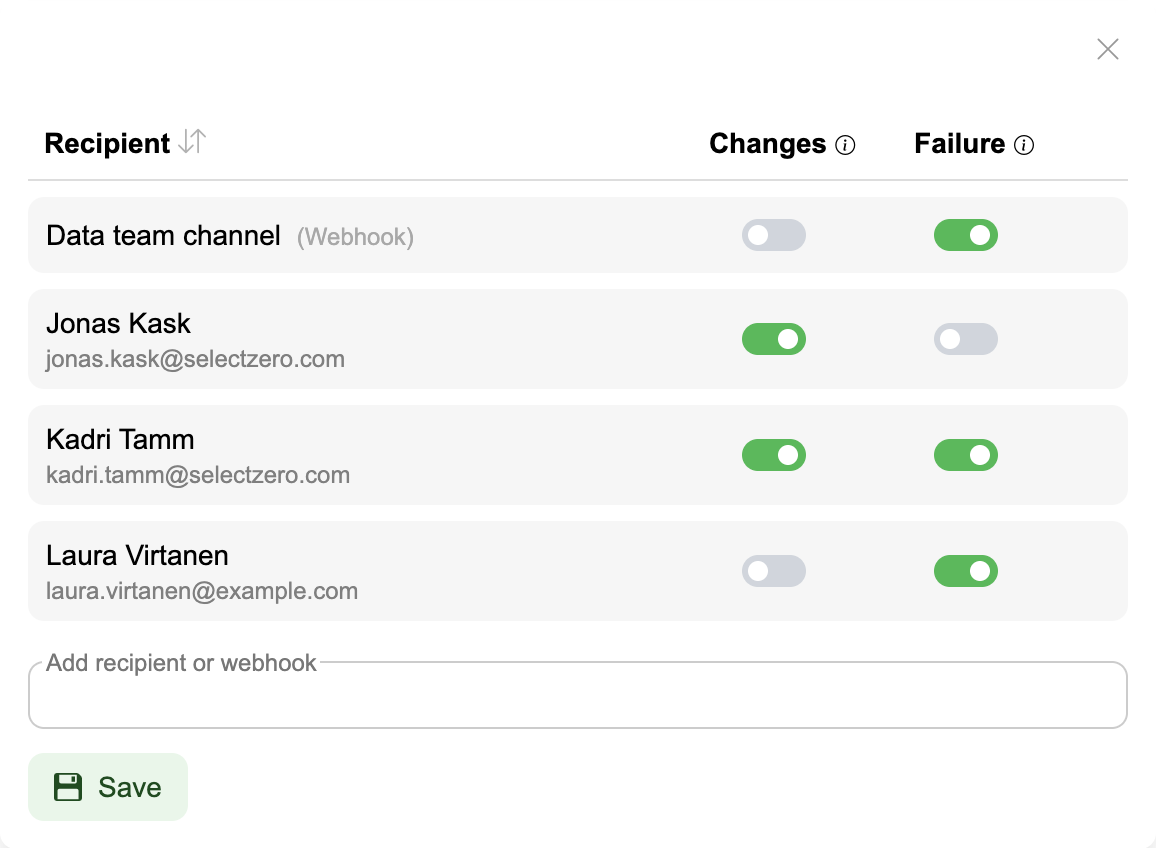
Users with edit rights see all recipients and can add users, custom emails or webhooks as recipients through the Add recipient or webhook field, choose each recipient's alert scopes, and remove recipients.
Users without edit rights see their own subscription row and can choose their scopes or remove their notifications.
Changes apply on Save.
Recipients of terms, objects and test cases can also be set by file import, see Import → Alert recipients.
Alert types
Available alert scopes depend on the entity:
Failure alerts - notifications when an execution fails or errors. Available on test cases, test suites, profilings, catalog objects and business rules
Change alerts - notifications when the entity is modified or deleted. Available on test cases, terms, glossaries, business rules, catalog objects and schemas
The full mapping is in Alerts settings → Alert scopes.
Users can choose which types of alerts they want to receive when configuring notifications. For test suites, the alerting form also holds the suite's alert settings (Alert mode, Allowed errors (%), Severity threshold - see Test suites → Alerts).
Object failure alerts
The Failure toggle on a catalog object notifies the recipient whenever a test case or profiling rule on that object fails or errors in a run.
Every execution counts: a test suite run, a scheduled batch, a single test case or profiling rule run by hand, a REST API run and a dbt sync.
One alert per object per run, listing every check of the object that failed or errored in that run
A suite run that touches several subscribed objects sends one email per recipient with a section per object
A check that keeps failing alerts again every time it runs and fails
A check that failed in an earlier run is not repeated when other checks of the object run
A profiling run lists only the rules it ran
The user who started the run is notified like any other recipient
A profiling rule row shows its value, the expected range it was judged against (e.g.
3 ± 0.3), and the previous run's valueA semantic test case that has not checked every row yet is reported once it has, or after three runs in a row
Business rule failure alerts
The Failure toggle on a business rule notifies the recipient whenever a test case linked to the rule fails or errors in a run. It works like object failure alerts.
One alert per rule per run, listing every linked test case that failed or errored in that run
Each listed test case shows its connection
A user's email lists only the test cases they can view (connection and test suite); the rest are counted
A user who can no longer view business rules is not emailed
A custom email address gets the count and the link only
A webhook gets every failed test case
Admins can review and manage all subscriptions centrally under Alerts settings → Managing user alerts; every user can see their own under Settings → Profile → My alerts.