sharing small pieces of rocks or jewels I find on the way

Timeboxing in 10 minutes

Really liked this idea so sharing with you all. You can read it in medium – here’s the link

https://medium.com/@davidsherwin/how-to-do-timeboxing-a93ef076a9c3

How To Do Timeboxing Right

Top highlight

Timeboxing is the use of short, structured sprints to achieve stated goals. Here’s how to get the most out of this technique in your daily work.

David Sherwin

9 min read

·

Feb 19, 2019

Time. When pursuing our personal and professional goals, it’s the most precious commodity we have. We obsess about how to make the most of it, treat it like it’s a tangible resource we can invest. We don’t want to fritter our time away in life, but treating our time too tangibly puts us in a double-bind situation. If we want a creative idea or team project to yield a meaningful result, we need enough time to take risks and explore new pathways. Yet if we give ourselves too much time for undirected exploration, we can end up having little to no time to create a product we can stand behind. We feel this tension in every project that we take on, and it’s a primary contributor to our anxieties in work and life.

In 2008, overwhelmed by the stress of a fast-paced job in a design studio, I decided to do something about it. After a few months of research into time management techniques, I wasn’t much better off than when I started. If you’ve used strategies like the ones provided in David Allen’s book Getting Things Done, then you’ve spent time focused on how to process and organize the things you need to get done. While such systems are good at helping you prioritize what needs to be done, such systems have little to no advice about how to complete a creative task individually or as a team.

At the time, I was working on multiple software development projects with contrasting methodologies: waterfall and agile. I wondered what would happen if I took the concept of timeboxing from agile — the use of one to two-week sprints to scope and deliver units of work as a team — and scaled it down for use in ten-minute increments? Over two years, I experimented with using this technique for creative problem solving in individual, team, and classroom settings. When I saw consistent results, I shared it in my book Creative Workshoptalksfree publications, and training workshops.

Fast-forward to 2019. Timeboxing is now part of the public lexicon, from its use in Design Sprints to Harvard Business Review articles, from Medium posts expanding on the technique to apps that visualize your timeboxed productivity. I continue to see organizations and teams advocate the use of timeboxing as beneficial, and it’s being applied to a wide range of activities beyond design.

However, almost everything I’ve seen about timeboxing in the past decade is missing something critical: Timeboxing isn’t just task chunking. (Sorry, Elon Musk.) People may think timeboxing is about checking tasks off the to-do list, or chopping their days into 5-minute increments. Yes, it’s easy to tick the box on short, clearly described tasks. However, it’s hard to make sure we’re completing relevant tasks in pursuit of the right goals.

In what follows, I’m going to update what I’d originally written about timeboxing in 2009, taking into account what I’ve learned in the past 10 years teaching the technique with my partner Mary Sherwin. It’s my hope that this will help you put timeboxing into practice more effectively, no matter whether you’re individually tackling problems or seeking to improve how you work with your team.

Timeboxing: Short, Structured Sprints to Reach Stated Goals

My definition of timeboxing is this: Timeboxing is the use of short, structured sprints to reach stated goals. Let’s look at a few of these words more closely.

By short, I mean that each task you’re completing is ideally no longer than 10 minutes. The more time you give yourself in a time box, the less likely you’ll be able to focus on finishing the task.

By structured, I mean that there’s a range of actions in a sprint that’ll help you accomplish your goal. These actions include setting goals, completing tasks in pursuit of that goal, taking breaks, and so forth.

By stated goals, I mean that you and your team should know exactly what you’re trying to create in each sprint at the desired fidelity. At the end of the time box, you should be able to say with certainty whether you accomplished what you’d intended or not, and why. Only start a sprint if you know exactly what you’re trying to achieve in that time period, and that everyone participating has agreed to give it a try.

There are three benefits of using timeboxing: Time constraints create extreme focus when you’re trying to accomplish tasks. You’re forced to regularly re-evaluate if you’re heading in the right direction. And it’s easy to course correct.

Timeboxing is best applied in the following situations:

It’s hard to focus on getting things done. Timeboxing can help you start creating something right away on a project, so you won’t fall prey to the “uh-oh effect”.

A deadline is rapidly approaching. Timeboxing is a way to design your own deadlines, so you aren’t procrastinating until you need to deliver something to others.

You need to align and motivate a group. If you’re in a workshop or meeting, timeboxing can keep everyone focused on what needs to be accomplished (in bite-sized increments).

The topic or problem seems too big to tackle. Timeboxing is a great way to put structure around a problem and take your first steps towards solving it.

Timeboxing doesn’t work in all circumstances, as there are many activities that require sustained attention to achieve results. For example, timeboxing doesn’t work well when you’re in the throes of executing detailed production work. So don’t oversell its benefits.

The Process of Timeboxing: Plan, Act, Evaluate

To explain the process of timeboxing, let’s see how a single timebox can be used to align and motivate a group.

When timeboxing, be specific about the required output and fidelity of what you’re creating. Over time, this will help you estimate how much you can accomplish when you take on certain tasks. It will also create shared accountability when timeboxing as a team.

Planning the Timebox

Imagine you’re working as a designer on a product team. In a meeting, you’ve shared three design ideas with your team leads, which somehow turned into a long debate about which idea would be best to implement. You’ve only got 15 minutes left in the meeting. You can use timeboxing to work your way towards a resolution:

“Let’s timebox this. For the next eight minutes, we’ll individually write on sticky notes three pros and three cons for each design option. When we’re done, we’ll read what everyone wrote and make a decision on what to implement. Want to try it?”

The above statement contains your plan for the timebox and has all the essential ingredients you need to get moving: what to do, how long you’ll do it, and the desired output.

Acting on the Plan

Say that your team agrees to this plan. Now you act on it, carrying out the task you’d agreed upon. Set the timer for eight minutes and go!

Evaluating What’s Been Done

Six minutes have elapsed so far. If you’re leading the timeboxing activity for the team, you would evaluate the team’s progress towards the output. Is everyone on their way to completing the task? If not, why? Do they need more time to complete it? Or was there something that you’d missed that needs to be addressed?

This is the most critical step of the timeboxing process: Using what you’re learning from completing the task to adjust what you’ll do in the next timebox. In some cases, what you learn in the activity can cause your team to entirely re-evaluate what you’re trying to accomplish.

This is where timeboxing moves beyond mere task chunking and becomes a powerful learning tool. You’re not timeboxing unless it includes planning, action, and evaluation.

Timeboxing isn’t about just checking things off a to-do list. Always include time for planning, action, and evaluation after each task. That said, it’s rare that a team can timebox for more than an hour without a break. Use your breaks to refuel, recharge, and reflect on what’s working and what you might do next.

Constructing Timeboxes that Lead to Great Results

Now that you understand the process of timeboxing, let’s look more closely at how to construct individual timeboxes. Including the following ingredients will help you consistently create great results.

What to Do: The Task That Needs to Happen

For each timebox, describe the exact task that needs to happen. The range of tasks you can take on is only limited by your imagination: generating questions, identifying audiences, brainstorming of ideas, giving and receiving feedback, sharing your work, and so forth. No matter what task you choose, it should always be clear how each it contributes to the success of your project. (Pro tip: Sharing and discussing work out loud always takes longer than you plan, and can bias your decision-making based on who’s the most verbally proficient on your team.)

Duration: How Long We’ll Do the Task

Try to keep yourself at 10 minutes or less, and be clear about what tasks aren’t included. Make sure there’s just enough time before the task to agree to your plan, and after the task to evaluate what happened.

Required Output: How Much You’ll Create at the Desired Fidelity

No matter what the task is, it should always have a tangible output. Be specific about the output, and how much of it you plan to create. You should be able to definitely say that you did it: In eight minutes, write eight ideas on individual sticky notes as words and sketches. Yes, we did that.

By requiring specific output, people are forced to be concise and consistent. A good rule of thumb is this: The lower the fidelity of what you’re creating in a timebox, the more of it you’ll be able to create. When you increase the fidelity, you increase the challenge. This is part of the reason why timeboxing doesn’t work well for more production-oriented tasks — it just takes longer than ten minutes to do certain tasks, like editing a piece of writing, creating detailed designs, or producing audio or video.

Don’t treat timeboxing as a rote recipe for task completion. You want to treat it flexibly, like you’re cooking a meal based on the ingredients at hand. Over time, timeboxing can become a mindset for how you respond to everyday challenges:

“I don’t have enough ideas yet for this project. I’m going to timebox myself to come up with 10 additional ideas in 10 minutes, one per page in my notebook…”

“We need more ‘How Might We?’ questions before we can start brainstorming. Let’s each generate five questions in the next five minutes, one question per sticky note…”

“Let’s timebox this debate to ten minutes. Each person will get 2 minutes to share their point of view, and I’ll write your key points on the whiteboard…”

Timeboxing Can Help Break Down Ambiguous Goals

Now that you’ve seen how to construct individual timeboxes, let’s briefly look at how to use them to break down and work towards fuzzy, ambiguous goals.

Imagine you’re working at a food delivery startup that’s struggling to reach its quarterly targets. Your CEO swings by your desk and says you’ll be taking on a crash project to develop three new revenue-generating opportunities that customers will love… oh, and you’ve got till the end of the week.

The ask isn’t totally clear, and if you pulled together a team to tackle this they would have a ton of questions. Just a few timeboxes could help you and your team break down this challenge by:

Asking questions to better understand the problem. You could write a list of questions that, if answered, would help everyone decide what problems you’re trying to solve.

Defining what the end deliverable should include. You could list what elements these revenue-generating opportunities will need to include when you present them.

Listing criteria that you’ll use to evaluate your ideas. You could determine what makes for a good (or not so good) idea, before everyone starts generating them.

Creating a draft plan for the week. You could list what needs to be accomplished in order to deliver on the ask, then prioritize which of those actions to take on first.

On every project that you work on, your approach is going to look a little different — and that’s okay. You’ll discover the best path to your goal as you go, and have the flexibility to adjust based on what you discover along the way. Due to this, timeboxing is different from certain trendy time management techniques that encourage you to schedule 25- to 30-minute time blocks for completing groups of tasks. Timeboxing helps you break down those big blocks and make the best use of the time inside them.

Got 10 Minutes? Give Timeboxing a Try

During the past decade, timeboxing has helped countless people be more productive in their professional and personal lives. If you haven’t used timeboxing before, take a few minutes today to try it out. And if you’d like activities to practice timeboxing on your own or with teams, check out Turning People into Teams and Creative Workshop.

This is a old article I’m copy pasting because it’s no longer there, but I think it’s valuable

Graham Jenkin was an inaugural Google “Great Manager Award” winner and currently runs product and design at AngelList. You can follow his tweets @GrahamJenkin.

Summary of the article is – you love what you do. You plan for that work. Then plan for meeting time as manager, but never let go of what you love. (My note – May be. Not always applicable, but you get the idea. )

Me, Make, Meet: How to manage a UX manager’s calendar

Most of us know the story.  You start your career as a front-line designer, researcher, coder, or writer.  You love what you do.  You love being a part of the process of making new stuff.  Or making old stuff better.  By some random series of events – some might say misfortune – someone eventually suggests that you have leadership potential and gives you a team of anxious/ambitious new grads to manage.  Or perhaps your freelance work is so successful that you’ve begun to hire junior designers to take on some of the load.  Either way, your responsibilities have broadened significantly.  Now there’s less time for you to do what got you here in the first place – doing the work yourself.  Your calendar is now jammed with meetings.  You have little time for yourself.  Forget hands-on project work.

It feels like a rat race.  But does it have to be this way?

I don’t believe so.  The answer lies in how you manage your calendar.  Calendar planning tactics seem like an odd topic for a UX manager blog, but for me at least, it’s the most essential tool to enable me to create the space to work … at the level I want to work at.

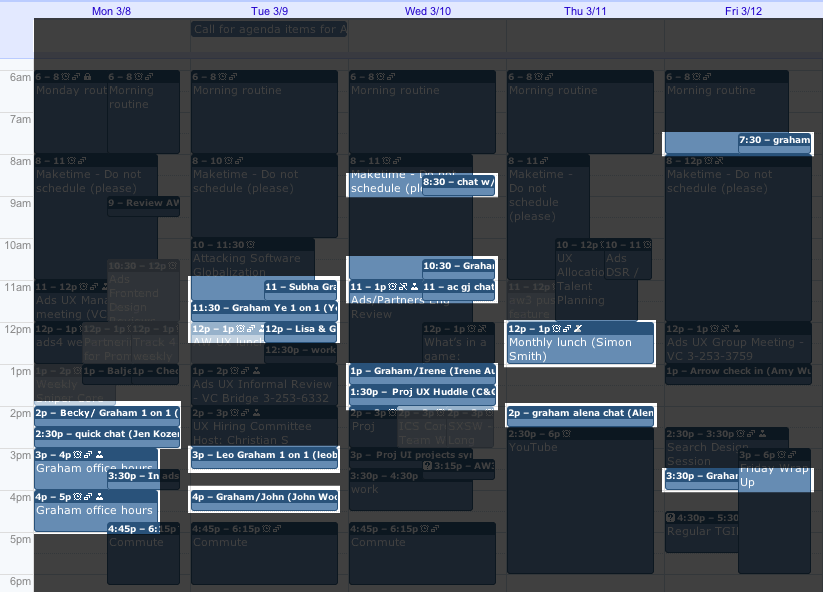
Here’s a typical week in my calendar:

calendar

At a glance, my calendar looks like a mess.  But there’s a method to the mess-ness.  Before turning to the calendar, I should talk a little about goals.

Start with personal goals

It’s extremely easy to get caught up in the day-to-day politics or firefighting or water-treading of any job that you can easily lose sight of why you’re working in the first place.  To prevent myself from getting sucked into this vortex, I have goals.  They keep me honest.  I’ve written them in Evernote so that they are with me at the desktop or on the road.  I don’t look at them every day, maybe once a month.  But they remind me of why I’m here, why I’m working.  Without them I’d be lost.  There’s nothing earth shattering about them.  They’re pretty simple: spend as much time with my wife and kids as I can, be the best manager I can be, eat my brussels sprouts, etc.  I have about 20 of them.

When planning my calendar, one goal is particularly relevant: I will design.

There’s an aspect of management philosophy here that some will disagree with.  I believe that by doing hands-on work, by cranking out design deliverables, by launching projects, not only am I meeting my desire to design, but I’m also gaining a better sense of what my team members are going through – because I’m going through it with them.  Hopefully I’m a better manager as a result.  The challenge, of course, is to get the time balance right so that you’re able to effectively support your team members, support your stakeholders, and successfully deliver on project work.  My calendar is a direct reflection of my attempt to get this balance right.  Even if you don’t believe in this approach, or if you believe that UX managers should be purely people managers, you’ll still need to balance time for yourself, your team and their stakeholders.

Let’s take a deeper look at a typical week and you’ll see what I mean.

Daily activities

Every work day, I attempt to maintain 3 time zones: “me time”, “make time”, and “meet time”.

Me time

me time

Every morning I have a personal routine.  I try to do something that I’m interested in beyond project or management work.  I’ll collect articles that my wife might find interesting and forward them to her.  For myself, I’ll read about jquery, game mechanics, or baseball trades.  I’ll listen to Jon Kabat-Zinn, Amy Goodman, or AC/DC.  “Me time” is replenishment time.  If I’m going to successfully drive myself through the rest of the day, I need to make sure that I’m personally on a full tank of gas, oil changed, tires rotated, etc.  That’s what “me time” is for.

I’m a morning person so I – um – do this in the morning.  6 till 8.  You could do it anytime.  But I recommend doing it … every day.  It makes a huge difference to my level of motivation and excitement about work and everything else.

Make time

make time

From 8am till about 11am I have “make time”.  This is when I design.  It could be conceptual work or detailed production work.  It could be a new idea I’m working on or a specific deliverable for an in-flight Google project.  It doesn’t matter.  All of my design work – or at least the stuff that doesn’t require anyone else – happens during “make time”.  I used to distribute this time across my work day – an hour here, an hour there.  That didn’t work (although I occasionally still do this when crunched on a deliverable).  I need to have at least 3 hours of continuous, uninterrupted time to really get deep on the work and make significant progress or produce something that I can feel good about.

Protecting “make time” has been tough.  Really tough.  As you can see from the calendar, some meetings end up creeping into “make time”.  Sometimes I’ll allow an important meeting to settle into this space, but I try to do so as little as possible.  Caving in and scheduling over “make time” can be a sign to others that you’re not really serious about managing your time.  It’s a battle, but it’s definitely worth it.  Every day, I feel like I’m productive.  Certainly some days are more productive than others, but every day is productive in some way, thanks to “make time”.

Meet time

meet time

The rest of my day is dedicated to meetings.  Many people, including many Googlers, believe that all meetings are a waste of time because they suck time that might be better spent working.  I’m not one of these people.  Yes, some meetings do waste time, but this is avoidable – and a topic for another blog article.  But if you ever want to achieve anything of a significant size, you need to do so with a team of people.  And if you’re doing anything with a team of people, you need to talk with them, which in many cases means meetings.  Sorry to be so basic, but not everyone gets this.

There are a handful of “meet time” categories that I allow onto my calendar.

I put a premium on 1 on 1 relationships with my team members, my fellow Google UX managers, and of course, my own manager.  So a good chunk of “meet time” is allocated to these 1 on 1s.  Right now, I tend to do 1 on 1s every other week – sometimes every 4 weeks – for 30 minutes each.  If people need additional time, I have office hours on Monday afternoons.  If no one comes to my office hours, I have a 2 hour block to process email.  Sweet.

Here’s my 1 on 1 schedule for the sample week:

As I’ve already mentioned, I attempt to make design work a priority.  To successfully execute on design projects, you obviously need to meet with business partners from product management and engineering to discuss project strategy and to present and discuss work.  So, another chunk of my meet time is allocated to these kinds of activities.  These are projects which I’m either directly responsible for or contributing to.  I avoid meetings for projects that my team members are working on without my direct involvement.  I let them own their work and their relationships and give guidance during 1 on 1s or reviews.

Here’s my project meeting schedule:

project time

If you care about the quality of work being done in the world that you manage, design reviews are a must.  And if you care about how your team’s work is communicated to stakeholders, participation in engineering and product reviews can be key.  My research partner and I check in on the week’s schedule of reviews every Monday and determine what we’ll attend and what we need to take last-minute action on.

Here’s the sample week’s review schedule.  No product reviews this particular week:

review time

If you have a plan on how to grow your user experience team and its members, you occasionally need to check in on how that plan is performing, make adjustments, weed out problems, and such.  Management team meetings perform this function.  Some are weekly, some quarterly, some yearly.  Some are at 50,000 feet level, some at 1,000, and some on the runway.

I have a few blocks for these kinds of meetings:

manager time

Working at Google has its perks.  But you’ve got to show up to enjoy them.  So some weeks, I schedule an hour or two to check out a tech talk or grab a beer at TGIF.

googley time

And believe it or not, we actually get to go home at night.  I check out a bit earlier than most people because I want to get home before the kids get too sleepy.  Googlers can be night owls so I’m sure to schedule my commute time to make it clear that I’m not going to be around.

commute time

It works for me

So that’s my strategy for making my calendar work for me.  What looks like an insanely chaotic schedule is actually a somewhat-structured plan to maximize my personal productivity while meeting the needs of my team and stakeholders.  If you’re thinking about trying a schedule like this, be warned that your colleagues may be quite annoyed by this at first.  You’re no longer available according to their schedule.  That will be a tough nut to swallow for some.  But if you prioritize according to your personal goals, and you make room for some flexibility (with time blocks such as office hours), you can keep your most important colleagues happy while fulfilling your own desires, needs, ambitions.  In summ, the plan is to schedule:

  • * Me time: get refueled so that you can perform to your potential
  • * Make time: continuous, uninterrupted time to design
  • * Meet time:
    • – for 1 on 1s,
    • – project team meetings,
    • – design, eng, product reviews,
    • – management team planning meetings, and
    • – googley fun time.
summary

I hope you find this system useful. And let me know if you have any suggestions for improving it, or if you have a better system.

– Graham

Graham Jenkin was an inaugural Google “Great Manager Award” winner and currently runs product and design at AngelList. You can follow his tweets @GrahamJenkin.

This is the most comprehensive post I have ever seen on hiring process, and also quite light weight since it’s for startups.

https://www.dave-bailey.com/blog/hiring-process

It covers how to find which position you need to hire as startup.

The way the step by step process is given is too beautiful.

Ron Friedman is one of my favorite person for reading email subscription. I always read what he writes. This month’s one included one article, 5 tips on making more money. It hits a cord, because I felt those over my years of experience.

The one most important that I liked is, counter offer. You can read it whole here https://www.wsj.com/articles/5-tips-to-get-raise-at-new-job-inflation-paycheck-11649859766

When you have one or more counter offer, you know what you are worth. Even if you sacrifice some, you should let your manager know, that way he would be automatically inclined to give you more. And he would have answer for his manager, why he wants to give you more.

Another important part is keeping the record in email, it’s always easy to forget who promised whom what. So, when you got an offer from your manager, shoot him/her an email “Did I understand right?” Loved it.

Right time to ask for more money – where the writer suggests to ask when you have done something great. Money goes to who asks. Without cry, even moms don’t know when to feed baby. So, clearly state!

Effective meeting techniques

Sometimes I see people go round in round talking about staffs but not making a decision. When a number of people are engaged, all their time gets lost, but not all thoughts are heard.

Previously I have learned a technique from another article, which I shared here https://raisul.wordpress.com/2019/08/04/sprint-based-decision-making/

Another way I learned to have effective meeting I found in the book “The great CEO within” by Matt Mochary chapter 10 “Decision Making” where he described how Amazon does it. It’s amazing, I suggest people to read this chapter. In fact, the entire book is full of gem for that matter.

If Amazon way can be adopted that’s amazing. The idea is, everyone will write their idea, problem and solution in a document 2 or 6 page long. Then shared with everyone in the meeting before the meeting. Others will add comment to the document. Those comments will be described by the commenter. That’s what I understood.

Long intro, heh!

Recently I was in a meeting and found things are not going anywhere, while time is passing by. So, I asked everyone to take 3 minutes, everyone write the idea in the chat window. Submit the idea after the 3 minutes. Then everyone gets 2 minutes to describe his thoughts. That way, we all gathered all thoughts very quickly and beautifully.

Then next another similar round to write the solution. Then suppose the deciders picks the solutions. Most importantly, all the thoughts are heard, all the solutions are heard and decider can pick and choose. Also, since everyone submits their thoughts after the time, nobody gets biased by another person.

What do you think? Please share your thoughts/tactics in comment.

Vimeo video watching faster

I want to see videos faster but I don’t see any option in vimeo. So, I found in youtube someone was kind enough to show how to do it – here How To Speed Up Vimeo Videos – YouTube

I wrote the javascript so that you don’t have to (also so that I can copy paste faster, haha)

javascript: var v = document.querySelector(‘video’); var t = prompt(‘set the playback rate’); v.playbackRate = parseFloat(t)

Basically, you just add any page to favorite and just edit that favorite for url with the above code. Or, just spent 1 minute time watching the video, copying the code and running 😉

With the 9%-6% in effect, suppose if someone keeps an FDR of 1 lakh taka, how much does he earn? 6000/- taka right?

What does that mean? That, something which earns you 6000/- taka, price of that thing is 1 lakh taka, right?

1 lakh divded by 6000 is 16.66. So, something which earns you money, that thing’s value is 16 times. Right?

That is P/E ration, price per earning ratio.

So, it basically says, if a company suppose earns a profit of 1 lakh taka, that company’s value is kind of 15 lakh taka.

Now, imagine this, you are owner of Robi. You can give someone 1 lakh taka as additional salary a year. Then how much less profit you do? 1 lakh taka, right? What does that translate into value of company? Your company value decreases by 15 lakh taka, right?

Instead, if you give 1 lakh taka worth of share, company’s value decreases by 1 lakh taka, so you kind of have 14 lakh taka gain.

So, during the time of IPO, when suppose Robi needed to give someone a bonus of say 5 lakh taka, instead gave share of 5 lakh taka. this 5 lakh directly then stayed in profit, resulting higher value of company. And the person who got the share, had 28 lakh taka worth of share. So, everyone wins!!

Also, employees see that, when they are contributing to the betterment of the company, then his share value increases.

That’s why, every successful organization in the world gives their employees share. Our research shows that Infosys has been giving 1% new share every year to employees, sometimes even more upon board approval. This creates a serious win-win situation for everyone involved, shareholders get higher return of their investment and employees get higher money.

Unfortunately, Bangladesh SEC doesn’t still allow this. Infosys started ESOP in 1993 that resulted 400 of their employees become millionaire by 2000. In this ESOP process, employees get an option to buy share at discounted rate, which practically gains them a higher amount of money as well as reason to answer spouse, “why the hell are you working your ass off for this F***ing company” although the real reason we are working our ass off, because we like to work our ass off, but can’t say to him/her, right? So, having esop and higher return of money gives an answer to that (Oh ya? I made X amount with share, who gives that man?)

The rule vs expectation

I was going through this training video and found this very interesting

https://www.coursera.org/learn/coaching-expectations-performance/lecture/hNwMP/expectations-and-standards

The main concept is, kind of defined values are the expectations and the behaviors should be based on those values, instead of rules. Many companies has list of rules but those rules create more machine, thank thinking about the big picture.

Suppose, there is a rule that emails should be answered within 24 hours. Then why this rule exists that becomes irrelevant. But, if the expectation is that we are a customer focused company, then if someone doesn’t answer emails fast enough, manager should have conversation and discussion with individual what’s right and why. That way leadership grows.

I had a colleague, Md Zahiduzzaman who was leaving our company for better opportunity. I saw him a very high performer, doing amazing work, very happy fellow. When he was leaving, he shared clearly that he is leaving for better opportunity. Also shared clearly some annoying features of our company, which we eventually improved. (Like, previously we had 5.5 days of work day, so people had to come half a day. This was annoying because although half a day, it didn’t add much value but took away people’s precious time.)

Then afterwards, he went somewhere, it’s a multinational which got closed down. When another of my favorite colleague Fakhrul bhai, told me about that, I said let’s ask him to join back with us. We even didn’t have any project ready for him, we didn’t even have a vacancy. We didn’t do him any favor by offering to join back with us. We knew that Zahid was a colleague we want to have, he is fun to work with, very serious and very capable.

But, sometimes I see, when people are leaving, they start performing bad, since this performance doesn’t matter any more. So, they would start slacking, take up other side project.

This story happened time and again. Another of my colleague when leaving, was performing so good, never dropped a ball, all the clients were very happy. So, when he went to Australia, his new job opportunity called me for background check. Of course the lasting impression was amazing.

So, my advice is, keep an amazing experience to your current job, the best one possible, because this is the final impression people would remember.

If someone is unhappy with current job, be it for salary, be it for some behavior or anything else, then, in my opinion he should do

  1. Notify his manager & HR that he is unhappy and the reason for that.
  2. Still if it’s not resolved, inform that you are looking for opportunity.
  3. Then start giving best of performance while you prepare for next opportunity, because this is the time to create the final impression.
  4. Then when you leave, your team members, your company would remember how amazing you have been.

Deliver best performance when leave, let the company cry at your departure, instead of being happy.

As I was learning Managing as a coach, I came across this idea of giving feedback, that while giving feedback, come up with 3 things to say about his strengths where s/he should “Keep this up” and then tell may be 3 things about “try this next time” which is the opportunity for his/her to grow. Such a beautiful gem of advice, puts the receiver at ease and giver a comfort.

Checkout the video here https://coursera.org/share/44772200e7174c916cfb3f05db3b3817

Design a site like this with WordPress.com
Get started