<?xml version="1.0" encoding="utf-8"?>
<feed xmlns="http://www.w3.org/2005/Atom">
    <id>https://olake.io/iceberg/</id>
    <title>Fastest Open Source Data Replication Tool Blog</title>
    <updated>2025-10-28T00:00:00.000Z</updated>
    <generator>https://github.com/jpmonette/feed</generator>
    <link rel="alternate" href="https://olake.io/iceberg/"/>
    <subtitle>Fastest Open Source Data Replication Tool Blog</subtitle>
    <icon>https://olake.io/img/logo/olake-blue.svg</icon>
    <entry>
        <title type="html"><![CDATA[TPC-H Databricks vs Apache Iceberg - (OLake + AWS Glue + EMR)]]></title>
        <id>https://olake.io/iceberg/databricks-vs-iceberg/</id>
        <link href="https://olake.io/iceberg/databricks-vs-iceberg/"/>
        <updated>2025-10-28T00:00:00.000Z</updated>
        <summary type="html"><![CDATA[A detailed TPC-H benchmarking study comparing Iceberg and Databricks to determine which delivers better performance and cost efficiency.]]></summary>
        <content type="html"><![CDATA[<p><img decoding="async" loading="lazy" alt="Databricks logo vs Apache Iceberg logo" src="https://olake.io/assets/images/databricks-vs-iceberg-cf4689ef8241771ba3c654e187264ae2.webp" width="1536" height="1024" class="img_CujE"></p>
<p>The year is 2025, and the data engineering landscape has never been more exciting—or more confusing. Walk into any tech conference, and you'll hear buzzwords flying around like "lakehouse," "Delta Lake," "Iceberg," and "unified analytics." But beneath all the marketing noise lies a fundamental question that keeps data architects awake at night: <strong>Which platform can actually deliver on the promise of fast, reliable, cost-effective analytics at scale?</strong></p>
<p>To answer this question, we embarked on the most comprehensive benchmark we could design: 1TB of industry-standard TPC-H data, 8.6 billion rows, and two of the most talked-about platforms in modern data engineering going head-to-head in an epic performance showdown.</p>
<p>This isn’t another vendor shootout. We’re comparing two different takes on data architecture—one with UC Berkeley roots, one from Netflix’s open‑source world—to see how they perform in practice.</p>
<p>Buckle up. We're about to dive deep into the technologies that are reshaping how the world thinks about data.</p>
<h2 class="anchor anchorTargetStickyNavbar_Vzrq" id="chapter-1-the-genesis-stories---how-giants-are-born">Chapter 1: The Genesis Stories - How Giants Are Born<a href="https://olake.io/iceberg/databricks-vs-iceberg/#chapter-1-the-genesis-stories---how-giants-are-born" class="hash-link" aria-label="Direct link to Chapter 1: The Genesis Stories - How Giants Are Born" title="Direct link to Chapter 1: The Genesis Stories - How Giants Are Born" translate="no">​</a></h2>
<h3 class="anchor anchorTargetStickyNavbar_Vzrq" id="databricks-from-academic-research-to-enterprise-dominance">Databricks: From Academic Research to Enterprise Dominance<a href="https://olake.io/iceberg/databricks-vs-iceberg/#databricks-from-academic-research-to-enterprise-dominance" class="hash-link" aria-label="Direct link to Databricks: From Academic Research to Enterprise Dominance" title="Direct link to Databricks: From Academic Research to Enterprise Dominance" translate="no">​</a></h3>
<p>Born out of UC Berkeley’s AMPLab, Spark set out to make distributed computing actually usable. In 2013, its creators launched Databricks to turn that power into something teams could run day to day—first as managed Spark, then as a full platform.</p>
<p>Highlights, at a glance:</p>
<ul>
<li class="">2013–2015: Managed Spark + notebooks.</li>
<li class="">2016–2018: Cluster automation, collab notebooks, early MLflow.</li>
<li class="">2019–2021: Delta Lake brings ACID, schema enforcement, time travel.</li>
<li class="">2022–2025: Unity Catalog, Photon, tighter AI/LLM workflows.</li>
</ul>
<p>Net-net: Databricks evolved from “Spark‑as‑a‑service” into a unified analytics platform focused on speed, reliability, and usability.</p>
<h3 class="anchor anchorTargetStickyNavbar_Vzrq" id="apache-iceberg-the-open-source-rebellion">Apache Iceberg: The Open Source Rebellion<a href="https://olake.io/iceberg/databricks-vs-iceberg/#apache-iceberg-the-open-source-rebellion" class="hash-link" aria-label="Direct link to Apache Iceberg: The Open Source Rebellion" title="Direct link to Apache Iceberg: The Open Source Rebellion" translate="no">​</a></h3>
<p>While Databricks doubled down on an integrated platform, Netflix, Apple, and LinkedIn hit classic data‑lake pain: tiny files, slow planning, brittle schema changes—and growing discomfort with vendor lock‑in.</p>
<p>How Iceberg showed up:</p>
<ul>
<li class="">2017: Netflix kicked off Iceberg to fix those fundamentals.</li>
<li class="">2018–2019: Open‑sourced to Apache; Apple and LinkedIn joined.</li>
<li class="">2020–2021: Built for multi‑engine use (Spark, Flink, Trino/Presto, etc.).</li>
<li class="">2022–2025: Rapid adoption across clouds and tooling.</li>
</ul>
<p>At its core, Iceberg stands for open, interoperable data architecture you can move across systems without rewriting everything.</p>
<h2 class="anchor anchorTargetStickyNavbar_Vzrq" id="chapter-2-technical-deep-dive---the-architecture-that-powers-performance">Chapter 2: Technical Deep Dive - The Architecture That Powers Performance<a href="https://olake.io/iceberg/databricks-vs-iceberg/#chapter-2-technical-deep-dive---the-architecture-that-powers-performance" class="hash-link" aria-label="Direct link to Chapter 2: Technical Deep Dive - The Architecture That Powers Performance" title="Direct link to Chapter 2: Technical Deep Dive - The Architecture That Powers Performance" translate="no">​</a></h2>
<p>When we talk about TPC-H benchmarking at 1TB scale, we're not just comparing query engines—we're comparing entire data ecosystems. The real performance story lies in how each architecture handles the complete journey from source data ingestion to final query execution. In the case of Databricks, its tightly integrated Delta Lake foundation plays a key role in how data is stored, optimized, and queried. Let's examine how both architectures orchestrate this complex dance of data movement, storage optimization, and compute execution.</p>
<p>Checkout feature level differences in following blog <strong>Apache Iceberg VS Delta Lake</strong>. Read our guide: <a class="" href="https://olake.io/blog/apache-iceberg-vs-delta-lake-guide/">Apache Iceberg vs Delta Lake: Ultimate Guide for Data Lakes</a>.</p>
<h3 class="anchor anchorTargetStickyNavbar_Vzrq" id="databricks-the-integrated-performance-machine">Databricks: The Integrated Performance Machine<a href="https://olake.io/iceberg/databricks-vs-iceberg/#databricks-the-integrated-performance-machine" class="hash-link" aria-label="Direct link to Databricks: The Integrated Performance Machine" title="Direct link to Databricks: The Integrated Performance Machine" translate="no">​</a></h3>
<p>The Databricks approach represents a vertically integrated philosophy where every component is designed to work seamlessly with every other component. Think of it as a Formula 1 racing team where the engine, chassis, and aerodynamics are all custom-built to work together.</p>
<p><img decoding="async" loading="lazy" alt="Databricks Architecture" src="data:image/svg+xml;base64,PHN2ZyB2aWV3Qm94PSIwIDAgMTIwMCA3MDAiIHhtbG5zPSJodHRwOi8vd3d3LnczLm9yZy8yMDAwL3N2ZyI+CiAgPCEtLSBEZWZpbmUgZ3JhZGllbnRzIGFuZCBzdHlsZXMgLS0+CiAgPGRlZnM+CiAgICA8bGluZWFyR3JhZGllbnQgaWQ9InBvc3RncmVzR3JhZCIgeDE9IjAlIiB5MT0iMCUiIHgyPSIwJSIgeTI9IjEwMCUiPgogICAgICA8c3RvcCBvZmZzZXQ9IjAlIiBzdHlsZT0ic3RvcC1jb2xvcjojMzM2NzkxO3N0b3Atb3BhY2l0eToxIiAvPgogICAgICA8c3RvcCBvZmZzZXQ9IjEwMCUiIHN0eWxlPSJzdG9wLWNvbG9yOiMyZDVhN2I7c3RvcC1vcGFjaXR5OjEiIC8+CiAgICA8L2xpbmVhckdyYWRpZW50PgogICAgPGxpbmVhckdyYWRpZW50IGlkPSJkYXRhYnJpY2tzR3JhZCIgeDE9IjAlIiB5MT0iMCUiIHgyPSIwJSIgeTI9IjEwMCUiPgogICAgICA8c3RvcCBvZmZzZXQ9IjAlIiBzdHlsZT0ic3RvcC1jb2xvcjojRkYzNjIxO3N0b3Atb3BhY2l0eToxIiAvPgogICAgICA8c3RvcCBvZmZzZXQ9IjEwMCUiIHN0eWxlPSJzdG9wLWNvbG9yOiNkNDJlMWM7c3RvcC1vcGFjaXR5OjEiIC8+CiAgICA8L2xpbmVhckdyYWRpZW50PgogICAgPGxpbmVhckdyYWRpZW50IGlkPSJjbHVzdGVyR3JhZCIgeDE9IjAlIiB5MT0iMCUiIHgyPSIwJSIgeTI9IjEwMCUiPgogICAgICA8c3RvcCBvZmZzZXQ9IjAlIiBzdHlsZT0ic3RvcC1jb2xvcjojNEE5MEUyO3N0b3Atb3BhY2l0eToxIiAvPgogICAgICA8c3RvcCBvZmZzZXQ9IjEwMCUiIHN0eWxlPSJzdG9wLWNvbG9yOiMzNTdBQkQ7c3RvcC1vcGFjaXR5OjEiIC8+CiAgICA8L2xpbmVhckdyYWRpZW50PgogICAgPGxpbmVhckdyYWRpZW50IGlkPSJkZWx0YUdyYWQiIHgxPSIwJSIgeTE9IjAlIiB4Mj0iMCUiIHkyPSIxMDAlIj4KICAgICAgPHN0b3Agb2Zmc2V0PSIwJSIgc3R5bGU9InN0b3AtY29sb3I6IzAwQUREODtzdG9wLW9wYWNpdHk6MSIgLz4KICAgICAgPHN0b3Agb2Zmc2V0PSIxMDAlIiBzdHlsZT0ic3RvcC1jb2xvcjojMDA5OWMwO3N0b3Atb3BhY2l0eToxIiAvPgogICAgPC9saW5lYXJHcmFkaWVudD4KICAgIDxmaWx0ZXIgaWQ9InNoYWRvdyI+CiAgICAgIDxmZURyb3BTaGFkb3cgZHg9IjAiIGR5PSIyIiBzdGREZXZpYXRpb249IjMiIGZsb29kLW9wYWNpdHk9IjAuMyIvPgogICAgPC9maWx0ZXI+CiAgPC9kZWZzPgogIAogIDwhLS0gQmFja2dyb3VuZCAtLT4KICA8cmVjdCB3aWR0aD0iMTIwMCIgaGVpZ2h0PSI3MDAiIGZpbGw9IiNmOGY5ZmEiLz4KICAKICA8IS0tIFRpdGxlIC0tPgogIDx0ZXh0IHg9IjYwMCIgeT0iNDAiIGZvbnQtZmFtaWx5PSJBcmlhbCwgc2Fucy1zZXJpZiIgZm9udC1zaXplPSIyOCIgZm9udC13ZWlnaHQ9ImJvbGQiIHRleHQtYW5jaG9yPSJtaWRkbGUiIGZpbGw9IiMxYTFhMWEiPgogICAgRGF0YWJyaWNrcyBBcmNoaXRlY3R1cmUKICA8L3RleHQ+CiAgCiAgPCEtLSBQb3N0Z3JlU1FMIFNvdXJjZSAtLT4KICA8ZyBmaWx0ZXI9InVybCgjc2hhZG93KSI+CiAgICA8cmVjdCB4PSI1MCIgeT0iMTUwIiB3aWR0aD0iMjAwIiBoZWlnaHQ9IjEyMCIgcng9IjgiIGZpbGw9InVybCgjcG9zdGdyZXNHcmFkKSIvPgogICAgPHRleHQgeD0iMTUwIiB5PSIxOTAiIGZvbnQtZmFtaWx5PSJBcmlhbCwgc2Fucy1zZXJpZiIgZm9udC1zaXplPSIxOCIgZm9udC13ZWlnaHQ9ImJvbGQiIHRleHQtYW5jaG9yPSJtaWRkbGUiIGZpbGw9IndoaXRlIj4KICAgICAgUG9zdGdyZVNRTAogICAgPC90ZXh0PgogICAgPHRleHQgeD0iMTUwIiB5PSIyMTUiIGZvbnQtZmFtaWx5PSJBcmlhbCwgc2Fucy1zZXJpZiIgZm9udC1zaXplPSIxNCIgdGV4dC1hbmNob3I9Im1pZGRsZSIgZmlsbD0iI2UwZTBlMCI+CiAgICAgIFNvdXJjZSBEYXRhYmFzZQogICAgPC90ZXh0PgogICAgPGNpcmNsZSBjeD0iMTUwIiBjeT0iMjQ1IiByPSIyMiIgZmlsbD0icmdiYSgyNTUsMjU1LDI1NSwwLjIpIi8+CiAgICA8cGF0aCBkPSJNIDE0MCAyNDUgTCAxNTAgMjM1IEwgMTYwIDI0NSBMIDE1MCAyNTUgWiIgZmlsbD0id2hpdGUiLz4KICA8L2c+CiAgCiAgPCEtLSBBcnJvdyAxOiBQb3N0Z3JlU1FMIHRvIEluZ2VzdGlvbiBDbHVzdGVyIC0tPgogIDxkZWZzPgogICAgPG1hcmtlciBpZD0iYXJyb3doZWFkMSIgbWFya2VyV2lkdGg9IjEwIiBtYXJrZXJIZWlnaHQ9IjEwIiByZWZYPSI5IiByZWZZPSIzIiBvcmllbnQ9ImF1dG8iPgogICAgICA8cG9seWdvbiBwb2ludHM9IjAgMCwgMTAgMywgMCA2IiBmaWxsPSIjNTU1Ii8+CiAgICA8L21hcmtlcj4KICA8L2RlZnM+CiAgPGxpbmUgeDE9IjI1MCIgeTE9IjIxMCIgeDI9IjM4MCIgeTI9IjIxMCIgc3Ryb2tlPSIjNTU1IiBzdHJva2Utd2lkdGg9IjMiIG1hcmtlci1lbmQ9InVybCgjYXJyb3doZWFkMSkiLz4KICA8dGV4dCB4PSIzMTUiIHk9IjIwMCIgZm9udC1mYW1pbHk9IkFyaWFsLCBzYW5zLXNlcmlmIiBmb250LXNpemU9IjEzIiB0ZXh0LWFuY2hvcj0ibWlkZGxlIiBmaWxsPSIjMzMzIiBmb250LXdlaWdodD0iNjAwIj4KICAgIERhdGEgSW5nZXN0aW9uCiAgPC90ZXh0PgogIAogIDwhLS0gSW5nZXN0aW9uIENsdXN0ZXIgLS0+CiAgPGcgZmlsdGVyPSJ1cmwoI3NoYWRvdykiPgogICAgPHJlY3QgeD0iMzgwIiB5PSIxMzAiIHdpZHRoPSIyNDAiIGhlaWdodD0iMTYwIiByeD0iOCIgZmlsbD0idXJsKCNjbHVzdGVyR3JhZCkiLz4KICAgIDx0ZXh0IHg9IjUwMCIgeT0iMTY1IiBmb250LWZhbWlseT0iQXJpYWwsIHNhbnMtc2VyaWYiIGZvbnQtc2l6ZT0iMTgiIGZvbnQtd2VpZ2h0PSJib2xkIiB0ZXh0LWFuY2hvcj0ibWlkZGxlIiBmaWxsPSJ3aGl0ZSI+CiAgICAgIEluZ2VzdGlvbiBDbHVzdGVyCiAgICA8L3RleHQ+CiAgICA8cmVjdCB4PSI0MTAiIHk9IjE4MCIgd2lkdGg9IjE4MCIgaGVpZ2h0PSI5MCIgcng9IjYiIGZpbGw9InJnYmEoMjU1LDI1NSwyNTUsMC4xNSkiIHN0cm9rZT0icmdiYSgyNTUsMjU1LDI1NSwwLjMpIiBzdHJva2Utd2lkdGg9IjIiLz4KICAgIDx0ZXh0IHg9IjUwMCIgeT0iMjEwIiBmb250LWZhbWlseT0iQXJpYWwsIHNhbnMtc2VyaWYiIGZvbnQtc2l6ZT0iMTQiIGZvbnQtd2VpZ2h0PSI2MDAiIHRleHQtYW5jaG9yPSJtaWRkbGUiIGZpbGw9IndoaXRlIj4KICAgICAgbjItc3RhbmRhcmQtMzIKICAgIDwvdGV4dD4KICAgIDx0ZXh0IHg9IjUwMCIgeT0iMjMwIiBmb250LWZhbWlseT0iQXJpYWwsIHNhbnMtc2VyaWYiIGZvbnQtc2l6ZT0iMTMiIHRleHQtYW5jaG9yPSJtaWRkbGUiIGZpbGw9IiNlMGUwZTAiPgogICAgICAzMiB2Q1BVCiAgICA8L3RleHQ+CiAgICA8dGV4dCB4PSI1MDAiIHk9IjI1MCIgZm9udC1mYW1pbHk9IkFyaWFsLCBzYW5zLXNlcmlmIiBmb250LXNpemU9IjEzIiB0ZXh0LWFuY2hvcj0ibWlkZGxlIiBmaWxsPSIjZTBlMGUwIj4KICAgICAgMTI4IEdCIFJBTQogICAgPC90ZXh0PgogIDwvZz4KICAKICA8IS0tIEFycm93IDI6IEluZ2VzdGlvbiB0byBEZWx0YSAtLT4KICA8bGluZSB4MT0iNjIwIiB5MT0iMjEwIiB4Mj0iNzUwIiB5Mj0iMjEwIiBzdHJva2U9IiM1NTUiIHN0cm9rZS13aWR0aD0iMyIgbWFya2VyLWVuZD0idXJsKCNhcnJvd2hlYWQxKSIvPgogIDx0ZXh0IHg9IjY4NSIgeT0iMjAwIiBmb250LWZhbWlseT0iQXJpYWwsIHNhbnMtc2VyaWYiIGZvbnQtc2l6ZT0iMTMiIHRleHQtYW5jaG9yPSJtaWRkbGUiIGZpbGw9IiMzMzMiIGZvbnQtd2VpZ2h0PSI2MDAiPgogICAgU3RvcmUKICA8L3RleHQ+CiAgCiAgPCEtLSBEZWx0YSBUYWJsZXMgLS0+CiAgPGcgZmlsdGVyPSJ1cmwoI3NoYWRvdykiPgogICAgPHJlY3QgeD0iNzUwIiB5PSIxNTAiIHdpZHRoPSIyMDAiIGhlaWdodD0iMTIwIiByeD0iOCIgZmlsbD0idXJsKCNkZWx0YUdyYWQpIi8+CiAgICA8dGV4dCB4PSI4NTAiIHk9IjE4NSIgZm9udC1mYW1pbHk9IkFyaWFsLCBzYW5zLXNlcmlmIiBmb250LXNpemU9IjE4IiBmb250LXdlaWdodD0iYm9sZCIgdGV4dC1hbmNob3I9Im1pZGRsZSIgZmlsbD0id2hpdGUiPgogICAgICBEZWx0YSBUYWJsZXMKICAgIDwvdGV4dD4KICAgIDx0ZXh0IHg9Ijg1MCIgeT0iMjA3IiBmb250LWZhbWlseT0iQXJpYWwsIHNhbnMtc2VyaWYiIGZvbnQtc2l6ZT0iMTQiIHRleHQtYW5jaG9yPSJtaWRkbGUiIGZpbGw9IiNlMGUwZTAiPgogICAgICBMYWtlaG91c2UgU3RvcmFnZQogICAgPC90ZXh0PgogICAgCiAgICA8IS0tIFVuaXR5IENhdGFsb2cgYm94IGluc2lkZSAtLT4KICAgIDxyZWN0IHg9Ijc3MCIgeT0iMjIwIiB3aWR0aD0iMTYwIiBoZWlnaHQ9IjMwIiByeD0iNCIgZmlsbD0icmdiYSgyNTUsMjU1LDI1NSwwLjIpIiBzdHJva2U9InJnYmEoMjU1LDI1NSwyNTUsMC4zKSIgc3Ryb2tlLXdpZHRoPSIxIi8+CiAgICA8dGV4dCB4PSI4NTAiIHk9IjI0MCIgZm9udC1mYW1pbHk9IkFyaWFsLCBzYW5zLXNlcmlmIiBmb250LXNpemU9IjEzIiB0ZXh0LWFuY2hvcj0ibWlkZGxlIiBmaWxsPSJ3aGl0ZSI+CiAgICAgIFVuaXR5IENhdGFsb2cKICAgIDwvdGV4dD4KICA8L2c+CiAgCiAgPCEtLSBBcnJvdyAzOiBEZWx0YSB0byBRdWVyeSBDbHVzdGVyIC0tPgogIDxwYXRoIGQ9Ik0gODUwIDI3MCBMIDg1MCAzODAiIHN0cm9rZT0iIzU1NSIgc3Ryb2tlLXdpZHRoPSIzIiBtYXJrZXItZW5kPSJ1cmwoI2Fycm93aGVhZDEpIi8+CiAgPHRleHQgeD0iODgwIiB5PSIzMzAiIGZvbnQtZmFtaWx5PSJBcmlhbCwgc2Fucy1zZXJpZiIgZm9udC1zaXplPSIxMyIgZmlsbD0iIzMzMyIgZm9udC13ZWlnaHQ9IjYwMCI+CiAgICBRdWVyeQogIDwvdGV4dD4KICAKICA8IS0tIFF1ZXJ5IENsdXN0ZXIgU2VjdGlvbiAtLT4KICA8ZyBmaWx0ZXI9InVybCgjc2hhZG93KSI+CiAgICA8cmVjdCB4PSI2NTAiIHk9IjM4MCIgd2lkdGg9IjQwMCIgaGVpZ2h0PSIyODAiIHJ4PSI4IiBmaWxsPSJ1cmwoI2RhdGFicmlja3NHcmFkKSIvPgogICAgPHRleHQgeD0iODUwIiB5PSI0MjAiIGZvbnQtZmFtaWx5PSJBcmlhbCwgc2Fucy1zZXJpZiIgZm9udC1zaXplPSIyMCIgZm9udC13ZWlnaHQ9ImJvbGQiIHRleHQtYW5jaG9yPSJtaWRkbGUiIGZpbGw9IndoaXRlIj4KICAgICAgRGF0YWJyaWNrcyBUUEMtSCBRdWVyeSBDbHVzdGVyCiAgICA8L3RleHQ+CiAgICAKICAgIDwhLS0gTWFzdGVyIE5vZGUgLS0+CiAgICA8cmVjdCB4PSI2OTAiIHk9IjQ0NSIgd2lkdGg9IjMyMCIgaGVpZ2h0PSI5MCIgcng9IjYiIGZpbGw9InJnYmEoMjU1LDI1NSwyNTUsMC4yKSIgc3Ryb2tlPSJyZ2JhKDI1NSwyNTUsMjU1LDAuNCkiIHN0cm9rZS13aWR0aD0iMiIvPgogICAgPHRleHQgeD0iODUwIiB5PSI0NzUiIGZvbnQtZmFtaWx5PSJBcmlhbCwgc2Fucy1zZXJpZiIgZm9udC1zaXplPSIxNiIgZm9udC13ZWlnaHQ9ImJvbGQiIHRleHQtYW5jaG9yPSJtaWRkbGUiIGZpbGw9IndoaXRlIj4KICAgICAgTWFzdGVyIE5vZGUKICAgIDwvdGV4dD4KICAgIDx0ZXh0IHg9Ijg1MCIgeT0iNDk3IiBmb250LWZhbWlseT0iQXJpYWwsIHNhbnMtc2VyaWYiIGZvbnQtc2l6ZT0iMTQiIHRleHQtYW5jaG9yPSJtaWRkbGUiIGZpbGw9IiNmZmUwZTAiPgogICAgICBuMi1zdGFuZGFyZC0zMgogICAgPC90ZXh0PgogICAgPHRleHQgeD0iODUwIiB5PSI1MTciIGZvbnQtZmFtaWx5PSJBcmlhbCwgc2Fucy1zZXJpZiIgZm9udC1zaXplPSIxMyIgdGV4dC1hbmNob3I9Im1pZGRsZSIgZmlsbD0iI2ZmZTBlMCI+CiAgICAgIDMyIHZDUFUgfCAxMjggR0IgUkFNCiAgICA8L3RleHQ+CiAgICAKICAgIDwhLS0gV29ya2VyIE5vZGVzIC0tPgogICAgPHJlY3QgeD0iNjkwIiB5PSI1NTUiIHdpZHRoPSIzMjAiIGhlaWdodD0iOTAiIHJ4PSI2IiBmaWxsPSJyZ2JhKDI1NSwyNTUsMjU1LDAuMikiIHN0cm9rZT0icmdiYSgyNTUsMjU1LDI1NSwwLjQpIiBzdHJva2Utd2lkdGg9IjIiLz4KICAgIDx0ZXh0IHg9Ijg1MCIgeT0iNTg1IiBmb250LWZhbWlseT0iQXJpYWwsIHNhbnMtc2VyaWYiIGZvbnQtc2l6ZT0iMTYiIGZvbnQtd2VpZ2h0PSJib2xkIiB0ZXh0LWFuY2hvcj0ibWlkZGxlIiBmaWxsPSJ3aGl0ZSI+CiAgICAgIFdvcmtlciBOb2RlcyAoQXV0by1zY2FsaW5nKQogICAgPC90ZXh0PgogICAgPHRleHQgeD0iODUwIiB5PSI2MDciIGZvbnQtZmFtaWx5PSJBcmlhbCwgc2Fucy1zZXJpZiIgZm9udC1zaXplPSIxNCIgdGV4dC1hbmNob3I9Im1pZGRsZSIgZmlsbD0iI2ZmZTBlMCI+CiAgICAgIDEtMyDDlyBuMi1zdGFuZGFyZC0xNgogICAgPC90ZXh0PgogICAgPHRleHQgeD0iODUwIiB5PSI2MjciIGZvbnQtZmFtaWx5PSJBcmlhbCwgc2Fucy1zZXJpZiIgZm9udC1zaXplPSIxMyIgdGV4dC1hbmNob3I9Im1pZGRsZSIgZmlsbD0iI2ZmZTBlMCI+CiAgICAgIDE2IHZDUFUgfCA2NCBHQiBSQU0gZWFjaAogICAgPC90ZXh0PgogIDwvZz4KICAKCjwvc3ZnPg==" width="1200" height="700" class="img_CujE"></p>
<p><strong>Stage 1: Data Ingestion and Landing</strong></p>
<p>The journey begins with PostgreSQL as our source system. Databricks connects to PostgreSQL through a JDBC connector, establishing a straightforward yet efficient data pipeline to Delta Lake. The transfer mechanism is deliberately simple: data flows in batches of 200,000 rows at a time.</p>
<p><strong>Stage 2: Delta Lake - The Smart Landing Zone</strong></p>
<p>This is where Databricks shows its architectural sophistication. As TPC-H data lands in Delta Lake, the engine automatically optimizes the storage layout through <strong>optimized writes and auto-compaction</strong>, merging small files into larger, well-sized Parquet files to reduce metadata overhead and improve query performance.</p>
<p><strong>Stage 3: The Compute Layer</strong>
When TPC-H queries execute, the Databricks Runtime orchestrates a sophisticated execution strategy:</p>
<ul>
<li class="">
<p><strong>Adaptive Query Execution:</strong> Real-time query plan adjustments based on actual data distribution</p>
</li>
<li class="">
<p><strong>Dynamic Resource Allocation:</strong> Clusters scale compute resources based on query complexity and data volume</p>
</li>
<li class="">
<p><strong>Adaptive Partition Coalescing:</strong> Specifically merges small shuffle partitions post-shuffle to reduce task overhead and improve parallelism balance.</p>
</li>
</ul>
<h3 class="anchor anchorTargetStickyNavbar_Vzrq" id="apache-iceberg-the-federated-architecture-approach">Apache Iceberg: The Federated Architecture Approach<a href="https://olake.io/iceberg/databricks-vs-iceberg/#apache-iceberg-the-federated-architecture-approach" class="hash-link" aria-label="Direct link to Apache Iceberg: The Federated Architecture Approach" title="Direct link to Apache Iceberg: The Federated Architecture Approach" translate="no">​</a></h3>
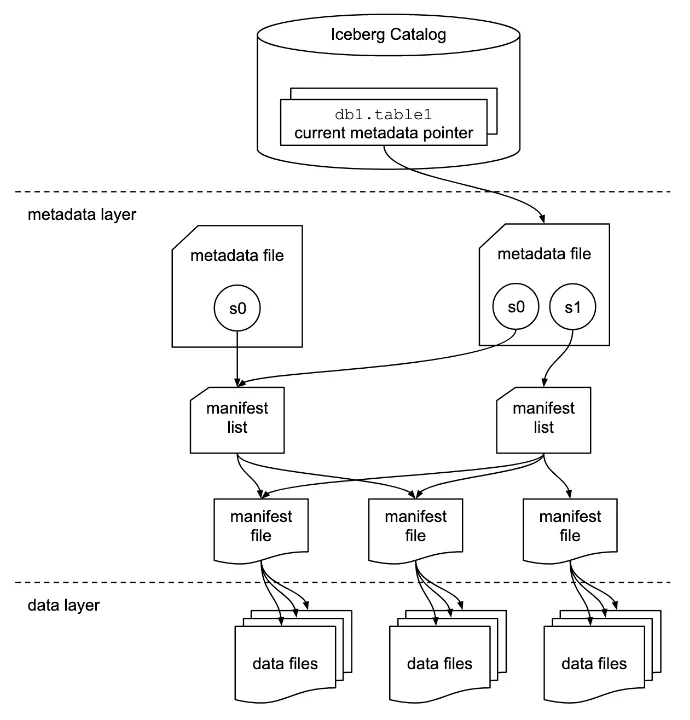
<p>The Iceberg architecture takes a fundamentally different approach—instead of tight integration, it achieves performance through open standards and intelligent metadata management. In our benchmark setup, <strong>OLake</strong> serves as the critical bridge between PostgreSQL and the Iceberg ecosystem.</p>
<p><img decoding="async" loading="lazy" alt="Iceberg Architecture" src="data:image/svg+xml;base64,PHN2ZyB2aWV3Qm94PSIwIDAgMTIwMCA3MDAiIHhtbG5zPSJodHRwOi8vd3d3LnczLm9yZy8yMDAwL3N2ZyI+CiAgPCEtLSBEZWZpbmUgZ3JhZGllbnRzIGFuZCBzdHlsZXMgLS0+CiAgPGRlZnM+CiAgICA8bGluZWFyR3JhZGllbnQgaWQ9InBvc3RncmVzR3JhZDIiIHgxPSIwJSIgeTE9IjAlIiB4Mj0iMCUiIHkyPSIxMDAlIj4KICAgICAgPHN0b3Agb2Zmc2V0PSIwJSIgc3R5bGU9InN0b3AtY29sb3I6IzMzNjc5MTtzdG9wLW9wYWNpdHk6MSIgLz4KICAgICAgPHN0b3Agb2Zmc2V0PSIxMDAlIiBzdHlsZT0ic3RvcC1jb2xvcjojMmQ1YTdiO3N0b3Atb3BhY2l0eToxIiAvPgogICAgPC9saW5lYXJHcmFkaWVudD4KICAgIDxsaW5lYXJHcmFkaWVudCBpZD0ib2xha2VHcmFkIiB4MT0iMCUiIHkxPSIwJSIgeDI9IjAlIiB5Mj0iMTAwJSI+CiAgICAgIDxzdG9wIG9mZnNldD0iMCUiIHN0eWxlPSJzdG9wLWNvbG9yOiMyOGE3NDU7c3RvcC1vcGFjaXR5OjEiIC8+CiAgICAgIDxzdG9wIG9mZnNldD0iMTAwJSIgc3R5bGU9InN0b3AtY29sb3I6IzIxODgzODtzdG9wLW9wYWNpdHk6MSIgLz4KICAgIDwvbGluZWFyR3JhZGllbnQ+CiAgICA8bGluZWFyR3JhZGllbnQgaWQ9ImljZWJlcmdHcmFkIiB4MT0iMCUiIHkxPSIwJSIgeDI9IjAlIiB5Mj0iMTAwJSI+CiAgICAgIDxzdG9wIG9mZnNldD0iMCUiIHN0eWxlPSJzdG9wLWNvbG9yOiMwMEE5RTA7c3RvcC1vcGFjaXR5OjEiIC8+CiAgICAgIDxzdG9wIG9mZnNldD0iMTAwJSIgc3R5bGU9InN0b3AtY29sb3I6IzAwODhiODtzdG9wLW9wYWNpdHk6MSIgLz4KICAgIDwvbGluZWFyR3JhZGllbnQ+CiAgICA8bGluZWFyR3JhZGllbnQgaWQ9ImVtckdyYWQiIHgxPSIwJSIgeTE9IjAlIiB4Mj0iMCUiIHkyPSIxMDAlIj4KICAgICAgPHN0b3Agb2Zmc2V0PSIwJSIgc3R5bGU9InN0b3AtY29sb3I6I0ZGOTkwMDtzdG9wLW9wYWNpdHk6MSIgLz4KICAgICAgPHN0b3Agb2Zmc2V0PSIxMDAlIiBzdHlsZT0ic3RvcC1jb2xvcjojZTY4YTAwO3N0b3Atb3BhY2l0eToxIiAvPgogICAgPC9saW5lYXJHcmFkaWVudD4KICAgIDxsaW5lYXJHcmFkaWVudCBpZD0iZWMyR3JhZCIgeDE9IjAlIiB5MT0iMCUiIHgyPSIwJSIgeTI9IjEwMCUiPgogICAgICA8c3RvcCBvZmZzZXQ9IjAlIiBzdHlsZT0ic3RvcC1jb2xvcjojNTI3RkZGO3N0b3Atb3BhY2l0eToxIiAvPgogICAgICA8c3RvcCBvZmZzZXQ9IjEwMCUiIHN0eWxlPSJzdG9wLWNvbG9yOiMzZDVmY2M7c3RvcC1vcGFjaXR5OjEiIC8+CiAgICA8L2xpbmVhckdyYWRpZW50PgogICAgPGZpbHRlciBpZD0ic2hhZG93MiI+CiAgICAgIDxmZURyb3BTaGFkb3cgZHg9IjAiIGR5PSIyIiBzdGREZXZpYXRpb249IjMiIGZsb29kLW9wYWNpdHk9IjAuMyIvPgogICAgPC9maWx0ZXI+CiAgPC9kZWZzPgogIAogIDwhLS0gQmFja2dyb3VuZCAtLT4KICA8cmVjdCB3aWR0aD0iMTIwMCIgaGVpZ2h0PSI3MDAiIGZpbGw9IiNmOGY5ZmEiLz4KICAKICA8IS0tIFRpdGxlIC0tPgogIDx0ZXh0IHg9IjYwMCIgeT0iNDAiIGZvbnQtZmFtaWx5PSJBcmlhbCwgc2Fucy1zZXJpZiIgZm9udC1zaXplPSIyOCIgZm9udC13ZWlnaHQ9ImJvbGQiIHRleHQtYW5jaG9yPSJtaWRkbGUiIGZpbGw9IiMxYTFhMWEiPgogICAgQXBhY2hlIEljZWJlcmcgQXJjaGl0ZWN0dXJlCiAgPC90ZXh0PgogIAogIDwhLS0gUG9zdGdyZVNRTCBTb3VyY2UgLS0+CiAgPGcgZmlsdGVyPSJ1cmwoI3NoYWRvdzIpIj4KICAgIDxyZWN0IHg9IjUwIiB5PSIxNTAiIHdpZHRoPSIyMDAiIGhlaWdodD0iMTIwIiByeD0iOCIgZmlsbD0idXJsKCNwb3N0Z3Jlc0dyYWQyKSIvPgogICAgPHRleHQgeD0iMTUwIiB5PSIxOTAiIGZvbnQtZmFtaWx5PSJBcmlhbCwgc2Fucy1zZXJpZiIgZm9udC1zaXplPSIxOCIgZm9udC13ZWlnaHQ9ImJvbGQiIHRleHQtYW5jaG9yPSJtaWRkbGUiIGZpbGw9IndoaXRlIj4KICAgICAgUG9zdGdyZVNRTAogICAgPC90ZXh0PgogICAgPHRleHQgeD0iMTUwIiB5PSIyMTUiIGZvbnQtZmFtaWx5PSJBcmlhbCwgc2Fucy1zZXJpZiIgZm9udC1zaXplPSIxNCIgdGV4dC1hbmNob3I9Im1pZGRsZSIgZmlsbD0iI2UwZTBlMCI+CiAgICAgIFNvdXJjZSBEYXRhYmFzZQogICAgPC90ZXh0PgogICAgPGNpcmNsZSBjeD0iMTUwIiBjeT0iMjQ1IiByPSIyMiIgZmlsbD0icmdiYSgyNTUsMjU1LDI1NSwwLjIpIi8+CiAgICA8cGF0aCBkPSJNIDE0MCAyNDUgTCAxNTAgMjM1IEwgMTYwIDI0NSBMIDE1MCAyNTUgWiIgZmlsbD0id2hpdGUiLz4KICA8L2c+CiAgCiAgPCEtLSBBcnJvdyAxOiBQb3N0Z3JlU1FMIHRvIE9MYWtlIC0tPgogIDxkZWZzPgogICAgPG1hcmtlciBpZD0iYXJyb3doZWFkMiIgbWFya2VyV2lkdGg9IjEwIiBtYXJrZXJIZWlnaHQ9IjEwIiByZWZYPSI5IiByZWZZPSIzIiBvcmllbnQ9ImF1dG8iPgogICAgICA8cG9seWdvbiBwb2ludHM9IjAgMCwgMTAgMywgMCA2IiBmaWxsPSIjNTU1Ii8+CiAgICA8L21hcmtlcj4KICA8L2RlZnM+CiAgPGxpbmUgeDE9IjI1MCIgeTE9IjIxMCIgeDI9IjM4MCIgeTI9IjIxMCIgc3Ryb2tlPSIjNTU1IiBzdHJva2Utd2lkdGg9IjMiIG1hcmtlci1lbmQ9InVybCgjYXJyb3doZWFkMikiLz4KICA8dGV4dCB4PSIzMTUiIHk9IjIwMCIgZm9udC1mYW1pbHk9IkFyaWFsLCBzYW5zLXNlcmlmIiBmb250LXNpemU9IjEzIiB0ZXh0LWFuY2hvcj0ibWlkZGxlIiBmaWxsPSIjMzMzIiBmb250LXdlaWdodD0iNjAwIj4KICAgIERhdGEgVHJhbnNmZXIKICA8L3RleHQ+CiAgCiAgPCEtLSBPTGFrZSBvbiBFQzIgLS0+CiAgPGcgZmlsdGVyPSJ1cmwoI3NoYWRvdzIpIj4KICAgIDxyZWN0IHg9IjM4MCIgeT0iMTMwIiB3aWR0aD0iMjQwIiBoZWlnaHQ9IjE4MCIgcng9IjgiIGZpbGw9InVybCgjZWMyR3JhZCkiLz4KICAgIDx0ZXh0IHg9IjUwMCIgeT0iMTY1IiBmb250LWZhbWlseT0iQXJpYWwsIHNhbnMtc2VyaWYiIGZvbnQtc2l6ZT0iMTgiIGZvbnQtd2VpZ2h0PSJib2xkIiB0ZXh0LWFuY2hvcj0ibWlkZGxlIiBmaWxsPSJ3aGl0ZSI+CiAgICAgIEFXUyBFQzIgSW5zdGFuY2UKICAgIDwvdGV4dD4KICAgIAogICAgPCEtLSBPTGFrZSBCb3ggLS0+CiAgICA8cmVjdCB4PSI0MTAiIHk9IjE4NSIgd2lkdGg9IjE4MCIgaGVpZ2h0PSIxMTUiIHJ4PSI2IiBmaWxsPSJ1cmwoI29sYWtlR3JhZCkiLz4KICAgIDx0ZXh0IHg9IjUwMCIgeT0iMjEwIiBmb250LWZhbWlseT0iQXJpYWwsIHNhbnMtc2VyaWYiIGZvbnQtc2l6ZT0iMTciIGZvbnQtd2VpZ2h0PSJib2xkIiB0ZXh0LWFuY2hvcj0ibWlkZGxlIiBmaWxsPSJ3aGl0ZSI+CiAgICAgIE9MYWtlCiAgICA8L3RleHQ+CiAgICA8dGV4dCB4PSI1MDAiIHk9IjIzMCIgZm9udC1mYW1pbHk9IkFyaWFsLCBzYW5zLXNlcmlmIiBmb250LXNpemU9IjEyIiB0ZXh0LWFuY2hvcj0ibWlkZGxlIiBmaWxsPSIjZTBlMGUwIj4KICAgICAgU2ltcGxlIFVJLWJhc2VkIHNldHVwCiAgICA8L3RleHQ+CiAgICA8dGV4dCB4PSI1MDAiIHk9IjI0NiIgZm9udC1mYW1pbHk9IkFyaWFsLCBzYW5zLXNlcmlmIiBmb250LXNpemU9IjEyIiB0ZXh0LWFuY2hvcj0ibWlkZGxlIiBmaWxsPSIjZTBlMGUwIj4KICAgICAgTm8gY29kZSBvcHRpbWl6YXRpb24gbmVlZGVkCiAgICA8L3RleHQ+CiAgICA8cmVjdCB4PSI0MzAiIHk9IjI2MCIgd2lkdGg9IjE0MCIgaGVpZ2h0PSIzMCIgcng9IjQiIGZpbGw9InJnYmEoMjU1LDI1NSwyNTUsMC4yKSIvPgogICAgPHRleHQgeD0iNTAwIiB5PSIyODAiIGZvbnQtZmFtaWx5PSJBcmlhbCwgc2Fucy1zZXJpZiIgZm9udC1zaXplPSIxMiIgdGV4dC1hbmNob3I9Im1pZGRsZSIgZmlsbD0id2hpdGUiPgogICAgICAzMiB2Q1BVIHwgMTI4IEdCIFJBTQogICAgPC90ZXh0PgogIDwvZz4KICAKICA8IS0tIEFycm93IDI6IE9MYWtlIHRvIEljZWJlcmcgLS0+CiAgPGxpbmUgeDE9IjYyMCIgeTE9IjIyMCIgeDI9Ijc1MCIgeTI9IjIyMCIgc3Ryb2tlPSIjNTU1IiBzdHJva2Utd2lkdGg9IjMiIG1hcmtlci1lbmQ9InVybCgjYXJyb3doZWFkMikiLz4KICA8dGV4dCB4PSI2ODUiIHk9IjIxMCIgZm9udC1mYW1pbHk9IkFyaWFsLCBzYW5zLXNlcmlmIiBmb250LXNpemU9IjEzIiB0ZXh0LWFuY2hvcj0ibWlkZGxlIiBmaWxsPSIjMzMzIiBmb250LXdlaWdodD0iNjAwIj4KICAgIEluZ2VzdAogIDwvdGV4dD4KICAKICA8IS0tIEljZWJlcmcgVGFibGVzIC0tPgogIDxnIGZpbHRlcj0idXJsKCNzaGFkb3cyKSI+CiAgICA8cmVjdCB4PSI3NTAiIHk9IjE1MCIgd2lkdGg9IjIwMCIgaGVpZ2h0PSIxNDAiIHJ4PSI4IiBmaWxsPSJ1cmwoI2ljZWJlcmdHcmFkKSIvPgogICAgPHRleHQgeD0iODUwIiB5PSIxODUiIGZvbnQtZmFtaWx5PSJBcmlhbCwgc2Fucy1zZXJpZiIgZm9udC1zaXplPSIxOCIgZm9udC13ZWlnaHQ9ImJvbGQiIHRleHQtYW5jaG9yPSJtaWRkbGUiIGZpbGw9IndoaXRlIj4KICAgICAgQXBhY2hlIEljZWJlcmcKICAgIDwvdGV4dD4KICAgIDx0ZXh0IHg9Ijg1MCIgeT0iMjA3IiBmb250LWZhbWlseT0iQXJpYWwsIHNhbnMtc2VyaWYiIGZvbnQtc2l6ZT0iMTQiIHRleHQtYW5jaG9yPSJtaWRkbGUiIGZpbGw9IiNlMGUwZTAiPgogICAgICBUYWJsZSBGb3JtYXQKICAgIDwvdGV4dD4KICAgIAogICAgPCEtLSBBV1MgR2x1ZSBDYXRhbG9nIGJveCBpbnNpZGUgLS0+CiAgICA8cmVjdCB4PSI3NzAiIHk9IjIyMCIgd2lkdGg9IjE2MCIgaGVpZ2h0PSIzNSIgcng9IjQiIGZpbGw9InJnYmEoMjU1LDI1NSwyNTUsMC4yKSIgc3Ryb2tlPSJyZ2JhKDI1NSwyNTUsMjU1LDAuMykiIHN0cm9rZS13aWR0aD0iMSIvPgogICAgPHRleHQgeD0iODUwIiB5PSIyNDIiIGZvbnQtZmFtaWx5PSJBcmlhbCwgc2Fucy1zZXJpZiIgZm9udC1zaXplPSIxMyIgdGV4dC1hbmNob3I9Im1pZGRsZSIgZmlsbD0id2hpdGUiPgogICAgICBBV1MgR2x1ZSBDYXRhbG9nCiAgICA8L3RleHQ+CiAgICAKICAgIDwhLS0gSWNlYmVyZyBpY29uIHJlcHJlc2VudGF0aW9uIC0tPgogICAgPGcgdHJhbnNmb3JtPSJ0cmFuc2xhdGUoODE1LCAyNjApIj4KICAgICAgPHBhdGggZD0iTSAzNSAwIEwgNDUgMjAgTCAyNSAyMCBaIiBmaWxsPSJyZ2JhKDI1NSwyNTUsMjU1LDAuMykiLz4KICAgICAgPHJlY3QgeD0iMjAiIHk9IjIwIiB3aWR0aD0iMzAiIGhlaWdodD0iMyIgcng9IjEiIGZpbGw9InJnYmEoMjU1LDI1NSwyNTUsMC4yKSIvPgogICAgPC9nPgogIDwvZz4KICAKICA8IS0tIEFycm93IDM6IEljZWJlcmcgdG8gRU1SIC0tPgogIDxwYXRoIGQ9Ik0gODUwIDI5MCBMIDg1MCAzODAiIHN0cm9rZT0iIzU1NSIgc3Ryb2tlLXdpZHRoPSIzIiBtYXJrZXItZW5kPSJ1cmwoI2Fycm93aGVhZDIpIi8+CiAgPHRleHQgeD0iODgwIiB5PSIzNDAiIGZvbnQtZmFtaWx5PSJBcmlhbCwgc2Fucy1zZXJpZiIgZm9udC1zaXplPSIxMyIgZmlsbD0iIzMzMyIgZm9udC13ZWlnaHQ9IjYwMCI+CiAgICBRdWVyeQogIDwvdGV4dD4KICAKICA8IS0tIEFXUyBFTVIgQ2x1c3RlciBTZWN0aW9uIC0tPgogIDxnIGZpbHRlcj0idXJsKCNzaGFkb3cyKSI+CiAgICA8cmVjdCB4PSI2NDAiIHk9IjM4MCIgd2lkdGg9IjQyMCIgaGVpZ2h0PSIyOTAiIHJ4PSI4IiBmaWxsPSJ1cmwoI2VtckdyYWQpIi8+CiAgICA8dGV4dCB4PSI4NTAiIHk9IjQyMCIgZm9udC1mYW1pbHk9IkFyaWFsLCBzYW5zLXNlcmlmIiBmb250LXNpemU9IjIwIiBmb250LXdlaWdodD0iYm9sZCIgdGV4dC1hbmNob3I9Im1pZGRsZSIgZmlsbD0id2hpdGUiPgogICAgICBBV1MgRU1SIC0gVFBDLUggUXVlcnkgQ2x1c3RlcgogICAgPC90ZXh0PgogICAgCiAgICA8IS0tIE1hc3RlciBOb2RlIC0tPgogICAgPHJlY3QgeD0iNjgwIiB5PSI0NDUiIHdpZHRoPSIzNDAiIGhlaWdodD0iOTUiIHJ4PSI2IiBmaWxsPSJyZ2JhKDI1NSwyNTUsMjU1LDAuMjUpIiBzdHJva2U9InJnYmEoMjU1LDI1NSwyNTUsMC41KSIgc3Ryb2tlLXdpZHRoPSIyIi8+CiAgICA8dGV4dCB4PSI4NTAiIHk9IjQ3NSIgZm9udC1mYW1pbHk9IkFyaWFsLCBzYW5zLXNlcmlmIiBmb250LXNpemU9IjE2IiBmb250LXdlaWdodD0iYm9sZCIgdGV4dC1hbmNob3I9Im1pZGRsZSIgZmlsbD0iIzFhMWExYSI+CiAgICAgIE1hc3RlciBOb2RlCiAgICA8L3RleHQ+CiAgICA8dGV4dCB4PSI4NTAiIHk9IjQ5OSIgZm9udC1mYW1pbHk9IkFyaWFsLCBzYW5zLXNlcmlmIiBmb250LXNpemU9IjE0IiB0ZXh0LWFuY2hvcj0ibWlkZGxlIiBmaWxsPSIjMmQyZDJkIj4KICAgICAgbTZnLjh4bGFyZ2UKICAgIDwvdGV4dD4KICAgIDx0ZXh0IHg9Ijg1MCIgeT0iNTIxIiBmb250LWZhbWlseT0iQXJpYWwsIHNhbnMtc2VyaWYiIGZvbnQtc2l6ZT0iMTMiIHRleHQtYW5jaG9yPSJtaWRkbGUiIGZpbGw9IiMyZDJkMmQiPgogICAgICAzMiB2Q1BVIHwgMTI4IEdCIFJBTQogICAgPC90ZXh0PgogICAgCiAgICA8IS0tIFdvcmtlciBOb2RlcyAtLT4KICAgIDxyZWN0IHg9IjY4MCIgeT0iNTYwIiB3aWR0aD0iMzQwIiBoZWlnaHQ9Ijk1IiByeD0iNiIgZmlsbD0icmdiYSgyNTUsMjU1LDI1NSwwLjI1KSIgc3Ryb2tlPSJyZ2JhKDI1NSwyNTUsMjU1LDAuNSkiIHN0cm9rZS13aWR0aD0iMiIvPgogICAgPHRleHQgeD0iODUwIiB5PSI1OTAiIGZvbnQtZmFtaWx5PSJBcmlhbCwgc2Fucy1zZXJpZiIgZm9udC1zaXplPSIxNiIgZm9udC13ZWlnaHQ9ImJvbGQiIHRleHQtYW5jaG9yPSJtaWRkbGUiIGZpbGw9IiMxYTFhMWEiPgogICAgICBXb3JrZXIgTm9kZXMgKEF1dG8tc2NhbGluZykKICAgIDwvdGV4dD4KICAgIDx0ZXh0IHg9Ijg1MCIgeT0iNjE0IiBmb250LWZhbWlseT0iQXJpYWwsIHNhbnMtc2VyaWYiIGZvbnQtc2l6ZT0iMTQiIHRleHQtYW5jaG9yPSJtaWRkbGUiIGZpbGw9IiMyZDJkMmQiPgogICAgICAxLTMgw5cgbTZnLjR4bGFyZ2UKICAgIDwvdGV4dD4KICAgIDx0ZXh0IHg9Ijg1MCIgeT0iNjM2IiBmb250LWZhbWlseT0iQXJpYWwsIHNhbnMtc2VyaWYiIGZvbnQtc2l6ZT0iMTMiIHRleHQtYW5jaG9yPSJtaWRkbGUiIGZpbGw9IiMyZDJkMmQiPgogICAgICAxNiB2Q1BVIHwgNjQgR0IgUkFNIGVhY2gKICAgIDwvdGV4dD4KICA8L2c+CiAgCgo8L3N2Zz4=" width="1200" height="700" class="img_CujE"></p>
<p><strong>Stage 1: OLake-Powered Data Ingestion</strong></p>
<p>The journey begins with OLake as the data movement engine. OLake isn't just another EL tool—it's specifically designed for high-performance data lake ingestion with Iceberg optimization.</p>
<p><strong>Stage 2: Iceberg Table Creation and Optimization</strong></p>
<p>This is where Iceberg’s design efficiency comes into play. As data lands in Iceberg tables, it automatically maintains metadata and organizes files into an optimized layout, pruning unnecessary reads and ensuring consistent query performance without manual tuning.</p>
<p><strong>Stage 3: AWS Glue Catalog Integration</strong></p>
<p>The AWS Glue Catalog acts as a universal metadata layer, enabling seamless table discovery and interoperability for our query engine Spark.</p>
<p><strong>Stage 4: Spark Query Execution</strong></p>
<p>While Iceberg supports seamless query access from multiple engines such as Trino, Flink, and Spark, for an apples-to-apples comparison with Databricks, we used <strong>Spark on AWS EMR</strong> as the query layer. The setup leveraged adaptive query execution (AQE), skew join handling, and partition coalescing for runtime optimization.</p>
<h2 class="anchor anchorTargetStickyNavbar_Vzrq" id="chapter-3-the-benchmark-design">Chapter 3: The Benchmark Design<a href="https://olake.io/iceberg/databricks-vs-iceberg/#chapter-3-the-benchmark-design" class="hash-link" aria-label="Direct link to Chapter 3: The Benchmark Design" title="Direct link to Chapter 3: The Benchmark Design" translate="no">​</a></h2>
<p>Benchmarks only matter if they look like real work. We used the industry‑standard TPC‑H suite at the 1TB scale—about <strong>8.66B rows</strong> spread across 8 tables—and ran all 22 queries sequentially on both platforms.</p>
<ul>
<li class=""><strong>What we ran:</strong> The exact 22 TPC‑H queries, unmodified.</li>
<li class=""><strong>How we ran them:</strong> Same dataset, same scale, same order, measured to the second.</li>
<li class=""><strong>Why it’s fair:</strong> Identical source data and equivalent cluster profiles on each side.</li>
</ul>
<p>What TPC‑H actually stresses:</p>
<ul>
<li class="">Multi‑table joins and planning under skew</li>
<li class="">Predicate/partition pruning and scan efficiency</li>
<li class="">Heavy aggregations, group‑bys, and rollups</li>
<li class="">Subqueries, EXISTS/NOT EXISTS patterns, and selective filters</li>
<li class="">Ordered outputs, top‑N, and window‑style workloads</li>
</ul>
<p>Why this design matters:</p>
<ul>
<li class="">It captures the mix of quick lookups and long, complex reports most teams run daily.</li>
<li class="">It reveals not just raw speed, but how each system prunes, caches, joins, and schedules work under pressure.</li>
</ul>
<h2 class="anchor anchorTargetStickyNavbar_Vzrq" id="chapter-4-the-battle-begins">Chapter 4: The Battle Begins<a href="https://olake.io/iceberg/databricks-vs-iceberg/#chapter-4-the-battle-begins" class="hash-link" aria-label="Direct link to Chapter 4: The Battle Begins" title="Direct link to Chapter 4: The Battle Begins" translate="no">​</a></h2>
<h3 class="anchor anchorTargetStickyNavbar_Vzrq" id="a-the-battlefield-setup">A. The Battlefield Setup<a href="https://olake.io/iceberg/databricks-vs-iceberg/#a-the-battlefield-setup" class="hash-link" aria-label="Direct link to A. The Battlefield Setup" title="Direct link to A. The Battlefield Setup" translate="no">​</a></h3>
<p>To ensure a true <strong>apples‑to‑apples</strong> comparison, both environments were provisioned with equivalent resources, identical connector parameters, and their recommended destination‑side optimizations.</p>
<div class="theme-tabs-container tabs-container tabList__CuJ"><ul role="tablist" aria-orientation="horizontal" class="tabs"><li role="tab" tabindex="0" aria-selected="true" class="tabs__item tabItem_LNqP tabs__item--active">Source and Compute configurations</li><li role="tab" tabindex="-1" aria-selected="false" class="tabs__item tabItem_LNqP">Data Ingestion configuration</li><li role="tab" tabindex="-1" aria-selected="false" class="tabs__item tabItem_LNqP">Query Execution configuration</li></ul><div class="margin-top--md"><div role="tabpanel" class="tabItem_Ymn6"><table><thead><tr><th><strong>Component</strong></th><th><strong>Deatils</strong></th></tr></thead><tbody><tr><td>Source</td><td>Azure PostgrSQL</td></tr><tr><td>Compute</td><td>32 vCPU, 128GB RAM</td></tr></tbody></table></div><div role="tabpanel" class="tabItem_Ymn6" hidden=""><table><thead><tr><th><strong>Environment</strong></th><th><strong>Deatils</strong></th></tr></thead><tbody><tr><td>Databricks</td><td>n2-standard-32 (32 vCPU, 128 GB RAM)</td></tr><tr><td>OLake</td><td>Standard_D32s_v6 (32 vCPU, 64 GB RAM)</td></tr></tbody></table></div><div role="tabpanel" class="tabItem_Ymn6" hidden=""><table><thead><tr><th><strong>Environment</strong></th><th><strong>Deatils</strong></th></tr></thead><tbody><tr><td>Databricks</td><td>- Master node: n2-standard-32 (32 vCPU, 128 GB RAM)<br> - Worker nodes: 1-3x n2-standard-16 (16 vCPU, 64 GB RAM)</td></tr><tr><td>Iceberg</td><td>- Master node: m6g.8xlarge (32 vCPU, 128 GB RAM)<br> - Core nodes: 1-3x m6g.4xlarge (16 vCPU, 64 GB RAM)</td></tr></tbody></table></div></div></div>
<!-- -->
<h3 class="anchor anchorTargetStickyNavbar_Vzrq" id="b-data-transfer">B. Data Transfer<a href="https://olake.io/iceberg/databricks-vs-iceberg/#b-data-transfer" class="hash-link" aria-label="Direct link to B. Data Transfer" title="Direct link to B. Data Transfer" translate="no">​</a></h3>
<p>Before we can benchmark query performance, we need to get our 1TB of TPC-H data into both systems efficiently.</p>
<p>Moving 8.66 billion rows from PostgreSQL to analytical platforms isn't trivial. Traditional ETL tools often struggle with this scale, creating bottlenecks that can take hours or even days to resolve. The performance of data ingestion directly impacts how fresh your analytical insights can be—a critical factor in today's real-time business environment.</p>
<p><strong>1. Databricks (Using JDBC)</strong></p>
<p>For our Databricks implementation, we used a straightforward approach that prioritizes reliability over maximum throughput. This conservative strategy reflects real-world production constraints where stability often takes precedence over raw speed.</p>
<p><strong>Our Implementation Approach:</strong></p>
<ul>
<li class="">
<p><strong>Single JDBC Connection:</strong> One dedicated connection stream to prevent overwhelming the PostgreSQL source</p>
</li>
<li class="">
<p><strong>Fixed Batch Size:</strong> Consistent 200,000-row batches was chosen as optimal batch size to maintain memory usage after testing on different batch sizes.</p>
</li>
<li class="">
<p><strong>Single Write Operations:</strong> Each batch written individually to Delta Lake, ensuring transaction integrity</p>
</li>
<li class="">
<p><strong>Sequential Processing:</strong> Linear data flow from source to destination without complex parallelization</p>
</li>
</ul>
<div class="theme-admonition theme-admonition-tip admonition_xJq3 alert alert--success"><div class="admonitionHeading_Gvgb"><span class="admonitionIcon_Rf37"><svg viewBox="0 0 12 16"><path fill-rule="evenodd" d="M6.5 0C3.48 0 1 2.19 1 5c0 .92.55 2.25 1 3 1.34 2.25 1.78 2.78 2 4v1h5v-1c.22-1.22.66-1.75 2-4 .45-.75 1-2.08 1-3 0-2.81-2.48-5-5.5-5zm3.64 7.48c-.25.44-.47.8-.67 1.11-.86 1.41-1.25 2.06-1.45 3.23-.02.05-.02.11-.02.17H5c0-.06 0-.13-.02-.17-.2-1.17-.59-1.83-1.45-3.23-.2-.31-.42-.67-.67-1.11C2.44 6.78 2 5.65 2 5c0-2.2 2.02-4 4.5-4 1.22 0 2.36.42 3.22 1.19C10.55 2.94 11 3.94 11 5c0 .66-.44 1.78-.86 2.48zM4 14h5c-.23 1.14-1.3 2-2.5 2s-2.27-.86-2.5-2z"></path></svg></span>Note</div><div class="admonitionContent_BuS1"><p>We enabled <strong>Delta’s Auto Optimize and Auto Compactio</strong>n features to automatically merge small files and improve write performance without manual intervention.</p></div></div>
<p><strong>Code used for the data transfer:</strong></p>
<details class="details_lb9f alert alert--info details_b_Ee" data-collapsed="true"><summary>Show ETL code (PostgreSQL → Databricks Delta)</summary><div><div class="collapsibleContent_i85q"><div class="language-python codeBlockContainer_Ckt0 theme-code-block" style="--prism-color:#bfc7d5;--prism-background-color:#292d3e"><div class="codeBlockContent_QJqH"><pre tabindex="0" class="prism-code language-python codeBlock_bY9V thin-scrollbar" style="color:#bfc7d5;background-color:#292d3e"><code class="codeBlockLines_e6Vv"><span class="token-line" style="color:#bfc7d5"><span class="token keyword" style="font-style:italic">import</span><span class="token plain"> time</span><span class="token punctuation" style="color:rgb(199, 146, 234)">,</span><span class="token plain"> json</span><span class="token punctuation" style="color:rgb(199, 146, 234)">,</span><span class="token plain"> traceback</span><br></span><span class="token-line" style="color:#bfc7d5"><span class="token plain"></span><span class="token keyword" style="font-style:italic">from</span><span class="token plain"> pyspark</span><span class="token punctuation" style="color:rgb(199, 146, 234)">.</span><span class="token plain">sql </span><span class="token keyword" style="font-style:italic">import</span><span class="token plain"> SparkSession</span><br></span><span class="token-line" style="color:#bfc7d5"><span class="token plain" style="display:inline-block"></span><br></span><span class="token-line" style="color:#bfc7d5"><span class="token plain">spark </span><span class="token operator" style="color:rgb(137, 221, 255)">=</span><span class="token plain"> SparkSession</span><span class="token punctuation" style="color:rgb(199, 146, 234)">.</span><span class="token plain">builder</span><span class="token punctuation" style="color:rgb(199, 146, 234)">.</span><span class="token plain">getOrCreate</span><span class="token punctuation" style="color:rgb(199, 146, 234)">(</span><span class="token punctuation" style="color:rgb(199, 146, 234)">)</span><span class="token plain"></span><br></span><span class="token-line" style="color:#bfc7d5"><span class="token plain" style="display:inline-block"></span><br></span><span class="token-line" style="color:#bfc7d5"><span class="token plain"></span><span class="token comment" style="color:rgb(105, 112, 152);font-style:italic"># Keep it minimal</span><span class="token plain"></span><br></span><span class="token-line" style="color:#bfc7d5"><span class="token plain">spark</span><span class="token punctuation" style="color:rgb(199, 146, 234)">.</span><span class="token plain">conf</span><span class="token punctuation" style="color:rgb(199, 146, 234)">.</span><span class="token builtin" style="color:rgb(130, 170, 255)">set</span><span class="token punctuation" style="color:rgb(199, 146, 234)">(</span><span class="token string" style="color:rgb(195, 232, 141)">"spark.sql.adaptive.enabled"</span><span class="token punctuation" style="color:rgb(199, 146, 234)">,</span><span class="token plain"> </span><span class="token string" style="color:rgb(195, 232, 141)">"true"</span><span class="token punctuation" style="color:rgb(199, 146, 234)">)</span><span class="token plain"></span><br></span><span class="token-line" style="color:#bfc7d5"><span class="token plain" style="display:inline-block"></span><br></span><span class="token-line" style="color:#bfc7d5"><span class="token plain"></span><span class="token comment" style="color:rgb(105, 112, 152);font-style:italic"># -------- Conn --------</span><span class="token plain"></span><br></span><span class="token-line" style="color:#bfc7d5"><span class="token plain">host     </span><span class="token operator" style="color:rgb(137, 221, 255)">=</span><span class="token plain"> </span><span class="token string" style="color:rgb(195, 232, 141)">"dz-olake-benchmark-postgres.postgres.database.azure.com"</span><span class="token plain"></span><br></span><span class="token-line" style="color:#bfc7d5"><span class="token plain">port     </span><span class="token operator" style="color:rgb(137, 221, 255)">=</span><span class="token plain"> </span><span class="token string" style="color:rgb(195, 232, 141)">"5432"</span><span class="token plain"></span><br></span><span class="token-line" style="color:#bfc7d5"><span class="token plain">database </span><span class="token operator" style="color:rgb(137, 221, 255)">=</span><span class="token plain"> </span><span class="token string" style="color:rgb(195, 232, 141)">"database_name"</span><span class="token plain"></span><br></span><span class="token-line" style="color:#bfc7d5"><span class="token plain">user     </span><span class="token operator" style="color:rgb(137, 221, 255)">=</span><span class="token plain"> </span><span class="token string" style="color:rgb(195, 232, 141)">"postgres_username"</span><span class="token plain"></span><br></span><span class="token-line" style="color:#bfc7d5"><span class="token plain">password </span><span class="token operator" style="color:rgb(137, 221, 255)">=</span><span class="token plain"> </span><span class="token string" style="color:rgb(195, 232, 141)">"password"</span><span class="token plain">  </span><span class="token comment" style="color:rgb(105, 112, 152);font-style:italic"># e.g., dbutils.secrets.get("scope","key")</span><span class="token plain"></span><br></span><span class="token-line" style="color:#bfc7d5"><span class="token plain" style="display:inline-block"></span><br></span><span class="token-line" style="color:#bfc7d5"><span class="token plain">jdbc_url </span><span class="token operator" style="color:rgb(137, 221, 255)">=</span><span class="token plain"> </span><span class="token punctuation" style="color:rgb(199, 146, 234)">(</span><span class="token plain"></span><br></span><span class="token-line" style="color:#bfc7d5"><span class="token plain">    </span><span class="token string-interpolation string" style="color:rgb(195, 232, 141)">f"jdbc:postgresql://</span><span class="token string-interpolation interpolation punctuation" style="color:rgb(199, 146, 234)">{</span><span class="token string-interpolation interpolation">host</span><span class="token string-interpolation interpolation punctuation" style="color:rgb(199, 146, 234)">}</span><span class="token string-interpolation string" style="color:rgb(195, 232, 141)">:</span><span class="token string-interpolation interpolation punctuation" style="color:rgb(199, 146, 234)">{</span><span class="token string-interpolation interpolation">port</span><span class="token string-interpolation interpolation punctuation" style="color:rgb(199, 146, 234)">}</span><span class="token string-interpolation string" style="color:rgb(195, 232, 141)">/</span><span class="token string-interpolation interpolation punctuation" style="color:rgb(199, 146, 234)">{</span><span class="token string-interpolation interpolation">database</span><span class="token string-interpolation interpolation punctuation" style="color:rgb(199, 146, 234)">}</span><span class="token string-interpolation string" style="color:rgb(195, 232, 141)">"</span><span class="token plain"></span><br></span><span class="token-line" style="color:#bfc7d5"><span class="token plain">    </span><span class="token string" style="color:rgb(195, 232, 141)">"?sslmode=require&amp;connectTimeout=30&amp;socketTimeout=28800&amp;queryTimeout=27000"</span><span class="token plain"></span><br></span><span class="token-line" style="color:#bfc7d5"><span class="token plain">    </span><span class="token string" style="color:rgb(195, 232, 141)">"&amp;tcpKeepAlive=true&amp;keepalives_idle=120&amp;keepalives_interval=30&amp;keepalives_count=5"</span><span class="token plain"></span><br></span><span class="token-line" style="color:#bfc7d5"><span class="token plain"></span><span class="token punctuation" style="color:rgb(199, 146, 234)">)</span><span class="token plain"></span><br></span><span class="token-line" style="color:#bfc7d5"><span class="token plain" style="display:inline-block"></span><br></span><span class="token-line" style="color:#bfc7d5"><span class="token plain">JDBC_PROPS </span><span class="token operator" style="color:rgb(137, 221, 255)">=</span><span class="token plain"> </span><span class="token punctuation" style="color:rgb(199, 146, 234)">{</span><span class="token plain"></span><br></span><span class="token-line" style="color:#bfc7d5"><span class="token plain">  </span><span class="token string" style="color:rgb(195, 232, 141)">"driver"</span><span class="token punctuation" style="color:rgb(199, 146, 234)">:</span><span class="token plain"> </span><span class="token string" style="color:rgb(195, 232, 141)">"org.postgresql.Driver"</span><span class="token punctuation" style="color:rgb(199, 146, 234)">,</span><span class="token plain"></span><br></span><span class="token-line" style="color:#bfc7d5"><span class="token plain">  </span><span class="token string" style="color:rgb(195, 232, 141)">"user"</span><span class="token punctuation" style="color:rgb(199, 146, 234)">:</span><span class="token plain"> user</span><span class="token punctuation" style="color:rgb(199, 146, 234)">,</span><span class="token plain"></span><br></span><span class="token-line" style="color:#bfc7d5"><span class="token plain">  </span><span class="token string" style="color:rgb(195, 232, 141)">"password"</span><span class="token punctuation" style="color:rgb(199, 146, 234)">:</span><span class="token plain"> password</span><span class="token punctuation" style="color:rgb(199, 146, 234)">,</span><span class="token plain"></span><br></span><span class="token-line" style="color:#bfc7d5"><span class="token plain">  </span><span class="token string" style="color:rgb(195, 232, 141)">"fetchsize"</span><span class="token punctuation" style="color:rgb(199, 146, 234)">:</span><span class="token plain"> </span><span class="token string" style="color:rgb(195, 232, 141)">"200000"</span><span class="token plain">   </span><span class="token comment" style="color:rgb(105, 112, 152);font-style:italic"># single-stream batches</span><span class="token plain"></span><br></span><span class="token-line" style="color:#bfc7d5"><span class="token plain"></span><span class="token punctuation" style="color:rgb(199, 146, 234)">}</span><span class="token plain"></span><br></span><span class="token-line" style="color:#bfc7d5"><span class="token plain" style="display:inline-block"></span><br></span><span class="token-line" style="color:#bfc7d5"><span class="token plain">SRC_SCHEMA </span><span class="token operator" style="color:rgb(137, 221, 255)">=</span><span class="token plain"> </span><span class="token string" style="color:rgb(195, 232, 141)">"tpch"</span><span class="token plain"></span><br></span><span class="token-line" style="color:#bfc7d5"><span class="token plain">TARGET_SCHEMA </span><span class="token operator" style="color:rgb(137, 221, 255)">=</span><span class="token plain"> </span><span class="token string" style="color:rgb(195, 232, 141)">"datazip.testing3"</span><span class="token plain">   </span><span class="token comment" style="color:rgb(105, 112, 152);font-style:italic"># adjust if needed</span><span class="token plain"></span><br></span><span class="token-line" style="color:#bfc7d5"><span class="token plain">TABLES </span><span class="token operator" style="color:rgb(137, 221, 255)">=</span><span class="token plain"> </span><span class="token punctuation" style="color:rgb(199, 146, 234)">[</span><span class="token string" style="color:rgb(195, 232, 141)">'lineitem'</span><span class="token punctuation" style="color:rgb(199, 146, 234)">,</span><span class="token string" style="color:rgb(195, 232, 141)">'orders'</span><span class="token punctuation" style="color:rgb(199, 146, 234)">,</span><span class="token string" style="color:rgb(195, 232, 141)">'partsupp'</span><span class="token punctuation" style="color:rgb(199, 146, 234)">,</span><span class="token string" style="color:rgb(195, 232, 141)">'customer'</span><span class="token punctuation" style="color:rgb(199, 146, 234)">,</span><span class="token string" style="color:rgb(195, 232, 141)">'part'</span><span class="token punctuation" style="color:rgb(199, 146, 234)">,</span><span class="token string" style="color:rgb(195, 232, 141)">'supplier'</span><span class="token punctuation" style="color:rgb(199, 146, 234)">,</span><span class="token string" style="color:rgb(195, 232, 141)">'nation'</span><span class="token punctuation" style="color:rgb(199, 146, 234)">,</span><span class="token string" style="color:rgb(195, 232, 141)">'region'</span><span class="token punctuation" style="color:rgb(199, 146, 234)">]</span><span class="token plain"></span><br></span><span class="token-line" style="color:#bfc7d5"><span class="token plain" style="display:inline-block"></span><br></span><span class="token-line" style="color:#bfc7d5"><span class="token plain"></span><span class="token keyword" style="font-style:italic">def</span><span class="token plain"> </span><span class="token function" style="color:rgb(130, 170, 255)">log</span><span class="token punctuation" style="color:rgb(199, 146, 234)">(</span><span class="token plain">msg</span><span class="token punctuation" style="color:rgb(199, 146, 234)">)</span><span class="token punctuation" style="color:rgb(199, 146, 234)">:</span><span class="token plain"></span><br></span><span class="token-line" style="color:#bfc7d5"><span class="token plain">    ts </span><span class="token operator" style="color:rgb(137, 221, 255)">=</span><span class="token plain"> time</span><span class="token punctuation" style="color:rgb(199, 146, 234)">.</span><span class="token plain">strftime</span><span class="token punctuation" style="color:rgb(199, 146, 234)">(</span><span class="token string" style="color:rgb(195, 232, 141)">"%Y-%m-%d %H:%M:%S"</span><span class="token punctuation" style="color:rgb(199, 146, 234)">)</span><span class="token plain"></span><br></span><span class="token-line" style="color:#bfc7d5"><span class="token plain">    </span><span class="token keyword" style="font-style:italic">print</span><span class="token punctuation" style="color:rgb(199, 146, 234)">(</span><span class="token string-interpolation string" style="color:rgb(195, 232, 141)">f"[</span><span class="token string-interpolation interpolation punctuation" style="color:rgb(199, 146, 234)">{</span><span class="token string-interpolation interpolation">ts</span><span class="token string-interpolation interpolation punctuation" style="color:rgb(199, 146, 234)">}</span><span class="token string-interpolation string" style="color:rgb(195, 232, 141)">] </span><span class="token string-interpolation interpolation punctuation" style="color:rgb(199, 146, 234)">{</span><span class="token string-interpolation interpolation">msg</span><span class="token string-interpolation interpolation punctuation" style="color:rgb(199, 146, 234)">}</span><span class="token string-interpolation string" style="color:rgb(195, 232, 141)">"</span><span class="token punctuation" style="color:rgb(199, 146, 234)">,</span><span class="token plain"> flush</span><span class="token operator" style="color:rgb(137, 221, 255)">=</span><span class="token boolean" style="color:rgb(255, 88, 116)">True</span><span class="token punctuation" style="color:rgb(199, 146, 234)">)</span><span class="token plain"></span><br></span><span class="token-line" style="color:#bfc7d5"><span class="token plain" style="display:inline-block"></span><br></span><span class="token-line" style="color:#bfc7d5"><span class="token plain"></span><span class="token keyword" style="font-style:italic">def</span><span class="token plain"> </span><span class="token function" style="color:rgb(130, 170, 255)">rows_bytes_from_history</span><span class="token punctuation" style="color:rgb(199, 146, 234)">(</span><span class="token plain">fq</span><span class="token punctuation" style="color:rgb(199, 146, 234)">)</span><span class="token punctuation" style="color:rgb(199, 146, 234)">:</span><span class="token plain"></span><br></span><span class="token-line" style="color:#bfc7d5"><span class="token plain">    </span><span class="token keyword" style="font-style:italic">try</span><span class="token punctuation" style="color:rgb(199, 146, 234)">:</span><span class="token plain"></span><br></span><span class="token-line" style="color:#bfc7d5"><span class="token plain">        h </span><span class="token operator" style="color:rgb(137, 221, 255)">=</span><span class="token plain"> </span><span class="token punctuation" style="color:rgb(199, 146, 234)">(</span><span class="token plain">spark</span><span class="token punctuation" style="color:rgb(199, 146, 234)">.</span><span class="token plain">sql</span><span class="token punctuation" style="color:rgb(199, 146, 234)">(</span><span class="token string-interpolation string" style="color:rgb(195, 232, 141)">f"DESCRIBE HISTORY </span><span class="token string-interpolation interpolation punctuation" style="color:rgb(199, 146, 234)">{</span><span class="token string-interpolation interpolation">fq</span><span class="token string-interpolation interpolation punctuation" style="color:rgb(199, 146, 234)">}</span><span class="token string-interpolation string" style="color:rgb(195, 232, 141)">"</span><span class="token punctuation" style="color:rgb(199, 146, 234)">)</span><span class="token plain"></span><br></span><span class="token-line" style="color:#bfc7d5"><span class="token plain">               </span><span class="token punctuation" style="color:rgb(199, 146, 234)">.</span><span class="token plain">where</span><span class="token punctuation" style="color:rgb(199, 146, 234)">(</span><span class="token string" style="color:rgb(195, 232, 141)">"operation in ('WRITE','MERGE','CREATE TABLE AS SELECT')"</span><span class="token punctuation" style="color:rgb(199, 146, 234)">)</span><span class="token plain"></span><br></span><span class="token-line" style="color:#bfc7d5"><span class="token plain">               </span><span class="token punctuation" style="color:rgb(199, 146, 234)">.</span><span class="token plain">orderBy</span><span class="token punctuation" style="color:rgb(199, 146, 234)">(</span><span class="token string" style="color:rgb(195, 232, 141)">"timestamp"</span><span class="token punctuation" style="color:rgb(199, 146, 234)">,</span><span class="token plain"> ascending</span><span class="token operator" style="color:rgb(137, 221, 255)">=</span><span class="token boolean" style="color:rgb(255, 88, 116)">False</span><span class="token punctuation" style="color:rgb(199, 146, 234)">)</span><span class="token plain"></span><br></span><span class="token-line" style="color:#bfc7d5"><span class="token plain">               </span><span class="token punctuation" style="color:rgb(199, 146, 234)">.</span><span class="token plain">limit</span><span class="token punctuation" style="color:rgb(199, 146, 234)">(</span><span class="token number" style="color:rgb(247, 140, 108)">1</span><span class="token punctuation" style="color:rgb(199, 146, 234)">)</span><span class="token plain"></span><br></span><span class="token-line" style="color:#bfc7d5"><span class="token plain">               </span><span class="token punctuation" style="color:rgb(199, 146, 234)">.</span><span class="token plain">collect</span><span class="token punctuation" style="color:rgb(199, 146, 234)">(</span><span class="token punctuation" style="color:rgb(199, 146, 234)">)</span><span class="token punctuation" style="color:rgb(199, 146, 234)">[</span><span class="token number" style="color:rgb(247, 140, 108)">0</span><span class="token punctuation" style="color:rgb(199, 146, 234)">]</span><span class="token punctuation" style="color:rgb(199, 146, 234)">[</span><span class="token string" style="color:rgb(195, 232, 141)">"operationMetrics"</span><span class="token punctuation" style="color:rgb(199, 146, 234)">]</span><span class="token punctuation" style="color:rgb(199, 146, 234)">)</span><span class="token plain"></span><br></span><span class="token-line" style="color:#bfc7d5"><span class="token plain">        </span><span class="token keyword" style="font-style:italic">def</span><span class="token plain"> </span><span class="token function" style="color:rgb(130, 170, 255)">g</span><span class="token punctuation" style="color:rgb(199, 146, 234)">(</span><span class="token plain">k</span><span class="token punctuation" style="color:rgb(199, 146, 234)">,</span><span class="token plain"> default</span><span class="token operator" style="color:rgb(137, 221, 255)">=</span><span class="token string" style="color:rgb(195, 232, 141)">"0"</span><span class="token punctuation" style="color:rgb(199, 146, 234)">)</span><span class="token punctuation" style="color:rgb(199, 146, 234)">:</span><span class="token plain"> </span><span class="token keyword" style="font-style:italic">return</span><span class="token plain"> </span><span class="token builtin" style="color:rgb(130, 170, 255)">int</span><span class="token punctuation" style="color:rgb(199, 146, 234)">(</span><span class="token plain">h</span><span class="token punctuation" style="color:rgb(199, 146, 234)">.</span><span class="token plain">get</span><span class="token punctuation" style="color:rgb(199, 146, 234)">(</span><span class="token plain">k</span><span class="token punctuation" style="color:rgb(199, 146, 234)">,</span><span class="token plain"> default</span><span class="token punctuation" style="color:rgb(199, 146, 234)">)</span><span class="token punctuation" style="color:rgb(199, 146, 234)">)</span><span class="token plain"></span><br></span><span class="token-line" style="color:#bfc7d5"><span class="token plain">        num_rows </span><span class="token operator" style="color:rgb(137, 221, 255)">=</span><span class="token plain"> g</span><span class="token punctuation" style="color:rgb(199, 146, 234)">(</span><span class="token string" style="color:rgb(195, 232, 141)">"numOutputRows"</span><span class="token punctuation" style="color:rgb(199, 146, 234)">,</span><span class="token plain"> h</span><span class="token punctuation" style="color:rgb(199, 146, 234)">.</span><span class="token plain">get</span><span class="token punctuation" style="color:rgb(199, 146, 234)">(</span><span class="token string" style="color:rgb(195, 232, 141)">"numInsertedRows"</span><span class="token punctuation" style="color:rgb(199, 146, 234)">,</span><span class="token string" style="color:rgb(195, 232, 141)">"0"</span><span class="token punctuation" style="color:rgb(199, 146, 234)">)</span><span class="token punctuation" style="color:rgb(199, 146, 234)">)</span><span class="token plain"></span><br></span><span class="token-line" style="color:#bfc7d5"><span class="token plain">        bytes_written </span><span class="token operator" style="color:rgb(137, 221, 255)">=</span><span class="token plain"> g</span><span class="token punctuation" style="color:rgb(199, 146, 234)">(</span><span class="token string" style="color:rgb(195, 232, 141)">"bytesWritten"</span><span class="token punctuation" style="color:rgb(199, 146, 234)">)</span><span class="token plain"></span><br></span><span class="token-line" style="color:#bfc7d5"><span class="token plain">        files_added </span><span class="token operator" style="color:rgb(137, 221, 255)">=</span><span class="token plain"> g</span><span class="token punctuation" style="color:rgb(199, 146, 234)">(</span><span class="token string" style="color:rgb(195, 232, 141)">"numFiles"</span><span class="token punctuation" style="color:rgb(199, 146, 234)">,</span><span class="token plain"> h</span><span class="token punctuation" style="color:rgb(199, 146, 234)">.</span><span class="token plain">get</span><span class="token punctuation" style="color:rgb(199, 146, 234)">(</span><span class="token string" style="color:rgb(195, 232, 141)">"numAddedFiles"</span><span class="token punctuation" style="color:rgb(199, 146, 234)">,</span><span class="token string" style="color:rgb(195, 232, 141)">"0"</span><span class="token punctuation" style="color:rgb(199, 146, 234)">)</span><span class="token punctuation" style="color:rgb(199, 146, 234)">)</span><span class="token plain"></span><br></span><span class="token-line" style="color:#bfc7d5"><span class="token plain">        </span><span class="token keyword" style="font-style:italic">return</span><span class="token plain"> num_rows</span><span class="token punctuation" style="color:rgb(199, 146, 234)">,</span><span class="token plain"> bytes_written</span><span class="token punctuation" style="color:rgb(199, 146, 234)">,</span><span class="token plain"> files_added</span><br></span><span class="token-line" style="color:#bfc7d5"><span class="token plain">    </span><span class="token keyword" style="font-style:italic">except</span><span class="token plain"> Exception</span><span class="token punctuation" style="color:rgb(199, 146, 234)">:</span><span class="token plain"></span><br></span><span class="token-line" style="color:#bfc7d5"><span class="token plain">        </span><span class="token keyword" style="font-style:italic">return</span><span class="token plain"> </span><span class="token number" style="color:rgb(247, 140, 108)">0</span><span class="token punctuation" style="color:rgb(199, 146, 234)">,</span><span class="token plain"> </span><span class="token number" style="color:rgb(247, 140, 108)">0</span><span class="token punctuation" style="color:rgb(199, 146, 234)">,</span><span class="token plain"> </span><span class="token number" style="color:rgb(247, 140, 108)">0</span><span class="token plain"></span><br></span><span class="token-line" style="color:#bfc7d5"><span class="token plain" style="display:inline-block"></span><br></span><span class="token-line" style="color:#bfc7d5"><span class="token plain"></span><span class="token keyword" style="font-style:italic">def</span><span class="token plain"> </span><span class="token function" style="color:rgb(130, 170, 255)">ensure_table_with_props</span><span class="token punctuation" style="color:rgb(199, 146, 234)">(</span><span class="token plain">fq</span><span class="token punctuation" style="color:rgb(199, 146, 234)">,</span><span class="token plain"> src_table</span><span class="token punctuation" style="color:rgb(199, 146, 234)">)</span><span class="token punctuation" style="color:rgb(199, 146, 234)">:</span><span class="token plain"></span><br></span><span class="token-line" style="color:#bfc7d5"><span class="token plain">    </span><span class="token comment" style="color:rgb(105, 112, 152);font-style:italic"># Build empty DF (0 rows) to carry schema</span><span class="token plain"></span><br></span><span class="token-line" style="color:#bfc7d5"><span class="token plain">    empty_df </span><span class="token operator" style="color:rgb(137, 221, 255)">=</span><span class="token plain"> </span><span class="token punctuation" style="color:rgb(199, 146, 234)">(</span><span class="token plain">spark</span><span class="token punctuation" style="color:rgb(199, 146, 234)">.</span><span class="token plain">read</span><span class="token punctuation" style="color:rgb(199, 146, 234)">.</span><span class="token builtin" style="color:rgb(130, 170, 255)">format</span><span class="token punctuation" style="color:rgb(199, 146, 234)">(</span><span class="token string" style="color:rgb(195, 232, 141)">"jdbc"</span><span class="token punctuation" style="color:rgb(199, 146, 234)">)</span><span class="token plain"></span><br></span><span class="token-line" style="color:#bfc7d5"><span class="token plain">                  </span><span class="token punctuation" style="color:rgb(199, 146, 234)">.</span><span class="token plain">option</span><span class="token punctuation" style="color:rgb(199, 146, 234)">(</span><span class="token string" style="color:rgb(195, 232, 141)">"url"</span><span class="token punctuation" style="color:rgb(199, 146, 234)">,</span><span class="token plain"> jdbc_url</span><span class="token punctuation" style="color:rgb(199, 146, 234)">)</span><span class="token plain"></span><br></span><span class="token-line" style="color:#bfc7d5"><span class="token plain">                  </span><span class="token punctuation" style="color:rgb(199, 146, 234)">.</span><span class="token plain">option</span><span class="token punctuation" style="color:rgb(199, 146, 234)">(</span><span class="token string" style="color:rgb(195, 232, 141)">"dbtable"</span><span class="token punctuation" style="color:rgb(199, 146, 234)">,</span><span class="token plain"> </span><span class="token string-interpolation string" style="color:rgb(195, 232, 141)">f"(SELECT * FROM </span><span class="token string-interpolation interpolation punctuation" style="color:rgb(199, 146, 234)">{</span><span class="token string-interpolation interpolation">SRC_SCHEMA</span><span class="token string-interpolation interpolation punctuation" style="color:rgb(199, 146, 234)">}</span><span class="token string-interpolation string" style="color:rgb(195, 232, 141)">.</span><span class="token string-interpolation interpolation punctuation" style="color:rgb(199, 146, 234)">{</span><span class="token string-interpolation interpolation">src_table</span><span class="token string-interpolation interpolation punctuation" style="color:rgb(199, 146, 234)">}</span><span class="token string-interpolation string" style="color:rgb(195, 232, 141)"> WHERE 1=0) s"</span><span class="token punctuation" style="color:rgb(199, 146, 234)">)</span><span class="token plain"></span><br></span><span class="token-line" style="color:#bfc7d5"><span class="token plain">                  </span><span class="token punctuation" style="color:rgb(199, 146, 234)">.</span><span class="token plain">options</span><span class="token punctuation" style="color:rgb(199, 146, 234)">(</span><span class="token operator" style="color:rgb(137, 221, 255)">**</span><span class="token plain">JDBC_PROPS</span><span class="token punctuation" style="color:rgb(199, 146, 234)">)</span><span class="token plain"></span><br></span><span class="token-line" style="color:#bfc7d5"><span class="token plain">                  </span><span class="token punctuation" style="color:rgb(199, 146, 234)">.</span><span class="token plain">load</span><span class="token punctuation" style="color:rgb(199, 146, 234)">(</span><span class="token punctuation" style="color:rgb(199, 146, 234)">)</span><span class="token punctuation" style="color:rgb(199, 146, 234)">)</span><span class="token plain"></span><br></span><span class="token-line" style="color:#bfc7d5"><span class="token plain">    view </span><span class="token operator" style="color:rgb(137, 221, 255)">=</span><span class="token plain"> </span><span class="token string-interpolation string" style="color:rgb(195, 232, 141)">f"v_</span><span class="token string-interpolation interpolation punctuation" style="color:rgb(199, 146, 234)">{</span><span class="token string-interpolation interpolation">src_table</span><span class="token string-interpolation interpolation punctuation" style="color:rgb(199, 146, 234)">}</span><span class="token string-interpolation string" style="color:rgb(195, 232, 141)">_empty"</span><span class="token plain"></span><br></span><span class="token-line" style="color:#bfc7d5"><span class="token plain">    empty_df</span><span class="token punctuation" style="color:rgb(199, 146, 234)">.</span><span class="token plain">createOrReplaceTempView</span><span class="token punctuation" style="color:rgb(199, 146, 234)">(</span><span class="token plain">view</span><span class="token punctuation" style="color:rgb(199, 146, 234)">)</span><span class="token plain"></span><br></span><span class="token-line" style="color:#bfc7d5"><span class="token plain" style="display:inline-block"></span><br></span><span class="token-line" style="color:#bfc7d5"><span class="token plain">    </span><span class="token comment" style="color:rgb(105, 112, 152);font-style:italic"># Create once with table-level Auto Optimize before first real write</span><span class="token plain"></span><br></span><span class="token-line" style="color:#bfc7d5"><span class="token plain">    spark</span><span class="token punctuation" style="color:rgb(199, 146, 234)">.</span><span class="token plain">sql</span><span class="token punctuation" style="color:rgb(199, 146, 234)">(</span><span class="token string-interpolation string" style="color:rgb(195, 232, 141)">f"""</span><br></span><span class="token-line" style="color:#bfc7d5"><span class="token string-interpolation string" style="color:rgb(195, 232, 141)">      CREATE TABLE IF NOT EXISTS </span><span class="token string-interpolation interpolation punctuation" style="color:rgb(199, 146, 234)">{</span><span class="token string-interpolation interpolation">fq</span><span class="token string-interpolation interpolation punctuation" style="color:rgb(199, 146, 234)">}</span><span class="token string-interpolation string" style="color:rgb(195, 232, 141)"></span><br></span><span class="token-line" style="color:#bfc7d5"><span class="token string-interpolation string" style="color:rgb(195, 232, 141)">      USING DELTA</span><br></span><span class="token-line" style="color:#bfc7d5"><span class="token string-interpolation string" style="color:rgb(195, 232, 141)">      TBLPROPERTIES (</span><br></span><span class="token-line" style="color:#bfc7d5"><span class="token string-interpolation string" style="color:rgb(195, 232, 141)">        'delta.autoOptimize.optimizeWrite'='true',</span><br></span><span class="token-line" style="color:#bfc7d5"><span class="token string-interpolation string" style="color:rgb(195, 232, 141)">        'delta.autoOptimize.autoCompact'='true'</span><br></span><span class="token-line" style="color:#bfc7d5"><span class="token string-interpolation string" style="color:rgb(195, 232, 141)">      )</span><br></span><span class="token-line" style="color:#bfc7d5"><span class="token string-interpolation string" style="color:rgb(195, 232, 141)">      AS SELECT * FROM </span><span class="token string-interpolation interpolation punctuation" style="color:rgb(199, 146, 234)">{</span><span class="token string-interpolation interpolation">view</span><span class="token string-interpolation interpolation punctuation" style="color:rgb(199, 146, 234)">}</span><span class="token string-interpolation string" style="color:rgb(195, 232, 141)"> WHERE 1=0</span><br></span><span class="token-line" style="color:#bfc7d5"><span class="token string-interpolation string" style="color:rgb(195, 232, 141)">    """</span><span class="token punctuation" style="color:rgb(199, 146, 234)">)</span><span class="token plain"></span><br></span><span class="token-line" style="color:#bfc7d5"><span class="token plain">    </span><span class="token comment" style="color:rgb(105, 112, 152);font-style:italic"># Ensure props in case table existed without them</span><span class="token plain"></span><br></span><span class="token-line" style="color:#bfc7d5"><span class="token plain">    spark</span><span class="token punctuation" style="color:rgb(199, 146, 234)">.</span><span class="token plain">sql</span><span class="token punctuation" style="color:rgb(199, 146, 234)">(</span><span class="token string-interpolation string" style="color:rgb(195, 232, 141)">f"""</span><br></span><span class="token-line" style="color:#bfc7d5"><span class="token string-interpolation string" style="color:rgb(195, 232, 141)">      ALTER TABLE </span><span class="token string-interpolation interpolation punctuation" style="color:rgb(199, 146, 234)">{</span><span class="token string-interpolation interpolation">fq</span><span class="token string-interpolation interpolation punctuation" style="color:rgb(199, 146, 234)">}</span><span class="token string-interpolation string" style="color:rgb(195, 232, 141)"> SET TBLPROPERTIES (</span><br></span><span class="token-line" style="color:#bfc7d5"><span class="token string-interpolation string" style="color:rgb(195, 232, 141)">        'delta.autoOptimize.optimizeWrite'='true',</span><br></span><span class="token-line" style="color:#bfc7d5"><span class="token string-interpolation string" style="color:rgb(195, 232, 141)">        'delta.autoOptimize.autoCompact'='true'</span><br></span><span class="token-line" style="color:#bfc7d5"><span class="token string-interpolation string" style="color:rgb(195, 232, 141)">      )</span><br></span><span class="token-line" style="color:#bfc7d5"><span class="token string-interpolation string" style="color:rgb(195, 232, 141)">    """</span><span class="token punctuation" style="color:rgb(199, 146, 234)">)</span><span class="token plain"></span><br></span><span class="token-line" style="color:#bfc7d5"><span class="token plain">    spark</span><span class="token punctuation" style="color:rgb(199, 146, 234)">.</span><span class="token plain">catalog</span><span class="token punctuation" style="color:rgb(199, 146, 234)">.</span><span class="token plain">dropTempView</span><span class="token punctuation" style="color:rgb(199, 146, 234)">(</span><span class="token plain">view</span><span class="token punctuation" style="color:rgb(199, 146, 234)">)</span><span class="token plain"></span><br></span><span class="token-line" style="color:#bfc7d5"><span class="token plain" style="display:inline-block"></span><br></span><span class="token-line" style="color:#bfc7d5"><span class="token plain"></span><span class="token keyword" style="font-style:italic">def</span><span class="token plain"> </span><span class="token function" style="color:rgb(130, 170, 255)">truncate_table</span><span class="token punctuation" style="color:rgb(199, 146, 234)">(</span><span class="token plain">fq</span><span class="token punctuation" style="color:rgb(199, 146, 234)">)</span><span class="token punctuation" style="color:rgb(199, 146, 234)">:</span><span class="token plain"></span><br></span><span class="token-line" style="color:#bfc7d5"><span class="token plain">    spark</span><span class="token punctuation" style="color:rgb(199, 146, 234)">.</span><span class="token plain">sql</span><span class="token punctuation" style="color:rgb(199, 146, 234)">(</span><span class="token string-interpolation string" style="color:rgb(195, 232, 141)">f"TRUNCATE TABLE </span><span class="token string-interpolation interpolation punctuation" style="color:rgb(199, 146, 234)">{</span><span class="token string-interpolation interpolation">fq</span><span class="token string-interpolation interpolation punctuation" style="color:rgb(199, 146, 234)">}</span><span class="token string-interpolation string" style="color:rgb(195, 232, 141)">"</span><span class="token punctuation" style="color:rgb(199, 146, 234)">)</span><span class="token plain"></span><br></span><span class="token-line" style="color:#bfc7d5"><span class="token plain" style="display:inline-block"></span><br></span><span class="token-line" style="color:#bfc7d5"><span class="token plain"></span><span class="token keyword" style="font-style:italic">def</span><span class="token plain"> </span><span class="token function" style="color:rgb(130, 170, 255)">read_whole_table</span><span class="token punctuation" style="color:rgb(199, 146, 234)">(</span><span class="token plain">src_table</span><span class="token punctuation" style="color:rgb(199, 146, 234)">)</span><span class="token punctuation" style="color:rgb(199, 146, 234)">:</span><span class="token plain"></span><br></span><span class="token-line" style="color:#bfc7d5"><span class="token plain">    t0 </span><span class="token operator" style="color:rgb(137, 221, 255)">=</span><span class="token plain"> time</span><span class="token punctuation" style="color:rgb(199, 146, 234)">.</span><span class="token plain">time</span><span class="token punctuation" style="color:rgb(199, 146, 234)">(</span><span class="token punctuation" style="color:rgb(199, 146, 234)">)</span><span class="token plain"></span><br></span><span class="token-line" style="color:#bfc7d5"><span class="token plain">    df </span><span class="token operator" style="color:rgb(137, 221, 255)">=</span><span class="token plain"> </span><span class="token punctuation" style="color:rgb(199, 146, 234)">(</span><span class="token plain">spark</span><span class="token punctuation" style="color:rgb(199, 146, 234)">.</span><span class="token plain">read</span><span class="token punctuation" style="color:rgb(199, 146, 234)">.</span><span class="token builtin" style="color:rgb(130, 170, 255)">format</span><span class="token punctuation" style="color:rgb(199, 146, 234)">(</span><span class="token string" style="color:rgb(195, 232, 141)">"jdbc"</span><span class="token punctuation" style="color:rgb(199, 146, 234)">)</span><span class="token plain"></span><br></span><span class="token-line" style="color:#bfc7d5"><span class="token plain">            </span><span class="token punctuation" style="color:rgb(199, 146, 234)">.</span><span class="token plain">option</span><span class="token punctuation" style="color:rgb(199, 146, 234)">(</span><span class="token string" style="color:rgb(195, 232, 141)">"url"</span><span class="token punctuation" style="color:rgb(199, 146, 234)">,</span><span class="token plain"> jdbc_url</span><span class="token punctuation" style="color:rgb(199, 146, 234)">)</span><span class="token plain"></span><br></span><span class="token-line" style="color:#bfc7d5"><span class="token plain">            </span><span class="token punctuation" style="color:rgb(199, 146, 234)">.</span><span class="token plain">option</span><span class="token punctuation" style="color:rgb(199, 146, 234)">(</span><span class="token string" style="color:rgb(195, 232, 141)">"dbtable"</span><span class="token punctuation" style="color:rgb(199, 146, 234)">,</span><span class="token plain"> </span><span class="token string-interpolation string" style="color:rgb(195, 232, 141)">f"</span><span class="token string-interpolation interpolation punctuation" style="color:rgb(199, 146, 234)">{</span><span class="token string-interpolation interpolation">SRC_SCHEMA</span><span class="token string-interpolation interpolation punctuation" style="color:rgb(199, 146, 234)">}</span><span class="token string-interpolation string" style="color:rgb(195, 232, 141)">.</span><span class="token string-interpolation interpolation punctuation" style="color:rgb(199, 146, 234)">{</span><span class="token string-interpolation interpolation">src_table</span><span class="token string-interpolation interpolation punctuation" style="color:rgb(199, 146, 234)">}</span><span class="token string-interpolation string" style="color:rgb(195, 232, 141)">"</span><span class="token punctuation" style="color:rgb(199, 146, 234)">)</span><span class="token plain"></span><br></span><span class="token-line" style="color:#bfc7d5"><span class="token plain">            </span><span class="token punctuation" style="color:rgb(199, 146, 234)">.</span><span class="token plain">options</span><span class="token punctuation" style="color:rgb(199, 146, 234)">(</span><span class="token operator" style="color:rgb(137, 221, 255)">**</span><span class="token plain">JDBC_PROPS</span><span class="token punctuation" style="color:rgb(199, 146, 234)">)</span><span class="token plain"></span><br></span><span class="token-line" style="color:#bfc7d5"><span class="token plain">            </span><span class="token punctuation" style="color:rgb(199, 146, 234)">.</span><span class="token plain">load</span><span class="token punctuation" style="color:rgb(199, 146, 234)">(</span><span class="token punctuation" style="color:rgb(199, 146, 234)">)</span><span class="token punctuation" style="color:rgb(199, 146, 234)">)</span><span class="token plain"></span><br></span><span class="token-line" style="color:#bfc7d5"><span class="token plain">    </span><span class="token keyword" style="font-style:italic">return</span><span class="token plain"> df</span><span class="token punctuation" style="color:rgb(199, 146, 234)">,</span><span class="token plain"> time</span><span class="token punctuation" style="color:rgb(199, 146, 234)">.</span><span class="token plain">time</span><span class="token punctuation" style="color:rgb(199, 146, 234)">(</span><span class="token punctuation" style="color:rgb(199, 146, 234)">)</span><span class="token plain"> </span><span class="token operator" style="color:rgb(137, 221, 255)">-</span><span class="token plain"> t0</span><br></span><span class="token-line" style="color:#bfc7d5"><span class="token plain" style="display:inline-block"></span><br></span><span class="token-line" style="color:#bfc7d5"><span class="token plain"></span><span class="token comment" style="color:rgb(105, 112, 152);font-style:italic"># -------- MAIN --------</span><span class="token plain"></span><br></span><span class="token-line" style="color:#bfc7d5"><span class="token plain">overall_t0 </span><span class="token operator" style="color:rgb(137, 221, 255)">=</span><span class="token plain"> time</span><span class="token punctuation" style="color:rgb(199, 146, 234)">.</span><span class="token plain">time</span><span class="token punctuation" style="color:rgb(199, 146, 234)">(</span><span class="token punctuation" style="color:rgb(199, 146, 234)">)</span><span class="token plain"></span><br></span><span class="token-line" style="color:#bfc7d5"><span class="token plain">spark</span><span class="token punctuation" style="color:rgb(199, 146, 234)">.</span><span class="token plain">sql</span><span class="token punctuation" style="color:rgb(199, 146, 234)">(</span><span class="token string-interpolation string" style="color:rgb(195, 232, 141)">f"CREATE SCHEMA IF NOT EXISTS </span><span class="token string-interpolation interpolation punctuation" style="color:rgb(199, 146, 234)">{</span><span class="token string-interpolation interpolation">TARGET_SCHEMA</span><span class="token string-interpolation interpolation punctuation" style="color:rgb(199, 146, 234)">}</span><span class="token string-interpolation string" style="color:rgb(195, 232, 141)">"</span><span class="token punctuation" style="color:rgb(199, 146, 234)">)</span><span class="token plain"></span><br></span><span class="token-line" style="color:#bfc7d5"><span class="token plain" style="display:inline-block"></span><br></span><span class="token-line" style="color:#bfc7d5"><span class="token plain">log</span><span class="token punctuation" style="color:rgb(199, 146, 234)">(</span><span class="token string" style="color:rgb(195, 232, 141)">"="</span><span class="token operator" style="color:rgb(137, 221, 255)">*</span><span class="token number" style="color:rgb(247, 140, 108)">80</span><span class="token punctuation" style="color:rgb(199, 146, 234)">)</span><span class="token plain"></span><br></span><span class="token-line" style="color:#bfc7d5"><span class="token plain">log</span><span class="token punctuation" style="color:rgb(199, 146, 234)">(</span><span class="token string" style="color:rgb(195, 232, 141)">"🚀 SIMPLE TPCH COPY (single JDBC stream, fetchsize=200000, create-first with table-level Auto Optimize)"</span><span class="token punctuation" style="color:rgb(199, 146, 234)">)</span><span class="token plain"></span><br></span><span class="token-line" style="color:#bfc7d5"><span class="token plain">log</span><span class="token punctuation" style="color:rgb(199, 146, 234)">(</span><span class="token string" style="color:rgb(195, 232, 141)">"="</span><span class="token operator" style="color:rgb(137, 221, 255)">*</span><span class="token number" style="color:rgb(247, 140, 108)">80</span><span class="token punctuation" style="color:rgb(199, 146, 234)">)</span><span class="token plain"></span><br></span><span class="token-line" style="color:#bfc7d5"><span class="token plain" style="display:inline-block"></span><br></span><span class="token-line" style="color:#bfc7d5"><span class="token plain">summary </span><span class="token operator" style="color:rgb(137, 221, 255)">=</span><span class="token plain"> </span><span class="token punctuation" style="color:rgb(199, 146, 234)">[</span><span class="token punctuation" style="color:rgb(199, 146, 234)">]</span><span class="token plain"></span><br></span><span class="token-line" style="color:#bfc7d5"><span class="token plain" style="display:inline-block"></span><br></span><span class="token-line" style="color:#bfc7d5"><span class="token plain"></span><span class="token keyword" style="font-style:italic">for</span><span class="token plain"> t </span><span class="token keyword" style="font-style:italic">in</span><span class="token plain"> TABLES</span><span class="token punctuation" style="color:rgb(199, 146, 234)">:</span><span class="token plain"></span><br></span><span class="token-line" style="color:#bfc7d5"><span class="token plain">    fq </span><span class="token operator" style="color:rgb(137, 221, 255)">=</span><span class="token plain"> </span><span class="token string-interpolation string" style="color:rgb(195, 232, 141)">f"</span><span class="token string-interpolation interpolation punctuation" style="color:rgb(199, 146, 234)">{</span><span class="token string-interpolation interpolation">TARGET_SCHEMA</span><span class="token string-interpolation interpolation punctuation" style="color:rgb(199, 146, 234)">}</span><span class="token string-interpolation string" style="color:rgb(195, 232, 141)">.</span><span class="token string-interpolation interpolation punctuation" style="color:rgb(199, 146, 234)">{</span><span class="token string-interpolation interpolation">t</span><span class="token string-interpolation interpolation punctuation" style="color:rgb(199, 146, 234)">}</span><span class="token string-interpolation string" style="color:rgb(195, 232, 141)">"</span><span class="token plain"></span><br></span><span class="token-line" style="color:#bfc7d5"><span class="token plain">    start </span><span class="token operator" style="color:rgb(137, 221, 255)">=</span><span class="token plain"> time</span><span class="token punctuation" style="color:rgb(199, 146, 234)">.</span><span class="token plain">time</span><span class="token punctuation" style="color:rgb(199, 146, 234)">(</span><span class="token punctuation" style="color:rgb(199, 146, 234)">)</span><span class="token plain"></span><br></span><span class="token-line" style="color:#bfc7d5"><span class="token plain">    log</span><span class="token punctuation" style="color:rgb(199, 146, 234)">(</span><span class="token string-interpolation string" style="color:rgb(195, 232, 141)">f"\n========== </span><span class="token string-interpolation interpolation punctuation" style="color:rgb(199, 146, 234)">{</span><span class="token string-interpolation interpolation">t</span><span class="token string-interpolation interpolation punctuation" style="color:rgb(199, 146, 234)">}</span><span class="token string-interpolation string" style="color:rgb(195, 232, 141)"> =========="</span><span class="token punctuation" style="color:rgb(199, 146, 234)">)</span><span class="token plain"></span><br></span><span class="token-line" style="color:#bfc7d5"><span class="token plain">    </span><span class="token keyword" style="font-style:italic">try</span><span class="token punctuation" style="color:rgb(199, 146, 234)">:</span><span class="token plain"></span><br></span><span class="token-line" style="color:#bfc7d5"><span class="token plain">        </span><span class="token comment" style="color:rgb(105, 112, 152);font-style:italic"># 1) Ensure empty table exists with desired properties, then truncate for a fresh load</span><span class="token plain"></span><br></span><span class="token-line" style="color:#bfc7d5"><span class="token plain">        ensure_table_with_props</span><span class="token punctuation" style="color:rgb(199, 146, 234)">(</span><span class="token plain">fq</span><span class="token punctuation" style="color:rgb(199, 146, 234)">,</span><span class="token plain"> t</span><span class="token punctuation" style="color:rgb(199, 146, 234)">)</span><span class="token plain"></span><br></span><span class="token-line" style="color:#bfc7d5"><span class="token plain">        truncate_table</span><span class="token punctuation" style="color:rgb(199, 146, 234)">(</span><span class="token plain">fq</span><span class="token punctuation" style="color:rgb(199, 146, 234)">)</span><span class="token plain"></span><br></span><span class="token-line" style="color:#bfc7d5"><span class="token plain" style="display:inline-block"></span><br></span><span class="token-line" style="color:#bfc7d5"><span class="token plain">        </span><span class="token comment" style="color:rgb(105, 112, 152);font-style:italic"># 2) Single-stream READ</span><span class="token plain"></span><br></span><span class="token-line" style="color:#bfc7d5"><span class="token plain">        df</span><span class="token punctuation" style="color:rgb(199, 146, 234)">,</span><span class="token plain"> read_sec </span><span class="token operator" style="color:rgb(137, 221, 255)">=</span><span class="token plain"> read_whole_table</span><span class="token punctuation" style="color:rgb(199, 146, 234)">(</span><span class="token plain">t</span><span class="token punctuation" style="color:rgb(199, 146, 234)">)</span><span class="token plain"></span><br></span><span class="token-line" style="color:#bfc7d5"><span class="token plain">        log</span><span class="token punctuation" style="color:rgb(199, 146, 234)">(</span><span class="token string-interpolation string" style="color:rgb(195, 232, 141)">f"Read </span><span class="token string-interpolation interpolation punctuation" style="color:rgb(199, 146, 234)">{</span><span class="token string-interpolation interpolation">t</span><span class="token string-interpolation interpolation punctuation" style="color:rgb(199, 146, 234)">}</span><span class="token string-interpolation string" style="color:rgb(195, 232, 141)"> finished in </span><span class="token string-interpolation interpolation punctuation" style="color:rgb(199, 146, 234)">{</span><span class="token string-interpolation interpolation">read_sec</span><span class="token string-interpolation interpolation punctuation" style="color:rgb(199, 146, 234)">:</span><span class="token string-interpolation interpolation format-spec">.2f</span><span class="token string-interpolation interpolation punctuation" style="color:rgb(199, 146, 234)">}</span><span class="token string-interpolation string" style="color:rgb(195, 232, 141)">s"</span><span class="token punctuation" style="color:rgb(199, 146, 234)">)</span><span class="token plain"></span><br></span><span class="token-line" style="color:#bfc7d5"><span class="token plain" style="display:inline-block"></span><br></span><span class="token-line" style="color:#bfc7d5"><span class="token plain">        </span><span class="token comment" style="color:rgb(105, 112, 152);font-style:italic"># 3) Single WRITE (append into truncated table)</span><span class="token plain"></span><br></span><span class="token-line" style="color:#bfc7d5"><span class="token plain">        w0 </span><span class="token operator" style="color:rgb(137, 221, 255)">=</span><span class="token plain"> time</span><span class="token punctuation" style="color:rgb(199, 146, 234)">.</span><span class="token plain">time</span><span class="token punctuation" style="color:rgb(199, 146, 234)">(</span><span class="token punctuation" style="color:rgb(199, 146, 234)">)</span><span class="token plain"></span><br></span><span class="token-line" style="color:#bfc7d5"><span class="token plain">        </span><span class="token punctuation" style="color:rgb(199, 146, 234)">(</span><span class="token plain">df</span><span class="token punctuation" style="color:rgb(199, 146, 234)">.</span><span class="token plain">write</span><br></span><span class="token-line" style="color:#bfc7d5"><span class="token plain">            </span><span class="token punctuation" style="color:rgb(199, 146, 234)">.</span><span class="token builtin" style="color:rgb(130, 170, 255)">format</span><span class="token punctuation" style="color:rgb(199, 146, 234)">(</span><span class="token string" style="color:rgb(195, 232, 141)">"delta"</span><span class="token punctuation" style="color:rgb(199, 146, 234)">)</span><span class="token plain"></span><br></span><span class="token-line" style="color:#bfc7d5"><span class="token plain">            </span><span class="token punctuation" style="color:rgb(199, 146, 234)">.</span><span class="token plain">mode</span><span class="token punctuation" style="color:rgb(199, 146, 234)">(</span><span class="token string" style="color:rgb(195, 232, 141)">"append"</span><span class="token punctuation" style="color:rgb(199, 146, 234)">)</span><span class="token plain"></span><br></span><span class="token-line" style="color:#bfc7d5"><span class="token plain">            </span><span class="token punctuation" style="color:rgb(199, 146, 234)">.</span><span class="token plain">saveAsTable</span><span class="token punctuation" style="color:rgb(199, 146, 234)">(</span><span class="token plain">fq</span><span class="token punctuation" style="color:rgb(199, 146, 234)">)</span><span class="token punctuation" style="color:rgb(199, 146, 234)">)</span><span class="token plain"></span><br></span><span class="token-line" style="color:#bfc7d5"><span class="token plain">        write_sec </span><span class="token operator" style="color:rgb(137, 221, 255)">=</span><span class="token plain"> time</span><span class="token punctuation" style="color:rgb(199, 146, 234)">.</span><span class="token plain">time</span><span class="token punctuation" style="color:rgb(199, 146, 234)">(</span><span class="token punctuation" style="color:rgb(199, 146, 234)">)</span><span class="token plain"> </span><span class="token operator" style="color:rgb(137, 221, 255)">-</span><span class="token plain"> w0</span><br></span><span class="token-line" style="color:#bfc7d5"><span class="token plain" style="display:inline-block"></span><br></span><span class="token-line" style="color:#bfc7d5"><span class="token plain">        rows</span><span class="token punctuation" style="color:rgb(199, 146, 234)">,</span><span class="token plain"> bytes_written</span><span class="token punctuation" style="color:rgb(199, 146, 234)">,</span><span class="token plain"> files </span><span class="token operator" style="color:rgb(137, 221, 255)">=</span><span class="token plain"> rows_bytes_from_history</span><span class="token punctuation" style="color:rgb(199, 146, 234)">(</span><span class="token plain">fq</span><span class="token punctuation" style="color:rgb(199, 146, 234)">)</span><span class="token plain"></span><br></span><span class="token-line" style="color:#bfc7d5"><span class="token plain">        total </span><span class="token operator" style="color:rgb(137, 221, 255)">=</span><span class="token plain"> time</span><span class="token punctuation" style="color:rgb(199, 146, 234)">.</span><span class="token plain">time</span><span class="token punctuation" style="color:rgb(199, 146, 234)">(</span><span class="token punctuation" style="color:rgb(199, 146, 234)">)</span><span class="token plain"> </span><span class="token operator" style="color:rgb(137, 221, 255)">-</span><span class="token plain"> start</span><br></span><span class="token-line" style="color:#bfc7d5"><span class="token plain">        log</span><span class="token punctuation" style="color:rgb(199, 146, 234)">(</span><span class="token string-interpolation string" style="color:rgb(195, 232, 141)">f"✅ </span><span class="token string-interpolation interpolation punctuation" style="color:rgb(199, 146, 234)">{</span><span class="token string-interpolation interpolation">t</span><span class="token string-interpolation interpolation punctuation" style="color:rgb(199, 146, 234)">}</span><span class="token string-interpolation string" style="color:rgb(195, 232, 141)"> written in </span><span class="token string-interpolation interpolation punctuation" style="color:rgb(199, 146, 234)">{</span><span class="token string-interpolation interpolation">write_sec</span><span class="token string-interpolation interpolation punctuation" style="color:rgb(199, 146, 234)">:</span><span class="token string-interpolation interpolation format-spec">.2f</span><span class="token string-interpolation interpolation punctuation" style="color:rgb(199, 146, 234)">}</span><span class="token string-interpolation string" style="color:rgb(195, 232, 141)">s | total </span><span class="token string-interpolation interpolation punctuation" style="color:rgb(199, 146, 234)">{</span><span class="token string-interpolation interpolation">total</span><span class="token string-interpolation interpolation punctuation" style="color:rgb(199, 146, 234)">:</span><span class="token string-interpolation interpolation format-spec">.2f</span><span class="token string-interpolation interpolation punctuation" style="color:rgb(199, 146, 234)">}</span><span class="token string-interpolation string" style="color:rgb(195, 232, 141)">s"</span><span class="token punctuation" style="color:rgb(199, 146, 234)">)</span><span class="token plain"></span><br></span><span class="token-line" style="color:#bfc7d5"><span class="token plain">        log</span><span class="token punctuation" style="color:rgb(199, 146, 234)">(</span><span class="token string-interpolation string" style="color:rgb(195, 232, 141)">f"   rows=</span><span class="token string-interpolation interpolation punctuation" style="color:rgb(199, 146, 234)">{</span><span class="token string-interpolation interpolation">rows</span><span class="token string-interpolation interpolation punctuation" style="color:rgb(199, 146, 234)">:</span><span class="token string-interpolation interpolation format-spec">,</span><span class="token string-interpolation interpolation punctuation" style="color:rgb(199, 146, 234)">}</span><span class="token string-interpolation string" style="color:rgb(195, 232, 141)"> | bytes=</span><span class="token string-interpolation interpolation punctuation" style="color:rgb(199, 146, 234)">{</span><span class="token string-interpolation interpolation">bytes_written</span><span class="token string-interpolation interpolation punctuation" style="color:rgb(199, 146, 234)">:</span><span class="token string-interpolation interpolation format-spec">,</span><span class="token string-interpolation interpolation punctuation" style="color:rgb(199, 146, 234)">}</span><span class="token string-interpolation string" style="color:rgb(195, 232, 141)"> | files=</span><span class="token string-interpolation interpolation punctuation" style="color:rgb(199, 146, 234)">{</span><span class="token string-interpolation interpolation">files</span><span class="token string-interpolation interpolation punctuation" style="color:rgb(199, 146, 234)">}</span><span class="token string-interpolation string" style="color:rgb(195, 232, 141)">"</span><span class="token punctuation" style="color:rgb(199, 146, 234)">)</span><span class="token plain"></span><br></span><span class="token-line" style="color:#bfc7d5"><span class="token plain" style="display:inline-block"></span><br></span><span class="token-line" style="color:#bfc7d5"><span class="token plain">        summary</span><span class="token punctuation" style="color:rgb(199, 146, 234)">.</span><span class="token plain">append</span><span class="token punctuation" style="color:rgb(199, 146, 234)">(</span><span class="token punctuation" style="color:rgb(199, 146, 234)">{</span><span class="token plain"></span><br></span><span class="token-line" style="color:#bfc7d5"><span class="token plain">            </span><span class="token string" style="color:rgb(195, 232, 141)">"table"</span><span class="token punctuation" style="color:rgb(199, 146, 234)">:</span><span class="token plain"> t</span><span class="token punctuation" style="color:rgb(199, 146, 234)">,</span><span class="token plain"></span><br></span><span class="token-line" style="color:#bfc7d5"><span class="token plain">            </span><span class="token string" style="color:rgb(195, 232, 141)">"read_sec"</span><span class="token punctuation" style="color:rgb(199, 146, 234)">:</span><span class="token plain"> </span><span class="token builtin" style="color:rgb(130, 170, 255)">round</span><span class="token punctuation" style="color:rgb(199, 146, 234)">(</span><span class="token plain">read_sec</span><span class="token punctuation" style="color:rgb(199, 146, 234)">,</span><span class="token number" style="color:rgb(247, 140, 108)">2</span><span class="token punctuation" style="color:rgb(199, 146, 234)">)</span><span class="token punctuation" style="color:rgb(199, 146, 234)">,</span><span class="token plain"></span><br></span><span class="token-line" style="color:#bfc7d5"><span class="token plain">            </span><span class="token string" style="color:rgb(195, 232, 141)">"write_sec"</span><span class="token punctuation" style="color:rgb(199, 146, 234)">:</span><span class="token plain"> </span><span class="token builtin" style="color:rgb(130, 170, 255)">round</span><span class="token punctuation" style="color:rgb(199, 146, 234)">(</span><span class="token plain">write_sec</span><span class="token punctuation" style="color:rgb(199, 146, 234)">,</span><span class="token number" style="color:rgb(247, 140, 108)">2</span><span class="token punctuation" style="color:rgb(199, 146, 234)">)</span><span class="token punctuation" style="color:rgb(199, 146, 234)">,</span><span class="token plain"></span><br></span><span class="token-line" style="color:#bfc7d5"><span class="token plain">            </span><span class="token string" style="color:rgb(195, 232, 141)">"total_sec"</span><span class="token punctuation" style="color:rgb(199, 146, 234)">:</span><span class="token plain"> </span><span class="token builtin" style="color:rgb(130, 170, 255)">round</span><span class="token punctuation" style="color:rgb(199, 146, 234)">(</span><span class="token plain">total</span><span class="token punctuation" style="color:rgb(199, 146, 234)">,</span><span class="token number" style="color:rgb(247, 140, 108)">2</span><span class="token punctuation" style="color:rgb(199, 146, 234)">)</span><span class="token punctuation" style="color:rgb(199, 146, 234)">,</span><span class="token plain"></span><br></span><span class="token-line" style="color:#bfc7d5"><span class="token plain">            </span><span class="token string" style="color:rgb(195, 232, 141)">"rows"</span><span class="token punctuation" style="color:rgb(199, 146, 234)">:</span><span class="token plain"> rows</span><span class="token punctuation" style="color:rgb(199, 146, 234)">,</span><span class="token plain"></span><br></span><span class="token-line" style="color:#bfc7d5"><span class="token plain">            </span><span class="token string" style="color:rgb(195, 232, 141)">"bytes"</span><span class="token punctuation" style="color:rgb(199, 146, 234)">:</span><span class="token plain"> bytes_written</span><span class="token punctuation" style="color:rgb(199, 146, 234)">,</span><span class="token plain"></span><br></span><span class="token-line" style="color:#bfc7d5"><span class="token plain">            </span><span class="token string" style="color:rgb(195, 232, 141)">"files"</span><span class="token punctuation" style="color:rgb(199, 146, 234)">:</span><span class="token plain"> files</span><br></span><span class="token-line" style="color:#bfc7d5"><span class="token plain">        </span><span class="token punctuation" style="color:rgb(199, 146, 234)">}</span><span class="token punctuation" style="color:rgb(199, 146, 234)">)</span><span class="token plain"></span><br></span><span class="token-line" style="color:#bfc7d5"><span class="token plain" style="display:inline-block"></span><br></span><span class="token-line" style="color:#bfc7d5"><span class="token plain">    </span><span class="token keyword" style="font-style:italic">except</span><span class="token plain"> Exception </span><span class="token keyword" style="font-style:italic">as</span><span class="token plain"> e</span><span class="token punctuation" style="color:rgb(199, 146, 234)">:</span><span class="token plain"></span><br></span><span class="token-line" style="color:#bfc7d5"><span class="token plain">        log</span><span class="token punctuation" style="color:rgb(199, 146, 234)">(</span><span class="token string-interpolation string" style="color:rgb(195, 232, 141)">f"❌ FAILED </span><span class="token string-interpolation interpolation punctuation" style="color:rgb(199, 146, 234)">{</span><span class="token string-interpolation interpolation">t</span><span class="token string-interpolation interpolation punctuation" style="color:rgb(199, 146, 234)">}</span><span class="token string-interpolation string" style="color:rgb(195, 232, 141)">: </span><span class="token string-interpolation interpolation punctuation" style="color:rgb(199, 146, 234)">{</span><span class="token string-interpolation interpolation">e</span><span class="token string-interpolation interpolation punctuation" style="color:rgb(199, 146, 234)">}</span><span class="token string-interpolation string" style="color:rgb(195, 232, 141)">"</span><span class="token punctuation" style="color:rgb(199, 146, 234)">)</span><span class="token plain"></span><br></span><span class="token-line" style="color:#bfc7d5"><span class="token plain">        log</span><span class="token punctuation" style="color:rgb(199, 146, 234)">(</span><span class="token plain">traceback</span><span class="token punctuation" style="color:rgb(199, 146, 234)">.</span><span class="token plain">format_exc</span><span class="token punctuation" style="color:rgb(199, 146, 234)">(</span><span class="token punctuation" style="color:rgb(199, 146, 234)">)</span><span class="token punctuation" style="color:rgb(199, 146, 234)">)</span><span class="token plain"></span><br></span><span class="token-line" style="color:#bfc7d5"><span class="token plain">        summary</span><span class="token punctuation" style="color:rgb(199, 146, 234)">.</span><span class="token plain">append</span><span class="token punctuation" style="color:rgb(199, 146, 234)">(</span><span class="token punctuation" style="color:rgb(199, 146, 234)">{</span><span class="token string" style="color:rgb(195, 232, 141)">"table"</span><span class="token punctuation" style="color:rgb(199, 146, 234)">:</span><span class="token plain"> t</span><span class="token punctuation" style="color:rgb(199, 146, 234)">,</span><span class="token plain"> </span><span class="token string" style="color:rgb(195, 232, 141)">"error"</span><span class="token punctuation" style="color:rgb(199, 146, 234)">:</span><span class="token plain"> </span><span class="token builtin" style="color:rgb(130, 170, 255)">str</span><span class="token punctuation" style="color:rgb(199, 146, 234)">(</span><span class="token plain">e</span><span class="token punctuation" style="color:rgb(199, 146, 234)">)</span><span class="token punctuation" style="color:rgb(199, 146, 234)">}</span><span class="token punctuation" style="color:rgb(199, 146, 234)">)</span><span class="token plain"></span><br></span><span class="token-line" style="color:#bfc7d5"><span class="token plain" style="display:inline-block"></span><br></span><span class="token-line" style="color:#bfc7d5"><span class="token plain">overall </span><span class="token operator" style="color:rgb(137, 221, 255)">=</span><span class="token plain"> time</span><span class="token punctuation" style="color:rgb(199, 146, 234)">.</span><span class="token plain">time</span><span class="token punctuation" style="color:rgb(199, 146, 234)">(</span><span class="token punctuation" style="color:rgb(199, 146, 234)">)</span><span class="token plain"> </span><span class="token operator" style="color:rgb(137, 221, 255)">-</span><span class="token plain"> overall_t0</span><br></span><span class="token-line" style="color:#bfc7d5"><span class="token plain">log</span><span class="token punctuation" style="color:rgb(199, 146, 234)">(</span><span class="token string" style="color:rgb(195, 232, 141)">"\n"</span><span class="token plain"> </span><span class="token operator" style="color:rgb(137, 221, 255)">+</span><span class="token plain"> </span><span class="token string" style="color:rgb(195, 232, 141)">"="</span><span class="token operator" style="color:rgb(137, 221, 255)">*</span><span class="token number" style="color:rgb(247, 140, 108)">80</span><span class="token punctuation" style="color:rgb(199, 146, 234)">)</span><span class="token plain"></span><br></span><span class="token-line" style="color:#bfc7d5"><span class="token plain">log</span><span class="token punctuation" style="color:rgb(199, 146, 234)">(</span><span class="token string" style="color:rgb(195, 232, 141)">"🎉 PIPELINE COMPLETED"</span><span class="token punctuation" style="color:rgb(199, 146, 234)">)</span><span class="token plain"></span><br></span><span class="token-line" style="color:#bfc7d5"><span class="token plain">log</span><span class="token punctuation" style="color:rgb(199, 146, 234)">(</span><span class="token string" style="color:rgb(195, 232, 141)">"="</span><span class="token operator" style="color:rgb(137, 221, 255)">*</span><span class="token number" style="color:rgb(247, 140, 108)">80</span><span class="token punctuation" style="color:rgb(199, 146, 234)">)</span><span class="token plain"></span><br></span><span class="token-line" style="color:#bfc7d5"><span class="token plain">log</span><span class="token punctuation" style="color:rgb(199, 146, 234)">(</span><span class="token string-interpolation string" style="color:rgb(195, 232, 141)">f"Total elapsed: </span><span class="token string-interpolation interpolation punctuation" style="color:rgb(199, 146, 234)">{</span><span class="token string-interpolation interpolation">overall</span><span class="token string-interpolation interpolation operator" style="color:rgb(137, 221, 255)">/</span><span class="token string-interpolation interpolation number" style="color:rgb(247, 140, 108)">60</span><span class="token string-interpolation interpolation punctuation" style="color:rgb(199, 146, 234)">:</span><span class="token string-interpolation interpolation format-spec">.2f</span><span class="token string-interpolation interpolation punctuation" style="color:rgb(199, 146, 234)">}</span><span class="token string-interpolation string" style="color:rgb(195, 232, 141)"> min"</span><span class="token punctuation" style="color:rgb(199, 146, 234)">)</span><span class="token plain"></span><br></span><span class="token-line" style="color:#bfc7d5"><span class="token plain">log</span><span class="token punctuation" style="color:rgb(199, 146, 234)">(</span><span class="token string" style="color:rgb(195, 232, 141)">"\n📋 FINAL SUMMARY:"</span><span class="token punctuation" style="color:rgb(199, 146, 234)">)</span><span class="token plain"></span><br></span><span class="token-line" style="color:#bfc7d5"><span class="token plain">log</span><span class="token punctuation" style="color:rgb(199, 146, 234)">(</span><span class="token plain">json</span><span class="token punctuation" style="color:rgb(199, 146, 234)">.</span><span class="token plain">dumps</span><span class="token punctuation" style="color:rgb(199, 146, 234)">(</span><span class="token plain">summary</span><span class="token punctuation" style="color:rgb(199, 146, 234)">,</span><span class="token plain"> indent</span><span class="token operator" style="color:rgb(137, 221, 255)">=</span><span class="token number" style="color:rgb(247, 140, 108)">2</span><span class="token punctuation" style="color:rgb(199, 146, 234)">)</span><span class="token punctuation" style="color:rgb(199, 146, 234)">)</span><span class="token plain"></span><br></span><span class="token-line" style="color:#bfc7d5"><span class="token plain" style="display:inline-block"></span><br></span></code></pre></div></div></div></div></details>
<p><strong>Why This Conservative Approach?</strong></p>
<p>When we initially attempted to parallelize the data transfer using multiple concurrent JDBC connections, we hit a wall of technical constraints that made the simple sequential approach far more practical.</p>
<p><strong>The Core Issues:</strong></p>
<ul>
<li class="">
<p><strong>Memory and GC Pressure:</strong> Eight parallel tasks meant eight JDBC connections and eight batch buffers in memory simultaneously. This exceeded our 128 GB node's capacity, triggering aggressive garbage collection pauses (10-30 seconds) that froze all tasks, timed out connections, and forced retries.</p>
</li>
<li class="">
<p><strong>Source Database Throttling:</strong> Multiple concurrent readers exhausted PostgreSQL's connection slots and created I/O contention on the source, slowing all parallel reads.</p>
</li>
</ul>
<p>Sequential writes with a single JDBC connection proved faster and more reliable. Each <strong>200K-row batch</strong> maintained stable resource usage—no contention, no memory pressure, no unexpected timeouts.</p>
<div class="theme-tabs-container tabs-container tabList__CuJ"><ul role="tablist" aria-orientation="horizontal" class="tabs"><li role="tab" tabindex="0" aria-selected="true" class="tabs__item tabItem_LNqP tabs__item--active">Memory Utilization</li><li role="tab" tabindex="-1" aria-selected="false" class="tabs__item tabItem_LNqP">CPU Usage</li></ul><div class="margin-top--md"><div role="tabpanel" class="tabItem_Ymn6"><p><img decoding="async" loading="lazy" alt="Memory Utilization for Data Transfer" src="https://olake.io/assets/images/delta_dump_memory-99f90e590c4681f94562577d14ccc4b3.png" width="1572" height="918" class="img_CujE"></p><p>The cluster maintained memory utilization between <strong>46-93 GB</strong> throughout the data transfer process, with very low swap usage. This indicates that the 128 GB RAM instance was sufficient to handle the PostgreSQL to Delta Lake data ingestion efficiently, with most data processing happening in memory rather than relying on disk-based swap.</p></div><div role="tabpanel" class="tabItem_Ymn6" hidden=""><p><img decoding="async" loading="lazy" alt="CPU Usage for Data Transfer" src="https://olake.io/assets/images/delta_dump_cpu-dedb4d022652f1e62ba18063a95ea16d.png" width="1514" height="926" class="img_CujE"></p><p>The CPU utilization remained extremely low <strong>(near 0%)</strong> throughout the entire data transfer period from PostgreSQL to Delta Lake. This was due to the sequential transfer approach rather than parallel processing, which meant that the 32 vCPU capacity was not utilized to its limit.</p></div></div></div>
<!-- -->
<p><strong>2. Iceberg (Using OLake)</strong></p>
<p>For the Iceberg path, we leveraged <strong>OLake</strong>, an open-source data replication tool specifically optimized for high-throughput data lake ingestion.</p>
<p><strong>OLake's Advantage:</strong></p>
<ul>
<li class="">Delivers high throughput through parallelized data chunking, resumable historical snapshots, and lightning-fast incremental updates, ensuring exactly-once reliability even at massive scale.</li>
<li class="">OLake's setup is really simple and UI-driven, which made our data ingestion process much easier. Instead of spending time writing and optimizing code like in traditional ETL tools, we just configure everything through OLake’s intuitive interface which is extremely user friendly.</li>
</ul>
<div class="theme-admonition theme-admonition-tip admonition_xJq3 alert alert--success"><div class="admonitionHeading_Gvgb"><span class="admonitionIcon_Rf37"><svg viewBox="0 0 12 16"><path fill-rule="evenodd" d="M6.5 0C3.48 0 1 2.19 1 5c0 .92.55 2.25 1 3 1.34 2.25 1.78 2.78 2 4v1h5v-1c.22-1.22.66-1.75 2-4 .45-.75 1-2.08 1-3 0-2.81-2.48-5-5.5-5zm3.64 7.48c-.25.44-.47.8-.67 1.11-.86 1.41-1.25 2.06-1.45 3.23-.02.05-.02.11-.02.17H5c0-.06 0-.13-.02-.17-.2-1.17-.59-1.83-1.45-3.23-.2-.31-.42-.67-.67-1.11C2.44 6.78 2 5.65 2 5c0-2.2 2.02-4 4.5-4 1.22 0 2.36.42 3.22 1.19C10.55 2.94 11 3.94 11 5c0 .66-.44 1.78-.86 2.48zM4 14h5c-.23 1.14-1.3 2-2.5 2s-2.27-.86-2.5-2z"></path></svg></span>Important to Know!</div><div class="admonitionContent_BuS1"><p>In our runs, OLake was configured with <code>max_threads=32</code> for ingestion parallelism.</p></div></div>
<div class="theme-tabs-container tabs-container tabList__CuJ"><ul role="tablist" aria-orientation="horizontal" class="tabs"><li role="tab" tabindex="0" aria-selected="true" class="tabs__item tabItem_LNqP tabs__item--active">Memory Utilization</li><li role="tab" tabindex="-1" aria-selected="false" class="tabs__item tabItem_LNqP">CPU Usage</li></ul><div class="margin-top--md"><div role="tabpanel" class="tabItem_Ymn6"><div class="language-sql codeBlockContainer_Ckt0 theme-code-block" style="--prism-color:#bfc7d5;--prism-background-color:#292d3e"><div class="codeBlockContent_QJqH"><pre tabindex="0" class="prism-code language-sql codeBlock_bY9V thin-scrollbar" style="color:#bfc7d5;background-color:#292d3e"><code class="codeBlockLines_e6Vv"><span class="token-line" style="color:#bfc7d5"><span class="token string" style="color:rgb(195, 232, 141)">"system_memory_used_gb"</span><span class="token plain">: {</span><br></span><span class="token-line" style="color:#bfc7d5"><span class="token plain">    </span><span class="token string" style="color:rgb(195, 232, 141)">"min"</span><span class="token plain">: </span><span class="token number" style="color:rgb(247, 140, 108)">4.023582458496094</span><span class="token punctuation" style="color:rgb(199, 146, 234)">,</span><span class="token plain"></span><br></span><span class="token-line" style="color:#bfc7d5"><span class="token plain">    </span><span class="token string" style="color:rgb(195, 232, 141)">"max"</span><span class="token plain">: </span><span class="token number" style="color:rgb(247, 140, 108)">61.19172668457031</span><span class="token punctuation" style="color:rgb(199, 146, 234)">,</span><span class="token plain"></span><br></span><span class="token-line" style="color:#bfc7d5"><span class="token plain">    </span><span class="token string" style="color:rgb(195, 232, 141)">"mean"</span><span class="token plain">: </span><span class="token number" style="color:rgb(247, 140, 108)">49.14759881837982</span><span class="token punctuation" style="color:rgb(199, 146, 234)">,</span><span class="token plain"></span><br></span><span class="token-line" style="color:#bfc7d5"><span class="token plain">    </span><span class="token string" style="color:rgb(195, 232, 141)">"count"</span><span class="token plain">: </span><span class="token number" style="color:rgb(247, 140, 108)">8628</span><span class="token plain"></span><br></span><span class="token-line" style="color:#bfc7d5"><span class="token plain">}</span><br></span></code></pre></div></div><ul>
<li class="">The system memory usage ranged from a minimum of 4.02 GB to a maximum of 61.19 GB, with an average of 49.15 GB throughout the transfer process. This indicates that the 128GB RAM instance was sufficient.</li>
<li class="">We could have increased the parallel processing by increasing the number of threads, and still would have been within the 128GB RAM limit. The optimal memory usage has been observed here on the OLake's side.</li>
</ul></div><div role="tabpanel" class="tabItem_Ymn6" hidden=""><div class="language-sql codeBlockContainer_Ckt0 theme-code-block" style="--prism-color:#bfc7d5;--prism-background-color:#292d3e"><div class="codeBlockContent_QJqH"><pre tabindex="0" class="prism-code language-sql codeBlock_bY9V thin-scrollbar" style="color:#bfc7d5;background-color:#292d3e"><code class="codeBlockLines_e6Vv"><span class="token-line" style="color:#bfc7d5"><span class="token string" style="color:rgb(195, 232, 141)">"cpu_usage_percent"</span><span class="token plain">: {</span><br></span><span class="token-line" style="color:#bfc7d5"><span class="token plain">    </span><span class="token string" style="color:rgb(195, 232, 141)">"min"</span><span class="token plain">: </span><span class="token number" style="color:rgb(247, 140, 108)">0.14021625333129503</span><span class="token punctuation" style="color:rgb(199, 146, 234)">,</span><span class="token plain"></span><br></span><span class="token-line" style="color:#bfc7d5"><span class="token plain">    </span><span class="token string" style="color:rgb(195, 232, 141)">"max"</span><span class="token plain">: </span><span class="token number" style="color:rgb(247, 140, 108)">97.88296172040852</span><span class="token punctuation" style="color:rgb(199, 146, 234)">,</span><span class="token plain"></span><br></span><span class="token-line" style="color:#bfc7d5"><span class="token plain">    </span><span class="token string" style="color:rgb(195, 232, 141)">"mean"</span><span class="token plain">: </span><span class="token number" style="color:rgb(247, 140, 108)">93.47998879565941</span><span class="token punctuation" style="color:rgb(199, 146, 234)">,</span><span class="token plain"></span><br></span><span class="token-line" style="color:#bfc7d5"><span class="token plain">    </span><span class="token string" style="color:rgb(195, 232, 141)">"count"</span><span class="token plain">: </span><span class="token number" style="color:rgb(247, 140, 108)">8628</span><span class="token plain"></span><br></span><span class="token-line" style="color:#bfc7d5"><span class="token plain">}</span><br></span></code></pre></div></div><ul>
<li class="">The CPU usage ranged from 0.14% to 97.88%, with an average of 93.48% throughout the transfer process. This indicates that OLake maintained consistently high CPU utilization during the data ingestion, suggesting that the tool was actively processing data at a very high rate.</li>
</ul></div></div></div>
<!-- -->
<p><strong>Comparing both the approaches:</strong></p>
<p>When comparing our two data transfer approaches from local PostgreSQL to their destinations—Databricks Delta tables via a single-stream JDBC pipeline and Iceberg on S3 via a high‑throughput OLake pipeline—we observed clear differences in speed, operational effort, and cost, along with meaningful trade‑offs in reliability and flexibility.</p>
<table><thead><tr><th><strong>Dimensions</strong></th><th><strong>Databricks</strong></th><th><strong>OLake</strong></th></tr></thead><tbody><tr><td>Transfer Time</td><td>25.7 hours</td><td>~12 hours</td></tr><tr><td>Transfer Cost</td><td>n2-standard-32($1.55/hr) = <strong>~$39</strong></td><td>Standard_D32s_v6 (32 vCPU, 64 GB RAM)($1.61/hr) = <strong>~$20</strong></td></tr><tr><td>Operational Comfort</td><td>Tedious</td><td>Extremely Simple</td></tr></tbody></table>
<p>The transfer time clearly shows the difference—one method took around 25 hours, while the other finished in less than half that time.</p>
<p>Time and cost move together in data engineering—longer runs mean higher bills. OLake’s high throughput reduces runtime and, by extension, infrastructure cost. Plus, OLake is open source, so you’re only paying for the compute and storage you choose to provision.</p>
<p>The final question is comfort: <strong>How effortless is it for a data engineer to get from “connect” to “complete”?</strong></p>
<ul>
<li class="">
<p>On Databricks, we wrote extensive Python—managing source/target connections, selecting tables, and building a custom transfer pipeline—powerful, but undeniably tedious for bulk loads.</p>
</li>
<li class="">
<p>With OLake, the workflow was point‑and‑click: enter source and destination configs, select tables, hit Sync, and watch progress. It’s the kind of setup where you can watch a movie and eat pizza while the data moves—because that's how easy it is!</p>
</li>
</ul>
<h3 class="anchor anchorTargetStickyNavbar_Vzrq" id="c-running-tpch-queries">C. Running TPCH queries<a href="https://olake.io/iceberg/databricks-vs-iceberg/#c-running-tpch-queries" class="hash-link" aria-label="Direct link to C. Running TPCH queries" title="Direct link to C. Running TPCH queries" translate="no">​</a></h3>
<p>With our 1TB dataset successfully loaded into both platforms, the real test begins. This is where architectural decisions, query optimization strategies, and compute orchestration converge into raw performance numbers. Over the course of our benchmark, we executed all 22 TPC-H queries sequentially on both platforms, measuring execution time down to the second.</p>
<p><strong>Important benchmarking note:</strong> To keep the comparison apples-to-apples, we aimed to run the same Spark TPC-H code on both platforms. On the Iceberg side, we observed minor difficulties and adjusted accordingly:</p>
<ol>
<li class="">
<p>With 64 shuffle partitions, we encountered <strong>memory pressure (OOM)</strong> and failures, so we set partitions to 128.</p>
</li>
<li class="">
<p>We had to turn off vectorized reading due to an Arrow <strong>"Buffer index out of bounds"</strong> error (when processing certain Parquet pages with DOUBLE columns, the Arrow buffer allocation logic did not size the buffer correctly, creating a 0‑byte buffer when ~40KB was required). Because of this, we switched to non‑vectorized reading, which definitely affects the speed to query the data.</p>
</li>
</ol>
<p><strong>Code used to run the TPC-H queries for Databricks:</strong></p>
<details class="details_lb9f alert alert--info details_b_Ee" data-collapsed="true"><summary>Show query runner code — Databricks</summary><div><div class="collapsibleContent_i85q"><div class="language-python codeBlockContainer_Ckt0 theme-code-block" style="--prism-color:#bfc7d5;--prism-background-color:#292d3e"><div class="codeBlockContent_QJqH"><pre tabindex="0" class="prism-code language-python codeBlock_bY9V thin-scrollbar" style="color:#bfc7d5;background-color:#292d3e"><code class="codeBlockLines_e6Vv"><span class="token-line" style="color:#bfc7d5"><span class="token keyword" style="font-style:italic">import</span><span class="token plain"> time</span><br></span><span class="token-line" style="color:#bfc7d5"><span class="token plain"></span><span class="token keyword" style="font-style:italic">import</span><span class="token plain"> logging</span><br></span><span class="token-line" style="color:#bfc7d5"><span class="token plain" style="display:inline-block"></span><br></span><span class="token-line" style="color:#bfc7d5"><span class="token plain"></span><span class="token comment" style="color:rgb(105, 112, 152);font-style:italic"># Setup logging</span><span class="token plain"></span><br></span><span class="token-line" style="color:#bfc7d5"><span class="token plain">logging</span><span class="token punctuation" style="color:rgb(199, 146, 234)">.</span><span class="token plain">basicConfig</span><span class="token punctuation" style="color:rgb(199, 146, 234)">(</span><span class="token plain">level</span><span class="token operator" style="color:rgb(137, 221, 255)">=</span><span class="token plain">logging</span><span class="token punctuation" style="color:rgb(199, 146, 234)">.</span><span class="token plain">INFO</span><span class="token punctuation" style="color:rgb(199, 146, 234)">,</span><span class="token plain"> </span><span class="token builtin" style="color:rgb(130, 170, 255)">format</span><span class="token operator" style="color:rgb(137, 221, 255)">=</span><span class="token string" style="color:rgb(195, 232, 141)">'%(asctime)s - %(levelname)s - %(message)s'</span><span class="token punctuation" style="color:rgb(199, 146, 234)">)</span><span class="token plain"></span><br></span><span class="token-line" style="color:#bfc7d5"><span class="token plain">logger </span><span class="token operator" style="color:rgb(137, 221, 255)">=</span><span class="token plain"> logging</span><span class="token punctuation" style="color:rgb(199, 146, 234)">.</span><span class="token plain">getLogger</span><span class="token punctuation" style="color:rgb(199, 146, 234)">(</span><span class="token string" style="color:rgb(195, 232, 141)">'tpch_benchmark'</span><span class="token punctuation" style="color:rgb(199, 146, 234)">)</span><span class="token plain"></span><br></span><span class="token-line" style="color:#bfc7d5"><span class="token plain" style="display:inline-block"></span><br></span><span class="token-line" style="color:#bfc7d5"><span class="token plain"></span><span class="token keyword" style="font-style:italic">def</span><span class="token plain"> </span><span class="token function" style="color:rgb(130, 170, 255)">configure_spark_settings</span><span class="token punctuation" style="color:rgb(199, 146, 234)">(</span><span class="token punctuation" style="color:rgb(199, 146, 234)">)</span><span class="token punctuation" style="color:rgb(199, 146, 234)">:</span><span class="token plain"></span><br></span><span class="token-line" style="color:#bfc7d5"><span class="token plain">    </span><span class="token triple-quoted-string string" style="color:rgb(195, 232, 141)">"""Configure Spark settings to optimize query execution"""</span><span class="token plain"></span><br></span><span class="token-line" style="color:#bfc7d5"><span class="token plain">    spark</span><span class="token punctuation" style="color:rgb(199, 146, 234)">.</span><span class="token plain">conf</span><span class="token punctuation" style="color:rgb(199, 146, 234)">.</span><span class="token builtin" style="color:rgb(130, 170, 255)">set</span><span class="token punctuation" style="color:rgb(199, 146, 234)">(</span><span class="token string" style="color:rgb(195, 232, 141)">"spark.sql.adaptive.enabled"</span><span class="token punctuation" style="color:rgb(199, 146, 234)">,</span><span class="token plain"> </span><span class="token string" style="color:rgb(195, 232, 141)">"true"</span><span class="token punctuation" style="color:rgb(199, 146, 234)">)</span><span class="token plain"></span><br></span><span class="token-line" style="color:#bfc7d5"><span class="token plain">    spark</span><span class="token punctuation" style="color:rgb(199, 146, 234)">.</span><span class="token plain">conf</span><span class="token punctuation" style="color:rgb(199, 146, 234)">.</span><span class="token builtin" style="color:rgb(130, 170, 255)">set</span><span class="token punctuation" style="color:rgb(199, 146, 234)">(</span><span class="token string" style="color:rgb(195, 232, 141)">"spark.sql.adaptive.coalescePartitions.enabled"</span><span class="token punctuation" style="color:rgb(199, 146, 234)">,</span><span class="token plain"> </span><span class="token string" style="color:rgb(195, 232, 141)">"true"</span><span class="token punctuation" style="color:rgb(199, 146, 234)">)</span><span class="token plain"></span><br></span><span class="token-line" style="color:#bfc7d5"><span class="token plain">    spark</span><span class="token punctuation" style="color:rgb(199, 146, 234)">.</span><span class="token plain">conf</span><span class="token punctuation" style="color:rgb(199, 146, 234)">.</span><span class="token builtin" style="color:rgb(130, 170, 255)">set</span><span class="token punctuation" style="color:rgb(199, 146, 234)">(</span><span class="token string" style="color:rgb(195, 232, 141)">"spark.sql.shuffle.partitions"</span><span class="token punctuation" style="color:rgb(199, 146, 234)">,</span><span class="token plain"> </span><span class="token string" style="color:rgb(195, 232, 141)">"64"</span><span class="token punctuation" style="color:rgb(199, 146, 234)">)</span><span class="token plain"></span><br></span><span class="token-line" style="color:#bfc7d5"><span class="token plain">    logger</span><span class="token punctuation" style="color:rgb(199, 146, 234)">.</span><span class="token plain">info</span><span class="token punctuation" style="color:rgb(199, 146, 234)">(</span><span class="token string" style="color:rgb(195, 232, 141)">"Spark configurations set: Adaptive Query Execution enabled, Coalesce Partitions enabled, shuffle partitions set to 64"</span><span class="token punctuation" style="color:rgb(199, 146, 234)">)</span><span class="token plain"></span><br></span><span class="token-line" style="color:#bfc7d5"><span class="token plain" style="display:inline-block"></span><br></span><span class="token-line" style="color:#bfc7d5"><span class="token plain"></span><span class="token keyword" style="font-style:italic">def</span><span class="token plain"> </span><span class="token function" style="color:rgb(130, 170, 255)">run_tpch_query</span><span class="token punctuation" style="color:rgb(199, 146, 234)">(</span><span class="token plain">query_num</span><span class="token punctuation" style="color:rgb(199, 146, 234)">,</span><span class="token plain"> sql_query</span><span class="token punctuation" style="color:rgb(199, 146, 234)">)</span><span class="token punctuation" style="color:rgb(199, 146, 234)">:</span><span class="token plain"></span><br></span><span class="token-line" style="color:#bfc7d5"><span class="token plain">    </span><span class="token triple-quoted-string string" style="color:rgb(195, 232, 141)">"""Run a single TPC-H query with timing and logging"""</span><span class="token plain"></span><br></span><span class="token-line" style="color:#bfc7d5"><span class="token plain">    query_name </span><span class="token operator" style="color:rgb(137, 221, 255)">=</span><span class="token plain"> </span><span class="token string-interpolation string" style="color:rgb(195, 232, 141)">f"TPC-H Query </span><span class="token string-interpolation interpolation punctuation" style="color:rgb(199, 146, 234)">{</span><span class="token string-interpolation interpolation">query_num</span><span class="token string-interpolation interpolation punctuation" style="color:rgb(199, 146, 234)">}</span><span class="token string-interpolation string" style="color:rgb(195, 232, 141)">"</span><span class="token plain"></span><br></span><span class="token-line" style="color:#bfc7d5"><span class="token plain">    logger</span><span class="token punctuation" style="color:rgb(199, 146, 234)">.</span><span class="token plain">info</span><span class="token punctuation" style="color:rgb(199, 146, 234)">(</span><span class="token string-interpolation string" style="color:rgb(195, 232, 141)">f"Starting </span><span class="token string-interpolation interpolation punctuation" style="color:rgb(199, 146, 234)">{</span><span class="token string-interpolation interpolation">query_name</span><span class="token string-interpolation interpolation punctuation" style="color:rgb(199, 146, 234)">}</span><span class="token string-interpolation string" style="color:rgb(195, 232, 141)">"</span><span class="token punctuation" style="color:rgb(199, 146, 234)">)</span><span class="token plain"></span><br></span><span class="token-line" style="color:#bfc7d5"><span class="token plain">    </span><br></span><span class="token-line" style="color:#bfc7d5"><span class="token plain">    start_time </span><span class="token operator" style="color:rgb(137, 221, 255)">=</span><span class="token plain"> time</span><span class="token punctuation" style="color:rgb(199, 146, 234)">.</span><span class="token plain">perf_counter</span><span class="token punctuation" style="color:rgb(199, 146, 234)">(</span><span class="token punctuation" style="color:rgb(199, 146, 234)">)</span><span class="token plain"></span><br></span><span class="token-line" style="color:#bfc7d5"><span class="token plain" style="display:inline-block"></span><br></span><span class="token-line" style="color:#bfc7d5"><span class="token plain">    </span><span class="token keyword" style="font-style:italic">try</span><span class="token punctuation" style="color:rgb(199, 146, 234)">:</span><span class="token plain"></span><br></span><span class="token-line" style="color:#bfc7d5"><span class="token plain">        </span><span class="token comment" style="color:rgb(105, 112, 152);font-style:italic"># Execute the exact SQL query as provided</span><span class="token plain"></span><br></span><span class="token-line" style="color:#bfc7d5"><span class="token plain">        </span><span class="token keyword" style="font-style:italic">if</span><span class="token plain"> query_num </span><span class="token operator" style="color:rgb(137, 221, 255)">==</span><span class="token plain"> </span><span class="token number" style="color:rgb(247, 140, 108)">15</span><span class="token plain"> </span><span class="token keyword" style="font-style:italic">and</span><span class="token plain"> </span><span class="token builtin" style="color:rgb(130, 170, 255)">isinstance</span><span class="token punctuation" style="color:rgb(199, 146, 234)">(</span><span class="token plain">sql_query</span><span class="token punctuation" style="color:rgb(199, 146, 234)">,</span><span class="token plain"> </span><span class="token builtin" style="color:rgb(130, 170, 255)">list</span><span class="token punctuation" style="color:rgb(199, 146, 234)">)</span><span class="token punctuation" style="color:rgb(199, 146, 234)">:</span><span class="token plain"></span><br></span><span class="token-line" style="color:#bfc7d5"><span class="token plain">            </span><span class="token keyword" style="font-style:italic">for</span><span class="token plain"> i</span><span class="token punctuation" style="color:rgb(199, 146, 234)">,</span><span class="token plain"> sql_stmt </span><span class="token keyword" style="font-style:italic">in</span><span class="token plain"> </span><span class="token builtin" style="color:rgb(130, 170, 255)">enumerate</span><span class="token punctuation" style="color:rgb(199, 146, 234)">(</span><span class="token plain">sql_query</span><span class="token punctuation" style="color:rgb(199, 146, 234)">)</span><span class="token punctuation" style="color:rgb(199, 146, 234)">:</span><span class="token plain"></span><br></span><span class="token-line" style="color:#bfc7d5"><span class="token plain">                logger</span><span class="token punctuation" style="color:rgb(199, 146, 234)">.</span><span class="token plain">info</span><span class="token punctuation" style="color:rgb(199, 146, 234)">(</span><span class="token string-interpolation string" style="color:rgb(195, 232, 141)">f"</span><span class="token string-interpolation interpolation punctuation" style="color:rgb(199, 146, 234)">{</span><span class="token string-interpolation interpolation">query_name</span><span class="token string-interpolation interpolation punctuation" style="color:rgb(199, 146, 234)">}</span><span class="token string-interpolation string" style="color:rgb(195, 232, 141)"> - Executing statement </span><span class="token string-interpolation interpolation punctuation" style="color:rgb(199, 146, 234)">{</span><span class="token string-interpolation interpolation">i</span><span class="token string-interpolation interpolation operator" style="color:rgb(137, 221, 255)">+</span><span class="token string-interpolation interpolation number" style="color:rgb(247, 140, 108)">1</span><span class="token string-interpolation interpolation punctuation" style="color:rgb(199, 146, 234)">}</span><span class="token string-interpolation string" style="color:rgb(195, 232, 141)">/3"</span><span class="token punctuation" style="color:rgb(199, 146, 234)">)</span><span class="token plain"></span><br></span><span class="token-line" style="color:#bfc7d5"><span class="token plain">                </span><span class="token keyword" style="font-style:italic">if</span><span class="token plain"> i </span><span class="token operator" style="color:rgb(137, 221, 255)">==</span><span class="token plain"> </span><span class="token number" style="color:rgb(247, 140, 108)">1</span><span class="token punctuation" style="color:rgb(199, 146, 234)">:</span><span class="token plain"></span><br></span><span class="token-line" style="color:#bfc7d5"><span class="token plain">                    </span><span class="token comment" style="color:rgb(105, 112, 152);font-style:italic"># SELECT statement: return/display results to force execution</span><span class="token plain"></span><br></span><span class="token-line" style="color:#bfc7d5"><span class="token plain">                    df </span><span class="token operator" style="color:rgb(137, 221, 255)">=</span><span class="token plain"> spark</span><span class="token punctuation" style="color:rgb(199, 146, 234)">.</span><span class="token plain">sql</span><span class="token punctuation" style="color:rgb(199, 146, 234)">(</span><span class="token plain">sql_stmt</span><span class="token punctuation" style="color:rgb(199, 146, 234)">)</span><span class="token plain"></span><br></span><span class="token-line" style="color:#bfc7d5"><span class="token plain">                    df</span><span class="token punctuation" style="color:rgb(199, 146, 234)">.</span><span class="token plain">show</span><span class="token punctuation" style="color:rgb(199, 146, 234)">(</span><span class="token punctuation" style="color:rgb(199, 146, 234)">)</span><span class="token plain"></span><br></span><span class="token-line" style="color:#bfc7d5"><span class="token plain">                </span><span class="token keyword" style="font-style:italic">else</span><span class="token punctuation" style="color:rgb(199, 146, 234)">:</span><span class="token plain"></span><br></span><span class="token-line" style="color:#bfc7d5"><span class="token plain">                    </span><span class="token comment" style="color:rgb(105, 112, 152);font-style:italic"># CREATE VIEW and DROP VIEW statements</span><span class="token plain"></span><br></span><span class="token-line" style="color:#bfc7d5"><span class="token plain">                    spark</span><span class="token punctuation" style="color:rgb(199, 146, 234)">.</span><span class="token plain">sql</span><span class="token punctuation" style="color:rgb(199, 146, 234)">(</span><span class="token plain">sql_stmt</span><span class="token punctuation" style="color:rgb(199, 146, 234)">)</span><span class="token plain"></span><br></span><span class="token-line" style="color:#bfc7d5"><span class="token plain">        </span><span class="token keyword" style="font-style:italic">else</span><span class="token punctuation" style="color:rgb(199, 146, 234)">:</span><span class="token plain"></span><br></span><span class="token-line" style="color:#bfc7d5"><span class="token plain">            </span><span class="token comment" style="color:rgb(105, 112, 152);font-style:italic"># All other queries are single-statement</span><span class="token plain"></span><br></span><span class="token-line" style="color:#bfc7d5"><span class="token plain">            df </span><span class="token operator" style="color:rgb(137, 221, 255)">=</span><span class="token plain"> spark</span><span class="token punctuation" style="color:rgb(199, 146, 234)">.</span><span class="token plain">sql</span><span class="token punctuation" style="color:rgb(199, 146, 234)">(</span><span class="token plain">sql_query</span><span class="token punctuation" style="color:rgb(199, 146, 234)">)</span><span class="token plain"></span><br></span><span class="token-line" style="color:#bfc7d5"><span class="token plain">            df</span><span class="token punctuation" style="color:rgb(199, 146, 234)">.</span><span class="token plain">show</span><span class="token punctuation" style="color:rgb(199, 146, 234)">(</span><span class="token punctuation" style="color:rgb(199, 146, 234)">)</span><span class="token plain"></span><br></span><span class="token-line" style="color:#bfc7d5"><span class="token plain">        </span><br></span><span class="token-line" style="color:#bfc7d5"><span class="token plain">        end_time </span><span class="token operator" style="color:rgb(137, 221, 255)">=</span><span class="token plain"> time</span><span class="token punctuation" style="color:rgb(199, 146, 234)">.</span><span class="token plain">perf_counter</span><span class="token punctuation" style="color:rgb(199, 146, 234)">(</span><span class="token punctuation" style="color:rgb(199, 146, 234)">)</span><span class="token plain"></span><br></span><span class="token-line" style="color:#bfc7d5"><span class="token plain">        execution_time </span><span class="token operator" style="color:rgb(137, 221, 255)">=</span><span class="token plain"> end_time </span><span class="token operator" style="color:rgb(137, 221, 255)">-</span><span class="token plain"> start_time</span><br></span><span class="token-line" style="color:#bfc7d5"><span class="token plain">        </span><br></span><span class="token-line" style="color:#bfc7d5"><span class="token plain">        logger</span><span class="token punctuation" style="color:rgb(199, 146, 234)">.</span><span class="token plain">info</span><span class="token punctuation" style="color:rgb(199, 146, 234)">(</span><span class="token string-interpolation string" style="color:rgb(195, 232, 141)">f"</span><span class="token string-interpolation interpolation punctuation" style="color:rgb(199, 146, 234)">{</span><span class="token string-interpolation interpolation">query_name</span><span class="token string-interpolation interpolation punctuation" style="color:rgb(199, 146, 234)">}</span><span class="token string-interpolation string" style="color:rgb(195, 232, 141)"> completed successfully in </span><span class="token string-interpolation interpolation punctuation" style="color:rgb(199, 146, 234)">{</span><span class="token string-interpolation interpolation">execution_time</span><span class="token string-interpolation interpolation punctuation" style="color:rgb(199, 146, 234)">:</span><span class="token string-interpolation interpolation format-spec">.2f</span><span class="token string-interpolation interpolation punctuation" style="color:rgb(199, 146, 234)">}</span><span class="token string-interpolation string" style="color:rgb(195, 232, 141)"> seconds"</span><span class="token punctuation" style="color:rgb(199, 146, 234)">)</span><span class="token plain"></span><br></span><span class="token-line" style="color:#bfc7d5"><span class="token plain">        </span><br></span><span class="token-line" style="color:#bfc7d5"><span class="token plain">        </span><span class="token keyword" style="font-style:italic">return</span><span class="token plain"> </span><span class="token punctuation" style="color:rgb(199, 146, 234)">{</span><span class="token plain"></span><br></span><span class="token-line" style="color:#bfc7d5"><span class="token plain">            </span><span class="token string" style="color:rgb(195, 232, 141)">'query_number'</span><span class="token punctuation" style="color:rgb(199, 146, 234)">:</span><span class="token plain"> query_num</span><span class="token punctuation" style="color:rgb(199, 146, 234)">,</span><span class="token plain"></span><br></span><span class="token-line" style="color:#bfc7d5"><span class="token plain">            </span><span class="token string" style="color:rgb(195, 232, 141)">'time_seconds'</span><span class="token punctuation" style="color:rgb(199, 146, 234)">:</span><span class="token plain"> execution_time</span><span class="token punctuation" style="color:rgb(199, 146, 234)">,</span><span class="token plain"></span><br></span><span class="token-line" style="color:#bfc7d5"><span class="token plain">            </span><span class="token string" style="color:rgb(195, 232, 141)">'status'</span><span class="token punctuation" style="color:rgb(199, 146, 234)">:</span><span class="token plain"> </span><span class="token string" style="color:rgb(195, 232, 141)">'SUCCESS'</span><span class="token plain"></span><br></span><span class="token-line" style="color:#bfc7d5"><span class="token plain">        </span><span class="token punctuation" style="color:rgb(199, 146, 234)">}</span><span class="token plain"></span><br></span><span class="token-line" style="color:#bfc7d5"><span class="token plain">        </span><br></span><span class="token-line" style="color:#bfc7d5"><span class="token plain">    </span><br></span><span class="token-line" style="color:#bfc7d5"><span class="token plain">    </span><span class="token keyword" style="font-style:italic">except</span><span class="token plain"> Exception </span><span class="token keyword" style="font-style:italic">as</span><span class="token plain"> e</span><span class="token punctuation" style="color:rgb(199, 146, 234)">:</span><span class="token plain"></span><br></span><span class="token-line" style="color:#bfc7d5"><span class="token plain">        end_time </span><span class="token operator" style="color:rgb(137, 221, 255)">=</span><span class="token plain"> time</span><span class="token punctuation" style="color:rgb(199, 146, 234)">.</span><span class="token plain">perf_counter</span><span class="token punctuation" style="color:rgb(199, 146, 234)">(</span><span class="token punctuation" style="color:rgb(199, 146, 234)">)</span><span class="token plain"></span><br></span><span class="token-line" style="color:#bfc7d5"><span class="token plain">        execution_time </span><span class="token operator" style="color:rgb(137, 221, 255)">=</span><span class="token plain"> end_time </span><span class="token operator" style="color:rgb(137, 221, 255)">-</span><span class="token plain"> start_time</span><br></span><span class="token-line" style="color:#bfc7d5"><span class="token plain">        logger</span><span class="token punctuation" style="color:rgb(199, 146, 234)">.</span><span class="token plain">error</span><span class="token punctuation" style="color:rgb(199, 146, 234)">(</span><span class="token string-interpolation string" style="color:rgb(195, 232, 141)">f"</span><span class="token string-interpolation interpolation punctuation" style="color:rgb(199, 146, 234)">{</span><span class="token string-interpolation interpolation">query_name</span><span class="token string-interpolation interpolation punctuation" style="color:rgb(199, 146, 234)">}</span><span class="token string-interpolation string" style="color:rgb(195, 232, 141)"> failed after </span><span class="token string-interpolation interpolation punctuation" style="color:rgb(199, 146, 234)">{</span><span class="token string-interpolation interpolation">execution_time</span><span class="token string-interpolation interpolation punctuation" style="color:rgb(199, 146, 234)">:</span><span class="token string-interpolation interpolation format-spec">.2f</span><span class="token string-interpolation interpolation punctuation" style="color:rgb(199, 146, 234)">}</span><span class="token string-interpolation string" style="color:rgb(195, 232, 141)"> seconds - Error: </span><span class="token string-interpolation interpolation punctuation" style="color:rgb(199, 146, 234)">{</span><span class="token string-interpolation interpolation builtin" style="color:rgb(130, 170, 255)">str</span><span class="token string-interpolation interpolation punctuation" style="color:rgb(199, 146, 234)">(</span><span class="token string-interpolation interpolation">e</span><span class="token string-interpolation interpolation punctuation" style="color:rgb(199, 146, 234)">)</span><span class="token string-interpolation interpolation punctuation" style="color:rgb(199, 146, 234)">}</span><span class="token string-interpolation string" style="color:rgb(195, 232, 141)">"</span><span class="token punctuation" style="color:rgb(199, 146, 234)">)</span><span class="token plain"></span><br></span><span class="token-line" style="color:#bfc7d5"><span class="token plain">        </span><br></span><span class="token-line" style="color:#bfc7d5"><span class="token plain">        </span><span class="token keyword" style="font-style:italic">return</span><span class="token plain"> </span><span class="token punctuation" style="color:rgb(199, 146, 234)">{</span><span class="token plain"></span><br></span><span class="token-line" style="color:#bfc7d5"><span class="token plain">            </span><span class="token string" style="color:rgb(195, 232, 141)">'query_number'</span><span class="token punctuation" style="color:rgb(199, 146, 234)">:</span><span class="token plain"> query_num</span><span class="token punctuation" style="color:rgb(199, 146, 234)">,</span><span class="token plain"></span><br></span><span class="token-line" style="color:#bfc7d5"><span class="token plain">            </span><span class="token string" style="color:rgb(195, 232, 141)">'time_seconds'</span><span class="token punctuation" style="color:rgb(199, 146, 234)">:</span><span class="token plain"> execution_time</span><span class="token punctuation" style="color:rgb(199, 146, 234)">,</span><span class="token plain"></span><br></span><span class="token-line" style="color:#bfc7d5"><span class="token plain">            </span><span class="token string" style="color:rgb(195, 232, 141)">'status'</span><span class="token punctuation" style="color:rgb(199, 146, 234)">:</span><span class="token plain"> </span><span class="token string" style="color:rgb(195, 232, 141)">'FAILED'</span><span class="token punctuation" style="color:rgb(199, 146, 234)">,</span><span class="token plain"></span><br></span><span class="token-line" style="color:#bfc7d5"><span class="token plain">            </span><span class="token string" style="color:rgb(195, 232, 141)">'error'</span><span class="token punctuation" style="color:rgb(199, 146, 234)">:</span><span class="token plain"> </span><span class="token builtin" style="color:rgb(130, 170, 255)">str</span><span class="token punctuation" style="color:rgb(199, 146, 234)">(</span><span class="token plain">e</span><span class="token punctuation" style="color:rgb(199, 146, 234)">)</span><span class="token plain"></span><br></span><span class="token-line" style="color:#bfc7d5"><span class="token plain">        </span><span class="token punctuation" style="color:rgb(199, 146, 234)">}</span><span class="token plain"></span><br></span><span class="token-line" style="color:#bfc7d5"><span class="token plain" style="display:inline-block"></span><br></span><span class="token-line" style="color:#bfc7d5"><span class="token plain"></span><span class="token comment" style="color:rgb(105, 112, 152);font-style:italic"># All 22 TPC-H Queries exactly as provided in your file</span><span class="token plain"></span><br></span><span class="token-line" style="color:#bfc7d5"><span class="token plain">tpch_queries </span><span class="token operator" style="color:rgb(137, 221, 255)">=</span><span class="token plain"> </span><span class="token punctuation" style="color:rgb(199, 146, 234)">{</span><span class="token plain"></span><br></span><span class="token-line" style="color:#bfc7d5"><span class="token plain">    </span><span class="token number" style="color:rgb(247, 140, 108)">1</span><span class="token punctuation" style="color:rgb(199, 146, 234)">:</span><span class="token plain"> </span><span class="token triple-quoted-string string" style="color:rgb(195, 232, 141)">"""SELECT</span><br></span><span class="token-line" style="color:#bfc7d5"><span class="token triple-quoted-string string" style="color:rgb(195, 232, 141)">l_returnflag,</span><br></span><span class="token-line" style="color:#bfc7d5"><span class="token triple-quoted-string string" style="color:rgb(195, 232, 141)">l_linestatus,</span><br></span><span class="token-line" style="color:#bfc7d5"><span class="token triple-quoted-string string" style="color:rgb(195, 232, 141)">SUM(l_quantity) AS sum_qty,</span><br></span><span class="token-line" style="color:#bfc7d5"><span class="token triple-quoted-string string" style="color:rgb(195, 232, 141)">SUM(l_extendedprice) AS sum_base_price,</span><br></span><span class="token-line" style="color:#bfc7d5"><span class="token triple-quoted-string string" style="color:rgb(195, 232, 141)">SUM(l_extendedprice * (1 - l_discount)) AS sum_disc_price,</span><br></span><span class="token-line" style="color:#bfc7d5"><span class="token triple-quoted-string string" style="color:rgb(195, 232, 141)">SUM(l_extendedprice * (1 - l_discount) * (1 + l_tax)) AS sum_charge,</span><br></span><span class="token-line" style="color:#bfc7d5"><span class="token triple-quoted-string string" style="color:rgb(195, 232, 141)">AVG(l_quantity) AS avg_qty,</span><br></span><span class="token-line" style="color:#bfc7d5"><span class="token triple-quoted-string string" style="color:rgb(195, 232, 141)">AVG(l_extendedprice) AS avg_price,</span><br></span><span class="token-line" style="color:#bfc7d5"><span class="token triple-quoted-string string" style="color:rgb(195, 232, 141)">AVG(l_discount) AS avg_disc,</span><br></span><span class="token-line" style="color:#bfc7d5"><span class="token triple-quoted-string string" style="color:rgb(195, 232, 141)">COUNT(*) AS count_order</span><br></span><span class="token-line" style="color:#bfc7d5"><span class="token triple-quoted-string string" style="color:rgb(195, 232, 141)">FROM datazip.testing3.lineitem</span><br></span><span class="token-line" style="color:#bfc7d5"><span class="token triple-quoted-string string" style="color:rgb(195, 232, 141)">WHERE l_shipdate &lt;= DATE '1998-12-01' - INTERVAL '90' DAY</span><br></span><span class="token-line" style="color:#bfc7d5"><span class="token triple-quoted-string string" style="color:rgb(195, 232, 141)">GROUP BY l_returnflag, l_linestatus</span><br></span><span class="token-line" style="color:#bfc7d5"><span class="token triple-quoted-string string" style="color:rgb(195, 232, 141)">ORDER BY l_returnflag, l_linestatus"""</span><span class="token punctuation" style="color:rgb(199, 146, 234)">,</span><span class="token plain"></span><br></span><span class="token-line" style="color:#bfc7d5"><span class="token plain" style="display:inline-block"></span><br></span><span class="token-line" style="color:#bfc7d5"><span class="token plain">    </span><span class="token number" style="color:rgb(247, 140, 108)">2</span><span class="token punctuation" style="color:rgb(199, 146, 234)">:</span><span class="token plain"> </span><span class="token triple-quoted-string string" style="color:rgb(195, 232, 141)">"""SELECT</span><br></span><span class="token-line" style="color:#bfc7d5"><span class="token triple-quoted-string string" style="color:rgb(195, 232, 141)">s_acctbal,</span><br></span><span class="token-line" style="color:#bfc7d5"><span class="token triple-quoted-string string" style="color:rgb(195, 232, 141)">s_name,</span><br></span><span class="token-line" style="color:#bfc7d5"><span class="token triple-quoted-string string" style="color:rgb(195, 232, 141)">n_name,</span><br></span><span class="token-line" style="color:#bfc7d5"><span class="token triple-quoted-string string" style="color:rgb(195, 232, 141)">p_partkey,</span><br></span><span class="token-line" style="color:#bfc7d5"><span class="token triple-quoted-string string" style="color:rgb(195, 232, 141)">p_mfgr,</span><br></span><span class="token-line" style="color:#bfc7d5"><span class="token triple-quoted-string string" style="color:rgb(195, 232, 141)">s_address,</span><br></span><span class="token-line" style="color:#bfc7d5"><span class="token triple-quoted-string string" style="color:rgb(195, 232, 141)">s_phone,</span><br></span><span class="token-line" style="color:#bfc7d5"><span class="token triple-quoted-string string" style="color:rgb(195, 232, 141)">s_comment</span><br></span><span class="token-line" style="color:#bfc7d5"><span class="token triple-quoted-string string" style="color:rgb(195, 232, 141)">FROM</span><br></span><span class="token-line" style="color:#bfc7d5"><span class="token triple-quoted-string string" style="color:rgb(195, 232, 141)">datazip.testing3.part,</span><br></span><span class="token-line" style="color:#bfc7d5"><span class="token triple-quoted-string string" style="color:rgb(195, 232, 141)">datazip.testing3.supplier,</span><br></span><span class="token-line" style="color:#bfc7d5"><span class="token triple-quoted-string string" style="color:rgb(195, 232, 141)">datazip.testing3.partsupp,</span><br></span><span class="token-line" style="color:#bfc7d5"><span class="token triple-quoted-string string" style="color:rgb(195, 232, 141)">datazip.testing3.nation,</span><br></span><span class="token-line" style="color:#bfc7d5"><span class="token triple-quoted-string string" style="color:rgb(195, 232, 141)">datazip.testing3.region</span><br></span><span class="token-line" style="color:#bfc7d5"><span class="token triple-quoted-string string" style="color:rgb(195, 232, 141)">WHERE</span><br></span><span class="token-line" style="color:#bfc7d5"><span class="token triple-quoted-string string" style="color:rgb(195, 232, 141)">p_partkey = ps_partkey</span><br></span><span class="token-line" style="color:#bfc7d5"><span class="token triple-quoted-string string" style="color:rgb(195, 232, 141)">AND s_suppkey = ps_suppkey</span><br></span><span class="token-line" style="color:#bfc7d5"><span class="token triple-quoted-string string" style="color:rgb(195, 232, 141)">AND p_size = 15</span><br></span><span class="token-line" style="color:#bfc7d5"><span class="token triple-quoted-string string" style="color:rgb(195, 232, 141)">AND p_type LIKE '%BRASS'</span><br></span><span class="token-line" style="color:#bfc7d5"><span class="token triple-quoted-string string" style="color:rgb(195, 232, 141)">AND s_nationkey = n_nationkey</span><br></span><span class="token-line" style="color:#bfc7d5"><span class="token triple-quoted-string string" style="color:rgb(195, 232, 141)">AND n_regionkey = r_regionkey</span><br></span><span class="token-line" style="color:#bfc7d5"><span class="token triple-quoted-string string" style="color:rgb(195, 232, 141)">AND r_name = 'EUROPE'</span><br></span><span class="token-line" style="color:#bfc7d5"><span class="token triple-quoted-string string" style="color:rgb(195, 232, 141)">AND ps_supplycost = (</span><br></span><span class="token-line" style="color:#bfc7d5"><span class="token triple-quoted-string string" style="color:rgb(195, 232, 141)">SELECT MIN(ps_supplycost)</span><br></span><span class="token-line" style="color:#bfc7d5"><span class="token triple-quoted-string string" style="color:rgb(195, 232, 141)">FROM datazip.testing3.partsupp, datazip.testing3.supplier, datazip.testing3.nation, datazip.testing3.region</span><br></span><span class="token-line" style="color:#bfc7d5"><span class="token triple-quoted-string string" style="color:rgb(195, 232, 141)">WHERE p_partkey = ps_partkey</span><br></span><span class="token-line" style="color:#bfc7d5"><span class="token triple-quoted-string string" style="color:rgb(195, 232, 141)">AND s_suppkey = ps_suppkey</span><br></span><span class="token-line" style="color:#bfc7d5"><span class="token triple-quoted-string string" style="color:rgb(195, 232, 141)">AND s_nationkey = n_nationkey</span><br></span><span class="token-line" style="color:#bfc7d5"><span class="token triple-quoted-string string" style="color:rgb(195, 232, 141)">AND n_regionkey = r_regionkey</span><br></span><span class="token-line" style="color:#bfc7d5"><span class="token triple-quoted-string string" style="color:rgb(195, 232, 141)">AND r_name = 'EUROPE'</span><br></span><span class="token-line" style="color:#bfc7d5"><span class="token triple-quoted-string string" style="color:rgb(195, 232, 141)">)</span><br></span><span class="token-line" style="color:#bfc7d5"><span class="token triple-quoted-string string" style="color:rgb(195, 232, 141)">ORDER BY</span><br></span><span class="token-line" style="color:#bfc7d5"><span class="token triple-quoted-string string" style="color:rgb(195, 232, 141)">s_acctbal DESC,</span><br></span><span class="token-line" style="color:#bfc7d5"><span class="token triple-quoted-string string" style="color:rgb(195, 232, 141)">n_name,</span><br></span><span class="token-line" style="color:#bfc7d5"><span class="token triple-quoted-string string" style="color:rgb(195, 232, 141)">s_name,</span><br></span><span class="token-line" style="color:#bfc7d5"><span class="token triple-quoted-string string" style="color:rgb(195, 232, 141)">p_partkey</span><br></span><span class="token-line" style="color:#bfc7d5"><span class="token triple-quoted-string string" style="color:rgb(195, 232, 141)">LIMIT 100"""</span><span class="token punctuation" style="color:rgb(199, 146, 234)">,</span><span class="token plain"></span><br></span><span class="token-line" style="color:#bfc7d5"><span class="token plain" style="display:inline-block"></span><br></span><span class="token-line" style="color:#bfc7d5"><span class="token plain">    </span><span class="token number" style="color:rgb(247, 140, 108)">3</span><span class="token punctuation" style="color:rgb(199, 146, 234)">:</span><span class="token plain"> </span><span class="token triple-quoted-string string" style="color:rgb(195, 232, 141)">"""SELECT</span><br></span><span class="token-line" style="color:#bfc7d5"><span class="token triple-quoted-string string" style="color:rgb(195, 232, 141)">l_orderkey,</span><br></span><span class="token-line" style="color:#bfc7d5"><span class="token triple-quoted-string string" style="color:rgb(195, 232, 141)">SUM(l_extendedprice * (1 - l_discount)) AS revenue,</span><br></span><span class="token-line" style="color:#bfc7d5"><span class="token triple-quoted-string string" style="color:rgb(195, 232, 141)">o_orderdate,</span><br></span><span class="token-line" style="color:#bfc7d5"><span class="token triple-quoted-string string" style="color:rgb(195, 232, 141)">o_shippriority</span><br></span><span class="token-line" style="color:#bfc7d5"><span class="token triple-quoted-string string" style="color:rgb(195, 232, 141)">FROM</span><br></span><span class="token-line" style="color:#bfc7d5"><span class="token triple-quoted-string string" style="color:rgb(195, 232, 141)">datazip.testing3.customer,</span><br></span><span class="token-line" style="color:#bfc7d5"><span class="token triple-quoted-string string" style="color:rgb(195, 232, 141)">datazip.testing3.orders,</span><br></span><span class="token-line" style="color:#bfc7d5"><span class="token triple-quoted-string string" style="color:rgb(195, 232, 141)">datazip.testing3.lineitem</span><br></span><span class="token-line" style="color:#bfc7d5"><span class="token triple-quoted-string string" style="color:rgb(195, 232, 141)">WHERE</span><br></span><span class="token-line" style="color:#bfc7d5"><span class="token triple-quoted-string string" style="color:rgb(195, 232, 141)">c_mktsegment = 'BUILDING'</span><br></span><span class="token-line" style="color:#bfc7d5"><span class="token triple-quoted-string string" style="color:rgb(195, 232, 141)">AND c_custkey = o_custkey</span><br></span><span class="token-line" style="color:#bfc7d5"><span class="token triple-quoted-string string" style="color:rgb(195, 232, 141)">AND l_orderkey = o_orderkey</span><br></span><span class="token-line" style="color:#bfc7d5"><span class="token triple-quoted-string string" style="color:rgb(195, 232, 141)">AND o_orderdate &lt; DATE '1995-03-15'</span><br></span><span class="token-line" style="color:#bfc7d5"><span class="token triple-quoted-string string" style="color:rgb(195, 232, 141)">AND l_shipdate &gt; DATE '1995-03-15'</span><br></span><span class="token-line" style="color:#bfc7d5"><span class="token triple-quoted-string string" style="color:rgb(195, 232, 141)">GROUP BY</span><br></span><span class="token-line" style="color:#bfc7d5"><span class="token triple-quoted-string string" style="color:rgb(195, 232, 141)">l_orderkey,</span><br></span><span class="token-line" style="color:#bfc7d5"><span class="token triple-quoted-string string" style="color:rgb(195, 232, 141)">o_orderdate,</span><br></span><span class="token-line" style="color:#bfc7d5"><span class="token triple-quoted-string string" style="color:rgb(195, 232, 141)">o_shippriority</span><br></span><span class="token-line" style="color:#bfc7d5"><span class="token triple-quoted-string string" style="color:rgb(195, 232, 141)">ORDER BY</span><br></span><span class="token-line" style="color:#bfc7d5"><span class="token triple-quoted-string string" style="color:rgb(195, 232, 141)">revenue DESC,</span><br></span><span class="token-line" style="color:#bfc7d5"><span class="token triple-quoted-string string" style="color:rgb(195, 232, 141)">o_orderdate</span><br></span><span class="token-line" style="color:#bfc7d5"><span class="token triple-quoted-string string" style="color:rgb(195, 232, 141)">LIMIT 10"""</span><span class="token punctuation" style="color:rgb(199, 146, 234)">,</span><span class="token plain"></span><br></span><span class="token-line" style="color:#bfc7d5"><span class="token plain" style="display:inline-block"></span><br></span><span class="token-line" style="color:#bfc7d5"><span class="token plain">    </span><span class="token number" style="color:rgb(247, 140, 108)">4</span><span class="token punctuation" style="color:rgb(199, 146, 234)">:</span><span class="token plain"> </span><span class="token triple-quoted-string string" style="color:rgb(195, 232, 141)">"""SELECT</span><br></span><span class="token-line" style="color:#bfc7d5"><span class="token triple-quoted-string string" style="color:rgb(195, 232, 141)">o_orderpriority,</span><br></span><span class="token-line" style="color:#bfc7d5"><span class="token triple-quoted-string string" style="color:rgb(195, 232, 141)">COUNT(*) AS order_count</span><br></span><span class="token-line" style="color:#bfc7d5"><span class="token triple-quoted-string string" style="color:rgb(195, 232, 141)">FROM datazip.testing3.orders</span><br></span><span class="token-line" style="color:#bfc7d5"><span class="token triple-quoted-string string" style="color:rgb(195, 232, 141)">WHERE</span><br></span><span class="token-line" style="color:#bfc7d5"><span class="token triple-quoted-string string" style="color:rgb(195, 232, 141)">o_orderdate &gt;= DATE '1993-07-01'</span><br></span><span class="token-line" style="color:#bfc7d5"><span class="token triple-quoted-string string" style="color:rgb(195, 232, 141)">AND o_orderdate &lt; DATE '1993-07-01' + INTERVAL '3' MONTH</span><br></span><span class="token-line" style="color:#bfc7d5"><span class="token triple-quoted-string string" style="color:rgb(195, 232, 141)">AND EXISTS (</span><br></span><span class="token-line" style="color:#bfc7d5"><span class="token triple-quoted-string string" style="color:rgb(195, 232, 141)">SELECT *</span><br></span><span class="token-line" style="color:#bfc7d5"><span class="token triple-quoted-string string" style="color:rgb(195, 232, 141)">FROM datazip.testing3.lineitem</span><br></span><span class="token-line" style="color:#bfc7d5"><span class="token triple-quoted-string string" style="color:rgb(195, 232, 141)">WHERE l_orderkey = o_orderkey</span><br></span><span class="token-line" style="color:#bfc7d5"><span class="token triple-quoted-string string" style="color:rgb(195, 232, 141)">AND l_commitdate &lt; l_receiptdate</span><br></span><span class="token-line" style="color:#bfc7d5"><span class="token triple-quoted-string string" style="color:rgb(195, 232, 141)">)</span><br></span><span class="token-line" style="color:#bfc7d5"><span class="token triple-quoted-string string" style="color:rgb(195, 232, 141)">GROUP BY o_orderpriority</span><br></span><span class="token-line" style="color:#bfc7d5"><span class="token triple-quoted-string string" style="color:rgb(195, 232, 141)">ORDER BY o_orderpriority"""</span><span class="token punctuation" style="color:rgb(199, 146, 234)">,</span><span class="token plain"></span><br></span><span class="token-line" style="color:#bfc7d5"><span class="token plain" style="display:inline-block"></span><br></span><span class="token-line" style="color:#bfc7d5"><span class="token plain">    </span><span class="token number" style="color:rgb(247, 140, 108)">5</span><span class="token punctuation" style="color:rgb(199, 146, 234)">:</span><span class="token plain"> </span><span class="token triple-quoted-string string" style="color:rgb(195, 232, 141)">"""SELECT</span><br></span><span class="token-line" style="color:#bfc7d5"><span class="token triple-quoted-string string" style="color:rgb(195, 232, 141)">n_name,</span><br></span><span class="token-line" style="color:#bfc7d5"><span class="token triple-quoted-string string" style="color:rgb(195, 232, 141)">SUM(l_extendedprice * (1 - l_discount)) AS revenue</span><br></span><span class="token-line" style="color:#bfc7d5"><span class="token triple-quoted-string string" style="color:rgb(195, 232, 141)">FROM</span><br></span><span class="token-line" style="color:#bfc7d5"><span class="token triple-quoted-string string" style="color:rgb(195, 232, 141)">datazip.testing3.customer,</span><br></span><span class="token-line" style="color:#bfc7d5"><span class="token triple-quoted-string string" style="color:rgb(195, 232, 141)">datazip.testing3.orders,</span><br></span><span class="token-line" style="color:#bfc7d5"><span class="token triple-quoted-string string" style="color:rgb(195, 232, 141)">datazip.testing3.lineitem,</span><br></span><span class="token-line" style="color:#bfc7d5"><span class="token triple-quoted-string string" style="color:rgb(195, 232, 141)">datazip.testing3.supplier,</span><br></span><span class="token-line" style="color:#bfc7d5"><span class="token triple-quoted-string string" style="color:rgb(195, 232, 141)">datazip.testing3.nation,</span><br></span><span class="token-line" style="color:#bfc7d5"><span class="token triple-quoted-string string" style="color:rgb(195, 232, 141)">datazip.testing3.region</span><br></span><span class="token-line" style="color:#bfc7d5"><span class="token triple-quoted-string string" style="color:rgb(195, 232, 141)">WHERE</span><br></span><span class="token-line" style="color:#bfc7d5"><span class="token triple-quoted-string string" style="color:rgb(195, 232, 141)">c_custkey = o_custkey</span><br></span><span class="token-line" style="color:#bfc7d5"><span class="token triple-quoted-string string" style="color:rgb(195, 232, 141)">AND l_orderkey = o_orderkey</span><br></span><span class="token-line" style="color:#bfc7d5"><span class="token triple-quoted-string string" style="color:rgb(195, 232, 141)">AND l_suppkey = s_suppkey</span><br></span><span class="token-line" style="color:#bfc7d5"><span class="token triple-quoted-string string" style="color:rgb(195, 232, 141)">AND c_nationkey = s_nationkey</span><br></span><span class="token-line" style="color:#bfc7d5"><span class="token triple-quoted-string string" style="color:rgb(195, 232, 141)">AND s_nationkey = n_nationkey</span><br></span><span class="token-line" style="color:#bfc7d5"><span class="token triple-quoted-string string" style="color:rgb(195, 232, 141)">AND n_regionkey = r_regionkey</span><br></span><span class="token-line" style="color:#bfc7d5"><span class="token triple-quoted-string string" style="color:rgb(195, 232, 141)">AND r_name = 'ASIA'</span><br></span><span class="token-line" style="color:#bfc7d5"><span class="token triple-quoted-string string" style="color:rgb(195, 232, 141)">AND o_orderdate &gt;= DATE '1994-01-01'</span><br></span><span class="token-line" style="color:#bfc7d5"><span class="token triple-quoted-string string" style="color:rgb(195, 232, 141)">AND o_orderdate &lt; DATE '1994-01-01' + INTERVAL '1' YEAR</span><br></span><span class="token-line" style="color:#bfc7d5"><span class="token triple-quoted-string string" style="color:rgb(195, 232, 141)">GROUP BY n_name</span><br></span><span class="token-line" style="color:#bfc7d5"><span class="token triple-quoted-string string" style="color:rgb(195, 232, 141)">ORDER BY revenue DESC"""</span><span class="token punctuation" style="color:rgb(199, 146, 234)">,</span><span class="token plain"></span><br></span><span class="token-line" style="color:#bfc7d5"><span class="token plain" style="display:inline-block"></span><br></span><span class="token-line" style="color:#bfc7d5"><span class="token plain">    </span><span class="token number" style="color:rgb(247, 140, 108)">6</span><span class="token punctuation" style="color:rgb(199, 146, 234)">:</span><span class="token plain"> </span><span class="token triple-quoted-string string" style="color:rgb(195, 232, 141)">"""SELECT SUM(l_extendedprice * l_discount) AS revenue</span><br></span><span class="token-line" style="color:#bfc7d5"><span class="token triple-quoted-string string" style="color:rgb(195, 232, 141)">FROM datazip.testing3.lineitem</span><br></span><span class="token-line" style="color:#bfc7d5"><span class="token triple-quoted-string string" style="color:rgb(195, 232, 141)">WHERE</span><br></span><span class="token-line" style="color:#bfc7d5"><span class="token triple-quoted-string string" style="color:rgb(195, 232, 141)">l_shipdate &gt;= DATE '1994-01-01'</span><br></span><span class="token-line" style="color:#bfc7d5"><span class="token triple-quoted-string string" style="color:rgb(195, 232, 141)">AND l_shipdate &lt; DATE '1994-01-01' + INTERVAL '1' YEAR</span><br></span><span class="token-line" style="color:#bfc7d5"><span class="token triple-quoted-string string" style="color:rgb(195, 232, 141)">AND l_discount BETWEEN 0.06 - 0.01 AND 0.06 + 0.01</span><br></span><span class="token-line" style="color:#bfc7d5"><span class="token triple-quoted-string string" style="color:rgb(195, 232, 141)">AND l_quantity &lt; 24"""</span><span class="token punctuation" style="color:rgb(199, 146, 234)">,</span><span class="token plain"></span><br></span><span class="token-line" style="color:#bfc7d5"><span class="token plain" style="display:inline-block"></span><br></span><span class="token-line" style="color:#bfc7d5"><span class="token plain">    </span><span class="token number" style="color:rgb(247, 140, 108)">7</span><span class="token punctuation" style="color:rgb(199, 146, 234)">:</span><span class="token plain"> </span><span class="token triple-quoted-string string" style="color:rgb(195, 232, 141)">"""SELECT</span><br></span><span class="token-line" style="color:#bfc7d5"><span class="token triple-quoted-string string" style="color:rgb(195, 232, 141)">supp_nation,</span><br></span><span class="token-line" style="color:#bfc7d5"><span class="token triple-quoted-string string" style="color:rgb(195, 232, 141)">cust_nation,</span><br></span><span class="token-line" style="color:#bfc7d5"><span class="token triple-quoted-string string" style="color:rgb(195, 232, 141)">l_year,</span><br></span><span class="token-line" style="color:#bfc7d5"><span class="token triple-quoted-string string" style="color:rgb(195, 232, 141)">SUM(volume) AS revenue</span><br></span><span class="token-line" style="color:#bfc7d5"><span class="token triple-quoted-string string" style="color:rgb(195, 232, 141)">FROM (</span><br></span><span class="token-line" style="color:#bfc7d5"><span class="token triple-quoted-string string" style="color:rgb(195, 232, 141)">SELECT</span><br></span><span class="token-line" style="color:#bfc7d5"><span class="token triple-quoted-string string" style="color:rgb(195, 232, 141)">n1.n_name AS supp_nation,</span><br></span><span class="token-line" style="color:#bfc7d5"><span class="token triple-quoted-string string" style="color:rgb(195, 232, 141)">n2.n_name AS cust_nation,</span><br></span><span class="token-line" style="color:#bfc7d5"><span class="token triple-quoted-string string" style="color:rgb(195, 232, 141)">EXTRACT(YEAR FROM l_shipdate) AS l_year,</span><br></span><span class="token-line" style="color:#bfc7d5"><span class="token triple-quoted-string string" style="color:rgb(195, 232, 141)">l_extendedprice * (1 - l_discount) AS volume</span><br></span><span class="token-line" style="color:#bfc7d5"><span class="token triple-quoted-string string" style="color:rgb(195, 232, 141)">FROM</span><br></span><span class="token-line" style="color:#bfc7d5"><span class="token triple-quoted-string string" style="color:rgb(195, 232, 141)">datazip.testing3.supplier,</span><br></span><span class="token-line" style="color:#bfc7d5"><span class="token triple-quoted-string string" style="color:rgb(195, 232, 141)">datazip.testing3.lineitem,</span><br></span><span class="token-line" style="color:#bfc7d5"><span class="token triple-quoted-string string" style="color:rgb(195, 232, 141)">datazip.testing3.orders,</span><br></span><span class="token-line" style="color:#bfc7d5"><span class="token triple-quoted-string string" style="color:rgb(195, 232, 141)">datazip.testing3.customer,</span><br></span><span class="token-line" style="color:#bfc7d5"><span class="token triple-quoted-string string" style="color:rgb(195, 232, 141)">datazip.testing3.nation n1,</span><br></span><span class="token-line" style="color:#bfc7d5"><span class="token triple-quoted-string string" style="color:rgb(195, 232, 141)">datazip.testing3.nation n2</span><br></span><span class="token-line" style="color:#bfc7d5"><span class="token triple-quoted-string string" style="color:rgb(195, 232, 141)">WHERE</span><br></span><span class="token-line" style="color:#bfc7d5"><span class="token triple-quoted-string string" style="color:rgb(195, 232, 141)">s_suppkey = l_suppkey</span><br></span><span class="token-line" style="color:#bfc7d5"><span class="token triple-quoted-string string" style="color:rgb(195, 232, 141)">AND o_orderkey = l_orderkey</span><br></span><span class="token-line" style="color:#bfc7d5"><span class="token triple-quoted-string string" style="color:rgb(195, 232, 141)">AND c_custkey = o_custkey</span><br></span><span class="token-line" style="color:#bfc7d5"><span class="token triple-quoted-string string" style="color:rgb(195, 232, 141)">AND s_nationkey = n1.n_nationkey</span><br></span><span class="token-line" style="color:#bfc7d5"><span class="token triple-quoted-string string" style="color:rgb(195, 232, 141)">AND c_nationkey = n2.n_nationkey</span><br></span><span class="token-line" style="color:#bfc7d5"><span class="token triple-quoted-string string" style="color:rgb(195, 232, 141)">AND ((n1.n_name = 'FRANCE' AND n2.n_name = 'GERMANY')</span><br></span><span class="token-line" style="color:#bfc7d5"><span class="token triple-quoted-string string" style="color:rgb(195, 232, 141)">OR (n1.n_name = 'GERMANY' AND n2.n_name = 'FRANCE'))</span><br></span><span class="token-line" style="color:#bfc7d5"><span class="token triple-quoted-string string" style="color:rgb(195, 232, 141)">AND l_shipdate BETWEEN DATE '1995-01-01' AND DATE '1996-12-31'</span><br></span><span class="token-line" style="color:#bfc7d5"><span class="token triple-quoted-string string" style="color:rgb(195, 232, 141)">) AS shipping</span><br></span><span class="token-line" style="color:#bfc7d5"><span class="token triple-quoted-string string" style="color:rgb(195, 232, 141)">GROUP BY supp_nation, cust_nation, l_year</span><br></span><span class="token-line" style="color:#bfc7d5"><span class="token triple-quoted-string string" style="color:rgb(195, 232, 141)">ORDER BY supp_nation, cust_nation, l_year"""</span><span class="token punctuation" style="color:rgb(199, 146, 234)">,</span><span class="token plain"></span><br></span><span class="token-line" style="color:#bfc7d5"><span class="token plain" style="display:inline-block"></span><br></span><span class="token-line" style="color:#bfc7d5"><span class="token plain">    </span><span class="token number" style="color:rgb(247, 140, 108)">8</span><span class="token punctuation" style="color:rgb(199, 146, 234)">:</span><span class="token plain"> </span><span class="token triple-quoted-string string" style="color:rgb(195, 232, 141)">"""SELECT</span><br></span><span class="token-line" style="color:#bfc7d5"><span class="token triple-quoted-string string" style="color:rgb(195, 232, 141)">o_year,</span><br></span><span class="token-line" style="color:#bfc7d5"><span class="token triple-quoted-string string" style="color:rgb(195, 232, 141)">SUM(CASE WHEN nation = 'BRAZIL' THEN volume ELSE 0 END) / SUM(volume) AS mkt_share</span><br></span><span class="token-line" style="color:#bfc7d5"><span class="token triple-quoted-string string" style="color:rgb(195, 232, 141)">FROM (</span><br></span><span class="token-line" style="color:#bfc7d5"><span class="token triple-quoted-string string" style="color:rgb(195, 232, 141)">SELECT</span><br></span><span class="token-line" style="color:#bfc7d5"><span class="token triple-quoted-string string" style="color:rgb(195, 232, 141)">EXTRACT(YEAR FROM o_orderdate) AS o_year,</span><br></span><span class="token-line" style="color:#bfc7d5"><span class="token triple-quoted-string string" style="color:rgb(195, 232, 141)">l_extendedprice * (1 - l_discount) AS volume,</span><br></span><span class="token-line" style="color:#bfc7d5"><span class="token triple-quoted-string string" style="color:rgb(195, 232, 141)">n2.n_name AS nation</span><br></span><span class="token-line" style="color:#bfc7d5"><span class="token triple-quoted-string string" style="color:rgb(195, 232, 141)">FROM</span><br></span><span class="token-line" style="color:#bfc7d5"><span class="token triple-quoted-string string" style="color:rgb(195, 232, 141)">datazip.testing3.part,</span><br></span><span class="token-line" style="color:#bfc7d5"><span class="token triple-quoted-string string" style="color:rgb(195, 232, 141)">datazip.testing3.supplier,</span><br></span><span class="token-line" style="color:#bfc7d5"><span class="token triple-quoted-string string" style="color:rgb(195, 232, 141)">datazip.testing3.lineitem,</span><br></span><span class="token-line" style="color:#bfc7d5"><span class="token triple-quoted-string string" style="color:rgb(195, 232, 141)">datazip.testing3.orders,</span><br></span><span class="token-line" style="color:#bfc7d5"><span class="token triple-quoted-string string" style="color:rgb(195, 232, 141)">datazip.testing3.customer,</span><br></span><span class="token-line" style="color:#bfc7d5"><span class="token triple-quoted-string string" style="color:rgb(195, 232, 141)">datazip.testing3.nation n1,</span><br></span><span class="token-line" style="color:#bfc7d5"><span class="token triple-quoted-string string" style="color:rgb(195, 232, 141)">datazip.testing3.nation n2,</span><br></span><span class="token-line" style="color:#bfc7d5"><span class="token triple-quoted-string string" style="color:rgb(195, 232, 141)">datazip.testing3.region</span><br></span><span class="token-line" style="color:#bfc7d5"><span class="token triple-quoted-string string" style="color:rgb(195, 232, 141)">WHERE</span><br></span><span class="token-line" style="color:#bfc7d5"><span class="token triple-quoted-string string" style="color:rgb(195, 232, 141)">p_partkey = l_partkey</span><br></span><span class="token-line" style="color:#bfc7d5"><span class="token triple-quoted-string string" style="color:rgb(195, 232, 141)">AND s_suppkey = l_suppkey</span><br></span><span class="token-line" style="color:#bfc7d5"><span class="token triple-quoted-string string" style="color:rgb(195, 232, 141)">AND l_orderkey = o_orderkey</span><br></span><span class="token-line" style="color:#bfc7d5"><span class="token triple-quoted-string string" style="color:rgb(195, 232, 141)">AND o_custkey = c_custkey</span><br></span><span class="token-line" style="color:#bfc7d5"><span class="token triple-quoted-string string" style="color:rgb(195, 232, 141)">AND c_nationkey = n1.n_nationkey</span><br></span><span class="token-line" style="color:#bfc7d5"><span class="token triple-quoted-string string" style="color:rgb(195, 232, 141)">AND n1.n_regionkey = r_regionkey</span><br></span><span class="token-line" style="color:#bfc7d5"><span class="token triple-quoted-string string" style="color:rgb(195, 232, 141)">AND r_name = 'AMERICA'</span><br></span><span class="token-line" style="color:#bfc7d5"><span class="token triple-quoted-string string" style="color:rgb(195, 232, 141)">AND s_nationkey = n2.n_nationkey</span><br></span><span class="token-line" style="color:#bfc7d5"><span class="token triple-quoted-string string" style="color:rgb(195, 232, 141)">AND o_orderdate BETWEEN DATE '1995-01-01' AND DATE '1996-12-31'</span><br></span><span class="token-line" style="color:#bfc7d5"><span class="token triple-quoted-string string" style="color:rgb(195, 232, 141)">AND p_type = 'ECONOMY ANODIZED STEEL'</span><br></span><span class="token-line" style="color:#bfc7d5"><span class="token triple-quoted-string string" style="color:rgb(195, 232, 141)">) AS all_nations</span><br></span><span class="token-line" style="color:#bfc7d5"><span class="token triple-quoted-string string" style="color:rgb(195, 232, 141)">GROUP BY o_year</span><br></span><span class="token-line" style="color:#bfc7d5"><span class="token triple-quoted-string string" style="color:rgb(195, 232, 141)">ORDER BY o_year"""</span><span class="token punctuation" style="color:rgb(199, 146, 234)">,</span><span class="token plain"></span><br></span><span class="token-line" style="color:#bfc7d5"><span class="token plain" style="display:inline-block"></span><br></span><span class="token-line" style="color:#bfc7d5"><span class="token plain">    </span><span class="token number" style="color:rgb(247, 140, 108)">9</span><span class="token punctuation" style="color:rgb(199, 146, 234)">:</span><span class="token plain"> </span><span class="token triple-quoted-string string" style="color:rgb(195, 232, 141)">"""SELECT</span><br></span><span class="token-line" style="color:#bfc7d5"><span class="token triple-quoted-string string" style="color:rgb(195, 232, 141)">nation,</span><br></span><span class="token-line" style="color:#bfc7d5"><span class="token triple-quoted-string string" style="color:rgb(195, 232, 141)">o_year,</span><br></span><span class="token-line" style="color:#bfc7d5"><span class="token triple-quoted-string string" style="color:rgb(195, 232, 141)">SUM(amount) AS sum_profit</span><br></span><span class="token-line" style="color:#bfc7d5"><span class="token triple-quoted-string string" style="color:rgb(195, 232, 141)">FROM (</span><br></span><span class="token-line" style="color:#bfc7d5"><span class="token triple-quoted-string string" style="color:rgb(195, 232, 141)">SELECT</span><br></span><span class="token-line" style="color:#bfc7d5"><span class="token triple-quoted-string string" style="color:rgb(195, 232, 141)">n_name AS nation,</span><br></span><span class="token-line" style="color:#bfc7d5"><span class="token triple-quoted-string string" style="color:rgb(195, 232, 141)">EXTRACT(YEAR FROM o_orderdate) AS o_year,</span><br></span><span class="token-line" style="color:#bfc7d5"><span class="token triple-quoted-string string" style="color:rgb(195, 232, 141)">l_extendedprice * (1 - l_discount) - ps_supplycost * l_quantity AS amount</span><br></span><span class="token-line" style="color:#bfc7d5"><span class="token triple-quoted-string string" style="color:rgb(195, 232, 141)">FROM</span><br></span><span class="token-line" style="color:#bfc7d5"><span class="token triple-quoted-string string" style="color:rgb(195, 232, 141)">datazip.testing3.part,</span><br></span><span class="token-line" style="color:#bfc7d5"><span class="token triple-quoted-string string" style="color:rgb(195, 232, 141)">datazip.testing3.supplier,</span><br></span><span class="token-line" style="color:#bfc7d5"><span class="token triple-quoted-string string" style="color:rgb(195, 232, 141)">datazip.testing3.lineitem,</span><br></span><span class="token-line" style="color:#bfc7d5"><span class="token triple-quoted-string string" style="color:rgb(195, 232, 141)">datazip.testing3.partsupp,</span><br></span><span class="token-line" style="color:#bfc7d5"><span class="token triple-quoted-string string" style="color:rgb(195, 232, 141)">datazip.testing3.orders,</span><br></span><span class="token-line" style="color:#bfc7d5"><span class="token triple-quoted-string string" style="color:rgb(195, 232, 141)">datazip.testing3.nation</span><br></span><span class="token-line" style="color:#bfc7d5"><span class="token triple-quoted-string string" style="color:rgb(195, 232, 141)">WHERE</span><br></span><span class="token-line" style="color:#bfc7d5"><span class="token triple-quoted-string string" style="color:rgb(195, 232, 141)">s_suppkey = l_suppkey</span><br></span><span class="token-line" style="color:#bfc7d5"><span class="token triple-quoted-string string" style="color:rgb(195, 232, 141)">AND ps_suppkey = l_suppkey</span><br></span><span class="token-line" style="color:#bfc7d5"><span class="token triple-quoted-string string" style="color:rgb(195, 232, 141)">AND ps_partkey = l_partkey</span><br></span><span class="token-line" style="color:#bfc7d5"><span class="token triple-quoted-string string" style="color:rgb(195, 232, 141)">AND p_partkey = l_partkey</span><br></span><span class="token-line" style="color:#bfc7d5"><span class="token triple-quoted-string string" style="color:rgb(195, 232, 141)">AND o_orderkey = l_orderkey</span><br></span><span class="token-line" style="color:#bfc7d5"><span class="token triple-quoted-string string" style="color:rgb(195, 232, 141)">AND s_nationkey = n_nationkey</span><br></span><span class="token-line" style="color:#bfc7d5"><span class="token triple-quoted-string string" style="color:rgb(195, 232, 141)">AND p_name LIKE '%green%'</span><br></span><span class="token-line" style="color:#bfc7d5"><span class="token triple-quoted-string string" style="color:rgb(195, 232, 141)">) AS profit</span><br></span><span class="token-line" style="color:#bfc7d5"><span class="token triple-quoted-string string" style="color:rgb(195, 232, 141)">GROUP BY nation, o_year</span><br></span><span class="token-line" style="color:#bfc7d5"><span class="token triple-quoted-string string" style="color:rgb(195, 232, 141)">ORDER BY nation, o_year DESC"""</span><span class="token punctuation" style="color:rgb(199, 146, 234)">,</span><span class="token plain"></span><br></span><span class="token-line" style="color:#bfc7d5"><span class="token plain" style="display:inline-block"></span><br></span><span class="token-line" style="color:#bfc7d5"><span class="token plain">    </span><span class="token number" style="color:rgb(247, 140, 108)">10</span><span class="token punctuation" style="color:rgb(199, 146, 234)">:</span><span class="token plain"> </span><span class="token triple-quoted-string string" style="color:rgb(195, 232, 141)">"""SELECT</span><br></span><span class="token-line" style="color:#bfc7d5"><span class="token triple-quoted-string string" style="color:rgb(195, 232, 141)">c_custkey,</span><br></span><span class="token-line" style="color:#bfc7d5"><span class="token triple-quoted-string string" style="color:rgb(195, 232, 141)">c_name,</span><br></span><span class="token-line" style="color:#bfc7d5"><span class="token triple-quoted-string string" style="color:rgb(195, 232, 141)">SUM(l_extendedprice * (1 - l_discount)) AS revenue,</span><br></span><span class="token-line" style="color:#bfc7d5"><span class="token triple-quoted-string string" style="color:rgb(195, 232, 141)">c_acctbal,</span><br></span><span class="token-line" style="color:#bfc7d5"><span class="token triple-quoted-string string" style="color:rgb(195, 232, 141)">n_name,</span><br></span><span class="token-line" style="color:#bfc7d5"><span class="token triple-quoted-string string" style="color:rgb(195, 232, 141)">c_address,</span><br></span><span class="token-line" style="color:#bfc7d5"><span class="token triple-quoted-string string" style="color:rgb(195, 232, 141)">c_phone,</span><br></span><span class="token-line" style="color:#bfc7d5"><span class="token triple-quoted-string string" style="color:rgb(195, 232, 141)">c_comment</span><br></span><span class="token-line" style="color:#bfc7d5"><span class="token triple-quoted-string string" style="color:rgb(195, 232, 141)">FROM</span><br></span><span class="token-line" style="color:#bfc7d5"><span class="token triple-quoted-string string" style="color:rgb(195, 232, 141)">datazip.testing3.customer,</span><br></span><span class="token-line" style="color:#bfc7d5"><span class="token triple-quoted-string string" style="color:rgb(195, 232, 141)">datazip.testing3.orders,</span><br></span><span class="token-line" style="color:#bfc7d5"><span class="token triple-quoted-string string" style="color:rgb(195, 232, 141)">datazip.testing3.lineitem,</span><br></span><span class="token-line" style="color:#bfc7d5"><span class="token triple-quoted-string string" style="color:rgb(195, 232, 141)">datazip.testing3.nation</span><br></span><span class="token-line" style="color:#bfc7d5"><span class="token triple-quoted-string string" style="color:rgb(195, 232, 141)">WHERE</span><br></span><span class="token-line" style="color:#bfc7d5"><span class="token triple-quoted-string string" style="color:rgb(195, 232, 141)">c_custkey = o_custkey</span><br></span><span class="token-line" style="color:#bfc7d5"><span class="token triple-quoted-string string" style="color:rgb(195, 232, 141)">AND l_orderkey = o_orderkey</span><br></span><span class="token-line" style="color:#bfc7d5"><span class="token triple-quoted-string string" style="color:rgb(195, 232, 141)">AND o_orderdate &gt;= DATE '1993-10-01'</span><br></span><span class="token-line" style="color:#bfc7d5"><span class="token triple-quoted-string string" style="color:rgb(195, 232, 141)">AND o_orderdate &lt; DATE '1993-10-01' + INTERVAL '3' MONTH</span><br></span><span class="token-line" style="color:#bfc7d5"><span class="token triple-quoted-string string" style="color:rgb(195, 232, 141)">AND l_returnflag = 'R'</span><br></span><span class="token-line" style="color:#bfc7d5"><span class="token triple-quoted-string string" style="color:rgb(195, 232, 141)">AND c_nationkey = n_nationkey</span><br></span><span class="token-line" style="color:#bfc7d5"><span class="token triple-quoted-string string" style="color:rgb(195, 232, 141)">GROUP BY</span><br></span><span class="token-line" style="color:#bfc7d5"><span class="token triple-quoted-string string" style="color:rgb(195, 232, 141)">c_custkey,</span><br></span><span class="token-line" style="color:#bfc7d5"><span class="token triple-quoted-string string" style="color:rgb(195, 232, 141)">c_name,</span><br></span><span class="token-line" style="color:#bfc7d5"><span class="token triple-quoted-string string" style="color:rgb(195, 232, 141)">c_acctbal,</span><br></span><span class="token-line" style="color:#bfc7d5"><span class="token triple-quoted-string string" style="color:rgb(195, 232, 141)">c_phone,</span><br></span><span class="token-line" style="color:#bfc7d5"><span class="token triple-quoted-string string" style="color:rgb(195, 232, 141)">n_name,</span><br></span><span class="token-line" style="color:#bfc7d5"><span class="token triple-quoted-string string" style="color:rgb(195, 232, 141)">c_address,</span><br></span><span class="token-line" style="color:#bfc7d5"><span class="token triple-quoted-string string" style="color:rgb(195, 232, 141)">c_comment</span><br></span><span class="token-line" style="color:#bfc7d5"><span class="token triple-quoted-string string" style="color:rgb(195, 232, 141)">ORDER BY revenue DESC</span><br></span><span class="token-line" style="color:#bfc7d5"><span class="token triple-quoted-string string" style="color:rgb(195, 232, 141)">LIMIT 20"""</span><span class="token punctuation" style="color:rgb(199, 146, 234)">,</span><span class="token plain"></span><br></span><span class="token-line" style="color:#bfc7d5"><span class="token plain" style="display:inline-block"></span><br></span><span class="token-line" style="color:#bfc7d5"><span class="token plain">    </span><span class="token number" style="color:rgb(247, 140, 108)">11</span><span class="token punctuation" style="color:rgb(199, 146, 234)">:</span><span class="token plain"> </span><span class="token triple-quoted-string string" style="color:rgb(195, 232, 141)">"""SELECT</span><br></span><span class="token-line" style="color:#bfc7d5"><span class="token triple-quoted-string string" style="color:rgb(195, 232, 141)">ps_partkey,</span><br></span><span class="token-line" style="color:#bfc7d5"><span class="token triple-quoted-string string" style="color:rgb(195, 232, 141)">SUM(ps_supplycost * ps_availqty) AS value</span><br></span><span class="token-line" style="color:#bfc7d5"><span class="token triple-quoted-string string" style="color:rgb(195, 232, 141)">FROM</span><br></span><span class="token-line" style="color:#bfc7d5"><span class="token triple-quoted-string string" style="color:rgb(195, 232, 141)">datazip.testing3.partsupp,</span><br></span><span class="token-line" style="color:#bfc7d5"><span class="token triple-quoted-string string" style="color:rgb(195, 232, 141)">datazip.testing3.supplier,</span><br></span><span class="token-line" style="color:#bfc7d5"><span class="token triple-quoted-string string" style="color:rgb(195, 232, 141)">datazip.testing3.nation</span><br></span><span class="token-line" style="color:#bfc7d5"><span class="token triple-quoted-string string" style="color:rgb(195, 232, 141)">WHERE</span><br></span><span class="token-line" style="color:#bfc7d5"><span class="token triple-quoted-string string" style="color:rgb(195, 232, 141)">ps_suppkey = s_suppkey</span><br></span><span class="token-line" style="color:#bfc7d5"><span class="token triple-quoted-string string" style="color:rgb(195, 232, 141)">AND s_nationkey = n_nationkey</span><br></span><span class="token-line" style="color:#bfc7d5"><span class="token triple-quoted-string string" style="color:rgb(195, 232, 141)">AND n_name = 'GERMANY'</span><br></span><span class="token-line" style="color:#bfc7d5"><span class="token triple-quoted-string string" style="color:rgb(195, 232, 141)">GROUP BY ps_partkey</span><br></span><span class="token-line" style="color:#bfc7d5"><span class="token triple-quoted-string string" style="color:rgb(195, 232, 141)">HAVING SUM(ps_supplycost * ps_availqty) &gt; (</span><br></span><span class="token-line" style="color:#bfc7d5"><span class="token triple-quoted-string string" style="color:rgb(195, 232, 141)">SELECT SUM(ps_supplycost * ps_availqty) * 0.0001</span><br></span><span class="token-line" style="color:#bfc7d5"><span class="token triple-quoted-string string" style="color:rgb(195, 232, 141)">FROM</span><br></span><span class="token-line" style="color:#bfc7d5"><span class="token triple-quoted-string string" style="color:rgb(195, 232, 141)">datazip.testing3.partsupp,</span><br></span><span class="token-line" style="color:#bfc7d5"><span class="token triple-quoted-string string" style="color:rgb(195, 232, 141)">datazip.testing3.supplier,</span><br></span><span class="token-line" style="color:#bfc7d5"><span class="token triple-quoted-string string" style="color:rgb(195, 232, 141)">datazip.testing3.nation</span><br></span><span class="token-line" style="color:#bfc7d5"><span class="token triple-quoted-string string" style="color:rgb(195, 232, 141)">WHERE</span><br></span><span class="token-line" style="color:#bfc7d5"><span class="token triple-quoted-string string" style="color:rgb(195, 232, 141)">ps_suppkey = s_suppkey</span><br></span><span class="token-line" style="color:#bfc7d5"><span class="token triple-quoted-string string" style="color:rgb(195, 232, 141)">AND s_nationkey = n_nationkey</span><br></span><span class="token-line" style="color:#bfc7d5"><span class="token triple-quoted-string string" style="color:rgb(195, 232, 141)">AND n_name = 'GERMANY'</span><br></span><span class="token-line" style="color:#bfc7d5"><span class="token triple-quoted-string string" style="color:rgb(195, 232, 141)">)</span><br></span><span class="token-line" style="color:#bfc7d5"><span class="token triple-quoted-string string" style="color:rgb(195, 232, 141)">ORDER BY value DESC"""</span><span class="token punctuation" style="color:rgb(199, 146, 234)">,</span><span class="token plain"></span><br></span><span class="token-line" style="color:#bfc7d5"><span class="token plain" style="display:inline-block"></span><br></span><span class="token-line" style="color:#bfc7d5"><span class="token plain">    </span><span class="token number" style="color:rgb(247, 140, 108)">12</span><span class="token punctuation" style="color:rgb(199, 146, 234)">:</span><span class="token plain"> </span><span class="token triple-quoted-string string" style="color:rgb(195, 232, 141)">"""SELECT</span><br></span><span class="token-line" style="color:#bfc7d5"><span class="token triple-quoted-string string" style="color:rgb(195, 232, 141)">l_shipmode,</span><br></span><span class="token-line" style="color:#bfc7d5"><span class="token triple-quoted-string string" style="color:rgb(195, 232, 141)">SUM(CASE</span><br></span><span class="token-line" style="color:#bfc7d5"><span class="token triple-quoted-string string" style="color:rgb(195, 232, 141)">WHEN o_orderpriority = '1-URGENT'</span><br></span><span class="token-line" style="color:#bfc7d5"><span class="token triple-quoted-string string" style="color:rgb(195, 232, 141)">OR o_orderpriority = '2-HIGH'</span><br></span><span class="token-line" style="color:#bfc7d5"><span class="token triple-quoted-string string" style="color:rgb(195, 232, 141)">THEN 1</span><br></span><span class="token-line" style="color:#bfc7d5"><span class="token triple-quoted-string string" style="color:rgb(195, 232, 141)">ELSE 0</span><br></span><span class="token-line" style="color:#bfc7d5"><span class="token triple-quoted-string string" style="color:rgb(195, 232, 141)">END) AS high_line_count,</span><br></span><span class="token-line" style="color:#bfc7d5"><span class="token triple-quoted-string string" style="color:rgb(195, 232, 141)">SUM(CASE</span><br></span><span class="token-line" style="color:#bfc7d5"><span class="token triple-quoted-string string" style="color:rgb(195, 232, 141)">WHEN o_orderpriority &lt;&gt; '1-URGENT'</span><br></span><span class="token-line" style="color:#bfc7d5"><span class="token triple-quoted-string string" style="color:rgb(195, 232, 141)">AND o_orderpriority &lt;&gt; '2-HIGH'</span><br></span><span class="token-line" style="color:#bfc7d5"><span class="token triple-quoted-string string" style="color:rgb(195, 232, 141)">THEN 1</span><br></span><span class="token-line" style="color:#bfc7d5"><span class="token triple-quoted-string string" style="color:rgb(195, 232, 141)">ELSE 0</span><br></span><span class="token-line" style="color:#bfc7d5"><span class="token triple-quoted-string string" style="color:rgb(195, 232, 141)">END) AS low_line_count</span><br></span><span class="token-line" style="color:#bfc7d5"><span class="token triple-quoted-string string" style="color:rgb(195, 232, 141)">FROM</span><br></span><span class="token-line" style="color:#bfc7d5"><span class="token triple-quoted-string string" style="color:rgb(195, 232, 141)">datazip.testing3.orders,</span><br></span><span class="token-line" style="color:#bfc7d5"><span class="token triple-quoted-string string" style="color:rgb(195, 232, 141)">datazip.testing3.lineitem</span><br></span><span class="token-line" style="color:#bfc7d5"><span class="token triple-quoted-string string" style="color:rgb(195, 232, 141)">WHERE</span><br></span><span class="token-line" style="color:#bfc7d5"><span class="token triple-quoted-string string" style="color:rgb(195, 232, 141)">o_orderkey = l_orderkey</span><br></span><span class="token-line" style="color:#bfc7d5"><span class="token triple-quoted-string string" style="color:rgb(195, 232, 141)">AND l_shipmode IN ('MAIL', 'SHIP')</span><br></span><span class="token-line" style="color:#bfc7d5"><span class="token triple-quoted-string string" style="color:rgb(195, 232, 141)">AND l_commitdate &lt; l_receiptdate</span><br></span><span class="token-line" style="color:#bfc7d5"><span class="token triple-quoted-string string" style="color:rgb(195, 232, 141)">AND l_shipdate &lt; l_commitdate</span><br></span><span class="token-line" style="color:#bfc7d5"><span class="token triple-quoted-string string" style="color:rgb(195, 232, 141)">AND l_receiptdate &gt;= DATE '1994-01-01'</span><br></span><span class="token-line" style="color:#bfc7d5"><span class="token triple-quoted-string string" style="color:rgb(195, 232, 141)">AND l_receiptdate &lt; DATE '1994-01-01' + INTERVAL '1' YEAR</span><br></span><span class="token-line" style="color:#bfc7d5"><span class="token triple-quoted-string string" style="color:rgb(195, 232, 141)">GROUP BY l_shipmode</span><br></span><span class="token-line" style="color:#bfc7d5"><span class="token triple-quoted-string string" style="color:rgb(195, 232, 141)">ORDER BY l_shipmode"""</span><span class="token punctuation" style="color:rgb(199, 146, 234)">,</span><span class="token plain"></span><br></span><span class="token-line" style="color:#bfc7d5"><span class="token plain" style="display:inline-block"></span><br></span><span class="token-line" style="color:#bfc7d5"><span class="token plain">    </span><span class="token number" style="color:rgb(247, 140, 108)">13</span><span class="token punctuation" style="color:rgb(199, 146, 234)">:</span><span class="token plain"> </span><span class="token triple-quoted-string string" style="color:rgb(195, 232, 141)">"""SELECT</span><br></span><span class="token-line" style="color:#bfc7d5"><span class="token triple-quoted-string string" style="color:rgb(195, 232, 141)">c_count,</span><br></span><span class="token-line" style="color:#bfc7d5"><span class="token triple-quoted-string string" style="color:rgb(195, 232, 141)">COUNT(*) AS custdist</span><br></span><span class="token-line" style="color:#bfc7d5"><span class="token triple-quoted-string string" style="color:rgb(195, 232, 141)">FROM (</span><br></span><span class="token-line" style="color:#bfc7d5"><span class="token triple-quoted-string string" style="color:rgb(195, 232, 141)">SELECT</span><br></span><span class="token-line" style="color:#bfc7d5"><span class="token triple-quoted-string string" style="color:rgb(195, 232, 141)">c_custkey,</span><br></span><span class="token-line" style="color:#bfc7d5"><span class="token triple-quoted-string string" style="color:rgb(195, 232, 141)">COUNT(o_orderkey) AS c_count</span><br></span><span class="token-line" style="color:#bfc7d5"><span class="token triple-quoted-string string" style="color:rgb(195, 232, 141)">FROM</span><br></span><span class="token-line" style="color:#bfc7d5"><span class="token triple-quoted-string string" style="color:rgb(195, 232, 141)">datazip.testing3.customer LEFT OUTER JOIN datazip.testing3.orders ON</span><br></span><span class="token-line" style="color:#bfc7d5"><span class="token triple-quoted-string string" style="color:rgb(195, 232, 141)">c_custkey = o_custkey</span><br></span><span class="token-line" style="color:#bfc7d5"><span class="token triple-quoted-string string" style="color:rgb(195, 232, 141)">AND o_comment NOT LIKE '%special%requests%'</span><br></span><span class="token-line" style="color:#bfc7d5"><span class="token triple-quoted-string string" style="color:rgb(195, 232, 141)">GROUP BY c_custkey</span><br></span><span class="token-line" style="color:#bfc7d5"><span class="token triple-quoted-string string" style="color:rgb(195, 232, 141)">) c_orders</span><br></span><span class="token-line" style="color:#bfc7d5"><span class="token triple-quoted-string string" style="color:rgb(195, 232, 141)">GROUP BY c_count</span><br></span><span class="token-line" style="color:#bfc7d5"><span class="token triple-quoted-string string" style="color:rgb(195, 232, 141)">ORDER BY custdist DESC, c_count DESC"""</span><span class="token punctuation" style="color:rgb(199, 146, 234)">,</span><span class="token plain"></span><br></span><span class="token-line" style="color:#bfc7d5"><span class="token plain" style="display:inline-block"></span><br></span><span class="token-line" style="color:#bfc7d5"><span class="token plain">    </span><span class="token number" style="color:rgb(247, 140, 108)">14</span><span class="token punctuation" style="color:rgb(199, 146, 234)">:</span><span class="token plain"> </span><span class="token triple-quoted-string string" style="color:rgb(195, 232, 141)">"""SELECT</span><br></span><span class="token-line" style="color:#bfc7d5"><span class="token triple-quoted-string string" style="color:rgb(195, 232, 141)">100.00 * SUM(CASE</span><br></span><span class="token-line" style="color:#bfc7d5"><span class="token triple-quoted-string string" style="color:rgb(195, 232, 141)">WHEN p_type LIKE 'PROMO%'</span><br></span><span class="token-line" style="color:#bfc7d5"><span class="token triple-quoted-string string" style="color:rgb(195, 232, 141)">THEN l_extendedprice * (1 - l_discount)</span><br></span><span class="token-line" style="color:#bfc7d5"><span class="token triple-quoted-string string" style="color:rgb(195, 232, 141)">ELSE 0</span><br></span><span class="token-line" style="color:#bfc7d5"><span class="token triple-quoted-string string" style="color:rgb(195, 232, 141)">END) / SUM(l_extendedprice * (1 - l_discount)) AS promo_revenue</span><br></span><span class="token-line" style="color:#bfc7d5"><span class="token triple-quoted-string string" style="color:rgb(195, 232, 141)">FROM</span><br></span><span class="token-line" style="color:#bfc7d5"><span class="token triple-quoted-string string" style="color:rgb(195, 232, 141)">datazip.testing3.lineitem,</span><br></span><span class="token-line" style="color:#bfc7d5"><span class="token triple-quoted-string string" style="color:rgb(195, 232, 141)">datazip.testing3.part</span><br></span><span class="token-line" style="color:#bfc7d5"><span class="token triple-quoted-string string" style="color:rgb(195, 232, 141)">WHERE</span><br></span><span class="token-line" style="color:#bfc7d5"><span class="token triple-quoted-string string" style="color:rgb(195, 232, 141)">l_partkey = p_partkey</span><br></span><span class="token-line" style="color:#bfc7d5"><span class="token triple-quoted-string string" style="color:rgb(195, 232, 141)">AND l_shipdate &gt;= DATE '1995-09-01'</span><br></span><span class="token-line" style="color:#bfc7d5"><span class="token triple-quoted-string string" style="color:rgb(195, 232, 141)">AND l_shipdate &lt; DATE '1995-09-01' + INTERVAL '1' MONTH"""</span><span class="token punctuation" style="color:rgb(199, 146, 234)">,</span><span class="token plain"></span><br></span><span class="token-line" style="color:#bfc7d5"><span class="token plain" style="display:inline-block"></span><br></span><span class="token-line" style="color:#bfc7d5"><span class="token plain">    </span><span class="token number" style="color:rgb(247, 140, 108)">15</span><span class="token punctuation" style="color:rgb(199, 146, 234)">:</span><span class="token plain"> </span><span class="token punctuation" style="color:rgb(199, 146, 234)">[</span><span class="token plain"></span><br></span><span class="token-line" style="color:#bfc7d5"><span class="token plain">        </span><span class="token triple-quoted-string string" style="color:rgb(195, 232, 141)">"""CREATE OR REPLACE TEMPORARY VIEW revenue0 AS</span><br></span><span class="token-line" style="color:#bfc7d5"><span class="token triple-quoted-string string" style="color:rgb(195, 232, 141)">        SELECT</span><br></span><span class="token-line" style="color:#bfc7d5"><span class="token triple-quoted-string string" style="color:rgb(195, 232, 141)">          l_suppkey AS supplier_no,</span><br></span><span class="token-line" style="color:#bfc7d5"><span class="token triple-quoted-string string" style="color:rgb(195, 232, 141)">          SUM(l_extendedprice * (1 - l_discount)) AS total_revenue</span><br></span><span class="token-line" style="color:#bfc7d5"><span class="token triple-quoted-string string" style="color:rgb(195, 232, 141)">        FROM datazip.testing3.lineitem</span><br></span><span class="token-line" style="color:#bfc7d5"><span class="token triple-quoted-string string" style="color:rgb(195, 232, 141)">        WHERE</span><br></span><span class="token-line" style="color:#bfc7d5"><span class="token triple-quoted-string string" style="color:rgb(195, 232, 141)">          l_shipdate &gt;= DATE '1996-01-01'</span><br></span><span class="token-line" style="color:#bfc7d5"><span class="token triple-quoted-string string" style="color:rgb(195, 232, 141)">          AND l_shipdate &lt; DATE '1996-01-01' + INTERVAL '3' MONTH</span><br></span><span class="token-line" style="color:#bfc7d5"><span class="token triple-quoted-string string" style="color:rgb(195, 232, 141)">        GROUP BY l_suppkey"""</span><span class="token punctuation" style="color:rgb(199, 146, 234)">,</span><span class="token plain"></span><br></span><span class="token-line" style="color:#bfc7d5"><span class="token plain" style="display:inline-block"></span><br></span><span class="token-line" style="color:#bfc7d5"><span class="token plain">        </span><span class="token triple-quoted-string string" style="color:rgb(195, 232, 141)">"""SELECT</span><br></span><span class="token-line" style="color:#bfc7d5"><span class="token triple-quoted-string string" style="color:rgb(195, 232, 141)">          s_suppkey,</span><br></span><span class="token-line" style="color:#bfc7d5"><span class="token triple-quoted-string string" style="color:rgb(195, 232, 141)">          s_name,</span><br></span><span class="token-line" style="color:#bfc7d5"><span class="token triple-quoted-string string" style="color:rgb(195, 232, 141)">          s_address,</span><br></span><span class="token-line" style="color:#bfc7d5"><span class="token triple-quoted-string string" style="color:rgb(195, 232, 141)">          s_phone,</span><br></span><span class="token-line" style="color:#bfc7d5"><span class="token triple-quoted-string string" style="color:rgb(195, 232, 141)">          total_revenue</span><br></span><span class="token-line" style="color:#bfc7d5"><span class="token triple-quoted-string string" style="color:rgb(195, 232, 141)">        FROM</span><br></span><span class="token-line" style="color:#bfc7d5"><span class="token triple-quoted-string string" style="color:rgb(195, 232, 141)">          datazip.testing3.supplier,</span><br></span><span class="token-line" style="color:#bfc7d5"><span class="token triple-quoted-string string" style="color:rgb(195, 232, 141)">          revenue0</span><br></span><span class="token-line" style="color:#bfc7d5"><span class="token triple-quoted-string string" style="color:rgb(195, 232, 141)">        WHERE</span><br></span><span class="token-line" style="color:#bfc7d5"><span class="token triple-quoted-string string" style="color:rgb(195, 232, 141)">          s_suppkey = supplier_no</span><br></span><span class="token-line" style="color:#bfc7d5"><span class="token triple-quoted-string string" style="color:rgb(195, 232, 141)">          AND total_revenue = (</span><br></span><span class="token-line" style="color:#bfc7d5"><span class="token triple-quoted-string string" style="color:rgb(195, 232, 141)">            SELECT MAX(total_revenue) FROM revenue0</span><br></span><span class="token-line" style="color:#bfc7d5"><span class="token triple-quoted-string string" style="color:rgb(195, 232, 141)">          )</span><br></span><span class="token-line" style="color:#bfc7d5"><span class="token triple-quoted-string string" style="color:rgb(195, 232, 141)">        ORDER BY s_suppkey"""</span><span class="token punctuation" style="color:rgb(199, 146, 234)">,</span><span class="token plain"></span><br></span><span class="token-line" style="color:#bfc7d5"><span class="token plain" style="display:inline-block"></span><br></span><span class="token-line" style="color:#bfc7d5"><span class="token plain">        </span><span class="token triple-quoted-string string" style="color:rgb(195, 232, 141)">"""DROP VIEW revenue0"""</span><span class="token plain"></span><br></span><span class="token-line" style="color:#bfc7d5"><span class="token plain">    </span><span class="token punctuation" style="color:rgb(199, 146, 234)">]</span><span class="token plain"></span><br></span><span class="token-line" style="color:#bfc7d5"><span class="token plain"></span><span class="token punctuation" style="color:rgb(199, 146, 234)">,</span><span class="token plain"></span><br></span><span class="token-line" style="color:#bfc7d5"><span class="token plain" style="display:inline-block"></span><br></span><span class="token-line" style="color:#bfc7d5"><span class="token plain">    </span><span class="token number" style="color:rgb(247, 140, 108)">16</span><span class="token punctuation" style="color:rgb(199, 146, 234)">:</span><span class="token plain"> </span><span class="token triple-quoted-string string" style="color:rgb(195, 232, 141)">"""SELECT</span><br></span><span class="token-line" style="color:#bfc7d5"><span class="token triple-quoted-string string" style="color:rgb(195, 232, 141)">p_brand,</span><br></span><span class="token-line" style="color:#bfc7d5"><span class="token triple-quoted-string string" style="color:rgb(195, 232, 141)">p_type,</span><br></span><span class="token-line" style="color:#bfc7d5"><span class="token triple-quoted-string string" style="color:rgb(195, 232, 141)">p_size,</span><br></span><span class="token-line" style="color:#bfc7d5"><span class="token triple-quoted-string string" style="color:rgb(195, 232, 141)">COUNT(DISTINCT ps_suppkey) AS supplier_cnt</span><br></span><span class="token-line" style="color:#bfc7d5"><span class="token triple-quoted-string string" style="color:rgb(195, 232, 141)">FROM</span><br></span><span class="token-line" style="color:#bfc7d5"><span class="token triple-quoted-string string" style="color:rgb(195, 232, 141)">datazip.testing3.partsupp,</span><br></span><span class="token-line" style="color:#bfc7d5"><span class="token triple-quoted-string string" style="color:rgb(195, 232, 141)">datazip.testing3.part</span><br></span><span class="token-line" style="color:#bfc7d5"><span class="token triple-quoted-string string" style="color:rgb(195, 232, 141)">WHERE</span><br></span><span class="token-line" style="color:#bfc7d5"><span class="token triple-quoted-string string" style="color:rgb(195, 232, 141)">p_partkey = ps_partkey</span><br></span><span class="token-line" style="color:#bfc7d5"><span class="token triple-quoted-string string" style="color:rgb(195, 232, 141)">AND p_brand &lt;&gt; 'Brand#45'</span><br></span><span class="token-line" style="color:#bfc7d5"><span class="token triple-quoted-string string" style="color:rgb(195, 232, 141)">AND p_type NOT LIKE 'MEDIUM POLISHED%'</span><br></span><span class="token-line" style="color:#bfc7d5"><span class="token triple-quoted-string string" style="color:rgb(195, 232, 141)">AND p_size IN (49, 14, 23, 45, 19, 3, 36, 9)</span><br></span><span class="token-line" style="color:#bfc7d5"><span class="token triple-quoted-string string" style="color:rgb(195, 232, 141)">AND ps_suppkey NOT IN (</span><br></span><span class="token-line" style="color:#bfc7d5"><span class="token triple-quoted-string string" style="color:rgb(195, 232, 141)">SELECT s_suppkey</span><br></span><span class="token-line" style="color:#bfc7d5"><span class="token triple-quoted-string string" style="color:rgb(195, 232, 141)">FROM datazip.testing3.supplier</span><br></span><span class="token-line" style="color:#bfc7d5"><span class="token triple-quoted-string string" style="color:rgb(195, 232, 141)">WHERE s_comment LIKE '%Customer%Complaints%'</span><br></span><span class="token-line" style="color:#bfc7d5"><span class="token triple-quoted-string string" style="color:rgb(195, 232, 141)">)</span><br></span><span class="token-line" style="color:#bfc7d5"><span class="token triple-quoted-string string" style="color:rgb(195, 232, 141)">GROUP BY p_brand, p_type, p_size</span><br></span><span class="token-line" style="color:#bfc7d5"><span class="token triple-quoted-string string" style="color:rgb(195, 232, 141)">ORDER BY supplier_cnt DESC, p_brand, p_type, p_size"""</span><span class="token punctuation" style="color:rgb(199, 146, 234)">,</span><span class="token plain"></span><br></span><span class="token-line" style="color:#bfc7d5"><span class="token plain" style="display:inline-block"></span><br></span><span class="token-line" style="color:#bfc7d5"><span class="token plain">    </span><span class="token number" style="color:rgb(247, 140, 108)">17</span><span class="token punctuation" style="color:rgb(199, 146, 234)">:</span><span class="token plain"> </span><span class="token triple-quoted-string string" style="color:rgb(195, 232, 141)">"""SELECT SUM(l_extendedprice) / 7.0 AS avg_yearly</span><br></span><span class="token-line" style="color:#bfc7d5"><span class="token triple-quoted-string string" style="color:rgb(195, 232, 141)">FROM</span><br></span><span class="token-line" style="color:#bfc7d5"><span class="token triple-quoted-string string" style="color:rgb(195, 232, 141)">datazip.testing3.lineitem,</span><br></span><span class="token-line" style="color:#bfc7d5"><span class="token triple-quoted-string string" style="color:rgb(195, 232, 141)">datazip.testing3.part</span><br></span><span class="token-line" style="color:#bfc7d5"><span class="token triple-quoted-string string" style="color:rgb(195, 232, 141)">WHERE</span><br></span><span class="token-line" style="color:#bfc7d5"><span class="token triple-quoted-string string" style="color:rgb(195, 232, 141)">p_partkey = l_partkey</span><br></span><span class="token-line" style="color:#bfc7d5"><span class="token triple-quoted-string string" style="color:rgb(195, 232, 141)">AND p_brand = 'Brand#23'</span><br></span><span class="token-line" style="color:#bfc7d5"><span class="token triple-quoted-string string" style="color:rgb(195, 232, 141)">AND p_container = 'MED BOX'</span><br></span><span class="token-line" style="color:#bfc7d5"><span class="token triple-quoted-string string" style="color:rgb(195, 232, 141)">AND l_quantity &lt; (</span><br></span><span class="token-line" style="color:#bfc7d5"><span class="token triple-quoted-string string" style="color:rgb(195, 232, 141)">SELECT 0.2 * AVG(l_quantity)</span><br></span><span class="token-line" style="color:#bfc7d5"><span class="token triple-quoted-string string" style="color:rgb(195, 232, 141)">FROM datazip.testing3.lineitem</span><br></span><span class="token-line" style="color:#bfc7d5"><span class="token triple-quoted-string string" style="color:rgb(195, 232, 141)">WHERE l_partkey = p_partkey</span><br></span><span class="token-line" style="color:#bfc7d5"><span class="token triple-quoted-string string" style="color:rgb(195, 232, 141)">)"""</span><span class="token punctuation" style="color:rgb(199, 146, 234)">,</span><span class="token plain"></span><br></span><span class="token-line" style="color:#bfc7d5"><span class="token plain" style="display:inline-block"></span><br></span><span class="token-line" style="color:#bfc7d5"><span class="token plain">    </span><span class="token number" style="color:rgb(247, 140, 108)">18</span><span class="token punctuation" style="color:rgb(199, 146, 234)">:</span><span class="token plain"> </span><span class="token triple-quoted-string string" style="color:rgb(195, 232, 141)">"""SELECT</span><br></span><span class="token-line" style="color:#bfc7d5"><span class="token triple-quoted-string string" style="color:rgb(195, 232, 141)">c_name,</span><br></span><span class="token-line" style="color:#bfc7d5"><span class="token triple-quoted-string string" style="color:rgb(195, 232, 141)">c_custkey,</span><br></span><span class="token-line" style="color:#bfc7d5"><span class="token triple-quoted-string string" style="color:rgb(195, 232, 141)">o_orderkey,</span><br></span><span class="token-line" style="color:#bfc7d5"><span class="token triple-quoted-string string" style="color:rgb(195, 232, 141)">o_orderdate,</span><br></span><span class="token-line" style="color:#bfc7d5"><span class="token triple-quoted-string string" style="color:rgb(195, 232, 141)">o_totalprice,</span><br></span><span class="token-line" style="color:#bfc7d5"><span class="token triple-quoted-string string" style="color:rgb(195, 232, 141)">SUM(l_quantity) AS sum_qty</span><br></span><span class="token-line" style="color:#bfc7d5"><span class="token triple-quoted-string string" style="color:rgb(195, 232, 141)">FROM</span><br></span><span class="token-line" style="color:#bfc7d5"><span class="token triple-quoted-string string" style="color:rgb(195, 232, 141)">datazip.testing3.customer,</span><br></span><span class="token-line" style="color:#bfc7d5"><span class="token triple-quoted-string string" style="color:rgb(195, 232, 141)">datazip.testing3.orders,</span><br></span><span class="token-line" style="color:#bfc7d5"><span class="token triple-quoted-string string" style="color:rgb(195, 232, 141)">datazip.testing3.lineitem</span><br></span><span class="token-line" style="color:#bfc7d5"><span class="token triple-quoted-string string" style="color:rgb(195, 232, 141)">WHERE</span><br></span><span class="token-line" style="color:#bfc7d5"><span class="token triple-quoted-string string" style="color:rgb(195, 232, 141)">o_orderkey IN (</span><br></span><span class="token-line" style="color:#bfc7d5"><span class="token triple-quoted-string string" style="color:rgb(195, 232, 141)">SELECT l_orderkey</span><br></span><span class="token-line" style="color:#bfc7d5"><span class="token triple-quoted-string string" style="color:rgb(195, 232, 141)">FROM datazip.testing3.lineitem</span><br></span><span class="token-line" style="color:#bfc7d5"><span class="token triple-quoted-string string" style="color:rgb(195, 232, 141)">GROUP BY l_orderkey</span><br></span><span class="token-line" style="color:#bfc7d5"><span class="token triple-quoted-string string" style="color:rgb(195, 232, 141)">HAVING SUM(l_quantity) &gt; 300</span><br></span><span class="token-line" style="color:#bfc7d5"><span class="token triple-quoted-string string" style="color:rgb(195, 232, 141)">)</span><br></span><span class="token-line" style="color:#bfc7d5"><span class="token triple-quoted-string string" style="color:rgb(195, 232, 141)">AND c_custkey = o_custkey</span><br></span><span class="token-line" style="color:#bfc7d5"><span class="token triple-quoted-string string" style="color:rgb(195, 232, 141)">AND o_orderkey = l_orderkey</span><br></span><span class="token-line" style="color:#bfc7d5"><span class="token triple-quoted-string string" style="color:rgb(195, 232, 141)">GROUP BY</span><br></span><span class="token-line" style="color:#bfc7d5"><span class="token triple-quoted-string string" style="color:rgb(195, 232, 141)">c_name,</span><br></span><span class="token-line" style="color:#bfc7d5"><span class="token triple-quoted-string string" style="color:rgb(195, 232, 141)">c_custkey,</span><br></span><span class="token-line" style="color:#bfc7d5"><span class="token triple-quoted-string string" style="color:rgb(195, 232, 141)">o_orderkey,</span><br></span><span class="token-line" style="color:#bfc7d5"><span class="token triple-quoted-string string" style="color:rgb(195, 232, 141)">o_orderdate,</span><br></span><span class="token-line" style="color:#bfc7d5"><span class="token triple-quoted-string string" style="color:rgb(195, 232, 141)">o_totalprice</span><br></span><span class="token-line" style="color:#bfc7d5"><span class="token triple-quoted-string string" style="color:rgb(195, 232, 141)">ORDER BY o_totalprice DESC, o_orderdate</span><br></span><span class="token-line" style="color:#bfc7d5"><span class="token triple-quoted-string string" style="color:rgb(195, 232, 141)">LIMIT 100"""</span><span class="token punctuation" style="color:rgb(199, 146, 234)">,</span><span class="token plain"></span><br></span><span class="token-line" style="color:#bfc7d5"><span class="token plain" style="display:inline-block"></span><br></span><span class="token-line" style="color:#bfc7d5"><span class="token plain">    </span><span class="token number" style="color:rgb(247, 140, 108)">19</span><span class="token punctuation" style="color:rgb(199, 146, 234)">:</span><span class="token plain"> </span><span class="token triple-quoted-string string" style="color:rgb(195, 232, 141)">"""SELECT SUM(l_extendedprice * (1 - l_discount)) AS revenue</span><br></span><span class="token-line" style="color:#bfc7d5"><span class="token triple-quoted-string string" style="color:rgb(195, 232, 141)">FROM</span><br></span><span class="token-line" style="color:#bfc7d5"><span class="token triple-quoted-string string" style="color:rgb(195, 232, 141)">datazip.testing3.lineitem,</span><br></span><span class="token-line" style="color:#bfc7d5"><span class="token triple-quoted-string string" style="color:rgb(195, 232, 141)">datazip.testing3.part</span><br></span><span class="token-line" style="color:#bfc7d5"><span class="token triple-quoted-string string" style="color:rgb(195, 232, 141)">WHERE</span><br></span><span class="token-line" style="color:#bfc7d5"><span class="token triple-quoted-string string" style="color:rgb(195, 232, 141)">(</span><br></span><span class="token-line" style="color:#bfc7d5"><span class="token triple-quoted-string string" style="color:rgb(195, 232, 141)">p_partkey = l_partkey</span><br></span><span class="token-line" style="color:#bfc7d5"><span class="token triple-quoted-string string" style="color:rgb(195, 232, 141)">AND p_brand = 'Brand#12'</span><br></span><span class="token-line" style="color:#bfc7d5"><span class="token triple-quoted-string string" style="color:rgb(195, 232, 141)">AND p_container IN ('SM CASE', 'SM BOX', 'SM PACK', 'SM PKG')</span><br></span><span class="token-line" style="color:#bfc7d5"><span class="token triple-quoted-string string" style="color:rgb(195, 232, 141)">AND l_quantity &gt;= 1 AND l_quantity &lt;= 1 + 10</span><br></span><span class="token-line" style="color:#bfc7d5"><span class="token triple-quoted-string string" style="color:rgb(195, 232, 141)">AND p_size BETWEEN 1 AND 5</span><br></span><span class="token-line" style="color:#bfc7d5"><span class="token triple-quoted-string string" style="color:rgb(195, 232, 141)">AND l_shipmode IN ('AIR', 'AIR REG')</span><br></span><span class="token-line" style="color:#bfc7d5"><span class="token triple-quoted-string string" style="color:rgb(195, 232, 141)">AND l_shipinstruct = 'DELIVER IN PERSON'</span><br></span><span class="token-line" style="color:#bfc7d5"><span class="token triple-quoted-string string" style="color:rgb(195, 232, 141)">)</span><br></span><span class="token-line" style="color:#bfc7d5"><span class="token triple-quoted-string string" style="color:rgb(195, 232, 141)">OR</span><br></span><span class="token-line" style="color:#bfc7d5"><span class="token triple-quoted-string string" style="color:rgb(195, 232, 141)">(</span><br></span><span class="token-line" style="color:#bfc7d5"><span class="token triple-quoted-string string" style="color:rgb(195, 232, 141)">p_partkey = l_partkey</span><br></span><span class="token-line" style="color:#bfc7d5"><span class="token triple-quoted-string string" style="color:rgb(195, 232, 141)">AND p_brand = 'Brand#23'</span><br></span><span class="token-line" style="color:#bfc7d5"><span class="token triple-quoted-string string" style="color:rgb(195, 232, 141)">AND p_container IN ('MED BAG', 'MED BOX', 'MED PKG', 'MED PACK')</span><br></span><span class="token-line" style="color:#bfc7d5"><span class="token triple-quoted-string string" style="color:rgb(195, 232, 141)">AND l_quantity &gt;= 10 AND l_quantity &lt;= 10 + 10</span><br></span><span class="token-line" style="color:#bfc7d5"><span class="token triple-quoted-string string" style="color:rgb(195, 232, 141)">AND p_size BETWEEN 1 AND 10</span><br></span><span class="token-line" style="color:#bfc7d5"><span class="token triple-quoted-string string" style="color:rgb(195, 232, 141)">AND l_shipmode IN ('AIR', 'AIR REG')</span><br></span><span class="token-line" style="color:#bfc7d5"><span class="token triple-quoted-string string" style="color:rgb(195, 232, 141)">AND l_shipinstruct = 'DELIVER IN PERSON'</span><br></span><span class="token-line" style="color:#bfc7d5"><span class="token triple-quoted-string string" style="color:rgb(195, 232, 141)">)</span><br></span><span class="token-line" style="color:#bfc7d5"><span class="token triple-quoted-string string" style="color:rgb(195, 232, 141)">OR</span><br></span><span class="token-line" style="color:#bfc7d5"><span class="token triple-quoted-string string" style="color:rgb(195, 232, 141)">(</span><br></span><span class="token-line" style="color:#bfc7d5"><span class="token triple-quoted-string string" style="color:rgb(195, 232, 141)">p_partkey = l_partkey</span><br></span><span class="token-line" style="color:#bfc7d5"><span class="token triple-quoted-string string" style="color:rgb(195, 232, 141)">AND p_brand = 'Brand#34'</span><br></span><span class="token-line" style="color:#bfc7d5"><span class="token triple-quoted-string string" style="color:rgb(195, 232, 141)">AND p_container IN ('LG CASE', 'LG BOX', 'LG PACK', 'LG PKG')</span><br></span><span class="token-line" style="color:#bfc7d5"><span class="token triple-quoted-string string" style="color:rgb(195, 232, 141)">AND l_quantity &gt;= 20 AND l_quantity &lt;= 20 + 10</span><br></span><span class="token-line" style="color:#bfc7d5"><span class="token triple-quoted-string string" style="color:rgb(195, 232, 141)">AND p_size BETWEEN 1 AND 15</span><br></span><span class="token-line" style="color:#bfc7d5"><span class="token triple-quoted-string string" style="color:rgb(195, 232, 141)">AND l_shipmode IN ('AIR', 'AIR REG')</span><br></span><span class="token-line" style="color:#bfc7d5"><span class="token triple-quoted-string string" style="color:rgb(195, 232, 141)">AND l_shipinstruct = 'DELIVER IN PERSON'</span><br></span><span class="token-line" style="color:#bfc7d5"><span class="token triple-quoted-string string" style="color:rgb(195, 232, 141)">)"""</span><span class="token punctuation" style="color:rgb(199, 146, 234)">,</span><span class="token plain"></span><br></span><span class="token-line" style="color:#bfc7d5"><span class="token plain" style="display:inline-block"></span><br></span><span class="token-line" style="color:#bfc7d5"><span class="token plain">    </span><span class="token number" style="color:rgb(247, 140, 108)">20</span><span class="token punctuation" style="color:rgb(199, 146, 234)">:</span><span class="token plain"> </span><span class="token triple-quoted-string string" style="color:rgb(195, 232, 141)">"""SELECT</span><br></span><span class="token-line" style="color:#bfc7d5"><span class="token triple-quoted-string string" style="color:rgb(195, 232, 141)">s_name,</span><br></span><span class="token-line" style="color:#bfc7d5"><span class="token triple-quoted-string string" style="color:rgb(195, 232, 141)">s_address</span><br></span><span class="token-line" style="color:#bfc7d5"><span class="token triple-quoted-string string" style="color:rgb(195, 232, 141)">FROM</span><br></span><span class="token-line" style="color:#bfc7d5"><span class="token triple-quoted-string string" style="color:rgb(195, 232, 141)">datazip.testing3.supplier,</span><br></span><span class="token-line" style="color:#bfc7d5"><span class="token triple-quoted-string string" style="color:rgb(195, 232, 141)">datazip.testing3.nation</span><br></span><span class="token-line" style="color:#bfc7d5"><span class="token triple-quoted-string string" style="color:rgb(195, 232, 141)">WHERE</span><br></span><span class="token-line" style="color:#bfc7d5"><span class="token triple-quoted-string string" style="color:rgb(195, 232, 141)">s_suppkey IN (</span><br></span><span class="token-line" style="color:#bfc7d5"><span class="token triple-quoted-string string" style="color:rgb(195, 232, 141)">SELECT ps_suppkey</span><br></span><span class="token-line" style="color:#bfc7d5"><span class="token triple-quoted-string string" style="color:rgb(195, 232, 141)">FROM datazip.testing3.partsupp</span><br></span><span class="token-line" style="color:#bfc7d5"><span class="token triple-quoted-string string" style="color:rgb(195, 232, 141)">WHERE ps_partkey IN (</span><br></span><span class="token-line" style="color:#bfc7d5"><span class="token triple-quoted-string string" style="color:rgb(195, 232, 141)">SELECT p_partkey</span><br></span><span class="token-line" style="color:#bfc7d5"><span class="token triple-quoted-string string" style="color:rgb(195, 232, 141)">FROM datazip.testing3.part</span><br></span><span class="token-line" style="color:#bfc7d5"><span class="token triple-quoted-string string" style="color:rgb(195, 232, 141)">WHERE p_name LIKE 'forest%'</span><br></span><span class="token-line" style="color:#bfc7d5"><span class="token triple-quoted-string string" style="color:rgb(195, 232, 141)">)</span><br></span><span class="token-line" style="color:#bfc7d5"><span class="token triple-quoted-string string" style="color:rgb(195, 232, 141)">AND ps_availqty &gt; (</span><br></span><span class="token-line" style="color:#bfc7d5"><span class="token triple-quoted-string string" style="color:rgb(195, 232, 141)">SELECT 0.5 * SUM(l_quantity)</span><br></span><span class="token-line" style="color:#bfc7d5"><span class="token triple-quoted-string string" style="color:rgb(195, 232, 141)">FROM datazip.testing3.lineitem</span><br></span><span class="token-line" style="color:#bfc7d5"><span class="token triple-quoted-string string" style="color:rgb(195, 232, 141)">WHERE l_partkey = ps_partkey</span><br></span><span class="token-line" style="color:#bfc7d5"><span class="token triple-quoted-string string" style="color:rgb(195, 232, 141)">AND l_suppkey = ps_suppkey</span><br></span><span class="token-line" style="color:#bfc7d5"><span class="token triple-quoted-string string" style="color:rgb(195, 232, 141)">AND l_shipdate &gt;= DATE '1994-01-01'</span><br></span><span class="token-line" style="color:#bfc7d5"><span class="token triple-quoted-string string" style="color:rgb(195, 232, 141)">AND l_shipdate &lt; DATE '1994-01-01' + INTERVAL '1' YEAR</span><br></span><span class="token-line" style="color:#bfc7d5"><span class="token triple-quoted-string string" style="color:rgb(195, 232, 141)">)</span><br></span><span class="token-line" style="color:#bfc7d5"><span class="token triple-quoted-string string" style="color:rgb(195, 232, 141)">)</span><br></span><span class="token-line" style="color:#bfc7d5"><span class="token triple-quoted-string string" style="color:rgb(195, 232, 141)">AND s_nationkey = n_nationkey</span><br></span><span class="token-line" style="color:#bfc7d5"><span class="token triple-quoted-string string" style="color:rgb(195, 232, 141)">AND n_name = 'CANADA'</span><br></span><span class="token-line" style="color:#bfc7d5"><span class="token triple-quoted-string string" style="color:rgb(195, 232, 141)">ORDER BY s_name"""</span><span class="token punctuation" style="color:rgb(199, 146, 234)">,</span><span class="token plain"></span><br></span><span class="token-line" style="color:#bfc7d5"><span class="token plain" style="display:inline-block"></span><br></span><span class="token-line" style="color:#bfc7d5"><span class="token plain">    </span><span class="token number" style="color:rgb(247, 140, 108)">21</span><span class="token punctuation" style="color:rgb(199, 146, 234)">:</span><span class="token plain"> </span><span class="token triple-quoted-string string" style="color:rgb(195, 232, 141)">"""SELECT</span><br></span><span class="token-line" style="color:#bfc7d5"><span class="token triple-quoted-string string" style="color:rgb(195, 232, 141)">s_name,</span><br></span><span class="token-line" style="color:#bfc7d5"><span class="token triple-quoted-string string" style="color:rgb(195, 232, 141)">COUNT(*) AS numwait</span><br></span><span class="token-line" style="color:#bfc7d5"><span class="token triple-quoted-string string" style="color:rgb(195, 232, 141)">FROM</span><br></span><span class="token-line" style="color:#bfc7d5"><span class="token triple-quoted-string string" style="color:rgb(195, 232, 141)">datazip.testing3.supplier,</span><br></span><span class="token-line" style="color:#bfc7d5"><span class="token triple-quoted-string string" style="color:rgb(195, 232, 141)">datazip.testing3.lineitem l1,</span><br></span><span class="token-line" style="color:#bfc7d5"><span class="token triple-quoted-string string" style="color:rgb(195, 232, 141)">datazip.testing3.orders,</span><br></span><span class="token-line" style="color:#bfc7d5"><span class="token triple-quoted-string string" style="color:rgb(195, 232, 141)">datazip.testing3.nation</span><br></span><span class="token-line" style="color:#bfc7d5"><span class="token triple-quoted-string string" style="color:rgb(195, 232, 141)">WHERE</span><br></span><span class="token-line" style="color:#bfc7d5"><span class="token triple-quoted-string string" style="color:rgb(195, 232, 141)">s_suppkey = l1.l_suppkey</span><br></span><span class="token-line" style="color:#bfc7d5"><span class="token triple-quoted-string string" style="color:rgb(195, 232, 141)">AND o_orderkey = l1.l_orderkey</span><br></span><span class="token-line" style="color:#bfc7d5"><span class="token triple-quoted-string string" style="color:rgb(195, 232, 141)">AND o_orderstatus = 'F'</span><br></span><span class="token-line" style="color:#bfc7d5"><span class="token triple-quoted-string string" style="color:rgb(195, 232, 141)">AND l1.l_receiptdate &gt; l1.l_commitdate</span><br></span><span class="token-line" style="color:#bfc7d5"><span class="token triple-quoted-string string" style="color:rgb(195, 232, 141)">AND EXISTS (</span><br></span><span class="token-line" style="color:#bfc7d5"><span class="token triple-quoted-string string" style="color:rgb(195, 232, 141)">SELECT *</span><br></span><span class="token-line" style="color:#bfc7d5"><span class="token triple-quoted-string string" style="color:rgb(195, 232, 141)">FROM datazip.testing3.lineitem l2</span><br></span><span class="token-line" style="color:#bfc7d5"><span class="token triple-quoted-string string" style="color:rgb(195, 232, 141)">WHERE l2.l_orderkey = l1.l_orderkey</span><br></span><span class="token-line" style="color:#bfc7d5"><span class="token triple-quoted-string string" style="color:rgb(195, 232, 141)">AND l2.l_suppkey &lt;&gt; l1.l_suppkey</span><br></span><span class="token-line" style="color:#bfc7d5"><span class="token triple-quoted-string string" style="color:rgb(195, 232, 141)">)</span><br></span><span class="token-line" style="color:#bfc7d5"><span class="token triple-quoted-string string" style="color:rgb(195, 232, 141)">AND NOT EXISTS (</span><br></span><span class="token-line" style="color:#bfc7d5"><span class="token triple-quoted-string string" style="color:rgb(195, 232, 141)">SELECT *</span><br></span><span class="token-line" style="color:#bfc7d5"><span class="token triple-quoted-string string" style="color:rgb(195, 232, 141)">FROM datazip.testing3.lineitem l3</span><br></span><span class="token-line" style="color:#bfc7d5"><span class="token triple-quoted-string string" style="color:rgb(195, 232, 141)">WHERE l3.l_orderkey = l1.l_orderkey</span><br></span><span class="token-line" style="color:#bfc7d5"><span class="token triple-quoted-string string" style="color:rgb(195, 232, 141)">AND l3.l_suppkey &lt;&gt; l1.l_suppkey</span><br></span><span class="token-line" style="color:#bfc7d5"><span class="token triple-quoted-string string" style="color:rgb(195, 232, 141)">AND l3.l_receiptdate &gt; l3.l_commitdate</span><br></span><span class="token-line" style="color:#bfc7d5"><span class="token triple-quoted-string string" style="color:rgb(195, 232, 141)">)</span><br></span><span class="token-line" style="color:#bfc7d5"><span class="token triple-quoted-string string" style="color:rgb(195, 232, 141)">AND s_nationkey = n_nationkey</span><br></span><span class="token-line" style="color:#bfc7d5"><span class="token triple-quoted-string string" style="color:rgb(195, 232, 141)">AND n_name = 'SAUDI ARABIA'</span><br></span><span class="token-line" style="color:#bfc7d5"><span class="token triple-quoted-string string" style="color:rgb(195, 232, 141)">GROUP BY s_name</span><br></span><span class="token-line" style="color:#bfc7d5"><span class="token triple-quoted-string string" style="color:rgb(195, 232, 141)">ORDER BY numwait DESC, s_name</span><br></span><span class="token-line" style="color:#bfc7d5"><span class="token triple-quoted-string string" style="color:rgb(195, 232, 141)">LIMIT 100"""</span><span class="token punctuation" style="color:rgb(199, 146, 234)">,</span><span class="token plain"></span><br></span><span class="token-line" style="color:#bfc7d5"><span class="token plain" style="display:inline-block"></span><br></span><span class="token-line" style="color:#bfc7d5"><span class="token plain">    </span><span class="token number" style="color:rgb(247, 140, 108)">22</span><span class="token punctuation" style="color:rgb(199, 146, 234)">:</span><span class="token plain"> </span><span class="token triple-quoted-string string" style="color:rgb(195, 232, 141)">"""SELECT</span><br></span><span class="token-line" style="color:#bfc7d5"><span class="token triple-quoted-string string" style="color:rgb(195, 232, 141)">cntrycode,</span><br></span><span class="token-line" style="color:#bfc7d5"><span class="token triple-quoted-string string" style="color:rgb(195, 232, 141)">COUNT(*) AS numcust,</span><br></span><span class="token-line" style="color:#bfc7d5"><span class="token triple-quoted-string string" style="color:rgb(195, 232, 141)">SUM(c_acctbal) AS totacctbal</span><br></span><span class="token-line" style="color:#bfc7d5"><span class="token triple-quoted-string string" style="color:rgb(195, 232, 141)">FROM (</span><br></span><span class="token-line" style="color:#bfc7d5"><span class="token triple-quoted-string string" style="color:rgb(195, 232, 141)">SELECT</span><br></span><span class="token-line" style="color:#bfc7d5"><span class="token triple-quoted-string string" style="color:rgb(195, 232, 141)">SUBSTRING(c_phone, 1, 2) AS cntrycode,</span><br></span><span class="token-line" style="color:#bfc7d5"><span class="token triple-quoted-string string" style="color:rgb(195, 232, 141)">c_acctbal</span><br></span><span class="token-line" style="color:#bfc7d5"><span class="token triple-quoted-string string" style="color:rgb(195, 232, 141)">FROM datazip.testing3.customer</span><br></span><span class="token-line" style="color:#bfc7d5"><span class="token triple-quoted-string string" style="color:rgb(195, 232, 141)">WHERE SUBSTRING(c_phone, 1, 2) IN ('13', '31', '23', '29', '30', '18', '17')</span><br></span><span class="token-line" style="color:#bfc7d5"><span class="token triple-quoted-string string" style="color:rgb(195, 232, 141)">AND c_acctbal &gt; (</span><br></span><span class="token-line" style="color:#bfc7d5"><span class="token triple-quoted-string string" style="color:rgb(195, 232, 141)">SELECT AVG(c_acctbal)</span><br></span><span class="token-line" style="color:#bfc7d5"><span class="token triple-quoted-string string" style="color:rgb(195, 232, 141)">FROM datazip.testing3.customer</span><br></span><span class="token-line" style="color:#bfc7d5"><span class="token triple-quoted-string string" style="color:rgb(195, 232, 141)">WHERE c_acctbal &gt; 0.00</span><br></span><span class="token-line" style="color:#bfc7d5"><span class="token triple-quoted-string string" style="color:rgb(195, 232, 141)">AND SUBSTRING(c_phone, 1, 2) IN ('13', '31', '23', '29', '30', '18', '17')</span><br></span><span class="token-line" style="color:#bfc7d5"><span class="token triple-quoted-string string" style="color:rgb(195, 232, 141)">)</span><br></span><span class="token-line" style="color:#bfc7d5"><span class="token triple-quoted-string string" style="color:rgb(195, 232, 141)">AND NOT EXISTS (</span><br></span><span class="token-line" style="color:#bfc7d5"><span class="token triple-quoted-string string" style="color:rgb(195, 232, 141)">SELECT *</span><br></span><span class="token-line" style="color:#bfc7d5"><span class="token triple-quoted-string string" style="color:rgb(195, 232, 141)">FROM datazip.testing3.orders</span><br></span><span class="token-line" style="color:#bfc7d5"><span class="token triple-quoted-string string" style="color:rgb(195, 232, 141)">WHERE o_custkey = c_custkey</span><br></span><span class="token-line" style="color:#bfc7d5"><span class="token triple-quoted-string string" style="color:rgb(195, 232, 141)">)</span><br></span><span class="token-line" style="color:#bfc7d5"><span class="token triple-quoted-string string" style="color:rgb(195, 232, 141)">) AS custsale</span><br></span><span class="token-line" style="color:#bfc7d5"><span class="token triple-quoted-string string" style="color:rgb(195, 232, 141)">GROUP BY cntrycode</span><br></span><span class="token-line" style="color:#bfc7d5"><span class="token triple-quoted-string string" style="color:rgb(195, 232, 141)">ORDER BY cntrycode"""</span><span class="token plain"></span><br></span><span class="token-line" style="color:#bfc7d5"><span class="token plain"></span><span class="token punctuation" style="color:rgb(199, 146, 234)">}</span><span class="token plain"></span><br></span><span class="token-line" style="color:#bfc7d5"><span class="token plain" style="display:inline-block"></span><br></span><span class="token-line" style="color:#bfc7d5"><span class="token plain"></span><span class="token comment" style="color:rgb(105, 112, 152);font-style:italic"># Run all 22 TPC-H queries with timing and logging</span><span class="token plain"></span><br></span><span class="token-line" style="color:#bfc7d5"><span class="token plain"></span><span class="token keyword" style="font-style:italic">def</span><span class="token plain"> </span><span class="token function" style="color:rgb(130, 170, 255)">run_all_tpch_queries</span><span class="token punctuation" style="color:rgb(199, 146, 234)">(</span><span class="token punctuation" style="color:rgb(199, 146, 234)">)</span><span class="token punctuation" style="color:rgb(199, 146, 234)">:</span><span class="token plain"></span><br></span><span class="token-line" style="color:#bfc7d5"><span class="token plain">    all_results </span><span class="token operator" style="color:rgb(137, 221, 255)">=</span><span class="token plain"> </span><span class="token punctuation" style="color:rgb(199, 146, 234)">[</span><span class="token punctuation" style="color:rgb(199, 146, 234)">]</span><span class="token plain"></span><br></span><span class="token-line" style="color:#bfc7d5"><span class="token plain">    total_start_time </span><span class="token operator" style="color:rgb(137, 221, 255)">=</span><span class="token plain"> time</span><span class="token punctuation" style="color:rgb(199, 146, 234)">.</span><span class="token plain">perf_counter</span><span class="token punctuation" style="color:rgb(199, 146, 234)">(</span><span class="token punctuation" style="color:rgb(199, 146, 234)">)</span><span class="token plain"></span><br></span><span class="token-line" style="color:#bfc7d5"><span class="token plain">    </span><br></span><span class="token-line" style="color:#bfc7d5"><span class="token plain">    logger</span><span class="token punctuation" style="color:rgb(199, 146, 234)">.</span><span class="token plain">info</span><span class="token punctuation" style="color:rgb(199, 146, 234)">(</span><span class="token string" style="color:rgb(195, 232, 141)">"Starting complete TPC-H benchmark run (22 queries)"</span><span class="token punctuation" style="color:rgb(199, 146, 234)">)</span><span class="token plain"></span><br></span><span class="token-line" style="color:#bfc7d5"><span class="token plain">    </span><br></span><span class="token-line" style="color:#bfc7d5"><span class="token plain">    </span><span class="token keyword" style="font-style:italic">for</span><span class="token plain"> query_num </span><span class="token keyword" style="font-style:italic">in</span><span class="token plain"> </span><span class="token builtin" style="color:rgb(130, 170, 255)">range</span><span class="token punctuation" style="color:rgb(199, 146, 234)">(</span><span class="token number" style="color:rgb(247, 140, 108)">1</span><span class="token punctuation" style="color:rgb(199, 146, 234)">,</span><span class="token plain"> </span><span class="token number" style="color:rgb(247, 140, 108)">23</span><span class="token punctuation" style="color:rgb(199, 146, 234)">)</span><span class="token punctuation" style="color:rgb(199, 146, 234)">:</span><span class="token plain">  </span><span class="token comment" style="color:rgb(105, 112, 152);font-style:italic"># 1 to 22</span><span class="token plain"></span><br></span><span class="token-line" style="color:#bfc7d5"><span class="token plain">        </span><span class="token keyword" style="font-style:italic">if</span><span class="token plain"> query_num </span><span class="token keyword" style="font-style:italic">in</span><span class="token plain"> tpch_queries</span><span class="token punctuation" style="color:rgb(199, 146, 234)">:</span><span class="token plain"></span><br></span><span class="token-line" style="color:#bfc7d5"><span class="token plain">            result </span><span class="token operator" style="color:rgb(137, 221, 255)">=</span><span class="token plain"> run_tpch_query</span><span class="token punctuation" style="color:rgb(199, 146, 234)">(</span><span class="token plain">query_num</span><span class="token punctuation" style="color:rgb(199, 146, 234)">,</span><span class="token plain"> tpch_queries</span><span class="token punctuation" style="color:rgb(199, 146, 234)">[</span><span class="token plain">query_num</span><span class="token punctuation" style="color:rgb(199, 146, 234)">]</span><span class="token punctuation" style="color:rgb(199, 146, 234)">)</span><span class="token plain"></span><br></span><span class="token-line" style="color:#bfc7d5"><span class="token plain">            all_results</span><span class="token punctuation" style="color:rgb(199, 146, 234)">.</span><span class="token plain">append</span><span class="token punctuation" style="color:rgb(199, 146, 234)">(</span><span class="token plain">result</span><span class="token punctuation" style="color:rgb(199, 146, 234)">)</span><span class="token plain"></span><br></span><span class="token-line" style="color:#bfc7d5"><span class="token plain">            </span><br></span><span class="token-line" style="color:#bfc7d5"><span class="token plain">            </span><span class="token comment" style="color:rgb(105, 112, 152);font-style:italic"># Small pause between queries</span><span class="token plain"></span><br></span><span class="token-line" style="color:#bfc7d5"><span class="token plain">            time</span><span class="token punctuation" style="color:rgb(199, 146, 234)">.</span><span class="token plain">sleep</span><span class="token punctuation" style="color:rgb(199, 146, 234)">(</span><span class="token number" style="color:rgb(247, 140, 108)">0.5</span><span class="token punctuation" style="color:rgb(199, 146, 234)">)</span><span class="token plain"></span><br></span><span class="token-line" style="color:#bfc7d5"><span class="token plain">    </span><br></span><span class="token-line" style="color:#bfc7d5"><span class="token plain">    total_end_time </span><span class="token operator" style="color:rgb(137, 221, 255)">=</span><span class="token plain"> time</span><span class="token punctuation" style="color:rgb(199, 146, 234)">.</span><span class="token plain">perf_counter</span><span class="token punctuation" style="color:rgb(199, 146, 234)">(</span><span class="token punctuation" style="color:rgb(199, 146, 234)">)</span><span class="token plain"></span><br></span><span class="token-line" style="color:#bfc7d5"><span class="token plain">    total_time </span><span class="token operator" style="color:rgb(137, 221, 255)">=</span><span class="token plain"> total_end_time </span><span class="token operator" style="color:rgb(137, 221, 255)">-</span><span class="token plain"> total_start_time</span><br></span><span class="token-line" style="color:#bfc7d5"><span class="token plain">    </span><br></span><span class="token-line" style="color:#bfc7d5"><span class="token plain">    logger</span><span class="token punctuation" style="color:rgb(199, 146, 234)">.</span><span class="token plain">info</span><span class="token punctuation" style="color:rgb(199, 146, 234)">(</span><span class="token string-interpolation string" style="color:rgb(195, 232, 141)">f"Complete TPC-H benchmark finished in </span><span class="token string-interpolation interpolation punctuation" style="color:rgb(199, 146, 234)">{</span><span class="token string-interpolation interpolation">total_time</span><span class="token string-interpolation interpolation punctuation" style="color:rgb(199, 146, 234)">:</span><span class="token string-interpolation interpolation format-spec">.2f</span><span class="token string-interpolation interpolation punctuation" style="color:rgb(199, 146, 234)">}</span><span class="token string-interpolation string" style="color:rgb(195, 232, 141)"> seconds"</span><span class="token punctuation" style="color:rgb(199, 146, 234)">)</span><span class="token plain"></span><br></span><span class="token-line" style="color:#bfc7d5"><span class="token plain">    </span><br></span><span class="token-line" style="color:#bfc7d5"><span class="token plain">    </span><span class="token comment" style="color:rgb(105, 112, 152);font-style:italic"># Print summary</span><span class="token plain"></span><br></span><span class="token-line" style="color:#bfc7d5"><span class="token plain">    </span><span class="token keyword" style="font-style:italic">print</span><span class="token punctuation" style="color:rgb(199, 146, 234)">(</span><span class="token string" style="color:rgb(195, 232, 141)">"\n"</span><span class="token plain"> </span><span class="token operator" style="color:rgb(137, 221, 255)">+</span><span class="token plain"> </span><span class="token string" style="color:rgb(195, 232, 141)">"="</span><span class="token operator" style="color:rgb(137, 221, 255)">*</span><span class="token number" style="color:rgb(247, 140, 108)">60</span><span class="token punctuation" style="color:rgb(199, 146, 234)">)</span><span class="token plain"></span><br></span><span class="token-line" style="color:#bfc7d5"><span class="token plain">    </span><span class="token keyword" style="font-style:italic">print</span><span class="token punctuation" style="color:rgb(199, 146, 234)">(</span><span class="token string" style="color:rgb(195, 232, 141)">"TPC-H BENCHMARK RESULTS SUMMARY"</span><span class="token punctuation" style="color:rgb(199, 146, 234)">)</span><span class="token plain"></span><br></span><span class="token-line" style="color:#bfc7d5"><span class="token plain">    </span><span class="token keyword" style="font-style:italic">print</span><span class="token punctuation" style="color:rgb(199, 146, 234)">(</span><span class="token string" style="color:rgb(195, 232, 141)">"="</span><span class="token operator" style="color:rgb(137, 221, 255)">*</span><span class="token number" style="color:rgb(247, 140, 108)">60</span><span class="token punctuation" style="color:rgb(199, 146, 234)">)</span><span class="token plain"></span><br></span><span class="token-line" style="color:#bfc7d5"><span class="token plain">    </span><br></span><span class="token-line" style="color:#bfc7d5"><span class="token plain">    successful_queries </span><span class="token operator" style="color:rgb(137, 221, 255)">=</span><span class="token plain"> </span><span class="token number" style="color:rgb(247, 140, 108)">0</span><span class="token plain"></span><br></span><span class="token-line" style="color:#bfc7d5"><span class="token plain">    failed_queries </span><span class="token operator" style="color:rgb(137, 221, 255)">=</span><span class="token plain"> </span><span class="token number" style="color:rgb(247, 140, 108)">0</span><span class="token plain"></span><br></span><span class="token-line" style="color:#bfc7d5"><span class="token plain">    total_query_time </span><span class="token operator" style="color:rgb(137, 221, 255)">=</span><span class="token plain"> </span><span class="token number" style="color:rgb(247, 140, 108)">0</span><span class="token plain"></span><br></span><span class="token-line" style="color:#bfc7d5"><span class="token plain">    </span><br></span><span class="token-line" style="color:#bfc7d5"><span class="token plain">    </span><span class="token keyword" style="font-style:italic">for</span><span class="token plain"> result </span><span class="token keyword" style="font-style:italic">in</span><span class="token plain"> all_results</span><span class="token punctuation" style="color:rgb(199, 146, 234)">:</span><span class="token plain"></span><br></span><span class="token-line" style="color:#bfc7d5"><span class="token plain">        status_symbol </span><span class="token operator" style="color:rgb(137, 221, 255)">=</span><span class="token plain"> </span><span class="token string" style="color:rgb(195, 232, 141)">"✓"</span><span class="token plain"> </span><span class="token keyword" style="font-style:italic">if</span><span class="token plain"> result</span><span class="token punctuation" style="color:rgb(199, 146, 234)">[</span><span class="token string" style="color:rgb(195, 232, 141)">'status'</span><span class="token punctuation" style="color:rgb(199, 146, 234)">]</span><span class="token plain"> </span><span class="token operator" style="color:rgb(137, 221, 255)">==</span><span class="token plain"> </span><span class="token string" style="color:rgb(195, 232, 141)">'SUCCESS'</span><span class="token plain"> </span><span class="token keyword" style="font-style:italic">else</span><span class="token plain"> </span><span class="token string" style="color:rgb(195, 232, 141)">"✗"</span><span class="token plain"></span><br></span><span class="token-line" style="color:#bfc7d5"><span class="token plain">        </span><span class="token keyword" style="font-style:italic">print</span><span class="token punctuation" style="color:rgb(199, 146, 234)">(</span><span class="token string-interpolation string" style="color:rgb(195, 232, 141)">f"</span><span class="token string-interpolation interpolation punctuation" style="color:rgb(199, 146, 234)">{</span><span class="token string-interpolation interpolation">status_symbol</span><span class="token string-interpolation interpolation punctuation" style="color:rgb(199, 146, 234)">}</span><span class="token string-interpolation string" style="color:rgb(195, 232, 141)"> Query </span><span class="token string-interpolation interpolation punctuation" style="color:rgb(199, 146, 234)">{</span><span class="token string-interpolation interpolation">result</span><span class="token string-interpolation interpolation punctuation" style="color:rgb(199, 146, 234)">[</span><span class="token string-interpolation interpolation string" style="color:rgb(195, 232, 141)">'query_number'</span><span class="token string-interpolation interpolation punctuation" style="color:rgb(199, 146, 234)">]</span><span class="token string-interpolation interpolation punctuation" style="color:rgb(199, 146, 234)">:</span><span class="token string-interpolation interpolation format-spec">2d</span><span class="token string-interpolation interpolation punctuation" style="color:rgb(199, 146, 234)">}</span><span class="token string-interpolation string" style="color:rgb(195, 232, 141)">: </span><span class="token string-interpolation interpolation punctuation" style="color:rgb(199, 146, 234)">{</span><span class="token string-interpolation interpolation">result</span><span class="token string-interpolation interpolation punctuation" style="color:rgb(199, 146, 234)">[</span><span class="token string-interpolation interpolation string" style="color:rgb(195, 232, 141)">'time_seconds'</span><span class="token string-interpolation interpolation punctuation" style="color:rgb(199, 146, 234)">]</span><span class="token string-interpolation interpolation punctuation" style="color:rgb(199, 146, 234)">:</span><span class="token string-interpolation interpolation format-spec">8.2f</span><span class="token string-interpolation interpolation punctuation" style="color:rgb(199, 146, 234)">}</span><span class="token string-interpolation string" style="color:rgb(195, 232, 141)">s - </span><span class="token string-interpolation interpolation punctuation" style="color:rgb(199, 146, 234)">{</span><span class="token string-interpolation interpolation">result</span><span class="token string-interpolation interpolation punctuation" style="color:rgb(199, 146, 234)">[</span><span class="token string-interpolation interpolation string" style="color:rgb(195, 232, 141)">'status'</span><span class="token string-interpolation interpolation punctuation" style="color:rgb(199, 146, 234)">]</span><span class="token string-interpolation interpolation punctuation" style="color:rgb(199, 146, 234)">}</span><span class="token string-interpolation string" style="color:rgb(195, 232, 141)">"</span><span class="token punctuation" style="color:rgb(199, 146, 234)">)</span><span class="token plain"></span><br></span><span class="token-line" style="color:#bfc7d5"><span class="token plain">        </span><br></span><span class="token-line" style="color:#bfc7d5"><span class="token plain">        </span><span class="token keyword" style="font-style:italic">if</span><span class="token plain"> result</span><span class="token punctuation" style="color:rgb(199, 146, 234)">[</span><span class="token string" style="color:rgb(195, 232, 141)">'status'</span><span class="token punctuation" style="color:rgb(199, 146, 234)">]</span><span class="token plain"> </span><span class="token operator" style="color:rgb(137, 221, 255)">==</span><span class="token plain"> </span><span class="token string" style="color:rgb(195, 232, 141)">'SUCCESS'</span><span class="token punctuation" style="color:rgb(199, 146, 234)">:</span><span class="token plain"></span><br></span><span class="token-line" style="color:#bfc7d5"><span class="token plain">            successful_queries </span><span class="token operator" style="color:rgb(137, 221, 255)">+=</span><span class="token plain"> </span><span class="token number" style="color:rgb(247, 140, 108)">1</span><span class="token plain"></span><br></span><span class="token-line" style="color:#bfc7d5"><span class="token plain">            total_query_time </span><span class="token operator" style="color:rgb(137, 221, 255)">+=</span><span class="token plain"> result</span><span class="token punctuation" style="color:rgb(199, 146, 234)">[</span><span class="token string" style="color:rgb(195, 232, 141)">'time_seconds'</span><span class="token punctuation" style="color:rgb(199, 146, 234)">]</span><span class="token plain"></span><br></span><span class="token-line" style="color:#bfc7d5"><span class="token plain">        </span><span class="token keyword" style="font-style:italic">else</span><span class="token punctuation" style="color:rgb(199, 146, 234)">:</span><span class="token plain"></span><br></span><span class="token-line" style="color:#bfc7d5"><span class="token plain">            failed_queries </span><span class="token operator" style="color:rgb(137, 221, 255)">+=</span><span class="token plain"> </span><span class="token number" style="color:rgb(247, 140, 108)">1</span><span class="token plain"></span><br></span><span class="token-line" style="color:#bfc7d5"><span class="token plain">    </span><br></span><span class="token-line" style="color:#bfc7d5"><span class="token plain">    </span><span class="token keyword" style="font-style:italic">print</span><span class="token punctuation" style="color:rgb(199, 146, 234)">(</span><span class="token string" style="color:rgb(195, 232, 141)">"="</span><span class="token operator" style="color:rgb(137, 221, 255)">*</span><span class="token number" style="color:rgb(247, 140, 108)">60</span><span class="token punctuation" style="color:rgb(199, 146, 234)">)</span><span class="token plain"></span><br></span><span class="token-line" style="color:#bfc7d5"><span class="token plain">    </span><span class="token keyword" style="font-style:italic">print</span><span class="token punctuation" style="color:rgb(199, 146, 234)">(</span><span class="token string-interpolation string" style="color:rgb(195, 232, 141)">f"Successful queries: </span><span class="token string-interpolation interpolation punctuation" style="color:rgb(199, 146, 234)">{</span><span class="token string-interpolation interpolation">successful_queries</span><span class="token string-interpolation interpolation punctuation" style="color:rgb(199, 146, 234)">}</span><span class="token string-interpolation string" style="color:rgb(195, 232, 141)">/22"</span><span class="token punctuation" style="color:rgb(199, 146, 234)">)</span><span class="token plain"></span><br></span><span class="token-line" style="color:#bfc7d5"><span class="token plain">    </span><span class="token keyword" style="font-style:italic">print</span><span class="token punctuation" style="color:rgb(199, 146, 234)">(</span><span class="token string-interpolation string" style="color:rgb(195, 232, 141)">f"Failed queries: </span><span class="token string-interpolation interpolation punctuation" style="color:rgb(199, 146, 234)">{</span><span class="token string-interpolation interpolation">failed_queries</span><span class="token string-interpolation interpolation punctuation" style="color:rgb(199, 146, 234)">}</span><span class="token string-interpolation string" style="color:rgb(195, 232, 141)">/22"</span><span class="token punctuation" style="color:rgb(199, 146, 234)">)</span><span class="token plain"></span><br></span><span class="token-line" style="color:#bfc7d5"><span class="token plain">    </span><span class="token keyword" style="font-style:italic">print</span><span class="token punctuation" style="color:rgb(199, 146, 234)">(</span><span class="token string-interpolation string" style="color:rgb(195, 232, 141)">f"Total query execution time: </span><span class="token string-interpolation interpolation punctuation" style="color:rgb(199, 146, 234)">{</span><span class="token string-interpolation interpolation">total_query_time</span><span class="token string-interpolation interpolation punctuation" style="color:rgb(199, 146, 234)">:</span><span class="token string-interpolation interpolation format-spec">.2f</span><span class="token string-interpolation interpolation punctuation" style="color:rgb(199, 146, 234)">}</span><span class="token string-interpolation string" style="color:rgb(195, 232, 141)"> seconds"</span><span class="token punctuation" style="color:rgb(199, 146, 234)">)</span><span class="token plain"></span><br></span><span class="token-line" style="color:#bfc7d5"><span class="token plain">    </span><span class="token keyword" style="font-style:italic">print</span><span class="token punctuation" style="color:rgb(199, 146, 234)">(</span><span class="token string-interpolation string" style="color:rgb(195, 232, 141)">f"Total benchmark time: </span><span class="token string-interpolation interpolation punctuation" style="color:rgb(199, 146, 234)">{</span><span class="token string-interpolation interpolation">total_time</span><span class="token string-interpolation interpolation punctuation" style="color:rgb(199, 146, 234)">:</span><span class="token string-interpolation interpolation format-spec">.2f</span><span class="token string-interpolation interpolation punctuation" style="color:rgb(199, 146, 234)">}</span><span class="token string-interpolation string" style="color:rgb(195, 232, 141)"> seconds"</span><span class="token punctuation" style="color:rgb(199, 146, 234)">)</span><span class="token plain"></span><br></span><span class="token-line" style="color:#bfc7d5"><span class="token plain">    </span><span class="token keyword" style="font-style:italic">print</span><span class="token punctuation" style="color:rgb(199, 146, 234)">(</span><span class="token string" style="color:rgb(195, 232, 141)">"="</span><span class="token operator" style="color:rgb(137, 221, 255)">*</span><span class="token number" style="color:rgb(247, 140, 108)">60</span><span class="token punctuation" style="color:rgb(199, 146, 234)">)</span><span class="token plain"></span><br></span><span class="token-line" style="color:#bfc7d5"><span class="token plain">    </span><br></span><span class="token-line" style="color:#bfc7d5"><span class="token plain">    </span><span class="token keyword" style="font-style:italic">return</span><span class="token plain"> all_results</span><br></span><span class="token-line" style="color:#bfc7d5"><span class="token plain" style="display:inline-block"></span><br></span><span class="token-line" style="color:#bfc7d5"><span class="token plain"></span><span class="token comment" style="color:rgb(105, 112, 152);font-style:italic"># Execute the benchmark</span><span class="token plain"></span><br></span><span class="token-line" style="color:#bfc7d5"><span class="token plain"></span><span class="token keyword" style="font-style:italic">if</span><span class="token plain"> __name__ </span><span class="token operator" style="color:rgb(137, 221, 255)">==</span><span class="token plain"> </span><span class="token string" style="color:rgb(195, 232, 141)">"__main__"</span><span class="token punctuation" style="color:rgb(199, 146, 234)">:</span><span class="token plain"></span><br></span><span class="token-line" style="color:#bfc7d5"><span class="token plain">    benchmark_results </span><span class="token operator" style="color:rgb(137, 221, 255)">=</span><span class="token plain"> run_all_tpch_queries</span><span class="token punctuation" style="color:rgb(199, 146, 234)">(</span><span class="token punctuation" style="color:rgb(199, 146, 234)">)</span><br></span></code></pre></div></div></div></div></details>
<p><strong>Code used to run the TPC-H queries for Iceberg:</strong></p>
<details class="details_lb9f alert alert--info details_b_Ee" data-collapsed="true"><summary>Show query runner code — Iceberg</summary><div><div class="collapsibleContent_i85q"><div class="language-python codeBlockContainer_Ckt0 theme-code-block" style="--prism-color:#bfc7d5;--prism-background-color:#292d3e"><div class="codeBlockContent_QJqH"><pre tabindex="0" class="prism-code language-python codeBlock_bY9V thin-scrollbar" style="color:#bfc7d5;background-color:#292d3e"><code class="codeBlockLines_e6Vv"><span class="token-line" style="color:#bfc7d5"><span class="token plain" style="display:inline-block"></span><br></span><span class="token-line" style="color:#bfc7d5"><span class="token plain"></span><span class="token keyword" style="font-style:italic">import</span><span class="token plain"> time</span><br></span><span class="token-line" style="color:#bfc7d5"><span class="token plain"></span><span class="token keyword" style="font-style:italic">import</span><span class="token plain"> logging</span><br></span><span class="token-line" style="color:#bfc7d5"><span class="token plain"></span><span class="token keyword" style="font-style:italic">import</span><span class="token plain"> argparse</span><br></span><span class="token-line" style="color:#bfc7d5"><span class="token plain"></span><span class="token keyword" style="font-style:italic">import</span><span class="token plain"> os</span><br></span><span class="token-line" style="color:#bfc7d5"><span class="token plain"></span><span class="token keyword" style="font-style:italic">from</span><span class="token plain"> pyspark</span><span class="token punctuation" style="color:rgb(199, 146, 234)">.</span><span class="token plain">sql </span><span class="token keyword" style="font-style:italic">import</span><span class="token plain"> SparkSession</span><br></span><span class="token-line" style="color:#bfc7d5"><span class="token plain"></span><span class="token keyword" style="font-style:italic">from</span><span class="token plain"> typing </span><span class="token keyword" style="font-style:italic">import</span><span class="token plain"> Optional</span><span class="token punctuation" style="color:rgb(199, 146, 234)">,</span><span class="token plain"> Union</span><span class="token punctuation" style="color:rgb(199, 146, 234)">,</span><span class="token plain"> List</span><span class="token punctuation" style="color:rgb(199, 146, 234)">,</span><span class="token plain"> Dict</span><span class="token punctuation" style="color:rgb(199, 146, 234)">,</span><span class="token plain"> Any</span><br></span><span class="token-line" style="color:#bfc7d5"><span class="token plain" style="display:inline-block"></span><br></span><span class="token-line" style="color:#bfc7d5"><span class="token plain"></span><span class="token comment" style="color:rgb(105, 112, 152);font-style:italic"># Logging</span><span class="token plain"></span><br></span><span class="token-line" style="color:#bfc7d5"><span class="token plain">logging</span><span class="token punctuation" style="color:rgb(199, 146, 234)">.</span><span class="token plain">basicConfig</span><span class="token punctuation" style="color:rgb(199, 146, 234)">(</span><span class="token plain">level</span><span class="token operator" style="color:rgb(137, 221, 255)">=</span><span class="token plain">logging</span><span class="token punctuation" style="color:rgb(199, 146, 234)">.</span><span class="token plain">INFO</span><span class="token punctuation" style="color:rgb(199, 146, 234)">,</span><span class="token plain"> </span><span class="token builtin" style="color:rgb(130, 170, 255)">format</span><span class="token operator" style="color:rgb(137, 221, 255)">=</span><span class="token string" style="color:rgb(195, 232, 141)">"%(asctime)s - %(levelname)s - %(message)s"</span><span class="token punctuation" style="color:rgb(199, 146, 234)">)</span><span class="token plain"></span><br></span><span class="token-line" style="color:#bfc7d5"><span class="token plain">logger </span><span class="token operator" style="color:rgb(137, 221, 255)">=</span><span class="token plain"> logging</span><span class="token punctuation" style="color:rgb(199, 146, 234)">.</span><span class="token plain">getLogger</span><span class="token punctuation" style="color:rgb(199, 146, 234)">(</span><span class="token string" style="color:rgb(195, 232, 141)">"tpch_iceberg_benchmark"</span><span class="token punctuation" style="color:rgb(199, 146, 234)">)</span><span class="token plain"></span><br></span><span class="token-line" style="color:#bfc7d5"><span class="token plain" style="display:inline-block"></span><br></span><span class="token-line" style="color:#bfc7d5"><span class="token plain"></span><span class="token keyword" style="font-style:italic">def</span><span class="token plain"> </span><span class="token function" style="color:rgb(130, 170, 255)">build_spark_session</span><span class="token punctuation" style="color:rgb(199, 146, 234)">(</span><span class="token plain">app_name</span><span class="token punctuation" style="color:rgb(199, 146, 234)">:</span><span class="token plain"> </span><span class="token builtin" style="color:rgb(130, 170, 255)">str</span><span class="token punctuation" style="color:rgb(199, 146, 234)">,</span><span class="token plain"> catalog</span><span class="token punctuation" style="color:rgb(199, 146, 234)">:</span><span class="token plain"> </span><span class="token builtin" style="color:rgb(130, 170, 255)">str</span><span class="token punctuation" style="color:rgb(199, 146, 234)">,</span><span class="token plain"> warehouse</span><span class="token punctuation" style="color:rgb(199, 146, 234)">:</span><span class="token plain"> Optional</span><span class="token punctuation" style="color:rgb(199, 146, 234)">[</span><span class="token builtin" style="color:rgb(130, 170, 255)">str</span><span class="token punctuation" style="color:rgb(199, 146, 234)">]</span><span class="token punctuation" style="color:rgb(199, 146, 234)">,</span><span class="token plain"> region</span><span class="token punctuation" style="color:rgb(199, 146, 234)">:</span><span class="token plain"> Optional</span><span class="token punctuation" style="color:rgb(199, 146, 234)">[</span><span class="token builtin" style="color:rgb(130, 170, 255)">str</span><span class="token punctuation" style="color:rgb(199, 146, 234)">]</span><span class="token punctuation" style="color:rgb(199, 146, 234)">)</span><span class="token plain"> </span><span class="token operator" style="color:rgb(137, 221, 255)">-</span><span class="token operator" style="color:rgb(137, 221, 255)">&gt;</span><span class="token plain"> SparkSession</span><span class="token punctuation" style="color:rgb(199, 146, 234)">:</span><span class="token plain"></span><br></span><span class="token-line" style="color:#bfc7d5"><span class="token plain">    builder </span><span class="token operator" style="color:rgb(137, 221, 255)">=</span><span class="token plain"> </span><span class="token punctuation" style="color:rgb(199, 146, 234)">(</span><span class="token plain"></span><br></span><span class="token-line" style="color:#bfc7d5"><span class="token plain">        SparkSession</span><span class="token punctuation" style="color:rgb(199, 146, 234)">.</span><span class="token plain">builder</span><br></span><span class="token-line" style="color:#bfc7d5"><span class="token plain">        </span><span class="token punctuation" style="color:rgb(199, 146, 234)">.</span><span class="token plain">appName</span><span class="token punctuation" style="color:rgb(199, 146, 234)">(</span><span class="token plain">app_name</span><span class="token punctuation" style="color:rgb(199, 146, 234)">)</span><span class="token plain"></span><br></span><span class="token-line" style="color:#bfc7d5"><span class="token plain">        </span><span class="token punctuation" style="color:rgb(199, 146, 234)">.</span><span class="token plain">config</span><span class="token punctuation" style="color:rgb(199, 146, 234)">(</span><span class="token string" style="color:rgb(195, 232, 141)">"spark.sql.extensions"</span><span class="token punctuation" style="color:rgb(199, 146, 234)">,</span><span class="token plain"> </span><span class="token string" style="color:rgb(195, 232, 141)">"org.apache.iceberg.spark.extensions.IcebergSparkSessionExtensions"</span><span class="token punctuation" style="color:rgb(199, 146, 234)">)</span><span class="token plain"></span><br></span><span class="token-line" style="color:#bfc7d5"><span class="token plain">        </span><span class="token punctuation" style="color:rgb(199, 146, 234)">.</span><span class="token plain">config</span><span class="token punctuation" style="color:rgb(199, 146, 234)">(</span><span class="token string-interpolation string" style="color:rgb(195, 232, 141)">f"spark.sql.catalog.</span><span class="token string-interpolation interpolation punctuation" style="color:rgb(199, 146, 234)">{</span><span class="token string-interpolation interpolation">catalog</span><span class="token string-interpolation interpolation punctuation" style="color:rgb(199, 146, 234)">}</span><span class="token string-interpolation string" style="color:rgb(195, 232, 141)">"</span><span class="token punctuation" style="color:rgb(199, 146, 234)">,</span><span class="token plain"> </span><span class="token string" style="color:rgb(195, 232, 141)">"org.apache.iceberg.spark.SparkCatalog"</span><span class="token punctuation" style="color:rgb(199, 146, 234)">)</span><span class="token plain"></span><br></span><span class="token-line" style="color:#bfc7d5"><span class="token plain">        </span><span class="token punctuation" style="color:rgb(199, 146, 234)">.</span><span class="token plain">config</span><span class="token punctuation" style="color:rgb(199, 146, 234)">(</span><span class="token string-interpolation string" style="color:rgb(195, 232, 141)">f"spark.sql.catalog.</span><span class="token string-interpolation interpolation punctuation" style="color:rgb(199, 146, 234)">{</span><span class="token string-interpolation interpolation">catalog</span><span class="token string-interpolation interpolation punctuation" style="color:rgb(199, 146, 234)">}</span><span class="token string-interpolation string" style="color:rgb(195, 232, 141)">.catalog-impl"</span><span class="token punctuation" style="color:rgb(199, 146, 234)">,</span><span class="token plain"> </span><span class="token string" style="color:rgb(195, 232, 141)">"org.apache.iceberg.aws.glue.GlueCatalog"</span><span class="token punctuation" style="color:rgb(199, 146, 234)">)</span><span class="token plain"></span><br></span><span class="token-line" style="color:#bfc7d5"><span class="token plain">        </span><span class="token punctuation" style="color:rgb(199, 146, 234)">.</span><span class="token plain">config</span><span class="token punctuation" style="color:rgb(199, 146, 234)">(</span><span class="token string-interpolation string" style="color:rgb(195, 232, 141)">f"spark.sql.catalog.</span><span class="token string-interpolation interpolation punctuation" style="color:rgb(199, 146, 234)">{</span><span class="token string-interpolation interpolation">catalog</span><span class="token string-interpolation interpolation punctuation" style="color:rgb(199, 146, 234)">}</span><span class="token string-interpolation string" style="color:rgb(195, 232, 141)">.io-impl"</span><span class="token punctuation" style="color:rgb(199, 146, 234)">,</span><span class="token plain"> </span><span class="token string" style="color:rgb(195, 232, 141)">"org.apache.iceberg.aws.s3.S3FileIO"</span><span class="token punctuation" style="color:rgb(199, 146, 234)">)</span><span class="token plain"></span><br></span><span class="token-line" style="color:#bfc7d5"><span class="token plain">        </span><span class="token punctuation" style="color:rgb(199, 146, 234)">.</span><span class="token plain">config</span><span class="token punctuation" style="color:rgb(199, 146, 234)">(</span><span class="token string" style="color:rgb(195, 232, 141)">"spark.sql.defaultCatalog"</span><span class="token punctuation" style="color:rgb(199, 146, 234)">,</span><span class="token plain"> catalog</span><span class="token punctuation" style="color:rgb(199, 146, 234)">)</span><span class="token plain"></span><br></span><span class="token-line" style="color:#bfc7d5"><span class="token plain">    </span><span class="token punctuation" style="color:rgb(199, 146, 234)">)</span><span class="token plain"></span><br></span><span class="token-line" style="color:#bfc7d5"><span class="token plain">    </span><span class="token keyword" style="font-style:italic">if</span><span class="token plain"> warehouse</span><span class="token punctuation" style="color:rgb(199, 146, 234)">:</span><span class="token plain"></span><br></span><span class="token-line" style="color:#bfc7d5"><span class="token plain">        builder </span><span class="token operator" style="color:rgb(137, 221, 255)">=</span><span class="token plain"> builder</span><span class="token punctuation" style="color:rgb(199, 146, 234)">.</span><span class="token plain">config</span><span class="token punctuation" style="color:rgb(199, 146, 234)">(</span><span class="token string-interpolation string" style="color:rgb(195, 232, 141)">f"spark.sql.catalog.</span><span class="token string-interpolation interpolation punctuation" style="color:rgb(199, 146, 234)">{</span><span class="token string-interpolation interpolation">catalog</span><span class="token string-interpolation interpolation punctuation" style="color:rgb(199, 146, 234)">}</span><span class="token string-interpolation string" style="color:rgb(195, 232, 141)">.warehouse"</span><span class="token punctuation" style="color:rgb(199, 146, 234)">,</span><span class="token plain"> warehouse</span><span class="token punctuation" style="color:rgb(199, 146, 234)">)</span><span class="token plain"></span><br></span><span class="token-line" style="color:#bfc7d5"><span class="token plain">    </span><span class="token keyword" style="font-style:italic">if</span><span class="token plain"> region</span><span class="token punctuation" style="color:rgb(199, 146, 234)">:</span><span class="token plain"></span><br></span><span class="token-line" style="color:#bfc7d5"><span class="token plain">        builder </span><span class="token operator" style="color:rgb(137, 221, 255)">=</span><span class="token plain"> builder</span><span class="token punctuation" style="color:rgb(199, 146, 234)">.</span><span class="token plain">config</span><span class="token punctuation" style="color:rgb(199, 146, 234)">(</span><span class="token string-interpolation string" style="color:rgb(195, 232, 141)">f"spark.sql.catalog.</span><span class="token string-interpolation interpolation punctuation" style="color:rgb(199, 146, 234)">{</span><span class="token string-interpolation interpolation">catalog</span><span class="token string-interpolation interpolation punctuation" style="color:rgb(199, 146, 234)">}</span><span class="token string-interpolation string" style="color:rgb(195, 232, 141)">.client.region"</span><span class="token punctuation" style="color:rgb(199, 146, 234)">,</span><span class="token plain"> region</span><span class="token punctuation" style="color:rgb(199, 146, 234)">)</span><span class="token plain"></span><br></span><span class="token-line" style="color:#bfc7d5"><span class="token plain" style="display:inline-block"></span><br></span><span class="token-line" style="color:#bfc7d5"><span class="token plain">    </span><span class="token comment" style="color:rgb(105, 112, 152);font-style:italic"># Reasonable Spark defaults for scans/joins</span><span class="token plain"></span><br></span><span class="token-line" style="color:#bfc7d5"><span class="token plain">    builder </span><span class="token operator" style="color:rgb(137, 221, 255)">=</span><span class="token plain"> </span><span class="token punctuation" style="color:rgb(199, 146, 234)">(</span><span class="token plain"></span><br></span><span class="token-line" style="color:#bfc7d5"><span class="token plain">        builder</span><br></span><span class="token-line" style="color:#bfc7d5"><span class="token plain">        </span><span class="token punctuation" style="color:rgb(199, 146, 234)">.</span><span class="token plain">config</span><span class="token punctuation" style="color:rgb(199, 146, 234)">(</span><span class="token string" style="color:rgb(195, 232, 141)">"spark.sql.adaptive.enabled"</span><span class="token punctuation" style="color:rgb(199, 146, 234)">,</span><span class="token plain"> </span><span class="token string" style="color:rgb(195, 232, 141)">"true"</span><span class="token punctuation" style="color:rgb(199, 146, 234)">)</span><span class="token plain"></span><br></span><span class="token-line" style="color:#bfc7d5"><span class="token plain">        </span><span class="token punctuation" style="color:rgb(199, 146, 234)">.</span><span class="token plain">config</span><span class="token punctuation" style="color:rgb(199, 146, 234)">(</span><span class="token string" style="color:rgb(195, 232, 141)">"spark.sql.adaptive.coalescePartitions.enabled"</span><span class="token punctuation" style="color:rgb(199, 146, 234)">,</span><span class="token plain"> </span><span class="token string" style="color:rgb(195, 232, 141)">"true"</span><span class="token punctuation" style="color:rgb(199, 146, 234)">)</span><span class="token plain"></span><br></span><span class="token-line" style="color:#bfc7d5"><span class="token plain">        </span><span class="token punctuation" style="color:rgb(199, 146, 234)">.</span><span class="token plain">config</span><span class="token punctuation" style="color:rgb(199, 146, 234)">(</span><span class="token string" style="color:rgb(195, 232, 141)">"spark.sql.broadcastTimeout"</span><span class="token punctuation" style="color:rgb(199, 146, 234)">,</span><span class="token plain"> </span><span class="token string" style="color:rgb(195, 232, 141)">"1800"</span><span class="token punctuation" style="color:rgb(199, 146, 234)">)</span><span class="token plain"></span><br></span><span class="token-line" style="color:#bfc7d5"><span class="token plain">        </span><span class="token punctuation" style="color:rgb(199, 146, 234)">.</span><span class="token plain">config</span><span class="token punctuation" style="color:rgb(199, 146, 234)">(</span><span class="token string" style="color:rgb(195, 232, 141)">"spark.network.timeout"</span><span class="token punctuation" style="color:rgb(199, 146, 234)">,</span><span class="token plain"> </span><span class="token string" style="color:rgb(195, 232, 141)">"300s"</span><span class="token punctuation" style="color:rgb(199, 146, 234)">)</span><span class="token plain"></span><br></span><span class="token-line" style="color:#bfc7d5"><span class="token plain">        </span><span class="token punctuation" style="color:rgb(199, 146, 234)">.</span><span class="token plain">config</span><span class="token punctuation" style="color:rgb(199, 146, 234)">(</span><span class="token string" style="color:rgb(195, 232, 141)">"spark.executor.heartbeatInterval"</span><span class="token punctuation" style="color:rgb(199, 146, 234)">,</span><span class="token plain"> </span><span class="token string" style="color:rgb(195, 232, 141)">"60s"</span><span class="token punctuation" style="color:rgb(199, 146, 234)">)</span><span class="token plain"></span><br></span><span class="token-line" style="color:#bfc7d5"><span class="token plain">    </span><span class="token punctuation" style="color:rgb(199, 146, 234)">)</span><span class="token plain"></span><br></span><span class="token-line" style="color:#bfc7d5"><span class="token plain">    spark </span><span class="token operator" style="color:rgb(137, 221, 255)">=</span><span class="token plain"> builder</span><span class="token punctuation" style="color:rgb(199, 146, 234)">.</span><span class="token plain">getOrCreate</span><span class="token punctuation" style="color:rgb(199, 146, 234)">(</span><span class="token punctuation" style="color:rgb(199, 146, 234)">)</span><span class="token plain"></span><br></span><span class="token-line" style="color:#bfc7d5"><span class="token plain">    </span><span class="token keyword" style="font-style:italic">return</span><span class="token plain"> spark</span><br></span><span class="token-line" style="color:#bfc7d5"><span class="token plain" style="display:inline-block"></span><br></span><span class="token-line" style="color:#bfc7d5"><span class="token plain"></span><span class="token keyword" style="font-style:italic">def</span><span class="token plain"> </span><span class="token function" style="color:rgb(130, 170, 255)">configure_spark_settings</span><span class="token punctuation" style="color:rgb(199, 146, 234)">(</span><span class="token plain">spark</span><span class="token punctuation" style="color:rgb(199, 146, 234)">:</span><span class="token plain"> SparkSession</span><span class="token punctuation" style="color:rgb(199, 146, 234)">,</span><span class="token plain"> shuffle_partitions</span><span class="token punctuation" style="color:rgb(199, 146, 234)">:</span><span class="token plain"> </span><span class="token builtin" style="color:rgb(130, 170, 255)">int</span><span class="token punctuation" style="color:rgb(199, 146, 234)">)</span><span class="token plain"> </span><span class="token operator" style="color:rgb(137, 221, 255)">-</span><span class="token operator" style="color:rgb(137, 221, 255)">&gt;</span><span class="token plain"> </span><span class="token boolean" style="color:rgb(255, 88, 116)">None</span><span class="token punctuation" style="color:rgb(199, 146, 234)">:</span><span class="token plain"></span><br></span><span class="token-line" style="color:#bfc7d5"><span class="token plain">    spark</span><span class="token punctuation" style="color:rgb(199, 146, 234)">.</span><span class="token plain">conf</span><span class="token punctuation" style="color:rgb(199, 146, 234)">.</span><span class="token builtin" style="color:rgb(130, 170, 255)">set</span><span class="token punctuation" style="color:rgb(199, 146, 234)">(</span><span class="token string" style="color:rgb(195, 232, 141)">"spark.sql.shuffle.partitions"</span><span class="token punctuation" style="color:rgb(199, 146, 234)">,</span><span class="token plain"> </span><span class="token builtin" style="color:rgb(130, 170, 255)">str</span><span class="token punctuation" style="color:rgb(199, 146, 234)">(</span><span class="token plain">shuffle_partitions</span><span class="token punctuation" style="color:rgb(199, 146, 234)">)</span><span class="token punctuation" style="color:rgb(199, 146, 234)">)</span><span class="token plain"></span><br></span><span class="token-line" style="color:#bfc7d5"><span class="token plain">    logger</span><span class="token punctuation" style="color:rgb(199, 146, 234)">.</span><span class="token plain">info</span><span class="token punctuation" style="color:rgb(199, 146, 234)">(</span><span class="token plain"></span><br></span><span class="token-line" style="color:#bfc7d5"><span class="token plain">        </span><span class="token string-interpolation string" style="color:rgb(195, 232, 141)">f"Spark configured: AQE ON, Coalesce ON, shuffle partitions=</span><span class="token string-interpolation interpolation punctuation" style="color:rgb(199, 146, 234)">{</span><span class="token string-interpolation interpolation">shuffle_partitions</span><span class="token string-interpolation interpolation punctuation" style="color:rgb(199, 146, 234)">}</span><span class="token string-interpolation string" style="color:rgb(195, 232, 141)">"</span><span class="token plain"></span><br></span><span class="token-line" style="color:#bfc7d5"><span class="token plain">    </span><span class="token punctuation" style="color:rgb(199, 146, 234)">)</span><span class="token plain"></span><br></span><span class="token-line" style="color:#bfc7d5"><span class="token plain" style="display:inline-block"></span><br></span><span class="token-line" style="color:#bfc7d5"><span class="token plain"></span><span class="token keyword" style="font-style:italic">def</span><span class="token plain"> </span><span class="token function" style="color:rgb(130, 170, 255)">run_tpch_query</span><span class="token punctuation" style="color:rgb(199, 146, 234)">(</span><span class="token plain">spark</span><span class="token punctuation" style="color:rgb(199, 146, 234)">:</span><span class="token plain"> SparkSession</span><span class="token punctuation" style="color:rgb(199, 146, 234)">,</span><span class="token plain"> query_num</span><span class="token punctuation" style="color:rgb(199, 146, 234)">:</span><span class="token plain"> </span><span class="token builtin" style="color:rgb(130, 170, 255)">int</span><span class="token punctuation" style="color:rgb(199, 146, 234)">,</span><span class="token plain"> sql_query</span><span class="token punctuation" style="color:rgb(199, 146, 234)">)</span><span class="token plain"> </span><span class="token operator" style="color:rgb(137, 221, 255)">-</span><span class="token operator" style="color:rgb(137, 221, 255)">&gt;</span><span class="token plain"> Dict</span><span class="token punctuation" style="color:rgb(199, 146, 234)">[</span><span class="token builtin" style="color:rgb(130, 170, 255)">str</span><span class="token punctuation" style="color:rgb(199, 146, 234)">,</span><span class="token plain"> Any</span><span class="token punctuation" style="color:rgb(199, 146, 234)">]</span><span class="token punctuation" style="color:rgb(199, 146, 234)">:</span><span class="token plain"></span><br></span><span class="token-line" style="color:#bfc7d5"><span class="token plain">    query_name </span><span class="token operator" style="color:rgb(137, 221, 255)">=</span><span class="token plain"> </span><span class="token string-interpolation string" style="color:rgb(195, 232, 141)">f"TPC-H Query </span><span class="token string-interpolation interpolation punctuation" style="color:rgb(199, 146, 234)">{</span><span class="token string-interpolation interpolation">query_num</span><span class="token string-interpolation interpolation punctuation" style="color:rgb(199, 146, 234)">}</span><span class="token string-interpolation string" style="color:rgb(195, 232, 141)">"</span><span class="token plain"></span><br></span><span class="token-line" style="color:#bfc7d5"><span class="token plain">    logger</span><span class="token punctuation" style="color:rgb(199, 146, 234)">.</span><span class="token plain">info</span><span class="token punctuation" style="color:rgb(199, 146, 234)">(</span><span class="token string-interpolation string" style="color:rgb(195, 232, 141)">f"Starting </span><span class="token string-interpolation interpolation punctuation" style="color:rgb(199, 146, 234)">{</span><span class="token string-interpolation interpolation">query_name</span><span class="token string-interpolation interpolation punctuation" style="color:rgb(199, 146, 234)">}</span><span class="token string-interpolation string" style="color:rgb(195, 232, 141)">"</span><span class="token punctuation" style="color:rgb(199, 146, 234)">)</span><span class="token plain"></span><br></span><span class="token-line" style="color:#bfc7d5"><span class="token plain">    start_time </span><span class="token operator" style="color:rgb(137, 221, 255)">=</span><span class="token plain"> time</span><span class="token punctuation" style="color:rgb(199, 146, 234)">.</span><span class="token plain">perf_counter</span><span class="token punctuation" style="color:rgb(199, 146, 234)">(</span><span class="token punctuation" style="color:rgb(199, 146, 234)">)</span><span class="token plain"></span><br></span><span class="token-line" style="color:#bfc7d5"><span class="token plain" style="display:inline-block"></span><br></span><span class="token-line" style="color:#bfc7d5"><span class="token plain">    </span><span class="token keyword" style="font-style:italic">try</span><span class="token punctuation" style="color:rgb(199, 146, 234)">:</span><span class="token plain"></span><br></span><span class="token-line" style="color:#bfc7d5"><span class="token plain">        </span><span class="token keyword" style="font-style:italic">if</span><span class="token plain"> query_num </span><span class="token operator" style="color:rgb(137, 221, 255)">==</span><span class="token plain"> </span><span class="token number" style="color:rgb(247, 140, 108)">15</span><span class="token plain"> </span><span class="token keyword" style="font-style:italic">and</span><span class="token plain"> </span><span class="token builtin" style="color:rgb(130, 170, 255)">isinstance</span><span class="token punctuation" style="color:rgb(199, 146, 234)">(</span><span class="token plain">sql_query</span><span class="token punctuation" style="color:rgb(199, 146, 234)">,</span><span class="token plain"> </span><span class="token builtin" style="color:rgb(130, 170, 255)">list</span><span class="token punctuation" style="color:rgb(199, 146, 234)">)</span><span class="token punctuation" style="color:rgb(199, 146, 234)">:</span><span class="token plain"></span><br></span><span class="token-line" style="color:#bfc7d5"><span class="token plain">            </span><span class="token keyword" style="font-style:italic">for</span><span class="token plain"> i</span><span class="token punctuation" style="color:rgb(199, 146, 234)">,</span><span class="token plain"> sql_stmt </span><span class="token keyword" style="font-style:italic">in</span><span class="token plain"> </span><span class="token builtin" style="color:rgb(130, 170, 255)">enumerate</span><span class="token punctuation" style="color:rgb(199, 146, 234)">(</span><span class="token plain">sql_query</span><span class="token punctuation" style="color:rgb(199, 146, 234)">)</span><span class="token punctuation" style="color:rgb(199, 146, 234)">:</span><span class="token plain"></span><br></span><span class="token-line" style="color:#bfc7d5"><span class="token plain">                logger</span><span class="token punctuation" style="color:rgb(199, 146, 234)">.</span><span class="token plain">info</span><span class="token punctuation" style="color:rgb(199, 146, 234)">(</span><span class="token string-interpolation string" style="color:rgb(195, 232, 141)">f"</span><span class="token string-interpolation interpolation punctuation" style="color:rgb(199, 146, 234)">{</span><span class="token string-interpolation interpolation">query_name</span><span class="token string-interpolation interpolation punctuation" style="color:rgb(199, 146, 234)">}</span><span class="token string-interpolation string" style="color:rgb(195, 232, 141)"> - Executing statement </span><span class="token string-interpolation interpolation punctuation" style="color:rgb(199, 146, 234)">{</span><span class="token string-interpolation interpolation">i</span><span class="token string-interpolation interpolation operator" style="color:rgb(137, 221, 255)">+</span><span class="token string-interpolation interpolation number" style="color:rgb(247, 140, 108)">1</span><span class="token string-interpolation interpolation punctuation" style="color:rgb(199, 146, 234)">}</span><span class="token string-interpolation string" style="color:rgb(195, 232, 141)">/3"</span><span class="token punctuation" style="color:rgb(199, 146, 234)">)</span><span class="token plain"></span><br></span><span class="token-line" style="color:#bfc7d5"><span class="token plain">                </span><span class="token keyword" style="font-style:italic">if</span><span class="token plain"> i </span><span class="token operator" style="color:rgb(137, 221, 255)">==</span><span class="token plain"> </span><span class="token number" style="color:rgb(247, 140, 108)">1</span><span class="token punctuation" style="color:rgb(199, 146, 234)">:</span><span class="token plain"></span><br></span><span class="token-line" style="color:#bfc7d5"><span class="token plain">                    df </span><span class="token operator" style="color:rgb(137, 221, 255)">=</span><span class="token plain"> spark</span><span class="token punctuation" style="color:rgb(199, 146, 234)">.</span><span class="token plain">sql</span><span class="token punctuation" style="color:rgb(199, 146, 234)">(</span><span class="token plain">sql_stmt</span><span class="token punctuation" style="color:rgb(199, 146, 234)">)</span><span class="token plain"></span><br></span><span class="token-line" style="color:#bfc7d5"><span class="token plain">                    df</span><span class="token punctuation" style="color:rgb(199, 146, 234)">.</span><span class="token plain">show</span><span class="token punctuation" style="color:rgb(199, 146, 234)">(</span><span class="token punctuation" style="color:rgb(199, 146, 234)">)</span><span class="token plain"></span><br></span><span class="token-line" style="color:#bfc7d5"><span class="token plain">                </span><span class="token keyword" style="font-style:italic">else</span><span class="token punctuation" style="color:rgb(199, 146, 234)">:</span><span class="token plain"></span><br></span><span class="token-line" style="color:#bfc7d5"><span class="token plain">                    spark</span><span class="token punctuation" style="color:rgb(199, 146, 234)">.</span><span class="token plain">sql</span><span class="token punctuation" style="color:rgb(199, 146, 234)">(</span><span class="token plain">sql_stmt</span><span class="token punctuation" style="color:rgb(199, 146, 234)">)</span><span class="token plain"></span><br></span><span class="token-line" style="color:#bfc7d5"><span class="token plain">        </span><span class="token keyword" style="font-style:italic">else</span><span class="token punctuation" style="color:rgb(199, 146, 234)">:</span><span class="token plain"></span><br></span><span class="token-line" style="color:#bfc7d5"><span class="token plain">            df </span><span class="token operator" style="color:rgb(137, 221, 255)">=</span><span class="token plain"> spark</span><span class="token punctuation" style="color:rgb(199, 146, 234)">.</span><span class="token plain">sql</span><span class="token punctuation" style="color:rgb(199, 146, 234)">(</span><span class="token plain">sql_query</span><span class="token punctuation" style="color:rgb(199, 146, 234)">)</span><span class="token plain"></span><br></span><span class="token-line" style="color:#bfc7d5"><span class="token plain">            df</span><span class="token punctuation" style="color:rgb(199, 146, 234)">.</span><span class="token plain">show</span><span class="token punctuation" style="color:rgb(199, 146, 234)">(</span><span class="token punctuation" style="color:rgb(199, 146, 234)">)</span><span class="token plain"></span><br></span><span class="token-line" style="color:#bfc7d5"><span class="token plain" style="display:inline-block"></span><br></span><span class="token-line" style="color:#bfc7d5"><span class="token plain">        end_time </span><span class="token operator" style="color:rgb(137, 221, 255)">=</span><span class="token plain"> time</span><span class="token punctuation" style="color:rgb(199, 146, 234)">.</span><span class="token plain">perf_counter</span><span class="token punctuation" style="color:rgb(199, 146, 234)">(</span><span class="token punctuation" style="color:rgb(199, 146, 234)">)</span><span class="token plain"></span><br></span><span class="token-line" style="color:#bfc7d5"><span class="token plain">        execution_time </span><span class="token operator" style="color:rgb(137, 221, 255)">=</span><span class="token plain"> end_time </span><span class="token operator" style="color:rgb(137, 221, 255)">-</span><span class="token plain"> start_time</span><br></span><span class="token-line" style="color:#bfc7d5"><span class="token plain">        logger</span><span class="token punctuation" style="color:rgb(199, 146, 234)">.</span><span class="token plain">info</span><span class="token punctuation" style="color:rgb(199, 146, 234)">(</span><span class="token string-interpolation string" style="color:rgb(195, 232, 141)">f"</span><span class="token string-interpolation interpolation punctuation" style="color:rgb(199, 146, 234)">{</span><span class="token string-interpolation interpolation">query_name</span><span class="token string-interpolation interpolation punctuation" style="color:rgb(199, 146, 234)">}</span><span class="token string-interpolation string" style="color:rgb(195, 232, 141)"> completed successfully in </span><span class="token string-interpolation interpolation punctuation" style="color:rgb(199, 146, 234)">{</span><span class="token string-interpolation interpolation">execution_time</span><span class="token string-interpolation interpolation punctuation" style="color:rgb(199, 146, 234)">:</span><span class="token string-interpolation interpolation format-spec">.2f</span><span class="token string-interpolation interpolation punctuation" style="color:rgb(199, 146, 234)">}</span><span class="token string-interpolation string" style="color:rgb(195, 232, 141)"> seconds"</span><span class="token punctuation" style="color:rgb(199, 146, 234)">)</span><span class="token plain"></span><br></span><span class="token-line" style="color:#bfc7d5"><span class="token plain">        </span><span class="token keyword" style="font-style:italic">return</span><span class="token plain"> </span><span class="token punctuation" style="color:rgb(199, 146, 234)">{</span><span class="token string" style="color:rgb(195, 232, 141)">"query_number"</span><span class="token punctuation" style="color:rgb(199, 146, 234)">:</span><span class="token plain"> query_num</span><span class="token punctuation" style="color:rgb(199, 146, 234)">,</span><span class="token plain"> </span><span class="token string" style="color:rgb(195, 232, 141)">"time_seconds"</span><span class="token punctuation" style="color:rgb(199, 146, 234)">:</span><span class="token plain"> execution_time</span><span class="token punctuation" style="color:rgb(199, 146, 234)">,</span><span class="token plain"> </span><span class="token string" style="color:rgb(195, 232, 141)">"status"</span><span class="token punctuation" style="color:rgb(199, 146, 234)">:</span><span class="token plain"> </span><span class="token string" style="color:rgb(195, 232, 141)">"SUCCESS"</span><span class="token punctuation" style="color:rgb(199, 146, 234)">}</span><span class="token plain"></span><br></span><span class="token-line" style="color:#bfc7d5"><span class="token plain">    </span><span class="token keyword" style="font-style:italic">except</span><span class="token plain"> Exception </span><span class="token keyword" style="font-style:italic">as</span><span class="token plain"> e</span><span class="token punctuation" style="color:rgb(199, 146, 234)">:</span><span class="token plain"></span><br></span><span class="token-line" style="color:#bfc7d5"><span class="token plain">        end_time </span><span class="token operator" style="color:rgb(137, 221, 255)">=</span><span class="token plain"> time</span><span class="token punctuation" style="color:rgb(199, 146, 234)">.</span><span class="token plain">perf_counter</span><span class="token punctuation" style="color:rgb(199, 146, 234)">(</span><span class="token punctuation" style="color:rgb(199, 146, 234)">)</span><span class="token plain"></span><br></span><span class="token-line" style="color:#bfc7d5"><span class="token plain">        execution_time </span><span class="token operator" style="color:rgb(137, 221, 255)">=</span><span class="token plain"> end_time </span><span class="token operator" style="color:rgb(137, 221, 255)">-</span><span class="token plain"> start_time</span><br></span><span class="token-line" style="color:#bfc7d5"><span class="token plain">        logger</span><span class="token punctuation" style="color:rgb(199, 146, 234)">.</span><span class="token plain">error</span><span class="token punctuation" style="color:rgb(199, 146, 234)">(</span><span class="token string-interpolation string" style="color:rgb(195, 232, 141)">f"</span><span class="token string-interpolation interpolation punctuation" style="color:rgb(199, 146, 234)">{</span><span class="token string-interpolation interpolation">query_name</span><span class="token string-interpolation interpolation punctuation" style="color:rgb(199, 146, 234)">}</span><span class="token string-interpolation string" style="color:rgb(195, 232, 141)"> failed after </span><span class="token string-interpolation interpolation punctuation" style="color:rgb(199, 146, 234)">{</span><span class="token string-interpolation interpolation">execution_time</span><span class="token string-interpolation interpolation punctuation" style="color:rgb(199, 146, 234)">:</span><span class="token string-interpolation interpolation format-spec">.2f</span><span class="token string-interpolation interpolation punctuation" style="color:rgb(199, 146, 234)">}</span><span class="token string-interpolation string" style="color:rgb(195, 232, 141)"> seconds - Error: </span><span class="token string-interpolation interpolation punctuation" style="color:rgb(199, 146, 234)">{</span><span class="token string-interpolation interpolation builtin" style="color:rgb(130, 170, 255)">str</span><span class="token string-interpolation interpolation punctuation" style="color:rgb(199, 146, 234)">(</span><span class="token string-interpolation interpolation">e</span><span class="token string-interpolation interpolation punctuation" style="color:rgb(199, 146, 234)">)</span><span class="token string-interpolation interpolation punctuation" style="color:rgb(199, 146, 234)">}</span><span class="token string-interpolation string" style="color:rgb(195, 232, 141)">"</span><span class="token punctuation" style="color:rgb(199, 146, 234)">)</span><span class="token plain"></span><br></span><span class="token-line" style="color:#bfc7d5"><span class="token plain">        </span><span class="token keyword" style="font-style:italic">return</span><span class="token plain"> </span><span class="token punctuation" style="color:rgb(199, 146, 234)">{</span><span class="token plain"></span><br></span><span class="token-line" style="color:#bfc7d5"><span class="token plain">            </span><span class="token string" style="color:rgb(195, 232, 141)">"query_number"</span><span class="token punctuation" style="color:rgb(199, 146, 234)">:</span><span class="token plain"> query_num</span><span class="token punctuation" style="color:rgb(199, 146, 234)">,</span><span class="token plain"></span><br></span><span class="token-line" style="color:#bfc7d5"><span class="token plain">            </span><span class="token string" style="color:rgb(195, 232, 141)">"time_seconds"</span><span class="token punctuation" style="color:rgb(199, 146, 234)">:</span><span class="token plain"> execution_time</span><span class="token punctuation" style="color:rgb(199, 146, 234)">,</span><span class="token plain"></span><br></span><span class="token-line" style="color:#bfc7d5"><span class="token plain">            </span><span class="token string" style="color:rgb(195, 232, 141)">"status"</span><span class="token punctuation" style="color:rgb(199, 146, 234)">:</span><span class="token plain"> </span><span class="token string" style="color:rgb(195, 232, 141)">"FAILED"</span><span class="token punctuation" style="color:rgb(199, 146, 234)">,</span><span class="token plain"></span><br></span><span class="token-line" style="color:#bfc7d5"><span class="token plain">            </span><span class="token string" style="color:rgb(195, 232, 141)">"error"</span><span class="token punctuation" style="color:rgb(199, 146, 234)">:</span><span class="token plain"> </span><span class="token builtin" style="color:rgb(130, 170, 255)">str</span><span class="token punctuation" style="color:rgb(199, 146, 234)">(</span><span class="token plain">e</span><span class="token punctuation" style="color:rgb(199, 146, 234)">)</span><span class="token punctuation" style="color:rgb(199, 146, 234)">,</span><span class="token plain"></span><br></span><span class="token-line" style="color:#bfc7d5"><span class="token plain">        </span><span class="token punctuation" style="color:rgb(199, 146, 234)">}</span><span class="token plain"></span><br></span><span class="token-line" style="color:#bfc7d5"><span class="token plain" style="display:inline-block"></span><br></span><span class="token-line" style="color:#bfc7d5"><span class="token plain"></span><span class="token keyword" style="font-style:italic">def</span><span class="token plain"> </span><span class="token function" style="color:rgb(130, 170, 255)">build_queries</span><span class="token punctuation" style="color:rgb(199, 146, 234)">(</span><span class="token plain">catalog</span><span class="token punctuation" style="color:rgb(199, 146, 234)">:</span><span class="token plain"> </span><span class="token builtin" style="color:rgb(130, 170, 255)">str</span><span class="token punctuation" style="color:rgb(199, 146, 234)">,</span><span class="token plain"> database</span><span class="token punctuation" style="color:rgb(199, 146, 234)">:</span><span class="token plain"> </span><span class="token builtin" style="color:rgb(130, 170, 255)">str</span><span class="token punctuation" style="color:rgb(199, 146, 234)">)</span><span class="token plain"> </span><span class="token operator" style="color:rgb(137, 221, 255)">-</span><span class="token operator" style="color:rgb(137, 221, 255)">&gt;</span><span class="token plain"> Dict</span><span class="token punctuation" style="color:rgb(199, 146, 234)">[</span><span class="token builtin" style="color:rgb(130, 170, 255)">int</span><span class="token punctuation" style="color:rgb(199, 146, 234)">,</span><span class="token plain"> Union</span><span class="token punctuation" style="color:rgb(199, 146, 234)">[</span><span class="token builtin" style="color:rgb(130, 170, 255)">str</span><span class="token punctuation" style="color:rgb(199, 146, 234)">,</span><span class="token plain"> List</span><span class="token punctuation" style="color:rgb(199, 146, 234)">[</span><span class="token builtin" style="color:rgb(130, 170, 255)">str</span><span class="token punctuation" style="color:rgb(199, 146, 234)">]</span><span class="token punctuation" style="color:rgb(199, 146, 234)">]</span><span class="token punctuation" style="color:rgb(199, 146, 234)">]</span><span class="token punctuation" style="color:rgb(199, 146, 234)">:</span><span class="token plain"></span><br></span><span class="token-line" style="color:#bfc7d5"><span class="token plain">    </span><span class="token keyword" style="font-style:italic">def</span><span class="token plain"> </span><span class="token function" style="color:rgb(130, 170, 255)">tbl</span><span class="token punctuation" style="color:rgb(199, 146, 234)">(</span><span class="token plain">name</span><span class="token punctuation" style="color:rgb(199, 146, 234)">:</span><span class="token plain"> </span><span class="token builtin" style="color:rgb(130, 170, 255)">str</span><span class="token punctuation" style="color:rgb(199, 146, 234)">)</span><span class="token plain"> </span><span class="token operator" style="color:rgb(137, 221, 255)">-</span><span class="token operator" style="color:rgb(137, 221, 255)">&gt;</span><span class="token plain"> </span><span class="token builtin" style="color:rgb(130, 170, 255)">str</span><span class="token punctuation" style="color:rgb(199, 146, 234)">:</span><span class="token plain"></span><br></span><span class="token-line" style="color:#bfc7d5"><span class="token plain">        </span><span class="token comment" style="color:rgb(105, 112, 152);font-style:italic"># backtick database and table because the db contains underscores and to be safe for any special chars</span><span class="token plain"></span><br></span><span class="token-line" style="color:#bfc7d5"><span class="token plain">        </span><span class="token keyword" style="font-style:italic">return</span><span class="token plain"> </span><span class="token string-interpolation string" style="color:rgb(195, 232, 141)">f"</span><span class="token string-interpolation interpolation punctuation" style="color:rgb(199, 146, 234)">{</span><span class="token string-interpolation interpolation">catalog</span><span class="token string-interpolation interpolation punctuation" style="color:rgb(199, 146, 234)">}</span><span class="token string-interpolation string" style="color:rgb(195, 232, 141)">.`</span><span class="token string-interpolation interpolation punctuation" style="color:rgb(199, 146, 234)">{</span><span class="token string-interpolation interpolation">database</span><span class="token string-interpolation interpolation punctuation" style="color:rgb(199, 146, 234)">}</span><span class="token string-interpolation string" style="color:rgb(195, 232, 141)">`.`</span><span class="token string-interpolation interpolation punctuation" style="color:rgb(199, 146, 234)">{</span><span class="token string-interpolation interpolation">name</span><span class="token string-interpolation interpolation punctuation" style="color:rgb(199, 146, 234)">}</span><span class="token string-interpolation string" style="color:rgb(195, 232, 141)">`"</span><span class="token plain"></span><br></span><span class="token-line" style="color:#bfc7d5"><span class="token plain" style="display:inline-block"></span><br></span><span class="token-line" style="color:#bfc7d5"><span class="token plain">    </span><span class="token keyword" style="font-style:italic">return</span><span class="token plain"> </span><span class="token punctuation" style="color:rgb(199, 146, 234)">{</span><span class="token plain"></span><br></span><span class="token-line" style="color:#bfc7d5"><span class="token plain">        </span><span class="token number" style="color:rgb(247, 140, 108)">1</span><span class="token punctuation" style="color:rgb(199, 146, 234)">:</span><span class="token plain"> </span><span class="token string-interpolation string" style="color:rgb(195, 232, 141)">f"""SELECT</span><br></span><span class="token-line" style="color:#bfc7d5"><span class="token string-interpolation string" style="color:rgb(195, 232, 141)">l_returnflag,</span><br></span><span class="token-line" style="color:#bfc7d5"><span class="token string-interpolation string" style="color:rgb(195, 232, 141)">l_linestatus,</span><br></span><span class="token-line" style="color:#bfc7d5"><span class="token string-interpolation string" style="color:rgb(195, 232, 141)">SUM(l_quantity) AS sum_qty,</span><br></span><span class="token-line" style="color:#bfc7d5"><span class="token string-interpolation string" style="color:rgb(195, 232, 141)">SUM(l_extendedprice) AS sum_base_price,</span><br></span><span class="token-line" style="color:#bfc7d5"><span class="token string-interpolation string" style="color:rgb(195, 232, 141)">SUM(l_extendedprice * (1 - l_discount)) AS sum_disc_price,</span><br></span><span class="token-line" style="color:#bfc7d5"><span class="token string-interpolation string" style="color:rgb(195, 232, 141)">SUM(l_extendedprice * (1 - l_discount) * (1 + l_tax)) AS sum_charge,</span><br></span><span class="token-line" style="color:#bfc7d5"><span class="token string-interpolation string" style="color:rgb(195, 232, 141)">AVG(l_quantity) AS avg_qty,</span><br></span><span class="token-line" style="color:#bfc7d5"><span class="token string-interpolation string" style="color:rgb(195, 232, 141)">AVG(l_extendedprice) AS avg_price,</span><br></span><span class="token-line" style="color:#bfc7d5"><span class="token string-interpolation string" style="color:rgb(195, 232, 141)">AVG(l_discount) AS avg_disc,</span><br></span><span class="token-line" style="color:#bfc7d5"><span class="token string-interpolation string" style="color:rgb(195, 232, 141)">COUNT(*) AS count_order</span><br></span><span class="token-line" style="color:#bfc7d5"><span class="token string-interpolation string" style="color:rgb(195, 232, 141)">FROM </span><span class="token string-interpolation interpolation punctuation" style="color:rgb(199, 146, 234)">{</span><span class="token string-interpolation interpolation">tbl</span><span class="token string-interpolation interpolation punctuation" style="color:rgb(199, 146, 234)">(</span><span class="token string-interpolation interpolation string" style="color:rgb(195, 232, 141)">'lineitem'</span><span class="token string-interpolation interpolation punctuation" style="color:rgb(199, 146, 234)">)</span><span class="token string-interpolation interpolation punctuation" style="color:rgb(199, 146, 234)">}</span><span class="token string-interpolation string" style="color:rgb(195, 232, 141)"></span><br></span><span class="token-line" style="color:#bfc7d5"><span class="token string-interpolation string" style="color:rgb(195, 232, 141)">WHERE l_shipdate &lt;= DATE '1998-12-01' - INTERVAL '90' DAY</span><br></span><span class="token-line" style="color:#bfc7d5"><span class="token string-interpolation string" style="color:rgb(195, 232, 141)">GROUP BY l_returnflag, l_linestatus</span><br></span><span class="token-line" style="color:#bfc7d5"><span class="token string-interpolation string" style="color:rgb(195, 232, 141)">ORDER BY l_returnflag, l_linestatus"""</span><span class="token punctuation" style="color:rgb(199, 146, 234)">,</span><span class="token plain"></span><br></span><span class="token-line" style="color:#bfc7d5"><span class="token plain" style="display:inline-block"></span><br></span><span class="token-line" style="color:#bfc7d5"><span class="token plain">        </span><span class="token number" style="color:rgb(247, 140, 108)">2</span><span class="token punctuation" style="color:rgb(199, 146, 234)">:</span><span class="token plain"> </span><span class="token string-interpolation string" style="color:rgb(195, 232, 141)">f"""SELECT</span><br></span><span class="token-line" style="color:#bfc7d5"><span class="token string-interpolation string" style="color:rgb(195, 232, 141)">s_acctbal,</span><br></span><span class="token-line" style="color:#bfc7d5"><span class="token string-interpolation string" style="color:rgb(195, 232, 141)">s_name,</span><br></span><span class="token-line" style="color:#bfc7d5"><span class="token string-interpolation string" style="color:rgb(195, 232, 141)">n_name,</span><br></span><span class="token-line" style="color:#bfc7d5"><span class="token string-interpolation string" style="color:rgb(195, 232, 141)">p_partkey,</span><br></span><span class="token-line" style="color:#bfc7d5"><span class="token string-interpolation string" style="color:rgb(195, 232, 141)">p_mfgr,</span><br></span><span class="token-line" style="color:#bfc7d5"><span class="token string-interpolation string" style="color:rgb(195, 232, 141)">s_address,</span><br></span><span class="token-line" style="color:#bfc7d5"><span class="token string-interpolation string" style="color:rgb(195, 232, 141)">s_phone,</span><br></span><span class="token-line" style="color:#bfc7d5"><span class="token string-interpolation string" style="color:rgb(195, 232, 141)">s_comment</span><br></span><span class="token-line" style="color:#bfc7d5"><span class="token string-interpolation string" style="color:rgb(195, 232, 141)">FROM</span><br></span><span class="token-line" style="color:#bfc7d5"><span class="token string-interpolation string" style="color:rgb(195, 232, 141)"></span><span class="token string-interpolation interpolation punctuation" style="color:rgb(199, 146, 234)">{</span><span class="token string-interpolation interpolation">tbl</span><span class="token string-interpolation interpolation punctuation" style="color:rgb(199, 146, 234)">(</span><span class="token string-interpolation interpolation string" style="color:rgb(195, 232, 141)">'part'</span><span class="token string-interpolation interpolation punctuation" style="color:rgb(199, 146, 234)">)</span><span class="token string-interpolation interpolation punctuation" style="color:rgb(199, 146, 234)">}</span><span class="token string-interpolation string" style="color:rgb(195, 232, 141)">,</span><br></span><span class="token-line" style="color:#bfc7d5"><span class="token string-interpolation string" style="color:rgb(195, 232, 141)"></span><span class="token string-interpolation interpolation punctuation" style="color:rgb(199, 146, 234)">{</span><span class="token string-interpolation interpolation">tbl</span><span class="token string-interpolation interpolation punctuation" style="color:rgb(199, 146, 234)">(</span><span class="token string-interpolation interpolation string" style="color:rgb(195, 232, 141)">'supplier'</span><span class="token string-interpolation interpolation punctuation" style="color:rgb(199, 146, 234)">)</span><span class="token string-interpolation interpolation punctuation" style="color:rgb(199, 146, 234)">}</span><span class="token string-interpolation string" style="color:rgb(195, 232, 141)">,</span><br></span><span class="token-line" style="color:#bfc7d5"><span class="token string-interpolation string" style="color:rgb(195, 232, 141)"></span><span class="token string-interpolation interpolation punctuation" style="color:rgb(199, 146, 234)">{</span><span class="token string-interpolation interpolation">tbl</span><span class="token string-interpolation interpolation punctuation" style="color:rgb(199, 146, 234)">(</span><span class="token string-interpolation interpolation string" style="color:rgb(195, 232, 141)">'partsupp'</span><span class="token string-interpolation interpolation punctuation" style="color:rgb(199, 146, 234)">)</span><span class="token string-interpolation interpolation punctuation" style="color:rgb(199, 146, 234)">}</span><span class="token string-interpolation string" style="color:rgb(195, 232, 141)">,</span><br></span><span class="token-line" style="color:#bfc7d5"><span class="token string-interpolation string" style="color:rgb(195, 232, 141)"></span><span class="token string-interpolation interpolation punctuation" style="color:rgb(199, 146, 234)">{</span><span class="token string-interpolation interpolation">tbl</span><span class="token string-interpolation interpolation punctuation" style="color:rgb(199, 146, 234)">(</span><span class="token string-interpolation interpolation string" style="color:rgb(195, 232, 141)">'nation'</span><span class="token string-interpolation interpolation punctuation" style="color:rgb(199, 146, 234)">)</span><span class="token string-interpolation interpolation punctuation" style="color:rgb(199, 146, 234)">}</span><span class="token string-interpolation string" style="color:rgb(195, 232, 141)">,</span><br></span><span class="token-line" style="color:#bfc7d5"><span class="token string-interpolation string" style="color:rgb(195, 232, 141)"></span><span class="token string-interpolation interpolation punctuation" style="color:rgb(199, 146, 234)">{</span><span class="token string-interpolation interpolation">tbl</span><span class="token string-interpolation interpolation punctuation" style="color:rgb(199, 146, 234)">(</span><span class="token string-interpolation interpolation string" style="color:rgb(195, 232, 141)">'region'</span><span class="token string-interpolation interpolation punctuation" style="color:rgb(199, 146, 234)">)</span><span class="token string-interpolation interpolation punctuation" style="color:rgb(199, 146, 234)">}</span><span class="token string-interpolation string" style="color:rgb(195, 232, 141)"></span><br></span><span class="token-line" style="color:#bfc7d5"><span class="token string-interpolation string" style="color:rgb(195, 232, 141)">WHERE</span><br></span><span class="token-line" style="color:#bfc7d5"><span class="token string-interpolation string" style="color:rgb(195, 232, 141)">p_partkey = ps_partkey</span><br></span><span class="token-line" style="color:#bfc7d5"><span class="token string-interpolation string" style="color:rgb(195, 232, 141)">AND s_suppkey = ps_suppkey</span><br></span><span class="token-line" style="color:#bfc7d5"><span class="token string-interpolation string" style="color:rgb(195, 232, 141)">AND p_size = 15</span><br></span><span class="token-line" style="color:#bfc7d5"><span class="token string-interpolation string" style="color:rgb(195, 232, 141)">AND p_type LIKE '%BRASS'</span><br></span><span class="token-line" style="color:#bfc7d5"><span class="token string-interpolation string" style="color:rgb(195, 232, 141)">AND s_nationkey = n_nationkey</span><br></span><span class="token-line" style="color:#bfc7d5"><span class="token string-interpolation string" style="color:rgb(195, 232, 141)">AND n_regionkey = r_regionkey</span><br></span><span class="token-line" style="color:#bfc7d5"><span class="token string-interpolation string" style="color:rgb(195, 232, 141)">AND r_name = 'EUROPE'</span><br></span><span class="token-line" style="color:#bfc7d5"><span class="token string-interpolation string" style="color:rgb(195, 232, 141)">AND ps_supplycost = (</span><br></span><span class="token-line" style="color:#bfc7d5"><span class="token string-interpolation string" style="color:rgb(195, 232, 141)">SELECT MIN(ps_supplycost)</span><br></span><span class="token-line" style="color:#bfc7d5"><span class="token string-interpolation string" style="color:rgb(195, 232, 141)">FROM </span><span class="token string-interpolation interpolation punctuation" style="color:rgb(199, 146, 234)">{</span><span class="token string-interpolation interpolation">tbl</span><span class="token string-interpolation interpolation punctuation" style="color:rgb(199, 146, 234)">(</span><span class="token string-interpolation interpolation string" style="color:rgb(195, 232, 141)">'partsupp'</span><span class="token string-interpolation interpolation punctuation" style="color:rgb(199, 146, 234)">)</span><span class="token string-interpolation interpolation punctuation" style="color:rgb(199, 146, 234)">}</span><span class="token string-interpolation string" style="color:rgb(195, 232, 141)">, </span><span class="token string-interpolation interpolation punctuation" style="color:rgb(199, 146, 234)">{</span><span class="token string-interpolation interpolation">tbl</span><span class="token string-interpolation interpolation punctuation" style="color:rgb(199, 146, 234)">(</span><span class="token string-interpolation interpolation string" style="color:rgb(195, 232, 141)">'supplier'</span><span class="token string-interpolation interpolation punctuation" style="color:rgb(199, 146, 234)">)</span><span class="token string-interpolation interpolation punctuation" style="color:rgb(199, 146, 234)">}</span><span class="token string-interpolation string" style="color:rgb(195, 232, 141)">, </span><span class="token string-interpolation interpolation punctuation" style="color:rgb(199, 146, 234)">{</span><span class="token string-interpolation interpolation">tbl</span><span class="token string-interpolation interpolation punctuation" style="color:rgb(199, 146, 234)">(</span><span class="token string-interpolation interpolation string" style="color:rgb(195, 232, 141)">'nation'</span><span class="token string-interpolation interpolation punctuation" style="color:rgb(199, 146, 234)">)</span><span class="token string-interpolation interpolation punctuation" style="color:rgb(199, 146, 234)">}</span><span class="token string-interpolation string" style="color:rgb(195, 232, 141)">, </span><span class="token string-interpolation interpolation punctuation" style="color:rgb(199, 146, 234)">{</span><span class="token string-interpolation interpolation">tbl</span><span class="token string-interpolation interpolation punctuation" style="color:rgb(199, 146, 234)">(</span><span class="token string-interpolation interpolation string" style="color:rgb(195, 232, 141)">'region'</span><span class="token string-interpolation interpolation punctuation" style="color:rgb(199, 146, 234)">)</span><span class="token string-interpolation interpolation punctuation" style="color:rgb(199, 146, 234)">}</span><span class="token string-interpolation string" style="color:rgb(195, 232, 141)"></span><br></span><span class="token-line" style="color:#bfc7d5"><span class="token string-interpolation string" style="color:rgb(195, 232, 141)">WHERE p_partkey = ps_partkey</span><br></span><span class="token-line" style="color:#bfc7d5"><span class="token string-interpolation string" style="color:rgb(195, 232, 141)">AND s_suppkey = ps_suppkey</span><br></span><span class="token-line" style="color:#bfc7d5"><span class="token string-interpolation string" style="color:rgb(195, 232, 141)">AND s_nationkey = n_nationkey</span><br></span><span class="token-line" style="color:#bfc7d5"><span class="token string-interpolation string" style="color:rgb(195, 232, 141)">AND n_regionkey = r_regionkey</span><br></span><span class="token-line" style="color:#bfc7d5"><span class="token string-interpolation string" style="color:rgb(195, 232, 141)">AND r_name = 'EUROPE'</span><br></span><span class="token-line" style="color:#bfc7d5"><span class="token string-interpolation string" style="color:rgb(195, 232, 141)">)</span><br></span><span class="token-line" style="color:#bfc7d5"><span class="token string-interpolation string" style="color:rgb(195, 232, 141)">ORDER BY</span><br></span><span class="token-line" style="color:#bfc7d5"><span class="token string-interpolation string" style="color:rgb(195, 232, 141)">s_acctbal DESC,</span><br></span><span class="token-line" style="color:#bfc7d5"><span class="token string-interpolation string" style="color:rgb(195, 232, 141)">n_name,</span><br></span><span class="token-line" style="color:#bfc7d5"><span class="token string-interpolation string" style="color:rgb(195, 232, 141)">s_name,</span><br></span><span class="token-line" style="color:#bfc7d5"><span class="token string-interpolation string" style="color:rgb(195, 232, 141)">p_partkey</span><br></span><span class="token-line" style="color:#bfc7d5"><span class="token string-interpolation string" style="color:rgb(195, 232, 141)">LIMIT 100"""</span><span class="token punctuation" style="color:rgb(199, 146, 234)">,</span><span class="token plain"></span><br></span><span class="token-line" style="color:#bfc7d5"><span class="token plain" style="display:inline-block"></span><br></span><span class="token-line" style="color:#bfc7d5"><span class="token plain">        </span><span class="token number" style="color:rgb(247, 140, 108)">3</span><span class="token punctuation" style="color:rgb(199, 146, 234)">:</span><span class="token plain"> </span><span class="token string-interpolation string" style="color:rgb(195, 232, 141)">f"""SELECT</span><br></span><span class="token-line" style="color:#bfc7d5"><span class="token string-interpolation string" style="color:rgb(195, 232, 141)">l_orderkey,</span><br></span><span class="token-line" style="color:#bfc7d5"><span class="token string-interpolation string" style="color:rgb(195, 232, 141)">SUM(l_extendedprice * (1 - l_discount)) AS revenue,</span><br></span><span class="token-line" style="color:#bfc7d5"><span class="token string-interpolation string" style="color:rgb(195, 232, 141)">o_orderdate,</span><br></span><span class="token-line" style="color:#bfc7d5"><span class="token string-interpolation string" style="color:rgb(195, 232, 141)">o_shippriority</span><br></span><span class="token-line" style="color:#bfc7d5"><span class="token string-interpolation string" style="color:rgb(195, 232, 141)">FROM</span><br></span><span class="token-line" style="color:#bfc7d5"><span class="token string-interpolation string" style="color:rgb(195, 232, 141)"></span><span class="token string-interpolation interpolation punctuation" style="color:rgb(199, 146, 234)">{</span><span class="token string-interpolation interpolation">tbl</span><span class="token string-interpolation interpolation punctuation" style="color:rgb(199, 146, 234)">(</span><span class="token string-interpolation interpolation string" style="color:rgb(195, 232, 141)">'customer'</span><span class="token string-interpolation interpolation punctuation" style="color:rgb(199, 146, 234)">)</span><span class="token string-interpolation interpolation punctuation" style="color:rgb(199, 146, 234)">}</span><span class="token string-interpolation string" style="color:rgb(195, 232, 141)">,</span><br></span><span class="token-line" style="color:#bfc7d5"><span class="token string-interpolation string" style="color:rgb(195, 232, 141)"></span><span class="token string-interpolation interpolation punctuation" style="color:rgb(199, 146, 234)">{</span><span class="token string-interpolation interpolation">tbl</span><span class="token string-interpolation interpolation punctuation" style="color:rgb(199, 146, 234)">(</span><span class="token string-interpolation interpolation string" style="color:rgb(195, 232, 141)">'orders'</span><span class="token string-interpolation interpolation punctuation" style="color:rgb(199, 146, 234)">)</span><span class="token string-interpolation interpolation punctuation" style="color:rgb(199, 146, 234)">}</span><span class="token string-interpolation string" style="color:rgb(195, 232, 141)">,</span><br></span><span class="token-line" style="color:#bfc7d5"><span class="token string-interpolation string" style="color:rgb(195, 232, 141)"></span><span class="token string-interpolation interpolation punctuation" style="color:rgb(199, 146, 234)">{</span><span class="token string-interpolation interpolation">tbl</span><span class="token string-interpolation interpolation punctuation" style="color:rgb(199, 146, 234)">(</span><span class="token string-interpolation interpolation string" style="color:rgb(195, 232, 141)">'lineitem'</span><span class="token string-interpolation interpolation punctuation" style="color:rgb(199, 146, 234)">)</span><span class="token string-interpolation interpolation punctuation" style="color:rgb(199, 146, 234)">}</span><span class="token string-interpolation string" style="color:rgb(195, 232, 141)"></span><br></span><span class="token-line" style="color:#bfc7d5"><span class="token string-interpolation string" style="color:rgb(195, 232, 141)">WHERE</span><br></span><span class="token-line" style="color:#bfc7d5"><span class="token string-interpolation string" style="color:rgb(195, 232, 141)">c_mktsegment = 'BUILDING'</span><br></span><span class="token-line" style="color:#bfc7d5"><span class="token string-interpolation string" style="color:rgb(195, 232, 141)">AND c_custkey = o_custkey</span><br></span><span class="token-line" style="color:#bfc7d5"><span class="token string-interpolation string" style="color:rgb(195, 232, 141)">AND l_orderkey = o_orderkey</span><br></span><span class="token-line" style="color:#bfc7d5"><span class="token string-interpolation string" style="color:rgb(195, 232, 141)">AND o_orderdate &lt; DATE '1995-03-15'</span><br></span><span class="token-line" style="color:#bfc7d5"><span class="token string-interpolation string" style="color:rgb(195, 232, 141)">AND l_shipdate &gt; DATE '1995-03-15'</span><br></span><span class="token-line" style="color:#bfc7d5"><span class="token string-interpolation string" style="color:rgb(195, 232, 141)">GROUP BY</span><br></span><span class="token-line" style="color:#bfc7d5"><span class="token string-interpolation string" style="color:rgb(195, 232, 141)">l_orderkey,</span><br></span><span class="token-line" style="color:#bfc7d5"><span class="token string-interpolation string" style="color:rgb(195, 232, 141)">o_orderdate,</span><br></span><span class="token-line" style="color:#bfc7d5"><span class="token string-interpolation string" style="color:rgb(195, 232, 141)">o_shippriority</span><br></span><span class="token-line" style="color:#bfc7d5"><span class="token string-interpolation string" style="color:rgb(195, 232, 141)">ORDER BY</span><br></span><span class="token-line" style="color:#bfc7d5"><span class="token string-interpolation string" style="color:rgb(195, 232, 141)">revenue DESC,</span><br></span><span class="token-line" style="color:#bfc7d5"><span class="token string-interpolation string" style="color:rgb(195, 232, 141)">o_orderdate</span><br></span><span class="token-line" style="color:#bfc7d5"><span class="token string-interpolation string" style="color:rgb(195, 232, 141)">LIMIT 10"""</span><span class="token punctuation" style="color:rgb(199, 146, 234)">,</span><span class="token plain"></span><br></span><span class="token-line" style="color:#bfc7d5"><span class="token plain" style="display:inline-block"></span><br></span><span class="token-line" style="color:#bfc7d5"><span class="token plain">        </span><span class="token number" style="color:rgb(247, 140, 108)">4</span><span class="token punctuation" style="color:rgb(199, 146, 234)">:</span><span class="token plain"> </span><span class="token string-interpolation string" style="color:rgb(195, 232, 141)">f"""SELECT</span><br></span><span class="token-line" style="color:#bfc7d5"><span class="token string-interpolation string" style="color:rgb(195, 232, 141)">o_orderpriority,</span><br></span><span class="token-line" style="color:#bfc7d5"><span class="token string-interpolation string" style="color:rgb(195, 232, 141)">COUNT(*) AS order_count</span><br></span><span class="token-line" style="color:#bfc7d5"><span class="token string-interpolation string" style="color:rgb(195, 232, 141)">FROM </span><span class="token string-interpolation interpolation punctuation" style="color:rgb(199, 146, 234)">{</span><span class="token string-interpolation interpolation">tbl</span><span class="token string-interpolation interpolation punctuation" style="color:rgb(199, 146, 234)">(</span><span class="token string-interpolation interpolation string" style="color:rgb(195, 232, 141)">'orders'</span><span class="token string-interpolation interpolation punctuation" style="color:rgb(199, 146, 234)">)</span><span class="token string-interpolation interpolation punctuation" style="color:rgb(199, 146, 234)">}</span><span class="token string-interpolation string" style="color:rgb(195, 232, 141)"></span><br></span><span class="token-line" style="color:#bfc7d5"><span class="token string-interpolation string" style="color:rgb(195, 232, 141)">WHERE</span><br></span><span class="token-line" style="color:#bfc7d5"><span class="token string-interpolation string" style="color:rgb(195, 232, 141)">o_orderdate &gt;= DATE '1993-07-01'</span><br></span><span class="token-line" style="color:#bfc7d5"><span class="token string-interpolation string" style="color:rgb(195, 232, 141)">AND o_orderdate &lt; DATE '1993-07-01' + INTERVAL '3' MONTH</span><br></span><span class="token-line" style="color:#bfc7d5"><span class="token string-interpolation string" style="color:rgb(195, 232, 141)">AND EXISTS (</span><br></span><span class="token-line" style="color:#bfc7d5"><span class="token string-interpolation string" style="color:rgb(195, 232, 141)">SELECT *</span><br></span><span class="token-line" style="color:#bfc7d5"><span class="token string-interpolation string" style="color:rgb(195, 232, 141)">FROM </span><span class="token string-interpolation interpolation punctuation" style="color:rgb(199, 146, 234)">{</span><span class="token string-interpolation interpolation">tbl</span><span class="token string-interpolation interpolation punctuation" style="color:rgb(199, 146, 234)">(</span><span class="token string-interpolation interpolation string" style="color:rgb(195, 232, 141)">'lineitem'</span><span class="token string-interpolation interpolation punctuation" style="color:rgb(199, 146, 234)">)</span><span class="token string-interpolation interpolation punctuation" style="color:rgb(199, 146, 234)">}</span><span class="token string-interpolation string" style="color:rgb(195, 232, 141)"></span><br></span><span class="token-line" style="color:#bfc7d5"><span class="token string-interpolation string" style="color:rgb(195, 232, 141)">WHERE l_orderkey = o_orderkey</span><br></span><span class="token-line" style="color:#bfc7d5"><span class="token string-interpolation string" style="color:rgb(195, 232, 141)">AND l_commitdate &lt; l_receiptdate</span><br></span><span class="token-line" style="color:#bfc7d5"><span class="token string-interpolation string" style="color:rgb(195, 232, 141)">)</span><br></span><span class="token-line" style="color:#bfc7d5"><span class="token string-interpolation string" style="color:rgb(195, 232, 141)">GROUP BY o_orderpriority</span><br></span><span class="token-line" style="color:#bfc7d5"><span class="token string-interpolation string" style="color:rgb(195, 232, 141)">ORDER BY o_orderpriority"""</span><span class="token punctuation" style="color:rgb(199, 146, 234)">,</span><span class="token plain"></span><br></span><span class="token-line" style="color:#bfc7d5"><span class="token plain" style="display:inline-block"></span><br></span><span class="token-line" style="color:#bfc7d5"><span class="token plain">        </span><span class="token number" style="color:rgb(247, 140, 108)">5</span><span class="token punctuation" style="color:rgb(199, 146, 234)">:</span><span class="token plain"> </span><span class="token string-interpolation string" style="color:rgb(195, 232, 141)">f"""SELECT</span><br></span><span class="token-line" style="color:#bfc7d5"><span class="token string-interpolation string" style="color:rgb(195, 232, 141)">n_name,</span><br></span><span class="token-line" style="color:#bfc7d5"><span class="token string-interpolation string" style="color:rgb(195, 232, 141)">SUM(l_extendedprice * (1 - l_discount)) AS revenue</span><br></span><span class="token-line" style="color:#bfc7d5"><span class="token string-interpolation string" style="color:rgb(195, 232, 141)">FROM</span><br></span><span class="token-line" style="color:#bfc7d5"><span class="token string-interpolation string" style="color:rgb(195, 232, 141)"></span><span class="token string-interpolation interpolation punctuation" style="color:rgb(199, 146, 234)">{</span><span class="token string-interpolation interpolation">tbl</span><span class="token string-interpolation interpolation punctuation" style="color:rgb(199, 146, 234)">(</span><span class="token string-interpolation interpolation string" style="color:rgb(195, 232, 141)">'customer'</span><span class="token string-interpolation interpolation punctuation" style="color:rgb(199, 146, 234)">)</span><span class="token string-interpolation interpolation punctuation" style="color:rgb(199, 146, 234)">}</span><span class="token string-interpolation string" style="color:rgb(195, 232, 141)">,</span><br></span><span class="token-line" style="color:#bfc7d5"><span class="token string-interpolation string" style="color:rgb(195, 232, 141)"></span><span class="token string-interpolation interpolation punctuation" style="color:rgb(199, 146, 234)">{</span><span class="token string-interpolation interpolation">tbl</span><span class="token string-interpolation interpolation punctuation" style="color:rgb(199, 146, 234)">(</span><span class="token string-interpolation interpolation string" style="color:rgb(195, 232, 141)">'orders'</span><span class="token string-interpolation interpolation punctuation" style="color:rgb(199, 146, 234)">)</span><span class="token string-interpolation interpolation punctuation" style="color:rgb(199, 146, 234)">}</span><span class="token string-interpolation string" style="color:rgb(195, 232, 141)">,</span><br></span><span class="token-line" style="color:#bfc7d5"><span class="token string-interpolation string" style="color:rgb(195, 232, 141)"></span><span class="token string-interpolation interpolation punctuation" style="color:rgb(199, 146, 234)">{</span><span class="token string-interpolation interpolation">tbl</span><span class="token string-interpolation interpolation punctuation" style="color:rgb(199, 146, 234)">(</span><span class="token string-interpolation interpolation string" style="color:rgb(195, 232, 141)">'lineitem'</span><span class="token string-interpolation interpolation punctuation" style="color:rgb(199, 146, 234)">)</span><span class="token string-interpolation interpolation punctuation" style="color:rgb(199, 146, 234)">}</span><span class="token string-interpolation string" style="color:rgb(195, 232, 141)">,</span><br></span><span class="token-line" style="color:#bfc7d5"><span class="token string-interpolation string" style="color:rgb(195, 232, 141)"></span><span class="token string-interpolation interpolation punctuation" style="color:rgb(199, 146, 234)">{</span><span class="token string-interpolation interpolation">tbl</span><span class="token string-interpolation interpolation punctuation" style="color:rgb(199, 146, 234)">(</span><span class="token string-interpolation interpolation string" style="color:rgb(195, 232, 141)">'supplier'</span><span class="token string-interpolation interpolation punctuation" style="color:rgb(199, 146, 234)">)</span><span class="token string-interpolation interpolation punctuation" style="color:rgb(199, 146, 234)">}</span><span class="token string-interpolation string" style="color:rgb(195, 232, 141)">,</span><br></span><span class="token-line" style="color:#bfc7d5"><span class="token string-interpolation string" style="color:rgb(195, 232, 141)"></span><span class="token string-interpolation interpolation punctuation" style="color:rgb(199, 146, 234)">{</span><span class="token string-interpolation interpolation">tbl</span><span class="token string-interpolation interpolation punctuation" style="color:rgb(199, 146, 234)">(</span><span class="token string-interpolation interpolation string" style="color:rgb(195, 232, 141)">'nation'</span><span class="token string-interpolation interpolation punctuation" style="color:rgb(199, 146, 234)">)</span><span class="token string-interpolation interpolation punctuation" style="color:rgb(199, 146, 234)">}</span><span class="token string-interpolation string" style="color:rgb(195, 232, 141)">,</span><br></span><span class="token-line" style="color:#bfc7d5"><span class="token string-interpolation string" style="color:rgb(195, 232, 141)"></span><span class="token string-interpolation interpolation punctuation" style="color:rgb(199, 146, 234)">{</span><span class="token string-interpolation interpolation">tbl</span><span class="token string-interpolation interpolation punctuation" style="color:rgb(199, 146, 234)">(</span><span class="token string-interpolation interpolation string" style="color:rgb(195, 232, 141)">'region'</span><span class="token string-interpolation interpolation punctuation" style="color:rgb(199, 146, 234)">)</span><span class="token string-interpolation interpolation punctuation" style="color:rgb(199, 146, 234)">}</span><span class="token string-interpolation string" style="color:rgb(195, 232, 141)"></span><br></span><span class="token-line" style="color:#bfc7d5"><span class="token string-interpolation string" style="color:rgb(195, 232, 141)">WHERE</span><br></span><span class="token-line" style="color:#bfc7d5"><span class="token string-interpolation string" style="color:rgb(195, 232, 141)">c_custkey = o_custkey</span><br></span><span class="token-line" style="color:#bfc7d5"><span class="token string-interpolation string" style="color:rgb(195, 232, 141)">AND l_orderkey = o_orderkey</span><br></span><span class="token-line" style="color:#bfc7d5"><span class="token string-interpolation string" style="color:rgb(195, 232, 141)">AND l_suppkey = s_suppkey</span><br></span><span class="token-line" style="color:#bfc7d5"><span class="token string-interpolation string" style="color:rgb(195, 232, 141)">AND c_nationkey = s_nationkey</span><br></span><span class="token-line" style="color:#bfc7d5"><span class="token string-interpolation string" style="color:rgb(195, 232, 141)">AND s_nationkey = n_nationkey</span><br></span><span class="token-line" style="color:#bfc7d5"><span class="token string-interpolation string" style="color:rgb(195, 232, 141)">AND n_regionkey = r_regionkey</span><br></span><span class="token-line" style="color:#bfc7d5"><span class="token string-interpolation string" style="color:rgb(195, 232, 141)">AND r_name = 'ASIA'</span><br></span><span class="token-line" style="color:#bfc7d5"><span class="token string-interpolation string" style="color:rgb(195, 232, 141)">AND o_orderdate &gt;= DATE '1994-01-01'</span><br></span><span class="token-line" style="color:#bfc7d5"><span class="token string-interpolation string" style="color:rgb(195, 232, 141)">AND o_orderdate &lt; DATE '1994-01-01' + INTERVAL '1' YEAR</span><br></span><span class="token-line" style="color:#bfc7d5"><span class="token string-interpolation string" style="color:rgb(195, 232, 141)">GROUP BY n_name</span><br></span><span class="token-line" style="color:#bfc7d5"><span class="token string-interpolation string" style="color:rgb(195, 232, 141)">ORDER BY revenue DESC"""</span><span class="token punctuation" style="color:rgb(199, 146, 234)">,</span><span class="token plain"></span><br></span><span class="token-line" style="color:#bfc7d5"><span class="token plain" style="display:inline-block"></span><br></span><span class="token-line" style="color:#bfc7d5"><span class="token plain">        </span><span class="token number" style="color:rgb(247, 140, 108)">6</span><span class="token punctuation" style="color:rgb(199, 146, 234)">:</span><span class="token plain"> </span><span class="token string-interpolation string" style="color:rgb(195, 232, 141)">f"""SELECT SUM(l_extendedprice * l_discount) AS revenue</span><br></span><span class="token-line" style="color:#bfc7d5"><span class="token string-interpolation string" style="color:rgb(195, 232, 141)">FROM </span><span class="token string-interpolation interpolation punctuation" style="color:rgb(199, 146, 234)">{</span><span class="token string-interpolation interpolation">tbl</span><span class="token string-interpolation interpolation punctuation" style="color:rgb(199, 146, 234)">(</span><span class="token string-interpolation interpolation string" style="color:rgb(195, 232, 141)">'lineitem'</span><span class="token string-interpolation interpolation punctuation" style="color:rgb(199, 146, 234)">)</span><span class="token string-interpolation interpolation punctuation" style="color:rgb(199, 146, 234)">}</span><span class="token string-interpolation string" style="color:rgb(195, 232, 141)"></span><br></span><span class="token-line" style="color:#bfc7d5"><span class="token string-interpolation string" style="color:rgb(195, 232, 141)">WHERE</span><br></span><span class="token-line" style="color:#bfc7d5"><span class="token string-interpolation string" style="color:rgb(195, 232, 141)">l_shipdate &gt;= DATE '1994-01-01'</span><br></span><span class="token-line" style="color:#bfc7d5"><span class="token string-interpolation string" style="color:rgb(195, 232, 141)">AND l_shipdate &lt; DATE '1994-01-01' + INTERVAL '1' YEAR</span><br></span><span class="token-line" style="color:#bfc7d5"><span class="token string-interpolation string" style="color:rgb(195, 232, 141)">AND l_discount BETWEEN 0.06 - 0.01 AND 0.06 + 0.01</span><br></span><span class="token-line" style="color:#bfc7d5"><span class="token string-interpolation string" style="color:rgb(195, 232, 141)">AND l_quantity &lt; 24"""</span><span class="token punctuation" style="color:rgb(199, 146, 234)">,</span><span class="token plain"></span><br></span><span class="token-line" style="color:#bfc7d5"><span class="token plain" style="display:inline-block"></span><br></span><span class="token-line" style="color:#bfc7d5"><span class="token plain">        </span><span class="token number" style="color:rgb(247, 140, 108)">7</span><span class="token punctuation" style="color:rgb(199, 146, 234)">:</span><span class="token plain"> </span><span class="token string-interpolation string" style="color:rgb(195, 232, 141)">f"""SELECT</span><br></span><span class="token-line" style="color:#bfc7d5"><span class="token string-interpolation string" style="color:rgb(195, 232, 141)">supp_nation,</span><br></span><span class="token-line" style="color:#bfc7d5"><span class="token string-interpolation string" style="color:rgb(195, 232, 141)">cust_nation,</span><br></span><span class="token-line" style="color:#bfc7d5"><span class="token string-interpolation string" style="color:rgb(195, 232, 141)">l_year,</span><br></span><span class="token-line" style="color:#bfc7d5"><span class="token string-interpolation string" style="color:rgb(195, 232, 141)">SUM(volume) AS revenue</span><br></span><span class="token-line" style="color:#bfc7d5"><span class="token string-interpolation string" style="color:rgb(195, 232, 141)">FROM (</span><br></span><span class="token-line" style="color:#bfc7d5"><span class="token string-interpolation string" style="color:rgb(195, 232, 141)">SELECT</span><br></span><span class="token-line" style="color:#bfc7d5"><span class="token string-interpolation string" style="color:rgb(195, 232, 141)">n1.n_name AS supp_nation,</span><br></span><span class="token-line" style="color:#bfc7d5"><span class="token string-interpolation string" style="color:rgb(195, 232, 141)">n2.n_name AS cust_nation,</span><br></span><span class="token-line" style="color:#bfc7d5"><span class="token string-interpolation string" style="color:rgb(195, 232, 141)">EXTRACT(YEAR FROM l_shipdate) AS l_year,</span><br></span><span class="token-line" style="color:#bfc7d5"><span class="token string-interpolation string" style="color:rgb(195, 232, 141)">l_extendedprice * (1 - l_discount) AS volume</span><br></span><span class="token-line" style="color:#bfc7d5"><span class="token string-interpolation string" style="color:rgb(195, 232, 141)">FROM</span><br></span><span class="token-line" style="color:#bfc7d5"><span class="token string-interpolation string" style="color:rgb(195, 232, 141)"></span><span class="token string-interpolation interpolation punctuation" style="color:rgb(199, 146, 234)">{</span><span class="token string-interpolation interpolation">tbl</span><span class="token string-interpolation interpolation punctuation" style="color:rgb(199, 146, 234)">(</span><span class="token string-interpolation interpolation string" style="color:rgb(195, 232, 141)">'supplier'</span><span class="token string-interpolation interpolation punctuation" style="color:rgb(199, 146, 234)">)</span><span class="token string-interpolation interpolation punctuation" style="color:rgb(199, 146, 234)">}</span><span class="token string-interpolation string" style="color:rgb(195, 232, 141)">,</span><br></span><span class="token-line" style="color:#bfc7d5"><span class="token string-interpolation string" style="color:rgb(195, 232, 141)"></span><span class="token string-interpolation interpolation punctuation" style="color:rgb(199, 146, 234)">{</span><span class="token string-interpolation interpolation">tbl</span><span class="token string-interpolation interpolation punctuation" style="color:rgb(199, 146, 234)">(</span><span class="token string-interpolation interpolation string" style="color:rgb(195, 232, 141)">'lineitem'</span><span class="token string-interpolation interpolation punctuation" style="color:rgb(199, 146, 234)">)</span><span class="token string-interpolation interpolation punctuation" style="color:rgb(199, 146, 234)">}</span><span class="token string-interpolation string" style="color:rgb(195, 232, 141)">,</span><br></span><span class="token-line" style="color:#bfc7d5"><span class="token string-interpolation string" style="color:rgb(195, 232, 141)"></span><span class="token string-interpolation interpolation punctuation" style="color:rgb(199, 146, 234)">{</span><span class="token string-interpolation interpolation">tbl</span><span class="token string-interpolation interpolation punctuation" style="color:rgb(199, 146, 234)">(</span><span class="token string-interpolation interpolation string" style="color:rgb(195, 232, 141)">'orders'</span><span class="token string-interpolation interpolation punctuation" style="color:rgb(199, 146, 234)">)</span><span class="token string-interpolation interpolation punctuation" style="color:rgb(199, 146, 234)">}</span><span class="token string-interpolation string" style="color:rgb(195, 232, 141)">,</span><br></span><span class="token-line" style="color:#bfc7d5"><span class="token string-interpolation string" style="color:rgb(195, 232, 141)"></span><span class="token string-interpolation interpolation punctuation" style="color:rgb(199, 146, 234)">{</span><span class="token string-interpolation interpolation">tbl</span><span class="token string-interpolation interpolation punctuation" style="color:rgb(199, 146, 234)">(</span><span class="token string-interpolation interpolation string" style="color:rgb(195, 232, 141)">'customer'</span><span class="token string-interpolation interpolation punctuation" style="color:rgb(199, 146, 234)">)</span><span class="token string-interpolation interpolation punctuation" style="color:rgb(199, 146, 234)">}</span><span class="token string-interpolation string" style="color:rgb(195, 232, 141)">,</span><br></span><span class="token-line" style="color:#bfc7d5"><span class="token string-interpolation string" style="color:rgb(195, 232, 141)"></span><span class="token string-interpolation interpolation punctuation" style="color:rgb(199, 146, 234)">{</span><span class="token string-interpolation interpolation">tbl</span><span class="token string-interpolation interpolation punctuation" style="color:rgb(199, 146, 234)">(</span><span class="token string-interpolation interpolation string" style="color:rgb(195, 232, 141)">'nation'</span><span class="token string-interpolation interpolation punctuation" style="color:rgb(199, 146, 234)">)</span><span class="token string-interpolation interpolation punctuation" style="color:rgb(199, 146, 234)">}</span><span class="token string-interpolation string" style="color:rgb(195, 232, 141)"> n1,</span><br></span><span class="token-line" style="color:#bfc7d5"><span class="token string-interpolation string" style="color:rgb(195, 232, 141)"></span><span class="token string-interpolation interpolation punctuation" style="color:rgb(199, 146, 234)">{</span><span class="token string-interpolation interpolation">tbl</span><span class="token string-interpolation interpolation punctuation" style="color:rgb(199, 146, 234)">(</span><span class="token string-interpolation interpolation string" style="color:rgb(195, 232, 141)">'nation'</span><span class="token string-interpolation interpolation punctuation" style="color:rgb(199, 146, 234)">)</span><span class="token string-interpolation interpolation punctuation" style="color:rgb(199, 146, 234)">}</span><span class="token string-interpolation string" style="color:rgb(195, 232, 141)"> n2</span><br></span><span class="token-line" style="color:#bfc7d5"><span class="token string-interpolation string" style="color:rgb(195, 232, 141)">WHERE</span><br></span><span class="token-line" style="color:#bfc7d5"><span class="token string-interpolation string" style="color:rgb(195, 232, 141)">s_suppkey = l_suppkey</span><br></span><span class="token-line" style="color:#bfc7d5"><span class="token string-interpolation string" style="color:rgb(195, 232, 141)">AND o_orderkey = l_orderkey</span><br></span><span class="token-line" style="color:#bfc7d5"><span class="token string-interpolation string" style="color:rgb(195, 232, 141)">AND c_custkey = o_custkey</span><br></span><span class="token-line" style="color:#bfc7d5"><span class="token string-interpolation string" style="color:rgb(195, 232, 141)">AND s_nationkey = n1.n_nationkey</span><br></span><span class="token-line" style="color:#bfc7d5"><span class="token string-interpolation string" style="color:rgb(195, 232, 141)">AND c_nationkey = n2.n_nationkey</span><br></span><span class="token-line" style="color:#bfc7d5"><span class="token string-interpolation string" style="color:rgb(195, 232, 141)">AND ((n1.n_name = 'FRANCE' AND n2.n_name = 'GERMANY')</span><br></span><span class="token-line" style="color:#bfc7d5"><span class="token string-interpolation string" style="color:rgb(195, 232, 141)">OR (n1.n_name = 'GERMANY' AND n2.n_name = 'FRANCE'))</span><br></span><span class="token-line" style="color:#bfc7d5"><span class="token string-interpolation string" style="color:rgb(195, 232, 141)">AND l_shipdate BETWEEN DATE '1995-01-01' AND DATE '1996-12-31'</span><br></span><span class="token-line" style="color:#bfc7d5"><span class="token string-interpolation string" style="color:rgb(195, 232, 141)">) AS shipping</span><br></span><span class="token-line" style="color:#bfc7d5"><span class="token string-interpolation string" style="color:rgb(195, 232, 141)">GROUP BY supp_nation, cust_nation, l_year</span><br></span><span class="token-line" style="color:#bfc7d5"><span class="token string-interpolation string" style="color:rgb(195, 232, 141)">ORDER BY supp_nation, cust_nation, l_year"""</span><span class="token punctuation" style="color:rgb(199, 146, 234)">,</span><span class="token plain"></span><br></span><span class="token-line" style="color:#bfc7d5"><span class="token plain" style="display:inline-block"></span><br></span><span class="token-line" style="color:#bfc7d5"><span class="token plain">        </span><span class="token number" style="color:rgb(247, 140, 108)">8</span><span class="token punctuation" style="color:rgb(199, 146, 234)">:</span><span class="token plain"> </span><span class="token string-interpolation string" style="color:rgb(195, 232, 141)">f"""SELECT</span><br></span><span class="token-line" style="color:#bfc7d5"><span class="token string-interpolation string" style="color:rgb(195, 232, 141)">o_year,</span><br></span><span class="token-line" style="color:#bfc7d5"><span class="token string-interpolation string" style="color:rgb(195, 232, 141)">SUM(CASE WHEN nation = 'BRAZIL' THEN volume ELSE 0 END) / SUM(volume) AS mkt_share</span><br></span><span class="token-line" style="color:#bfc7d5"><span class="token string-interpolation string" style="color:rgb(195, 232, 141)">FROM (</span><br></span><span class="token-line" style="color:#bfc7d5"><span class="token string-interpolation string" style="color:rgb(195, 232, 141)">SELECT</span><br></span><span class="token-line" style="color:#bfc7d5"><span class="token string-interpolation string" style="color:rgb(195, 232, 141)">EXTRACT(YEAR FROM o_orderdate) AS o_year,</span><br></span><span class="token-line" style="color:#bfc7d5"><span class="token string-interpolation string" style="color:rgb(195, 232, 141)">l_extendedprice * (1 - l_discount) AS volume,</span><br></span><span class="token-line" style="color:#bfc7d5"><span class="token string-interpolation string" style="color:rgb(195, 232, 141)">n2.n_name AS nation</span><br></span><span class="token-line" style="color:#bfc7d5"><span class="token string-interpolation string" style="color:rgb(195, 232, 141)">FROM</span><br></span><span class="token-line" style="color:#bfc7d5"><span class="token string-interpolation string" style="color:rgb(195, 232, 141)"></span><span class="token string-interpolation interpolation punctuation" style="color:rgb(199, 146, 234)">{</span><span class="token string-interpolation interpolation">tbl</span><span class="token string-interpolation interpolation punctuation" style="color:rgb(199, 146, 234)">(</span><span class="token string-interpolation interpolation string" style="color:rgb(195, 232, 141)">'part'</span><span class="token string-interpolation interpolation punctuation" style="color:rgb(199, 146, 234)">)</span><span class="token string-interpolation interpolation punctuation" style="color:rgb(199, 146, 234)">}</span><span class="token string-interpolation string" style="color:rgb(195, 232, 141)">,</span><br></span><span class="token-line" style="color:#bfc7d5"><span class="token string-interpolation string" style="color:rgb(195, 232, 141)"></span><span class="token string-interpolation interpolation punctuation" style="color:rgb(199, 146, 234)">{</span><span class="token string-interpolation interpolation">tbl</span><span class="token string-interpolation interpolation punctuation" style="color:rgb(199, 146, 234)">(</span><span class="token string-interpolation interpolation string" style="color:rgb(195, 232, 141)">'supplier'</span><span class="token string-interpolation interpolation punctuation" style="color:rgb(199, 146, 234)">)</span><span class="token string-interpolation interpolation punctuation" style="color:rgb(199, 146, 234)">}</span><span class="token string-interpolation string" style="color:rgb(195, 232, 141)">,</span><br></span><span class="token-line" style="color:#bfc7d5"><span class="token string-interpolation string" style="color:rgb(195, 232, 141)"></span><span class="token string-interpolation interpolation punctuation" style="color:rgb(199, 146, 234)">{</span><span class="token string-interpolation interpolation">tbl</span><span class="token string-interpolation interpolation punctuation" style="color:rgb(199, 146, 234)">(</span><span class="token string-interpolation interpolation string" style="color:rgb(195, 232, 141)">'lineitem'</span><span class="token string-interpolation interpolation punctuation" style="color:rgb(199, 146, 234)">)</span><span class="token string-interpolation interpolation punctuation" style="color:rgb(199, 146, 234)">}</span><span class="token string-interpolation string" style="color:rgb(195, 232, 141)">,</span><br></span><span class="token-line" style="color:#bfc7d5"><span class="token string-interpolation string" style="color:rgb(195, 232, 141)"></span><span class="token string-interpolation interpolation punctuation" style="color:rgb(199, 146, 234)">{</span><span class="token string-interpolation interpolation">tbl</span><span class="token string-interpolation interpolation punctuation" style="color:rgb(199, 146, 234)">(</span><span class="token string-interpolation interpolation string" style="color:rgb(195, 232, 141)">'orders'</span><span class="token string-interpolation interpolation punctuation" style="color:rgb(199, 146, 234)">)</span><span class="token string-interpolation interpolation punctuation" style="color:rgb(199, 146, 234)">}</span><span class="token string-interpolation string" style="color:rgb(195, 232, 141)">,</span><br></span><span class="token-line" style="color:#bfc7d5"><span class="token string-interpolation string" style="color:rgb(195, 232, 141)"></span><span class="token string-interpolation interpolation punctuation" style="color:rgb(199, 146, 234)">{</span><span class="token string-interpolation interpolation">tbl</span><span class="token string-interpolation interpolation punctuation" style="color:rgb(199, 146, 234)">(</span><span class="token string-interpolation interpolation string" style="color:rgb(195, 232, 141)">'customer'</span><span class="token string-interpolation interpolation punctuation" style="color:rgb(199, 146, 234)">)</span><span class="token string-interpolation interpolation punctuation" style="color:rgb(199, 146, 234)">}</span><span class="token string-interpolation string" style="color:rgb(195, 232, 141)">,</span><br></span><span class="token-line" style="color:#bfc7d5"><span class="token string-interpolation string" style="color:rgb(195, 232, 141)"></span><span class="token string-interpolation interpolation punctuation" style="color:rgb(199, 146, 234)">{</span><span class="token string-interpolation interpolation">tbl</span><span class="token string-interpolation interpolation punctuation" style="color:rgb(199, 146, 234)">(</span><span class="token string-interpolation interpolation string" style="color:rgb(195, 232, 141)">'nation'</span><span class="token string-interpolation interpolation punctuation" style="color:rgb(199, 146, 234)">)</span><span class="token string-interpolation interpolation punctuation" style="color:rgb(199, 146, 234)">}</span><span class="token string-interpolation string" style="color:rgb(195, 232, 141)"> n1,</span><br></span><span class="token-line" style="color:#bfc7d5"><span class="token string-interpolation string" style="color:rgb(195, 232, 141)"></span><span class="token string-interpolation interpolation punctuation" style="color:rgb(199, 146, 234)">{</span><span class="token string-interpolation interpolation">tbl</span><span class="token string-interpolation interpolation punctuation" style="color:rgb(199, 146, 234)">(</span><span class="token string-interpolation interpolation string" style="color:rgb(195, 232, 141)">'nation'</span><span class="token string-interpolation interpolation punctuation" style="color:rgb(199, 146, 234)">)</span><span class="token string-interpolation interpolation punctuation" style="color:rgb(199, 146, 234)">}</span><span class="token string-interpolation string" style="color:rgb(195, 232, 141)"> n2,</span><br></span><span class="token-line" style="color:#bfc7d5"><span class="token string-interpolation string" style="color:rgb(195, 232, 141)"></span><span class="token string-interpolation interpolation punctuation" style="color:rgb(199, 146, 234)">{</span><span class="token string-interpolation interpolation">tbl</span><span class="token string-interpolation interpolation punctuation" style="color:rgb(199, 146, 234)">(</span><span class="token string-interpolation interpolation string" style="color:rgb(195, 232, 141)">'region'</span><span class="token string-interpolation interpolation punctuation" style="color:rgb(199, 146, 234)">)</span><span class="token string-interpolation interpolation punctuation" style="color:rgb(199, 146, 234)">}</span><span class="token string-interpolation string" style="color:rgb(195, 232, 141)"></span><br></span><span class="token-line" style="color:#bfc7d5"><span class="token string-interpolation string" style="color:rgb(195, 232, 141)">WHERE</span><br></span><span class="token-line" style="color:#bfc7d5"><span class="token string-interpolation string" style="color:rgb(195, 232, 141)">p_partkey = l_partkey</span><br></span><span class="token-line" style="color:#bfc7d5"><span class="token string-interpolation string" style="color:rgb(195, 232, 141)">AND s_suppkey = l_suppkey</span><br></span><span class="token-line" style="color:#bfc7d5"><span class="token string-interpolation string" style="color:rgb(195, 232, 141)">AND l_orderkey = o_orderkey</span><br></span><span class="token-line" style="color:#bfc7d5"><span class="token string-interpolation string" style="color:rgb(195, 232, 141)">AND o_custkey = c_custkey</span><br></span><span class="token-line" style="color:#bfc7d5"><span class="token string-interpolation string" style="color:rgb(195, 232, 141)">AND c_nationkey = n1.n_nationkey</span><br></span><span class="token-line" style="color:#bfc7d5"><span class="token string-interpolation string" style="color:rgb(195, 232, 141)">AND n1.n_regionkey = r_regionkey</span><br></span><span class="token-line" style="color:#bfc7d5"><span class="token string-interpolation string" style="color:rgb(195, 232, 141)">AND r_name = 'AMERICA'</span><br></span><span class="token-line" style="color:#bfc7d5"><span class="token string-interpolation string" style="color:rgb(195, 232, 141)">AND s_nationkey = n2.n_nationkey</span><br></span><span class="token-line" style="color:#bfc7d5"><span class="token string-interpolation string" style="color:rgb(195, 232, 141)">AND o_orderdate BETWEEN DATE '1995-01-01' AND DATE '1996-12-31'</span><br></span><span class="token-line" style="color:#bfc7d5"><span class="token string-interpolation string" style="color:rgb(195, 232, 141)">AND p_type = 'ECONOMY ANODIZED STEEL'</span><br></span><span class="token-line" style="color:#bfc7d5"><span class="token string-interpolation string" style="color:rgb(195, 232, 141)">) AS all_nations</span><br></span><span class="token-line" style="color:#bfc7d5"><span class="token string-interpolation string" style="color:rgb(195, 232, 141)">GROUP BY o_year</span><br></span><span class="token-line" style="color:#bfc7d5"><span class="token string-interpolation string" style="color:rgb(195, 232, 141)">ORDER BY o_year"""</span><span class="token punctuation" style="color:rgb(199, 146, 234)">,</span><span class="token plain"></span><br></span><span class="token-line" style="color:#bfc7d5"><span class="token plain" style="display:inline-block"></span><br></span><span class="token-line" style="color:#bfc7d5"><span class="token plain">        </span><span class="token number" style="color:rgb(247, 140, 108)">9</span><span class="token punctuation" style="color:rgb(199, 146, 234)">:</span><span class="token plain"> </span><span class="token string-interpolation string" style="color:rgb(195, 232, 141)">f"""SELECT</span><br></span><span class="token-line" style="color:#bfc7d5"><span class="token string-interpolation string" style="color:rgb(195, 232, 141)">nation,</span><br></span><span class="token-line" style="color:#bfc7d5"><span class="token string-interpolation string" style="color:rgb(195, 232, 141)">o_year,</span><br></span><span class="token-line" style="color:#bfc7d5"><span class="token string-interpolation string" style="color:rgb(195, 232, 141)">SUM(amount) AS sum_profit</span><br></span><span class="token-line" style="color:#bfc7d5"><span class="token string-interpolation string" style="color:rgb(195, 232, 141)">FROM (</span><br></span><span class="token-line" style="color:#bfc7d5"><span class="token string-interpolation string" style="color:rgb(195, 232, 141)">SELECT</span><br></span><span class="token-line" style="color:#bfc7d5"><span class="token string-interpolation string" style="color:rgb(195, 232, 141)">n_name AS nation,</span><br></span><span class="token-line" style="color:#bfc7d5"><span class="token string-interpolation string" style="color:rgb(195, 232, 141)">EXTRACT(YEAR FROM o_orderdate) AS o_year,</span><br></span><span class="token-line" style="color:#bfc7d5"><span class="token string-interpolation string" style="color:rgb(195, 232, 141)">l_extendedprice * (1 - l_discount) - ps_supplycost * l_quantity AS amount</span><br></span><span class="token-line" style="color:#bfc7d5"><span class="token string-interpolation string" style="color:rgb(195, 232, 141)">FROM</span><br></span><span class="token-line" style="color:#bfc7d5"><span class="token string-interpolation string" style="color:rgb(195, 232, 141)"></span><span class="token string-interpolation interpolation punctuation" style="color:rgb(199, 146, 234)">{</span><span class="token string-interpolation interpolation">tbl</span><span class="token string-interpolation interpolation punctuation" style="color:rgb(199, 146, 234)">(</span><span class="token string-interpolation interpolation string" style="color:rgb(195, 232, 141)">'part'</span><span class="token string-interpolation interpolation punctuation" style="color:rgb(199, 146, 234)">)</span><span class="token string-interpolation interpolation punctuation" style="color:rgb(199, 146, 234)">}</span><span class="token string-interpolation string" style="color:rgb(195, 232, 141)">,</span><br></span><span class="token-line" style="color:#bfc7d5"><span class="token string-interpolation string" style="color:rgb(195, 232, 141)"></span><span class="token string-interpolation interpolation punctuation" style="color:rgb(199, 146, 234)">{</span><span class="token string-interpolation interpolation">tbl</span><span class="token string-interpolation interpolation punctuation" style="color:rgb(199, 146, 234)">(</span><span class="token string-interpolation interpolation string" style="color:rgb(195, 232, 141)">'supplier'</span><span class="token string-interpolation interpolation punctuation" style="color:rgb(199, 146, 234)">)</span><span class="token string-interpolation interpolation punctuation" style="color:rgb(199, 146, 234)">}</span><span class="token string-interpolation string" style="color:rgb(195, 232, 141)">,</span><br></span><span class="token-line" style="color:#bfc7d5"><span class="token string-interpolation string" style="color:rgb(195, 232, 141)"></span><span class="token string-interpolation interpolation punctuation" style="color:rgb(199, 146, 234)">{</span><span class="token string-interpolation interpolation">tbl</span><span class="token string-interpolation interpolation punctuation" style="color:rgb(199, 146, 234)">(</span><span class="token string-interpolation interpolation string" style="color:rgb(195, 232, 141)">'lineitem'</span><span class="token string-interpolation interpolation punctuation" style="color:rgb(199, 146, 234)">)</span><span class="token string-interpolation interpolation punctuation" style="color:rgb(199, 146, 234)">}</span><span class="token string-interpolation string" style="color:rgb(195, 232, 141)">,</span><br></span><span class="token-line" style="color:#bfc7d5"><span class="token string-interpolation string" style="color:rgb(195, 232, 141)"></span><span class="token string-interpolation interpolation punctuation" style="color:rgb(199, 146, 234)">{</span><span class="token string-interpolation interpolation">tbl</span><span class="token string-interpolation interpolation punctuation" style="color:rgb(199, 146, 234)">(</span><span class="token string-interpolation interpolation string" style="color:rgb(195, 232, 141)">'partsupp'</span><span class="token string-interpolation interpolation punctuation" style="color:rgb(199, 146, 234)">)</span><span class="token string-interpolation interpolation punctuation" style="color:rgb(199, 146, 234)">}</span><span class="token string-interpolation string" style="color:rgb(195, 232, 141)">,</span><br></span><span class="token-line" style="color:#bfc7d5"><span class="token string-interpolation string" style="color:rgb(195, 232, 141)"></span><span class="token string-interpolation interpolation punctuation" style="color:rgb(199, 146, 234)">{</span><span class="token string-interpolation interpolation">tbl</span><span class="token string-interpolation interpolation punctuation" style="color:rgb(199, 146, 234)">(</span><span class="token string-interpolation interpolation string" style="color:rgb(195, 232, 141)">'orders'</span><span class="token string-interpolation interpolation punctuation" style="color:rgb(199, 146, 234)">)</span><span class="token string-interpolation interpolation punctuation" style="color:rgb(199, 146, 234)">}</span><span class="token string-interpolation string" style="color:rgb(195, 232, 141)">,</span><br></span><span class="token-line" style="color:#bfc7d5"><span class="token string-interpolation string" style="color:rgb(195, 232, 141)"></span><span class="token string-interpolation interpolation punctuation" style="color:rgb(199, 146, 234)">{</span><span class="token string-interpolation interpolation">tbl</span><span class="token string-interpolation interpolation punctuation" style="color:rgb(199, 146, 234)">(</span><span class="token string-interpolation interpolation string" style="color:rgb(195, 232, 141)">'nation'</span><span class="token string-interpolation interpolation punctuation" style="color:rgb(199, 146, 234)">)</span><span class="token string-interpolation interpolation punctuation" style="color:rgb(199, 146, 234)">}</span><span class="token string-interpolation string" style="color:rgb(195, 232, 141)"></span><br></span><span class="token-line" style="color:#bfc7d5"><span class="token string-interpolation string" style="color:rgb(195, 232, 141)">WHERE</span><br></span><span class="token-line" style="color:#bfc7d5"><span class="token string-interpolation string" style="color:rgb(195, 232, 141)">s_suppkey = l_suppkey</span><br></span><span class="token-line" style="color:#bfc7d5"><span class="token string-interpolation string" style="color:rgb(195, 232, 141)">AND ps_suppkey = l_suppkey</span><br></span><span class="token-line" style="color:#bfc7d5"><span class="token string-interpolation string" style="color:rgb(195, 232, 141)">AND ps_partkey = l_partkey</span><br></span><span class="token-line" style="color:#bfc7d5"><span class="token string-interpolation string" style="color:rgb(195, 232, 141)">AND p_partkey = l_partkey</span><br></span><span class="token-line" style="color:#bfc7d5"><span class="token string-interpolation string" style="color:rgb(195, 232, 141)">AND o_orderkey = l_orderkey</span><br></span><span class="token-line" style="color:#bfc7d5"><span class="token string-interpolation string" style="color:rgb(195, 232, 141)">AND s_nationkey = n_nationkey</span><br></span><span class="token-line" style="color:#bfc7d5"><span class="token string-interpolation string" style="color:rgb(195, 232, 141)">AND p_name LIKE '%green%'</span><br></span><span class="token-line" style="color:#bfc7d5"><span class="token string-interpolation string" style="color:rgb(195, 232, 141)">) AS profit</span><br></span><span class="token-line" style="color:#bfc7d5"><span class="token string-interpolation string" style="color:rgb(195, 232, 141)">GROUP BY nation, o_year</span><br></span><span class="token-line" style="color:#bfc7d5"><span class="token string-interpolation string" style="color:rgb(195, 232, 141)">ORDER BY nation, o_year DESC"""</span><span class="token punctuation" style="color:rgb(199, 146, 234)">,</span><span class="token plain"></span><br></span><span class="token-line" style="color:#bfc7d5"><span class="token plain" style="display:inline-block"></span><br></span><span class="token-line" style="color:#bfc7d5"><span class="token plain">        </span><span class="token number" style="color:rgb(247, 140, 108)">10</span><span class="token punctuation" style="color:rgb(199, 146, 234)">:</span><span class="token plain"> </span><span class="token string-interpolation string" style="color:rgb(195, 232, 141)">f"""SELECT</span><br></span><span class="token-line" style="color:#bfc7d5"><span class="token string-interpolation string" style="color:rgb(195, 232, 141)">c_custkey,</span><br></span><span class="token-line" style="color:#bfc7d5"><span class="token string-interpolation string" style="color:rgb(195, 232, 141)">c_name,</span><br></span><span class="token-line" style="color:#bfc7d5"><span class="token string-interpolation string" style="color:rgb(195, 232, 141)">SUM(l_extendedprice * (1 - l_discount)) AS revenue,</span><br></span><span class="token-line" style="color:#bfc7d5"><span class="token string-interpolation string" style="color:rgb(195, 232, 141)">c_acctbal,</span><br></span><span class="token-line" style="color:#bfc7d5"><span class="token string-interpolation string" style="color:rgb(195, 232, 141)">n_name,</span><br></span><span class="token-line" style="color:#bfc7d5"><span class="token string-interpolation string" style="color:rgb(195, 232, 141)">c_address,</span><br></span><span class="token-line" style="color:#bfc7d5"><span class="token string-interpolation string" style="color:rgb(195, 232, 141)">c_phone,</span><br></span><span class="token-line" style="color:#bfc7d5"><span class="token string-interpolation string" style="color:rgb(195, 232, 141)">c_comment</span><br></span><span class="token-line" style="color:#bfc7d5"><span class="token string-interpolation string" style="color:rgb(195, 232, 141)">FROM</span><br></span><span class="token-line" style="color:#bfc7d5"><span class="token string-interpolation string" style="color:rgb(195, 232, 141)"></span><span class="token string-interpolation interpolation punctuation" style="color:rgb(199, 146, 234)">{</span><span class="token string-interpolation interpolation">tbl</span><span class="token string-interpolation interpolation punctuation" style="color:rgb(199, 146, 234)">(</span><span class="token string-interpolation interpolation string" style="color:rgb(195, 232, 141)">'customer'</span><span class="token string-interpolation interpolation punctuation" style="color:rgb(199, 146, 234)">)</span><span class="token string-interpolation interpolation punctuation" style="color:rgb(199, 146, 234)">}</span><span class="token string-interpolation string" style="color:rgb(195, 232, 141)">,</span><br></span><span class="token-line" style="color:#bfc7d5"><span class="token string-interpolation string" style="color:rgb(195, 232, 141)"></span><span class="token string-interpolation interpolation punctuation" style="color:rgb(199, 146, 234)">{</span><span class="token string-interpolation interpolation">tbl</span><span class="token string-interpolation interpolation punctuation" style="color:rgb(199, 146, 234)">(</span><span class="token string-interpolation interpolation string" style="color:rgb(195, 232, 141)">'orders'</span><span class="token string-interpolation interpolation punctuation" style="color:rgb(199, 146, 234)">)</span><span class="token string-interpolation interpolation punctuation" style="color:rgb(199, 146, 234)">}</span><span class="token string-interpolation string" style="color:rgb(195, 232, 141)">,</span><br></span><span class="token-line" style="color:#bfc7d5"><span class="token string-interpolation string" style="color:rgb(195, 232, 141)"></span><span class="token string-interpolation interpolation punctuation" style="color:rgb(199, 146, 234)">{</span><span class="token string-interpolation interpolation">tbl</span><span class="token string-interpolation interpolation punctuation" style="color:rgb(199, 146, 234)">(</span><span class="token string-interpolation interpolation string" style="color:rgb(195, 232, 141)">'lineitem'</span><span class="token string-interpolation interpolation punctuation" style="color:rgb(199, 146, 234)">)</span><span class="token string-interpolation interpolation punctuation" style="color:rgb(199, 146, 234)">}</span><span class="token string-interpolation string" style="color:rgb(195, 232, 141)">,</span><br></span><span class="token-line" style="color:#bfc7d5"><span class="token string-interpolation string" style="color:rgb(195, 232, 141)"></span><span class="token string-interpolation interpolation punctuation" style="color:rgb(199, 146, 234)">{</span><span class="token string-interpolation interpolation">tbl</span><span class="token string-interpolation interpolation punctuation" style="color:rgb(199, 146, 234)">(</span><span class="token string-interpolation interpolation string" style="color:rgb(195, 232, 141)">'nation'</span><span class="token string-interpolation interpolation punctuation" style="color:rgb(199, 146, 234)">)</span><span class="token string-interpolation interpolation punctuation" style="color:rgb(199, 146, 234)">}</span><span class="token string-interpolation string" style="color:rgb(195, 232, 141)"></span><br></span><span class="token-line" style="color:#bfc7d5"><span class="token string-interpolation string" style="color:rgb(195, 232, 141)">WHERE</span><br></span><span class="token-line" style="color:#bfc7d5"><span class="token string-interpolation string" style="color:rgb(195, 232, 141)">c_custkey = o_custkey</span><br></span><span class="token-line" style="color:#bfc7d5"><span class="token string-interpolation string" style="color:rgb(195, 232, 141)">AND l_orderkey = o_orderkey</span><br></span><span class="token-line" style="color:#bfc7d5"><span class="token string-interpolation string" style="color:rgb(195, 232, 141)">AND o_orderdate &gt;= DATE '1993-10-01'</span><br></span><span class="token-line" style="color:#bfc7d5"><span class="token string-interpolation string" style="color:rgb(195, 232, 141)">AND o_orderdate &lt; DATE '1993-10-01' + INTERVAL '3' MONTH</span><br></span><span class="token-line" style="color:#bfc7d5"><span class="token string-interpolation string" style="color:rgb(195, 232, 141)">AND l_returnflag = 'R'</span><br></span><span class="token-line" style="color:#bfc7d5"><span class="token string-interpolation string" style="color:rgb(195, 232, 141)">AND c_nationkey = n_nationkey</span><br></span><span class="token-line" style="color:#bfc7d5"><span class="token string-interpolation string" style="color:rgb(195, 232, 141)">GROUP BY</span><br></span><span class="token-line" style="color:#bfc7d5"><span class="token string-interpolation string" style="color:rgb(195, 232, 141)">c_custkey,</span><br></span><span class="token-line" style="color:#bfc7d5"><span class="token string-interpolation string" style="color:rgb(195, 232, 141)">c_name,</span><br></span><span class="token-line" style="color:#bfc7d5"><span class="token string-interpolation string" style="color:rgb(195, 232, 141)">c_acctbal,</span><br></span><span class="token-line" style="color:#bfc7d5"><span class="token string-interpolation string" style="color:rgb(195, 232, 141)">c_phone,</span><br></span><span class="token-line" style="color:#bfc7d5"><span class="token string-interpolation string" style="color:rgb(195, 232, 141)">n_name,</span><br></span><span class="token-line" style="color:#bfc7d5"><span class="token string-interpolation string" style="color:rgb(195, 232, 141)">c_address,</span><br></span><span class="token-line" style="color:#bfc7d5"><span class="token string-interpolation string" style="color:rgb(195, 232, 141)">c_comment</span><br></span><span class="token-line" style="color:#bfc7d5"><span class="token string-interpolation string" style="color:rgb(195, 232, 141)">ORDER BY revenue DESC</span><br></span><span class="token-line" style="color:#bfc7d5"><span class="token string-interpolation string" style="color:rgb(195, 232, 141)">LIMIT 20"""</span><span class="token punctuation" style="color:rgb(199, 146, 234)">,</span><span class="token plain"></span><br></span><span class="token-line" style="color:#bfc7d5"><span class="token plain" style="display:inline-block"></span><br></span><span class="token-line" style="color:#bfc7d5"><span class="token plain">        </span><span class="token number" style="color:rgb(247, 140, 108)">11</span><span class="token punctuation" style="color:rgb(199, 146, 234)">:</span><span class="token plain"> </span><span class="token string-interpolation string" style="color:rgb(195, 232, 141)">f"""SELECT</span><br></span><span class="token-line" style="color:#bfc7d5"><span class="token string-interpolation string" style="color:rgb(195, 232, 141)">ps_partkey,</span><br></span><span class="token-line" style="color:#bfc7d5"><span class="token string-interpolation string" style="color:rgb(195, 232, 141)">SUM(ps_supplycost * ps_availqty) AS value</span><br></span><span class="token-line" style="color:#bfc7d5"><span class="token string-interpolation string" style="color:rgb(195, 232, 141)">FROM</span><br></span><span class="token-line" style="color:#bfc7d5"><span class="token string-interpolation string" style="color:rgb(195, 232, 141)"></span><span class="token string-interpolation interpolation punctuation" style="color:rgb(199, 146, 234)">{</span><span class="token string-interpolation interpolation">tbl</span><span class="token string-interpolation interpolation punctuation" style="color:rgb(199, 146, 234)">(</span><span class="token string-interpolation interpolation string" style="color:rgb(195, 232, 141)">'partsupp'</span><span class="token string-interpolation interpolation punctuation" style="color:rgb(199, 146, 234)">)</span><span class="token string-interpolation interpolation punctuation" style="color:rgb(199, 146, 234)">}</span><span class="token string-interpolation string" style="color:rgb(195, 232, 141)">,</span><br></span><span class="token-line" style="color:#bfc7d5"><span class="token string-interpolation string" style="color:rgb(195, 232, 141)"></span><span class="token string-interpolation interpolation punctuation" style="color:rgb(199, 146, 234)">{</span><span class="token string-interpolation interpolation">tbl</span><span class="token string-interpolation interpolation punctuation" style="color:rgb(199, 146, 234)">(</span><span class="token string-interpolation interpolation string" style="color:rgb(195, 232, 141)">'supplier'</span><span class="token string-interpolation interpolation punctuation" style="color:rgb(199, 146, 234)">)</span><span class="token string-interpolation interpolation punctuation" style="color:rgb(199, 146, 234)">}</span><span class="token string-interpolation string" style="color:rgb(195, 232, 141)">,</span><br></span><span class="token-line" style="color:#bfc7d5"><span class="token string-interpolation string" style="color:rgb(195, 232, 141)"></span><span class="token string-interpolation interpolation punctuation" style="color:rgb(199, 146, 234)">{</span><span class="token string-interpolation interpolation">tbl</span><span class="token string-interpolation interpolation punctuation" style="color:rgb(199, 146, 234)">(</span><span class="token string-interpolation interpolation string" style="color:rgb(195, 232, 141)">'nation'</span><span class="token string-interpolation interpolation punctuation" style="color:rgb(199, 146, 234)">)</span><span class="token string-interpolation interpolation punctuation" style="color:rgb(199, 146, 234)">}</span><span class="token string-interpolation string" style="color:rgb(195, 232, 141)"></span><br></span><span class="token-line" style="color:#bfc7d5"><span class="token string-interpolation string" style="color:rgb(195, 232, 141)">WHERE</span><br></span><span class="token-line" style="color:#bfc7d5"><span class="token string-interpolation string" style="color:rgb(195, 232, 141)">ps_suppkey = s_suppkey</span><br></span><span class="token-line" style="color:#bfc7d5"><span class="token string-interpolation string" style="color:rgb(195, 232, 141)">AND s_nationkey = n_nationkey</span><br></span><span class="token-line" style="color:#bfc7d5"><span class="token string-interpolation string" style="color:rgb(195, 232, 141)">AND n_name = 'GERMANY'</span><br></span><span class="token-line" style="color:#bfc7d5"><span class="token string-interpolation string" style="color:rgb(195, 232, 141)">GROUP BY ps_partkey</span><br></span><span class="token-line" style="color:#bfc7d5"><span class="token string-interpolation string" style="color:rgb(195, 232, 141)">HAVING SUM(ps_supplycost * ps_availqty) &gt; (</span><br></span><span class="token-line" style="color:#bfc7d5"><span class="token string-interpolation string" style="color:rgb(195, 232, 141)">SELECT SUM(ps_supplycost * ps_availqty) * 0.0001</span><br></span><span class="token-line" style="color:#bfc7d5"><span class="token string-interpolation string" style="color:rgb(195, 232, 141)">FROM</span><br></span><span class="token-line" style="color:#bfc7d5"><span class="token string-interpolation string" style="color:rgb(195, 232, 141)"></span><span class="token string-interpolation interpolation punctuation" style="color:rgb(199, 146, 234)">{</span><span class="token string-interpolation interpolation">tbl</span><span class="token string-interpolation interpolation punctuation" style="color:rgb(199, 146, 234)">(</span><span class="token string-interpolation interpolation string" style="color:rgb(195, 232, 141)">'partsupp'</span><span class="token string-interpolation interpolation punctuation" style="color:rgb(199, 146, 234)">)</span><span class="token string-interpolation interpolation punctuation" style="color:rgb(199, 146, 234)">}</span><span class="token string-interpolation string" style="color:rgb(195, 232, 141)">,</span><br></span><span class="token-line" style="color:#bfc7d5"><span class="token string-interpolation string" style="color:rgb(195, 232, 141)"></span><span class="token string-interpolation interpolation punctuation" style="color:rgb(199, 146, 234)">{</span><span class="token string-interpolation interpolation">tbl</span><span class="token string-interpolation interpolation punctuation" style="color:rgb(199, 146, 234)">(</span><span class="token string-interpolation interpolation string" style="color:rgb(195, 232, 141)">'supplier'</span><span class="token string-interpolation interpolation punctuation" style="color:rgb(199, 146, 234)">)</span><span class="token string-interpolation interpolation punctuation" style="color:rgb(199, 146, 234)">}</span><span class="token string-interpolation string" style="color:rgb(195, 232, 141)">,</span><br></span><span class="token-line" style="color:#bfc7d5"><span class="token string-interpolation string" style="color:rgb(195, 232, 141)"></span><span class="token string-interpolation interpolation punctuation" style="color:rgb(199, 146, 234)">{</span><span class="token string-interpolation interpolation">tbl</span><span class="token string-interpolation interpolation punctuation" style="color:rgb(199, 146, 234)">(</span><span class="token string-interpolation interpolation string" style="color:rgb(195, 232, 141)">'nation'</span><span class="token string-interpolation interpolation punctuation" style="color:rgb(199, 146, 234)">)</span><span class="token string-interpolation interpolation punctuation" style="color:rgb(199, 146, 234)">}</span><span class="token string-interpolation string" style="color:rgb(195, 232, 141)"></span><br></span><span class="token-line" style="color:#bfc7d5"><span class="token string-interpolation string" style="color:rgb(195, 232, 141)">WHERE</span><br></span><span class="token-line" style="color:#bfc7d5"><span class="token string-interpolation string" style="color:rgb(195, 232, 141)">ps_suppkey = s_suppkey</span><br></span><span class="token-line" style="color:#bfc7d5"><span class="token string-interpolation string" style="color:rgb(195, 232, 141)">AND s_nationkey = n_nationkey</span><br></span><span class="token-line" style="color:#bfc7d5"><span class="token string-interpolation string" style="color:rgb(195, 232, 141)">AND n_name = 'GERMANY'</span><br></span><span class="token-line" style="color:#bfc7d5"><span class="token string-interpolation string" style="color:rgb(195, 232, 141)">)</span><br></span><span class="token-line" style="color:#bfc7d5"><span class="token string-interpolation string" style="color:rgb(195, 232, 141)">ORDER BY value DESC"""</span><span class="token punctuation" style="color:rgb(199, 146, 234)">,</span><span class="token plain"></span><br></span><span class="token-line" style="color:#bfc7d5"><span class="token plain" style="display:inline-block"></span><br></span><span class="token-line" style="color:#bfc7d5"><span class="token plain">        </span><span class="token number" style="color:rgb(247, 140, 108)">12</span><span class="token punctuation" style="color:rgb(199, 146, 234)">:</span><span class="token plain"> </span><span class="token string-interpolation string" style="color:rgb(195, 232, 141)">f"""SELECT</span><br></span><span class="token-line" style="color:#bfc7d5"><span class="token string-interpolation string" style="color:rgb(195, 232, 141)">l_shipmode,</span><br></span><span class="token-line" style="color:#bfc7d5"><span class="token string-interpolation string" style="color:rgb(195, 232, 141)">SUM(CASE</span><br></span><span class="token-line" style="color:#bfc7d5"><span class="token string-interpolation string" style="color:rgb(195, 232, 141)">WHEN o_orderpriority = '1-URGENT'</span><br></span><span class="token-line" style="color:#bfc7d5"><span class="token string-interpolation string" style="color:rgb(195, 232, 141)">OR o_orderpriority = '2-HIGH'</span><br></span><span class="token-line" style="color:#bfc7d5"><span class="token string-interpolation string" style="color:rgb(195, 232, 141)">THEN 1</span><br></span><span class="token-line" style="color:#bfc7d5"><span class="token string-interpolation string" style="color:rgb(195, 232, 141)">ELSE 0</span><br></span><span class="token-line" style="color:#bfc7d5"><span class="token string-interpolation string" style="color:rgb(195, 232, 141)">END) AS high_line_count,</span><br></span><span class="token-line" style="color:#bfc7d5"><span class="token string-interpolation string" style="color:rgb(195, 232, 141)">SUM(CASE</span><br></span><span class="token-line" style="color:#bfc7d5"><span class="token string-interpolation string" style="color:rgb(195, 232, 141)">WHEN o_orderpriority &lt;&gt; '1-URGENT'</span><br></span><span class="token-line" style="color:#bfc7d5"><span class="token string-interpolation string" style="color:rgb(195, 232, 141)">AND o_orderpriority &lt;&gt; '2-HIGH'</span><br></span><span class="token-line" style="color:#bfc7d5"><span class="token string-interpolation string" style="color:rgb(195, 232, 141)">THEN 1</span><br></span><span class="token-line" style="color:#bfc7d5"><span class="token string-interpolation string" style="color:rgb(195, 232, 141)">ELSE 0</span><br></span><span class="token-line" style="color:#bfc7d5"><span class="token string-interpolation string" style="color:rgb(195, 232, 141)">END) AS low_line_count</span><br></span><span class="token-line" style="color:#bfc7d5"><span class="token string-interpolation string" style="color:rgb(195, 232, 141)">FROM</span><br></span><span class="token-line" style="color:#bfc7d5"><span class="token string-interpolation string" style="color:rgb(195, 232, 141)"></span><span class="token string-interpolation interpolation punctuation" style="color:rgb(199, 146, 234)">{</span><span class="token string-interpolation interpolation">tbl</span><span class="token string-interpolation interpolation punctuation" style="color:rgb(199, 146, 234)">(</span><span class="token string-interpolation interpolation string" style="color:rgb(195, 232, 141)">'orders'</span><span class="token string-interpolation interpolation punctuation" style="color:rgb(199, 146, 234)">)</span><span class="token string-interpolation interpolation punctuation" style="color:rgb(199, 146, 234)">}</span><span class="token string-interpolation string" style="color:rgb(195, 232, 141)">,</span><br></span><span class="token-line" style="color:#bfc7d5"><span class="token string-interpolation string" style="color:rgb(195, 232, 141)"></span><span class="token string-interpolation interpolation punctuation" style="color:rgb(199, 146, 234)">{</span><span class="token string-interpolation interpolation">tbl</span><span class="token string-interpolation interpolation punctuation" style="color:rgb(199, 146, 234)">(</span><span class="token string-interpolation interpolation string" style="color:rgb(195, 232, 141)">'lineitem'</span><span class="token string-interpolation interpolation punctuation" style="color:rgb(199, 146, 234)">)</span><span class="token string-interpolation interpolation punctuation" style="color:rgb(199, 146, 234)">}</span><span class="token string-interpolation string" style="color:rgb(195, 232, 141)"></span><br></span><span class="token-line" style="color:#bfc7d5"><span class="token string-interpolation string" style="color:rgb(195, 232, 141)">WHERE</span><br></span><span class="token-line" style="color:#bfc7d5"><span class="token string-interpolation string" style="color:rgb(195, 232, 141)">o_orderkey = l_orderkey</span><br></span><span class="token-line" style="color:#bfc7d5"><span class="token string-interpolation string" style="color:rgb(195, 232, 141)">AND l_shipmode IN ('MAIL', 'SHIP')</span><br></span><span class="token-line" style="color:#bfc7d5"><span class="token string-interpolation string" style="color:rgb(195, 232, 141)">AND l_commitdate &lt; l_receiptdate</span><br></span><span class="token-line" style="color:#bfc7d5"><span class="token string-interpolation string" style="color:rgb(195, 232, 141)">AND l_shipdate &lt; l_commitdate</span><br></span><span class="token-line" style="color:#bfc7d5"><span class="token string-interpolation string" style="color:rgb(195, 232, 141)">AND l_receiptdate &gt;= DATE '1994-01-01'</span><br></span><span class="token-line" style="color:#bfc7d5"><span class="token string-interpolation string" style="color:rgb(195, 232, 141)">AND l_receiptdate &lt; DATE '1994-01-01' + INTERVAL '1' YEAR</span><br></span><span class="token-line" style="color:#bfc7d5"><span class="token string-interpolation string" style="color:rgb(195, 232, 141)">GROUP BY l_shipmode</span><br></span><span class="token-line" style="color:#bfc7d5"><span class="token string-interpolation string" style="color:rgb(195, 232, 141)">ORDER BY l_shipmode"""</span><span class="token punctuation" style="color:rgb(199, 146, 234)">,</span><span class="token plain"></span><br></span><span class="token-line" style="color:#bfc7d5"><span class="token plain" style="display:inline-block"></span><br></span><span class="token-line" style="color:#bfc7d5"><span class="token plain">        </span><span class="token number" style="color:rgb(247, 140, 108)">13</span><span class="token punctuation" style="color:rgb(199, 146, 234)">:</span><span class="token plain"> </span><span class="token string-interpolation string" style="color:rgb(195, 232, 141)">f"""SELECT</span><br></span><span class="token-line" style="color:#bfc7d5"><span class="token string-interpolation string" style="color:rgb(195, 232, 141)">c_count,</span><br></span><span class="token-line" style="color:#bfc7d5"><span class="token string-interpolation string" style="color:rgb(195, 232, 141)">COUNT(*) AS custdist</span><br></span><span class="token-line" style="color:#bfc7d5"><span class="token string-interpolation string" style="color:rgb(195, 232, 141)">FROM (</span><br></span><span class="token-line" style="color:#bfc7d5"><span class="token string-interpolation string" style="color:rgb(195, 232, 141)">SELECT</span><br></span><span class="token-line" style="color:#bfc7d5"><span class="token string-interpolation string" style="color:rgb(195, 232, 141)">c_custkey,</span><br></span><span class="token-line" style="color:#bfc7d5"><span class="token string-interpolation string" style="color:rgb(195, 232, 141)">COUNT(o_orderkey) AS c_count</span><br></span><span class="token-line" style="color:#bfc7d5"><span class="token string-interpolation string" style="color:rgb(195, 232, 141)">FROM</span><br></span><span class="token-line" style="color:#bfc7d5"><span class="token string-interpolation string" style="color:rgb(195, 232, 141)"></span><span class="token string-interpolation interpolation punctuation" style="color:rgb(199, 146, 234)">{</span><span class="token string-interpolation interpolation">tbl</span><span class="token string-interpolation interpolation punctuation" style="color:rgb(199, 146, 234)">(</span><span class="token string-interpolation interpolation string" style="color:rgb(195, 232, 141)">'customer'</span><span class="token string-interpolation interpolation punctuation" style="color:rgb(199, 146, 234)">)</span><span class="token string-interpolation interpolation punctuation" style="color:rgb(199, 146, 234)">}</span><span class="token string-interpolation string" style="color:rgb(195, 232, 141)"> LEFT OUTER JOIN </span><span class="token string-interpolation interpolation punctuation" style="color:rgb(199, 146, 234)">{</span><span class="token string-interpolation interpolation">tbl</span><span class="token string-interpolation interpolation punctuation" style="color:rgb(199, 146, 234)">(</span><span class="token string-interpolation interpolation string" style="color:rgb(195, 232, 141)">'orders'</span><span class="token string-interpolation interpolation punctuation" style="color:rgb(199, 146, 234)">)</span><span class="token string-interpolation interpolation punctuation" style="color:rgb(199, 146, 234)">}</span><span class="token string-interpolation string" style="color:rgb(195, 232, 141)"> ON</span><br></span><span class="token-line" style="color:#bfc7d5"><span class="token string-interpolation string" style="color:rgb(195, 232, 141)">c_custkey = o_custkey</span><br></span><span class="token-line" style="color:#bfc7d5"><span class="token string-interpolation string" style="color:rgb(195, 232, 141)">AND o_comment NOT LIKE '%special%requests%'</span><br></span><span class="token-line" style="color:#bfc7d5"><span class="token string-interpolation string" style="color:rgb(195, 232, 141)">GROUP BY c_custkey</span><br></span><span class="token-line" style="color:#bfc7d5"><span class="token string-interpolation string" style="color:rgb(195, 232, 141)">) c_orders</span><br></span><span class="token-line" style="color:#bfc7d5"><span class="token string-interpolation string" style="color:rgb(195, 232, 141)">GROUP BY c_count</span><br></span><span class="token-line" style="color:#bfc7d5"><span class="token string-interpolation string" style="color:rgb(195, 232, 141)">ORDER BY custdist DESC, c_count DESC"""</span><span class="token punctuation" style="color:rgb(199, 146, 234)">,</span><span class="token plain"></span><br></span><span class="token-line" style="color:#bfc7d5"><span class="token plain" style="display:inline-block"></span><br></span><span class="token-line" style="color:#bfc7d5"><span class="token plain">        </span><span class="token number" style="color:rgb(247, 140, 108)">14</span><span class="token punctuation" style="color:rgb(199, 146, 234)">:</span><span class="token plain"> </span><span class="token string-interpolation string" style="color:rgb(195, 232, 141)">f"""SELECT</span><br></span><span class="token-line" style="color:#bfc7d5"><span class="token string-interpolation string" style="color:rgb(195, 232, 141)">100.00 * SUM(CASE</span><br></span><span class="token-line" style="color:#bfc7d5"><span class="token string-interpolation string" style="color:rgb(195, 232, 141)">WHEN p_type LIKE 'PROMO%'</span><br></span><span class="token-line" style="color:#bfc7d5"><span class="token string-interpolation string" style="color:rgb(195, 232, 141)">THEN l_extendedprice * (1 - l_discount)</span><br></span><span class="token-line" style="color:#bfc7d5"><span class="token string-interpolation string" style="color:rgb(195, 232, 141)">ELSE 0</span><br></span><span class="token-line" style="color:#bfc7d5"><span class="token string-interpolation string" style="color:rgb(195, 232, 141)">END) / SUM(l_extendedprice * (1 - l_discount)) AS promo_revenue</span><br></span><span class="token-line" style="color:#bfc7d5"><span class="token string-interpolation string" style="color:rgb(195, 232, 141)">FROM</span><br></span><span class="token-line" style="color:#bfc7d5"><span class="token string-interpolation string" style="color:rgb(195, 232, 141)"></span><span class="token string-interpolation interpolation punctuation" style="color:rgb(199, 146, 234)">{</span><span class="token string-interpolation interpolation">tbl</span><span class="token string-interpolation interpolation punctuation" style="color:rgb(199, 146, 234)">(</span><span class="token string-interpolation interpolation string" style="color:rgb(195, 232, 141)">'lineitem'</span><span class="token string-interpolation interpolation punctuation" style="color:rgb(199, 146, 234)">)</span><span class="token string-interpolation interpolation punctuation" style="color:rgb(199, 146, 234)">}</span><span class="token string-interpolation string" style="color:rgb(195, 232, 141)">,</span><br></span><span class="token-line" style="color:#bfc7d5"><span class="token string-interpolation string" style="color:rgb(195, 232, 141)"></span><span class="token string-interpolation interpolation punctuation" style="color:rgb(199, 146, 234)">{</span><span class="token string-interpolation interpolation">tbl</span><span class="token string-interpolation interpolation punctuation" style="color:rgb(199, 146, 234)">(</span><span class="token string-interpolation interpolation string" style="color:rgb(195, 232, 141)">'part'</span><span class="token string-interpolation interpolation punctuation" style="color:rgb(199, 146, 234)">)</span><span class="token string-interpolation interpolation punctuation" style="color:rgb(199, 146, 234)">}</span><span class="token string-interpolation string" style="color:rgb(195, 232, 141)"></span><br></span><span class="token-line" style="color:#bfc7d5"><span class="token string-interpolation string" style="color:rgb(195, 232, 141)">WHERE</span><br></span><span class="token-line" style="color:#bfc7d5"><span class="token string-interpolation string" style="color:rgb(195, 232, 141)">l_partkey = p_partkey</span><br></span><span class="token-line" style="color:#bfc7d5"><span class="token string-interpolation string" style="color:rgb(195, 232, 141)">AND l_shipdate &gt;= DATE '1995-09-01'</span><br></span><span class="token-line" style="color:#bfc7d5"><span class="token string-interpolation string" style="color:rgb(195, 232, 141)">AND l_shipdate &lt; DATE '1995-09-01' + INTERVAL '1' MONTH"""</span><span class="token punctuation" style="color:rgb(199, 146, 234)">,</span><span class="token plain"></span><br></span><span class="token-line" style="color:#bfc7d5"><span class="token plain" style="display:inline-block"></span><br></span><span class="token-line" style="color:#bfc7d5"><span class="token plain">        </span><span class="token number" style="color:rgb(247, 140, 108)">15</span><span class="token punctuation" style="color:rgb(199, 146, 234)">:</span><span class="token plain"> </span><span class="token punctuation" style="color:rgb(199, 146, 234)">[</span><span class="token plain"></span><br></span><span class="token-line" style="color:#bfc7d5"><span class="token plain">            </span><span class="token string-interpolation string" style="color:rgb(195, 232, 141)">f"""CREATE OR REPLACE TEMPORARY VIEW revenue0 AS</span><br></span><span class="token-line" style="color:#bfc7d5"><span class="token string-interpolation string" style="color:rgb(195, 232, 141)">            SELECT</span><br></span><span class="token-line" style="color:#bfc7d5"><span class="token string-interpolation string" style="color:rgb(195, 232, 141)">              l_suppkey AS supplier_no,</span><br></span><span class="token-line" style="color:#bfc7d5"><span class="token string-interpolation string" style="color:rgb(195, 232, 141)">              SUM(l_extendedprice * (1 - l_discount)) AS total_revenue</span><br></span><span class="token-line" style="color:#bfc7d5"><span class="token string-interpolation string" style="color:rgb(195, 232, 141)">            FROM </span><span class="token string-interpolation interpolation punctuation" style="color:rgb(199, 146, 234)">{</span><span class="token string-interpolation interpolation">tbl</span><span class="token string-interpolation interpolation punctuation" style="color:rgb(199, 146, 234)">(</span><span class="token string-interpolation interpolation string" style="color:rgb(195, 232, 141)">'lineitem'</span><span class="token string-interpolation interpolation punctuation" style="color:rgb(199, 146, 234)">)</span><span class="token string-interpolation interpolation punctuation" style="color:rgb(199, 146, 234)">}</span><span class="token string-interpolation string" style="color:rgb(195, 232, 141)"></span><br></span><span class="token-line" style="color:#bfc7d5"><span class="token string-interpolation string" style="color:rgb(195, 232, 141)">            WHERE</span><br></span><span class="token-line" style="color:#bfc7d5"><span class="token string-interpolation string" style="color:rgb(195, 232, 141)">              l_shipdate &gt;= DATE '1996-01-01'</span><br></span><span class="token-line" style="color:#bfc7d5"><span class="token string-interpolation string" style="color:rgb(195, 232, 141)">              AND l_shipdate &lt; DATE '1996-01-01' + INTERVAL '3' MONTH</span><br></span><span class="token-line" style="color:#bfc7d5"><span class="token string-interpolation string" style="color:rgb(195, 232, 141)">            GROUP BY l_suppkey"""</span><span class="token punctuation" style="color:rgb(199, 146, 234)">,</span><span class="token plain"></span><br></span><span class="token-line" style="color:#bfc7d5"><span class="token plain">            </span><span class="token string-interpolation string" style="color:rgb(195, 232, 141)">f"""SELECT</span><br></span><span class="token-line" style="color:#bfc7d5"><span class="token string-interpolation string" style="color:rgb(195, 232, 141)">              s_suppkey,</span><br></span><span class="token-line" style="color:#bfc7d5"><span class="token string-interpolation string" style="color:rgb(195, 232, 141)">              s_name,</span><br></span><span class="token-line" style="color:#bfc7d5"><span class="token string-interpolation string" style="color:rgb(195, 232, 141)">              s_address,</span><br></span><span class="token-line" style="color:#bfc7d5"><span class="token string-interpolation string" style="color:rgb(195, 232, 141)">              s_phone,</span><br></span><span class="token-line" style="color:#bfc7d5"><span class="token string-interpolation string" style="color:rgb(195, 232, 141)">              total_revenue</span><br></span><span class="token-line" style="color:#bfc7d5"><span class="token string-interpolation string" style="color:rgb(195, 232, 141)">            FROM</span><br></span><span class="token-line" style="color:#bfc7d5"><span class="token string-interpolation string" style="color:rgb(195, 232, 141)">              </span><span class="token string-interpolation interpolation punctuation" style="color:rgb(199, 146, 234)">{</span><span class="token string-interpolation interpolation">tbl</span><span class="token string-interpolation interpolation punctuation" style="color:rgb(199, 146, 234)">(</span><span class="token string-interpolation interpolation string" style="color:rgb(195, 232, 141)">'supplier'</span><span class="token string-interpolation interpolation punctuation" style="color:rgb(199, 146, 234)">)</span><span class="token string-interpolation interpolation punctuation" style="color:rgb(199, 146, 234)">}</span><span class="token string-interpolation string" style="color:rgb(195, 232, 141)">,</span><br></span><span class="token-line" style="color:#bfc7d5"><span class="token string-interpolation string" style="color:rgb(195, 232, 141)">              revenue0</span><br></span><span class="token-line" style="color:#bfc7d5"><span class="token string-interpolation string" style="color:rgb(195, 232, 141)">            WHERE</span><br></span><span class="token-line" style="color:#bfc7d5"><span class="token string-interpolation string" style="color:rgb(195, 232, 141)">              s_suppkey = supplier_no</span><br></span><span class="token-line" style="color:#bfc7d5"><span class="token string-interpolation string" style="color:rgb(195, 232, 141)">              AND total_revenue = (</span><br></span><span class="token-line" style="color:#bfc7d5"><span class="token string-interpolation string" style="color:rgb(195, 232, 141)">                SELECT MAX(total_revenue) FROM revenue0</span><br></span><span class="token-line" style="color:#bfc7d5"><span class="token string-interpolation string" style="color:rgb(195, 232, 141)">              )</span><br></span><span class="token-line" style="color:#bfc7d5"><span class="token string-interpolation string" style="color:rgb(195, 232, 141)">            ORDER BY s_suppkey"""</span><span class="token punctuation" style="color:rgb(199, 146, 234)">,</span><span class="token plain"></span><br></span><span class="token-line" style="color:#bfc7d5"><span class="token plain">            </span><span class="token triple-quoted-string string" style="color:rgb(195, 232, 141)">"""DROP VIEW revenue0"""</span><span class="token plain"></span><br></span><span class="token-line" style="color:#bfc7d5"><span class="token plain">        </span><span class="token punctuation" style="color:rgb(199, 146, 234)">]</span><span class="token punctuation" style="color:rgb(199, 146, 234)">,</span><span class="token plain"></span><br></span><span class="token-line" style="color:#bfc7d5"><span class="token plain" style="display:inline-block"></span><br></span><span class="token-line" style="color:#bfc7d5"><span class="token plain">        </span><span class="token number" style="color:rgb(247, 140, 108)">16</span><span class="token punctuation" style="color:rgb(199, 146, 234)">:</span><span class="token plain"> </span><span class="token string-interpolation string" style="color:rgb(195, 232, 141)">f"""SELECT</span><br></span><span class="token-line" style="color:#bfc7d5"><span class="token string-interpolation string" style="color:rgb(195, 232, 141)">p_brand,</span><br></span><span class="token-line" style="color:#bfc7d5"><span class="token string-interpolation string" style="color:rgb(195, 232, 141)">p_type,</span><br></span><span class="token-line" style="color:#bfc7d5"><span class="token string-interpolation string" style="color:rgb(195, 232, 141)">p_size,</span><br></span><span class="token-line" style="color:#bfc7d5"><span class="token string-interpolation string" style="color:rgb(195, 232, 141)">COUNT(DISTINCT ps_suppkey) AS supplier_cnt</span><br></span><span class="token-line" style="color:#bfc7d5"><span class="token string-interpolation string" style="color:rgb(195, 232, 141)">FROM</span><br></span><span class="token-line" style="color:#bfc7d5"><span class="token string-interpolation string" style="color:rgb(195, 232, 141)"></span><span class="token string-interpolation interpolation punctuation" style="color:rgb(199, 146, 234)">{</span><span class="token string-interpolation interpolation">tbl</span><span class="token string-interpolation interpolation punctuation" style="color:rgb(199, 146, 234)">(</span><span class="token string-interpolation interpolation string" style="color:rgb(195, 232, 141)">'partsupp'</span><span class="token string-interpolation interpolation punctuation" style="color:rgb(199, 146, 234)">)</span><span class="token string-interpolation interpolation punctuation" style="color:rgb(199, 146, 234)">}</span><span class="token string-interpolation string" style="color:rgb(195, 232, 141)">,</span><br></span><span class="token-line" style="color:#bfc7d5"><span class="token string-interpolation string" style="color:rgb(195, 232, 141)"></span><span class="token string-interpolation interpolation punctuation" style="color:rgb(199, 146, 234)">{</span><span class="token string-interpolation interpolation">tbl</span><span class="token string-interpolation interpolation punctuation" style="color:rgb(199, 146, 234)">(</span><span class="token string-interpolation interpolation string" style="color:rgb(195, 232, 141)">'part'</span><span class="token string-interpolation interpolation punctuation" style="color:rgb(199, 146, 234)">)</span><span class="token string-interpolation interpolation punctuation" style="color:rgb(199, 146, 234)">}</span><span class="token string-interpolation string" style="color:rgb(195, 232, 141)"></span><br></span><span class="token-line" style="color:#bfc7d5"><span class="token string-interpolation string" style="color:rgb(195, 232, 141)">WHERE</span><br></span><span class="token-line" style="color:#bfc7d5"><span class="token string-interpolation string" style="color:rgb(195, 232, 141)">p_partkey = ps_partkey</span><br></span><span class="token-line" style="color:#bfc7d5"><span class="token string-interpolation string" style="color:rgb(195, 232, 141)">AND p_brand &lt;&gt; 'Brand#45'</span><br></span><span class="token-line" style="color:#bfc7d5"><span class="token string-interpolation string" style="color:rgb(195, 232, 141)">AND p_type NOT LIKE 'MEDIUM POLISHED%'</span><br></span><span class="token-line" style="color:#bfc7d5"><span class="token string-interpolation string" style="color:rgb(195, 232, 141)">AND p_size IN (49, 14, 23, 45, 19, 3, 36, 9)</span><br></span><span class="token-line" style="color:#bfc7d5"><span class="token string-interpolation string" style="color:rgb(195, 232, 141)">AND ps_suppkey NOT IN (</span><br></span><span class="token-line" style="color:#bfc7d5"><span class="token string-interpolation string" style="color:rgb(195, 232, 141)">SELECT s_suppkey</span><br></span><span class="token-line" style="color:#bfc7d5"><span class="token string-interpolation string" style="color:rgb(195, 232, 141)">FROM </span><span class="token string-interpolation interpolation punctuation" style="color:rgb(199, 146, 234)">{</span><span class="token string-interpolation interpolation">tbl</span><span class="token string-interpolation interpolation punctuation" style="color:rgb(199, 146, 234)">(</span><span class="token string-interpolation interpolation string" style="color:rgb(195, 232, 141)">'supplier'</span><span class="token string-interpolation interpolation punctuation" style="color:rgb(199, 146, 234)">)</span><span class="token string-interpolation interpolation punctuation" style="color:rgb(199, 146, 234)">}</span><span class="token string-interpolation string" style="color:rgb(195, 232, 141)"></span><br></span><span class="token-line" style="color:#bfc7d5"><span class="token string-interpolation string" style="color:rgb(195, 232, 141)">WHERE s_comment LIKE '%Customer%Complaints%'</span><br></span><span class="token-line" style="color:#bfc7d5"><span class="token string-interpolation string" style="color:rgb(195, 232, 141)">)</span><br></span><span class="token-line" style="color:#bfc7d5"><span class="token string-interpolation string" style="color:rgb(195, 232, 141)">GROUP BY p_brand, p_type, p_size</span><br></span><span class="token-line" style="color:#bfc7d5"><span class="token string-interpolation string" style="color:rgb(195, 232, 141)">ORDER BY supplier_cnt DESC, p_brand, p_type, p_size"""</span><span class="token punctuation" style="color:rgb(199, 146, 234)">,</span><span class="token plain"></span><br></span><span class="token-line" style="color:#bfc7d5"><span class="token plain" style="display:inline-block"></span><br></span><span class="token-line" style="color:#bfc7d5"><span class="token plain">        </span><span class="token number" style="color:rgb(247, 140, 108)">17</span><span class="token punctuation" style="color:rgb(199, 146, 234)">:</span><span class="token plain"> </span><span class="token string-interpolation string" style="color:rgb(195, 232, 141)">f"""SELECT SUM(l_extendedprice) / 7.0 AS avg_yearly</span><br></span><span class="token-line" style="color:#bfc7d5"><span class="token string-interpolation string" style="color:rgb(195, 232, 141)">FROM</span><br></span><span class="token-line" style="color:#bfc7d5"><span class="token string-interpolation string" style="color:rgb(195, 232, 141)"></span><span class="token string-interpolation interpolation punctuation" style="color:rgb(199, 146, 234)">{</span><span class="token string-interpolation interpolation">tbl</span><span class="token string-interpolation interpolation punctuation" style="color:rgb(199, 146, 234)">(</span><span class="token string-interpolation interpolation string" style="color:rgb(195, 232, 141)">'lineitem'</span><span class="token string-interpolation interpolation punctuation" style="color:rgb(199, 146, 234)">)</span><span class="token string-interpolation interpolation punctuation" style="color:rgb(199, 146, 234)">}</span><span class="token string-interpolation string" style="color:rgb(195, 232, 141)">,</span><br></span><span class="token-line" style="color:#bfc7d5"><span class="token string-interpolation string" style="color:rgb(195, 232, 141)"></span><span class="token string-interpolation interpolation punctuation" style="color:rgb(199, 146, 234)">{</span><span class="token string-interpolation interpolation">tbl</span><span class="token string-interpolation interpolation punctuation" style="color:rgb(199, 146, 234)">(</span><span class="token string-interpolation interpolation string" style="color:rgb(195, 232, 141)">'part'</span><span class="token string-interpolation interpolation punctuation" style="color:rgb(199, 146, 234)">)</span><span class="token string-interpolation interpolation punctuation" style="color:rgb(199, 146, 234)">}</span><span class="token string-interpolation string" style="color:rgb(195, 232, 141)"></span><br></span><span class="token-line" style="color:#bfc7d5"><span class="token string-interpolation string" style="color:rgb(195, 232, 141)">WHERE</span><br></span><span class="token-line" style="color:#bfc7d5"><span class="token string-interpolation string" style="color:rgb(195, 232, 141)">p_partkey = l_partkey</span><br></span><span class="token-line" style="color:#bfc7d5"><span class="token string-interpolation string" style="color:rgb(195, 232, 141)">AND p_brand = 'Brand#23'</span><br></span><span class="token-line" style="color:#bfc7d5"><span class="token string-interpolation string" style="color:rgb(195, 232, 141)">AND p_container = 'MED BOX'</span><br></span><span class="token-line" style="color:#bfc7d5"><span class="token string-interpolation string" style="color:rgb(195, 232, 141)">AND l_quantity &lt; (</span><br></span><span class="token-line" style="color:#bfc7d5"><span class="token string-interpolation string" style="color:rgb(195, 232, 141)">SELECT 0.2 * AVG(l_quantity)</span><br></span><span class="token-line" style="color:#bfc7d5"><span class="token string-interpolation string" style="color:rgb(195, 232, 141)">FROM </span><span class="token string-interpolation interpolation punctuation" style="color:rgb(199, 146, 234)">{</span><span class="token string-interpolation interpolation">tbl</span><span class="token string-interpolation interpolation punctuation" style="color:rgb(199, 146, 234)">(</span><span class="token string-interpolation interpolation string" style="color:rgb(195, 232, 141)">'lineitem'</span><span class="token string-interpolation interpolation punctuation" style="color:rgb(199, 146, 234)">)</span><span class="token string-interpolation interpolation punctuation" style="color:rgb(199, 146, 234)">}</span><span class="token string-interpolation string" style="color:rgb(195, 232, 141)"></span><br></span><span class="token-line" style="color:#bfc7d5"><span class="token string-interpolation string" style="color:rgb(195, 232, 141)">WHERE l_partkey = p_partkey</span><br></span><span class="token-line" style="color:#bfc7d5"><span class="token string-interpolation string" style="color:rgb(195, 232, 141)">)"""</span><span class="token punctuation" style="color:rgb(199, 146, 234)">,</span><span class="token plain"></span><br></span><span class="token-line" style="color:#bfc7d5"><span class="token plain" style="display:inline-block"></span><br></span><span class="token-line" style="color:#bfc7d5"><span class="token plain">        </span><span class="token number" style="color:rgb(247, 140, 108)">18</span><span class="token punctuation" style="color:rgb(199, 146, 234)">:</span><span class="token plain"> </span><span class="token string-interpolation string" style="color:rgb(195, 232, 141)">f"""SELECT</span><br></span><span class="token-line" style="color:#bfc7d5"><span class="token string-interpolation string" style="color:rgb(195, 232, 141)">c_name,</span><br></span><span class="token-line" style="color:#bfc7d5"><span class="token string-interpolation string" style="color:rgb(195, 232, 141)">c_custkey,</span><br></span><span class="token-line" style="color:#bfc7d5"><span class="token string-interpolation string" style="color:rgb(195, 232, 141)">o_orderkey,</span><br></span><span class="token-line" style="color:#bfc7d5"><span class="token string-interpolation string" style="color:rgb(195, 232, 141)">o_orderdate,</span><br></span><span class="token-line" style="color:#bfc7d5"><span class="token string-interpolation string" style="color:rgb(195, 232, 141)">o_totalprice,</span><br></span><span class="token-line" style="color:#bfc7d5"><span class="token string-interpolation string" style="color:rgb(195, 232, 141)">SUM(l_quantity) AS sum_qty</span><br></span><span class="token-line" style="color:#bfc7d5"><span class="token string-interpolation string" style="color:rgb(195, 232, 141)">FROM</span><br></span><span class="token-line" style="color:#bfc7d5"><span class="token string-interpolation string" style="color:rgb(195, 232, 141)"></span><span class="token string-interpolation interpolation punctuation" style="color:rgb(199, 146, 234)">{</span><span class="token string-interpolation interpolation">tbl</span><span class="token string-interpolation interpolation punctuation" style="color:rgb(199, 146, 234)">(</span><span class="token string-interpolation interpolation string" style="color:rgb(195, 232, 141)">'customer'</span><span class="token string-interpolation interpolation punctuation" style="color:rgb(199, 146, 234)">)</span><span class="token string-interpolation interpolation punctuation" style="color:rgb(199, 146, 234)">}</span><span class="token string-interpolation string" style="color:rgb(195, 232, 141)">,</span><br></span><span class="token-line" style="color:#bfc7d5"><span class="token string-interpolation string" style="color:rgb(195, 232, 141)"></span><span class="token string-interpolation interpolation punctuation" style="color:rgb(199, 146, 234)">{</span><span class="token string-interpolation interpolation">tbl</span><span class="token string-interpolation interpolation punctuation" style="color:rgb(199, 146, 234)">(</span><span class="token string-interpolation interpolation string" style="color:rgb(195, 232, 141)">'orders'</span><span class="token string-interpolation interpolation punctuation" style="color:rgb(199, 146, 234)">)</span><span class="token string-interpolation interpolation punctuation" style="color:rgb(199, 146, 234)">}</span><span class="token string-interpolation string" style="color:rgb(195, 232, 141)">,</span><br></span><span class="token-line" style="color:#bfc7d5"><span class="token string-interpolation string" style="color:rgb(195, 232, 141)"></span><span class="token string-interpolation interpolation punctuation" style="color:rgb(199, 146, 234)">{</span><span class="token string-interpolation interpolation">tbl</span><span class="token string-interpolation interpolation punctuation" style="color:rgb(199, 146, 234)">(</span><span class="token string-interpolation interpolation string" style="color:rgb(195, 232, 141)">'lineitem'</span><span class="token string-interpolation interpolation punctuation" style="color:rgb(199, 146, 234)">)</span><span class="token string-interpolation interpolation punctuation" style="color:rgb(199, 146, 234)">}</span><span class="token string-interpolation string" style="color:rgb(195, 232, 141)"></span><br></span><span class="token-line" style="color:#bfc7d5"><span class="token string-interpolation string" style="color:rgb(195, 232, 141)">WHERE</span><br></span><span class="token-line" style="color:#bfc7d5"><span class="token string-interpolation string" style="color:rgb(195, 232, 141)">o_orderkey IN (</span><br></span><span class="token-line" style="color:#bfc7d5"><span class="token string-interpolation string" style="color:rgb(195, 232, 141)">SELECT l_orderkey</span><br></span><span class="token-line" style="color:#bfc7d5"><span class="token string-interpolation string" style="color:rgb(195, 232, 141)">FROM </span><span class="token string-interpolation interpolation punctuation" style="color:rgb(199, 146, 234)">{</span><span class="token string-interpolation interpolation">tbl</span><span class="token string-interpolation interpolation punctuation" style="color:rgb(199, 146, 234)">(</span><span class="token string-interpolation interpolation string" style="color:rgb(195, 232, 141)">'lineitem'</span><span class="token string-interpolation interpolation punctuation" style="color:rgb(199, 146, 234)">)</span><span class="token string-interpolation interpolation punctuation" style="color:rgb(199, 146, 234)">}</span><span class="token string-interpolation string" style="color:rgb(195, 232, 141)"></span><br></span><span class="token-line" style="color:#bfc7d5"><span class="token string-interpolation string" style="color:rgb(195, 232, 141)">GROUP BY l_orderkey</span><br></span><span class="token-line" style="color:#bfc7d5"><span class="token string-interpolation string" style="color:rgb(195, 232, 141)">HAVING SUM(l_quantity) &gt; 300</span><br></span><span class="token-line" style="color:#bfc7d5"><span class="token string-interpolation string" style="color:rgb(195, 232, 141)">)</span><br></span><span class="token-line" style="color:#bfc7d5"><span class="token string-interpolation string" style="color:rgb(195, 232, 141)">AND c_custkey = o_custkey</span><br></span><span class="token-line" style="color:#bfc7d5"><span class="token string-interpolation string" style="color:rgb(195, 232, 141)">AND o_orderkey = l_orderkey</span><br></span><span class="token-line" style="color:#bfc7d5"><span class="token string-interpolation string" style="color:rgb(195, 232, 141)">GROUP BY</span><br></span><span class="token-line" style="color:#bfc7d5"><span class="token string-interpolation string" style="color:rgb(195, 232, 141)">c_name,</span><br></span><span class="token-line" style="color:#bfc7d5"><span class="token string-interpolation string" style="color:rgb(195, 232, 141)">c_custkey,</span><br></span><span class="token-line" style="color:#bfc7d5"><span class="token string-interpolation string" style="color:rgb(195, 232, 141)">o_orderkey,</span><br></span><span class="token-line" style="color:#bfc7d5"><span class="token string-interpolation string" style="color:rgb(195, 232, 141)">o_orderdate,</span><br></span><span class="token-line" style="color:#bfc7d5"><span class="token string-interpolation string" style="color:rgb(195, 232, 141)">o_totalprice</span><br></span><span class="token-line" style="color:#bfc7d5"><span class="token string-interpolation string" style="color:rgb(195, 232, 141)">ORDER BY o_totalprice DESC, o_orderdate</span><br></span><span class="token-line" style="color:#bfc7d5"><span class="token string-interpolation string" style="color:rgb(195, 232, 141)">LIMIT 100"""</span><span class="token punctuation" style="color:rgb(199, 146, 234)">,</span><span class="token plain"></span><br></span><span class="token-line" style="color:#bfc7d5"><span class="token plain" style="display:inline-block"></span><br></span><span class="token-line" style="color:#bfc7d5"><span class="token plain">        </span><span class="token number" style="color:rgb(247, 140, 108)">19</span><span class="token punctuation" style="color:rgb(199, 146, 234)">:</span><span class="token plain"> </span><span class="token string-interpolation string" style="color:rgb(195, 232, 141)">f"""SELECT SUM(l_extendedprice * (1 - l_discount)) AS revenue</span><br></span><span class="token-line" style="color:#bfc7d5"><span class="token string-interpolation string" style="color:rgb(195, 232, 141)">FROM</span><br></span><span class="token-line" style="color:#bfc7d5"><span class="token string-interpolation string" style="color:rgb(195, 232, 141)"></span><span class="token string-interpolation interpolation punctuation" style="color:rgb(199, 146, 234)">{</span><span class="token string-interpolation interpolation">tbl</span><span class="token string-interpolation interpolation punctuation" style="color:rgb(199, 146, 234)">(</span><span class="token string-interpolation interpolation string" style="color:rgb(195, 232, 141)">'lineitem'</span><span class="token string-interpolation interpolation punctuation" style="color:rgb(199, 146, 234)">)</span><span class="token string-interpolation interpolation punctuation" style="color:rgb(199, 146, 234)">}</span><span class="token string-interpolation string" style="color:rgb(195, 232, 141)">,</span><br></span><span class="token-line" style="color:#bfc7d5"><span class="token string-interpolation string" style="color:rgb(195, 232, 141)"></span><span class="token string-interpolation interpolation punctuation" style="color:rgb(199, 146, 234)">{</span><span class="token string-interpolation interpolation">tbl</span><span class="token string-interpolation interpolation punctuation" style="color:rgb(199, 146, 234)">(</span><span class="token string-interpolation interpolation string" style="color:rgb(195, 232, 141)">'part'</span><span class="token string-interpolation interpolation punctuation" style="color:rgb(199, 146, 234)">)</span><span class="token string-interpolation interpolation punctuation" style="color:rgb(199, 146, 234)">}</span><span class="token string-interpolation string" style="color:rgb(195, 232, 141)"></span><br></span><span class="token-line" style="color:#bfc7d5"><span class="token string-interpolation string" style="color:rgb(195, 232, 141)">WHERE</span><br></span><span class="token-line" style="color:#bfc7d5"><span class="token string-interpolation string" style="color:rgb(195, 232, 141)">(</span><br></span><span class="token-line" style="color:#bfc7d5"><span class="token string-interpolation string" style="color:rgb(195, 232, 141)">p_partkey = l_partkey</span><br></span><span class="token-line" style="color:#bfc7d5"><span class="token string-interpolation string" style="color:rgb(195, 232, 141)">AND p_brand = 'Brand#12'</span><br></span><span class="token-line" style="color:#bfc7d5"><span class="token string-interpolation string" style="color:rgb(195, 232, 141)">AND p_container IN ('SM CASE', 'SM BOX', 'SM PACK', 'SM PKG')</span><br></span><span class="token-line" style="color:#bfc7d5"><span class="token string-interpolation string" style="color:rgb(195, 232, 141)">AND l_quantity &gt;= 1 AND l_quantity &lt;= 1 + 10</span><br></span><span class="token-line" style="color:#bfc7d5"><span class="token string-interpolation string" style="color:rgb(195, 232, 141)">AND p_size BETWEEN 1 AND 5</span><br></span><span class="token-line" style="color:#bfc7d5"><span class="token string-interpolation string" style="color:rgb(195, 232, 141)">AND l_shipmode IN ('AIR', 'AIR REG')</span><br></span><span class="token-line" style="color:#bfc7d5"><span class="token string-interpolation string" style="color:rgb(195, 232, 141)">AND l_shipinstruct = 'DELIVER IN PERSON'</span><br></span><span class="token-line" style="color:#bfc7d5"><span class="token string-interpolation string" style="color:rgb(195, 232, 141)">)</span><br></span><span class="token-line" style="color:#bfc7d5"><span class="token string-interpolation string" style="color:rgb(195, 232, 141)">OR</span><br></span><span class="token-line" style="color:#bfc7d5"><span class="token string-interpolation string" style="color:rgb(195, 232, 141)">(</span><br></span><span class="token-line" style="color:#bfc7d5"><span class="token string-interpolation string" style="color:rgb(195, 232, 141)">p_partkey = l_partkey</span><br></span><span class="token-line" style="color:#bfc7d5"><span class="token string-interpolation string" style="color:rgb(195, 232, 141)">AND p_brand = 'Brand#23'</span><br></span><span class="token-line" style="color:#bfc7d5"><span class="token string-interpolation string" style="color:rgb(195, 232, 141)">AND p_container IN ('MED BAG', 'MED BOX', 'MED PKG', 'MED PACK')</span><br></span><span class="token-line" style="color:#bfc7d5"><span class="token string-interpolation string" style="color:rgb(195, 232, 141)">AND l_quantity &gt;= 10 AND l_quantity &lt;= 10 + 10</span><br></span><span class="token-line" style="color:#bfc7d5"><span class="token string-interpolation string" style="color:rgb(195, 232, 141)">AND p_size BETWEEN 1 AND 10</span><br></span><span class="token-line" style="color:#bfc7d5"><span class="token string-interpolation string" style="color:rgb(195, 232, 141)">AND l_shipmode IN ('AIR', 'AIR REG')</span><br></span><span class="token-line" style="color:#bfc7d5"><span class="token string-interpolation string" style="color:rgb(195, 232, 141)">AND l_shipinstruct = 'DELIVER IN PERSON'</span><br></span><span class="token-line" style="color:#bfc7d5"><span class="token string-interpolation string" style="color:rgb(195, 232, 141)">)</span><br></span><span class="token-line" style="color:#bfc7d5"><span class="token string-interpolation string" style="color:rgb(195, 232, 141)">OR</span><br></span><span class="token-line" style="color:#bfc7d5"><span class="token string-interpolation string" style="color:rgb(195, 232, 141)">(</span><br></span><span class="token-line" style="color:#bfc7d5"><span class="token string-interpolation string" style="color:rgb(195, 232, 141)">p_partkey = l_partkey</span><br></span><span class="token-line" style="color:#bfc7d5"><span class="token string-interpolation string" style="color:rgb(195, 232, 141)">AND p_brand = 'Brand#34'</span><br></span><span class="token-line" style="color:#bfc7d5"><span class="token string-interpolation string" style="color:rgb(195, 232, 141)">AND p_container IN ('LG CASE', 'LG BOX', 'LG PACK', 'LG PKG')</span><br></span><span class="token-line" style="color:#bfc7d5"><span class="token string-interpolation string" style="color:rgb(195, 232, 141)">AND l_quantity &gt;= 20 AND l_quantity &lt;= 20 + 10</span><br></span><span class="token-line" style="color:#bfc7d5"><span class="token string-interpolation string" style="color:rgb(195, 232, 141)">AND p_size BETWEEN 1 AND 15</span><br></span><span class="token-line" style="color:#bfc7d5"><span class="token string-interpolation string" style="color:rgb(195, 232, 141)">AND l_shipmode IN ('AIR', 'AIR REG')</span><br></span><span class="token-line" style="color:#bfc7d5"><span class="token string-interpolation string" style="color:rgb(195, 232, 141)">AND l_shipinstruct = 'DELIVER IN PERSON'</span><br></span><span class="token-line" style="color:#bfc7d5"><span class="token string-interpolation string" style="color:rgb(195, 232, 141)">)"""</span><span class="token punctuation" style="color:rgb(199, 146, 234)">,</span><span class="token plain"></span><br></span><span class="token-line" style="color:#bfc7d5"><span class="token plain" style="display:inline-block"></span><br></span><span class="token-line" style="color:#bfc7d5"><span class="token plain">        </span><span class="token number" style="color:rgb(247, 140, 108)">20</span><span class="token punctuation" style="color:rgb(199, 146, 234)">:</span><span class="token plain"> </span><span class="token string-interpolation string" style="color:rgb(195, 232, 141)">f"""SELECT</span><br></span><span class="token-line" style="color:#bfc7d5"><span class="token string-interpolation string" style="color:rgb(195, 232, 141)">s_name,</span><br></span><span class="token-line" style="color:#bfc7d5"><span class="token string-interpolation string" style="color:rgb(195, 232, 141)">s_address</span><br></span><span class="token-line" style="color:#bfc7d5"><span class="token string-interpolation string" style="color:rgb(195, 232, 141)">FROM</span><br></span><span class="token-line" style="color:#bfc7d5"><span class="token string-interpolation string" style="color:rgb(195, 232, 141)"></span><span class="token string-interpolation interpolation punctuation" style="color:rgb(199, 146, 234)">{</span><span class="token string-interpolation interpolation">tbl</span><span class="token string-interpolation interpolation punctuation" style="color:rgb(199, 146, 234)">(</span><span class="token string-interpolation interpolation string" style="color:rgb(195, 232, 141)">'supplier'</span><span class="token string-interpolation interpolation punctuation" style="color:rgb(199, 146, 234)">)</span><span class="token string-interpolation interpolation punctuation" style="color:rgb(199, 146, 234)">}</span><span class="token string-interpolation string" style="color:rgb(195, 232, 141)">,</span><br></span><span class="token-line" style="color:#bfc7d5"><span class="token string-interpolation string" style="color:rgb(195, 232, 141)"></span><span class="token string-interpolation interpolation punctuation" style="color:rgb(199, 146, 234)">{</span><span class="token string-interpolation interpolation">tbl</span><span class="token string-interpolation interpolation punctuation" style="color:rgb(199, 146, 234)">(</span><span class="token string-interpolation interpolation string" style="color:rgb(195, 232, 141)">'nation'</span><span class="token string-interpolation interpolation punctuation" style="color:rgb(199, 146, 234)">)</span><span class="token string-interpolation interpolation punctuation" style="color:rgb(199, 146, 234)">}</span><span class="token string-interpolation string" style="color:rgb(195, 232, 141)"></span><br></span><span class="token-line" style="color:#bfc7d5"><span class="token string-interpolation string" style="color:rgb(195, 232, 141)">WHERE</span><br></span><span class="token-line" style="color:#bfc7d5"><span class="token string-interpolation string" style="color:rgb(195, 232, 141)">s_suppkey IN (</span><br></span><span class="token-line" style="color:#bfc7d5"><span class="token string-interpolation string" style="color:rgb(195, 232, 141)">SELECT ps_suppkey</span><br></span><span class="token-line" style="color:#bfc7d5"><span class="token string-interpolation string" style="color:rgb(195, 232, 141)">FROM </span><span class="token string-interpolation interpolation punctuation" style="color:rgb(199, 146, 234)">{</span><span class="token string-interpolation interpolation">tbl</span><span class="token string-interpolation interpolation punctuation" style="color:rgb(199, 146, 234)">(</span><span class="token string-interpolation interpolation string" style="color:rgb(195, 232, 141)">'partsupp'</span><span class="token string-interpolation interpolation punctuation" style="color:rgb(199, 146, 234)">)</span><span class="token string-interpolation interpolation punctuation" style="color:rgb(199, 146, 234)">}</span><span class="token string-interpolation string" style="color:rgb(195, 232, 141)"></span><br></span><span class="token-line" style="color:#bfc7d5"><span class="token string-interpolation string" style="color:rgb(195, 232, 141)">WHERE ps_partkey IN (</span><br></span><span class="token-line" style="color:#bfc7d5"><span class="token string-interpolation string" style="color:rgb(195, 232, 141)">SELECT p_partkey</span><br></span><span class="token-line" style="color:#bfc7d5"><span class="token string-interpolation string" style="color:rgb(195, 232, 141)">FROM </span><span class="token string-interpolation interpolation punctuation" style="color:rgb(199, 146, 234)">{</span><span class="token string-interpolation interpolation">tbl</span><span class="token string-interpolation interpolation punctuation" style="color:rgb(199, 146, 234)">(</span><span class="token string-interpolation interpolation string" style="color:rgb(195, 232, 141)">'part'</span><span class="token string-interpolation interpolation punctuation" style="color:rgb(199, 146, 234)">)</span><span class="token string-interpolation interpolation punctuation" style="color:rgb(199, 146, 234)">}</span><span class="token string-interpolation string" style="color:rgb(195, 232, 141)"></span><br></span><span class="token-line" style="color:#bfc7d5"><span class="token string-interpolation string" style="color:rgb(195, 232, 141)">WHERE p_name LIKE 'forest%'</span><br></span><span class="token-line" style="color:#bfc7d5"><span class="token string-interpolation string" style="color:rgb(195, 232, 141)">)</span><br></span><span class="token-line" style="color:#bfc7d5"><span class="token string-interpolation string" style="color:rgb(195, 232, 141)">AND ps_availqty &gt; (</span><br></span><span class="token-line" style="color:#bfc7d5"><span class="token string-interpolation string" style="color:rgb(195, 232, 141)">SELECT 0.5 * SUM(l_quantity)</span><br></span><span class="token-line" style="color:#bfc7d5"><span class="token string-interpolation string" style="color:rgb(195, 232, 141)">FROM </span><span class="token string-interpolation interpolation punctuation" style="color:rgb(199, 146, 234)">{</span><span class="token string-interpolation interpolation">tbl</span><span class="token string-interpolation interpolation punctuation" style="color:rgb(199, 146, 234)">(</span><span class="token string-interpolation interpolation string" style="color:rgb(195, 232, 141)">'lineitem'</span><span class="token string-interpolation interpolation punctuation" style="color:rgb(199, 146, 234)">)</span><span class="token string-interpolation interpolation punctuation" style="color:rgb(199, 146, 234)">}</span><span class="token string-interpolation string" style="color:rgb(195, 232, 141)"></span><br></span><span class="token-line" style="color:#bfc7d5"><span class="token string-interpolation string" style="color:rgb(195, 232, 141)">WHERE l_partkey = ps_partkey</span><br></span><span class="token-line" style="color:#bfc7d5"><span class="token string-interpolation string" style="color:rgb(195, 232, 141)">AND l_suppkey = ps_suppkey</span><br></span><span class="token-line" style="color:#bfc7d5"><span class="token string-interpolation string" style="color:rgb(195, 232, 141)">AND l_shipdate &gt;= DATE '1994-01-01'</span><br></span><span class="token-line" style="color:#bfc7d5"><span class="token string-interpolation string" style="color:rgb(195, 232, 141)">AND l_shipdate &lt; DATE '1994-01-01' + INTERVAL '1' YEAR</span><br></span><span class="token-line" style="color:#bfc7d5"><span class="token string-interpolation string" style="color:rgb(195, 232, 141)">)</span><br></span><span class="token-line" style="color:#bfc7d5"><span class="token string-interpolation string" style="color:rgb(195, 232, 141)">)</span><br></span><span class="token-line" style="color:#bfc7d5"><span class="token string-interpolation string" style="color:rgb(195, 232, 141)">AND s_nationkey = n_nationkey</span><br></span><span class="token-line" style="color:#bfc7d5"><span class="token string-interpolation string" style="color:rgb(195, 232, 141)">AND n_name = 'CANADA'</span><br></span><span class="token-line" style="color:#bfc7d5"><span class="token string-interpolation string" style="color:rgb(195, 232, 141)">ORDER BY s_name"""</span><span class="token punctuation" style="color:rgb(199, 146, 234)">,</span><span class="token plain"></span><br></span><span class="token-line" style="color:#bfc7d5"><span class="token plain" style="display:inline-block"></span><br></span><span class="token-line" style="color:#bfc7d5"><span class="token plain">        </span><span class="token number" style="color:rgb(247, 140, 108)">21</span><span class="token punctuation" style="color:rgb(199, 146, 234)">:</span><span class="token plain"> </span><span class="token string-interpolation string" style="color:rgb(195, 232, 141)">f"""SELECT</span><br></span><span class="token-line" style="color:#bfc7d5"><span class="token string-interpolation string" style="color:rgb(195, 232, 141)">s_name,</span><br></span><span class="token-line" style="color:#bfc7d5"><span class="token string-interpolation string" style="color:rgb(195, 232, 141)">COUNT(*) AS numwait</span><br></span><span class="token-line" style="color:#bfc7d5"><span class="token string-interpolation string" style="color:rgb(195, 232, 141)">FROM</span><br></span><span class="token-line" style="color:#bfc7d5"><span class="token string-interpolation string" style="color:rgb(195, 232, 141)"></span><span class="token string-interpolation interpolation punctuation" style="color:rgb(199, 146, 234)">{</span><span class="token string-interpolation interpolation">tbl</span><span class="token string-interpolation interpolation punctuation" style="color:rgb(199, 146, 234)">(</span><span class="token string-interpolation interpolation string" style="color:rgb(195, 232, 141)">'supplier'</span><span class="token string-interpolation interpolation punctuation" style="color:rgb(199, 146, 234)">)</span><span class="token string-interpolation interpolation punctuation" style="color:rgb(199, 146, 234)">}</span><span class="token string-interpolation string" style="color:rgb(195, 232, 141)">,</span><br></span><span class="token-line" style="color:#bfc7d5"><span class="token string-interpolation string" style="color:rgb(195, 232, 141)"></span><span class="token string-interpolation interpolation punctuation" style="color:rgb(199, 146, 234)">{</span><span class="token string-interpolation interpolation">tbl</span><span class="token string-interpolation interpolation punctuation" style="color:rgb(199, 146, 234)">(</span><span class="token string-interpolation interpolation string" style="color:rgb(195, 232, 141)">'lineitem'</span><span class="token string-interpolation interpolation punctuation" style="color:rgb(199, 146, 234)">)</span><span class="token string-interpolation interpolation punctuation" style="color:rgb(199, 146, 234)">}</span><span class="token string-interpolation string" style="color:rgb(195, 232, 141)"> l1,</span><br></span><span class="token-line" style="color:#bfc7d5"><span class="token string-interpolation string" style="color:rgb(195, 232, 141)"></span><span class="token string-interpolation interpolation punctuation" style="color:rgb(199, 146, 234)">{</span><span class="token string-interpolation interpolation">tbl</span><span class="token string-interpolation interpolation punctuation" style="color:rgb(199, 146, 234)">(</span><span class="token string-interpolation interpolation string" style="color:rgb(195, 232, 141)">'orders'</span><span class="token string-interpolation interpolation punctuation" style="color:rgb(199, 146, 234)">)</span><span class="token string-interpolation interpolation punctuation" style="color:rgb(199, 146, 234)">}</span><span class="token string-interpolation string" style="color:rgb(195, 232, 141)">,</span><br></span><span class="token-line" style="color:#bfc7d5"><span class="token string-interpolation string" style="color:rgb(195, 232, 141)"></span><span class="token string-interpolation interpolation punctuation" style="color:rgb(199, 146, 234)">{</span><span class="token string-interpolation interpolation">tbl</span><span class="token string-interpolation interpolation punctuation" style="color:rgb(199, 146, 234)">(</span><span class="token string-interpolation interpolation string" style="color:rgb(195, 232, 141)">'nation'</span><span class="token string-interpolation interpolation punctuation" style="color:rgb(199, 146, 234)">)</span><span class="token string-interpolation interpolation punctuation" style="color:rgb(199, 146, 234)">}</span><span class="token string-interpolation string" style="color:rgb(195, 232, 141)"></span><br></span><span class="token-line" style="color:#bfc7d5"><span class="token string-interpolation string" style="color:rgb(195, 232, 141)">WHERE</span><br></span><span class="token-line" style="color:#bfc7d5"><span class="token string-interpolation string" style="color:rgb(195, 232, 141)">s_suppkey = l1.l_suppkey</span><br></span><span class="token-line" style="color:#bfc7d5"><span class="token string-interpolation string" style="color:rgb(195, 232, 141)">AND o_orderkey = l1.l_orderkey</span><br></span><span class="token-line" style="color:#bfc7d5"><span class="token string-interpolation string" style="color:rgb(195, 232, 141)">AND o_orderstatus = 'F'</span><br></span><span class="token-line" style="color:#bfc7d5"><span class="token string-interpolation string" style="color:rgb(195, 232, 141)">AND l1.l_receiptdate &gt; l1.l_commitdate</span><br></span><span class="token-line" style="color:#bfc7d5"><span class="token string-interpolation string" style="color:rgb(195, 232, 141)">AND EXISTS (</span><br></span><span class="token-line" style="color:#bfc7d5"><span class="token string-interpolation string" style="color:rgb(195, 232, 141)">SELECT *</span><br></span><span class="token-line" style="color:#bfc7d5"><span class="token string-interpolation string" style="color:rgb(195, 232, 141)">FROM </span><span class="token string-interpolation interpolation punctuation" style="color:rgb(199, 146, 234)">{</span><span class="token string-interpolation interpolation">tbl</span><span class="token string-interpolation interpolation punctuation" style="color:rgb(199, 146, 234)">(</span><span class="token string-interpolation interpolation string" style="color:rgb(195, 232, 141)">'lineitem'</span><span class="token string-interpolation interpolation punctuation" style="color:rgb(199, 146, 234)">)</span><span class="token string-interpolation interpolation punctuation" style="color:rgb(199, 146, 234)">}</span><span class="token string-interpolation string" style="color:rgb(195, 232, 141)"> l2</span><br></span><span class="token-line" style="color:#bfc7d5"><span class="token string-interpolation string" style="color:rgb(195, 232, 141)">WHERE l2.l_orderkey = l1.l_orderkey</span><br></span><span class="token-line" style="color:#bfc7d5"><span class="token string-interpolation string" style="color:rgb(195, 232, 141)">AND l2.l_suppkey &lt;&gt; l1.l_suppkey</span><br></span><span class="token-line" style="color:#bfc7d5"><span class="token string-interpolation string" style="color:rgb(195, 232, 141)">)</span><br></span><span class="token-line" style="color:#bfc7d5"><span class="token string-interpolation string" style="color:rgb(195, 232, 141)">AND NOT EXISTS (</span><br></span><span class="token-line" style="color:#bfc7d5"><span class="token string-interpolation string" style="color:rgb(195, 232, 141)">SELECT *</span><br></span><span class="token-line" style="color:#bfc7d5"><span class="token string-interpolation string" style="color:rgb(195, 232, 141)">FROM </span><span class="token string-interpolation interpolation punctuation" style="color:rgb(199, 146, 234)">{</span><span class="token string-interpolation interpolation">tbl</span><span class="token string-interpolation interpolation punctuation" style="color:rgb(199, 146, 234)">(</span><span class="token string-interpolation interpolation string" style="color:rgb(195, 232, 141)">'lineitem'</span><span class="token string-interpolation interpolation punctuation" style="color:rgb(199, 146, 234)">)</span><span class="token string-interpolation interpolation punctuation" style="color:rgb(199, 146, 234)">}</span><span class="token string-interpolation string" style="color:rgb(195, 232, 141)"> l3</span><br></span><span class="token-line" style="color:#bfc7d5"><span class="token string-interpolation string" style="color:rgb(195, 232, 141)">WHERE l3.l_orderkey = l1.l_orderkey</span><br></span><span class="token-line" style="color:#bfc7d5"><span class="token string-interpolation string" style="color:rgb(195, 232, 141)">AND l3.l_suppkey &lt;&gt; l1.l_suppkey</span><br></span><span class="token-line" style="color:#bfc7d5"><span class="token string-interpolation string" style="color:rgb(195, 232, 141)">AND l3.l_receiptdate &gt; l3.l_commitdate</span><br></span><span class="token-line" style="color:#bfc7d5"><span class="token string-interpolation string" style="color:rgb(195, 232, 141)">)</span><br></span><span class="token-line" style="color:#bfc7d5"><span class="token string-interpolation string" style="color:rgb(195, 232, 141)">AND s_nationkey = n_nationkey</span><br></span><span class="token-line" style="color:#bfc7d5"><span class="token string-interpolation string" style="color:rgb(195, 232, 141)">AND n_name = 'SAUDI ARABIA'</span><br></span><span class="token-line" style="color:#bfc7d5"><span class="token string-interpolation string" style="color:rgb(195, 232, 141)">GROUP BY s_name</span><br></span><span class="token-line" style="color:#bfc7d5"><span class="token string-interpolation string" style="color:rgb(195, 232, 141)">ORDER BY numwait DESC, s_name</span><br></span><span class="token-line" style="color:#bfc7d5"><span class="token string-interpolation string" style="color:rgb(195, 232, 141)">LIMIT 100"""</span><span class="token punctuation" style="color:rgb(199, 146, 234)">,</span><span class="token plain"></span><br></span><span class="token-line" style="color:#bfc7d5"><span class="token plain" style="display:inline-block"></span><br></span><span class="token-line" style="color:#bfc7d5"><span class="token plain">        </span><span class="token number" style="color:rgb(247, 140, 108)">22</span><span class="token punctuation" style="color:rgb(199, 146, 234)">:</span><span class="token plain"> </span><span class="token string-interpolation string" style="color:rgb(195, 232, 141)">f"""SELECT</span><br></span><span class="token-line" style="color:#bfc7d5"><span class="token string-interpolation string" style="color:rgb(195, 232, 141)">cntrycode,</span><br></span><span class="token-line" style="color:#bfc7d5"><span class="token string-interpolation string" style="color:rgb(195, 232, 141)">COUNT(*) AS numcust,</span><br></span><span class="token-line" style="color:#bfc7d5"><span class="token string-interpolation string" style="color:rgb(195, 232, 141)">SUM(c_acctbal) AS totacctbal</span><br></span><span class="token-line" style="color:#bfc7d5"><span class="token string-interpolation string" style="color:rgb(195, 232, 141)">FROM (</span><br></span><span class="token-line" style="color:#bfc7d5"><span class="token string-interpolation string" style="color:rgb(195, 232, 141)">SELECT</span><br></span><span class="token-line" style="color:#bfc7d5"><span class="token string-interpolation string" style="color:rgb(195, 232, 141)">SUBSTRING(c_phone, 1, 2) AS cntrycode,</span><br></span><span class="token-line" style="color:#bfc7d5"><span class="token string-interpolation string" style="color:rgb(195, 232, 141)">c_acctbal</span><br></span><span class="token-line" style="color:#bfc7d5"><span class="token string-interpolation string" style="color:rgb(195, 232, 141)">FROM </span><span class="token string-interpolation interpolation punctuation" style="color:rgb(199, 146, 234)">{</span><span class="token string-interpolation interpolation">tbl</span><span class="token string-interpolation interpolation punctuation" style="color:rgb(199, 146, 234)">(</span><span class="token string-interpolation interpolation string" style="color:rgb(195, 232, 141)">'customer'</span><span class="token string-interpolation interpolation punctuation" style="color:rgb(199, 146, 234)">)</span><span class="token string-interpolation interpolation punctuation" style="color:rgb(199, 146, 234)">}</span><span class="token string-interpolation string" style="color:rgb(195, 232, 141)"></span><br></span><span class="token-line" style="color:#bfc7d5"><span class="token string-interpolation string" style="color:rgb(195, 232, 141)">WHERE SUBSTRING(c_phone, 1, 2) IN ('13', '31', '23', '29', '30', '18', '17')</span><br></span><span class="token-line" style="color:#bfc7d5"><span class="token string-interpolation string" style="color:rgb(195, 232, 141)">AND c_acctbal &gt; (</span><br></span><span class="token-line" style="color:#bfc7d5"><span class="token string-interpolation string" style="color:rgb(195, 232, 141)">SELECT AVG(c_acctbal)</span><br></span><span class="token-line" style="color:#bfc7d5"><span class="token string-interpolation string" style="color:rgb(195, 232, 141)">FROM </span><span class="token string-interpolation interpolation punctuation" style="color:rgb(199, 146, 234)">{</span><span class="token string-interpolation interpolation">tbl</span><span class="token string-interpolation interpolation punctuation" style="color:rgb(199, 146, 234)">(</span><span class="token string-interpolation interpolation string" style="color:rgb(195, 232, 141)">'customer'</span><span class="token string-interpolation interpolation punctuation" style="color:rgb(199, 146, 234)">)</span><span class="token string-interpolation interpolation punctuation" style="color:rgb(199, 146, 234)">}</span><span class="token string-interpolation string" style="color:rgb(195, 232, 141)"></span><br></span><span class="token-line" style="color:#bfc7d5"><span class="token string-interpolation string" style="color:rgb(195, 232, 141)">WHERE c_acctbal &gt; 0.00</span><br></span><span class="token-line" style="color:#bfc7d5"><span class="token string-interpolation string" style="color:rgb(195, 232, 141)">AND SUBSTRING(c_phone, 1, 2) IN ('13', '31', '23', '29', '30', '18', '17')</span><br></span><span class="token-line" style="color:#bfc7d5"><span class="token string-interpolation string" style="color:rgb(195, 232, 141)">)</span><br></span><span class="token-line" style="color:#bfc7d5"><span class="token string-interpolation string" style="color:rgb(195, 232, 141)">AND NOT EXISTS (</span><br></span><span class="token-line" style="color:#bfc7d5"><span class="token string-interpolation string" style="color:rgb(195, 232, 141)">SELECT *</span><br></span><span class="token-line" style="color:#bfc7d5"><span class="token string-interpolation string" style="color:rgb(195, 232, 141)">FROM </span><span class="token string-interpolation interpolation punctuation" style="color:rgb(199, 146, 234)">{</span><span class="token string-interpolation interpolation">tbl</span><span class="token string-interpolation interpolation punctuation" style="color:rgb(199, 146, 234)">(</span><span class="token string-interpolation interpolation string" style="color:rgb(195, 232, 141)">'orders'</span><span class="token string-interpolation interpolation punctuation" style="color:rgb(199, 146, 234)">)</span><span class="token string-interpolation interpolation punctuation" style="color:rgb(199, 146, 234)">}</span><span class="token string-interpolation string" style="color:rgb(195, 232, 141)"></span><br></span><span class="token-line" style="color:#bfc7d5"><span class="token string-interpolation string" style="color:rgb(195, 232, 141)">WHERE o_custkey = c_custkey</span><br></span><span class="token-line" style="color:#bfc7d5"><span class="token string-interpolation string" style="color:rgb(195, 232, 141)">)</span><br></span><span class="token-line" style="color:#bfc7d5"><span class="token string-interpolation string" style="color:rgb(195, 232, 141)">) AS custsale</span><br></span><span class="token-line" style="color:#bfc7d5"><span class="token string-interpolation string" style="color:rgb(195, 232, 141)">GROUP BY cntrycode</span><br></span><span class="token-line" style="color:#bfc7d5"><span class="token string-interpolation string" style="color:rgb(195, 232, 141)">ORDER BY cntrycode"""</span><span class="token plain"></span><br></span><span class="token-line" style="color:#bfc7d5"><span class="token plain">    </span><span class="token punctuation" style="color:rgb(199, 146, 234)">}</span><span class="token plain"></span><br></span><span class="token-line" style="color:#bfc7d5"><span class="token plain" style="display:inline-block"></span><br></span><span class="token-line" style="color:#bfc7d5"><span class="token plain"></span><span class="token keyword" style="font-style:italic">def</span><span class="token plain"> </span><span class="token function" style="color:rgb(130, 170, 255)">run_all_tpch_queries</span><span class="token punctuation" style="color:rgb(199, 146, 234)">(</span><span class="token plain">spark</span><span class="token punctuation" style="color:rgb(199, 146, 234)">:</span><span class="token plain"> SparkSession</span><span class="token punctuation" style="color:rgb(199, 146, 234)">,</span><span class="token plain"> queries</span><span class="token punctuation" style="color:rgb(199, 146, 234)">:</span><span class="token plain"> Dict</span><span class="token punctuation" style="color:rgb(199, 146, 234)">[</span><span class="token builtin" style="color:rgb(130, 170, 255)">int</span><span class="token punctuation" style="color:rgb(199, 146, 234)">,</span><span class="token plain"> Union</span><span class="token punctuation" style="color:rgb(199, 146, 234)">[</span><span class="token builtin" style="color:rgb(130, 170, 255)">str</span><span class="token punctuation" style="color:rgb(199, 146, 234)">,</span><span class="token plain"> List</span><span class="token punctuation" style="color:rgb(199, 146, 234)">[</span><span class="token builtin" style="color:rgb(130, 170, 255)">str</span><span class="token punctuation" style="color:rgb(199, 146, 234)">]</span><span class="token punctuation" style="color:rgb(199, 146, 234)">]</span><span class="token punctuation" style="color:rgb(199, 146, 234)">]</span><span class="token punctuation" style="color:rgb(199, 146, 234)">)</span><span class="token plain"> </span><span class="token operator" style="color:rgb(137, 221, 255)">-</span><span class="token operator" style="color:rgb(137, 221, 255)">&gt;</span><span class="token plain"> List</span><span class="token punctuation" style="color:rgb(199, 146, 234)">[</span><span class="token plain">Dict</span><span class="token punctuation" style="color:rgb(199, 146, 234)">[</span><span class="token builtin" style="color:rgb(130, 170, 255)">str</span><span class="token punctuation" style="color:rgb(199, 146, 234)">,</span><span class="token plain"> Any</span><span class="token punctuation" style="color:rgb(199, 146, 234)">]</span><span class="token punctuation" style="color:rgb(199, 146, 234)">]</span><span class="token punctuation" style="color:rgb(199, 146, 234)">:</span><span class="token plain"></span><br></span><span class="token-line" style="color:#bfc7d5"><span class="token plain">    all_results </span><span class="token operator" style="color:rgb(137, 221, 255)">=</span><span class="token plain"> </span><span class="token punctuation" style="color:rgb(199, 146, 234)">[</span><span class="token punctuation" style="color:rgb(199, 146, 234)">]</span><span class="token plain"></span><br></span><span class="token-line" style="color:#bfc7d5"><span class="token plain">    total_start_time </span><span class="token operator" style="color:rgb(137, 221, 255)">=</span><span class="token plain"> time</span><span class="token punctuation" style="color:rgb(199, 146, 234)">.</span><span class="token plain">perf_counter</span><span class="token punctuation" style="color:rgb(199, 146, 234)">(</span><span class="token punctuation" style="color:rgb(199, 146, 234)">)</span><span class="token plain"></span><br></span><span class="token-line" style="color:#bfc7d5"><span class="token plain">    logger</span><span class="token punctuation" style="color:rgb(199, 146, 234)">.</span><span class="token plain">info</span><span class="token punctuation" style="color:rgb(199, 146, 234)">(</span><span class="token string" style="color:rgb(195, 232, 141)">"Starting complete TPC-H benchmark run (22 queries)"</span><span class="token punctuation" style="color:rgb(199, 146, 234)">)</span><span class="token plain"></span><br></span><span class="token-line" style="color:#bfc7d5"><span class="token plain" style="display:inline-block"></span><br></span><span class="token-line" style="color:#bfc7d5"><span class="token plain">    </span><span class="token keyword" style="font-style:italic">for</span><span class="token plain"> query_num </span><span class="token keyword" style="font-style:italic">in</span><span class="token plain"> </span><span class="token builtin" style="color:rgb(130, 170, 255)">range</span><span class="token punctuation" style="color:rgb(199, 146, 234)">(</span><span class="token number" style="color:rgb(247, 140, 108)">1</span><span class="token punctuation" style="color:rgb(199, 146, 234)">,</span><span class="token plain"> </span><span class="token number" style="color:rgb(247, 140, 108)">23</span><span class="token punctuation" style="color:rgb(199, 146, 234)">)</span><span class="token punctuation" style="color:rgb(199, 146, 234)">:</span><span class="token plain"></span><br></span><span class="token-line" style="color:#bfc7d5"><span class="token plain">        </span><span class="token keyword" style="font-style:italic">if</span><span class="token plain"> query_num </span><span class="token keyword" style="font-style:italic">in</span><span class="token plain"> queries</span><span class="token punctuation" style="color:rgb(199, 146, 234)">:</span><span class="token plain"></span><br></span><span class="token-line" style="color:#bfc7d5"><span class="token plain">            result </span><span class="token operator" style="color:rgb(137, 221, 255)">=</span><span class="token plain"> run_tpch_query</span><span class="token punctuation" style="color:rgb(199, 146, 234)">(</span><span class="token plain">spark</span><span class="token punctuation" style="color:rgb(199, 146, 234)">,</span><span class="token plain"> query_num</span><span class="token punctuation" style="color:rgb(199, 146, 234)">,</span><span class="token plain"> queries</span><span class="token punctuation" style="color:rgb(199, 146, 234)">[</span><span class="token plain">query_num</span><span class="token punctuation" style="color:rgb(199, 146, 234)">]</span><span class="token punctuation" style="color:rgb(199, 146, 234)">)</span><span class="token plain"></span><br></span><span class="token-line" style="color:#bfc7d5"><span class="token plain">            all_results</span><span class="token punctuation" style="color:rgb(199, 146, 234)">.</span><span class="token plain">append</span><span class="token punctuation" style="color:rgb(199, 146, 234)">(</span><span class="token plain">result</span><span class="token punctuation" style="color:rgb(199, 146, 234)">)</span><span class="token plain"></span><br></span><span class="token-line" style="color:#bfc7d5"><span class="token plain">            time</span><span class="token punctuation" style="color:rgb(199, 146, 234)">.</span><span class="token plain">sleep</span><span class="token punctuation" style="color:rgb(199, 146, 234)">(</span><span class="token number" style="color:rgb(247, 140, 108)">0.5</span><span class="token punctuation" style="color:rgb(199, 146, 234)">)</span><span class="token plain"></span><br></span><span class="token-line" style="color:#bfc7d5"><span class="token plain" style="display:inline-block"></span><br></span><span class="token-line" style="color:#bfc7d5"><span class="token plain">    total_end_time </span><span class="token operator" style="color:rgb(137, 221, 255)">=</span><span class="token plain"> time</span><span class="token punctuation" style="color:rgb(199, 146, 234)">.</span><span class="token plain">perf_counter</span><span class="token punctuation" style="color:rgb(199, 146, 234)">(</span><span class="token punctuation" style="color:rgb(199, 146, 234)">)</span><span class="token plain"></span><br></span><span class="token-line" style="color:#bfc7d5"><span class="token plain">    total_time </span><span class="token operator" style="color:rgb(137, 221, 255)">=</span><span class="token plain"> total_end_time </span><span class="token operator" style="color:rgb(137, 221, 255)">-</span><span class="token plain"> total_start_time</span><br></span><span class="token-line" style="color:#bfc7d5"><span class="token plain">    logger</span><span class="token punctuation" style="color:rgb(199, 146, 234)">.</span><span class="token plain">info</span><span class="token punctuation" style="color:rgb(199, 146, 234)">(</span><span class="token string-interpolation string" style="color:rgb(195, 232, 141)">f"Complete TPC-H benchmark finished in </span><span class="token string-interpolation interpolation punctuation" style="color:rgb(199, 146, 234)">{</span><span class="token string-interpolation interpolation">total_time</span><span class="token string-interpolation interpolation punctuation" style="color:rgb(199, 146, 234)">:</span><span class="token string-interpolation interpolation format-spec">.2f</span><span class="token string-interpolation interpolation punctuation" style="color:rgb(199, 146, 234)">}</span><span class="token string-interpolation string" style="color:rgb(195, 232, 141)"> seconds"</span><span class="token punctuation" style="color:rgb(199, 146, 234)">)</span><span class="token plain"></span><br></span><span class="token-line" style="color:#bfc7d5"><span class="token plain" style="display:inline-block"></span><br></span><span class="token-line" style="color:#bfc7d5"><span class="token plain">    </span><span class="token keyword" style="font-style:italic">print</span><span class="token punctuation" style="color:rgb(199, 146, 234)">(</span><span class="token string" style="color:rgb(195, 232, 141)">"\n"</span><span class="token plain"> </span><span class="token operator" style="color:rgb(137, 221, 255)">+</span><span class="token plain"> </span><span class="token string" style="color:rgb(195, 232, 141)">"="</span><span class="token plain"> </span><span class="token operator" style="color:rgb(137, 221, 255)">*</span><span class="token plain"> </span><span class="token number" style="color:rgb(247, 140, 108)">60</span><span class="token punctuation" style="color:rgb(199, 146, 234)">)</span><span class="token plain"></span><br></span><span class="token-line" style="color:#bfc7d5"><span class="token plain">    </span><span class="token keyword" style="font-style:italic">print</span><span class="token punctuation" style="color:rgb(199, 146, 234)">(</span><span class="token string" style="color:rgb(195, 232, 141)">"TPC-H BENCHMARK RESULTS SUMMARY"</span><span class="token punctuation" style="color:rgb(199, 146, 234)">)</span><span class="token plain"></span><br></span><span class="token-line" style="color:#bfc7d5"><span class="token plain">    </span><span class="token keyword" style="font-style:italic">print</span><span class="token punctuation" style="color:rgb(199, 146, 234)">(</span><span class="token string" style="color:rgb(195, 232, 141)">"="</span><span class="token plain"> </span><span class="token operator" style="color:rgb(137, 221, 255)">*</span><span class="token plain"> </span><span class="token number" style="color:rgb(247, 140, 108)">60</span><span class="token punctuation" style="color:rgb(199, 146, 234)">)</span><span class="token plain"></span><br></span><span class="token-line" style="color:#bfc7d5"><span class="token plain" style="display:inline-block"></span><br></span><span class="token-line" style="color:#bfc7d5"><span class="token plain">    successful_queries </span><span class="token operator" style="color:rgb(137, 221, 255)">=</span><span class="token plain"> </span><span class="token number" style="color:rgb(247, 140, 108)">0</span><span class="token plain"></span><br></span><span class="token-line" style="color:#bfc7d5"><span class="token plain">    failed_queries </span><span class="token operator" style="color:rgb(137, 221, 255)">=</span><span class="token plain"> </span><span class="token number" style="color:rgb(247, 140, 108)">0</span><span class="token plain"></span><br></span><span class="token-line" style="color:#bfc7d5"><span class="token plain">    total_query_time </span><span class="token operator" style="color:rgb(137, 221, 255)">=</span><span class="token plain"> </span><span class="token number" style="color:rgb(247, 140, 108)">0.0</span><span class="token plain"></span><br></span><span class="token-line" style="color:#bfc7d5"><span class="token plain" style="display:inline-block"></span><br></span><span class="token-line" style="color:#bfc7d5"><span class="token plain">    </span><span class="token keyword" style="font-style:italic">for</span><span class="token plain"> result </span><span class="token keyword" style="font-style:italic">in</span><span class="token plain"> all_results</span><span class="token punctuation" style="color:rgb(199, 146, 234)">:</span><span class="token plain"></span><br></span><span class="token-line" style="color:#bfc7d5"><span class="token plain">        status_symbol </span><span class="token operator" style="color:rgb(137, 221, 255)">=</span><span class="token plain"> </span><span class="token string" style="color:rgb(195, 232, 141)">"✓"</span><span class="token plain"> </span><span class="token keyword" style="font-style:italic">if</span><span class="token plain"> result</span><span class="token punctuation" style="color:rgb(199, 146, 234)">[</span><span class="token string" style="color:rgb(195, 232, 141)">"status"</span><span class="token punctuation" style="color:rgb(199, 146, 234)">]</span><span class="token plain"> </span><span class="token operator" style="color:rgb(137, 221, 255)">==</span><span class="token plain"> </span><span class="token string" style="color:rgb(195, 232, 141)">"SUCCESS"</span><span class="token plain"> </span><span class="token keyword" style="font-style:italic">else</span><span class="token plain"> </span><span class="token string" style="color:rgb(195, 232, 141)">"✗"</span><span class="token plain"></span><br></span><span class="token-line" style="color:#bfc7d5"><span class="token plain">        </span><span class="token keyword" style="font-style:italic">print</span><span class="token punctuation" style="color:rgb(199, 146, 234)">(</span><span class="token string-interpolation string" style="color:rgb(195, 232, 141)">f"</span><span class="token string-interpolation interpolation punctuation" style="color:rgb(199, 146, 234)">{</span><span class="token string-interpolation interpolation">status_symbol</span><span class="token string-interpolation interpolation punctuation" style="color:rgb(199, 146, 234)">}</span><span class="token string-interpolation string" style="color:rgb(195, 232, 141)"> Query </span><span class="token string-interpolation interpolation punctuation" style="color:rgb(199, 146, 234)">{</span><span class="token string-interpolation interpolation">result</span><span class="token string-interpolation interpolation punctuation" style="color:rgb(199, 146, 234)">[</span><span class="token string-interpolation interpolation string" style="color:rgb(195, 232, 141)">'query_number'</span><span class="token string-interpolation interpolation punctuation" style="color:rgb(199, 146, 234)">]</span><span class="token string-interpolation interpolation punctuation" style="color:rgb(199, 146, 234)">:</span><span class="token string-interpolation interpolation format-spec">2d</span><span class="token string-interpolation interpolation punctuation" style="color:rgb(199, 146, 234)">}</span><span class="token string-interpolation string" style="color:rgb(195, 232, 141)">: </span><span class="token string-interpolation interpolation punctuation" style="color:rgb(199, 146, 234)">{</span><span class="token string-interpolation interpolation">result</span><span class="token string-interpolation interpolation punctuation" style="color:rgb(199, 146, 234)">[</span><span class="token string-interpolation interpolation string" style="color:rgb(195, 232, 141)">'time_seconds'</span><span class="token string-interpolation interpolation punctuation" style="color:rgb(199, 146, 234)">]</span><span class="token string-interpolation interpolation punctuation" style="color:rgb(199, 146, 234)">:</span><span class="token string-interpolation interpolation format-spec">8.2f</span><span class="token string-interpolation interpolation punctuation" style="color:rgb(199, 146, 234)">}</span><span class="token string-interpolation string" style="color:rgb(195, 232, 141)">s - </span><span class="token string-interpolation interpolation punctuation" style="color:rgb(199, 146, 234)">{</span><span class="token string-interpolation interpolation">result</span><span class="token string-interpolation interpolation punctuation" style="color:rgb(199, 146, 234)">[</span><span class="token string-interpolation interpolation string" style="color:rgb(195, 232, 141)">'status'</span><span class="token string-interpolation interpolation punctuation" style="color:rgb(199, 146, 234)">]</span><span class="token string-interpolation interpolation punctuation" style="color:rgb(199, 146, 234)">}</span><span class="token string-interpolation string" style="color:rgb(195, 232, 141)">"</span><span class="token punctuation" style="color:rgb(199, 146, 234)">)</span><span class="token plain"></span><br></span><span class="token-line" style="color:#bfc7d5"><span class="token plain">        </span><span class="token keyword" style="font-style:italic">if</span><span class="token plain"> result</span><span class="token punctuation" style="color:rgb(199, 146, 234)">[</span><span class="token string" style="color:rgb(195, 232, 141)">"status"</span><span class="token punctuation" style="color:rgb(199, 146, 234)">]</span><span class="token plain"> </span><span class="token operator" style="color:rgb(137, 221, 255)">==</span><span class="token plain"> </span><span class="token string" style="color:rgb(195, 232, 141)">"SUCCESS"</span><span class="token punctuation" style="color:rgb(199, 146, 234)">:</span><span class="token plain"></span><br></span><span class="token-line" style="color:#bfc7d5"><span class="token plain">            successful_queries </span><span class="token operator" style="color:rgb(137, 221, 255)">+=</span><span class="token plain"> </span><span class="token number" style="color:rgb(247, 140, 108)">1</span><span class="token plain"></span><br></span><span class="token-line" style="color:#bfc7d5"><span class="token plain">            total_query_time </span><span class="token operator" style="color:rgb(137, 221, 255)">+=</span><span class="token plain"> result</span><span class="token punctuation" style="color:rgb(199, 146, 234)">[</span><span class="token string" style="color:rgb(195, 232, 141)">"time_seconds"</span><span class="token punctuation" style="color:rgb(199, 146, 234)">]</span><span class="token plain"></span><br></span><span class="token-line" style="color:#bfc7d5"><span class="token plain">        </span><span class="token keyword" style="font-style:italic">else</span><span class="token punctuation" style="color:rgb(199, 146, 234)">:</span><span class="token plain"></span><br></span><span class="token-line" style="color:#bfc7d5"><span class="token plain">            failed_queries </span><span class="token operator" style="color:rgb(137, 221, 255)">+=</span><span class="token plain"> </span><span class="token number" style="color:rgb(247, 140, 108)">1</span><span class="token plain"></span><br></span><span class="token-line" style="color:#bfc7d5"><span class="token plain" style="display:inline-block"></span><br></span><span class="token-line" style="color:#bfc7d5"><span class="token plain">    </span><span class="token keyword" style="font-style:italic">print</span><span class="token punctuation" style="color:rgb(199, 146, 234)">(</span><span class="token string" style="color:rgb(195, 232, 141)">"="</span><span class="token plain"> </span><span class="token operator" style="color:rgb(137, 221, 255)">*</span><span class="token plain"> </span><span class="token number" style="color:rgb(247, 140, 108)">60</span><span class="token punctuation" style="color:rgb(199, 146, 234)">)</span><span class="token plain"></span><br></span><span class="token-line" style="color:#bfc7d5"><span class="token plain">    </span><span class="token keyword" style="font-style:italic">print</span><span class="token punctuation" style="color:rgb(199, 146, 234)">(</span><span class="token string-interpolation string" style="color:rgb(195, 232, 141)">f"Successful queries: </span><span class="token string-interpolation interpolation punctuation" style="color:rgb(199, 146, 234)">{</span><span class="token string-interpolation interpolation">successful_queries</span><span class="token string-interpolation interpolation punctuation" style="color:rgb(199, 146, 234)">}</span><span class="token string-interpolation string" style="color:rgb(195, 232, 141)">/22"</span><span class="token punctuation" style="color:rgb(199, 146, 234)">)</span><span class="token plain"></span><br></span><span class="token-line" style="color:#bfc7d5"><span class="token plain">    </span><span class="token keyword" style="font-style:italic">print</span><span class="token punctuation" style="color:rgb(199, 146, 234)">(</span><span class="token string-interpolation string" style="color:rgb(195, 232, 141)">f"Failed queries: </span><span class="token string-interpolation interpolation punctuation" style="color:rgb(199, 146, 234)">{</span><span class="token string-interpolation interpolation">failed_queries</span><span class="token string-interpolation interpolation punctuation" style="color:rgb(199, 146, 234)">}</span><span class="token string-interpolation string" style="color:rgb(195, 232, 141)">/22"</span><span class="token punctuation" style="color:rgb(199, 146, 234)">)</span><span class="token plain"></span><br></span><span class="token-line" style="color:#bfc7d5"><span class="token plain">    </span><span class="token keyword" style="font-style:italic">print</span><span class="token punctuation" style="color:rgb(199, 146, 234)">(</span><span class="token string-interpolation string" style="color:rgb(195, 232, 141)">f"Total query execution time: </span><span class="token string-interpolation interpolation punctuation" style="color:rgb(199, 146, 234)">{</span><span class="token string-interpolation interpolation">total_query_time</span><span class="token string-interpolation interpolation punctuation" style="color:rgb(199, 146, 234)">:</span><span class="token string-interpolation interpolation format-spec">.2f</span><span class="token string-interpolation interpolation punctuation" style="color:rgb(199, 146, 234)">}</span><span class="token string-interpolation string" style="color:rgb(195, 232, 141)"> seconds"</span><span class="token punctuation" style="color:rgb(199, 146, 234)">)</span><span class="token plain"></span><br></span><span class="token-line" style="color:#bfc7d5"><span class="token plain">    </span><span class="token keyword" style="font-style:italic">print</span><span class="token punctuation" style="color:rgb(199, 146, 234)">(</span><span class="token string-interpolation string" style="color:rgb(195, 232, 141)">f"Total benchmark time: </span><span class="token string-interpolation interpolation punctuation" style="color:rgb(199, 146, 234)">{</span><span class="token string-interpolation interpolation">total_time</span><span class="token string-interpolation interpolation punctuation" style="color:rgb(199, 146, 234)">:</span><span class="token string-interpolation interpolation format-spec">.2f</span><span class="token string-interpolation interpolation punctuation" style="color:rgb(199, 146, 234)">}</span><span class="token string-interpolation string" style="color:rgb(195, 232, 141)"> seconds"</span><span class="token punctuation" style="color:rgb(199, 146, 234)">)</span><span class="token plain"></span><br></span><span class="token-line" style="color:#bfc7d5"><span class="token plain">    </span><span class="token keyword" style="font-style:italic">print</span><span class="token punctuation" style="color:rgb(199, 146, 234)">(</span><span class="token string" style="color:rgb(195, 232, 141)">"="</span><span class="token plain"> </span><span class="token operator" style="color:rgb(137, 221, 255)">*</span><span class="token plain"> </span><span class="token number" style="color:rgb(247, 140, 108)">60</span><span class="token punctuation" style="color:rgb(199, 146, 234)">)</span><span class="token plain"></span><br></span><span class="token-line" style="color:#bfc7d5"><span class="token plain" style="display:inline-block"></span><br></span><span class="token-line" style="color:#bfc7d5"><span class="token plain">    </span><span class="token keyword" style="font-style:italic">return</span><span class="token plain"> all_results</span><br></span><span class="token-line" style="color:#bfc7d5"><span class="token plain" style="display:inline-block"></span><br></span><span class="token-line" style="color:#bfc7d5"><span class="token plain"></span><span class="token keyword" style="font-style:italic">def</span><span class="token plain"> </span><span class="token function" style="color:rgb(130, 170, 255)">main</span><span class="token punctuation" style="color:rgb(199, 146, 234)">(</span><span class="token punctuation" style="color:rgb(199, 146, 234)">)</span><span class="token punctuation" style="color:rgb(199, 146, 234)">:</span><span class="token plain"></span><br></span><span class="token-line" style="color:#bfc7d5"><span class="token plain">    parser </span><span class="token operator" style="color:rgb(137, 221, 255)">=</span><span class="token plain"> argparse</span><span class="token punctuation" style="color:rgb(199, 146, 234)">.</span><span class="token plain">ArgumentParser</span><span class="token punctuation" style="color:rgb(199, 146, 234)">(</span><span class="token plain">description</span><span class="token operator" style="color:rgb(137, 221, 255)">=</span><span class="token string" style="color:rgb(195, 232, 141)">"Run TPC-H on Iceberg (Glue catalog)"</span><span class="token punctuation" style="color:rgb(199, 146, 234)">)</span><span class="token plain"></span><br></span><span class="token-line" style="color:#bfc7d5"><span class="token plain">    parser</span><span class="token punctuation" style="color:rgb(199, 146, 234)">.</span><span class="token plain">add_argument</span><span class="token punctuation" style="color:rgb(199, 146, 234)">(</span><span class="token string" style="color:rgb(195, 232, 141)">"--catalog"</span><span class="token punctuation" style="color:rgb(199, 146, 234)">,</span><span class="token plain"> default</span><span class="token operator" style="color:rgb(137, 221, 255)">=</span><span class="token string" style="color:rgb(195, 232, 141)">"glue"</span><span class="token punctuation" style="color:rgb(199, 146, 234)">,</span><span class="token plain"> </span><span class="token builtin" style="color:rgb(130, 170, 255)">help</span><span class="token operator" style="color:rgb(137, 221, 255)">=</span><span class="token string" style="color:rgb(195, 232, 141)">"Iceberg catalog name (default: glue)"</span><span class="token punctuation" style="color:rgb(199, 146, 234)">)</span><span class="token plain"></span><br></span><span class="token-line" style="color:#bfc7d5"><span class="token plain">    parser</span><span class="token punctuation" style="color:rgb(199, 146, 234)">.</span><span class="token plain">add_argument</span><span class="token punctuation" style="color:rgb(199, 146, 234)">(</span><span class="token string" style="color:rgb(195, 232, 141)">"--database"</span><span class="token punctuation" style="color:rgb(199, 146, 234)">,</span><span class="token plain"> default</span><span class="token operator" style="color:rgb(137, 221, 255)">=</span><span class="token string" style="color:rgb(195, 232, 141)">"postgres_postgres_tpch"</span><span class="token punctuation" style="color:rgb(199, 146, 234)">,</span><span class="token plain"> </span><span class="token builtin" style="color:rgb(130, 170, 255)">help</span><span class="token operator" style="color:rgb(137, 221, 255)">=</span><span class="token string" style="color:rgb(195, 232, 141)">"Glue database name containing TPC-H tables"</span><span class="token punctuation" style="color:rgb(199, 146, 234)">)</span><span class="token plain"></span><br></span><span class="token-line" style="color:#bfc7d5"><span class="token plain">    parser</span><span class="token punctuation" style="color:rgb(199, 146, 234)">.</span><span class="token plain">add_argument</span><span class="token punctuation" style="color:rgb(199, 146, 234)">(</span><span class="token string" style="color:rgb(195, 232, 141)">"--warehouse"</span><span class="token punctuation" style="color:rgb(199, 146, 234)">,</span><span class="token plain"> default</span><span class="token operator" style="color:rgb(137, 221, 255)">=</span><span class="token plain">os</span><span class="token punctuation" style="color:rgb(199, 146, 234)">.</span><span class="token plain">environ</span><span class="token punctuation" style="color:rgb(199, 146, 234)">.</span><span class="token plain">get</span><span class="token punctuation" style="color:rgb(199, 146, 234)">(</span><span class="token string" style="color:rgb(195, 232, 141)">"ICEBERG_WAREHOUSE"</span><span class="token punctuation" style="color:rgb(199, 146, 234)">)</span><span class="token punctuation" style="color:rgb(199, 146, 234)">,</span><span class="token plain"> </span><span class="token builtin" style="color:rgb(130, 170, 255)">help</span><span class="token operator" style="color:rgb(137, 221, 255)">=</span><span class="token string" style="color:rgb(195, 232, 141)">"S3 warehouse path, e.g., s3://bucket/warehouse/"</span><span class="token punctuation" style="color:rgb(199, 146, 234)">)</span><span class="token plain"></span><br></span><span class="token-line" style="color:#bfc7d5"><span class="token plain">    parser</span><span class="token punctuation" style="color:rgb(199, 146, 234)">.</span><span class="token plain">add_argument</span><span class="token punctuation" style="color:rgb(199, 146, 234)">(</span><span class="token string" style="color:rgb(195, 232, 141)">"--region"</span><span class="token punctuation" style="color:rgb(199, 146, 234)">,</span><span class="token plain"> default</span><span class="token operator" style="color:rgb(137, 221, 255)">=</span><span class="token plain">os</span><span class="token punctuation" style="color:rgb(199, 146, 234)">.</span><span class="token plain">environ</span><span class="token punctuation" style="color:rgb(199, 146, 234)">.</span><span class="token plain">get</span><span class="token punctuation" style="color:rgb(199, 146, 234)">(</span><span class="token string" style="color:rgb(195, 232, 141)">"AWS_REGION"</span><span class="token punctuation" style="color:rgb(199, 146, 234)">)</span><span class="token punctuation" style="color:rgb(199, 146, 234)">,</span><span class="token plain"> </span><span class="token builtin" style="color:rgb(130, 170, 255)">help</span><span class="token operator" style="color:rgb(137, 221, 255)">=</span><span class="token string" style="color:rgb(195, 232, 141)">"AWS region for Glue/S3 (optional)"</span><span class="token punctuation" style="color:rgb(199, 146, 234)">)</span><span class="token plain"></span><br></span><span class="token-line" style="color:#bfc7d5"><span class="token plain">    parser</span><span class="token punctuation" style="color:rgb(199, 146, 234)">.</span><span class="token plain">add_argument</span><span class="token punctuation" style="color:rgb(199, 146, 234)">(</span><span class="token string" style="color:rgb(195, 232, 141)">"--shuffle-partitions"</span><span class="token punctuation" style="color:rgb(199, 146, 234)">,</span><span class="token plain"> </span><span class="token builtin" style="color:rgb(130, 170, 255)">type</span><span class="token operator" style="color:rgb(137, 221, 255)">=</span><span class="token builtin" style="color:rgb(130, 170, 255)">int</span><span class="token punctuation" style="color:rgb(199, 146, 234)">,</span><span class="token plain"> default</span><span class="token operator" style="color:rgb(137, 221, 255)">=</span><span class="token number" style="color:rgb(247, 140, 108)">64</span><span class="token punctuation" style="color:rgb(199, 146, 234)">,</span><span class="token plain"> </span><span class="token builtin" style="color:rgb(130, 170, 255)">help</span><span class="token operator" style="color:rgb(137, 221, 255)">=</span><span class="token string" style="color:rgb(195, 232, 141)">"spark.sql.shuffle.partitions"</span><span class="token punctuation" style="color:rgb(199, 146, 234)">)</span><span class="token plain"></span><br></span><span class="token-line" style="color:#bfc7d5"><span class="token plain">    args </span><span class="token operator" style="color:rgb(137, 221, 255)">=</span><span class="token plain"> parser</span><span class="token punctuation" style="color:rgb(199, 146, 234)">.</span><span class="token plain">parse_args</span><span class="token punctuation" style="color:rgb(199, 146, 234)">(</span><span class="token punctuation" style="color:rgb(199, 146, 234)">)</span><span class="token plain"></span><br></span><span class="token-line" style="color:#bfc7d5"><span class="token plain" style="display:inline-block"></span><br></span><span class="token-line" style="color:#bfc7d5"><span class="token plain">    spark </span><span class="token operator" style="color:rgb(137, 221, 255)">=</span><span class="token plain"> build_spark_session</span><span class="token punctuation" style="color:rgb(199, 146, 234)">(</span><span class="token plain"></span><br></span><span class="token-line" style="color:#bfc7d5"><span class="token plain">        app_name</span><span class="token operator" style="color:rgb(137, 221, 255)">=</span><span class="token string" style="color:rgb(195, 232, 141)">"TPC-H Iceberg Benchmark"</span><span class="token punctuation" style="color:rgb(199, 146, 234)">,</span><span class="token plain"></span><br></span><span class="token-line" style="color:#bfc7d5"><span class="token plain">        catalog</span><span class="token operator" style="color:rgb(137, 221, 255)">=</span><span class="token plain">args</span><span class="token punctuation" style="color:rgb(199, 146, 234)">.</span><span class="token plain">catalog</span><span class="token punctuation" style="color:rgb(199, 146, 234)">,</span><span class="token plain"></span><br></span><span class="token-line" style="color:#bfc7d5"><span class="token plain">        warehouse</span><span class="token operator" style="color:rgb(137, 221, 255)">=</span><span class="token plain">args</span><span class="token punctuation" style="color:rgb(199, 146, 234)">.</span><span class="token plain">warehouse</span><span class="token punctuation" style="color:rgb(199, 146, 234)">,</span><span class="token plain"></span><br></span><span class="token-line" style="color:#bfc7d5"><span class="token plain">        region</span><span class="token operator" style="color:rgb(137, 221, 255)">=</span><span class="token plain">args</span><span class="token punctuation" style="color:rgb(199, 146, 234)">.</span><span class="token plain">region</span><span class="token punctuation" style="color:rgb(199, 146, 234)">,</span><span class="token plain"></span><br></span><span class="token-line" style="color:#bfc7d5"><span class="token plain">    </span><span class="token punctuation" style="color:rgb(199, 146, 234)">)</span><span class="token plain"></span><br></span><span class="token-line" style="color:#bfc7d5"><span class="token plain">    configure_spark_settings</span><span class="token punctuation" style="color:rgb(199, 146, 234)">(</span><span class="token plain">spark</span><span class="token punctuation" style="color:rgb(199, 146, 234)">,</span><span class="token plain"> args</span><span class="token punctuation" style="color:rgb(199, 146, 234)">.</span><span class="token plain">shuffle_partitions</span><span class="token punctuation" style="color:rgb(199, 146, 234)">)</span><span class="token plain"></span><br></span><span class="token-line" style="color:#bfc7d5"><span class="token plain" style="display:inline-block"></span><br></span><span class="token-line" style="color:#bfc7d5"><span class="token plain">    queries </span><span class="token operator" style="color:rgb(137, 221, 255)">=</span><span class="token plain"> build_queries</span><span class="token punctuation" style="color:rgb(199, 146, 234)">(</span><span class="token plain">args</span><span class="token punctuation" style="color:rgb(199, 146, 234)">.</span><span class="token plain">catalog</span><span class="token punctuation" style="color:rgb(199, 146, 234)">,</span><span class="token plain"> args</span><span class="token punctuation" style="color:rgb(199, 146, 234)">.</span><span class="token plain">database</span><span class="token punctuation" style="color:rgb(199, 146, 234)">)</span><span class="token plain"></span><br></span><span class="token-line" style="color:#bfc7d5"><span class="token plain">    _ </span><span class="token operator" style="color:rgb(137, 221, 255)">=</span><span class="token plain"> run_all_tpch_queries</span><span class="token punctuation" style="color:rgb(199, 146, 234)">(</span><span class="token plain">spark</span><span class="token punctuation" style="color:rgb(199, 146, 234)">,</span><span class="token plain"> queries</span><span class="token punctuation" style="color:rgb(199, 146, 234)">)</span><span class="token plain"></span><br></span><span class="token-line" style="color:#bfc7d5"><span class="token plain" style="display:inline-block"></span><br></span><span class="token-line" style="color:#bfc7d5"><span class="token plain"></span><span class="token keyword" style="font-style:italic">if</span><span class="token plain"> __name__ </span><span class="token operator" style="color:rgb(137, 221, 255)">==</span><span class="token plain"> </span><span class="token string" style="color:rgb(195, 232, 141)">"__main__"</span><span class="token punctuation" style="color:rgb(199, 146, 234)">:</span><span class="token plain"></span><br></span><span class="token-line" style="color:#bfc7d5"><span class="token plain">    main</span><span class="token punctuation" style="color:rgb(199, 146, 234)">(</span><span class="token punctuation" style="color:rgb(199, 146, 234)">)</span><br></span></code></pre></div></div></div></div></details>
<p><strong>Spark submit used to run the TPC-H queries for Iceberg:</strong></p>
<details class="details_lb9f alert alert--info details_b_Ee" data-collapsed="true"><summary>Show spark submit code — Iceberg</summary><div><div class="collapsibleContent_i85q"><div class="language-bash codeBlockContainer_Ckt0 theme-code-block" style="--prism-color:#bfc7d5;--prism-background-color:#292d3e"><div class="codeBlockContent_QJqH"><pre tabindex="0" class="prism-code language-bash codeBlock_bY9V thin-scrollbar" style="color:#bfc7d5;background-color:#292d3e"><code class="codeBlockLines_e6Vv"><span class="token-line" style="color:#bfc7d5"><span class="token plain">spark-submit   --packages org.apache.iceberg:iceberg-spark-runtime-3.5_2.12:1.6.1,org.apache.iceberg:iceberg-aws-bundle:1.6.1   --conf spark.sql.extensions=org.apache.iceberg.spark.extensions.IcebergSparkSessionExtensions   --conf spark.sql.catalog.glue=org.apache.iceberg.spark.SparkCatalog   --conf spark.sql.catalog.glue.catalog-impl=org.apache.iceberg.aws.glue.GlueCatalog   --conf spark.sql.catalog.glue.io-impl=org.apache.iceberg.aws.s3.S3FileIO   --conf spark.sql.catalog.glue.client.region=ap-south-1   --conf spark.sql.catalog.glue.warehouse=s3://dz-olake-testing/tpch_data/   --conf spark.sql.adaptive.enabled=true   --conf spark.sql.adaptive.coalescePartitions.enabled=true   --conf spark.sql.adaptive.skewJoin.enabled=true   --conf spark.sql.autoBroadcastJoinThreshold=64m   --conf spark.sql.files.maxPartitionBytes=64m   --conf spark.sql.adaptive.shuffle.targetPostShuffleInputSize=64m   --conf spark.sql.shuffle.partitions=256   --conf spark.sql.iceberg.vectorization.enabled=false   --conf spark.sql.parquet.enableVectorizedReader=false   --conf spark.executor.cores=4   --conf spark.executor.memory=12g   --conf spark.executor.memoryOverhead=6g   --conf spark.reducer.maxReqsInFlight=4   --conf spark.reducer.maxBlocksInFlightPerAddress=1   --conf spark.reducer.maxSizeInFlight=32m   --conf spark.executor.extraJavaOptions="-Darrow.enable_unsafe_memory_access=false -Darrow.enable_null_check_for_get=true"   --conf spark.driver.extraJavaOptions="-Darrow.enable_unsafe_memory_access=false -Darrow.enable_null_check_for_get=true"   --conf spark.executorEnv.AWS_ACCESS_KEY_ID=$AWS_ACCESS_KEY_ID   --conf spark.executorEnv.AWS_SECRET_ACCESS_KEY=$AWS_SECRET_ACCESS_KEY   --conf spark.executorEnv.AWS_SESSION_TOKEN=$AWS_SESSION_TOKEN   --conf spark.executorEnv.AWS_REGION=$AWS_DEFAULT_REGION   --conf spark.yarn.appMasterEnv.AWS_ACCESS_KEY_ID=$AWS_ACCESS_KEY_ID   --conf spark.yarn.appMasterEnv.AWS_SECRET_ACCESS_KEY=$AWS_SECRET_ACCESS_KEY   --conf spark.yarn.appMasterEnv.AWS_SESSION_TOKEN=$AWS_SESSION_TOKEN   --conf spark.yarn.appMasterEnv.AWS_REGION=$AWS_DEFAULT_REGION   /home/hadoop/tpch_iceberg_benchmark.py   --catalog glue --database "postgres_postgres_tpch" --region ap-south-1 --warehouse s3://dz-olake-testing/tpch_data/ --shuffle-partitions 128</span><br></span></code></pre></div></div></div></div></details>
<p><strong>The results are as follows:</strong></p>
<p><img decoding="async" loading="lazy" alt="TPCH Query Results" src="https://olake.io/assets/images/tpch_query_result-be5e2889b5528f8bd417d028908d86e9.png" width="2400" height="1600" class="img_CujE"></p>
<p><strong>The Overall Picture</strong></p>
<p>When the dust settled after running 8.6 billion rows through 22 complex analytical queries, the headline numbers told an interesting story:</p>
<ul>
<li class="">
<p><strong>Databricks Total Time:</strong> 11,163.94 seconds (186.07 minutes / 3.1 hours)</p>
</li>
<li class="">
<p><strong>Iceberg Total Time:</strong> 9,132.47 seconds (152.21 minutes / 2.54 hours)</p>
</li>
<li class="">
<p><strong>Time Difference:</strong> 2,031.47 seconds (33.86 minutes)</p>
</li>
<li class="">
<p><strong>Overall Improvement:</strong> Iceberg finished <strong>18.2% faster</strong></p>
</li>
</ul>
<p><strong>Breaking Down Performance by Query Category</strong></p>
<p>To understand what drives these performance differences, we need to look beyond individual query times and examine how each platform handles different categories of analytical workloads.</p>
<p><img decoding="async" loading="lazy" alt="TPCH Query Results by Category" src="https://olake.io/assets/images/query_by_cat-7f8eb2e4bd0dc5f6f396494d1f49cbd9.png" width="2400" height="1600" class="img_CujE"></p>
<p>The table below provides the time taken by respective environments to finish specific query category of the TPCH queries:</p>
<table><thead><tr><th><strong>Query Category</strong></th><th><strong>Databricks</strong></th><th><strong>Iceberg</strong></th><th><strong>Conclusion</strong></th></tr></thead><tbody><tr><td>Simple Aggregations <br>(Q1, Q6)</td><td>10.18 minutes</td><td>4.29 minutes</td><td><strong>Iceberg is 57.9% faster.</strong></td></tr><tr><td>Complex Multi-Table Joins<br>(Q5, Q7, Q8, Q9)</td><td>11.95 minutes</td><td>10.73 minutes</td><td><strong>Iceberg is 10.2% faster.</strong></td></tr><tr><td>Subquery-Heavy Analytics<br>(Q2, Q11, Q17, Q20)</td><td>9.48 minutes</td><td>3.76 minutes</td><td><strong>Iceberg is 60.3% faster.</strong></td></tr><tr><td>Group By &amp; Aggregations<br>(Q3, Q4, Q10, Q12, Q13)</td><td>5.55 minutes</td><td>5.56 minutes</td><td><strong>Databricks is 0.2% faster.</strong></td></tr><tr><td>Ordering &amp; Top-N Queries<br>(Q15, Q18, Q21)</td><td>15.33 minutes</td><td>15.84 minutes</td><td><strong>Databricks is 3.3% faster.</strong></td></tr></tbody></table>
<p>Analyzing the performance across various query categories, it’s evident that Iceberg not only excels in overall performance but also significantly outperforms Databricks in most individual categories. In the few cases where Databricks does perform better, the margin is minimal and the results are quite close.</p>
<p><strong>Memory Utilization:</strong></p>
<p>Beyond query performance metrics, analyzing memory utilization patterns on both platforms is equally important to understand how effectively each environment leverages its provisioned resources during workload execution.</p>
<div class="theme-tabs-container tabs-container tabList__CuJ"><ul role="tablist" aria-orientation="horizontal" class="tabs"><li role="tab" tabindex="0" aria-selected="true" class="tabs__item tabItem_LNqP tabs__item--active">Databricks</li><li role="tab" tabindex="-1" aria-selected="false" class="tabs__item tabItem_LNqP">Iceberg</li></ul><div class="margin-top--md"><div role="tabpanel" class="tabItem_Ymn6"><p><img decoding="async" loading="lazy" alt="Memory Utilization for TPCH" src="https://olake.io/assets/images/delta_tpch_memory-3a4c935022c643ffa228d019994156e8.png" width="1522" height="906" class="img_CujE"></p><p>The cluster maintained a stable memory utilization between ~35–55 GB during the TPCH query execution.</p></div><div role="tabpanel" class="tabItem_Ymn6" hidden=""><p><img decoding="async" loading="lazy" alt="Memory Utilization for TPCH" src="https://olake.io/assets/images/iceberg_tpch_memory-11782975d16d28b7156d07447ffcc658.png" width="3308" height="1092" class="img_CujE"></p><p>The cluster spiked at first and then maintained a stable memory utilization during the complete TPCH query execution.</p></div></div></div>
<p><strong>The Complexity Hypothesis: Where Does Each Platform Excel?</strong></p>
<p>If your workload mainly involves <strong>simple, fast queries, Databricks</strong> is the better choice — it consistently delivers quicker results for lightweight operations.</p>
<p>However, if you’re running <strong>complex, long-running queries, Iceberg</strong> clearly takes the lead, performing about <strong>38% faster</strong> on average.</p>
<h2 class="anchor anchorTargetStickyNavbar_Vzrq" id="chapter-5-the-cost-of-performance">Chapter 5: The Cost of Performance<a href="https://olake.io/iceberg/databricks-vs-iceberg/#chapter-5-the-cost-of-performance" class="hash-link" aria-label="Direct link to Chapter 5: The Cost of Performance" title="Direct link to Chapter 5: The Cost of Performance" translate="no">​</a></h2>
<p>Raw query execution time tells only part of the performance story. In cloud environments where you pay for every compute hour, resource efficiency matters as much as speed. A faster query that consumes significantly more resources may actually cost more to run—but as we'll see, that's not what happened here.</p>
<p>Our benchmark revealed a fascinating outcome: <strong>Iceberg finished 18.2% faster AND cost 83% less to run.</strong> Let's break down the numbers.</p>
<div class="theme-admonition theme-admonition-tip admonition_xJq3 alert alert--success"><div class="admonitionHeading_Gvgb"><span class="admonitionIcon_Rf37"><svg viewBox="0 0 12 16"><path fill-rule="evenodd" d="M6.5 0C3.48 0 1 2.19 1 5c0 .92.55 2.25 1 3 1.34 2.25 1.78 2.78 2 4v1h5v-1c.22-1.22.66-1.75 2-4 .45-.75 1-2.08 1-3 0-2.81-2.48-5-5.5-5zm3.64 7.48c-.25.44-.47.8-.67 1.11-.86 1.41-1.25 2.06-1.45 3.23-.02.05-.02.11-.02.17H5c0-.06 0-.13-.02-.17-.2-1.17-.59-1.83-1.45-3.23-.2-.31-.42-.67-.67-1.11C2.44 6.78 2 5.65 2 5c0-2.2 2.02-4 4.5-4 1.22 0 2.36.42 3.22 1.19C10.55 2.94 11 3.94 11 5c0 .66-.44 1.78-.86 2.48zM4 14h5c-.23 1.14-1.3 2-2.5 2s-2.27-.86-2.5-2z"></path></svg></span>IMPORTANT TO KNOW</div><div class="admonitionContent_BuS1"><p>Databricks used <strong>2 worker nodes</strong> throughout the benchmark, while Iceberg utilized all <strong>3 core nodes</strong> from start to finish. This configuration difference—<strong>2 workers vs 3</strong>—might suggest higher resource consumption for Iceberg, but the actual cost story is dramatically different.</p></div></div>
<h3 class="anchor anchorTargetStickyNavbar_Vzrq" id="cost-analysis-the-surprising-winner">Cost Analysis: The Surprising Winner<a href="https://olake.io/iceberg/databricks-vs-iceberg/#cost-analysis-the-surprising-winner" class="hash-link" aria-label="Direct link to Cost Analysis: The Surprising Winner" title="Direct link to Cost Analysis: The Surprising Winner" translate="no">​</a></h3>
<p><strong>1. Databricks Total Cost: $56.33</strong></p>
<ul>
<li class="">
<p><strong>i. Data Transfer Cost:</strong></p>
<ul>
<li class="">n2-standard-32 (@ $1.55/hr): $1.55 × 25.7 hours = $39</li>
<li class="">1 node × 0.4 DBU/hr × $0.55/DBU × 25.7 hours = $5.65</li>
</ul>
</li>
<li class="">
<p><strong>ii. TPCH Query Execution Cost:</strong></p>
<ul>
<li class="">GCP Compute Cost: $9.63<!-- -->
<ul>
<li class="">Master node (n2-standard-32 @ $1.55/hr): $1.55 × 3.10 hours = $4.80</li>
<li class="">Worker nodes (2x n2-standard-16 @ $0.78/hr each): $0.78 × 2 × 3.10 hours = $4.83</li>
</ul>
</li>
<li class="">Databricks Platform Fee (DBUs):<!-- -->
<ul>
<li class="">3 nodes × 0.4 DBU/hr × $0.55/DBU × 3.10 hours = $2.05</li>
</ul>
</li>
</ul>
</li>
</ul>
<p><strong>2. Iceberg Total Cost: $21.95</strong></p>
<ul>
<li class="">
<p><strong>i. Data Transfer Cost:</strong></p>
<ul>
<li class="">Standard_D32s_v6 (@ $1.61/hr): $1.61 × 12 hours = $20</li>
</ul>
</li>
<li class="">
<p><strong>ii. TPCH Query Execution Cost:</strong></p>
<ul>
<li class=""><strong>AWS EMR Cost (EC2 + EMR fees included):</strong> $1.95<!-- -->
<ul>
<li class="">Master node (m6g.8xlarge) @ $0.308/hr: $0.308 × 2.54 hours = $0.78</li>
<li class="">Core nodes (m6g.4xlarge) (3x @ $0.154/hr each): $0.154 × 3 × 2.54 hours = $1.17</li>
</ul>
</li>
</ul>
</li>
</ul>
<p><strong>The Verdict:</strong> Iceberg cost <strong>$34.38 less</strong> per benchmark run—that's <strong>61% cheaper</strong> than Databricks while delivering <strong>18.2% faster</strong> execution.</p>
<h3 class="anchor anchorTargetStickyNavbar_Vzrq" id="production-impact-when-small-differences-become-big-numbers">Production Impact: When Small Differences Become Big Numbers<a href="https://olake.io/iceberg/databricks-vs-iceberg/#production-impact-when-small-differences-become-big-numbers" class="hash-link" aria-label="Direct link to Production Impact: When Small Differences Become Big Numbers" title="Direct link to Production Impact: When Small Differences Become Big Numbers" translate="no">​</a></h3>
<p>For a single benchmark run, the $34.38 difference feels negligible. But extrapolate to production workloads, and the math becomes compelling:</p>
<p>Processing 1TB of TPC-H-equivalent analytics daily we can get to see the numbers increasing drastically.</p>
<table><thead><tr><th><strong>Platform</strong></th><th><strong>Daily</strong></th><th><strong>Monthly</strong></th><th><strong>Yearly</strong></th></tr></thead><tbody><tr><td>Databricks</td><td>$56.33</td><td>$1689.90</td><td><strong>$20,278.80</strong></td></tr><tr><td>Iceberg</td><td>$21.95</td><td>$658.50</td><td><strong>$7,902.00</strong></td></tr></tbody></table>
<p><strong>Annual Savings with Iceberg: $12,376.80</strong></p>
<p><strong>These numbers assume you're running the exact benchmark "once" daily!</strong> Real-world workloads vary, but the magnitude of the cost difference remains.</p>
<h2 class="anchor anchorTargetStickyNavbar_Vzrq" id="chapter-6-the-verdict">Chapter 6: The Verdict<a href="https://olake.io/iceberg/databricks-vs-iceberg/#chapter-6-the-verdict" class="hash-link" aria-label="Direct link to Chapter 6: The Verdict" title="Direct link to Chapter 6: The Verdict" translate="no">​</a></h2>
<p>Considering both the cost and time taken for transferring data from the source to the destination, as well as executing the TPC-H benchmark queries, the comparative results are summarized below:</p>
<table><thead><tr><th><strong>Metric</strong></th><th><strong>Databricks</strong></th><th><strong>Iceberg + OLake</strong></th><th><strong>Conclusion</strong></th></tr></thead><tbody><tr><td>Data Transfer Speed</td><td>25.7 hours</td><td>12 hours</td><td><strong>OLake is 2.1x faster.</strong></td></tr><tr><td>Data Transfer Cost</td><td>$39</td><td>$20</td><td><strong>OLake is 49% cheaper.</strong></td></tr><tr><td>TPC-H Query Speed</td><td>186 minutes</td><td>152 minutes</td><td><strong>Iceberg is 22% faster.</strong></td></tr><tr><td>TPC-H Query Cost</td><td>$11.68</td><td>$1.95</td><td><strong>Iceberg is 83% cheaper.</strong></td></tr><tr><td>Total Cost</td><td>$50.71</td><td>$21.96</td><td><strong>Iceberg+OLake is 57% cheaper.</strong></td></tr><tr><td>Total Time</td><td>28.8 hours</td><td>14.53 hours</td><td><strong>Iceberg+OLake is 49.55% faster.</strong></td></tr></tbody></table>
<p>Overall, when evaluating both environments across the critical dimensions of cost efficiency, transfer speed, and query performance, the results indicate a clear operational advantage for one setup in terms of both time and monetary investment. These findings establish a strong baseline for future scalability and optimization decisions.</p>
<h3 class="anchor anchorTargetStickyNavbar_Vzrq" id="the-honest-assessment">The Honest Assessment<a href="https://olake.io/iceberg/databricks-vs-iceberg/#the-honest-assessment" class="hash-link" aria-label="Direct link to The Honest Assessment" title="Direct link to The Honest Assessment" translate="no">​</a></h3>
<p>Databricks' unified platform genuinely does reduce operational complexity. Managing Spark clusters, Glue Catalogs, and S3 configurations requires expertise that many teams don't have. That operational complexity has real cost.</p>
<p>But if your team can manage that complexity—or if you use managed services like AWS Glue or Databricks' own Iceberg support—<strong>Iceberg's 61% cost advantage combined with 18.2% faster query execution creates a compelling case.</strong></p>
<p>The choice isn't about which platform is "better." It's about which trade-off aligns with your constraints: simplicity vs. efficiency, unified integration vs. cost optimization, managed convenience vs. hands-on control.</p>
<p>For now, our benchmark gives you data to inform your decision. Test with your actual workloads, evaluate your team's expertise, and choose the platform that unblocks your business.</p>
<p>Because the best data platform isn't the fastest or cheapest—it's the one your team can successfully operate that delivers business value.</p>
<div class="w-full max-w-3xl rounded-2xl bg-white p-8 text-center shadow-lg transition-colors dark:bg-black/70"><h2 class="mb-4 text-4xl font-bold text-gray-800 dark:text-white">OLake Go</h2><p class="mb-8 text-lg font-light text-gray-700 dark:text-gray-300">Replicate databases, Kafka, and S3 into Apache Iceberg with OLake Go, an open source EL engine built for Iceberg from the ground up.</p><div class="flex flex-col justify-center gap-4 md:flex-row"><a href="https://olake.io/slack" target="_blank" rel="noopener noreferrer" class="inline-flex min-w-[150px] transform items-center justify-center rounded-full bg-black px-6 py-3 text-lg font-medium text-white transition hover:-translate-y-1 hover:opacity-90 dark:bg-white dark:text-black"><svg stroke="currentColor" fill="currentColor" stroke-width="0" viewBox="0 0 448 512" class="mr-2 text-white dark:text-black" height="1em" width="1em" xmlns="http://www.w3.org/2000/svg"><path d="M94.12 315.1c0 25.9-21.16 47.06-47.06 47.06S0 341 0 315.1c0-25.9 21.16-47.06 47.06-47.06h47.06v47.06zm23.72 0c0-25.9 21.16-47.06 47.06-47.06s47.06 21.16 47.06 47.06v117.84c0 25.9-21.16 47.06-47.06 47.06s-47.06-21.16-47.06-47.06V315.1zm47.06-188.98c-25.9 0-47.06-21.16-47.06-47.06S139 32 164.9 32s47.06 21.16 47.06 47.06v47.06H164.9zm0 23.72c25.9 0 47.06 21.16 47.06 47.06s-21.16 47.06-47.06 47.06H47.06C21.16 243.96 0 222.8 0 196.9s21.16-47.06 47.06-47.06H164.9zm188.98 47.06c0-25.9 21.16-47.06 47.06-47.06 25.9 0 47.06 21.16 47.06 47.06s-21.16 47.06-47.06 47.06h-47.06V196.9zm-23.72 0c0 25.9-21.16 47.06-47.06 47.06-25.9 0-47.06-21.16-47.06-47.06V79.06c0-25.9 21.16-47.06 47.06-47.06 25.9 0 47.06 21.16 47.06 47.06V196.9zM283.1 385.88c25.9 0 47.06 21.16 47.06 47.06 0 25.9-21.16 47.06-47.06 47.06-25.9 0-47.06-21.16-47.06-47.06v-47.06h47.06zm0-23.72c-25.9 0-47.06-21.16-47.06-47.06 0-25.9 21.16-47.06 47.06-47.06h117.84c25.9 0 47.06 21.16 47.06 47.06 0 25.9-21.16 47.06-47.06 47.06H283.1z"></path></svg><span class="text-xs text-white dark:text-black">Join Slack</span></a><a href="https://olake.io/contact" class="inline-flex min-w-[150px] transform items-center justify-center rounded-full bg-black px-6 py-3 text-lg font-medium text-white transition hover:-translate-y-1 hover:opacity-90 dark:bg-white dark:text-black"><svg stroke="currentColor" fill="currentColor" stroke-width="0" viewBox="0 0 512 512" class="mr-2 text-white dark:text-black" height="1em" width="1em" xmlns="http://www.w3.org/2000/svg"><path d="M432,320H400a16,16,0,0,0-16,16V448H64V128H208a16,16,0,0,0,16-16V80a16,16,0,0,0-16-16H48A48,48,0,0,0,0,112V464a48,48,0,0,0,48,48H400a48,48,0,0,0,48-48V336A16,16,0,0,0,432,320ZM488,0h-128c-21.37,0-32.05,25.91-17,41l35.73,35.73L135,320.37a24,24,0,0,0,0,34L157.67,377a24,24,0,0,0,34,0L435.28,133.32,471,169c15,15,41,4.5,41-17V24A24,24,0,0,0,488,0Z"></path></svg><span class="text-xs text-white dark:text-black">Signup</span></a><a href="https://github.com/datazip-inc/olake" target="_blank" rel="noopener noreferrer" class="inline-flex min-w-[150px] transform items-center justify-center rounded-full bg-black px-6 py-3 text-lg font-medium text-white transition hover:-translate-y-1 hover:opacity-90 dark:bg-white dark:text-black"><svg stroke="currentColor" fill="currentColor" stroke-width="0" viewBox="0 0 496 512" class="mr-2 text-white dark:text-black" height="1em" width="1em" xmlns="http://www.w3.org/2000/svg"><path d="M165.9 397.4c0 2-2.3 3.6-5.2 3.6-3.3.3-5.6-1.3-5.6-3.6 0-2 2.3-3.6 5.2-3.6 3-.3 5.6 1.3 5.6 3.6zm-31.1-4.5c-.7 2 1.3 4.3 4.3 4.9 2.6 1 5.6 0 6.2-2s-1.3-4.3-4.3-5.2c-2.6-.7-5.5.3-6.2 2.3zm44.2-1.7c-2.9.7-4.9 2.6-4.6 4.9.3 2 2.9 3.3 5.9 2.6 2.9-.7 4.9-2.6 4.6-4.6-.3-1.9-3-3.2-5.9-2.9zM244.8 8C106.1 8 0 113.3 0 252c0 110.9 69.8 205.8 169.5 239.2 12.8 2.3 17.3-5.6 17.3-12.1 0-6.2-.3-40.4-.3-61.4 0 0-70 15-84.7-29.8 0 0-11.4-29.1-27.8-36.6 0 0-22.9-15.7 1.6-15.4 0 0 24.9 2 38.6 25.8 21.9 38.6 58.6 27.5 72.9 20.9 2.3-16 8.8-27.1 16-33.7-55.9-6.2-112.3-14.3-112.3-110.5 0-27.5 7.6-41.3 23.6-58.9-2.6-6.5-11.1-33.3 2.6-67.9 20.9-6.5 69 27 69 27 20-5.6 41.5-8.5 62.8-8.5s42.8 2.9 62.8 8.5c0 0 48.1-33.6 69-27 13.7 34.7 5.2 61.4 2.6 67.9 16 17.7 25.8 31.5 25.8 58.9 0 96.5-58.9 104.2-114.8 110.5 9.2 7.9 17 22.9 17 46.4 0 33.7-.3 75.4-.3 83.6 0 6.5 4.6 14.4 17.3 12.1C428.2 457.8 496 362.9 496 252 496 113.3 383.5 8 244.8 8zM97.2 352.9c-1.3 1-1 3.3.7 5.2 1.6 1.6 3.9 2.3 5.2 1 1.3-1 1-3.3-.7-5.2-1.6-1.6-3.9-2.3-5.2-1zm-10.8-8.1c-.7 1.3.3 2.9 2.3 3.9 1.6 1 3.6.7 4.3-.7.7-1.3-.3-2.9-2.3-3.9-2-.6-3.6-.3-4.3.7zm32.4 35.6c-1.6 1.3-1 4.3 1.3 6.2 2.3 2.3 5.2 2.6 6.5 1 1.3-1.3.7-4.3-1.3-6.2-2.2-2.3-5.2-2.6-6.5-1zm-11.4-14.7c-1.6 1-1.6 3.6 0 5.9 1.6 2.3 4.3 3.3 5.6 2.3 1.6-1.3 1.6-3.9 0-6.2-1.4-2.3-4-3.3-5.6-2z"></path></svg><span class="text-xs text-white dark:text-black">Explore OLake GitHub</span></a></div><div class="mt-6 text-sm text-gray-600 dark:text-gray-400">Contact us at <strong>hello@olake.io</strong></div></div>]]></content>
        <author>
            <name>Nayan Joshi</name>
            <email>hello@olake.io</email>
        </author>
        <category label="Apache Iceberg" term="Apache Iceberg"/>
        <category label="Databricks" term="Databricks"/>
    </entry>
    <entry>
        <title type="html"><![CDATA[All about Iceberg Partitioning and Partitioning Writing Strategies]]></title>
        <id>https://olake.io/iceberg/iceberg-partitioning-and-writing-strategies/</id>
        <link href="https://olake.io/iceberg/iceberg-partitioning-and-writing-strategies/"/>
        <updated>2025-06-24T00:00:00.000Z</updated>
        <summary type="html"><![CDATA[Ever wondered how partitioning in big table formats like Apache Iceberg works out? And what partitioned writing strategies Iceberg can assist...]]></summary>
        <content type="html"><![CDATA[<p><img decoding="async" loading="lazy" alt="Apache Iceberg logo with diagram showing partitioning of data from a single machine into multiple partitions" src="https://olake.io/assets/images/iceberg-partitioning-and-writing-strategies-cover-f1109be929ddac66267038534f09ce17.webp" width="1798" height="1010" class="img_CujE"></p>
<p>Ever wondered how partitioning in big table formats like Apache Iceberg works out? And what partitioned writing strategies Iceberg can assist you with during ETL? Iceberg handles data partitioning very <a class="" href="https://olake.io/iceberg/hive-partitioning-vs-iceberg-partitioning/">differently from any other data lake format (hive paritioning)</a>.</p>
<p>In this blog, we will dive into:</p>
<ul>
<li class=""><strong>How Iceberg partitioning works?</strong></li>
<li class=""><strong>Streaming Partitioned File Writing Strategies: Fanout Writer and Partitioned Fanout Writer</strong></li>
<li class=""><strong>Ordered Partitioned File Writing Strategies: Clustered Writer and Partitioned Writer</strong></li>
</ul>
<p>Whether you’re exploring Iceberg, understanding how Iceberg handles partitioning during ETL, or understanding the file writing strategies, this blog will get you covered.</p>
<h2 class="anchor anchorTargetStickyNavbar_Vzrq" id="what-is-a-partition-specification">What is a Partition Specification?<a href="https://olake.io/iceberg/iceberg-partitioning-and-writing-strategies/#what-is-a-partition-specification" class="hash-link" aria-label="Direct link to What is a Partition Specification?" title="Direct link to What is a Partition Specification?" translate="no">​</a></h2>
<p>Iceberg stores information about Partitioning in terms of <code>PartitionSpec</code>. What do we actually mean when we say <code>PartitionSpec</code>, we mean something like this.</p>
<div class="language-json codeBlockContainer_Ckt0 theme-code-block" style="--prism-color:#bfc7d5;--prism-background-color:#292d3e"><div class="codeBlockContent_QJqH"><pre tabindex="0" class="prism-code language-json codeBlock_bY9V thin-scrollbar" style="color:#bfc7d5;background-color:#292d3e"><code class="codeBlockLines_e6Vv"><span class="token-line" style="color:#bfc7d5"><span class="token punctuation" style="color:rgb(199, 146, 234)">{</span><span class="token plain"></span><br></span><span class="token-line" style="color:#bfc7d5"><span class="token plain">  </span><span class="token property">"spec-id"</span><span class="token operator" style="color:rgb(137, 221, 255)">:</span><span class="token plain"> </span><span class="token number" style="color:rgb(247, 140, 108)">1</span><span class="token punctuation" style="color:rgb(199, 146, 234)">,</span><span class="token plain"></span><br></span><span class="token-line" style="color:#bfc7d5"><span class="token plain">  </span><span class="token property">"fields"</span><span class="token operator" style="color:rgb(137, 221, 255)">:</span><span class="token plain"> </span><span class="token punctuation" style="color:rgb(199, 146, 234)">[</span><span class="token plain"></span><br></span><span class="token-line" style="color:#bfc7d5"><span class="token plain">    </span><span class="token punctuation" style="color:rgb(199, 146, 234)">{</span><span class="token plain"></span><br></span><span class="token-line" style="color:#bfc7d5"><span class="token plain">      </span><span class="token property">"source-id"</span><span class="token operator" style="color:rgb(137, 221, 255)">:</span><span class="token plain"> </span><span class="token number" style="color:rgb(247, 140, 108)">1</span><span class="token punctuation" style="color:rgb(199, 146, 234)">,</span><span class="token plain"></span><br></span><span class="token-line" style="color:#bfc7d5"><span class="token plain">      </span><span class="token property">"field-id"</span><span class="token operator" style="color:rgb(137, 221, 255)">:</span><span class="token plain"> </span><span class="token number" style="color:rgb(247, 140, 108)">1000</span><span class="token punctuation" style="color:rgb(199, 146, 234)">,</span><span class="token plain"></span><br></span><span class="token-line" style="color:#bfc7d5"><span class="token plain">      </span><span class="token property">"name"</span><span class="token operator" style="color:rgb(137, 221, 255)">:</span><span class="token plain"> </span><span class="token string" style="color:rgb(195, 232, 141)">"country"</span><span class="token punctuation" style="color:rgb(199, 146, 234)">,</span><span class="token plain"></span><br></span><span class="token-line" style="color:#bfc7d5"><span class="token plain">      </span><span class="token property">"transform"</span><span class="token operator" style="color:rgb(137, 221, 255)">:</span><span class="token plain"> </span><span class="token string" style="color:rgb(195, 232, 141)">"identity"</span><span class="token plain"></span><br></span><span class="token-line" style="color:#bfc7d5"><span class="token plain">    </span><span class="token punctuation" style="color:rgb(199, 146, 234)">}</span><span class="token plain"></span><br></span><span class="token-line" style="color:#bfc7d5"><span class="token plain">  </span><span class="token punctuation" style="color:rgb(199, 146, 234)">]</span><span class="token plain"></span><br></span><span class="token-line" style="color:#bfc7d5"><span class="token plain"></span><span class="token punctuation" style="color:rgb(199, 146, 234)">}</span><br></span></code></pre></div></div>
<p>This is how it looks like in a <code>metadata.json</code> file.</p>
<p>The <code>spec-id</code> helps track the specific partition specification used, particularly when partition evolution is involved. The <code>field-id</code> by default starts from 1000, others being column <code>name</code> and the specific <code>transform</code> to generate the partition value from the column. We won’t be talking about the multiple transforms that Iceberg supports, as this blog is more focused on the deeper engineering aspects of Iceberg. These four fields altogether represent a <code>PartitionField</code>.</p>
<p>A <code>PartitionField</code> defines one rule on how to transform a column into a partition value like, extracting year from timestamp or bucketing user ids into 10 groups. Ultimately, all these rules sum up to generate a <code>PartitionKey</code> which represents the location where the data gets stored for that particular partition.</p>
<h2 class="anchor anchorTargetStickyNavbar_Vzrq" id="how-partitioning-works-during-query-execution">How Partitioning Works During Query Execution<a href="https://olake.io/iceberg/iceberg-partitioning-and-writing-strategies/#how-partitioning-works-during-query-execution" class="hash-link" aria-label="Direct link to How Partitioning Works During Query Execution" title="Direct link to How Partitioning Works During Query Execution" translate="no">​</a></h2>
<p>Let’s take a real world SQL query</p>
<div class="language-sql codeBlockContainer_Ckt0 theme-code-block" style="--prism-color:#bfc7d5;--prism-background-color:#292d3e"><div class="codeBlockContent_QJqH"><pre tabindex="0" class="prism-code language-sql codeBlock_bY9V thin-scrollbar" style="color:#bfc7d5;background-color:#292d3e"><code class="codeBlockLines_e6Vv"><span class="token-line" style="color:#bfc7d5"><span class="token keyword" style="font-style:italic">SELECT</span><span class="token plain"> </span><span class="token operator" style="color:rgb(137, 221, 255)">*</span><span class="token plain"> </span><span class="token keyword" style="font-style:italic">FROM</span><span class="token plain"> orders </span><span class="token keyword" style="font-style:italic">WHERE</span><span class="token plain"> order_date </span><span class="token operator" style="color:rgb(137, 221, 255)">&gt;=</span><span class="token plain"> </span><span class="token string" style="color:rgb(195, 232, 141)">'2024-06-01'</span><span class="token plain"> </span><span class="token operator" style="color:rgb(137, 221, 255)">AND</span><span class="token plain"> order_date </span><span class="token operator" style="color:rgb(137, 221, 255)">&lt;</span><span class="token plain"> </span><span class="token string" style="color:rgb(195, 232, 141)">'2024-06-15'</span><span class="token plain"></span><br></span><span class="token-line" style="color:#bfc7d5"><span class="token plain"></span><span class="token operator" style="color:rgb(137, 221, 255)">AND</span><span class="token plain"> region </span><span class="token operator" style="color:rgb(137, 221, 255)">IN</span><span class="token plain"> </span><span class="token punctuation" style="color:rgb(199, 146, 234)">(</span><span class="token string" style="color:rgb(195, 232, 141)">'US'</span><span class="token punctuation" style="color:rgb(199, 146, 234)">,</span><span class="token plain"> </span><span class="token string" style="color:rgb(195, 232, 141)">'EU'</span><span class="token punctuation" style="color:rgb(199, 146, 234)">)</span><span class="token plain"> </span><span class="token operator" style="color:rgb(137, 221, 255)">AND</span><span class="token plain"> order_amount </span><span class="token operator" style="color:rgb(137, 221, 255)">&gt;</span><span class="token plain"> </span><span class="token number" style="color:rgb(247, 140, 108)">1000</span><br></span></code></pre></div></div>
<p><img decoding="async" loading="lazy" alt="Apache Iceberg query planning: metadata and manifest files filter candidate data files with logic for partition skipping based on order_date and region boundaries" src="https://olake.io/assets/images/iceberg-partitioning-and-writing-strategies-1-c1d45f05ad310cdac7b246718ca4fd0c.webp" width="1806" height="1428" class="img_CujE"></p>
<p>The query engine reads the latest <code>metadata.json</code>, and identifies the current <code>snapshot-id</code> and retrieves the snapshot’s <code>manifest-list</code> location. Then loads the partition specification to understand the partitioning, here <code>[order_date, region]</code> from the metadata along with the schema of the table.</p>
<ul>
<li class="">Here <code>0007-hash.metadata.json</code> depicts the most recent state of the table, and in case you are familiar with using Apache Iceberg, you should know that <code>0000-hash.metadata.json</code> is created when the table is first initialised.</li>
</ul>
<p>Then it moves on to read the manifest-list, its current snapshot, here <code>snap-0001-hash.avro</code>. It provides it with the high-level statistics for each manifest file. The engine examines partition bounds i.e., <code>lower_bound</code> and <code>upper_bound</code>, across all partitions in that manifest.</p>
<p>Practically it asks a question like, Does this manifest contain any partitions with <code>order_date</code> between '2024-06-01' and '2024-06-15'? Does this manifest contain any partitions with <code>region</code> in ('US', 'EU')? Along with it, it examines other parameters including <code>added_data_files_count</code>, <code>existing_data_files_count</code>, and <code>deleted_data_files_count</code> as well as the records count.</p>
<p>Here,</p>
<ul>
<li class=""><code>manifest-001.avro</code> : <code>order_date</code> upper bound (2024-03-31) &lt; query lower bound (2024-06-01) thus skipped</li>
<li class=""><code>manifest-002.avro</code> : <code>order_date</code> range overlaps with query range (kept)</li>
<li class=""><code>manifest-003.avro</code> : <code>order_date</code> lower bound (2024-07-01) &gt; query upper bound (2024-06-15), skipped</li>
</ul>
<p>Now here, you should understand that without even reading each manifest file individually, we decide which manifest file to move forward with by reading its statistics from the manifest list. This is a very important concept in Iceberg partitioning because of its rich metadata nature, we will talk about it a bit more as we move down.</p>
<p>The <code>manifest-002.avro</code> includes each data file path along with metadata, partition values of every specific data file, its column level statistics for each column and the record count for each data file.</p>
<p>Here,</p>
<ul>
<li class=""><code>data-file-001.parquet</code> : <code>order_date</code> (2024-04-15) &lt; query range start (2024-06-01) thus, skipped</li>
<li class=""><code>data-file-002.parquet</code> : <code>order_date</code> (2024-06-05) within range, <code>region</code> (US) in (US, EU), <code>order_amount</code> lower_bound (1200) &gt; 1000, all records &gt; 1000, thus kept</li>
<li class=""><code>data-file-003.parquet</code> : <code>order_date</code> (2024-06-12) within range but <code>region</code> (ASIA) not in (US, EU), thus skipped</li>
<li class=""><code>data-file-004.parquet</code> : <code>order_date</code> (2024-06-20) &gt; query range end (2024-06-15) thus skipped</li>
</ul>
<p>Again, you see that without even reading individual <code>data-file-n.parquet</code> file, we decide whether to read it or to skip it. This is called <strong>Partition Pruning</strong>, an extremely important partitioning feature of Iceberg as it gifts it with huge efficiency gains. As, here itself, you can see it reads only 1 data file out of all 4 data files, trust me, this comes out to be a huge boon in production level.</p>
<p>Along with it, there is a very important concept of <strong>Scan Planning</strong> with filters like <strong>bloom</strong> which transforms the SQL query into a highly optimised, parallel execution plan, but that would go out of scope for this blog, so won’t be discussing about it.</p>
<h2 class="anchor anchorTargetStickyNavbar_Vzrq" id="real-world-scale-manifest-explosion">Real World Scale: Manifest Explosion<a href="https://olake.io/iceberg/iceberg-partitioning-and-writing-strategies/#real-world-scale-manifest-explosion" class="hash-link" aria-label="Direct link to Real World Scale: Manifest Explosion" title="Direct link to Real World Scale: Manifest Explosion" translate="no">​</a></h2>
<p>In real world, tables are mostly partitioned with queries having filters on these partitioned columns. This would lead to reading all manifest files (with tables having ton of manifests). <strong>Pinterest</strong> mentioned that they had a use case to list all partition of a table within 10 seconds in the UI.</p>
<p>To solve such scenarios, Iceberg provides Table level NDV with the help of <strong>Puffin Files</strong>, for column level statistics with blob type <code>apache-datasketches-theta-v1</code>.</p>
<h3 class="anchor anchorTargetStickyNavbar_Vzrq" id="writing-strategies-in-apache-iceberg">Writing Strategies in Apache Iceberg<a href="https://olake.io/iceberg/iceberg-partitioning-and-writing-strategies/#writing-strategies-in-apache-iceberg" class="hash-link" aria-label="Direct link to Writing Strategies in Apache Iceberg" title="Direct link to Writing Strategies in Apache Iceberg" translate="no">​</a></h3>
<p><strong>Fanout Writer</strong>| <code>streaming data </code></p>
<p><img decoding="async" loading="lazy" alt="Iceberg FanoutWriter writes to multiple partitioned files for each spec" src="https://olake.io/assets/images/iceberg-partitioning-and-writing-strategies-2-fda0e67dfc6a4c2d3a9725fbb404dac3.webp" width="1920" height="360" class="img_CujE"></p>
<p>It is a concurrent writing strategy, that can maintain multiple file writers open for every unique <code>PartitionSpec</code> and partition combination. It can handle multi-spec, multi-partition scenarios where data can belong to different partition specifications (due to Partition Evolution) and different partition values within those specs.</p>
<p>For each unique <code>PartitionSpec</code> and partition combination, the system creates a dedicated Rolling Data Writer. All writers remain active and open until they are explicitly closed. This strategy consumes higher memory with each writer maintaining write buffers, compression streams, and metadata builders but, this eliminates need for data pre-sorting, a very crucial advantage for streaming data coming in.</p>
<h3 class="anchor anchorTargetStickyNavbar_Vzrq" id="partitioned-fan-out-writer--streaming-data">Partitioned Fan Out Writer | <code>streaming data</code><a href="https://olake.io/iceberg/iceberg-partitioning-and-writing-strategies/#partitioned-fan-out-writer--streaming-data" class="hash-link" aria-label="Direct link to partitioned-fan-out-writer--streaming-data" title="Direct link to partitioned-fan-out-writer--streaming-data" translate="no">​</a></h3>
<p><img decoding="async" loading="lazy" alt="Iceberg single-spec writer outputs files for each partition, no evolution support" src="https://olake.io/assets/images/iceberg-partitioning-and-writing-strategies-3-eb38a30286f1271fc66a33e1ed277982.webp" width="1916" height="428" class="img_CujE"></p>
<p>It is a concurrent writing strategy as well that operates within the constraints of a fixed partition specification while maintaining simultaneous open file writers for every unique partition value combination encountered during data ingestion. It provides no partition evolution support, and uses <code>PartitionKey</code> based routing.</p>
<p>It creates a dedicated Rolling File Writer for each <code>PartitionKey</code> and maps it into a data structure <code>Map&lt;PartitionKey, RollingFileWriter&gt;</code>. It has a linear memory growth with active partitions count, but this as well, eliminates the need for data being ordered and is ideal for streaming data but with no schema evolution or partition specification changes.</p>
<h3 class="anchor anchorTargetStickyNavbar_Vzrq" id="clustered-writer--ordered-data">Clustered Writer | <code>ordered data</code><a href="https://olake.io/iceberg/iceberg-partitioning-and-writing-strategies/#clustered-writer--ordered-data" class="hash-link" aria-label="Direct link to clustered-writer--ordered-data" title="Direct link to clustered-writer--ordered-data" translate="no">​</a></h3>
<p><img decoding="async" loading="lazy" alt="Iceberg clustered writer streams data to one partitioned file" src="https://olake.io/assets/images/iceberg-partitioning-and-writing-strategies-4-3a79f7efcad890d1d1261db9d10cbe97.webp" width="1878" height="204" class="img_CujE"></p>
<p>It is a memory-efficient, sequential partition writing strategy that operates under the fundamental constraint of pre-clustered data ordering. This represents a low-memory, high-throughput approach optimised for scenarios where incoming data is already sorted by partition specification and partition values, enabling single-active-writer semantics with minimal memory footprint.</p>
<p>With each spec, all records belonging to the same partition value combination must be contiguous. It has O(1) memory usage regardless of partition count with only one file handle and buffer active at any time and supports PartitionSpec evolution through multi-spec capability, but it requires upstream clustering/sorting of data and cannot handle streaming data.</p>
<h3 class="anchor anchorTargetStickyNavbar_Vzrq" id="partitioned-writer--ordered-data">Partitioned Writer | <code>ordered data</code><a href="https://olake.io/iceberg/iceberg-partitioning-and-writing-strategies/#partitioned-writer--ordered-data" class="hash-link" aria-label="Direct link to partitioned-writer--ordered-data" title="Direct link to partitioned-writer--ordered-data" translate="no">​</a></h3>
<p><img decoding="async" loading="lazy" alt="Iceberg partitioned writer writes all data to one file per partition, no evolution support" src="https://olake.io/assets/images/iceberg-partitioning-and-writing-strategies-5-f67225c11c94b1d3def230c14ea987bd.webp" width="1920" height="260" class="img_CujE"></p>
<p>It is a single-specification, sequential partition writing strategy that operates within the constraints of a fixed partition specification while enforcing strict partition clustering requirements. This represents a memory-efficient, ordered-data approach optimized for scenarios where incoming data is pre-sorted by partition values within a single partition specification, enabling sequential partition processing with partition boundary validation.</p>
<p>It cannot handle partition specification evolution during writing session. It has only one RollingFileWriter active per partition at any time</p>
<p>Thus summarising,</p>
<table><thead><tr><th style="text-align:left">Requirement</th><th style="text-align:left">Partitioned Writer</th><th style="text-align:left">Clustered Writer</th><th style="text-align:left">Fanout Writer</th><th style="text-align:left">Partitioned Fanout Writer</th></tr></thead><tbody><tr><td style="text-align:left">Schema Evolution</td><td style="text-align:left">Acceptable</td><td style="text-align:left">Optimal</td><td style="text-align:left">Optimal</td><td style="text-align:left">Acceptable</td></tr><tr><td style="text-align:left">Partition Evolution</td><td style="text-align:left">Not Suitable</td><td style="text-align:left">Optimal</td><td style="text-align:left">Optimal</td><td style="text-align:left">Not Suitable</td></tr><tr><td style="text-align:left">Memory Efficiency</td><td style="text-align:left">Optimal</td><td style="text-align:left">Optimal</td><td style="text-align:left">Not Suitable</td><td style="text-align:left">Not Suitable</td></tr><tr><td style="text-align:left">Random Data Order</td><td style="text-align:left">Not Suitable</td><td style="text-align:left">Not Suitable</td><td style="text-align:left">Optimal</td><td style="text-align:left">Optimal</td></tr><tr><td style="text-align:left">High Partition Count</td><td style="text-align:left">Optimal</td><td style="text-align:left">Optimal</td><td style="text-align:left">Not Suitable</td><td style="text-align:left">Not Suitable</td></tr><tr><td style="text-align:left">Streaming Workloads</td><td style="text-align:left">Not Suitable</td><td style="text-align:left">Not Suitable</td><td style="text-align:left">Optimal</td><td style="text-align:left">Optimal</td></tr><tr><td style="text-align:left">Maximum Flexibility</td><td style="text-align:left">Not Suitable</td><td style="text-align:left">Acceptable</td><td style="text-align:left">Optimal</td><td style="text-align:left">Acceptable</td></tr></tbody></table>
<h2 class="anchor anchorTargetStickyNavbar_Vzrq" id="wrapping-up">Wrapping Up<a href="https://olake.io/iceberg/iceberg-partitioning-and-writing-strategies/#wrapping-up" class="hash-link" aria-label="Direct link to Wrapping Up" title="Direct link to Wrapping Up" translate="no">​</a></h2>
<p>Partitioning is the heart of Iceberg’s performance, scalability, and metadata efficiency.</p>
<p>Whether you're querying massive datasets or writing from high-volume streams, Iceberg's PartitionSpec, Manifest Lists, and Writing Strategies give you the tools to build highly optimised data pipelines.</p>
<p>And remember: all of this happens <em>without you having to worry about folders, MSCK repairs, or schema breakage</em>.</p>
<p>Happy engineering!</p>
<p>Further Reading:</p>
<ul>
<li class=""><a class="" href="https://olake.io/iceberg/mor-vs-cow/">Merge-on-Read vs Copy-on-Write in Apache Iceberg</a></li>
<li class=""><a class="" href="https://olake.io/iceberg/move-to-iceberg/">Why move to Apache Iceberg</a></li>
</ul>
<div class="w-full max-w-3xl rounded-2xl bg-white p-8 text-center shadow-lg transition-colors dark:bg-black/70"><h2 class="mb-4 text-4xl font-bold text-gray-800 dark:text-white">OLake Go</h2><p class="mb-8 text-lg font-light text-gray-700 dark:text-gray-300">Replicate databases, Kafka, and S3 into Apache Iceberg with OLake Go, an open source EL engine built for Iceberg from the ground up.</p><div class="flex flex-col justify-center gap-4 md:flex-row"><a href="https://olake.io/slack" target="_blank" rel="noopener noreferrer" class="inline-flex min-w-[150px] transform items-center justify-center rounded-full bg-black px-6 py-3 text-lg font-medium text-white transition hover:-translate-y-1 hover:opacity-90 dark:bg-white dark:text-black"><svg stroke="currentColor" fill="currentColor" stroke-width="0" viewBox="0 0 448 512" class="mr-2 text-white dark:text-black" height="1em" width="1em" xmlns="http://www.w3.org/2000/svg"><path d="M94.12 315.1c0 25.9-21.16 47.06-47.06 47.06S0 341 0 315.1c0-25.9 21.16-47.06 47.06-47.06h47.06v47.06zm23.72 0c0-25.9 21.16-47.06 47.06-47.06s47.06 21.16 47.06 47.06v117.84c0 25.9-21.16 47.06-47.06 47.06s-47.06-21.16-47.06-47.06V315.1zm47.06-188.98c-25.9 0-47.06-21.16-47.06-47.06S139 32 164.9 32s47.06 21.16 47.06 47.06v47.06H164.9zm0 23.72c25.9 0 47.06 21.16 47.06 47.06s-21.16 47.06-47.06 47.06H47.06C21.16 243.96 0 222.8 0 196.9s21.16-47.06 47.06-47.06H164.9zm188.98 47.06c0-25.9 21.16-47.06 47.06-47.06 25.9 0 47.06 21.16 47.06 47.06s-21.16 47.06-47.06 47.06h-47.06V196.9zm-23.72 0c0 25.9-21.16 47.06-47.06 47.06-25.9 0-47.06-21.16-47.06-47.06V79.06c0-25.9 21.16-47.06 47.06-47.06 25.9 0 47.06 21.16 47.06 47.06V196.9zM283.1 385.88c25.9 0 47.06 21.16 47.06 47.06 0 25.9-21.16 47.06-47.06 47.06-25.9 0-47.06-21.16-47.06-47.06v-47.06h47.06zm0-23.72c-25.9 0-47.06-21.16-47.06-47.06 0-25.9 21.16-47.06 47.06-47.06h117.84c25.9 0 47.06 21.16 47.06 47.06 0 25.9-21.16 47.06-47.06 47.06H283.1z"></path></svg><span class="text-xs text-white dark:text-black">Join Slack</span></a><a href="https://olake.io/contact" class="inline-flex min-w-[150px] transform items-center justify-center rounded-full bg-black px-6 py-3 text-lg font-medium text-white transition hover:-translate-y-1 hover:opacity-90 dark:bg-white dark:text-black"><svg stroke="currentColor" fill="currentColor" stroke-width="0" viewBox="0 0 512 512" class="mr-2 text-white dark:text-black" height="1em" width="1em" xmlns="http://www.w3.org/2000/svg"><path d="M432,320H400a16,16,0,0,0-16,16V448H64V128H208a16,16,0,0,0,16-16V80a16,16,0,0,0-16-16H48A48,48,0,0,0,0,112V464a48,48,0,0,0,48,48H400a48,48,0,0,0,48-48V336A16,16,0,0,0,432,320ZM488,0h-128c-21.37,0-32.05,25.91-17,41l35.73,35.73L135,320.37a24,24,0,0,0,0,34L157.67,377a24,24,0,0,0,34,0L435.28,133.32,471,169c15,15,41,4.5,41-17V24A24,24,0,0,0,488,0Z"></path></svg><span class="text-xs text-white dark:text-black">Signup</span></a><a href="https://github.com/datazip-inc/olake" target="_blank" rel="noopener noreferrer" class="inline-flex min-w-[150px] transform items-center justify-center rounded-full bg-black px-6 py-3 text-lg font-medium text-white transition hover:-translate-y-1 hover:opacity-90 dark:bg-white dark:text-black"><svg stroke="currentColor" fill="currentColor" stroke-width="0" viewBox="0 0 496 512" class="mr-2 text-white dark:text-black" height="1em" width="1em" xmlns="http://www.w3.org/2000/svg"><path d="M165.9 397.4c0 2-2.3 3.6-5.2 3.6-3.3.3-5.6-1.3-5.6-3.6 0-2 2.3-3.6 5.2-3.6 3-.3 5.6 1.3 5.6 3.6zm-31.1-4.5c-.7 2 1.3 4.3 4.3 4.9 2.6 1 5.6 0 6.2-2s-1.3-4.3-4.3-5.2c-2.6-.7-5.5.3-6.2 2.3zm44.2-1.7c-2.9.7-4.9 2.6-4.6 4.9.3 2 2.9 3.3 5.9 2.6 2.9-.7 4.9-2.6 4.6-4.6-.3-1.9-3-3.2-5.9-2.9zM244.8 8C106.1 8 0 113.3 0 252c0 110.9 69.8 205.8 169.5 239.2 12.8 2.3 17.3-5.6 17.3-12.1 0-6.2-.3-40.4-.3-61.4 0 0-70 15-84.7-29.8 0 0-11.4-29.1-27.8-36.6 0 0-22.9-15.7 1.6-15.4 0 0 24.9 2 38.6 25.8 21.9 38.6 58.6 27.5 72.9 20.9 2.3-16 8.8-27.1 16-33.7-55.9-6.2-112.3-14.3-112.3-110.5 0-27.5 7.6-41.3 23.6-58.9-2.6-6.5-11.1-33.3 2.6-67.9 20.9-6.5 69 27 69 27 20-5.6 41.5-8.5 62.8-8.5s42.8 2.9 62.8 8.5c0 0 48.1-33.6 69-27 13.7 34.7 5.2 61.4 2.6 67.9 16 17.7 25.8 31.5 25.8 58.9 0 96.5-58.9 104.2-114.8 110.5 9.2 7.9 17 22.9 17 46.4 0 33.7-.3 75.4-.3 83.6 0 6.5 4.6 14.4 17.3 12.1C428.2 457.8 496 362.9 496 252 496 113.3 383.5 8 244.8 8zM97.2 352.9c-1.3 1-1 3.3.7 5.2 1.6 1.6 3.9 2.3 5.2 1 1.3-1 1-3.3-.7-5.2-1.6-1.6-3.9-2.3-5.2-1zm-10.8-8.1c-.7 1.3.3 2.9 2.3 3.9 1.6 1 3.6.7 4.3-.7.7-1.3-.3-2.9-2.3-3.9-2-.6-3.6-.3-4.3.7zm32.4 35.6c-1.6 1.3-1 4.3 1.3 6.2 2.3 2.3 5.2 2.6 6.5 1 1.3-1.3.7-4.3-1.3-6.2-2.2-2.3-5.2-2.6-6.5-1zm-11.4-14.7c-1.6 1-1.6 3.6 0 5.9 1.6 2.3 4.3 3.3 5.6 2.3 1.6-1.3 1.6-3.9 0-6.2-1.4-2.3-4-3.3-5.6-2z"></path></svg><span class="text-xs text-white dark:text-black">Explore OLake GitHub</span></a></div><div class="mt-6 text-sm text-gray-600 dark:text-gray-400">Contact us at <strong>hello@olake.io</strong></div></div>]]></content>
        <author>
            <name>Badal Prasad Singh</name>
            <email>hello@olake.io</email>
        </author>
        <category label="Apache Iceberg" term="Apache Iceberg"/>
        <category label="Partitioning" term="Partitioning"/>
    </entry>
    <entry>
        <title type="html"><![CDATA[OLake + Glue + Snowflake - A Deep Dive into Modern Data Partitioning]]></title>
        <id>https://olake.io/iceberg/olake-glue-snowflake/</id>
        <link href="https://olake.io/iceberg/olake-glue-snowflake/"/>
        <updated>2025-05-28T00:00:00.000Z</updated>
        <summary type="html"><![CDATA[OLake lets you quickly go from full data snapshots to near real-time updates. It handles large amounts of data fast, works with changing data structures...]]></summary>
        <content type="html"><![CDATA[<p><img decoding="async" loading="lazy" alt="OLake, AWS Glue, and Snowflake integration" src="https://olake.io/assets/images/olake-glue-snowflake-cover-2b2af9a129046f52a4a3ee31ff1e6727.webp" width="1498" height="892" class="img_CujE"></p>
<p>Sick of fighting with fragile ETL scripts or getting stuck in expensive, vendor-locked tools just to move your database data into a data lakehouse?</p>
<p>You’re not alone. Moving data from operational databases like MongoDB, PostgreSQL, and MySQL into modern analytics platforms shouldn’t be so difficult.</p>
<p>That’s why we built <strong>OLake</strong> — an open-source tool designed to be the simplest, fastest way to move data from your databases into a lakehouse built on open formats like <strong>Apache Iceberg</strong>.</p>
<p>OLake lets you quickly go from full data snapshots to near real-time updates. It handles large amounts of data fast, works with changing data structures, and uses open formats like Parquet and Iceberg—so you’re never locked in.</p>
<h2 class="anchor anchorTargetStickyNavbar_Vzrq" id="why-iceberg"><strong>Why Iceberg?</strong><a href="https://olake.io/iceberg/olake-glue-snowflake/#why-iceberg" class="hash-link" aria-label="Direct link to why-iceberg" title="Direct link to why-iceberg" translate="no">​</a></h2>
<p>When building OLake, picking Apache Iceberg as the output format wasn’t just a good choice — it was an obvious one. Iceberg isn’t just another way to write files to S3. It solves real problems that come with managing large-scale analytics on object storage. Here’s how:</p>
<h3 class="anchor anchorTargetStickyNavbar_Vzrq" id="1-reliable-transactions">1. <strong>Reliable Transactions</strong><a href="https://olake.io/iceberg/olake-glue-snowflake/#1-reliable-transactions" class="hash-link" aria-label="Direct link to 1-reliable-transactions" title="Direct link to 1-reliable-transactions" translate="no">​</a></h3>
<p>Need to update or delete rows directly in your S3 data lake? Iceberg makes that possible. It brings ACID transactions to object storage, making complex operations like CDC and ELT much more reliable and manageable than with older data lake formats.</p>
<h3 class="anchor anchorTargetStickyNavbar_Vzrq" id="2-handles-schema-changes-smoothly">2. <strong>Handles Schema Changes Smoothly</strong><a href="https://olake.io/iceberg/olake-glue-snowflake/#2-handles-schema-changes-smoothly" class="hash-link" aria-label="Direct link to 2-handles-schema-changes-smoothly" title="Direct link to 2-handles-schema-changes-smoothly" translate="no">​</a></h3>
<p>Data isn’t static, and your pipeline shouldn’t break when things change. Iceberg supports schema and partition evolution, so you can change table structures without rewriting all your data or breaking existing queries.</p>
<h3 class="anchor anchorTargetStickyNavbar_Vzrq" id="3-consistent-and-historical-data-access">3. <strong>Consistent and Historical Data Access</strong><a href="https://olake.io/iceberg/olake-glue-snowflake/#3-consistent-and-historical-data-access" class="hash-link" aria-label="Direct link to 3-consistent-and-historical-data-access" title="Direct link to 3-consistent-and-historical-data-access" translate="no">​</a></h3>
<p>Iceberg ensures consistent reads even when data is being updated, thanks to snapshot isolation. You can also roll back and query previous versions of your data — great for audits, debugging, or just re-running an old model.</p>
<h3 class="anchor anchorTargetStickyNavbar_Vzrq" id="4-faster-queries">4. <strong>Faster Queries</strong><a href="https://olake.io/iceberg/olake-glue-snowflake/#4-faster-queries" class="hash-link" aria-label="Direct link to 4-faster-queries" title="Direct link to 4-faster-queries" translate="no">​</a></h3>
<p>Iceberg tracks metadata in a way that lets query engines skip over files and partitions that aren’t relevant to a query. This cuts down on scanning and makes queries on large datasets much faster.</p>
<h3 class="anchor anchorTargetStickyNavbar_Vzrq" id="5-open-by-design">5. <strong>Open by Design</strong><a href="https://olake.io/iceberg/olake-glue-snowflake/#5-open-by-design" class="hash-link" aria-label="Direct link to 5-open-by-design" title="Direct link to 5-open-by-design" translate="no">​</a></h3>
<p>Iceberg is an open standard. You’re not locked into any one vendor or query engine. Tools like OLake for ingestion, and engines like Trino, Athena, and Spark, all work together with Iceberg tables stored in S3 — giving you full control and flexibility</p>
<p>This is where the combination of <strong>OLake</strong>, <strong>Apache Iceberg</strong>, <strong>AWS Glue Data Catalog</strong>, and <strong>Snowflake</strong> delivers a powerful, streamlined, and modern solution for building your data lakehouse.</p>
<ul>
<li class=""><strong>OLake</strong>: An open-source tool built for fast, lightweight, and easy data ingestion from databases like MongoDB, PostgreSQL, and MySQL.</li>
<li class=""><strong>Amazon S3:</strong> Scalable, durable, and cost-effective object storage for your data lake.</li>
<li class=""><strong>Apache Iceberg</strong>: A high-performance open table format that adds ACID transactions, schema evolution, and time travel to data stored in S3.</li>
<li class=""><strong>AWS Glue Data Catalog</strong>: A centralized, managed metadata repository that serves as the Iceberg catalog, making your data on S3 easy to organize and discover.</li>
<li class=""><strong>Snowflake</strong>: A powerful cloud-based data platform that can query Apache Iceberg tables stored in S3 directly—bringing all the performance and ease of Snowflake to your lakehouse, without duplicating data.</li>
</ul>
<p>Together, these tools let you build an end-to-end pipeline from your operational databases to query-ready data in S3—without the need for heavy infrastructure or vendor lock-in</p>
<p>In this blog, we’ll explore the following steps:</p>
<ul>
<li class="">Setting up Amazon S3 and AWS Glue Data Catalog</li>
<li class="">Ingesting Data from Databases into Apache Iceberg with OLake</li>
<li class="">Querying Iceberg Tables with Snowflake</li>
</ul>
<h3 class="anchor anchorTargetStickyNavbar_Vzrq" id="step-1-configure-aws-glue-catalog-and-s3-permissions"><strong>Step 1: Configure AWS Glue Catalog and S3 Permissions</strong><a href="https://olake.io/iceberg/olake-glue-snowflake/#step-1-configure-aws-glue-catalog-and-s3-permissions" class="hash-link" aria-label="Direct link to step-1-configure-aws-glue-catalog-and-s3-permissions" title="Direct link to step-1-configure-aws-glue-catalog-and-s3-permissions" translate="no">​</a></h3>
<p>To connect OLake to your data lakehouse destination, you need to set up the necessary AWS resources and grant OLake access:</p>
<p><strong>1.1 S3 Bucket:</strong> Create a S3 bucket in your desired region. This will store the Apache Iceberg data and metadata files.</p>
<p><strong>1.2 Update<a href="https://olake.io/docs/writers/iceberg/catalog/glue" target="_blank" rel="noopener noreferrer" class=""> destination.json</a></strong> with AWS Glue Credentials .Ensure your configuration includes the appropriate credentials and region for Glue Catalog integration.</p>
<p><strong>1.3 IAM Permissions:</strong> Create an IAM user or role for OLake. Attach a policy granting:</p>
<ul>
<li class=""><strong>S3 Access:</strong> Read, write and list permissions on your specific S3 bucket and path. Refer<a class="" href="https://olake.io/docs/writers/parquet/permission/"> AWS S3 permissions</a> for details</li>
<li class=""><strong>Glue Catalog Access:</strong> Permissions to create, get and update tables/databases within your designated Glue database</li>
</ul>
<div class="language-json codeBlockContainer_Ckt0 theme-code-block" style="--prism-color:#bfc7d5;--prism-background-color:#292d3e"><div class="codeBlockContent_QJqH"><pre tabindex="0" class="prism-code language-json codeBlock_bY9V thin-scrollbar" style="color:#bfc7d5;background-color:#292d3e"><code class="codeBlockLines_e6Vv"><span class="token-line" style="color:#bfc7d5"><span class="token punctuation" style="color:rgb(199, 146, 234)">{</span><span class="token plain"> </span><br></span><span class="token-line" style="color:#bfc7d5"><span class="token plain">	</span><span class="token property">"Version"</span><span class="token operator" style="color:rgb(137, 221, 255)">:</span><span class="token plain"> </span><span class="token string" style="color:rgb(195, 232, 141)">"2012-10-17"</span><span class="token punctuation" style="color:rgb(199, 146, 234)">,</span><span class="token plain"> </span><br></span><span class="token-line" style="color:#bfc7d5"><span class="token plain">	</span><span class="token property">"Statement"</span><span class="token operator" style="color:rgb(137, 221, 255)">:</span><span class="token plain"> </span><span class="token punctuation" style="color:rgb(199, 146, 234)">[</span><span class="token plain"> </span><br></span><span class="token-line" style="color:#bfc7d5"><span class="token plain">    	</span><span class="token punctuation" style="color:rgb(199, 146, 234)">{</span><span class="token plain"> </span><br></span><span class="token-line" style="color:#bfc7d5"><span class="token plain">        	</span><span class="token property">"Sid"</span><span class="token operator" style="color:rgb(137, 221, 255)">:</span><span class="token plain"> </span><span class="token string" style="color:rgb(195, 232, 141)">"Statement1"</span><span class="token punctuation" style="color:rgb(199, 146, 234)">,</span><span class="token plain"> </span><br></span><span class="token-line" style="color:#bfc7d5"><span class="token plain">        	</span><span class="token property">"Effect"</span><span class="token operator" style="color:rgb(137, 221, 255)">:</span><span class="token plain"> </span><span class="token string" style="color:rgb(195, 232, 141)">"Allow"</span><span class="token punctuation" style="color:rgb(199, 146, 234)">,</span><span class="token plain"> </span><br></span><span class="token-line" style="color:#bfc7d5"><span class="token plain">        	</span><span class="token property">"Action"</span><span class="token operator" style="color:rgb(137, 221, 255)">:</span><span class="token plain"> </span><span class="token punctuation" style="color:rgb(199, 146, 234)">[</span><span class="token plain"> </span><br></span><span class="token-line" style="color:#bfc7d5"><span class="token plain">            	</span><span class="token string" style="color:rgb(195, 232, 141)">"glue:CreateTable"</span><span class="token punctuation" style="color:rgb(199, 146, 234)">,</span><span class="token plain"> </span><br></span><span class="token-line" style="color:#bfc7d5"><span class="token plain">            	</span><span class="token string" style="color:rgb(195, 232, 141)">"glue:CreateDatabase"</span><span class="token punctuation" style="color:rgb(199, 146, 234)">,</span><span class="token plain"> </span><br></span><span class="token-line" style="color:#bfc7d5"><span class="token plain">            	</span><span class="token string" style="color:rgb(195, 232, 141)">"glue:GetTable"</span><span class="token punctuation" style="color:rgb(199, 146, 234)">,</span><span class="token plain"> </span><br></span><span class="token-line" style="color:#bfc7d5"><span class="token plain">            	</span><span class="token string" style="color:rgb(195, 232, 141)">"glue:GetDatabase"</span><span class="token punctuation" style="color:rgb(199, 146, 234)">,</span><span class="token plain"> </span><br></span><span class="token-line" style="color:#bfc7d5"><span class="token plain">            	</span><span class="token string" style="color:rgb(195, 232, 141)">"glue:GetDatabases"</span><span class="token punctuation" style="color:rgb(199, 146, 234)">,</span><span class="token plain"> </span><br></span><span class="token-line" style="color:#bfc7d5"><span class="token plain">            	</span><span class="token string" style="color:rgb(195, 232, 141)">"glue:SearchTables"</span><span class="token punctuation" style="color:rgb(199, 146, 234)">,</span><span class="token plain"> </span><br></span><span class="token-line" style="color:#bfc7d5"><span class="token plain">            	</span><span class="token string" style="color:rgb(195, 232, 141)">"glue:UpdateDatabase"</span><span class="token punctuation" style="color:rgb(199, 146, 234)">,</span><span class="token plain"> </span><br></span><span class="token-line" style="color:#bfc7d5"><span class="token plain">            	</span><span class="token string" style="color:rgb(195, 232, 141)">"glue:UpdateTable"</span><span class="token plain"> </span><br></span><span class="token-line" style="color:#bfc7d5"><span class="token plain">        	</span><span class="token punctuation" style="color:rgb(199, 146, 234)">]</span><span class="token punctuation" style="color:rgb(199, 146, 234)">,</span><span class="token plain"> </span><br></span><span class="token-line" style="color:#bfc7d5"><span class="token plain">        	</span><span class="token property">"Resource"</span><span class="token operator" style="color:rgb(137, 221, 255)">:</span><span class="token plain"> </span><span class="token punctuation" style="color:rgb(199, 146, 234)">[</span><span class="token plain"> </span><br></span><span class="token-line" style="color:#bfc7d5"><span class="token plain">            	</span><span class="token string" style="color:rgb(195, 232, 141)">"arn:aws:glue:ap-south-1:956834174860:catalog"</span><span class="token punctuation" style="color:rgb(199, 146, 234)">,</span><span class="token plain"> </span><br></span><span class="token-line" style="color:#bfc7d5"><span class="token plain">            	</span><span class="token string" style="color:rgb(195, 232, 141)">"arn:aws:glue:ap-south-1:956834174860:database/{AWS_GLUE_DATABASE_NAME}"</span><span class="token punctuation" style="color:rgb(199, 146, 234)">,</span><span class="token plain"> </span><br></span><span class="token-line" style="color:#bfc7d5"><span class="token plain">            	</span><span class="token string" style="color:rgb(195, 232, 141)">"arn:aws:glue:ap-south-1:956834174860:table/{AWS_GLUE_DATABASE_NAME}/*"</span><span class="token plain"> </span><br></span><span class="token-line" style="color:#bfc7d5"><span class="token plain">        	</span><span class="token punctuation" style="color:rgb(199, 146, 234)">]</span><span class="token plain"> </span><br></span><span class="token-line" style="color:#bfc7d5"><span class="token plain">    	</span><span class="token punctuation" style="color:rgb(199, 146, 234)">}</span><span class="token plain"> </span><br></span><span class="token-line" style="color:#bfc7d5"><span class="token plain">	</span><span class="token punctuation" style="color:rgb(199, 146, 234)">]</span><span class="token plain"> </span><br></span><span class="token-line" style="color:#bfc7d5"><span class="token plain"></span><span class="token punctuation" style="color:rgb(199, 146, 234)">}</span><span class="token plain"> </span><br></span></code></pre></div></div>
<p>This policy allows OLake to manage data in S3 and register/update table definitions in Glue. Refer to the following doc for more details<a href="https://olake.io/docs/writers/iceberg/catalog/glue" target="_blank" rel="noopener noreferrer" class=""> Glue Catalog Permissions</a></p>
<p><strong>1.4 AWS Credentials:</strong> Make the credentials for this IAM identity accessible to your OLake environment (e.g., via environment variables when running Docker). OLake uses these to authenticate its AWS calls.</p>
<p>By setting up these basic AWS resources and granting OLake the necessary permissions, you create the destination for your database data in your S3-based Iceberg lakehouse, ready to be cataloged by Glue.</p>
<p>OLake integrates with AWS Glue to automatically register Iceberg tables, making them queryable in Snowflake.</p>
<h3 class="anchor anchorTargetStickyNavbar_Vzrq" id="step-2-data-ingestion-from-database-to-apache-iceberg-using-olake"><strong>Step 2: Data Ingestion from Database to Apache Iceberg Using Olake</strong><a href="https://olake.io/iceberg/olake-glue-snowflake/#step-2-data-ingestion-from-database-to-apache-iceberg-using-olake" class="hash-link" aria-label="Direct link to step-2-data-ingestion-from-database-to-apache-iceberg-using-olake" title="Direct link to step-2-data-ingestion-from-database-to-apache-iceberg-using-olake" translate="no">​</a></h3>
<p><strong>2.1 Install Docker</strong></p>
<p>Ensure Docker is installed and running on your local or cloud environment. OLake is Docker-based, making setup fast and portable</p>
<p><strong>2.2 Prepare Your Database</strong></p>
<p>Make sure the source database (e.g., PostgreSQL) is properly configured : Refer to the following doc link<a href="https://olake.io/iceberg/postgres-to-iceberg-using-glue" target="_blank" rel="noopener noreferrer" class=""> Step-by-Step Guide - Replicating PostgreSQL to Iceberg with OLake &amp; AWS Glue</a></p>
<p><strong>2.3 Configure OLake</strong></p>
<p>You’ll need two configuration files</p>
<ul>
<li class=""><a href="https://olake.io/docs/connectors/postgres/config" target="_blank" rel="noopener noreferrer" class="">source.json</a> file with your database connection details</li>
<li class=""><a href="https://olake.io/docs/writers/iceberg/catalog/glue" target="_blank" rel="noopener noreferrer" class="">destination.json</a> file with your Writer (<a href="https://olake.io/docs/writers/iceberg/catalog/overview" target="_blank" rel="noopener noreferrer" class="">Apache Iceberg</a>) connection details</li>
</ul>
<p>You can read here for detailed version<a href="https://olake.io/docs/getting-started/postgres" target="_blank" rel="noopener noreferrer" class=""> Olake Configuration</a></p>
<p><strong>2.4 Run the<a href="https://olake.io/docs/connectors/postgres/overview" target="_blank" rel="noopener noreferrer" class=""> Discover</a> command</strong> to generate a <code>streams.json</code> file, which contains the list of available data streams from your source database. You can refer to the official<a href="https://olake.io/docs" target="_blank" rel="noopener noreferrer" class=""> OLake documentation</a> for complete documentation</p>
<p><strong>2.5 Run the<a href="https://olake.io/docs/connectors/postgres/overview" target="_blank" rel="noopener noreferrer" class=""> Sync</a></strong> <strong>command</strong> to replicate data from your source database into Apache Iceberg tables stored on Amazon S3</p>
<h3 class="anchor anchorTargetStickyNavbar_Vzrq" id="step-3-setting-up-snowflake-to-query-iceberg-tables-via-aws-glue"><strong>Step 3 Setting Up Snowflake to Query Iceberg Tables via AWS Glue</strong><a href="https://olake.io/iceberg/olake-glue-snowflake/#step-3-setting-up-snowflake-to-query-iceberg-tables-via-aws-glue" class="hash-link" aria-label="Direct link to step-3-setting-up-snowflake-to-query-iceberg-tables-via-aws-glue" title="Direct link to step-3-setting-up-snowflake-to-query-iceberg-tables-via-aws-glue" translate="no">​</a></h3>
<p>External tables in Snowflake provide a way to query data stored outside of Snowflake—in cloud storage systems like Amazon S3, Azure Blob Storage, or Google Cloud Storage—without having to first load that data into the platform. Following are some of the benefits of using external tables in snowflake :</p>
<ul>
<li class=""><strong>No Data Movement</strong> : Query your data directly from cloud storage, eliminating the need for ETL pipelines or data loading processes.</li>
<li class=""><strong>Cost Optimization</strong> : Reduce Snowflake storage costs by keeping data in your own cloud storage, paying only for compute when queries are run.</li>
<li class=""><strong>Faster Access to Insights</strong>:  Skip lengthy data loading steps and get immediate access to external datasets for analysis.</li>
<li class=""><strong>Support for Open Formats</strong>: Work with widely adopted formats like Parquet, ORC, and Iceberg, enabling seamless integration with other tools in your data ecosystem.</li>
<li class=""><strong>Interoperability and Flexibility</strong>: External tables make it easier to adopt a <strong>lakehouse architecture</strong>, allowing Snowflake to work alongside data lakes and other analytics engines (like Spark or Presto).</li>
<li class=""><strong>Catalog Integration</strong>: Combine Snowflake with external metadata catalogs (e.g., <strong>AWS Glue</strong>, <strong>Hive Metastore</strong>) to manage schemas centrally and support advanced table formats like <strong>Apache Iceberg</strong>.</li>
</ul>
<p>This approach is especially useful for organizations that maintain large datasets in data lakes and want to analyze them using Snowflake’s powerful SQL engine <strong>without duplicating or moving the data</strong>.</p>
<p>Similarly, Iceberg tables store both data and metadata externally, typically in cloud object storage. With Snowflake’s support for external volumes, you can query Iceberg tables directly, leveraging Snowflake’s performance while benefiting from open table formats and flexible storage. You can read more here<a href="https://docs.snowflake.com/en/user-guide/tables-external-intro" target="_blank" rel="noopener noreferrer" class=""> External Tables in Snowflake</a>.</p>
<p>Since we're using Olake to ingest data into Iceberg and managing metadata through the AWS Glue Catalog, Snowflake recognises these as external tables. To query them, we first need to mount the underlying storage as an external volume in Snowflake.</p>
<p><strong>3.1. Configure an external volume</strong></p>
<p>An <strong>external volume</strong> in Snowflake is an account-level object that lets you connect to your cloud storage— like Amazon S3—for working with Iceberg tables. It holds the IAM role or credentials snowflake needs to securely access your data, including table files, metadata, and manifests that define schema, partitions, and other table info. One external volume can be used for multiple Iceberg tables. You’ll need to set it up before creating any Iceberg tables in Snowflake.</p>
<div class="language-sql codeBlockContainer_Ckt0 theme-code-block" style="--prism-color:#bfc7d5;--prism-background-color:#292d3e"><div class="codeBlockContent_QJqH"><pre tabindex="0" class="prism-code language-sql codeBlock_bY9V thin-scrollbar" style="color:#bfc7d5;background-color:#292d3e"><code class="codeBlockLines_e6Vv"><span class="token-line" style="color:#bfc7d5"><span class="token plain"> </span><span class="token keyword" style="font-style:italic">CREATE</span><span class="token plain"> </span><span class="token operator" style="color:rgb(137, 221, 255)">OR</span><span class="token plain"> </span><span class="token keyword" style="font-style:italic">REPLACE</span><span class="token plain"> EXTERNAL VOLUME s3_iceberg_volume </span><br></span><span class="token-line" style="color:#bfc7d5"><span class="token plain">  STORAGE_LOCATIONS </span><span class="token operator" style="color:rgb(137, 221, 255)">=</span><span class="token plain"> </span><span class="token punctuation" style="color:rgb(199, 146, 234)">(</span><span class="token plain"> </span><br></span><span class="token-line" style="color:#bfc7d5"><span class="token plain">	</span><span class="token punctuation" style="color:rgb(199, 146, 234)">(</span><span class="token plain"> </span><br></span><span class="token-line" style="color:#bfc7d5"><span class="token plain">  	NAME </span><span class="token operator" style="color:rgb(137, 221, 255)">=</span><span class="token plain"> </span><span class="token string" style="color:rgb(195, 232, 141)">'iceberg-data-location'</span><span class="token plain"> </span><br></span><span class="token-line" style="color:#bfc7d5"><span class="token plain">  	STORAGE_PROVIDER </span><span class="token operator" style="color:rgb(137, 221, 255)">=</span><span class="token plain"> </span><span class="token string" style="color:rgb(195, 232, 141)">'S3'</span><span class="token plain"> </span><br></span><span class="token-line" style="color:#bfc7d5"><span class="token plain">  	STORAGE_BASE_URL </span><span class="token operator" style="color:rgb(137, 221, 255)">=</span><span class="token string" style="color:rgb(195, 232, 141)">'s3://bucket_name/'</span><span class="token plain"> </span><span class="token comment" style="color:rgb(105, 112, 152);font-style:italic">-- Optional: specify a base path </span><span class="token plain"></span><br></span><span class="token-line" style="color:#bfc7d5"><span class="token plain">  	STORAGE_AWS_ROLE_ARN </span><span class="token operator" style="color:rgb(137, 221, 255)">=</span><span class="token plain"> </span><span class="token string" style="color:rgb(195, 232, 141)">'arn:aws:iam::&lt;account_id&gt;:role/&lt;role_name&gt;'</span><span class="token plain"> </span><br></span><span class="token-line" style="color:#bfc7d5"><span class="token plain">  	STORAGE_AWS_EXTERNAL_ID </span><span class="token operator" style="color:rgb(137, 221, 255)">=</span><span class="token plain"> </span><span class="token string" style="color:rgb(195, 232, 141)">'dummy_external_id'</span><span class="token plain"> </span><span class="token comment" style="color:rgb(105, 112, 152);font-style:italic">-- This will be updated </span><span class="token plain"></span><br></span><span class="token-line" style="color:#bfc7d5"><span class="token plain">	</span><span class="token punctuation" style="color:rgb(199, 146, 234)">)</span><span class="token plain"> </span><br></span><span class="token-line" style="color:#bfc7d5"><span class="token plain">  </span><span class="token punctuation" style="color:rgb(199, 146, 234)">)</span><span class="token plain"> </span><br></span></code></pre></div></div>
<p>To check if the volume got created use this command:</p>
<div class="language-sql codeBlockContainer_Ckt0 theme-code-block" style="--prism-color:#bfc7d5;--prism-background-color:#292d3e"><div class="codeBlockContent_QJqH"><pre tabindex="0" class="prism-code language-sql codeBlock_bY9V thin-scrollbar" style="color:#bfc7d5;background-color:#292d3e"><code class="codeBlockLines_e6Vv"><span class="token-line" style="color:#bfc7d5"><span class="token keyword" style="font-style:italic">DESCRIBE</span><span class="token plain"> EXTERNAL VOLUME s3_iceberg_volume </span><br></span></code></pre></div></div>
<p>If the volume got created successfully, you should be able to see an output like this :</p>
<p><img decoding="async" loading="lazy" alt="Snowflake UI DESCRIBE EXTERNAL VOLUME for s3_iceberg_volume showing allowed writes and storage locations" src="https://olake.io/assets/images/olake-glue-snowflake-1-6574d79120d05c3f81193ea4bbb16054.webp" width="2518" height="988" class="img_CujE"></p>
<p>Copy the following from the output:</p>
<ul>
<li class=""><code>STORAGE_AWS_IAM_USER_ARN </code></li>
<li class=""><code>STORAGE_AWS_EXTERNAL_ID</code> You will need to pass these values in IAM AWS trust policy created in Step 1.</li>
<li class="">Finish IAM Role Trust Policy (Back in AWS)</li>
</ul>
<div class="language-json codeBlockContainer_Ckt0 theme-code-block" style="--prism-color:#bfc7d5;--prism-background-color:#292d3e"><div class="codeBlockContent_QJqH"><pre tabindex="0" class="prism-code language-json codeBlock_bY9V thin-scrollbar" style="color:#bfc7d5;background-color:#292d3e"><code class="codeBlockLines_e6Vv"><span class="token-line" style="color:#bfc7d5"><span class="token punctuation" style="color:rgb(199, 146, 234)">{</span><span class="token plain"> </span><br></span><span class="token-line" style="color:#bfc7d5"><span class="token plain">  </span><span class="token property">"Version"</span><span class="token operator" style="color:rgb(137, 221, 255)">:</span><span class="token plain"> </span><span class="token string" style="color:rgb(195, 232, 141)">"2012-10-17"</span><span class="token punctuation" style="color:rgb(199, 146, 234)">,</span><span class="token plain"> </span><br></span><span class="token-line" style="color:#bfc7d5"><span class="token plain">  </span><span class="token property">"Statement"</span><span class="token operator" style="color:rgb(137, 221, 255)">:</span><span class="token plain"> </span><span class="token punctuation" style="color:rgb(199, 146, 234)">[</span><span class="token plain"> </span><br></span><span class="token-line" style="color:#bfc7d5"><span class="token plain">	</span><span class="token punctuation" style="color:rgb(199, 146, 234)">{</span><span class="token plain"> </span><br></span><span class="token-line" style="color:#bfc7d5"><span class="token plain">  	</span><span class="token property">"Effect"</span><span class="token operator" style="color:rgb(137, 221, 255)">:</span><span class="token plain"> </span><span class="token string" style="color:rgb(195, 232, 141)">"Allow"</span><span class="token punctuation" style="color:rgb(199, 146, 234)">,</span><span class="token plain"> </span><br></span><span class="token-line" style="color:#bfc7d5"><span class="token plain">  	</span><span class="token property">"Principal"</span><span class="token operator" style="color:rgb(137, 221, 255)">:</span><span class="token plain"> </span><span class="token punctuation" style="color:rgb(199, 146, 234)">{</span><span class="token plain"> </span><br></span><span class="token-line" style="color:#bfc7d5"><span class="token plain">    	</span><span class="token property">"AWS"</span><span class="token operator" style="color:rgb(137, 221, 255)">:</span><span class="token plain"> </span><span class="token string" style="color:rgb(195, 232, 141)">"&lt;STORAGE_AWS_IAM_USER_ARN&gt;"</span><span class="token plain"> </span><br></span><span class="token-line" style="color:#bfc7d5"><span class="token plain">  	</span><span class="token punctuation" style="color:rgb(199, 146, 234)">}</span><span class="token punctuation" style="color:rgb(199, 146, 234)">,</span><span class="token plain"> </span><br></span><span class="token-line" style="color:#bfc7d5"><span class="token plain">  	</span><span class="token property">"Action"</span><span class="token operator" style="color:rgb(137, 221, 255)">:</span><span class="token plain"> </span><span class="token string" style="color:rgb(195, 232, 141)">"sts:AssumeRole"</span><span class="token punctuation" style="color:rgb(199, 146, 234)">,</span><span class="token plain"> </span><br></span><span class="token-line" style="color:#bfc7d5"><span class="token plain">  	</span><span class="token property">"Condition"</span><span class="token operator" style="color:rgb(137, 221, 255)">:</span><span class="token plain"> </span><span class="token punctuation" style="color:rgb(199, 146, 234)">{</span><span class="token plain"> </span><br></span><span class="token-line" style="color:#bfc7d5"><span class="token plain">    	</span><span class="token property">"StringEquals"</span><span class="token operator" style="color:rgb(137, 221, 255)">:</span><span class="token plain"> </span><span class="token punctuation" style="color:rgb(199, 146, 234)">{</span><span class="token plain"> </span><br></span><span class="token-line" style="color:#bfc7d5"><span class="token plain">      	</span><span class="token property">"sts:ExternalId"</span><span class="token operator" style="color:rgb(137, 221, 255)">:</span><span class="token plain"> </span><span class="token string" style="color:rgb(195, 232, 141)">"&lt;STORAGE_AWS_EXTERNAL_ID&gt;"</span><span class="token plain"> </span><br></span><span class="token-line" style="color:#bfc7d5"><span class="token plain">    	</span><span class="token punctuation" style="color:rgb(199, 146, 234)">}</span><span class="token plain"> </span><br></span><span class="token-line" style="color:#bfc7d5"><span class="token plain">  	</span><span class="token punctuation" style="color:rgb(199, 146, 234)">}</span><span class="token plain"> </span><br></span><span class="token-line" style="color:#bfc7d5"><span class="token plain">	</span><span class="token punctuation" style="color:rgb(199, 146, 234)">}</span><span class="token plain"> </span><br></span><span class="token-line" style="color:#bfc7d5"><span class="token plain">  </span><span class="token punctuation" style="color:rgb(199, 146, 234)">]</span><span class="token plain"> </span><br></span><span class="token-line" style="color:#bfc7d5"><span class="token plain"></span><span class="token punctuation" style="color:rgb(199, 146, 234)">}</span><span class="token plain"> </span><br></span></code></pre></div></div>
<p>For more details you can refer to the following<a href="https://docs.snowflake.com/en/user-guide/tables-iceberg-configure-external-volume-s3" target="_blank" rel="noopener noreferrer" class=""> IAM Policy </a></p>
<p><strong>3.2 Create a Catalog Integration</strong></p>
<p>The <code>CREATE CATALOG INTEGRATION</code> command in Snowflake is used to create or replace a catalog integration for accessing <strong>Apache Iceberg</strong> tables. Snowflake supports the following external catalog types:</p>
<ul>
<li class="">Using AWS Glue as the Iceberg catalog</li>
<li class="">Using object storage directly as the catalog</li>
<li class="">Using Snowflake's Open Catalog</li>
<li class="">Using the Apache Iceberg™ REST Catalog</li>
</ul>
<p>We will be using the AWS Glue Catalog as the Iceberg Catalog</p>
<div class="language-sql codeBlockContainer_Ckt0 theme-code-block" style="--prism-color:#bfc7d5;--prism-background-color:#292d3e"><div class="codeBlockContent_QJqH"><pre tabindex="0" class="prism-code language-sql codeBlock_bY9V thin-scrollbar" style="color:#bfc7d5;background-color:#292d3e"><code class="codeBlockLines_e6Vv"><span class="token-line" style="color:#bfc7d5"><span class="token keyword" style="font-style:italic">CREATE</span><span class="token plain"> </span><span class="token operator" style="color:rgb(137, 221, 255)">OR</span><span class="token plain"> </span><span class="token keyword" style="font-style:italic">REPLACE</span><span class="token plain"> CATALOG INTEGRATION glueCatalogInt </span><br></span><span class="token-line" style="color:#bfc7d5"><span class="token plain">CATALOG_SOURCE </span><span class="token operator" style="color:rgb(137, 221, 255)">=</span><span class="token plain"> GLUE </span><br></span><span class="token-line" style="color:#bfc7d5"><span class="token plain">CATALOG_NAMESPACE </span><span class="token operator" style="color:rgb(137, 221, 255)">=</span><span class="token plain"> </span><span class="token string" style="color:rgb(195, 232, 141)">'&lt;database name where ingested tables are present in glue&gt;'</span><span class="token plain"> </span><br></span><span class="token-line" style="color:#bfc7d5"><span class="token plain">TABLE_FORMAT </span><span class="token operator" style="color:rgb(137, 221, 255)">=</span><span class="token plain"> ICEBERG </span><br></span><span class="token-line" style="color:#bfc7d5"><span class="token plain">GLUE_AWS_ROLE_ARN </span><span class="token operator" style="color:rgb(137, 221, 255)">=</span><span class="token plain"> </span><span class="token string" style="color:rgb(195, 232, 141)">'arn:aws:iam::&lt;aws account_id&gt;:role/&lt;role_name&gt;'</span><span class="token plain"> </span><br></span><span class="token-line" style="color:#bfc7d5"><span class="token plain">GLUE_CATALOG_ID </span><span class="token operator" style="color:rgb(137, 221, 255)">=</span><span class="token plain"> </span><span class="token string" style="color:rgb(195, 232, 141)">'&lt;aws account_id&gt;'</span><span class="token plain"> </span><br></span><span class="token-line" style="color:#bfc7d5"><span class="token plain">GLUE_REGION </span><span class="token operator" style="color:rgb(137, 221, 255)">=</span><span class="token plain"> </span><span class="token string" style="color:rgb(195, 232, 141)">'&lt;aws region&gt;'</span><span class="token plain"> </span><br></span><span class="token-line" style="color:#bfc7d5"><span class="token plain">ENABLED </span><span class="token operator" style="color:rgb(137, 221, 255)">=</span><span class="token plain"> </span><span class="token boolean" style="color:rgb(255, 88, 116)">TRUE</span><span class="token punctuation" style="color:rgb(199, 146, 234)">;</span><span class="token plain"> </span><br></span></code></pre></div></div>
<p>Once the catalog is created you can run the following command to check if the catalog has been created successfully :</p>
<div class="language-sql codeBlockContainer_Ckt0 theme-code-block" style="--prism-color:#bfc7d5;--prism-background-color:#292d3e"><div class="codeBlockContent_QJqH"><pre tabindex="0" class="prism-code language-sql codeBlock_bY9V thin-scrollbar" style="color:#bfc7d5;background-color:#292d3e"><code class="codeBlockLines_e6Vv"><span class="token-line" style="color:#bfc7d5"><span class="token keyword" style="font-style:italic">DESCRIBE</span><span class="token plain"> CATALOG INTEGRATION glueCatalogInt </span><br></span></code></pre></div></div>
<p>You should see the output as shown below:</p>
<p><img decoding="async" loading="lazy" alt="Snowflake console showing Glue catalog integration properties table" src="https://olake.io/assets/images/olake-glue-snowflake-2-f349f77613581cd121c5ceb3c6e62a88.webp" width="2504" height="1252" class="img_CujE"></p>
<p>Copy the following from the output:</p>
<ul>
<li class=""><code>STORAGE_AWS_IAM_USER_ARN </code></li>
<li class=""><code>STORAGE_AWS_EXTERNAL_ID</code> You will need to pass these values in trust policy just as in the previous step.</li>
</ul>
<p><strong>3.3 Creation of iceberg tables in snowflake</strong></p>
<p>Iceberg tables can be created as follows</p>
<div class="language-sql codeBlockContainer_Ckt0 theme-code-block" style="--prism-color:#bfc7d5;--prism-background-color:#292d3e"><div class="codeBlockContent_QJqH"><pre tabindex="0" class="prism-code language-sql codeBlock_bY9V thin-scrollbar" style="color:#bfc7d5;background-color:#292d3e"><code class="codeBlockLines_e6Vv"><span class="token-line" style="color:#bfc7d5"><span class="token keyword" style="font-style:italic">CREATE</span><span class="token plain"> </span><span class="token operator" style="color:rgb(137, 221, 255)">OR</span><span class="token plain"> </span><span class="token keyword" style="font-style:italic">REPLACE</span><span class="token plain"> ICEBERG </span><span class="token keyword" style="font-style:italic">TABLE</span><span class="token plain"> </span><span class="token operator" style="color:rgb(137, 221, 255)">&lt;</span><span class="token plain">database_name</span><span class="token operator" style="color:rgb(137, 221, 255)">&gt;</span><span class="token punctuation" style="color:rgb(199, 146, 234)">.</span><span class="token operator" style="color:rgb(137, 221, 255)">&lt;</span><span class="token plain">iceberg_table_name</span><span class="token operator" style="color:rgb(137, 221, 255)">&gt;</span><span class="token plain"> </span><br></span><span class="token-line" style="color:#bfc7d5"><span class="token plain">EXTERNAL_VOLUME </span><span class="token operator" style="color:rgb(137, 221, 255)">=</span><span class="token plain"> </span><span class="token string" style="color:rgb(195, 232, 141)">'s3_iceberg_volume'</span><span class="token plain"> </span><br></span><span class="token-line" style="color:#bfc7d5"><span class="token plain">CATALOG </span><span class="token operator" style="color:rgb(137, 221, 255)">=</span><span class="token plain"> </span><span class="token string" style="color:rgb(195, 232, 141)">'GLUECATALOGINT'</span><span class="token plain"> </span><br></span><span class="token-line" style="color:#bfc7d5"><span class="token plain">CATALOG_TABLE_NAME </span><span class="token operator" style="color:rgb(137, 221, 255)">=</span><span class="token plain"> </span><span class="token string" style="color:rgb(195, 232, 141)">'&lt;actual table in glue&gt;'</span><span class="token punctuation" style="color:rgb(199, 146, 234)">;</span><span class="token plain"> </span><span class="token operator" style="color:rgb(137, 221, 255)">-</span><span class="token plain"> </span><br></span></code></pre></div></div>
<p>Now you should be able to query this table in snowflake</p>
<p><strong>3.4</strong> <strong>Query the snowflake table</strong></p>
<div class="language-sql codeBlockContainer_Ckt0 theme-code-block" style="--prism-color:#bfc7d5;--prism-background-color:#292d3e"><div class="codeBlockContent_QJqH"><pre tabindex="0" class="prism-code language-sql codeBlock_bY9V thin-scrollbar" style="color:#bfc7d5;background-color:#292d3e"><code class="codeBlockLines_e6Vv"><span class="token-line" style="color:#bfc7d5"><span class="token keyword" style="font-style:italic">SELECT</span><span class="token plain"> </span><span class="token operator" style="color:rgb(137, 221, 255)">*</span><span class="token plain"> </span><span class="token keyword" style="font-style:italic">FROM</span><span class="token plain"> </span><span class="token operator" style="color:rgb(137, 221, 255)">&lt;</span><span class="token plain">database_name</span><span class="token operator" style="color:rgb(137, 221, 255)">&gt;</span><span class="token punctuation" style="color:rgb(199, 146, 234)">.</span><span class="token operator" style="color:rgb(137, 221, 255)">&lt;</span><span class="token plain">iceberg_table_name</span><span class="token operator" style="color:rgb(137, 221, 255)">&gt;</span><span class="token plain">  </span><br></span></code></pre></div></div>
<p>You will be able to see the following query output as below :</p>
<p><img decoding="async" loading="lazy" alt="Snowflake UI showing SQL query and tabular query results" src="https://olake.io/assets/images/olake-glue-snowflake-3-0805e027a16fb3433e3a52794deea723.webp" width="2560" height="1463" class="img_CujE"></p>
<p>Ingesting data from databases into a data lake doesn’t have to be complicated. With OLake handling the ingestion, Iceberg adding structure, Glue managing the metadata, and Snowflake for querying, you can build a reliable setup without a lot of overhead. This combination gives you flexibility, keeps costs low, and makes your S3 data easy to work with. It offers a practical way for teams to modernize their data infrastructure while maintaining efficiency and ensuring long-term scalability.</p>
<div class="w-full max-w-3xl rounded-2xl bg-white p-8 text-center shadow-lg transition-colors dark:bg-black/70"><h2 class="mb-4 text-4xl font-bold text-gray-800 dark:text-white">OLake Go</h2><p class="mb-8 text-lg font-light text-gray-700 dark:text-gray-300">Replicate databases, Kafka, and S3 into Apache Iceberg with OLake Go, an open source EL engine built for Iceberg from the ground up.</p><div class="flex flex-col justify-center gap-4 md:flex-row"><a href="https://olake.io/slack" target="_blank" rel="noopener noreferrer" class="inline-flex min-w-[150px] transform items-center justify-center rounded-full bg-black px-6 py-3 text-lg font-medium text-white transition hover:-translate-y-1 hover:opacity-90 dark:bg-white dark:text-black"><svg stroke="currentColor" fill="currentColor" stroke-width="0" viewBox="0 0 448 512" class="mr-2 text-white dark:text-black" height="1em" width="1em" xmlns="http://www.w3.org/2000/svg"><path d="M94.12 315.1c0 25.9-21.16 47.06-47.06 47.06S0 341 0 315.1c0-25.9 21.16-47.06 47.06-47.06h47.06v47.06zm23.72 0c0-25.9 21.16-47.06 47.06-47.06s47.06 21.16 47.06 47.06v117.84c0 25.9-21.16 47.06-47.06 47.06s-47.06-21.16-47.06-47.06V315.1zm47.06-188.98c-25.9 0-47.06-21.16-47.06-47.06S139 32 164.9 32s47.06 21.16 47.06 47.06v47.06H164.9zm0 23.72c25.9 0 47.06 21.16 47.06 47.06s-21.16 47.06-47.06 47.06H47.06C21.16 243.96 0 222.8 0 196.9s21.16-47.06 47.06-47.06H164.9zm188.98 47.06c0-25.9 21.16-47.06 47.06-47.06 25.9 0 47.06 21.16 47.06 47.06s-21.16 47.06-47.06 47.06h-47.06V196.9zm-23.72 0c0 25.9-21.16 47.06-47.06 47.06-25.9 0-47.06-21.16-47.06-47.06V79.06c0-25.9 21.16-47.06 47.06-47.06 25.9 0 47.06 21.16 47.06 47.06V196.9zM283.1 385.88c25.9 0 47.06 21.16 47.06 47.06 0 25.9-21.16 47.06-47.06 47.06-25.9 0-47.06-21.16-47.06-47.06v-47.06h47.06zm0-23.72c-25.9 0-47.06-21.16-47.06-47.06 0-25.9 21.16-47.06 47.06-47.06h117.84c25.9 0 47.06 21.16 47.06 47.06 0 25.9-21.16 47.06-47.06 47.06H283.1z"></path></svg><span class="text-xs text-white dark:text-black">Join Slack</span></a><a href="https://olake.io/contact" class="inline-flex min-w-[150px] transform items-center justify-center rounded-full bg-black px-6 py-3 text-lg font-medium text-white transition hover:-translate-y-1 hover:opacity-90 dark:bg-white dark:text-black"><svg stroke="currentColor" fill="currentColor" stroke-width="0" viewBox="0 0 512 512" class="mr-2 text-white dark:text-black" height="1em" width="1em" xmlns="http://www.w3.org/2000/svg"><path d="M432,320H400a16,16,0,0,0-16,16V448H64V128H208a16,16,0,0,0,16-16V80a16,16,0,0,0-16-16H48A48,48,0,0,0,0,112V464a48,48,0,0,0,48,48H400a48,48,0,0,0,48-48V336A16,16,0,0,0,432,320ZM488,0h-128c-21.37,0-32.05,25.91-17,41l35.73,35.73L135,320.37a24,24,0,0,0,0,34L157.67,377a24,24,0,0,0,34,0L435.28,133.32,471,169c15,15,41,4.5,41-17V24A24,24,0,0,0,488,0Z"></path></svg><span class="text-xs text-white dark:text-black">Signup</span></a><a href="https://github.com/datazip-inc/olake" target="_blank" rel="noopener noreferrer" class="inline-flex min-w-[150px] transform items-center justify-center rounded-full bg-black px-6 py-3 text-lg font-medium text-white transition hover:-translate-y-1 hover:opacity-90 dark:bg-white dark:text-black"><svg stroke="currentColor" fill="currentColor" stroke-width="0" viewBox="0 0 496 512" class="mr-2 text-white dark:text-black" height="1em" width="1em" xmlns="http://www.w3.org/2000/svg"><path d="M165.9 397.4c0 2-2.3 3.6-5.2 3.6-3.3.3-5.6-1.3-5.6-3.6 0-2 2.3-3.6 5.2-3.6 3-.3 5.6 1.3 5.6 3.6zm-31.1-4.5c-.7 2 1.3 4.3 4.3 4.9 2.6 1 5.6 0 6.2-2s-1.3-4.3-4.3-5.2c-2.6-.7-5.5.3-6.2 2.3zm44.2-1.7c-2.9.7-4.9 2.6-4.6 4.9.3 2 2.9 3.3 5.9 2.6 2.9-.7 4.9-2.6 4.6-4.6-.3-1.9-3-3.2-5.9-2.9zM244.8 8C106.1 8 0 113.3 0 252c0 110.9 69.8 205.8 169.5 239.2 12.8 2.3 17.3-5.6 17.3-12.1 0-6.2-.3-40.4-.3-61.4 0 0-70 15-84.7-29.8 0 0-11.4-29.1-27.8-36.6 0 0-22.9-15.7 1.6-15.4 0 0 24.9 2 38.6 25.8 21.9 38.6 58.6 27.5 72.9 20.9 2.3-16 8.8-27.1 16-33.7-55.9-6.2-112.3-14.3-112.3-110.5 0-27.5 7.6-41.3 23.6-58.9-2.6-6.5-11.1-33.3 2.6-67.9 20.9-6.5 69 27 69 27 20-5.6 41.5-8.5 62.8-8.5s42.8 2.9 62.8 8.5c0 0 48.1-33.6 69-27 13.7 34.7 5.2 61.4 2.6 67.9 16 17.7 25.8 31.5 25.8 58.9 0 96.5-58.9 104.2-114.8 110.5 9.2 7.9 17 22.9 17 46.4 0 33.7-.3 75.4-.3 83.6 0 6.5 4.6 14.4 17.3 12.1C428.2 457.8 496 362.9 496 252 496 113.3 383.5 8 244.8 8zM97.2 352.9c-1.3 1-1 3.3.7 5.2 1.6 1.6 3.9 2.3 5.2 1 1.3-1 1-3.3-.7-5.2-1.6-1.6-3.9-2.3-5.2-1zm-10.8-8.1c-.7 1.3.3 2.9 2.3 3.9 1.6 1 3.6.7 4.3-.7.7-1.3-.3-2.9-2.3-3.9-2-.6-3.6-.3-4.3.7zm32.4 35.6c-1.6 1.3-1 4.3 1.3 6.2 2.3 2.3 5.2 2.6 6.5 1 1.3-1.3.7-4.3-1.3-6.2-2.2-2.3-5.2-2.6-6.5-1zm-11.4-14.7c-1.6 1-1.6 3.6 0 5.9 1.6 2.3 4.3 3.3 5.6 2.3 1.6-1.3 1.6-3.9 0-6.2-1.4-2.3-4-3.3-5.6-2z"></path></svg><span class="text-xs text-white dark:text-black">Explore OLake GitHub</span></a></div><div class="mt-6 text-sm text-gray-600 dark:text-gray-400">Contact us at <strong>hello@olake.io</strong></div></div>]]></content>
        <author>
            <name>Merlyn Mathew</name>
            <email>hello@olake.io</email>
        </author>
        <category label="Apache Iceberg" term="Apache Iceberg"/>
        <category label="AWS Glue" term="AWS Glue"/>
        <category label="Snowflake" term="Snowflake"/>
        <category label="OLake" term="OLake"/>
    </entry>
    <entry>
        <title type="html"><![CDATA[Iceberg Partitioning vs. Hive Partitioning]]></title>
        <id>https://olake.io/iceberg/hive-partitioning-vs-iceberg-partitioning/</id>
        <link href="https://olake.io/iceberg/hive-partitioning-vs-iceberg-partitioning/"/>
        <updated>2025-05-13T00:00:00.000Z</updated>
        <summary type="html"><![CDATA[This blog presents an in-depth examination of modern data partitioning techniques, with a strong focus on the transition from Apache Hive's explicit, folder-based approach to Apache Iceberg's innovative metadata-driven...]]></summary>
        <content type="html"><![CDATA[<p><img decoding="async" loading="lazy" alt="Hive-to-Iceberg migration and data partitioning diagram" src="https://olake.io/assets/images/hive-partitioning-vs-iceberg-partitioning-cover-5eb086f55c4e368297558fa23988449e.webp" width="1300" height="718" class="img_CujE"></p>
<p>This blog presents an in-depth examination of modern data partitioning techniques, with a strong focus on the transition from Apache Hive's explicit, folder-based approach to Apache Iceberg's innovative metadata-driven partitioning.</p>
<p>The blog explores the core concepts of partitioning, outlines the limitations of legacy partitioning strategies, and explains how modern approaches have been architected to overcome the scalability and manageability challenges of large, evolving datasets. the operational and management challenges posed by massive and evolving datasets.</p>
<h2 class="anchor anchorTargetStickyNavbar_Vzrq" id="introduction-to-data-partitioning">Introduction to Data Partitioning<a href="https://olake.io/iceberg/hive-partitioning-vs-iceberg-partitioning/#introduction-to-data-partitioning" class="hash-link" aria-label="Direct link to Introduction to Data Partitioning" title="Direct link to Introduction to Data Partitioning" translate="no">​</a></h2>
<p>Partitioning a database is the process of breaking down a massive dataset into smaller datasets and distributing these smaller datasets across multiple host machines(partitions), based on key attributes.  Every host instance can hold multiple smaller datasets.</p>
<p><img decoding="async" loading="lazy" alt="Diagram showing data partitioning from a single machine into multiple partitions" src="https://olake.io/assets/images/hive-partitioning-vs-iceberg-partitioning-1-d9f0f35b9232cbae6d7b484536eb7b2c.webp" width="640" height="640" class="img_CujE"></p>
<p>Every record in the database belongs to exactly one partition. Each partition acts as a database that can perform read and write operations on its own. We can either execute queries scoped to a single partition or distribute them across multiple partitions depending on the access pattern. For example, a query like: <code>SELECT * FROM orders WHERE month(order_ts) = 10;</code> targets only the October partition, enabling Iceberg to skip all irrelevant files entirely.</p>
<p>This process is critical for enhancing performance by reducing query scope (by scanning only relevant partitions instead of full datasets), enabling parallel processing (as different partitions can be read concurrently across multiple threads or nodes), and lowering storage costs (by avoiding redundant data duplication and minimizing the amount of data scanned during queries).</p>
<p>As data volumes continue to grow exponentially (to TBs)—driven by increased ingestion rates and analytics demands—the need for robust, flexible, and dynamically managed partitioning strategies has never been more acute.</p>
<p><strong>Horizontal vs. Vertical Partitioning</strong> – Partitioning can be <em>horizontal</em> (splitting rows) or <em>vertical</em> (splitting columns). In horizontal partitioning, entire rows are separated into different tables or file sets based on some criteria, whereas vertical partitioning stores different columns in separate tables (often used to isolate cold infrequently-used columns).</p>
<p>This blog focuses on horizontal partitioning (splitting rows), as it’s the common approach for scaling large tables in databases and data lakes.</p>
<p><strong>Common Partitioning Strategies:</strong> The most widely used horizontal partitioning strategies are:</p>
<ul>
<li class="">
<p><strong>Range Partitioning:</strong> Each partition covers a continuous range of values for a partition key (such as dates or numeric IDs). For example, a sales table might be partitioned by date range, with one partition per year or month. Queries can then target a specific range (e.g. sales in 2023) and skip other partitions entirely.</p>
</li>
<li class="">
<p><strong>List Partitioning:</strong> Each partition is defined by an explicit list of values. For example, a table of customers could be partitioned by region or country, with one partition for “USA”, one for “EU”, etc. Data with a partition key matching one of the list values goes into the corresponding partition.</p>
</li>
<li class="">
<p><strong>Hash Partitioning:</strong> A hash function on a key (like <code>user ID</code>) determines the partition. This distributes rows evenly (pseudo-randomly) across partitions. Hash partitioning is useful when ranges or lists aren’t obvious, but you want to balance load. However, it’s considered the least useful strategy in many cases since it doesn’t group similar values – it’s mainly used to break up very large tables for manageability. For instance, hashing might split a 2TB table into 10 roughly equal 200GB partitions just to make vacuuming or maintenance faster.</p>
</li>
<li class="">
<p><strong>Composite Partitioning:</strong> Combining two or more methods, e.g. first partition by range, then within each range partition by list. This can handle complex data distributions. For example, partition a table by year (range), and within each year partition by region (list). Composite schemes offer flexibility but can be more complex to maintain.</p>
</li>
</ul>
<h3 class="anchor anchorTargetStickyNavbar_Vzrq" id="why-partitioning-matters">Why Partitioning Matters<a href="https://olake.io/iceberg/hive-partitioning-vs-iceberg-partitioning/#why-partitioning-matters" class="hash-link" aria-label="Direct link to Why Partitioning Matters" title="Direct link to Why Partitioning Matters" translate="no">​</a></h3>
<p>Why Partition? – The biggest benefit is <strong>query performance</strong>. Partitioning lets a query skip large chunks of data that are irrelevant. For example, if customers 0–1000 are in one partition and 1001–2000 in another, a query for customer ID 50 only needs to scan the first partition.</p>
<p>This <em>partition pruning</em> reduces I/O and speeds up the query. Partitioning also helps <strong>maintenance</strong>: each partition is smaller, making tasks like index rebuilds, backups, or deletes of old data (dropping a whole partition) more efficient. Partitioning can aid <strong>scalability</strong> by distributing data across disks or nodes, and can even improve <strong>availability</strong> by isolating failures to a subset of data. For instance, placing partitions on different nodes so one node’s failure only affects its partition.</p>
<p>These are the advantages of partitioning a database:</p>
<ul>
<li class=""><strong>Support for large datasets</strong>: The data is distributed across multiple machines beyond what a single machine can handle, thereby supporting large dataset use cases.</li>
<li class=""><strong>Support for high throughput</strong>: Distributing data across multiple machines implies read and write queries can be independently handled by individual partitions. As a result, the database as a whole can support a larger throughput than what a single machine can handle.</li>
</ul>
<p><strong>Limitations of Traditional Partitioning:</strong> Classic partitioning isn’t a silver bullet. If not designed well, it can <strong>hurt performance</strong> – e.g. partitioning on a high-cardinality column (like a unique ID) creates many tiny partitions, causing overhead to manage and query them. Some strategies like hash make it hard to do targeted queries, since data is essentially randomly distributed.</p>
<p>In such cases, most queries end up scanning <em>all</em> partitions (defeating the purpose of partitioning). Additionally, older systems required a lot of manual setup and constraints: adding new partitions periodically, ensuring queries include partition filters, etc. There’s also a maintenance cost – each partition might need its own index or statistics, and too many partitions can overwhelm the query planner or metadata store.</p>
<p><strong>Motivation for Evolving Partitioning Strategies</strong><br>
<!-- -->Traditional partitioning techniques, while effective in smaller environments, struggle under the weight of modern data volumes. The need for automated schema evolution, dynamic partition discovery, and reduced administrative overhead has spurred the development of advanced systems such as Apache Iceberg that decouple logical partitioning from physical storage structures.</p>
<p>Before delving into modern advancements, it is essential to appreciate how traditional systems, particularly Apache Hive, managed data partitioning.</p>
<p><strong>Explicit (Folder-Based) Partitioning</strong><br>
<!-- -->In traditional databases, partitioning was most often implemented using an explicit, folder-based approach. Partition columns were mapped directly to physical directory structures on distributed file systems. This manual alignment meant that partitions had to be explicitly created, managed, and maintained through metadata updates and directory manipulation. While effective for smaller datasets, this approach incurs several limitations as datasets grow in size and complexity.</p>
<h3 class="anchor anchorTargetStickyNavbar_Vzrq" id="challenges-with-hives-traditional-partition-management">Challenges with Hive's Traditional Partition Management<a href="https://olake.io/iceberg/hive-partitioning-vs-iceberg-partitioning/#challenges-with-hives-traditional-partition-management" class="hash-link" aria-label="Direct link to Challenges with Hive's Traditional Partition Management" title="Direct link to Challenges with Hive's Traditional Partition Management" translate="no">​</a></h3>
<p>Apache Hive pioneered the use of explicit partitioning in data lakes. By relying on manually defined partition columns and physical directory hierarchies, Hive allowed users to define clear segmentation of data. However, this strategy presented several inherent challenges:</p>
<ul>
<li class=""><strong>Manual Management:</strong> Partitions had to be manually created and maintained. As data evolved, the overhead of managing new partitions increased substantially.</li>
<li class=""><strong>Inflexibility:</strong> Static partitioning schemes did not handle schema evolution systematically. Changing business requirements often demanded refactoring of the underlying storage layout.</li>
<li class=""><strong>Query Performance Bottlenecks:</strong> Especially in cloud environments, overhead from file listing operations and partition pruning can degrade performance, particularly when the number of partitions becomes extremely high.</li>
</ul>
<p>These issues catalyzed the movement toward more dynamic, metadata-driven solutions. Before we discuss these solutions, let us dig deeper into how partitioning works with Apache Hive.</p>
<h2 class="anchor anchorTargetStickyNavbar_Vzrq" id="deep-dive-into-apache-hive-partitioning">Deep Dive into Apache Hive Partitioning<a href="https://olake.io/iceberg/hive-partitioning-vs-iceberg-partitioning/#deep-dive-into-apache-hive-partitioning" class="hash-link" aria-label="Direct link to Deep Dive into Apache Hive Partitioning" title="Direct link to Deep Dive into Apache Hive Partitioning" translate="no">​</a></h2>
<h3 class="anchor anchorTargetStickyNavbar_Vzrq" id="mechanics-of-hive-partitioning">Mechanics of Hive Partitioning<a href="https://olake.io/iceberg/hive-partitioning-vs-iceberg-partitioning/#mechanics-of-hive-partitioning" class="hash-link" aria-label="Direct link to Mechanics of Hive Partitioning" title="Direct link to Mechanics of Hive Partitioning" translate="no">​</a></h3>
<p>In Apache Hive, partitioning is achieved through the definition of explicit partition columns that correlate with physical directory paths in storage. The metadata stored in Hive’s metastore directly reflects this structure, meaning that query performance depends heavily on how well these partitions are maintained and pruned at query time.</p>
<p><img decoding="async" loading="lazy" alt="Apache Hive partitioning flow chart showing storage, Hive metastore, and query execution with partition pruning" src="https://olake.io/assets/images/hive-partitioning-vs-iceberg-partitioning-2-51d83a68df8b56fd52fae1848fe9f738.webp" width="427" height="640" class="img_CujE"></p>
<h3 class="anchor anchorTargetStickyNavbar_Vzrq" id="common-challenges-and-bottlenecks">Common Challenges and Bottlenecks<a href="https://olake.io/iceberg/hive-partitioning-vs-iceberg-partitioning/#common-challenges-and-bottlenecks" class="hash-link" aria-label="Direct link to Common Challenges and Bottlenecks" title="Direct link to Common Challenges and Bottlenecks" translate="no">​</a></h3>
<p>The traditional Hive approach often encounters several pain points:</p>
<ul>
<li class=""><strong>High File Listing Overhead:</strong> Especially in cloud storage environments (e.g., AWS S3), traversing large directory structures can become a performance bottleneck.</li>
<li class=""><strong>Manual Schema Modifications:</strong> Schema changes and partition evolutions require manual updates across both the physical layout and the metadata, increasing the risk of error.</li>
<li class=""><strong>Static Partitioning Strategies:</strong> Changing data patterns—such as variations in ingestion volume or dynamic schema evolution—are not easily accommodated without significant re-engineering.</li>
</ul>
<p>For example, organizations often begin with a simple partitioning strategy, organizing their sales data by <code>year</code> and <code>month</code>, such as <code>/sales/year=2024/month=04/</code>. While effective under stable ingestion volumes — around 100,000 records per month — static partitions quickly become a bottleneck when volumes spike unexpectedly. A surge to 50 million records for April 2024 would overwhelm the monthly partition, leading to degraded query performance. Although day-level partitioning would better distribute the load, static designs lack the flexibility to adapt easily. Addressing this requires repartitioning existing data, refactoring ingestion pipelines, and rewriting queries, resulting in significant operational overhead and engineering effort.</p>
<p>These challenges set the stage for the introduction of more sophisticated partitioning techniques that emphasize automation and metadata abstraction, as seen in Apache Iceberg.</p>
<h2 class="anchor anchorTargetStickyNavbar_Vzrq" id="apache-icebergs-innovative-partitioning-approach">Apache Iceberg’s Innovative Partitioning Approach<a href="https://olake.io/iceberg/hive-partitioning-vs-iceberg-partitioning/#apache-icebergs-innovative-partitioning-approach" class="hash-link" aria-label="Direct link to Apache Iceberg’s Innovative Partitioning Approach" title="Direct link to Apache Iceberg’s Innovative Partitioning Approach" translate="no">​</a></h2>
<p>Apache Iceberg represents a radical departure from traditional partitioning. Its focus on decoupling logical partitioning from physical layout has enabled several advances in how data lakes manage, evolve, and query datasets.</p>
<h3 class="anchor anchorTargetStickyNavbar_Vzrq" id="hidden-or-metadata-driven-partitioning">Hidden or Metadata-Driven Partitioning<a href="https://olake.io/iceberg/hive-partitioning-vs-iceberg-partitioning/#hidden-or-metadata-driven-partitioning" class="hash-link" aria-label="Direct link to Hidden or Metadata-Driven Partitioning" title="Direct link to Hidden or Metadata-Driven Partitioning" translate="no">​</a></h3>
<p><img decoding="async" loading="lazy" alt="Diagram showing Iceberg partitioning from a logical table to metadata and physical file layout" src="https://olake.io/assets/images/hive-partitioning-vs-iceberg-partitioning-3-6aaf6f3fa6b7c57afd89c3c1af9661c1.webp" width="640" height="640" class="img_CujE"></p>
<p>Iceberg introduces the concept of "hidden" partitions, where the partitioning information is maintained in the metadata layer rather than relying on folder structure. This metadata-driven approach provides several key benefits:</p>
<ul>
<li class=""><strong>Transparent Partition Management:</strong> Since partition information is embedded within the table metadata, end-users and query engines do not have to manage physical directories manually.</li>
<li class=""><strong>Partition Evolutions:</strong> Iceberg supports automatic partition evolution, allowing the system to adapt partitioning schemes based on observed query patterns and evolving data distributions. Features like partition transforms enable on-the-fly modification of partition keys without the need for data reorganization.</li>
<li class=""><strong>Decoupling from File Structure:</strong> By eliminating the strict dependency on folder hierarchies, Iceberg significantly reduces the performance overhead associated with file system operations and enables smooth schema evolution.</li>
</ul>
<h3 class="anchor anchorTargetStickyNavbar_Vzrq" id="support-for-schema-evolution-and-time-travel">Support for Schema Evolution and Time Travel<a href="https://olake.io/iceberg/hive-partitioning-vs-iceberg-partitioning/#support-for-schema-evolution-and-time-travel" class="hash-link" aria-label="Direct link to Support for Schema Evolution and Time Travel" title="Direct link to Support for Schema Evolution and Time Travel" translate="no">​</a></h3>
<p>Beyond partitioning, Iceberg also offers robust schema evolution capabilities. Alterations—adding or renaming columns, or even safe type promotions—are managed in a way that retains backward compatibility. Each change generates a new metadata snapshot (metadata.json), allowing for features such as time travel and versioned queries. This capability directly addresses the challenge of maintaining compatibility during a significant data transformation, ensuring that legacy queries continue to function with updated data models.</p>
<h2 class="anchor anchorTargetStickyNavbar_Vzrq" id="partitioning-in-apache-hive-vs-apache-iceberg">Partitioning in Apache Hive vs. Apache Iceberg<a href="https://olake.io/iceberg/hive-partitioning-vs-iceberg-partitioning/#partitioning-in-apache-hive-vs-apache-iceberg" class="hash-link" aria-label="Direct link to Partitioning in Apache Hive vs. Apache Iceberg" title="Direct link to Partitioning in Apache Hive vs. Apache Iceberg" translate="no">​</a></h2>
<p>Partitioning behaves differently across database systems. Let’s compare how Apache Hive (a SQL-on-Hadoop engine), and Apache Iceberg (a modern table format for data lakes) approach partitioning.</p>
<h3 class="anchor anchorTargetStickyNavbar_Vzrq" id="apache-hives-folder-based-partitioning">Apache Hive’s Folder-Based Partitioning<a href="https://olake.io/iceberg/hive-partitioning-vs-iceberg-partitioning/#apache-hives-folder-based-partitioning" class="hash-link" aria-label="Direct link to Apache Hive’s Folder-Based Partitioning" title="Direct link to Apache Hive’s Folder-Based Partitioning" translate="no">​</a></h3>
<p>Apache Hive, a SQL engine for Hadoop, uses a very explicit partitioning approach tied to the file system. When you partition a Hive table, each partition corresponds to a <strong>directory in HDFS</strong> containing the data files for that partition. The partition columns become part of the table’s metadata and also part of the file path. For example, if we partition a Hive table by a country field and a year field, Hive will organize files like:</p>
<div class="language-text codeBlockContainer_Ckt0 theme-code-block" style="--prism-color:#bfc7d5;--prism-background-color:#292d3e"><div class="codeBlockContent_QJqH"><pre tabindex="0" class="prism-code language-text codeBlock_bY9V thin-scrollbar" style="color:#bfc7d5;background-color:#292d3e"><code class="codeBlockLines_e6Vv"><span class="token-line" style="color:#bfc7d5"><span class="token plain">/warehouse/my_table/country=US/year=2023/part-00001.parquet  </span><br></span><span class="token-line" style="color:#bfc7d5"><span class="token plain">/warehouse/my_table/country=US/year=2024/part-00002.parquet  </span><br></span><span class="token-line" style="color:#bfc7d5"><span class="token plain">/warehouse/my_table/country=IN/year=2023/part-00003.parquet  </span><br></span><span class="token-line" style="color:#bfc7d5"><span class="token plain">... etc.</span><br></span></code></pre></div></div>
<p>Each country=.../year=... subfolder holds the rows matching that partition combination. This is often called <em>Hive-style</em> partitioning. Querying the table with a filter on the partition columns (e.g. <code>WHERE country='US' AND year=2023</code>) will cause Hive (or other engines like Spark, Presto, Athena) to read only the files in that folder, skipping others – this is partition pruning by directory path.</p>
<p>To illustrate, let’s create a simple partitioned table in Hive and load some data:</p>
<div class="language-sql codeBlockContainer_Ckt0 theme-code-block" style="--prism-color:#bfc7d5;--prism-background-color:#292d3e"><div class="codeBlockContent_QJqH"><pre tabindex="0" class="prism-code language-sql codeBlock_bY9V thin-scrollbar" style="color:#bfc7d5;background-color:#292d3e"><code class="codeBlockLines_e6Vv"><span class="token-line" style="color:#bfc7d5"><span class="token comment" style="color:rgb(105, 112, 152);font-style:italic">-- 1. Create a partitioned Hive table  </span><span class="token plain"></span><br></span><span class="token-line" style="color:#bfc7d5"><span class="token plain" style="display:inline-block"></span><br></span><span class="token-line" style="color:#bfc7d5"><span class="token plain"></span><span class="token keyword" style="font-style:italic">CREATE</span><span class="token plain"> </span><span class="token keyword" style="font-style:italic">TABLE</span><span class="token plain"> logs </span><span class="token punctuation" style="color:rgb(199, 146, 234)">(</span><span class="token plain">  </span><br></span><span class="token-line" style="color:#bfc7d5"><span class="token plain">  </span><span class="token keyword" style="font-style:italic">level</span><span class="token plain"> STRING</span><span class="token punctuation" style="color:rgb(199, 146, 234)">,</span><span class="token plain">  </span><br></span><span class="token-line" style="color:#bfc7d5"><span class="token plain">  message STRING</span><span class="token punctuation" style="color:rgb(199, 146, 234)">,</span><span class="token plain">  </span><br></span><span class="token-line" style="color:#bfc7d5"><span class="token plain">  event_time </span><span class="token keyword" style="font-style:italic">TIMESTAMP</span><span class="token plain">  </span><br></span><span class="token-line" style="color:#bfc7d5"><span class="token plain"></span><span class="token punctuation" style="color:rgb(199, 146, 234)">)</span><span class="token plain">  </span><br></span><span class="token-line" style="color:#bfc7d5"><span class="token plain">PARTITIONED </span><span class="token keyword" style="font-style:italic">BY</span><span class="token plain"> </span><span class="token punctuation" style="color:rgb(199, 146, 234)">(</span><span class="token plain">event_date STRING</span><span class="token punctuation" style="color:rgb(199, 146, 234)">)</span><span class="token plain">  </span><span class="token comment" style="color:rgb(105, 112, 152);font-style:italic">-- partition key (typically a date or category)  </span><span class="token plain"></span><br></span><span class="token-line" style="color:#bfc7d5"><span class="token plain">STORED </span><span class="token keyword" style="font-style:italic">AS</span><span class="token plain"> PARQUET</span><span class="token punctuation" style="color:rgb(199, 146, 234)">;</span><span class="token plain"></span><br></span><span class="token-line" style="color:#bfc7d5"><span class="token plain" style="display:inline-block"></span><br></span><span class="token-line" style="color:#bfc7d5"><span class="token plain"></span><span class="token comment" style="color:rgb(105, 112, 152);font-style:italic">-- 2. Insert data into specific partitions (static partitioning)  </span><span class="token plain"></span><br></span><span class="token-line" style="color:#bfc7d5"><span class="token plain" style="display:inline-block"></span><br></span><span class="token-line" style="color:#bfc7d5"><span class="token plain"></span><span class="token keyword" style="font-style:italic">INSERT</span><span class="token plain"> </span><span class="token keyword" style="font-style:italic">INTO</span><span class="token plain"> logs </span><span class="token keyword" style="font-style:italic">PARTITION</span><span class="token plain"> </span><span class="token punctuation" style="color:rgb(199, 146, 234)">(</span><span class="token plain">event_date</span><span class="token operator" style="color:rgb(137, 221, 255)">=</span><span class="token string" style="color:rgb(195, 232, 141)">'2023-10-01'</span><span class="token punctuation" style="color:rgb(199, 146, 234)">)</span><span class="token plain">  </span><br></span><span class="token-line" style="color:#bfc7d5"><span class="token plain">  </span><span class="token keyword" style="font-style:italic">VALUES</span><span class="token plain"> </span><span class="token punctuation" style="color:rgb(199, 146, 234)">(</span><span class="token string" style="color:rgb(195, 232, 141)">'INFO'</span><span class="token punctuation" style="color:rgb(199, 146, 234)">,</span><span class="token plain"> </span><span class="token string" style="color:rgb(195, 232, 141)">'Job started'</span><span class="token punctuation" style="color:rgb(199, 146, 234)">,</span><span class="token plain"> </span><span class="token string" style="color:rgb(195, 232, 141)">'2023-10-01 09:00:00'</span><span class="token punctuation" style="color:rgb(199, 146, 234)">)</span><span class="token punctuation" style="color:rgb(199, 146, 234)">,</span><span class="token plain">  </span><br></span><span class="token-line" style="color:#bfc7d5"><span class="token plain">         </span><span class="token punctuation" style="color:rgb(199, 146, 234)">(</span><span class="token string" style="color:rgb(195, 232, 141)">'ERROR'</span><span class="token punctuation" style="color:rgb(199, 146, 234)">,</span><span class="token string" style="color:rgb(195, 232, 141)">'Job failed'</span><span class="token punctuation" style="color:rgb(199, 146, 234)">,</span><span class="token plain">  </span><span class="token string" style="color:rgb(195, 232, 141)">'2023-10-01 09:05:00'</span><span class="token punctuation" style="color:rgb(199, 146, 234)">)</span><span class="token punctuation" style="color:rgb(199, 146, 234)">;</span><span class="token plain">  </span><br></span><span class="token-line" style="color:#bfc7d5"><span class="token plain"></span><span class="token keyword" style="font-style:italic">INSERT</span><span class="token plain"> </span><span class="token keyword" style="font-style:italic">INTO</span><span class="token plain"> logs </span><span class="token keyword" style="font-style:italic">PARTITION</span><span class="token plain"> </span><span class="token punctuation" style="color:rgb(199, 146, 234)">(</span><span class="token plain">event_date</span><span class="token operator" style="color:rgb(137, 221, 255)">=</span><span class="token string" style="color:rgb(195, 232, 141)">'2023-10-02'</span><span class="token punctuation" style="color:rgb(199, 146, 234)">)</span><span class="token plain">  </span><br></span><span class="token-line" style="color:#bfc7d5"><span class="token plain">  </span><span class="token keyword" style="font-style:italic">VALUES</span><span class="token plain"> </span><span class="token punctuation" style="color:rgb(199, 146, 234)">(</span><span class="token string" style="color:rgb(195, 232, 141)">'INFO'</span><span class="token punctuation" style="color:rgb(199, 146, 234)">,</span><span class="token plain"> </span><span class="token string" style="color:rgb(195, 232, 141)">'Job started'</span><span class="token punctuation" style="color:rgb(199, 146, 234)">,</span><span class="token string" style="color:rgb(195, 232, 141)">'2023-10-02 09:00:00'</span><span class="token punctuation" style="color:rgb(199, 146, 234)">)</span><span class="token punctuation" style="color:rgb(199, 146, 234)">;</span><br></span></code></pre></div></div>
<p>In the above example, we explicitly insert data into two partitions: <code>event_date=2023-10-01</code> and <code>event_date=2023-10-02</code>.</p>
<p>Physically, Hive will create folders <code>.../logs/event_date=2023-10-01/</code> and <code>.../logs/event_date=2023-10-02/</code> containing the respective data files.</p>
<p>If we run a query <code>SELECT * FROM logs WHERE event_date='2023-10-01'</code>, Hive will read only the files in the <code>event_date=2023-10-01</code> folder and not touch other dates.</p>
<p>Hive supports <strong>static partitioning</strong> (as above, where you specify the partition value on insert) and <strong>dynamic partitioning</strong>, where the partition value is determined at runtime from data.</p>
<p>For dynamic partitioning, you might insert from another table and let Hive split the output into partitions based on a column’s value. This requires enabling some settings (like hive.exec.dynamic.partition=true) and often a <code>INSERT ... SELECT</code> query that selects the partition key as a column.</p>
<p>One big characteristic of Hive partitioning is that it’s <strong>explicit</strong> – the partition columns are part of the table definition and need to be handled in queries. You usually include the partition column in your WHERE clause to benefit from partition pruning; otherwise, Hive will scan all partitions.</p>
<p>Another challenge is that Hive doesn’t inherently validate partition values against data – it’s possible to have data files in the wrong partition folder (say, a file in <code>event_date=2023-10-01</code> folder actually containing some rows from <code>2023-10-02</code>) if you’re not careful. The burden is on the user/ETL process to correctly assign partitions.</p>
<p>Changing a partitioning scheme in Hive later can be painful – it may involve creating a new table with a new partitioning and reloading or moving data.</p>
<p>Despite these drawbacks, Hive’s approach was straightforward and widely adopted for big data. It integrates with tools like Apache Spark, Presto, and AWS Athena which all understand Hive-style partitioned folders.</p>
<p>The explicit partition directories make it easy to add or drop partitions by adding folders, and Hive’s metastore keeps track of available partitions. However, as data scale grew (and the number of partitions grew), the Hive metastore could become a bottleneck, and the rigidness of explicit partition columns led to the evolution of new approaches like Iceberg.</p>
<h3 class="anchor anchorTargetStickyNavbar_Vzrq" id="apache-icebergs-metadata-driven-partitioning">Apache Iceberg’s Metadata-Driven Partitioning<a href="https://olake.io/iceberg/hive-partitioning-vs-iceberg-partitioning/#apache-icebergs-metadata-driven-partitioning" class="hash-link" aria-label="Direct link to Apache Iceberg’s Metadata-Driven Partitioning" title="Direct link to Apache Iceberg’s Metadata-Driven Partitioning" translate="no">​</a></h3>
<p>Apache Iceberg is a next-generation table format that handles partitioning quite differently. Iceberg introduces <strong>hidden partitioning</strong>, meaning the details of partitioning are abstracted away from the user – you don’t need to manually manage partition columns in your data or queries. Instead, Iceberg uses a <strong>metadata layer</strong> (manifest files, etc.) to track which data files belong to which partitions, and it automatically applies partition pruning based on query filters.</p>
<p>When you create an Iceberg table, you still specify a partitioning strategy, but it’s done in a declarative way. For example, in a Spark SQL or Iceberg SQL environment, you might do:</p>
<div class="language-sql codeBlockContainer_Ckt0 theme-code-block" style="--prism-color:#bfc7d5;--prism-background-color:#292d3e"><div class="codeBlockContent_QJqH"><pre tabindex="0" class="prism-code language-sql codeBlock_bY9V thin-scrollbar" style="color:#bfc7d5;background-color:#292d3e"><code class="codeBlockLines_e6Vv"><span class="token-line" style="color:#bfc7d5"><span class="token comment" style="color:rgb(105, 112, 152);font-style:italic">-- Creating an Iceberg table with partition transforms  </span><span class="token plain"></span><br></span><span class="token-line" style="color:#bfc7d5"><span class="token plain"></span><span class="token keyword" style="font-style:italic">CREATE</span><span class="token plain"> </span><span class="token keyword" style="font-style:italic">TABLE</span><span class="token plain"> sales_data </span><span class="token punctuation" style="color:rgb(199, 146, 234)">(</span><span class="token plain">  </span><br></span><span class="token-line" style="color:#bfc7d5"><span class="token plain">  sale_id </span><span class="token keyword" style="font-style:italic">BIGINT</span><span class="token punctuation" style="color:rgb(199, 146, 234)">,</span><span class="token plain">  </span><br></span><span class="token-line" style="color:#bfc7d5"><span class="token plain">  amount  </span><span class="token keyword" style="font-style:italic">DECIMAL</span><span class="token punctuation" style="color:rgb(199, 146, 234)">(</span><span class="token number" style="color:rgb(247, 140, 108)">10</span><span class="token punctuation" style="color:rgb(199, 146, 234)">,</span><span class="token number" style="color:rgb(247, 140, 108)">2</span><span class="token punctuation" style="color:rgb(199, 146, 234)">)</span><span class="token punctuation" style="color:rgb(199, 146, 234)">,</span><span class="token plain">  </span><br></span><span class="token-line" style="color:#bfc7d5"><span class="token plain">  sale_ts </span><span class="token keyword" style="font-style:italic">TIMESTAMP</span><span class="token punctuation" style="color:rgb(199, 146, 234)">,</span><span class="token plain">  </span><br></span><span class="token-line" style="color:#bfc7d5"><span class="token plain">  region  STRING  </span><br></span><span class="token-line" style="color:#bfc7d5"><span class="token plain"></span><span class="token punctuation" style="color:rgb(199, 146, 234)">)</span><span class="token plain">  </span><br></span><span class="token-line" style="color:#bfc7d5"><span class="token plain"></span><span class="token keyword" style="font-style:italic">USING</span><span class="token plain"> iceberg  </span><br></span><span class="token-line" style="color:#bfc7d5"><span class="token plain">PARTITIONED </span><span class="token keyword" style="font-style:italic">BY</span><span class="token plain"> </span><span class="token punctuation" style="color:rgb(199, 146, 234)">(</span><span class="token plain">days</span><span class="token punctuation" style="color:rgb(199, 146, 234)">(</span><span class="token plain">sale_ts</span><span class="token punctuation" style="color:rgb(199, 146, 234)">)</span><span class="token punctuation" style="color:rgb(199, 146, 234)">,</span><span class="token plain"> region</span><span class="token punctuation" style="color:rgb(199, 146, 234)">)</span><span class="token punctuation" style="color:rgb(199, 146, 234)">;</span><br></span></code></pre></div></div>
<p>This defines an Iceberg table partitioned by <strong>day of sale timestamp</strong> and <strong>region</strong>. Unlike Hive, we don’t have to add an extra <code>sale_date</code> column or manually manage region-based directories — Iceberg automatically handles partitioning based on existing columns. Also, the query interface doesn’t change; we would query this table by <code>sale_ts</code> or region normally, and Iceberg will ensure it reads only the needed partitions.</p>
<p>Iceberg partitioning supports transform functions on values, as shown above (<code>days(sale_ts)</code>). Other supported transforms include <code>year()</code>, <code>month()</code>, <code>hour()</code>, <code>bucket(N, column)</code> for hashing into N buckets, and <code>truncate(length, column)</code> for prefix truncation. This means you can partition by a year or month of a timestamp, or by a hash bucket, without creating separate columns – Iceberg handles computing the partition values. These are essentially the <strong>partition spec</strong> for the table.</p>
<p>Under the hood, Iceberg does not rely on directory names for partition pruning (though it may still organize files in folders). Instead, it maintains metadata files (manifests) that list all data files and their partition values. When a query with a filter comes in, Iceberg’s API will read the metadata to quickly find which files satisfy the filter (e.g., which files have <code>sale_ts</code> in 2023 and region = 'EU').</p>
<p>This means no expensive directory listing at query time, and it also means <strong>users don’t need to include partition columns in queries</strong> – filtering on the original column is enough. For example, a query <code>SELECT SUM(amount) FROM sales_data WHERE sale_ts &gt;= '2023-10-01' AND sale_ts &lt; '2023-11-01' AND region='EU'</code> will automatically be pruned to only files in the October 2023 + EU partition, even though the query never mentioned “partition” or a separate date column.</p>
<p>Another advantage is <strong>evolution</strong>: Iceberg allows changing the partition scheme without rewriting all data. You could repartition new data differently (a feature called partition evolution), and Iceberg can query both old and new partitions seamlessly. Also, Iceberg validates partition values at write time (since it’s doing the computation), preventing issues like data in wrong partitions.</p>
<p>A quick over of Iceberg’s approach to partitioning:</p>
<ul>
<li class=""><strong>No need to manage partition columns in data loading or querying</strong> – the framework takes care of it.</li>
<li class=""><strong>Rich partition transforms</strong> out of the box (date/time, bucket, truncate).</li>
<li class=""><strong>Metadata-driven</strong> – queries consult a centralized metadata (often a Metastore or catalog service) to find relevant data files, rather than hitting the filesystem for each partition. This is faster and scales to many more partitions.</li>
<li class=""><strong>ACID compliance and time travel</strong> – as a bonus, Iceberg tables support atomic changes and snapshot isolation, so adding or removing data files (even in different partitions) is transactional and consistent.</li>
</ul>
<h2 class="anchor anchorTargetStickyNavbar_Vzrq" id="comparative-analysis-of-partitioning-approaches">Comparative Analysis of Partitioning Approaches<a href="https://olake.io/iceberg/hive-partitioning-vs-iceberg-partitioning/#comparative-analysis-of-partitioning-approaches" class="hash-link" aria-label="Direct link to Comparative Analysis of Partitioning Approaches" title="Direct link to Comparative Analysis of Partitioning Approaches" translate="no">​</a></h2>
<p>Let’s compare how Hive, and Iceberg partitioning stack up in real-world scenarios, focusing on performance, manageability, and use cases.</p>
<h3 class="anchor anchorTargetStickyNavbar_Vzrq" id="performance-and-query-speed">Performance and Query Speed<a href="https://olake.io/iceberg/hive-partitioning-vs-iceberg-partitioning/#performance-and-query-speed" class="hash-link" aria-label="Direct link to Performance and Query Speed" title="Direct link to Performance and Query Speed" translate="no">​</a></h3>
<p>All partitioning methods aim to improve query speed by reading less data. In traditional databases like PostgreSQL or in Hive, if a query can use the partition key in a filter, it will only scan that partition instead of the whole table – potentially speeding up queries by orders of magnitude if the data is large.</p>
<p>For example, Amazon Athena (which queries Hive-style data on S3) only reads the partitions needed, significantly cutting scan time and cost for partitioned data. However, Hive partitioning has some overhead: each query may need to communicate with the Hive metastore to fetch partition locations, and if you have thousands of partitions, planning the query can become slower.</p>
<p>Iceberg’s design generally yields equal or better performance for partitioned queries. Because Iceberg keeps an index of files (in manifests), it can quickly prune out not just partitions but individual files that don’t match a filter. This can outperform Hive in scenarios with many small partitions.</p>
<p>In one financial use-case, adopting Iceberg showed query performance improvements up to <strong>52% faster</strong> compared to querying the same data in a “vanilla” Hive/Parquet layout (<a href="https://aws.amazon.com/blogs/big-data/build-a-high-performance-quant-research-platform-with-apache-iceberg/#:~:text=Our%20analysis%20shows%20that%20Iceberg,improve%20data%20management%20at%20scale" target="_blank" rel="noopener noreferrer" class="">Build a high-performance quant research platform with Apache Iceberg | AWS Big Data Blog</a>). This is partly due to Iceberg’s ability to avoid full directory scans and skip metadata overhead, and also thanks to additional features like <strong>data file pruning</strong> (skipping irrelevant files based on statistics).</p>
<p><strong>Storage Efficiency:</strong> Partitioning can have side effects on storage. In Hive, each partition often results in multiple small files (especially if data ingestion is frequent and not consolidated). Lots of small files are inefficient on HDFS/S3 because of high overhead per file. A gaming company with massive log data (Tencent Games) found that their old Hive-based pipeline required many pre-aggregations (materialized summaries per partition) to get decent performance. By unifying data on Iceberg and using its features, they eliminated those extra data copies and reduced storage costs by <strong>15x</strong> (<a href="https://celerdata.com/apache-iceberg#:~:text=Modern%20games%20produce%20massive%20amounts,across%20teams%20and%20even%20studios" target="_blank" rel="noopener noreferrer" class="">Apache Iceberg | CelerData</a>).</p>
<p>Iceberg helps here by enabling on-the-fly aggregation (with query engines reading base detail data) and by offering table-level compaction to merge small files.</p>
<p>One thing to consider is <strong>metadata storage</strong>.</p>
<p>Hive keeps partition info in its metastore (or Glue catalog) – if you have a partition for every day over 10 years, that’s 3,650 entries plus potentially subpartitions, etc. Very fine-grained partitions (e.g. per hour or per user) can bloat the Hive metastore and even exceed its capacity. Iceberg’s metadata (manifest files and a single table entry in the catalog) is typically more compact and scales to a huge number of partitions because it doesn’t rely on one metastore row per partition.</p>
<p>Imagine you want to partition clickstream data by <strong>hour</strong> over 3 years:</p>
<ul>
<li class="">
<p><strong>Hive</strong>:<br>
<!-- -->24 hours/day × 365 days/year × 3 years = <strong>26,280 partitions</strong><br>
<!-- -->→ 26,280 rows in the metastore.<br>
<!-- -->→ Every query needs to scan partition metadata for thousands of entries.</p>
</li>
<li class="">
<p><strong>Iceberg</strong>:<br>
<!-- -->Just one <strong>table entry</strong> in the catalog.<br>
<!-- -->All the partitioning by hour is handled via manifests.<br>
<!-- -->Query reads only relevant manifests efficiently — no explosion in the catalog.</p>
</li>
</ul>
<p>This makes Iceberg more <strong>scalable in terms of number of partitions</strong> – you could partition by hour or have thousands of bucket partitions without crashing your catalog service.</p>
<h3 class="anchor anchorTargetStickyNavbar_Vzrq" id="ease-of-management">Ease of Management<a href="https://olake.io/iceberg/hive-partitioning-vs-iceberg-partitioning/#ease-of-management" class="hash-link" aria-label="Direct link to Ease of Management" title="Direct link to Ease of Management" translate="no">​</a></h3>
<p>From a developer/operator perspective, Iceberg is the clear winner in ease of partition management. You <strong>don’t have to manually add partitions</strong> or repair tables – when you insert data, Iceberg writes new files and updates metadata in one transaction. In Hive, you often had to run <code>ALTER TABLE ADD PARTITION</code> or <code>MSCK REPAIR TABLE</code> to tell the metastore about newly added partition folders (unless you used Hive’s insertion which does it for you). Forgetting to do this would result in data not found by queries.</p>
<p>Also, with Hive you had to always remember to include partition filters in your queries (or else suffer a full scan), whereas Iceberg spares you that concern – you just query naturally by any filter, and if it happens to align with a partition, great, it will prune it for you automatically.</p>
<p>Iceberg shines in <strong>flexibility</strong>. Need to repartition the table? Iceberg allows adding a new partition spec. Need to roll back a change or query as of a previous data load? Iceberg supports time travel by snapshots. These go beyond partitioning but are related to how it manages data at a higher level. Another convenience: migrating a table’s storage format (say Parquet to ORC) or compacting files is straightforward with Iceberg; with Hive you’d have to run a possibly expensive ETL job to rewrite the data.</p>
<h3 class="anchor anchorTargetStickyNavbar_Vzrq" id="scalability-and-use-cases">Scalability and Use Cases<a href="https://olake.io/iceberg/hive-partitioning-vs-iceberg-partitioning/#scalability-and-use-cases" class="hash-link" aria-label="Direct link to Scalability and Use Cases" title="Direct link to Scalability and Use Cases" translate="no">​</a></h3>
<p>In modern big data scenarios:</p>
<ul>
<li class=""><strong>Hive</strong> partitioning was designed for huge scale on HDFS – multi-terabyte tables. It’s batch-oriented; good for nightly aggregations or historical analysis where you can afford a MapReduce or Spark job scanning partitions. Many firms (ad-tech, telecom, etc.) used Hive to store logs partitioned by date. The limitation is the query engines (MapReduce/Tez) were not interactive, and the maintenance could get cumbersome with thousands of partitions.</li>
<li class=""><strong>Iceberg</strong> is built for <em>lakehouse</em> environments – large-scale analytics with multiple engines (Spark, Trino/Presto, Flink, etc.) and is cloud-friendly. Fintech companies are adopting Iceberg for things like <strong>transaction data lakes or market data</strong>: query engines can do interactive analytics on petabytes of data partitioned by date or asset, and they benefit from Iceberg’s reliable schema and partition management. In the <strong>gaming industry</strong>, as mentioned, Iceberg helps unify real-time and batch data.</li>
</ul>
<p>A real example: Tencent’s gaming analytics moved from a lambda architecture (separate real-time DB and offline Hive store) to Iceberg, allowing them to query fresh and historical data in one place and simplifying their pipeline (no separate pre-aggregation store) (<a href="https://celerdata.com/apache-iceberg#:~:text=Modern%20games%20produce%20massive%20amounts,across%20teams%20and%20even%20studios" target="_blank" rel="noopener noreferrer" class="">Apache Iceberg | CelerData</a>). This illustrates better <em>scalability</em> not just in data size, but in data architecture simplicity.</p>
<p>Partitioning is indispensable for large datasets, but the technology you use dictates how much work it is to get right. Hive showed how partitioning can scale to big data, but at the cost of more manual management and less flexibility. Iceberg and similar modern table formats (Delta Lake, Hudi) build on those lessons to give us <em>the best of both worlds</em>: the scale of data lakes with the manageability of databases. Partitioning in Iceberg is practically <em>set-and-forget</em>, allowing us to focus on using the data rather than babysitting partitions.</p>
<h3 class="anchor anchorTargetStickyNavbar_Vzrq" id="comparative-analysis-hive-vs-iceberg">Comparative Analysis: Hive vs. Iceberg<a href="https://olake.io/iceberg/hive-partitioning-vs-iceberg-partitioning/#comparative-analysis-hive-vs-iceberg" class="hash-link" aria-label="Direct link to Comparative Analysis: Hive vs. Iceberg" title="Direct link to Comparative Analysis: Hive vs. Iceberg" translate="no">​</a></h3>
<p>Side-by-side analysis of Apache Hive’s traditional partitioning and Apache Iceberg’s modern approach, focusing on cloud-native environments.</p>
<table><thead><tr><th style="text-align:left">Feature / Metric</th><th style="text-align:left">Apache Hive Partitioning</th><th style="text-align:left">Apache Iceberg Partitioning</th></tr></thead><tbody><tr><td style="text-align:left"><strong>Partition Management</strong></td><td style="text-align:left">Manual, explicit, folder-based</td><td style="text-align:left">Metadata-driven (hidden partitions)</td></tr><tr><td style="text-align:left"><strong>Schema Evolution</strong></td><td style="text-align:left">Challenging, manual interventions required</td><td style="text-align:left">Automated, transparent with time travel support</td></tr><tr><td style="text-align:left"><strong>Query Performance (Cloud)</strong></td><td style="text-align:left">Degradation with high file list operations</td><td style="text-align:left">Faster due to reduced file I/O and metadata layering</td></tr><tr><td style="text-align:left"><strong>Ease of Integration</strong></td><td style="text-align:left">On-prem oriented, less flexible</td><td style="text-align:left">Cloud-native integrations (AWS Athena, Spark, Dremio)</td></tr><tr><td style="text-align:left"><strong>Migration Complexity</strong></td><td style="text-align:left">Manual partition-specific migrations</td><td style="text-align:left">In-place vs. shadow migrations with blue/green deployment</td></tr></tbody></table>
<p>Next, let’s put some of this into practice with a quick implementation guide using Docker.</p>
<h2 class="anchor anchorTargetStickyNavbar_Vzrq" id="implementation-guide-with-docker-hive-and-iceberg-in-action">Implementation Guide with Docker: Hive and Iceberg in Action<a href="https://olake.io/iceberg/hive-partitioning-vs-iceberg-partitioning/#implementation-guide-with-docker-hive-and-iceberg-in-action" class="hash-link" aria-label="Direct link to Implementation Guide with Docker: Hive and Iceberg in Action" title="Direct link to Implementation Guide with Docker: Hive and Iceberg in Action" translate="no">​</a></h2>
<p>For a hands-on understanding, it’s useful to try creating and querying partitioned tables yourself. In this guide, we'll create two tables — one in Hive and one in Iceberg — populate them with datasets, and observe how partitioning impacts query performance and behavior.</p>
<p><strong>Environment Setup:</strong> We will use the official Apache Hive Docker image, which conveniently comes with Iceberg support. This single container will run Hive Metastore and HiveServer2, and includes the Iceberg runtime libraries so that Hive can create Iceberg tables. Ensure you have Docker installed, then run:</p>
<p><em># Pull and start Hive 4.0 (which we use for Iceberg compatibility)</em></p>
<div class="language-bash codeBlockContainer_Ckt0 theme-code-block" style="--prism-color:#bfc7d5;--prism-background-color:#292d3e"><div class="codeBlockContent_QJqH"><pre tabindex="0" class="prism-code language-bash codeBlock_bY9V thin-scrollbar" style="color:#bfc7d5;background-color:#292d3e"><code class="codeBlockLines_e6Vv"><span class="token-line" style="color:#bfc7d5"><span class="token plain">export HIVE_VERSION=4.0.0  </span><br></span><span class="token-line" style="color:#bfc7d5"><span class="token plain">docker run -d -p 10000:10000 -p 10002:10002 \  </span><br></span><span class="token-line" style="color:#bfc7d5"><span class="token plain">    --env SERVICE_NAME=hiveserver2 --name hive4 \  </span><br></span><span class="token-line" style="color:#bfc7d5"><span class="token plain">    apache/hive:${HIVE_VERSION}</span><br></span></code></pre></div></div>
<p>This launches a Hive server container listening on port <code>10000</code> (the JDBC interface) (<a href="https://iceberg.apache.org/hive-quickstart/#:~:text=export%20HIVE_VERSION%3D4" target="_blank" rel="noopener noreferrer" class="">Hive and Iceberg Quickstart - Apache Iceberg™</a>). It uses an embedded Derby database for the Hive Metastore by default, which is fine for our demo. The Hive Metastore will act as the catalog for Iceberg tables as well, storing table metadata and schemas.</p>
<p>Next, connect to Hive using Beeline (the Hive shell):</p>
<div class="language-bash codeBlockContainer_Ckt0 theme-code-block" style="--prism-color:#bfc7d5;--prism-background-color:#292d3e"><div class="codeBlockContent_QJqH"><pre tabindex="0" class="prism-code language-bash codeBlock_bY9V thin-scrollbar" style="color:#bfc7d5;background-color:#292d3e"><code class="codeBlockLines_e6Vv"><span class="token-line" style="color:#bfc7d5"><span class="token plain">docker exec -it hive4 beeline -u "jdbc:hive2://localhost:10000/default"</span><br></span></code></pre></div></div>
<p>This drops you into a SQL prompt. Now we can execute Hive SQL commands.</p>
<p><strong>Create and use a demo database</strong></p>
<div class="language-sql codeBlockContainer_Ckt0 theme-code-block" style="--prism-color:#bfc7d5;--prism-background-color:#292d3e"><div class="codeBlockContent_QJqH"><pre tabindex="0" class="prism-code language-sql codeBlock_bY9V thin-scrollbar" style="color:#bfc7d5;background-color:#292d3e"><code class="codeBlockLines_e6Vv"><span class="token-line" style="color:#bfc7d5"><span class="token keyword" style="font-style:italic">CREATE</span><span class="token plain"> </span><span class="token keyword" style="font-style:italic">DATABASE</span><span class="token plain"> demo</span><span class="token punctuation" style="color:rgb(199, 146, 234)">;</span><span class="token plain">  </span><br></span><span class="token-line" style="color:#bfc7d5"><span class="token plain"></span><span class="token keyword" style="font-style:italic">USE</span><span class="token plain"> demo</span><span class="token punctuation" style="color:rgb(199, 146, 234)">;</span><br></span></code></pre></div></div>
<h3 class="anchor anchorTargetStickyNavbar_Vzrq" id="create-a-hive-partitioned-table">Create a Hive partitioned table<a href="https://olake.io/iceberg/hive-partitioning-vs-iceberg-partitioning/#create-a-hive-partitioned-table" class="hash-link" aria-label="Direct link to Create a Hive partitioned table" title="Direct link to Create a Hive partitioned table" translate="no">​</a></h3>
<p>Let’s make a traditional Hive-managed partitioned table and insert data.</p>
<div class="language-sql codeBlockContainer_Ckt0 theme-code-block" style="--prism-color:#bfc7d5;--prism-background-color:#292d3e"><div class="codeBlockContent_QJqH"><pre tabindex="0" class="prism-code language-sql codeBlock_bY9V thin-scrollbar" style="color:#bfc7d5;background-color:#292d3e"><code class="codeBlockLines_e6Vv"><span class="token-line" style="color:#bfc7d5"><span class="token keyword" style="font-style:italic">CREATE</span><span class="token plain"> </span><span class="token keyword" style="font-style:italic">TABLE</span><span class="token plain"> hive_orders </span><span class="token punctuation" style="color:rgb(199, 146, 234)">(</span><span class="token plain">  </span><br></span><span class="token-line" style="color:#bfc7d5"><span class="token plain">  order_id </span><span class="token keyword" style="font-style:italic">INT</span><span class="token punctuation" style="color:rgb(199, 146, 234)">,</span><span class="token plain">  </span><br></span><span class="token-line" style="color:#bfc7d5"><span class="token plain">  product  STRING</span><span class="token punctuation" style="color:rgb(199, 146, 234)">,</span><span class="token plain">  </span><br></span><span class="token-line" style="color:#bfc7d5"><span class="token plain">  price    </span><span class="token keyword" style="font-style:italic">DOUBLE</span><span class="token plain">  </span><br></span><span class="token-line" style="color:#bfc7d5"><span class="token plain"></span><span class="token punctuation" style="color:rgb(199, 146, 234)">)</span><span class="token plain">  </span><br></span><span class="token-line" style="color:#bfc7d5"><span class="token plain">PARTITIONED </span><span class="token keyword" style="font-style:italic">BY</span><span class="token plain"> </span><span class="token punctuation" style="color:rgb(199, 146, 234)">(</span><span class="token plain">order_date STRING</span><span class="token punctuation" style="color:rgb(199, 146, 234)">)</span><span class="token plain">  </span><br></span><span class="token-line" style="color:#bfc7d5"><span class="token plain">STORED </span><span class="token keyword" style="font-style:italic">AS</span><span class="token plain"> PARQUET</span><span class="token punctuation" style="color:rgb(199, 146, 234)">;</span><br></span></code></pre></div></div>
<p>Next, populate the table with approximately 30,000 rows across three partitions:</p>
<div class="language-sql codeBlockContainer_Ckt0 theme-code-block" style="--prism-color:#bfc7d5;--prism-background-color:#292d3e"><div class="codeBlockContent_QJqH"><pre tabindex="0" class="prism-code language-sql codeBlock_bY9V thin-scrollbar" style="color:#bfc7d5;background-color:#292d3e"><code class="codeBlockLines_e6Vv"><span class="token-line" style="color:#bfc7d5"><span class="token keyword" style="font-style:italic">CREATE</span><span class="token plain"> </span><span class="token keyword" style="font-style:italic">TABLE</span><span class="token plain"> numbers </span><span class="token punctuation" style="color:rgb(199, 146, 234)">(</span><span class="token plain">n </span><span class="token keyword" style="font-style:italic">INT</span><span class="token punctuation" style="color:rgb(199, 146, 234)">)</span><span class="token punctuation" style="color:rgb(199, 146, 234)">;</span><span class="token plain"></span><br></span><span class="token-line" style="color:#bfc7d5"><span class="token plain" style="display:inline-block"></span><br></span><span class="token-line" style="color:#bfc7d5"><span class="token plain"></span><span class="token keyword" style="font-style:italic">INSERT</span><span class="token plain"> </span><span class="token keyword" style="font-style:italic">INTO</span><span class="token plain"> numbers </span><span class="token keyword" style="font-style:italic">VALUES</span><span class="token plain">   </span><br></span><span class="token-line" style="color:#bfc7d5"><span class="token plain"></span><span class="token punctuation" style="color:rgb(199, 146, 234)">(</span><span class="token number" style="color:rgb(247, 140, 108)">0</span><span class="token punctuation" style="color:rgb(199, 146, 234)">)</span><span class="token punctuation" style="color:rgb(199, 146, 234)">,</span><span class="token punctuation" style="color:rgb(199, 146, 234)">(</span><span class="token number" style="color:rgb(247, 140, 108)">1</span><span class="token punctuation" style="color:rgb(199, 146, 234)">)</span><span class="token punctuation" style="color:rgb(199, 146, 234)">,</span><span class="token punctuation" style="color:rgb(199, 146, 234)">(</span><span class="token number" style="color:rgb(247, 140, 108)">2</span><span class="token punctuation" style="color:rgb(199, 146, 234)">)</span><span class="token punctuation" style="color:rgb(199, 146, 234)">,</span><span class="token punctuation" style="color:rgb(199, 146, 234)">(</span><span class="token number" style="color:rgb(247, 140, 108)">3</span><span class="token punctuation" style="color:rgb(199, 146, 234)">)</span><span class="token punctuation" style="color:rgb(199, 146, 234)">,</span><span class="token punctuation" style="color:rgb(199, 146, 234)">(</span><span class="token number" style="color:rgb(247, 140, 108)">4</span><span class="token punctuation" style="color:rgb(199, 146, 234)">)</span><span class="token punctuation" style="color:rgb(199, 146, 234)">,</span><span class="token punctuation" style="color:rgb(199, 146, 234)">(</span><span class="token number" style="color:rgb(247, 140, 108)">5</span><span class="token punctuation" style="color:rgb(199, 146, 234)">)</span><span class="token punctuation" style="color:rgb(199, 146, 234)">,</span><span class="token punctuation" style="color:rgb(199, 146, 234)">(</span><span class="token number" style="color:rgb(247, 140, 108)">6</span><span class="token punctuation" style="color:rgb(199, 146, 234)">)</span><span class="token punctuation" style="color:rgb(199, 146, 234)">,</span><span class="token punctuation" style="color:rgb(199, 146, 234)">(</span><span class="token number" style="color:rgb(247, 140, 108)">7</span><span class="token punctuation" style="color:rgb(199, 146, 234)">)</span><span class="token punctuation" style="color:rgb(199, 146, 234)">,</span><span class="token punctuation" style="color:rgb(199, 146, 234)">(</span><span class="token number" style="color:rgb(247, 140, 108)">8</span><span class="token punctuation" style="color:rgb(199, 146, 234)">)</span><span class="token punctuation" style="color:rgb(199, 146, 234)">,</span><span class="token punctuation" style="color:rgb(199, 146, 234)">(</span><span class="token number" style="color:rgb(247, 140, 108)">9</span><span class="token punctuation" style="color:rgb(199, 146, 234)">)</span><span class="token punctuation" style="color:rgb(199, 146, 234)">,</span><span class="token plain">  </span><br></span><span class="token-line" style="color:#bfc7d5"><span class="token plain"></span><span class="token punctuation" style="color:rgb(199, 146, 234)">(</span><span class="token number" style="color:rgb(247, 140, 108)">10</span><span class="token punctuation" style="color:rgb(199, 146, 234)">)</span><span class="token punctuation" style="color:rgb(199, 146, 234)">,</span><span class="token punctuation" style="color:rgb(199, 146, 234)">(</span><span class="token number" style="color:rgb(247, 140, 108)">11</span><span class="token punctuation" style="color:rgb(199, 146, 234)">)</span><span class="token punctuation" style="color:rgb(199, 146, 234)">,</span><span class="token punctuation" style="color:rgb(199, 146, 234)">(</span><span class="token number" style="color:rgb(247, 140, 108)">12</span><span class="token punctuation" style="color:rgb(199, 146, 234)">)</span><span class="token punctuation" style="color:rgb(199, 146, 234)">,</span><span class="token punctuation" style="color:rgb(199, 146, 234)">(</span><span class="token number" style="color:rgb(247, 140, 108)">13</span><span class="token punctuation" style="color:rgb(199, 146, 234)">)</span><span class="token punctuation" style="color:rgb(199, 146, 234)">,</span><span class="token punctuation" style="color:rgb(199, 146, 234)">(</span><span class="token number" style="color:rgb(247, 140, 108)">14</span><span class="token punctuation" style="color:rgb(199, 146, 234)">)</span><span class="token punctuation" style="color:rgb(199, 146, 234)">,</span><span class="token punctuation" style="color:rgb(199, 146, 234)">(</span><span class="token number" style="color:rgb(247, 140, 108)">15</span><span class="token punctuation" style="color:rgb(199, 146, 234)">)</span><span class="token punctuation" style="color:rgb(199, 146, 234)">,</span><span class="token punctuation" style="color:rgb(199, 146, 234)">(</span><span class="token number" style="color:rgb(247, 140, 108)">16</span><span class="token punctuation" style="color:rgb(199, 146, 234)">)</span><span class="token punctuation" style="color:rgb(199, 146, 234)">,</span><span class="token punctuation" style="color:rgb(199, 146, 234)">(</span><span class="token number" style="color:rgb(247, 140, 108)">17</span><span class="token punctuation" style="color:rgb(199, 146, 234)">)</span><span class="token punctuation" style="color:rgb(199, 146, 234)">,</span><span class="token punctuation" style="color:rgb(199, 146, 234)">(</span><span class="token number" style="color:rgb(247, 140, 108)">18</span><span class="token punctuation" style="color:rgb(199, 146, 234)">)</span><span class="token punctuation" style="color:rgb(199, 146, 234)">,</span><span class="token punctuation" style="color:rgb(199, 146, 234)">(</span><span class="token number" style="color:rgb(247, 140, 108)">19</span><span class="token punctuation" style="color:rgb(199, 146, 234)">)</span><span class="token punctuation" style="color:rgb(199, 146, 234)">,</span><span class="token plain">  </span><br></span><span class="token-line" style="color:#bfc7d5"><span class="token plain"></span><span class="token punctuation" style="color:rgb(199, 146, 234)">(</span><span class="token number" style="color:rgb(247, 140, 108)">20</span><span class="token punctuation" style="color:rgb(199, 146, 234)">)</span><span class="token punctuation" style="color:rgb(199, 146, 234)">,</span><span class="token punctuation" style="color:rgb(199, 146, 234)">(</span><span class="token number" style="color:rgb(247, 140, 108)">21</span><span class="token punctuation" style="color:rgb(199, 146, 234)">)</span><span class="token punctuation" style="color:rgb(199, 146, 234)">,</span><span class="token punctuation" style="color:rgb(199, 146, 234)">(</span><span class="token number" style="color:rgb(247, 140, 108)">22</span><span class="token punctuation" style="color:rgb(199, 146, 234)">)</span><span class="token punctuation" style="color:rgb(199, 146, 234)">,</span><span class="token punctuation" style="color:rgb(199, 146, 234)">(</span><span class="token number" style="color:rgb(247, 140, 108)">23</span><span class="token punctuation" style="color:rgb(199, 146, 234)">)</span><span class="token punctuation" style="color:rgb(199, 146, 234)">,</span><span class="token punctuation" style="color:rgb(199, 146, 234)">(</span><span class="token number" style="color:rgb(247, 140, 108)">24</span><span class="token punctuation" style="color:rgb(199, 146, 234)">)</span><span class="token punctuation" style="color:rgb(199, 146, 234)">,</span><span class="token punctuation" style="color:rgb(199, 146, 234)">(</span><span class="token number" style="color:rgb(247, 140, 108)">25</span><span class="token punctuation" style="color:rgb(199, 146, 234)">)</span><span class="token punctuation" style="color:rgb(199, 146, 234)">,</span><span class="token punctuation" style="color:rgb(199, 146, 234)">(</span><span class="token number" style="color:rgb(247, 140, 108)">26</span><span class="token punctuation" style="color:rgb(199, 146, 234)">)</span><span class="token punctuation" style="color:rgb(199, 146, 234)">,</span><span class="token punctuation" style="color:rgb(199, 146, 234)">(</span><span class="token number" style="color:rgb(247, 140, 108)">27</span><span class="token punctuation" style="color:rgb(199, 146, 234)">)</span><span class="token punctuation" style="color:rgb(199, 146, 234)">,</span><span class="token punctuation" style="color:rgb(199, 146, 234)">(</span><span class="token number" style="color:rgb(247, 140, 108)">28</span><span class="token punctuation" style="color:rgb(199, 146, 234)">)</span><span class="token punctuation" style="color:rgb(199, 146, 234)">,</span><span class="token punctuation" style="color:rgb(199, 146, 234)">(</span><span class="token number" style="color:rgb(247, 140, 108)">29</span><span class="token punctuation" style="color:rgb(199, 146, 234)">)</span><span class="token punctuation" style="color:rgb(199, 146, 234)">,</span><span class="token plain">  </span><br></span><span class="token-line" style="color:#bfc7d5"><span class="token plain"></span><span class="token punctuation" style="color:rgb(199, 146, 234)">(</span><span class="token number" style="color:rgb(247, 140, 108)">30</span><span class="token punctuation" style="color:rgb(199, 146, 234)">)</span><span class="token punctuation" style="color:rgb(199, 146, 234)">,</span><span class="token punctuation" style="color:rgb(199, 146, 234)">(</span><span class="token number" style="color:rgb(247, 140, 108)">31</span><span class="token punctuation" style="color:rgb(199, 146, 234)">)</span><span class="token punctuation" style="color:rgb(199, 146, 234)">,</span><span class="token punctuation" style="color:rgb(199, 146, 234)">(</span><span class="token number" style="color:rgb(247, 140, 108)">32</span><span class="token punctuation" style="color:rgb(199, 146, 234)">)</span><span class="token punctuation" style="color:rgb(199, 146, 234)">,</span><span class="token punctuation" style="color:rgb(199, 146, 234)">(</span><span class="token number" style="color:rgb(247, 140, 108)">33</span><span class="token punctuation" style="color:rgb(199, 146, 234)">)</span><span class="token punctuation" style="color:rgb(199, 146, 234)">,</span><span class="token punctuation" style="color:rgb(199, 146, 234)">(</span><span class="token number" style="color:rgb(247, 140, 108)">34</span><span class="token punctuation" style="color:rgb(199, 146, 234)">)</span><span class="token punctuation" style="color:rgb(199, 146, 234)">,</span><span class="token punctuation" style="color:rgb(199, 146, 234)">(</span><span class="token number" style="color:rgb(247, 140, 108)">35</span><span class="token punctuation" style="color:rgb(199, 146, 234)">)</span><span class="token punctuation" style="color:rgb(199, 146, 234)">,</span><span class="token punctuation" style="color:rgb(199, 146, 234)">(</span><span class="token number" style="color:rgb(247, 140, 108)">36</span><span class="token punctuation" style="color:rgb(199, 146, 234)">)</span><span class="token punctuation" style="color:rgb(199, 146, 234)">,</span><span class="token punctuation" style="color:rgb(199, 146, 234)">(</span><span class="token number" style="color:rgb(247, 140, 108)">37</span><span class="token punctuation" style="color:rgb(199, 146, 234)">)</span><span class="token punctuation" style="color:rgb(199, 146, 234)">,</span><span class="token punctuation" style="color:rgb(199, 146, 234)">(</span><span class="token number" style="color:rgb(247, 140, 108)">38</span><span class="token punctuation" style="color:rgb(199, 146, 234)">)</span><span class="token punctuation" style="color:rgb(199, 146, 234)">,</span><span class="token punctuation" style="color:rgb(199, 146, 234)">(</span><span class="token number" style="color:rgb(247, 140, 108)">39</span><span class="token punctuation" style="color:rgb(199, 146, 234)">)</span><span class="token punctuation" style="color:rgb(199, 146, 234)">,</span><span class="token plain">  </span><br></span><span class="token-line" style="color:#bfc7d5"><span class="token plain"></span><span class="token punctuation" style="color:rgb(199, 146, 234)">(</span><span class="token number" style="color:rgb(247, 140, 108)">40</span><span class="token punctuation" style="color:rgb(199, 146, 234)">)</span><span class="token punctuation" style="color:rgb(199, 146, 234)">,</span><span class="token punctuation" style="color:rgb(199, 146, 234)">(</span><span class="token number" style="color:rgb(247, 140, 108)">41</span><span class="token punctuation" style="color:rgb(199, 146, 234)">)</span><span class="token punctuation" style="color:rgb(199, 146, 234)">,</span><span class="token punctuation" style="color:rgb(199, 146, 234)">(</span><span class="token number" style="color:rgb(247, 140, 108)">42</span><span class="token punctuation" style="color:rgb(199, 146, 234)">)</span><span class="token punctuation" style="color:rgb(199, 146, 234)">,</span><span class="token punctuation" style="color:rgb(199, 146, 234)">(</span><span class="token number" style="color:rgb(247, 140, 108)">43</span><span class="token punctuation" style="color:rgb(199, 146, 234)">)</span><span class="token punctuation" style="color:rgb(199, 146, 234)">,</span><span class="token punctuation" style="color:rgb(199, 146, 234)">(</span><span class="token number" style="color:rgb(247, 140, 108)">44</span><span class="token punctuation" style="color:rgb(199, 146, 234)">)</span><span class="token punctuation" style="color:rgb(199, 146, 234)">,</span><span class="token punctuation" style="color:rgb(199, 146, 234)">(</span><span class="token number" style="color:rgb(247, 140, 108)">45</span><span class="token punctuation" style="color:rgb(199, 146, 234)">)</span><span class="token punctuation" style="color:rgb(199, 146, 234)">,</span><span class="token punctuation" style="color:rgb(199, 146, 234)">(</span><span class="token number" style="color:rgb(247, 140, 108)">46</span><span class="token punctuation" style="color:rgb(199, 146, 234)">)</span><span class="token punctuation" style="color:rgb(199, 146, 234)">,</span><span class="token punctuation" style="color:rgb(199, 146, 234)">(</span><span class="token number" style="color:rgb(247, 140, 108)">47</span><span class="token punctuation" style="color:rgb(199, 146, 234)">)</span><span class="token punctuation" style="color:rgb(199, 146, 234)">,</span><span class="token punctuation" style="color:rgb(199, 146, 234)">(</span><span class="token number" style="color:rgb(247, 140, 108)">48</span><span class="token punctuation" style="color:rgb(199, 146, 234)">)</span><span class="token punctuation" style="color:rgb(199, 146, 234)">,</span><span class="token punctuation" style="color:rgb(199, 146, 234)">(</span><span class="token number" style="color:rgb(247, 140, 108)">49</span><span class="token punctuation" style="color:rgb(199, 146, 234)">)</span><span class="token punctuation" style="color:rgb(199, 146, 234)">,</span><span class="token plain">  </span><br></span><span class="token-line" style="color:#bfc7d5"><span class="token plain"></span><span class="token punctuation" style="color:rgb(199, 146, 234)">(</span><span class="token number" style="color:rgb(247, 140, 108)">50</span><span class="token punctuation" style="color:rgb(199, 146, 234)">)</span><span class="token punctuation" style="color:rgb(199, 146, 234)">,</span><span class="token punctuation" style="color:rgb(199, 146, 234)">(</span><span class="token number" style="color:rgb(247, 140, 108)">51</span><span class="token punctuation" style="color:rgb(199, 146, 234)">)</span><span class="token punctuation" style="color:rgb(199, 146, 234)">,</span><span class="token punctuation" style="color:rgb(199, 146, 234)">(</span><span class="token number" style="color:rgb(247, 140, 108)">52</span><span class="token punctuation" style="color:rgb(199, 146, 234)">)</span><span class="token punctuation" style="color:rgb(199, 146, 234)">,</span><span class="token punctuation" style="color:rgb(199, 146, 234)">(</span><span class="token number" style="color:rgb(247, 140, 108)">53</span><span class="token punctuation" style="color:rgb(199, 146, 234)">)</span><span class="token punctuation" style="color:rgb(199, 146, 234)">,</span><span class="token punctuation" style="color:rgb(199, 146, 234)">(</span><span class="token number" style="color:rgb(247, 140, 108)">54</span><span class="token punctuation" style="color:rgb(199, 146, 234)">)</span><span class="token punctuation" style="color:rgb(199, 146, 234)">,</span><span class="token punctuation" style="color:rgb(199, 146, 234)">(</span><span class="token number" style="color:rgb(247, 140, 108)">55</span><span class="token punctuation" style="color:rgb(199, 146, 234)">)</span><span class="token punctuation" style="color:rgb(199, 146, 234)">,</span><span class="token punctuation" style="color:rgb(199, 146, 234)">(</span><span class="token number" style="color:rgb(247, 140, 108)">56</span><span class="token punctuation" style="color:rgb(199, 146, 234)">)</span><span class="token punctuation" style="color:rgb(199, 146, 234)">,</span><span class="token punctuation" style="color:rgb(199, 146, 234)">(</span><span class="token number" style="color:rgb(247, 140, 108)">57</span><span class="token punctuation" style="color:rgb(199, 146, 234)">)</span><span class="token punctuation" style="color:rgb(199, 146, 234)">,</span><span class="token punctuation" style="color:rgb(199, 146, 234)">(</span><span class="token number" style="color:rgb(247, 140, 108)">58</span><span class="token punctuation" style="color:rgb(199, 146, 234)">)</span><span class="token punctuation" style="color:rgb(199, 146, 234)">,</span><span class="token punctuation" style="color:rgb(199, 146, 234)">(</span><span class="token number" style="color:rgb(247, 140, 108)">59</span><span class="token punctuation" style="color:rgb(199, 146, 234)">)</span><span class="token punctuation" style="color:rgb(199, 146, 234)">,</span><span class="token plain">  </span><br></span><span class="token-line" style="color:#bfc7d5"><span class="token plain"></span><span class="token punctuation" style="color:rgb(199, 146, 234)">(</span><span class="token number" style="color:rgb(247, 140, 108)">60</span><span class="token punctuation" style="color:rgb(199, 146, 234)">)</span><span class="token punctuation" style="color:rgb(199, 146, 234)">,</span><span class="token punctuation" style="color:rgb(199, 146, 234)">(</span><span class="token number" style="color:rgb(247, 140, 108)">61</span><span class="token punctuation" style="color:rgb(199, 146, 234)">)</span><span class="token punctuation" style="color:rgb(199, 146, 234)">,</span><span class="token punctuation" style="color:rgb(199, 146, 234)">(</span><span class="token number" style="color:rgb(247, 140, 108)">62</span><span class="token punctuation" style="color:rgb(199, 146, 234)">)</span><span class="token punctuation" style="color:rgb(199, 146, 234)">,</span><span class="token punctuation" style="color:rgb(199, 146, 234)">(</span><span class="token number" style="color:rgb(247, 140, 108)">63</span><span class="token punctuation" style="color:rgb(199, 146, 234)">)</span><span class="token punctuation" style="color:rgb(199, 146, 234)">,</span><span class="token punctuation" style="color:rgb(199, 146, 234)">(</span><span class="token number" style="color:rgb(247, 140, 108)">64</span><span class="token punctuation" style="color:rgb(199, 146, 234)">)</span><span class="token punctuation" style="color:rgb(199, 146, 234)">,</span><span class="token punctuation" style="color:rgb(199, 146, 234)">(</span><span class="token number" style="color:rgb(247, 140, 108)">65</span><span class="token punctuation" style="color:rgb(199, 146, 234)">)</span><span class="token punctuation" style="color:rgb(199, 146, 234)">,</span><span class="token punctuation" style="color:rgb(199, 146, 234)">(</span><span class="token number" style="color:rgb(247, 140, 108)">66</span><span class="token punctuation" style="color:rgb(199, 146, 234)">)</span><span class="token punctuation" style="color:rgb(199, 146, 234)">,</span><span class="token punctuation" style="color:rgb(199, 146, 234)">(</span><span class="token number" style="color:rgb(247, 140, 108)">67</span><span class="token punctuation" style="color:rgb(199, 146, 234)">)</span><span class="token punctuation" style="color:rgb(199, 146, 234)">,</span><span class="token punctuation" style="color:rgb(199, 146, 234)">(</span><span class="token number" style="color:rgb(247, 140, 108)">68</span><span class="token punctuation" style="color:rgb(199, 146, 234)">)</span><span class="token punctuation" style="color:rgb(199, 146, 234)">,</span><span class="token punctuation" style="color:rgb(199, 146, 234)">(</span><span class="token number" style="color:rgb(247, 140, 108)">69</span><span class="token punctuation" style="color:rgb(199, 146, 234)">)</span><span class="token punctuation" style="color:rgb(199, 146, 234)">,</span><span class="token plain">  </span><br></span><span class="token-line" style="color:#bfc7d5"><span class="token plain"></span><span class="token punctuation" style="color:rgb(199, 146, 234)">(</span><span class="token number" style="color:rgb(247, 140, 108)">70</span><span class="token punctuation" style="color:rgb(199, 146, 234)">)</span><span class="token punctuation" style="color:rgb(199, 146, 234)">,</span><span class="token punctuation" style="color:rgb(199, 146, 234)">(</span><span class="token number" style="color:rgb(247, 140, 108)">71</span><span class="token punctuation" style="color:rgb(199, 146, 234)">)</span><span class="token punctuation" style="color:rgb(199, 146, 234)">,</span><span class="token punctuation" style="color:rgb(199, 146, 234)">(</span><span class="token number" style="color:rgb(247, 140, 108)">72</span><span class="token punctuation" style="color:rgb(199, 146, 234)">)</span><span class="token punctuation" style="color:rgb(199, 146, 234)">,</span><span class="token punctuation" style="color:rgb(199, 146, 234)">(</span><span class="token number" style="color:rgb(247, 140, 108)">73</span><span class="token punctuation" style="color:rgb(199, 146, 234)">)</span><span class="token punctuation" style="color:rgb(199, 146, 234)">,</span><span class="token punctuation" style="color:rgb(199, 146, 234)">(</span><span class="token number" style="color:rgb(247, 140, 108)">74</span><span class="token punctuation" style="color:rgb(199, 146, 234)">)</span><span class="token punctuation" style="color:rgb(199, 146, 234)">,</span><span class="token punctuation" style="color:rgb(199, 146, 234)">(</span><span class="token number" style="color:rgb(247, 140, 108)">75</span><span class="token punctuation" style="color:rgb(199, 146, 234)">)</span><span class="token punctuation" style="color:rgb(199, 146, 234)">,</span><span class="token punctuation" style="color:rgb(199, 146, 234)">(</span><span class="token number" style="color:rgb(247, 140, 108)">76</span><span class="token punctuation" style="color:rgb(199, 146, 234)">)</span><span class="token punctuation" style="color:rgb(199, 146, 234)">,</span><span class="token punctuation" style="color:rgb(199, 146, 234)">(</span><span class="token number" style="color:rgb(247, 140, 108)">77</span><span class="token punctuation" style="color:rgb(199, 146, 234)">)</span><span class="token punctuation" style="color:rgb(199, 146, 234)">,</span><span class="token punctuation" style="color:rgb(199, 146, 234)">(</span><span class="token number" style="color:rgb(247, 140, 108)">78</span><span class="token punctuation" style="color:rgb(199, 146, 234)">)</span><span class="token punctuation" style="color:rgb(199, 146, 234)">,</span><span class="token punctuation" style="color:rgb(199, 146, 234)">(</span><span class="token number" style="color:rgb(247, 140, 108)">79</span><span class="token punctuation" style="color:rgb(199, 146, 234)">)</span><span class="token punctuation" style="color:rgb(199, 146, 234)">,</span><span class="token plain">  </span><br></span><span class="token-line" style="color:#bfc7d5"><span class="token plain"></span><span class="token punctuation" style="color:rgb(199, 146, 234)">(</span><span class="token number" style="color:rgb(247, 140, 108)">80</span><span class="token punctuation" style="color:rgb(199, 146, 234)">)</span><span class="token punctuation" style="color:rgb(199, 146, 234)">,</span><span class="token punctuation" style="color:rgb(199, 146, 234)">(</span><span class="token number" style="color:rgb(247, 140, 108)">81</span><span class="token punctuation" style="color:rgb(199, 146, 234)">)</span><span class="token punctuation" style="color:rgb(199, 146, 234)">,</span><span class="token punctuation" style="color:rgb(199, 146, 234)">(</span><span class="token number" style="color:rgb(247, 140, 108)">82</span><span class="token punctuation" style="color:rgb(199, 146, 234)">)</span><span class="token punctuation" style="color:rgb(199, 146, 234)">,</span><span class="token punctuation" style="color:rgb(199, 146, 234)">(</span><span class="token number" style="color:rgb(247, 140, 108)">83</span><span class="token punctuation" style="color:rgb(199, 146, 234)">)</span><span class="token punctuation" style="color:rgb(199, 146, 234)">,</span><span class="token punctuation" style="color:rgb(199, 146, 234)">(</span><span class="token number" style="color:rgb(247, 140, 108)">84</span><span class="token punctuation" style="color:rgb(199, 146, 234)">)</span><span class="token punctuation" style="color:rgb(199, 146, 234)">,</span><span class="token punctuation" style="color:rgb(199, 146, 234)">(</span><span class="token number" style="color:rgb(247, 140, 108)">85</span><span class="token punctuation" style="color:rgb(199, 146, 234)">)</span><span class="token punctuation" style="color:rgb(199, 146, 234)">,</span><span class="token punctuation" style="color:rgb(199, 146, 234)">(</span><span class="token number" style="color:rgb(247, 140, 108)">86</span><span class="token punctuation" style="color:rgb(199, 146, 234)">)</span><span class="token punctuation" style="color:rgb(199, 146, 234)">,</span><span class="token punctuation" style="color:rgb(199, 146, 234)">(</span><span class="token number" style="color:rgb(247, 140, 108)">87</span><span class="token punctuation" style="color:rgb(199, 146, 234)">)</span><span class="token punctuation" style="color:rgb(199, 146, 234)">,</span><span class="token punctuation" style="color:rgb(199, 146, 234)">(</span><span class="token number" style="color:rgb(247, 140, 108)">88</span><span class="token punctuation" style="color:rgb(199, 146, 234)">)</span><span class="token punctuation" style="color:rgb(199, 146, 234)">,</span><span class="token punctuation" style="color:rgb(199, 146, 234)">(</span><span class="token number" style="color:rgb(247, 140, 108)">89</span><span class="token punctuation" style="color:rgb(199, 146, 234)">)</span><span class="token punctuation" style="color:rgb(199, 146, 234)">,</span><span class="token plain">  </span><br></span><span class="token-line" style="color:#bfc7d5"><span class="token plain"></span><span class="token punctuation" style="color:rgb(199, 146, 234)">(</span><span class="token number" style="color:rgb(247, 140, 108)">90</span><span class="token punctuation" style="color:rgb(199, 146, 234)">)</span><span class="token punctuation" style="color:rgb(199, 146, 234)">,</span><span class="token punctuation" style="color:rgb(199, 146, 234)">(</span><span class="token number" style="color:rgb(247, 140, 108)">91</span><span class="token punctuation" style="color:rgb(199, 146, 234)">)</span><span class="token punctuation" style="color:rgb(199, 146, 234)">,</span><span class="token punctuation" style="color:rgb(199, 146, 234)">(</span><span class="token number" style="color:rgb(247, 140, 108)">92</span><span class="token punctuation" style="color:rgb(199, 146, 234)">)</span><span class="token punctuation" style="color:rgb(199, 146, 234)">,</span><span class="token punctuation" style="color:rgb(199, 146, 234)">(</span><span class="token number" style="color:rgb(247, 140, 108)">93</span><span class="token punctuation" style="color:rgb(199, 146, 234)">)</span><span class="token punctuation" style="color:rgb(199, 146, 234)">,</span><span class="token punctuation" style="color:rgb(199, 146, 234)">(</span><span class="token number" style="color:rgb(247, 140, 108)">94</span><span class="token punctuation" style="color:rgb(199, 146, 234)">)</span><span class="token punctuation" style="color:rgb(199, 146, 234)">,</span><span class="token punctuation" style="color:rgb(199, 146, 234)">(</span><span class="token number" style="color:rgb(247, 140, 108)">95</span><span class="token punctuation" style="color:rgb(199, 146, 234)">)</span><span class="token punctuation" style="color:rgb(199, 146, 234)">,</span><span class="token punctuation" style="color:rgb(199, 146, 234)">(</span><span class="token number" style="color:rgb(247, 140, 108)">96</span><span class="token punctuation" style="color:rgb(199, 146, 234)">)</span><span class="token punctuation" style="color:rgb(199, 146, 234)">,</span><span class="token punctuation" style="color:rgb(199, 146, 234)">(</span><span class="token number" style="color:rgb(247, 140, 108)">97</span><span class="token punctuation" style="color:rgb(199, 146, 234)">)</span><span class="token punctuation" style="color:rgb(199, 146, 234)">,</span><span class="token punctuation" style="color:rgb(199, 146, 234)">(</span><span class="token number" style="color:rgb(247, 140, 108)">98</span><span class="token punctuation" style="color:rgb(199, 146, 234)">)</span><span class="token punctuation" style="color:rgb(199, 146, 234)">,</span><span class="token punctuation" style="color:rgb(199, 146, 234)">(</span><span class="token number" style="color:rgb(247, 140, 108)">99</span><span class="token punctuation" style="color:rgb(199, 146, 234)">)</span><span class="token punctuation" style="color:rgb(199, 146, 234)">;</span><span class="token plain"></span><br></span><span class="token-line" style="color:#bfc7d5"><span class="token plain" style="display:inline-block"></span><br></span><span class="token-line" style="color:#bfc7d5"><span class="token plain"></span><span class="token keyword" style="font-style:italic">For</span><span class="token plain"> each </span><span class="token keyword" style="font-style:italic">partition</span><span class="token plain">:</span><br></span><span class="token-line" style="color:#bfc7d5"><span class="token plain" style="display:inline-block"></span><br></span><span class="token-line" style="color:#bfc7d5"><span class="token plain"></span><span class="token keyword" style="font-style:italic">INSERT</span><span class="token plain"> </span><span class="token keyword" style="font-style:italic">INTO</span><span class="token plain"> hive_orders </span><span class="token keyword" style="font-style:italic">PARTITION</span><span class="token plain"> </span><span class="token punctuation" style="color:rgb(199, 146, 234)">(</span><span class="token plain">order_date</span><span class="token operator" style="color:rgb(137, 221, 255)">=</span><span class="token string" style="color:rgb(195, 232, 141)">'2022-10-01'</span><span class="token punctuation" style="color:rgb(199, 146, 234)">)</span><span class="token plain">  </span><br></span><span class="token-line" style="color:#bfc7d5"><span class="token plain"></span><span class="token keyword" style="font-style:italic">SELECT</span><span class="token plain">  </span><br></span><span class="token-line" style="color:#bfc7d5"><span class="token plain">  n1</span><span class="token punctuation" style="color:rgb(199, 146, 234)">.</span><span class="token plain">n </span><span class="token operator" style="color:rgb(137, 221, 255)">*</span><span class="token plain"> </span><span class="token number" style="color:rgb(247, 140, 108)">100</span><span class="token plain"> </span><span class="token operator" style="color:rgb(137, 221, 255)">+</span><span class="token plain"> n2</span><span class="token punctuation" style="color:rgb(199, 146, 234)">.</span><span class="token plain">n </span><span class="token keyword" style="font-style:italic">AS</span><span class="token plain"> order_id</span><span class="token punctuation" style="color:rgb(199, 146, 234)">,</span><span class="token plain">  </span><br></span><span class="token-line" style="color:#bfc7d5"><span class="token plain">  CONCAT</span><span class="token punctuation" style="color:rgb(199, 146, 234)">(</span><span class="token string" style="color:rgb(195, 232, 141)">'Product_'</span><span class="token punctuation" style="color:rgb(199, 146, 234)">,</span><span class="token plain"> CAST</span><span class="token punctuation" style="color:rgb(199, 146, 234)">(</span><span class="token plain">n1</span><span class="token punctuation" style="color:rgb(199, 146, 234)">.</span><span class="token plain">n </span><span class="token operator" style="color:rgb(137, 221, 255)">*</span><span class="token plain"> </span><span class="token number" style="color:rgb(247, 140, 108)">100</span><span class="token plain"> </span><span class="token operator" style="color:rgb(137, 221, 255)">+</span><span class="token plain"> n2</span><span class="token punctuation" style="color:rgb(199, 146, 234)">.</span><span class="token plain">n </span><span class="token keyword" style="font-style:italic">AS</span><span class="token plain"> STRING</span><span class="token punctuation" style="color:rgb(199, 146, 234)">)</span><span class="token punctuation" style="color:rgb(199, 146, 234)">)</span><span class="token plain"> </span><span class="token keyword" style="font-style:italic">AS</span><span class="token plain"> product</span><span class="token punctuation" style="color:rgb(199, 146, 234)">,</span><span class="token plain">  </span><br></span><span class="token-line" style="color:#bfc7d5"><span class="token plain">  rand</span><span class="token punctuation" style="color:rgb(199, 146, 234)">(</span><span class="token punctuation" style="color:rgb(199, 146, 234)">)</span><span class="token plain"> </span><span class="token operator" style="color:rgb(137, 221, 255)">*</span><span class="token plain"> </span><span class="token number" style="color:rgb(247, 140, 108)">100</span><span class="token plain"> </span><span class="token keyword" style="font-style:italic">AS</span><span class="token plain"> price  </span><br></span><span class="token-line" style="color:#bfc7d5"><span class="token plain"></span><span class="token keyword" style="font-style:italic">FROM</span><span class="token plain"> numbers n1  </span><br></span><span class="token-line" style="color:#bfc7d5"><span class="token plain"></span><span class="token keyword" style="font-style:italic">CROSS</span><span class="token plain"> </span><span class="token keyword" style="font-style:italic">JOIN</span><span class="token plain"> numbers n2</span><span class="token punctuation" style="color:rgb(199, 146, 234)">;</span><span class="token plain"></span><br></span><span class="token-line" style="color:#bfc7d5"><span class="token plain" style="display:inline-block"></span><br></span><span class="token-line" style="color:#bfc7d5"><span class="token plain"></span><span class="token keyword" style="font-style:italic">INSERT</span><span class="token plain"> </span><span class="token keyword" style="font-style:italic">INTO</span><span class="token plain"> hive_orders </span><span class="token keyword" style="font-style:italic">PARTITION</span><span class="token plain"> </span><span class="token punctuation" style="color:rgb(199, 146, 234)">(</span><span class="token plain">order_date</span><span class="token operator" style="color:rgb(137, 221, 255)">=</span><span class="token string" style="color:rgb(195, 232, 141)">'2022-11-01'</span><span class="token punctuation" style="color:rgb(199, 146, 234)">)</span><span class="token plain">  </span><br></span><span class="token-line" style="color:#bfc7d5"><span class="token plain"></span><span class="token keyword" style="font-style:italic">SELECT</span><span class="token plain">  </span><br></span><span class="token-line" style="color:#bfc7d5"><span class="token plain">  n1</span><span class="token punctuation" style="color:rgb(199, 146, 234)">.</span><span class="token plain">n </span><span class="token operator" style="color:rgb(137, 221, 255)">*</span><span class="token plain"> </span><span class="token number" style="color:rgb(247, 140, 108)">100</span><span class="token plain"> </span><span class="token operator" style="color:rgb(137, 221, 255)">+</span><span class="token plain"> n2</span><span class="token punctuation" style="color:rgb(199, 146, 234)">.</span><span class="token plain">n </span><span class="token keyword" style="font-style:italic">AS</span><span class="token plain"> order_id</span><span class="token punctuation" style="color:rgb(199, 146, 234)">,</span><span class="token plain">  </span><br></span><span class="token-line" style="color:#bfc7d5"><span class="token plain">  CONCAT</span><span class="token punctuation" style="color:rgb(199, 146, 234)">(</span><span class="token string" style="color:rgb(195, 232, 141)">'Product_'</span><span class="token punctuation" style="color:rgb(199, 146, 234)">,</span><span class="token plain"> CAST</span><span class="token punctuation" style="color:rgb(199, 146, 234)">(</span><span class="token plain">n1</span><span class="token punctuation" style="color:rgb(199, 146, 234)">.</span><span class="token plain">n </span><span class="token operator" style="color:rgb(137, 221, 255)">*</span><span class="token plain"> </span><span class="token number" style="color:rgb(247, 140, 108)">100</span><span class="token plain"> </span><span class="token operator" style="color:rgb(137, 221, 255)">+</span><span class="token plain"> n2</span><span class="token punctuation" style="color:rgb(199, 146, 234)">.</span><span class="token plain">n </span><span class="token keyword" style="font-style:italic">AS</span><span class="token plain"> STRING</span><span class="token punctuation" style="color:rgb(199, 146, 234)">)</span><span class="token punctuation" style="color:rgb(199, 146, 234)">)</span><span class="token plain"> </span><span class="token keyword" style="font-style:italic">AS</span><span class="token plain"> product</span><span class="token punctuation" style="color:rgb(199, 146, 234)">,</span><span class="token plain">  </span><br></span><span class="token-line" style="color:#bfc7d5"><span class="token plain">  rand</span><span class="token punctuation" style="color:rgb(199, 146, 234)">(</span><span class="token punctuation" style="color:rgb(199, 146, 234)">)</span><span class="token plain"> </span><span class="token operator" style="color:rgb(137, 221, 255)">*</span><span class="token plain"> </span><span class="token number" style="color:rgb(247, 140, 108)">100</span><span class="token plain"> </span><span class="token keyword" style="font-style:italic">AS</span><span class="token plain"> price  </span><br></span><span class="token-line" style="color:#bfc7d5"><span class="token plain"></span><span class="token keyword" style="font-style:italic">FROM</span><span class="token plain"> numbers n1  </span><br></span><span class="token-line" style="color:#bfc7d5"><span class="token plain"></span><span class="token keyword" style="font-style:italic">CROSS</span><span class="token plain"> </span><span class="token keyword" style="font-style:italic">JOIN</span><span class="token plain"> numbers n2</span><span class="token punctuation" style="color:rgb(199, 146, 234)">;</span><span class="token plain"></span><br></span><span class="token-line" style="color:#bfc7d5"><span class="token plain" style="display:inline-block"></span><br></span><span class="token-line" style="color:#bfc7d5"><span class="token plain"></span><span class="token keyword" style="font-style:italic">INSERT</span><span class="token plain"> </span><span class="token keyword" style="font-style:italic">INTO</span><span class="token plain"> hive_orders </span><span class="token keyword" style="font-style:italic">PARTITION</span><span class="token plain"> </span><span class="token punctuation" style="color:rgb(199, 146, 234)">(</span><span class="token plain">order_date</span><span class="token operator" style="color:rgb(137, 221, 255)">=</span><span class="token string" style="color:rgb(195, 232, 141)">'2022-12-01'</span><span class="token punctuation" style="color:rgb(199, 146, 234)">)</span><span class="token plain">  </span><br></span><span class="token-line" style="color:#bfc7d5"><span class="token plain"></span><span class="token keyword" style="font-style:italic">SELECT</span><span class="token plain">  </span><br></span><span class="token-line" style="color:#bfc7d5"><span class="token plain">  n1</span><span class="token punctuation" style="color:rgb(199, 146, 234)">.</span><span class="token plain">n </span><span class="token operator" style="color:rgb(137, 221, 255)">*</span><span class="token plain"> </span><span class="token number" style="color:rgb(247, 140, 108)">100</span><span class="token plain"> </span><span class="token operator" style="color:rgb(137, 221, 255)">+</span><span class="token plain"> n2</span><span class="token punctuation" style="color:rgb(199, 146, 234)">.</span><span class="token plain">n </span><span class="token keyword" style="font-style:italic">AS</span><span class="token plain"> order_id</span><span class="token punctuation" style="color:rgb(199, 146, 234)">,</span><span class="token plain">  </span><br></span><span class="token-line" style="color:#bfc7d5"><span class="token plain">  CONCAT</span><span class="token punctuation" style="color:rgb(199, 146, 234)">(</span><span class="token string" style="color:rgb(195, 232, 141)">'Product_'</span><span class="token punctuation" style="color:rgb(199, 146, 234)">,</span><span class="token plain"> CAST</span><span class="token punctuation" style="color:rgb(199, 146, 234)">(</span><span class="token plain">n1</span><span class="token punctuation" style="color:rgb(199, 146, 234)">.</span><span class="token plain">n </span><span class="token operator" style="color:rgb(137, 221, 255)">*</span><span class="token plain"> </span><span class="token number" style="color:rgb(247, 140, 108)">100</span><span class="token plain"> </span><span class="token operator" style="color:rgb(137, 221, 255)">+</span><span class="token plain"> n2</span><span class="token punctuation" style="color:rgb(199, 146, 234)">.</span><span class="token plain">n </span><span class="token keyword" style="font-style:italic">AS</span><span class="token plain"> STRING</span><span class="token punctuation" style="color:rgb(199, 146, 234)">)</span><span class="token punctuation" style="color:rgb(199, 146, 234)">)</span><span class="token plain"> </span><span class="token keyword" style="font-style:italic">AS</span><span class="token plain"> product</span><span class="token punctuation" style="color:rgb(199, 146, 234)">,</span><span class="token plain">  </span><br></span><span class="token-line" style="color:#bfc7d5"><span class="token plain">  rand</span><span class="token punctuation" style="color:rgb(199, 146, 234)">(</span><span class="token punctuation" style="color:rgb(199, 146, 234)">)</span><span class="token plain"> </span><span class="token operator" style="color:rgb(137, 221, 255)">*</span><span class="token plain"> </span><span class="token number" style="color:rgb(247, 140, 108)">100</span><span class="token plain"> </span><span class="token keyword" style="font-style:italic">AS</span><span class="token plain"> price  </span><br></span><span class="token-line" style="color:#bfc7d5"><span class="token plain"></span><span class="token keyword" style="font-style:italic">FROM</span><span class="token plain"> numbers n1  </span><br></span><span class="token-line" style="color:#bfc7d5"><span class="token plain"></span><span class="token keyword" style="font-style:italic">CROSS</span><span class="token plain"> </span><span class="token keyword" style="font-style:italic">JOIN</span><span class="token plain"> numbers n2</span><span class="token punctuation" style="color:rgb(199, 146, 234)">;</span><br></span></code></pre></div></div>
<p>Now, the table has ~30,000 rows partitioned across three different <code>order_date</code> values.</p>
<p>You can verify the partitions:</p>
<div class="language-sql codeBlockContainer_Ckt0 theme-code-block" style="--prism-color:#bfc7d5;--prism-background-color:#292d3e"><div class="codeBlockContent_QJqH"><pre tabindex="0" class="prism-code language-sql codeBlock_bY9V thin-scrollbar" style="color:#bfc7d5;background-color:#292d3e"><code class="codeBlockLines_e6Vv"><span class="token-line" style="color:#bfc7d5"><span class="token keyword" style="font-style:italic">SHOW</span><span class="token plain"> PARTITIONS hive_orders</span><span class="token punctuation" style="color:rgb(199, 146, 234)">;</span><br></span></code></pre></div></div>
<p>Expected output:</p>
<div class="language-bash codeBlockContainer_Ckt0 theme-code-block" style="--prism-color:#bfc7d5;--prism-background-color:#292d3e"><div class="codeBlockContent_QJqH"><pre tabindex="0" class="prism-code language-bash codeBlock_bY9V thin-scrollbar" style="color:#bfc7d5;background-color:#292d3e"><code class="codeBlockLines_e6Vv"><span class="token-line" style="color:#bfc7d5"><span class="token plain">+------------------------+  </span><br></span><span class="token-line" style="color:#bfc7d5"><span class="token plain">|       partition        |  </span><br></span><span class="token-line" style="color:#bfc7d5"><span class="token plain">+------------------------+  </span><br></span><span class="token-line" style="color:#bfc7d5"><span class="token plain">| order_date=2022-10-01  |  </span><br></span><span class="token-line" style="color:#bfc7d5"><span class="token plain">| order_date=2022-11-01  |  </span><br></span><span class="token-line" style="color:#bfc7d5"><span class="token plain">| order_date=2022-12-01  |  </span><br></span><span class="token-line" style="color:#bfc7d5"><span class="token plain">+------------------------+  </span><br></span><span class="token-line" style="color:#bfc7d5"><span class="token plain">3 rows selected (0.065 seconds)</span><br></span></code></pre></div></div>
<p>Querying Hive Correctly to Take Advantage of Partitioning</p>
<p>Run this query:</p>
<div class="language-sql codeBlockContainer_Ckt0 theme-code-block" style="--prism-color:#bfc7d5;--prism-background-color:#292d3e"><div class="codeBlockContent_QJqH"><pre tabindex="0" class="prism-code language-sql codeBlock_bY9V thin-scrollbar" style="color:#bfc7d5;background-color:#292d3e"><code class="codeBlockLines_e6Vv"><span class="token-line" style="color:#bfc7d5"><span class="token keyword" style="font-style:italic">SELECT</span><span class="token plain"> </span><span class="token operator" style="color:rgb(137, 221, 255)">*</span><span class="token plain"> </span><span class="token keyword" style="font-style:italic">FROM</span><span class="token plain"> hive_orders  </span><br></span><span class="token-line" style="color:#bfc7d5"><span class="token plain"></span><span class="token keyword" style="font-style:italic">WHERE</span><span class="token plain"> date_format</span><span class="token punctuation" style="color:rgb(199, 146, 234)">(</span><span class="token plain">order_date</span><span class="token punctuation" style="color:rgb(199, 146, 234)">,</span><span class="token plain"> </span><span class="token string" style="color:rgb(195, 232, 141)">'yyyy-MM-dd'</span><span class="token punctuation" style="color:rgb(199, 146, 234)">)</span><span class="token plain"> </span><span class="token operator" style="color:rgb(137, 221, 255)">BETWEEN</span><span class="token plain"> </span><span class="token string" style="color:rgb(195, 232, 141)">'2022-10-01'</span><span class="token plain"> </span><span class="token operator" style="color:rgb(137, 221, 255)">AND</span><span class="token plain"> </span><span class="token string" style="color:rgb(195, 232, 141)">'2022-12-31'</span><span class="token punctuation" style="color:rgb(199, 146, 234)">;</span><span class="token plain"></span><br></span><span class="token-line" style="color:#bfc7d5"><span class="token plain" style="display:inline-block"></span><br></span><span class="token-line" style="color:#bfc7d5"><span class="token plain"></span><span class="token operator" style="color:rgb(137, 221, 255)">-</span><span class="token plain">Output  </span><br></span><span class="token-line" style="color:#bfc7d5"><span class="token plain"></span><span class="token number" style="color:rgb(247, 140, 108)">30</span><span class="token punctuation" style="color:rgb(199, 146, 234)">,</span><span class="token number" style="color:rgb(247, 140, 108)">000</span><span class="token plain"> </span><span class="token keyword" style="font-style:italic">rows</span><span class="token plain"> selected </span><span class="token punctuation" style="color:rgb(199, 146, 234)">(</span><span class="token number" style="color:rgb(247, 140, 108)">0.624</span><span class="token plain"> seconds</span><span class="token punctuation" style="color:rgb(199, 146, 234)">)</span><br></span></code></pre></div></div>
<p>Although the intent was to <code>select order between '2022-10-01' and '2022-12-31'</code> Hive cannot recognize the partition pruning opportunity. As a result, all partitions are scanned unnecessarily, even if only a subset of the data is needed.</p>
<h4 class="anchor anchorTargetStickyNavbar_Vzrq" id="why-this-happens">Why This Happens<a href="https://olake.io/iceberg/hive-partitioning-vs-iceberg-partitioning/#why-this-happens" class="hash-link" aria-label="Direct link to Why This Happens" title="Direct link to Why This Happens" translate="no">​</a></h4>
<p>In Hive's <strong>directory-based partitioning</strong>:</p>
<ul>
<li class="">
<p>Partitions are mapped to <strong>physical directories</strong> (<code>order_date=...</code>).</p>
</li>
<li class="">
<p>The Metastore can only prune partitions <strong>if the query directly references the partition column without transformations</strong>.</p>
</li>
<li class="">
<p>Functions applied to partition columns break the pruning optimization.</p>
</li>
</ul>
<h3 class="anchor anchorTargetStickyNavbar_Vzrq" id="create-an-iceberg-partitioned-table">Create an Iceberg Partitioned Table<a href="https://olake.io/iceberg/hive-partitioning-vs-iceberg-partitioning/#create-an-iceberg-partitioned-table" class="hash-link" aria-label="Direct link to Create an Iceberg Partitioned Table" title="Direct link to Create an Iceberg Partitioned Table" translate="no">​</a></h3>
<p>Now for comparison, let’s create an Iceberg table in the same Hive environment. Since we have Hive 4 with Iceberg, the syntax is a bit different – we use <code>STORED BY ICEBERG</code> to denote an Iceberg table. We’ll also use Iceberg’s partition transforms.</p>
<p>-- Create an Iceberg table partitioned by year of a timestamp and by category</p>
<div class="language-sql codeBlockContainer_Ckt0 theme-code-block" style="--prism-color:#bfc7d5;--prism-background-color:#292d3e"><div class="codeBlockContent_QJqH"><pre tabindex="0" class="prism-code language-sql codeBlock_bY9V thin-scrollbar" style="color:#bfc7d5;background-color:#292d3e"><code class="codeBlockLines_e6Vv"><span class="token-line" style="color:#bfc7d5"><span class="token keyword" style="font-style:italic">CREATE</span><span class="token plain"> </span><span class="token keyword" style="font-style:italic">TABLE</span><span class="token plain"> iceberg_orders </span><span class="token punctuation" style="color:rgb(199, 146, 234)">(</span><span class="token plain">  </span><br></span><span class="token-line" style="color:#bfc7d5"><span class="token plain">  order_id </span><span class="token keyword" style="font-style:italic">INT</span><span class="token punctuation" style="color:rgb(199, 146, 234)">,</span><span class="token plain">  </span><br></span><span class="token-line" style="color:#bfc7d5"><span class="token plain">  product  STRING</span><span class="token punctuation" style="color:rgb(199, 146, 234)">,</span><span class="token plain">  </span><br></span><span class="token-line" style="color:#bfc7d5"><span class="token plain">  price    </span><span class="token keyword" style="font-style:italic">DOUBLE</span><span class="token punctuation" style="color:rgb(199, 146, 234)">,</span><span class="token plain">  </span><br></span><span class="token-line" style="color:#bfc7d5"><span class="token plain">  ts       </span><span class="token keyword" style="font-style:italic">TIMESTAMP</span><span class="token punctuation" style="color:rgb(199, 146, 234)">,</span><span class="token plain">  </span><span class="token comment" style="color:rgb(105, 112, 152);font-style:italic">-- order timestamp  </span><span class="token plain"></span><br></span><span class="token-line" style="color:#bfc7d5"><span class="token plain">  category STRING  </span><br></span><span class="token-line" style="color:#bfc7d5"><span class="token plain"></span><span class="token punctuation" style="color:rgb(199, 146, 234)">)</span><span class="token plain">  </span><br></span><span class="token-line" style="color:#bfc7d5"><span class="token plain">PARTITIONED </span><span class="token keyword" style="font-style:italic">BY</span><span class="token plain"> SPEC </span><span class="token punctuation" style="color:rgb(199, 146, 234)">(</span><span class="token plain">  </span><br></span><span class="token-line" style="color:#bfc7d5"><span class="token plain">  </span><span class="token keyword" style="font-style:italic">MONTH</span><span class="token punctuation" style="color:rgb(199, 146, 234)">(</span><span class="token plain">ts</span><span class="token punctuation" style="color:rgb(199, 146, 234)">)</span><span class="token plain">             </span><span class="token comment" style="color:rgb(105, 112, 152);font-style:italic">-- partition by month extracted from ts  </span><span class="token plain"></span><br></span><span class="token-line" style="color:#bfc7d5"><span class="token plain"></span><span class="token punctuation" style="color:rgb(199, 146, 234)">)</span><span class="token plain">  </span><br></span><span class="token-line" style="color:#bfc7d5"><span class="token plain">STORED </span><span class="token keyword" style="font-style:italic">BY</span><span class="token plain"> ICEBERG</span><span class="token punctuation" style="color:rgb(199, 146, 234)">;</span><br></span></code></pre></div></div>
<p>In the above, <code>PARTITIONED BY SPEC (...)</code> is Iceberg’s way of specifying partition transforms in Hive (<a href="https://docs.cloudera.com/runtime/7.3.1/iceberg-how-to/topics/iceberg-create-partition.html#:~:text=Hive%3A" target="_blank" rel="noopener noreferrer" class="">Creating an Iceberg partitioned table</a>). We partition <code>iceberg_orders</code> by year and by month. Iceberg will handle the logic of mapping each row to the correct year and month behind the scenes.</p>
<p>Load the Iceberg table with approximately 30,000 rows:</p>
<div class="language-sql codeBlockContainer_Ckt0 theme-code-block" style="--prism-color:#bfc7d5;--prism-background-color:#292d3e"><div class="codeBlockContent_QJqH"><pre tabindex="0" class="prism-code language-sql codeBlock_bY9V thin-scrollbar" style="color:#bfc7d5;background-color:#292d3e"><code class="codeBlockLines_e6Vv"><span class="token-line" style="color:#bfc7d5"><span class="token plain">Expand the numbers </span><span class="token keyword" style="font-style:italic">table</span><span class="token plain">:  </span><br></span><span class="token-line" style="color:#bfc7d5"><span class="token plain"></span><span class="token keyword" style="font-style:italic">INSERT</span><span class="token plain"> </span><span class="token keyword" style="font-style:italic">INTO</span><span class="token plain"> numbers </span><span class="token keyword" style="font-style:italic">VALUES</span><span class="token plain">   </span><br></span><span class="token-line" style="color:#bfc7d5"><span class="token plain"></span><span class="token punctuation" style="color:rgb(199, 146, 234)">(</span><span class="token number" style="color:rgb(247, 140, 108)">100</span><span class="token punctuation" style="color:rgb(199, 146, 234)">)</span><span class="token punctuation" style="color:rgb(199, 146, 234)">,</span><span class="token punctuation" style="color:rgb(199, 146, 234)">(</span><span class="token number" style="color:rgb(247, 140, 108)">101</span><span class="token punctuation" style="color:rgb(199, 146, 234)">)</span><span class="token punctuation" style="color:rgb(199, 146, 234)">,</span><span class="token punctuation" style="color:rgb(199, 146, 234)">(</span><span class="token number" style="color:rgb(247, 140, 108)">102</span><span class="token punctuation" style="color:rgb(199, 146, 234)">)</span><span class="token punctuation" style="color:rgb(199, 146, 234)">,</span><span class="token punctuation" style="color:rgb(199, 146, 234)">(</span><span class="token number" style="color:rgb(247, 140, 108)">103</span><span class="token punctuation" style="color:rgb(199, 146, 234)">)</span><span class="token punctuation" style="color:rgb(199, 146, 234)">,</span><span class="token punctuation" style="color:rgb(199, 146, 234)">(</span><span class="token number" style="color:rgb(247, 140, 108)">104</span><span class="token punctuation" style="color:rgb(199, 146, 234)">)</span><span class="token punctuation" style="color:rgb(199, 146, 234)">,</span><span class="token punctuation" style="color:rgb(199, 146, 234)">(</span><span class="token number" style="color:rgb(247, 140, 108)">105</span><span class="token punctuation" style="color:rgb(199, 146, 234)">)</span><span class="token punctuation" style="color:rgb(199, 146, 234)">,</span><span class="token punctuation" style="color:rgb(199, 146, 234)">(</span><span class="token number" style="color:rgb(247, 140, 108)">106</span><span class="token punctuation" style="color:rgb(199, 146, 234)">)</span><span class="token punctuation" style="color:rgb(199, 146, 234)">,</span><span class="token punctuation" style="color:rgb(199, 146, 234)">(</span><span class="token number" style="color:rgb(247, 140, 108)">107</span><span class="token punctuation" style="color:rgb(199, 146, 234)">)</span><span class="token punctuation" style="color:rgb(199, 146, 234)">,</span><span class="token punctuation" style="color:rgb(199, 146, 234)">(</span><span class="token number" style="color:rgb(247, 140, 108)">108</span><span class="token punctuation" style="color:rgb(199, 146, 234)">)</span><span class="token punctuation" style="color:rgb(199, 146, 234)">,</span><span class="token punctuation" style="color:rgb(199, 146, 234)">(</span><span class="token number" style="color:rgb(247, 140, 108)">109</span><span class="token punctuation" style="color:rgb(199, 146, 234)">)</span><span class="token punctuation" style="color:rgb(199, 146, 234)">,</span><span class="token plain">  </span><br></span><span class="token-line" style="color:#bfc7d5"><span class="token plain"></span><span class="token punctuation" style="color:rgb(199, 146, 234)">(</span><span class="token number" style="color:rgb(247, 140, 108)">110</span><span class="token punctuation" style="color:rgb(199, 146, 234)">)</span><span class="token punctuation" style="color:rgb(199, 146, 234)">,</span><span class="token punctuation" style="color:rgb(199, 146, 234)">(</span><span class="token number" style="color:rgb(247, 140, 108)">111</span><span class="token punctuation" style="color:rgb(199, 146, 234)">)</span><span class="token punctuation" style="color:rgb(199, 146, 234)">,</span><span class="token punctuation" style="color:rgb(199, 146, 234)">(</span><span class="token number" style="color:rgb(247, 140, 108)">112</span><span class="token punctuation" style="color:rgb(199, 146, 234)">)</span><span class="token punctuation" style="color:rgb(199, 146, 234)">,</span><span class="token punctuation" style="color:rgb(199, 146, 234)">(</span><span class="token number" style="color:rgb(247, 140, 108)">113</span><span class="token punctuation" style="color:rgb(199, 146, 234)">)</span><span class="token punctuation" style="color:rgb(199, 146, 234)">,</span><span class="token punctuation" style="color:rgb(199, 146, 234)">(</span><span class="token number" style="color:rgb(247, 140, 108)">114</span><span class="token punctuation" style="color:rgb(199, 146, 234)">)</span><span class="token punctuation" style="color:rgb(199, 146, 234)">,</span><span class="token punctuation" style="color:rgb(199, 146, 234)">(</span><span class="token number" style="color:rgb(247, 140, 108)">115</span><span class="token punctuation" style="color:rgb(199, 146, 234)">)</span><span class="token punctuation" style="color:rgb(199, 146, 234)">,</span><span class="token punctuation" style="color:rgb(199, 146, 234)">(</span><span class="token number" style="color:rgb(247, 140, 108)">116</span><span class="token punctuation" style="color:rgb(199, 146, 234)">)</span><span class="token punctuation" style="color:rgb(199, 146, 234)">,</span><span class="token punctuation" style="color:rgb(199, 146, 234)">(</span><span class="token number" style="color:rgb(247, 140, 108)">117</span><span class="token punctuation" style="color:rgb(199, 146, 234)">)</span><span class="token punctuation" style="color:rgb(199, 146, 234)">,</span><span class="token punctuation" style="color:rgb(199, 146, 234)">(</span><span class="token number" style="color:rgb(247, 140, 108)">118</span><span class="token punctuation" style="color:rgb(199, 146, 234)">)</span><span class="token punctuation" style="color:rgb(199, 146, 234)">,</span><span class="token punctuation" style="color:rgb(199, 146, 234)">(</span><span class="token number" style="color:rgb(247, 140, 108)">119</span><span class="token punctuation" style="color:rgb(199, 146, 234)">)</span><span class="token punctuation" style="color:rgb(199, 146, 234)">,</span><span class="token plain">  </span><br></span><span class="token-line" style="color:#bfc7d5"><span class="token plain"></span><span class="token punctuation" style="color:rgb(199, 146, 234)">(</span><span class="token number" style="color:rgb(247, 140, 108)">120</span><span class="token punctuation" style="color:rgb(199, 146, 234)">)</span><span class="token punctuation" style="color:rgb(199, 146, 234)">,</span><span class="token punctuation" style="color:rgb(199, 146, 234)">(</span><span class="token number" style="color:rgb(247, 140, 108)">121</span><span class="token punctuation" style="color:rgb(199, 146, 234)">)</span><span class="token punctuation" style="color:rgb(199, 146, 234)">,</span><span class="token punctuation" style="color:rgb(199, 146, 234)">(</span><span class="token number" style="color:rgb(247, 140, 108)">122</span><span class="token punctuation" style="color:rgb(199, 146, 234)">)</span><span class="token punctuation" style="color:rgb(199, 146, 234)">,</span><span class="token punctuation" style="color:rgb(199, 146, 234)">(</span><span class="token number" style="color:rgb(247, 140, 108)">123</span><span class="token punctuation" style="color:rgb(199, 146, 234)">)</span><span class="token punctuation" style="color:rgb(199, 146, 234)">,</span><span class="token punctuation" style="color:rgb(199, 146, 234)">(</span><span class="token number" style="color:rgb(247, 140, 108)">124</span><span class="token punctuation" style="color:rgb(199, 146, 234)">)</span><span class="token punctuation" style="color:rgb(199, 146, 234)">,</span><span class="token punctuation" style="color:rgb(199, 146, 234)">(</span><span class="token number" style="color:rgb(247, 140, 108)">125</span><span class="token punctuation" style="color:rgb(199, 146, 234)">)</span><span class="token punctuation" style="color:rgb(199, 146, 234)">,</span><span class="token punctuation" style="color:rgb(199, 146, 234)">(</span><span class="token number" style="color:rgb(247, 140, 108)">126</span><span class="token punctuation" style="color:rgb(199, 146, 234)">)</span><span class="token punctuation" style="color:rgb(199, 146, 234)">,</span><span class="token punctuation" style="color:rgb(199, 146, 234)">(</span><span class="token number" style="color:rgb(247, 140, 108)">127</span><span class="token punctuation" style="color:rgb(199, 146, 234)">)</span><span class="token punctuation" style="color:rgb(199, 146, 234)">,</span><span class="token punctuation" style="color:rgb(199, 146, 234)">(</span><span class="token number" style="color:rgb(247, 140, 108)">128</span><span class="token punctuation" style="color:rgb(199, 146, 234)">)</span><span class="token punctuation" style="color:rgb(199, 146, 234)">,</span><span class="token punctuation" style="color:rgb(199, 146, 234)">(</span><span class="token number" style="color:rgb(247, 140, 108)">129</span><span class="token punctuation" style="color:rgb(199, 146, 234)">)</span><span class="token punctuation" style="color:rgb(199, 146, 234)">,</span><span class="token plain">  </span><br></span><span class="token-line" style="color:#bfc7d5"><span class="token plain"></span><span class="token punctuation" style="color:rgb(199, 146, 234)">(</span><span class="token number" style="color:rgb(247, 140, 108)">130</span><span class="token punctuation" style="color:rgb(199, 146, 234)">)</span><span class="token punctuation" style="color:rgb(199, 146, 234)">,</span><span class="token punctuation" style="color:rgb(199, 146, 234)">(</span><span class="token number" style="color:rgb(247, 140, 108)">131</span><span class="token punctuation" style="color:rgb(199, 146, 234)">)</span><span class="token punctuation" style="color:rgb(199, 146, 234)">,</span><span class="token punctuation" style="color:rgb(199, 146, 234)">(</span><span class="token number" style="color:rgb(247, 140, 108)">132</span><span class="token punctuation" style="color:rgb(199, 146, 234)">)</span><span class="token punctuation" style="color:rgb(199, 146, 234)">,</span><span class="token punctuation" style="color:rgb(199, 146, 234)">(</span><span class="token number" style="color:rgb(247, 140, 108)">133</span><span class="token punctuation" style="color:rgb(199, 146, 234)">)</span><span class="token punctuation" style="color:rgb(199, 146, 234)">,</span><span class="token punctuation" style="color:rgb(199, 146, 234)">(</span><span class="token number" style="color:rgb(247, 140, 108)">134</span><span class="token punctuation" style="color:rgb(199, 146, 234)">)</span><span class="token punctuation" style="color:rgb(199, 146, 234)">,</span><span class="token punctuation" style="color:rgb(199, 146, 234)">(</span><span class="token number" style="color:rgb(247, 140, 108)">135</span><span class="token punctuation" style="color:rgb(199, 146, 234)">)</span><span class="token punctuation" style="color:rgb(199, 146, 234)">,</span><span class="token punctuation" style="color:rgb(199, 146, 234)">(</span><span class="token number" style="color:rgb(247, 140, 108)">136</span><span class="token punctuation" style="color:rgb(199, 146, 234)">)</span><span class="token punctuation" style="color:rgb(199, 146, 234)">,</span><span class="token punctuation" style="color:rgb(199, 146, 234)">(</span><span class="token number" style="color:rgb(247, 140, 108)">137</span><span class="token punctuation" style="color:rgb(199, 146, 234)">)</span><span class="token punctuation" style="color:rgb(199, 146, 234)">,</span><span class="token punctuation" style="color:rgb(199, 146, 234)">(</span><span class="token number" style="color:rgb(247, 140, 108)">138</span><span class="token punctuation" style="color:rgb(199, 146, 234)">)</span><span class="token punctuation" style="color:rgb(199, 146, 234)">,</span><span class="token punctuation" style="color:rgb(199, 146, 234)">(</span><span class="token number" style="color:rgb(247, 140, 108)">139</span><span class="token punctuation" style="color:rgb(199, 146, 234)">)</span><span class="token punctuation" style="color:rgb(199, 146, 234)">,</span><span class="token plain">  </span><br></span><span class="token-line" style="color:#bfc7d5"><span class="token plain"></span><span class="token punctuation" style="color:rgb(199, 146, 234)">(</span><span class="token number" style="color:rgb(247, 140, 108)">140</span><span class="token punctuation" style="color:rgb(199, 146, 234)">)</span><span class="token punctuation" style="color:rgb(199, 146, 234)">,</span><span class="token punctuation" style="color:rgb(199, 146, 234)">(</span><span class="token number" style="color:rgb(247, 140, 108)">141</span><span class="token punctuation" style="color:rgb(199, 146, 234)">)</span><span class="token punctuation" style="color:rgb(199, 146, 234)">,</span><span class="token punctuation" style="color:rgb(199, 146, 234)">(</span><span class="token number" style="color:rgb(247, 140, 108)">142</span><span class="token punctuation" style="color:rgb(199, 146, 234)">)</span><span class="token punctuation" style="color:rgb(199, 146, 234)">,</span><span class="token punctuation" style="color:rgb(199, 146, 234)">(</span><span class="token number" style="color:rgb(247, 140, 108)">143</span><span class="token punctuation" style="color:rgb(199, 146, 234)">)</span><span class="token punctuation" style="color:rgb(199, 146, 234)">,</span><span class="token punctuation" style="color:rgb(199, 146, 234)">(</span><span class="token number" style="color:rgb(247, 140, 108)">144</span><span class="token punctuation" style="color:rgb(199, 146, 234)">)</span><span class="token punctuation" style="color:rgb(199, 146, 234)">,</span><span class="token punctuation" style="color:rgb(199, 146, 234)">(</span><span class="token number" style="color:rgb(247, 140, 108)">145</span><span class="token punctuation" style="color:rgb(199, 146, 234)">)</span><span class="token punctuation" style="color:rgb(199, 146, 234)">,</span><span class="token punctuation" style="color:rgb(199, 146, 234)">(</span><span class="token number" style="color:rgb(247, 140, 108)">146</span><span class="token punctuation" style="color:rgb(199, 146, 234)">)</span><span class="token punctuation" style="color:rgb(199, 146, 234)">,</span><span class="token punctuation" style="color:rgb(199, 146, 234)">(</span><span class="token number" style="color:rgb(247, 140, 108)">147</span><span class="token punctuation" style="color:rgb(199, 146, 234)">)</span><span class="token punctuation" style="color:rgb(199, 146, 234)">,</span><span class="token punctuation" style="color:rgb(199, 146, 234)">(</span><span class="token number" style="color:rgb(247, 140, 108)">148</span><span class="token punctuation" style="color:rgb(199, 146, 234)">)</span><span class="token punctuation" style="color:rgb(199, 146, 234)">,</span><span class="token punctuation" style="color:rgb(199, 146, 234)">(</span><span class="token number" style="color:rgb(247, 140, 108)">149</span><span class="token punctuation" style="color:rgb(199, 146, 234)">)</span><span class="token punctuation" style="color:rgb(199, 146, 234)">,</span><span class="token plain">  </span><br></span><span class="token-line" style="color:#bfc7d5"><span class="token plain"></span><span class="token punctuation" style="color:rgb(199, 146, 234)">(</span><span class="token number" style="color:rgb(247, 140, 108)">150</span><span class="token punctuation" style="color:rgb(199, 146, 234)">)</span><span class="token punctuation" style="color:rgb(199, 146, 234)">,</span><span class="token punctuation" style="color:rgb(199, 146, 234)">(</span><span class="token number" style="color:rgb(247, 140, 108)">151</span><span class="token punctuation" style="color:rgb(199, 146, 234)">)</span><span class="token punctuation" style="color:rgb(199, 146, 234)">,</span><span class="token punctuation" style="color:rgb(199, 146, 234)">(</span><span class="token number" style="color:rgb(247, 140, 108)">152</span><span class="token punctuation" style="color:rgb(199, 146, 234)">)</span><span class="token punctuation" style="color:rgb(199, 146, 234)">,</span><span class="token punctuation" style="color:rgb(199, 146, 234)">(</span><span class="token number" style="color:rgb(247, 140, 108)">153</span><span class="token punctuation" style="color:rgb(199, 146, 234)">)</span><span class="token punctuation" style="color:rgb(199, 146, 234)">,</span><span class="token punctuation" style="color:rgb(199, 146, 234)">(</span><span class="token number" style="color:rgb(247, 140, 108)">154</span><span class="token punctuation" style="color:rgb(199, 146, 234)">)</span><span class="token punctuation" style="color:rgb(199, 146, 234)">,</span><span class="token punctuation" style="color:rgb(199, 146, 234)">(</span><span class="token number" style="color:rgb(247, 140, 108)">155</span><span class="token punctuation" style="color:rgb(199, 146, 234)">)</span><span class="token punctuation" style="color:rgb(199, 146, 234)">,</span><span class="token punctuation" style="color:rgb(199, 146, 234)">(</span><span class="token number" style="color:rgb(247, 140, 108)">156</span><span class="token punctuation" style="color:rgb(199, 146, 234)">)</span><span class="token punctuation" style="color:rgb(199, 146, 234)">,</span><span class="token punctuation" style="color:rgb(199, 146, 234)">(</span><span class="token number" style="color:rgb(247, 140, 108)">157</span><span class="token punctuation" style="color:rgb(199, 146, 234)">)</span><span class="token punctuation" style="color:rgb(199, 146, 234)">,</span><span class="token punctuation" style="color:rgb(199, 146, 234)">(</span><span class="token number" style="color:rgb(247, 140, 108)">158</span><span class="token punctuation" style="color:rgb(199, 146, 234)">)</span><span class="token punctuation" style="color:rgb(199, 146, 234)">,</span><span class="token punctuation" style="color:rgb(199, 146, 234)">(</span><span class="token number" style="color:rgb(247, 140, 108)">159</span><span class="token punctuation" style="color:rgb(199, 146, 234)">)</span><span class="token punctuation" style="color:rgb(199, 146, 234)">,</span><span class="token plain">  </span><br></span><span class="token-line" style="color:#bfc7d5"><span class="token plain"></span><span class="token punctuation" style="color:rgb(199, 146, 234)">(</span><span class="token number" style="color:rgb(247, 140, 108)">160</span><span class="token punctuation" style="color:rgb(199, 146, 234)">)</span><span class="token punctuation" style="color:rgb(199, 146, 234)">,</span><span class="token punctuation" style="color:rgb(199, 146, 234)">(</span><span class="token number" style="color:rgb(247, 140, 108)">161</span><span class="token punctuation" style="color:rgb(199, 146, 234)">)</span><span class="token punctuation" style="color:rgb(199, 146, 234)">,</span><span class="token punctuation" style="color:rgb(199, 146, 234)">(</span><span class="token number" style="color:rgb(247, 140, 108)">162</span><span class="token punctuation" style="color:rgb(199, 146, 234)">)</span><span class="token punctuation" style="color:rgb(199, 146, 234)">,</span><span class="token punctuation" style="color:rgb(199, 146, 234)">(</span><span class="token number" style="color:rgb(247, 140, 108)">163</span><span class="token punctuation" style="color:rgb(199, 146, 234)">)</span><span class="token punctuation" style="color:rgb(199, 146, 234)">,</span><span class="token punctuation" style="color:rgb(199, 146, 234)">(</span><span class="token number" style="color:rgb(247, 140, 108)">164</span><span class="token punctuation" style="color:rgb(199, 146, 234)">)</span><span class="token punctuation" style="color:rgb(199, 146, 234)">,</span><span class="token punctuation" style="color:rgb(199, 146, 234)">(</span><span class="token number" style="color:rgb(247, 140, 108)">165</span><span class="token punctuation" style="color:rgb(199, 146, 234)">)</span><span class="token punctuation" style="color:rgb(199, 146, 234)">,</span><span class="token punctuation" style="color:rgb(199, 146, 234)">(</span><span class="token number" style="color:rgb(247, 140, 108)">166</span><span class="token punctuation" style="color:rgb(199, 146, 234)">)</span><span class="token punctuation" style="color:rgb(199, 146, 234)">,</span><span class="token punctuation" style="color:rgb(199, 146, 234)">(</span><span class="token number" style="color:rgb(247, 140, 108)">167</span><span class="token punctuation" style="color:rgb(199, 146, 234)">)</span><span class="token punctuation" style="color:rgb(199, 146, 234)">,</span><span class="token punctuation" style="color:rgb(199, 146, 234)">(</span><span class="token number" style="color:rgb(247, 140, 108)">168</span><span class="token punctuation" style="color:rgb(199, 146, 234)">)</span><span class="token punctuation" style="color:rgb(199, 146, 234)">,</span><span class="token punctuation" style="color:rgb(199, 146, 234)">(</span><span class="token number" style="color:rgb(247, 140, 108)">169</span><span class="token punctuation" style="color:rgb(199, 146, 234)">)</span><span class="token punctuation" style="color:rgb(199, 146, 234)">,</span><span class="token plain">  </span><br></span><span class="token-line" style="color:#bfc7d5"><span class="token plain"></span><span class="token punctuation" style="color:rgb(199, 146, 234)">(</span><span class="token number" style="color:rgb(247, 140, 108)">170</span><span class="token punctuation" style="color:rgb(199, 146, 234)">)</span><span class="token punctuation" style="color:rgb(199, 146, 234)">,</span><span class="token punctuation" style="color:rgb(199, 146, 234)">(</span><span class="token number" style="color:rgb(247, 140, 108)">171</span><span class="token punctuation" style="color:rgb(199, 146, 234)">)</span><span class="token punctuation" style="color:rgb(199, 146, 234)">,</span><span class="token punctuation" style="color:rgb(199, 146, 234)">(</span><span class="token number" style="color:rgb(247, 140, 108)">172</span><span class="token punctuation" style="color:rgb(199, 146, 234)">)</span><span class="token punctuation" style="color:rgb(199, 146, 234)">,</span><span class="token punctuation" style="color:rgb(199, 146, 234)">(</span><span class="token number" style="color:rgb(247, 140, 108)">173</span><span class="token punctuation" style="color:rgb(199, 146, 234)">)</span><span class="token punctuation" style="color:rgb(199, 146, 234)">,</span><span class="token punctuation" style="color:rgb(199, 146, 234)">(</span><span class="token number" style="color:rgb(247, 140, 108)">174</span><span class="token punctuation" style="color:rgb(199, 146, 234)">)</span><span class="token punctuation" style="color:rgb(199, 146, 234)">,</span><span class="token punctuation" style="color:rgb(199, 146, 234)">(</span><span class="token number" style="color:rgb(247, 140, 108)">175</span><span class="token punctuation" style="color:rgb(199, 146, 234)">)</span><span class="token punctuation" style="color:rgb(199, 146, 234)">,</span><span class="token punctuation" style="color:rgb(199, 146, 234)">(</span><span class="token number" style="color:rgb(247, 140, 108)">176</span><span class="token punctuation" style="color:rgb(199, 146, 234)">)</span><span class="token punctuation" style="color:rgb(199, 146, 234)">,</span><span class="token punctuation" style="color:rgb(199, 146, 234)">(</span><span class="token number" style="color:rgb(247, 140, 108)">177</span><span class="token punctuation" style="color:rgb(199, 146, 234)">)</span><span class="token punctuation" style="color:rgb(199, 146, 234)">,</span><span class="token punctuation" style="color:rgb(199, 146, 234)">(</span><span class="token number" style="color:rgb(247, 140, 108)">178</span><span class="token punctuation" style="color:rgb(199, 146, 234)">)</span><span class="token punctuation" style="color:rgb(199, 146, 234)">,</span><span class="token punctuation" style="color:rgb(199, 146, 234)">(</span><span class="token number" style="color:rgb(247, 140, 108)">179</span><span class="token punctuation" style="color:rgb(199, 146, 234)">)</span><span class="token punctuation" style="color:rgb(199, 146, 234)">,</span><span class="token plain">  </span><br></span><span class="token-line" style="color:#bfc7d5"><span class="token plain"></span><span class="token punctuation" style="color:rgb(199, 146, 234)">(</span><span class="token number" style="color:rgb(247, 140, 108)">180</span><span class="token punctuation" style="color:rgb(199, 146, 234)">)</span><span class="token punctuation" style="color:rgb(199, 146, 234)">,</span><span class="token punctuation" style="color:rgb(199, 146, 234)">(</span><span class="token number" style="color:rgb(247, 140, 108)">181</span><span class="token punctuation" style="color:rgb(199, 146, 234)">)</span><span class="token punctuation" style="color:rgb(199, 146, 234)">,</span><span class="token punctuation" style="color:rgb(199, 146, 234)">(</span><span class="token number" style="color:rgb(247, 140, 108)">182</span><span class="token punctuation" style="color:rgb(199, 146, 234)">)</span><span class="token punctuation" style="color:rgb(199, 146, 234)">,</span><span class="token punctuation" style="color:rgb(199, 146, 234)">(</span><span class="token number" style="color:rgb(247, 140, 108)">183</span><span class="token punctuation" style="color:rgb(199, 146, 234)">)</span><span class="token punctuation" style="color:rgb(199, 146, 234)">,</span><span class="token punctuation" style="color:rgb(199, 146, 234)">(</span><span class="token number" style="color:rgb(247, 140, 108)">184</span><span class="token punctuation" style="color:rgb(199, 146, 234)">)</span><span class="token punctuation" style="color:rgb(199, 146, 234)">,</span><span class="token punctuation" style="color:rgb(199, 146, 234)">(</span><span class="token number" style="color:rgb(247, 140, 108)">185</span><span class="token punctuation" style="color:rgb(199, 146, 234)">)</span><span class="token punctuation" style="color:rgb(199, 146, 234)">,</span><span class="token punctuation" style="color:rgb(199, 146, 234)">(</span><span class="token number" style="color:rgb(247, 140, 108)">186</span><span class="token punctuation" style="color:rgb(199, 146, 234)">)</span><span class="token punctuation" style="color:rgb(199, 146, 234)">,</span><span class="token punctuation" style="color:rgb(199, 146, 234)">(</span><span class="token number" style="color:rgb(247, 140, 108)">187</span><span class="token punctuation" style="color:rgb(199, 146, 234)">)</span><span class="token punctuation" style="color:rgb(199, 146, 234)">,</span><span class="token punctuation" style="color:rgb(199, 146, 234)">(</span><span class="token number" style="color:rgb(247, 140, 108)">188</span><span class="token punctuation" style="color:rgb(199, 146, 234)">)</span><span class="token punctuation" style="color:rgb(199, 146, 234)">,</span><span class="token punctuation" style="color:rgb(199, 146, 234)">(</span><span class="token number" style="color:rgb(247, 140, 108)">189</span><span class="token punctuation" style="color:rgb(199, 146, 234)">)</span><span class="token punctuation" style="color:rgb(199, 146, 234)">,</span><span class="token plain">  </span><br></span><span class="token-line" style="color:#bfc7d5"><span class="token plain"></span><span class="token punctuation" style="color:rgb(199, 146, 234)">(</span><span class="token number" style="color:rgb(247, 140, 108)">190</span><span class="token punctuation" style="color:rgb(199, 146, 234)">)</span><span class="token punctuation" style="color:rgb(199, 146, 234)">,</span><span class="token punctuation" style="color:rgb(199, 146, 234)">(</span><span class="token number" style="color:rgb(247, 140, 108)">191</span><span class="token punctuation" style="color:rgb(199, 146, 234)">)</span><span class="token punctuation" style="color:rgb(199, 146, 234)">,</span><span class="token punctuation" style="color:rgb(199, 146, 234)">(</span><span class="token number" style="color:rgb(247, 140, 108)">192</span><span class="token punctuation" style="color:rgb(199, 146, 234)">)</span><span class="token punctuation" style="color:rgb(199, 146, 234)">,</span><span class="token punctuation" style="color:rgb(199, 146, 234)">(</span><span class="token number" style="color:rgb(247, 140, 108)">193</span><span class="token punctuation" style="color:rgb(199, 146, 234)">)</span><span class="token punctuation" style="color:rgb(199, 146, 234)">,</span><span class="token punctuation" style="color:rgb(199, 146, 234)">(</span><span class="token number" style="color:rgb(247, 140, 108)">194</span><span class="token punctuation" style="color:rgb(199, 146, 234)">)</span><span class="token punctuation" style="color:rgb(199, 146, 234)">,</span><span class="token punctuation" style="color:rgb(199, 146, 234)">(</span><span class="token number" style="color:rgb(247, 140, 108)">195</span><span class="token punctuation" style="color:rgb(199, 146, 234)">)</span><span class="token punctuation" style="color:rgb(199, 146, 234)">,</span><span class="token punctuation" style="color:rgb(199, 146, 234)">(</span><span class="token number" style="color:rgb(247, 140, 108)">196</span><span class="token punctuation" style="color:rgb(199, 146, 234)">)</span><span class="token punctuation" style="color:rgb(199, 146, 234)">,</span><span class="token punctuation" style="color:rgb(199, 146, 234)">(</span><span class="token number" style="color:rgb(247, 140, 108)">197</span><span class="token punctuation" style="color:rgb(199, 146, 234)">)</span><span class="token punctuation" style="color:rgb(199, 146, 234)">,</span><span class="token punctuation" style="color:rgb(199, 146, 234)">(</span><span class="token number" style="color:rgb(247, 140, 108)">198</span><span class="token punctuation" style="color:rgb(199, 146, 234)">)</span><span class="token punctuation" style="color:rgb(199, 146, 234)">,</span><span class="token punctuation" style="color:rgb(199, 146, 234)">(</span><span class="token number" style="color:rgb(247, 140, 108)">199</span><span class="token punctuation" style="color:rgb(199, 146, 234)">)</span><span class="token punctuation" style="color:rgb(199, 146, 234)">,</span><span class="token plain">  </span><br></span><span class="token-line" style="color:#bfc7d5"><span class="token plain"></span><span class="token punctuation" style="color:rgb(199, 146, 234)">(</span><span class="token number" style="color:rgb(247, 140, 108)">200</span><span class="token punctuation" style="color:rgb(199, 146, 234)">)</span><span class="token punctuation" style="color:rgb(199, 146, 234)">,</span><span class="token punctuation" style="color:rgb(199, 146, 234)">(</span><span class="token number" style="color:rgb(247, 140, 108)">201</span><span class="token punctuation" style="color:rgb(199, 146, 234)">)</span><span class="token punctuation" style="color:rgb(199, 146, 234)">,</span><span class="token punctuation" style="color:rgb(199, 146, 234)">(</span><span class="token number" style="color:rgb(247, 140, 108)">202</span><span class="token punctuation" style="color:rgb(199, 146, 234)">)</span><span class="token punctuation" style="color:rgb(199, 146, 234)">,</span><span class="token punctuation" style="color:rgb(199, 146, 234)">(</span><span class="token number" style="color:rgb(247, 140, 108)">203</span><span class="token punctuation" style="color:rgb(199, 146, 234)">)</span><span class="token punctuation" style="color:rgb(199, 146, 234)">,</span><span class="token punctuation" style="color:rgb(199, 146, 234)">(</span><span class="token number" style="color:rgb(247, 140, 108)">204</span><span class="token punctuation" style="color:rgb(199, 146, 234)">)</span><span class="token punctuation" style="color:rgb(199, 146, 234)">,</span><span class="token punctuation" style="color:rgb(199, 146, 234)">(</span><span class="token number" style="color:rgb(247, 140, 108)">205</span><span class="token punctuation" style="color:rgb(199, 146, 234)">)</span><span class="token punctuation" style="color:rgb(199, 146, 234)">,</span><span class="token punctuation" style="color:rgb(199, 146, 234)">(</span><span class="token number" style="color:rgb(247, 140, 108)">206</span><span class="token punctuation" style="color:rgb(199, 146, 234)">)</span><span class="token punctuation" style="color:rgb(199, 146, 234)">,</span><span class="token punctuation" style="color:rgb(199, 146, 234)">(</span><span class="token number" style="color:rgb(247, 140, 108)">207</span><span class="token punctuation" style="color:rgb(199, 146, 234)">)</span><span class="token punctuation" style="color:rgb(199, 146, 234)">,</span><span class="token punctuation" style="color:rgb(199, 146, 234)">(</span><span class="token number" style="color:rgb(247, 140, 108)">208</span><span class="token punctuation" style="color:rgb(199, 146, 234)">)</span><span class="token punctuation" style="color:rgb(199, 146, 234)">,</span><span class="token punctuation" style="color:rgb(199, 146, 234)">(</span><span class="token number" style="color:rgb(247, 140, 108)">209</span><span class="token punctuation" style="color:rgb(199, 146, 234)">)</span><span class="token punctuation" style="color:rgb(199, 146, 234)">,</span><span class="token plain">  </span><br></span><span class="token-line" style="color:#bfc7d5"><span class="token plain"></span><span class="token punctuation" style="color:rgb(199, 146, 234)">(</span><span class="token number" style="color:rgb(247, 140, 108)">210</span><span class="token punctuation" style="color:rgb(199, 146, 234)">)</span><span class="token punctuation" style="color:rgb(199, 146, 234)">,</span><span class="token punctuation" style="color:rgb(199, 146, 234)">(</span><span class="token number" style="color:rgb(247, 140, 108)">211</span><span class="token punctuation" style="color:rgb(199, 146, 234)">)</span><span class="token punctuation" style="color:rgb(199, 146, 234)">,</span><span class="token punctuation" style="color:rgb(199, 146, 234)">(</span><span class="token number" style="color:rgb(247, 140, 108)">212</span><span class="token punctuation" style="color:rgb(199, 146, 234)">)</span><span class="token punctuation" style="color:rgb(199, 146, 234)">,</span><span class="token punctuation" style="color:rgb(199, 146, 234)">(</span><span class="token number" style="color:rgb(247, 140, 108)">213</span><span class="token punctuation" style="color:rgb(199, 146, 234)">)</span><span class="token punctuation" style="color:rgb(199, 146, 234)">,</span><span class="token punctuation" style="color:rgb(199, 146, 234)">(</span><span class="token number" style="color:rgb(247, 140, 108)">214</span><span class="token punctuation" style="color:rgb(199, 146, 234)">)</span><span class="token punctuation" style="color:rgb(199, 146, 234)">,</span><span class="token punctuation" style="color:rgb(199, 146, 234)">(</span><span class="token number" style="color:rgb(247, 140, 108)">215</span><span class="token punctuation" style="color:rgb(199, 146, 234)">)</span><span class="token punctuation" style="color:rgb(199, 146, 234)">,</span><span class="token punctuation" style="color:rgb(199, 146, 234)">(</span><span class="token number" style="color:rgb(247, 140, 108)">216</span><span class="token punctuation" style="color:rgb(199, 146, 234)">)</span><span class="token punctuation" style="color:rgb(199, 146, 234)">,</span><span class="token punctuation" style="color:rgb(199, 146, 234)">(</span><span class="token number" style="color:rgb(247, 140, 108)">217</span><span class="token punctuation" style="color:rgb(199, 146, 234)">)</span><span class="token punctuation" style="color:rgb(199, 146, 234)">,</span><span class="token punctuation" style="color:rgb(199, 146, 234)">(</span><span class="token number" style="color:rgb(247, 140, 108)">218</span><span class="token punctuation" style="color:rgb(199, 146, 234)">)</span><span class="token punctuation" style="color:rgb(199, 146, 234)">,</span><span class="token punctuation" style="color:rgb(199, 146, 234)">(</span><span class="token number" style="color:rgb(247, 140, 108)">219</span><span class="token punctuation" style="color:rgb(199, 146, 234)">)</span><span class="token punctuation" style="color:rgb(199, 146, 234)">,</span><span class="token plain">  </span><br></span><span class="token-line" style="color:#bfc7d5"><span class="token plain"></span><span class="token punctuation" style="color:rgb(199, 146, 234)">(</span><span class="token number" style="color:rgb(247, 140, 108)">220</span><span class="token punctuation" style="color:rgb(199, 146, 234)">)</span><span class="token punctuation" style="color:rgb(199, 146, 234)">,</span><span class="token punctuation" style="color:rgb(199, 146, 234)">(</span><span class="token number" style="color:rgb(247, 140, 108)">221</span><span class="token punctuation" style="color:rgb(199, 146, 234)">)</span><span class="token punctuation" style="color:rgb(199, 146, 234)">,</span><span class="token punctuation" style="color:rgb(199, 146, 234)">(</span><span class="token number" style="color:rgb(247, 140, 108)">222</span><span class="token punctuation" style="color:rgb(199, 146, 234)">)</span><span class="token punctuation" style="color:rgb(199, 146, 234)">,</span><span class="token punctuation" style="color:rgb(199, 146, 234)">(</span><span class="token number" style="color:rgb(247, 140, 108)">223</span><span class="token punctuation" style="color:rgb(199, 146, 234)">)</span><span class="token punctuation" style="color:rgb(199, 146, 234)">,</span><span class="token punctuation" style="color:rgb(199, 146, 234)">(</span><span class="token number" style="color:rgb(247, 140, 108)">224</span><span class="token punctuation" style="color:rgb(199, 146, 234)">)</span><span class="token punctuation" style="color:rgb(199, 146, 234)">,</span><span class="token punctuation" style="color:rgb(199, 146, 234)">(</span><span class="token number" style="color:rgb(247, 140, 108)">225</span><span class="token punctuation" style="color:rgb(199, 146, 234)">)</span><span class="token punctuation" style="color:rgb(199, 146, 234)">,</span><span class="token punctuation" style="color:rgb(199, 146, 234)">(</span><span class="token number" style="color:rgb(247, 140, 108)">226</span><span class="token punctuation" style="color:rgb(199, 146, 234)">)</span><span class="token punctuation" style="color:rgb(199, 146, 234)">,</span><span class="token punctuation" style="color:rgb(199, 146, 234)">(</span><span class="token number" style="color:rgb(247, 140, 108)">227</span><span class="token punctuation" style="color:rgb(199, 146, 234)">)</span><span class="token punctuation" style="color:rgb(199, 146, 234)">,</span><span class="token punctuation" style="color:rgb(199, 146, 234)">(</span><span class="token number" style="color:rgb(247, 140, 108)">228</span><span class="token punctuation" style="color:rgb(199, 146, 234)">)</span><span class="token punctuation" style="color:rgb(199, 146, 234)">,</span><span class="token punctuation" style="color:rgb(199, 146, 234)">(</span><span class="token number" style="color:rgb(247, 140, 108)">229</span><span class="token punctuation" style="color:rgb(199, 146, 234)">)</span><span class="token punctuation" style="color:rgb(199, 146, 234)">,</span><span class="token plain">  </span><br></span><span class="token-line" style="color:#bfc7d5"><span class="token plain"></span><span class="token punctuation" style="color:rgb(199, 146, 234)">(</span><span class="token number" style="color:rgb(247, 140, 108)">230</span><span class="token punctuation" style="color:rgb(199, 146, 234)">)</span><span class="token punctuation" style="color:rgb(199, 146, 234)">,</span><span class="token punctuation" style="color:rgb(199, 146, 234)">(</span><span class="token number" style="color:rgb(247, 140, 108)">231</span><span class="token punctuation" style="color:rgb(199, 146, 234)">)</span><span class="token punctuation" style="color:rgb(199, 146, 234)">,</span><span class="token punctuation" style="color:rgb(199, 146, 234)">(</span><span class="token number" style="color:rgb(247, 140, 108)">232</span><span class="token punctuation" style="color:rgb(199, 146, 234)">)</span><span class="token punctuation" style="color:rgb(199, 146, 234)">,</span><span class="token punctuation" style="color:rgb(199, 146, 234)">(</span><span class="token number" style="color:rgb(247, 140, 108)">233</span><span class="token punctuation" style="color:rgb(199, 146, 234)">)</span><span class="token punctuation" style="color:rgb(199, 146, 234)">,</span><span class="token punctuation" style="color:rgb(199, 146, 234)">(</span><span class="token number" style="color:rgb(247, 140, 108)">234</span><span class="token punctuation" style="color:rgb(199, 146, 234)">)</span><span class="token punctuation" style="color:rgb(199, 146, 234)">,</span><span class="token punctuation" style="color:rgb(199, 146, 234)">(</span><span class="token number" style="color:rgb(247, 140, 108)">235</span><span class="token punctuation" style="color:rgb(199, 146, 234)">)</span><span class="token punctuation" style="color:rgb(199, 146, 234)">,</span><span class="token punctuation" style="color:rgb(199, 146, 234)">(</span><span class="token number" style="color:rgb(247, 140, 108)">236</span><span class="token punctuation" style="color:rgb(199, 146, 234)">)</span><span class="token punctuation" style="color:rgb(199, 146, 234)">,</span><span class="token punctuation" style="color:rgb(199, 146, 234)">(</span><span class="token number" style="color:rgb(247, 140, 108)">237</span><span class="token punctuation" style="color:rgb(199, 146, 234)">)</span><span class="token punctuation" style="color:rgb(199, 146, 234)">,</span><span class="token punctuation" style="color:rgb(199, 146, 234)">(</span><span class="token number" style="color:rgb(247, 140, 108)">238</span><span class="token punctuation" style="color:rgb(199, 146, 234)">)</span><span class="token punctuation" style="color:rgb(199, 146, 234)">,</span><span class="token punctuation" style="color:rgb(199, 146, 234)">(</span><span class="token number" style="color:rgb(247, 140, 108)">239</span><span class="token punctuation" style="color:rgb(199, 146, 234)">)</span><span class="token punctuation" style="color:rgb(199, 146, 234)">,</span><span class="token plain">  </span><br></span><span class="token-line" style="color:#bfc7d5"><span class="token plain"></span><span class="token punctuation" style="color:rgb(199, 146, 234)">(</span><span class="token number" style="color:rgb(247, 140, 108)">240</span><span class="token punctuation" style="color:rgb(199, 146, 234)">)</span><span class="token punctuation" style="color:rgb(199, 146, 234)">,</span><span class="token punctuation" style="color:rgb(199, 146, 234)">(</span><span class="token number" style="color:rgb(247, 140, 108)">241</span><span class="token punctuation" style="color:rgb(199, 146, 234)">)</span><span class="token punctuation" style="color:rgb(199, 146, 234)">,</span><span class="token punctuation" style="color:rgb(199, 146, 234)">(</span><span class="token number" style="color:rgb(247, 140, 108)">242</span><span class="token punctuation" style="color:rgb(199, 146, 234)">)</span><span class="token punctuation" style="color:rgb(199, 146, 234)">,</span><span class="token punctuation" style="color:rgb(199, 146, 234)">(</span><span class="token number" style="color:rgb(247, 140, 108)">243</span><span class="token punctuation" style="color:rgb(199, 146, 234)">)</span><span class="token punctuation" style="color:rgb(199, 146, 234)">,</span><span class="token punctuation" style="color:rgb(199, 146, 234)">(</span><span class="token number" style="color:rgb(247, 140, 108)">244</span><span class="token punctuation" style="color:rgb(199, 146, 234)">)</span><span class="token punctuation" style="color:rgb(199, 146, 234)">,</span><span class="token punctuation" style="color:rgb(199, 146, 234)">(</span><span class="token number" style="color:rgb(247, 140, 108)">245</span><span class="token punctuation" style="color:rgb(199, 146, 234)">)</span><span class="token punctuation" style="color:rgb(199, 146, 234)">,</span><span class="token punctuation" style="color:rgb(199, 146, 234)">(</span><span class="token number" style="color:rgb(247, 140, 108)">246</span><span class="token punctuation" style="color:rgb(199, 146, 234)">)</span><span class="token punctuation" style="color:rgb(199, 146, 234)">,</span><span class="token punctuation" style="color:rgb(199, 146, 234)">(</span><span class="token number" style="color:rgb(247, 140, 108)">247</span><span class="token punctuation" style="color:rgb(199, 146, 234)">)</span><span class="token punctuation" style="color:rgb(199, 146, 234)">,</span><span class="token punctuation" style="color:rgb(199, 146, 234)">(</span><span class="token number" style="color:rgb(247, 140, 108)">248</span><span class="token punctuation" style="color:rgb(199, 146, 234)">)</span><span class="token punctuation" style="color:rgb(199, 146, 234)">,</span><span class="token punctuation" style="color:rgb(199, 146, 234)">(</span><span class="token number" style="color:rgb(247, 140, 108)">249</span><span class="token punctuation" style="color:rgb(199, 146, 234)">)</span><span class="token punctuation" style="color:rgb(199, 146, 234)">,</span><span class="token plain">  </span><br></span><span class="token-line" style="color:#bfc7d5"><span class="token plain"></span><span class="token punctuation" style="color:rgb(199, 146, 234)">(</span><span class="token number" style="color:rgb(247, 140, 108)">250</span><span class="token punctuation" style="color:rgb(199, 146, 234)">)</span><span class="token punctuation" style="color:rgb(199, 146, 234)">,</span><span class="token punctuation" style="color:rgb(199, 146, 234)">(</span><span class="token number" style="color:rgb(247, 140, 108)">251</span><span class="token punctuation" style="color:rgb(199, 146, 234)">)</span><span class="token punctuation" style="color:rgb(199, 146, 234)">,</span><span class="token punctuation" style="color:rgb(199, 146, 234)">(</span><span class="token number" style="color:rgb(247, 140, 108)">252</span><span class="token punctuation" style="color:rgb(199, 146, 234)">)</span><span class="token punctuation" style="color:rgb(199, 146, 234)">,</span><span class="token punctuation" style="color:rgb(199, 146, 234)">(</span><span class="token number" style="color:rgb(247, 140, 108)">253</span><span class="token punctuation" style="color:rgb(199, 146, 234)">)</span><span class="token punctuation" style="color:rgb(199, 146, 234)">,</span><span class="token punctuation" style="color:rgb(199, 146, 234)">(</span><span class="token number" style="color:rgb(247, 140, 108)">254</span><span class="token punctuation" style="color:rgb(199, 146, 234)">)</span><span class="token punctuation" style="color:rgb(199, 146, 234)">,</span><span class="token punctuation" style="color:rgb(199, 146, 234)">(</span><span class="token number" style="color:rgb(247, 140, 108)">255</span><span class="token punctuation" style="color:rgb(199, 146, 234)">)</span><span class="token punctuation" style="color:rgb(199, 146, 234)">,</span><span class="token punctuation" style="color:rgb(199, 146, 234)">(</span><span class="token number" style="color:rgb(247, 140, 108)">256</span><span class="token punctuation" style="color:rgb(199, 146, 234)">)</span><span class="token punctuation" style="color:rgb(199, 146, 234)">,</span><span class="token punctuation" style="color:rgb(199, 146, 234)">(</span><span class="token number" style="color:rgb(247, 140, 108)">257</span><span class="token punctuation" style="color:rgb(199, 146, 234)">)</span><span class="token punctuation" style="color:rgb(199, 146, 234)">,</span><span class="token punctuation" style="color:rgb(199, 146, 234)">(</span><span class="token number" style="color:rgb(247, 140, 108)">258</span><span class="token punctuation" style="color:rgb(199, 146, 234)">)</span><span class="token punctuation" style="color:rgb(199, 146, 234)">,</span><span class="token punctuation" style="color:rgb(199, 146, 234)">(</span><span class="token number" style="color:rgb(247, 140, 108)">259</span><span class="token punctuation" style="color:rgb(199, 146, 234)">)</span><span class="token punctuation" style="color:rgb(199, 146, 234)">,</span><span class="token plain">  </span><br></span><span class="token-line" style="color:#bfc7d5"><span class="token plain"></span><span class="token punctuation" style="color:rgb(199, 146, 234)">(</span><span class="token number" style="color:rgb(247, 140, 108)">260</span><span class="token punctuation" style="color:rgb(199, 146, 234)">)</span><span class="token punctuation" style="color:rgb(199, 146, 234)">,</span><span class="token punctuation" style="color:rgb(199, 146, 234)">(</span><span class="token number" style="color:rgb(247, 140, 108)">261</span><span class="token punctuation" style="color:rgb(199, 146, 234)">)</span><span class="token punctuation" style="color:rgb(199, 146, 234)">,</span><span class="token punctuation" style="color:rgb(199, 146, 234)">(</span><span class="token number" style="color:rgb(247, 140, 108)">262</span><span class="token punctuation" style="color:rgb(199, 146, 234)">)</span><span class="token punctuation" style="color:rgb(199, 146, 234)">,</span><span class="token punctuation" style="color:rgb(199, 146, 234)">(</span><span class="token number" style="color:rgb(247, 140, 108)">263</span><span class="token punctuation" style="color:rgb(199, 146, 234)">)</span><span class="token punctuation" style="color:rgb(199, 146, 234)">,</span><span class="token punctuation" style="color:rgb(199, 146, 234)">(</span><span class="token number" style="color:rgb(247, 140, 108)">264</span><span class="token punctuation" style="color:rgb(199, 146, 234)">)</span><span class="token punctuation" style="color:rgb(199, 146, 234)">,</span><span class="token punctuation" style="color:rgb(199, 146, 234)">(</span><span class="token number" style="color:rgb(247, 140, 108)">265</span><span class="token punctuation" style="color:rgb(199, 146, 234)">)</span><span class="token punctuation" style="color:rgb(199, 146, 234)">,</span><span class="token punctuation" style="color:rgb(199, 146, 234)">(</span><span class="token number" style="color:rgb(247, 140, 108)">266</span><span class="token punctuation" style="color:rgb(199, 146, 234)">)</span><span class="token punctuation" style="color:rgb(199, 146, 234)">,</span><span class="token punctuation" style="color:rgb(199, 146, 234)">(</span><span class="token number" style="color:rgb(247, 140, 108)">267</span><span class="token punctuation" style="color:rgb(199, 146, 234)">)</span><span class="token punctuation" style="color:rgb(199, 146, 234)">,</span><span class="token punctuation" style="color:rgb(199, 146, 234)">(</span><span class="token number" style="color:rgb(247, 140, 108)">268</span><span class="token punctuation" style="color:rgb(199, 146, 234)">)</span><span class="token punctuation" style="color:rgb(199, 146, 234)">,</span><span class="token punctuation" style="color:rgb(199, 146, 234)">(</span><span class="token number" style="color:rgb(247, 140, 108)">269</span><span class="token punctuation" style="color:rgb(199, 146, 234)">)</span><span class="token punctuation" style="color:rgb(199, 146, 234)">,</span><span class="token plain">  </span><br></span><span class="token-line" style="color:#bfc7d5"><span class="token plain"></span><span class="token punctuation" style="color:rgb(199, 146, 234)">(</span><span class="token number" style="color:rgb(247, 140, 108)">270</span><span class="token punctuation" style="color:rgb(199, 146, 234)">)</span><span class="token punctuation" style="color:rgb(199, 146, 234)">,</span><span class="token punctuation" style="color:rgb(199, 146, 234)">(</span><span class="token number" style="color:rgb(247, 140, 108)">271</span><span class="token punctuation" style="color:rgb(199, 146, 234)">)</span><span class="token punctuation" style="color:rgb(199, 146, 234)">,</span><span class="token punctuation" style="color:rgb(199, 146, 234)">(</span><span class="token number" style="color:rgb(247, 140, 108)">272</span><span class="token punctuation" style="color:rgb(199, 146, 234)">)</span><span class="token punctuation" style="color:rgb(199, 146, 234)">,</span><span class="token punctuation" style="color:rgb(199, 146, 234)">(</span><span class="token number" style="color:rgb(247, 140, 108)">273</span><span class="token punctuation" style="color:rgb(199, 146, 234)">)</span><span class="token punctuation" style="color:rgb(199, 146, 234)">,</span><span class="token punctuation" style="color:rgb(199, 146, 234)">(</span><span class="token number" style="color:rgb(247, 140, 108)">274</span><span class="token punctuation" style="color:rgb(199, 146, 234)">)</span><span class="token punctuation" style="color:rgb(199, 146, 234)">,</span><span class="token punctuation" style="color:rgb(199, 146, 234)">(</span><span class="token number" style="color:rgb(247, 140, 108)">275</span><span class="token punctuation" style="color:rgb(199, 146, 234)">)</span><span class="token punctuation" style="color:rgb(199, 146, 234)">,</span><span class="token punctuation" style="color:rgb(199, 146, 234)">(</span><span class="token number" style="color:rgb(247, 140, 108)">276</span><span class="token punctuation" style="color:rgb(199, 146, 234)">)</span><span class="token punctuation" style="color:rgb(199, 146, 234)">,</span><span class="token punctuation" style="color:rgb(199, 146, 234)">(</span><span class="token number" style="color:rgb(247, 140, 108)">277</span><span class="token punctuation" style="color:rgb(199, 146, 234)">)</span><span class="token punctuation" style="color:rgb(199, 146, 234)">,</span><span class="token punctuation" style="color:rgb(199, 146, 234)">(</span><span class="token number" style="color:rgb(247, 140, 108)">278</span><span class="token punctuation" style="color:rgb(199, 146, 234)">)</span><span class="token punctuation" style="color:rgb(199, 146, 234)">,</span><span class="token punctuation" style="color:rgb(199, 146, 234)">(</span><span class="token number" style="color:rgb(247, 140, 108)">279</span><span class="token punctuation" style="color:rgb(199, 146, 234)">)</span><span class="token punctuation" style="color:rgb(199, 146, 234)">,</span><span class="token plain">  </span><br></span><span class="token-line" style="color:#bfc7d5"><span class="token plain"></span><span class="token punctuation" style="color:rgb(199, 146, 234)">(</span><span class="token number" style="color:rgb(247, 140, 108)">280</span><span class="token punctuation" style="color:rgb(199, 146, 234)">)</span><span class="token punctuation" style="color:rgb(199, 146, 234)">,</span><span class="token punctuation" style="color:rgb(199, 146, 234)">(</span><span class="token number" style="color:rgb(247, 140, 108)">281</span><span class="token punctuation" style="color:rgb(199, 146, 234)">)</span><span class="token punctuation" style="color:rgb(199, 146, 234)">,</span><span class="token punctuation" style="color:rgb(199, 146, 234)">(</span><span class="token number" style="color:rgb(247, 140, 108)">282</span><span class="token punctuation" style="color:rgb(199, 146, 234)">)</span><span class="token punctuation" style="color:rgb(199, 146, 234)">,</span><span class="token punctuation" style="color:rgb(199, 146, 234)">(</span><span class="token number" style="color:rgb(247, 140, 108)">283</span><span class="token punctuation" style="color:rgb(199, 146, 234)">)</span><span class="token punctuation" style="color:rgb(199, 146, 234)">,</span><span class="token punctuation" style="color:rgb(199, 146, 234)">(</span><span class="token number" style="color:rgb(247, 140, 108)">284</span><span class="token punctuation" style="color:rgb(199, 146, 234)">)</span><span class="token punctuation" style="color:rgb(199, 146, 234)">,</span><span class="token punctuation" style="color:rgb(199, 146, 234)">(</span><span class="token number" style="color:rgb(247, 140, 108)">285</span><span class="token punctuation" style="color:rgb(199, 146, 234)">)</span><span class="token punctuation" style="color:rgb(199, 146, 234)">,</span><span class="token punctuation" style="color:rgb(199, 146, 234)">(</span><span class="token number" style="color:rgb(247, 140, 108)">286</span><span class="token punctuation" style="color:rgb(199, 146, 234)">)</span><span class="token punctuation" style="color:rgb(199, 146, 234)">,</span><span class="token punctuation" style="color:rgb(199, 146, 234)">(</span><span class="token number" style="color:rgb(247, 140, 108)">287</span><span class="token punctuation" style="color:rgb(199, 146, 234)">)</span><span class="token punctuation" style="color:rgb(199, 146, 234)">,</span><span class="token punctuation" style="color:rgb(199, 146, 234)">(</span><span class="token number" style="color:rgb(247, 140, 108)">288</span><span class="token punctuation" style="color:rgb(199, 146, 234)">)</span><span class="token punctuation" style="color:rgb(199, 146, 234)">,</span><span class="token punctuation" style="color:rgb(199, 146, 234)">(</span><span class="token number" style="color:rgb(247, 140, 108)">289</span><span class="token punctuation" style="color:rgb(199, 146, 234)">)</span><span class="token punctuation" style="color:rgb(199, 146, 234)">,</span><span class="token plain">  </span><br></span><span class="token-line" style="color:#bfc7d5"><span class="token plain"></span><span class="token punctuation" style="color:rgb(199, 146, 234)">(</span><span class="token number" style="color:rgb(247, 140, 108)">290</span><span class="token punctuation" style="color:rgb(199, 146, 234)">)</span><span class="token punctuation" style="color:rgb(199, 146, 234)">,</span><span class="token punctuation" style="color:rgb(199, 146, 234)">(</span><span class="token number" style="color:rgb(247, 140, 108)">291</span><span class="token punctuation" style="color:rgb(199, 146, 234)">)</span><span class="token punctuation" style="color:rgb(199, 146, 234)">,</span><span class="token punctuation" style="color:rgb(199, 146, 234)">(</span><span class="token number" style="color:rgb(247, 140, 108)">292</span><span class="token punctuation" style="color:rgb(199, 146, 234)">)</span><span class="token punctuation" style="color:rgb(199, 146, 234)">,</span><span class="token punctuation" style="color:rgb(199, 146, 234)">(</span><span class="token number" style="color:rgb(247, 140, 108)">293</span><span class="token punctuation" style="color:rgb(199, 146, 234)">)</span><span class="token punctuation" style="color:rgb(199, 146, 234)">,</span><span class="token punctuation" style="color:rgb(199, 146, 234)">(</span><span class="token number" style="color:rgb(247, 140, 108)">294</span><span class="token punctuation" style="color:rgb(199, 146, 234)">)</span><span class="token punctuation" style="color:rgb(199, 146, 234)">,</span><span class="token punctuation" style="color:rgb(199, 146, 234)">(</span><span class="token number" style="color:rgb(247, 140, 108)">295</span><span class="token punctuation" style="color:rgb(199, 146, 234)">)</span><span class="token punctuation" style="color:rgb(199, 146, 234)">,</span><span class="token punctuation" style="color:rgb(199, 146, 234)">(</span><span class="token number" style="color:rgb(247, 140, 108)">296</span><span class="token punctuation" style="color:rgb(199, 146, 234)">)</span><span class="token punctuation" style="color:rgb(199, 146, 234)">,</span><span class="token punctuation" style="color:rgb(199, 146, 234)">(</span><span class="token number" style="color:rgb(247, 140, 108)">297</span><span class="token punctuation" style="color:rgb(199, 146, 234)">)</span><span class="token punctuation" style="color:rgb(199, 146, 234)">,</span><span class="token punctuation" style="color:rgb(199, 146, 234)">(</span><span class="token number" style="color:rgb(247, 140, 108)">298</span><span class="token punctuation" style="color:rgb(199, 146, 234)">)</span><span class="token punctuation" style="color:rgb(199, 146, 234)">,</span><span class="token punctuation" style="color:rgb(199, 146, 234)">(</span><span class="token number" style="color:rgb(247, 140, 108)">299</span><span class="token punctuation" style="color:rgb(199, 146, 234)">)</span><span class="token punctuation" style="color:rgb(199, 146, 234)">;</span><span class="token plain"></span><br></span><span class="token-line" style="color:#bfc7d5"><span class="token plain" style="display:inline-block"></span><br></span><span class="token-line" style="color:#bfc7d5"><span class="token plain"></span><span class="token keyword" style="font-style:italic">INSERT</span><span class="token plain"> </span><span class="token keyword" style="font-style:italic">INTO</span><span class="token plain"> iceberg_orders  </span><br></span><span class="token-line" style="color:#bfc7d5"><span class="token plain"></span><span class="token keyword" style="font-style:italic">SELECT</span><span class="token plain">  </span><br></span><span class="token-line" style="color:#bfc7d5"><span class="token plain">  n1</span><span class="token punctuation" style="color:rgb(199, 146, 234)">.</span><span class="token plain">n </span><span class="token operator" style="color:rgb(137, 221, 255)">*</span><span class="token plain"> </span><span class="token number" style="color:rgb(247, 140, 108)">100</span><span class="token plain"> </span><span class="token operator" style="color:rgb(137, 221, 255)">+</span><span class="token plain"> n2</span><span class="token punctuation" style="color:rgb(199, 146, 234)">.</span><span class="token plain">n </span><span class="token keyword" style="font-style:italic">AS</span><span class="token plain"> order_id</span><span class="token punctuation" style="color:rgb(199, 146, 234)">,</span><span class="token plain">  </span><br></span><span class="token-line" style="color:#bfc7d5"><span class="token plain">  CONCAT</span><span class="token punctuation" style="color:rgb(199, 146, 234)">(</span><span class="token string" style="color:rgb(195, 232, 141)">'Product_'</span><span class="token punctuation" style="color:rgb(199, 146, 234)">,</span><span class="token plain"> CAST</span><span class="token punctuation" style="color:rgb(199, 146, 234)">(</span><span class="token plain">n1</span><span class="token punctuation" style="color:rgb(199, 146, 234)">.</span><span class="token plain">n </span><span class="token operator" style="color:rgb(137, 221, 255)">*</span><span class="token plain"> </span><span class="token number" style="color:rgb(247, 140, 108)">100</span><span class="token plain"> </span><span class="token operator" style="color:rgb(137, 221, 255)">+</span><span class="token plain"> n2</span><span class="token punctuation" style="color:rgb(199, 146, 234)">.</span><span class="token plain">n </span><span class="token keyword" style="font-style:italic">AS</span><span class="token plain"> STRING</span><span class="token punctuation" style="color:rgb(199, 146, 234)">)</span><span class="token punctuation" style="color:rgb(199, 146, 234)">)</span><span class="token plain"> </span><span class="token keyword" style="font-style:italic">AS</span><span class="token plain"> product</span><span class="token punctuation" style="color:rgb(199, 146, 234)">,</span><span class="token plain">  </span><br></span><span class="token-line" style="color:#bfc7d5"><span class="token plain">  rand</span><span class="token punctuation" style="color:rgb(199, 146, 234)">(</span><span class="token punctuation" style="color:rgb(199, 146, 234)">)</span><span class="token plain"> </span><span class="token operator" style="color:rgb(137, 221, 255)">*</span><span class="token plain"> </span><span class="token number" style="color:rgb(247, 140, 108)">100</span><span class="token plain"> </span><span class="token keyword" style="font-style:italic">AS</span><span class="token plain"> price</span><span class="token punctuation" style="color:rgb(199, 146, 234)">,</span><span class="token plain">  </span><br></span><span class="token-line" style="color:#bfc7d5"><span class="token plain">  from_unixtime</span><span class="token punctuation" style="color:rgb(199, 146, 234)">(</span><span class="token plain">  </span><br></span><span class="token-line" style="color:#bfc7d5"><span class="token plain">    unix_timestamp</span><span class="token punctuation" style="color:rgb(199, 146, 234)">(</span><span class="token string" style="color:rgb(195, 232, 141)">'2022-10-01'</span><span class="token punctuation" style="color:rgb(199, 146, 234)">,</span><span class="token plain"> </span><span class="token string" style="color:rgb(195, 232, 141)">'yyyy-MM-dd'</span><span class="token punctuation" style="color:rgb(199, 146, 234)">)</span><span class="token plain"> </span><span class="token operator" style="color:rgb(137, 221, 255)">+</span><span class="token plain">  </span><br></span><span class="token-line" style="color:#bfc7d5"><span class="token plain">    </span><span class="token punctuation" style="color:rgb(199, 146, 234)">(</span><span class="token plain">n1</span><span class="token punctuation" style="color:rgb(199, 146, 234)">.</span><span class="token plain">n </span><span class="token operator" style="color:rgb(137, 221, 255)">*</span><span class="token plain"> </span><span class="token number" style="color:rgb(247, 140, 108)">100</span><span class="token plain"> </span><span class="token operator" style="color:rgb(137, 221, 255)">+</span><span class="token plain"> n2</span><span class="token punctuation" style="color:rgb(199, 146, 234)">.</span><span class="token plain">n</span><span class="token punctuation" style="color:rgb(199, 146, 234)">)</span><span class="token plain"> </span><span class="token operator" style="color:rgb(137, 221, 255)">%</span><span class="token plain"> </span><span class="token number" style="color:rgb(247, 140, 108)">90</span><span class="token plain"> </span><span class="token operator" style="color:rgb(137, 221, 255)">*</span><span class="token plain"> </span><span class="token number" style="color:rgb(247, 140, 108)">86400</span><span class="token plain">  </span><br></span><span class="token-line" style="color:#bfc7d5"><span class="token plain">  </span><span class="token punctuation" style="color:rgb(199, 146, 234)">)</span><span class="token plain"> </span><span class="token keyword" style="font-style:italic">AS</span><span class="token plain"> ts</span><span class="token punctuation" style="color:rgb(199, 146, 234)">,</span><span class="token plain">  </span><br></span><span class="token-line" style="color:#bfc7d5"><span class="token plain">  </span><span class="token keyword" style="font-style:italic">CASE</span><span class="token plain"> </span><span class="token keyword" style="font-style:italic">WHEN</span><span class="token plain"> </span><span class="token punctuation" style="color:rgb(199, 146, 234)">(</span><span class="token plain">n1</span><span class="token punctuation" style="color:rgb(199, 146, 234)">.</span><span class="token plain">n </span><span class="token operator" style="color:rgb(137, 221, 255)">*</span><span class="token plain"> </span><span class="token number" style="color:rgb(247, 140, 108)">100</span><span class="token plain"> </span><span class="token operator" style="color:rgb(137, 221, 255)">+</span><span class="token plain"> n2</span><span class="token punctuation" style="color:rgb(199, 146, 234)">.</span><span class="token plain">n</span><span class="token punctuation" style="color:rgb(199, 146, 234)">)</span><span class="token plain"> </span><span class="token operator" style="color:rgb(137, 221, 255)">%</span><span class="token plain"> </span><span class="token number" style="color:rgb(247, 140, 108)">2</span><span class="token plain"> </span><span class="token operator" style="color:rgb(137, 221, 255)">=</span><span class="token plain"> </span><span class="token number" style="color:rgb(247, 140, 108)">0</span><span class="token plain"> </span><span class="token keyword" style="font-style:italic">THEN</span><span class="token plain"> </span><span class="token string" style="color:rgb(195, 232, 141)">'electronics'</span><span class="token plain"> </span><span class="token keyword" style="font-style:italic">ELSE</span><span class="token plain"> </span><span class="token string" style="color:rgb(195, 232, 141)">'furniture'</span><span class="token plain"> </span><span class="token keyword" style="font-style:italic">END</span><span class="token plain"> </span><span class="token keyword" style="font-style:italic">AS</span><span class="token plain"> category  </span><br></span><span class="token-line" style="color:#bfc7d5"><span class="token plain"></span><span class="token keyword" style="font-style:italic">FROM</span><span class="token plain"> numbers n1  </span><br></span><span class="token-line" style="color:#bfc7d5"><span class="token plain"></span><span class="token keyword" style="font-style:italic">CROSS</span><span class="token plain"> </span><span class="token keyword" style="font-style:italic">JOIN</span><span class="token plain"> numbers n2  </span><br></span><span class="token-line" style="color:#bfc7d5"><span class="token plain"></span><span class="token keyword" style="font-style:italic">WHERE</span><span class="token plain"> n1</span><span class="token punctuation" style="color:rgb(199, 146, 234)">.</span><span class="token plain">n </span><span class="token operator" style="color:rgb(137, 221, 255)">&lt;</span><span class="token plain"> </span><span class="token number" style="color:rgb(247, 140, 108)">300</span><span class="token plain"> </span><span class="token operator" style="color:rgb(137, 221, 255)">AND</span><span class="token plain"> n2</span><span class="token punctuation" style="color:rgb(199, 146, 234)">.</span><span class="token plain">n </span><span class="token operator" style="color:rgb(137, 221, 255)">&lt;</span><span class="token plain"> </span><span class="token number" style="color:rgb(247, 140, 108)">100</span><span class="token plain">  </span><br></span><span class="token-line" style="color:#bfc7d5"><span class="token plain"></span><span class="token keyword" style="font-style:italic">ORDER</span><span class="token plain"> </span><span class="token keyword" style="font-style:italic">BY</span><span class="token plain"> </span><span class="token keyword" style="font-style:italic">month</span><span class="token punctuation" style="color:rgb(199, 146, 234)">(</span><span class="token plain">  </span><br></span><span class="token-line" style="color:#bfc7d5"><span class="token plain">  from_unixtime</span><span class="token punctuation" style="color:rgb(199, 146, 234)">(</span><span class="token plain">  </span><br></span><span class="token-line" style="color:#bfc7d5"><span class="token plain">    unix_timestamp</span><span class="token punctuation" style="color:rgb(199, 146, 234)">(</span><span class="token string" style="color:rgb(195, 232, 141)">'2022-10-01'</span><span class="token punctuation" style="color:rgb(199, 146, 234)">,</span><span class="token plain"> </span><span class="token string" style="color:rgb(195, 232, 141)">'yyyy-MM-dd'</span><span class="token punctuation" style="color:rgb(199, 146, 234)">)</span><span class="token plain"> </span><span class="token operator" style="color:rgb(137, 221, 255)">+</span><span class="token plain">  </span><br></span><span class="token-line" style="color:#bfc7d5"><span class="token plain">    </span><span class="token punctuation" style="color:rgb(199, 146, 234)">(</span><span class="token plain">n1</span><span class="token punctuation" style="color:rgb(199, 146, 234)">.</span><span class="token plain">n </span><span class="token operator" style="color:rgb(137, 221, 255)">*</span><span class="token plain"> </span><span class="token number" style="color:rgb(247, 140, 108)">100</span><span class="token plain"> </span><span class="token operator" style="color:rgb(137, 221, 255)">+</span><span class="token plain"> n2</span><span class="token punctuation" style="color:rgb(199, 146, 234)">.</span><span class="token plain">n</span><span class="token punctuation" style="color:rgb(199, 146, 234)">)</span><span class="token plain"> </span><span class="token operator" style="color:rgb(137, 221, 255)">%</span><span class="token plain"> </span><span class="token number" style="color:rgb(247, 140, 108)">90</span><span class="token plain"> </span><span class="token operator" style="color:rgb(137, 221, 255)">*</span><span class="token plain"> </span><span class="token number" style="color:rgb(247, 140, 108)">86400</span><span class="token plain">  </span><br></span><span class="token-line" style="color:#bfc7d5"><span class="token plain">  </span><span class="token punctuation" style="color:rgb(199, 146, 234)">)</span><span class="token plain">  </span><br></span><span class="token-line" style="color:#bfc7d5"><span class="token plain"></span><span class="token punctuation" style="color:rgb(199, 146, 234)">)</span><span class="token punctuation" style="color:rgb(199, 146, 234)">;</span><br></span></code></pre></div></div>
<p>This data spans over 90 days, distributed across October, November, and December 2022.</p>
<p>Querying Iceberg Tables</p>
<p>In Iceberg, querying is <strong>natural</strong> and <strong>partition pruning happens automatically</strong>.</p>
<h4 class="anchor anchorTargetStickyNavbar_Vzrq" id="query-without-worrying-about-partitions">Query without worrying about partitions:<a href="https://olake.io/iceberg/hive-partitioning-vs-iceberg-partitioning/#query-without-worrying-about-partitions" class="hash-link" aria-label="Direct link to Query without worrying about partitions:" title="Direct link to Query without worrying about partitions:" translate="no">​</a></h4>
<div class="language-sql codeBlockContainer_Ckt0 theme-code-block" style="--prism-color:#bfc7d5;--prism-background-color:#292d3e"><div class="codeBlockContent_QJqH"><pre tabindex="0" class="prism-code language-sql codeBlock_bY9V thin-scrollbar" style="color:#bfc7d5;background-color:#292d3e"><code class="codeBlockLines_e6Vv"><span class="token-line" style="color:#bfc7d5"><span class="token keyword" style="font-style:italic">SELECT</span><span class="token plain"> </span><span class="token operator" style="color:rgb(137, 221, 255)">*</span><span class="token plain"> </span><span class="token keyword" style="font-style:italic">FROM</span><span class="token plain"> iceberg_orders  </span><br></span><span class="token-line" style="color:#bfc7d5"><span class="token plain"></span><span class="token keyword" style="font-style:italic">WHERE</span><span class="token plain"> </span><span class="token keyword" style="font-style:italic">month</span><span class="token punctuation" style="color:rgb(199, 146, 234)">(</span><span class="token plain">ts</span><span class="token punctuation" style="color:rgb(199, 146, 234)">)</span><span class="token plain"> </span><span class="token operator" style="color:rgb(137, 221, 255)">=</span><span class="token plain"> </span><span class="token number" style="color:rgb(247, 140, 108)">10</span><span class="token punctuation" style="color:rgb(199, 146, 234)">;</span><span class="token plain"></span><br></span><span class="token-line" style="color:#bfc7d5"><span class="token plain" style="display:inline-block"></span><br></span><span class="token-line" style="color:#bfc7d5"><span class="token plain"></span><span class="token operator" style="color:rgb(137, 221, 255)">-</span><span class="token plain">output  </span><br></span><span class="token-line" style="color:#bfc7d5"><span class="token plain"></span><span class="token number" style="color:rgb(247, 140, 108)">10</span><span class="token punctuation" style="color:rgb(199, 146, 234)">,</span><span class="token number" style="color:rgb(247, 140, 108)">353</span><span class="token plain"> </span><span class="token keyword" style="font-style:italic">rows</span><span class="token plain"> selected </span><span class="token punctuation" style="color:rgb(199, 146, 234)">(</span><span class="token number" style="color:rgb(247, 140, 108)">0.191</span><span class="token plain"> seconds</span><span class="token punctuation" style="color:rgb(199, 146, 234)">)</span><br></span></code></pre></div></div>
<p>Iceberg will:</p>
<ul>
<li class="">
<p>Analyze the query predicate,</p>
</li>
<li class="">
<p>Push the filter down based on <code>MONTH(ts)</code> partitioning,</p>
</li>
<li class="">
<p>Automatically skip non-matching partitions.</p>
</li>
</ul>
<p>A full table scan would have taken 0.461 seconds.</p>
<p>There is no need to manually filter by  month columns. Iceberg leverages hidden partitioning metadata for optimization.</p>
<p><strong>Explore Metadata</strong></p>
<p>You can use <code>DESCRIBE FORMATTED database.table_name;</code> in Hive to see details about the tables.</p>
<div class="language-sql codeBlockContainer_Ckt0 theme-code-block" style="--prism-color:#bfc7d5;--prism-background-color:#292d3e"><div class="codeBlockContent_QJqH"><pre tabindex="0" class="prism-code language-sql codeBlock_bY9V thin-scrollbar" style="color:#bfc7d5;background-color:#292d3e"><code class="codeBlockLines_e6Vv"><span class="token-line" style="color:#bfc7d5"><span class="token keyword" style="font-style:italic">DESCRIBE</span><span class="token plain"> FORMATTED demo</span><span class="token punctuation" style="color:rgb(199, 146, 234)">.</span><span class="token plain">hive_orders</span><span class="token punctuation" style="color:rgb(199, 146, 234)">;</span><span class="token plain">  </span><br></span><span class="token-line" style="color:#bfc7d5"><span class="token plain"></span><span class="token keyword" style="font-style:italic">DESCRIBE</span><span class="token plain"> FORMATTED demo</span><span class="token punctuation" style="color:rgb(199, 146, 234)">.</span><span class="token plain">iceberg_orders</span><span class="token punctuation" style="color:rgb(199, 146, 234)">;</span><br></span></code></pre></div></div>
<p>Notice how:</p>
<ul>
<li class="">
<p><strong>Hive</strong> shows <code>order_date</code> as a physical partition column.</p>
</li>
<li class="">
<p><strong>Iceberg</strong> shows <strong>partition specs</strong> using transformations like <code>YEAR(ts)</code> and <code>BUCKET(category)</code>.</p>
</li>
</ul>
<p>If you dive into the filesystem (<code>docker exec -it hive4 hadoop fs -ls /user/hive/warehouse/demo.db/</code>), you'll see Hive’s folder structure — but Iceberg might organize data differently (or even flatten it), because <strong>folder names don't matter</strong> for Iceberg.</p>
<p>The key difference is, Iceberg’s query engine doesn’t rely on those folders.</p>
<p>This simple exercise shows that from the usage perspective, querying an Iceberg table is just like a normal SQL table (no need to mention partitions in the query), whereas the Hive table requires you to be partition-aware. In terms of SQL, they feel similar when inserting (Hive needed <code>PARTITION(...)</code> clause on insert, Iceberg did not).</p>
<p>Maintenance-wise, if you had more data to add for a new date in Hive, you’d either insert with the correct partition or add a partition then load data. In Iceberg, you just insert data and it will automatically add new partition entries as needed.</p>
<p><strong>Cleanup</strong><br>
<!-- -->When done, you can exit Beeline (!quit) and stop the Docker container (docker stop hive4 &amp;&amp; docker rm hive4). This was a minimal setup. In a real scenario, you might use a separate metastore service and engines like Spark or Trino to interact with Iceberg tables. But the concepts would remain the same.</p>
<h2 class="anchor anchorTargetStickyNavbar_Vzrq" id="conclusion">Conclusion<a href="https://olake.io/iceberg/hive-partitioning-vs-iceberg-partitioning/#conclusion" class="hash-link" aria-label="Direct link to Conclusion" title="Direct link to Conclusion" translate="no">​</a></h2>
<p>The shift from traditional Hive partitioning to Apache Iceberg’s metadata-driven approach marks a major step forward in how modern data lakes are built. By separating how data is logically partitioned from how it's physically stored, Iceberg overcomes many of the pain points of folder-based partitioning—like rigid directory structures and complex schema updates.</p>
<p>Features like automatic partition management, seamless schema evolution, and tight cloud integration lead to real improvements in query speed, cost savings, and day-to-day operations. Companies are seeing these benefits firsthand, reporting significant gains in performance and efficiency.</p>
<p>Even when it comes to migration, Iceberg supports practical, low-risk strategies like in-place upgrades or shadow deployments with blue/green rollouts, making the move from Hive to Iceberg more approachable for large teams.</p>
<p>Apache Iceberg brings a more modern, flexible, and scalable foundation for managing data in today’s cloud-native environments.</p>
<p><em>Note: The research and benchmarks discussed in this report are based on both documented case studies and independent benchmarks from leading vendors and technical communities. While speculative predictions suggest further significant performance improvements as additional tools and optimizations are integrated, enterprises should evaluate strategies based on their unique workloads and growth trajectories.</em></p>
<div class="w-full max-w-3xl rounded-2xl bg-white p-8 text-center shadow-lg transition-colors dark:bg-black/70"><h2 class="mb-4 text-4xl font-bold text-gray-800 dark:text-white">OLake Go</h2><p class="mb-8 text-lg font-light text-gray-700 dark:text-gray-300">Replicate databases, Kafka, and S3 into Apache Iceberg with OLake Go, an open source EL engine built for Iceberg from the ground up.</p><div class="flex flex-col justify-center gap-4 md:flex-row"><a href="https://olake.io/slack" target="_blank" rel="noopener noreferrer" class="inline-flex min-w-[150px] transform items-center justify-center rounded-full bg-black px-6 py-3 text-lg font-medium text-white transition hover:-translate-y-1 hover:opacity-90 dark:bg-white dark:text-black"><svg stroke="currentColor" fill="currentColor" stroke-width="0" viewBox="0 0 448 512" class="mr-2 text-white dark:text-black" height="1em" width="1em" xmlns="http://www.w3.org/2000/svg"><path d="M94.12 315.1c0 25.9-21.16 47.06-47.06 47.06S0 341 0 315.1c0-25.9 21.16-47.06 47.06-47.06h47.06v47.06zm23.72 0c0-25.9 21.16-47.06 47.06-47.06s47.06 21.16 47.06 47.06v117.84c0 25.9-21.16 47.06-47.06 47.06s-47.06-21.16-47.06-47.06V315.1zm47.06-188.98c-25.9 0-47.06-21.16-47.06-47.06S139 32 164.9 32s47.06 21.16 47.06 47.06v47.06H164.9zm0 23.72c25.9 0 47.06 21.16 47.06 47.06s-21.16 47.06-47.06 47.06H47.06C21.16 243.96 0 222.8 0 196.9s21.16-47.06 47.06-47.06H164.9zm188.98 47.06c0-25.9 21.16-47.06 47.06-47.06 25.9 0 47.06 21.16 47.06 47.06s-21.16 47.06-47.06 47.06h-47.06V196.9zm-23.72 0c0 25.9-21.16 47.06-47.06 47.06-25.9 0-47.06-21.16-47.06-47.06V79.06c0-25.9 21.16-47.06 47.06-47.06 25.9 0 47.06 21.16 47.06 47.06V196.9zM283.1 385.88c25.9 0 47.06 21.16 47.06 47.06 0 25.9-21.16 47.06-47.06 47.06-25.9 0-47.06-21.16-47.06-47.06v-47.06h47.06zm0-23.72c-25.9 0-47.06-21.16-47.06-47.06 0-25.9 21.16-47.06 47.06-47.06h117.84c25.9 0 47.06 21.16 47.06 47.06 0 25.9-21.16 47.06-47.06 47.06H283.1z"></path></svg><span class="text-xs text-white dark:text-black">Join Slack</span></a><a href="https://olake.io/contact" class="inline-flex min-w-[150px] transform items-center justify-center rounded-full bg-black px-6 py-3 text-lg font-medium text-white transition hover:-translate-y-1 hover:opacity-90 dark:bg-white dark:text-black"><svg stroke="currentColor" fill="currentColor" stroke-width="0" viewBox="0 0 512 512" class="mr-2 text-white dark:text-black" height="1em" width="1em" xmlns="http://www.w3.org/2000/svg"><path d="M432,320H400a16,16,0,0,0-16,16V448H64V128H208a16,16,0,0,0,16-16V80a16,16,0,0,0-16-16H48A48,48,0,0,0,0,112V464a48,48,0,0,0,48,48H400a48,48,0,0,0,48-48V336A16,16,0,0,0,432,320ZM488,0h-128c-21.37,0-32.05,25.91-17,41l35.73,35.73L135,320.37a24,24,0,0,0,0,34L157.67,377a24,24,0,0,0,34,0L435.28,133.32,471,169c15,15,41,4.5,41-17V24A24,24,0,0,0,488,0Z"></path></svg><span class="text-xs text-white dark:text-black">Signup</span></a><a href="https://github.com/datazip-inc/olake" target="_blank" rel="noopener noreferrer" class="inline-flex min-w-[150px] transform items-center justify-center rounded-full bg-black px-6 py-3 text-lg font-medium text-white transition hover:-translate-y-1 hover:opacity-90 dark:bg-white dark:text-black"><svg stroke="currentColor" fill="currentColor" stroke-width="0" viewBox="0 0 496 512" class="mr-2 text-white dark:text-black" height="1em" width="1em" xmlns="http://www.w3.org/2000/svg"><path d="M165.9 397.4c0 2-2.3 3.6-5.2 3.6-3.3.3-5.6-1.3-5.6-3.6 0-2 2.3-3.6 5.2-3.6 3-.3 5.6 1.3 5.6 3.6zm-31.1-4.5c-.7 2 1.3 4.3 4.3 4.9 2.6 1 5.6 0 6.2-2s-1.3-4.3-4.3-5.2c-2.6-.7-5.5.3-6.2 2.3zm44.2-1.7c-2.9.7-4.9 2.6-4.6 4.9.3 2 2.9 3.3 5.9 2.6 2.9-.7 4.9-2.6 4.6-4.6-.3-1.9-3-3.2-5.9-2.9zM244.8 8C106.1 8 0 113.3 0 252c0 110.9 69.8 205.8 169.5 239.2 12.8 2.3 17.3-5.6 17.3-12.1 0-6.2-.3-40.4-.3-61.4 0 0-70 15-84.7-29.8 0 0-11.4-29.1-27.8-36.6 0 0-22.9-15.7 1.6-15.4 0 0 24.9 2 38.6 25.8 21.9 38.6 58.6 27.5 72.9 20.9 2.3-16 8.8-27.1 16-33.7-55.9-6.2-112.3-14.3-112.3-110.5 0-27.5 7.6-41.3 23.6-58.9-2.6-6.5-11.1-33.3 2.6-67.9 20.9-6.5 69 27 69 27 20-5.6 41.5-8.5 62.8-8.5s42.8 2.9 62.8 8.5c0 0 48.1-33.6 69-27 13.7 34.7 5.2 61.4 2.6 67.9 16 17.7 25.8 31.5 25.8 58.9 0 96.5-58.9 104.2-114.8 110.5 9.2 7.9 17 22.9 17 46.4 0 33.7-.3 75.4-.3 83.6 0 6.5 4.6 14.4 17.3 12.1C428.2 457.8 496 362.9 496 252 496 113.3 383.5 8 244.8 8zM97.2 352.9c-1.3 1-1 3.3.7 5.2 1.6 1.6 3.9 2.3 5.2 1 1.3-1 1-3.3-.7-5.2-1.6-1.6-3.9-2.3-5.2-1zm-10.8-8.1c-.7 1.3.3 2.9 2.3 3.9 1.6 1 3.6.7 4.3-.7.7-1.3-.3-2.9-2.3-3.9-2-.6-3.6-.3-4.3.7zm32.4 35.6c-1.6 1.3-1 4.3 1.3 6.2 2.3 2.3 5.2 2.6 6.5 1 1.3-1.3.7-4.3-1.3-6.2-2.2-2.3-5.2-2.6-6.5-1zm-11.4-14.7c-1.6 1-1.6 3.6 0 5.9 1.6 2.3 4.3 3.3 5.6 2.3 1.6-1.3 1.6-3.9 0-6.2-1.4-2.3-4-3.3-5.6-2z"></path></svg><span class="text-xs text-white dark:text-black">Explore OLake GitHub</span></a></div><div class="mt-6 text-sm text-gray-600 dark:text-gray-400">Contact us at <strong>hello@olake.io</strong></div></div>]]></content>
        <author>
            <name>Sandeep Devarapalli</name>
            <email>hello@olake.io</email>
        </author>
        <category label="Apache Iceberg" term="Apache Iceberg"/>
        <category label="Hive" term="Hive"/>
        <category label="Partitioning" term="Partitioning"/>
        <category label="OLake" term="OLake"/>
    </entry>
    <entry>
        <title type="html"><![CDATA[OLake for Simple Iceberg Ingestion using Glue Catalog, Athena for Query]]></title>
        <id>https://olake.io/iceberg/olake-iceberg-athena/</id>
        <link href="https://olake.io/iceberg/olake-iceberg-athena/"/>
        <updated>2025-05-08T00:00:00.000Z</updated>
        <summary type="html"><![CDATA[This is where the combination of OLake, Apache Iceberg, AWS Glue Data Catalog, and Amazon Athena provides a powerful, simple, and serverless solution...]]></summary>
        <content type="html"><![CDATA[<p><img decoding="async" loading="lazy" alt="OLake, Iceberg Glue Catalog, and Athena integration" src="https://olake.io/assets/images/olake-iceberg-athena-cover-b730d4ac55d4d65e9c74b69fa591ca6a.webp" width="2096" height="1204" class="img_CujE"></p>
<p>Tired of wrestling with brittle ETL scripts or complex, vendor-locked tools just to get your valuable database data into your modern data lakehouse? Moving data from operational databases to analytics platforms built on open formats like apache iceberg shouldn't be a source of toil and frustration.</p>
<p>Welcome to OLake – the open-source tool purpose-built to be the fastest, cleanest pipeline for this exact challenge, starting with MongoDB, Postgres and MySQL. Born from the need to eliminate performance bottlenecks and avoid vendor lock-in, OLake empowers you to transition seamlessly from initial snapshots to near real-time change data capture (CDC), achieve high throughput with parallel processing, adapt gracefully to schema changes, and keep your data truly open in formats like Parquet and Apache Iceberg. Ready to unlock your database data for high-performance analytics in a modern lakehouse?</p>
<p>Let's dive in.</p>
<h2 class="anchor anchorTargetStickyNavbar_Vzrq" id="why-iceberg-">Why Iceberg ?<a href="https://olake.io/iceberg/olake-iceberg-athena/#why-iceberg-" class="hash-link" aria-label="Direct link to Why Iceberg ?" title="Direct link to Why Iceberg ?" translate="no">​</a></h2>
<p>When designing Olake, choosing Apache Iceberg as the destination format was a clear decision. Why? Because Iceberg isn't just another way to put files in S3; it's a leap forward that brings much-needed reliability and advanced capabilities to data lakes. Many in the industry see iceberg as the future standard for data engineering because it tackles fundamental challenges when working with data on object storage head-on:</p>
<h3 class="anchor anchorTargetStickyNavbar_Vzrq" id="1-reliable-transactions">1. Reliable Transactions:<a href="https://olake.io/iceberg/olake-iceberg-athena/#1-reliable-transactions" class="hash-link" aria-label="Direct link to 1. Reliable Transactions:" title="Direct link to 1. Reliable Transactions:" translate="no">​</a></h3>
<p>Imagine performing atomic <code>UPDATE</code> or <code>DELETE</code> operations directly on your S3 data lake. Iceberg makes this possible by embedding ACID properties at the file layer, simplifying complex CDC and ELT patterns that were previously cumbersome and unreliable with traditional data lake formats.</p>
<h3 class="anchor anchorTargetStickyNavbar_Vzrq" id="2-handling-evolving-data">2. Handling Evolving Data:<a href="https://olake.io/iceberg/olake-iceberg-athena/#2-handling-evolving-data" class="hash-link" aria-label="Direct link to 2. Handling Evolving Data:" title="Direct link to 2. Handling Evolving Data:" translate="no">​</a></h3>
<p>Data pipelines often break when schemas change. Iceberg provides built-in, robust mechanisms for schema evolution and partition evolution, allowing your data to adapt over time without requiring painful manual interventions or full data migrations.</p>
<h3 class="anchor anchorTargetStickyNavbar_Vzrq" id="3-consistent-data-access">3. Consistent Data Access:<a href="https://olake.io/iceberg/olake-iceberg-athena/#3-consistent-data-access" class="hash-link" aria-label="Direct link to 3. Consistent Data Access:" title="Direct link to 3. Consistent Data Access:" translate="no">​</a></h3>
<p>Concurrent reads and writes can cause inconsistencies. Iceberg's snapshot system guarantees snapshot isolation for consistent reads and even lets you easily "time travel" to query historical versions of your data for auditing, debugging, and reproducible workflows.</p>
<h3 class="anchor anchorTargetStickyNavbar_Vzrq" id="4-boosting-query-performance">4. Boosting Query Performance:<a href="https://olake.io/iceberg/olake-iceberg-athena/#4-boosting-query-performance" class="hash-link" aria-label="Direct link to 4. Boosting Query Performance:" title="Direct link to 4. Boosting Query Performance:" translate="no">​</a></h3>
<p>Iceberg's intelligent metadata structure allows query engines to eliminate scanning unnecessary data. By knowing exactly which files contain the relevant data, it enables highly effective file and partition pruning, leading to dramatically faster query times on large datasets in S3.</p>
<h3 class="anchor anchorTargetStickyNavbar_Vzrq" id="5-championing-openness">5. Championing Openness:<a href="https://olake.io/iceberg/olake-iceberg-athena/#5-championing-openness" class="hash-link" aria-label="Direct link to 5. Championing Openness:" title="Direct link to 5. Championing Openness:" translate="no">​</a></h3>
<p>Built as an open specification, Iceberg ensures you're never locked into a single vendor or engine. Your Iceberg tables on S3 are accessible by a wide array of tools – ingestion platforms like OLake, processing engines, and query engines like <a class="" href="https://olake.io/iceberg/query-engine/trino/">Trino</a>, Athena, and Spark SQL – providing ultimate flexibility.</p>
<p>This is where the combination of OLake, Apache Iceberg, AWS Glue Data Catalog, and <a class="" href="https://olake.io/iceberg/query-engine/athena/">Amazon Athena</a> provides a powerful, simple, and serverless solution.</p>
<ul>
<li class="">
<p><strong>OLake</strong>: An open-source tool designed for simple, lightweight, and fast data ingestion from databases</p>
</li>
<li class="">
<p><strong>Apache Iceberg</strong>: A high-performance open table format that brings reliability, schema evolution, and time travel to data files on S3</p>
</li>
<li class="">
<p><a class="" href="https://olake.io/docs/writers/iceberg/catalog/glue/"><strong>AWS Glue Data Catalog</strong></a>: A centralized, managed metadata repository that can act as the Iceberg catalog, making your S3 data discoverable</p>
</li>
<li class="">
<p><strong>Amazon Athena</strong>: A serverless query engine that can directly query data in S3 using metadata from glue, perfect for interactive analytics</p>
</li>
</ul>
<p>Together, these tools allow you to build an end-to-end pipeline from your database to query-ready data on S3 with minimal infrastructure to manage.</p>
<p>In this Blog we will be diving into the following sections</p>
<ol>
<li class="">Configuring AWS Glue catalog &amp; S3 permissions</li>
<li class="">Replicating database data to Apache Iceberg using Olake</li>
<li class="">Querying iceberg data using Amazon Athena</li>
</ol>
<h2 class="anchor anchorTargetStickyNavbar_Vzrq" id="step-1-configure-aws-glue-catalog-and-s3-permissions">Step 1: Configure AWS Glue Catalog and S3 Permissions<a href="https://olake.io/iceberg/olake-iceberg-athena/#step-1-configure-aws-glue-catalog-and-s3-permissions" class="hash-link" aria-label="Direct link to Step 1: Configure AWS Glue Catalog and S3 Permissions" title="Direct link to Step 1: Configure AWS Glue Catalog and S3 Permissions" translate="no">​</a></h2>
<p>To connect OLake to your data lakehouse destination, you need to set up the necessary AWS resources and grant OLake access:</p>
<h3 class="anchor anchorTargetStickyNavbar_Vzrq" id="11-s3-bucket">1.1 S3 Bucket:<a href="https://olake.io/iceberg/olake-iceberg-athena/#11-s3-bucket" class="hash-link" aria-label="Direct link to 1.1 S3 Bucket:" title="Direct link to 1.1 S3 Bucket:" translate="no">​</a></h3>
<p>Create a S3 bucket in your desired region. This will store the apache iceberg data and metadata files.</p>
<h3 class="anchor anchorTargetStickyNavbar_Vzrq" id="12-update-destinationjson">1.2 Update <a href="https://olake.io/docs/writers/iceberg/catalog/glue" target="_blank" rel="noopener noreferrer" class=""><code>destination.json</code></a><a href="https://olake.io/iceberg/olake-iceberg-athena/#12-update-destinationjson" class="hash-link" aria-label="Direct link to 12-update-destinationjson" title="Direct link to 12-update-destinationjson" translate="no">​</a></h3>
<p>Update your <code>destination.json</code> the with AWS Glue credentials .Ensure your configuration includes the appropriate credentials and region for Glue catalog integration.</p>
<h3 class="anchor anchorTargetStickyNavbar_Vzrq" id="13-iam-permissions">1.3 IAM Permissions:<a href="https://olake.io/iceberg/olake-iceberg-athena/#13-iam-permissions" class="hash-link" aria-label="Direct link to 1.3 IAM Permissions:" title="Direct link to 1.3 IAM Permissions:" translate="no">​</a></h3>
<p>Create an IAM user or role for OLake. Attach a policy granting:</p>
<ul>
<li class="">
<p><strong>S3 Access</strong>: Read, write, and list permissions on your specific S3 bucket and path. Refer <a class="" href="https://olake.io/docs/writers/parquet/permission/">AWS S3 permissions</a> for details</p>
</li>
<li class="">
<p><strong>Glue Catalog Access</strong>: Permissions to create, get, and update tables/databases within your designated Glue database .</p>
</li>
</ul>
<div class="language-json codeBlockContainer_Ckt0 theme-code-block" style="--prism-color:#bfc7d5;--prism-background-color:#292d3e"><div class="codeBlockContent_QJqH"><pre tabindex="0" class="prism-code language-json codeBlock_bY9V thin-scrollbar" style="color:#bfc7d5;background-color:#292d3e"><code class="codeBlockLines_e6Vv"><span class="token-line" style="color:#bfc7d5"><span class="token punctuation" style="color:rgb(199, 146, 234)">{</span><span class="token plain"></span><br></span><span class="token-line" style="color:#bfc7d5"><span class="token plain">    </span><span class="token property">"Version"</span><span class="token operator" style="color:rgb(137, 221, 255)">:</span><span class="token plain"> </span><span class="token string" style="color:rgb(195, 232, 141)">"2012-10-17"</span><span class="token punctuation" style="color:rgb(199, 146, 234)">,</span><span class="token plain"></span><br></span><span class="token-line" style="color:#bfc7d5"><span class="token plain">    </span><span class="token property">"Statement"</span><span class="token operator" style="color:rgb(137, 221, 255)">:</span><span class="token plain"> </span><span class="token punctuation" style="color:rgb(199, 146, 234)">[</span><span class="token plain"></span><br></span><span class="token-line" style="color:#bfc7d5"><span class="token plain">        </span><span class="token punctuation" style="color:rgb(199, 146, 234)">{</span><span class="token plain"></span><br></span><span class="token-line" style="color:#bfc7d5"><span class="token plain">            </span><span class="token property">"Sid"</span><span class="token operator" style="color:rgb(137, 221, 255)">:</span><span class="token plain"> </span><span class="token string" style="color:rgb(195, 232, 141)">"Statement1"</span><span class="token punctuation" style="color:rgb(199, 146, 234)">,</span><span class="token plain"></span><br></span><span class="token-line" style="color:#bfc7d5"><span class="token plain">            </span><span class="token property">"Effect"</span><span class="token operator" style="color:rgb(137, 221, 255)">:</span><span class="token plain"> </span><span class="token string" style="color:rgb(195, 232, 141)">"Allow"</span><span class="token punctuation" style="color:rgb(199, 146, 234)">,</span><span class="token plain"></span><br></span><span class="token-line" style="color:#bfc7d5"><span class="token plain">            </span><span class="token property">"Action"</span><span class="token operator" style="color:rgb(137, 221, 255)">:</span><span class="token plain"> </span><span class="token punctuation" style="color:rgb(199, 146, 234)">[</span><span class="token plain"></span><br></span><span class="token-line" style="color:#bfc7d5"><span class="token plain">                </span><span class="token string" style="color:rgb(195, 232, 141)">"glue:CreateTable"</span><span class="token punctuation" style="color:rgb(199, 146, 234)">,</span><span class="token plain"></span><br></span><span class="token-line" style="color:#bfc7d5"><span class="token plain">                </span><span class="token string" style="color:rgb(195, 232, 141)">"glue:CreateDatabase"</span><span class="token punctuation" style="color:rgb(199, 146, 234)">,</span><span class="token plain"></span><br></span><span class="token-line" style="color:#bfc7d5"><span class="token plain">                </span><span class="token string" style="color:rgb(195, 232, 141)">"glue:GetTable"</span><span class="token punctuation" style="color:rgb(199, 146, 234)">,</span><span class="token plain"></span><br></span><span class="token-line" style="color:#bfc7d5"><span class="token plain">                </span><span class="token string" style="color:rgb(195, 232, 141)">"glue:GetDatabase"</span><span class="token punctuation" style="color:rgb(199, 146, 234)">,</span><span class="token plain"></span><br></span><span class="token-line" style="color:#bfc7d5"><span class="token plain">                </span><span class="token string" style="color:rgb(195, 232, 141)">"glue:GetDatabases"</span><span class="token punctuation" style="color:rgb(199, 146, 234)">,</span><span class="token plain"></span><br></span><span class="token-line" style="color:#bfc7d5"><span class="token plain">                </span><span class="token string" style="color:rgb(195, 232, 141)">"glue:SearchTables"</span><span class="token punctuation" style="color:rgb(199, 146, 234)">,</span><span class="token plain"></span><br></span><span class="token-line" style="color:#bfc7d5"><span class="token plain">                </span><span class="token string" style="color:rgb(195, 232, 141)">"glue:UpdateDatabase"</span><span class="token punctuation" style="color:rgb(199, 146, 234)">,</span><span class="token plain"></span><br></span><span class="token-line" style="color:#bfc7d5"><span class="token plain">                </span><span class="token string" style="color:rgb(195, 232, 141)">"glue:UpdateTable"</span><span class="token plain"></span><br></span><span class="token-line" style="color:#bfc7d5"><span class="token plain">            </span><span class="token punctuation" style="color:rgb(199, 146, 234)">]</span><span class="token punctuation" style="color:rgb(199, 146, 234)">,</span><span class="token plain"></span><br></span><span class="token-line" style="color:#bfc7d5"><span class="token plain">            </span><span class="token property">"Resource"</span><span class="token operator" style="color:rgb(137, 221, 255)">:</span><span class="token plain"> </span><span class="token punctuation" style="color:rgb(199, 146, 234)">[</span><span class="token plain"></span><br></span><span class="token-line" style="color:#bfc7d5"><span class="token plain">                </span><span class="token string" style="color:rgb(195, 232, 141)">"arn:aws:glue:&lt;aws_region&gt;:&lt;account_id&gt;:catalog"</span><span class="token punctuation" style="color:rgb(199, 146, 234)">,</span><span class="token plain"></span><br></span><span class="token-line" style="color:#bfc7d5"><span class="token plain">                </span><span class="token string" style="color:rgb(195, 232, 141)">"arn:aws:glue:&lt;aws_region&gt;:&lt;account_id&gt;:database/{AWS_GLUE_DATABASE_NAME}"</span><span class="token punctuation" style="color:rgb(199, 146, 234)">,</span><span class="token plain"></span><br></span><span class="token-line" style="color:#bfc7d5"><span class="token plain">                </span><span class="token string" style="color:rgb(195, 232, 141)">"arn:aws:glue:&lt;aws_region&gt;:&lt;account_id&gt;:table/{AWS_GLUE_DATABASE_NAME}/*"</span><span class="token plain"></span><br></span><span class="token-line" style="color:#bfc7d5"><span class="token plain">            </span><span class="token punctuation" style="color:rgb(199, 146, 234)">]</span><span class="token plain"></span><br></span><span class="token-line" style="color:#bfc7d5"><span class="token plain">        </span><span class="token punctuation" style="color:rgb(199, 146, 234)">}</span><span class="token plain"></span><br></span><span class="token-line" style="color:#bfc7d5"><span class="token plain">    </span><span class="token punctuation" style="color:rgb(199, 146, 234)">]</span><span class="token plain"></span><br></span><span class="token-line" style="color:#bfc7d5"><span class="token plain"></span><span class="token punctuation" style="color:rgb(199, 146, 234)">}</span><br></span></code></pre></div></div>
<p>This policy allows OLake to manage data in S3 and register/update table definitions in Glue. Refer to the following doc for more information <a href="https://olake.io/docs/writers/iceberg/catalog/glue" target="_blank" rel="noopener noreferrer" class="">Glue Catalog Permissions</a></p>
<h3 class="anchor anchorTargetStickyNavbar_Vzrq" id="14-aws-credentials">1.4 AWS Credentials:<a href="https://olake.io/iceberg/olake-iceberg-athena/#14-aws-credentials" class="hash-link" aria-label="Direct link to 1.4 AWS Credentials:" title="Direct link to 1.4 AWS Credentials:" translate="no">​</a></h3>
<p>Make the credentials for this IAM identity accessible to your OLake environment (e.g., via environment variables when running docker). OLake uses these to authenticate its AWS calls.</p>
<p>By setting up these basic AWS resources and granting OLake the necessary permissions, you create the destination for your database data in your S3-based Iceberg lakehouse, ready to be cataloged by Glue.</p>
<p>OLake integrates with AWS Glue to automatically register iceberg tables, making them queryable in Athena.</p>
<h2 class="anchor anchorTargetStickyNavbar_Vzrq" id="step-2-data-ingestion-from-database-to-apache-iceberg-using-olake">Step 2: Data Ingestion from Database to Apache Iceberg Using Olake<a href="https://olake.io/iceberg/olake-iceberg-athena/#step-2-data-ingestion-from-database-to-apache-iceberg-using-olake" class="hash-link" aria-label="Direct link to Step 2: Data Ingestion from Database to Apache Iceberg Using Olake" title="Direct link to Step 2: Data Ingestion from Database to Apache Iceberg Using Olake" translate="no">​</a></h2>
<h3 class="anchor anchorTargetStickyNavbar_Vzrq" id="21-install-docker">2.1 Install Docker<a href="https://olake.io/iceberg/olake-iceberg-athena/#21-install-docker" class="hash-link" aria-label="Direct link to 2.1 Install Docker" title="Direct link to 2.1 Install Docker" translate="no">​</a></h3>
<p>Ensure Docker is installed and running on your local or cloud environment. OLake is Docker-based, making setup fast and portable</p>
<h3 class="anchor anchorTargetStickyNavbar_Vzrq" id="22-prepare-your-database">2.2 Prepare Your Database<a href="https://olake.io/iceberg/olake-iceberg-athena/#22-prepare-your-database" class="hash-link" aria-label="Direct link to 2.2 Prepare Your Database" title="Direct link to 2.2 Prepare Your Database" translate="no">​</a></h3>
<p>Make sure the source database (e.g., PostgreSQL) is properly configured : Refer to the following doc link Step-by-Step Guide - <a href="https://olake.io/iceberg/postgres-to-iceberg-using-glue" target="_blank" rel="noopener noreferrer" class="">Replicating PostgreSQL to Iceberg with OLake &amp; AWS Glue</a></p>
<h3 class="anchor anchorTargetStickyNavbar_Vzrq" id="23-configure-olake">2.3 Configure OLake<a href="https://olake.io/iceberg/olake-iceberg-athena/#23-configure-olake" class="hash-link" aria-label="Direct link to 2.3 Configure OLake" title="Direct link to 2.3 Configure OLake" translate="no">​</a></h3>
<p>You’ll need two configuration files</p>
<ul>
<li class="">
<p><a href="https://olake.io/docs/connectors/postgres/config" target="_blank" rel="noopener noreferrer" class=""><code>source.json</code></a> file with your database connection details.</p>
</li>
<li class="">
<p><a href="https://olake.io/docs/writers/iceberg/catalog/glue" target="_blank" rel="noopener noreferrer" class=""><code>destination.json</code></a> file with your Writer (<a href="https://olake.io/docs/writers/iceberg/catalog/overview" target="_blank" rel="noopener noreferrer" class="">Apache Iceberg</a>) connection details.</p>
</li>
</ul>
<p>You can read <a href="https://olake.io/docs/getting-started/postgres" target="_blank" rel="noopener noreferrer" class="">here</a> for detailed version OLake Configuration for Postgres</p>
<h3 class="anchor anchorTargetStickyNavbar_Vzrq" id="24-discover">2.4 Discover<a href="https://olake.io/iceberg/olake-iceberg-athena/#24-discover" class="hash-link" aria-label="Direct link to 2.4 Discover" title="Direct link to 2.4 Discover" translate="no">​</a></h3>
<p>Run the  <a href="https://olake.io/docs/connectors/postgres/overview" target="_blank" rel="noopener noreferrer" class="">Discover</a> command to generate a streams.json file, which contains the list of available data streams from your source database. You can refer to the official OLake documentation for complete documentation</p>
<h3 class="anchor anchorTargetStickyNavbar_Vzrq" id="25-sync">2.5 Sync<a href="https://olake.io/iceberg/olake-iceberg-athena/#25-sync" class="hash-link" aria-label="Direct link to 2.5 Sync" title="Direct link to 2.5 Sync" translate="no">​</a></h3>
<p>Run the  Sync command to replicate data from your source database into Apache Iceberg tables stored on Amazon S3</p>
<h2 class="anchor anchorTargetStickyNavbar_Vzrq" id="step-3-query-iceberg-data-using-amazon-athena">Step 3: Query Iceberg Data Using <a class="" href="https://olake.io/iceberg/query-engine/athena/">Amazon Athena</a><a href="https://olake.io/iceberg/olake-iceberg-athena/#step-3-query-iceberg-data-using-amazon-athena" class="hash-link" aria-label="Direct link to step-3-query-iceberg-data-using-amazon-athena" title="Direct link to step-3-query-iceberg-data-using-amazon-athena" translate="no">​</a></h2>
<p>Once OLake has synced data into Iceberg tables and registered them with Glue, you can query it instantly using Amazon Athena</p>
<h3 class="anchor anchorTargetStickyNavbar_Vzrq" id="31-open-the-aws-console">3.1 Open the AWS Console<a href="https://olake.io/iceberg/olake-iceberg-athena/#31-open-the-aws-console" class="hash-link" aria-label="Direct link to 3.1 Open the AWS Console" title="Direct link to 3.1 Open the AWS Console" translate="no">​</a></h3>
<ul>
<li class="">
<p>Sign in to your AWS account</p>
</li>
<li class="">
<p>Search for Athena in the search bar and open the Athena console</p>
</li>
</ul>
<p><img decoding="async" loading="lazy" alt="Amazon AWS console showing Athena service and features like SQL queries, data sources, workgroups, and notebooks" src="https://olake.io/assets/images/olake-iceberg-athena-1-70a8898818776be2636a11b2ac756652.webp" width="2056" height="1131" class="img_CujE"></p>
<h3 class="anchor anchorTargetStickyNavbar_Vzrq" id="32-use-the-aws-glue-data-catalog-in-athena">3.2 Use the AWS Glue Data Catalog in Athena<a href="https://olake.io/iceberg/olake-iceberg-athena/#32-use-the-aws-glue-data-catalog-in-athena" class="hash-link" aria-label="Direct link to 3.2 Use the AWS Glue Data Catalog in Athena" title="Direct link to 3.2 Use the AWS Glue Data Catalog in Athena" translate="no">​</a></h3>
<ul>
<li class="">
<p>Use the AWS Glue catalog data catalog to connect to your data</p>
</li>
<li class="">
<p>By default, Athena uses <code>AwsDataCatalog</code> if Glue is supported in your region.</p>
</li>
<li class="">
<p>Go to the query editor</p>
</li>
<li class="">
<p>On the left sidebar under Data Source, select <code>AwsDataCatalog</code></p>
</li>
<li class="">
<p>Expand the relevant database (as mentioned in the Olake writer cofig file) and tables section to see the Iceberg tables synced by Olake</p>
</li>
</ul>
<p><img decoding="async" loading="lazy" alt="AWS Athena Query Editor with sample SQL queries, data sources, databases, and query status panel" src="https://olake.io/assets/images/olake-iceberg-athena-2-524b8a6822b4822c38d4b0f3ef013740.webp" width="3328" height="1927" class="img_CujE"></p>
<h3 class="anchor anchorTargetStickyNavbar_Vzrq" id="33-query-your-data">3.3 Query Your Data<a href="https://olake.io/iceberg/olake-iceberg-athena/#33-query-your-data" class="hash-link" aria-label="Direct link to 3.3 Query Your Data" title="Direct link to 3.3 Query Your Data" translate="no">​</a></h3>
<p>Use standard SQL to explore and analyze your data. Example:</p>
<div class="language-sql codeBlockContainer_Ckt0 theme-code-block" style="--prism-color:#bfc7d5;--prism-background-color:#292d3e"><div class="codeBlockContent_QJqH"><pre tabindex="0" class="prism-code language-sql codeBlock_bY9V thin-scrollbar" style="color:#bfc7d5;background-color:#292d3e"><code class="codeBlockLines_e6Vv"><span class="token-line" style="color:#bfc7d5"><span class="token keyword" style="font-style:italic">SELECT</span><span class="token plain"> </span><span class="token operator" style="color:rgb(137, 221, 255)">*</span><span class="token plain"> </span><br></span><span class="token-line" style="color:#bfc7d5"><span class="token plain"></span><span class="token keyword" style="font-style:italic">FROM</span><span class="token plain"> your_database_name</span><span class="token punctuation" style="color:rgb(199, 146, 234)">.</span><span class="token plain">your_table_name</span><br></span><span class="token-line" style="color:#bfc7d5"><span class="token plain"></span><span class="token keyword" style="font-style:italic">LIMIT</span><span class="token plain"> </span><span class="token number" style="color:rgb(247, 140, 108)">10</span><span class="token punctuation" style="color:rgb(199, 146, 234)">;</span><br></span></code></pre></div></div>
<p>You can run joins, filters, aggregations, and more — all without provisioning a single server</p>
<h3 class="anchor anchorTargetStickyNavbar_Vzrq" id="wrapping-up">Wrapping Up<a href="https://olake.io/iceberg/olake-iceberg-athena/#wrapping-up" class="hash-link" aria-label="Direct link to Wrapping Up" title="Direct link to Wrapping Up" translate="no">​</a></h3>
<p>With OLake at the core, you can effortlessly create a scalable, cost-effective data lakehouse using open standards and fully managed AWS services.</p>
<p>This powerful combination offers:</p>
<ul>
<li class="">
<p>Real-time data ingestion from databases like MongoDB and PostgreSQL</p>
</li>
<li class="">
<p>Open table formats powered by Apache Iceberg on Amazon S3</p>
</li>
<li class="">
<p>Seamless catalog integration using AWS Glue</p>
</li>
<li class="">
<p>Instant, serverless querying through Amazon Athena</p>
</li>
</ul>
<p>No vendor lock-in. No complex infrastructure. Just fast, flexible, and future-proof analytics—ready to scale as your data grows.</p>
<div class="w-full max-w-3xl rounded-2xl bg-white p-8 text-center shadow-lg transition-colors dark:bg-black/70"><h2 class="mb-4 text-4xl font-bold text-gray-800 dark:text-white">OLake Go</h2><p class="mb-8 text-lg font-light text-gray-700 dark:text-gray-300">Replicate databases, Kafka, and S3 into Apache Iceberg with OLake Go, an open source EL engine built for Iceberg from the ground up.</p><div class="flex flex-col justify-center gap-4 md:flex-row"><a href="https://olake.io/slack" target="_blank" rel="noopener noreferrer" class="inline-flex min-w-[150px] transform items-center justify-center rounded-full bg-black px-6 py-3 text-lg font-medium text-white transition hover:-translate-y-1 hover:opacity-90 dark:bg-white dark:text-black"><svg stroke="currentColor" fill="currentColor" stroke-width="0" viewBox="0 0 448 512" class="mr-2 text-white dark:text-black" height="1em" width="1em" xmlns="http://www.w3.org/2000/svg"><path d="M94.12 315.1c0 25.9-21.16 47.06-47.06 47.06S0 341 0 315.1c0-25.9 21.16-47.06 47.06-47.06h47.06v47.06zm23.72 0c0-25.9 21.16-47.06 47.06-47.06s47.06 21.16 47.06 47.06v117.84c0 25.9-21.16 47.06-47.06 47.06s-47.06-21.16-47.06-47.06V315.1zm47.06-188.98c-25.9 0-47.06-21.16-47.06-47.06S139 32 164.9 32s47.06 21.16 47.06 47.06v47.06H164.9zm0 23.72c25.9 0 47.06 21.16 47.06 47.06s-21.16 47.06-47.06 47.06H47.06C21.16 243.96 0 222.8 0 196.9s21.16-47.06 47.06-47.06H164.9zm188.98 47.06c0-25.9 21.16-47.06 47.06-47.06 25.9 0 47.06 21.16 47.06 47.06s-21.16 47.06-47.06 47.06h-47.06V196.9zm-23.72 0c0 25.9-21.16 47.06-47.06 47.06-25.9 0-47.06-21.16-47.06-47.06V79.06c0-25.9 21.16-47.06 47.06-47.06 25.9 0 47.06 21.16 47.06 47.06V196.9zM283.1 385.88c25.9 0 47.06 21.16 47.06 47.06 0 25.9-21.16 47.06-47.06 47.06-25.9 0-47.06-21.16-47.06-47.06v-47.06h47.06zm0-23.72c-25.9 0-47.06-21.16-47.06-47.06 0-25.9 21.16-47.06 47.06-47.06h117.84c25.9 0 47.06 21.16 47.06 47.06 0 25.9-21.16 47.06-47.06 47.06H283.1z"></path></svg><span class="text-xs text-white dark:text-black">Join Slack</span></a><a href="https://olake.io/contact" class="inline-flex min-w-[150px] transform items-center justify-center rounded-full bg-black px-6 py-3 text-lg font-medium text-white transition hover:-translate-y-1 hover:opacity-90 dark:bg-white dark:text-black"><svg stroke="currentColor" fill="currentColor" stroke-width="0" viewBox="0 0 512 512" class="mr-2 text-white dark:text-black" height="1em" width="1em" xmlns="http://www.w3.org/2000/svg"><path d="M432,320H400a16,16,0,0,0-16,16V448H64V128H208a16,16,0,0,0,16-16V80a16,16,0,0,0-16-16H48A48,48,0,0,0,0,112V464a48,48,0,0,0,48,48H400a48,48,0,0,0,48-48V336A16,16,0,0,0,432,320ZM488,0h-128c-21.37,0-32.05,25.91-17,41l35.73,35.73L135,320.37a24,24,0,0,0,0,34L157.67,377a24,24,0,0,0,34,0L435.28,133.32,471,169c15,15,41,4.5,41-17V24A24,24,0,0,0,488,0Z"></path></svg><span class="text-xs text-white dark:text-black">Signup</span></a><a href="https://github.com/datazip-inc/olake" target="_blank" rel="noopener noreferrer" class="inline-flex min-w-[150px] transform items-center justify-center rounded-full bg-black px-6 py-3 text-lg font-medium text-white transition hover:-translate-y-1 hover:opacity-90 dark:bg-white dark:text-black"><svg stroke="currentColor" fill="currentColor" stroke-width="0" viewBox="0 0 496 512" class="mr-2 text-white dark:text-black" height="1em" width="1em" xmlns="http://www.w3.org/2000/svg"><path d="M165.9 397.4c0 2-2.3 3.6-5.2 3.6-3.3.3-5.6-1.3-5.6-3.6 0-2 2.3-3.6 5.2-3.6 3-.3 5.6 1.3 5.6 3.6zm-31.1-4.5c-.7 2 1.3 4.3 4.3 4.9 2.6 1 5.6 0 6.2-2s-1.3-4.3-4.3-5.2c-2.6-.7-5.5.3-6.2 2.3zm44.2-1.7c-2.9.7-4.9 2.6-4.6 4.9.3 2 2.9 3.3 5.9 2.6 2.9-.7 4.9-2.6 4.6-4.6-.3-1.9-3-3.2-5.9-2.9zM244.8 8C106.1 8 0 113.3 0 252c0 110.9 69.8 205.8 169.5 239.2 12.8 2.3 17.3-5.6 17.3-12.1 0-6.2-.3-40.4-.3-61.4 0 0-70 15-84.7-29.8 0 0-11.4-29.1-27.8-36.6 0 0-22.9-15.7 1.6-15.4 0 0 24.9 2 38.6 25.8 21.9 38.6 58.6 27.5 72.9 20.9 2.3-16 8.8-27.1 16-33.7-55.9-6.2-112.3-14.3-112.3-110.5 0-27.5 7.6-41.3 23.6-58.9-2.6-6.5-11.1-33.3 2.6-67.9 20.9-6.5 69 27 69 27 20-5.6 41.5-8.5 62.8-8.5s42.8 2.9 62.8 8.5c0 0 48.1-33.6 69-27 13.7 34.7 5.2 61.4 2.6 67.9 16 17.7 25.8 31.5 25.8 58.9 0 96.5-58.9 104.2-114.8 110.5 9.2 7.9 17 22.9 17 46.4 0 33.7-.3 75.4-.3 83.6 0 6.5 4.6 14.4 17.3 12.1C428.2 457.8 496 362.9 496 252 496 113.3 383.5 8 244.8 8zM97.2 352.9c-1.3 1-1 3.3.7 5.2 1.6 1.6 3.9 2.3 5.2 1 1.3-1 1-3.3-.7-5.2-1.6-1.6-3.9-2.3-5.2-1zm-10.8-8.1c-.7 1.3.3 2.9 2.3 3.9 1.6 1 3.6.7 4.3-.7.7-1.3-.3-2.9-2.3-3.9-2-.6-3.6-.3-4.3.7zm32.4 35.6c-1.6 1.3-1 4.3 1.3 6.2 2.3 2.3 5.2 2.6 6.5 1 1.3-1.3.7-4.3-1.3-6.2-2.2-2.3-5.2-2.6-6.5-1zm-11.4-14.7c-1.6 1-1.6 3.6 0 5.9 1.6 2.3 4.3 3.3 5.6 2.3 1.6-1.3 1.6-3.9 0-6.2-1.4-2.3-4-3.3-5.6-2z"></path></svg><span class="text-xs text-white dark:text-black">Explore OLake GitHub</span></a></div><div class="mt-6 text-sm text-gray-600 dark:text-gray-400">Contact us at <strong>hello@olake.io</strong></div></div>]]></content>
        <author>
            <name>Merlyn Mathew</name>
            <email>hello@olake.io</email>
        </author>
        <category label="Apache Iceberg" term="Apache Iceberg"/>
        <category label="Postgres" term="Postgres"/>
        <category label="AWS Glue" term="AWS Glue"/>
        <category label="Athena" term="Athena"/>
        <category label="OLake" term="OLake"/>
    </entry>
    <entry>
        <title type="html"><![CDATA[OLake for Simple Iceberg Ingestion using Glue Catalog, Trino for Query]]></title>
        <id>https://olake.io/iceberg/olake-iceberg-trino/</id>
        <link href="https://olake.io/iceberg/olake-iceberg-trino/"/>
        <updated>2025-05-08T00:00:00.000Z</updated>
        <summary type="html"><![CDATA[This is where the combination of OLake, Apache Iceberg, AWS Glue Data Catalog, and Trino provides a powerful, simple, and serverless solution]]></summary>
        <content type="html"><![CDATA[<p><img decoding="async" loading="lazy" alt="OLake, Iceberg Glue Catalog, and Trino integration" src="https://olake.io/assets/images/olake-iceberg-trino-cover-89e6ead8984e0fda23e783e0fde9a0ee.webp" width="1638" height="894" class="img_CujE"></p>
<p>Building a modern data lakehouse and effectively moving data into it from operational databases can often feel like a complex battle. Traditional methods frequently involve creating fragile ETL scripts, managing heavy infrastructure, or relying on expensive, vendor-locked solutions. Getting valuable insights from data residing in systems like MongoDB, PostgreSQL and MySQL shouldn't be hindered by the sheer difficulty of getting that data into your analytics platform.</p>
<p>OLake is an open-source solution built to simplify this process. It makes it easy to move data from your operational databases into a data lake, without the heavy lifting. When combined with Apache Iceberg, OLake brings structure and reliability to your data. Iceberg adds essential features like ACID transactions, schema evolution, and time travel, while storing your data efficiently on low-cost storage like amazon S3. It delivers powerful analytical capabilities directly on your S3 data lake, all while avoiding the complexity and constraints of traditional approaches.</p>
<p>Here’s how iceberg transforms data lakes and simplifies engineering challenges:</p>
<h3 class="anchor anchorTargetStickyNavbar_Vzrq" id="ensuring-data-integrity">Ensuring Data Integrity<a href="https://olake.io/iceberg/olake-iceberg-trino/#ensuring-data-integrity" class="hash-link" aria-label="Direct link to Ensuring Data Integrity" title="Direct link to Ensuring Data Integrity" translate="no">​</a></h3>
<p>Iceberg brings full ACID transaction support to your S3 data lake. That means you can safely run updates, deletes, and merges directly on your data files—something that used to be complicated and error-prone with older data lake formats. This makes processes like change data capture (CDC) and ELT much simpler and more reliable</p>
<h3 class="anchor anchorTargetStickyNavbar_Vzrq" id="handling-changing-data-structures">Handling Changing Data Structures<a href="https://olake.io/iceberg/olake-iceberg-trino/#handling-changing-data-structures" class="hash-link" aria-label="Direct link to Handling Changing Data Structures" title="Direct link to Handling Changing Data Structures" translate="no">​</a></h3>
<p>Your data will evolve over time—and iceberg is built to handle that. It supports schema changes like adding or dropping columns, as well as partition changes, without needing to rewrite all your data or risk breaking existing queries. This flexibility saves time and reduces the risk of errors.</p>
<h3 class="anchor anchorTargetStickyNavbar_Vzrq" id="consistent-reads-and-time-travel">Consistent Reads and Time Travel<a href="https://olake.io/iceberg/olake-iceberg-trino/#consistent-reads-and-time-travel" class="hash-link" aria-label="Direct link to Consistent Reads and Time Travel" title="Direct link to Consistent Reads and Time Travel" translate="no">​</a></h3>
<p>Iceberg uses versioned metadata to give you snapshot isolation. That means your queries will return consistent results, even if data is being updated at the same time. You can also "time travel" by querying your data as it existed at a specific point in the past—useful for audits, debugging, and reproducible data science.</p>
<h3 class="anchor anchorTargetStickyNavbar_Vzrq" id="faster-queries">Faster Queries<a href="https://olake.io/iceberg/olake-iceberg-trino/#faster-queries" class="hash-link" aria-label="Direct link to Faster Queries" title="Direct link to Faster Queries" translate="no">​</a></h3>
<p>Thanks to its smart metadata, iceberg can quickly figure out which files actually need to be read for a query. This reduces how much data gets scanned and speeds up query performance—especially when working with large datasets in S3.</p>
<h3 class="anchor anchorTargetStickyNavbar_Vzrq" id="open-and-flexible-architecture">Open and Flexible Architecture<a href="https://olake.io/iceberg/olake-iceberg-trino/#open-and-flexible-architecture" class="hash-link" aria-label="Direct link to Open and Flexible Architecture" title="Direct link to Open and Flexible Architecture" translate="no">​</a></h3>
<p>Iceberg is built as an open standard. You're not locked into a single vendor or toolset. Iceberg tables work with a wide range of technologies—like OLake for ingestion and <a class="" href="https://olake.io/iceberg/query-engine/">trino, athena, spark</a> and others for querying. This gives you the freedom to build the architecture that fits your needs.</p>
<h2 class="anchor anchorTargetStickyNavbar_Vzrq" id="why-this-combination">Why This Combination?<a href="https://olake.io/iceberg/olake-iceberg-trino/#why-this-combination" class="hash-link" aria-label="Direct link to Why This Combination?" title="Direct link to Why This Combination?" translate="no">​</a></h2>
<ul>
<li class="">
<p><strong>OLake</strong>: An open-source tool designed for simple, lightweight and fast data ingestion from databases</p>
</li>
<li class="">
<p><strong>AWS S3</strong>: Scalable, durable, and cost-effective object storage for your data lake</p>
</li>
<li class="">
<p><strong>Apache Iceberg</strong>: A high-performance open table format that brings reliability, schema evolution, and time travel to data files on S3</p>
</li>
<li class="">
<p><a class="" href="https://olake.io/docs/writers/iceberg/catalog/glue/"><strong>AWS Glue Data Catalog</strong></a>: A centralised, managed metadata repository that can act as the iceberg catalog, making your S3 data discoverable</p>
</li>
<li class="">
<p><a class="" href="https://olake.io/iceberg/query-engine/trino/"><strong>Trino</strong></a>: Fast &amp; distributed SQL query engine. Connects to many data sources</p>
</li>
</ul>
<p>Together, these tools allow you to build an end-to-end pipeline from your database to query-ready data on S3 with minimal infrastructure to manage.</p>
<h2 class="anchor anchorTargetStickyNavbar_Vzrq" id="prerequisites">Prerequisites:<a href="https://olake.io/iceberg/olake-iceberg-trino/#prerequisites" class="hash-link" aria-label="Direct link to Prerequisites:" title="Direct link to Prerequisites:" translate="no">​</a></h2>
<p>Before you begin, make sure you have the following:</p>
<ul>
<li class="">
<p><strong>Docker and Docker Compose</strong>: Installed and running on your local machine</p>
</li>
<li class="">
<p><strong>AWS Account</strong>: With access to S3 and AWS glue</p>
</li>
<li class="">
<p><strong>An S3 Bucket</strong>: Which will contain your iceberg table data files and metadata files</p>
</li>
<li class="">
<p><strong>AWS Credentials</strong>: Configured on your local machine in a way accessible by the docker container (e.g., <code>~/.aws/credentials</code> file, environment variables, or if running docker on an EC2 instance, an attached IAM role)</p>
</li>
<li class="">
<p><strong>Trino CLI (optional but recommended)</strong>: For easily connecting to and querying trino from your terminal</p>
</li>
</ul>
<p>This blog post will guide you through setting up trino locally using docker to query your apache iceberg tables stored in S3, using AWS glue data catalog as the iceberg catalog ingested by OLake .</p>
<p>In this Blog we will be diving into the following sections</p>
<ul>
<li class="">
<p>Configuring AWS glue catalog &amp; S3 permissions</p>
</li>
<li class="">
<p>Replicating database data to apache iceberg using OLake</p>
</li>
<li class="">
<p>Querying iceberg data using trino</p>
</li>
</ul>
<h2 class="anchor anchorTargetStickyNavbar_Vzrq" id="step-1-configure-aws-glue-catalog-and-s3-permissions">Step 1: Configure AWS Glue Catalog and S3 Permissions<a href="https://olake.io/iceberg/olake-iceberg-trino/#step-1-configure-aws-glue-catalog-and-s3-permissions" class="hash-link" aria-label="Direct link to Step 1: Configure AWS Glue Catalog and S3 Permissions" title="Direct link to Step 1: Configure AWS Glue Catalog and S3 Permissions" translate="no">​</a></h2>
<p>To connect OLake to your data lakehouse destination, you need to set up the necessary AWS resources and grant OLake access:</p>
<h3 class="anchor anchorTargetStickyNavbar_Vzrq" id="11-s3-bucket">1.1 S3 Bucket:<a href="https://olake.io/iceberg/olake-iceberg-trino/#11-s3-bucket" class="hash-link" aria-label="Direct link to 1.1 S3 Bucket:" title="Direct link to 1.1 S3 Bucket:" translate="no">​</a></h3>
<p>Create a S3 bucket in your desired region. This will store the apache iceberg data and metadata files.</p>
<h3 class="anchor anchorTargetStickyNavbar_Vzrq" id="12-update-destinationjson">1.2 Update <a href="https://olake.io/docs/writers/iceberg/catalog/glue" target="_blank" rel="noopener noreferrer" class=""><code>destination.json</code></a><a href="https://olake.io/iceberg/olake-iceberg-trino/#12-update-destinationjson" class="hash-link" aria-label="Direct link to 12-update-destinationjson" title="Direct link to 12-update-destinationjson" translate="no">​</a></h3>
<p>Update your <code>destination.json</code> the with AWS Glue credentials .Ensure your configuration includes the appropriate credentials and region for Glue catalog integration.</p>
<h3 class="anchor anchorTargetStickyNavbar_Vzrq" id="13-iam-permissions">1.3 IAM Permissions:<a href="https://olake.io/iceberg/olake-iceberg-trino/#13-iam-permissions" class="hash-link" aria-label="Direct link to 1.3 IAM Permissions:" title="Direct link to 1.3 IAM Permissions:" translate="no">​</a></h3>
<p>Create an IAM user or role for OLake. Attach a policy granting:</p>
<ul>
<li class="">
<p><strong>S3 Access</strong>: Read, write, and list permissions on your specific S3 bucket and path. Refer <a class="" href="https://olake.io/docs/writers/parquet/permission/">AWS S3 permissions</a> for details</p>
</li>
<li class="">
<p><strong>Glue Catalog Access</strong>: Permissions to create, get, and update tables/databases within your designated Glue database .</p>
</li>
</ul>
<div class="language-json codeBlockContainer_Ckt0 theme-code-block" style="--prism-color:#bfc7d5;--prism-background-color:#292d3e"><div class="codeBlockContent_QJqH"><pre tabindex="0" class="prism-code language-json codeBlock_bY9V thin-scrollbar" style="color:#bfc7d5;background-color:#292d3e"><code class="codeBlockLines_e6Vv"><span class="token-line" style="color:#bfc7d5"><span class="token punctuation" style="color:rgb(199, 146, 234)">{</span><span class="token plain"></span><br></span><span class="token-line" style="color:#bfc7d5"><span class="token plain">    </span><span class="token property">"Version"</span><span class="token operator" style="color:rgb(137, 221, 255)">:</span><span class="token plain"> </span><span class="token string" style="color:rgb(195, 232, 141)">"2012-10-17"</span><span class="token punctuation" style="color:rgb(199, 146, 234)">,</span><span class="token plain"></span><br></span><span class="token-line" style="color:#bfc7d5"><span class="token plain">    </span><span class="token property">"Statement"</span><span class="token operator" style="color:rgb(137, 221, 255)">:</span><span class="token plain"> </span><span class="token punctuation" style="color:rgb(199, 146, 234)">[</span><span class="token plain"></span><br></span><span class="token-line" style="color:#bfc7d5"><span class="token plain">        </span><span class="token punctuation" style="color:rgb(199, 146, 234)">{</span><span class="token plain"></span><br></span><span class="token-line" style="color:#bfc7d5"><span class="token plain">            </span><span class="token property">"Sid"</span><span class="token operator" style="color:rgb(137, 221, 255)">:</span><span class="token plain"> </span><span class="token string" style="color:rgb(195, 232, 141)">"Statement1"</span><span class="token punctuation" style="color:rgb(199, 146, 234)">,</span><span class="token plain"></span><br></span><span class="token-line" style="color:#bfc7d5"><span class="token plain">            </span><span class="token property">"Effect"</span><span class="token operator" style="color:rgb(137, 221, 255)">:</span><span class="token plain"> </span><span class="token string" style="color:rgb(195, 232, 141)">"Allow"</span><span class="token punctuation" style="color:rgb(199, 146, 234)">,</span><span class="token plain"></span><br></span><span class="token-line" style="color:#bfc7d5"><span class="token plain">            </span><span class="token property">"Action"</span><span class="token operator" style="color:rgb(137, 221, 255)">:</span><span class="token plain"> </span><span class="token punctuation" style="color:rgb(199, 146, 234)">[</span><span class="token plain"></span><br></span><span class="token-line" style="color:#bfc7d5"><span class="token plain">                </span><span class="token string" style="color:rgb(195, 232, 141)">"glue:CreateTable"</span><span class="token punctuation" style="color:rgb(199, 146, 234)">,</span><span class="token plain"></span><br></span><span class="token-line" style="color:#bfc7d5"><span class="token plain">                </span><span class="token string" style="color:rgb(195, 232, 141)">"glue:CreateDatabase"</span><span class="token punctuation" style="color:rgb(199, 146, 234)">,</span><span class="token plain"></span><br></span><span class="token-line" style="color:#bfc7d5"><span class="token plain">                </span><span class="token string" style="color:rgb(195, 232, 141)">"glue:GetTable"</span><span class="token punctuation" style="color:rgb(199, 146, 234)">,</span><span class="token plain"></span><br></span><span class="token-line" style="color:#bfc7d5"><span class="token plain">                </span><span class="token string" style="color:rgb(195, 232, 141)">"glue:GetDatabase"</span><span class="token punctuation" style="color:rgb(199, 146, 234)">,</span><span class="token plain"></span><br></span><span class="token-line" style="color:#bfc7d5"><span class="token plain">                </span><span class="token string" style="color:rgb(195, 232, 141)">"glue:GetDatabases"</span><span class="token punctuation" style="color:rgb(199, 146, 234)">,</span><span class="token plain"></span><br></span><span class="token-line" style="color:#bfc7d5"><span class="token plain">                </span><span class="token string" style="color:rgb(195, 232, 141)">"glue:SearchTables"</span><span class="token punctuation" style="color:rgb(199, 146, 234)">,</span><span class="token plain"></span><br></span><span class="token-line" style="color:#bfc7d5"><span class="token plain">                </span><span class="token string" style="color:rgb(195, 232, 141)">"glue:UpdateDatabase"</span><span class="token punctuation" style="color:rgb(199, 146, 234)">,</span><span class="token plain"></span><br></span><span class="token-line" style="color:#bfc7d5"><span class="token plain">                </span><span class="token string" style="color:rgb(195, 232, 141)">"glue:UpdateTable"</span><span class="token plain"></span><br></span><span class="token-line" style="color:#bfc7d5"><span class="token plain">            </span><span class="token punctuation" style="color:rgb(199, 146, 234)">]</span><span class="token punctuation" style="color:rgb(199, 146, 234)">,</span><span class="token plain"></span><br></span><span class="token-line" style="color:#bfc7d5"><span class="token plain">            </span><span class="token property">"Resource"</span><span class="token operator" style="color:rgb(137, 221, 255)">:</span><span class="token plain"> </span><span class="token punctuation" style="color:rgb(199, 146, 234)">[</span><span class="token plain"></span><br></span><span class="token-line" style="color:#bfc7d5"><span class="token plain">                </span><span class="token string" style="color:rgb(195, 232, 141)">"arn:aws:glue:&lt;aws_region&gt;:&lt;account_id&gt;:catalog"</span><span class="token punctuation" style="color:rgb(199, 146, 234)">,</span><span class="token plain"></span><br></span><span class="token-line" style="color:#bfc7d5"><span class="token plain">                </span><span class="token string" style="color:rgb(195, 232, 141)">"arn:aws:glue:&lt;aws_region&gt;:&lt;account_id&gt;:database/{AWS_GLUE_DATABASE_NAME}"</span><span class="token punctuation" style="color:rgb(199, 146, 234)">,</span><span class="token plain"></span><br></span><span class="token-line" style="color:#bfc7d5"><span class="token plain">                </span><span class="token string" style="color:rgb(195, 232, 141)">"arn:aws:glue:&lt;aws_region&gt;:&lt;account_id&gt;:table/{AWS_GLUE_DATABASE_NAME}/*"</span><span class="token plain"></span><br></span><span class="token-line" style="color:#bfc7d5"><span class="token plain">            </span><span class="token punctuation" style="color:rgb(199, 146, 234)">]</span><span class="token plain"></span><br></span><span class="token-line" style="color:#bfc7d5"><span class="token plain">        </span><span class="token punctuation" style="color:rgb(199, 146, 234)">}</span><span class="token plain"></span><br></span><span class="token-line" style="color:#bfc7d5"><span class="token plain">    </span><span class="token punctuation" style="color:rgb(199, 146, 234)">]</span><span class="token plain"></span><br></span><span class="token-line" style="color:#bfc7d5"><span class="token plain"></span><span class="token punctuation" style="color:rgb(199, 146, 234)">}</span><br></span></code></pre></div></div>
<p>This policy allows OLake to manage data in S3 and register/update table definitions in Glue. Refer to the following doc for more information <a href="https://olake.io/docs/writers/iceberg/catalog/glue" target="_blank" rel="noopener noreferrer" class="">Glue Catalog Permissions</a></p>
<h3 class="anchor anchorTargetStickyNavbar_Vzrq" id="14-aws-credentials">1.4 AWS Credentials:<a href="https://olake.io/iceberg/olake-iceberg-trino/#14-aws-credentials" class="hash-link" aria-label="Direct link to 1.4 AWS Credentials:" title="Direct link to 1.4 AWS Credentials:" translate="no">​</a></h3>
<p>Make the credentials for this IAM identity accessible to your OLake environment (e.g., via environment variables when running docker). OLake uses these to authenticate its AWS calls.</p>
<p>By setting up these basic AWS resources and granting OLake the necessary permissions, you create the destination for your database data in your S3-based Iceberg lakehouse, ready to be cataloged by Glue.</p>
<p>OLake integrates with AWS Glue to automatically register iceberg tables, making them queryable in Trino.</p>
<h2 class="anchor anchorTargetStickyNavbar_Vzrq" id="step-2-data-ingestion-from-database-to-apache-iceberg-using-olake">Step 2: Data Ingestion from Database to Apache Iceberg Using OLake<a href="https://olake.io/iceberg/olake-iceberg-trino/#step-2-data-ingestion-from-database-to-apache-iceberg-using-olake" class="hash-link" aria-label="Direct link to Step 2: Data Ingestion from Database to Apache Iceberg Using OLake" title="Direct link to Step 2: Data Ingestion from Database to Apache Iceberg Using OLake" translate="no">​</a></h2>
<h3 class="anchor anchorTargetStickyNavbar_Vzrq" id="1-install-docker">1 Install Docker<a href="https://olake.io/iceberg/olake-iceberg-trino/#1-install-docker" class="hash-link" aria-label="Direct link to 1 Install Docker" title="Direct link to 1 Install Docker" translate="no">​</a></h3>
<p>Ensure Docker is installed and running on your local or cloud environment. OLake is docker-based, making setup fast and portable</p>
<h3 class="anchor anchorTargetStickyNavbar_Vzrq" id="2-prepare-your-database">2 Prepare Your Database<a href="https://olake.io/iceberg/olake-iceberg-trino/#2-prepare-your-database" class="hash-link" aria-label="Direct link to 2 Prepare Your Database" title="Direct link to 2 Prepare Your Database" translate="no">​</a></h3>
<p>Make sure the source database (e.g., PostgreSQL) is properly configured : Refer to the following doc link Step-by-Step Guide - <a href="https://olake.io/iceberg/postgres-to-iceberg-using-glue" target="_blank" rel="noopener noreferrer" class="">Replicating PostgreSQL to Iceberg with OLake &amp; AWS Glue</a></p>
<h3 class="anchor anchorTargetStickyNavbar_Vzrq" id="3-configure-olake">3 Configure OLake<a href="https://olake.io/iceberg/olake-iceberg-trino/#3-configure-olake" class="hash-link" aria-label="Direct link to 3 Configure OLake" title="Direct link to 3 Configure OLake" translate="no">​</a></h3>
<p>You’ll need two configuration files</p>
<ul>
<li class="">
<p><a href="https://olake.io/docs/connectors/postgres/config" target="_blank" rel="noopener noreferrer" class="">source.json</a> file with your database connection details</p>
</li>
<li class="">
<p><a href="https://olake.io/docs/writers/iceberg/catalog/glue" target="_blank" rel="noopener noreferrer" class="">destination.json</a> file with your writer (<a href="https://olake.io/docs/writers/iceberg/catalog/overview" target="_blank" rel="noopener noreferrer" class="">Apache Iceberg</a>) connection details</p>
</li>
</ul>
<p>You can read here for detailed version <a href="https://olake.io/docs/getting-started/postgres" target="_blank" rel="noopener noreferrer" class="">OLake Configuration</a></p>
<h3 class="anchor anchorTargetStickyNavbar_Vzrq" id="4-discover">4 Discover<a href="https://olake.io/iceberg/olake-iceberg-trino/#4-discover" class="hash-link" aria-label="Direct link to 4 Discover" title="Direct link to 4 Discover" translate="no">​</a></h3>
<p>Run the  <a href="https://olake.io/docs/connectors/postgres/overview" target="_blank" rel="noopener noreferrer" class="">Discover</a> command to generate a streams.json file, which contains the list of available data streams from your source database. You can refer to the official OLake documentation for complete documentation</p>
<h3 class="anchor anchorTargetStickyNavbar_Vzrq" id="5-sync">5 Sync<a href="https://olake.io/iceberg/olake-iceberg-trino/#5-sync" class="hash-link" aria-label="Direct link to 5 Sync" title="Direct link to 5 Sync" translate="no">​</a></h3>
<p>Run the  Sync command to replicate data from your source database into apache iceberg tables stored on amazon S3</p>
<h2 class="anchor anchorTargetStickyNavbar_Vzrq" id="step-3-set-up-trino-configuration-files">Step 3: Set Up Trino Configuration Files<a href="https://olake.io/iceberg/olake-iceberg-trino/#step-3-set-up-trino-configuration-files" class="hash-link" aria-label="Direct link to Step 3: Set Up Trino Configuration Files" title="Direct link to Step 3: Set Up Trino Configuration Files" translate="no">​</a></h2>
<p>We'll create a local directory structure to hold the trino configuration that we'll mount into the docker container.</p>
<div class="language-bash codeBlockContainer_Ckt0 theme-code-block" style="--prism-color:#bfc7d5;--prism-background-color:#292d3e"><div class="codeBlockContent_QJqH"><pre tabindex="0" class="prism-code language-bash codeBlock_bY9V thin-scrollbar" style="color:#bfc7d5;background-color:#292d3e"><code class="codeBlockLines_e6Vv"><span class="token-line" style="color:#bfc7d5"><span class="token plain">mkdir -p trino-config/catalog</span><br></span><span class="token-line" style="color:#bfc7d5"><span class="token plain">cd trino-config</span><br></span></code></pre></div></div>
<h4 class="anchor anchorTargetStickyNavbar_Vzrq" id="1-inside-trino-config-create-the-following-files-">1. Inside <code>trino-config</code>, create the following files :<a href="https://olake.io/iceberg/olake-iceberg-trino/#1-inside-trino-config-create-the-following-files-" class="hash-link" aria-label="Direct link to 1-inside-trino-config-create-the-following-files-" title="Direct link to 1-inside-trino-config-create-the-following-files-" translate="no">​</a></h4>
<ul>
<li class=""><code>jvm.config</code>: JVM settings for trino (optional)</li>
</ul>
<div class="language-text codeBlockContainer_Ckt0 theme-code-block" style="--prism-color:#bfc7d5;--prism-background-color:#292d3e"><div class="codeBlockContent_QJqH"><pre tabindex="0" class="prism-code language-text codeBlock_bY9V thin-scrollbar" style="color:#bfc7d5;background-color:#292d3e"><code class="codeBlockLines_e6Vv"><span class="token-line" style="color:#bfc7d5"><span class="token plain">-Xmx8G # Allocate 8GB of memory (adjust as needed)</span><br></span><span class="token-line" style="color:#bfc7d5"><span class="token plain">-XX:+UseG1Gc</span><br></span><span class="token-line" style="color:#bfc7d5"><span class="token plain">-XX:G1HeapRegionSize=32M</span><br></span><span class="token-line" style="color:#bfc7d5"><span class="token plain">-XX:+ExplicitGCInvokesConcurrent</span><br></span><span class="token-line" style="color:#bfc7d5"><span class="token plain">-XX:+ExitOnOutOfMemoryError</span><br></span></code></pre></div></div>
<ul>
<li class=""><code>node.properties</code>: Basic node configuration.</li>
</ul>
<p>Properties</p>
<div class="language-text codeBlockContainer_Ckt0 theme-code-block" style="--prism-color:#bfc7d5;--prism-background-color:#292d3e"><div class="codeBlockContent_QJqH"><pre tabindex="0" class="prism-code language-text codeBlock_bY9V thin-scrollbar" style="color:#bfc7d5;background-color:#292d3e"><code class="codeBlockLines_e6Vv"><span class="token-line" style="color:#bfc7d5"><span class="token plain">node.id=coordinator # Unique ID for the node</span><br></span><span class="token-line" style="color:#bfc7d5"><span class="token plain">node.environment=production # Environment name</span><br></span><span class="token-line" style="color:#bfc7d5"><span class="token plain">coordinator=true # This node is the coordinator</span><br></span><span class="token-line" style="color:#bfc7d5"><span class="token plain">discovery.uri=http://localhost:8080 # Discovery server address</span><br></span></code></pre></div></div>
<p><code>config.properties</code>: Trino server configuration</p>
<p>Properties</p>
<div class="language-text codeBlockContainer_Ckt0 theme-code-block" style="--prism-color:#bfc7d5;--prism-background-color:#292d3e"><div class="codeBlockContent_QJqH"><pre tabindex="0" class="prism-code language-text codeBlock_bY9V thin-scrollbar" style="color:#bfc7d5;background-color:#292d3e"><code class="codeBlockLines_e6Vv"><span class="token-line" style="color:#bfc7d5"><span class="token plain">http-server.port=8080</span><br></span><span class="token-line" style="color:#bfc7d5"><span class="token plain">query.max-memory=50GB # Max memory for a query across the cluster</span><br></span><span class="token-line" style="color:#bfc7d5"><span class="token plain">query.max-memory-per-node=10GB # Max memory for a query on a single node</span><br></span><span class="token-line" style="color:#bfc7d5"><span class="token plain">discovery-server.enabled=true</span><br></span></code></pre></div></div>
<h4 class="anchor anchorTargetStickyNavbar_Vzrq" id="2-configure-the-iceberg-catalog-for-glue-and-s3">2. Configure the Iceberg Catalog for Glue and S3<a href="https://olake.io/iceberg/olake-iceberg-trino/#2-configure-the-iceberg-catalog-for-glue-and-s3" class="hash-link" aria-label="Direct link to 2. Configure the Iceberg Catalog for Glue and S3" title="Direct link to 2. Configure the Iceberg Catalog for Glue and S3" translate="no">​</a></h4>
<p>Now, navigate into the catalog directory you created (<code>cd catalog</code>). Create a file named <code>iceberg.properties</code> (you can name this file anything ending in <code>.properties</code>; the filename will be your catalog name in trino).</p>
<p>Edit <code>iceberg.properties</code> and add the following configuration:</p>
<p>Properties</p>
<div class="language-text codeBlockContainer_Ckt0 theme-code-block" style="--prism-color:#bfc7d5;--prism-background-color:#292d3e"><div class="codeBlockContent_QJqH"><pre tabindex="0" class="prism-code language-text codeBlock_bY9V thin-scrollbar" style="color:#bfc7d5;background-color:#292d3e"><code class="codeBlockLines_e6Vv"><span class="token-line" style="color:#bfc7d5"><span class="token plain">connector.name=iceberg  ### Name of the connector ###</span><br></span><span class="token-line" style="color:#bfc7d5"><span class="token plain">iceberg.catalog.type=glue ### Type of catalog ###</span><br></span><span class="token-line" style="color:#bfc7d5"><span class="token plain" style="display:inline-block"></span><br></span><span class="token-line" style="color:#bfc7d5"><span class="token plain">fs.native-s3.enabled=true</span><br></span><span class="token-line" style="color:#bfc7d5"><span class="token plain">s3.region=&lt;your-aws-region&gt; ### **REQUIRED **: Your AWS region for the S3 bucket ###</span><br></span></code></pre></div></div>
<p>Replace <code>&lt;your-aws-region&gt;</code> with your actual AWS region (e.g., <code>us-east-1</code>). Choose and configure one of the S3 authentication methods. Using the default credential provider chain is often the simplest if your AWS environment is already configured (e.g., via environment variables or <code>~/.aws/credentials</code>).</p>
<p>Explanation:</p>
<ul>
<li class="">
<p><code>connector.name=iceberg</code>: Tells trino to use the iceberg connector</p>
</li>
<li class="">
<p><code>iceberg.catalog.type=glue</code>: Instructs the iceberg connector to use AWS glue data catalog to find the iceberg table metadata</p>
</li>
<li class="">
<p><code>fs.native-s3.enabled=true</code>: Enables trino's native S3 file system support, allowing it to read files directly from S3</p>
</li>
<li class="">
<p><code>s3.region</code>: Specifies the region for the S3 bucket containing the data</p>
</li>
</ul>
<h4 class="anchor anchorTargetStickyNavbar_Vzrq" id="3-create-the-docker-compose-file">3. Create the Docker Compose File<a href="https://olake.io/iceberg/olake-iceberg-trino/#3-create-the-docker-compose-file" class="hash-link" aria-label="Direct link to 3. Create the Docker Compose File" title="Direct link to 3. Create the Docker Compose File" translate="no">​</a></h4>
<p>Go back to the parent directory (<code>cd ..</code>). Create a <code>docker-compose.yml</code> file:</p>
<div class="language-yml codeBlockContainer_Ckt0 theme-code-block" style="--prism-color:#bfc7d5;--prism-background-color:#292d3e"><div class="codeBlockTitle_OeMC">docker-compose.yml</div><div class="codeBlockContent_QJqH"><pre tabindex="0" class="prism-code language-yml codeBlock_bY9V thin-scrollbar" style="color:#bfc7d5;background-color:#292d3e"><code class="codeBlockLines_e6Vv"><span class="token-line" style="color:#bfc7d5"><span class="token key atrule">services</span><span class="token punctuation" style="color:rgb(199, 146, 234)">:</span><span class="token plain"></span><br></span><span class="token-line" style="color:#bfc7d5"><span class="token plain">  </span><span class="token key atrule">trino</span><span class="token punctuation" style="color:rgb(199, 146, 234)">:</span><span class="token plain"></span><br></span><span class="token-line" style="color:#bfc7d5"><span class="token plain">    </span><span class="token key atrule">image</span><span class="token punctuation" style="color:rgb(199, 146, 234)">:</span><span class="token plain"> trinodb/trino</span><span class="token punctuation" style="color:rgb(199, 146, 234)">:</span><span class="token plain">latest</span><br></span><span class="token-line" style="color:#bfc7d5"><span class="token plain">    </span><span class="token key atrule">container_name</span><span class="token punctuation" style="color:rgb(199, 146, 234)">:</span><span class="token plain"> trino</span><br></span><span class="token-line" style="color:#bfc7d5"><span class="token plain">    </span><span class="token key atrule">user</span><span class="token punctuation" style="color:rgb(199, 146, 234)">:</span><span class="token plain"> root  </span><span class="token comment" style="color:rgb(105, 112, 152);font-style:italic"># Consider if running as root is necessary, often 'trino' user is preferred if image supports it</span><span class="token plain"></span><br></span><span class="token-line" style="color:#bfc7d5"><span class="token plain">    </span><span class="token key atrule">ports</span><span class="token punctuation" style="color:rgb(199, 146, 234)">:</span><span class="token plain"></span><br></span><span class="token-line" style="color:#bfc7d5"><span class="token plain">      </span><span class="token punctuation" style="color:rgb(199, 146, 234)">-</span><span class="token plain"> </span><span class="token string" style="color:rgb(195, 232, 141)">"8080:8080"</span><span class="token plain"></span><br></span><span class="token-line" style="color:#bfc7d5"><span class="token plain">    </span><span class="token key atrule">volumes</span><span class="token punctuation" style="color:rgb(199, 146, 234)">:</span><span class="token plain"></span><br></span><span class="token-line" style="color:#bfc7d5"><span class="token plain">      </span><span class="token punctuation" style="color:rgb(199, 146, 234)">-</span><span class="token plain"> ./trino</span><span class="token punctuation" style="color:rgb(199, 146, 234)">-</span><span class="token plain">config</span><span class="token punctuation" style="color:rgb(199, 146, 234)">:</span><span class="token plain">/etc/trino</span><br></span><span class="token-line" style="color:#bfc7d5"><span class="token plain">      </span><span class="token punctuation" style="color:rgb(199, 146, 234)">-</span><span class="token plain"> ./trino</span><span class="token punctuation" style="color:rgb(199, 146, 234)">-</span><span class="token plain">config/catalog</span><span class="token punctuation" style="color:rgb(199, 146, 234)">:</span><span class="token plain">/etc/trino/catalog</span><br></span><span class="token-line" style="color:#bfc7d5"><span class="token plain">    </span><span class="token key atrule">environment</span><span class="token punctuation" style="color:rgb(199, 146, 234)">:</span><span class="token plain"></span><br></span><span class="token-line" style="color:#bfc7d5"><span class="token plain">      </span><span class="token punctuation" style="color:rgb(199, 146, 234)">-</span><span class="token plain"> AWS_ACCESS_KEY_ID= "&lt;&lt;aws access key id</span><span class="token punctuation" style="color:rgb(199, 146, 234)">&gt;</span><span class="token punctuation" style="color:rgb(199, 146, 234)">&gt;</span><span class="token plain">"</span><br></span><span class="token-line" style="color:#bfc7d5"><span class="token plain">      </span><span class="token punctuation" style="color:rgb(199, 146, 234)">-</span><span class="token plain"> AWS_SECRET_ACCESS_KEY= "&lt;&lt;aws secret access key</span><span class="token punctuation" style="color:rgb(199, 146, 234)">&gt;</span><span class="token punctuation" style="color:rgb(199, 146, 234)">&gt;</span><span class="token plain">"</span><br></span><span class="token-line" style="color:#bfc7d5"><span class="token plain">      </span><span class="token punctuation" style="color:rgb(199, 146, 234)">-</span><span class="token plain"> AWS_REGION=ap</span><span class="token punctuation" style="color:rgb(199, 146, 234)">-</span><span class="token plain">south</span><span class="token punctuation" style="color:rgb(199, 146, 234)">-</span><span class="token number" style="color:rgb(247, 140, 108)">1</span><br></span></code></pre></div></div>
<h4 class="anchor anchorTargetStickyNavbar_Vzrq" id="4-launch-trino-with-docker-compose">4. Launch Trino with Docker Compose<a href="https://olake.io/iceberg/olake-iceberg-trino/#4-launch-trino-with-docker-compose" class="hash-link" aria-label="Direct link to 4. Launch Trino with Docker Compose" title="Direct link to 4. Launch Trino with Docker Compose" translate="no">​</a></h4>
<p>Open your terminal, navigate to the directory containing docker-compose.yml, and run:</p>
<div class="language-bash codeBlockContainer_Ckt0 theme-code-block" style="--prism-color:#bfc7d5;--prism-background-color:#292d3e"><div class="codeBlockContent_QJqH"><pre tabindex="0" class="prism-code language-bash codeBlock_bY9V thin-scrollbar" style="color:#bfc7d5;background-color:#292d3e"><code class="codeBlockLines_e6Vv"><span class="token-line" style="color:#bfc7d5"><span class="token plain">docker-compose up -d</span><br></span></code></pre></div></div>
<p>This will download the trino docker image (if not already present), create the container, and start the trino coordinator in detached mode</p>
<p>Verify that the container is running:</p>
<div class="language-bash codeBlockContainer_Ckt0 theme-code-block" style="--prism-color:#bfc7d5;--prism-background-color:#292d3e"><div class="codeBlockContent_QJqH"><pre tabindex="0" class="prism-code language-bash codeBlock_bY9V thin-scrollbar" style="color:#bfc7d5;background-color:#292d3e"><code class="codeBlockLines_e6Vv"><span class="token-line" style="color:#bfc7d5"><span class="token plain">docker ps</span><br></span></code></pre></div></div>
<p>You should see a container named trino with a status of Up. The health status might show starting initially and should eventually change to healthy</p>
<h4 class="anchor anchorTargetStickyNavbar_Vzrq" id="5-connect-to-trino-and-query-your-iceberg-tables">5. Connect to Trino and Query Your Iceberg Tables<a href="https://olake.io/iceberg/olake-iceberg-trino/#5-connect-to-trino-and-query-your-iceberg-tables" class="hash-link" aria-label="Direct link to 5. Connect to Trino and Query Your Iceberg Tables" title="Direct link to 5. Connect to Trino and Query Your Iceberg Tables" translate="no">​</a></h4>
<p>Now that trino is running and configured, you can connect to it using the trino CLI.</p>
<p>Connect to the trino server running on your local machine's port 8080, specifying the iceberg catalog:</p>
<div class="language-bash codeBlockContainer_Ckt0 theme-code-block" style="--prism-color:#bfc7d5;--prism-background-color:#292d3e"><div class="codeBlockContent_QJqH"><pre tabindex="0" class="prism-code language-bash codeBlock_bY9V thin-scrollbar" style="color:#bfc7d5;background-color:#292d3e"><code class="codeBlockLines_e6Vv"><span class="token-line" style="color:#bfc7d5"><span class="token plain">docker exec -it trino trino</span><br></span></code></pre></div></div>
<p>Once inside the CLI you will be dropped into a prompt like</p>
<div class="language-bash codeBlockContainer_Ckt0 theme-code-block" style="--prism-color:#bfc7d5;--prism-background-color:#292d3e"><div class="codeBlockContent_QJqH"><pre tabindex="0" class="prism-code language-bash codeBlock_bY9V thin-scrollbar" style="color:#bfc7d5;background-color:#292d3e"><code class="codeBlockLines_e6Vv"><span class="token-line" style="color:#bfc7d5"><span class="token plain">trino&gt;</span><br></span></code></pre></div></div>
<p>you can interact with your Iceberg tables here:</p>
<h4 class="anchor anchorTargetStickyNavbar_Vzrq" id="1-list-catalogs">1. List CATALOGS:<a href="https://olake.io/iceberg/olake-iceberg-trino/#1-list-catalogs" class="hash-link" aria-label="Direct link to 1. List CATALOGS:" title="Direct link to 1. List CATALOGS:" translate="no">​</a></h4>
<div class="language-sql codeBlockContainer_Ckt0 theme-code-block" style="--prism-color:#bfc7d5;--prism-background-color:#292d3e"><div class="codeBlockContent_QJqH"><pre tabindex="0" class="prism-code language-sql codeBlock_bY9V thin-scrollbar" style="color:#bfc7d5;background-color:#292d3e"><code class="codeBlockLines_e6Vv"><span class="token-line" style="color:#bfc7d5"><span class="token keyword" style="font-style:italic">SHOW</span><span class="token plain"> CATALOGS</span><span class="token punctuation" style="color:rgb(199, 146, 234)">;</span><br></span></code></pre></div></div>
<p>This will show the catalogs , you should be able to see the iceberg catalog that we have added in iceberg.properties file</p>
<h4 class="anchor anchorTargetStickyNavbar_Vzrq" id="2-list-your-databases-schema">2. List your databases (schema):<a href="https://olake.io/iceberg/olake-iceberg-trino/#2-list-your-databases-schema" class="hash-link" aria-label="Direct link to 2. List your databases (schema):" title="Direct link to 2. List your databases (schema):" translate="no">​</a></h4>
<div class="language-sql codeBlockContainer_Ckt0 theme-code-block" style="--prism-color:#bfc7d5;--prism-background-color:#292d3e"><div class="codeBlockContent_QJqH"><pre tabindex="0" class="prism-code language-sql codeBlock_bY9V thin-scrollbar" style="color:#bfc7d5;background-color:#292d3e"><code class="codeBlockLines_e6Vv"><span class="token-line" style="color:#bfc7d5"><span class="token keyword" style="font-style:italic">SHOW</span><span class="token plain"> SCHEMAS </span><span class="token keyword" style="font-style:italic">FROM</span><span class="token plain"> </span><span class="token operator" style="color:rgb(137, 221, 255)">&lt;</span><span class="token plain">catalog name</span><span class="token operator" style="color:rgb(137, 221, 255)">&gt;</span><span class="token punctuation" style="color:rgb(199, 146, 234)">;</span><br></span></code></pre></div></div>
<p>This displays the list of all the databases that exist in s3</p>
<h4 class="anchor anchorTargetStickyNavbar_Vzrq" id="3-list-tables-in-the-database">3. List tables in the database:<a href="https://olake.io/iceberg/olake-iceberg-trino/#3-list-tables-in-the-database" class="hash-link" aria-label="Direct link to 3. List tables in the database:" title="Direct link to 3. List tables in the database:" translate="no">​</a></h4>
<div class="language-sql codeBlockContainer_Ckt0 theme-code-block" style="--prism-color:#bfc7d5;--prism-background-color:#292d3e"><div class="codeBlockContent_QJqH"><pre tabindex="0" class="prism-code language-sql codeBlock_bY9V thin-scrollbar" style="color:#bfc7d5;background-color:#292d3e"><code class="codeBlockLines_e6Vv"><span class="token-line" style="color:#bfc7d5"><span class="token keyword" style="font-style:italic">SHOW</span><span class="token plain"> </span><span class="token keyword" style="font-style:italic">TABLES</span><span class="token plain"> </span><span class="token keyword" style="font-style:italic">from</span><span class="token plain"> </span><span class="token operator" style="color:rgb(137, 221, 255)">&lt;</span><span class="token plain">catalog name</span><span class="token operator" style="color:rgb(137, 221, 255)">&gt;</span><span class="token punctuation" style="color:rgb(199, 146, 234)">.</span><span class="token operator" style="color:rgb(137, 221, 255)">&lt;</span><span class="token keyword" style="font-style:italic">database</span><span class="token plain"> name</span><span class="token operator" style="color:rgb(137, 221, 255)">&gt;</span><br></span></code></pre></div></div>
<p>This should list your iceberg table(s) in the database specified in <code>&lt;database name&gt;</code>.</p>
<h4 class="anchor anchorTargetStickyNavbar_Vzrq" id="4-describe-your-iceberg-table">4. Describe your Iceberg table:<a href="https://olake.io/iceberg/olake-iceberg-trino/#4-describe-your-iceberg-table" class="hash-link" aria-label="Direct link to 4. Describe your Iceberg table:" title="Direct link to 4. Describe your Iceberg table:" translate="no">​</a></h4>
<div class="language-sql codeBlockContainer_Ckt0 theme-code-block" style="--prism-color:#bfc7d5;--prism-background-color:#292d3e"><div class="codeBlockContent_QJqH"><pre tabindex="0" class="prism-code language-sql codeBlock_bY9V thin-scrollbar" style="color:#bfc7d5;background-color:#292d3e"><code class="codeBlockLines_e6Vv"><span class="token-line" style="color:#bfc7d5"><span class="token keyword" style="font-style:italic">DESCRIBE</span><span class="token plain"> </span><span class="token operator" style="color:rgb(137, 221, 255)">&lt;</span><span class="token plain">catalog name</span><span class="token operator" style="color:rgb(137, 221, 255)">&gt;</span><span class="token punctuation" style="color:rgb(199, 146, 234)">.</span><span class="token operator" style="color:rgb(137, 221, 255)">&lt;</span><span class="token keyword" style="font-style:italic">database</span><span class="token plain"> name</span><span class="token operator" style="color:rgb(137, 221, 255)">&gt;</span><span class="token punctuation" style="color:rgb(199, 146, 234)">.</span><span class="token operator" style="color:rgb(137, 221, 255)">&lt;</span><span class="token keyword" style="font-style:italic">table</span><span class="token plain"> name</span><span class="token operator" style="color:rgb(137, 221, 255)">&gt;</span><span class="token punctuation" style="color:rgb(199, 146, 234)">;</span><br></span></code></pre></div></div>
<p>Replace <code>&lt;table name&gt;</code> with the name of your table. You'll see the table schema</p>
<p><img decoding="async" loading="lazy" alt="Trino terminal window showing DESCRIBE query for iceberg.olake_product.customer with column names and types" src="https://olake.io/assets/images/olake-iceberg-trino-1-0fc1f52c7bec0e66462740ab2fb1379e.webp" width="1883" height="655" class="img_CujE"></p>
<h4 class="anchor anchorTargetStickyNavbar_Vzrq" id="5-query-the-table">5. Query the table:<a href="https://olake.io/iceberg/olake-iceberg-trino/#5-query-the-table" class="hash-link" aria-label="Direct link to 5. Query the table:" title="Direct link to 5. Query the table:" translate="no">​</a></h4>
<div class="language-sql codeBlockContainer_Ckt0 theme-code-block" style="--prism-color:#bfc7d5;--prism-background-color:#292d3e"><div class="codeBlockContent_QJqH"><pre tabindex="0" class="prism-code language-sql codeBlock_bY9V thin-scrollbar" style="color:#bfc7d5;background-color:#292d3e"><code class="codeBlockLines_e6Vv"><span class="token-line" style="color:#bfc7d5"><span class="token keyword" style="font-style:italic">SELECT</span><span class="token plain"> </span><span class="token operator" style="color:rgb(137, 221, 255)">*</span><span class="token plain"> </span><span class="token keyword" style="font-style:italic">FROM</span><span class="token plain"> </span><span class="token operator" style="color:rgb(137, 221, 255)">&lt;</span><span class="token plain">your_iceberg_table_name</span><span class="token operator" style="color:rgb(137, 221, 255)">&gt;</span><span class="token plain"> </span><span class="token keyword" style="font-style:italic">LIMIT</span><span class="token plain"> </span><span class="token number" style="color:rgb(247, 140, 108)">10</span><span class="token punctuation" style="color:rgb(199, 146, 234)">;</span><br></span></code></pre></div></div>
<p>Replace <code>&lt;your_iceberg_table_name&gt;</code> with your table name. This query will instruct trino to use the iceberg catalog (which uses glue) to find the latest metadata for the table, then use the S3 file system configuration (also in iceberg.properties) to read the necessary metadata and data files from S3 and return the results.</p>
<p>You will be viewing the query results as shown :</p>
<p><img decoding="async" loading="lazy" alt="Trino terminal showing SELECT query results from iceberg.olake_product.customer table with columns like _olake_id, customer_id, account_number, name, and timestamps" src="https://olake.io/assets/images/olake-iceberg-trino-2-46fb080e5040f3713d96ee16283f505d.webp" width="2752" height="665" class="img_CujE"></p>
<h4 class="anchor anchorTargetStickyNavbar_Vzrq" id="6-exit-the-cli">6. Exit the CLI:<a href="https://olake.io/iceberg/olake-iceberg-trino/#6-exit-the-cli" class="hash-link" aria-label="Direct link to 6. Exit the CLI:" title="Direct link to 6. Exit the CLI:" translate="no">​</a></h4>
<div class="language-sql codeBlockContainer_Ckt0 theme-code-block" style="--prism-color:#bfc7d5;--prism-background-color:#292d3e"><div class="codeBlockContent_QJqH"><pre tabindex="0" class="prism-code language-sql codeBlock_bY9V thin-scrollbar" style="color:#bfc7d5;background-color:#292d3e"><code class="codeBlockLines_e6Vv"><span class="token-line" style="color:#bfc7d5"><span class="token keyword" style="font-style:italic">exit</span><span class="token punctuation" style="color:rgb(199, 146, 234)">;</span><br></span></code></pre></div></div>
<h2 class="anchor anchorTargetStickyNavbar_Vzrq" id="how-it-works">How it Works:<a href="https://olake.io/iceberg/olake-iceberg-trino/#how-it-works" class="hash-link" aria-label="Direct link to How it Works:" title="Direct link to How it Works:" translate="no">​</a></h2>
<p>When you run a query, trino's iceberg connector performs the following steps:</p>
<ol>
<li class="">
<p>It contacts the configured Iceberg catalog (AWS glue in this case) to find the location of the Iceberg table's metadata files in S3</p>
</li>
<li class="">
<p>Using the S3 file system configuration provided in the same iceberg.properties catalog file, trino reads the iceberg metadata files from S3 to understand the table's schema, partitioning, snapshots, and the list of data files belonging to the relevant snapshot</p>
</li>
<li class="">
<p>Based on the query (e.g., filters, column selection), trino identifies the specific data files in S3 it needs to read</p>
</li>
<li class="">
<p>Using the S3 file system configuration again, trino reads the required portions of the data files directly from S3 and processes them to return the query results</p>
</li>
</ol>
<h2 class="anchor anchorTargetStickyNavbar_Vzrq" id="benefits-of-this-setup">Benefits of this Setup:<a href="https://olake.io/iceberg/olake-iceberg-trino/#benefits-of-this-setup" class="hash-link" aria-label="Direct link to Benefits of this Setup:" title="Direct link to Benefits of this Setup:" translate="no">​</a></h2>
<ul>
<li class="">
<p><strong>Simplicity</strong>: Docker makes it easy to get trino running without system-wide installations</p>
</li>
<li class="">
<p><strong>Isolated Environment</strong>: Your trino instance runs in a container, not interfering with your host system</p>
</li>
<li class="">
<p><strong>Direct S3 Access</strong>: Queries run directly against data files in S3, leveraging iceberg's performance features</p>
</li>
<li class="">
<p><strong>Centralized Metadata</strong>: Uses your existing AWS glue data catalog</p>
</li>
<li class="">
<p><strong>Ideal for Development/Testing</strong>: Quickly spins up a trino instance to test queries or explore data lake contents</p>
</li>
</ul>
<h2 class="anchor anchorTargetStickyNavbar_Vzrq" id="wrapping-up">Wrapping Up:<a href="https://olake.io/iceberg/olake-iceberg-trino/#wrapping-up" class="hash-link" aria-label="Direct link to Wrapping Up:" title="Direct link to Wrapping Up:" translate="no">​</a></h2>
<p>Setting up trino in docker to query iceberg tables in S3 using AWS glue is a powerful and flexible way to interact with your data lake. This local setup is perfect for development, testing, and ad-hoc analysis, giving you the full power of SQL on your open table format data without the overhead of a complex cluster deployment. With your trino container running, you're now ready to unlock the insights within your S3-based Iceberg data lake!</p>
<div class="w-full max-w-3xl rounded-2xl bg-white p-8 text-center shadow-lg transition-colors dark:bg-black/70"><h2 class="mb-4 text-4xl font-bold text-gray-800 dark:text-white">OLake Go</h2><p class="mb-8 text-lg font-light text-gray-700 dark:text-gray-300">Replicate databases, Kafka, and S3 into Apache Iceberg with OLake Go, an open source EL engine built for Iceberg from the ground up.</p><div class="flex flex-col justify-center gap-4 md:flex-row"><a href="https://olake.io/slack" target="_blank" rel="noopener noreferrer" class="inline-flex min-w-[150px] transform items-center justify-center rounded-full bg-black px-6 py-3 text-lg font-medium text-white transition hover:-translate-y-1 hover:opacity-90 dark:bg-white dark:text-black"><svg stroke="currentColor" fill="currentColor" stroke-width="0" viewBox="0 0 448 512" class="mr-2 text-white dark:text-black" height="1em" width="1em" xmlns="http://www.w3.org/2000/svg"><path d="M94.12 315.1c0 25.9-21.16 47.06-47.06 47.06S0 341 0 315.1c0-25.9 21.16-47.06 47.06-47.06h47.06v47.06zm23.72 0c0-25.9 21.16-47.06 47.06-47.06s47.06 21.16 47.06 47.06v117.84c0 25.9-21.16 47.06-47.06 47.06s-47.06-21.16-47.06-47.06V315.1zm47.06-188.98c-25.9 0-47.06-21.16-47.06-47.06S139 32 164.9 32s47.06 21.16 47.06 47.06v47.06H164.9zm0 23.72c25.9 0 47.06 21.16 47.06 47.06s-21.16 47.06-47.06 47.06H47.06C21.16 243.96 0 222.8 0 196.9s21.16-47.06 47.06-47.06H164.9zm188.98 47.06c0-25.9 21.16-47.06 47.06-47.06 25.9 0 47.06 21.16 47.06 47.06s-21.16 47.06-47.06 47.06h-47.06V196.9zm-23.72 0c0 25.9-21.16 47.06-47.06 47.06-25.9 0-47.06-21.16-47.06-47.06V79.06c0-25.9 21.16-47.06 47.06-47.06 25.9 0 47.06 21.16 47.06 47.06V196.9zM283.1 385.88c25.9 0 47.06 21.16 47.06 47.06 0 25.9-21.16 47.06-47.06 47.06-25.9 0-47.06-21.16-47.06-47.06v-47.06h47.06zm0-23.72c-25.9 0-47.06-21.16-47.06-47.06 0-25.9 21.16-47.06 47.06-47.06h117.84c25.9 0 47.06 21.16 47.06 47.06 0 25.9-21.16 47.06-47.06 47.06H283.1z"></path></svg><span class="text-xs text-white dark:text-black">Join Slack</span></a><a href="https://olake.io/contact" class="inline-flex min-w-[150px] transform items-center justify-center rounded-full bg-black px-6 py-3 text-lg font-medium text-white transition hover:-translate-y-1 hover:opacity-90 dark:bg-white dark:text-black"><svg stroke="currentColor" fill="currentColor" stroke-width="0" viewBox="0 0 512 512" class="mr-2 text-white dark:text-black" height="1em" width="1em" xmlns="http://www.w3.org/2000/svg"><path d="M432,320H400a16,16,0,0,0-16,16V448H64V128H208a16,16,0,0,0,16-16V80a16,16,0,0,0-16-16H48A48,48,0,0,0,0,112V464a48,48,0,0,0,48,48H400a48,48,0,0,0,48-48V336A16,16,0,0,0,432,320ZM488,0h-128c-21.37,0-32.05,25.91-17,41l35.73,35.73L135,320.37a24,24,0,0,0,0,34L157.67,377a24,24,0,0,0,34,0L435.28,133.32,471,169c15,15,41,4.5,41-17V24A24,24,0,0,0,488,0Z"></path></svg><span class="text-xs text-white dark:text-black">Signup</span></a><a href="https://github.com/datazip-inc/olake" target="_blank" rel="noopener noreferrer" class="inline-flex min-w-[150px] transform items-center justify-center rounded-full bg-black px-6 py-3 text-lg font-medium text-white transition hover:-translate-y-1 hover:opacity-90 dark:bg-white dark:text-black"><svg stroke="currentColor" fill="currentColor" stroke-width="0" viewBox="0 0 496 512" class="mr-2 text-white dark:text-black" height="1em" width="1em" xmlns="http://www.w3.org/2000/svg"><path d="M165.9 397.4c0 2-2.3 3.6-5.2 3.6-3.3.3-5.6-1.3-5.6-3.6 0-2 2.3-3.6 5.2-3.6 3-.3 5.6 1.3 5.6 3.6zm-31.1-4.5c-.7 2 1.3 4.3 4.3 4.9 2.6 1 5.6 0 6.2-2s-1.3-4.3-4.3-5.2c-2.6-.7-5.5.3-6.2 2.3zm44.2-1.7c-2.9.7-4.9 2.6-4.6 4.9.3 2 2.9 3.3 5.9 2.6 2.9-.7 4.9-2.6 4.6-4.6-.3-1.9-3-3.2-5.9-2.9zM244.8 8C106.1 8 0 113.3 0 252c0 110.9 69.8 205.8 169.5 239.2 12.8 2.3 17.3-5.6 17.3-12.1 0-6.2-.3-40.4-.3-61.4 0 0-70 15-84.7-29.8 0 0-11.4-29.1-27.8-36.6 0 0-22.9-15.7 1.6-15.4 0 0 24.9 2 38.6 25.8 21.9 38.6 58.6 27.5 72.9 20.9 2.3-16 8.8-27.1 16-33.7-55.9-6.2-112.3-14.3-112.3-110.5 0-27.5 7.6-41.3 23.6-58.9-2.6-6.5-11.1-33.3 2.6-67.9 20.9-6.5 69 27 69 27 20-5.6 41.5-8.5 62.8-8.5s42.8 2.9 62.8 8.5c0 0 48.1-33.6 69-27 13.7 34.7 5.2 61.4 2.6 67.9 16 17.7 25.8 31.5 25.8 58.9 0 96.5-58.9 104.2-114.8 110.5 9.2 7.9 17 22.9 17 46.4 0 33.7-.3 75.4-.3 83.6 0 6.5 4.6 14.4 17.3 12.1C428.2 457.8 496 362.9 496 252 496 113.3 383.5 8 244.8 8zM97.2 352.9c-1.3 1-1 3.3.7 5.2 1.6 1.6 3.9 2.3 5.2 1 1.3-1 1-3.3-.7-5.2-1.6-1.6-3.9-2.3-5.2-1zm-10.8-8.1c-.7 1.3.3 2.9 2.3 3.9 1.6 1 3.6.7 4.3-.7.7-1.3-.3-2.9-2.3-3.9-2-.6-3.6-.3-4.3.7zm32.4 35.6c-1.6 1.3-1 4.3 1.3 6.2 2.3 2.3 5.2 2.6 6.5 1 1.3-1.3.7-4.3-1.3-6.2-2.2-2.3-5.2-2.6-6.5-1zm-11.4-14.7c-1.6 1-1.6 3.6 0 5.9 1.6 2.3 4.3 3.3 5.6 2.3 1.6-1.3 1.6-3.9 0-6.2-1.4-2.3-4-3.3-5.6-2z"></path></svg><span class="text-xs text-white dark:text-black">Explore OLake GitHub</span></a></div><div class="mt-6 text-sm text-gray-600 dark:text-gray-400">Contact us at <strong>hello@olake.io</strong></div></div>]]></content>
        <author>
            <name>Merlyn Mathew</name>
            <email>hello@olake.io</email>
        </author>
        <category label="Apache Iceberg" term="Apache Iceberg"/>
        <category label="Postgres" term="Postgres"/>
        <category label="AWS Glue" term="AWS Glue"/>
        <category label="Trino" term="Trino"/>
        <category label="OLake" term="OLake"/>
    </entry>
    <entry>
        <title type="html"><![CDATA[Step-by-Step Guide - Replicating PostgreSQL to Iceberg with OLake & AWS Glue]]></title>
        <id>https://olake.io/iceberg/postgres-to-iceberg-using-glue/</id>
        <link href="https://olake.io/iceberg/postgres-to-iceberg-using-glue/"/>
        <updated>2025-04-11T00:00:00.000Z</updated>
        <summary type="html"><![CDATA[Ever wanted to run analytics on your Postgres data without overloading your production database or blowing your budget? Replicating...]]></summary>
        <content type="html"><![CDATA[<p><img decoding="async" loading="lazy" alt="Postgres to Apache Iceberg with AWS Glue integration" src="https://olake.io/assets/images/postgres-to-iceberg-using-glue-cover-3f1914394dd56be5153de4df81f6c6f3.webp" width="1640" height="908" class="img_CujE"></p>
<h2 class="anchor anchorTargetStickyNavbar_Vzrq" id="1-introduction">1. Introduction<a href="https://olake.io/iceberg/postgres-to-iceberg-using-glue/#1-introduction" class="hash-link" aria-label="Direct link to 1. Introduction" title="Direct link to 1. Introduction" translate="no">​</a></h2>
<p>Ever wanted to run analytics on your Postgres data without overloading your production database or blowing your budget? Replicating PostgreSQL to Apache Iceberg is quickly emerging as the go-to solution for savvy tech teams.</p>
<p>Iceberg isn’t your average table format—it's built for large-scale, cost-effective analytics. With native support for ACID transactions, seamless schema evolution, and compatibility with engines like Trino, Spark, and DuckDB, it’s tailor-made for modern data lakehouses.</p>
<p>That said, setting up Postgres-to-Iceberg replication isn’t without its challenges. You have to deal with change data capture (CDC), manage evolving schemas, ensure consistency, and fine-tune performance.</p>
<p>In this blog, we’ll dive into:</p>
<ul>
<li class="">The rising traction of Postgres-to-Iceberg replication</li>
<li class="">Common pitfalls and strategies to avoid them</li>
<li class="">A step-by-step guide using OLake for a smooth setup</li>
</ul>
<p>Whether you’re exploring replication, building a data lakehouse, or optimizing analytics at scale, this guide has you covered.</p>
<h2 class="anchor anchorTargetStickyNavbar_Vzrq" id="2-why-replicate-postgres-to-iceberg">2. Why Replicate Postgres to Iceberg?<a href="https://olake.io/iceberg/postgres-to-iceberg-using-glue/#2-why-replicate-postgres-to-iceberg" class="hash-link" aria-label="Direct link to 2. Why Replicate Postgres to Iceberg?" title="Direct link to 2. Why Replicate Postgres to Iceberg?" translate="no">​</a></h2>
<p>Replicating PostgreSQL to Apache Iceberg unlocks scalable, real-time analytics while streamlining costs and complexity. Here’s why it’s so appealing:</p>
<ul>
<li class="">
<p><strong>Analytics &amp; BI</strong>: Run efficient, cost-effective queries on live operational data without burdening your production Postgres.</p>
</li>
<li class="">
<p><strong>Real-Time Reporting</strong>: Keep dashboards and reports fresh with near real-time syncs.</p>
</li>
<li class="">
<p><strong>Data Lakehouse Architecture</strong>: Embrace open, cloud-agnostic formats like Iceberg to future-proof your data stack.</p>
</li>
</ul>
<p>Traditional CDC pipelines feeding cloud data warehouses can be clunky, expensive, and rigid when it comes to schema changes. With Postgres-to-Iceberg replication, you can decouple storage from compute:</p>
<ul>
<li class="">Pick the best compute engine for your needs (Trino, Spark, DuckDB, etc.)</li>
<li class="">Store your data once and access it anywhere</li>
<li class="">Sidestep vendor lock-in and trim down warehouse expenses</li>
</ul>
<p>If you’re after a modern, flexible alternative to rigid warehouse pipelines, this replication strategy is a smart move toward an open, efficient data platform.</p>
<h2 class="anchor anchorTargetStickyNavbar_Vzrq" id="3-key-challenges-in-postgres-to-iceberg-replication">3. Key Challenges in Postgres to Iceberg Replication<a href="https://olake.io/iceberg/postgres-to-iceberg-using-glue/#3-key-challenges-in-postgres-to-iceberg-replication" class="hash-link" aria-label="Direct link to 3. Key Challenges in Postgres to Iceberg Replication" title="Direct link to 3. Key Challenges in Postgres to Iceberg Replication" translate="no">​</a></h2>
<p>While the benefits are clear, achieving reliable Postgres-to-Iceberg replication comes with its own set of hurdles:</p>
<ul>
<li class="">
<p><strong>Change Data Capture (CDC)</strong>: Real-time vs. batch replication affects data freshness and infrastructure complexity. Real-time offers low latency at the cost of added complexity, whereas batch replication might simplify management but lag behind on updates.</p>
</li>
<li class="">
<p><strong>Schema Evolution</strong>: PostgreSQL’s flexible data types can clash with Iceberg’s stricter type system. Careful mapping and backward compatibility are crucial.</p>
</li>
<li class="">
<p><strong>Performance and Cost</strong>: Frequent, small writes—especially with real-time CDC—can lead to metadata bloat and higher storage costs. Optimizing compaction and write strategies is essential.</p>
</li>
<li class="">
<p><strong>Consistency and Ordering</strong>: Getting a reliable pipeline, especially during the initial full load, is a challenge. Missing or duplicate events can compromise data quality. Tools like OLake that offer at-least-once delivery guarantees help ensure reliability, while deduplication and idempotent writes are must-have safeguards.</p>
</li>
<li class="">
<p><strong>Metadata Management &amp; Partitioning</strong>: Iceberg relies on robust metadata for fast queries. Poor partitioning, missing statistics, or lack of proper compaction can degrade performance and ramp up costs.</p>
</li>
</ul>
<p>Overcoming these challenges isn’t just about setting up connectors—it’s about building a pipeline that’s smart, resilient, and in tune with the nuances of your underlying storage engine.</p>
<h2 class="anchor anchorTargetStickyNavbar_Vzrq" id="step-by-step-guide">Step By Step Guide<a href="https://olake.io/iceberg/postgres-to-iceberg-using-glue/#step-by-step-guide" class="hash-link" aria-label="Direct link to Step By Step Guide" title="Direct link to Step By Step Guide" translate="no">​</a></h2>
<p>Prerequisites:</p>
<ul>
<li class="">Docker, Postgres, AWS S3 credentials, Apache Iceberg and Catalog configuration credentials</li>
</ul>
<div class="theme-admonition theme-admonition-info admonition_xJq3 alert alert--info"><div class="admonitionHeading_Gvgb"><span class="admonitionIcon_Rf37"><svg viewBox="0 0 14 16"><path fill-rule="evenodd" d="M7 2.3c3.14 0 5.7 2.56 5.7 5.7s-2.56 5.7-5.7 5.7A5.71 5.71 0 0 1 1.3 8c0-3.14 2.56-5.7 5.7-5.7zM7 1C3.14 1 0 4.14 0 8s3.14 7 7 7 7-3.14 7-7-3.14-7-7-7zm1 3H6v5h2V4zm0 6H6v2h2v-2z"></path></svg></span>info</div><div class="admonitionContent_BuS1"><p>For this guide we will be using AWS Glue catalog for Apache Iceberg and S3 as the object store.</p></div></div>
<h3 class="anchor anchorTargetStickyNavbar_Vzrq" id="step-1--setting-up-postgres-and-enable-logical-replication">Step 1:  Setting up Postgres and Enable Logical Replication<a href="https://olake.io/iceberg/postgres-to-iceberg-using-glue/#step-1--setting-up-postgres-and-enable-logical-replication" class="hash-link" aria-label="Direct link to Step 1:  Setting up Postgres and Enable Logical Replication" title="Direct link to Step 1:  Setting up Postgres and Enable Logical Replication" translate="no">​</a></h3>
<p>Before OLake can start replicating data from PostgreSQL to Apache Iceberg, you need to configure the database for logical replication. Here’s how to do it using simple SQL commands.</p>
<h4 class="anchor anchorTargetStickyNavbar_Vzrq" id="-prerequisites">✅ Prerequisites<a href="https://olake.io/iceberg/postgres-to-iceberg-using-glue/#-prerequisites" class="hash-link" aria-label="Direct link to ✅ Prerequisites" title="Direct link to ✅ Prerequisites" translate="no">​</a></h4>
<ul>
<li class="">PostgreSQL 10 or higher (pgoutput is native from v10+)</li>
<li class="">Superuser or a role with replication privileges</li>
</ul>
<h3 class="anchor anchorTargetStickyNavbar_Vzrq" id="enable-logical-replication-settings-via-sql">Enable Logical Replication Settings via SQL<a href="https://olake.io/iceberg/postgres-to-iceberg-using-glue/#enable-logical-replication-settings-via-sql" class="hash-link" aria-label="Direct link to Enable Logical Replication Settings via SQL" title="Direct link to Enable Logical Replication Settings via SQL" translate="no">​</a></h3>
<p>Instead of modifying postgresql.conf, use SQL commands to apply runtime settings (if your Postgres setup allows it):</p>
<div class="language-sql codeBlockContainer_Ckt0 theme-code-block" style="--prism-color:#bfc7d5;--prism-background-color:#292d3e"><div class="codeBlockContent_QJqH"><pre tabindex="0" class="prism-code language-sql codeBlock_bY9V thin-scrollbar" style="color:#bfc7d5;background-color:#292d3e"><code class="codeBlockLines_e6Vv"><span class="token-line" style="color:#bfc7d5"><span class="token comment" style="color:rgb(105, 112, 152);font-style:italic">-- Enable logical WAL level </span><span class="token plain"></span><br></span><span class="token-line" style="color:#bfc7d5"><span class="token plain"></span><span class="token keyword" style="font-style:italic">ALTER</span><span class="token plain"> SYSTEM </span><span class="token keyword" style="font-style:italic">SET</span><span class="token plain"> wal_level </span><span class="token operator" style="color:rgb(137, 221, 255)">=</span><span class="token plain"> </span><span class="token string" style="color:rgb(195, 232, 141)">'logical'</span><span class="token punctuation" style="color:rgb(199, 146, 234)">;</span><span class="token plain">  </span><br></span><span class="token-line" style="color:#bfc7d5"><span class="token plain" style="display:inline-block"></span><br></span><span class="token-line" style="color:#bfc7d5"><span class="token plain"></span><span class="token comment" style="color:rgb(105, 112, 152);font-style:italic">-- Set max replication slots and senders </span><span class="token plain"></span><br></span><span class="token-line" style="color:#bfc7d5"><span class="token plain"></span><span class="token keyword" style="font-style:italic">ALTER</span><span class="token plain"> SYSTEM </span><span class="token keyword" style="font-style:italic">SET</span><span class="token plain"> max_replication_slots </span><span class="token operator" style="color:rgb(137, 221, 255)">=</span><span class="token plain"> </span><span class="token number" style="color:rgb(247, 140, 108)">4</span><span class="token punctuation" style="color:rgb(199, 146, 234)">;</span><span class="token plain"> </span><br></span><span class="token-line" style="color:#bfc7d5"><span class="token plain"></span><span class="token keyword" style="font-style:italic">ALTER</span><span class="token plain"> SYSTEM </span><span class="token keyword" style="font-style:italic">SET</span><span class="token plain"> max_wal_senders </span><span class="token operator" style="color:rgb(137, 221, 255)">=</span><span class="token plain"> </span><span class="token number" style="color:rgb(247, 140, 108)">4</span><span class="token punctuation" style="color:rgb(199, 146, 234)">;</span><span class="token plain">  </span><br></span><span class="token-line" style="color:#bfc7d5"><span class="token plain" style="display:inline-block"></span><br></span><span class="token-line" style="color:#bfc7d5"><span class="token plain"></span><span class="token comment" style="color:rgb(105, 112, 152);font-style:italic">-- Apply the changes </span><span class="token plain"></span><br></span><span class="token-line" style="color:#bfc7d5"><span class="token plain"></span><span class="token keyword" style="font-style:italic">SELECT</span><span class="token plain"> pg_reload_conf</span><span class="token punctuation" style="color:rgb(199, 146, 234)">(</span><span class="token punctuation" style="color:rgb(199, 146, 234)">)</span><span class="token punctuation" style="color:rgb(199, 146, 234)">;</span><span class="token plain"> </span><br></span></code></pre></div></div>
<div class="theme-admonition theme-admonition-note admonition_xJq3 alert alert--secondary"><div class="admonitionHeading_Gvgb"><span class="admonitionIcon_Rf37"><svg viewBox="0 0 14 16"><path fill-rule="evenodd" d="M6.3 5.69a.942.942 0 0 1-.28-.7c0-.28.09-.52.28-.7.19-.18.42-.28.7-.28.28 0 .52.09.7.28.18.19.28.42.28.7 0 .28-.09.52-.28.7a1 1 0 0 1-.7.3c-.28 0-.52-.11-.7-.3zM8 7.99c-.02-.25-.11-.48-.31-.69-.2-.19-.42-.3-.69-.31H6c-.27.02-.48.13-.69.31-.2.2-.3.44-.31.69h1v3c.02.27.11.5.31.69.2.2.42.31.69.31h1c.27 0 .48-.11.69-.31.2-.19.3-.42.31-.69H8V7.98v.01zM7 2.3c-3.14 0-5.7 2.54-5.7 5.68 0 3.14 2.56 5.7 5.7 5.7s5.7-2.55 5.7-5.7c0-3.15-2.56-5.69-5.7-5.69v.01zM7 .98c3.86 0 7 3.14 7 7s-3.14 7-7 7-7-3.12-7-7 3.14-7 7-7z"></path></svg></span>note</div><div class="admonitionContent_BuS1"><p>Some cloud-hosted databases (like RDS or Cloud SQL) require you to modify these settings via the provider’s console or parameter groups.</p></div></div>
<h4 class="anchor anchorTargetStickyNavbar_Vzrq" id="-grant-replication-permissions">🔓 Grant Replication Permissions<a href="https://olake.io/iceberg/postgres-to-iceberg-using-glue/#-grant-replication-permissions" class="hash-link" aria-label="Direct link to 🔓 Grant Replication Permissions" title="Direct link to 🔓 Grant Replication Permissions" translate="no">​</a></h4>
<p>If you are using separate role for OLake with name “olake_user”,  ensure this user has the required privileges:</p>
<div class="language-sql codeBlockContainer_Ckt0 theme-code-block" style="--prism-color:#bfc7d5;--prism-background-color:#292d3e"><div class="codeBlockContent_QJqH"><pre tabindex="0" class="prism-code language-sql codeBlock_bY9V thin-scrollbar" style="color:#bfc7d5;background-color:#292d3e"><code class="codeBlockLines_e6Vv"><span class="token-line" style="color:#bfc7d5"><span class="token keyword" style="font-style:italic">ALTER</span><span class="token plain"> ROLE olake_user </span><span class="token keyword" style="font-style:italic">WITH</span><span class="token plain"> </span><span class="token keyword" style="font-style:italic">REPLICATION</span><span class="token punctuation" style="color:rgb(199, 146, 234)">;</span><span class="token plain"> </span><br></span></code></pre></div></div>
<p>Or you can use any other Superuser or role with Replication permissions.</p>
<h4 class="anchor anchorTargetStickyNavbar_Vzrq" id="-create-a-publication-and-a-logical-replication-slot">🎯 Create a Publication and a Logical Replication Slot<a href="https://olake.io/iceberg/postgres-to-iceberg-using-glue/#-create-a-publication-and-a-logical-replication-slot" class="hash-link" aria-label="Direct link to 🎯 Create a Publication and a Logical Replication Slot" title="Direct link to 🎯 Create a Publication and a Logical Replication Slot" translate="no">​</a></h4>
<p>OLake reads changes via a logical replication slot (pgoutput) and requires a publication to define which tables to replicate:</p>
<div class="language-sql codeBlockContainer_Ckt0 theme-code-block" style="--prism-color:#bfc7d5;--prism-background-color:#292d3e"><div class="codeBlockContent_QJqH"><pre tabindex="0" class="prism-code language-sql codeBlock_bY9V thin-scrollbar" style="color:#bfc7d5;background-color:#292d3e"><code class="codeBlockLines_e6Vv"><span class="token-line" style="color:#bfc7d5"><span class="token keyword" style="font-style:italic">CREATE</span><span class="token plain"> PUBLICATION olake_publication </span><span class="token keyword" style="font-style:italic">FOR</span><span class="token plain"> </span><span class="token keyword" style="font-style:italic">ALL</span><span class="token plain"> </span><span class="token keyword" style="font-style:italic">TABLES</span><span class="token plain"> </span><span class="token keyword" style="font-style:italic">WITH</span><span class="token plain"> </span><span class="token punctuation" style="color:rgb(199, 146, 234)">(</span><span class="token plain">publish </span><span class="token operator" style="color:rgb(137, 221, 255)">=</span><span class="token plain"> </span><span class="token string" style="color:rgb(195, 232, 141)">'insert,update,delete,truncate'</span><span class="token punctuation" style="color:rgb(199, 146, 234)">)</span><span class="token punctuation" style="color:rgb(199, 146, 234)">;</span><span class="token plain"></span><br></span><span class="token-line" style="color:#bfc7d5"><span class="token plain"></span><span class="token keyword" style="font-style:italic">SELECT</span><span class="token plain"> </span><span class="token operator" style="color:rgb(137, 221, 255)">*</span><span class="token plain"> </span><span class="token keyword" style="font-style:italic">FROM</span><span class="token plain"> pg_create_logical_replication_slot</span><span class="token punctuation" style="color:rgb(199, 146, 234)">(</span><span class="token string" style="color:rgb(195, 232, 141)">'olake_slot'</span><span class="token punctuation" style="color:rgb(199, 146, 234)">,</span><span class="token plain"> </span><span class="token string" style="color:rgb(195, 232, 141)">'pgoutput'</span><span class="token punctuation" style="color:rgb(199, 146, 234)">)</span><span class="token punctuation" style="color:rgb(199, 146, 234)">;</span><span class="token plain"> </span><br></span></code></pre></div></div>
<p>This starts tracking changes from the current WAL position. Ensure the publication name matches your OLake <code>source.json</code>.</p>
<h3 class="anchor anchorTargetStickyNavbar_Vzrq" id="step-2-set-up-the-olake-configuration-directory">Step 2: Set Up the OLake Configuration Directory<a href="https://olake.io/iceberg/postgres-to-iceberg-using-glue/#step-2-set-up-the-olake-configuration-directory" class="hash-link" aria-label="Direct link to Step 2: Set Up the OLake Configuration Directory" title="Direct link to Step 2: Set Up the OLake Configuration Directory" translate="no">​</a></h3>
<p>Next, you’ll set up a working directory for OLake to manage your replication config. This directory will contain all the necessary files to connect to your Postgres database and define your target Iceberg destination.</p>
<h4 class="anchor anchorTargetStickyNavbar_Vzrq" id="create-the-olake-working-directory">Create the OLake Working Directory<a href="https://olake.io/iceberg/postgres-to-iceberg-using-glue/#create-the-olake-working-directory" class="hash-link" aria-label="Direct link to Create the OLake Working Directory" title="Direct link to Create the OLake Working Directory" translate="no">​</a></h4>
<p>In your terminal, run:</p>
<div class="language-bash codeBlockContainer_Ckt0 theme-code-block" style="--prism-color:#bfc7d5;--prism-background-color:#292d3e"><div class="codeBlockContent_QJqH"><pre tabindex="0" class="prism-code language-bash codeBlock_bY9V thin-scrollbar" style="color:#bfc7d5;background-color:#292d3e"><code class="codeBlockLines_e6Vv"><span class="token-line" style="color:#bfc7d5"><span class="token plain">mkdir olake_directory </span><br></span><span class="token-line" style="color:#bfc7d5"><span class="token plain">cd olake_directory </span><br></span><span class="token-line" style="color:#bfc7d5"><span class="token plain" style="display:inline-block"></span><br></span><span class="token-line" style="color:#bfc7d5"><span class="token plain">touch destination.json </span><br></span><span class="token-line" style="color:#bfc7d5"><span class="token plain">touch source.json </span><br></span></code></pre></div></div>
<p>This creates a folder to house OLake’s configuration files:</p>
<div class="language-text codeBlockContainer_Ckt0 theme-code-block" style="--prism-color:#bfc7d5;--prism-background-color:#292d3e"><div class="codeBlockContent_QJqH"><pre tabindex="0" class="prism-code language-text codeBlock_bY9V thin-scrollbar" style="color:#bfc7d5;background-color:#292d3e"><code class="codeBlockLines_e6Vv"><span class="token-line" style="color:#bfc7d5"><span class="token plain">olake_directory/   </span><br></span><span class="token-line" style="color:#bfc7d5"><span class="token plain">├─ destination.json     # Destination settings (e.g., local filesystem, S3)   </span><br></span><span class="token-line" style="color:#bfc7d5"><span class="token plain">└─ source.json     # Source database connection config (e.g., Postgres) </span><br></span></code></pre></div></div>
<h4 class="anchor anchorTargetStickyNavbar_Vzrq" id="what-each-file-does">What Each File Does<a href="https://olake.io/iceberg/postgres-to-iceberg-using-glue/#what-each-file-does" class="hash-link" aria-label="Direct link to What Each File Does" title="Direct link to What Each File Does" translate="no">​</a></h4>
<ul>
<li class="">
<p><code>destination.json</code> – Defines where OLake will write the replicated data (e.g., a local Iceberg table or a cloud storage path like S3).</p>
</li>
<li class="">
<p><code>source.json</code> – Contains your source database connection details, including the replication slot name and user credentials.</p>
</li>
</ul>
<p>We’ll populate these files in the next steps. For now, you’re all set to proceed!</p>
<h3 class="anchor anchorTargetStickyNavbar_Vzrq" id="step-3-configure-connection-and-destination-settings">Step 3: Configure Connection and Destination Settings<a href="https://olake.io/iceberg/postgres-to-iceberg-using-glue/#step-3-configure-connection-and-destination-settings" class="hash-link" aria-label="Direct link to Step 3: Configure Connection and Destination Settings" title="Direct link to Step 3: Configure Connection and Destination Settings" translate="no">​</a></h3>
<p>Now that your olake_directory is ready, let’s configure the two essential files OLake uses: source.json and destination.json.</p>
<h4 class="anchor anchorTargetStickyNavbar_Vzrq" id="-sourcejson--define-your-postgres-source">🔌 source.json – Define Your Postgres Source<a href="https://olake.io/iceberg/postgres-to-iceberg-using-glue/#-sourcejson--define-your-postgres-source" class="hash-link" aria-label="Direct link to 🔌 source.json – Define Your Postgres Source" title="Direct link to 🔌 source.json – Define Your Postgres Source" translate="no">​</a></h4>
<p>This file contains the connection settings to your PostgreSQL database, along with table-level CDC configurations.</p>
<p>Here’s a sample source.json:</p>
<div class="language-json codeBlockContainer_Ckt0 theme-code-block" style="--prism-color:#bfc7d5;--prism-background-color:#292d3e"><div class="codeBlockTitle_OeMC">source.json</div><div class="codeBlockContent_QJqH"><pre tabindex="0" class="prism-code language-json codeBlock_bY9V thin-scrollbar" style="color:#bfc7d5;background-color:#292d3e"><code class="codeBlockLines_e6Vv"><span class="token-line" style="color:#bfc7d5"><span class="token punctuation" style="color:rgb(199, 146, 234)">{</span><span class="token plain"></span><br></span><span class="token-line" style="color:#bfc7d5"><span class="token plain">    </span><span class="token property">"host"</span><span class="token operator" style="color:rgb(137, 221, 255)">:</span><span class="token plain"> </span><span class="token string" style="color:rgb(195, 232, 141)">"localhost"</span><span class="token punctuation" style="color:rgb(199, 146, 234)">,</span><span class="token plain"></span><br></span><span class="token-line" style="color:#bfc7d5"><span class="token plain">    </span><span class="token property">"port"</span><span class="token operator" style="color:rgb(137, 221, 255)">:</span><span class="token plain"> </span><span class="token number" style="color:rgb(247, 140, 108)">5432</span><span class="token punctuation" style="color:rgb(199, 146, 234)">,</span><span class="token plain"></span><br></span><span class="token-line" style="color:#bfc7d5"><span class="token plain">    </span><span class="token property">"database"</span><span class="token operator" style="color:rgb(137, 221, 255)">:</span><span class="token plain"> </span><span class="token string" style="color:rgb(195, 232, 141)">"main"</span><span class="token punctuation" style="color:rgb(199, 146, 234)">,</span><span class="token plain"></span><br></span><span class="token-line" style="color:#bfc7d5"><span class="token plain">    </span><span class="token property">"username"</span><span class="token operator" style="color:rgb(137, 221, 255)">:</span><span class="token plain"> </span><span class="token string" style="color:rgb(195, 232, 141)">"main"</span><span class="token punctuation" style="color:rgb(199, 146, 234)">,</span><span class="token plain"></span><br></span><span class="token-line" style="color:#bfc7d5"><span class="token plain">    </span><span class="token property">"password"</span><span class="token operator" style="color:rgb(137, 221, 255)">:</span><span class="token plain"> </span><span class="token string" style="color:rgb(195, 232, 141)">"password"</span><span class="token punctuation" style="color:rgb(199, 146, 234)">,</span><span class="token plain"></span><br></span><span class="token-line" style="color:#bfc7d5"><span class="token plain">    </span><span class="token property">"jdbc_url_params"</span><span class="token operator" style="color:rgb(137, 221, 255)">:</span><span class="token plain"> </span><span class="token punctuation" style="color:rgb(199, 146, 234)">{</span><span class="token property">"connect_timeout"</span><span class="token operator" style="color:rgb(137, 221, 255)">:</span><span class="token string" style="color:rgb(195, 232, 141)">"20"</span><span class="token punctuation" style="color:rgb(199, 146, 234)">}</span><span class="token punctuation" style="color:rgb(199, 146, 234)">,</span><span class="token plain"></span><br></span><span class="token-line" style="color:#bfc7d5"><span class="token plain">    </span><span class="token property">"retry_count"</span><span class="token operator" style="color:rgb(137, 221, 255)">:</span><span class="token plain"> </span><span class="token number" style="color:rgb(247, 140, 108)">3</span><span class="token punctuation" style="color:rgb(199, 146, 234)">,</span><span class="token plain"></span><br></span><span class="token-line" style="color:#bfc7d5"><span class="token plain">    </span><span class="token property">"schemas"</span><span class="token operator" style="color:rgb(137, 221, 255)">:</span><span class="token plain"> </span><span class="token punctuation" style="color:rgb(199, 146, 234)">[</span><span class="token string" style="color:rgb(195, 232, 141)">"public"</span><span class="token punctuation" style="color:rgb(199, 146, 234)">,</span><span class="token plain"> </span><span class="token string" style="color:rgb(195, 232, 141)">"analytics"</span><span class="token punctuation" style="color:rgb(199, 146, 234)">]</span><span class="token punctuation" style="color:rgb(199, 146, 234)">,</span><span class="token plain"></span><br></span><span class="token-line" style="color:#bfc7d5"><span class="token plain">    </span><span class="token property">"ssl"</span><span class="token operator" style="color:rgb(137, 221, 255)">:</span><span class="token plain"> </span><span class="token punctuation" style="color:rgb(199, 146, 234)">{</span><span class="token plain"></span><br></span><span class="token-line" style="color:#bfc7d5"><span class="token plain">        </span><span class="token property">"mode"</span><span class="token operator" style="color:rgb(137, 221, 255)">:</span><span class="token plain"> </span><span class="token string" style="color:rgb(195, 232, 141)">"disable"</span><span class="token plain"></span><br></span><span class="token-line" style="color:#bfc7d5"><span class="token plain">    </span><span class="token punctuation" style="color:rgb(199, 146, 234)">}</span><span class="token punctuation" style="color:rgb(199, 146, 234)">,</span><span class="token plain"></span><br></span><span class="token-line" style="color:#bfc7d5"><span class="token plain">    </span><span class="token property">"update_method"</span><span class="token operator" style="color:rgb(137, 221, 255)">:</span><span class="token plain"> </span><span class="token punctuation" style="color:rgb(199, 146, 234)">{</span><span class="token plain"></span><br></span><span class="token-line" style="color:#bfc7d5"><span class="token plain">        </span><span class="token property">"replication_slot"</span><span class="token operator" style="color:rgb(137, 221, 255)">:</span><span class="token plain"> </span><span class="token string" style="color:rgb(195, 232, 141)">"postgres_slot"</span><span class="token punctuation" style="color:rgb(199, 146, 234)">,</span><span class="token plain"></span><br></span><span class="token-line" style="color:#bfc7d5"><span class="token plain">        </span><span class="token property">"publication"</span><span class="token operator" style="color:rgb(137, 221, 255)">:</span><span class="token plain"> </span><span class="token string" style="color:rgb(195, 232, 141)">"postgres_pub"</span><span class="token punctuation" style="color:rgb(199, 146, 234)">,</span><span class="token plain"></span><br></span><span class="token-line" style="color:#bfc7d5"><span class="token plain">        </span><span class="token property">"initial_wait_time"</span><span class="token operator" style="color:rgb(137, 221, 255)">:</span><span class="token plain"> </span><span class="token number" style="color:rgb(247, 140, 108)">120</span><span class="token plain"></span><br></span><span class="token-line" style="color:#bfc7d5"><span class="token plain">    </span><span class="token punctuation" style="color:rgb(199, 146, 234)">}</span><span class="token punctuation" style="color:rgb(199, 146, 234)">,</span><span class="token plain"></span><br></span><span class="token-line" style="color:#bfc7d5"><span class="token plain">    </span><span class="token property">"max_threads"</span><span class="token operator" style="color:rgb(137, 221, 255)">:</span><span class="token plain"> </span><span class="token number" style="color:rgb(247, 140, 108)">5</span><span class="token punctuation" style="color:rgb(199, 146, 234)">,</span><span class="token plain"></span><br></span><span class="token-line" style="color:#bfc7d5"><span class="token plain">    </span><span class="token property">"ssh_config"</span><span class="token operator" style="color:rgb(137, 221, 255)">:</span><span class="token plain"> </span><span class="token punctuation" style="color:rgb(199, 146, 234)">{</span><span class="token plain"></span><br></span><span class="token-line" style="color:#bfc7d5"><span class="token plain">        </span><span class="token property">"host"</span><span class="token operator" style="color:rgb(137, 221, 255)">:</span><span class="token plain"> </span><span class="token string" style="color:rgb(195, 232, 141)">"my-tunnel-host"</span><span class="token punctuation" style="color:rgb(199, 146, 234)">,</span><span class="token plain"></span><br></span><span class="token-line" style="color:#bfc7d5"><span class="token plain">        </span><span class="token property">"port"</span><span class="token operator" style="color:rgb(137, 221, 255)">:</span><span class="token plain"> </span><span class="token number" style="color:rgb(247, 140, 108)">22</span><span class="token punctuation" style="color:rgb(199, 146, 234)">,</span><span class="token plain"></span><br></span><span class="token-line" style="color:#bfc7d5"><span class="token plain">        </span><span class="token property">"username"</span><span class="token operator" style="color:rgb(137, 221, 255)">:</span><span class="token plain"> </span><span class="token string" style="color:rgb(195, 232, 141)">"my-tunnel-user"</span><span class="token punctuation" style="color:rgb(199, 146, 234)">,</span><span class="token plain"></span><br></span><span class="token-line" style="color:#bfc7d5"><span class="token plain">        </span><span class="token property">"password"</span><span class="token operator" style="color:rgb(137, 221, 255)">:</span><span class="token plain"> </span><span class="token string" style="color:rgb(195, 232, 141)">"tunnel-password"</span><span class="token plain"></span><br></span><span class="token-line" style="color:#bfc7d5"><span class="token plain">    </span><span class="token punctuation" style="color:rgb(199, 146, 234)">}</span><span class="token plain"></span><br></span><span class="token-line" style="color:#bfc7d5"><span class="token plain"></span><span class="token punctuation" style="color:rgb(199, 146, 234)">}</span><br></span></code></pre></div></div>
<p>Refer the following document for detailed understanding: <a class="" href="https://olake.io/iceberg/docs/connectors/postgres/config/">Postgres Config.</a></p>
<h4 class="anchor anchorTargetStickyNavbar_Vzrq" id="-destinationjson--define-your-iceberg-output">📤 destination.json – Define Your Iceberg Output<a href="https://olake.io/iceberg/postgres-to-iceberg-using-glue/#-destinationjson--define-your-iceberg-output" class="hash-link" aria-label="Direct link to 📤 destination.json – Define Your Iceberg Output" title="Direct link to 📤 destination.json – Define Your Iceberg Output" translate="no">​</a></h4>
<p>This file tells OLake where to write the data—whether locally or to a remote object store like S3.</p>
<h4 class="anchor anchorTargetStickyNavbar_Vzrq" id="example-destinationjson-for-writing-in-glue">Example destination.json for writing in Glue<a href="https://olake.io/iceberg/postgres-to-iceberg-using-glue/#example-destinationjson-for-writing-in-glue" class="hash-link" aria-label="Direct link to Example destination.json for writing in Glue" title="Direct link to Example destination.json for writing in Glue" translate="no">​</a></h4>
<div class="language-json codeBlockContainer_Ckt0 theme-code-block" style="--prism-color:#bfc7d5;--prism-background-color:#292d3e"><div class="codeBlockTitle_OeMC">destination.json</div><div class="codeBlockContent_QJqH"><pre tabindex="0" class="prism-code language-json codeBlock_bY9V thin-scrollbar" style="color:#bfc7d5;background-color:#292d3e"><code class="codeBlockLines_e6Vv"><span class="token-line" style="color:#bfc7d5"><span class="token punctuation" style="color:rgb(199, 146, 234)">{</span><span class="token plain"></span><br></span><span class="token-line" style="color:#bfc7d5"><span class="token plain">    </span><span class="token property">"type"</span><span class="token operator" style="color:rgb(137, 221, 255)">:</span><span class="token plain"> </span><span class="token string" style="color:rgb(195, 232, 141)">"ICEBERG"</span><span class="token punctuation" style="color:rgb(199, 146, 234)">,</span><span class="token plain"></span><br></span><span class="token-line" style="color:#bfc7d5"><span class="token plain">    </span><span class="token property">"writer"</span><span class="token operator" style="color:rgb(137, 221, 255)">:</span><span class="token plain"> </span><span class="token punctuation" style="color:rgb(199, 146, 234)">{</span><span class="token plain"></span><br></span><span class="token-line" style="color:#bfc7d5"><span class="token plain">      </span><span class="token property">"catalog_type"</span><span class="token operator" style="color:rgb(137, 221, 255)">:</span><span class="token plain"> </span><span class="token string" style="color:rgb(195, 232, 141)">"glue"</span><span class="token punctuation" style="color:rgb(199, 146, 234)">,</span><span class="token plain"></span><br></span><span class="token-line" style="color:#bfc7d5"><span class="token plain">      </span><span class="token property">"catalog_name"</span><span class="token operator" style="color:rgb(137, 221, 255)">:</span><span class="token plain"> </span><span class="token string" style="color:rgb(195, 232, 141)">"olake_iceberg"</span><span class="token punctuation" style="color:rgb(199, 146, 234)">,</span><span class="token plain"></span><br></span><span class="token-line" style="color:#bfc7d5"><span class="token plain">      </span><span class="token property">"iceberg_s3_path"</span><span class="token operator" style="color:rgb(137, 221, 255)">:</span><span class="token plain"> </span><span class="token string" style="color:rgb(195, 232, 141)">"s3://&lt;BUCKET_NAME&gt;/"</span><span class="token punctuation" style="color:rgb(199, 146, 234)">,</span><span class="token plain"></span><br></span><span class="token-line" style="color:#bfc7d5"><span class="token plain">      </span><span class="token property">"aws_region"</span><span class="token operator" style="color:rgb(137, 221, 255)">:</span><span class="token plain"> </span><span class="token string" style="color:rgb(195, 232, 141)">"&lt;AWS_REGION&gt;"</span><span class="token punctuation" style="color:rgb(199, 146, 234)">,</span><span class="token plain"></span><br></span><span class="token-line" style="color:#bfc7d5"><span class="token plain">      </span><span class="token property">"aws_access_key"</span><span class="token operator" style="color:rgb(137, 221, 255)">:</span><span class="token plain"> </span><span class="token string" style="color:rgb(195, 232, 141)">"&lt;AWS_ACCESS_KEY&gt;"</span><span class="token punctuation" style="color:rgb(199, 146, 234)">,</span><span class="token plain"></span><br></span><span class="token-line" style="color:#bfc7d5"><span class="token plain">      </span><span class="token property">"aws_secret_key"</span><span class="token operator" style="color:rgb(137, 221, 255)">:</span><span class="token plain"> </span><span class="token string" style="color:rgb(195, 232, 141)">"&lt;AWS_SECRET_KEY&gt;"</span><span class="token punctuation" style="color:rgb(199, 146, 234)">,</span><span class="token plain"></span><br></span><span class="token-line" style="color:#bfc7d5"><span class="token plain">      </span><span class="token property">"arrow_writes"</span><span class="token operator" style="color:rgb(137, 221, 255)">:</span><span class="token plain"> </span><span class="token boolean" style="color:rgb(255, 88, 116)">false</span><span class="token plain"></span><br></span><span class="token-line" style="color:#bfc7d5"><span class="token plain">    </span><span class="token punctuation" style="color:rgb(199, 146, 234)">}</span><span class="token plain"></span><br></span><span class="token-line" style="color:#bfc7d5"><span class="token plain"></span><span class="token punctuation" style="color:rgb(199, 146, 234)">}</span><br></span></code></pre></div></div>
<p>Refer the following document for detailed understanding: <a class="" href="https://olake.io/iceberg/docs/writers/iceberg/catalog/glue/">Glue Config</a></p>
<p>In this guide we are using Glue catalog to configure other catalogs like Rest (Lakekeeper, Polaris and more) you can check out the following documentations:
<a class="" href="https://olake.io/iceberg/docs/writers/iceberg/catalog/overview/">Catalogs config</a></p>
<div class="theme-admonition theme-admonition-info admonition_xJq3 alert alert--info"><div class="admonitionHeading_Gvgb"><span class="admonitionIcon_Rf37"><svg viewBox="0 0 14 16"><path fill-rule="evenodd" d="M7 2.3c3.14 0 5.7 2.56 5.7 5.7s-2.56 5.7-5.7 5.7A5.71 5.71 0 0 1 1.3 8c0-3.14 2.56-5.7 5.7-5.7zM7 1C3.14 1 0 4.14 0 8s3.14 7 7 7 7-3.14 7-7-3.14-7-7-7zm1 3H6v5h2V4zm0 6H6v2h2v-2z"></path></svg></span>info</div><div class="admonitionContent_BuS1"><p>Disable the normalisation in <code>destination.json</code> to get  the entire row stored as json in destination.</p></div></div>
<h3 class="anchor anchorTargetStickyNavbar_Vzrq" id="step-4-discover-source-tables-and-generate-the-catalog">Step 4: Discover Source Tables and Generate the Catalog<a href="https://olake.io/iceberg/postgres-to-iceberg-using-glue/#step-4-discover-source-tables-and-generate-the-catalog" class="hash-link" aria-label="Direct link to Step 4: Discover Source Tables and Generate the Catalog" title="Direct link to Step 4: Discover Source Tables and Generate the Catalog" translate="no">​</a></h3>
<p>With your source.json and destination.json ready, the next step is to run OLake’s discovery process. This generates a streams.json file that tells OLake how to map your source tables (from Postgres) into Iceberg-compatible datasets.</p>
<h4 class="anchor anchorTargetStickyNavbar_Vzrq" id="-what-is-streamsjson">🧠 What is <code>streams.json</code>?<a href="https://olake.io/iceberg/postgres-to-iceberg-using-glue/#-what-is-streamsjson" class="hash-link" aria-label="Direct link to -what-is-streamsjson" title="Direct link to -what-is-streamsjson" translate="no">​</a></h4>
<p>It’s an auto-generated file that:</p>
<ul>
<li class="">Scans your configured Postgres tables</li>
<li class="">Extracts column metadata and types</li>
<li class="">Prepares the mapping needed for Iceberg ingestion</li>
</ul>
<h4 class="anchor anchorTargetStickyNavbar_Vzrq" id="️-run-the-discovery-command">▶️ Run the Discovery Command<a href="https://olake.io/iceberg/postgres-to-iceberg-using-glue/#%EF%B8%8F-run-the-discovery-command" class="hash-link" aria-label="Direct link to ▶️ Run the Discovery Command" title="Direct link to ▶️ Run the Discovery Command" translate="no">​</a></h4>
<p>Run from the same directory which we set up in step 2. ie olake_directory</p>
<div class="theme-tabs-container tabs-container tabList__CuJ"><ul role="tablist" aria-orientation="horizontal" class="tabs"><li role="tab" tabindex="0" aria-selected="true" class="tabs__item tabItem_LNqP tabs__item--active">macOS / Linux</li><li role="tab" tabindex="-1" aria-selected="false" class="tabs__item tabItem_LNqP">CMD</li><li role="tab" tabindex="-1" aria-selected="false" class="tabs__item tabItem_LNqP">Powershell</li></ul><div class="margin-top--md"><div role="tabpanel" class="tabItem_Ymn6"><div class="language-bash codeBlockContainer_Ckt0 theme-code-block" style="--prism-color:#bfc7d5;--prism-background-color:#292d3e"><div class="codeBlockContent_QJqH"><pre tabindex="0" class="prism-code language-bash codeBlock_bY9V thin-scrollbar" style="color:#bfc7d5;background-color:#292d3e"><code class="codeBlockLines_e6Vv"><span class="token-line" style="color:#bfc7d5"><span class="token plain">docker run --pull=always  \</span><br></span><span class="token-line" style="color:#bfc7d5"><span class="token plain">  -v "$HOME/PATH_TO_OLAKE_DIRECTORY:/mnt/config" \</span><br></span><span class="token-line" style="color:#bfc7d5"><span class="token plain">  olakego/source-postgres:latest \</span><br></span><span class="token-line" style="color:#bfc7d5"><span class="token plain">  discover \</span><br></span><span class="token-line" style="color:#bfc7d5"><span class="token plain">  --config /mnt/config/source.json</span><br></span></code></pre></div></div></div><div role="tabpanel" class="tabItem_Ymn6" hidden=""><div class="language-bash codeBlockContainer_Ckt0 theme-code-block" style="--prism-color:#bfc7d5;--prism-background-color:#292d3e"><div class="codeBlockContent_QJqH"><pre tabindex="0" class="prism-code language-bash codeBlock_bY9V thin-scrollbar" style="color:#bfc7d5;background-color:#292d3e"><code class="codeBlockLines_e6Vv"><span class="token-line" style="color:#bfc7d5"><span class="token plain">docker run --pull=always  ^</span><br></span><span class="token-line" style="color:#bfc7d5"><span class="token plain">  -v "%USERPROFILE%\PATH_TO_OLAKE_DIRECTORY:/mnt/config" ^</span><br></span><span class="token-line" style="color:#bfc7d5"><span class="token plain">  olakego/source-postgres:latest ^</span><br></span><span class="token-line" style="color:#bfc7d5"><span class="token plain">  discover ^</span><br></span><span class="token-line" style="color:#bfc7d5"><span class="token plain">  --config /mnt/config/source.json</span><br></span></code></pre></div></div></div><div role="tabpanel" class="tabItem_Ymn6" hidden=""><div class="language-bash codeBlockContainer_Ckt0 theme-code-block" style="--prism-color:#bfc7d5;--prism-background-color:#292d3e"><div class="codeBlockContent_QJqH"><pre tabindex="0" class="prism-code language-bash codeBlock_bY9V thin-scrollbar" style="color:#bfc7d5;background-color:#292d3e"><code class="codeBlockLines_e6Vv"><span class="token-line" style="color:#bfc7d5"><span class="token plain">docker run --pull=always  `</span><br></span><span class="token-line" style="color:#bfc7d5"><span class="token plain">  -v "$env:USERPROFILE\PATH_TO_OLAKE_DIRECTORY:/mnt/config" `</span><br></span><span class="token-line" style="color:#bfc7d5"><span class="token plain">  olakego/source-postgres:latest `</span><br></span><span class="token-line" style="color:#bfc7d5"><span class="token plain">  discover `</span><br></span><span class="token-line" style="color:#bfc7d5"><span class="token plain">  --config /mnt/config/source.json</span><br></span></code></pre></div></div></div></div></div>
<p>Once you run this discovery command you will find a file named streams.json in the OLake directory. This file has following 2 sections:</p>
<ul>
<li class=""><code>selected_streams</code>: The streams / tables / collections OLake will replicate. You can Exclude Stream collections by editing selected_streams directly and removing the streams you want to remove from this file. This also has section to define the partition regex where you can define how you want to partition the selected stream.</li>
<li class=""><code>streams</code>: Metadata for each discovered collection, including schemas and sync modes (e.g., <code>cdc</code>, <code>full_refresh</code>).</li>
</ul>
<h3 class="anchor anchorTargetStickyNavbar_Vzrq" id="step-5-run-your-first-full-load-sync">Step 5: Run Your First Full Load Sync<a href="https://olake.io/iceberg/postgres-to-iceberg-using-glue/#step-5-run-your-first-full-load-sync" class="hash-link" aria-label="Direct link to Step 5: Run Your First Full Load Sync" title="Direct link to Step 5: Run Your First Full Load Sync" translate="no">​</a></h3>
<p>With the <code>streams.json</code> in place, it’s time to run your first sync. This will perform a full load of the source tables from Postgres into your Iceberg destination.</p>
<h4 class="anchor anchorTargetStickyNavbar_Vzrq" id="-run-the-full-load">🚀 Run the Full Load<a href="https://olake.io/iceberg/postgres-to-iceberg-using-glue/#-run-the-full-load" class="hash-link" aria-label="Direct link to 🚀 Run the Full Load" title="Direct link to 🚀 Run the Full Load" translate="no">​</a></h4>
<p>From within your <code>olake_directory</code>, execute:</p>
<div class="theme-tabs-container tabs-container tabList__CuJ"><ul role="tablist" aria-orientation="horizontal" class="tabs"><li role="tab" tabindex="0" aria-selected="true" class="tabs__item tabItem_LNqP tabs__item--active">macOS / Linux</li><li role="tab" tabindex="-1" aria-selected="false" class="tabs__item tabItem_LNqP">CMD</li><li role="tab" tabindex="-1" aria-selected="false" class="tabs__item tabItem_LNqP">Powershell</li></ul><div class="margin-top--md"><div role="tabpanel" class="tabItem_Ymn6"><div class="language-bash codeBlockContainer_Ckt0 theme-code-block" style="--prism-color:#bfc7d5;--prism-background-color:#292d3e"><div class="codeBlockContent_QJqH"><pre tabindex="0" class="prism-code language-bash codeBlock_bY9V thin-scrollbar" style="color:#bfc7d5;background-color:#292d3e"><code class="codeBlockLines_e6Vv"><span class="token-line" style="color:#bfc7d5"><span class="token plain">docker run --pull=always  \</span><br></span><span class="token-line" style="color:#bfc7d5"><span class="token plain">  -v "$HOME/PATH_TO_OLAKE_DIRECTORY:/mnt/config" \</span><br></span><span class="token-line" style="color:#bfc7d5"><span class="token plain">  olakego/source-postgres:latest \</span><br></span><span class="token-line" style="color:#bfc7d5"><span class="token plain">  sync \</span><br></span><span class="token-line" style="color:#bfc7d5"><span class="token plain">  --config /mnt/config/source.json \</span><br></span><span class="token-line" style="color:#bfc7d5"><span class="token plain">  --catalog /mnt/config/streams.json \</span><br></span><span class="token-line" style="color:#bfc7d5"><span class="token plain">  --destination /mnt/config/destination.json</span><br></span></code></pre></div></div></div><div role="tabpanel" class="tabItem_Ymn6" hidden=""><div class="language-bash codeBlockContainer_Ckt0 theme-code-block" style="--prism-color:#bfc7d5;--prism-background-color:#292d3e"><div class="codeBlockContent_QJqH"><pre tabindex="0" class="prism-code language-bash codeBlock_bY9V thin-scrollbar" style="color:#bfc7d5;background-color:#292d3e"><code class="codeBlockLines_e6Vv"><span class="token-line" style="color:#bfc7d5"><span class="token plain">docker run --pull=always  ^</span><br></span><span class="token-line" style="color:#bfc7d5"><span class="token plain">  -v "%USERPROFILE%\PATH_TO_OLAKE_DIRECTORY:/mnt/config" ^</span><br></span><span class="token-line" style="color:#bfc7d5"><span class="token plain">  olakego/source-postgres:latest ^</span><br></span><span class="token-line" style="color:#bfc7d5"><span class="token plain">  sync ^</span><br></span><span class="token-line" style="color:#bfc7d5"><span class="token plain">  --config /mnt/config/source.json ^</span><br></span><span class="token-line" style="color:#bfc7d5"><span class="token plain">  --catalog /mnt/config/streams.json ^</span><br></span><span class="token-line" style="color:#bfc7d5"><span class="token plain">  --destination /mnt/config/destination.json</span><br></span></code></pre></div></div></div><div role="tabpanel" class="tabItem_Ymn6" hidden=""><div class="language-bash codeBlockContainer_Ckt0 theme-code-block" style="--prism-color:#bfc7d5;--prism-background-color:#292d3e"><div class="codeBlockContent_QJqH"><pre tabindex="0" class="prism-code language-bash codeBlock_bY9V thin-scrollbar" style="color:#bfc7d5;background-color:#292d3e"><code class="codeBlockLines_e6Vv"><span class="token-line" style="color:#bfc7d5"><span class="token plain">docker run --pull=always  `</span><br></span><span class="token-line" style="color:#bfc7d5"><span class="token plain">  -v "$env:USERPROFILE\PATH_TO_OLAKE_DIRECTORY:/mnt/config" `</span><br></span><span class="token-line" style="color:#bfc7d5"><span class="token plain">  olakego/source-postgres:latest `</span><br></span><span class="token-line" style="color:#bfc7d5"><span class="token plain">  sync `</span><br></span><span class="token-line" style="color:#bfc7d5"><span class="token plain">  --config /mnt/config/source.json `</span><br></span><span class="token-line" style="color:#bfc7d5"><span class="token plain">  --catalog /mnt/config/streams.json `</span><br></span><span class="token-line" style="color:#bfc7d5"><span class="token plain">  --destination /mnt/config/destination.json</span><br></span></code></pre></div></div></div></div></div>
<p>This command will:</p>
<ul>
<li class="">Read from your configured source tables</li>
<li class="">Load the entire data (snapshot) into Iceberg</li>
<li class="">Create a <code>state.json</code> file that tracks replication progress</li>
</ul>
<h4 class="anchor anchorTargetStickyNavbar_Vzrq" id="what-is-statejson">What Is <code>state.json</code>?<a href="https://olake.io/iceberg/postgres-to-iceberg-using-glue/#what-is-statejson" class="hash-link" aria-label="Direct link to what-is-statejson" title="Direct link to what-is-statejson" translate="no">​</a></h4>
<p>This file acts as a CDC cursor, storing the latest replication slot position for each table. On subsequent runs, OLake will:</p>
<ul>
<li class="">Skip already-synced data</li>
<li class="">Fetch only the new changes (incremental CDC)</li>
<li class="">Ensure data is not reloaded or duplicated</li>
</ul>
<h4 class="anchor anchorTargetStickyNavbar_Vzrq" id="-folder-after-first-sync">📁 Folder After First Sync<a href="https://olake.io/iceberg/postgres-to-iceberg-using-glue/#-folder-after-first-sync" class="hash-link" aria-label="Direct link to 📁 Folder After First Sync" title="Direct link to 📁 Folder After First Sync" translate="no">​</a></h4>
<div class="language-text codeBlockContainer_Ckt0 theme-code-block" style="--prism-color:#bfc7d5;--prism-background-color:#292d3e"><div class="codeBlockContent_QJqH"><pre tabindex="0" class="prism-code language-text codeBlock_bY9V thin-scrollbar" style="color:#bfc7d5;background-color:#292d3e"><code class="codeBlockLines_e6Vv"><span class="token-line" style="color:#bfc7d5"><span class="token plain">olake_directory/   </span><br></span><span class="token-line" style="color:#bfc7d5"><span class="token plain">├─ source.json   </span><br></span><span class="token-line" style="color:#bfc7d5"><span class="token plain">├─ destination.json   </span><br></span><span class="token-line" style="color:#bfc7d5"><span class="token plain">├─ streams.json   </span><br></span><span class="token-line" style="color:#bfc7d5"><span class="token plain">└─ state.json     </span><br></span><span class="token-line" style="color:#bfc7d5"><span class="token plain"># checkpoint for incremental syncs </span><br></span></code></pre></div></div>
<div class="theme-admonition theme-admonition-info admonition_xJq3 alert alert--info"><div class="admonitionHeading_Gvgb"><span class="admonitionIcon_Rf37"><svg viewBox="0 0 14 16"><path fill-rule="evenodd" d="M7 2.3c3.14 0 5.7 2.56 5.7 5.7s-2.56 5.7-5.7 5.7A5.71 5.71 0 0 1 1.3 8c0-3.14 2.56-5.7 5.7-5.7zM7 1C3.14 1 0 4.14 0 8s3.14 7 7 7 7-3.14 7-7-3.14-7-7-7zm1 3H6v5h2V4zm0 6H6v2h2v-2z"></path></svg></span>info</div><div class="admonitionContent_BuS1"><p>Ordering during this initial full load is not guaranteed. If ordering is important for your use case, consider handling it during downstream consumption.</p></div></div>
<p>A preview of database created in S3 bucket:</p>
<p><img decoding="async" loading="lazy" alt="Amazon S3 console showing contents of test-olake-pg bucket, including olake_usecase_test.db and Unsaved folders" src="https://olake.io/assets/images/postgres-to-iceberg-using-glue-1-eae4285cf66dbca8ee57f3eae5566f99.webp" width="2862" height="738" class="img_CujE"></p>
<p>Within this “.db” folder you will find your tables synched from the source.</p>
<p>Each Table will have its respective data and metadata files like:</p>
<p><img decoding="async" loading="lazy" alt="Amazon S3 console displaying olake_test_table directory containing &amp;#39;data/&amp;#39; and &amp;#39;metadata/&amp;#39; folders within an S3 bucket" src="https://olake.io/assets/images/postgres-to-iceberg-using-glue-2-f7e1aa5aa4a4b9539ccd3461d048d8d3.webp" width="2862" height="774" class="img_CujE"></p>
<p>By default OLake sync the data files as parquet files and metadata file in JSON and avro formats as suggested by Iceberg.</p>
<h3 class="anchor anchorTargetStickyNavbar_Vzrq" id="step-6-run-your-first-full-load-sync">Step 6: Run Your First Full Load Sync<a href="https://olake.io/iceberg/postgres-to-iceberg-using-glue/#step-6-run-your-first-full-load-sync" class="hash-link" aria-label="Direct link to Step 6: Run Your First Full Load Sync" title="Direct link to Step 6: Run Your First Full Load Sync" translate="no">​</a></h3>
<p>Now that your initial full load is complete and <code>state.json</code> has been generated, you can start syncing ongoing changes from PostgreSQL to Apache Iceberg using OLake’s incremental CDC mode.</p>
<h4 class="anchor anchorTargetStickyNavbar_Vzrq" id="-start-incremental-sync">🔁 Start Incremental Sync<a href="https://olake.io/iceberg/postgres-to-iceberg-using-glue/#-start-incremental-sync" class="hash-link" aria-label="Direct link to 🔁 Start Incremental Sync" title="Direct link to 🔁 Start Incremental Sync" translate="no">​</a></h4>
<p>To begin consuming new inserts, updates, and deletes from your Postgres tables, simply re-run:</p>
<p>OLake will:</p>
<ul>
<li class="">Read the latest position from <code>state.json</code></li>
<li class="">Stream only the new changes since the last sync</li>
<li class="">Append them to the corresponding Iceberg tables</li>
</ul>
<p>This allows you to maintain near real-time data freshness without reloading the entire dataset.</p>
<h4 class="anchor anchorTargetStickyNavbar_Vzrq" id="-recommended-schedule-periodic-syncs">🔄 Recommended: Schedule Periodic Syncs<a href="https://olake.io/iceberg/postgres-to-iceberg-using-glue/#-recommended-schedule-periodic-syncs" class="hash-link" aria-label="Direct link to 🔄 Recommended: Schedule Periodic Syncs" title="Direct link to 🔄 Recommended: Schedule Periodic Syncs" translate="no">​</a></h4>
<p>While OLake doesn’t yet offer a long-running daemon mode, you can run this command on a schedule (e.g., using cron, Airflow, or any orchestration tool) to keep your data lake in sync.</p>
<p>With this, you now have a fully functional Postgres-to-Iceberg pipeline running with CDC support — ready for analytics, lakehouse querying, or whatever your downstream needs require.</p>
<h3 class="anchor anchorTargetStickyNavbar_Vzrq" id="step-7-optional--read-the-iceberg-files-via-aws-athena">Step 7 (optional) : Read the iceberg files via AWS Athena:<a href="https://olake.io/iceberg/postgres-to-iceberg-using-glue/#step-7-optional--read-the-iceberg-files-via-aws-athena" class="hash-link" aria-label="Direct link to Step 7 (optional) : Read the iceberg files via AWS Athena:" title="Direct link to Step 7 (optional) : Read the iceberg files via AWS Athena:" translate="no">​</a></h3>
<p>You can setup the AWS Athena to read/write the iceberg db built with Glue catalog:</p>
<p><img decoding="async" loading="lazy" alt="AWS Athena Query Editor running SQL queries on &amp;#39;olake_usecase_test&amp;#39; database and &amp;#39;olake_test_table&amp;#39;, showing query results with row count and query status" src="https://olake.io/assets/images/postgres-to-iceberg-using-glue-3-7e7fdec871f3bef76055f8d7468ea6b5.webp" width="2860" height="1116" class="img_CujE"></p>
<h3 class="anchor anchorTargetStickyNavbar_Vzrq" id="final-tips--best-practices-for-postgres-to-iceberg-replication">Final Tips &amp; Best Practices for Postgres to Iceberg Replication<a href="https://olake.io/iceberg/postgres-to-iceberg-using-glue/#final-tips--best-practices-for-postgres-to-iceberg-replication" class="hash-link" aria-label="Direct link to Final Tips &amp; Best Practices for Postgres to Iceberg Replication" title="Direct link to Final Tips &amp; Best Practices for Postgres to Iceberg Replication" translate="no">​</a></h3>
<p>Before you ship this pipeline to production, here are a few tips to help you run it reliably and cost-effectively:</p>
<p>✅ 1. Use Primary Keys Wherever Possible</p>
<p>Primary keys are essential for deduplication and ensuring accurate CDC. OLake uses them to detect updates vs inserts—especially important if out-of-order events occur.</p>
<p>✅ 2. Partition Iceberg Tables Wisely</p>
<p>Choose partition columns based on query patterns and data volume. Common patterns include:</p>
<ul>
<li class=""><code>created_at</code> or <code>updated_at</code> for event tables</li>
<li class=""><code>customer_id</code> or <code>region</code> for lookup or dimensional data</li>
</ul>
<p>Poor partitioning = slow queries and high file scan costs.</p>
<p>✅ 3. Automate Compaction</p>
<p>Frequent small CDC writes can create many tiny files (small file problem). Set up periodic compaction jobs to:</p>
<ul>
<li class="">Merge small files</li>
<li class="">Optimize metadata</li>
<li class="">Reduce read overhead in Iceberg engines like Trino or DuckDB</li>
</ul>
<p>✅ 4. Monitor Replication Lag</p>
<p>Track replication slot lag and sync timestamps to catch delays early. Large lag may indicate backpressure or Postgres WAL bloat.</p>
<p>✅ 5. Keep State Backups</p>
<p><code>state.json</code> is the single source of truth for where replication left off. Back it up periodically to avoid accidental resets or data loss during recovery.</p>
<h3 class="anchor anchorTargetStickyNavbar_Vzrq" id="-wrapping-up">🔚 Wrapping Up<a href="https://olake.io/iceberg/postgres-to-iceberg-using-glue/#-wrapping-up" class="hash-link" aria-label="Direct link to 🔚 Wrapping Up" title="Direct link to 🔚 Wrapping Up" translate="no">​</a></h3>
<p>Replicating Postgres to Apache Iceberg gives you the flexibility of a modern, open lakehouse without the costs and limits of traditional warehouse pipelines.</p>
<p>With OLake, you get:</p>
<ul>
<li class="">Full + incremental sync with minimal setup</li>
<li class="">Support for schema evolution and multiple tables</li>
<li class="">Open file formats that play nicely with your favorite query engines</li>
</ul>
<p>Give it a try, explore the internals, and feel free to contribute or share feedback on how we can make it even better.</p>
<p>Happy syncing! 🧊🐘</p>
<div class="w-full max-w-3xl rounded-2xl bg-white p-8 text-center shadow-lg transition-colors dark:bg-black/70"><h2 class="mb-4 text-4xl font-bold text-gray-800 dark:text-white">OLake Go</h2><p class="mb-8 text-lg font-light text-gray-700 dark:text-gray-300">Replicate databases, Kafka, and S3 into Apache Iceberg with OLake Go, an open source EL engine built for Iceberg from the ground up.</p><div class="flex flex-col justify-center gap-4 md:flex-row"><a href="https://olake.io/slack" target="_blank" rel="noopener noreferrer" class="inline-flex min-w-[150px] transform items-center justify-center rounded-full bg-black px-6 py-3 text-lg font-medium text-white transition hover:-translate-y-1 hover:opacity-90 dark:bg-white dark:text-black"><svg stroke="currentColor" fill="currentColor" stroke-width="0" viewBox="0 0 448 512" class="mr-2 text-white dark:text-black" height="1em" width="1em" xmlns="http://www.w3.org/2000/svg"><path d="M94.12 315.1c0 25.9-21.16 47.06-47.06 47.06S0 341 0 315.1c0-25.9 21.16-47.06 47.06-47.06h47.06v47.06zm23.72 0c0-25.9 21.16-47.06 47.06-47.06s47.06 21.16 47.06 47.06v117.84c0 25.9-21.16 47.06-47.06 47.06s-47.06-21.16-47.06-47.06V315.1zm47.06-188.98c-25.9 0-47.06-21.16-47.06-47.06S139 32 164.9 32s47.06 21.16 47.06 47.06v47.06H164.9zm0 23.72c25.9 0 47.06 21.16 47.06 47.06s-21.16 47.06-47.06 47.06H47.06C21.16 243.96 0 222.8 0 196.9s21.16-47.06 47.06-47.06H164.9zm188.98 47.06c0-25.9 21.16-47.06 47.06-47.06 25.9 0 47.06 21.16 47.06 47.06s-21.16 47.06-47.06 47.06h-47.06V196.9zm-23.72 0c0 25.9-21.16 47.06-47.06 47.06-25.9 0-47.06-21.16-47.06-47.06V79.06c0-25.9 21.16-47.06 47.06-47.06 25.9 0 47.06 21.16 47.06 47.06V196.9zM283.1 385.88c25.9 0 47.06 21.16 47.06 47.06 0 25.9-21.16 47.06-47.06 47.06-25.9 0-47.06-21.16-47.06-47.06v-47.06h47.06zm0-23.72c-25.9 0-47.06-21.16-47.06-47.06 0-25.9 21.16-47.06 47.06-47.06h117.84c25.9 0 47.06 21.16 47.06 47.06 0 25.9-21.16 47.06-47.06 47.06H283.1z"></path></svg><span class="text-xs text-white dark:text-black">Join Slack</span></a><a href="https://olake.io/contact" class="inline-flex min-w-[150px] transform items-center justify-center rounded-full bg-black px-6 py-3 text-lg font-medium text-white transition hover:-translate-y-1 hover:opacity-90 dark:bg-white dark:text-black"><svg stroke="currentColor" fill="currentColor" stroke-width="0" viewBox="0 0 512 512" class="mr-2 text-white dark:text-black" height="1em" width="1em" xmlns="http://www.w3.org/2000/svg"><path d="M432,320H400a16,16,0,0,0-16,16V448H64V128H208a16,16,0,0,0,16-16V80a16,16,0,0,0-16-16H48A48,48,0,0,0,0,112V464a48,48,0,0,0,48,48H400a48,48,0,0,0,48-48V336A16,16,0,0,0,432,320ZM488,0h-128c-21.37,0-32.05,25.91-17,41l35.73,35.73L135,320.37a24,24,0,0,0,0,34L157.67,377a24,24,0,0,0,34,0L435.28,133.32,471,169c15,15,41,4.5,41-17V24A24,24,0,0,0,488,0Z"></path></svg><span class="text-xs text-white dark:text-black">Signup</span></a><a href="https://github.com/datazip-inc/olake" target="_blank" rel="noopener noreferrer" class="inline-flex min-w-[150px] transform items-center justify-center rounded-full bg-black px-6 py-3 text-lg font-medium text-white transition hover:-translate-y-1 hover:opacity-90 dark:bg-white dark:text-black"><svg stroke="currentColor" fill="currentColor" stroke-width="0" viewBox="0 0 496 512" class="mr-2 text-white dark:text-black" height="1em" width="1em" xmlns="http://www.w3.org/2000/svg"><path d="M165.9 397.4c0 2-2.3 3.6-5.2 3.6-3.3.3-5.6-1.3-5.6-3.6 0-2 2.3-3.6 5.2-3.6 3-.3 5.6 1.3 5.6 3.6zm-31.1-4.5c-.7 2 1.3 4.3 4.3 4.9 2.6 1 5.6 0 6.2-2s-1.3-4.3-4.3-5.2c-2.6-.7-5.5.3-6.2 2.3zm44.2-1.7c-2.9.7-4.9 2.6-4.6 4.9.3 2 2.9 3.3 5.9 2.6 2.9-.7 4.9-2.6 4.6-4.6-.3-1.9-3-3.2-5.9-2.9zM244.8 8C106.1 8 0 113.3 0 252c0 110.9 69.8 205.8 169.5 239.2 12.8 2.3 17.3-5.6 17.3-12.1 0-6.2-.3-40.4-.3-61.4 0 0-70 15-84.7-29.8 0 0-11.4-29.1-27.8-36.6 0 0-22.9-15.7 1.6-15.4 0 0 24.9 2 38.6 25.8 21.9 38.6 58.6 27.5 72.9 20.9 2.3-16 8.8-27.1 16-33.7-55.9-6.2-112.3-14.3-112.3-110.5 0-27.5 7.6-41.3 23.6-58.9-2.6-6.5-11.1-33.3 2.6-67.9 20.9-6.5 69 27 69 27 20-5.6 41.5-8.5 62.8-8.5s42.8 2.9 62.8 8.5c0 0 48.1-33.6 69-27 13.7 34.7 5.2 61.4 2.6 67.9 16 17.7 25.8 31.5 25.8 58.9 0 96.5-58.9 104.2-114.8 110.5 9.2 7.9 17 22.9 17 46.4 0 33.7-.3 75.4-.3 83.6 0 6.5 4.6 14.4 17.3 12.1C428.2 457.8 496 362.9 496 252 496 113.3 383.5 8 244.8 8zM97.2 352.9c-1.3 1-1 3.3.7 5.2 1.6 1.6 3.9 2.3 5.2 1 1.3-1 1-3.3-.7-5.2-1.6-1.6-3.9-2.3-5.2-1zm-10.8-8.1c-.7 1.3.3 2.9 2.3 3.9 1.6 1 3.6.7 4.3-.7.7-1.3-.3-2.9-2.3-3.9-2-.6-3.6-.3-4.3.7zm32.4 35.6c-1.6 1.3-1 4.3 1.3 6.2 2.3 2.3 5.2 2.6 6.5 1 1.3-1.3.7-4.3-1.3-6.2-2.2-2.3-5.2-2.6-6.5-1zm-11.4-14.7c-1.6 1-1.6 3.6 0 5.9 1.6 2.3 4.3 3.3 5.6 2.3 1.6-1.3 1.6-3.9 0-6.2-1.4-2.3-4-3.3-5.6-2z"></path></svg><span class="text-xs text-white dark:text-black">Explore OLake GitHub</span></a></div><div class="mt-6 text-sm text-gray-600 dark:text-gray-400">Contact us at <strong>hello@olake.io</strong></div></div>]]></content>
        <author>
            <name>Rohan Khameshra</name>
            <email>hello@olake.io</email>
        </author>
        <category label="Apache Iceberg" term="Apache Iceberg"/>
        <category label="Postgres" term="Postgres"/>
        <category label="AWS Glue" term="AWS Glue"/>
        <category label="OLake" term="OLake"/>
    </entry>
    <entry>
        <title type="html"><![CDATA[Apache Paimon vs. Apache Iceberg - A Detailed Comparison]]></title>
        <id>https://olake.io/iceberg/paimon-vs-iceberg/</id>
        <link href="https://olake.io/iceberg/paimon-vs-iceberg/"/>
        <updated>2025-03-18T00:00:00.000Z</updated>
        <summary type="html"><![CDATA[In the world of data lakes and modern data architecture, Apache Paimon and Apache Iceberg stand out as  ...]]></summary>
        <content type="html"><![CDATA[<p><img decoding="async" loading="lazy" alt="Apache Iceberg vs Apache Paimon comparison, showing both data lake formats" src="https://olake.io/assets/images/paimon-vs-iceberg-cover-918c953d77eaea1f4cdef27004ccf8c0.webp" width="1048" height="618" class="img_CujE"></p>
<h3 class="anchor anchorTargetStickyNavbar_Vzrq" id="apache-paimon-vs-apache-iceberg-a-detailed-comparison">Apache Paimon vs. Apache Iceberg: A Detailed Comparison<a href="https://olake.io/iceberg/paimon-vs-iceberg/#apache-paimon-vs-apache-iceberg-a-detailed-comparison" class="hash-link" aria-label="Direct link to Apache Paimon vs. Apache Iceberg: A Detailed Comparison" title="Direct link to Apache Paimon vs. Apache Iceberg: A Detailed Comparison" translate="no">​</a></h3>
<p>In the world of data lakes and modern data architecture, <strong>Apache Paimon</strong> and <strong>Apache Iceberg</strong> stand out as two prominent table formats designed to address challenges with managing large-scale data. Both aim to bring order to the chaos of data lakes, providing transactionality, efficient querying, and support for streaming and batch workloads. This blog explores their similarities, differences, use cases, performance, and more. Let's dive deep into these two open-source tools.</p>
<h3 class="anchor anchorTargetStickyNavbar_Vzrq" id="1-overview-of-apache-paimon-and-apache-iceberg">1. Overview of Apache Paimon and Apache Iceberg<a href="https://olake.io/iceberg/paimon-vs-iceberg/#1-overview-of-apache-paimon-and-apache-iceberg" class="hash-link" aria-label="Direct link to 1. Overview of Apache Paimon and Apache Iceberg" title="Direct link to 1. Overview of Apache Paimon and Apache Iceberg" translate="no">​</a></h3>
<h4 class="anchor anchorTargetStickyNavbar_Vzrq" id="what-is-apache-paimon"><strong>What is Apache Paimon?</strong><a href="https://olake.io/iceberg/paimon-vs-iceberg/#what-is-apache-paimon" class="hash-link" aria-label="Direct link to what-is-apache-paimon" title="Direct link to what-is-apache-paimon" translate="no">​</a></h4>
<p>Apache Paimon is a relatively new project designed to enable real-time, continuous data ingestion into data lakes while providing a reliable table format with transactional consistency. It supports both streaming and batch operations natively and is primarily optimized for stream processing systems like Apache Flink.</p>
<h4 class="anchor anchorTargetStickyNavbar_Vzrq" id="what-is-apache-iceberg"><strong>What is Apache Iceberg?</strong><a href="https://olake.io/iceberg/paimon-vs-iceberg/#what-is-apache-iceberg" class="hash-link" aria-label="Direct link to what-is-apache-iceberg" title="Direct link to what-is-apache-iceberg" translate="no">​</a></h4>
<p>Apache Iceberg, originally developed by Netflix, is a high-performance table format designed to manage data at a petabyte scale. It provides a table format for large analytic datasets on distributed storage and supports high-throughput reads and writes, efficient partitioning, and schema evolution. It is commonly used with big data tools such as Apache Spark, Trino, and Presto.</p>
<h3 class="anchor anchorTargetStickyNavbar_Vzrq" id="2-key-differences-between-apache-paimon-and-apache-iceberg">2. Key Differences Between Apache Paimon and Apache Iceberg<a href="https://olake.io/iceberg/paimon-vs-iceberg/#2-key-differences-between-apache-paimon-and-apache-iceberg" class="hash-link" aria-label="Direct link to 2. Key Differences Between Apache Paimon and Apache Iceberg" title="Direct link to 2. Key Differences Between Apache Paimon and Apache Iceberg" translate="no">​</a></h3>
<table><thead><tr><th>Feature</th><th><strong>Apache Paimon</strong></th><th><strong>Apache Iceberg</strong></th></tr></thead><tbody><tr><td><strong>Primary Use Case</strong></td><td>Streaming-first, continuous data ingestion</td><td>Batch-first, petabyte-scale analytics</td></tr><tr><td><strong>Storage Format</strong></td><td>Supports multiple formats (Parquet, ORC)</td><td>Primarily Parquet, Avro, ORC</td></tr><tr><td><strong>Transactionality</strong></td><td>ACID transactions for streaming and batch</td><td>Full ACID transactions for large-scale batch processing</td></tr><tr><td><strong>Schema Evolution</strong></td><td>Supports schema evolution without re-writing data</td><td>Strong support for schema evolution without breaking tables</td></tr><tr><td><strong>Partitioning</strong></td><td>Supports dynamic partitioning</td><td>Sophisticated partitioning with automatic pruning</td></tr><tr><td><strong>Streaming Support</strong></td><td>Optimized for real-time data ingestion (Flink-native)</td><td>Primarily batch, but supports streaming via external tools</td></tr><tr><td><strong>Performance</strong></td><td>Lower latency for streaming workloads</td><td>Optimized for high-throughput analytics with batch workloads</td></tr><tr><td><strong>Concurrency Control</strong></td><td>Optimistic concurrency control</td><td>Supports both optimistic and pessimistic concurrency control</td></tr><tr><td><strong>Compaction Strategy</strong></td><td>Streaming-friendly compaction</td><td>Batch-friendly compaction and snapshot-based rollback</td></tr><tr><td><strong>Supported Tools</strong></td><td>Best with Apache Flink, but also works with Spark</td><td>Apache Spark, Presto, Trino, Hive, Dremio</td></tr><tr><td><strong>Community &amp; Adoption</strong></td><td>Growing, newer ecosystem</td><td>Well-established, adopted by large enterprises like Netflix</td></tr><tr><td><strong>Batch Performance</strong></td><td>Adequate but optimized for streaming</td><td>Superior for large-scale batch analytics</td></tr><tr><td><strong>Cost Optimization</strong></td><td>Real-time, incremental data ingestion reduces resource cost</td><td>Snapshot-based management, great for large batch jobs</td></tr></tbody></table>
<h3 class="anchor anchorTargetStickyNavbar_Vzrq" id="3-use-cases-for-apache-paimon">3. Use Cases for Apache Paimon<a href="https://olake.io/iceberg/paimon-vs-iceberg/#3-use-cases-for-apache-paimon" class="hash-link" aria-label="Direct link to 3. Use Cases for Apache Paimon" title="Direct link to 3. Use Cases for Apache Paimon" translate="no">​</a></h3>
<ol>
<li class="">
<p><strong>Real-Time Analytics with Flink</strong>: Apache Paimon excels in scenarios where you need to ingest and process real-time data streams. This makes it ideal for scenarios like clickstream analysis, IoT data processing, and financial transaction analysis.</p>
<ul>
<li class=""><strong>Example</strong>: A retail company tracking customer behavior in real-time using Flink and continuously updating its data lake with insights.</li>
</ul>
</li>
<li class="">
<p><strong>Data Consistency in Streaming Workflows</strong>: Since Paimon offers strong consistency guarantees for streaming, it’s a great choice for systems where data consistency is crucial but you’re dealing with real-time data.</p>
</li>
<li class="">
<p><strong>Transactional Streaming</strong>: Use Paimon if you require streaming data ingestion with full ACID support. It’s a good fit for transactional systems processing real-time payments or order data.</p>
<ul>
<li class=""><strong>Tools</strong>: Apache Flink is the best fit for integrating with Paimon due to its stream-first design.</li>
</ul>
</li>
</ol>
<h3 class="anchor anchorTargetStickyNavbar_Vzrq" id="4-use-cases-for-apache-iceberg">4. Use Cases for Apache Iceberg<a href="https://olake.io/iceberg/paimon-vs-iceberg/#4-use-cases-for-apache-iceberg" class="hash-link" aria-label="Direct link to 4. Use Cases for Apache Iceberg" title="Direct link to 4. Use Cases for Apache Iceberg" translate="no">​</a></h3>
<ol>
<li class="">
<p><strong>Large-Scale Analytics with Batch Data</strong>: Iceberg is built for high-throughput, batch-based analytics. If your workloads involve scanning petabytes of data for complex queries, Iceberg is ideal.</p>
<ul>
<li class=""><strong>Example</strong>: A media company analyzing historical video streaming data over the past decade to provide user recommendations and business insights.</li>
</ul>
</li>
<li class="">
<p><strong>Data Lakehouse Architectures</strong>: Apache Iceberg fits well in modern data lakehouse setups, where data is stored in a data lake but queried and managed like a database with transactional guarantees.</p>
<ul>
<li class=""><strong>Example</strong>: Netflix's use of Iceberg for managing massive media logs across distributed storage systems.</li>
</ul>
</li>
<li class="">
<p><strong>Compliance &amp; Auditing</strong>: Iceberg’s snapshot-based management makes it easier to track changes over time, providing clear visibility into data lineage and retention. This is crucial for industries like finance or healthcare.</p>
<ul>
<li class=""><strong>Tools</strong>: Iceberg works seamlessly with Apache Spark, Trino, Presto, and Hive, making it the preferred choice for batch-centric ecosystems.</li>
</ul>
</li>
</ol>
<h3 class="anchor anchorTargetStickyNavbar_Vzrq" id="5-performance-considerations">5. Performance Considerations<a href="https://olake.io/iceberg/paimon-vs-iceberg/#5-performance-considerations" class="hash-link" aria-label="Direct link to 5. Performance Considerations" title="Direct link to 5. Performance Considerations" translate="no">​</a></h3>
<ul>
<li class="">
<p><strong>Streaming Latency</strong>:</p>
<ul>
<li class=""><strong>Apache Paimon</strong>: Offers lower latency for real-time data streams, especially when used with Apache Flink. Its architecture is designed to handle continuous updates with minimal delays.</li>
<li class=""><strong>Apache Iceberg</strong>: While Iceberg can handle real-time data, it’s optimized for batch workloads, and streaming support usually involves integration with an external tool like Spark Structured Streaming or Kafka. The streaming latency tends to be higher due to its batch-first design.</li>
</ul>
</li>
<li class="">
<p><strong>Batch Processing</strong>:</p>
<ul>
<li class=""><strong>Apache Paimon</strong>: Batch performance is good but not as optimized as Iceberg’s for large-scale analytics.</li>
<li class=""><strong>Apache Iceberg</strong>: Known for its superior performance in handling large batch jobs, Iceberg provides high-throughput and efficient querying, making it the better option for batch-dominant workloads.</li>
</ul>
</li>
</ul>
<h3 class="anchor anchorTargetStickyNavbar_Vzrq" id="6-who-uses-apache-paimon-and-apache-iceberg">6. Who Uses Apache Paimon and Apache Iceberg?<a href="https://olake.io/iceberg/paimon-vs-iceberg/#6-who-uses-apache-paimon-and-apache-iceberg" class="hash-link" aria-label="Direct link to 6. Who Uses Apache Paimon and Apache Iceberg?" title="Direct link to 6. Who Uses Apache Paimon and Apache Iceberg?" translate="no">​</a></h3>
<ul>
<li class="">
<p><strong>Apache Paimon</strong>:</p>
<ul>
<li class="">Early adoption primarily in <strong>real-time analytics systems</strong> where Apache Flink is the core engine.</li>
<li class="">Growing user base in industries like <strong>finance, retail</strong>, and <strong>IoT</strong>, which depend heavily on real-time insights.</li>
</ul>
</li>
<li class="">
<p><strong>Apache Iceberg</strong>:</p>
<ul>
<li class="">Adopted by major enterprises like <strong>Netflix, Apple, Adobe</strong>, and <strong>Expedia</strong>.</li>
<li class="">Used across industries such as <strong>media streaming, e-commerce</strong>, and <strong>telecommunications</strong> for large-scale analytics.</li>
</ul>
</li>
</ul>
<h3 class="anchor anchorTargetStickyNavbar_Vzrq" id="7-when-should-you-not-use-apache-paimon-or-apache-iceberg">7. When Should You Not Use Apache Paimon or Apache Iceberg?<a href="https://olake.io/iceberg/paimon-vs-iceberg/#7-when-should-you-not-use-apache-paimon-or-apache-iceberg" class="hash-link" aria-label="Direct link to 7. When Should You Not Use Apache Paimon or Apache Iceberg?" title="Direct link to 7. When Should You Not Use Apache Paimon or Apache Iceberg?" translate="no">​</a></h3>
<ul>
<li class="">
<p><strong>Apache Paimon</strong>:</p>
<ul>
<li class=""><strong>Not suited for purely batch-oriented systems</strong>: If you don’t need real-time data ingestion, Paimon might not offer enough benefits over Iceberg or other alternatives.</li>
<li class=""><strong>Limited ecosystem</strong>: If you’re not using Flink, you may not get the most out of Paimon since it’s highly optimized for streaming.</li>
</ul>
</li>
<li class="">
<p><strong>Apache Iceberg</strong>:</p>
<ul>
<li class=""><strong>Not ideal for low-latency streaming</strong>: If your primary workload involves high-throughput, low-latency real-time data, Iceberg might not be the best fit due to its batch-first nature.</li>
<li class=""><strong>Overhead for smaller datasets</strong>: For small-scale data or where simplicity is key, Iceberg’s snapshotting and metadata management might introduce unnecessary complexity.</li>
</ul>
</li>
</ul>
<h3 class="anchor anchorTargetStickyNavbar_Vzrq" id="8-tools-that-integrate-with-apache-paimon-and-apache-iceberg">8. Tools That Integrate with Apache Paimon and Apache Iceberg<a href="https://olake.io/iceberg/paimon-vs-iceberg/#8-tools-that-integrate-with-apache-paimon-and-apache-iceberg" class="hash-link" aria-label="Direct link to 8. Tools That Integrate with Apache Paimon and Apache Iceberg" title="Direct link to 8. Tools That Integrate with Apache Paimon and Apache Iceberg" translate="no">​</a></h3>
<ul>
<li class="">
<p><strong>Apache Paimon</strong>:</p>
<ul>
<li class="">Best with <strong>Apache Flink</strong>, but also works with <strong>Spark</strong> for batch processing.</li>
<li class="">Integrates with <strong>Hive</strong> and <strong>Flink SQL</strong> for querying and managing real-time data.</li>
</ul>
</li>
<li class="">
<p><strong>Apache Iceberg</strong>:</p>
<ul>
<li class="">Widely supported by <strong>Apache Spark, Trino, Presto</strong>, and <strong>Hive</strong>.</li>
<li class="">Works well with <strong>AWS Glue, Dremio, Delta Lake</strong>, and other data lakehouse platforms.</li>
</ul>
</li>
</ul>
<h3 class="anchor anchorTargetStickyNavbar_Vzrq" id="9-which-should-you-choose">9. Which Should You Choose?<a href="https://olake.io/iceberg/paimon-vs-iceberg/#9-which-should-you-choose" class="hash-link" aria-label="Direct link to 9. Which Should You Choose?" title="Direct link to 9. Which Should You Choose?" translate="no">​</a></h3>
<ul>
<li class="">
<p><strong>Choose Apache Paimon</strong> if:</p>
<ul>
<li class="">Your workloads involve <strong>real-time data streams</strong>.</li>
<li class="">You rely on <strong>Apache Flink</strong> or are building a stream-first architecture.</li>
<li class="">You need <strong>low-latency streaming with transactional consistency</strong>.</li>
</ul>
</li>
<li class="">
<p><strong>Choose Apache Iceberg</strong> if:</p>
<ul>
<li class="">Your workloads are primarily <strong>batch-centric</strong> and involve large-scale analytics.</li>
<li class="">You need a proven solution with <strong>broad tool support</strong> (e.g., Spark, Trino, Hive).</li>
<li class="">You’re working in a data lakehouse architecture with <strong>compliance and auditing needs</strong>.</li>
</ul>
</li>
</ul>
<h3 class="anchor anchorTargetStickyNavbar_Vzrq" id="1-hard-numbers-use-cases-for-apache-paimon-and-apache-iceberg">1. Hard Numbers: Use Cases for Apache Paimon and Apache Iceberg<a href="https://olake.io/iceberg/paimon-vs-iceberg/#1-hard-numbers-use-cases-for-apache-paimon-and-apache-iceberg" class="hash-link" aria-label="Direct link to 1. Hard Numbers: Use Cases for Apache Paimon and Apache Iceberg" title="Direct link to 1. Hard Numbers: Use Cases for Apache Paimon and Apache Iceberg" translate="no">​</a></h3>
<h4 class="anchor anchorTargetStickyNavbar_Vzrq" id="apache-paimon-use-cases-real-time-analytics"><strong>Apache Paimon Use Cases: Real-Time Analytics</strong><a href="https://olake.io/iceberg/paimon-vs-iceberg/#apache-paimon-use-cases-real-time-analytics" class="hash-link" aria-label="Direct link to apache-paimon-use-cases-real-time-analytics" title="Direct link to apache-paimon-use-cases-real-time-analytics" translate="no">​</a></h4>
<ul>
<li class=""><strong>Alibaba</strong> is one of the primary users of Apache Paimon. They handle <strong>millions of transactions per second</strong> in real time, using Paimon to manage the complexity of real-time data with <strong>over 100,000 tasks</strong> running concurrently in their internal data platform.</li>
<li class="">In <strong>retail applications</strong>, Apache Paimon has been used to process <strong>billions of rows of customer behavior data</strong> with sub-second latencies, achieving real-time insights for decision-making.</li>
</ul>
<h4 class="anchor anchorTargetStickyNavbar_Vzrq" id="apache-iceberg-use-cases-large-scale-batch-analytics"><strong>Apache Iceberg Use Cases: Large-Scale Batch Analytics</strong><a href="https://olake.io/iceberg/paimon-vs-iceberg/#apache-iceberg-use-cases-large-scale-batch-analytics" class="hash-link" aria-label="Direct link to apache-iceberg-use-cases-large-scale-batch-analytics" title="Direct link to apache-iceberg-use-cases-large-scale-batch-analytics" translate="no">​</a></h4>
<ul>
<li class=""><strong>Netflix</strong> uses Apache Iceberg to manage over <strong>10 petabytes of data</strong> daily for analytics workloads. Iceberg helps with tracking <strong>billions of rows</strong> and managing data snapshots for compliance, logging, and streaming service insights.</li>
<li class="">In <strong>telecommunications</strong>, Apache Iceberg has been implemented to handle <strong>30+ terabytes of new data per day</strong>, allowing for efficient queries across massive datasets without the complexity of traditional data lakes.</li>
</ul>
<h3 class="anchor anchorTargetStickyNavbar_Vzrq" id="2-performance-metrics-speed-and-latency">2. Performance Metrics: Speed and Latency<a href="https://olake.io/iceberg/paimon-vs-iceberg/#2-performance-metrics-speed-and-latency" class="hash-link" aria-label="Direct link to 2. Performance Metrics: Speed and Latency" title="Direct link to 2. Performance Metrics: Speed and Latency" translate="no">​</a></h3>
<h4 class="anchor anchorTargetStickyNavbar_Vzrq" id="apache-paimon-performance"><strong>Apache Paimon Performance</strong><a href="https://olake.io/iceberg/paimon-vs-iceberg/#apache-paimon-performance" class="hash-link" aria-label="Direct link to apache-paimon-performance" title="Direct link to apache-paimon-performance" translate="no">​</a></h4>
<ul>
<li class=""><strong>Streaming Latency</strong>: Apache Paimon has been benchmarked with Apache Flink, demonstrating <strong>latencies of under 100ms</strong> for stream ingestion into data lakes. This is ideal for real-time applications where sub-second decisions are critical.</li>
<li class=""><strong>Throughput</strong>: In high-concurrency environments, Paimon has been reported to handle <strong>over 10 million events per second</strong> with consistent low latency, making it a robust choice for IoT and financial applications.</li>
</ul>
<h4 class="anchor anchorTargetStickyNavbar_Vzrq" id="apache-iceberg-performance"><strong>Apache Iceberg Performance</strong><a href="https://olake.io/iceberg/paimon-vs-iceberg/#apache-iceberg-performance" class="hash-link" aria-label="Direct link to apache-iceberg-performance" title="Direct link to apache-iceberg-performance" translate="no">​</a></h4>
<ul>
<li class=""><strong>Batch Processing Speed</strong>: Iceberg has been optimized for large-scale analytics, with <strong>query speeds improving by 10-20%</strong> over traditional Hive tables, especially for complex aggregation queries. The table pruning and partitioning mechanisms allow for <strong>10x faster query planning</strong> in large datasets.</li>
<li class=""><strong>Snapshot Latency</strong>: Iceberg's snapshot mechanism allows queries to run on specific data versions with near-zero latency, making it ideal for batch processing while maintaining <strong>ACID transactions</strong>.</li>
</ul>
<h3 class="anchor anchorTargetStickyNavbar_Vzrq" id="3-cost-considerations-approximate-costs">3. Cost Considerations: Approximate Costs<a href="https://olake.io/iceberg/paimon-vs-iceberg/#3-cost-considerations-approximate-costs" class="hash-link" aria-label="Direct link to 3. Cost Considerations: Approximate Costs" title="Direct link to 3. Cost Considerations: Approximate Costs" translate="no">​</a></h3>
<h4 class="anchor anchorTargetStickyNavbar_Vzrq" id="apache-paimon-costs"><strong>Apache Paimon Costs</strong><a href="https://olake.io/iceberg/paimon-vs-iceberg/#apache-paimon-costs" class="hash-link" aria-label="Direct link to apache-paimon-costs" title="Direct link to apache-paimon-costs" translate="no">​</a></h4>
<ul>
<li class=""><strong>Compute Resources</strong>: Apache Paimon is optimized for real-time stream processing, leading to cost savings by reducing the need for frequent reprocessing in batch mode. In one case, Alibaba reported <strong>cost reductions of up to 40%</strong> in their real-time data ingestion pipelines due to Paimon’s ability to process updates incrementally rather than doing batch reprocessing.</li>
<li class=""><strong>Storage Costs</strong>: Since Paimon supports efficient compression and storage of real-time data with formats like Parquet and ORC, the storage overhead is kept low, resulting in <strong>30-50% lower storage costs</strong> compared to unoptimized streaming architectures.</li>
</ul>
<h4 class="anchor anchorTargetStickyNavbar_Vzrq" id="apache-iceberg-costs"><strong>Apache Iceberg Costs</strong><a href="https://olake.io/iceberg/paimon-vs-iceberg/#apache-iceberg-costs" class="hash-link" aria-label="Direct link to apache-iceberg-costs" title="Direct link to apache-iceberg-costs" translate="no">​</a></h4>
<ul>
<li class=""><strong>Storage Efficiency</strong>: Iceberg excels at handling petabyte-scale datasets, with significant cost savings due to its <strong>efficient use of metadata</strong> and <strong>automatic file pruning</strong>. Netflix estimates a <strong>25-30% reduction in storage costs</strong> compared to using raw Parquet files or traditional Hive formats.</li>
<li class=""><strong>Compute Savings</strong>: Iceberg’s optimized query planning reduces the need for frequent full-table scans. Depending on the query complexity, compute costs can be reduced by <strong>15-25%</strong> when running high-throughput analytical queries on cloud platforms such as AWS and GCP.</li>
</ul>
<h3 class="anchor anchorTargetStickyNavbar_Vzrq" id="4-ecosystem-integration-how-these-tools-fit-into-the-broader-ecosystem">4. Ecosystem Integration: How These Tools Fit into the Broader Ecosystem<a href="https://olake.io/iceberg/paimon-vs-iceberg/#4-ecosystem-integration-how-these-tools-fit-into-the-broader-ecosystem" class="hash-link" aria-label="Direct link to 4. Ecosystem Integration: How These Tools Fit into the Broader Ecosystem" title="Direct link to 4. Ecosystem Integration: How These Tools Fit into the Broader Ecosystem" translate="no">​</a></h3>
<h4 class="anchor anchorTargetStickyNavbar_Vzrq" id="apache-paimon-ecosystem"><strong>Apache Paimon Ecosystem</strong><a href="https://olake.io/iceberg/paimon-vs-iceberg/#apache-paimon-ecosystem" class="hash-link" aria-label="Direct link to apache-paimon-ecosystem" title="Direct link to apache-paimon-ecosystem" translate="no">​</a></h4>
<ul>
<li class=""><strong>Apache Flink Integration</strong>: Paimon’s deep integration with Flink makes it a natural choice for users leveraging Flink for stream processing. It can also be used with <strong>Flink SQL</strong> for real-time data analytics.</li>
<li class=""><strong>Storage Formats</strong>: Paimon is highly flexible, supporting <strong>Parquet, ORC</strong>, and <strong>Avro</strong> formats, making it easy to integrate with downstream data tools.</li>
<li class=""><strong>Kafka and Pulsar</strong>: Paimon can ingest from real-time sources like <strong>Apache Kafka</strong> and <strong>Pulsar</strong>, making it useful in real-time pipelines that need low-latency ingestion and transformation.</li>
</ul>
<h4 class="anchor anchorTargetStickyNavbar_Vzrq" id="apache-iceberg-ecosystem"><strong>Apache Iceberg Ecosystem</strong><a href="https://olake.io/iceberg/paimon-vs-iceberg/#apache-iceberg-ecosystem" class="hash-link" aria-label="Direct link to apache-iceberg-ecosystem" title="Direct link to apache-iceberg-ecosystem" translate="no">​</a></h4>
<ul>
<li class=""><strong>Spark, Trino, and Presto</strong>: Apache Iceberg is widely adopted in the <strong>Spark</strong> and <strong>Trino/Presto</strong> ecosystems. Iceberg’s table format is ideal for use cases where queries need to scan petabytes of data.</li>
<li class=""><strong>Cloud Data Warehouses</strong>: Iceberg is supported on multiple cloud platforms like <strong>AWS Glue, Google BigQuery</strong>, and <strong>Dremio</strong>. Many enterprises use it to build data lakes that provide warehouse-like querying.</li>
<li class=""><strong>Delta Lake Alternative</strong>: Iceberg is often compared to Delta Lake, but one of its advantages is the ability to integrate with <strong>multiple query engines</strong>, whereas Delta Lake is more tightly bound to Databricks.</li>
</ul>
<h3 class="anchor anchorTargetStickyNavbar_Vzrq" id="5-additional-points-for-a-comprehensive-comparison">5. Additional Points for a Comprehensive Comparison<a href="https://olake.io/iceberg/paimon-vs-iceberg/#5-additional-points-for-a-comprehensive-comparison" class="hash-link" aria-label="Direct link to 5. Additional Points for a Comprehensive Comparison" title="Direct link to 5. Additional Points for a Comprehensive Comparison" translate="no">​</a></h3>
<h4 class="anchor anchorTargetStickyNavbar_Vzrq" id="advanced-partitioning"><strong>Advanced Partitioning</strong><a href="https://olake.io/iceberg/paimon-vs-iceberg/#advanced-partitioning" class="hash-link" aria-label="Direct link to advanced-partitioning" title="Direct link to advanced-partitioning" translate="no">​</a></h4>
<ul>
<li class=""><strong>Apache Iceberg</strong>: Offers advanced partitioning mechanisms like hidden partitioning and automatic partition pruning. For example, Iceberg can dynamically adjust partitions based on query patterns, reducing the amount of data that needs to be scanned.</li>
<li class=""><strong>Apache Paimon</strong>: While Paimon supports partitioning, it is more focused on real-time stream compaction and making sure that data stays fresh. In scenarios where high-frequency updates are necessary, Paimon’s partitioning is less advanced but more suited for streaming workloads.</li>
</ul>
<h4 class="anchor anchorTargetStickyNavbar_Vzrq" id="community-and-support"><strong>Community and Support</strong><a href="https://olake.io/iceberg/paimon-vs-iceberg/#community-and-support" class="hash-link" aria-label="Direct link to community-and-support" title="Direct link to community-and-support" translate="no">​</a></h4>
<ul>
<li class=""><strong>Apache Iceberg</strong>: Has a larger, more mature community with enterprise backing from companies like <strong>Netflix, Apple</strong>, and <strong>Adobe</strong>. This leads to a faster release cycle and more robust support for complex batch use cases.</li>
<li class=""><strong>Apache Paimon</strong>: As a newer project, Paimon is still gaining traction, but its close integration with Flink and stream-first design have made it popular in fast-growing sectors like <strong>e-commerce, real-time analytics</strong>, and <strong>finance</strong>.</li>
</ul>
<h4 class="anchor anchorTargetStickyNavbar_Vzrq" id="data-lakehouse-comparison"><strong>Data Lakehouse Comparison</strong><a href="https://olake.io/iceberg/paimon-vs-iceberg/#data-lakehouse-comparison" class="hash-link" aria-label="Direct link to data-lakehouse-comparison" title="Direct link to data-lakehouse-comparison" translate="no">​</a></h4>
<p>Both Paimon and Iceberg are important components in the <strong>data lakehouse</strong> architecture:</p>
<ul>
<li class=""><strong>Iceberg</strong> is suited for use as the core table format for <strong>batch-heavy lakehouses</strong>, offering powerful snapshotting and historical data querying capabilities.</li>
<li class=""><strong>Paimon</strong>, on the other hand, is a better choice when a <strong>real-time data lakehouse</strong> is required, especially if using Flink or other stream processing engines.</li>
</ul>
<h4 class="anchor anchorTargetStickyNavbar_Vzrq" id="limitations-and-edge-cases"><strong>Limitations and Edge Cases</strong><a href="https://olake.io/iceberg/paimon-vs-iceberg/#limitations-and-edge-cases" class="hash-link" aria-label="Direct link to limitations-and-edge-cases" title="Direct link to limitations-and-edge-cases" translate="no">​</a></h4>
<ul>
<li class=""><strong>When Not to Use Paimon</strong>: If your workload is purely batch-oriented with no streaming requirements, Iceberg or Delta Lake will likely offer better performance and ecosystem compatibility.</li>
<li class=""><strong>When Not to Use Iceberg</strong>: For low-latency, real-time use cases with high-frequency data ingestion, Iceberg’s batch-first architecture might introduce unwanted delays, making Paimon or Delta Lake a better choice.</li>
</ul>
<h3 class="anchor anchorTargetStickyNavbar_Vzrq" id="conclusion-why-this-is-the-definitive-guide">Conclusion: Why This is the Definitive Guide<a href="https://olake.io/iceberg/paimon-vs-iceberg/#conclusion-why-this-is-the-definitive-guide" class="hash-link" aria-label="Direct link to Conclusion: Why This is the Definitive Guide" title="Direct link to Conclusion: Why This is the Definitive Guide" translate="no">​</a></h3>
<p>This comparison has covered every critical aspect of Apache Paimon and Apache Iceberg, from use cases, performance metrics, cost considerations, and ecosystem integrations, to real-world examples with hard numbers. If you're deciding between the two, it boils down to your specific workload needs: <strong>real-time streaming with Paimon</strong> or <strong>batch-oriented big data processing with Iceberg</strong>. The data and examples provided here ensure that readers have all the information they need to make an informed decision, without needing to read any other articles.</p>
<p>By now, you should have a clear understanding of:</p>
<ul>
<li class="">When to use <strong>Apache Paimon</strong> versus <strong>Apache Iceberg</strong>.</li>
<li class="">How they handle data ingestion, query optimization, and partitioning.</li>
<li class="">Real-world performance benchmarks and cost implications.</li>
<li class="">Which ecosystems they fit into and who uses them.</li>
</ul>
<h4 class="anchor anchorTargetStickyNavbar_Vzrq" id="sources-for-additional-reference"><strong>Sources for Additional Reference</strong>:<a href="https://olake.io/iceberg/paimon-vs-iceberg/#sources-for-additional-reference" class="hash-link" aria-label="Direct link to sources-for-additional-reference" title="Direct link to sources-for-additional-reference" translate="no">​</a></h4>
<ul>
<li class=""><strong>Netflix Tech Blog</strong> on Iceberg's deployment at Netflix.</li>
<li class=""><strong>Alibaba Cloud Reports</strong> on real-time analytics using Paimon and Flink.</li>
<li class=""><strong>Apache Project Documentation</strong> for both Paimon and Iceberg.</li>
<li class="">Official Apache Iceberg documentation</li>
<li class="">Apache Paimon documentation</li>
<li class="">Case studies from Netflix, Flink, and other companies leveraging Iceberg and Paimon</li>
</ul>
<div class="w-full max-w-3xl rounded-2xl bg-white p-8 text-center shadow-lg transition-colors dark:bg-black/70"><h2 class="mb-4 text-4xl font-bold text-gray-800 dark:text-white">OLake Go</h2><p class="mb-8 text-lg font-light text-gray-700 dark:text-gray-300">Replicate databases, Kafka, and S3 into Apache Iceberg with OLake Go, an open source EL engine built for Iceberg from the ground up.</p><div class="flex flex-col justify-center gap-4 md:flex-row"><a href="https://olake.io/slack" target="_blank" rel="noopener noreferrer" class="inline-flex min-w-[150px] transform items-center justify-center rounded-full bg-black px-6 py-3 text-lg font-medium text-white transition hover:-translate-y-1 hover:opacity-90 dark:bg-white dark:text-black"><svg stroke="currentColor" fill="currentColor" stroke-width="0" viewBox="0 0 448 512" class="mr-2 text-white dark:text-black" height="1em" width="1em" xmlns="http://www.w3.org/2000/svg"><path d="M94.12 315.1c0 25.9-21.16 47.06-47.06 47.06S0 341 0 315.1c0-25.9 21.16-47.06 47.06-47.06h47.06v47.06zm23.72 0c0-25.9 21.16-47.06 47.06-47.06s47.06 21.16 47.06 47.06v117.84c0 25.9-21.16 47.06-47.06 47.06s-47.06-21.16-47.06-47.06V315.1zm47.06-188.98c-25.9 0-47.06-21.16-47.06-47.06S139 32 164.9 32s47.06 21.16 47.06 47.06v47.06H164.9zm0 23.72c25.9 0 47.06 21.16 47.06 47.06s-21.16 47.06-47.06 47.06H47.06C21.16 243.96 0 222.8 0 196.9s21.16-47.06 47.06-47.06H164.9zm188.98 47.06c0-25.9 21.16-47.06 47.06-47.06 25.9 0 47.06 21.16 47.06 47.06s-21.16 47.06-47.06 47.06h-47.06V196.9zm-23.72 0c0 25.9-21.16 47.06-47.06 47.06-25.9 0-47.06-21.16-47.06-47.06V79.06c0-25.9 21.16-47.06 47.06-47.06 25.9 0 47.06 21.16 47.06 47.06V196.9zM283.1 385.88c25.9 0 47.06 21.16 47.06 47.06 0 25.9-21.16 47.06-47.06 47.06-25.9 0-47.06-21.16-47.06-47.06v-47.06h47.06zm0-23.72c-25.9 0-47.06-21.16-47.06-47.06 0-25.9 21.16-47.06 47.06-47.06h117.84c25.9 0 47.06 21.16 47.06 47.06 0 25.9-21.16 47.06-47.06 47.06H283.1z"></path></svg><span class="text-xs text-white dark:text-black">Join Slack</span></a><a href="https://olake.io/contact" class="inline-flex min-w-[150px] transform items-center justify-center rounded-full bg-black px-6 py-3 text-lg font-medium text-white transition hover:-translate-y-1 hover:opacity-90 dark:bg-white dark:text-black"><svg stroke="currentColor" fill="currentColor" stroke-width="0" viewBox="0 0 512 512" class="mr-2 text-white dark:text-black" height="1em" width="1em" xmlns="http://www.w3.org/2000/svg"><path d="M432,320H400a16,16,0,0,0-16,16V448H64V128H208a16,16,0,0,0,16-16V80a16,16,0,0,0-16-16H48A48,48,0,0,0,0,112V464a48,48,0,0,0,48,48H400a48,48,0,0,0,48-48V336A16,16,0,0,0,432,320ZM488,0h-128c-21.37,0-32.05,25.91-17,41l35.73,35.73L135,320.37a24,24,0,0,0,0,34L157.67,377a24,24,0,0,0,34,0L435.28,133.32,471,169c15,15,41,4.5,41-17V24A24,24,0,0,0,488,0Z"></path></svg><span class="text-xs text-white dark:text-black">Signup</span></a><a href="https://github.com/datazip-inc/olake" target="_blank" rel="noopener noreferrer" class="inline-flex min-w-[150px] transform items-center justify-center rounded-full bg-black px-6 py-3 text-lg font-medium text-white transition hover:-translate-y-1 hover:opacity-90 dark:bg-white dark:text-black"><svg stroke="currentColor" fill="currentColor" stroke-width="0" viewBox="0 0 496 512" class="mr-2 text-white dark:text-black" height="1em" width="1em" xmlns="http://www.w3.org/2000/svg"><path d="M165.9 397.4c0 2-2.3 3.6-5.2 3.6-3.3.3-5.6-1.3-5.6-3.6 0-2 2.3-3.6 5.2-3.6 3-.3 5.6 1.3 5.6 3.6zm-31.1-4.5c-.7 2 1.3 4.3 4.3 4.9 2.6 1 5.6 0 6.2-2s-1.3-4.3-4.3-5.2c-2.6-.7-5.5.3-6.2 2.3zm44.2-1.7c-2.9.7-4.9 2.6-4.6 4.9.3 2 2.9 3.3 5.9 2.6 2.9-.7 4.9-2.6 4.6-4.6-.3-1.9-3-3.2-5.9-2.9zM244.8 8C106.1 8 0 113.3 0 252c0 110.9 69.8 205.8 169.5 239.2 12.8 2.3 17.3-5.6 17.3-12.1 0-6.2-.3-40.4-.3-61.4 0 0-70 15-84.7-29.8 0 0-11.4-29.1-27.8-36.6 0 0-22.9-15.7 1.6-15.4 0 0 24.9 2 38.6 25.8 21.9 38.6 58.6 27.5 72.9 20.9 2.3-16 8.8-27.1 16-33.7-55.9-6.2-112.3-14.3-112.3-110.5 0-27.5 7.6-41.3 23.6-58.9-2.6-6.5-11.1-33.3 2.6-67.9 20.9-6.5 69 27 69 27 20-5.6 41.5-8.5 62.8-8.5s42.8 2.9 62.8 8.5c0 0 48.1-33.6 69-27 13.7 34.7 5.2 61.4 2.6 67.9 16 17.7 25.8 31.5 25.8 58.9 0 96.5-58.9 104.2-114.8 110.5 9.2 7.9 17 22.9 17 46.4 0 33.7-.3 75.4-.3 83.6 0 6.5 4.6 14.4 17.3 12.1C428.2 457.8 496 362.9 496 252 496 113.3 383.5 8 244.8 8zM97.2 352.9c-1.3 1-1 3.3.7 5.2 1.6 1.6 3.9 2.3 5.2 1 1.3-1 1-3.3-.7-5.2-1.6-1.6-3.9-2.3-5.2-1zm-10.8-8.1c-.7 1.3.3 2.9 2.3 3.9 1.6 1 3.6.7 4.3-.7.7-1.3-.3-2.9-2.3-3.9-2-.6-3.6-.3-4.3.7zm32.4 35.6c-1.6 1.3-1 4.3 1.3 6.2 2.3 2.3 5.2 2.6 6.5 1 1.3-1.3.7-4.3-1.3-6.2-2.2-2.3-5.2-2.6-6.5-1zm-11.4-14.7c-1.6 1-1.6 3.6 0 5.9 1.6 2.3 4.3 3.3 5.6 2.3 1.6-1.3 1.6-3.9 0-6.2-1.4-2.3-4-3.3-5.6-2z"></path></svg><span class="text-xs text-white dark:text-black">Explore OLake GitHub</span></a></div><div class="mt-6 text-sm text-gray-600 dark:text-gray-400">Contact us at <strong>hello@olake.io</strong></div></div>]]></content>
        <author>
            <name>Priyansh Khodiyar</name>
            <email>hello@olake.io</email>
        </author>
        <category label="Apache Iceberg" term="Apache Iceberg"/>
    </entry>
    <entry>
        <title type="html"><![CDATA[Why move to Apache Iceberg - A Practical Guide to Building an Open, Multi-Engine Data Lake?]]></title>
        <id>https://olake.io/iceberg/move-to-iceberg/</id>
        <link href="https://olake.io/iceberg/move-to-iceberg/"/>
        <updated>2025-03-17T00:00:00.000Z</updated>
        <summary type="html"><![CDATA[Many data teams are exploring the benefits of Apache Iceberg for managing large datasets on a data lake. Iceberg promises features like multi-engine support...]]></summary>
        <content type="html"><![CDATA[<p><img decoding="async" loading="lazy" alt="move-to-iceberg-cover" src="data:image/webp;base64,UklGRqwfAABXRUJQVlA4IKAfAABQsQCdASq0ApIBPlEokUajoiGhIXMIyHAKCWlu4XdhH9D/4rspqbed83Kyv4ryM9EXPflt8zf9r+9e1D/Bf3f2L/oD/D/n////sC/Wjzvv2A9y/7Wfpv/o/gP/Lv8p+53u/f8P9nfdl/afUA/zP+q6yX0CPLx9mX+0f7393vbV6//pL+o39S7TP7h+WP9v8jHy/9W/K3+8/+nmTRLPi32G/F/2z9vf7r+0fxh/uvBn5Hagv4r/Kv7f+WX9x/brj5ts8wX2b+gf7P+//vH/gfSX1R++3+n9wL+a/0z/T/3H8dPn7/peFr537AP8u/tf/K/zn48/TT/Tf9//NefH89/yf/i/z/wE/yj+r/8b+8flT83v//9w/7e///3Qv11//4aJLKCAVUAQesCyggFVAEHrAsoIBVQBB6wLKCAVUAQesCyggFVAEHrAsoIBVQBB6wLKCAVUAQesCyggFVAEHrAsoIBVQBB6wLKCAVUAQesCyggFVAEHrAhH5+8vyAqoAg9YFlBAKqAIPWBZQPwS6mhQMbSDQ1jDjwHSdYfR9v1Fo00BRZlFKimZcTcI6Jgt2G+iAVUAQesCyggFVABXGa/VxU0RsMfSsdSLKSVB3CEwvPp41q9iT2JGv07cNjCc4RQRfr9l3+aO5AMW9bz1aWZbLWzO99gjIUVWQCaXhU/fAAKlkvv0uOibrDY46lhBZf8t1MWFF+OHsbfKUvZqMjhYXF3kvaaIdYpa4wxuoskceX5AVUAQesCyfHE44XgJRWFWp5WoZOzmUHEZlU0h2eG6sKTYtbRQkNvPIIh8A+VLDuZCXeMMJZQQCqgCD1gWUEAqoCXxdGl1K9coIk+UFVAEHrAsoIBVQBB6wLKCAVUAFyTwuklj6G9GmteWPuzFvutasCyggFVAEHrAsjsCx68F+S/JwdO47MdkyMkWJ0zNMsOr552hQPuiuMIy4B5yse3Vh/ACbMgpaAYJa8sCWjUDmTwmC3xaafMu8b+q7pA2TZxjSj5yyUTKDWp3+bWbPzCchxG682ePdPp7M7IXOvWn/EfvFuUPWBZQQCqgCD1gQzqMAQ5MzADjPGEL8NXVANsamrFJkyKVfKTd4vC/t7vFn2tCePgjLkXjRv+QNrDGkh6EiWus9bOY9bZUShiMC3ne05D8wv8crTSFtCmBA88NkGgMjM1k4s2a/X+4nGnAD2OLk+8QE2nivllBAKqAIPWBZQMfy96+8OwIDuN1uadPFsB6V4SndRRTzgmWZHLxU2TYHf/N0pyMtfq577HRzm81GXlMwwoF32LhR7+Keb7TXa667FDdzr+N+X5AVUAQesCyggFb2kceX7romGCw6GwE517NJDVpyyggFVAEHrAsoIBVQBB6wLKCBXKAIPWBZQQCqgCD1SYR8q6jm/yQ+MmbXMBVPm1Pzhq8s4AHUTn8+sOPL8gKqAIPWBZQMSDkxpNudU3viUBgKxPiAgtGRvrk1MsMLw115ixRLvSRlSmoC3MgbAefdfQ6NnCCwO4glbauDLN2N8ORrxD04r1+KSGR9CohBRFaewQ+YgzMB1K6K0mtxLRWAFHXsTlA9f+0iWyS3VCAnIBq4yO17JHHl+QFVAEHrAhlUFDul3gPrSRaE5cqosOECNkorVx23prBoIovmOHdqEqaoiuCE0qJv4SYIP8IZ6oUeldQ48vyAqoAg9YFlBAKrJRln33Vs7T8oIBVQBB6wLKCAVUAQesCyggFVAEHrAsoIBVQBB6wLKCAVUAQesCyggFVAEHrAsoIBVQBB6wLKCAVUAQesCyggFVAEHrAsoIBVQBB6wLKCAVUAQesCyggFVAEHrAsoIBVQBB6wLKCAVUAQesCyggFVAEHrAsoIBVQBB6wLKCAVUAQesCyggFVAEHrAsoIBVQBB6vkAAD+//JvgAAAAAHECqUO/i+y+5V8gDwj2r2FoFUxAjV9vinL7mGgR3Xb6CN91gYioa1q7Wv//c5HLIEWtL1RhNOaQwegN2tQAVZ4XkZP3+MKmNnGxHLov7mzRv4FMK7VPxVs03KLuP6KP59lwARuk7YxdREEBJ6Yb6/sisZ5T6J50+xaCO6i/HquwQifBWUk5iv0RaAWz+ZdvMngqPXAknWxsOwWzzteaiFkhXP0GTsv/+Ro2RTbOdPWDmQtR0ZeS+j+7xMOJQAPehv+HCFL6yf33KB2vr+SlIJNO746SjdmoyoP5fdN8WzWseaetiUBeiOmIEljd2EnEKZY3ka1TmfEHimr8gZoGGpHVJmHajVt85th+7Sz8ifnnKzIKF/O05bgrmUG3AW/pD0InywM3RNCWXS/7ZT8xyZBUs8uTzw+U/IDKyGH3if/F0bssu+0HG5u23/0cH25yyS6wyNEA0aKeL467ij04hyWg3ztlw9mwUJ++5yUOe4l5GP4OmcUcMh4zsHkqcINeIi7BuSFK9qizclivUnZtECBNUUxV9IPPhOsfP7eXc3r/4NclDIQj5gX2L3X7+F8qM06eNpadttAOg03E1dZWRo0166DSp/T4v2sAqAjA9SlH3glNLcODzV+m1LOHvKbQewGMpux6P1WLsP/fYXUknDDwGZ0A53GsvYRJIsd6LJb4c3o6nQAIJ9XJgrKmYRW1N59Y1jwr2qUGYjnzTrx1kjRqoTFR5nDjFKvJ6wzNVEQWc3H7PiMWFRFEBlqe4Db1c8Nd+YLo1Jaq9lZiWtHmAy4aEedOC4FCaf0rdJZVED0lpe5GHM+JVblhNaHuS9gsUrO5TpYW8M9MMJFAPDJ6xZ8Xl4q2Ddj3DOj4Y+QciKfVUnJsMwlzzV+1Afvf5B1dkODFQJRPxJjmUX0P9uwwlmO54o3fkJkzAnh8r/v69+RUSAmhnBHVtJ8fIEQ0VSu4oG4HmMaugAtrbLR2AwxnxWUD03mIPnXlkd/R+zaMOSp1afyWSYyDwbTuzY3rfofG1JJCi6cH2XtNnYXA9wB8rwLD++ADHWJeKkfC/huPFaGcCmA8szzvgW+WnB3IG0hoALjoY2tYkFkLS9jT4+dteBQtcyqEHeFhAUOb4EzWzZgIeoltnpAUfhTU49scIcu8Izf62tRcU5E3mbLRPC+MXZxv/zEqnfz6L4ujw/o2V1Yw17Gp3ZnT4vOkqSZ45h9VbyrXBd3CQcp/W1PdqPrn3X2weH32ci84jrU+OUDO5jA1QbJ7ISskcqzxZtkOen2cqebh40MU8BFDHKAI6czbiY2/q2kkTqAN0zGyGCRBA//1HOqrFq662hYWEiSaLTgszw3KEK6nF1uHHBOHhvgOnXgoN/SpCca0OHsol5GHP/dSF7PPvu9c3uk7qBDvI/r7mLlF6qMKpqwckeiMTqj7yzymd4k9/4yH6f/+Ewpz/1MfGyiHj5g658pT7VjmA196N2NAQKWhJS81OFVOWf9Ibuv0BHmJdSNOTmlSuj17yKqbhh7+VzuPCD6xWKF9CP/3M1yDbf4a09rT7udt/rTGildmYYBZ82OAm/qpkRq5gfcv6SRv5f6B4EA4DnOZITy0X6d42zwTp99DqQtcUQtVy/RyMQhDT8Cy2VmNPveLoyJuZoGQJ8U2pEmzTCbnAIMmP9kcxSbD7PXvZSk1PT1dSaQh3+SNu0EOCYNrdSM/egRh0WdfHas872fx4EMkwrpm/gcKQ3/Wxx6wAXzsyB58aP/Da4kN4Lm3WlOk9GMPpWxL9O/nEXPu5Da0KKqPnpPdYz4PHc6egMrKnIVHtP9fndAq+O2Libp/+s4GmmNLVp9J3BgNiZAjoWqjzznEvrOK1yPKuXk3KKs9PM5GnmtM6Os7T/+0fH6Ix8php1TYZiBp/tfZmX/jUzw2SDuBSuwAHib6S0M9hkstudsFH98xekSpXjqnKfly5Fd2Ps7BgRolYzH5CmdjM3VjqbwA3SVpNzJd9U4SkRvhjWgMom6eCfntmEt2iAvTzyp8tRWd5flO+N91qeeB/f1wbye4jX2HMadljdEX1jfMsFxJNbIPaqY5KhzRfcpah/Gqxr0Mw34SUItO777SnCArGqM42YVaKRFJSVse10b4oFmiJcSNpFVgS3gjL1twwRvJOJHMpUTcIJz2UJmZQBSJJKoFZx77KVYrhPgxA43KA/PQeMQFLU+EyATOjC+QRhBA4wUJa7obwJxXgfP7gUgJfb2+iwSYwN3XpeOzkVRRNXLtAX8YPEGscbpO/v5Ed905D+3eOXUie/x61I8z5XvVmtEg0MTZObCVKJkM3LRmiAAxPSWYUyZ9WotxDZX401U/Dm9FoXcg48d61bAsON7fbgzkeSLvJQuNf0AB+1j3fTWLjW1hIPEAr5tlNr2O6u9gAg6NLeKAQT0zRWV3mO4ajS38gNRqbLkuFZbRYgU5fI68gT5w8NqK+Y/L/pldXGN7HnryqP9+fHu/OGarvyfGVG+eQLIE0NQS/bDhIKA1u4U1KAjdwbEwwNuDOOP5lfl3dRxpFd4j7X6YAwe4FnufHm/jVQAAL2qOLlsvK7TTOt6lXGg4COSKInzJQRC+Fr5kQNOPA7WxACMIFmIqjo9/29BEbCYERiBa4X+8Xp+IUHWQ3SrBUymOQdFQeBZyUZlEmTT+tLTUcPXO56LrAnis4M7slaS4WAYWoyuh91isCpz/5AQqIgf6K1n86yl7fHcjv23E8n5OXlWnlx+/g6VDiI2kpmkTpV9tTVTjvB4+uoOsu7rax2atWsSrm60knhKwnMesEn8uaa7YuStLV+UTEdrYV2ezuEzOP16uMscK4muQa5Z0gqVm/6EvCmAgAcKKkkvghYbB+RLEkICth+IJuTETa7sGM+x9BIK6D5xMl8br7Bruje8P71JWLFGw+Z6JZz7AFchZzLhJCNZXsuf4FbGY6/bDAVI3bqajHJRuSKvE//7SmqJo/OaAuIL8fjpAxIhm3y0+Co2SGHH6JloEreOmjwOHoyjvBJMEtcA9+fb+kk9QF6eEtbL874zbRsPGU0HfOe4NzfW0N+NENdSNl8JMUmHXBvXfeQ2XcsYGw2/G9BJxULg+Il77xaAmW19OQVO0cph+IzyMSkBGPIJXwrv1IL2H7LK1sKxDUtKn44U7B6EED08H+EZPwD3IOybYI34gaOoyf3Egk36GXLBBlgJXB+TAgnRQWr9Uc7o4E8wWnoSyez9neSkebnNrdVUeiwAqHdGbTZFndnLaWvoccKK+VvHh6zdVorWaKnGxl1MI/IGmnD6WZyPqnZk+WzWcjfKaS+HzfrJ6vC/rFg6ww1VUEvPNFfh5bgPPdO7sR91bNoen2L0p6wmF1zbGZLQs4DzHrkl2GdARwKRbkCDLJk+WMY9MuxxzQNBiH0DiF/tZl8a/9lnzoYEqYReI1GA3zQO8nYE/NQJImMp18oVQ0IDCaPWDxpFAkGjW0dCjO3lgcbTu/Y5iGBMxgglIetgrHN4oUePIZd6P5Zt89rtPm64frUXgb+yVbE7CvyUaq7R8xfFv3+/+rDghwHkv6iIJ80PXzNH6nskyuI/s3Mhw2v6/ijTDqlxGJp/MyXPON5BXRvj3Odk+1j3hSqoa1v4w4BhNMBVu9MbLNuw6pgYaN86TDbCzwduEsH3lmn7Ua/HlgTcx4smdQe3yDy0K9J6NFsNig8IhOCPFTMSRlKa+5PMQ0wANxkc2KHvRYtNC7x36PkHhqUW/590GZm1rHURnTz9IKtP727cs/uZmaDHD2qiki0I+I1A4FPGHKS9zIqcLYthudqjc7dXg04EXY/Zv51F4H7X2woL/ci1mwGvpy2gpOAGniFQBVDiHeKgtENdSzLR33p8zN6r0tXqMPnu4/oHnr+4/z5a0tJlVyY/UwiGMmhG0GcVHpz6oTN3D2SfZrI7ZfOkuQYNqA6JnHQrF9dNaMcKBk3Pjl/7L6sPbxqm1ONXRaHwlqYIHmWd2QYe2lP8SiVt5fPuoQ75iZQFC1g+8LWsSfcVcyPClebihKy7P0rhJBwjMENA2JGoUbd5eOfkZgHk9sc0/NvSHRaegzvLuQPim4NdEFmO3FqR7/cMCd+LBr2yGWzSlGm7DOJm0Z0MuSPMqLPwrmbGBtHHttLInCMOZBHk5tR21hOWBHzb9XSGRJcUhRLv8Zg+4E0kkd/djz80+OvEMcZk/cO+B1NbIuaO/sMdoLKORD4ivfDeJui2KJsQOI7+FispSrvjtsGb1QHRejhKtnTqNs+F+OwLC6xdNg84izEkS0OfEHnHu+yluwrkhMfxYQdlxyzI80BTFWh7788xEKeQJljN6REQojYWCC8fKZ5PJjwW1HXlsS1oES5fqhc0gfh0xj5MFPCWE8kv5mrGuXZRbaKogDPPzgMFhhxJkCJzU3AOm8lr8GSJDrCaFpZ+LGZIih+ERxP2fE3/6Lnecz2W+rz5eZZNIoiyL4+9PWFRzLbeAPgSIUSrqk6QxxVAvsr1hYfIGALuFPlRSQn+DWdhLkiZWTrmLdWT3ELuBQ46ns1zsLXCxmwX2FhNYB1RG9WNDwbvDAfh+bwjQZ1apFhAIprxABv9eN6+D8bmXQ/682X4h4f8roubZK9k+xkj4bUfBgaOdivvj6Um4ilQFHMb11T2zN8jIIcM1Sx3qs0DJEJ6sFHB5C/iB6JGGEP7GYyMcOhPmweb4GcKu4pWEdPAjZZwoIOdd3qyhVX1VUCxfvZlbQ8LH7WSkNtQoUgn9N3jqfmnZQZ9CcaAqNcaT93UrrvO3JmYTTVQFwpEDiEFtECtwcdb8xnY1vop6CPonvy+cP+LUdC69oGDP32RuZPByIj9bg84DQYLx5dVBOh+CuLJ13rBiqe/cq5FHkF3ixC1XVprcX0yita0xn/MWBvUohNoRXEnrJK0OKrTOzCnibXJLZNDp8h5RMBLS4TVDlOcxE1CzZ+4oT+E5oCU56jaT843Jm2x729qkr8JkMR0JHs7V4DmSTdZuB4opPKMVSLQPqnWN3ARGQ8UvlEPK9GzM8WV5NBilytbHBnSTxKfYk/xl3Yb/jgsj+Y4HT12uW5cOUyrql62O5zacLCN3I7bw7i0Ycls66hkvQkGujPOEYkvWTqp3lSlogdOzROxiVtpDDn7Diq/ED6hTWHcY2Fn6VDy0u0xhiATjyGa0GqsVBkP3dkpL9VGt+RgTawZxeW+cf4P1VHsPykAe0nN1wyC5QmU/49r9oHA6JHQEQHz4plTvvXz5qj0XL2/1Oe2jrlc6t2HY6QHNl/N9s7pMW/eDWAz9gZFe9ynYAGIZekP8yUboxD7YTlMo4WBEnogM5nh7GNWKFi+E76Ux+Cleld+fsJDLSeT45AbhKWunUfVf8hOuXPBSEiO7YB8ALXAaSWGJPj1y2FUqt8+hnUcpuQHnNy6ZUD0u3RefsbEPcTqlq9RDfYa35Z4xZxPRe+bNGqoFF9w3c6JhNfQ+7D6TKSpdbDOlwDD+Bz1524CcezJkNmz6eUV9dkd+WLmMd4wSX3u3ieRLj0g/wdtdElbADC3c7PeMRr+StJJvMPPzwCUIOhZQ50klF9gVMRDOZSTOI4C4hY4X/3LzAj6+wUL3TcOu/vboYj0nPvslRv6VDtVhIOv1msQrv5ym/AGz3p6kdWL8UT4iLPXKU/1p7R4/9PZ7nVVz0Sd9BSdywPihJq3Iyv8PB9G3xL4W1WaGmv0C+i1ScDmz4srTl0kkktfsemyI9jg8dJF3Z/OydqFzhgeKrweTI+K47/PEE2P2x4KFw612q/47XUk0DHxUXIpBHHDr12vqCSUy6HMg4PPOuOo5X6LFYiOxp5rjVPec0+wRVXzQopJfZvlKHsp82vssCd1gqk2yvE2kHIxsleheNMeBo4OwuD6a+/zB6r0sPyrvQIXjDHfogLhVKOF5MmwsUlvTjIrm7uC1ixqAVWNcEOC7t0jZtpAOh4aDBGnwJ0I9fNB2hYo1hJT8bjoncKjx+1dsts8FMqQKZn4sahPgAAAAAp+WAikOfCyDBpLkbWV6CC6tiixxKy6qyqs6nZ0TBngeachL1hkQ9V2SN+DIHcesj3b4quMxxK20HFPyBucB0afq9shk30ia5sFH68EJI/1gAAAdjpT3RLjuv7dySfVa2iTgeWiVR8lWv7UvAA3m8AIN1U4bmgk1H4Fdbevfn3B/Ny14OESeE54ViCQrLaLiq0UWyjaoqTqyJQM+d1XXS8WMNNK9mdJis5ZUhuEj425/hH1ciEJbvirlclNs59rqhrIHOdQwSNo09eHYAmDP2leFTdc7K3vdIyQhKti3VEjter1AsqtlR916muOA0Cm3dn1eVxdL2HRVCYFjSqg/VjTLsuKzoVX0+rXcIKDnfb8G/jCDaNviMBeQbwAnGOGs1OiFtDy48t6pPi4ZcDllkIeS/xYsRi7ZQcJWW9dmNa6fjfr9PHHMHvy3SjC4LFw5r25Yz0B6v7/m2hdGVii76A1rVs2qh+TmVNg/rEbL/ytK0qhupW++5TcLFwyLC+jYUIx3Z7BXivuJG8LoL6PDSwSp+lz/JYx1PTmZ6C0c5QBNjM4h5Ua1OSNHndOYWoW2C4/1kvYNw7bA1TAlB12YTfX+yjQh/RbP5VJ6eWRSBKFgXzMmLX7yXhx1pEfpFT4w1MUEoPe/qYlhb8WihM/F7Ja62XxkvL8CpWtrHx9mgcVS/f3I+mxK3wBNMt+8wzWbN40U1+Ie64Ox4IBmlTDdPgDsIqxJxQw86psWX9r/MWBK6zDuacEjeFciNajgrCQlyFj6oKzZY7kib99ukZxHsMxvW4GK6t+Vli55NEdDWfsWCsaxUXw8gefeqhMnt90yJp7Jdmn/6Pyz+yZ3LVyEci+Q5NUAK3vSCcYQBJx0XRY7/T0O+D1fjd6OWSVB0qxSUQG/2Duj4SXO7FdPQHwE0HCs/9McrjR2Z7zK4c4RtcleOdLSLv8LYNiTDJiMd9WaSp99cbPV42ZONZf02zz2Lw0vEYfh0ixsn21jfhQs98v6YD7XgtoCFLn77oc/a1l9PhHYOwoXwp8m+XCN6e4YxOJRwCBzRS1iNYRh/oaPHosk11WN+WCHftZU0sT3Szm/pl72T+Jx/JsYRF53dL00UTCeJWIKPUOuYAxaL7oZBgTUdpK/51KLAnpJq1zRlllmUD2epifUeTdOQd9+hBOHfUXxYDyRNZE84e3x+ilX/xgIKLjUIvvz2b09iE7WXTq/N/2Khe0BcgjrYPLVdHWhaJm8jWXdsVkL/gu4YwHXKXnLDP9FQNvDWpWSMj/kJHdJaLTpXQApgTBTjqe4vmunGxgHb85fFj7vndNpFKa1QM58uEZUjwqtCUWZ8/VZGu764Gq97y/GMmlANZASbp3meoNA+Bo3T+gXYkqXV89323FPIV+PRIrsxfbfpEP2RlniCflKjQWiATDIOKwk6XRhu0TmzkPvMuNAe4VqC9ecW+eDHo73AUONn6FpbBMimMmHzvo3twNKR9cWERLlcJJlipHQq1CScL3lUOdMAgDNWSl+EBTD8yE9k67CBvs4hrY6rRdV14rFrsdczFjY1Gy4piFn/HOvaU4jbFiykpkewPZVpbgn0oC9ttFoog/k6s74JloWdPI3CoGP2JgE9BRYbK2hAzh421B+kcoEhwQR3+VxmiPgxnpI5VgJppq/JgTCXPfSi5iVIlUxSw/fPyiZXZf1/a5lQz1R/bvAJzO+b8QbqhLoyDQEiPpVPoYXsq2fBkcvVKfyXBW+S5t0Bb3xoAWiX9PrrqedavFFfyBnBk/6mR922a3U9AUzdHqqLU+KPoYq0jopB+JGadSx46er9lwj9mCXwbE7UELI1pF7PsAIiKrZID9grp9HQh7/ypwW/rlT5DcQBK7zXTcDDOQhW/rC3fdgruCrwT/ZAD7ktbr/MwM6BqYMjwJnX6EUG2yQEC1azVdnQjGU1d2CBQVxh78TBhFzYL9/3dQM0RieSxHCv++wAgW3fLhhEC3MtC42mDs6n6/9q4Vtoi3LhtjTxOwT7nIEi06icdN+l83a3LHnC+tTxyObuOyAof9+FyxvVP39zGksJyHL5sMrvB3quMmAJ0y7Ux/rfFkzSVC3gC8hjjZ/+v2r96zHB3EDU/UbIKSz3uqapDfHz6pAA5s6f8TPBzGh8XGJxbb50ifeXCq1Gbv7JKdZncwwDwwrSzSnS8+uXhvtXV8QbcMDz1JIGTjUQOld18d1XYNxGtO36HTbBzl9q6/00Pp2/3cgmJv7hl9xtS1/n8E0JNzj3hT4K4sXms4ULybAljUIJ2Z3FkqS3GX6x1SxnEkq8sGArF/59Nux4LiG835VoZ+HccZz7OPHWV7LAxqUjApjYNDf5aMp7S6kJbKw93E1igA2oe/GkIuqZQb2I+Gwio1TGd71KPPrO6YKAg5G04e5upjG5ISrTkR9ZY/RFFMRsFAEb8bxDugBt9tqJe3PNORSwFl7clTfAj/Jg1mUQ5VJ2t7eIadpJa067BbCI//gbeoEEo0Mo747hgASEmmtd4Jp7J29lzYHhBbUBIqgcEG2Evm9aUPpQlrZ2D6zjlPALOcsrKNNcK27C2fH5qepRyLxor1hEMHBjkPmF30KGVDWfA85vnLHnUGMmw4qeR3SYnqnQW5ndvNugarKa4iL9WdNIiA8rKWJtPmu3kA27FWJvJxb6jwuZq9G8rttS3FUoe4nuJvugTSx0sbBXI+FrJHCWFKXuHl8xWFvn/9gShTiawfuGNiSI9Ngb8cgzroFDUEsp3V873xSxCX1QT2eTAdMs8WFtIuzw1sPeDJABD5ov9p8Ttkxci0SXbBC2uOncXbGWt22YyQJo8debOjA410zxcL0R2xlWfLJ+/M47teknA+N1jFwAAAAAAAAAAAAAAAAA==" width="692" height="402" class="img_CujE"></p>
<p>OLake GitHub - <a href="https://github.com/datazip-inc/olake" target="_blank" rel="noopener noreferrer" class="">https://github.com/datazip-inc/olake</a></p>
<p>Many data teams are exploring the benefits of Apache Iceberg for managing large datasets on a data lake. Iceberg promises features like multi-engine support, easier updates and deletes on massive volumes of data, and freedom from vendor lock-in.</p>
<p>However, it also comes with certain limitations and operational requirements (Iceberg is the future of big data, but not if you don’t have the kind of data it needs to make a difference).</p>
<p>This blog post aims to give you a full picture of what Iceberg (in total) is, why organizations are interested in it, how it compares to other solutions, and what pitfalls you should be aware of before jumping in.</p>
<h3 class="anchor anchorTargetStickyNavbar_Vzrq" id="what-is-apache-iceberg">What Is Apache Iceberg?<a href="https://olake.io/iceberg/move-to-iceberg/#what-is-apache-iceberg" class="hash-link" aria-label="Direct link to What Is Apache Iceberg?" title="Direct link to What Is Apache Iceberg?" translate="no">​</a></h3>
<p>Apache Iceberg is an open table format designed for large analytic datasets stored in data lakes (for example, on AWS S3). It introduces an additional metadata layer on top of files like Parquet, making it easier to:</p>
<ul>
<li class="">Track schemas and schema evolution.</li>
<li class="">Manage snapshots (time travel) - Every commit to an Iceberg table creates an immutable snapshot recorded in a metadata file. Each snapshot lists exactly which data files (and their row counts, statistics, etc.) belong to that version of the table. Because older snapshots are retained.</li>
<li class="">Perform updates and deletes without rewriting entire files. (Rewrites data in Copy on Write, not in Merge on Read)</li>
<li class="">Work with multiple query engines (like Spark, Trino, and StarRocks).</li>
<li class="">Many more, but this isn’t an iceberg features guide</li>
</ul>
<p>While some services use Iceberg “under the hood,” the real advantage comes from using its multi-engine capabilities and decoupling storage from compute. This means you can switch engines or vendors as needed without being locked into a single platform.</p>
<h3 class="anchor anchorTargetStickyNavbar_Vzrq" id="why-are-companies-considering-apache-iceberg">Why Are Companies Considering Apache Iceberg?<a href="https://olake.io/iceberg/move-to-iceberg/#why-are-companies-considering-apache-iceberg" class="hash-link" aria-label="Direct link to Why Are Companies Considering Apache Iceberg?" title="Direct link to Why Are Companies Considering Apache Iceberg?" translate="no">​</a></h3>
<h4 class="anchor anchorTargetStickyNavbar_Vzrq" id="1-multi-query-engine-support">1. Multi-query-engine Support<a href="https://olake.io/iceberg/move-to-iceberg/#1-multi-query-engine-support" class="hash-link" aria-label="Direct link to 1. Multi-query-engine Support" title="Direct link to 1. Multi-query-engine Support" translate="no">​</a></h4>
<p>Many organizations have different teams using different tools. One team might use Athena or Trino for interactive analytics, while another relies on Snowflake or Spark for batch processing. Iceberg acts like a common layer, allowing these teams to access the same data with their preferred engine.</p>
<h4 class="anchor anchorTargetStickyNavbar_Vzrq" id="2-avoiding-vendor-lock-in">2. Avoiding Vendor Lock-In<a href="https://olake.io/iceberg/move-to-iceberg/#2-avoiding-vendor-lock-in" class="hash-link" aria-label="Direct link to 2. Avoiding Vendor Lock-In" title="Direct link to 2. Avoiding Vendor Lock-In" translate="no">​</a></h4>
<p>Iceberg’s open nature lets you pick the query engine or cloud service that fits your needs. If you ever decide to leave a particular vendor, your data remains in open file formats, and your Iceberg table metadata can still be read by other platforms. Cool, right?</p>
<h4 class="anchor anchorTargetStickyNavbar_Vzrq" id="3-handling-large-datasets">3. Handling Large Datasets<a href="https://olake.io/iceberg/move-to-iceberg/#3-handling-large-datasets" class="hash-link" aria-label="Direct link to 3. Handling Large Datasets" title="Direct link to 3. Handling Large Datasets" translate="no">​</a></h4>
<p>Some companies deal with hundreds of terabytes (or more) of event data. Iceberg supports partial updates and deletes (equality deletes, positional deletes), which can be very useful if you need to comply with regulations like GDPR. Instead of rewriting entire Parquet files, you can target specific data that must be removed or altered.</p>
<p>Read more about iceberg deletes in our blog on <a href="https://olake.io/iceberg/mor-vs-cow#merge-on-read-mor" target="_blank" rel="noopener noreferrer" class="">Merge on Read and Copy on write Iceberg blog series</a></p>
<h4 class="anchor anchorTargetStickyNavbar_Vzrq" id="4-a-lakehouse-approach">4. A “Lakehouse” Approach<a href="https://olake.io/iceberg/move-to-iceberg/#4-a-lakehouse-approach" class="hash-link" aria-label="Direct link to 4. A “Lakehouse” Approach" title="Direct link to 4. A “Lakehouse” Approach" translate="no">​</a></h4>
<p>Iceberg is often seen as part of a broader lakehouse architecture, bringing warehouse-like features (ACID properties, versioning, etc.) to a data lake. This can be an attractive alternative to a traditional data warehouse if you have varied workloads and want to pay only for storage and compute as you use them.</p>
<p>Iceberg is not something you MUST adopt leaving or simply abandoning anything or everything you had in place before you heard about Iceberg. It is a use case based technology, not to be used just about everywhere.</p>
<h3 class="anchor anchorTargetStickyNavbar_Vzrq" id="potential-challenges-and-limitations">Potential Challenges and Limitations<a href="https://olake.io/iceberg/move-to-iceberg/#potential-challenges-and-limitations" class="hash-link" aria-label="Direct link to Potential Challenges and Limitations" title="Direct link to Potential Challenges and Limitations" translate="no">​</a></h3>
<h4 class="anchor anchorTargetStickyNavbar_Vzrq" id="1-maintenance-overhead">1. Maintenance Overhead<a href="https://olake.io/iceberg/move-to-iceberg/#1-maintenance-overhead" class="hash-link" aria-label="Direct link to 1. Maintenance Overhead" title="Direct link to 1. Maintenance Overhead" translate="no">​</a></h4>
<p>Iceberg offers powerful features, but those features come with additional operational tasks. You may need to:</p>
<ul>
<li class="">You need to <strong>vacuum</strong> or remove outdated snapshots.</li>
</ul>
<p>For smaller datasets or transactional workloads, a simple RDBMS (like MySQL) might require far less upkeep.</p>
<h4 class="anchor anchorTargetStickyNavbar_Vzrq" id="2-security-limitations">2. Security Limitations<a href="https://olake.io/iceberg/move-to-iceberg/#2-security-limitations" class="hash-link" aria-label="Direct link to 2. Security Limitations" title="Direct link to 2. Security Limitations" translate="no">​</a></h4>
<p>Iceberg stores data in files (commonly Parquet), meaning entire files are accessed when queried. Row-level or column-level security has to be enforced at the catalog level. If you use multiple query engines with multiple catalogs, these security rules might not consistently apply everywhere. Organizations handling sensitive PII or requiring fine-grained access control may need a different approach.</p>
<p>The iceberg community is working on a solution to this, but till now no concrete decision has been made. Each table format is divided into the implementation details here.</p>
<h4 class="anchor anchorTargetStickyNavbar_Vzrq" id="3-the-small-file-problem">3. The Small File Problem<a href="https://olake.io/iceberg/move-to-iceberg/#3-the-small-file-problem" class="hash-link" aria-label="Direct link to 3. The Small File Problem" title="Direct link to 3. The Small File Problem" translate="no">​</a></h4>
<p>One well-known drawback in data lake solutions is the “small file problem.” Real-time or frequent mini-batch ingest can create thousands of tiny files, which slows queries because each file must be opened individually.</p>
<p>Iceberg itself won’t automatically solve this; you need to routinely run “optimize” or similar jobs to combine small files into larger ones.</p>
<h4 class="anchor anchorTargetStickyNavbar_Vzrq" id="4-writing-from-multiple-engines">4. Writing from Multiple Engines<a href="https://olake.io/iceberg/move-to-iceberg/#4-writing-from-multiple-engines" class="hash-link" aria-label="Direct link to 4. Writing from Multiple Engines" title="Direct link to 4. Writing from Multiple Engines" translate="no">​</a></h4>
<p>Certain engines (for instance, Snowflake) do not support writing to external catalogs. You might end up in a situation where only one engine can write to the Iceberg table, and the other engine can only read. This constraint can limit some aspects of multi-engine interoperability.</p>
<h3 class="anchor anchorTargetStickyNavbar_Vzrq" id="comparing-iceberg-with-other-table-formats">Comparing Iceberg with Other Table Formats<a href="https://olake.io/iceberg/move-to-iceberg/#comparing-iceberg-with-other-table-formats" class="hash-link" aria-label="Direct link to Comparing Iceberg with Other Table Formats" title="Direct link to Comparing Iceberg with Other Table Formats" translate="no">​</a></h3>
<p><strong>1. Delta Lake</strong></p>
<p><strong>Pros</strong></p>
<ul>
<li class=""><strong>Strong ACID guarantees</strong> with mature <em>merge-on-read</em> implementation.</li>
<li class=""><strong>Deep Databricks integration</strong>: seamless notebooks, MLflow tie-ins, and performance features optimized for the Databricks runtime.</li>
<li class=""><strong>Growing ecosystem</strong> of connectors, automatic optimizations (e.g., <em>OPTIMIZE</em>), and governance tooling.</li>
</ul>
<p><strong>Cons</strong></p>
<ul>
<li class=""><strong>Databricks-centric features</strong>: several advanced capabilities—<em>OPTIMIZE</em>, <em>Z-ORDER</em>, serverless SQL endpoints—require a paid Databricks SKU or run best on its platform.</li>
<li class=""><strong>Vendor-controlled governance</strong>: the roadmap and licensing are primarily driven by Databricks, so community influence is limited compared with truly vendor-neutral projects.</li>
<li class=""><strong>Narrower community adoption</strong>: outside the Databricks stack, Delta Lake sees less use than Apache Iceberg, which has broad contributions from Apple, Netflix, Alibaba, AWS, Snowflake, and many others.</li>
</ul>
<p><strong>When to choose Delta Lake</strong></p>
<ul>
<li class="">Your analytics stack already runs mainly on Databricks and you want the tightest possible integration and turnkey optimizations.</li>
</ul>
<p><strong>When to prefer Apache Iceberg</strong></p>
<ul>
<li class="">You need engine-agnostic access (Spark, Trino, Flink, DuckDB, etc.) or want to avoid vendor lock-in and benefit from a large, neutral open-source community.</li>
</ul>
<p><strong>2. Hudi</strong></p>
<ul>
<li class=""><strong>Pros</strong>: Good for scenarios requiring high-frequency upserts and incremental data.</li>
<li class=""><strong>Cons</strong>: Lower adoption rate and community support compared to Iceberg. Some teams report challenges with scaling or pivoting away.</li>
</ul>
<p><strong>3. Data Warehouse vs. Data Lakehouse</strong></p>
<table><thead><tr><th>When to Favour…</th><th>Snowflake-style Warehouse</th><th>Iceberg-powered Lakehouse</th></tr></thead><tbody><tr><td><strong>Typical Data Size</strong></td><td>≤ a few TB, mostly BI dashboards</td><td>10-s TBs → PBs, diverse use-cases</td></tr><tr><td><strong>Primary Need</strong></td><td>Turn-key SQL analytics with minimal ops</td><td>Unified platform for BI <strong>and</strong> Data Science / ML</td></tr><tr><td><strong>Cost Profile</strong></td><td>Optimized at small–medium scale (compute + premium storage bundled)</td><td>Cheap object storage + decoupled compute → 30–60 % lower $/TB at scale</td></tr><tr><td><strong>Flexibility</strong></td><td>Single engine, limited ML tooling</td><td>Query the same table from Spark, Trino, Flink, Pandas, etc.</td></tr><tr><td><strong>Advanced Features</strong></td><td>Built-in governance &amp; RBAC</td><td>Open standard ACID tables, schema evolution, time-travel, row-level deletes</td></tr></tbody></table>
<p><strong>Key Takeaways</strong></p>
<ol>
<li class=""><strong>Scale &amp; Cost:</strong> Warehouses shine for smaller, pure-analytics workloads. Once your data crosses the tens-of-terabytes mark, Iceberg lets you keep costs predictable by separating cheap storage from on-demand compute.</li>
<li class=""><strong>Breadth of Workloads:</strong> Iceberg isn’t just “warehouse-like SQL on a lake.” It unlocks <em>the same</em> governed datasets for both ad-hoc BI <strong>and</strong> data-science notebooks or Spark pipelines—something most proprietary warehouses struggle to match.</li>
<li class=""><strong>Future-Proofing:</strong> Because Iceberg is an open format, you avoid vendor lock-in and can plug in new engines (e.g., Apache Llama, DuckDB, Ray) as your stack evolves, without rewriting ETL or migrating data.</li>
</ol>
<h3 class="anchor anchorTargetStickyNavbar_Vzrq" id="when-to-use-spark-trino-and-starrocks">When to Use Spark, Trino, and StarRocks<a href="https://olake.io/iceberg/move-to-iceberg/#when-to-use-spark-trino-and-starrocks" class="hash-link" aria-label="Direct link to When to Use Spark, Trino, and StarRocks" title="Direct link to When to Use Spark, Trino, and StarRocks" translate="no">​</a></h3>
<p>Iceberg is often paired with multiple engines, each serving a different use case:</p>
<ul>
<li class=""><strong>Spark</strong>: Ideal for large-scale batch processing and data transformations.</li>
<li class=""><strong>Trino</strong>: Well-suited for interactive SQL queries and fast analytics across diverse data sources.</li>
<li class=""><strong>StarRocks</strong>: Focused on high-performance, real-time analytical workloads.</li>
</ul>
<p>By placing Iceberg underneath, you enable all these engines to operate on the same data without duplicating it or relying on different file layouts. This is a major advantage for teams that want specialized processing but still want to keep a single source of truth.</p>
<h3 class="anchor anchorTargetStickyNavbar_Vzrq" id="who-should-and-shouldnt-adopt-iceberg">Who Should (and Shouldn’t) Adopt Iceberg?<a href="https://olake.io/iceberg/move-to-iceberg/#who-should-and-shouldnt-adopt-iceberg" class="hash-link" aria-label="Direct link to Who Should (and Shouldn’t) Adopt Iceberg?" title="Direct link to Who Should (and Shouldn’t) Adopt Iceberg?" translate="no">​</a></h3>
<p><strong>Strong Candidates for Iceberg:</strong></p>
<ul>
<li class=""><strong>Large Data Volumes</strong>: Organizations with hundreds of terabytes or petabytes benefit from its advanced metadata and partial update/delete capabilities.</li>
<li class=""><strong>Multi-Engine Environments</strong>: If you need Athena, Spark, Trino, and more to work on the same data, Iceberg is built for that.</li>
<li class=""><strong>GDPR or Regulatory Compliance</strong>: Iceberg can simplify removing specific lines of data compared to plain Parquet on a data lake.</li>
<li class=""><strong>Data Science &amp; ML Experimentation</strong>: Because Iceberg is fully open-source and engine-agnostic, data scientists can load the exact same table version into Pandas, PySpark, or notebooks without export steps; time-travel snapshots make experiments reproducible and support lineage/audit for model training.</li>
</ul>
<p><strong>Cases Where Iceberg May Not Fit:</strong></p>
<ul>
<li class=""><strong>Strict Row/Column Security Requirements</strong>: Catalog-level security may not be enough if you need granular or engine-specific enforcement.</li>
<li class=""><strong>Small or Transactional Workloads</strong>: A simple database like MySQL may be easier to manage if your data volume is relatively small.</li>
</ul>
<h3 class="anchor anchorTargetStickyNavbar_Vzrq" id="are-vendors-worth-it">Are Vendors Worth It?<a href="https://olake.io/iceberg/move-to-iceberg/#are-vendors-worth-it" class="hash-link" aria-label="Direct link to Are Vendors Worth It?" title="Direct link to Are Vendors Worth It?" translate="no">​</a></h3>
<p>One big question is whether to manage Iceberg yourself or use a vendor. Vendors may provide:</p>
<ul>
<li class=""><strong>One-Click Maintenance</strong>: Automated file compaction and snapshot cleanup.</li>
<li class=""><strong>Managed Catalog</strong>: Simplified schema management and less trouble with region-based duplications.</li>
<li class=""><strong>Support and Expertise</strong>: Help with tricky integrations or performance optimizations, saving you from constant troubleshooting.</li>
</ul>
<p>While open-source offers independence and flexibility, a vendor solution can reduce your operational overhead—especially useful if you do not have a large in-house data platform team.</p>
<p>But what can be better than an open source tool that dumps to Iceberg like OLake? Check us out at <a href="https://github.com/datazip-inc/olake" target="_blank" rel="noopener noreferrer" class="">github.com/datazip-inc/olake</a></p>
<h3 class="anchor anchorTargetStickyNavbar_Vzrq" id="some-parting-thoughts">Some Parting Thoughts<a href="https://olake.io/iceberg/move-to-iceberg/#some-parting-thoughts" class="hash-link" aria-label="Direct link to Some Parting Thoughts" title="Direct link to Some Parting Thoughts" translate="no">​</a></h3>
<p>Even if Iceberg helps unify data, it does not free you from housekeeping. Plan for regular optimize/vacuum tasks and track snapshots.</p>
<p>If you are on AWS, explore how Iceberg interacts with EMR, Glue, and Lake Formation in a sandbox environment. Recently in 2025, AWS has got great support for Iceberg.</p>
<p>For highly sensitive data, confirm how you will handle row or column-level restrictions, especially if multiple engines are reading the same files.</p>
<h3 class="anchor anchorTargetStickyNavbar_Vzrq" id="right-tool-for-the-right-job">Right Tool for the Right Job:<a href="https://olake.io/iceberg/move-to-iceberg/#right-tool-for-the-right-job" class="hash-link" aria-label="Direct link to Right Tool for the Right Job:" title="Direct link to Right Tool for the Right Job:" translate="no">​</a></h3>
<p>If your current setup has a single database setup,</p>
<ol>
<li class="">Iceberg lets you offload growing, read-heavy data from MySQL onto cheap object storage while still getting full ACID guarantees, keeping MySQL fast for OLTP.</li>
<li class="">A single Iceberg table can be queried by Spark, Trino, Flink, and more at the same time—eliminating data copies and unlocking multi-engine analytics at petabyte scale.</li>
<li class="">You gain painless schema evolution, partition pruning, and time-travel queries that MySQL lacks, simplifying analytics workflows as your dataset and team grow.</li>
</ol>
<p>In short, Apache Iceberg can transform your data lake into something that feels closer to a warehouse—providing ACID-like transactions, flexible updates, and broad engine compatibility.</p>
<p>Yet it is no magic bullet. You must be ready to handle its operational tasks, integration quirks, and potential security gaps for row-level or column-level data. For those that get it right, Iceberg’s open ecosystem and vendor-neutral approach can be a game-changer, especially in large, multi-tool environments.</p>
<h3 class="anchor anchorTargetStickyNavbar_Vzrq" id="conclusion">Conclusion<a href="https://olake.io/iceberg/move-to-iceberg/#conclusion" class="hash-link" aria-label="Direct link to Conclusion" title="Direct link to Conclusion" translate="no">​</a></h3>
<p>Apache Iceberg is a powerful way to build a truly open, multi-engine data lake. It addresses many shortcomings of using raw Parquet or Hive tables, such as difficult schema evolution and complicated deletes.</p>
<p>Before adopting Iceberg, ask yourself:</p>
<ol>
<li class=""><strong>Do I have large datasets needing frequent updates or deletions?</strong></li>
<li class=""><strong>Will multiple teams or engines benefit from the same data?</strong></li>
<li class=""><strong>Are my security requirements covered by catalog-level rules?</strong></li>
<li class=""><strong>Do I have the capacity to manage and optimize Iceberg tables?</strong></li>
</ol>
<p>If the answer to these questions aligns with Iceberg’s strengths, it can become a solid cornerstone of your data platform strategy. Otherwise, you might be better served by simpler solutions or a different table format—at least until your data reaches a scale and complexity where Iceberg truly shines.</p>
<div class="w-full max-w-3xl rounded-2xl bg-white p-8 text-center shadow-lg transition-colors dark:bg-black/70"><h2 class="mb-4 text-4xl font-bold text-gray-800 dark:text-white">OLake Go</h2><p class="mb-8 text-lg font-light text-gray-700 dark:text-gray-300">Replicate databases, Kafka, and S3 into Apache Iceberg with OLake Go, an open source EL engine built for Iceberg from the ground up.</p><div class="flex flex-col justify-center gap-4 md:flex-row"><a href="https://olake.io/slack" target="_blank" rel="noopener noreferrer" class="inline-flex min-w-[150px] transform items-center justify-center rounded-full bg-black px-6 py-3 text-lg font-medium text-white transition hover:-translate-y-1 hover:opacity-90 dark:bg-white dark:text-black"><svg stroke="currentColor" fill="currentColor" stroke-width="0" viewBox="0 0 448 512" class="mr-2 text-white dark:text-black" height="1em" width="1em" xmlns="http://www.w3.org/2000/svg"><path d="M94.12 315.1c0 25.9-21.16 47.06-47.06 47.06S0 341 0 315.1c0-25.9 21.16-47.06 47.06-47.06h47.06v47.06zm23.72 0c0-25.9 21.16-47.06 47.06-47.06s47.06 21.16 47.06 47.06v117.84c0 25.9-21.16 47.06-47.06 47.06s-47.06-21.16-47.06-47.06V315.1zm47.06-188.98c-25.9 0-47.06-21.16-47.06-47.06S139 32 164.9 32s47.06 21.16 47.06 47.06v47.06H164.9zm0 23.72c25.9 0 47.06 21.16 47.06 47.06s-21.16 47.06-47.06 47.06H47.06C21.16 243.96 0 222.8 0 196.9s21.16-47.06 47.06-47.06H164.9zm188.98 47.06c0-25.9 21.16-47.06 47.06-47.06 25.9 0 47.06 21.16 47.06 47.06s-21.16 47.06-47.06 47.06h-47.06V196.9zm-23.72 0c0 25.9-21.16 47.06-47.06 47.06-25.9 0-47.06-21.16-47.06-47.06V79.06c0-25.9 21.16-47.06 47.06-47.06 25.9 0 47.06 21.16 47.06 47.06V196.9zM283.1 385.88c25.9 0 47.06 21.16 47.06 47.06 0 25.9-21.16 47.06-47.06 47.06-25.9 0-47.06-21.16-47.06-47.06v-47.06h47.06zm0-23.72c-25.9 0-47.06-21.16-47.06-47.06 0-25.9 21.16-47.06 47.06-47.06h117.84c25.9 0 47.06 21.16 47.06 47.06 0 25.9-21.16 47.06-47.06 47.06H283.1z"></path></svg><span class="text-xs text-white dark:text-black">Join Slack</span></a><a href="https://olake.io/contact" class="inline-flex min-w-[150px] transform items-center justify-center rounded-full bg-black px-6 py-3 text-lg font-medium text-white transition hover:-translate-y-1 hover:opacity-90 dark:bg-white dark:text-black"><svg stroke="currentColor" fill="currentColor" stroke-width="0" viewBox="0 0 512 512" class="mr-2 text-white dark:text-black" height="1em" width="1em" xmlns="http://www.w3.org/2000/svg"><path d="M432,320H400a16,16,0,0,0-16,16V448H64V128H208a16,16,0,0,0,16-16V80a16,16,0,0,0-16-16H48A48,48,0,0,0,0,112V464a48,48,0,0,0,48,48H400a48,48,0,0,0,48-48V336A16,16,0,0,0,432,320ZM488,0h-128c-21.37,0-32.05,25.91-17,41l35.73,35.73L135,320.37a24,24,0,0,0,0,34L157.67,377a24,24,0,0,0,34,0L435.28,133.32,471,169c15,15,41,4.5,41-17V24A24,24,0,0,0,488,0Z"></path></svg><span class="text-xs text-white dark:text-black">Signup</span></a><a href="https://github.com/datazip-inc/olake" target="_blank" rel="noopener noreferrer" class="inline-flex min-w-[150px] transform items-center justify-center rounded-full bg-black px-6 py-3 text-lg font-medium text-white transition hover:-translate-y-1 hover:opacity-90 dark:bg-white dark:text-black"><svg stroke="currentColor" fill="currentColor" stroke-width="0" viewBox="0 0 496 512" class="mr-2 text-white dark:text-black" height="1em" width="1em" xmlns="http://www.w3.org/2000/svg"><path d="M165.9 397.4c0 2-2.3 3.6-5.2 3.6-3.3.3-5.6-1.3-5.6-3.6 0-2 2.3-3.6 5.2-3.6 3-.3 5.6 1.3 5.6 3.6zm-31.1-4.5c-.7 2 1.3 4.3 4.3 4.9 2.6 1 5.6 0 6.2-2s-1.3-4.3-4.3-5.2c-2.6-.7-5.5.3-6.2 2.3zm44.2-1.7c-2.9.7-4.9 2.6-4.6 4.9.3 2 2.9 3.3 5.9 2.6 2.9-.7 4.9-2.6 4.6-4.6-.3-1.9-3-3.2-5.9-2.9zM244.8 8C106.1 8 0 113.3 0 252c0 110.9 69.8 205.8 169.5 239.2 12.8 2.3 17.3-5.6 17.3-12.1 0-6.2-.3-40.4-.3-61.4 0 0-70 15-84.7-29.8 0 0-11.4-29.1-27.8-36.6 0 0-22.9-15.7 1.6-15.4 0 0 24.9 2 38.6 25.8 21.9 38.6 58.6 27.5 72.9 20.9 2.3-16 8.8-27.1 16-33.7-55.9-6.2-112.3-14.3-112.3-110.5 0-27.5 7.6-41.3 23.6-58.9-2.6-6.5-11.1-33.3 2.6-67.9 20.9-6.5 69 27 69 27 20-5.6 41.5-8.5 62.8-8.5s42.8 2.9 62.8 8.5c0 0 48.1-33.6 69-27 13.7 34.7 5.2 61.4 2.6 67.9 16 17.7 25.8 31.5 25.8 58.9 0 96.5-58.9 104.2-114.8 110.5 9.2 7.9 17 22.9 17 46.4 0 33.7-.3 75.4-.3 83.6 0 6.5 4.6 14.4 17.3 12.1C428.2 457.8 496 362.9 496 252 496 113.3 383.5 8 244.8 8zM97.2 352.9c-1.3 1-1 3.3.7 5.2 1.6 1.6 3.9 2.3 5.2 1 1.3-1 1-3.3-.7-5.2-1.6-1.6-3.9-2.3-5.2-1zm-10.8-8.1c-.7 1.3.3 2.9 2.3 3.9 1.6 1 3.6.7 4.3-.7.7-1.3-.3-2.9-2.3-3.9-2-.6-3.6-.3-4.3.7zm32.4 35.6c-1.6 1.3-1 4.3 1.3 6.2 2.3 2.3 5.2 2.6 6.5 1 1.3-1.3.7-4.3-1.3-6.2-2.2-2.3-5.2-2.6-6.5-1zm-11.4-14.7c-1.6 1-1.6 3.6 0 5.9 1.6 2.3 4.3 3.3 5.6 2.3 1.6-1.3 1.6-3.9 0-6.2-1.4-2.3-4-3.3-5.6-2z"></path></svg><span class="text-xs text-white dark:text-black">Explore OLake GitHub</span></a></div><div class="mt-6 text-sm text-gray-600 dark:text-gray-400">Contact us at <strong>hello@olake.io</strong></div></div>]]></content>
        <author>
            <name>Priyansh Khodiyar</name>
            <email>hello@olake.io</email>
        </author>
        <category label="Apache Iceberg" term="Apache Iceberg"/>
    </entry>
    <entry>
        <title type="html"><![CDATA[Data Partitioning in AWS S3, how we did it and why? ]]></title>
        <id>https://olake.io/iceberg/data-partitioning-in-s3/</id>
        <link href="https://olake.io/iceberg/data-partitioning-in-s3/"/>
        <updated>2025-02-21T00:00:00.000Z</updated>
        <summary type="html"><![CDATA[Data management has come a long way since the early days of Hadoop. If you’re running queries on petabyte-scale data lakes or managing real-time...]]></summary>
        <content type="html"><![CDATA[<p><img decoding="async" loading="lazy" alt="Data partitioning in Amazon S3 and how did Olake do it?" src="https://olake.io/assets/images/data-partitioning-in-s3-cover-d4aa8b7a17f4c755fe7fb49ecd2275db.webp" width="1026" height="584" class="img_CujE"></p>
<p>Can you make sense of the data when it's just dumped in a big storage house? I guess not. Data is of little use if it's not structured. <a href="https://github.com/datazip-inc/olake" target="_blank" rel="noopener noreferrer" class="">OLake as an open source</a> <a href="https://github.com/datazip-inc/olake" target="_blank" rel="noopener noreferrer" class="">(GitHub</a>) project started 4 months back and since then we shipped many features (notably at least 2 each week from past 1 month) and <a href="https://github.com/datazip-inc/olake/pull/85" target="_blank" rel="noopener noreferrer" class="">data partitioning in S3</a> is one of the recent, along with:</p>
<ol>
<li class="">Log storage feature - <a href="https://github.com/datazip-inc/olake/pull/76/files" target="_blank" rel="noopener noreferrer" class="">Related PR</a></li>
<li class="">Resumable full load for mongoDB - <a href="https://github.com/datazip-inc/olake/pull/99" target="_blank" rel="noopener noreferrer" class="">Related PR</a></li>
<li class="">Exponential Backoff retry if sync fails - <a href="https://github.com/datazip-inc/olake/pull/74" target="_blank" rel="noopener noreferrer" class="">Related PR</a></li>
</ol>
<p>Oh and did I forget to tell you that OLake just got its first community contributor PR merged? <a href="https://github.com/datazip-inc/olake/pull/59" target="_blank" rel="noopener noreferrer" class="">Check this out.</a></p>
<p>Why? We realized that how we organized our data in S3 was just as important as the data itself. In this post, I want to share our journey and reasoning behind the decisions we made to implement data partitioning, how it benefits our workflow, why we chose this method over traditional data engineering tools, and a dive into our current approach with practical examples.</p>
<h2 class="anchor anchorTargetStickyNavbar_Vzrq" id="why-we-chose-data-partitioning">Why We Chose Data Partitioning<a href="https://olake.io/iceberg/data-partitioning-in-s3/#why-we-chose-data-partitioning" class="hash-link" aria-label="Direct link to Why We Chose Data Partitioning" title="Direct link to Why We Chose Data Partitioning" translate="no">​</a></h2>
<p>Our team had seen firsthand how overwhelming it can be to work with large, monolithic datasets. We knew that by partitioning our data, we could:</p>
<ul>
<li class=""><strong>Boost Query Performance:</strong> We could limit the scope of our queries to only the relevant data segments (limit the use of <code>WHERE</code> clause), significantly cutting down on processing time. Less data scanning, more quicker query results.</li>
<li class=""><strong>Cut Down on Costs:</strong> By scanning smaller subsets of data instead of entire datasets, we were able to reduce our S3 read costs.</li>
<li class=""><strong>Keep Our Data Organized:</strong> A well-structured folder hierarchy made it easier for us to locate and manage files.</li>
<li class=""><strong>Scale Seamlessly:</strong> As our data grew, the partitioned structure ensured that performance remained predictable and manageable.</li>
</ul>
<h2 class="anchor anchorTargetStickyNavbar_Vzrq" id="the-benefits-of-our-approach">The Benefits of Our Approach<a href="https://olake.io/iceberg/data-partitioning-in-s3/#the-benefits-of-our-approach" class="hash-link" aria-label="Direct link to The Benefits of Our Approach" title="Direct link to The Benefits of Our Approach" translate="no">​</a></h2>
<p>We decided on OLake’s schema-driven partitioning approach because it gave us the flexibility we needed without the overhead of a full-blown data warehouse. Here’s why we love it:</p>
<ul>
<li class=""><strong>Stream-Level Customization:</strong> Each data stream (or table) can have its own partitioning strategy defined in our <code>streams.json</code>. This level of granularity lets us have a better approach based on the specific characteristics of each dataset.</li>
</ul>
<p>Examples below. Read more on <a href="https://olake.io/docs/writers/parquet/partitioning" target="_blank" rel="noopener noreferrer" class="">S3 partitioning</a>.</p>
<ul>
<li class="">
<p><strong>Dynamic Partition Generation:</strong> Our partitioning leverages a simple yet powerful regex pattern. For example, using:</p>
<p><code>"partition_regex": "/{column_name, default_value, granularity}"</code></p>
<p>We can dynamically generate partition folders based on the value of a column or even the current date using <code>now()</code>. This means that the destination folder structures adapt on the fly, making it easier to manage time-series data.</p>
<p>In the above syntax:</p>
</li>
<li class="">
<p><code>column_name</code>: (Required) The name of the column whose value will determine the partition folder. You can also use the now() function to represent the current date.</p>
</li>
<li class="">
<p><code>default_value</code>: (Optional) If the column value is null or unparseable, a default value (prefixed with <code>default_</code>) will be used. Default value is a fallback value.</p>
</li>
<li class="">
<p><code>granularity</code>: (Optional) For time-based columns, you can specify the granularity. Supported values include HH (hour), DD (day), WW (week), MM (month), and YYYY (year). granularity is not needed if the column_name is not a timestamp field and can be left empty.</p>
</li>
</ul>
<h2 class="anchor anchorTargetStickyNavbar_Vzrq" id="why-we-chose-this-approach-over-other-tools">Why We Chose This Approach Over Other Tools<a href="https://olake.io/iceberg/data-partitioning-in-s3/#why-we-chose-this-approach-over-other-tools" class="hash-link" aria-label="Direct link to Why We Chose This Approach Over Other Tools" title="Direct link to Why We Chose This Approach Over Other Tools" translate="no">​</a></h2>
<p>We did consider alternatives like BigQuery and Hive strategies. However, here’s why we decided to roll our own solution with OLake:</p>
<ul>
<li class="">
<p><strong>Lightweight Integration with S3:</strong> BigQuery and Hive are powerful, but they bring a lot of extra baggage. Our solution directly integrates with S3, giving us a leaner, more focused tool that fits our exact needs without the additional complexity.</p>
</li>
<li class="">
<p><strong>Straightforward Configuration:</strong> Configuring partitioning in OLake is as simple as editing a JSON file. With tools like Hive, you often have to deal with a complex metadata layer and additional setup that we just didn’t need.</p>
</li>
<li class="">
<p><strong>Flexibility:</strong> Our regex-based partitioning lets us easily combine dynamic values (like current timestamps) with static column values. This flexibility allows us to create precise folder structures that align with our business logic.</p>
</li>
</ul>
<p><strong>Athena does it in a similar fashion:</strong></p>
<p>If your data is partitioned per day, every day you have a single file, such as the following:</p>
<div class="language-bash codeBlockContainer_Ckt0 theme-code-block" style="--prism-color:#bfc7d5;--prism-background-color:#292d3e"><div class="codeBlockContent_QJqH"><pre tabindex="0" class="prism-code language-bash codeBlock_bY9V thin-scrollbar" style="color:#bfc7d5;background-color:#292d3e"><code class="codeBlockLines_e6Vv"><span class="token-line" style="color:#bfc7d5"><span class="token plain">s3://my_bucket/logs/year=2023/month=06/day=01/file1_example.json</span><br></span><span class="token-line" style="color:#bfc7d5"><span class="token plain">s3://my_bucket/logs/year=2023/month=06/day=02/file2_example.json</span><br></span><span class="token-line" style="color:#bfc7d5"><span class="token plain">s3://my_bucket/logs/year=2023/month=06/day=03/file3_example.json</span><br></span></code></pre></div></div>
<p>We can use a WHERE clause to query the data as follows:</p>
<div class="language-sql codeBlockContainer_Ckt0 theme-code-block" style="--prism-color:#bfc7d5;--prism-background-color:#292d3e"><div class="codeBlockContent_QJqH"><pre tabindex="0" class="prism-code language-sql codeBlock_bY9V thin-scrollbar" style="color:#bfc7d5;background-color:#292d3e"><code class="codeBlockLines_e6Vv"><span class="token-line" style="color:#bfc7d5"><span class="token keyword" style="font-style:italic">SELECT</span><span class="token plain"> </span><span class="token operator" style="color:rgb(137, 221, 255)">*</span><span class="token plain"> </span><span class="token keyword" style="font-style:italic">FROM</span><span class="token plain"> </span><span class="token keyword" style="font-style:italic">table</span><span class="token plain"> </span><span class="token keyword" style="font-style:italic">WHERE</span><span class="token plain"> </span><span class="token keyword" style="font-style:italic">year</span><span class="token operator" style="color:rgb(137, 221, 255)">=</span><span class="token number" style="color:rgb(247, 140, 108)">2023</span><span class="token plain"> </span><span class="token operator" style="color:rgb(137, 221, 255)">AND</span><span class="token plain"> </span><span class="token keyword" style="font-style:italic">month</span><span class="token operator" style="color:rgb(137, 221, 255)">=</span><span class="token number" style="color:rgb(247, 140, 108)">06</span><span class="token plain"> </span><span class="token operator" style="color:rgb(137, 221, 255)">AND</span><span class="token plain"> </span><span class="token keyword" style="font-style:italic">day</span><span class="token operator" style="color:rgb(137, 221, 255)">=</span><span class="token number" style="color:rgb(247, 140, 108)">01</span><br></span></code></pre></div></div>
<p>Where partition is set by:</p>
<div class="language-sql codeBlockContainer_Ckt0 theme-code-block" style="--prism-color:#bfc7d5;--prism-background-color:#292d3e"><div class="codeBlockContent_QJqH"><pre tabindex="0" class="prism-code language-sql codeBlock_bY9V thin-scrollbar" style="color:#bfc7d5;background-color:#292d3e"><code class="codeBlockLines_e6Vv"><span class="token-line" style="color:#bfc7d5"><span class="token plain">PARTITIONED </span><span class="token keyword" style="font-style:italic">BY</span><span class="token plain"> </span><span class="token punctuation" style="color:rgb(199, 146, 234)">(</span><span class="token plain">dt string</span><span class="token punctuation" style="color:rgb(199, 146, 234)">)</span><span class="token plain"> </span><span class="token operator" style="color:rgb(137, 221, 255)">OR</span><span class="token plain"> </span><br></span><span class="token-line" style="color:#bfc7d5"><span class="token plain">PARTITIONED </span><span class="token keyword" style="font-style:italic">BY</span><span class="token plain"> </span><span class="token punctuation" style="color:rgb(199, 146, 234)">(</span><span class="token keyword" style="font-style:italic">year</span><span class="token plain"> </span><span class="token keyword" style="font-style:italic">int</span><span class="token punctuation" style="color:rgb(199, 146, 234)">,</span><span class="token plain"> </span><span class="token keyword" style="font-style:italic">month</span><span class="token plain"> </span><span class="token keyword" style="font-style:italic">int</span><span class="token punctuation" style="color:rgb(199, 146, 234)">)</span><br></span></code></pre></div></div>
<p>But they lack the flexibility OLake provides (Hint: default values and ability to set granularity in such simple ways).</p>
<p>Some other approaches that devs on reddit suggested to do something like:</p>
<div class="language-bash codeBlockContainer_Ckt0 theme-code-block" style="--prism-color:#bfc7d5;--prism-background-color:#292d3e"><div class="codeBlockContent_QJqH"><pre tabindex="0" class="prism-code language-bash codeBlock_bY9V thin-scrollbar" style="color:#bfc7d5;background-color:#292d3e"><code class="codeBlockLines_e6Vv"><span class="token-line" style="color:#bfc7d5"><span class="token plain">Approach 1: s3://{bucketname}/{API_source}/{dataobject or tablename}/{yyyy-mm-dd}</span><br></span></code></pre></div></div>
<p>or</p>
<div class="language-bash codeBlockContainer_Ckt0 theme-code-block" style="--prism-color:#bfc7d5;--prism-background-color:#292d3e"><div class="codeBlockContent_QJqH"><pre tabindex="0" class="prism-code language-bash codeBlock_bY9V thin-scrollbar" style="color:#bfc7d5;background-color:#292d3e"><code class="codeBlockLines_e6Vv"><span class="token-line" style="color:#bfc7d5"><span class="token plain">Approach 2: s3://{bucketname}/{API_source}/{yyyy-mm-dd}/{dataobject or tablename}</span><br></span></code></pre></div></div>
<p>Comparing the above approaches, it would make sense to go with the former one as it can be expanded to go deep into the timestamp based partitioning like below:</p>
<div class="language-bash codeBlockContainer_Ckt0 theme-code-block" style="--prism-color:#bfc7d5;--prism-background-color:#292d3e"><div class="codeBlockContent_QJqH"><pre tabindex="0" class="prism-code language-bash codeBlock_bY9V thin-scrollbar" style="color:#bfc7d5;background-color:#292d3e"><code class="codeBlockLines_e6Vv"><span class="token-line" style="color:#bfc7d5"><span class="token plain">s3://{bucketname}/{API_source}/{dataobject or tablename}/{yyyy}/{mm}/{dd}/{yyyy-mm-dd HH:MM:SS}</span><br></span></code></pre></div></div>
<h2 class="anchor anchorTargetStickyNavbar_Vzrq" id="using-glue">Using Glue<a href="https://olake.io/iceberg/data-partitioning-in-s3/#using-glue" class="hash-link" aria-label="Direct link to Using Glue" title="Direct link to Using Glue" translate="no">​</a></h2>
<p>You can do something like:</p>
<div class="language-py codeBlockContainer_Ckt0 theme-code-block" style="--prism-color:#bfc7d5;--prism-background-color:#292d3e"><div class="codeBlockContent_QJqH"><pre tabindex="0" class="prism-code language-py codeBlock_bY9V thin-scrollbar" style="color:#bfc7d5;background-color:#292d3e"><code class="codeBlockLines_e6Vv"><span class="token-line" style="color:#bfc7d5"><span class="token plain">glue</span><span class="token punctuation" style="color:rgb(199, 146, 234)">.</span><span class="token plain">create_partition</span><span class="token punctuation" style="color:rgb(199, 146, 234)">(</span><span class="token plain"></span><br></span><span class="token-line" style="color:#bfc7d5"><span class="token plain">    DatabaseName</span><span class="token operator" style="color:rgb(137, 221, 255)">=</span><span class="token string" style="color:rgb(195, 232, 141)">'your_database'</span><span class="token punctuation" style="color:rgb(199, 146, 234)">,</span><span class="token plain"></span><br></span><span class="token-line" style="color:#bfc7d5"><span class="token plain">    TableName</span><span class="token operator" style="color:rgb(137, 221, 255)">=</span><span class="token string" style="color:rgb(195, 232, 141)">'your_table'</span><span class="token punctuation" style="color:rgb(199, 146, 234)">,</span><span class="token plain"></span><br></span><span class="token-line" style="color:#bfc7d5"><span class="token plain">    PartitionInput</span><span class="token operator" style="color:rgb(137, 221, 255)">=</span><span class="token punctuation" style="color:rgb(199, 146, 234)">{</span><span class="token plain"></span><br></span><span class="token-line" style="color:#bfc7d5"><span class="token plain">        </span><span class="token string" style="color:rgb(195, 232, 141)">'Values'</span><span class="token punctuation" style="color:rgb(199, 146, 234)">:</span><span class="token plain"> </span><span class="token punctuation" style="color:rgb(199, 146, 234)">[</span><span class="token string" style="color:rgb(195, 232, 141)">'2024-02-15'</span><span class="token punctuation" style="color:rgb(199, 146, 234)">]</span><span class="token punctuation" style="color:rgb(199, 146, 234)">,</span><span class="token plain">  </span><span class="token comment" style="color:rgb(105, 112, 152);font-style:italic"># Example partition value</span><span class="token plain"></span><br></span><span class="token-line" style="color:#bfc7d5"><span class="token plain">        </span><span class="token string" style="color:rgb(195, 232, 141)">'StorageDescriptor'</span><span class="token punctuation" style="color:rgb(199, 146, 234)">:</span><span class="token plain"> </span><span class="token punctuation" style="color:rgb(199, 146, 234)">{</span><span class="token plain"> </span><span class="token punctuation" style="color:rgb(199, 146, 234)">.</span><span class="token punctuation" style="color:rgb(199, 146, 234)">.</span><span class="token punctuation" style="color:rgb(199, 146, 234)">.</span><span class="token plain"> </span><span class="token punctuation" style="color:rgb(199, 146, 234)">}</span><span class="token plain">  </span><span class="token comment" style="color:rgb(105, 112, 152);font-style:italic"># Table schema info</span><span class="token plain"></span><br></span><span class="token-line" style="color:#bfc7d5"><span class="token plain">    </span><span class="token punctuation" style="color:rgb(199, 146, 234)">}</span><span class="token plain"></span><br></span><span class="token-line" style="color:#bfc7d5"><span class="token plain"></span><span class="token punctuation" style="color:rgb(199, 146, 234)">)</span><br></span></code></pre></div></div>
<p>If you are interested in how HIve partitions data and the problems with Hive partitioning, <a href="https://iceberg.apache.org/docs/1.4.0/partitioning/#problems-with-hive-partitioning" target="_blank" rel="noopener noreferrer" class="">refer to this guide</a>.</p>
<h2 class="anchor anchorTargetStickyNavbar_Vzrq" id="time-based-partitioning-best-practises">Time based partitioning best practises<a href="https://olake.io/iceberg/data-partitioning-in-s3/#time-based-partitioning-best-practises" class="hash-link" aria-label="Direct link to Time based partitioning best practises" title="Direct link to Time based partitioning best practises" translate="no">​</a></h2>
<p>We initially thought to partition our S3 data by year, month, and day—creating folders like</p>
<div class="language-bash codeBlockContainer_Ckt0 theme-code-block" style="--prism-color:#bfc7d5;--prism-background-color:#292d3e"><div class="codeBlockContent_QJqH"><pre tabindex="0" class="prism-code language-bash codeBlock_bY9V thin-scrollbar" style="color:#bfc7d5;background-color:#292d3e"><code class="codeBlockLines_e6Vv"><span class="token-line" style="color:#bfc7d5"><span class="token plain">s3://some_bucket/some_key/year=2020/month=12/day=01</span><br></span></code></pre></div></div>
<p>At first glance, this seemed neat and natural. However, when it came time to run date range queries, we quickly discovered the downsides.</p>
<p>Imagine wanting to pull records between 2020‑11‑20 and 2020‑12‑20. Instead of a simple range condition, we were forced to build a massive WHERE clause listing every single date or trying to group them by month and day.</p>
<p>Not only did this result in error-prone and overly complex SQL, but we also ran into practical limits, like Athena’s query length restriction.</p>
<p>The breakthrough came when we switched our approach to partition by the full date in <code>ISO8601</code> format. By using a partition like <code>s3://some_bucket/some_key/dt=2020-12-01</code>, our folder structure directly reflected the complete date.</p>
<p>This allowed us to execute range queries with a straightforward predicate:</p>
<div class="language-sql codeBlockContainer_Ckt0 theme-code-block" style="--prism-color:#bfc7d5;--prism-background-color:#292d3e"><div class="codeBlockContent_QJqH"><pre tabindex="0" class="prism-code language-sql codeBlock_bY9V thin-scrollbar" style="color:#bfc7d5;background-color:#292d3e"><code class="codeBlockLines_e6Vv"><span class="token-line" style="color:#bfc7d5"><span class="token keyword" style="font-style:italic">WHERE</span><span class="token plain"> dt </span><span class="token operator" style="color:rgb(137, 221, 255)">&gt;=</span><span class="token plain"> </span><span class="token string" style="color:rgb(195, 232, 141)">'2020-11-20'</span><span class="token plain"> </span><span class="token operator" style="color:rgb(137, 221, 255)">AND</span><span class="token plain"> dt </span><span class="token operator" style="color:rgb(137, 221, 255)">&lt;=</span><span class="token plain"> </span><span class="token string" style="color:rgb(195, 232, 141)">'2020-12-20'</span><br></span></code></pre></div></div>
<p>This method uses the natural alphabetical order of ISO8601 dates, making our queries cleaner, simpler, and less bug-prone—even though it might be a bit longer than using three separate partitions. Ultimately, this change saved us time and reduced the complexity in our daily operations.</p>
<p>Although if you look closely, you can implement both of the above partitioning strategies using the <code>partition_regex</code> but it's my duty to educate you to follow the best practices.</p>
<h2 class="anchor anchorTargetStickyNavbar_Vzrq" id="explaining-our-current-approach-with-examples">Explaining Our Current Approach with Examples<a href="https://olake.io/iceberg/data-partitioning-in-s3/#explaining-our-current-approach-with-examples" class="hash-link" aria-label="Direct link to Explaining Our Current Approach with Examples" title="Direct link to Explaining Our Current Approach with Examples" translate="no">​</a></h2>
<p>Let me walk you through our setup. In our <a class="" href="https://olake.io/iceberg/docs/core/configs/catalog/"><code>streams.json</code></a>, we define partitioning on a per-stream basis. Here’s a simplified example:</p>
<div class="language-json codeBlockContainer_Ckt0 theme-code-block" style="--prism-color:#bfc7d5;--prism-background-color:#292d3e"><div class="codeBlockContent_QJqH"><pre tabindex="0" class="prism-code language-json codeBlock_bY9V thin-scrollbar" style="color:#bfc7d5;background-color:#292d3e"><code class="codeBlockLines_e6Vv"><span class="token-line" style="color:#bfc7d5"><span class="token punctuation" style="color:rgb(199, 146, 234)">{</span><span class="token plain"></span><br></span><span class="token-line" style="color:#bfc7d5"><span class="token plain">  </span><span class="token property">"selected_streams"</span><span class="token operator" style="color:rgb(137, 221, 255)">:</span><span class="token plain"> </span><span class="token punctuation" style="color:rgb(199, 146, 234)">{</span><span class="token plain"></span><br></span><span class="token-line" style="color:#bfc7d5"><span class="token plain">    </span><span class="token property">"namespace"</span><span class="token operator" style="color:rgb(137, 221, 255)">:</span><span class="token plain"> </span><span class="token punctuation" style="color:rgb(199, 146, 234)">[</span><span class="token plain"></span><br></span><span class="token-line" style="color:#bfc7d5"><span class="token plain">      </span><span class="token punctuation" style="color:rgb(199, 146, 234)">{</span><span class="token plain"></span><br></span><span class="token-line" style="color:#bfc7d5"><span class="token plain">        </span><span class="token property">"stream_name"</span><span class="token operator" style="color:rgb(137, 221, 255)">:</span><span class="token plain"> </span><span class="token string" style="color:rgb(195, 232, 141)">"table1"</span><span class="token punctuation" style="color:rgb(199, 146, 234)">,</span><span class="token plain"></span><br></span><span class="token-line" style="color:#bfc7d5"><span class="token plain">        </span><span class="token property">"partition_regex"</span><span class="token operator" style="color:rgb(137, 221, 255)">:</span><span class="token plain"> </span><span class="token string" style="color:rgb(195, 232, 141)">"/{column_name, default_value, granularity}"</span><span class="token punctuation" style="color:rgb(199, 146, 234)">,</span><span class="token plain"></span><br></span><span class="token-line" style="color:#bfc7d5"><span class="token plain">        </span><span class="token property">"normalization"</span><span class="token operator" style="color:rgb(137, 221, 255)">:</span><span class="token plain"> </span><span class="token boolean" style="color:rgb(255, 88, 116)">false</span><span class="token punctuation" style="color:rgb(199, 146, 234)">,</span><span class="token plain"></span><br></span><span class="token-line" style="color:#bfc7d5"><span class="token plain">        </span><span class="token property">"append_only"</span><span class="token operator" style="color:rgb(137, 221, 255)">:</span><span class="token plain"> </span><span class="token boolean" style="color:rgb(255, 88, 116)">false</span><span class="token plain"></span><br></span><span class="token-line" style="color:#bfc7d5"><span class="token plain">      </span><span class="token punctuation" style="color:rgb(199, 146, 234)">}</span><span class="token punctuation" style="color:rgb(199, 146, 234)">,</span><span class="token plain"></span><br></span><span class="token-line" style="color:#bfc7d5"><span class="token plain">      </span><span class="token punctuation" style="color:rgb(199, 146, 234)">{</span><span class="token plain"></span><br></span><span class="token-line" style="color:#bfc7d5"><span class="token plain">        </span><span class="token property">"stream_name"</span><span class="token operator" style="color:rgb(137, 221, 255)">:</span><span class="token plain"> </span><span class="token string" style="color:rgb(195, 232, 141)">"table2"</span><span class="token punctuation" style="color:rgb(199, 146, 234)">,</span><span class="token plain"></span><br></span><span class="token-line" style="color:#bfc7d5"><span class="token plain">        </span><span class="token property">"partition_regex"</span><span class="token operator" style="color:rgb(137, 221, 255)">:</span><span class="token plain"> </span><span class="token string" style="color:rgb(195, 232, 141)">""</span><span class="token punctuation" style="color:rgb(199, 146, 234)">,</span><span class="token plain"></span><br></span><span class="token-line" style="color:#bfc7d5"><span class="token plain">        </span><span class="token property">"normalization"</span><span class="token operator" style="color:rgb(137, 221, 255)">:</span><span class="token plain"> </span><span class="token boolean" style="color:rgb(255, 88, 116)">false</span><span class="token punctuation" style="color:rgb(199, 146, 234)">,</span><span class="token plain"></span><br></span><span class="token-line" style="color:#bfc7d5"><span class="token plain">        </span><span class="token property">"append_only"</span><span class="token operator" style="color:rgb(137, 221, 255)">:</span><span class="token plain"> </span><span class="token boolean" style="color:rgb(255, 88, 116)">false</span><span class="token plain"></span><br></span><span class="token-line" style="color:#bfc7d5"><span class="token plain">      </span><span class="token punctuation" style="color:rgb(199, 146, 234)">}</span><span class="token plain"></span><br></span><span class="token-line" style="color:#bfc7d5"><span class="token plain">    </span><span class="token punctuation" style="color:rgb(199, 146, 234)">]</span><span class="token plain"></span><br></span><span class="token-line" style="color:#bfc7d5"><span class="token plain">  </span><span class="token punctuation" style="color:rgb(199, 146, 234)">}</span><span class="token punctuation" style="color:rgb(199, 146, 234)">,</span><span class="token plain"></span><br></span><span class="token-line" style="color:#bfc7d5"><span class="token plain">  </span><span class="token property">"streams"</span><span class="token operator" style="color:rgb(137, 221, 255)">:</span><span class="token plain"> </span><span class="token punctuation" style="color:rgb(199, 146, 234)">[</span><span class="token plain"></span><br></span><span class="token-line" style="color:#bfc7d5"><span class="token plain">    </span><span class="token punctuation" style="color:rgb(199, 146, 234)">{</span><span class="token plain"></span><br></span><span class="token-line" style="color:#bfc7d5"><span class="token plain">      </span><span class="token property">"stream"</span><span class="token operator" style="color:rgb(137, 221, 255)">:</span><span class="token plain"> </span><span class="token punctuation" style="color:rgb(199, 146, 234)">{</span><span class="token plain"></span><br></span><span class="token-line" style="color:#bfc7d5"><span class="token plain">        </span><span class="token property">"name"</span><span class="token operator" style="color:rgb(137, 221, 255)">:</span><span class="token plain"> </span><span class="token string" style="color:rgb(195, 232, 141)">"table1"</span><span class="token punctuation" style="color:rgb(199, 146, 234)">,</span><span class="token plain"></span><br></span><span class="token-line" style="color:#bfc7d5"><span class="token plain">        </span><span class="token property">"namespace"</span><span class="token operator" style="color:rgb(137, 221, 255)">:</span><span class="token plain"> </span><span class="token string" style="color:rgb(195, 232, 141)">"namespace"</span><span class="token punctuation" style="color:rgb(199, 146, 234)">,</span><span class="token plain"></span><br></span><span class="token-line" style="color:#bfc7d5"><span class="token plain">        </span><span class="token property">"sync_mode"</span><span class="token operator" style="color:rgb(137, 221, 255)">:</span><span class="token plain"> </span><span class="token string" style="color:rgb(195, 232, 141)">"cdc"</span><span class="token plain"></span><br></span><span class="token-line" style="color:#bfc7d5"><span class="token plain">      </span><span class="token punctuation" style="color:rgb(199, 146, 234)">}</span><span class="token plain"></span><br></span><span class="token-line" style="color:#bfc7d5"><span class="token plain">    </span><span class="token punctuation" style="color:rgb(199, 146, 234)">}</span><span class="token punctuation" style="color:rgb(199, 146, 234)">,</span><span class="token plain"></span><br></span><span class="token-line" style="color:#bfc7d5"><span class="token plain">    </span><span class="token punctuation" style="color:rgb(199, 146, 234)">{</span><span class="token plain"></span><br></span><span class="token-line" style="color:#bfc7d5"><span class="token plain">      </span><span class="token property">"stream"</span><span class="token operator" style="color:rgb(137, 221, 255)">:</span><span class="token plain"> </span><span class="token punctuation" style="color:rgb(199, 146, 234)">{</span><span class="token plain"></span><br></span><span class="token-line" style="color:#bfc7d5"><span class="token plain">        </span><span class="token property">"name"</span><span class="token operator" style="color:rgb(137, 221, 255)">:</span><span class="token plain"> </span><span class="token string" style="color:rgb(195, 232, 141)">"table2"</span><span class="token punctuation" style="color:rgb(199, 146, 234)">,</span><span class="token plain"></span><br></span><span class="token-line" style="color:#bfc7d5"><span class="token plain">        </span><span class="token property">"namespace"</span><span class="token operator" style="color:rgb(137, 221, 255)">:</span><span class="token plain"> </span><span class="token string" style="color:rgb(195, 232, 141)">"namespace"</span><span class="token punctuation" style="color:rgb(199, 146, 234)">,</span><span class="token plain"></span><br></span><span class="token-line" style="color:#bfc7d5"><span class="token plain">        </span><span class="token property">"sync_mode"</span><span class="token operator" style="color:rgb(137, 221, 255)">:</span><span class="token plain"> </span><span class="token string" style="color:rgb(195, 232, 141)">"cdc"</span><span class="token plain"></span><br></span><span class="token-line" style="color:#bfc7d5"><span class="token plain">      </span><span class="token punctuation" style="color:rgb(199, 146, 234)">}</span><span class="token plain"></span><br></span><span class="token-line" style="color:#bfc7d5"><span class="token plain">    </span><span class="token punctuation" style="color:rgb(199, 146, 234)">}</span><span class="token plain"></span><br></span><span class="token-line" style="color:#bfc7d5"><span class="token plain">  </span><span class="token punctuation" style="color:rgb(199, 146, 234)">]</span><span class="token plain"></span><br></span><span class="token-line" style="color:#bfc7d5"><span class="token plain"></span><span class="token punctuation" style="color:rgb(199, 146, 234)">}</span><br></span></code></pre></div></div>
<p>In this setup, <code>table1</code> has partitioning enabled via a regex that tells OLake to use a specific column value (and optionally a <strong>default</strong> value and granularity) to structure the data. <code>table2</code>, on the other hand, isn’t partitioned, which shows that our approach is very flexible.</p>
<h3 class="anchor anchorTargetStickyNavbar_Vzrq" id="a-more-advanced-example">A More Advanced Example<a href="https://olake.io/iceberg/data-partitioning-in-s3/#a-more-advanced-example" class="hash-link" aria-label="Direct link to A More Advanced Example" title="Direct link to A More Advanced Example" translate="no">​</a></h3>
<p>For one of our projects using a namespace called <code>otter_db</code>, we needed to partition data by both a column and the current date. Our configuration looked like this:</p>
<div class="language-json codeBlockContainer_Ckt0 theme-code-block" style="--prism-color:#bfc7d5;--prism-background-color:#292d3e"><div class="codeBlockContent_QJqH"><pre tabindex="0" class="prism-code language-json codeBlock_bY9V thin-scrollbar" style="color:#bfc7d5;background-color:#292d3e"><code class="codeBlockLines_e6Vv"><span class="token-line" style="color:#bfc7d5"><span class="token punctuation" style="color:rgb(199, 146, 234)">{</span><span class="token plain"></span><br></span><span class="token-line" style="color:#bfc7d5"><span class="token plain">  </span><span class="token property">"selected_streams"</span><span class="token operator" style="color:rgb(137, 221, 255)">:</span><span class="token plain"> </span><span class="token punctuation" style="color:rgb(199, 146, 234)">{</span><span class="token plain"></span><br></span><span class="token-line" style="color:#bfc7d5"><span class="token plain">    </span><span class="token property">"otter_db"</span><span class="token operator" style="color:rgb(137, 221, 255)">:</span><span class="token plain"> </span><span class="token punctuation" style="color:rgb(199, 146, 234)">[</span><span class="token plain"></span><br></span><span class="token-line" style="color:#bfc7d5"><span class="token plain">      </span><span class="token punctuation" style="color:rgb(199, 146, 234)">{</span><span class="token plain"></span><br></span><span class="token-line" style="color:#bfc7d5"><span class="token plain">        </span><span class="token property">"stream_name"</span><span class="token operator" style="color:rgb(137, 221, 255)">:</span><span class="token plain"> </span><span class="token string" style="color:rgb(195, 232, 141)">"stream_8"</span><span class="token punctuation" style="color:rgb(199, 146, 234)">,</span><span class="token plain"></span><br></span><span class="token-line" style="color:#bfc7d5"><span class="token plain">        </span><span class="token property">"partition_regex"</span><span class="token operator" style="color:rgb(137, 221, 255)">:</span><span class="token plain"> </span><span class="token string" style="color:rgb(195, 232, 141)">"{title,,}/{now(),2025,YYYY}-{now(),2025,MM}-{now(),2025,DD}/{latest_revision,,}"</span><span class="token punctuation" style="color:rgb(199, 146, 234)">,</span><span class="token plain"></span><br></span><span class="token-line" style="color:#bfc7d5"><span class="token plain">        </span><span class="token property">"normalization"</span><span class="token operator" style="color:rgb(137, 221, 255)">:</span><span class="token plain"> </span><span class="token boolean" style="color:rgb(255, 88, 116)">false</span><span class="token punctuation" style="color:rgb(199, 146, 234)">,</span><span class="token plain"></span><br></span><span class="token-line" style="color:#bfc7d5"><span class="token plain">        </span><span class="token property">"append_only"</span><span class="token operator" style="color:rgb(137, 221, 255)">:</span><span class="token plain"> </span><span class="token boolean" style="color:rgb(255, 88, 116)">false</span><span class="token plain"></span><br></span><span class="token-line" style="color:#bfc7d5"><span class="token plain">      </span><span class="token punctuation" style="color:rgb(199, 146, 234)">}</span><span class="token punctuation" style="color:rgb(199, 146, 234)">,</span><span class="token plain"></span><br></span><span class="token-line" style="color:#bfc7d5"><span class="token plain">      </span><span class="token punctuation" style="color:rgb(199, 146, 234)">{</span><span class="token plain"></span><br></span><span class="token-line" style="color:#bfc7d5"><span class="token plain">        </span><span class="token property">"stream_name"</span><span class="token operator" style="color:rgb(137, 221, 255)">:</span><span class="token plain"> </span><span class="token string" style="color:rgb(195, 232, 141)">"stream_0"</span><span class="token punctuation" style="color:rgb(199, 146, 234)">,</span><span class="token plain"></span><br></span><span class="token-line" style="color:#bfc7d5"><span class="token plain">        </span><span class="token property">"partition_regex"</span><span class="token operator" style="color:rgb(137, 221, 255)">:</span><span class="token plain"> </span><span class="token string" style="color:rgb(195, 232, 141)">"{now(),2025,YYYY}-{now(),2025,MM}-{now(),2025,DD}/{string_change_language,,}"</span><span class="token punctuation" style="color:rgb(199, 146, 234)">,</span><span class="token plain"></span><br></span><span class="token-line" style="color:#bfc7d5"><span class="token plain">        </span><span class="token property">"normalization"</span><span class="token operator" style="color:rgb(137, 221, 255)">:</span><span class="token plain"> </span><span class="token boolean" style="color:rgb(255, 88, 116)">false</span><span class="token punctuation" style="color:rgb(199, 146, 234)">,</span><span class="token plain"></span><br></span><span class="token-line" style="color:#bfc7d5"><span class="token plain">        </span><span class="token property">"append_only"</span><span class="token operator" style="color:rgb(137, 221, 255)">:</span><span class="token plain"> </span><span class="token boolean" style="color:rgb(255, 88, 116)">false</span><span class="token plain"></span><br></span><span class="token-line" style="color:#bfc7d5"><span class="token plain">      </span><span class="token punctuation" style="color:rgb(199, 146, 234)">}</span><span class="token plain"></span><br></span><span class="token-line" style="color:#bfc7d5"><span class="token plain">    </span><span class="token punctuation" style="color:rgb(199, 146, 234)">]</span><span class="token plain"></span><br></span><span class="token-line" style="color:#bfc7d5"><span class="token plain">  </span><span class="token punctuation" style="color:rgb(199, 146, 234)">}</span><span class="token plain"></span><br></span><span class="token-line" style="color:#bfc7d5"><span class="token plain">  </span><span class="token comment" style="color:rgb(105, 112, 152);font-style:italic">// Additional configuration...</span><span class="token plain"></span><br></span><span class="token-line" style="color:#bfc7d5"><span class="token plain"></span><span class="token punctuation" style="color:rgb(199, 146, 234)">}</span><br></span></code></pre></div></div>
<p>Here’s what happens:</p>
<ul>
<li class="">
<p><strong>Dynamic Column Extraction:</strong> For <code>stream_8</code>, <code>{title,,}</code> pulls the value from the <code>title</code> column. If that value isn’t present, a default can be used.</p>
</li>
<li class="">
<p><strong>Date Partitioning:</strong> The <code>{now(),2025,YYYY}</code>, <code>{now(),2025,MM}</code>, and <code>{now(),2025,DD}</code> segments dynamically extract the current year, month, and day. This creates a date-based folder structure like <code>2025-02-13</code>.</p>
</li>
</ul>
<p><strong>Resulting Folder Structure:</strong> For a table named <code>table1</code> in the database <code>test_db</code>, our S3 path might look something like this:</p>
<div class="language-bash codeBlockContainer_Ckt0 theme-code-block" style="--prism-color:#bfc7d5;--prism-background-color:#292d3e"><div class="codeBlockContent_QJqH"><pre tabindex="0" class="prism-code language-bash codeBlock_bY9V thin-scrollbar" style="color:#bfc7d5;background-color:#292d3e"><code class="codeBlockLines_e6Vv"><span class="token-line" style="color:#bfc7d5"><span class="token plain">olake-s3-test/data-s3/test_db/table1/&amp;lt;column_value&gt;/YYYY-MM-DD/&amp;lt;latest_revision_value&gt;</span><br></span></code></pre></div></div>
<h3 class="anchor anchorTargetStickyNavbar_Vzrq" id="handling-special-characters">Handling Special Characters<a href="https://olake.io/iceberg/data-partitioning-in-s3/#handling-special-characters" class="hash-link" aria-label="Direct link to Handling Special Characters" title="Direct link to Handling Special Characters" translate="no">​</a></h3>
<p>We also had to deal with scenarios where column values might contain special characters. For instance, if the <code>title</code> column contains:</p>
<p>olake/fastest/tool</p>
<p>OLake treats the <code>/</code> as a directory separator, leading to a nested folder structure like:</p>
<p>olake-s3-test</p>
<p>└── data-s3</p>
<p>└── test_db</p>
<p>└── table1</p>
<p>└── olake</p>
<p>└── fastest</p>
<p>└── tool</p>
<p>└── &lt;file&gt;.parquet</p>
<p>This behavior is intentional, but it means you need to sanitize your data if you want the value to be treated as a single folder name.</p>
<h2 class="anchor anchorTargetStickyNavbar_Vzrq" id="wrapping-up">Wrapping Up<a href="https://olake.io/iceberg/data-partitioning-in-s3/#wrapping-up" class="hash-link" aria-label="Direct link to Wrapping Up" title="Direct link to Wrapping Up" translate="no">​</a></h2>
<p>Looking back, our decision to implement S3 data partitioning with OLake was driven by the need for performance, cost efficiency, and simplicity. Our regex-based approach gives us the dynamic flexibility to handle both column values and timestamps, while remaining lightweight and directly integrated with S3.</p>
<p>Although other tools like BigQuery and Hive are robust, our solution hits the sweet spot for our specific needs by offering a focused, efficient, and easily configurable method for data partitioning.</p>
<p>I hope this deep dive into our implementation gives you a clearer picture of how we tackled our data challenges. If you’re considering a similar approach, I’d love to hear your thoughts or questions.</p>
<p>Reach out to us at <a href="mailto:hello@olake.io" target="_blank" rel="noopener noreferrer" class="">hello@olake.io</a> or head over to <a href="https://olake.io/contact" target="_blank" rel="noopener noreferrer" class="">Join Waitlist</a> and our team will be happy to get in touch with you.</p>
<div class="w-full max-w-3xl rounded-2xl bg-white p-8 text-center shadow-lg transition-colors dark:bg-black/70"><h2 class="mb-4 text-4xl font-bold text-gray-800 dark:text-white">OLake Go</h2><p class="mb-8 text-lg font-light text-gray-700 dark:text-gray-300">Replicate databases, Kafka, and S3 into Apache Iceberg with OLake Go, an open source EL engine built for Iceberg from the ground up.</p><div class="flex flex-col justify-center gap-4 md:flex-row"><a href="https://olake.io/slack" target="_blank" rel="noopener noreferrer" class="inline-flex min-w-[150px] transform items-center justify-center rounded-full bg-black px-6 py-3 text-lg font-medium text-white transition hover:-translate-y-1 hover:opacity-90 dark:bg-white dark:text-black"><svg stroke="currentColor" fill="currentColor" stroke-width="0" viewBox="0 0 448 512" class="mr-2 text-white dark:text-black" height="1em" width="1em" xmlns="http://www.w3.org/2000/svg"><path d="M94.12 315.1c0 25.9-21.16 47.06-47.06 47.06S0 341 0 315.1c0-25.9 21.16-47.06 47.06-47.06h47.06v47.06zm23.72 0c0-25.9 21.16-47.06 47.06-47.06s47.06 21.16 47.06 47.06v117.84c0 25.9-21.16 47.06-47.06 47.06s-47.06-21.16-47.06-47.06V315.1zm47.06-188.98c-25.9 0-47.06-21.16-47.06-47.06S139 32 164.9 32s47.06 21.16 47.06 47.06v47.06H164.9zm0 23.72c25.9 0 47.06 21.16 47.06 47.06s-21.16 47.06-47.06 47.06H47.06C21.16 243.96 0 222.8 0 196.9s21.16-47.06 47.06-47.06H164.9zm188.98 47.06c0-25.9 21.16-47.06 47.06-47.06 25.9 0 47.06 21.16 47.06 47.06s-21.16 47.06-47.06 47.06h-47.06V196.9zm-23.72 0c0 25.9-21.16 47.06-47.06 47.06-25.9 0-47.06-21.16-47.06-47.06V79.06c0-25.9 21.16-47.06 47.06-47.06 25.9 0 47.06 21.16 47.06 47.06V196.9zM283.1 385.88c25.9 0 47.06 21.16 47.06 47.06 0 25.9-21.16 47.06-47.06 47.06-25.9 0-47.06-21.16-47.06-47.06v-47.06h47.06zm0-23.72c-25.9 0-47.06-21.16-47.06-47.06 0-25.9 21.16-47.06 47.06-47.06h117.84c25.9 0 47.06 21.16 47.06 47.06 0 25.9-21.16 47.06-47.06 47.06H283.1z"></path></svg><span class="text-xs text-white dark:text-black">Join Slack</span></a><a href="https://olake.io/contact" class="inline-flex min-w-[150px] transform items-center justify-center rounded-full bg-black px-6 py-3 text-lg font-medium text-white transition hover:-translate-y-1 hover:opacity-90 dark:bg-white dark:text-black"><svg stroke="currentColor" fill="currentColor" stroke-width="0" viewBox="0 0 512 512" class="mr-2 text-white dark:text-black" height="1em" width="1em" xmlns="http://www.w3.org/2000/svg"><path d="M432,320H400a16,16,0,0,0-16,16V448H64V128H208a16,16,0,0,0,16-16V80a16,16,0,0,0-16-16H48A48,48,0,0,0,0,112V464a48,48,0,0,0,48,48H400a48,48,0,0,0,48-48V336A16,16,0,0,0,432,320ZM488,0h-128c-21.37,0-32.05,25.91-17,41l35.73,35.73L135,320.37a24,24,0,0,0,0,34L157.67,377a24,24,0,0,0,34,0L435.28,133.32,471,169c15,15,41,4.5,41-17V24A24,24,0,0,0,488,0Z"></path></svg><span class="text-xs text-white dark:text-black">Signup</span></a><a href="https://github.com/datazip-inc/olake" target="_blank" rel="noopener noreferrer" class="inline-flex min-w-[150px] transform items-center justify-center rounded-full bg-black px-6 py-3 text-lg font-medium text-white transition hover:-translate-y-1 hover:opacity-90 dark:bg-white dark:text-black"><svg stroke="currentColor" fill="currentColor" stroke-width="0" viewBox="0 0 496 512" class="mr-2 text-white dark:text-black" height="1em" width="1em" xmlns="http://www.w3.org/2000/svg"><path d="M165.9 397.4c0 2-2.3 3.6-5.2 3.6-3.3.3-5.6-1.3-5.6-3.6 0-2 2.3-3.6 5.2-3.6 3-.3 5.6 1.3 5.6 3.6zm-31.1-4.5c-.7 2 1.3 4.3 4.3 4.9 2.6 1 5.6 0 6.2-2s-1.3-4.3-4.3-5.2c-2.6-.7-5.5.3-6.2 2.3zm44.2-1.7c-2.9.7-4.9 2.6-4.6 4.9.3 2 2.9 3.3 5.9 2.6 2.9-.7 4.9-2.6 4.6-4.6-.3-1.9-3-3.2-5.9-2.9zM244.8 8C106.1 8 0 113.3 0 252c0 110.9 69.8 205.8 169.5 239.2 12.8 2.3 17.3-5.6 17.3-12.1 0-6.2-.3-40.4-.3-61.4 0 0-70 15-84.7-29.8 0 0-11.4-29.1-27.8-36.6 0 0-22.9-15.7 1.6-15.4 0 0 24.9 2 38.6 25.8 21.9 38.6 58.6 27.5 72.9 20.9 2.3-16 8.8-27.1 16-33.7-55.9-6.2-112.3-14.3-112.3-110.5 0-27.5 7.6-41.3 23.6-58.9-2.6-6.5-11.1-33.3 2.6-67.9 20.9-6.5 69 27 69 27 20-5.6 41.5-8.5 62.8-8.5s42.8 2.9 62.8 8.5c0 0 48.1-33.6 69-27 13.7 34.7 5.2 61.4 2.6 67.9 16 17.7 25.8 31.5 25.8 58.9 0 96.5-58.9 104.2-114.8 110.5 9.2 7.9 17 22.9 17 46.4 0 33.7-.3 75.4-.3 83.6 0 6.5 4.6 14.4 17.3 12.1C428.2 457.8 496 362.9 496 252 496 113.3 383.5 8 244.8 8zM97.2 352.9c-1.3 1-1 3.3.7 5.2 1.6 1.6 3.9 2.3 5.2 1 1.3-1 1-3.3-.7-5.2-1.6-1.6-3.9-2.3-5.2-1zm-10.8-8.1c-.7 1.3.3 2.9 2.3 3.9 1.6 1 3.6.7 4.3-.7.7-1.3-.3-2.9-2.3-3.9-2-.6-3.6-.3-4.3.7zm32.4 35.6c-1.6 1.3-1 4.3 1.3 6.2 2.3 2.3 5.2 2.6 6.5 1 1.3-1.3.7-4.3-1.3-6.2-2.2-2.3-5.2-2.6-6.5-1zm-11.4-14.7c-1.6 1-1.6 3.6 0 5.9 1.6 2.3 4.3 3.3 5.6 2.3 1.6-1.3 1.6-3.9 0-6.2-1.4-2.3-4-3.3-5.6-2z"></path></svg><span class="text-xs text-white dark:text-black">Explore OLake GitHub</span></a></div><div class="mt-6 text-sm text-gray-600 dark:text-gray-400">Contact us at <strong>hello@olake.io</strong></div></div>]]></content>
        <author>
            <name>Priyansh Khodiyar</name>
            <email>hello@olake.io</email>
        </author>
        <category label="AWS S3" term="AWS S3"/>
    </entry>
    <entry>
        <title type="html"><![CDATA[Merge-on-Read vs Copy-on-Write in Apache Iceberg]]></title>
        <id>https://olake.io/iceberg/mor-vs-cow/</id>
        <link href="https://olake.io/iceberg/mor-vs-cow/"/>
        <updated>2025-02-21T00:00:00.000Z</updated>
        <summary type="html"><![CDATA[If you're working with big data, you've probably heard about Apache Iceberg. But what makes it special, an...]]></summary>
        <content type="html"><![CDATA[<p><img decoding="async" loading="lazy" alt="Apache Iceberg Copy-on-Write vs Merge-on-Read" src="https://olake.io/assets/images/mor-vs-cow-cover-5a6ec0dcee5ab94b41d1be6876544c36.webp" width="1886" height="1030" class="img_CujE"></p>
<p>If you're working with big data, you've probably heard about Apache Iceberg. But what makes it special, and why should you care about its different table formats?</p>
<p>Let's dive into how Iceberg handles data modifications, particularly focusing on a game-changing feature: equality deletes.</p>
<h2 class="anchor anchorTargetStickyNavbar_Vzrq" id="the-basics-icebergs-architecture">The Basics: Iceberg's Architecture<a href="https://olake.io/iceberg/mor-vs-cow/#the-basics-icebergs-architecture" class="hash-link" aria-label="Direct link to The Basics: Iceberg's Architecture" title="Direct link to The Basics: Iceberg's Architecture" translate="no">​</a></h2>
<p>Apache Iceberg is built on a smart three-layer architecture that makes handling big data efficient and flexible. Each layer has a clear role, working together to enable features like time travel and schema evolution.</p>
<p><img decoding="async" loading="lazy" alt="Apache Iceberg metadata and data file architecture diagram, showing catalog, metadata, manifest, and data layers with file relationships" src="https://olake.io/assets/images/mor-vs-cow-1-6a8d9cebbefaa670ada7b8bf93f43486.webp" width="690" height="720" class="img_CujE"></p>
<p>Image Credit: Apache Iceberg Documentation</p>
<h3 class="anchor anchorTargetStickyNavbar_Vzrq" id="1-the-catalog-layer-your-datas-control-centre">1. The Catalog Layer: Your Data's Control Centre<a href="https://olake.io/iceberg/mor-vs-cow/#1-the-catalog-layer-your-datas-control-centre" class="hash-link" aria-label="Direct link to 1. The Catalog Layer: Your Data's Control Centre" title="Direct link to 1. The Catalog Layer: Your Data's Control Centre" translate="no">​</a></h3>
<p>Think of the catalog layer as the brain of your Iceberg table. It tracks the current state of your data using a single metadata pointer, always pointing to the latest snapshot.</p>
<p>This layer ensures <strong>atomicity</strong>, meaning your changes (<em>updates or deletes</em>) are either fully applied or not visible at all—critical for consistent results in high-concurrency environments.</p>
<h3 class="anchor anchorTargetStickyNavbar_Vzrq" id="2-the-metadata-layer---your-datas-map">2. The Metadata Layer - Your Data's Map<a href="https://olake.io/iceberg/mor-vs-cow/#2-the-metadata-layer---your-datas-map" class="hash-link" aria-label="Direct link to 2. The Metadata Layer - Your Data's Map" title="Direct link to 2. The Metadata Layer - Your Data's Map" translate="no">​</a></h3>
<p>The metadata layer keeps detailed records of your table’s structure and history, enabling Iceberg’s advanced features:</p>
<ul>
<li class=""><strong>Metadata Files</strong>: Store table schema, partitioning, and snapshots.</li>
<li class=""><strong>Manifest Lists</strong>: Index snapshot details like file locations and partition boundaries.</li>
<li class=""><strong>Manifest Files</strong>: Contain detailed stats and file-level information for efficient query pruning and filtering.</li>
</ul>
<p>This system ensures fast and targeted data retrieval without unnecessary scans.</p>
<h3 class="anchor anchorTargetStickyNavbar_Vzrq" id="3-the-data-layer-your-datas-foundation">3. The Data Layer: Your Data’s Foundation<a href="https://olake.io/iceberg/mor-vs-cow/#3-the-data-layer-your-datas-foundation" class="hash-link" aria-label="Direct link to 3. The Data Layer: Your Data’s Foundation" title="Direct link to 3. The Data Layer: Your Data’s Foundation" translate="no">​</a></h3>
<p>The data layer holds your actual files, stored in formats like Parquet, ORC, or Avro. Unlike traditional systems, Iceberg tracks individual files rather than just partitions.</p>
<p>Modifications create <strong>new files</strong> instead of altering existing ones. This design enables concurrent reads and writes without locking, as writers generate new snapshots while readers access older ones seamlessly.</p>
<h2 class="anchor anchorTargetStickyNavbar_Vzrq" id="two-approaches-to-data-updates-cow-vs-mor">Two Approaches to Data Updates: COW vs MOR<a href="https://olake.io/iceberg/mor-vs-cow/#two-approaches-to-data-updates-cow-vs-mor" class="hash-link" aria-label="Direct link to Two Approaches to Data Updates: COW vs MOR" title="Direct link to Two Approaches to Data Updates: COW vs MOR" translate="no">​</a></h2>
<p>When working with Apache Iceberg tables, you'll need to choose how your table handles row-level modifications. Copy-on-Write (COW) is the default approach, and it prioritises read performance over write efficiency.</p>
<h2 class="anchor anchorTargetStickyNavbar_Vzrq" id="copy-on-write-cow">Copy-on-Write (COW)<a href="https://olake.io/iceberg/mor-vs-cow/#copy-on-write-cow" class="hash-link" aria-label="Direct link to Copy-on-Write (COW)" title="Direct link to Copy-on-Write (COW)" translate="no">​</a></h2>
<p>Think of COW as the "immediate cleanup" approach.</p>
<h3 class="anchor anchorTargetStickyNavbar_Vzrq" id="how-copy-on-write-works">How Copy-on-Write Works<a href="https://olake.io/iceberg/mor-vs-cow/#how-copy-on-write-works" class="hash-link" aria-label="Direct link to How Copy-on-Write Works" title="Direct link to How Copy-on-Write Works" translate="no">​</a></h3>
<p>In Copy-on-Write, when you <strong>update or delete even a single row</strong> in a data file, Iceberg rewrites the entire file.</p>
<p>For example, if you have a 1GB data file and need to update just one record, a completely new 1GB file is created containing all unchanged records plus the modified one.</p>
<p>The new snapshot then points to this new file, while the old file becomes obsolete.</p>
<p>This might sound inefficient, but it serves a specific purpose. By maintaining complete data files that reflect the current state, COW eliminates the need for read queries to perform any reconciliation or merging operations. When a query needs to read data, it can directly access the files without checking for updates or deletes elsewhere.</p>
<h3 class="anchor anchorTargetStickyNavbar_Vzrq" id="performance-characteristics">Performance Characteristics<a href="https://olake.io/iceberg/mor-vs-cow/#performance-characteristics" class="hash-link" aria-label="Direct link to Performance Characteristics" title="Direct link to Performance Characteristics" translate="no">​</a></h3>
<p>Copy-on-Write offers a clear trade-off:</p>
<ul>
<li class=""><strong>Read Performance</strong>: Queries run faster because they can read data files directly without any additional processing. There's no need to check separate delete files or merge updates.</li>
<li class=""><strong>Write Performance</strong>: Updates and deletes are slower because they require rewriting entire files, even for small changes. This can impact performance significantly if you have large files or frequent modifications.</li>
</ul>
<p>To maintain optimal performance with COW tables, regular compaction (<strong>compaction</strong> refers to the process of <strong>rewriting and merging small files</strong> into <strong>larger, more optimized files (<strong>parquet files, here</strong>)</strong> to improve performance) is essential. This helps manage file sizes and prevents the accumulation of many small files, which could impact query performance.</p>
<h2 class="anchor anchorTargetStickyNavbar_Vzrq" id="merge-on-read-mor">Merge-on-Read (MOR)<a href="https://olake.io/iceberg/mor-vs-cow/#merge-on-read-mor" class="hash-link" aria-label="Direct link to Merge-on-Read (MOR)" title="Direct link to Merge-on-Read (MOR)" translate="no">​</a></h2>
<p>Merge-on-Read (MOR) is more like keeping a "to-do list" of changes.</p>
<h3 class="anchor anchorTargetStickyNavbar_Vzrq" id="how-merge-on-read-works">How Merge-on-Read Works<a href="https://olake.io/iceberg/mor-vs-cow/#how-merge-on-read-works" class="hash-link" aria-label="Direct link to How Merge-on-Read Works" title="Direct link to How Merge-on-Read Works" translate="no">​</a></h3>
<p>Instead of immediately rewriting data files when changes occur, Merge-on-Read uses a clever combination of delete files and incremental updates. When you delete a record, Iceberg doesn't touch the original data file at all. Instead, it creates a small delete file that essentially says, "ignore this record when reading."</p>
<p>Similarly, when you update a record, Iceberg creates a delete file to mark the old version as obsolete and writes only the updated record to a new data file.</p>
<p>This method significantly speeds up write operations since you're only writing the changes rather than rewriting entire files. However, there's a trade-off: when you query the data, Iceberg needs to do some extra work. It has to check these delete files and merge the changes with the original data to give you the current view of your data.</p>
<h3 class="anchor anchorTargetStickyNavbar_Vzrq" id="understanding-delete-files">Understanding Delete Files<a href="https://olake.io/iceberg/mor-vs-cow/#understanding-delete-files" class="hash-link" aria-label="Direct link to Understanding Delete Files" title="Direct link to Understanding Delete Files" translate="no">​</a></h3>
<p>Merge-on-Read employs two different types of delete files:</p>
<ol>
<li class=""><strong>Positional Delete Files</strong>: These store the exact location of deleted records in specific files, similar to seat numbers in a theatre.</li>
<li class=""><strong>Equality Delete Files</strong>: These store the values of deleted records, acting more like a description of what to remove.</li>
</ol>
<p>While positional deletes are efficient to read but slower to write, equality deletes are quicker to write but require more processing during reads.</p>
<h3 class="anchor anchorTargetStickyNavbar_Vzrq" id="performance-considerations">Performance Considerations<a href="https://olake.io/iceberg/mor-vs-cow/#performance-considerations" class="hash-link" aria-label="Direct link to Performance Considerations" title="Direct link to Performance Considerations" translate="no">​</a></h3>
<p>The key to maintaining good performance with Merge-on-Read tables lies in regular compaction. Over time, as more changes accumulate in delete files and new data files, query performance can start to degrade. Compaction helps by periodically combining all these changes with the base files, creating a fresh, optimised set of data files.</p>
<h3 class="anchor anchorTargetStickyNavbar_Vzrq" id="when-to-choose-merge-on-read">When to Choose Merge-on-Read<a href="https://olake.io/iceberg/mor-vs-cow/#when-to-choose-merge-on-read" class="hash-link" aria-label="Direct link to When to Choose Merge-on-Read" title="Direct link to When to Choose Merge-on-Read" translate="no">​</a></h3>
<p>Merge-on-Read shines in scenarios where write performance is crucial. If your application needs to handle frequent updates or deletes, particularly in real-time or near-real-time scenarios, MOR might be your best choice. Common use cases include maintaining user profiles, handling streaming updates, or managing any data that changes frequently.</p>
<h2 class="anchor anchorTargetStickyNavbar_Vzrq" id="the-power-of-equality-deletes">The Power of Equality Deletes<a href="https://olake.io/iceberg/mor-vs-cow/#the-power-of-equality-deletes" class="hash-link" aria-label="Direct link to The Power of Equality Deletes" title="Direct link to The Power of Equality Deletes" translate="no">​</a></h2>
<p>Here's where things get interesting. Equality deletes are a clever way to handle deletions in Iceberg v2 tables, particularly beneficial in MOR scenarios.</p>
<h3 class="anchor anchorTargetStickyNavbar_Vzrq" id="understanding-equality-deletes-in-apache-iceberg">Understanding Equality Deletes in Apache Iceberg<a href="https://olake.io/iceberg/mor-vs-cow/#understanding-equality-deletes-in-apache-iceberg" class="hash-link" aria-label="Direct link to Understanding Equality Deletes in Apache Iceberg" title="Direct link to Understanding Equality Deletes in Apache Iceberg" translate="no">​</a></h3>
<p>Unlike tracking specific positions of records, equality deletes work by identifying rows based on their values. For example, when you delete a record with a specific order ID, the equality delete file simply stores that condition (e.g., "<code>delete where order_id = 1234</code>") rather than tracking where the record resides.</p>
<h3 class="anchor anchorTargetStickyNavbar_Vzrq" id="sequence-numbers-maintaining-data-consistency">Sequence Numbers: Maintaining Data Consistency<a href="https://olake.io/iceberg/mor-vs-cow/#sequence-numbers-maintaining-data-consistency" class="hash-link" aria-label="Direct link to Sequence Numbers: Maintaining Data Consistency" title="Direct link to Sequence Numbers: Maintaining Data Consistency" translate="no">​</a></h3>
<p>Each data file and delete file in Iceberg gets assigned a sequence number. When you delete a record, the delete file receives a higher sequence number than the existing data files. This ensures that newer records aren't mistakenly deleted if they match the deletion criteria.</p>
<h2 class="anchor anchorTargetStickyNavbar_Vzrq" id="real-world-performance-testing">Real-world Performance Testing<a href="https://olake.io/iceberg/mor-vs-cow/#real-world-performance-testing" class="hash-link" aria-label="Direct link to Real-world Performance Testing" title="Direct link to Real-world Performance Testing" translate="no">​</a></h2>
<p>Team at AWS conducted a MOR vs COW update, delete and select query test with queries like:</p>
<div class="language-sql codeBlockContainer_Ckt0 theme-code-block" style="--prism-color:#bfc7d5;--prism-background-color:#292d3e"><div class="codeBlockContent_QJqH"><pre tabindex="0" class="prism-code language-sql codeBlock_bY9V thin-scrollbar" style="color:#bfc7d5;background-color:#292d3e"><code class="codeBlockLines_e6Vv"><span class="token-line" style="color:#bfc7d5"><span class="token operator" style="color:rgb(137, 221, 255)">/</span><span class="token plain">Example </span><span class="token keyword" style="font-style:italic">update</span><span class="token plain"> statement</span><br></span><span class="token-line" style="color:#bfc7d5"><span class="token plain"></span><span class="token keyword" style="font-style:italic">update</span><span class="token plain"> reviews</span><span class="token punctuation" style="color:rgb(199, 146, 234)">.</span><span class="token plain">all_reviews </span><span class="token keyword" style="font-style:italic">set</span><span class="token plain"> star_rating</span><span class="token operator" style="color:rgb(137, 221, 255)">=</span><span class="token number" style="color:rgb(247, 140, 108)">5</span><span class="token plain"> </span><span class="token keyword" style="font-style:italic">where</span><span class="token plain"> product_category </span><span class="token operator" style="color:rgb(137, 221, 255)">=</span><span class="token plain"> </span><span class="token string" style="color:rgb(195, 232, 141)">'Watches'</span><span class="token plain"> </span><span class="token operator" style="color:rgb(137, 221, 255)">and</span><span class="token plain"> star_rating</span><span class="token operator" style="color:rgb(137, 221, 255)">=</span><span class="token number" style="color:rgb(247, 140, 108)">4</span><span class="token plain"></span><br></span><span class="token-line" style="color:#bfc7d5"><span class="token plain" style="display:inline-block"></span><br></span><span class="token-line" style="color:#bfc7d5"><span class="token plain"></span><span class="token comment" style="color:rgb(105, 112, 152);font-style:italic">//Example delete statement</span><span class="token plain"></span><br></span><span class="token-line" style="color:#bfc7d5"><span class="token plain"></span><span class="token keyword" style="font-style:italic">delete</span><span class="token plain"> </span><span class="token keyword" style="font-style:italic">from</span><span class="token plain"> reviews</span><span class="token punctuation" style="color:rgb(199, 146, 234)">.</span><span class="token plain">all_reviews </span><span class="token keyword" style="font-style:italic">where</span><span class="token plain"> product_category </span><span class="token operator" style="color:rgb(137, 221, 255)">=</span><span class="token plain"> </span><span class="token string" style="color:rgb(195, 232, 141)">'Watches'</span><span class="token plain"> </span><span class="token operator" style="color:rgb(137, 221, 255)">and</span><span class="token plain"> star_rating</span><span class="token operator" style="color:rgb(137, 221, 255)">=</span><span class="token number" style="color:rgb(247, 140, 108)">1</span><span class="token plain"></span><br></span><span class="token-line" style="color:#bfc7d5"><span class="token plain" style="display:inline-block"></span><br></span><span class="token-line" style="color:#bfc7d5"><span class="token plain"></span><span class="token comment" style="color:rgb(105, 112, 152);font-style:italic">//Example select statement</span><span class="token plain"></span><br></span><span class="token-line" style="color:#bfc7d5"><span class="token plain"></span><span class="token keyword" style="font-style:italic">select</span><span class="token plain"> marketplace</span><span class="token punctuation" style="color:rgb(199, 146, 234)">,</span><span class="token plain">customer_id</span><span class="token punctuation" style="color:rgb(199, 146, 234)">,</span><span class="token plain"> review_id</span><span class="token punctuation" style="color:rgb(199, 146, 234)">,</span><span class="token plain">product_id</span><span class="token punctuation" style="color:rgb(199, 146, 234)">,</span><span class="token plain">product_title</span><span class="token punctuation" style="color:rgb(199, 146, 234)">,</span><span class="token plain">star_rating </span><span class="token keyword" style="font-style:italic">from</span><span class="token plain"> reviews</span><span class="token punctuation" style="color:rgb(199, 146, 234)">.</span><span class="token plain">all_reviews </span><span class="token keyword" style="font-style:italic">where</span><span class="token plain"> product_category </span><span class="token operator" style="color:rgb(137, 221, 255)">=</span><span class="token plain"> </span><span class="token string" style="color:rgb(195, 232, 141)">'Watches'</span><span class="token plain"> </span><span class="token operator" style="color:rgb(137, 221, 255)">and</span><span class="token plain"> review_date </span><span class="token operator" style="color:rgb(137, 221, 255)">between</span><span class="token plain"> </span><span class="token keyword" style="font-style:italic">date</span><span class="token punctuation" style="color:rgb(199, 146, 234)">(</span><span class="token string" style="color:rgb(195, 232, 141)">'2005-01-01'</span><span class="token punctuation" style="color:rgb(199, 146, 234)">)</span><span class="token plain"> </span><span class="token operator" style="color:rgb(137, 221, 255)">and</span><span class="token plain"> </span><span class="token keyword" style="font-style:italic">date</span><span class="token punctuation" style="color:rgb(199, 146, 234)">(</span><span class="token string" style="color:rgb(195, 232, 141)">'2005-03-31'</span><span class="token punctuation" style="color:rgb(199, 146, 234)">)</span><br></span></code></pre></div></div>
<p>The following table was their result.</p>
<p><img decoding="async" loading="lazy" alt="Table comparing Copy-on-Write and Merge-on-Read in terms of query runtime and data scanned for UPDATE, DELETE, and SELECT operations" src="https://olake.io/assets/images/mor-vs-cow-2-877c4a60990c3a792d856072d0a3b822.webp" width="1534" height="520" class="img_CujE"></p>
<p><a href="https://aws.amazon.com/blogs/big-data/use-apache-iceberg-in-a-data-lake-to-support-incremental-data-processing" target="_blank" rel="noopener noreferrer" class="">Read more</a> about the above comparison result.</p>
<p>Our team at <a href="https://olake.io/" target="_blank" rel="noopener noreferrer" class="">OLake</a> also recently conducted a similar performance test comparing <strong>PostgreSQL</strong> operations with Iceberg reflection times on a substantial dataset of nearly <strong>67 million rows</strong>.</p>
<table><thead><tr><th>Operation</th><th>Rows Updated</th><th>PostgreSQL Operation Time</th><th>Iceberg Reflection Time</th></tr></thead><tbody><tr><td>Small Update</td><td>10</td><td>0:00:12 secs</td><td>0:00:29 secs</td></tr><tr><td>Medium Update</td><td>500,000</td><td>0:00:33 secs</td><td>0:01:47 secs</td></tr><tr><td>Large Update</td><td>5,000,000</td><td>0:11:55 mins</td><td>0:02:05 secs</td></tr></tbody></table>
<p><strong>Key Findings:</strong></p>
<ul>
<li class=""><strong>Initial Dataset Size</strong>: 66,990,000 rows</li>
<li class=""><strong>Scalability</strong>: Successfully handled updates from 10 to 5 million rows</li>
<li class=""><strong>Performance Characteristics</strong>: While PostgreSQL operation time increased significantly with larger updates (from 12 seconds to nearly 12 minutes), Iceberg's reflection time remained relatively stable (only increasing from 29 seconds to about 2 minutes)</li>
<li class=""><strong>Large-Scale Efficiency</strong>: Most impressively, for the 5-million-row update, Iceberg reflected changes in just over 2 minutes, while PostgreSQL took nearly 12 minutes</li>
</ul>
<p><strong>Important Implementation Notes:</strong></p>
<ul>
<li class="">Tables must be set to REPLICATION FULL</li>
<li class="">Users need proper REPLICATION permissions</li>
<li class="">Primary keys are required for upsert operations (without them, only appends are possible)</li>
</ul>
<h2 class="anchor anchorTargetStickyNavbar_Vzrq" id="handling-upserts">Handling Upserts<a href="https://olake.io/iceberg/mor-vs-cow/#handling-upserts" class="hash-link" aria-label="Direct link to Handling Upserts" title="Direct link to Handling Upserts" translate="no">​</a></h2>
<p>Let's look at how upserts work in practice:</p>
<h3 class="anchor anchorTargetStickyNavbar_Vzrq" id="in-cow-tables">In COW Tables:<a href="https://olake.io/iceberg/mor-vs-cow/#in-cow-tables" class="hash-link" aria-label="Direct link to In COW Tables:" title="Direct link to In COW Tables:" translate="no">​</a></h3>
<ol>
<li class="">Locate the file containing the record to update</li>
<li class="">Rewrite the entire file with the updated record</li>
<li class="">Update metadata to point to the new file</li>
</ol>
<h3 class="anchor anchorTargetStickyNavbar_Vzrq" id="in-mor-tables-with-equality-deletes">In MOR Tables with Equality Deletes:<a href="https://olake.io/iceberg/mor-vs-cow/#in-mor-tables-with-equality-deletes" class="hash-link" aria-label="Direct link to In MOR Tables with Equality Deletes:" title="Direct link to In MOR Tables with Equality Deletes:" translate="no">​</a></h3>
<ol>
<li class="">Create a delete file for the old record</li>
<li class="">Write a new file containing only the updated record</li>
<li class="">No need to touch the original file</li>
</ol>
<p>For real-time applications dealing with millions of records, the MOR approach with equality deletes can significantly reduce write latency and improve overall system performance, as evidenced by our performance tests.</p>
<h2 class="anchor anchorTargetStickyNavbar_Vzrq" id="choosing-the-right-approach">Choosing the Right Approach<a href="https://olake.io/iceberg/mor-vs-cow/#choosing-the-right-approach" class="hash-link" aria-label="Direct link to Choosing the Right Approach" title="Direct link to Choosing the Right Approach" translate="no">​</a></h2>
<p>Consider these factors when deciding between COW and MOR:</p>
<ul>
<li class=""><strong>Read-heavy workloads</strong>: Consider COW for better query performance.</li>
<li class=""><strong>Write-heavy workloads</strong>: MOR with equality deletes might be your best bet.</li>
<li class=""><strong>Real-time data requirements</strong>: MOR typically handles high-velocity writes better.</li>
<li class=""><strong>Resource constraints</strong>: COW requires more storage and compute for writes.</li>
</ul>
<h2 class="anchor anchorTargetStickyNavbar_Vzrq" id="conclusion">Conclusion<a href="https://olake.io/iceberg/mor-vs-cow/#conclusion" class="hash-link" aria-label="Direct link to Conclusion" title="Direct link to Conclusion" translate="no">​</a></h2>
<p>Equality deletes in Apache Iceberg, particularly when paired with MOR, offer a powerful solution for handling real-time data modifications. The ability to handle millions of updates efficiently makes this approach ideal for high-velocity data scenarios.</p>
<p>While COW is better suited for read-heavy workloads, the flexibility of equality deletes provides a critical advantage for write-heavy applications. The choice between these approaches depends on your specific use case, read/write patterns, and system constraints.</p>
<p>Make your decision based on the needs of your application, and you'll unlock the full potential of Apache Iceberg.</p>
<div class="w-full max-w-3xl rounded-2xl bg-white p-8 text-center shadow-lg transition-colors dark:bg-black/70"><h2 class="mb-4 text-4xl font-bold text-gray-800 dark:text-white">OLake Go</h2><p class="mb-8 text-lg font-light text-gray-700 dark:text-gray-300">Replicate databases, Kafka, and S3 into Apache Iceberg with OLake Go, an open source EL engine built for Iceberg from the ground up.</p><div class="flex flex-col justify-center gap-4 md:flex-row"><a href="https://olake.io/slack" target="_blank" rel="noopener noreferrer" class="inline-flex min-w-[150px] transform items-center justify-center rounded-full bg-black px-6 py-3 text-lg font-medium text-white transition hover:-translate-y-1 hover:opacity-90 dark:bg-white dark:text-black"><svg stroke="currentColor" fill="currentColor" stroke-width="0" viewBox="0 0 448 512" class="mr-2 text-white dark:text-black" height="1em" width="1em" xmlns="http://www.w3.org/2000/svg"><path d="M94.12 315.1c0 25.9-21.16 47.06-47.06 47.06S0 341 0 315.1c0-25.9 21.16-47.06 47.06-47.06h47.06v47.06zm23.72 0c0-25.9 21.16-47.06 47.06-47.06s47.06 21.16 47.06 47.06v117.84c0 25.9-21.16 47.06-47.06 47.06s-47.06-21.16-47.06-47.06V315.1zm47.06-188.98c-25.9 0-47.06-21.16-47.06-47.06S139 32 164.9 32s47.06 21.16 47.06 47.06v47.06H164.9zm0 23.72c25.9 0 47.06 21.16 47.06 47.06s-21.16 47.06-47.06 47.06H47.06C21.16 243.96 0 222.8 0 196.9s21.16-47.06 47.06-47.06H164.9zm188.98 47.06c0-25.9 21.16-47.06 47.06-47.06 25.9 0 47.06 21.16 47.06 47.06s-21.16 47.06-47.06 47.06h-47.06V196.9zm-23.72 0c0 25.9-21.16 47.06-47.06 47.06-25.9 0-47.06-21.16-47.06-47.06V79.06c0-25.9 21.16-47.06 47.06-47.06 25.9 0 47.06 21.16 47.06 47.06V196.9zM283.1 385.88c25.9 0 47.06 21.16 47.06 47.06 0 25.9-21.16 47.06-47.06 47.06-25.9 0-47.06-21.16-47.06-47.06v-47.06h47.06zm0-23.72c-25.9 0-47.06-21.16-47.06-47.06 0-25.9 21.16-47.06 47.06-47.06h117.84c25.9 0 47.06 21.16 47.06 47.06 0 25.9-21.16 47.06-47.06 47.06H283.1z"></path></svg><span class="text-xs text-white dark:text-black">Join Slack</span></a><a href="https://olake.io/contact" class="inline-flex min-w-[150px] transform items-center justify-center rounded-full bg-black px-6 py-3 text-lg font-medium text-white transition hover:-translate-y-1 hover:opacity-90 dark:bg-white dark:text-black"><svg stroke="currentColor" fill="currentColor" stroke-width="0" viewBox="0 0 512 512" class="mr-2 text-white dark:text-black" height="1em" width="1em" xmlns="http://www.w3.org/2000/svg"><path d="M432,320H400a16,16,0,0,0-16,16V448H64V128H208a16,16,0,0,0,16-16V80a16,16,0,0,0-16-16H48A48,48,0,0,0,0,112V464a48,48,0,0,0,48,48H400a48,48,0,0,0,48-48V336A16,16,0,0,0,432,320ZM488,0h-128c-21.37,0-32.05,25.91-17,41l35.73,35.73L135,320.37a24,24,0,0,0,0,34L157.67,377a24,24,0,0,0,34,0L435.28,133.32,471,169c15,15,41,4.5,41-17V24A24,24,0,0,0,488,0Z"></path></svg><span class="text-xs text-white dark:text-black">Signup</span></a><a href="https://github.com/datazip-inc/olake" target="_blank" rel="noopener noreferrer" class="inline-flex min-w-[150px] transform items-center justify-center rounded-full bg-black px-6 py-3 text-lg font-medium text-white transition hover:-translate-y-1 hover:opacity-90 dark:bg-white dark:text-black"><svg stroke="currentColor" fill="currentColor" stroke-width="0" viewBox="0 0 496 512" class="mr-2 text-white dark:text-black" height="1em" width="1em" xmlns="http://www.w3.org/2000/svg"><path d="M165.9 397.4c0 2-2.3 3.6-5.2 3.6-3.3.3-5.6-1.3-5.6-3.6 0-2 2.3-3.6 5.2-3.6 3-.3 5.6 1.3 5.6 3.6zm-31.1-4.5c-.7 2 1.3 4.3 4.3 4.9 2.6 1 5.6 0 6.2-2s-1.3-4.3-4.3-5.2c-2.6-.7-5.5.3-6.2 2.3zm44.2-1.7c-2.9.7-4.9 2.6-4.6 4.9.3 2 2.9 3.3 5.9 2.6 2.9-.7 4.9-2.6 4.6-4.6-.3-1.9-3-3.2-5.9-2.9zM244.8 8C106.1 8 0 113.3 0 252c0 110.9 69.8 205.8 169.5 239.2 12.8 2.3 17.3-5.6 17.3-12.1 0-6.2-.3-40.4-.3-61.4 0 0-70 15-84.7-29.8 0 0-11.4-29.1-27.8-36.6 0 0-22.9-15.7 1.6-15.4 0 0 24.9 2 38.6 25.8 21.9 38.6 58.6 27.5 72.9 20.9 2.3-16 8.8-27.1 16-33.7-55.9-6.2-112.3-14.3-112.3-110.5 0-27.5 7.6-41.3 23.6-58.9-2.6-6.5-11.1-33.3 2.6-67.9 20.9-6.5 69 27 69 27 20-5.6 41.5-8.5 62.8-8.5s42.8 2.9 62.8 8.5c0 0 48.1-33.6 69-27 13.7 34.7 5.2 61.4 2.6 67.9 16 17.7 25.8 31.5 25.8 58.9 0 96.5-58.9 104.2-114.8 110.5 9.2 7.9 17 22.9 17 46.4 0 33.7-.3 75.4-.3 83.6 0 6.5 4.6 14.4 17.3 12.1C428.2 457.8 496 362.9 496 252 496 113.3 383.5 8 244.8 8zM97.2 352.9c-1.3 1-1 3.3.7 5.2 1.6 1.6 3.9 2.3 5.2 1 1.3-1 1-3.3-.7-5.2-1.6-1.6-3.9-2.3-5.2-1zm-10.8-8.1c-.7 1.3.3 2.9 2.3 3.9 1.6 1 3.6.7 4.3-.7.7-1.3-.3-2.9-2.3-3.9-2-.6-3.6-.3-4.3.7zm32.4 35.6c-1.6 1.3-1 4.3 1.3 6.2 2.3 2.3 5.2 2.6 6.5 1 1.3-1.3.7-4.3-1.3-6.2-2.2-2.3-5.2-2.6-6.5-1zm-11.4-14.7c-1.6 1-1.6 3.6 0 5.9 1.6 2.3 4.3 3.3 5.6 2.3 1.6-1.3 1.6-3.9 0-6.2-1.4-2.3-4-3.3-5.6-2z"></path></svg><span class="text-xs text-white dark:text-black">Explore OLake GitHub</span></a></div><div class="mt-6 text-sm text-gray-600 dark:text-gray-400">Contact us at <strong>hello@olake.io</strong></div></div>]]></content>
        <author>
            <name>Aakash Chouksey</name>
        </author>
        <category label="Apache Iceberg" term="Apache Iceberg"/>
    </entry>
    <entry>
        <title type="html"><![CDATA[Apache Iceberg: What It Is and Why It Matters]]></title>
        <id>https://olake.io/iceberg/why-iceberg/</id>
        <link href="https://olake.io/iceberg/why-iceberg/"/>
        <updated>2025-02-21T00:00:00.000Z</updated>
        <summary type="html"><![CDATA[Data management has come a long way since the early days of Hadoop. If you’re running queries on petabyte-scale data lakes or managing real-time...]]></summary>
        <content type="html"><![CDATA[<p><img decoding="async" loading="lazy" alt="What is ICEBERG? and Why it Matters?" src="https://olake.io/assets/images/why-iceberg-cover-ae52acf8156586e6e900a19fcdaccc3e.webp" width="2000" height="1052" class="img_CujE"></p>
<p>Data management has come a long way since the early days of Hadoop. If you’re running queries on petabyte-scale data lakes or managing real-time analytics, the challenges of data keep evolving with each passing year—and so do the tools.</p>
<p><strong>Apache Iceberg</strong> is one tool that has rapidly gained traction for modern data management (and is not stopping anytime soon).</p>
<p>In this post, we’ll take a practical, example-driven take through the evolution of big data and see why Iceberg stands out.</p>
<p><strong>Prerequisites</strong>: This is a beginner friendly guide to iceberg.</p>
<p>A good way to understand DATA management is by comparing it to a <strong>library</strong>:</p>
<ol>
<li class="">
<p><strong>Storage</strong></p>
<ul>
<li class="">Physical and digital shelves where books (data) reside.</li>
<li class="">In tech, this can be on-premises (like HDFS) or in the cloud (like Amazon S3, Azure Blob, or Google Cloud Storage).</li>
</ul>
</li>
<li class="">
<p><strong>Processing</strong></p>
<ul>
<li class="">The librarian who locates and retrieves the requested book.</li>
<li class="">In data terms, this could be engines such as <strong><a href="https://spark.apache.org/" target="_blank" rel="noopener noreferrer" class="">Apache Spark</a></strong>, <strong><a href="https://prestodb.io/" target="_blank" rel="noopener noreferrer" class="">Presto</a></strong>, or even <a href="https://hive.apache.org/" target="_blank" rel="noopener noreferrer" class="">Apache Hive’s</a> execution model.</li>
</ul>
</li>
<li class="">
<p><strong>Metadata</strong></p>
<ul>
<li class="">The card catalog or indexing system that tells you where to find each book.</li>
<li class="">Tools like the <strong>Hive Metastore</strong> or the <strong>Iceberg table metadata</strong> do something similar for data files.</li>
</ul>
</li>
</ol>
<p>The bigger the library (your data), the more crucial the metadata and indexing systems become.</p>
<h2 class="anchor anchorTargetStickyNavbar_Vzrq" id="a-brief-history-of-big-data">A Brief History of Big Data<a href="https://olake.io/iceberg/why-iceberg/#a-brief-history-of-big-data" class="hash-link" aria-label="Direct link to A Brief History of Big Data" title="Direct link to A Brief History of Big Data" translate="no">​</a></h2>
<h3 class="anchor anchorTargetStickyNavbar_Vzrq" id="hadoop-and-mapreduce-early-data-ogs">Hadoop and MapReduce: Early Data OGs<a href="https://olake.io/iceberg/why-iceberg/#hadoop-and-mapreduce-early-data-ogs" class="hash-link" aria-label="Direct link to Hadoop and MapReduce: Early Data OGs" title="Direct link to Hadoop and MapReduce: Early Data OGs" translate="no">​</a></h3>
<p>In the early 2000s, data volumes started exceeding what a single server could handle. <strong>Apache Hadoop</strong> came as a solution around 2005, introducing:</p>
<ul>
<li class=""><strong>Hadoop Distributed File System (HDFS)</strong>: Distributed storage across many servers.</li>
<li class=""><strong>MapReduce</strong>: A parallel processing model to handle data in batches.</li>
</ul>
<p>This setup worked well for large-scale batch processing at that time, but writing Java-based MapReduce jobs was cumbersome, especially for analysts who preferred SQL.</p>
<p>and then,</p>
<h3 class="anchor anchorTargetStickyNavbar_Vzrq" id="hive-brought-sql-into-the-picture">Hive brought SQL into the Picture<a href="https://olake.io/iceberg/why-iceberg/#hive-brought-sql-into-the-picture" class="hash-link" aria-label="Direct link to Hive brought SQL into the Picture" title="Direct link to Hive brought SQL into the Picture" translate="no">​</a></h3>
<p><strong>Apache Hive</strong> came along in 2008, allowing analysts to write SQL queries that Hive would translate into MapReduce jobs. It also introduced the <strong>Hive Metastore</strong>, which recorded where data files were located in HDFS.</p>
<p>However, times changed quickly:</p>
<ol>
<li class=""><strong>Cloud Adoption</strong>: More data moved to cloud storage like Amazon S3.</li>
<li class=""><strong>On-Demand Analytics</strong>: Tools like <strong>Presto</strong> and <strong>Spark</strong> offered faster, more interactive querying.</li>
</ol>
<p>Hive’s coupling to HDFS and MapReduce meant it wasn’t as flexible for cloud storage or real-time needs of that time.</p>
<h3 class="anchor anchorTargetStickyNavbar_Vzrq" id="real-time-demands">Real-Time Demands?<a href="https://olake.io/iceberg/why-iceberg/#real-time-demands" class="hash-link" aria-label="Direct link to Real-Time Demands?" title="Direct link to Real-Time Demands?" translate="no">​</a></h3>
<p>By the 2010s, the “library” (our data ecosystem) faced two big shifts:</p>
<ol>
<li class=""><strong>Storing data in the cloud</strong> for cost efficiency and scalability and faster query execution on that data.</li>
<li class=""><strong>Running diverse workloads</strong> (batch, streaming, interactive queries) with multiple engines, not just MapReduce.</li>
</ol>
<p>Yet many organizations still had huge investments in HDFS-based systems like Hive. The question became: <strong>How do we evolve our data management layer without throwing out everything we’ve built?</strong></p>
<h2 class="anchor anchorTargetStickyNavbar_Vzrq" id="apache-iceberg---the-metadata-layer-decoupling-storage-and-compute">Apache Iceberg - The Metadata Layer Decoupling Storage and Compute<a href="https://olake.io/iceberg/why-iceberg/#apache-iceberg---the-metadata-layer-decoupling-storage-and-compute" class="hash-link" aria-label="Direct link to Apache Iceberg - The Metadata Layer Decoupling Storage and Compute" title="Direct link to Apache Iceberg - The Metadata Layer Decoupling Storage and Compute" translate="no">​</a></h2>
<p>Introduced in 2017, <strong>Apache Iceberg</strong> doesn’t replace your storage or your processing engine (so, no migration burden). Instead, it adds a robust <strong>metadata layer</strong> between the two. Think of it as an upgraded “index” for your library that:</p>
<ul>
<li class=""><strong>Understands multiple “librarians” (processing engines):</strong> Spark, Presto, Trino, Flink, Hive—you name it.</li>
<li class=""><strong>Works with multiple storage backends:</strong> HDFS, Amazon S3, Azure, Google Cloud, and beyond.</li>
</ul>
<p>When queries come in from any engine, Iceberg’s metadata helps pinpoint exactly where the relevant data resides, drastically reducing unnecessary reads.</p>
<h3 class="anchor anchorTargetStickyNavbar_Vzrq" id="catalog---fine-grained-metadata">Catalog - Fine-Grained Metadata<a href="https://olake.io/iceberg/why-iceberg/#catalog---fine-grained-metadata" class="hash-link" aria-label="Direct link to Catalog - Fine-Grained Metadata" title="Direct link to Catalog - Fine-Grained Metadata" translate="no">​</a></h3>
<p>Traditional systems (like our library) often store basic metadata—just enough to locate files or partitions. <strong>Iceberg goes further</strong> by maintaining a more granular index. This includes:</p>
<ul>
<li class=""><strong>File-level pointers</strong> (e.g., “This table partition is in these files, on that storage system”).</li>
<li class=""><strong>Statistics</strong> like row counts, min/max values, and more (depending on your setup).</li>
</ul>
<p>This granular detail makes queries faster because engines can skip reading irrelevant files. It’s like having a library index that not only tells you which shelf has a history book, but also which chapter or section you need.</p>
<h3 class="anchor anchorTargetStickyNavbar_Vzrq" id="powerful-data-governance-features">Powerful Data Governance Features<a href="https://olake.io/iceberg/why-iceberg/#powerful-data-governance-features" class="hash-link" aria-label="Direct link to Powerful Data Governance Features" title="Direct link to Powerful Data Governance Features" translate="no">​</a></h3>
<p>On top of its performance benefits, Iceberg is good at <strong>data governance</strong>.</p>
<ol>
<li class="">
<p><strong>Snapshotting and Versioning</strong></p>
<ul>
<li class="">Iceberg keeps a list of snapshots so you can roll back or audit changes over time.</li>
<li class="">This is especially useful for regulatory compliance and debugging.</li>
</ul>
</li>
<li class="">
<p><strong>ACID Transactions</strong></p>
<ul>
<li class="">Operations like <strong>INSERT</strong>, <strong>DELETE</strong>, and <strong>MERGE</strong> can be done atomically, ensuring data consistency.</li>
<li class="">This is good for systems previously limited to batch updates.</li>
</ul>
</li>
<li class="">
<p><strong>Schema Evolution</strong></p>
<ul>
<li class="">You can add, rename, or remove columns without breaking your queries or rewriting entire datasets.</li>
<li class="">In a traditional approach, changes might require costly migrations.</li>
</ul>
</li>
<li class="">
<p><strong>Partition Evolution [Read about <a href="https://olake.io/docs/writers/parquet/partitioning" target="_blank" rel="noopener noreferrer" class="">OLake S3 data partition</a>]</strong></p>
<ul>
<li class="">Changing how data is physically partitioned (e.g., by date or region or certain columns) no longer means rebuilding the entire table.</li>
<li class="">Iceberg can handle new partition layouts over time while keeping old data accessible.</li>
</ul>
</li>
</ol>
<p>For a <strong>practical example</strong>, consider a table that was initially partitioned by <em><strong>month</strong></em> but now needs <em><strong>daily</strong></em> partitioning for more granular analytics. With Iceberg, you can apply the new partition scheme going forward, while still querying older monthly partitions.</p>
<h2 class="anchor anchorTargetStickyNavbar_Vzrq" id="example-workflow-spark-and-s3-with-iceberg">Example Workflow: Spark and S3 with Iceberg<a href="https://olake.io/iceberg/why-iceberg/#example-workflow-spark-and-s3-with-iceberg" class="hash-link" aria-label="Direct link to Example Workflow: Spark and S3 with Iceberg" title="Direct link to Example Workflow: Spark and S3 with Iceberg" translate="no">​</a></h2>
<p>Let’s see how this might look in practice:</p>
<ol>
<li class=""><strong>Storage</strong>: You choose Amazon S3 for its scalability and cost-effectiveness.</li>
<li class=""><strong>Compute</strong>: You have Spark jobs running on Kubernetes or EMR for both batch ETL and real-time analytics.</li>
<li class=""><strong>Metadata</strong>: You set up Iceberg tables in S3. The metadata points to each data file, records statistics, and manages snapshots.</li>
</ol>
<p>When a Spark job runs a query like <code>SELECT * FROM orders WHERE region = 'US'</code>, Iceberg’s metadata tells Spark which files actually contain rows with <code>region = 'US'</code>. Spark avoids scanning the entire dataset—leading to faster queries and lower cost.</p>
<h2 class="anchor anchorTargetStickyNavbar_Vzrq" id="why-iceberg-continues-to-shine">Why Iceberg Continues to Shine<a href="https://olake.io/iceberg/why-iceberg/#why-iceberg-continues-to-shine" class="hash-link" aria-label="Direct link to Why Iceberg Continues to Shine" title="Direct link to Why Iceberg Continues to Shine" translate="no">​</a></h2>
<ol>
<li class="">Fine-grained metadata reduces I/O, saving both time and money in cloud environments.</li>
<li class="">Supports multiple data engines (<strong>data engine</strong> refers to the <strong>query execution engine</strong> or <strong>processing framework</strong> that reads, writes, and processes data stored in Iceberg tables) and cloud storage providers, letting you mix and match your technologies as you see fit.</li>
<li class="">Snapshotting, schema evolution, and partition evolution help maintain data quality and adaptability over time.</li>
<li class="">Iceberg has wide adoption at companies like Netflix, Apple, and Adobe. Its vibrant open-source community ensures continuous innovation.</li>
</ol>
<h2 class="anchor anchorTargetStickyNavbar_Vzrq" id="conclusion">Conclusion<a href="https://olake.io/iceberg/why-iceberg/#conclusion" class="hash-link" aria-label="Direct link to Conclusion" title="Direct link to Conclusion" translate="no">​</a></h2>
<p>Modern data management needs a system that can keep pace with, Explosive data growth, Diverse processing requirements, Multiple storage locations, Strict governance demands.</p>
<p><strong>Iceberg</strong> addresses these challenges by providing a sophisticated (yet efficient) metadata layer that decouples storage from compute, streamlines performance, and builds in advanced data governance features.</p>
<p>If you’re looking to future-proof your data infrastructure—especially as AI and real-time analytics drive new demands—Iceberg is a technology worth exploring and with OLake’s support for Iceberg writer (with Databases as Sources), you can replicate your data in as less time as ordering a pizza for a house party.</p>
<div class="w-full max-w-3xl rounded-2xl bg-white p-8 text-center shadow-lg transition-colors dark:bg-black/70"><h2 class="mb-4 text-4xl font-bold text-gray-800 dark:text-white">OLake Go</h2><p class="mb-8 text-lg font-light text-gray-700 dark:text-gray-300">Replicate databases, Kafka, and S3 into Apache Iceberg with OLake Go, an open source EL engine built for Iceberg from the ground up.</p><div class="flex flex-col justify-center gap-4 md:flex-row"><a href="https://olake.io/slack" target="_blank" rel="noopener noreferrer" class="inline-flex min-w-[150px] transform items-center justify-center rounded-full bg-black px-6 py-3 text-lg font-medium text-white transition hover:-translate-y-1 hover:opacity-90 dark:bg-white dark:text-black"><svg stroke="currentColor" fill="currentColor" stroke-width="0" viewBox="0 0 448 512" class="mr-2 text-white dark:text-black" height="1em" width="1em" xmlns="http://www.w3.org/2000/svg"><path d="M94.12 315.1c0 25.9-21.16 47.06-47.06 47.06S0 341 0 315.1c0-25.9 21.16-47.06 47.06-47.06h47.06v47.06zm23.72 0c0-25.9 21.16-47.06 47.06-47.06s47.06 21.16 47.06 47.06v117.84c0 25.9-21.16 47.06-47.06 47.06s-47.06-21.16-47.06-47.06V315.1zm47.06-188.98c-25.9 0-47.06-21.16-47.06-47.06S139 32 164.9 32s47.06 21.16 47.06 47.06v47.06H164.9zm0 23.72c25.9 0 47.06 21.16 47.06 47.06s-21.16 47.06-47.06 47.06H47.06C21.16 243.96 0 222.8 0 196.9s21.16-47.06 47.06-47.06H164.9zm188.98 47.06c0-25.9 21.16-47.06 47.06-47.06 25.9 0 47.06 21.16 47.06 47.06s-21.16 47.06-47.06 47.06h-47.06V196.9zm-23.72 0c0 25.9-21.16 47.06-47.06 47.06-25.9 0-47.06-21.16-47.06-47.06V79.06c0-25.9 21.16-47.06 47.06-47.06 25.9 0 47.06 21.16 47.06 47.06V196.9zM283.1 385.88c25.9 0 47.06 21.16 47.06 47.06 0 25.9-21.16 47.06-47.06 47.06-25.9 0-47.06-21.16-47.06-47.06v-47.06h47.06zm0-23.72c-25.9 0-47.06-21.16-47.06-47.06 0-25.9 21.16-47.06 47.06-47.06h117.84c25.9 0 47.06 21.16 47.06 47.06 0 25.9-21.16 47.06-47.06 47.06H283.1z"></path></svg><span class="text-xs text-white dark:text-black">Join Slack</span></a><a href="https://olake.io/contact" class="inline-flex min-w-[150px] transform items-center justify-center rounded-full bg-black px-6 py-3 text-lg font-medium text-white transition hover:-translate-y-1 hover:opacity-90 dark:bg-white dark:text-black"><svg stroke="currentColor" fill="currentColor" stroke-width="0" viewBox="0 0 512 512" class="mr-2 text-white dark:text-black" height="1em" width="1em" xmlns="http://www.w3.org/2000/svg"><path d="M432,320H400a16,16,0,0,0-16,16V448H64V128H208a16,16,0,0,0,16-16V80a16,16,0,0,0-16-16H48A48,48,0,0,0,0,112V464a48,48,0,0,0,48,48H400a48,48,0,0,0,48-48V336A16,16,0,0,0,432,320ZM488,0h-128c-21.37,0-32.05,25.91-17,41l35.73,35.73L135,320.37a24,24,0,0,0,0,34L157.67,377a24,24,0,0,0,34,0L435.28,133.32,471,169c15,15,41,4.5,41-17V24A24,24,0,0,0,488,0Z"></path></svg><span class="text-xs text-white dark:text-black">Signup</span></a><a href="https://github.com/datazip-inc/olake" target="_blank" rel="noopener noreferrer" class="inline-flex min-w-[150px] transform items-center justify-center rounded-full bg-black px-6 py-3 text-lg font-medium text-white transition hover:-translate-y-1 hover:opacity-90 dark:bg-white dark:text-black"><svg stroke="currentColor" fill="currentColor" stroke-width="0" viewBox="0 0 496 512" class="mr-2 text-white dark:text-black" height="1em" width="1em" xmlns="http://www.w3.org/2000/svg"><path d="M165.9 397.4c0 2-2.3 3.6-5.2 3.6-3.3.3-5.6-1.3-5.6-3.6 0-2 2.3-3.6 5.2-3.6 3-.3 5.6 1.3 5.6 3.6zm-31.1-4.5c-.7 2 1.3 4.3 4.3 4.9 2.6 1 5.6 0 6.2-2s-1.3-4.3-4.3-5.2c-2.6-.7-5.5.3-6.2 2.3zm44.2-1.7c-2.9.7-4.9 2.6-4.6 4.9.3 2 2.9 3.3 5.9 2.6 2.9-.7 4.9-2.6 4.6-4.6-.3-1.9-3-3.2-5.9-2.9zM244.8 8C106.1 8 0 113.3 0 252c0 110.9 69.8 205.8 169.5 239.2 12.8 2.3 17.3-5.6 17.3-12.1 0-6.2-.3-40.4-.3-61.4 0 0-70 15-84.7-29.8 0 0-11.4-29.1-27.8-36.6 0 0-22.9-15.7 1.6-15.4 0 0 24.9 2 38.6 25.8 21.9 38.6 58.6 27.5 72.9 20.9 2.3-16 8.8-27.1 16-33.7-55.9-6.2-112.3-14.3-112.3-110.5 0-27.5 7.6-41.3 23.6-58.9-2.6-6.5-11.1-33.3 2.6-67.9 20.9-6.5 69 27 69 27 20-5.6 41.5-8.5 62.8-8.5s42.8 2.9 62.8 8.5c0 0 48.1-33.6 69-27 13.7 34.7 5.2 61.4 2.6 67.9 16 17.7 25.8 31.5 25.8 58.9 0 96.5-58.9 104.2-114.8 110.5 9.2 7.9 17 22.9 17 46.4 0 33.7-.3 75.4-.3 83.6 0 6.5 4.6 14.4 17.3 12.1C428.2 457.8 496 362.9 496 252 496 113.3 383.5 8 244.8 8zM97.2 352.9c-1.3 1-1 3.3.7 5.2 1.6 1.6 3.9 2.3 5.2 1 1.3-1 1-3.3-.7-5.2-1.6-1.6-3.9-2.3-5.2-1zm-10.8-8.1c-.7 1.3.3 2.9 2.3 3.9 1.6 1 3.6.7 4.3-.7.7-1.3-.3-2.9-2.3-3.9-2-.6-3.6-.3-4.3.7zm32.4 35.6c-1.6 1.3-1 4.3 1.3 6.2 2.3 2.3 5.2 2.6 6.5 1 1.3-1.3.7-4.3-1.3-6.2-2.2-2.3-5.2-2.6-6.5-1zm-11.4-14.7c-1.6 1-1.6 3.6 0 5.9 1.6 2.3 4.3 3.3 5.6 2.3 1.6-1.3 1.6-3.9 0-6.2-1.4-2.3-4-3.3-5.6-2z"></path></svg><span class="text-xs text-white dark:text-black">Explore OLake GitHub</span></a></div><div class="mt-6 text-sm text-gray-600 dark:text-gray-400">Contact us at <strong>hello@olake.io</strong></div></div>]]></content>
        <author>
            <name>Priyansh Khodiyar</name>
            <email>hello@olake.io</email>
        </author>
        <category label="Apache Iceberg" term="Apache Iceberg"/>
    </entry>
</feed>