SoCS — Take Note

For this week’s Stream of Consciousness Saturday prompt, Linda G. Hill has asked us to use the word “note.”

I love listening to music, but please take note, when it comes to reading music, I cannot read a note

And speaking about being unable to read, I cannot read my own handwriting. So I use my Notes app on my iPhone to write myself notes, grocery shopping lists, blog post ideas, reminders, and any other things to take note of.

I have another note taking app on my iPhone. It’s called “Simplenote,” and that is where I write the first drafts of many of my blog posts. Like this one, for instance. Then I copy and paste from Simplenote to Jetpack/WordPress app on my iPhone.

SoCS — Make a Note

For this week’s Stream of Consciousness Saturday prompt, Linda G. Hill has given us the phrase “make a note,” and instructed us to do with it what we will.

I’ve found that if I don’t make a note of something I thought of — whether it’s an item to add to the grocery list, an idea for a blog post, a reminder for something I need to do, an appointment, the name of a TV show someone recommended, etc. — within a few seconds of having thought of it, whatever it is, it will disappear from my mind, possibly forever.

I’ve also found that it’s been happening more of late than it used to and I have to admit that it might be due to growing older. My mind, these days, seems less like a steel trap and more like a sieve.

So I have taken to using the Notes app on my iPhone to jot down items to add to my grocery list as soon as they occur to me or when my wife tells me to pick up this, that, or the other on my next trip to the supermarket. I also make a note of shows or movies to watch on TV, and items on my Honey Do list.

I use the Reminders app for recurring things, like cleaning our coffee maker every other week or giving the monthly flea and tick treatment to our dog or changing the batteries in our smoke detectors.

Because if I don’t make a note of such things right away, I will fuhgeddaboudit.

SoCS — The List Maker

For this week’s Stream of Consciousness Saturday prompt from Linda G. Hill, we are asked about lists. She asks us to make or talk about a list.

I’ve always been a natural list maker. And I’ve found that, as I’ve gotten older, list making has become even more important than ever, because my memory is not as good as it once was. I make grocery lists, to-do lists, lists of shows or movies I may want to watch on TV or books I may want to download onto my iPhone.

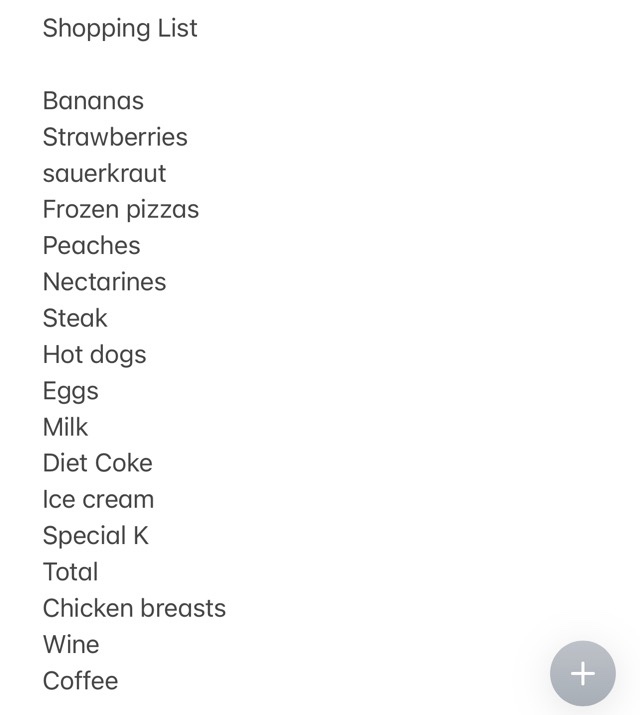
And, because my cursive has evolved to the point that even I can’t read my handwriting, I make all of my lists using the handy dandy Notes app on my iPhone. For example, here’s my most recent and very legible grocery shopping list.Most of the items on the above list (except for the ice cream) were dictated to me by my wife. As I walk around the grocery store, pick up the items on the list, and drop them into the shopping cart, I use the text strikethrough feature of the app to indicate that I’ve secured the item in question so that when I get home my wife won’t yell at me for forgetting something.

And yes, I’ve got a holiday gift list going, too. But that’s top secret, so, sorry, but I can’t post it here.

I’m a strong advocate of lists. They keep me organized and without them, I probably wouldn’t get anything done.

Grocery List Challenge

img_5884You may be wondering why I’m sharing a grocery list with you. I’m kind of wondering that myself. The answer is because Cheryl, aka The Bag Lady, has a new Fun Challenge.

The idea behind her challenge is for us to reveal some things about our home life. The first one is to “take a picture of our current grocery list, whether it be on a scrap of paper, a napkin, etc.”

Before I (or my wife and I) go to the grocery store, I open the Notes app on my iPhone and tap out a list of items I need to pick up. Then, once I get to the grocery store, as I add the items to my physical shopping cart, I use the “strikethrough” feature on the Notes app to let me know that I have secured each item. That way, right before I get in the checkout line, I review my list to make sure I didn’t miss anything. It works for me.

Now how about showing us your shopping list?