Some maps are never done

Etrakien 3 sketch

If you have followed my blog for a while you probably know that I’m on and off is working on my own fantasy setting, the Etrakien world. The world is mainly concentrating on the area around Ankh-Bathor, the world’s largest city and market place, dividing the world between east and west.

Earlier I’ve made two versions of the map for this world, but some maps just don’t seem to have a last version, so I’m now restarting the map for a third time. Why you might wonder, well the reason is actually quite simple.

Since the world is developing all the time with twists and turns the map in the end didn’t really work out with the plot. The biggest reason for this is that it felt like everything was too far away from each other, I wanted the world to be more concentrated to one are. This would open up some new possibilities in my world building, and making a new map is never something bad, that is always good.

As you can see in the sketch of the world above I’ve kept quite a lot from the older maps, actually most of the coast lines are from the earlier ones, they have only been moved around quite a lot. I also decided to have less countries then before, mainly because this will make it easier to keep track of the politics of the world. Instead I’m adding some free city states that are under their own rule, but will be in coalition with one or more countries.

I’m in no hurry to finish this map, and it is something I’m working on between commissions and some other stuff, so there might be some time between updates. But it will be a fun project to work on.

Making a lot of maps

Eldolan
It has been rather quiet from me lately. The reason for this is that I’m doing some jobs for Pelgrane press that has occupied most of my spare time that I use for mapping.

The maps are for an upcoming 13th age adventure named Shadow over Eldolan. For this adventure I’ve made a city map (that you can see at the top of this post) and nearly ten different location maps.

The city map is made in CD3 from Profantasy using my customized style that I have developed in the program. You can see some tutorials on how to tweak CD3 to get the same result in the tutorial section of my blog. The tutorial also shows what steps I’m doing in Photoshop to get a more unique look of the map. I still think that the colours in CD3 are too bright to accomplish a satisfying result. So I correct that in Photoshop.

All the location maps are made in the new lovely style by Mike Schley that you can buy from Profantasy’s homepage. The maps are all quite different from each other and you can see an example from one of the maps below. The style was great fun to work with but as always when you use a style in CC3 there will be one or two symbols that you miss when you make a map.

Map H colour preview

Apart from the 13th age maps I’m also doing some maps for their Trail of Cthulhu game. Those maps are however done completely in Photoshop. Originally I was planning on using CC3 here, but when I got the descriptions of what kind of maps they asked for I quickly realized that none of the available styles really would work out. So I started from scratch, making something up on my own. You can see part of a map below. The aim was to make a map that had a 1930th feeling, something that could have been in an Indiana Jones film. I am very pleased with the result and I’m looking forward to see them in print. But first I need to finish all the maps.

Whistle and I’ll Come preview

Back to the future

Ormgudensdal

I started to play RPG’s some years too late to really experience the old hex crawling games. But for some reason I’ve always liked the simplicity in the world and area maps used by then. So when I was asked to make a map for a Swedish old school adventure called “The valley of the Snake god” (Ormgudens dal) I gladly accepted.

The adventure is a tribute to the old hex crawling ones and I was asked to make the full colour hex map in the middle of the book, yes the one you can see at the top of this blog post as well.

The map was really fun to make and to help me out I used the 2010, July annual from Profantasy. As always when you use a style as your base for a commissioned map there will be symbols that are missing. So to solve this I had to make the symbols myself. That maybe doesn’t sound that hard but the problem you get is that even though I easily can make some hex symbols, the one I made had to fit in with the already existing ones.

If you don’t succeed the new symbols will be in the way for the overall harmony of the map, and I know I at least would get very annoyed by that. Lucky for me I’m quite good at copying a style while drawing and I’m very pleased with the new symbols I made for the style, can you spot them?

The adventure itself is a very good one with some “Alien” influences added to it which make it a bit different from many other fantasy adventures I’ve played. If you’re Swedish, or can read Swedish, I can warmly recommend it, if for nothing else so for the beautiful colour map 😉

Malmö after the war

malmö zon

Sometimes you just have to make a map, the inspiration just demands that you have to do it. You can’t really wait for the next day, you can’t even go to bed until it is finished.

I got that feeling today, and I have to blame the Swedish RPG Mutant year 0 (Mutant år 0).

Last year I backed the re-release of the Swedish game Mutant. I used to play the game when I grew up and I really loved it. It is a game about the world after a big catastrophe, a nuclear war. Or at least that was the story back then in the late 80’s. By then it didn’t feel like an absolutely unrealistic future.

Anyway today I got the PDF’s of the new game in my mail box, the printed game will be released in April this year, and it looks absolutely fantastic. I haven’t read all the rules but the ones I’ve looked at looks very solid and good.

With the game there were also two really nice maps of the Stockholm area after the catastrophe. I really liked the feeling of the maps and just felt that I had to try to make one myself. Also it felt like a shame if you could only play the game in Stockholm, so I made a map of Malmö.

The map is completely made in Photoshop on my Wacom Cintiq. Not much more to say, hope you like it.

Stealing is good!

When you make a map one of the hardest, and most important things, is to get a good coastline. If the coastline isn’t believable the map wont be that either. So how do you get a good coastline. I know for sure that it is hard because this is one of the things I’ve been struggling a lot with since I started to make maps.

Well not anymore, not since I started to steal them. I mean why should I create something that I can steal? Now you might start to consider my moral judgement here, I mean you are not supposed to steal, right? But when it comes to the coastline I think we can make an exception. Of course you don’t do it from other peoples work you do it from maps of the earth.

Earth has so many coastlines and I can assure you that no one will ever see that you stole it in the first place. Just stealing a part of earth, lets say the coastline of Denmark wont work, because then everyone will recognise it, and  the magic of the map will disappear, it will just be an alternative map of Denmark and not your new fancy fantasy region.

To avoid getting caught, getting caught is bad due to the reason mentioned above, this is how I do it.

First of all I’m deciding on what type of map I want to do, for this little tutorial I’ll make a map of a coastal area with some Islands. Lets continue using Denmark as an example, the country has some really nice looking coastal areas that can be used.

Zoom in a bit on the map, I’m typically using Google maps for this, and start looking for some nice areas. When you find one make a screen capture of it and paste it in a new document in Photoshop. Continue in this way until you have a couple of different regions. Cut away all the uninteresting bits, the bits you don’t want to use. Paste all the parts you are going to use into a new document. In the picture below you can see the four different regions I’ve picked for my map.
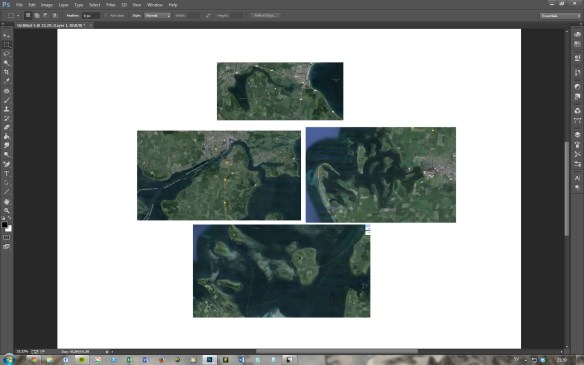
picture01

Now when you have all your pieces in the same file it is time to arrange them together. Do this by rotating them, flipping them and so on until you get a structure that you like. At this stage you might also find out that you need an extra piece or that you have one that don’t work. I for example felt that I needed one more piece of coastline to get it right, so I stole another part of Denmark and added it in. When you are done you will have something that looks like the picture below.

picture02

Now it is time for the next step in the process, drawing.The first thing to do is to merge all the layers with maps from Google earth, then I change the opacity of the layer to 50%. Add a new layer and select the brush tool. Now it is time to sketch the actual coastline, I usually do this with a blue colour, that will make it easier to draw in the lines for real later, in black.

I try to just follow the coastline that I see in the merged map pictures, sometimes I do some small free hand changes, but most of the time I follow the real coast line. When you are done it is always good to hide the Google maps layer and look at the coast line you just made. Sometimes you now see things that looks strange, erase those and draw some new lines. I also like to add a pale blue colour to the sea/ocean, so I clearly can see what is land and what is sea in the map. Below you can see my coast line.

picture03

Well that is about it. Now it is time to maybe add in some mountains, rivers, forest, cities or what ever you want to fill your world with. When the sketch is done just select the brush you want, change colour to black and start drawing on a new layer.

Mouse Guard

Musrike

One of my favorite comics is Mouse Guard by David Petersen. Everything in the comics from art to story are done to perfection and it is a real treat to read the stories about the small mice and their adventures.

Some months ago I learned that there also is a RPG based on the books. Since it seems to be impossible to get a hold of the rules in a physical copy I had to make do with the pdf. But that worked out ok as well.

The rules in the game are very good and straight forward and quite quickly I felt that this might be something I could play with my children. I probably have to simplify the rules a bit for them, but playing as mice battling snakes and bats could make up some great stories for them.
The biggest problem though is that the game is in English, so I have to translate it for them. The first thing to do of course had to be to make a map of the Mouse Guard world in Swedish.

The map in the post I entirely made in Photoshop and is based on the original map by David Petersen. It was great fun to make and translating all the names into Swedish was a bit of a challenge.

Now I just have to convince my children that we have to play this, and of course I also have to finish simplifying the rules. Or I might just switch the rules to something that is already available in Swedish that we can use.

Not just a map

Nehibia

What makes up a great map? That is a question I often ponder on. When I make my maps I always try to make more than just a map, I try to make a story. One of the first fantasy maps I came in contact with while growing up was the map in lord of the rings. And just by looking at that map you could see stories unfold. You could follow the rivers, the forests, mountain ranges, everywhere strange names. It took some time between me finding the map and me reading the book. But before starting on the book I already knew a lot about the world, just by looking at the map.

That is how I want my maps when I make them, I want them to tell stories. The more you look at the map the more things should start to unfold in front of your eyes, make you follow the rivers, finding the kingdoms, the wastelands. I want my maps to be like a library of imagination.

Another challenge is when someone else want you to make a map for them. I’m always flattered when people contact me and they want me to do that. They are actually trusting me that I shall make a map of something from their imagination, and of course I want that to be as good as possible. It is always hard to create something that someone already might have a clear view of what it should look like. Usually you have to meet somewhere in between, and it is always easier to make a map if you know a bit of the story. And if you know a bit of the story you can put that into the map.

The map at the top of this post is a commission I made for the Chronicles of Lo-Hin, you can read more about that by visiting their homepage. The client had a clear view on what he wanted and after a while we agreed on using Jon Roberts Overland style from Profantasy’s March annual in 2011. Personally that style is my favorite overland style that has been released for Campaign cartographer 3 (CC3). All symbols in the style are absolutely gorgeous, so when my client asked me to do some custom symbols that would fit into the style I nearly freaked out and thought, that wont be possible. But I gave it a try and I must say that I’m quite pleased with the result. Can you spot them?

I worked quite a lot on getting the style the way I and my client wanted, I’ve tweaked the style a bit in Photohop by applying some filters and textures to give it the feeling we were after. This is also the first map where I decided to make the rivers in Photoshop instead of CC3. The reason for this is that I wanted the rivers to look more natural. If you make the rivers in CC3 you get a curved line that has the same width all the way. I wanted the width to differ in size, that would make the rivers look more alive.

Also I wanted the map to have a lot of details that you had to look for, details that together would want your imagination to start telling you a story. So it wouldn’t be just a map but something more. Did I succeed with that? Well that is for you to tell.

Remaking a style

september_map
One of the programs I use the most while mapping is CC3 from Profantasy. The good thing with CC3 is that due to the annuals they release every year, that gives you a new style every month, there is now a vast collection of styles that you can use.

Most of the styles are quick to work with and you can produce a finished map that looks good in a rather short time. When we talk about short times and mapping, that still means quite many hours of work. But for me CC3 is usually the program I use in the beginning of my process of making a map, nearly all maps I start working on in CC3 will end up in Photoshop sooner or later.

So why do I do that? Well mainly it is because whenever I use a style there are things I like to change or things I want to enhance. One of the drawbacks of CC3 is that when you work with a style you are limited to what’s in the style. You can of course use symbols from other styles in the particular style you’re using, but not many styles work well together.

Sometimes you want more then what is offered and sometimes you just want to change the feeling of the map by adjusting the colours. Of course you can do a lot of those things in CC3 as well, but not all. And due to that my skills in CC3 are being quite limited it is much quicker for me to open up the map in Photoshop and do the changes I want there.

As an example lets look at the latest style from the Annuals, the overland style made by JT Vendel. The style is absolutely gorgeous and the mountains in it are among the best ones released. But still there are things I want to do different. For a start I have some mixed feelings regarding the water texture, so I wanted to change the texture in the map and see how the result would be.

When a friend of mine asked if I could make a map for his RPG campaign I thought it would be a perfect opportunity to test the style again, with my changes.

To do this I picked a flat grey texture as the sea, in this way it would be very easy for me to select the grey water in Photoshop and replace it with something else, in this case a paper texture that I partially coloured blue and a pattern of waves that I made. However the sea felt a bit empty now so I added some sea monsters from the July issue of this years annual. Those monsters are only in black and white, so I had to colour them in Photoshop so that they would fit into the style.

Another thing I like to do outside of CC3 are rivers. I like my rivers width to change while they flow downstream, it gives the rivers some more life. In CC3 the rivers will be a line with the same width all the way. Yes you can change the size of the line, but it will still just be a line. Also i feel like I have more control of how the river flows when I do them outside CC3, but that might just be me.

I’m very pleased with the end result and the new sea texture and sea monsters gives the map a feeling of an old medieval map, in a fantasy sort of way. I think the feeling is different from when you use the original sea, which one that is better is hard to say. It is more about what version of the style that works best with the setting you are mapping for.

The Annual September style

Two kingdoms

This month saw the release of a new overland style in the monthly annual from Profantasy. This style was made by TJ Vandel, or Schwarzkreus as he is known as over at the Cartographers guild. The style itself is lovely with a very handmade feel to it. It is quite sharp in its details and it feels like the symbols are made with a pen on paper.

In the style you have an astonishing amount of mountains and hills to choose from. This is a style that crave a lot of mountains. They feel like the soul of the style. If you’re not going to use them you can as well just use another style. This style wont come to its full potential if you don’t use mountains in it.

Apart from the mountains there are some nice textures of deserts, open plains, fields and more. You also get some really nice cities, castles and more to place in the map.

The only thing I’m feeling very divided towards in the style is the sea texture. To be honest I can’t really decide if I like it or not. The sea texture is very colourful compared to the rest of the textures and this makes it take over the map a bit. At the same time it is the seas that makes the style unique compared to other styles. I guess I’ll use it in some maps in the future, but in some others I might try something else for the seas.

The style was very easy to use and you can, thanks to the shear amount of symbols, very quickly make large mountain areas. So you can without a problem make a map in an evening if you need to, and the finished result is gorgeous. I’m definitely going to use it in more maps in the future.

In the map I picked another font though then the recommended one. I didn’t like the included one in the style, but that might just be me. And one of the good things in CC3 is that If you don’t like the default font you can just pick another one.

The June Annual

June annual test map

This month’s annual from Profantasy for Campaign Cartographer 3 (CC3) included a very nice looking overland style that has a comic book look and feel. I must admit that I really like it and it will definitely work perfect for maps I use when I play with my kids. So I decided to try it out.

The style itself is as I said very charming and the symbol are well done. You have a good selection of things to put in your map, even though you always want more than what is delivered. But I know how hard it is to get everything in when you make a map style, I’ve actually added a symbol or two for the styles I’ve made for Profantasy when I started making maps with them. Doing that for this style could actually be a good challenge for my drawing skills.

One thing I thought of after finishing my map in the style is that I made it a bit too wide, I thinks this style should be more dense looking to get it to look at its best. I’m still pleased with the result but my next map in it will probably be better, learning from the experience of the first one.

The style is really fast and rewarding to work in and the time it takes to make a map in it compared to the time invested in the process of making it is very good. You can say you get a lot of good looks for very little time spent.

Those with a sharp eye will also spot that I actually used another font than the included one for the map. There is actually no certain reason for it, I just wanted to test what the map would look like with another font.

I will definitely come back to this style making a map or two and the only thing I miss now is a dungeon style with the same comic book feeling as this one.