

תיאור
Better Messages היא מערכת ההודעות הפרטיות בזמן אמת ל-WordPress העשירה ביותר בתכונות, עם אינטגרציות מובנות עבור BuddyPress, BuddyBoss Platform, Ultimate Member, PeepSo וכל אתר אחר המבוסס על WordPress.
הפכו את אתר ה-WordPress שלכם לפלטפורמת תקשורת עוצמתית עם הודעות פרטיות, חדרי צ'אט, שיחות וידאו ושמע, צ'אטים קבוציים בוידאו, בוטים של AI ו-אפליקציות מובייל מקוריות.
בין אם אתם בונים קהילה פרטית או ציבורית, רשת חברתית, אינטראנט, אתר חדרי צ'אט, מרקטפלייס, אתר חברות, פלטפורמת היכרויות או אתר כלכלת יוצרים – Better Messages מספק יכולות הודעות ברמת ארגון עם ממשק קל לשימוש.
נסו את Better Messages:
- הדגמה חיה — אתר הדגמה פונקציונלי לחלוטין
- תיעוד ומאגר ידע — מדריכי התקנה, תכונות, שאלות נפוצות
- כל האינטגרציות — כל תוסף וערכת עיצוב נתמכים
- תמחור — השוואה בין הגרסה החינמית וגרסת WebSocket
- בלוג & מדריכים — מדריכים, הדגמות שלב-אחר-שלב, צלילות עומק לאינטגרציות
למפתחים:
- תיעוד REST API — כל נקודת קצה ופרמטר
- PHP Hooks — actions, פילטרים, פונקציות עזר
- JavaScript Hooks — אירועי צד-לקוח ו-API להתאמה אישית
- יומן שינויים — כל גרסה ותיקון באג
- מפת דרכים — תכונות עתידיות והצבעות
תרחישי שימוש נפוצים:
Better Messages נמצא בשימוש נרחב להפעלת מערכת הודעות עבור:
- קהילות פרטיות — פלטפורמות קהילה בתשלום ולחברים בלבד, קבוצות מאסטרמיינד, רשתות בוגרים, מחזורי קורסים, מעגלי אימון, הודעות מוגבלות לתפקיד, צ'אטים קבוצתיים, בוטי צ'אט AI לקליטה ושאלות נפוצות, הצפנה מקצה לקצה לשיחות רגישות
- קהילות ציבוריות ורשתות חברתיות — פלטפורמות חברתיות פתוחות, קהילות תחביבים ועניין, אתרים מבוססי BuddyPress / BuddyBoss / PeepSo / FluentCommunity, הודעות פרטיות, שיחות קבוצתיות, חדרי צ'אט, ווידג'טי מיני-צ'אט המתלווים למשתמשים ברחבי האתר
- אינטראנט ואתרי תאגיד — תקשורת פנימית לעובדים, ערוצי צוות ומחלקה, גישה מוגבלת לפי תפקיד WordPress, שיתוף קבצים, שיחות קול ווידאו לצוותים מרוחקים, תוכנית אירוח עצמי לאתרים עם דרישות ריבונות נתונים
- אתרי חדרי צ'אט — אתרים שנבנו סביב חדרי צ'אט בזמן אמת כתכונה העיקרית, חדרים ציבוריים ופרטיים, דיון מבוסס נושאים, גישת אורחים למבקרים לא רשומים, אספקה ב-AJAX או WebSocket
- אתרי היכרויות ושידוכים — צ'אט פרטי 1-על-1, צירופי תמונות ווידאו, שיחות קול ווידאו, כפתורי צ'אט מפרופיל לפרופיל במדריכי חברים, צ'אט אורחים למבקרים גולשים, הצפנה מקצה לקצה לשיחות פרטיות
- פלטפורמות כלכלת יוצרים ומעריצים — הודעות בתשלום עם חיוב לכל הודעה ולכל שיחה באמצעות GamiPress או MyCRED, שיחות וידאו פרטיות, הודעות המוניות למעריצים, ווידג'טים של מיני-צ'אט פעילים תמיד
- פלטפורמות DM פרימיום וממוסחרות — חיוב לכל הודעה ישירה או לכל שיחה עם תמחור לפי תפקיד, הצגת יתרה, הודעות מוגבלות לתפקיד, מודרציית תוכן AI לסינון ניסיונות ספאם והונאה
- פלטפורמות אימון ומנטורינג — הודעות ישירות לקוח-מאמן, שיחות וידאו מתוזמנות, הודעות קוליות, שיתוף קבצים, חדרי צ'אט של קורסים באמצעות אינטגרציות LMS
- חנויות מקוונות (WooCommerce) — צ'אט טרום-מכירה בעמודי מוצר, תמיכה בהזמנות לאחר הרכישה, הודעות מודעות הקשר העגלה, תיבת דואר נכנס מוטמעת ב"החשבון שלי"
- מרקטפלייסים רב-מוכרים ולוחות מודעות — צ'אט קונה-מוכר על כל מודעה, שרשורים לכל מודעה, צ'אט אורחים למבקרים לא רשומים
- קורסים מקוונים (LMS) — חדרי צ'אט של קורסים, הודעות ישירות בין מדריך לתלמיד, שיחות קבוצתיות לקורסים מבוססי מחזורים
- פורומים וקהילות שאלות ותשובות — קישור להודעה פרטית בכל תגובה, צ'אט המשך עבור משתתפי השרשור
- אתרי נדל"ן ומודעות — הודעות פנייה לסוכן, שיחות צ'אט בהקשר הנכס, צ'אט אורחים למבקרים גולשים
- אירועים חיים ווובינרים — חדרי צ'אט בלובי האירוע, גישת אורחים למשתתפים לא רשומים, שיחות קול ווידאו קבוצתיות עבור AMA, הודעות מוצמדות עם סדר היום של האירוע
- פלטפורמות הזמנות ותורים — תקשורת אורח-מארח על מודעות והזמנות, שיתוף קבצים עבור מסמכים, שיחות קול ווידאו לפני הצ'ק-אין
- קהילות קריפטו ו-Web3 — חדרי צ'אט מוגבלי-טוקן באמצעות תוסף חברות ותפקידי WordPress, שיחות קבוצתיות AMA, בוטי ידע מבוססי AI לשאלות whitepaper, אפליקציות מובייל למעורבות בתנועה
תוסף "Better Messages" נקרא בעבר "BP Better Messages".
תרגמו את Better Messages לשפה שלכם
תכונות הודעות עיקריות:
- שיחות בזמן אמת המבוססות על AJAX או WebSocket
- שיחות פרטיות אחד על אחד
- שיחות קבוציות עם משתתפים ללא הגבלה
- חדרי צ'אט עם תמיכה בגישת אורחים
- הודעות עבור קבוצות BuddyPress, קבוצות PeepSo, קבוצות Ultimate Member, קבוצות FluentCommunity
- נושאים לשיחות
- חיפוש בכל ההודעות
- סימון הודעות כמועדפות
- הצמדת הודעות חשובות לראש השיחה
- הצמדת שיחות מועדפות לראש הרשימה
- סינון רשימת שיחות להצגת שיחות שלא נקראו בלבד
- מענה להודעות ספציפיות
- עריכת הודעות שנשלחו (עם מחוון עריכה)
- מחיקת הודעות
- העברת הודעות לשיחות אחרות
- השתקת התראות שיחה
- שמירה אוטומטית של טיוטות הודעות עם שחזור
AI & אוטומציה:
- בוטים של AI מופעלים על ידי OpenAI, Anthropic (Claude) ו-Google Gemini
- בוטים של AI בשיחות קבוציות עם תגובות מבוססות אזכור
- סיכום שיחות ותקצירים מתוזמנים עם AI
- מעקב אחר שימוש בטוקנים עם הערכת עלויות
- תמלול הודעות קוליות מופעל על ידי Better Messages Cloud AI או OpenAI
- יכולת חיפוש אינטרנט לבוטים של AI
- כלי חיפוש קבצים לבוטים של AI
- יצירת תמונות עם AI
- תמיכה בקבצי PDF בשיחות AI
מדיה & תוכן:
- שיתוף קבצים עם העלאות ניתנות לחידוש ויכולת להגן על קבצים מגישה ישירה (תמונות, סרטונים, מסמכים)
- אופטימיזציה של תמונות ווידאו בצד הלקוח לתאימות בין דפדפנים וחיסכון בשטח אחסון (המרת פורמט, בקרת איכות, הסרת מטא-נתונים)
- Photo cropping and editing before sending
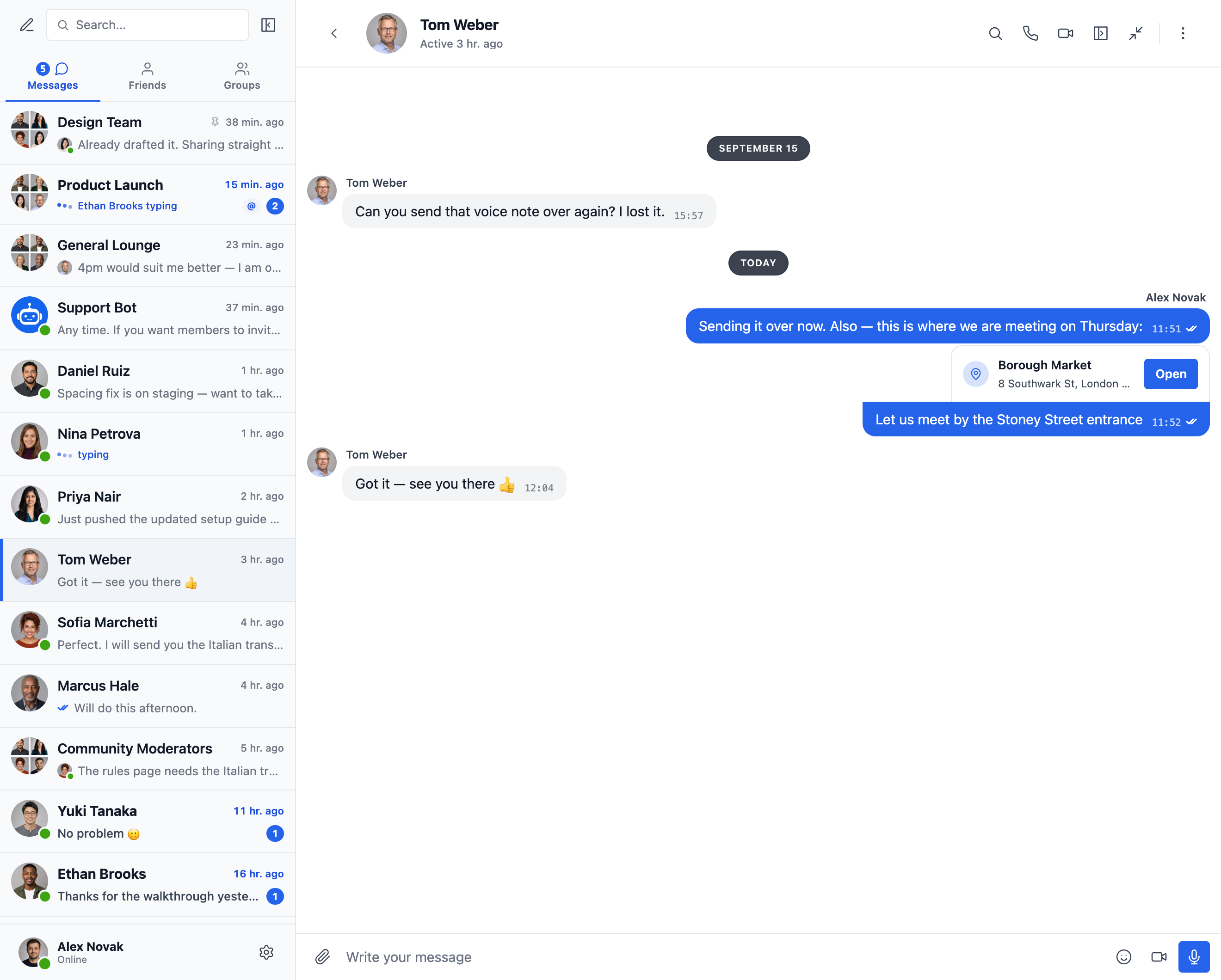
- Location messages with a map picker and nearby place suggestions
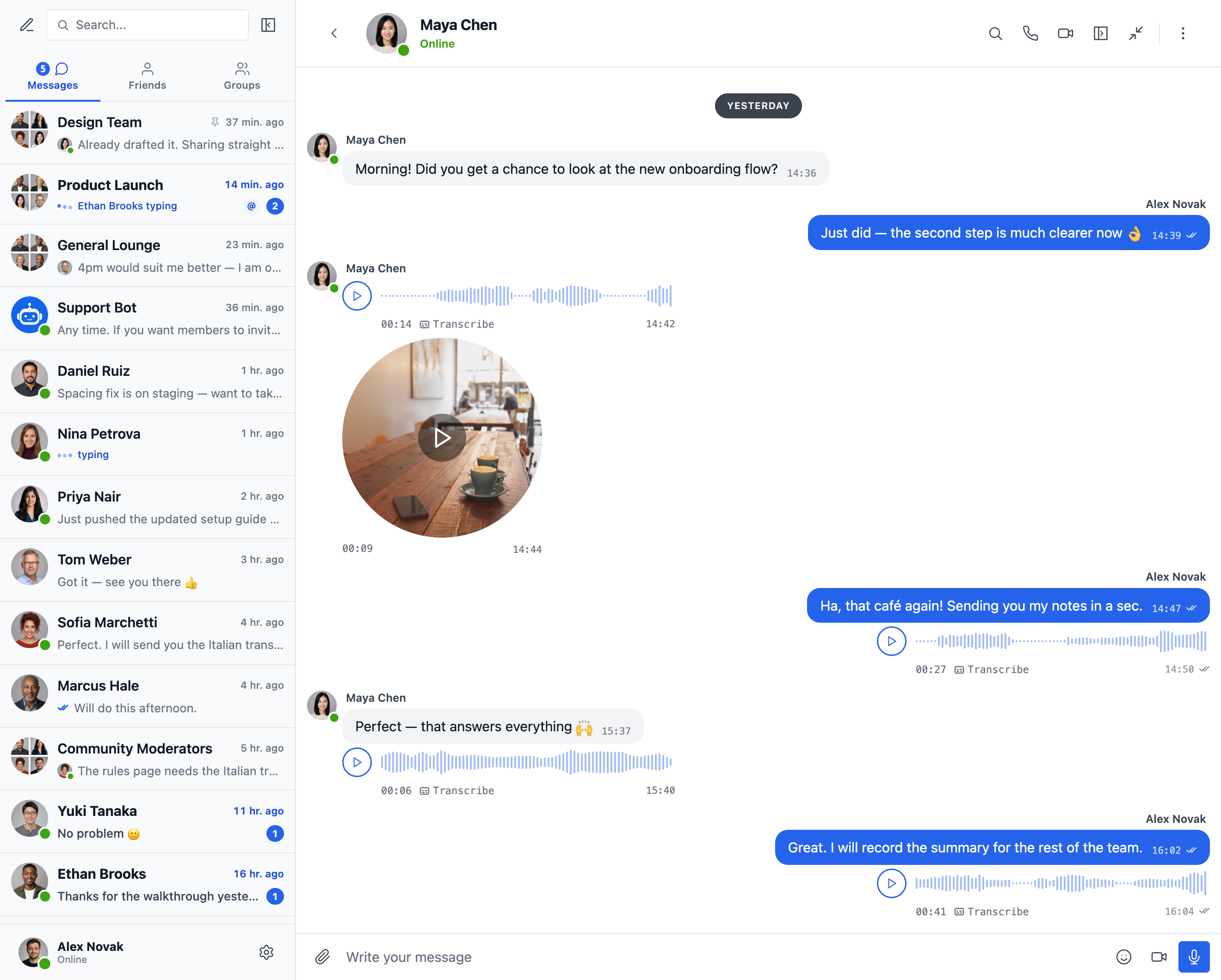
- Voice messages and video messages (available as addon)
- קישורים מוטמעים עם תמונות ממוזערות ותיאורים
- תמיכה ב-oEmbed עבור YouTube, Vimeo, Spotify, SoundCloud, Flickr ו-20+ שירותים
- בורר אימוג'י
- חבילות מדבקות מובנות עם בקרת גישה מבוססת תפקידים ותמיכה רב-שפתית
- שילוב GIF עם ספקי GIPHY ו-Klipy
- הצעות מדבקות בזמן הקלדה
- תמיכה בעיצוב טקסט Markdown
התראות:
- התראות דוא"ל להודעות שלא נקראו (תבניות הניתנות להתאמה)
- תמיכה בקישור ביטול הרשמה בדוא"ל
- התראות קוליות להודעות חדשות
- התראות toast באתר בכל מקום באתר שלכם
ניהול & אבטחה:
- מודרציית תוכן AI עם שני ספקים:
- Better Messages Moderation AI — כלול ברישיון WebSocket ללא עלות נוספת, אין צורך במפתחות API של צד שלישי. מופעל על ידי Better Messages Cloud עם קטגוריות מורחבות, כללים מותאמים אישית ומודעות להקשר שיחה
- OpenAI Moderation API — חינמי לשימוש, דורש מפתח API של OpenAI
- כללי מודרציה מותאמים אישית — הגדירו את הכללים שלכם בטקסט פשוט
- מודעות להקשר שיחה — זיהוי דפוסים המפוצלים על פני מספר הודעות
- בחרו בין פעולות המודרציה «סמן בלבד» (מומלץ) או «השהה לבדיקה»
- הודעות בפיקוח מוקדם – בדיקת הודעות לפני מסירה
- תכונת דיווח על הודעות
- מסנן מילים פוגעניות עם רשימה שחורה הניתנת להתאמה
- תכונת חסימת משתמש
- בקרת גישה מבוססת תפקידים
- רשימה לבנה/שחורה של משתמשים לניהול
תכונות מעורבות:
- תגובות להודעות
- אזכורים (@username)
- שליחת הודעות המוניות מלוח הניהול של WP עם תזמון, צירוף קבצים ועיבוד ברקע
- שיחות מוצעות למשתמשים חדשים
- הטמיעו נקודות כניסה לשיחות בכל מקום באתר שלכם ללא שימוש בשורטקודים
- חמישה וידג'טים: חברים, קבוצות, משתמשים, בוטים של AI, חדרי צ'אט
- שני סגנונות תצוגה: סרגל קלאסי או בועה צפה (עם ראשי צ'אט)
- שלושה משטחי מיקום: סרגל תחתון, פאנל צדדי, סרגל טאבים למובייל
- בורר אייקונים, תיבת חיפוש, הגבלות תפקיד והחלפת מצב "הסתר טאב כאשר ריק" עבור כל וידג'ט
- וידג'ט משתמשים עם שלושה מצבי תצוגה (כולם / לפי תפקיד / נבחרים ידנית) ומיון לפי פעילות אחרונה או תאריך הרשמה
- סדר טאבים הניתן להתאמה בוידג'טים מיני, בפאנל הצדדי ובתצוגת המובייל
התאמה אישית:
- עיצוב מודרני, ניתן להתאמה אישית מלאה
- Appearance tab — repaint every part of the messenger, reshape its corners and spacing and tune dark mode, with a live preview
- צלילי התראה מותאמים אישית
- תמיכה בפריסת RTL
- פתרון White label
- ניתן לתרגום מלא
- אפשרות מחיקה אוטומטית של הודעות ישנות
פרטיות ו-GDPR:
- דף הגדרות ייעודי לפרטיות ו-GDPR
- כל נתוני ההודעות מאוחסנים בשרת שלכם
- מודרציית AI (כשמופעלת) שולחת את תוכן ההודעה לניתוח — Better Messages Cloud אינו שומר שום נתונים; אם אתם משתמשים בספק OpenAI, סקרו את מדיניות הנתונים של OpenAI
- תמיכה בייצוא ומחיקת נתונים אישיים של WordPress (כלים ייצוא/מחיקת נתונים אישיים)
- טקסט מדיניות פרטיות מוצע שמתאים את עצמו לתכונות המופעלות
- אפשרות תמונות אמוג'י באחסון עצמי — ללא בקשות CDN חיצוניות
- הטמעות וידאו ידידותיות לפרטיות — YouTube, Vimeo נטענים רק לאחר לחיצת המשתמש
- ללא עוגיות, ללא סקריפטים של אנליטיקה או מעקב
- תיעוד פרטיות ו-GDPR
זו אינה רשימה מלאה של תכונות – ל-Better Messages יש עוד הרבה תכונות ואפשרויות קטנות שלא מפורטות כאן. אנו מוסיפים כל הזמן תכונות ושיפורים חדשים על בסיס משוב משתמשים.
תוספים & ערכות עיצוב תואמים — מעל 35 אינטגרציות מובנות:
Better Messages פועל מיד על כל אתר WordPress. אם האתר שלכם כבר מריץ תוסף קהילה, LMS, מרקטפלייס או מדריך, Better Messages מתחבר אליו ישירות — יורש חברים, פרופילים, קבוצות, קורסים, מודעות ופוסטים כך שמשטחי הצ'אט מופיעים במקומות הנכונים ללא הגדרה.
פלטפורמות קהילה & חברות — מחליפים את המסנג'ר המובנה ויורשים חברים, פרופילים, חברים וקבוצות:
- BuddyPress
- BuddyBoss Platform — including BuddyBoss Theme and ReadyLaunch
- PeepSo
- Ultimate Member
- FluentCommunity — including Spaces and Courses
- SureDash
- ProfileGrid
- UsersWP
- WP User Manager
מערכות ניהול למידה (LMS) — חדרי צ'אט של קורסים, הודעות מדריכים ושיחות בין תלמידים:
- LearnDash — including Instructor Role add-on
- LearnPress
- Tutor LMS
- MasterStudy LMS
- קורסים של FluentCommunity
מסחר אלקטרוני — WooCommerce — צ'אט טרום-מכירה ותמיכה בהזמנות לחנויות מקוונות:
- WooCommerce — כפתורי יצירת קשר בעמודי מוצר, עגלה, תשלום והזמנה. תוכן העגלה מתפרסם אוטומטית בשיחה כהודעה עשירה כך שנציג התמיכה רואה מיד מה הלקוח מסתכל עליו, עמודי ההזמנה מפרסמים כרטיס הקשר הזמנה מובנה. כתובות URL של מוצר שנדבקות לכל צ'אט מורחבות לכרטיסי מוצר עשירים. תיבת הדואר הנכנס המוטמעת ממוקמת בתוך החשבון שלי של WooCommerce. תואם HPOS, תואם ערכת עיצוב מבוססת בלוקים, פועל עם תשלום כאורח. זמין הן בגרסה החינמית והן בגרסת WebSocket — גרסת ה-WebSocket פותחת את הצ'אטים כשכבה של מיני-ווידג'ט קופץ במקום לעבור לעמוד אחר.
מרקטפלייסים & רב-מוכרים — צ'אט קונה-מוכר על גבי WooCommerce, עם הסכמה לכל מוכר וכפתורי יצירת קשר בחנויות מוכרים, עמודי מוצר ופרטי הזמנות:
מודעות, מדריכים & לוחות מודעות — כפתורי יצירת קשר בכל מודעה, עם שרשורים לכל מודעה:
- HivePress
- Directorist
- GeoDirectory
- Classified Listing
- Motors – Car Dealer, Classifieds & Listing
- WP Job Manager
ערכות עיצוב לנדל"ן — הודעות סוכן ופניות במודעות נכסים:
פורומים — קישור להודעה פרטית בכל תגובה:
- wpForo
- bbPress
גיימיפיקציה, נקודות & גישה בתשלום — חיוב לכל הודעה או שיחה עם תמחור לפי תפקיד והצגת יתרה:
אוטומציה & בוני עמודים:
- Uncanny Automator — triggers and actions for chat events
- AutomatorWP — triggers and actions for chat events
- Crocoblock JetEngine Profile Builder — profile and chat shortcodes for JetEngine listings
התראות Push & PWA:
- FluentNotify — web push through your own Firebase project
- OneSignal — web push notifications
- Progressify PWA — install-to-home-screen prompts on the messenger
בונה Shortcode אוניברסלי — הוספת צ'אט לכל דבר אחר:
לא רואים את התוסף או ערכת העיצוב שלכם ברשימה? Better Messages כולל בונה Shortcode ויזואלי תחת פאנל ניהול WP Better Messages Shortcodes המאפשר לשבץ כפתור Live Chat על כל סוג פוסט מותאם אישית, מדריך, מודעת מרקטפלייס, פרופיל סוכן או בלוק של בונה עמודים — ללא כתיבת PHP. הצביעו על פוסט לדוגמה, בחרו כיצד נקבע משתמש היעד (מחבר הפוסט, מזהה משתמש המאוחסן ב-postmeta, או תיבת דואר נכנס קבועה), הגדירו אסטרטגיית שרשור ותווית, והעתיקו את ה-shortcode שנוצר. אותו shortcode עובד אז עבור כל פוסט באותה תבנית, עם שרשור אוטומטי לכל פוסט וכרזת צ'אט פנימית אופציונלית. הדביקו אותו בתוך Gutenberg, Elementor, Bricks, Divi, או ישירות בתבנית של ערכת עיצוב.
אל תהססו לדווח על אי-תאימות או לבקש אינטגרציות נוספות — זה חשוב מאוד ועוזר לשפר את Better Messages!
גרסת WebSocket:
גרסת WebSocket היא אפשרות בתשלום, ניתן לקבל מפתח רישיון באתר שלנו.
אנו משתמשים בשרתים הייעודיים שלנו ליישום תקשורת WebSocket בין האתר שלכם למשתמשים. השרתים שלנו פרטיים לחלוטין ואינם שומרים או עוקבים אחר כל נתון פרטי — כל ההודעות נשארות במסד הנתונים שלכם.
ביצועים & אמינות:
- Significantly reduces the load on your server
- Instant message delivery in realtime, up to 200x faster than AJAX
- עובד עם כל אחסון כולל אחסון שיתופי
- ללא הגבלות על חיבורים בו-זמניים או משתמשים פעילים חודשיים
שיחות וידאו & שמע:
- שיחות וידאו HD (1 על 1)
- שיחות שמע HD (1 על 1)
- צ'אטים בוידאו קבוציים (עד 32 משתתפים)
- צ'אטים קוליים קבוציים (עד 50 משתתפים)
- שיתוף מסך בשיחות ובצ'אטים קבוציים
Mobile Apps:
- iOS Mobile App (build your own branded app)
- Android Mobile App (build your own branded app)
- התראות push לשיחות והודעות
- התראות VoIP לשיחות נכנסות
תכונות בזמן אמת:
- סטטוס מסירת הודעות (נשלחה, נמסרה, נצפתה)
- מחווני פעילות הקלדה, הקלטת קול והעלאת קבצים
- מחוון נוכחות מחובר/לא מחובר
- סטטוסי משתמשים (מחובר, לא פעיל, נא לא להפריע)
- צ'אטים מיני – חלונות צ'אט בכל מקום באתר שלכם
- וידג'ט שיחות מיני – הצגה והמשך של שיחות אחרונות מכל עמוד
- סינון מחוברים בלבד ומיון מחוברים תחילה עבור וידג'ט המשתמשים המיני
Better Messages Cloud AI:
- תרגום הודעות אוטומטי בשיחות אחד על אחד — 53 שפות, זיהוי אוטומטי
- ניהול תוכן AI — 23 קטגוריות, כללים מותאמים אישית, מודעות להקשר השיחה
- תמלול הודעות קוליות — 99+ שפות עם זיהוי אוטומטי
- אין צורך במפתחות API של צד שלישי — כלול ברישיון WebSocket ללא עלות נוספת
אבטחה & הצפנה:
- הצפנה מקצה לקצה אופציונלית (E2EE) — ניתן להפעיל ברמת האתר ולכל שיחה בנפרד, הודעות וקבצים מוצפנים בדפדפני המשתמשים באמצעות AES-256-GCM, השרת לעולם אינו רואה טקסט גלוי
- הצפנה מקומית בדפדפן (AES256) לאחסון הודעות לא מקוון
- התראות Web Push (עובד גם כשהדפדפן סגור)
- כל הנתונים מוצפנים במעבר, כך שאיננו יכולים לקרוא אותם בשרתים שלנו
תמיכה:
- תמיכה בדוא"ל עם עדיפות
- עדכונים שוטפים ותכונות חדשות
למה WebSocket משנה את כללי המשחק?
קבלו מפתח רישיון לגרסת WebSocket | תנאי שימוש
פריסת RTL מובנית בתוסף.
תוכלו לתרגם את התוסף לשפה שלכם עם LocoTranslate או להשתתף בתרגום התוסף.
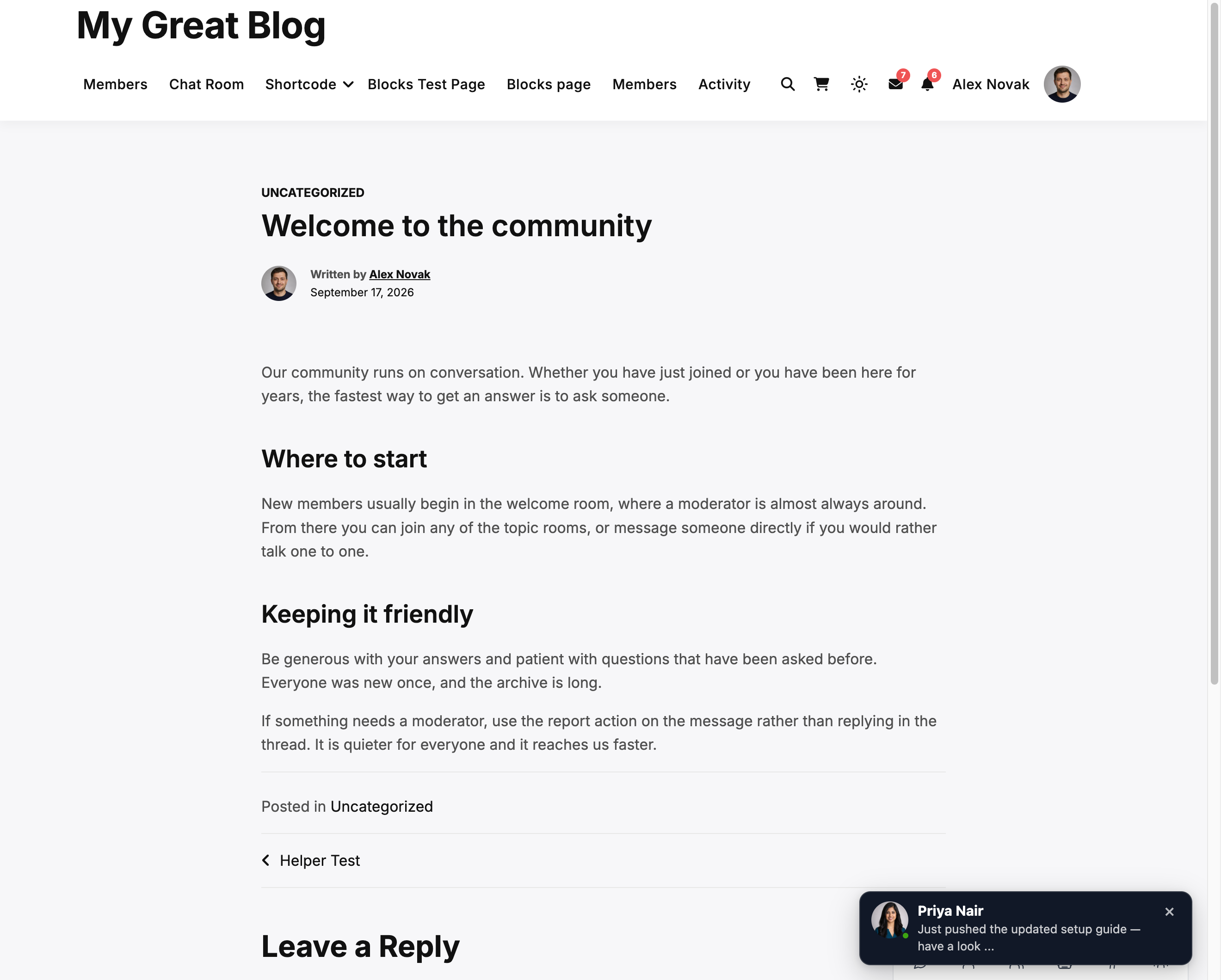
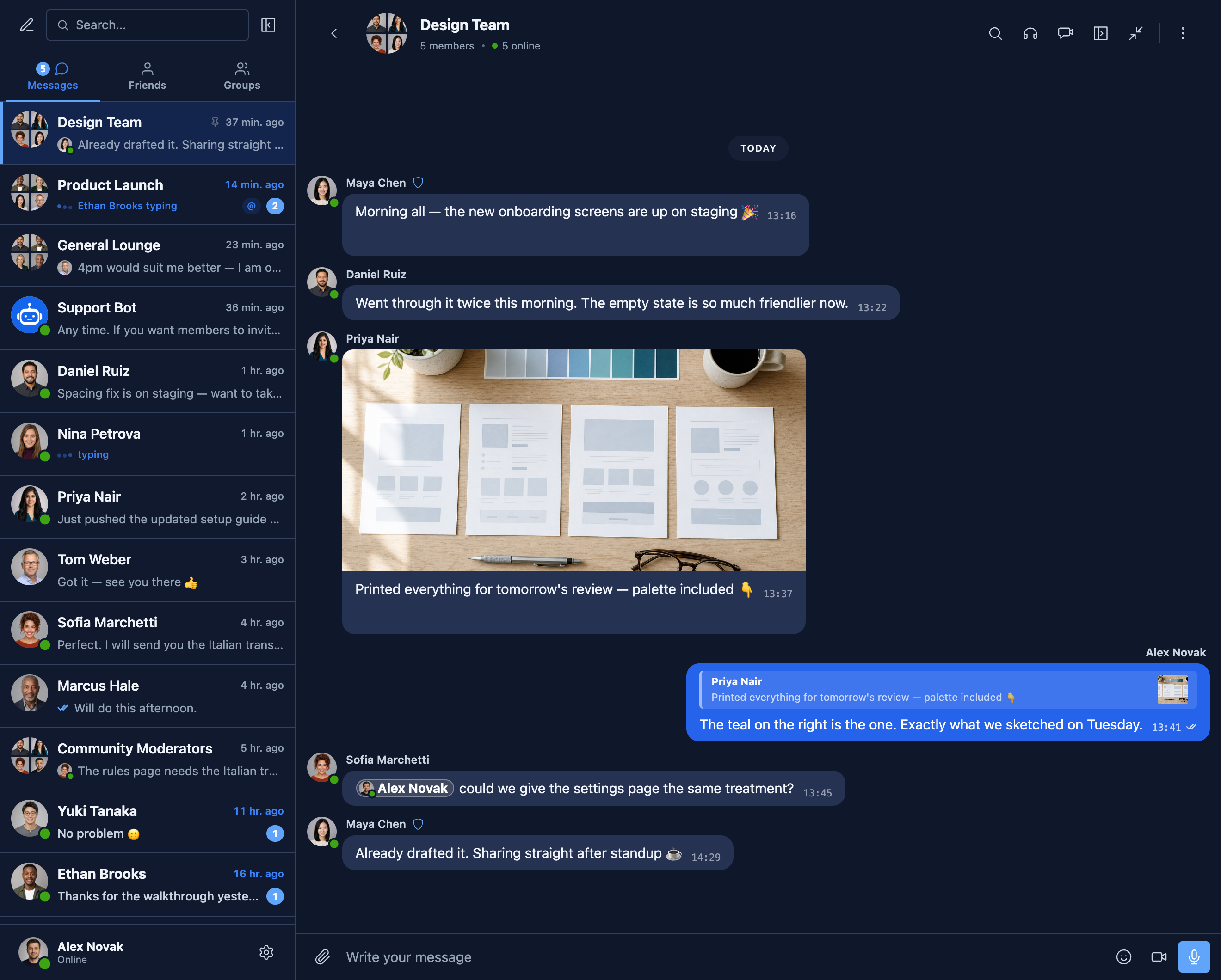
צילומי מסך

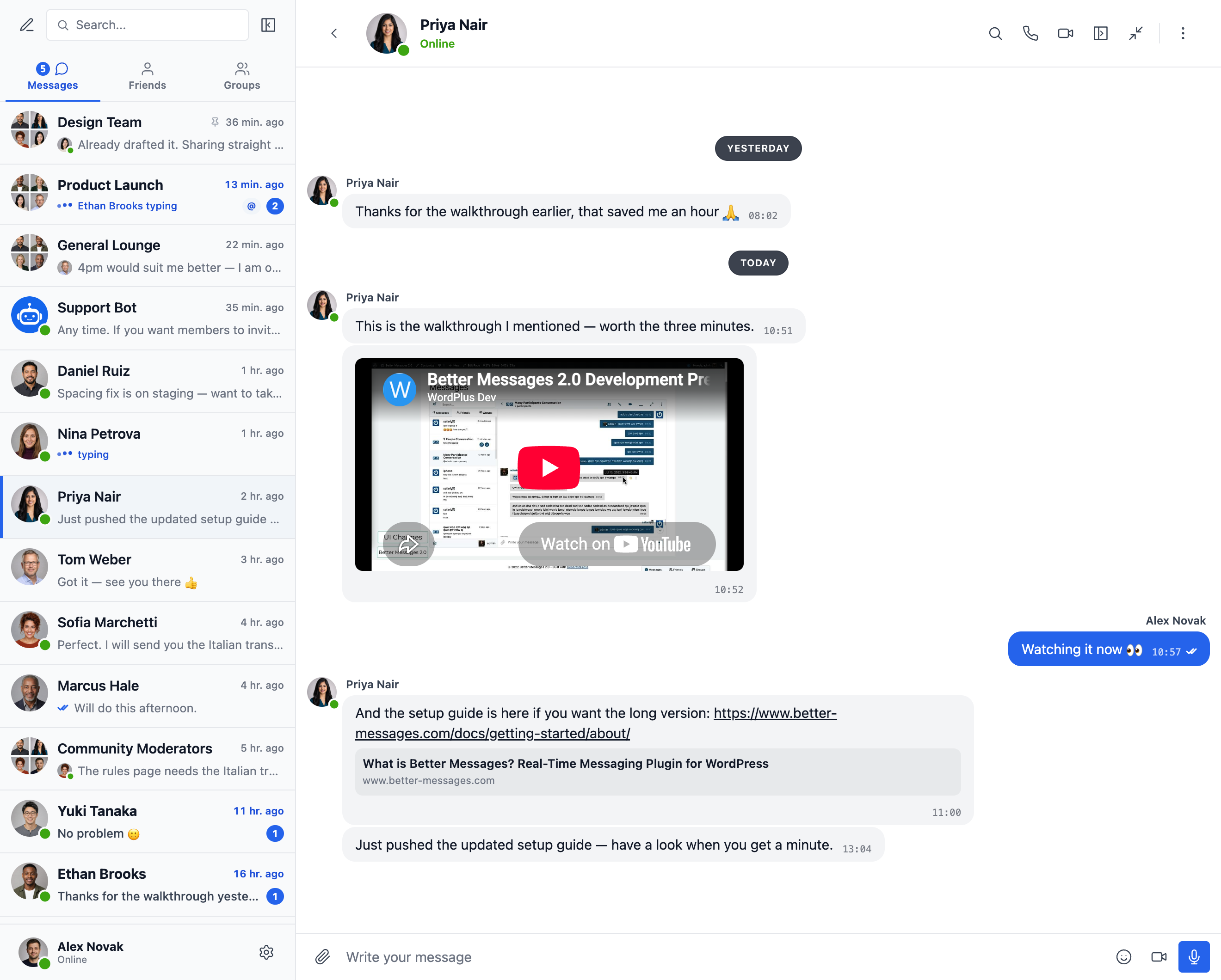
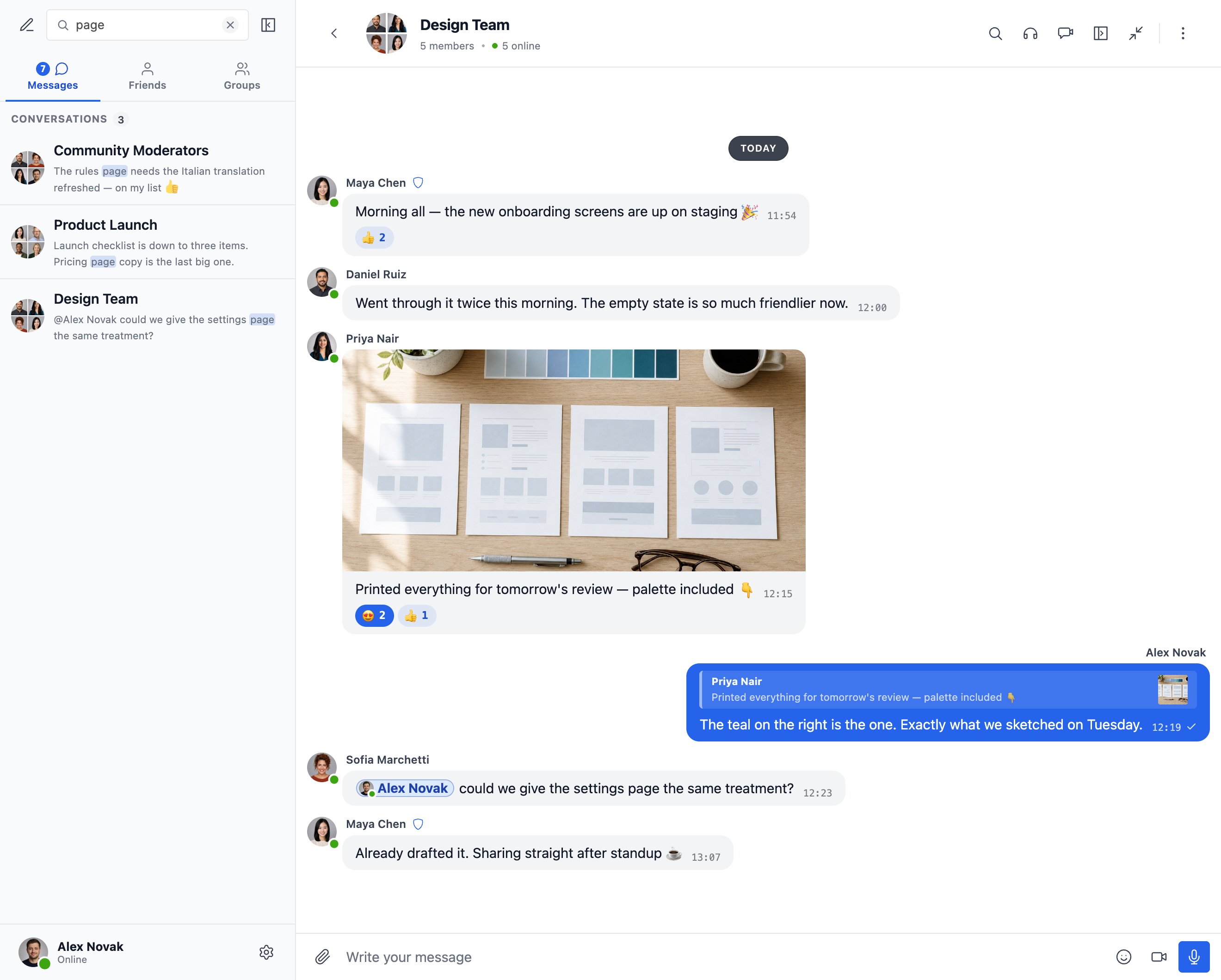
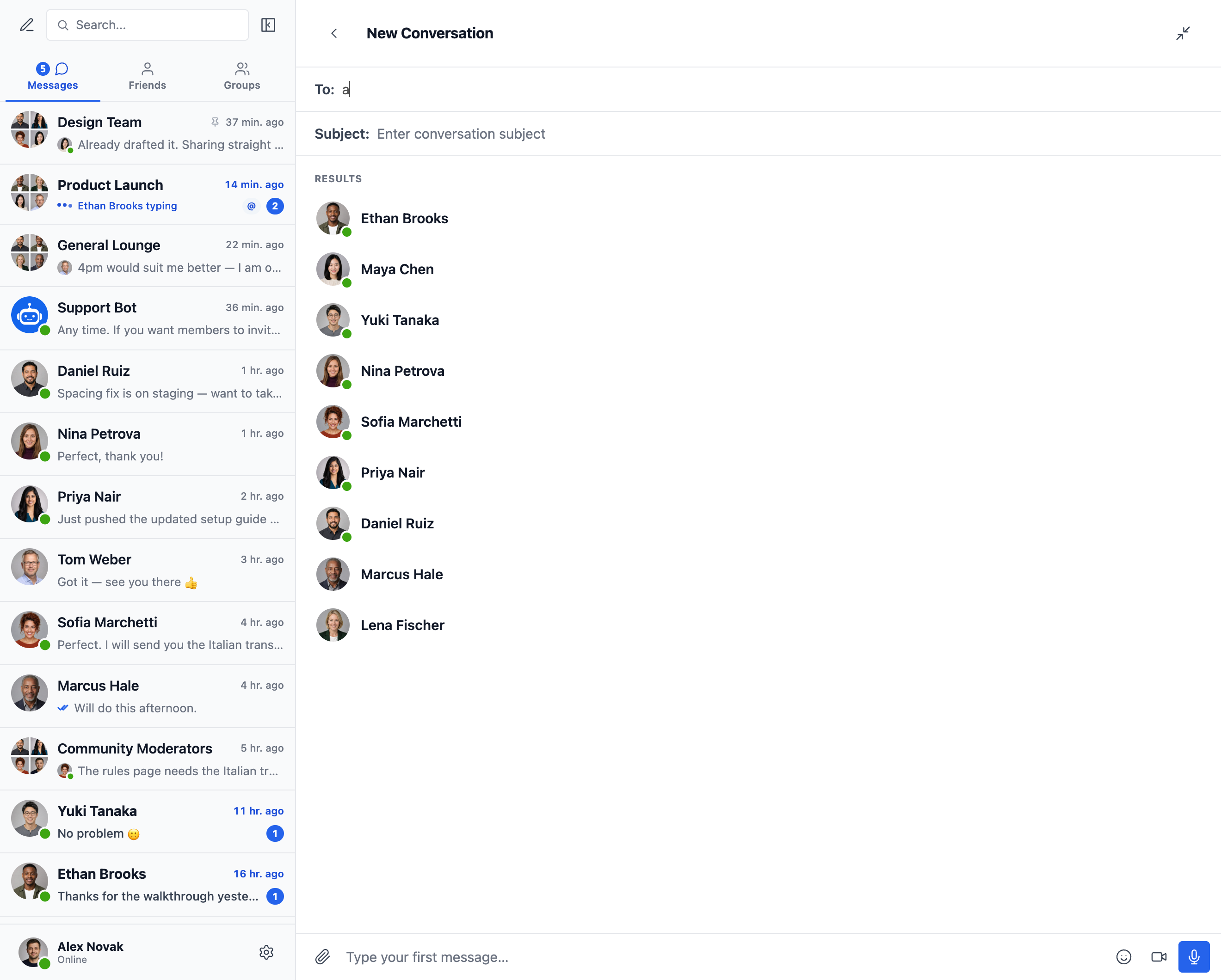
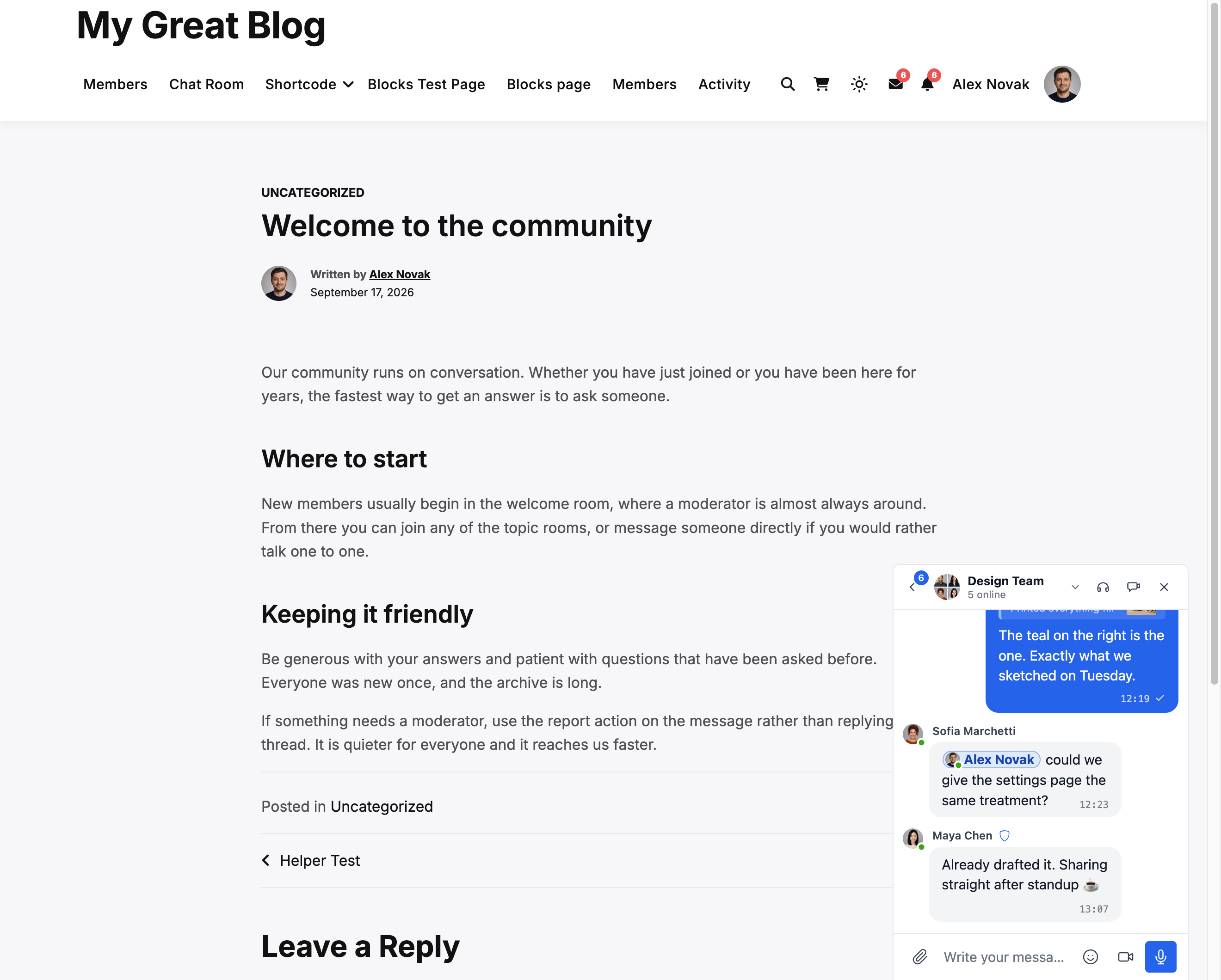

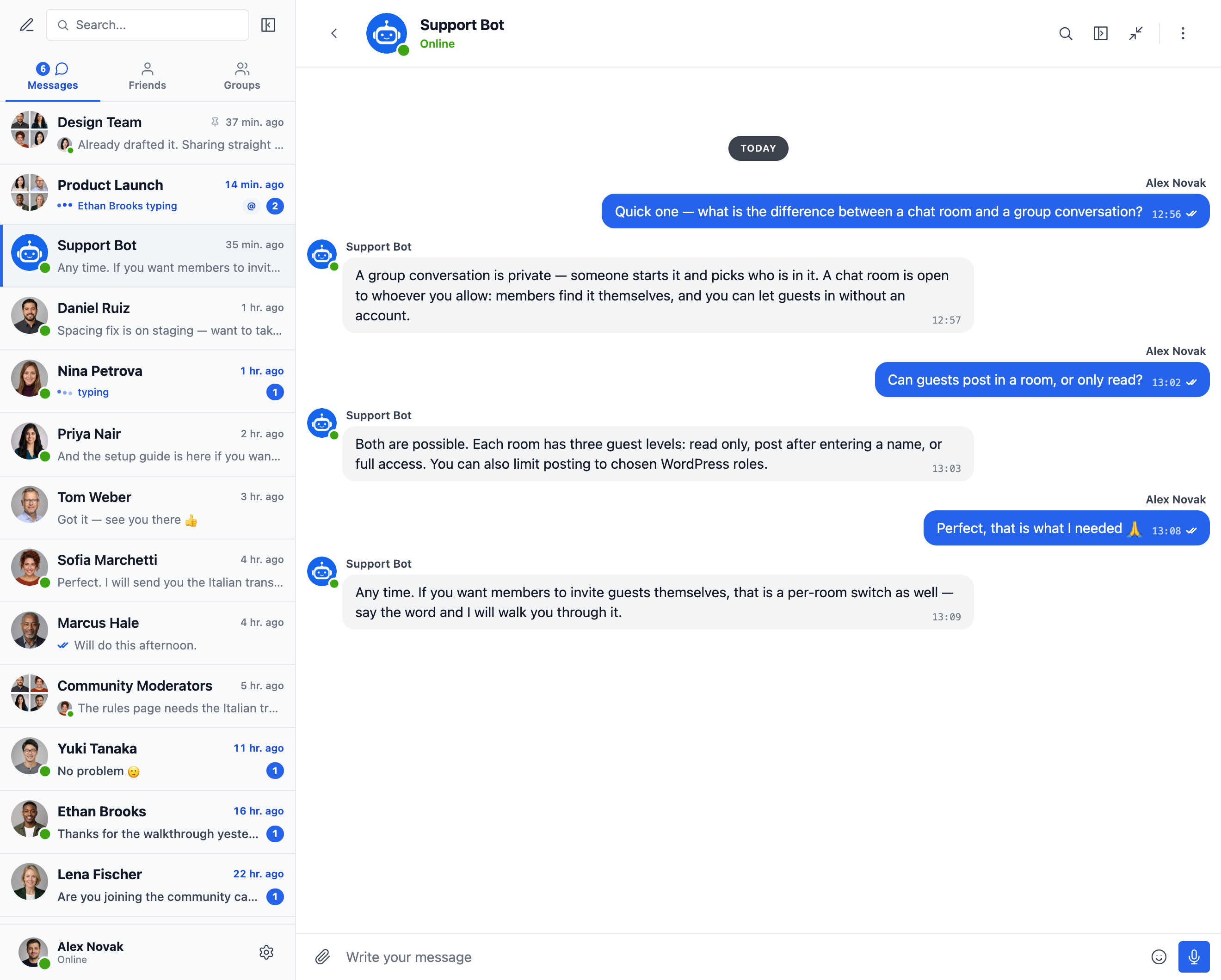


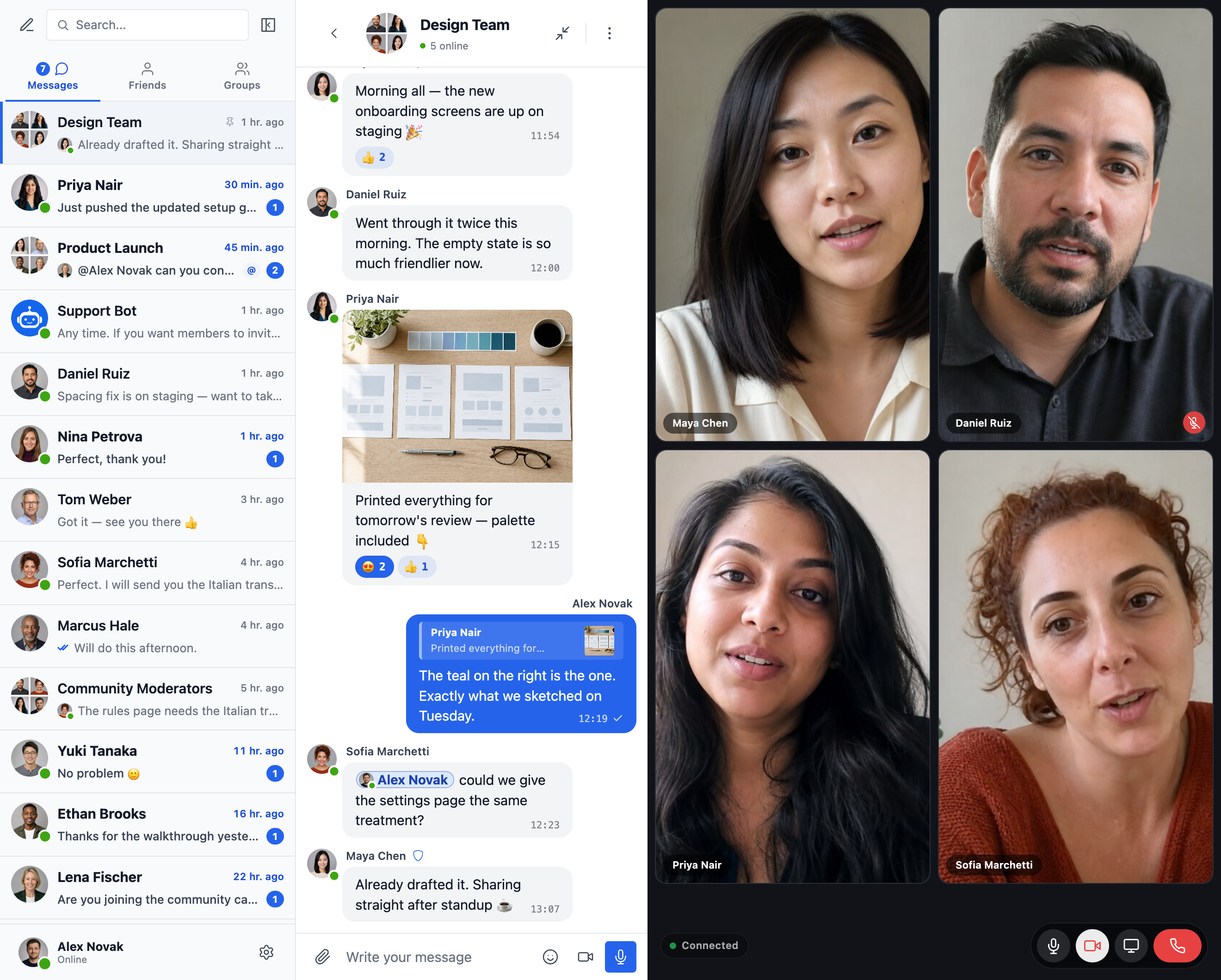
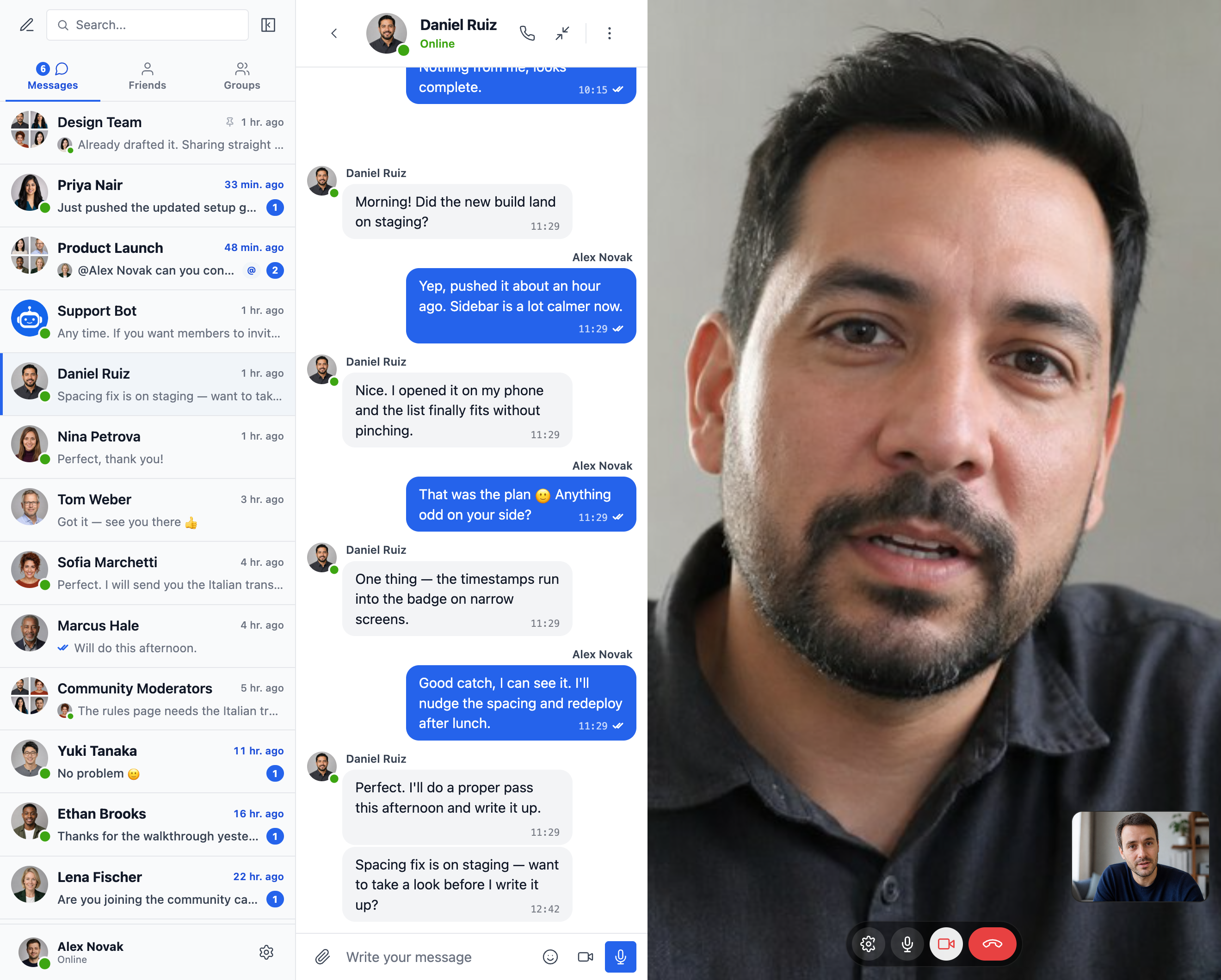
בלוקים
תוסף זה מספק 2 בלוקים.
- Messages The user's messages, where they can open any conversation they are part of
- Chat Room Embed a Better Messages chat room
התקנה
- העלו את קבצי התוסף לתיקיית
/wp-content/plugins/bp-better-messages, או התקינו את התוסף ישירות דרך מסך התוספים של WordPress. - הפעילו את התוסף דרך מסך 'תוספים' ב-WordPress
- השתמשו בהגדרות -> Better Messages כדי להגדיר את התוסף
שאלות נפוצות
-
האם Better Messages חינמי?
-
Yes — install the free version from WordPress.org. It supports private and group conversations, chat rooms, file sharing, oEmbed previews, smart-batched email notifications, role-based access, guest chat, and the standard messenger feature set. The WebSocket version is paid and unlocks instant delivery, one-on-one and group voice / video calls, Better Messages Cloud AI (content moderation, message translation and voice message transcription with no API key of your own), web push, and end-to-end encryption.
-
עם אילו תוספים של WordPress משתלב Better Messages?
-
מעל 35 אינטגרציות מובנות במגוון פלטפורמות קהילה (BuddyPress, BuddyBoss Platform, PeepSo, Ultimate Member, FluentCommunity, SureDash, ProfileGrid, UsersWP, WP User Manager), LMS (LearnDash, LearnPress, Tutor LMS, MasterStudy LMS), מסחר אלקטרוני (WooCommerce — צ'אט טרום-מכירה ותמיכה בהזמנות עם כפתורי יצירת קשר בעמודי המוצר, עגלה, תשלום והזמנה), מרקטפלייסים רב-מוכרים (Dokan, WCFM, WC Vendors, MultiVendorX), מודעות ומדריכים (HivePress, Directorist, GeoDirectory, Classified Listing, Motors, WP Job Manager), ערכות עיצוב לנדל"ן (Houzez, RealHomes), פורומים (wpForo, bbPress), גיימיפיקציה (GamiPress, MyCRED), אוטומציה (Uncanny Automator, AutomatorWP), בוני עמודים (Crocoblock JetEngine), ו-push / PWA (OneSignal, Progressify). אם התוסף שלכם אינו מופיע, בונה ה-Shortcode הוויזואלי המובנה מאפשר להוסיף כפתור Live Chat לכל סוג פוסט מותאם אישית ללא כתיבת PHP. ראו את הרשימה המלאה של אינטגרציות.
-
האם הוא תומך בשיחות קבוצתיות?
-
כן — שיחות קבוצתיות מן השורה הראשונה עם היסטוריה משותפת, אזכורים, תגובות (reactions), העלאת קבצים, מענה, עריכה / מחיקה / העברה ושיחות קוליות / שיחות וידאו קבוצתיות (גרסת WebSocket). ניתן להצמיד שיחות קבוצתיות באופן אוטומטי לקבוצות BuddyPress / BuddyBoss / PeepSo / Ultimate Member / FluentCommunity, כך שחברים מצטרפים לשיחה ועוזבים אותה בסנכרון עם קבוצת הקהילה המקורית.
-
האם מבקרים שאינם רשומים (אורחים) יכולים לנהל שיחות?
-
כן — Guest Chat מאפשר למבקרים שאינם רשומים להצטרף לחדרי שיחה, לשלוח הודעות למוכרים ב-marketplaces, לשאול שאלות על רישומים ב-directory listings או לשוחח עם תמיכת האתר. האורח מזין שם תצוגה (ואופציונלית גם דוא"ל) ולאחר מכן משתתף כמשתמש אורח. היסטוריית השיחות שלו נשמרת אם הוא ירשם בהמשך.
-
האם הוא תומך בשיחות קוליות ובשיחות וידאו ב-WordPress?
-
כן (גרסת WebSocket) — שיחות קול / וידאו אחד-על-אחד וקבוצתיות פועלות בתוך שרשור המסנג'ר, ולא כאינטגרציה נפרדת של Zoom / Whereby. ממסר מדיה מאוחסן כלול ברישיון WebSocket — ללא חשבון Twilio נפרד, ללא מנוי Daily / Whereby וללא תוכנית מפתחים של Zoom. השיחות במסך מלא במובייל ובתצוגת תמונה-בתוך-תמונה בדסקטופ.
-
האם Better Messages תואם GDPR?
-
כן. כל נתוני ההודעות נשמרים רק במסד הנתונים של WordPress שלך. ממסר ה-WebSocket בענן עיוור לתוכן ההודעות — הוא מנתב אירועים מוצפנים אך לא קורא, שומר או בוחן את מה שעובר דרכו. Better Messages משולב גם עם הכלים המובנים של WordPress לייצוא ומחיקת נתונים אישיים. עבור אתרים עם דרישות מחמירות של ריבונות נתונים (סעיף 9 ב-GDPR, סביבות דמויות HIPAA, עומסי עבודה רגולטוריים) זמינה תוכנית self-hosted — פנה לתמיכה.
-
האם יש תכונות AI?
-
Yes. AI Chat Bots (OpenAI, Anthropic Claude, Google Gemini) work in the free version with your own provider API key. They act as full participants in any thread, with custom system prompts and per-bot points charging via GamiPress / MyCRED. Better Messages Cloud AI (WebSocket version) provides AI Content Moderation (23+ categories including spam, scam, doxxing, contact sharing), AI Message Translation (53 languages with auto-detection), and Voice Message Transcription (99+ languages) — all included with the WebSocket license, no third-party API key required.
-
האם יש אפליקציות מקוריות ל-iOS ו-Android?
-
כן — Better Messages מגיע עם אפליקציות מובייל מקוריות ל-iOS ו-Android שנבנו על Capacitor, עם התראות push, שליחה בזמן אמת, שיחות קוליות / שיחות וידאו והקבלה מלאה של תכונות ה-messenger לעומת גרסת הוויב. עבור אתרים שרוצים אפליקציה ממותגת משלהם ב-App Store / Play Store תחת חשבון מפתח משלהם זמינה בנייה מחדש בגרסת white-label.
-
האם ניתן לתרגם את ממשק ה-messenger לשפה שלי?
-
כן — Better Messages ניתן לתרגום מלא באמצעות כלי התרגום הסטנדרטיים של WordPress (Loco Translate, WPML, Polylang) באמצעות ה-text domain
bp-better-messages. מגיע עם יותר מ-30 תרגומי קהילה. ניתן לתרום או לשפר תרגום בכתובת translate.wordpress.org. -
האם הוא תומך בהצפנה מקצה לקצה?
-
כן (גרסת WebSocket). הצפנה מקצה לקצה מופעלת לכל שרשור — הודעות וצירופי קבצים מוצפנים בדפדפן השולח באמצעות AES-256-GCM לפני השידור, נשארים מוצפנים בעת מנוחה במסד הנתונים ומפוענחים רק בדפדפן הנמען. השרת שומר רק טקסט מוצפן; אף מנהל מערכת, מהנדס אירוח או תוקף עם גישה למסד הנתונים אינו יכול לקרוא את תוכן ההודעות של שרשור E2E.
-
היכן ניתן למצוא תיעוד מפורט?
-
התיעוד המלא, מדריכי האינטגרציה, מסמך REST API, מסמך ה-hooks, מדריכי הווידאו ויותר מ-80 פוסטים בבלוג נמצאים בכתובת www.better-messages.com.
-
Which external services does Better Messages connect to?
-
The plugin connects to WordPlus Cloud, the plugin author's service that sells and licenses the WebSocket version, only when an administrator uses one of these features:
- Plans, prices and reviews. When an administrator opens Better Messages Upgrade, the site asks WordPlus Cloud (api.wordplus.cloud) for the current plans, prices and customer reviews, and keeps the answer for an hour. No personal data is sent, only the request itself, which WordPress makes with the site's address. The administrator's browser then loads the reviews' photos from WordPlus Cloud.
- Contact form. When an administrator sends a message from Better Messages Support, the plugin sends what they wrote, their name and email address, any files they attach, any access details they choose to share, and the site's address and technical details (the WordPress, PHP, database and web server versions, the theme and the active plugins), which the form shows before sending.
- Better Messages Assistant, only after you press Start. The AI assistant on Better Messages Support sends nothing until an administrator presses Start under the list of what it sends. Start registers the site with WordPlus Cloud (its address, the plugin version and whether it is the free or the WebSocket version). Then each question goes to WordPlus Cloud's assistant service (rest.wordplus.cloud) with the site's address, the plugin's settings (without keys or passwords), the plugin, WordPress, PHP and theme versions, the active plugins and the administrator's language, and the answer comes back to the page. Questions and answers are stored and read by the plugin's team to improve the assistant. Visitors' data is never sent. "Turn off the assistant" under the chat stops it, and the
wordplus_sdk_assistant_enabledfilter hides it. - Buying. Buying happens on the WordPlus Cloud website (www.wordplus.cloud), never inside WordPress. The Upgrade buttons open it with the site's address. After paying, the plugin sends WordPlus Cloud the one-time code it came back with, the site's address, the plugin version and a random identifier of the site, and gets the licence key.
- Installing the WebSocket version, only when asked for. If the buyer asks for it on the WordPlus Cloud checkout page, WordPlus Cloud contacts the site, and the site downloads the WebSocket version from WordPlus Cloud and installs it. Nothing is installed unless the buyer asks on that page.
- Licence check. Once a licence key is saved, the site sends the key, its address and the plugin version to WordPlus Cloud once a day to confirm the licence.
- Emoji and sticker downloads, only when an administrator asks. "Download emoji images to your server", the emoji names in other languages and the sticker packs come from WordPlus Cloud's CDN (cdn.wordplus.cloud), or from WordPlus Cloud (api.wordplus.cloud) when the CDN fails, and the sticker settings ask it for the list of packs when they open. The administrator's browser loads the packs' cover pictures from the same addresses. These requests send the plugin's name and version, and WordPress adds the site's address to every request it makes.
- Usage data, only if you opt in. After the plugin is first activated, it asks once whether to share usage data, and nothing is sent unless an administrator chooses Allow & Continue. Then the site sends the administrator's name and email address (to tell them about security and feature updates), the site's address, title, language and time zone, the WordPress, PHP and plugin versions and whether the plugin is active, and, unless switched off, which of the plugin's features and settings are in use (on/off values, numbers and short setting values, never your content, addresses or keys, and the size of the site's messaging only as a range) and the names and versions of its plugins and themes. With them goes how far the setup in Get started has come (which of its cards are done or dismissed), and when the free trial notice was shown and which of its buttons was clicked. It sends them once a day when something changed, and when the plugin is activated, deactivated or deleted. The newsletter is a separate choice, off unless switched on. Each choice can be changed, or the sharing stopped, from the Opt out link under the plugin on the Plugins screen. Opting out has WordPlus Cloud erase what was shared. A site that opted in through Freemius in an earlier version stays opted in, and its administrators are told once that its data goes to WordPlus Cloud now. Only the WebSocket version adds the features and settings in use to what such a site shares, unless switched off. The free version shares them only once an administrator switches them on. A site that skipped Freemius's opt-in is not asked again.
- Deactivation feedback, only when you send it. When the plugin is deactivated, it may ask why. The answer is sent to WordPlus Cloud only if the administrator submits it, without their email or the site's address unless they opted in to usage data and left "Anonymous feedback" unticked.
WordPlus Cloud: terms of service, privacy policy.
-
Which other services can Better Messages use?
-
Besides WordPlus Cloud, the plugin uses these services, each as described:
- Emoji images (jsDelivr). Emoji show as Apple's images by default, and until the site downloads them, browsers load the image sheet from jsDelivr (cdn.jsdelivr.net), which receives the visitor's IP address. "Download emoji images to your server" in the emoji settings, or the native emoji set, stops it. jsDelivr: terms of service, privacy policy.
- Video and media links (YouTube, Vimeo and other oEmbed providers). With oEmbeds on, which is the default, a link to a provider WordPress's oEmbed support knows makes the site ask that provider for its player, and the player loads from the provider in the conversation. With "Privacy-friendly oEmbeds" on, a video loads only after a click. YouTube: terms of service, Google privacy policy. Vimeo: terms of service, privacy policy.
- GIFs (GIPHY, KLIPY), only with your own API key. Searches typed in the GIF picker go from the site to the chosen provider, with a random identifier for each member and never their name, and GIFs load in browsers from the provider's servers. GIPHY: terms of service, privacy policy. KLIPY: API terms, privacy policy.
- Stipop stickers, only with your own API key. The sticker store and sticker searches go to Stipop (messenger.stipop.io) with the member's numeric ID on the site and the chosen language, and the stickers load in browsers from img.stipop.io. Stipop: terms of service, privacy policy.
- AI chat bots and AI features, only with your own API key. With an OpenAI, Anthropic or Google Gemini key, the messages of conversations with an AI bot, with the bot's instructions, and the content an AI feature works on (messages it checks, voice messages it transcribes) go to that provider. OpenAI: terms of use, privacy policy. Anthropic: commercial terms, privacy policy. Google Gemini: API terms, privacy policy.
- Location sharing, only when switched on. Browsers showing a shared place load the map from tile.openstreetmap.org, and the place search and nearby places send the search text or the map's position to nominatim.openstreetmap.org and overpass-api.de. These addresses can be changed in the location settings. OpenStreetMap: tile usage policy, Nominatim usage policy, privacy policy. Overpass API: terms.
- OneSignal, only with the OneSignal plugin. When the OneSignal integration is used, the site links each member's push subscription to their numeric ID on the site at OneSignal (api.onesignal.com), so message notifications reach them. OneSignal: terms of service, privacy policy.
- Cloud storage, only when connected. With a storage provider connected (Amazon S3, Cloudflare R2 or another S3-compatible service), files sent in messages are kept with that provider in the administrator's own account, and browsers upload and download them there. The provider's own terms and privacy policy apply.
- Mobile App, only when an administrator sets one up. On Better Messages Mobile App, the Android signing key and its passwords are sent to the plugin author's app builder (builder.better-messages.com) to check or create them, and the Apple and Google keys the administrator enters are checked with Apple (api.appstoreconnect.apple.com) and Google. Apple: privacy policy. Google Firebase: terms, privacy policy.
- FFmpeg, only when downloaded. "FFmpeg WASM (~30 MB)" in the media settings downloads the video converter once from better-messages.com to the site, which then serves it to the browsers that convert videos before sending them.
סקירות


מפתחים
"Better Messages – חדרי צ'אט, צ'אט קבוצתי, הודעות פרטיות & בוטי צ'אט מבוססי AI" הוא תוסף קוד פתוח. האנשים הבאים תרמו ליצירת התוסף הזה.
תורמים
“Better Messages – חדרי צ'אט, צ'אט קבוצתי, הודעות פרטיות & בוטי צ'אט מבוססי AI” תורגם ל-32 שפות. תודה רבה למתרגמים על תרומתם.
מעוניינים בפיתוח?
עיינו בקוד, ראו את הקוד ב-SVN repository, או הירשמו ללוג פיתוח באמצעות RSS.
שינויים
Important — please read before updating to 3.0
3.0 is a full redesign. Your conversations, settings and integrations carry across untouched — including the colors and sizes you set in the Customizer.
Noticed something wrong after updating to 3.0? Please tell us. A redesign this large can behave differently on a theme or plugin combination we have not seen. If anything looks broken, missing or out of place, email us at support@better-messages.com — or open a topic on the support forum if you are can not contact email for some reason — and we will get it fixed. Please do not leave it unreported, every report speeds up a fix for everyone.
Thank you to everyone who sent feedback and bug reports on the 3.0 release.
3.1.6
- Added
data-thread-idanddata-thread-typeto the open conversation (.bm-thread-col), anddata-open-thread-idanddata-open-thread-typeto the card around it and to mini chat windows, so custom CSS can style one conversation, or every chat room, its background and info panel included - Added Settings Integrations FluentCommunity Messages Icon for the Messages button in the portal header and bottom menu, Position in the Header to put it at the start of the header icons or next to the profile picture, and Messages Button on Phones to show it on phones in the header, the bottom menu or both
- Improved video in calls on the cloud call servers from Windows and Linux computers: the camera is tested as it turns on, with a spinner on its button, and goes out at up to 1080p in the codec the computer handles best: its hardware H.264 on Windows where it keeps up, else VP9
- Improved calls on the cloud call servers when a camera struggles during the call: it steps down from 1080p to 720p, or switches to a lighter codec while everyone sees "Optimizing video quality…" on its tile, in the browser and in the mobile app
- Improved screen sharing in calls on the cloud call servers from Windows and Linux computers, which now share in VP9 as smoothly as a Mac shares in H.264, where the hardware H.264 encoder of some Windows computers held a shared screen to a few frames a second
- Improved the CPU use of calls on the cloud call servers with many cameras, as the statistics of each connection are read once instead of once for every video
- Fixed voice and video messages recorded in Chrome failing to upload on sites whose PHP memory limit is unlimited, where they stayed at "Waiting to send"
- Fixed a message the site keeps failing to take holding back every message sent after it, also each time it was sent again by itself
- Fixed text messages waiting for a file, voice or video message that is still uploading, or for a message stuck in another conversation
- Fixed Send now on a waiting message trying an older failing message first instead of sending the message it was pressed on
- Fixed uploads that failed halfway staying in the Media Library instead of being removed with the other unused uploads
- Fixed each new page or tab fetching the encryption keys again when another open tab of the site had already fetched them
- Fixed the unread count sitting low in its circle in the collapsed conversations list on FluentCommunity and on themes with a tall line height
- Fixed the counts in search results sitting low in their circles, and the date and New messages labels of a conversation growing taller, on FluentCommunity and on themes with a tall line height
- Fixed deleting a message taking seconds on sites with many files, as it looked through every file sent in the messenger instead of the files of that message
- Fixed a message sent again after a lost connection waiting until the first send had finished all its work, instead of being answered as soon as the message was saved
- Fixed a camera paused by its device during a call on the cloud call servers, such as Safari on an iPad sent to the background, showing the others its last picture frozen instead of the avatar until it came back
- Fixed the messenger never finishing its load, even after a reload, when the browser database opened but stopped answering, as in Safari after a Mac woke from sleep: it moves to a fresh database, and every reload after that loads at once
- Fixed browser database timeouts the messenger works around reaching error tracking tools by the thousand as uncaught errors
- Other minor bugfixes and improvements
3.1.5
- Added custom tabs on the mini widgets bar, the side panel and the mobile tab bar, from Settings Appearance: a link, a page shown inside the messenger, or content with shortcodes rendered for each member, hidden per role and bar
- Added renaming of the built-in tabs, one name for all three bars
- Added the
better_messages_navigation_tabsJavaScript filter and thebetter_messages_custom_tabsPHP filter, to add, remove, reorder and rename the tabs of every bar from code — see Custom navigation tabs - Fixed the Courses widget icon picked in Appearance showing in the preview but not on the site, and its Show Search Box switch doing nothing
- Fixed the collapsed side panel showing the stock icons instead of the widget icons picked in Appearance
- Fixed the side panel showing the wrong number of tabs for a moment while the messenger loads
- Fixed the Restricted Roles of voice and video messages not applying in New Conversation, where restricted members and guests still had the mic and the camera: the site now also refuses their recordings
- Fixed Unique Guest Names letting a guest sign up or rename with the username or display name of a member, an administrator too
- Fixed Restrict Message Viewing letting restricted members read some messages: new messages, edits and AI replies as they arrived, ephemeral chat rooms, conversations they were added to, AI translations and transcripts, search results, and messages stored before the restriction
- Improved the sound of calls on the cloud call servers over unstable connections, as each audio packet now carries a copy of the one before it
- Improved video in calls on computers whose hardware video encoder drops camera frames: this is now detected, and the camera is encoded in software from its next start
- Tested up to WordPress 7.2
- Other minor bugfixes and improvements
3.1.4
- Added Better Messages Settings Get started, the page a new site opens on: one click each sets up the Messages page, chat with visitors, a chat room on its own page and the plugins on the site
- Added Get started cards for the look, file sharing, email notifications, reports and blocking, and restrictions, each one dismissible, with the Messages page required until it exists
- Added a new Better Messages Upgrade page: what the WebSocket version adds beside its price, monthly or yearly with the yearly saving shown, reviews from buyers, every feature side by side with the free version, and answers to the questions asked before buying
- Added the offer of the free WebSocket trial back, as before 3.1: a notice on the Dashboard and the Plugins screen once members are messaging, and, from then on, Better Messages Start trial while the site can still take it, with a subscription at once still one click away
- Fixed files sent from a private window in Safari staying at 0% and never being sent, in plain and end-to-end encrypted conversations
- Fixed typed messages showing as sent, and live for the others, but never being saved when the browser could not keep them in its local database
- Fixed video in calls running at 15 or 20 frames per second from webcams that give Full HD only at a lower frame rate, as many do: such a camera now opens at a smaller size at 30 frames per second
- Fixed an AI chat bot reply that could stay a pulsing dot for many minutes when the response ended without finishing, as on OpenAI with image generation off and web search on: it now says the response was interrupted
- Fixed an AI chat bot answer that is only a generated image still showing as typing in the conversations list after it arrived
- Fixed AI chat bot image costs counting less than OpenAI bills: an image made with OpenAI is now priced from the tokens OpenAI reports, the prompt and the pictures being edited included, so the usage figures and points pricing follow the real cost
- Fixed a message the site kept failing holding back every message sent after it, which looked sent but never arrived: it now shows Message not sent with Retry, and the others go out
- Fixed messages showing as sent when the site answered with something other than Better Messages, such as a firewall check page: they now show Message not sent with Retry
- Fixed messages sent just before closing the tab staying unsent until the site was opened again in the same browser: they now go out as the tab closes
- Fixed a message being lost, though the others may have seen it arrive, when the tab was closed or the phone locked right after pressing Send: it now goes out as the tab closes, or from the next page opened on the site
- Fixed messages waiting to be sent being lost when the browser lost them from its local database or was slow to save them, as on a device that is nearly full
- Fixed messages waiting to be sent being deleted when Browser Database Encryption was switched on or off
- Fixed attachments being left out when sending from New Conversation into a conversation that already exists
- Improved AI chat bots on OpenAI: the limits of images, web searches and file searches per response are enforced by OpenAI as one total when each tool in use has a limit, not only asked for in the instructions
- Improved calls on the cloud call servers: a video the server pauses for a weak connection shows "Paused: weak connection" instead of freezing without a word, and a group call says when every video is paused
- Improved lip sync in group calls: each voice keeps to its own camera, measured from what the browser plays in Chrome, Edge and other Chromium browsers, Bluetooth headphones included, and the sound of a shared screen, such as a video playing in a tab, keeps to the screen
- Security improvement: an error message carried in a link is shown as plain text, so a crafted link can no longer run script on the site, and every notice keeps only safe markup
- Improved the notice for a missing Messages page: one click on any admin screen creates the page, in place of an error that sent you to the settings
- Improved the deactivation survey: an admin who just installed the plugin is asked what they were trying to do, in a question above the answer box
- Improved the settings on phones and short screens: the header no longer covers the page title, and the side menu has a thin scrollbar
- Improved the usage data, for sites that share it: it also says how far the site got in Get started, which cards are done, dismissed or not set up, and when the trial notice was shown and which of its buttons was clicked
- Other minor bugfixes and improvements
See the full changelog for every earlier version.