
Description
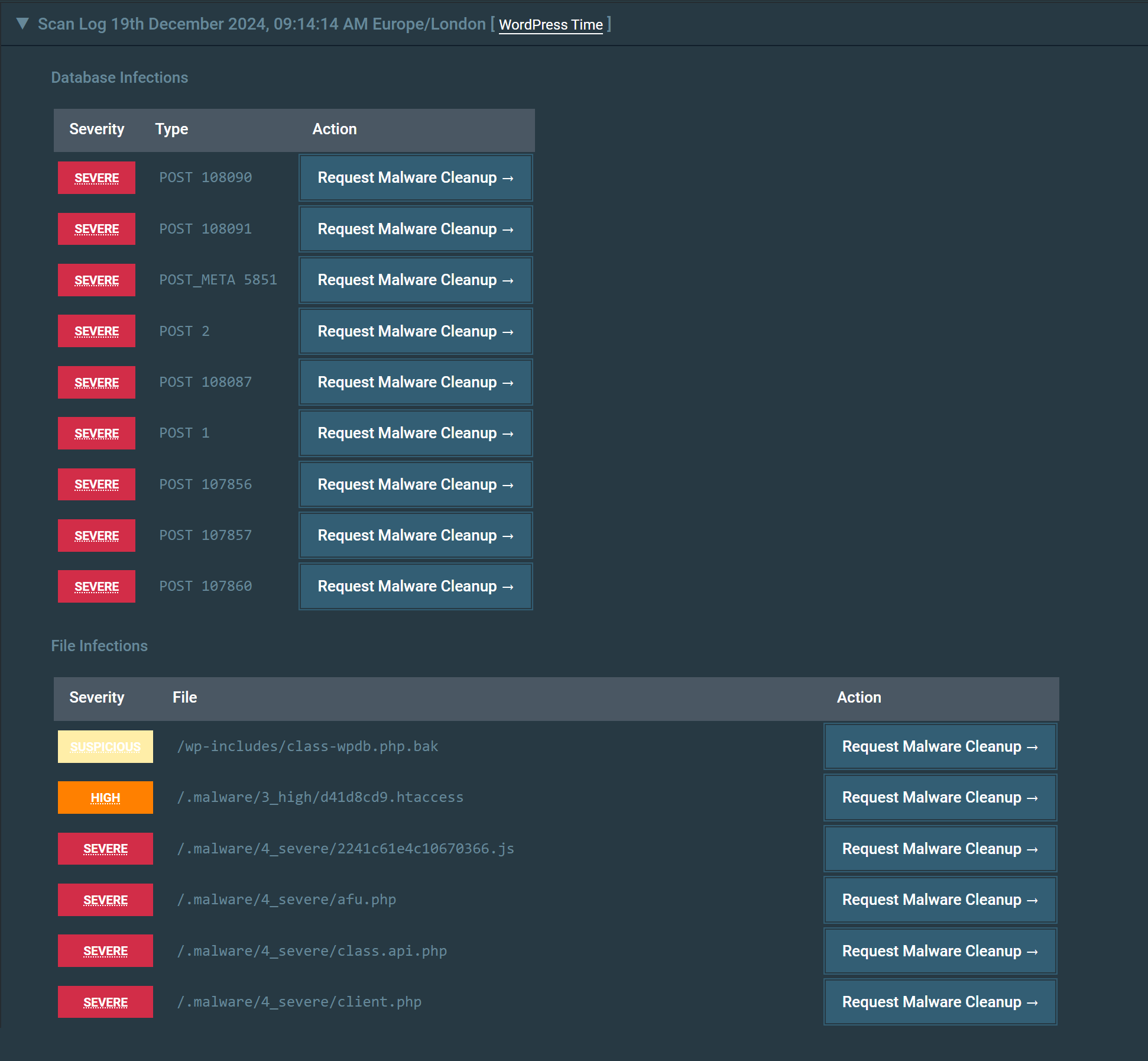
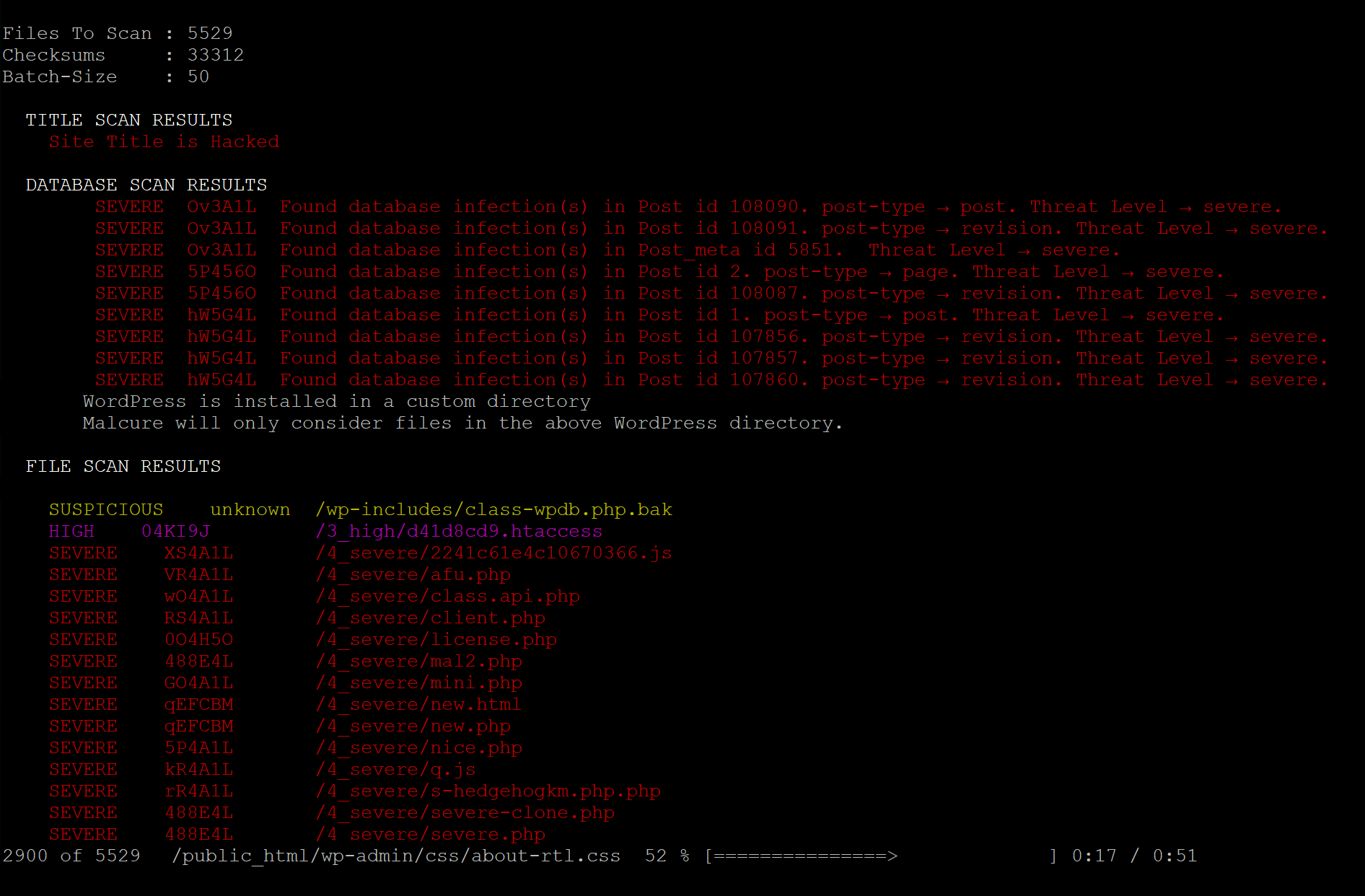
Scans site files, realtime file-uploads, the database, and user accounts for malware, and reports each finding by file path or database record. Schedule automatic scans and email alerts. A free Malcure Cloud connection is required.
Screenshots




Installation
- Upload the
wp-malware-removalfolder to the/wp-content/plugins/directory. - Activate the plugin through the ‘Plugins’ menu in Admin Dashboard.
- Open the Malcure menu and follow the simple wizard to start your first scan.
FAQ
-
Do I need to register?
-
Yes. A free registration is required for the plugin to function. It is done inside your dashboard, under fair use to prevent abuse.
-
Where can I find the Malcure Terms of Use and Privacy Policy?
-
These are available on our website: Terms of Use and Privacy Policy
Reviews

Septanm 25, 2026
Malcure claims to be a website security company, yet their remediation process violates fundamental cybersecurity best practices.
Demanding Master Account Logins: When hired to clean a single domain, their support team insisted on being handed the master logins to the primary IONOS Hosting Account. Handing over master access grants a third party full control over all domains, billing details, and unrelated client sites under that contract. Professional security firms use isolated access vectors, never master credentials.
Inability to Adapt to Server Firewalls: Malcure rigidly demanded direct, external network access to the site's MySQL database. On secure cloud hosting like IONOS, databases are hidden behind strict internal firewalls that block outside IP addresses for safety. Malcure’s technicians refused to acknowledge this standard infrastructure limitation.
Ignoring Full Developer Access: Even when provided with a comprehensive security package—including isolated SFTP access, a WordPress Administrator login, and a raw .sql database export file—Malcure refused to proceed. Because WordPress admin panels run locally inside the host's network loop, any standard security plugin can scan and clean the database internally. Malcure's refusal to work with these industry-standard assets suggests they rely blindly on automated external scripts rather than true technical expertise.
Blame-Shifting and Stalling: By demanding impossible firewall openings and insecure master logins, the company sets up a convenient excuse ("the client denied us access") to justify delays or refuse refunds when they cannot fulfill their service.
💡 The Verdict
If you value the security of your hosting infrastructure, avoid Malcure. Their rigid playbooks, unsafe credential requirements, and poor handling of shared hosting environments make them a liability rather than a security solution.
If you have already paid them and they refuse to work using standard SFTP and WordPress Admin access, revoke their access immediately and file a dispute with your bank or PayPal for "Services Not Rendered."

Jiyè 22, 2026
1 reply
Not working i have just tested with an hacked website not a single issues has been find out by the plugin.

Avril 30, 2026
fantastic. it lasts long, needs 3-4 scan turns, but it cleans malware.
But the first scan is longest, every other gets faster.
Tried 5 different plugins, this is the only one that hepled me out and identified malware. Sent them unidentified malware I found myself and they updated their definitions within 4 hours!
After days of trouble, within 3 days it seems I got rid of malware on 6 sites.
great

Avril 23, 2026
Thanks a lot for your work which we are allowed to use for free.
Works very good, don't know if it really, really finds ALL malware – but who knows?!

Avril 12, 2026
It's so annoying!!! Many positions force me to do things, like paying for upgrades.

fevriye 15, 2026
good database scangood file scangood problems explication: it's possible to resolve a lot of problem using file editor and MySQL editing
Contributors & Developers
“Malcure Malware Shield — Removal, Repair, Monitor” is open source software. The following people have contributed to this plugin.
Contributors

Translate “Malcure Malware Shield — Removal, Repair, Monitor” into your language.
Interested in development?
Browse the code, check out the SVN repository, or subscribe to the development log by RSS.
Changelog
19.9.9
- Feature: Onboarding wizard for unregistered sites.
- Improvement: WP-CLI —
--mcforceskips prompts (--dry-runtakes priority); scan logs are JSON-only. - Minor: Scheduled scans validate choices; duplicated scanner/CTA code cleanup; user scan labels “email missing”/”email invalid”.
19.9.8
- Feature: WP-CLI remediation suite — repair, delete, whitelist management, and nuke-files from the command line.
19.9.7
- Security: Hardened AJAX surface. Credits: Charles Vosburgh
- Security: Added Multisite capability gate for remediation actions. Credits: Charles Vosburgh
- Security: Added content verification and symlink detection for file repair. Credits: Charles Vosburgh
- Feature: DeepScan uploads.
- Improvement: Enhanced Event Logging.
- Bugfix: Self-healing scheduled scan cron.
- Bugfix: Self-healing scheduled scan cron when the plugin is reactivated.
19.9.6
- Bugfix: Compatibility with PHP 5.6.
- Bugfix: User Scan resolves actual capabilities.
19.9.5
- Bugfix: Fixed scanner not auto-updating definitions before scans.
- Feature: Email notification preferences.
19.9.4.1
- Bugfix: Fixed fatal javascript error.
19.9.4
- Feature: User Account Audit results in scans.
- Feature: SaaS-Served File Whitelist.
- Improvement: Enhanced Event Logging.
- Improvement: First-run UX performance optimisation.
- Bugfix: Some UI elements were not styled correctly under certain conditions.
- Bugfix: Cleaned results would not reflect in Stateful scanner.
19.9.3
- Improvement: Stateful scanner now self-heals its monitor cron if WordPress cron is lost (e.g. after a server reboot).
19.9.2
- Hardening: Strengthens scan input validation and database-query sanitisation for safer scans.
- Stability: Improves runtime handling and diagnostics reliability during scans.
19.9.1
- Bugfix: Smaller files were being ignored during monitoring / scheduled scans.
- Improvement: Improved
wp malcure sync --mcforcefeedback and live definitions refresh behavior. - Stability: More reliable definitions updates across admin and WP-CLI workflows.
- UX: Clearer manual definitions update errors in the admin UI.
- Feature: Added WP-CLI definitions export and import commands for moving definitions between environments.
- Feature: Added
wp malcure refresh-checksumsfor on-demand official core, plugin, and theme checksum refresh. - Feature: Added
wp malcure start-async-scan,cancel-async-scan, andstatus-async-scan, with text and JSON status output. - Improvement: CLI commands are properly documented.
19.9
- Feature: Malware definitions are now checked hourly for faster threat-intelligence updates.
- Stability: Reduced unnecessary SaaS requests with smarter local freshness checks before contacting the API.
- Improvement: Admin and WP-CLI now use the same definitions-check flow and record the last successful definitions check for more consistent refresh behavior.
- Improvement: Diagnostics now flag MySQL settings that can interrupt large definition updates and database scans.
19.8
- Bugfix: Scheduled scanning wouldn’t ignore whitelisted items.
- Several UI fixes.
19.7
- Major Bugfix: In certain conditions unknown files inside core directories were never reported.
- Bugfix: Fixed styles for Monitoring UI.
19.6
- Fixed issues not clearing when initializing scan.
- Fixed low confidence issues being saved.
- Fixed database issues not being saved.
- Fixed compatibility testing transients.
- Minor UI improvements.
- Updated readme with respect to recent features, functionality and updates.
19.5
- New: Clearer admin UI labeling.
- Bugfix: Styles not loading on Scan Scheduler page.
- Stability: Several other stability fixes.
19.4
- Major Bugfix: Fatal error during auto-upgrade.
- Updated readme.
19.3
- Major Bugfix: The very initial database record was never scanned.
- Feature: New DB-record inspection + (Advanced Edition) DB-record whitelisting.
- Improvement: Smart Checksum Refresh — Updates only modified components during upgrades for faster performance.
- Major: Checksum system overhaul: more robust payload handling, better core vs non-core validation, and automatic checksum refresh after WP/plugin/theme upgrades.
19.2
- Feature: Major performance optimization for checksums.
- Feature: Enhanced SaaS API integration with signature verification.
- Feature: Compatibility check for plugin version.
- UX: Improved license validation and error messages.
- UX: Better handling of database vs file infections in UI.
19.1
- Feature: Introducing enhanced cleanup operations.
19.0
- Bugfix: Enhanced detection of suspicious empty files in core directories.