- VSCode Version: 1.22.2
- OS Version: High Sierra 10.13.4
Steps to Reproduce:
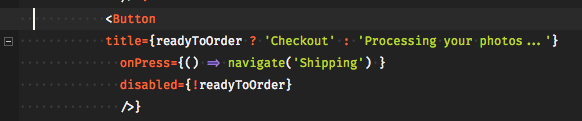
- Copy code from screenshot example
- Hover in the gutter to see the collapse mark in the wrong place
Does this issue occur when all extensions are disabled?: Yes
Clarification
The latest version of VScode is supposed to have collapsing markup based on actual markup and not indentation, but that doesn't seem to be the case.
Screenshot
Steps to Reproduce:
Does this issue occur when all extensions are disabled?: Yes
Clarification
The latest version of VScode is supposed to have collapsing markup based on actual markup and not indentation, but that doesn't seem to be the case.
Screenshot