[Jupyter Integration w/ Docker] Debugger breaks at the wrong place #664
Description
Environment data
- debugpy version: 1.3.0 (run
import debugpy; print(debugpy.__version__)if uncertain) - OS and version: Linux 5.4.0
- Python version (& distribution if applicable, e.g. Anaconda): 3.9
- Using VS Code or Visual Studio: VS Code Code Spaces
Actual behavior
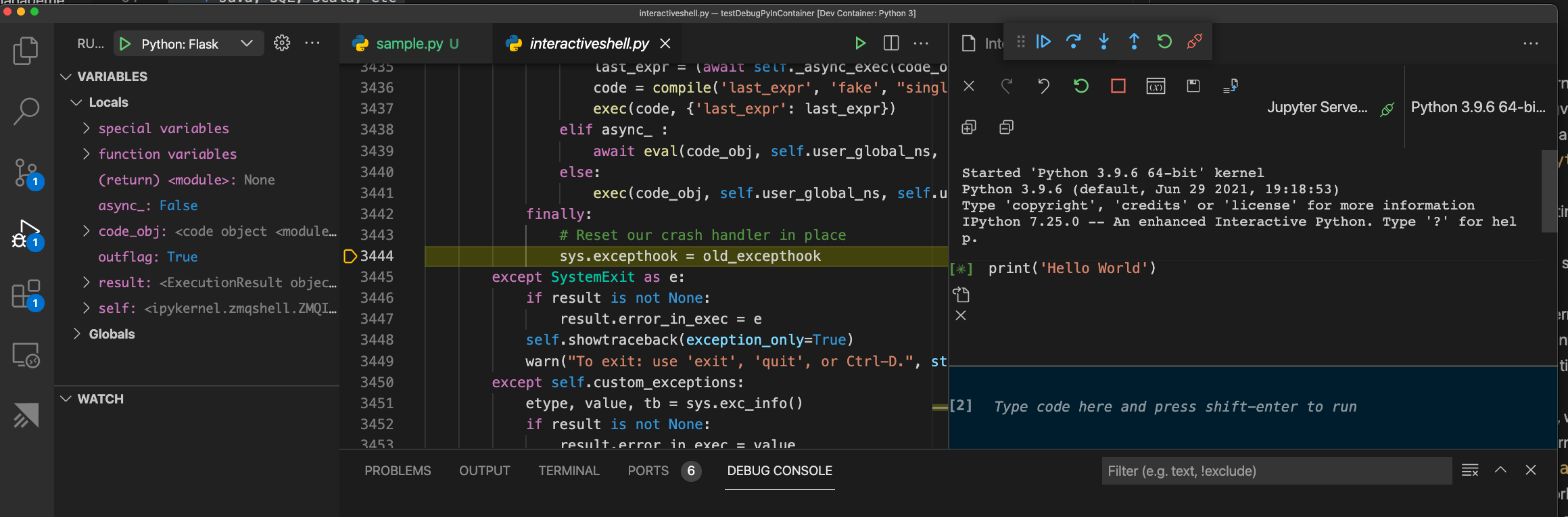
Debugger stops at interactiveShell.py file at the lie sys.execthook = old_excepthook
This seems to be reproducible only in containers or codespaces.
Expected behavior
Debugger should stop in the code that the user same. In my example i ran sample.py. Hence it should break either in sample.py or a temporary file with the same code.
Please note: In desktop, the issue with source mappings will be resolved in the latest Jupyter extension, see here microsoft/vscode-jupyter#6534
Steps to reproduce:
- Ensure you have docker up n running
- Clone the repo https://github.com/DonJayamanne/testDebugPyInContainer
- Open in VS Code Containers
3. Open folder in VS Code
4. When prompted to open inContainerclick yes - Install the Python & Jupyter Extension from marketplace
- Ensure you select
Python 3.9as your workspace interpreter in python (bottom left statusbar) - Pip install
ipykernelinto thePython 3.9environment
8 . Create a file namedsample.pyand the the following code
# %%
print('Hello World')- Code lenses will appear
Run Cell | Run Below | Debug Cell - Click
Run celland confirm it gets executed - Close the interactive window that opened on the right side (ensure you have just the Python file opened)
- Now click
Debug Cell - Notice how the debugger starts and stops at
interactiveShell.pyfile at the liesys.execthook = old_excepthook
Note:
- Latest ipykernel 6.0 ships with debugpy. You can optionally chose to downgrade to the older version.
pip uninstall ipykernel debugpy ipythonpython -m pip install ipython==7.15.0 ipykernel==5.5.5
However even with this (old version), the issue repros.