Step into targets doesn't seem to respect selected option #661
Description
Environment data
- debugpy version: 1.3.0
- OS and version: Windows 10
- Python version (& distribution if applicable, e.g. Anaconda): 3.8.10 (venv)
- Using VS Code or Visual Studio: VS Code
Expected behavior
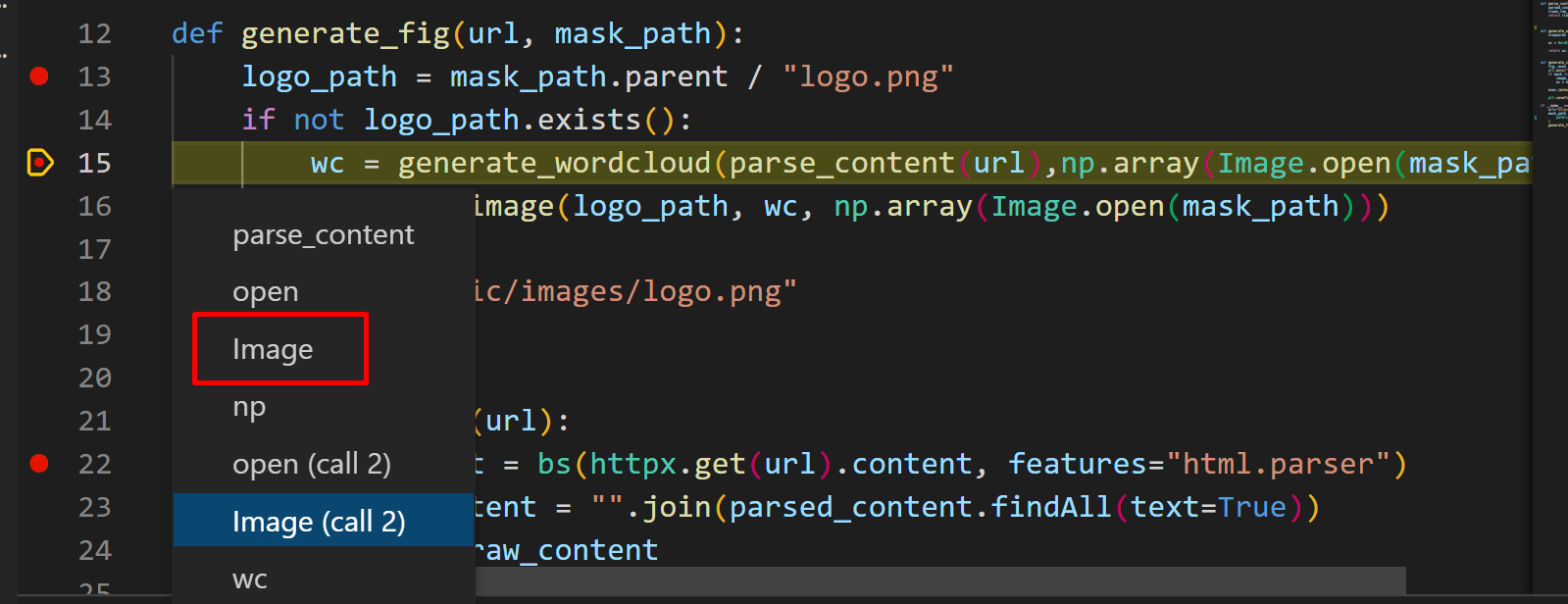
Selecting the "Image" option that shows after I run "Step into target..." should step into the Image file:
Actual behavior
Selecting "Image" gives the same behaviour as if I did a normal "step into" (i.e. steps into the parse_content method)
Steps to reproduce:
- Clone https://github.com/luabud/pvscc-logo
- Set up a venv and install the dependencies in the requirements.txt file
- Create the following launch.json configuration:
{
            "name": "Python: Current File",
            "type": "python",
            "request": "launch",
            "program": "${file}",
            "console": "integratedTerminal",
            "justMyCode": false,
            "autoReload": {"enable": true}
}- Open the generate_logo.py file (located on the root of the project)
- Set up a breakpoint on line 13
- Start debugging (F5) using the configuration we created above
- When the debugger stops on line 13, right-click on line 15 (
wc = generate_wordcloud(parse_content(url),np.array(Image.open(mask_path)))) and select "Jump to Cursor". This is just to avoid the if condition on line 14, that will return false by default. - Once in line 15, right click and select "Step into Targets..."
- Select "Image"
- Watch it step into the parse_content method instead