The Intellij Idea is recommended.
This is the Gradle project.
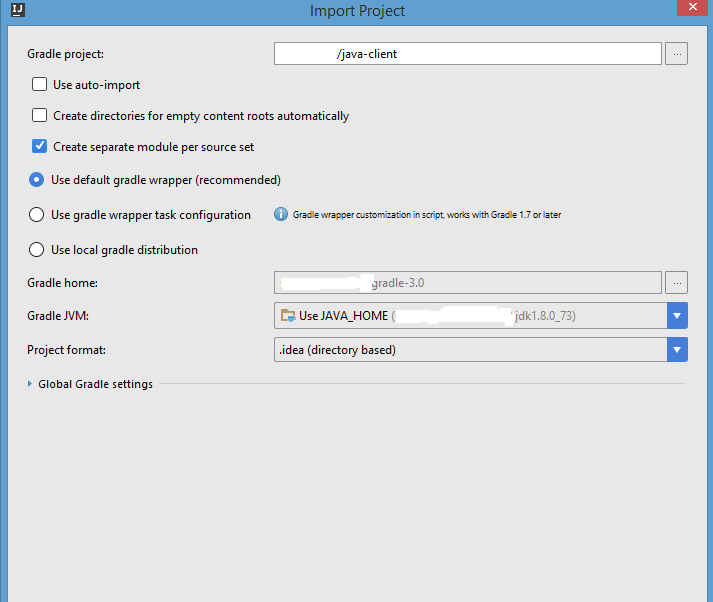
Be sure that:
-
The
JAVA_HOMEenvironmental contains a path to JDK > 7 -
If non built-in gradle distribution is used then its version should be > 2.1
This project is compiled in some not common way. We use ecj Eclipse Java Compiler. Below is the sample how to define this compiler by IDE.

Please check following settings:


Appium java-client strictly follows Google Java Style as a coding standards. Contributors are requested to follow this by configuring in their IDE's Editor Code style,
- Clone Google Style Guide from git
Intellij IDEA users can configure this way,
Files -> Other Settings -> Default Settings ->Editor -> Code Style -> Manage -> Manage -> Import -> eclipse-java-google-style.xml (Downloaded from Google Style Guide)-> Apply
Reformat your code before raising a Pull Request.
jacoco-maven-plugin generates the coverage reports, once integration tests are successfully run by maven-surefire-plugin
Intellij IDEA user's can configure and view this way,
Analyse -> show coverage Data -> Add -> Select ${basedir}/target/coverage-reports/jacoco-unit.exec (jacoco-unit.exec generated after integration test run) -> Click Show Selected -> Coverage Results displayed in IDE
It is needed to go to the directory where java_client is located. You can do it via command line. And then run the following command
gradle check. If everything is ok then all checks should be passed. Otherwise you can open reports at JAVA_CLIENT_DIRECTORY/build/reports
The adding of new tests is required when new feature is added or some bug is fixed.