Import/Export T265 localization map API #3324
Conversation
|
Related to #3129 |
Add sensors callbacks streaming tests

Change-Id: I3c900ed8a07516e070116a1f09c6b0212c7182cb
Verification with unit-test

Change-Id: If60527c73f10bbd52e1130a28c52fcf13f1b34f6
Refactor DBL_EPSILON usage
Change-Id: I7b146a06acb55f88b9862247e934fd411a942ccc
Fix public API signature

Change-Id: I4cec2e334f77bcdc2bab225c980b899192ec4ce7
Change-Id: I07413e065fc2d6c6ef0d01ec2641299aaaa36280
Change-Id: If63b83180e9ede22bc79550bdece0125bfb8d0df
Change-Id: I38fa26182deafc085978266a955bddacfa8a54a3
Cleanup debug/comments/workaround
Fix C++ API signature
Fix EOL in C# wrapper

Change-Id: I863351d9865e2cd969cffc4ba8caccd9fa6beb72
Add relocalization timeout negative test. Comments amendments

Change-Id: Ic2f4ff45aa1c753a2b3bca890ab10d58c5e36d34
Refactor async transfer handler for TM2 device
Update T265 python code

Change-Id: Idd86e62fb9d375ef968d7df180cd276624b0713e
Adjust async operation flow and report statuses

Change-Id: I51ca66c6f2e0aeaedd4d7692a6b669063a997ac0
Remove duplicate enum.
Prevent #define redefinition warning

Change-Id: I887cabc155398baf4da97ed75f3a0552d79e13f1
Change-Id: I453873104b41b08c21be8d832068db7bec2e7d90
Change-Id: I317286a3bfadf6c329e1a74157763736acb12e4d
Rename raise_controller_event to raise_hw_event for reuse

Change-Id: I4f1b7316acf6260924f2670723e1908d04473f83
Implement in the core logic via pose_sensor interface
Add to C/C++ public API
Add to Python/C# wrappers
Relocate rs_vector rs_quaternions to rs_types.h for reuse

Change-Id: Id1e9d1f8f724e58996432c8bd4ac23a9d46d4a1e
Change-Id: I4c8445ca4ce9e107ee8ed6079ff4326eb6c2349b
Add return value to pose_sensor APIs.
Fix python and C# bindings for pose_sensor
Update t2xx unit-test

Change-Id: I8642f1c2d6e949fa41e6d4d4cf2f522a8e4ffef3
Change-Id: I3a8e6bab0f6d418eb3a40d35f47c3e9f22cda587
Enhance T2xx reports for localization/wheel odometry APIs.
Add PoseFrame attrib to C#
Add wheel odometry sanity to test coverage
Add wheel odometry calibration sample for tests

Change-Id: I3af16c1ee5d3168f5de22590b7a1d32ad8169a8f
|
Hi. I’m excited to try the localization map export/import function and could use some help understanding how it works using the RealSense Viewer. It doesn’t seem to be relocalizing but maybe I’m doing something wrong. Here’s my test:
At this point I expect the origin to eventually snap back to where I started the T265 the first time but it never does. It stays where the T265 was started the second time. I’ve tried this with the 2.19.1 release (FW version 0.0.18.5129) and a more recent development branch (86af003) Am I doing something wrong or do you have any ideas about how I can see what’s going on? Thanks! |
|
Hi @bill-wright, Glad to hear you're excited about T265; we're excited to hear how people make use of it. You are using the latest firmware, 2.19.1. Once relocalized, the loaded map snaps to you (i.e. your current map created since startup) instead you snapping to loaded map, so your coordinates will not visibly jump when this happens. The current way you interact with the map is via static nodes. You can think of them as fixed positions in the world (map) whose position you care about and whose position is defined relative to the local scene. Once created, you can ask about their positions and the T265 will provide their location relative to current tracking origin. Currently, the way to tell that we have relocalized to a loaded map is the static nodes defined in that map will begin to return valid poses. You might create a static node in the center of the play area in a VR context and then define play boundary relative to it. For an AR experience, you might define a static node at the location of a set of virtual objects. We are working on adding visualization of maps and static nodes in the |
|
Thanks @radfordi, I think I get it. I'm doing persistent AR so I want to know the difference between the coordinate system this time and coordinate system when the map was created. I could place a static node at the origin when making the map and then its pose in the new coordinate system would tell me the transform between the new coordinates and the map coordinates. I'll give that a go. That should work. |
|
Hi again @radfordi, That worked! I modified one of the examples to save a map with a static node in it (I'm using the origin (0,0,0) as the static node). This seems to work fine and I can see that the map file has the text of the static node name toward the end of it so I believe my static node is getting into the map file. Then on a subsequent run, I can load that map and get the position of the static node relative to the new coordinate system. That seems to work and the location of the static node relative to the new coordinate system makes sense. My issue now is what can I do to help the relocalization process? I've only been able to get it to relocalize when I let the camera dwell for several seconds at the starting place I used when I made the map so it gets the same look from the same place it originally started. When I make the map, I try to move the camera all over the room so it gets to see the room from all angles but that doesn't seem to make much difference. Is there something I can do when making the map to help it relocalize better? Is there any way for me to tell how complete the map is? Any heuristics would be helpful. Thanks again! |
|
Hi @radfordi I'm working with @bill-wright on the T265 relocalization too and I'm seeing that it can take roughly 2 minutes for the static nodes to start returning valid poses. We'd like to relocalize to a loaded map within a few seconds. Any advice on how to reduce the relocalization time would be much appreciated. Thanks! |
|
@bill-wright, @JBBee, I'm glad to hear the basics work for you so that now we can talk about performance! The time to first relocalization is one of our key metrics and we are actively working to improve it. Our goal is the same as yours, a time measured in seconds not minutes. We have found a few related bugs since 2.19.2 whose fixes may help in your scenario. We are working on the next release and would love to hear about your feedback when it's availble. We plan to continue to make progress in this area. |
|
@bill-wright, @JBBee, the latest version of librealsense, v2.21.0, has quite a few fixes with respect to relocalization. We'd love to hear if the performance improvement is noticeable in your application. |
|
Hi @radfordi, thanks for checking in with us! @bill-wright and I are using the new version in our application and we are seeing a definite improvement. But it seems we have to focus on an area in our room in order to be able to re-localize using that area. For example, we'll start the pose stream and walk around a bit and then stop and focus on a certain feature in the room for about 10-15 seconds, then continue. After exporting and importing this map in a new session it's able to re-localize when looking at that feature that was focused on, so it doesn't necessarily need to be the starting location anymore, which is great! Ideally though we'd be able to continuously move at a slow walking pace around the room once or twice and then be able to re-localize after importing by just repeating a similar walk around. If there's any additional tips on how to get to this continuous movement that would be much appreciated. Thanks. |
|
@JBBee, @bill-wright, thanks for reporting on your progress. We have a known issue where we aren't relocalizing while moving. We are working on a fix and hope to have something for the next release. |
|
@bill-wright can you please share the example for relocalization as a starter ? |
|
Hi @zainmehdi The relocalization performance has been getting better in successive releases. @JBBee and I appreciate the efforts of the RealSense team to make this better. I can share some snippets. We're working in Unity so YMMV. I also edited this a little for clarity so please forgive any little errors that I introduced. Hope they help. internal PoseSensor GetActivePoseSensor() {
PoseSensor sensor = null;
sensor = ActiveProfile?.Device.QuerySensors<PoseSensor>().First();
return sensor;
}
internal bool SetOrigin() {
var pos = new Intel.RealSense.Math.Vector();
pos.x = 0;
pos.y = 0;
pos.z = 0;
var rot = new Intel.RealSense.Math.Quaternion();
rot.x = 0;
rot.y = 0;
rot.z = 0;
rot.w = 1;
ret = false;
try {
using (PoseSensor poseSensor = GetActivePoseSensor()) {
Dbg("Setting origin with handle: " + poseSensor.Handle);
ret = poseSensor.SetStaticNode("origin", pos, rot);
}
}
catch (Exception ex) {
Debug.LogException(ex);
}
return ret;
}
internal bool GetOrigin(out Matrix4x4 trs) {
Intel.RealSense.Math.Vector pos;
Intel.RealSense.Math.Quaternion rot;
try {
lock (this) {
using (PoseSensor poseSensor = GetActivePoseSensor()) {
if (poseSensor != null && poseSensor.GetStaticNode("origin", out pos, out rot)) {
// Convert T265 coordinate system to Unity's
// see https://realsense.intel.com/how-to-getting-imu-data-from-d435i-and-t265/
Vector3 unityPos = new Vector3(pos.x, pos.y, -pos.z);
Quaternion q = new Quaternion(rot.x, rot.y, rot.z, rot.w);
Vector3 e = q.eulerAngles;
Quaternion unityRot = Quaternion.Euler(-e.x, -e.y, e.z);
trs = Matrix4x4.TRS(unityPos, unityRot, Vector3.one);
return true;
}
}
}
}
catch(Exception ex) {
Debug.LogException(ex);
}
trs = Matrix4x4.identity;
return false;
} |
|
Hi there, sorry, I'm new on T265 and on localization in general. I'm playing with my new T265 and I'm trying to learn from posts. I understood that static nodes are the keys for a good mapping. My question: is there a way to trigger when a static node is detected from the camera and to retrieve its current mapping via API? |
New APIs:
(
rs2_export_localization_map,rs2_export_localization_map)(
rs2_set_static_node,rs2_get_static_node)(
rs2_load_wheel_odometry_config,rs2_send_wheel_odometry)The localization maps can be used to establish initial location features, as well as sharing the tracking features between multiple devices.
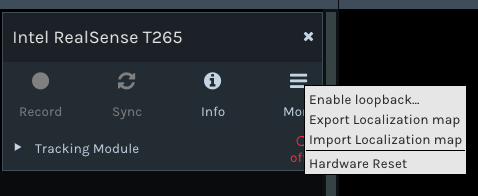
The functionality is available in idle state only. Try it with Realsense-viewer
Propagate the APIs to C# and Python wrappers
Extend unit-tests: